Hello, I've just bought the palette 2S PRO. I have set this up with my qidi q1 pro. But when I slice my print with canvas3D for the colours and send it to my printer the height between the nozzle and the printbed is either way too high or way too low and scratches the bed. It also makes like a line in perfect height before the print starts (one straight decent line) but when the actual print starts the printbed goes lower like a layer change before it even started. How can I prevent this from happening and fix it?
#Q1 PRO with Canvas 3D to combo with palette 2S PRO
1 messages · Page 1 of 1 (latest)
 umbral summit
 latent saffronBOT
umbral summit
Hello, I've just bought the palette 2S PRO. I have set this up with my qidi q1 p...
AI Help
It sounds like you may be experiencing issues with your printer's bed leveling, first ensure that your bed is properly leveled. To adjust the nozzle height, you may need to adjust either the Z-offset in your slicer software or manually adjust the height of your print bed. The line you are seeing could be due to a priming or wiping process in your printer's software, you might need to adjust the settings in your printer's software to prevent this issue. Ensure that your printer's firmware and slicing software are updated to the latest version. If the problem persists, reach out to the manufacturer for further assistance.
WARNING: This response is AI generated and may contain errors.
latent saffronBOT
This post has been closed due to inactivity.
This post has been inactive for over 1 hour and so has been closed. To reopen this post simply send another message.
umbral summit
Please help
umbral summit
The printer performs perfectly using qidi slicer
 half field
no there's something specifically called z offset
umbral summit
In what software?
half field
your printer's firmware
umbral summit
There's is auto calibration
umbral summit
It is a problem with canvas3D I think
umbral summit
half field
and you have run the auto cal?
Yes like 2 times
I have perfect prints with every other software
umbral summit
Ah okay thanks for the help tho
They don't support qidi printers, so I added custom
half field
i will google along side tou for the moment, if we cant find anything i'll ask someone to come help
half field

do you have any values in the print bed offset?
also, is that the right software?
@umbral summit
umbral summit
Yes it is
I've not seen that option wait I'm starting up my computor
No first layer is just 0mm a offset
Do you think the problem is in the gcode? @half field
half field
umbral summit
Do you think the problem is in the gcode? <@184814577857331200>
yes, but the slicer generates the gcode, so the solution is probably in the slicer
have you tried slicing with any other model?
i dont have any experience in canvas3d so im shooting from the hip here fyi
just in a helpin mood 🔫 🤠
might just need to avoid canvas3d for now 🤷
latent saffronBOT
Z-offset
Where your printer thinks the nozzle is
The z-offset is the distance from the tip of the nozzle to the trigger point of a bed sensor.
Setting your z-offset correctly ensures a good first layer squish and proper adhesion to the build plate (assuming its clean, see
?bedcleaning for more information). See
?leveling for a good representation of how the first layer should look like.
If in doubt: Refer to you your specific machines documentation.
For the Qidi X series printers: Adjusting the z offset from the Fluidd webinterface breaks it. Always set the z offset from the printers screen.
https://www.wevolver.com/article/z-offset-what-it-is-and-how-to-adjust-it
?z-offset requested by: wadwamille#0
Leveling Your Printer
Here is a handy infographic that will help with levelling your printer.
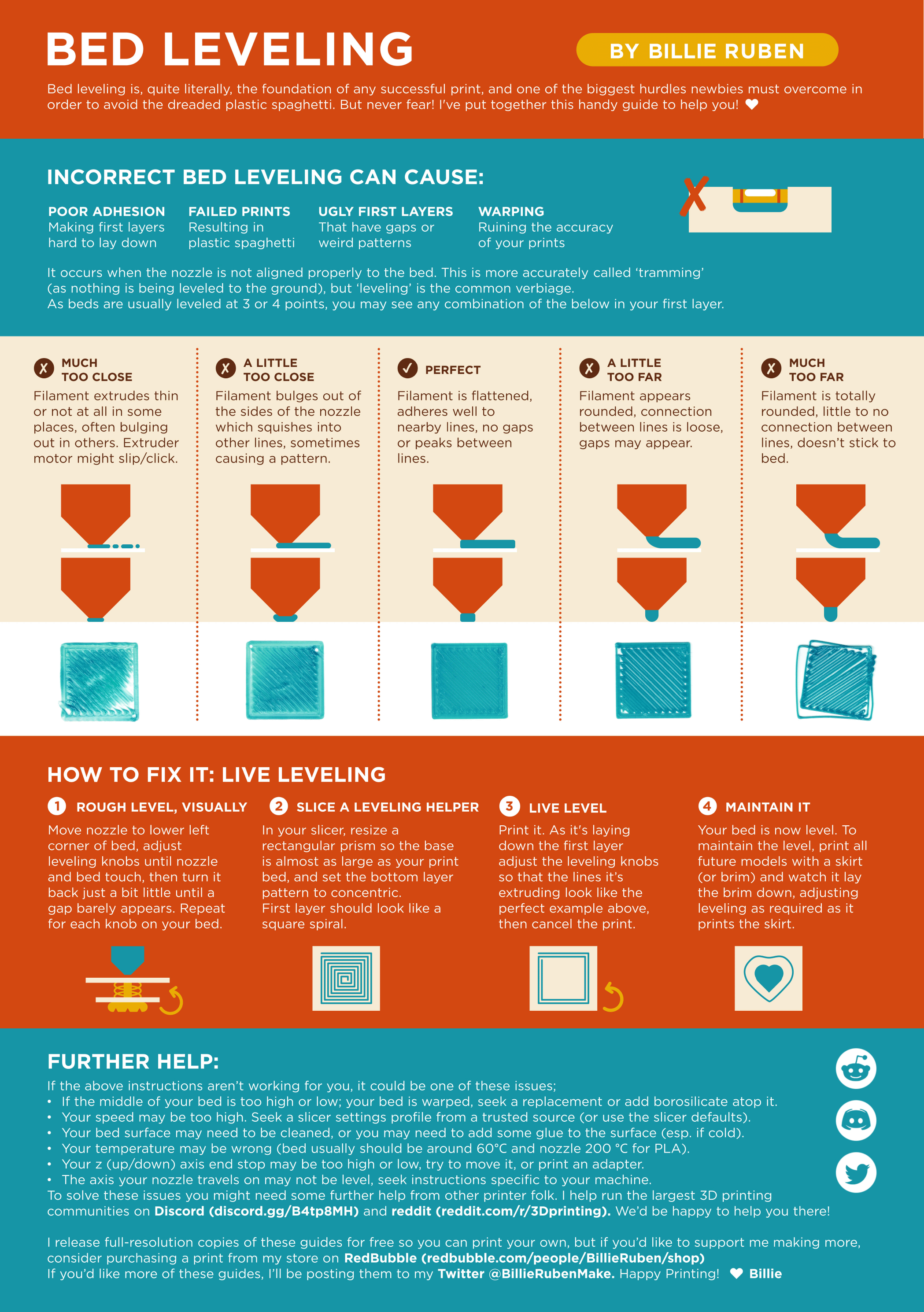
?leveling requested by: wadwamille#0
half field
found bot commands which make what i was asking about z offset a lot more clear :p
umbral summit
what other software can i use for my palette then?
half field
umbral summit
what other software can i use for my palette then?
that i dont know
i think the pallette is pretty old
umbral summit
oh
half field
i know prusa slicer supports some kind of multi material, but idk if it supports the pallete
umbral summit
I mean the pallete itself works perfectly
half field
umbral summit
I mean the pallete itself works perfectly
honestly, i dont know what the play is  let me see if i can find someone with more knowledge
umbral summit
okay thank you
half field
might need to wait until later when more people are on. try to find someone with MMU experience
latent saffronBOT
This post has been closed due to inactivity.
This post has been inactive for over 1 hour and so has been closed. To reopen this post simply send another message.
umbral summit
Might be a problem in the start gcode?
 frozen nacelle
you can try copying the start gcode from your old slicer to the new one
umbral summit
frozen nacelle
you can try copying the start gcode from your old slicer to the new one
I did this but still same issues
I might have found a problem
frozen nacelle
check the gcode from the new slicer vs your old one there might be some hidden start gcode...?
umbral summit
@frozen nacelle now the transition problem is fixed, but the nozzle is still too high
Is this just in the start gcode?
frozen nacelle
how high
frozen nacelle
does it calibrate z
umbral summit
The printer?
frozen nacelle
yea when it starts
umbral summit
No but it prints perfect with other slicers without z calibration
I do it manually with screws and a paper normally every day
frozen nacelle
can you send gcode from old and new slicer her
umbral summit
Yes
frozen nacelle
umbral summit
I do it manually with screws and a paper normally every day
what the why that sounds painful
umbral summit
It's so easy
frozen nacelle
easier then it doing the work for you
umbral summit
Only the back screw kills my arm 😭
umbral summit
frozen nacelle
easier then it doing the work for you
You mean bed leveling?
frozen nacelle
your bed leveling every day
 umbral summit
frozen nacelle
what do you do then z offset? z homing?
the screws like in every corner
I think there's two calibrations
this is what it downloads, the file for the palette, a file for the printer, and a pdf
frozen nacelle
ok now can you slice that in your old slicer and send that
umbral summit
It will be without colours tho
frozen nacelle
i know just want to check the file overf
umbral summit
does it matter if it's same size?
frozen nacelle
n a
umbral summit
this is with qidi slicer
I've never had problems with the qidi slicer. I just needed multi colour
This is with qidi slicer in 20min or so PLA
 frozen nacelle
your start gcode is definately different between canvas and qidi
umbral summit
I'll copy it from qidi and try again?
frozen nacelle
umbral summit
can you copy start from here and the other slicer to here
umbral summit
yes sure, idk where to find start gcode from qidi tho
G28 ; home all axes
M104 S<TEMP> ; heat extruder
M140 S<BED> ; heat bed
M109 S<TEMP> ; wait for extruder to heat
M190 S<BED> ; wait for bed to heat
G92 E0 ; reset extruder
PRINT_START BED=[first_layer_bed_temperature] HOTEND=[first_layer_temperature] CHAMBER=[chamber_minimal_temperature]
M83
M140 S[first_layer_bed_temperature]
M104 S[first_layer_temperature]
M141 S[chamber_minimal_temperature]
G4 P3000
T[initial_tool]
{position[0] = max((min(print_bed_max[0], first_layer_print_min[0] + 80) - 85), 0)}
{position[1] = max((min(print_bed_max[1] - 5, first_layer_print_min[1] + 80) - 85), 0)}
{position[2] = 0.5 * first_layer_height * nozzle_diameter[0]}
G0 X{position[0]} Y{position[1]} Z5 F6000
G0 Z[first_layer_height] F600
G1 E3 F1800
G1 X{position[0] + 85} E{85 * position[2]} F3000
G1 Y{position[1] + 2} E{2 * position[2]}
G1 X{position[0]} E{85 * position[2]}
G1 Y{position[1] + 85} E{83 * position[2]}
G1 X{position[0] + 2} E{2 * position[2]}
G1 Y{position[1] + 3} E{82 * position[2]}
G1 X{position[0] + 3} Z0
G1 X{position[0] + 6}
G1 Z1 F600
@frozen nacelle this is the one from qidi
frozen nacelle
umbral summit
<@150767157045624832> this is the one from qidi
how about from the other one
frozen nacelle
umbral summit
G28 ; home all axes
M104 S<TEMP> ; heat extruder
M140 S<BED> ; heat bed
M109 S<T...
so this is the other slicer?
umbral summit
wait
PRINT_START BED=[first_layer_bed_temperature] HOTEND=[first_layer_temperature] CHAMBER=[chamber_minimal_temperature]
M83
M140 S[first_layer_bed_temperature]
M104 S[first_layer_temperature]
M141 S[chamber_minimal_temperature]
G4 P3000
T[initial_tool]
{position[0] = max((min(print_bed_max[0], first_layer_print_min[0] + 80) - 85), 0)}
{position[1] = max((min(print_bed_max[1] - 5, first_layer_print_min[1] + 80) - 85), 0)}
{position[2] = 0.5 * first_layer_height * nozzle_diameter[0]}
G0 X{position[0]} Y{position[1]} Z5 F6000
G0 Z[first_layer_height] F600
G1 E3 F1800
G1 X{position[0] + 85} E{85 * position[2]} F3000
G1 Y{position[1] + 2} E{2 * position[2]}
G1 X{position[0]} E{85 * position[2]}
G1 Y{position[1] + 85} E{83 * position[2]}
G1 X{position[0] + 2} E{2 * position[2]}
G1 Y{position[1] + 3} E{82 * position[2]}
G1 X{position[0] + 3} Z0
G1 X{position[0] + 6}
G1 Z1 F600
frozen nacelle
this is which?
umbral summit
G28 ; home all axes
M104 S<TEMP> ; heat extruder
M140 S<BED> ; heat bed
M109 S<TEMP> ; wait for extruder to heat
M190 S<BED> ; wait for bed to heat
G92 E0 ; reset extruder
big one is QIDI
last and small one is canvas
frozen nacelle
try printing with this in canvas
PRINT_START BED=<BED>  HOTEND=<TEMP>
M104 S<TEMP> ; heat extruder
M140 S<BED> ; heat bed
M109 S<TEMP> ; wait for extruder to heat
M190 S<BED> ; wait for bed to heat
G92 E0 ; reset extruder
 frozen nacelle
maybe clean up that double space before HOTEND
PRINT_START BED=<BED> HOTEND=<TEMP>
umbral summit
yeah
frozen nacelle
just remove that 2nd space to be safe and give it a shot
umbral summit
should i just keep the same code for the palette?
frozen nacelle
hm?>
umbral summit
nvm i resetted the palette too
will take a minute to make the first filament of the palette
frozen nacelle
umbral summit
nvm i resetted the palette too
hows print going
umbral summit
sorry my palette keeps failing
frozen nacelle
other issues 
half field
umbral summit
PRINT_START BED=[first_layer_bed_temperature] HOTEND=[first_layer_temperature] C...
if you put backticks it will format it as code instead of text. backticks are `
backticks on the start and the end of the block you want to format as code
like this
 half field
oh shoot you're right thanks
umbral summit
Is there something wrong with the code?
half field
umbral summit
Is there something wrong with the code?
just makes it easier to read/copy and paste 🙂
glad to see you're getting help, i felt bad i couldn't help with this ❤️
frozen nacelle
discord formatting lesson with wad 
umbral summit
I think my palette might work again
half field
frozen nacelle
discord formatting lesson with wad <:NekoWoah:945241330769080350>
ye 😎 there's a way to color the code for different programming languages too
umbral summit
half field
glad to see you're getting help, i felt bad i couldn't help with this ❤️
You helped me far already, so thanks for that
My motor is just skipping steps now
frozen nacelle
half field
ye 😎 there's a way to color the code for different programming languages too
for(languages in code) {
string name = languages.name;
}
thats usually too high acceleration
umbral summit
its in the palette
half field
could still be asking too much acceleration from the motors. Is there a way to lower the filament change speed?
umbral summit
dont think so
half field
hmmm
frozen nacelle
take all the crap out try again?
half field
yeah you can probably just open up the palette and clean it out if that's the issue
half field
frozen nacelle
```cs
for(languages in code) {
string name = languages.name;
}
```
neat :> i usually get my programming help from some obscure stack overflow post from 8 years ago so i dont use discord for help a lot lol
just the nature of c++
frozen nacelle
c# (microsoft java)
umbral summit
😂
It's making a bit more filament and then I think it's up to the gcode
Took 2 screws out and it works much better the palette lol, might've been pressure
Nvm should've not unscrewed them
frozen nacelle

umbral summit
😭
half field
umbral summit
Nvm should've not unscrewed them
uh oh 
umbral summit
Printer is startingg
Bed leveling is going to take a while....
Okay so it does the nozzle clean, that's already a good sign
half field
umbral summit
Okay so it does the nozzle clean, that's already a good sign
still printing ok?
umbral summit
Bed leveling still
Bed is already heated up
Uhm
A second nozzle clean
Omg
Uhh
Look
I've made it directly go to the extrudir

IT WORKS
frozen nacelle
heck yea
umbral summit
There is a setting for me to add like filament tube length, so I can go through my other filament sensors originally from my qidi
half field
umbral summit
IT WORKS
yay 🥳 
 half field
i see white filament, just a heads up that the filament is abrasive and will eventually wear down brass nozzles
im so glad its working 🙂
umbral summit
So I cannot print white filament that long?
frozen nacelle
eventually itl wear, fine for now but be aware itl cause issues
half field
umbral summit
So I cannot print white filament that long?
what poi said. Long term thing.
umbral summit
It didn't stick to the build plate, next time I'll connect the runout sensors and the good wires and add some special lime thing
But PERFECT height
Thanks allot both!!!
frozen nacelle
umbral summit
It didn't stick to the build plate, next time I'll connect the runout sensors an...
zoffset or dirty
umbral summit
Do you guys think I better buy the canvas hub or a SD card reader?
frozen nacelle
do you have issues
wifi printing is very nice
but is it worth the cost, up to you to decide
frozen nacelle
40 for wifi, id do it
latent saffronBOT
This post has been closed due to inactivity.
This post has been inactive for over 1 hour and so has been closed. To reopen this post simply send another message.
umbral summit
@frozen nacelle there is a problem i think
this is what i make

But it prints this

@half field
I mean it looks like a christmas sweat now haha
half field
Yeah i have no clue sorry. i dont know anything about mmu printing
latent saffronBOT
This post has been closed due to inactivity.
This post has been inactive for over 1 hour and so has been closed. To reopen this post simply send another message.
umbral summit
I have seen on the internet that it just depends on every print if it turns out good
frozen nacelle
you might need to calibrate that tube length
latent saffronBOT
This post has been closed due to inactivity.
This post has been inactive for over 1 hour and so has been closed. To reopen this post simply send another message.
umbral summit
frozen nacelle
you might need to calibrate that tube length
I did now, its printing
latent saffronBOT
This post has been closed due to inactivity.
This post has been inactive for over 1 hour and so has been closed. To reopen this post simply send another message.
frozen nacelle
umbral summit
I did now, its printing
Howd it go?
latent saffronBOT
This post has been closed due to inactivity.
This post has been inactive for over 1 hour and so has been closed. To reopen this post simply send another message.
umbral summit
frozen nacelle
Howd it go?
Went the same, I stopped it at the start when the colours were mixing allot again
frozen nacelle
guess youl have to find a support server for the palette