


1 messages · Page 1 of 1 (latest)
 iron prism
Hello,
I just got this 3d printer for Christmas and it's been giving me issues.
More have popped up but they were fixed somewhat easily. The annoying part is thst it printed the benchy fine the first time around. Now it can't even finish printing that.
 strange galeBOT
iron prism
Hello,
I just got this 3d printer for Christmas and it's been giving me issues....
Hello,
I'm sorry to hear you're having trouble with your 3D printer. Here are some troubleshooting steps for the issues you mentioned:
Leveling the bed: Ensure that all the corners and the center of the bed are at the same level. You may need to adjust the leveling knobs or screws on your printer to achieve this. Some printers have automatic bed leveling features that can help with this process.
Scratching or scraping: This could be a sign of the print head being too close to the bed or the nozzle being clogged. Try adjusting the nozzle height slightly higher from the bed and ensure the extruder is clean and free from any debris.
For the issue with the Benchy print failing after the first successful print, it could be related to the bed leveling or nozzle height being off. Repeating the leveling process and ensuring the settings are correct for the print can help resolve this issue.
If you need further assistance, please provide more details about your printer model and s...
 lime grove
Make sure the nozzle is clean before it probes the bed
strange galeBOT
Tips for better first layer success
The first layer is quite literally the foundation of a successful print. These are some of the things to keep in mind:
?bedcleaning .?platemps .?paperlevel . If your printer is equipped with a bed meshing probe such as a BLTouch or CRTouch, make sure your Z-offset positions the nozzle close enough to the bed, refer to ?z-offset for additional information. If your printer has automatic Z-offset calibration, make sure the nozzle is clean while the calibration runs.?leveling for help with the interpretation of the results.
iron prism
lime grove
Make sure the nozzle is clean before it probes the bed
What's the best way to clean it?
 knotty marsh
iron prism
Hello,
I just got this 3d printer for Christmas and it's been giving me issues....
where are you located op?
Because I had this happened to me when I was printing without a filament dryer
iron prism
I'm based in Florida which is very humid so I could see that being an issue
lime grove
iron prism
What's the best way to clean it?
Look at it and see if stuff is on it that throws off the nozzle probing. A brass brush on the hot nozzle works fine
knotty marsh
And since Im living in a humid place, my filament soaked up the mositure and expanded, causing a breakage in the cold end and a complete stoppage
strange galeBOT
 iron prism
holy
knotty marsh
iron prism
I'm based in Florida which is very humid so I could see that being an issue
Yeah get a dryer
Im personally using the Sunlu S2
iron prism
Alright I'll definitely look into that thank you. Is there anything I could do in the meantime?
knotty marsh
iron prism
Alright I'll definitely look into that thank you. Is there anything I could do i...
Well, you could try to level your bed more
Note how the squares on your bed arent really the same
iron prism
I'm confused on how to achieve this though since the printer has ABL. There's only 4 screws under the plate to which I can see unless I should be looking around for more
I can send pictures
strange galeBOT
iron prism
I'm confused on how to achieve this though since the printer has ABL. There's on...
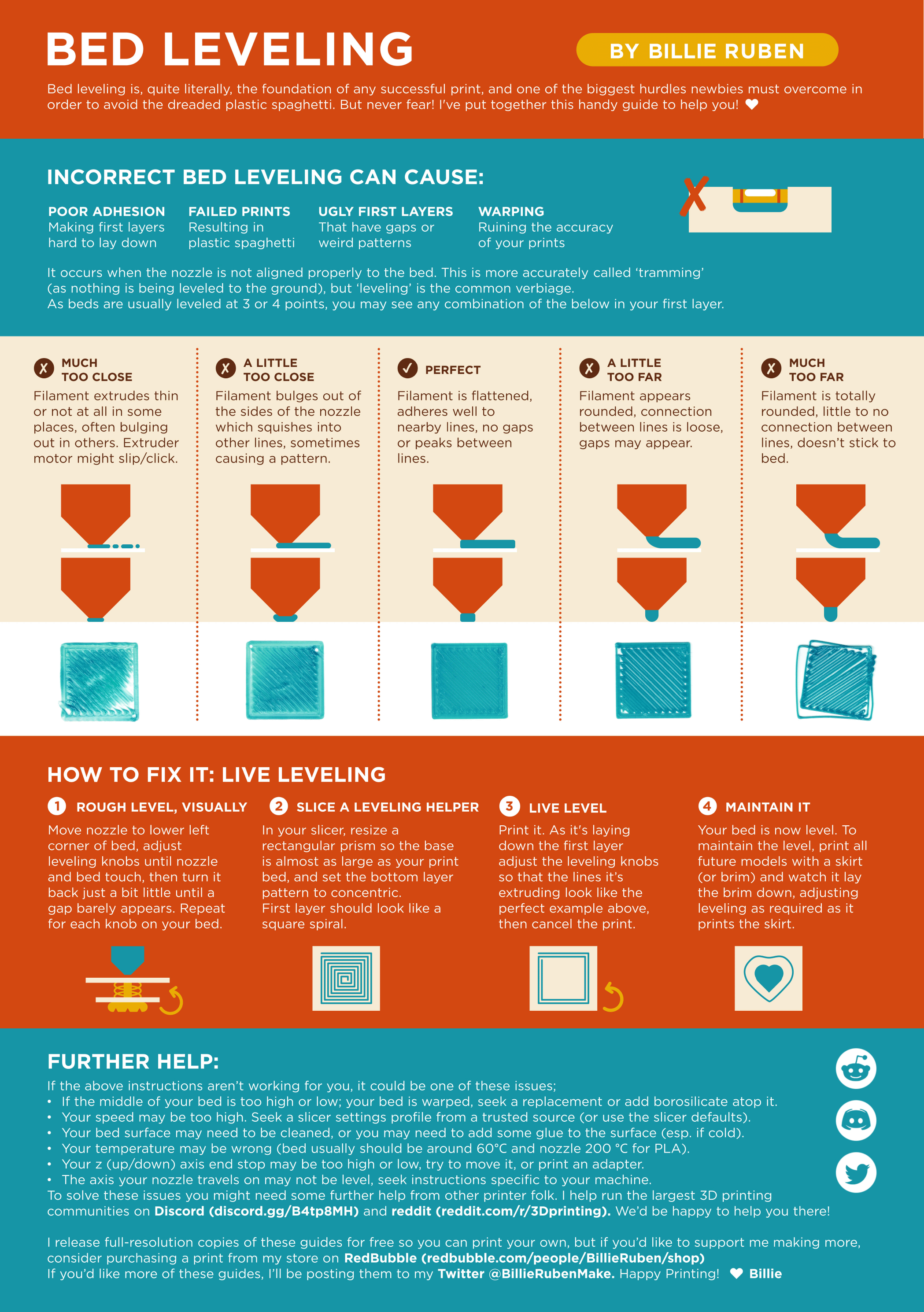
Leveling Your Printer
Here is a handy infographic that will help with levelling your printer.
 humble tiger
@iron prism I had a similar issue with my SE, it seems to look like what happened to me, use the guide above to configure your z offset visually if your printer says the bed is level
Even though it says bed leveling, the visual aid can be applied to z offset as well
iron prism
@humble tiger How do you go about leveling the bed? Do you use washers underneath or something else. I'm not aware of any knobs for adjusting. I'm very new to this thing sorry 😅
humble tiger
No worries man I am too, does the KE use auto leveling?
iron prism
It does
I've been doing some reading and I've found that the numbers aren't supposed to look like this (i think?)
 humble tiger
Yes, so you need to run a first layer test and use the visual aid to adjust your z offset visually
Cause clearly it’s not the bed
humble tiger
Do not try that
It is a problem with your z offset
I’d also recommend using a glue stick to improve adhesion to the plate
iron prism
So how do I calibate the z offset for each corner. Doesn't it just set it for the entire plate?
if i follow the visual aid of course
humble tiger
It should be in tuning
Look in the settings of your printer on the lcd for z offset
So you can manually adjust it
This right here is from poor z offset if the bed is level, the nozzle is dragging through the printed material etching is as your seeing here

Make sure to adjust it little by little, like by .03 and then go down to .01
I’d personally use the z offset when it levels the bed and adjust it from there, it tends to be .2 away from the correct level
lime grove
iron prism
You can see how your plate is "shaped" as its too high on the front left and too low on the back right
humble tiger
You think the bed is warped?
lime grove
humble tiger
You think the bed is warped?
Look at the numbers. Should be an easy fix with the leveling screws
And a bit lower on the z offset
humble tiger
My printer had the exact same problem
Although, the etching in the first level I’m almost certain is a z offset issue since adjusting the bed on the KE or SE is next to impossible
iron prism
 humble tiger
Oh
iron prism
I think it genuinely is the bed because I just leveled it to center and moved the z level to 0
it was above and there was clearance
but then I moved it to the corner and it got pushed up by the bed
lime grove
humble tiger
Although, the etching in the first level I’m almost certain is a z offset issue ...
Its both
iron prism
should I try getting some small washers and placing them underneath on the lower parts, all the screws are tight so I assume it's either the spacers or the plate itself
lime grove
You can sand down the standoffs or replace them with silicone spacers and leveling wheels
iron prism
So they reaplce the old spacers and just screw on underneath to adjust whenever needed?
lime grove
Like the olden days
Although a unadjustable 2 mm range bed could be enough for creality to replace it🤷
iron prism
I'll reach out to them because it's been extremely frustrating. I assume it printed the benchy fine and then when I tried to print other things the bed screwed up the nozzle and now it just refues to work period
But thank you for the help, it was insightful and I at least understand a bit more about the printer!
lime grove
Good luck
strange galeBOT
This post has been inactive for over 1 hour and so has been closed. To reopen this post simply send another message.


