#someone
1 messages · Page 1 of 1 (latest)
 true maple
 ebon muralBOT
true maple
Hello can someone who is smart in this help me, i just got a printer for christm...
AI Help
It sounds like your issue may be related to either bed leveling or bed adhesion. Here are a few steps you can try:
-
Make sure your bed is properly leveled. You may need to adjust the knobs under the bed to ensure it's at the right height.
-
Clean the build plate with isopropyl alcohol before starting each print to ensure good adhesion.
-
Consider using a brim or a raft in your slicing software (Cura) to provide more surface area for the print to stick to.
-
You can also try using a glue stick or a specialized bed adhesive like hairspray or a PEI sheet to improve adhesion.
If these steps don't solve the issue, please provide more details about your printing settings so we can better assist you.
WARNING: This response is AI generated and may contain errors.
 wicked chasm
@true maple follow benchybots ideas....
ebon muralBOT
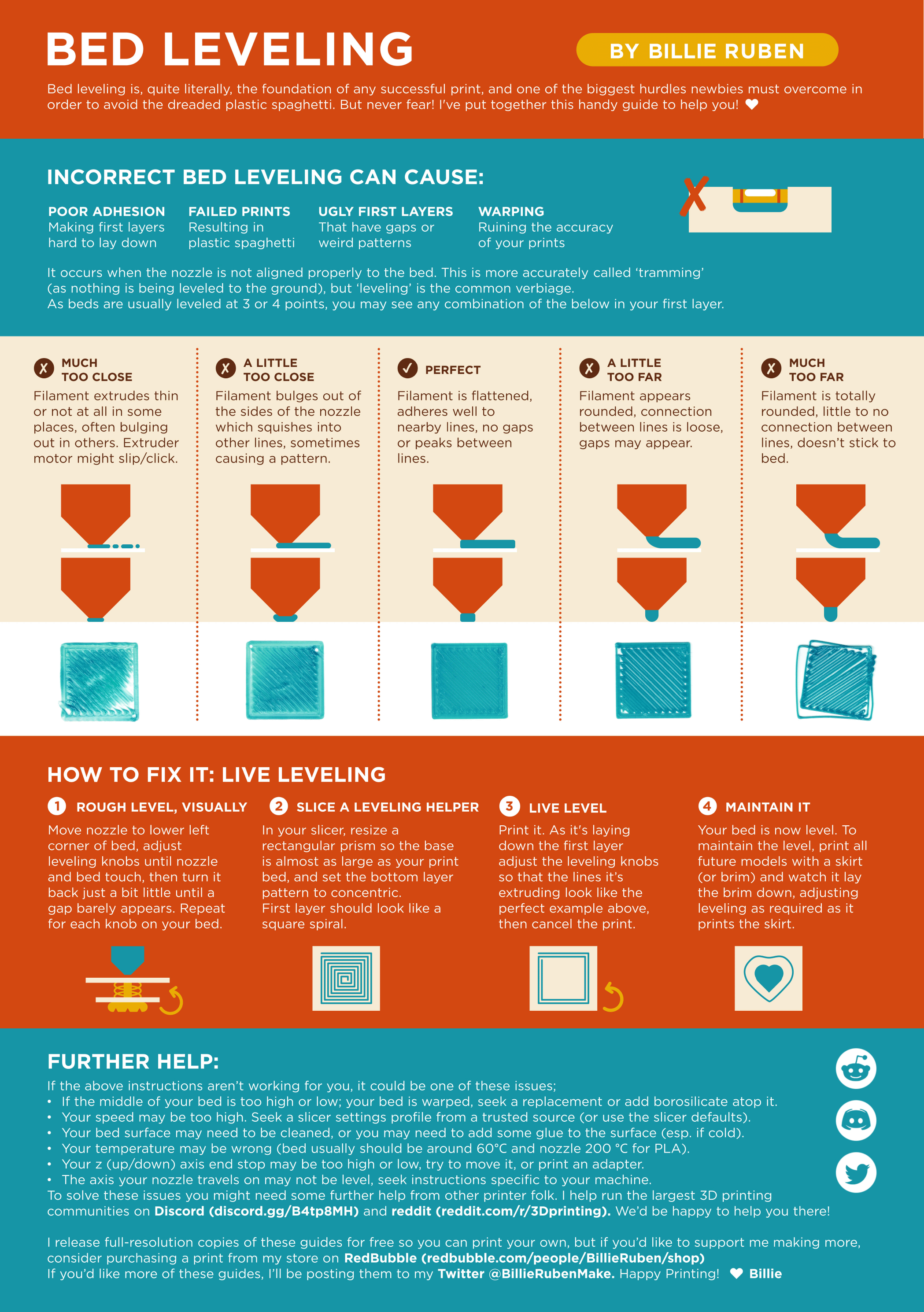
Leveling Your Printer
Here is a handy infographic that will help with levelling your printer.
?leveling requested by: wolfesbluebox#0
 jolly tiger
true maple
ok
?beginner
ebon muralBOT
true maple
ok
GitHub
This is the wiki for the 3D Printers Discord . Contribute to 3D-Printing-Discord/wiki development by creating an account on GitHub.
Troubleshooting
A number of troubleshooting guides exist online:
• Simplify 3D Print Quality Troubleshooting
• Rigid Ink Print Quality Guide
• Institute of 3D Printing Cheat Sheet
?troubleshooting requested by: m.von.d#0
Tips for better first layer success
The first layer is quite literally the foundation of a successful print. These are some of the things to keep in mind:
- Wash your print surface with dish soap and water, refer to
?bedcleaning. - Ensure your printing temperatures are appropriate. For PLA, the ideal bed temperature is 55°C-60°C. If the lines appear to come out "gummy" and forms clumps, raising the nozzle temperature may help. Calibrate your nozzle temperature by printing a temperature tower. Refer also to
?platemps. - Relevel your bed and ensure your nozzle distance is equally spaced at each corner, refer to
?paperlevel. If your printer is equipped with a bed meshing probe such as a BLTouch or CRTouch, make sure your Z-offset positions the nozzle close enough to the bed, refer to?z-offsetfor additional information. If your printer has automatic Z-offset calibration, make sure the nozzle is clean while the calibration runs. - You can confirm that your leveling and Z-offset is correct by observing your first layer extrusion by printing a full layer test: Printables, Thingiverse Refer to
?levelingfor help with the interpretation of the results. - Ensure the nozzle is not colliding with the print. This usually presents itself as loud noises and layer shifting. Some causes may include overextrusion, insufficient cooling, mechanical Z axis issues, or insufficient Z hop
- For warp-prone materials such as ABS, Nylon, Polypropylene and others an enclosure is recommended, ensure ambient temperatures are high enough (40°C+) and stable. Consider using a specialized bed adhesive.
?firstlayer requested by: m.von.d#0
jolly tiger
should be something to start with
true maple
jolly tiger
should be something to start with
Ah thanks I think the problem was I leveled it really badly and just wrong I leveled good and now it’s printing fine it’s halfway through a boat but I’ll see if it’s completed in like a hour