My Bambu a1 with AMS has been having adhesion problems lately. I would have to wipe down my print bed with rubbing alcohol and a cloth before every print otherwise it would start slowly peeling off the bed during printing. Small parts only get worse. When printing small parts, not only does it begin slowly peeling off, but it also "explodes" off of the print bed during printing. Someone said it was bad calibration. It could be, but I created this forum to get more info on what it could be or how I can fix it.
#Adhesion problems
1 messages · Page 1 of 1 (latest)
 native comet
 jade pilotBOT
native comet
My Bambu a1 with AMS has been having adhesion problems lately. I would have to w...
AI Help
It sounds like you may be experiencing adhesion issues with your Bambu a1 printer. Here are some steps you can take to troubleshoot and address the problem:
-
Check your print bed temperature: Ensure that your print bed is heated to the correct temperature for the filament you are using. Different filaments require different bed temperatures for optimal adhesion.
-
Level your print bed: Make sure that your print bed is properly leveled. An unlevel bed can cause adhesion issues and result in parts detaching during printing.
-
Adjust your first layer settings: Try adjusting your first layer settings such as the first layer height, print speed, and extrusion width. This can help improve the adhesion of your prints.
-
Clean your print bed: Make sure to clean your print bed thoroughly with rubbing alcohol before each print. This will remove any oils or residues that may affect adhesion.
-
Try using a different print surface: Consider using a different print surface such as a PE...
WARNING: This response is AI generated and may contain errors.
jade pilotBOT
native comet
My Bambu a1 with AMS has been having adhesion problems lately. I would have to w...
Cleaning Your 3D Printer Bed
While IPA (Isopropyl Alcohol) may dissolve the oily compounds built up on your bed, it mostly just spreads those oils around. For a more permanent solution use a degreasing agent such as dish soap and water (unscented, as those sometimes have chemicals that make the bed adhesion worse) under warm water, scrub the entire plate taking care to push the soap into all the cracks (if your bed is textured). Dry with a lint free cloth or leave to air dry. You can then put the build surface back on to your printer. If you like you can use the isopropyl alcohol to clean the bed intermittently between prints, but please note it still wont remove any of the oily compounds.
If you are still experiencing adhesion issues it may be z offset, speeds or temperatures. You may also find more success in using adhesion boosters such as hairspray, glue-stick, or specially formulated adhesives for 3d printing. Happy printing!
?bedcleaning requested by: adib07#0
native comet
jade pilot
i clean it regularly but even then i still get those problems
 random raft
native comet
i clean it regularly but even then i still get those problems
you said you clean it with IPA, clean it with dish soap and water as the bot said
native comet
i do that too
native comet
native comet
i clean it regularly but even then i still get those problems
thats what i meant in that message
i clean it weekly (as i was suggested) with dish soap and water, and with ipa before every print
jade pilotBOT
This post has been closed due to inactivity.
This post has been inactive for over 1 hour and so has been closed. To reopen this post simply send another message.
 sour rivet
Hi @native comet
Just some ideas...
Could you try moving the nozzle a little closer to the bed?
Maybe the z-offset is a little off.
R u printing with pla?
Does the part cooling fan turn on just before the print flies off the bed?
sour rivet
this maybe or new texure bed, maybe it's worn..

 severe olive
I switched over to Prusa Slicer and made some tweaks to the Z-offset
sour rivet
nice! is it sticking now?
native comet
sour rivet
Hi <@1073086938841624696>
Just some ideas...
Could you try moving the nozzle a ...
Cooling fan - idk
I don't know how to make it so whenever it's printing it gets closer to the bed since it automatically calibrates I just don't worry about that so I wouldn't know how to do that
jade pilotBOT
Z-offset
Where your printer thinks the nozzle is
The z-offset is the distance from the tip of the nozzle to the trigger point of a bed sensor.
Setting your z-offset correctly ensures a good first layer squish and proper adhesion to the build plate (assuming its clean, see
?bedcleaning for more information). See
?leveling for a good representation of how the first layer should look like.
If in doubt: Refer to you your specific machines documentation.
For the Qidi X series printers: Adjusting the z offset from the Fluidd webinterface breaks it. Always set the z offset from the printers screen.
https://www.wevolver.com/article/z-offset-what-it-is-and-how-to-adjust-it
?z-offset requested by: wolfesbluebox#0
Leveling Your Printer
Here is a handy infographic that will help with levelling your printer.
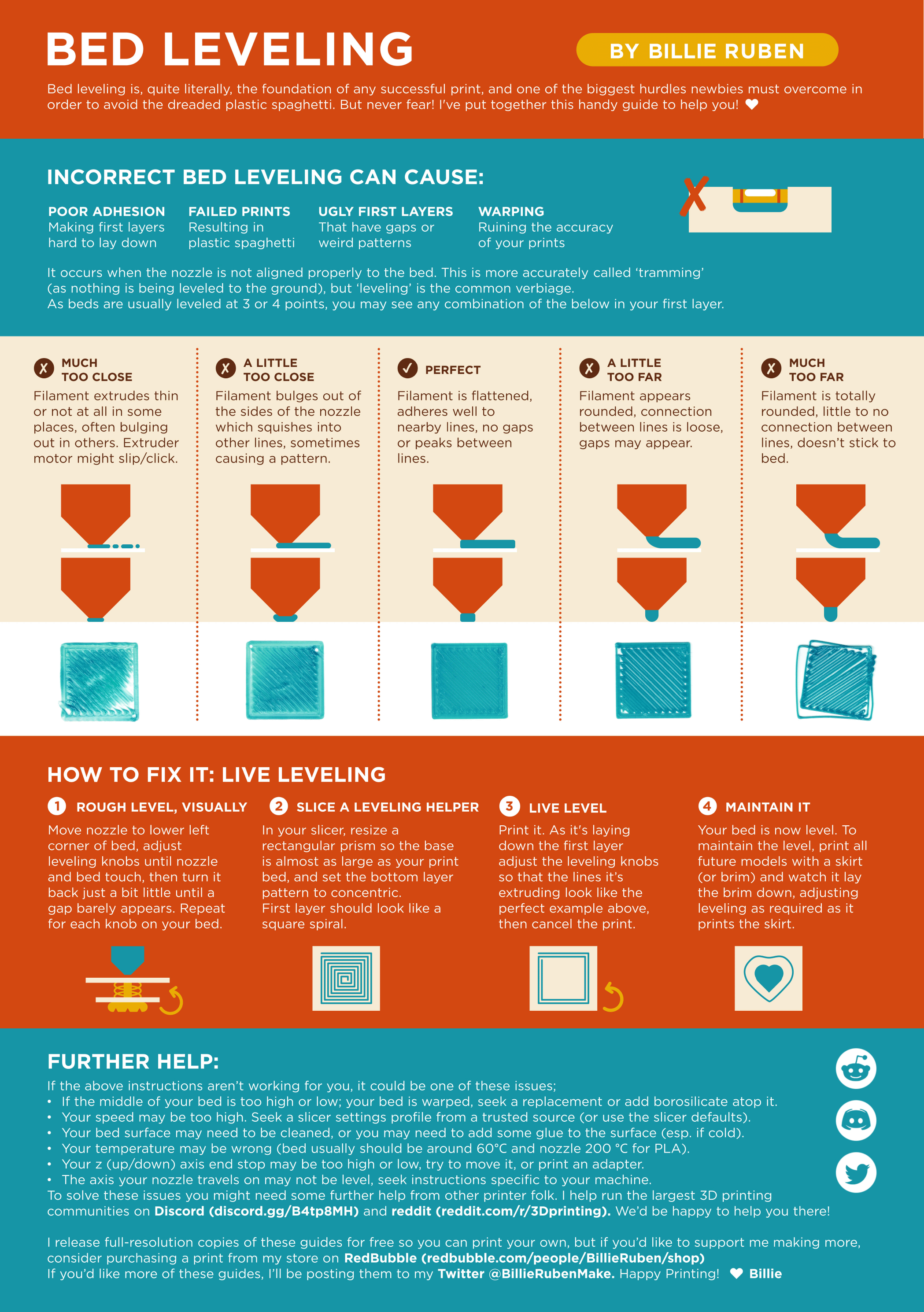
?leveling requested by: wolfesbluebox#0
sour rivet
native comet
Cooling fan - idk
I don't know how to make it so whenever it's printing it gets ...
hmm ok..
well see above for some more info on z offset...
and this for fans 😄
https://forum.bambulab.com/t/bambuslicer-how-to-set-fans/15552/5
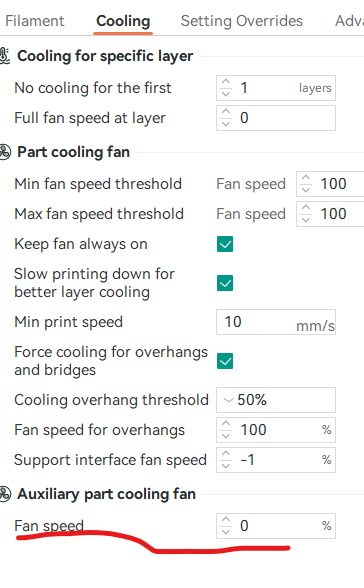
Bambu Lab Community Forum
Yes there is - it is part of the filament profile and there in the GCode-part. For Aux-Fan it is in the cooling tab: For Chamber fan, it is in the advanced settings: The range for the chamberfan is between 0 S0 (0%) to S255(100%)