#Now with PEEK: DupliHeater aka THE OBLITERATOR
1 messages · Page 2 of 1
 wraith forum
 next jungle
how is it placed relative to the board?
wraith forum
next jungle
how is it placed relative to the board?
Blower fan into the general direction. The other cutout is for an axial fan blowing directly over and under the board but I have to remove one of the ssr to mount the fan and then remount the ssr because it blocks the screws otherwise

bracket from the stock board cooling
next jungle
probably fine. but yea good that you hit the back of the board. usually thats where the most heat is
wraith forum
PID done, almost the same values
 nimble igloo
wraith forum
PID done, almost the same values
nimble igloo
wraith forum
PID done, almost the same values
I guess if it doesn't work then manually adjust PID gains
wraith forum
oh god how would I do that?😅
next jungle
copy the line it tells you at the end into the config, then adjust the parameters on the model
or copy it out the overrides file into the config
nimble igloo
wraith forum
oh god how would I do that?😅
In the command with PID tuning results just change values by hand, there are tables that say "if your response looks like this, change this gain"
wraith forum
nimble igloo
In the command with PID tuning results just change values by hand, there are tab...
ahhh okay those tables would be helpful
right now it holds steady at 150°C
nimble igloo
wraith forum
ahhh okay those tables would be helpful
I'll need to look around for one in English 
wraith forum
wraith forum
right now it holds steady at 150°C
If it works if I heat up in stages I am gonna cry 😄
nope overshot
nimble igloo
This is for P and I
 wraith forum
uhm.....
nimble igloo
A1 is low P and no I
D1 is low P and high I
A4 is high P and no I
wraith forum
huh
next jungle
if it looks more like C3 its the right direction
then reduce P a bit and if it looks like C2 its better
wraith forum
I feel I have to disable the error mode to see the graph
next jungle
if you have a stable tune it should work
wraith forum
I mean its not since it overshoots and errors out every single time
nimble igloo
wraith forum
If I am at say D3....
Decrease the I gain a bit first
You can set both I and D gains to 0 to see if the P is too high
wraith forum
okay small understanding problem on my side:
M307 H1 R3.305 K1.113:0.014 D8.69 E1.35 S0.75 B0
thats what it spat out
Heater 1: heating rate 3.305, cooling rate 1.113/0.014, dead time 8.69, max PWM 0.75, mode PID, calibrated at 0.0V
Predicted max temperature rise 223°C
PID parameters: heating P6.2 I0.246 D37.8, steady P6.2 I0.368 D37.8````

thats my actual PID valuesfrom feel i would set I to 0.2 and see what happens
wraith forum
how do I change them?
next jungle
not a large change
but its sometimes better to do small changes to see how stuff reacts
nimble igloo
wraith forum
okay small understanding problem on my side:
M307 H1 R3.305 K1.113:0.014 D8.69 E...
Ah, right, RRF uses model parameters
wraith forum
what I don't understand that its perfectly fine if I set the hotend to 150°C
but if I set it to 200°C it goes to 220°C and errors out
next jungle
at what temperature did you tuned it?
wraith forum
300°C
next jungle
might be not stable at 200°C
wraith forum
if I set it to 300°C it overshoots the same
next jungle
i have some slight instability on my K3 where the tune was dont at 270°C when printing at 330°C
weird, thats a quite unstable tune
tried to let ot run at full PWM not at 75%?
wraith forum
yes, initial tune was at 100%
next jungle
M301 does support to set individual PID values
wraith forum
PSA: Hot things are hot. Ouch
anyways: Should that thermistor be a bit further in there🙈

And yes thats a fresh scratch on the block
next jungle
but the downside is it overwrites the model of M307 and has some limitations
https://docs.duet3d.com/en/User_manual/Connecting_hardware/Heaters_tuning here is a way described in how to manually tune the model, might work for you
Duet3D Documentation
 gentle orbit
ah yeah classic
gentle orbit
wraith forum
PID done, almost the same values
do you start from ambient and do the tool tuneing?
gentle orbit
wraith forum
but if I set it to 200°C it goes to 220°C and errors out
sounds like thermistor
wraith forum
gentle orbit
do you start from ambient and do the tool tuneing?
yesn't, sometimes 😄
gentle orbit
if you don't start from room temp you have to put the start value in the command
wraith forum
huh
gentle orbit
yeah if it's already hot the R value will be lower since it doesn't take as much to heat up
so it overshoots
gentle orbit
 wraith forum
yes but not on the "how to PID tune" page
next jungle
if it keeps overshooting reduce the R parameter in the model by 5-10%
next jungle
you could, would just take longer
wraith forum
Graphic. Seems like I do have to make a few metal spools after all
 gentle orbit
oh no
wraith forum
10 mins at 140ºC and honestly I don't know what I expected
gentle orbit
next jungle
yea that was to be expected
wraith forum
Filament is fine
gentle orbit
filament looks fine
wraith forum
next jungle
you could harrass ares industries for restock them
did you see my plan? 😄
next jungle
i mean that would be the easy low efford way out of it
wraith forum
https://de.aliexpress.com/item/4000310461924.html those plus a few 60 mm standoffs
next jungle
thats one way

 wraith forum
I am very happy😊
gentle orbit
first prints soon? 👀
wraith forum
maybe this weekend, but probably not PEI/PEEK
on account of I can't dry it reliably 😄
maybe I try the microwave.....
nimble igloo
wraith forum
looks like C1 now
C1 is decent
The optimal response for our use case is B2, but C1 also works
 opaque oxide
What did the fan think of the bed?
wraith forum
well nothing because I wasn't powering the bed while trying to figure out the hotend
 normal mango
wraith forum
normal mango
wraith forum
what’s this
wraith forum
normal mango
what’s this
its for manual PID tuning
wraith forum
nimble igloo
A1 is low P and no I
D1 is low P and high I
A4 is high P and no I
so you change the values from where you are to where you want it to go
normal mango
yea i think i’ll let klipper do that for me
nimble igloo
normal mango
yea i think i’ll let klipper do that for me
You do this when the autotuning algorithm fails
 chrome depot
wraith forum
https://de.aliexpress.com/item/4000310461924.html those plus a few 60 mm standof...
chrome depot
wraith forum
https://de.aliexpress.com/item/4000310461924.html those plus a few 60 mm standof...
It's a shame you are not in canada, the northprint3d ones are cheap
chrome depot
wraith forum
Graphic. Seems like I do have to make a few metal spools after all<:vaulthah:597...
Wait wtf
Damn
I ordered a spool of PETG from sunlu and it has the max spool temp on it, weird that this one would not have any warnings
wraith forum
chrome depot
Damn
PC spool at 140ºC
chrome depot
Time to make a spool design, get standoffs and screws and get the side plates laser cut
wraith forum
Didn't think much, the Filament PM PEI has a "dry at 110ºC and the spool can take that too" sentence on the storepage
chrome depot
Laserboost is pretty good for the wallet especially when you order larger qty
wraith forum
chrome depot
Time to make a spool design, get standoffs and screws and get the side plates la...
Ooor use the streaming trays
which is much less work
Probably
Hopefully
wraith forum
It has holes so...I am counting on that
wraith forum
I have washers
chrome depot
Fair enough I guess
chrome depot
Yeah
Just need to make sure they are well lined up
Otherwise it shall wobble a lot
gentle orbit
easy enough with a printed jig
chrome depot
Yeah true
wraith forum
I clearly didn't remove the manual bed probing gcode from the default start gcode 🙈


wraith forum
Retractions etc, but looks nice.
 wraith forum
PSA: Heated Beds can be hot

I think placing the chamber thermistor on the left side on the height of the nozzle and away from the chamber heaters exhaust gives more accurate readings. Maybe
 nimble igloo
wraith forum
I think placing the chamber thermistor on the left side on the height of the noz...
nimble igloo
wraith forum
I think placing the chamber thermistor on the left side on the height of the noz...
How hot will this chamber go for now?
wraith forum
Will check, problem is something still smokes. I bet the spacers keeping the heaters from touching the metal housing.
I think I'll wrap some alu in kapton tape instead of the silicone/nylon spacers
Or try to yolo peek or pei spacers
nimble igloo
wraith forum
Or try to yolo peek or pei spacers
How would this spacer look?
wraith forum
Like the original one, a 3 mm thick square frame with square cutout corners. Should be fine
 nimble igloo
wraith forum
nimble igloo
wraith forum
Hmm, how hot is the heater getting?
wraith forum
230ºC so right at the edge of capabilities.
nimble igloo
wraith forum
230ºC so right at the edge of capabilities.
What about soft fire brick? Can be carved with an utility knife etc, just don't inhale
wraith forum
nimble igloo
What about soft fire brick? Can be carved with an utility knife etc, just don't ...
Don't have any and would probably crumble when I fasten it back to the fan, but I like the idea...I still have some of the silicone coated glass fiber sleeve. I bet I could use that
Maybe turn it inside out
nimble igloo
wraith forum
Don't have any and would probably crumble when I fasten it back to the fan, but ...
Basically I was looking at refractory materials you can process by hand
Sadly castables need firing
wraith forum
Yeah, custom ceramic spacers etc would be really great
(thinking about the 1000ºC furnace at work)
nimble igloo
wraith forum
(thinking about the 1000ºC furnace at work)
Oh, so you can fire
nimble igloo
Actually, @wraith forum
Furnace rope / fire rope
It's just woven rough fiberglass, meant for sealing furnaces etc. You just place it between 2 surfaces in a pattern you want and bolt them together
wraith forum
Oh good idea
opaque oxide
nimble igloo
What about soft fire brick? Can be carved with an utility knife etc, just don't ...
wtf soft fire brick
how have i never stumbled across this before
next jungle
wraith forum
PSA: Heated Beds can be hot
get a oseq buildplate, will remind you when its hot
wraith forum
I knew it was hot. Didn't stop me from poking around with the thermistor and accidentally pressing my arm against the edge of the bed
next jungle
well then get some heat resistant sleeves
wraith forum
added the second electronics fan, MCU temp under load at 43°C instead of ~50°C. Nice
also printing a "looks neater" plate for the electronics to stop the wires from just flopping around
the part I am printing has 15 layers, no clue how RRF came to this conclusion

"go home, you are drunk" moment
 wraith forum
nimble igloo
Actually, <@406971626836721664>
Furnace rope / fire rope
It's just woven rough...
wraith forum
nimble igloo
Actually, <@406971626836721664>
Furnace rope / fire rope
It's just woven rough...
ordered some of that, seems the easiest/safest solution for now
and we are at 55°C chamber passively with the 100°C bed and the new thermistor location
normal mango
what did u use as chamber isolation?
nimble igloo
wraith forum
ordered some of that, seems the easiest/safest solution for now
I just knew that I'm missing something obvious when brainstorming before
gentle orbit
wraith forum
the part I am printing has 15 layers, no clue how RRF came to this conclusion
isn't it cubic
wraith forum
normal mango
what did u use as chamber isolation?
Car body insulation and alu tape
wraith forum
gentle orbit
isn't it cubic
 gentle orbit
no I mean 13399.30 mm3
wraith forum
No clue, it uses mm apparently🤷
wraith forum
normal mango
what did u use as chamber isolation?
This stuff, butyl foam with adhesive and an aluminized side
 normal mango
alr tysm
gentle orbit
oh you meant layers
wraith forum
yes
gentle orbit
sorry, lack of caffeine
wraith forum
the height is off and thus the amount of layers
no worries
its now at layer 14, we'll see if it just continues or not 😄
wraith forum
Looks neater, works the same. No one will see it in action. Totally worth it
 gentle orbit
yeah I can't judge
nimble igloo
wraith forum
Looks neater, works the same. No one will see it in action. Totally worth it<:va...
Are you using the punch-type printable labels? So cool
gentle orbit
oh yeah those are cool
wraith forum
One of these cheap things
 gentle orbit
I see you also have the single phase disconnecting power switch, you think it's worth going for one that does both?
wraith forum
couldn't get the switch out
gentle orbit
ah
wraith forum
but the safety switch in front disconnects both phases
gentle orbit
 should probably get something similar
nimble igloo
wraith forum
couldn't get the switch out
 wraith forum
Yesno
*couldn't get it out safely without destroying the whole IEC connector and the one I have has the wrong mounting pattern so I decided "good enough is good enough"
normal mango
wraith forum
Looks neater, works the same. No one will see it in action. Totally worth it<:va...
are u using 1 z motor?
wraith forum
I did not change the stock movement system so yeah: one z motor
normal mango
ah alr
wraith forum
it has two 12 mm linear rods and a ball screw, I am not that worried
normal mango
ball screw?
wraith forum
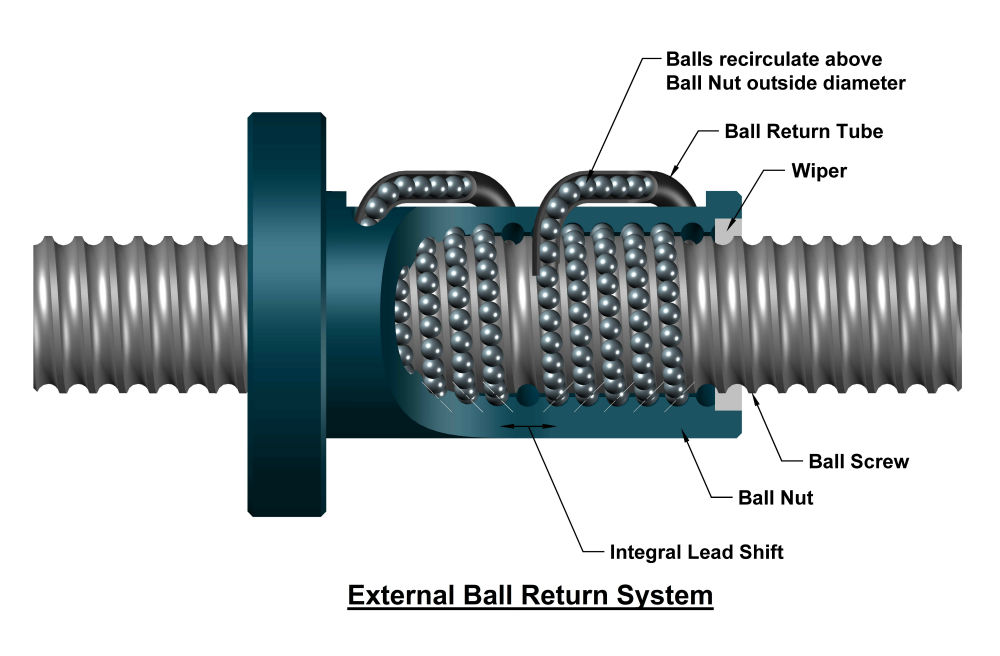
imagine a threaded rod but instead of threads it runs on ball bearings
like a helical ball bearing
nimble igloo
wraith forum
it has two 12 mm linear rods and a ball screw, I am not that worried
Yeah, it's solid
 nimble igloo
Anyway, @wraith forum , I was asking about your target temps because you can wire BME280 to RRF and it's SPI temp, humidity and pressure sensor that works up to 85°C
wraith forum
https://www.barnesballscrew.com/how-a-ball-screw-works/ one of these 😄
wraith forum
nimble igloo
Anyway, <@406971626836721664> , I was asking about your target temps because you...
instead of just a thermistor?
nimble igloo
wraith forum
instead of just a thermistor?
Yep, for more sensors in a chamber
nimble igloo
wraith forum
good to know if/when I need it
They're dirt cheap
Duet3D Documentation
Describes choosing, connecting and configuring Digital Humidity and Temperature (DHT) sensors.
wraith forum
god I love the duet docs❤️
nimble igloo
wraith forum
god I love the duet docs❤️
You'd need to ask RRF folks for how many can you connect (technically you just need more GPIO for CS, but dunno how RRF handles it
next jungle
the 6hc has like 3 or 4 SPI pins free for one
the other connections might become a issue
wraith forum
Trying to wrap my head around how to tell the printer what to do with the chamber heater: What I want to do is limit the heaters max temp to 200ºC (from its max equilibrium temp 230ºC ) but still be able to be throttled down when the set chamber heat is reached.
Mh does limiting the power reduce the max temp of a ptc?🤔
Because that would be the easiest
gentle orbit
my heater has a thermostat that limits its power, maybe wire up those?
would that 30C difference matter?
wraith forum
I mean for the plastic in direct contact with it probably yes
nimble igloo
wraith forum
Mh does limiting the power reduce the max temp of a ptc?🤔
Yes, but will change the PID gains
wraith forum
Bang Bang anyways
next jungle
i dont directly control the heater on my k3, it just goes full blast until the ambient temperature is reached
nimble igloo
Ah, then you can likely make daemon.g adjust max power depending on the heater temperature
next jungle
it does havea thermstatic switch on it, but it might wear out over time
wraith forum
next jungle
i dont directly control the heater on my k3, it just goes full blast until the a...
Yeah thats what it does currently
next jungle
its the easiest way to have it aim for a certain ambient temp.
if not configured as a heater you can do some stuff with the daemon.g, did that in the past but rn i just run the heater dumb with a chamber thermistor for the feedback
nimble igloo
next jungle
its the easiest way to have it aim for a certain ambient temp.
if not configured...
I believe that he can implement the power limiting in daemon.g to limit the power near the 200°C point
next jungle
i guess you could write some logic to reduce power until it stays at the target or just figure it out and set it as a hard limit
also this gives me now to think about my implementation, the thermal switch opens at 150°C +-10°C
probably could get a bit more of heat out of it by either bypassing the switch or going to a higher temp rated one
but that would open another can of worms as it might melt the mounting bracket it has from factory
nimble igloo
next jungle
but that would open another can of worms as it might melt the mounting bracket i...
Sneak in one from Ti at work
next jungle
if we would print TI in the first place
inconel is already rare, stainless is doable
but then i would need to get some ceramic insulators i guess
nimble igloo
next jungle
inconel is already rare, stainless is doable
Stainless would be fine, just do some topo optimization to bleed off the heat
next jungle
alternative i figure out how to print PEKK
next jungle
nimble igloo
Stainless would be fine, just do some topo optimization to bleed off the heat
the being electricaly conductive part is the bigger issue i think
i guess there is a reason why it came stock with PA12 mounting brackets
nimble igloo
next jungle
the being electricaly conductive part is the bigger issue i think
What size mounting screws?
next jungle
to the fanshroud behind it with M3 screws
to the heater some selftappers of unknown size
i know its possible to electricaly isolate it, but not sure if its worth the efford
nimble igloo
next jungle
i know its possible to electricaly isolate it, but not sure if its worth the eff...
Ceramic isolators for transistors are like $5 per 10 if you wanna try
next jungle
tbf overall im more worried about the selftappers being a one time use thing, the ones used for holding the thermal switch on it are already a bit worn after uninstalling and installing them
but rn it works. so better to not touch it i guess
nimble igloo
wraith forum
Well that didn't hold up too well
Why not?
wraith forum
PEEK and no 2.85 mm
it evolved
nimble igloo
wraith forum
PEEK and no 2.85 mm<:vaulthah:597787241812852736>
it evolved<:yay:8990627076832...
We just need to get you a better heatbreak, right?
wraith forum
And drill out the printhead
nimble igloo
wraith forum
And drill out the printhead
Print enough PLA CF and the bore will widen itself
wraith forum
And somehow find a heatbreak for a 7.8 mm hole
nimble igloo
wraith forum
And somehow find a heatbreak for a 7.8 mm hole<:feelssobman:393783865241501696>
I wonder if I have the right size thin wall tubing
wraith forum
I mean you can find medical grade steel tubes in all shapes and sizes but that doesn't make a good heatbreak
I looked, a lot
nimble igloo
wraith forum
I mean you can find medical grade steel tubes in all shapes and sizes but that d...
I have tubes, I have copper stock and I have access to a clapped out lathe
gentle orbit
wraith forum
And somehow find a heatbreak for a 7.8 mm hole<:feelssobman:393783865241501696>
can't you adapt to a common size?
or just want to keep it simple for now?
chrome depot
wraith forum
And somehow find a heatbreak for a 7.8 mm hole<:feelssobman:393783865241501696>
just need a friend with a lathe to fix that
wraith forum
All heatbreaks (I found ) are either m7 threaded/7mm smooth or have the wrong thread (MK10)
BiQu has one according to their Alix store but they just sent a mk8 one if you buy it
nimble igloo
wraith forum
All heatbreaks (I found ) are either m7 threaded/7mm smooth or have the wrong th...
Actually, 7 mm smooth will be easy to mod, just glue on a thin wall tubing with 7 mm ID
wraith forum
right now I just used a strip of alutape and that seems to work
chrome depot
wraith forum
right now I just used a strip of alutape and that seems to work
I could modify my original toolhead with a press fit tube to have a 7mm hole and send it to you if you pay shipping
wraith forum
👀
Shipping: 50$ probably
I mean if I could find the right tube
Mh putting 7 mm ID copper pipe into a drill and sand it down to paper thin?
chrome depot
wraith forum
Shipping: 50$ probably<:vaulthah:597787241812852736>
Send me your address and I'll get a quote, shouldn't be too much
next jungle
7mm ID is massive
wraith forum
Thats what the heatbreaks I have have
next jungle
if you convert to 1.75 you probably dont need a bore this large for the PTFE tube
wraith forum
It already is 1.75 mm
next jungle
so you want to go 2.85 then?
wraith forum
no
next jungle
hmm then ive missed some context
wraith forum
That was the original pla
wraith forum
next jungle
hmm then ive missed some context
The stock heatbreak is 7.8 mm in diameter with a M7 thread for the heatblock. I couldn't find a M6 threaded one for the high temp heatblock that also has a 7.8 mm body. So I just taped a bit of alu tape around it and janked the grub screws down on it and hope it has enough contact with the heatsink to not heatcreep to hell
next jungle
ahh so you just want to unfuck the design
wraith forum
basically
@severe obsidian is the guy you bought the special heatbreak from for peeky still in business?
Never thought about that🙈
next jungle
hmm sadly the kraken heatbreak is also 7mm OD
worst case you can probably make a quick CAD file and hope JLC can make one
 severe obsidian
wraith forum
<@195637381121048577> is the guy you bought the special heatbreak from for peeky...
severe obsidian
wraith forum
<@195637381121048577> is the guy you bought the special heatbreak from for peeky...
No but I stopped using it anyway, I have a Copperhead MK10 (?) heatbreak now
wraith forum

severe obsidian
It's also 7.8mm, sticks out a bit more but otherwise it's drop-in
severe obsidian
The Guy From Virginia Special (tm) was also like $30 ish I think
wraith forum
Oh whaat?
next jungle
thats what some random online result shows when searching SV01 pro heatbreak
 wraith forum
Yeah thats exactly what I need
Now I only need to find a seller selling a replacement part for an ancient-ish printer
opaque oxide
pewa or motorsports might know
gentle orbit
at this point I'd just ream my own copper rod to make a custom break
next jungle
worst case get a bimetal heatbreak, heat it. seperate it and press on a custom made coldside
nimble igloo
wraith forum
Now I only need to find a seller selling a replacement part for an ancient-ish p...
Sovol still sells them at $10 per 3
wraith forum
they look wrong though
next jungle
sadly none of the chinese seller have a drawing online of what they sell so you can check dimensions
worst case you get the Slice MK10 heatbreak
gentle orbit
nimble igloo
Sovol still sells them at $10 per 3
those are for the pro that use the creality like
nimble igloo
next jungle
sadly none of the chinese seller have a drawing online of what they sell so you ...
You can just message sellers if you want to spend an afternoon talking to people who don't understand you
nimble igloo
gentle orbit
those are for the pro that use the creality like
 gentle orbit
hmm, weird
sovol doesn't sell the same looking heatbreak


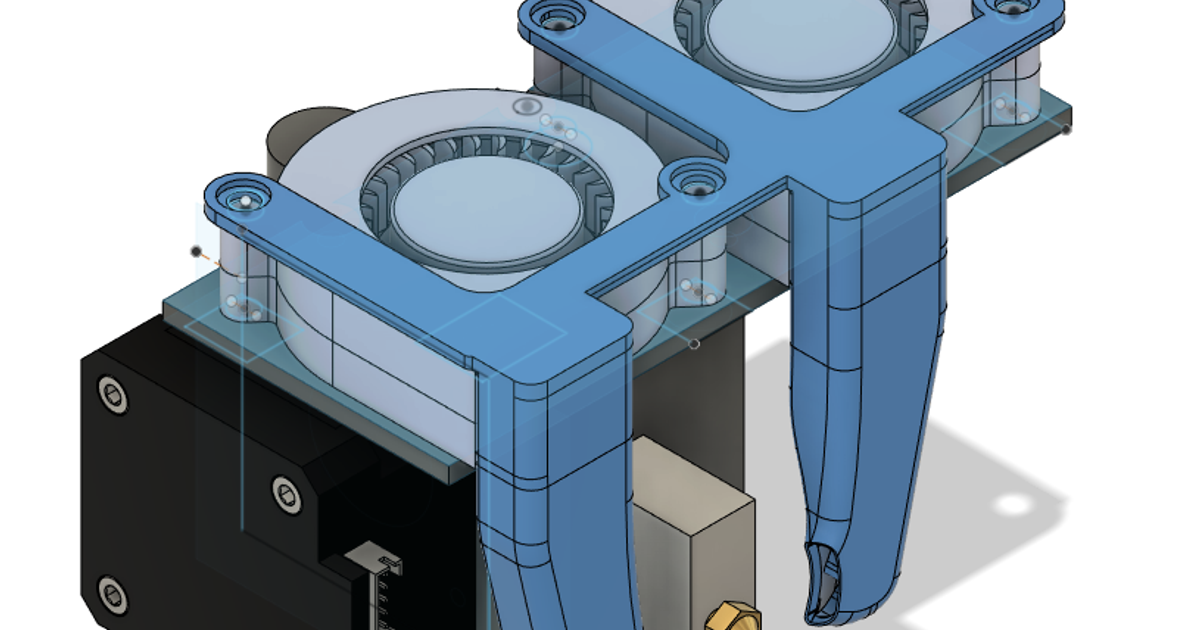
this is the one needed
 wraith forum
Well I found out what smoked
 chrome depot
Gawd damn
wraith forum
Also, this "Silicone" melts at 230ºC🤷
chrome depot
Time for titanium slm housing with ceramic spacers
wraith forum
Or just 6 mm glass fiber rope with the nylon shell
@nimble igloo amazing idea, thank you🙏
nimble igloo
wraith forum
<@374587076718624768> amazing idea, thank you🙏
It's already in?
wraith forum
Test fitted, still picking bits of silicone from the fins

Basically one loop on each side
Keeps is nicely centered I think
nimble igloo
Thicc
wraith forum
Its supposed to be ø 6 mm when stretched
wraith forum
Should be fine
 wraith forum
It heats still the tiniest amount of smoke, probably missed a few tiny spots of silicone
I should put it outside and let it bake for an hour or two to really get rid of it
But it didn't short out so thats great
And the crossflow fan isn't as annoying anymore after loosening and reattaching it🤷
gentle orbit
you lose some you win some 
opaque oxide
wraith forum
Well I found out what smoked
don't the heaters themselves usually get pretty hot?
Might have exceeded 230
in the metal at least
they also could have lied
wraith forum
opaque oxide
Might have exceeded 230
The thermistor I had shoved between the fins hopefully doesn't lie
opaque oxide
wraith forum
The thermistor I had shoved between the fins hopefully doesn't lie
oh yeah that does make my theory less plausible
wraith forum
so with the new chamber thermistor position it takes about 10 minutes to reach 60°C in the chamber on the height of the nozzle (and yes I need to PID tune the bed again, same issue I had with the nozzle PID)

probs a bit less when I put the bed on 150°C directly
nozzle lags a bit behind, I guess because of the thermal mass of the heatblock, its the same now
 gritty sonnet
i feel like it should be faster than that
wraith forum
Also: What does it tell me that the G10 sheet looses its translucency? (max temp G10 was 120°C right?)
We are now at 73°C chamber
18 min
I also open the door sometimes to see if it smokes or not
also thermal expansion is real: The acrylic door now jams on one corner
wraith forum
gritty sonnet
i feel like it should be faster than that <:thinkies:961512478683050034>
I mean I have no comparison, so I take what I can get
I'll go to 80°C and stop it then

34 mins to 80°C
I'll take it
also doesn't smoke any more (for now)
wraith forum
okay I tried to wrap my head around how to wire and configure that but I failed horribly: How do I use a seperate 5V powersupply to cut the 24V system? The Octopus pro has a dedicated PS_ON pin so I guess that would be used but where would the 5V come into the mainboard? Where would the 24V go to power the heater, fans etc?
I feel like I am missing some vital info since I always read "just wire in a seperate 5V PSU" but never a tutorial or something to actually do that
wraith forum
since this thing is kinda hot I want to have an additional layer of safety to cut out the primary power by cutting off the 24V PSU when the Firmware tells it to
normal mango
oh
gentle orbit
wraith forum
okay I tried to wrap my head around how to wire and configure that but I failed ...
what I do is just cut the AC with a contactor that also turns off the main 24V supply
wraith forum
I mean yeah true but how would it work?
gentle orbit
what do you mean?
wraith forum
the 5v thing
Also the contactor while we are at it. Do you close it manually to start the printer?
gentle orbit
so the AC coming from the plug gets split into a main branch behind a contactor and a small PSU that handles the power for the MCU. So when you turn the switch on the small PSU gets power, that turns on the MCU, and then the MCU turns the contactor on energizing everything else on the main branch
the contactor is switched by the board so not manual
wraith forum
Okay and the small psu powers what?
gentle orbit
oh, just use the dedicated rail or usb connector
gentle orbit
you can power the octo by putting 5V into the USB or directly powering it on the pins
USB works as well if you have a small phone charger brick you can sacrifice
gentle orbit
probably EXP header
wraith forum
Makes sense
gentle orbit
I think you have a switch that lets you choose between USB powered or powered by the Vin
wraith forum
Yeah I remenber from flashing the thing
Thats where these are useful I think

(if it would fit)
gentle orbit
only thing I'm unsure of with USB powered whether you still need a common ground or not
wraith forum
Meaning 5v and 24v having connected grounds?
wraith forum
I mean seems logical
gentle orbit
definitely check that with someone smarter than me though
also double check the 5v power if you skip USB
the logic is 3.3V so I'm not sure how your specific board handles it
opaque oxide
gentle orbit
I know you have to connect the grounds on all PSUs
What do you mean connect the grounds? The protective ground in the wall or the return path for the 5v supply?
nimble igloo
opaque oxide
What do you mean connect the grounds? The protective ground in the wall or the r...
GND output rails of PSUs
"Return path" isn't the best name
next jungle
wraith forum
how tf do you wire that
On the duet 3 board the pson header has 3 pins, where 2 are to backfeed the board and the 3rd one is to switch the psu
Just needs to get a jumper set to bypass the internal 5v voltage regulator and use the external supply
nimble igloo
next jungle
Just needs to get a jumper set to bypass the internal 5v voltage regulator and u...
On Octopus you can't bypass it, if you want to connect external 5 V it gets connected through a diode to the 5 V buck output
next jungle
Thats just stupid. But then again its a budget board
wraith forum
I might order some custom lasered 2 mm steel plates as build plates, ya think its worth it to let them laser a fine grid onto it?
and they are not more expensive than getting some random AliX plates to buff the surface off
next jungle
you probably have no access to a sandblasting setup right?
normal mango
wraith forum
and they are not more expensive than getting some random AliX plates to buff the...
id give it a shot i think
gentle orbit
wraith forum
I might order some custom lasered 2 mm steel plates as build plates, ya think it...
spring steel?
2 mm sounds a bit thick
wraith forum
gentle orbit
spring steel?
🤷 JLC doesn't have spring steel, so either Stainless or Cold Rolled.
Its an addition as I am caving in and ordering Metal Spool Sides from them
nimble igloo
wraith forum
the sandblasting
Although you could try aggresive etching
wraith forum
nimble igloo
Although you could try aggresive etching <:thinkies:961512478683050034>
mh good thought
nimble igloo
wraith forum
🤷 JLC doesn't have spring steel, so either Stainless or Cold Rolled.
Its an ad...
Check which steel is harder
wraith forum
or....steel wool 😄
gentle orbit
wraith forum
🤷 JLC doesn't have spring steel, so either Stainless or Cold Rolled.
Its an ad...
cold rolled sounds better but idk how it'd stand up to being heated to 200C from room temp and back down repeatedly
can't be worse than random chinese flex beds I guess
wraith forum
stainless steel 201 is actually cheaper
wraith forum
I could just wirewheel it, couldn't I?
gentle orbit
are you getting a sandwich panel under the bed btw? so the heater is not hold by glue or rtv
wraith forum
It is sandwiched
gentle orbit
wraith forum
I could just wirewheel it, couldn't I?
probably, but NPA should stick anyway
I like Dead's etching idea
wraith forum
mh according to JLC 12.30€ for two 2 mm plates with lasermarking.....
gentle orbit
that's not bad
wraith forum
7.50€ without the lasermarking
nimble igloo
I assume you wanna use clips for it and not magnets?
gentle orbit
how small can they go? you could get a mesh or net for your heatblock to hold it from the bottom and then use a smaller heatbreak
wraith forum
I do not follow?
gentle orbit
you have that weird OD heatbreak that holds the block, what if you just laser a mesh that holds the block so you can use a regular break
wraith forum
the block has two m2 screws holding it to the heatsink
wraith forum
Dragon block
wraith forum
wraith forum
I clearly didn't remove the manual bed probing gcode from the default start gcod...
sorta kinda can see it there
wraith forum
I may need to loose these silicone spacers
reprinting the wheels is high on the list
gentle orbit
return to springs?
wraith forum
not sure whats better for those temps
gentle orbit
peek printed standoffs
gentle orbit
I think the croxy had lasered plate kinematic joints
if you want to get real fancy with it
wraith forum
kinematic mount on a catilevered bed? 😄
gentle orbit
cantilevered Z, the bed could still be kinematic
regular springs are probably fine tho on 180x180
wraith forum
220x220 Bed with 200x190 printarea
gentle orbit
 wraith forum
wild
opaque oxide
wraith forum
I could just wirewheel it, couldn't I?
wire wheel on a grid of 2mm plate sounds like a recipe for cutting up your wire wheel into a wire pile
not sure how good you are with an angle grinder, but clamping something like that down and hitting it with a flap sander would probably work as long as you dont need the surface to be perfectly level
wraith forum
Its supposed to be a print plate.
opaque oxide
ah, mb 😅
wraith forum
Pretty colours


hot tightening at 450°C
And I forgot to paint a funny thing on the block before. A well...maybe when I replace the block someday
next jungle
just make sure to not have ABS resedues in there the next time
 next jungle
wraith forum
Thats a fresh nozzle
next jungle
wraith forum
Thats a fresh nozzle
yea but the next time its filled with something.
having the accidental ABS cookoff is no fun
wraith forum
normal mango
what happened here?
not an active heater, I guess thats why
the accociated thermistor is not used to control the heater
wraith forum
next jungle
yea but the next time its filled with something.
having the accidental ABS cooko...
there was some smoke billowing out, I guess there was a tiny bit of stuff stuck on the heatbreak
next jungle
overheated ABS is just annoying, smokes a lot and carbonises and cleaning that out is annoying
wraith forum
Yes, happens to the nickel coating at 400ºC ish
normal mango
so id be surprised if u didnt get the oxidation
opaque oxide
oh interesting, didnt know nickel had issues at such low temps
normal mango
out of curiosity are u building a peek printer?
wraith forum
You can paint stuff on there with some oil and have it oxidize
wraith forum
normal mango
out of curiosity are u building a peek printer?
Got 2.5 kg of the stuff so yeah
 raw shoalBOT
So you want to print PEEK on a budget?
https://karlzhao314.blogspot.com/2020/07/the-peek-performance-project-part-1.html
Note: This is not a tutorial. Inform yourself and do research before undertaking an advanced build project.
?peekbudget requested by: m.von.d#0
wraith forum
Based on this
wraith forum
opaque oxide
oh interesting, didnt know nickel had issues at such low temps
Not entirely sure if the block is nickel coated or if its a copper alloy throughout. Colours would indicate the latter
nimble igloo
wraith forum
Not entirely sure if the block is nickel coated or if its a copper alloy through...
Copper with nickel plating
Remember to not get a tungsten carbide nozzle for HT
wraith forum
Its steel
nimble igloo
wraith forum
Its steel
Yeah, just for future reference
 naive finch
nimble igloo
Copper with nickel plating
Remember to not get a tungsten carbide nozzle for HT
naive finch
nimble igloo
Copper with nickel plating
Remember to not get a tungsten carbide nozzle for HT
Why
nimble igloo
naive finch
Why
Tungsten carbide has too low CTE and too high E, which means that in a copper block at high temps it slowly shears off threads, loosening itself and wrecking the block
wraith forum
Next up: NASA motor cooling

Need to print a manifold and recreate the cooling jackets
nimble igloo
wraith forum
Need to print a manifold and recreate the cooling jackets
Got enough clearance like on the original?
wraith forum
nimble igloo
Got enough clearance like on the original?
What clearance specifically?
For the tubes
nimble igloo
Around the motor, "radially" so to speak
nimble igloo
Barbs will be the hardest to make printable, I think
opaque oxide
wraith forum
Next up: NASA motor cooling
does that work better than mounting a fan on it?
seems neat regardless
wraith forum
opaque oxide
does that work better than mounting a fan on it?
In a 90ºC chamber? Yes
opaque oxide
ah, didnt' realize your motors were in your chamber
wraith forum
nimble igloo
Barbs will be the hardest to make printable, I think <:vaulthah:5977872418128527...
Yeah likely maybe make holes and insert a barb or even a metal fitting
wraith forum
opaque oxide
ah, didnt' realize your motors were in your chamber
I think mounting the motors outside is possible but a bit too involved (for now)
next jungle
nimble igloo
Barbs will be the hardest to make printable, I think <:vaulthah:5977872418128527...
probably easier to make them holes and thread them
atleast thats the solution i know that works from experience
wraith forum
Bought this, its so stupid cheap its not worth it to design a printed one

5€ for two
gentle orbit
wraith forum
Bought this, its so stupid cheap its not worth it to design a printed one
it's not about the cost but the challenge
and you passed the challenge of not overcomplicating things by designing and printing something you can buy off the self for cheap

 next jungle
now get it printed out of Copper
wraith forum
or just Nylon/PP
I mean PC/PETG technically has high enough temp resistance
mh I got that PP-CF still lying around
wraith forum
nema 14 round version
 normal mango
wraith forum
nema 14 round version
normal mango
wraith forum
nema 14 round version
the water flows inside the shell?
wraith forum
aircooling
normal mango
bcs it looks super thin
wraith forum
no worries
normal mango
ye i thought it was air cooling at first and then misunderstood smth
wraith forum
its basically just an airduct letting the air (hopefully) flow around the motor
printing a PETG testpiece of each to see if they even remotely fit
I suck at modeling 😄
normal mango
if it has inlet and exhaust wouldn’t it make more sense to make the channel inside more defined? or are u limited by space
wraith forum
kinda limited
and the airflow is not that much anyways
its an experiment most of all
normal mango
ye fair
gentle orbit
wraith forum
maybe cut the corners here a bit to help airflow

keeps the outer dimensions the same and still makes for a bit better flow
 wraith forum
There should be enough space for airflow by the motor geometry. I'll try to make a slightly better version properly
 sage talon
are you planning on preheating your filament when you print
gentle orbit
sage talon
are you planning on preheating your filament when you print
that a thing?
sage talon
gentle orbit
that a thing?
idk
nimble igloo
gentle orbit
that a thing?
Some papers mention it for heavily reinforced filaments, so they won't be too brittle to feed
wraith forum
sage talon
are you planning on preheating your filament when you print
No, not really
wraith forum
Regarding motorcooling: Ya'll think its enough to have cool air passing over the back/bottom of the stepper motor? Like these but with air
 next jungle
try and see, worst case you have to change medium to water
wraith forum
I guess that would be the easiest
gentle orbit
wraith forum
Regarding motorcooling: Ya'll think its enough to have cool air passing over the...
wasn't it better to cool the sides? I remember having only the bottom cooled wasn't worth
wraith forum
Yeah but I am trying to avoid disassembling the movement system
gentle orbit
maybe with water in a semi cold chamber bottom only is enough but for HT I'd go for something that causes less headaches later
especially with just air
I wonder if you could just put 2 of these on the stepper

 wraith forum
Yeah I thought about that but I would need to brace them
sage talon
wraith forum
Yeah I thought about that but I would need to brace them
zipties
C clamp also maybe?
next jungle
metal zipties exist
wraith forum
All good ideas, will see what transpires in the end
chrome depot
gentle orbit
wasn't it better to cool the sides? I remember having only the bottom cooled was...
It does help a lot
Not as much as from the sides but still
wraith forum
I have one thermistor slot left, will just test it
wraith forum
 nimble igloo
wraith forum
<:yay:899062707683209218>
nimble igloo
wraith forum
<:yay:899062707683209218>
If feeling fancy, add an o-ring groove
wraith forum
if it works maybe
 supple hemlock

 wraith forum
Intentional
Should probably keep it back from the sidewall
in my head this will make the sides come down to the surface when bolted down
wraith forum
PEEK loaded
normal mango
GG
opaque oxide
wraith forum
PEEK loaded
that's gotta be $20 of filament :0
wraith forum
sidenote: 400°C Polypropylene stinks to high hell
opaque oxide
What temp does it decompose? I thought most thermoplastics started at 300c
next jungle
just be mentaly prepared that a PEEK blob is a lot more annoying than a PETG blob
wraith forum
wraith forum
next jungle
just be mentaly prepared that a PEEK blob is a lot more annoying than a PETG blo...
I am so nervous
next jungle
wraith forum
I am so nervous<:vaulthah:597787241812852736>
ive had a PPS blob that ive luckly catched early enough
wraith forum
I am most amazed that it seems to be dry
next jungle
i really should give the PEKK a try at this point
but i need to get a new buildplate for that i guess, PEI is not ideal
wraith forum
Just overheat a piece of G10
I have no clue if that looks remotely right
@severe obsidian does that look right?
next jungle
i do have a ruined springsteel plate that i could attempt to cleanup
wraith forum
Comes out translucent, gets opaque, right?
next jungle
the color looks to be in the right direction
wraith forum
Purge did that at least

I wish I had a thermal camera
Also the shadows of the moving toolhead freaking me out because it looks like smoke on first glance
And I need a stiffer buildplate
When PEEK is less fussy than PP (for now)
Wants to warp though
next jungle
thats why PEKK exist
 normal mango
GG
gritty sonnet
wowza you did the thing
wraith forum
Only 90ºC chamber though
gritty sonnet
whats your goal?
wraith forum
Kaz got ~150ºC iirc
gritty sonnet
gl gl
wraith forum
🫡 ||will use black countersunk screws when I get around to it||

yes the sticking out bits of the original name annoy me too
severe obsidian
wraith forum
Comes out translucent, gets opaque, right?
Yeah that's righg
wraith forum
severe obsidian
Yeah that's righg
Thank you for the Blogposts❤️
gentle orbit
nice
wraith forum
Now with PEEK: DupliHeater aka THE OBLITERATOR
wraith forum
I feel like I should set up a few macros. Right now its all very manual
But brain kinda says no🙈
I added a btt smart filament sensor I had lying around though
gentle orbit
what kinda macros you have in mind?
normal mango
$ SET_HEATER_TEMPERATURE HEATER=extruder TARGET=Nan
gentle orbit
normal mango
$ SET_HEATER_TEMPERATURE HEATER=extruder TARGET=Nan
RRF: lol
normal mango
gentle orbit
RRF: lol
thats no fun
wraith forum
gentle orbit
what kinda macros you have in mind?
Honestly haven't looked into it. Normal stuff not just macros. I have no clue how PA works on rrf (just put it in the slicer?), I know that setting inputshaper is just a gcode but do I just put that in config.g, do I have to load it before a print? Does the Filament sensor just work or do I have to define a macro to call. A start/end macro etc. Its just something I would need to put the work in for and currently I just don't
next jungle
you can use the filament manager to handle the PA
gentle orbit
PA is the same as klipper or marlin, you define it after the tool
or that yeah if you use the filament manager in RRF
filament override will run the filament specific gcode where you can store PA
next jungle
i use the filament manager to set PID models per filament since they tend to be stable at different temps
like my PLA PID is tuned around 230°C while PPS is tuned around 330°C
chrome depot
I need to get around to doing filament manager on my machines
wraith forum
next jungle
like my PLA PID is tuned around 230°C while PPS is tuned around 330°C
Thats a good idea
Maybe dumb but couldn't I put the PID gcode into the Filament Gcode in Orca Slicer? Should work
next jungle
wraith forum
Maybe dumb but couldn't I put the PID gcode into the Filament Gcode in Orca Slic...
will work, keeping it on the machine has the benefit to not loose it in case something happens to the slicer profile
next jungle
i did add a bit of logic to also check if the sliced filament is the one that is loaded on the printer
wraith forum
Same (on klipper)
gentle orbit
wraith forum
I checked my aliexpress purchases and I spend ~200€ on it for stuff I explicitly ordered for it
its s bit more total for some of the materials like the mdf panels, the corrugated PC sheet for the top, some extra insulation, random alu plates etc
wraith forum
The membrane pump I got works with water so I ordered water cooling blocks and tubing
nimble igloo
wraith forum
The membrane pump I got works with water so I ordered water cooling blocks and t...
Soon™ : Hollow linear rods and pumping water through them to cool the bearings
next jungle
or ask igus for some hightemp bushings
they wanted to send me some for free last time ive talked to them at formnext
nimble igloo
next jungle
or ask igus for some hightemp bushings
And wear them out in a week
nimble igloo
next jungle
they wanted to send me some for free last time ive talked to them at formnext
You can ask for the whole corner display with presentation without owning a company
next jungle
i mean i do have a card from the salesrep responsible for my area
talked to him at a smaller expo last year
wanted to know if the small robot they make would work for actually automating stuff. but its a toy that maxes out at next to no load
might even struggle to handle larger buildplates
opaque oxide
nimble igloo
Soon™ : Hollow linear rods and pumping water through them to cool the bearings
would that cool the bearings? 🤔 aren't bearings designed to have as little contact as possible?
wraith forum
opaque oxide
would that cool the bearings? 🤔 aren't bearings designed to have as little cont...
Thermal expansion kills bearings so keeping the rod cool keeps it from expanding too much
The D6 uses plastic bushings though
Not too worried about them (yet)
wraith forum
wraith forum
Thermal expansion kills bearings so keeping the rod cool keeps it from expanding...
(That might be completely wrong, thats just what I think it is)
sage talon
Or just use brass graphite bushings
Honestly, it should work up to whatever chamber temp you want
opaque oxide
wraith forum
Thermal expansion kills bearings so keeping the rod cool keeps it from expanding...
ohhhh good to know
nimble igloo
opaque oxide
would that cool the bearings? 🤔 aren't bearings designed to have as little cont...
They're filled with grease
 rough quartz
nimble igloo
Soon™ : Hollow linear rods and pumping water through them to cool the bearings
rough quartz
nimble igloo
Soon™ : Hollow linear rods and pumping water through them to cool the bearings
yes !! I have like half a printer designed using this
wraith forum
Well what transpired is exactly what Tushonk and Superbrain foretold 40 mm alu cooling blocks and metal zipties (and some thermal pads I guess?)


 wraith forum
Will also put one block on the hotend heatsink in series with the extruder motor one I guess
gentle orbit
I wonder if you could replace the heatsink with that waterblock
drill a 7 mm hole through the center then just solder in the heatbreak
wraith forum
Yeah I wondered that too but I don't think that the alu block would appreciate that
 viscid lake
gentle orbit
drill a 7 mm hole through the center then just solder in the heatbreak
viscid lake
gentle orbit
drill a 7 mm hole through the center then just solder in the heatbreak
thats a good idea lowk
wraith forum
Yeah but how to mount the waterblock to the toolhead and the heatblock to the waterblock etc etc
chrome depot
wraith forum
Yeah but how to mount the waterblock to the toolhead and the heatblock to the wa...
~~You get my toolhead and I arrange that for you ~~
I can probably make you a heatsink
Either SLM or cnc'd, up to you
nimble igloo
chrome depot
Either SLM or cnc'd, up to you
EDMed
chrome depot
nimble igloo
EDMed <:yay:899062707683209218>
well EDM is harder to make an internal cavity
or well it is doable but you would need a true simultaneous 5 axis EDM with a curved electrode
viscid lake
wraith forum
Yeah but how to mount the waterblock to the toolhead and the heatblock to the wa...
self tapping heatbreaks
turn anything into a heatsink
someone patent that before stratasys gets it
wraith forum
Alternatively I just strap it to the heatsink with a bracket and let the thermal gradient do the rest.
next jungle
chrome depot
or well it is doable but you would need a true simultaneous 5 axis EDM with a cu...
4 axis is enough if you have a hole thats large enough
wraith forum
We are at it again

printing the brackets that will brace the Cooling Blocks against the motors
not strictly needed for the NEMA 17 ones but definitely needed for the round NEMA 14
We'll see what the old PEI sheet + NPA has to say about PEEK
I knew I forgot something

This one hangs directly in front of the chamber hester during preheatimg
Now it hangs a bit more
I have M3 wingnuts I should probably use for this
wraith forum
Very pleased. Chamber fluctuated between 90ºC and 98ºC. Adhesion was coating-ripping good
 sage talon
wraith forum
Very pleased. Chamber fluctuated between 90ºC and 98ºC. Adhesion was coating-rip...
sage talon
wraith forum
Very pleased. Chamber fluctuated between 90ºC and 98ºC. Adhesion was coating-rip...
what's the part for?
nimble igloo
sage talon
what's the part for?
#1308910548066242621 message I assume
wraith forum
sage talon
what's the part for?
Brackets to hold the water cooling blocks down so I don't yank down a metal ziptie on the motor or waterblock body (back four parts, probably fine without them) and the same for the front part but for the extruder motor
wraith forum
got the water cooling stuff, now to figure out the routing of the tubes
 viscid cape
can metal zipties be reused / undone
sage talon
viscid cape
can metal zipties be reused / undone
yes
sage talon
wraith forum
Very pleased. Chamber fluctuated between 90ºC and 98ºC. Adhesion was coating-rip...
you were right to do this
tried to metal zip tie a water block to the motor and it wont hold
wraith forum
sage talon
tried to metal zip tie a water block to the motor and it wont hold
Havent tried it yet
Kinda arguing with myself that a nylon ziptie is okay since its actively cooled
sage talon
wraith forum
Havent tried it yet<:vaulthah:597787241812852736>
once you tighten it, you kinda have to back it off a little for it to tighten
but at least they are reusable so I could just take it off
wraith forum
Mh right the ball bearing won't catch otherwise
I just need to file a ~0.3 mm notch on each side of the bracketssince the waterblocks are all oversized by around 0.5 mm
Oh and I can take these as shrinkage tests👀 nice
sage talon
wraith forum
Oh and I can take these as shrinkage tests👀 nice
oh yeah. I could try some peek zip ties
wraith forum
I mean no ones stopping me from just using bailing wire to twist these suckers on tight
viscid cape
sage talon
tried to metal zip tie a water block to the motor and it wont hold
why doesnt it hold, is it because of thermal expansion? Do you use the tool made for the zipties to tighten it or by hand?
maybe you need a piece of something compressible between the ziptie and heatsink so it has a bit of room to compress and get that back-off effect
sage talon
wraith forum
I mean no ones stopping me from just using bailing wire to twist these suckers o...
 gentle orbit
sage talon
gentle orbit
sage talon
wait until you see them crystallized