
#ender is being sped : (
1 messages · Page 1 of 1 (latest)
 prime trail
 verbal dustBOT
prime trail
Z offset is fine but the bed is always not leveling right
AI Help
If your Z offset is fine but the bed is not leveling correctly, it could be due to several factors such as a warped bed, uneven bed surface, or mechanical issues with the bed leveling system.
Here are a few steps you can take to troubleshoot the issue:
- Check if your bed is warped by placing a flat object like a glass plate on top of it. If there are gaps between the bed and the object, you may need to manually level the bed or consider getting a new bed surface.
- Make sure all the bed leveling screws are secure and not loose. Adjust them as needed to ensure the bed is leveled properly.
- Check if the bed leveling sensor or probe is functioning correctly. Clean it and ensure there are no obstructions that could affect its accuracy.
- If you are using a software-assisted bed leveling system, make sure your firmware is up to date and properly calibrated.
If you continue to experience issues with bed leveling, consider reaching out to the manufacturer for further assistance.
WARNING: This response is AI generated and may contain errors.
 rich shard
prime trail
Z offset is fine but the bed is always not leveling right
printer firmware flashed, M420 S1 added to slicer start gcode, and the bed decently lerveled in the first place?
prime trail
??
verbal dustBOT
Marlin Firmware
Get and/or set bed leveling state. For mesh-based leveling systems use Z parameter to set the Z Fade Height.
prime trail
Idk wym
rich shard
1 you gotta flash the printer firmware to use the probe
2 the M420 S1 loads the mesh during printing, otherwise there is no point to it
3 it can only correct for so much if its being applied
prime trail
I have a CR tuch and I installed that stuff already
Bro idk what you mean is there like a vid to help?
I use Cura too
 candid geode
You need to put “M420 S1” into the start gCode, have you done that? Else the printer won’t use the bed mesh
 rancid furnace
prime trail
I need a vid to explain it or something
yeah its called google bud
idk how u expect to recieve help when ur always swearing and being rude
candid geode
@prime trail So, in cura there is a setting where you put all the stuff the printer should do before the print (heating up, purge line etc.). All that is done in form of gCode commands. Now if you want the printer to apply the bed mesh you have to give it the command “M420 S1” before every print, by putting it in the so-called start gCode (the setting I mentioned earlier). Now go find that setting, copy that command in there and please learn to ask kindly.

 candid geode
That is not a gCode command, that’s a file name
prime trail
Oh
I acdently deleted part of the home is this right?

Let me try to get the g code
But we’re would it be?
candid geode
prime trail
I acdently deleted part of the home is this right?
I think that is missing the heating commands
candid geode
To be safe I would just completely delete the printer profile and make a new unchanged one
candid geode
I think you have to create and switch to another printer before you delete the current one
Not sure though
candid geode
And then just add your printer (Ender 3 v2 I guess)
prime trail
I did
candid geode
Ok so now you go into the setting with the start gCode
prime trail
Ok
candid geode
U mean the firmware?
candid geode
No it’s only that
prime trail
Is M420 s1 ? The code ?
prime trail
Ok
candid geode
Just paste it into a new line
candid geode
Make a new line
candid geode
Just show me where you put it and I’ll tell you if it’s wrong
prime trail
 candid geode
Remove those two dots before the command
prime trail
Ok
candid geode
And make sure there is no space before the M
candid geode
Ok that looks good
prime trail
Ok
candid geode
Ok so just to be sure; you did also flash the new firmware onto the printer?
candid geode
By that I mean the sd-card file stuff
prime trail
Yes
candid geode
prime trail
; at end?
No, that’s for comments
prime trail
Oh
candid geode
prime trail
Yes
Also for the screen?
candid geode
Ok congrats, I think you did it
prime trail
Ok
candid geode
prime trail
What will this command do?
Nothing, the printer will just ignore everything behind it
candid geode
Used if you want to note something in between your code
candid geode
U mean the M420 S1 or the comment using ;?
prime trail
The M420 S1
candid geode
Or the whole gCode?
prime trail
Was I supposed to do a ; in there?
candid geode
No
verbal dustBOT
Marlin Firmware
Get and/or set bed leveling state. For mesh-based leveling systems use Z parameter to set the Z Fade Height.
prime trail
Ok
candid geode
Here that’s what benchybot says
prime trail
Ok
candid geode
So to explain this a bit simpler: what the Cr-touch only does is it measures the distance between print head and printer bed, and uses that to create a height map of its surface. Then while printing it will compensate for any high or low spots in the bed, by just printing minimally lower or higher. And what M420 S1 does is it tells the printer to “remember” that mesh probed a while ago and to use it for the rest of the print.
Got it?
@prime trail
prime trail
Yes
candid geode
And before U print anything please adjust the Z-offset
prime trail
Trying a print rn
 candid geode
Ok U can also do that while printing
prime trail
So should I uh level the bed again? Auto level
candid geode
No
candid geode
While it prints, change the offset by steps of 0.05 until it’s the right distance
verbal dustBOT
Leveling Your Printer
Here is a handy infographic that will help with levelling your printer.
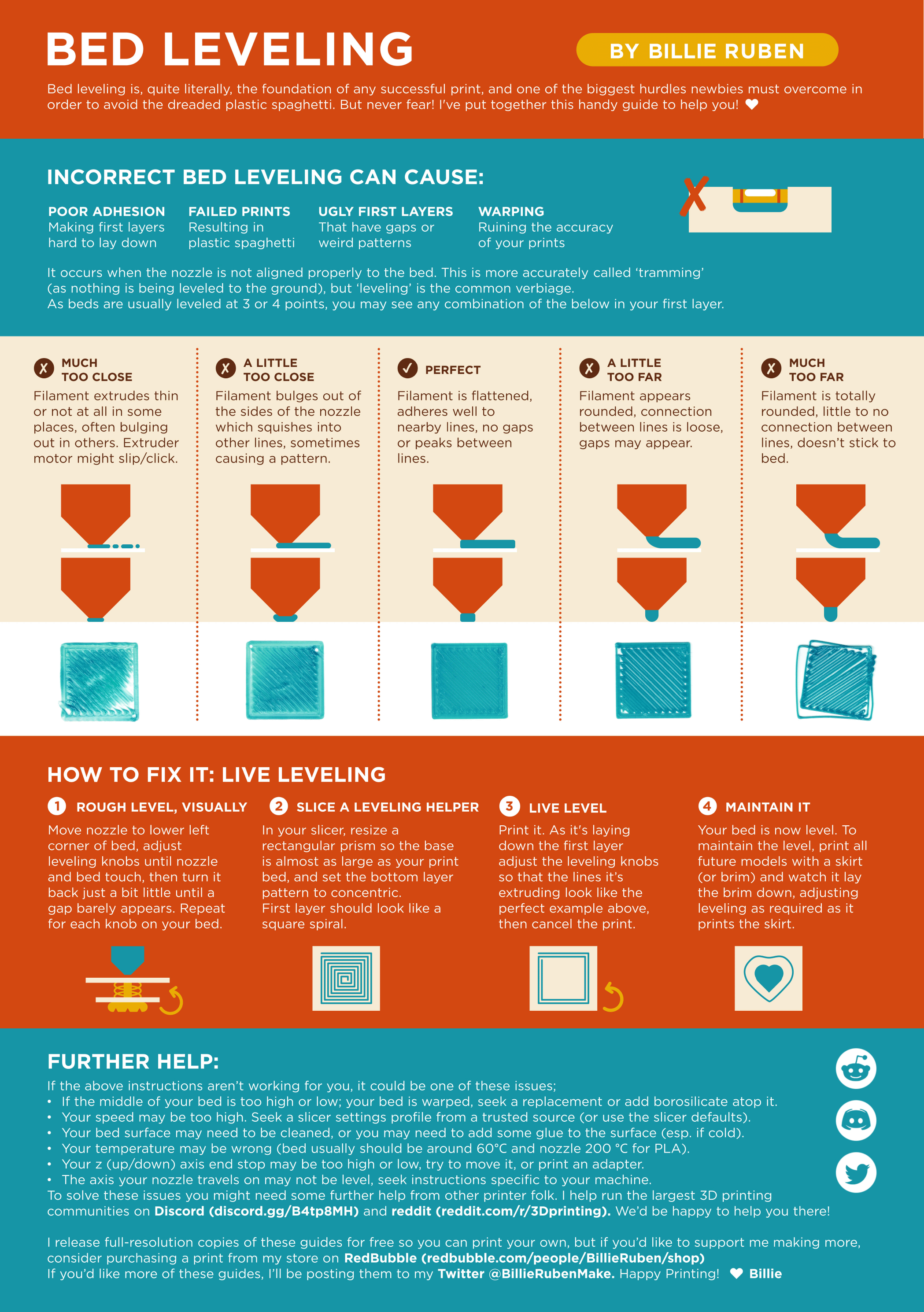
?leveling requested by: abraxasreturned#0
candid geode
The print should look like the middle square
candid geode
Yeah U welcome
prime trail
Thanks
candid geode
But please don’t curse that much if U don’t get something
candid geode
Pic?
 candid geode
That’s too low
prime trail
Ok
candid geode
Far too low I’d say
prime trail
So -1.68?
candid geode
Just do +0.10 what you had before
prime trail
-1.62 seems good
candid geode
Might do it too
candid geode
0.10, not 10.00
candid geode
verbal dust
Just check if it looks like this one
prime trail
Ok
candid geode
But if -1.62 looks good it should work

 candid geode
Nah those ripples show that it’s too close
 prime trail
: /
 candid geode
Not perfect but would do
candid geode
Next time maybe
prime trail
Ok
candid geode
So yes you can delete jt
candid geode
Idk
prime trail
K
verbal dustBOT
Print one of these!
Reversible Ratchet Tool
Automatic Zen Garden
Chainmail Wallet
Customizable Sanding Stick
Photographic Sweep Stand
Smartphone Photo Studio for #3DBenchy and tiny stuff
Center Finder For Edges Set
Modular Mounting System
1.75mm Filament Clip
Parts Tray Drawers
Hand-Screw Clamp
Yet ANOTHER Machine Vise
G-Clamp fully printable
Monster Mouth Headphone Holder - Clampable
Still undecided? use ?random_thing for something entirely else
?whattoprint requested by: abraxasreturned#0
candid geode
You can print one of there if U want
candid geode
But yeah happy printing, that’s it I guess. If U need more help U can ask (kindly) here or dm me, I’m going to sleep now. It’s 1am here LOL.
verbal dustBOT
This post has been closed due to inactivity.
This post has been inactive for over 1 hour and so has been closed. To reopen this post simply send another message.
verbal dustBOT
This post has been closed due to inactivity.
This post has been inactive for over 1 hour and so has been closed. To reopen this post simply send another message.