
#Printing circles
1 messages · Page 1 of 1 (latest)
 royal zinc
 limber ravenBOT
royal zinc
Ive been trying to get these printed but they either dont stick or start stringi...
AI Help
It sounds like you may be experiencing adhesion issues and stringing with your prints. Here are a few tips to troubleshoot:
-
Bed Leveling: Make sure your print bed is properly leveled. This can greatly affect adhesion. Use a piece of paper to check the distance between the nozzle and bed at different points.
-
Bed Temperature: Ensure the bed is heated to the appropriate temperature for PLA (usually around 60°C) to help with adhesion.
-
Nozzle Temperature: Check that you are printing at the correct temperature for PLA filament. Typically, PLA prints well between 190-220°C.
-
Retraction Settings: Adjust your retraction settings in your slicer software (like Orca) to reduce stringing. Start with a retraction distance of around 6mm and a speed of 40mm/s.
-
Print Speed: Try reducing the print speed to help with stringing issues. Slow down the overall print speed or adjust speed settings for outer walls.
-
Cooling: Ensure that your cooling fan is properly cooling the printed ...
WARNING: This response is AI generated and may contain errors.
royal zinc
Nozzel Temp: 210
Bed Temp: 60
Bed Leveling is fine I believe
Print Speed I think is 5mm, but then I halfed it and still got this issue.
 simple karma
sorry, probably won't be able to help, but 5 MM/S???? did you mean 50???
5 is insanely slow
royal zinc
simple karma
sorry, probably won't be able to help, but 5 MM/S???? did you mean 50???
extrusion speed 5mm, might be different to print speed mb!
simple karma
ohh yeah, please clarify lmao
simple karma
i assume the circles are supposed to be the same thickness all around?

and what's your printspeed?
royal zinc
im not too sure on print speed where do i check that
simple karma
im not too familiar with orca slicer
royal zinc
simple karma
i assume the circles are supposed to be the same thickness all around?
i dont thunk so but its the beginning of a tower thing so thats not an issue its more the stringing thats occuring then bad prints happen off of it
simple karma
royal zinc
i dont thunk so but its the beginning of a tower thing so thats not an issue its...
alright, but can you double check? still seems to be a weird shape
or a weird angle
royal zinc
simple karma
alright, but can you double check? still seems to be a weird shape
checking now
simple karma
idk if its in orca but you can usually select individual layers
like theres a slider and you can switch between layers to see what each layer looks like
royal zinc
yeah this is what its meant to look like
 simple karma
ahh alright, just wanted to make sure
royal zinc
if its the speed its telling me at the bottom at the beginning its around 30-50
simple karma
does the printer have a fan from one direction or two
royal zinc
then jumps between 80-500 later on
royal zinc
simple karma
does the printer have a fan from one direction or two
uh two I believe
simple karma
500? damnn
royal zinc
simple karma
500? damnn
think so
 simple karma
yea sorry i can't really help, just wanted to make sure because that shape looked weird
royal zinc
no worries
 crystal shoal
@royal zinc First thing first: when was the last time you washed this bed with soap and water?
Your Z offset and leveling look OK
crystal shoal
Hmm. I'd up first layer speed to 35mm/s and make sure you have detect narrow solid infill disabled
royal zinc
could it be the chamber is too cold? sits around 28C
crystal shoal
Then yeah totally fine, you want that chamber between 20-30
Too high and it'll get melted in the extruder where it shouldn't
royal zinc
crystal shoal
Hmm. I'd up first layer speed to 35mm/s and make sure you have detect narrow sol...
Ill look for the narrow solid infill setting, not sure how to increase first layer speed tho?
crystal shoal
First layer speed is under Speed
royal zinc
OrcaSlicer ^
crystal shoal
May need to change settings to Advanced view
 crystal shoal
For the perimeters, 105 on those tiny sections
Change both to 35
Don't have to leave it there but for this print seems like it will benefit
royal zinc
okay sounds good
crystal shoal
And then another potential help is setting initial layer height to 0.25
That is under Quality
royal zinc
yep thats already sest to 0.25
crystal shoal
Nuclear option is to add a Brim under Other as "Outer Brim Only"
 crystal shoal
Sometimes does weird things to small sections like that which can cause some issues
royal zinc
done
 crystal shoal
And if that don't work hire an exorcist
royal zinc
hahaha okay
ill get that going
and check back in like 5-10 once its started
it formed a giant mess, cleaned it up, rewashed the plate and retrying just incase it was a one off nozzel didnt get cleaned properly or something
@crystal shoal

not sure what happened but even first layer isnt going down properly
do u know of an exorcist?
i got 0 idea whats happening hahaha trying a 3rd time
royal zinc
sorry for the reping @crystal shoal still not working properly getting uneven prints and bumps


 crystal shoal
royal zinc
sorry for the reping <@174751450075758594> still not working properly getting un...
Hm. That offset looks slightly off on that one.
Like 0.1mm too high.
It is supposed to be automatic on that machine though
royal zinc
is it? ive manually changed the z offsset
so could that be affecting it?
think im sitting at an offset of 0.280mm?
royal zinc
crystal shoal
Like 0.1mm too high.
wait so lower it 0.180mm?
crystal shoal
That could definitely be it then
royal zinc
crystal shoal
That could definitely be it then
so should I lower it by 0.1mm?, or completely remove the z offset?
crystal shoal
Lower it by 0.1mm, on that machine I believe offset is a positive value? Could be wring
If 0.18 is closer then yes
royal zinc
crystal shoal
That could definitely be it then
is that too close now?


 royal zinc
okay sure!
royal zinc
crystal shoal
Back off like 0.03
Is this good?


looks very similar to the above
still too close?
crystal shoal
Still just a tad close
limber ravenBOT
Leveling Your Printer
Here is a handy infographic that will help with levelling your printer.
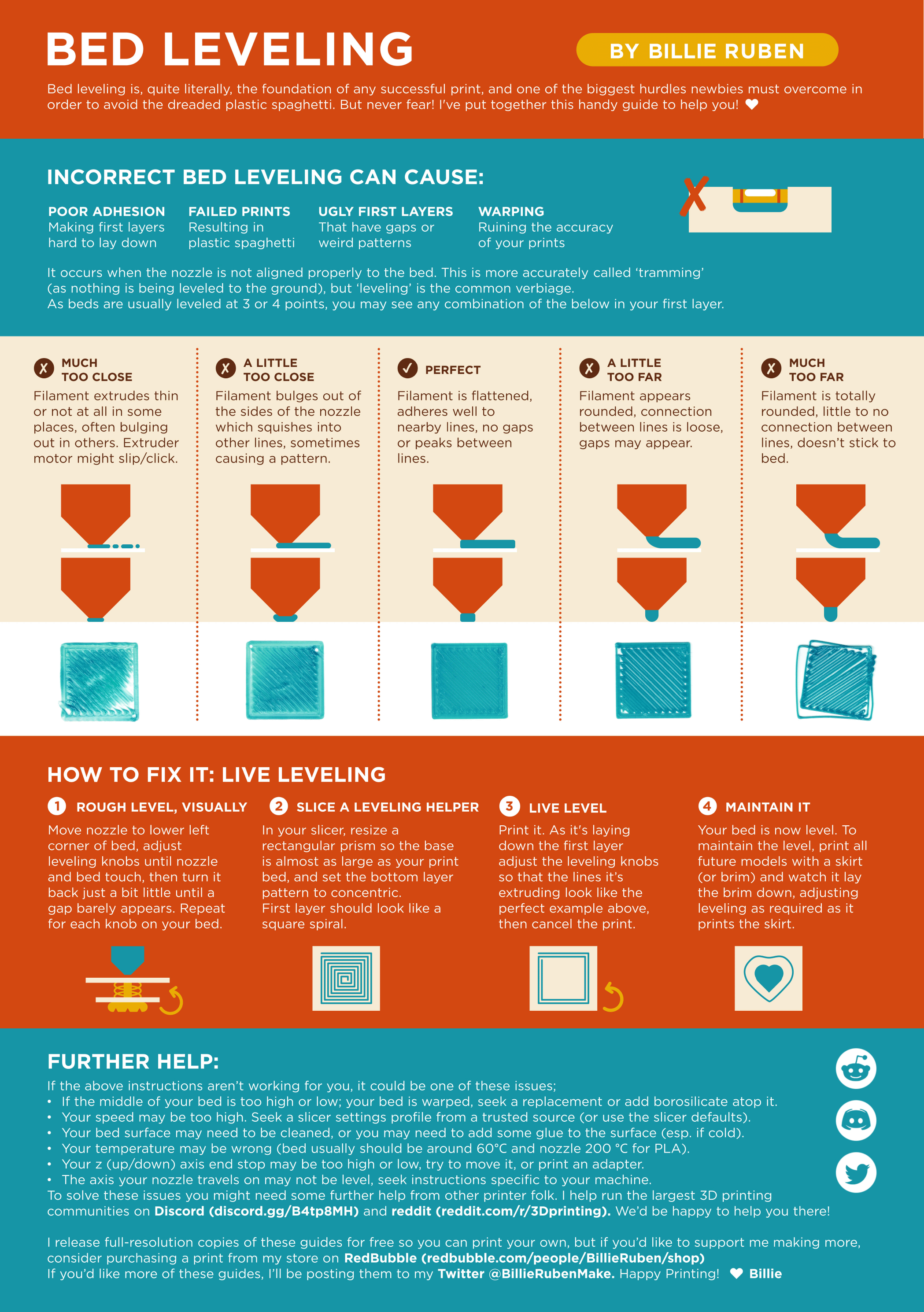
?leveling requested by: derragon#0
crystal shoal
Should look like the center one
royal zinc
ive printed patches before and found it best at 270
but then at 270 it doesnt work
with these circles lol
trying at another 0.03mm increase
royal zinc
just gonna let it print and see what happens