#can someone help level?
1 messages · Page 1 of 1 (latest)
 nimble veldt
 winged kayakBOT
nimble veldt
I need help levelling my k1 printer bed, I’ve no idea what to do and my bed has ...
AI Help
To level your k1 printer bed with a 1mm range, follow these steps:
- Home the printer.
- Use a sheet of paper or a feeler gauge to adjust the distance between the nozzle and the bed. Turn the leveling screws under the bed to move the bed closer or further from the nozzle until you feel slight resistance when moving the paper under the nozzle.
- Repeat the process for all corners and the center of the bed, adjusting the bed height as needed.
- You can also adjust the bed leveling settings in your firmware or slicer software for finer adjustments.
If you are still having trouble, it may be helpful to check for any loose parts or issues with the printer's hardware that could be affecting the bed leveling process.
WARNING: This response is AI generated and may contain errors.
Leveling Your Printer
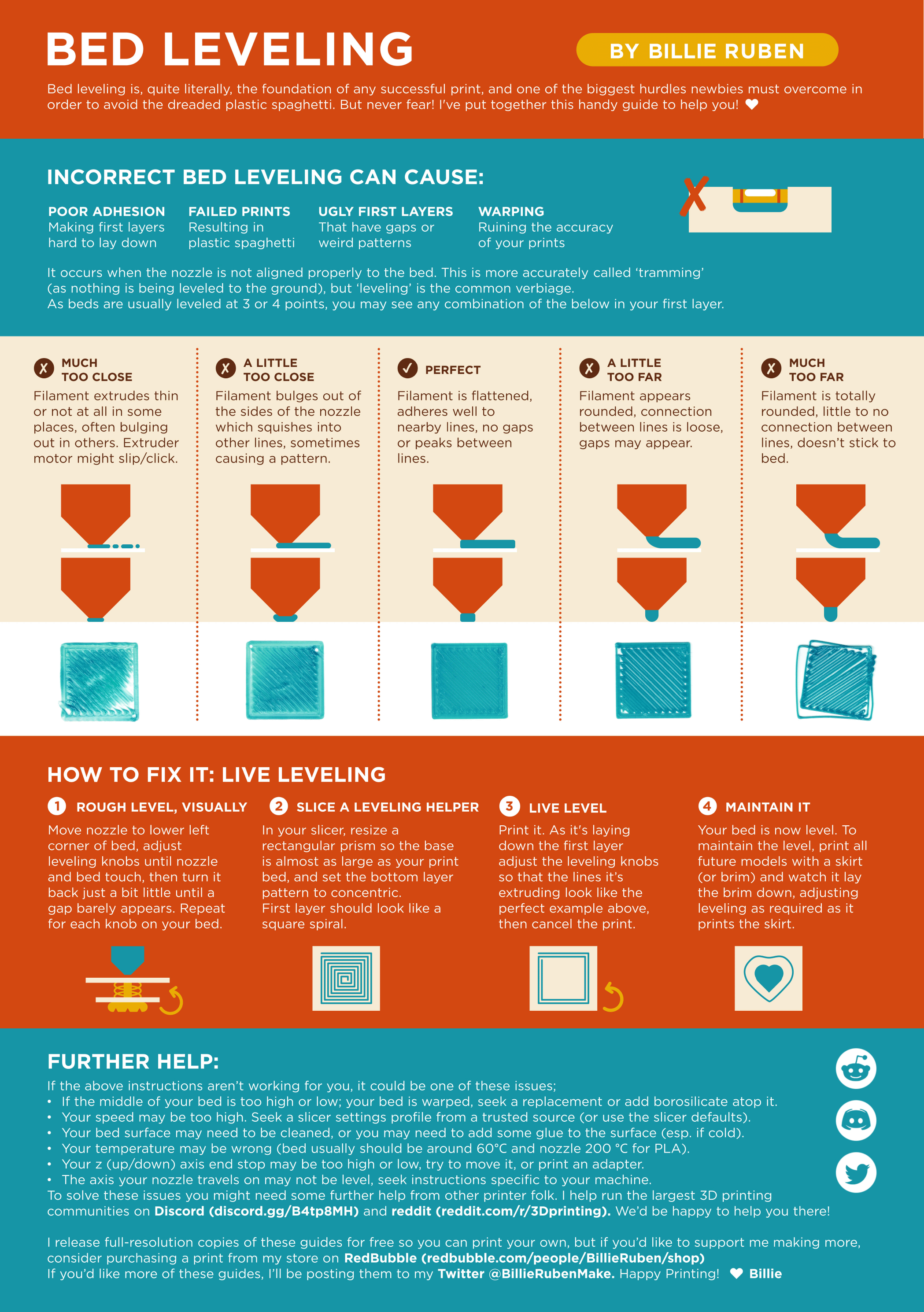
Here is a handy infographic that will help with levelling your printer.
?leveling requested by: sledmasterfred#0
nimble veldt
 thorn hull
What Exactly What You Looking For?
Just a better bed level
thorn hull
Can You Send A Picture Of The Mesh?
nimble veldt
Yeah lemme get it
thorn hull
nimble veldt
Yeah lemme get it
The K1 Has Knobs Under The Bed Right?
nimble veldt
thorn hull
The K1 Has Knobs Under The Bed Right?
Umm, lemme check I’m not entirely sure, I recently got it you see, about a week ago. I’m doing another mesh so you can see what it is exactly right now
thorn hull

If your printer bed looks more like a slip-n-slide, this is the video for you!
Help support this channel! https://www.patreon.com/Needitmakeit
In this video we first show the recommended way to level the bed, and yes it was better, but not nearly good enough. We have come up with a far better and easier way to do it from the top. If your bed...
nimble veldt
That is under the bed, I’m not too sure what you mean by “knobs” sorry
 thorn hull
nimble veldt
That is under the bed, I’m not too sure what you mean by “knobs” sorry
Ah It Doesn't Have Them
thorn hull
thorn hull
https://m.youtube.com/watch?v=mW4jI42n3z4
You're Going To Have To Play With Belts
nimble veldt
thorn hull
You're Going To Have To Play With Belts
Guess that’s going to have to wait until I move then, as moving house within a few days and all my tools etc are packed ready to move so don’t have them to hand
The range has gone down slightly but this is the mesh that has just finished
 thorn hull
https://m.youtube.com/watch?v=mW4jI42n3z4
After Doing Those Steps Do This, And Run Z Tilt Adjust
https://github.com/Guilouz/Creality-Helper-Script-Wiki

GitHub
Wiki for Creality Helper Script. Contribute to Guilouz/Creality-Helper-Script-Wiki development by creating an account on GitHub.
thorn hull
nimble veldt
The range has gone down slightly but this is the mesh that has just finished
Yeah I'd Wait Until You Get Settled In, It'll Be A Bit Of A Process
nimble veldt
Will do, thank you, I was hoping I didn’t have to mess around with the belts but
thorn hull
nimble veldt
Will do, thank you, I was hoping I didn’t have to mess around with the belts but
How Are Your First Layers
1mm Is Bad, But Can Be Compensated For (kinda)
nimble veldt
Poor adhesion to the plate, has gaps in the layers like it has separated from the line next to it, and looks like bubbles from the bed in places
 prisma kite
nimble veldt
Poor adhesion to the plate, has gaps in the layers like it has separated from th...
You can add manual bed leveling knobs and silicone spacers if you want
https://discord.com/channels/167661427862142976/1190693789820539051 read here, shynd wrote how manual leveling works