#help with ender 3 v2 Neo screen
1 messages · Page 1 of 1 (latest)
 torn stagBOT
AI Help
It sounds like you may be experiencing a firmware compatibility issue. I recommend checking if the firmware you uploaded is specifically compatible with the Ender 3 V2 Neo model. If it is, try re-flashing the firmware to ensure it was installed correctly. If the issue persists, you may want to reach out to the manufacturer for further assistance.
WARNING: This response is AI generated and may contain errors.
 surreal dragon
Screen works, but motors do not. After updating the motherboard's firmware the motors do not seem to work, everything is plugged in properly, and the motors worked fine before hand.
 oblique gorge
surreal dragon
Screen works, but motors do not. After updating the motherboard's firmware the m...
When you flashed did you flash the BLTouch version or standard?
surreal dragon
oblique gorge
When you flashed did you flash the BLTouch version or standard?
The only version that i can flash with is CR-touch
i can extruder filament via prontables app, but i cant move the motors at all
oblique gorge
Which leads me to believe we have the wrong firmware installed
surreal dragon
these are the only ones i can get, and i dont know which one to get
 oblique gorge
Where did you download it from? The Creality site for the V2 Neo doesn't even have the 4.2.7 option
oblique gorge
surreal dragon
these are the only ones i can get, and i dont know which one to get
You know what board version you have
surreal dragon
oblique gorge
Where did you download it from? The Creality site for the V2 Neo doesn't even ha...
Creality Cloud
oblique gorge
None of those match
surreal dragon
oblique gorge
You know what board version you have
i dont know
oblique gorge
What board did you buy.
surreal dragon
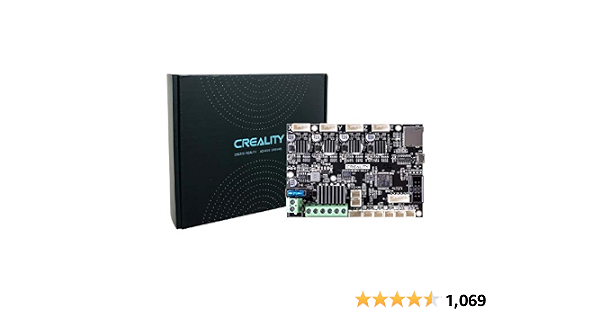
Official Creality New Upgrade Motherboard Silent Mainboard V4.2.7 for Ender 3 Customized and Non-Standard Matchingl Ender 3 Silent Mother Board, Also for Ender 3 Max/Ender 3 Neo/3 V2 Neo/3 Max Neo
This one
oblique gorge
What does it say there.
surreal dragon
4.2.7
oblique gorge

creality
You can download Ender-3 V2's product manual & firmware and slicing software on here.
Ignore that it's non neo.
Marlin-2.0.1-HW-4.2.7-mainboard-V1.1.2-compatible with BLTouch and filament detection
surreal dragon
oblique gorge
https://www.creality.com/pages/download-ender-3-v2
Do i download from this link, or no because this one is Ender 3 v2 but not V2 Neo?
oblique gorge
oblique gorge
Ignore that it's non neo.
^
surreal dragon
okay sorry
i will download now, thank you
@oblique gorge Do I also have to update the screen?
oblique gorge
Ah crud the screen part may be different
GitHub
In this repository there are the configuration files and releases for the Professional firmware with several features enabled. You can use the Configurator if you want to compile your own custom se...
surreal dragon
oblique gorge
Ah crud the screen part may be different
The firmware worked, the printer works! Thanks so much Derra (-:
oblique gorge
This may be better
oblique gorge
surreal dragon
The firmware worked, the printer works! Thanks so much Derra (-:
Holy shit yay
I was worried for a sec that we'd need to build a newer version
surreal dragon
Now I just need to find the screen Firmware, but the printer itself works!
oblique gorge
That may be due to the non neo version and that's on me
The mrisoc configurator can be used to build a (hopefully) fully compatible version
Lets you select the board, printer version, etc.
surreal dragon
oblique gorge
The mrisoc configurator can be used to build a (hopefully) fully compatible vers...
So I just download the link you sent me, put in all my printer's info and it will output a file for me to use to file my printer's board with? Or do i flash the printer's screen with?
oblique gorge
Will potentially still need to update the screen
I have not used the utility before but know some other folks have
surreal dragon
oblique gorge
I have not used the utility before but know some other folks have
im not entirely sure what I need to do, I cant seem to find the download on the github page, could you help?
oblique gorge
surreal dragon
im not entirely sure what I need to do, I cant seem to find the download on the ...
Have you built Marlin before?
surreal dragon
oblique gorge
Have you built Marlin before?
Nope never ever
oblique gorge
Found it
That's the V2 Neo firmware from the 4.2.7 board page

While knowing how to build Marlin is nice I am not subjecting you to that right now lol
surreal dragon
Thank you so much derra, i probably wouldve gaven up and just thrown it out, thank you so much.
oblique gorge
Did that work? 
surreal dragon
oblique gorge
Did that work? <:catlook:748595098652114944>
Yes it worked! I had to flash the screen too but everything works perfectly now! thank you so much