#Bed level not working SV06 Plus
1 messages · Page 2 of 1
 autumn girder
 atomic karma
how do i turn them back on
autumn girder
u have to home it
autumn girder
wdym it didnt go to the end
atomic karma
it didnt go to the end of the x axis
cos it rammed into the top
PID tune the bed. Ideally, all PID tuning should occur at the temperatures that you print most at.
PID_TEST_BED TEMP=70
SAVE_CONFIG (once completed)
PID tune the extruder while part cooling fan runs at 25%.
PID_TEST_HOTEND TEMP=245
SAVE_CONFIG (once completed)
Adjust z_offset. Make sure your nozzle if very clean. Do the Paper test.
DO_PROBE_CALIBRATE
Follow z_offset setup in Mainsail/Fluidd.
SAVE_CONFIG (once completed)
Create a bed mesh.
DO_CREATE_MESH
SAVE_CONFIG (once completed)
what the fuck is PID tuning
autumn girder
basically temp
atomic karma
ah
how do i do this
autumn girder
just send the PID_TEST_BED TEMP=60 into the console
or whatever your usual printing temp is
atomic karma
for pla its 60
for petg its 83
autumn girder
i would recommend the higher temp
atomic karma
yeah
gonna be doing a lot of PETG work soon
@autumn girder
can i unplug my laptop when im not using it
gonna need to move my setup around to account for it
got no room
autumn girder
when ur not using it, yeah sure
atomic karma
oh nice
does the PID tuning just send it up to max temp
then back down a little and repeat
autumn girder
it goes to the whatever temperature you set
PID tuning is to make sure the temperature dont overshoot
or undershoot
atomic karma
oh nice
autumn girder
basically make the temp just right
atomic karma
so itll take a little while
autumn girder
yeah
atomic karma
what was kenobi on about with the z offset thing
i think he said something about how i can make it change depending on where the nozzle is
atomic karma
your doing your z offset??
autumn girder
yeah take a look at #1261411811752673321 lol
atomic karma
oh goddam
that must have been a pain in the ass
autumn girder
what is?
autumn girder
atomic karma
should i wait for the bed to cool before doing the extruder PID test
nah, you can do it now
autumn girder
atomic karma
your issue
eh its fine
atomic karma
nice
glad you got yours sorted
just need to get my bed level then imma be all set
autumn girder
besides i kinda like tinkering
atomic karma
i saved config before starting the extruder PID test
and same here if im being honest
as guelling as this has been
its been a lot of fun
autumn girder
So have you done the PID tuning and z offset?
atomic karma
yeah
about to do bed mesh
autumn girder
Oh alright
Now let's actually see how bad it is
Watch it be decently level, and it was just not using the bed somehow
autumn girder
Just restart again or wait
atomic karma

well i ran g28 after hitting do mesh so im not sure whats gonna happen
oh nice
its getting ready for a mesh
atomic karma
autumn girder
Watch it be decently level, and it was just not using the bed somehow
eh
what the probe just wasnt using the bed
that would be funny as hell
autumn girder
atomic karma
well i ran g28 after hitting do mesh so im not sure whats gonna happen
It's gonna heat it up and do abl
atomic karma
yep
its doing it now
omfg its so fast
fucking 3k accel
also im not gonna get the screen to work
should i unplug it or just leave it
autumn girder
i suggest leave it
atomic karma
k
autumn girder
and why not
autumn girder
cba?
atomic karma
cant be assed
autumn girder
oh lmfao
atomic karma
cant be bothered
autumn girder
i mean you dont have to do it now
atomic karma
i might in the future
autumn girder
you can do it later after getting the well deserved rest
atomic karma
got some stuff to do today
no rest for me until its done
autumn girder
so youre staying awake?
atomic karma
yeah
autumn girder
might as well go allthe way and fix ur sleep schedule
keep urself awake till ur usual sleep time
not medical advice*
dont take my word
atomic karma
shops close early today so i have to get out before they close
and im gonna try stay awake
cant promise i can lmao
autumn girder
yeah i know its difficult lmao
atomic karma
erm
ive just done the ABL and saved config
went to height map and its not there
autumn girder
send screenshot

 spring fern
i dont believe this is an exact scale

did u get this from pronterface results?
wait
thats klipper
atomic karma
 autumn girder
turn on scale gradient
atomic karma
 spring fern
and scaleyes
autumn girder
holy shit
 autumn girder
1.7 mm range
atomic karma
 atomic karma
 autumn girder
i mean right side of the whole page

mines also bad
probably some x twist
z tilt
atomic karma
 spring fern
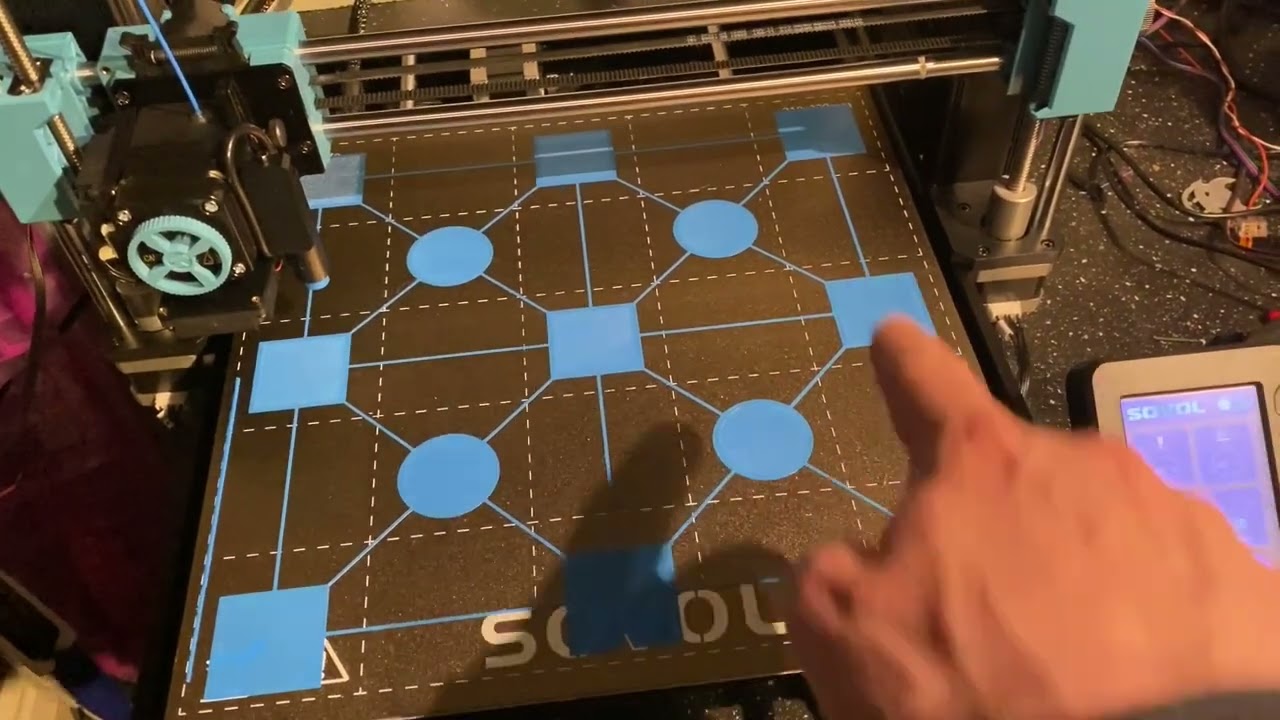
A square & true setup can make all the difference to a machine that is struggling to achieve an even & uniform first layer across the whole bed, & where the ABL system can't seem to compensate.
It might not be the definitive answer to all issues on all machines but this absolutely 100% fixed the issue on my production unit!
here go back to marlin
this dude got it down
autumn girder
naaah
atomic karma
ive already done that
autumn girder
no way u tell us to go back to marlin after 8 hours of installing klipper
atomic karma
yeah
used my set square
spring fern
LOL
atomic karma
made sure it was all good
spring fern
klipper can still compensate for that
just gotta find the right lines of code to smack in the printer.cfg
autumn girder
alright i go brb, got some stuff to do
atomic karma
bet
spring fern
@atomic karmago to klipper server and ask for advice on making the bed compensate for that mesh. they will harass u and bully u but also give u a good answer. or many answers. and many more questions as well. best of luck soldier.
atomic karma
spring fern
<@1234097372708212778>go to klipper server and ask for advice on making the bed ...
well goddam
thanks for all the help the past like week
hopefully i can get it sorted so i can print again
cheers guys
spring fern
id help more but klipper is beyond my expertise. theres sooooooooo many different types of bed meshing. i ended up going with KAMP
and then within KAMP there are more bed meshing codes u can add in.
when i tried to setup kamp i got nothing but errors and then someone just linked me the guide and im like "dude im already following the guide i need help thats why i got this error i need help" and their like "well follow the guide!!!! ur obvisouly doing it wrong start over" and thats basically the kinda help u get over there.
they will assist eventually u just have to be persistant with them
and dont joke around. their so fucking serious over there
fucker said "lose the attitude or im not helping u"
all i said before that was "idk what that is"
over and over to her questions and i had to keep googling them
apparently "idk" is an attitude
pisses me off
fuckers
and they dont tell u what to do. they juist keep linking u things and make u read all the documentation.
atomic karma
oh goddam
sorry for dipping for a sec
sounds like a pain tbh
you got a link by chance
spring fern
i have to DM it to u
abbey or aubey or something like that was the one who helped me a lot
still dont like her thughu. especially ESPECIALLY that one dude. forgot his name though. omg he always insulting my intelligence.
atomic karma
lmfao
ive just put a message out so hopefully ill get an answer some time soon
anything i should do whilst i wait
spring fern
be ready to link PRINTER.CFG files and stuff
use '''
when u coipy and paste it in
the tilda key 3 times
spring fern
and let me know how it progresses
atomic karma
bet
how do i turn the laptop off properly
autumn girder
shutdown -h now
atomic karma
tyty
and just power it on when ready
atomic karma
lovely
you seen #✅|help-quick-questions message this
could that work or no
autumn girder
what could work or no?
atomic karma
taking the printer apart to bend the magnet
well
either way
imma grab a power nap and get up in a few hours
ill catch yall later
thanks so much for your help @autumn girder
honestly been a lifesaver
autumn girder
atomic karma
taking the printer apart to bend the magnet
dont ask me, i have no experience/knowledge in that
atomic karma
ahh fair
autumn girder
atomic karma
well
either way
imma grab a power nap and get up in a few hours
ill catch yall l...
alright, have a good nap
atomic karma
cya
autumn girder
cya
spring fern
@atomic karmaoh, and if u type a command into linux to communicate with ur klipper controller. SUDO means override admin. or some shit like that. so if u get an error try typing in SUDO at the start of ur command. knowing this would have saved me $45 and 4 weeks of every day frustration.
autumn girder
$45?
atomic karma
Oh goddam
spring fern
i bought an entire klipper extension board cuz my commands wernt working
spring fern
well $20 plus some fans to setup
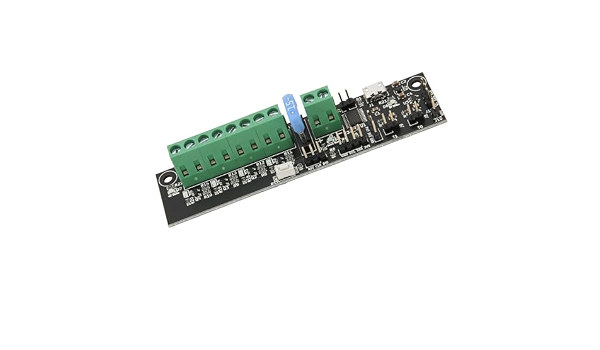
How to Use: Available after installation Specification: Item Type: V2.4 for Klipper Expander Board Material: PCB Applicable : For V2.4 Package List: 1 x For V2.4 for Klipper Expander Board
autumn girder
and for what
spring fern
its to add other things. i added AUX fans to my setup
i could have plugged them into the PI board but the linux wouldnt report back to me the pin OUTPUT and it wasnt documented online.
4 weeks later im talking to some random on voron server and he said why didnt u jhust type "sudo"? and im like "what???" and i fucking did it and it worked im thinking "MOTHER FUCKER WHY DIDNT FUCKING GUIDE SAY THAT!!!!!!!!!" i was so pissed.
autumn girder
for linux users that are already familiar, sudo is very obvious just saying
that was like one of the earliest thing i learned about linux
but yeah i understand ur frustration
spring fern
and klipper server wouldnt help me with it. they said what im trying to setup up is "impossible". i went to voron server cuz i know their smart as fuck. and sure enough the first dude i speak to was able to help me set it up. ON TOP OF THAT he ended up being the one who designed that klipper expander board. i didnt even know til he finshed helping me set it up and im like holyyyyy crap his GITHUB page with its documentation actually matches his discord name hes not lying lol!
autumn girder
what were u even trying to setup, and on what printer
spring fern
autumn girder
but yeah i understand ur frustration
yeah. i didnt know what linux was til i started setting up klipper. its litterally just text feedback. its horrible. all keywords and commands. i hate it.
ENDER 3 S1 PLUS aux fans
cuz my cooling is DOGSHIT
2 5015s horrible air flow
i added 3 5015s in the back so i had 5
autumn girder
damn thats alot
spring fern
still wasnt enough!
its the same concept as the sv07


they have the aux fans on the Y axis blowing at the print. this is bascially what i setup

very simliar.
also it turned my printer into a legit heater. it was a horrible idea and awful experience. room heated so quickly. im sitting there sweating for no reason.
 uncut siloBOT
This post has been closed due to inactivity.
This post has been inactive for over 1 hour and so has been closed. To reopen this post simply send another message.
autumn girder
@atomic karma
atomic karma
yoo
autumn girder
okay first, ssh into the laptop
then run ls /dev/serial/by-id/*
what output do you get
atomic karma
/dev/serial/by-id/usb-1a86_USB_Serial-if00-port0
atomic karma
 autumn girder
no, just the printer.cfg
atomic karma
where do i check
double click it
autumn girder
yeah just click it once
autumn girder
can u go to machines tab
go here and download the klippy log file

and send it to me
 autumn girder
eh?
atomic karma
{"error": {"code": 404, "message": "Not Found", "traceback": "Traceback (most recent call last):\n\n File "/home/frogman/moonraker-env/lib/python3.12/site-packages/tornado/web.py", line 1790, in _execute\n result = await result\n ^^^^^^^^^^^^\n\n File "/home/frogman/moonraker/moonraker/components/application.py", line 796, in get\n self.absolute_path = self.validate_absolute_path(\n ^^^^^^^^^^^^^^^^^^^^^^^^^^^^\n\n File "/home/frogman/moonraker-env/lib/python3.12/site-packages/tornado/web.py", line 2900, in validate_absolute_path\n raise HTTPError(404)\n\ntornado.web.HTTPError: HTTP 404: Not Found\n"}}
autumn girder
in any page
top right there should be a shut down icon
click that, and click restart firmware
atomic karma
bruh
i didnt even see that
my b
went to bed earlier
fell asleep after 2 minutes
not working
should i shut it down
then turn the printer on
then the laptop
then mainsail
autumn girder
yeah sure
autumn girder
then idk, try reinstalling moonraker
atomic karma
how do i bring the install menu up again
autumn girder
?kiauh
uncut siloBOT
The Klipper Installation And Update Helper is a exactly what it says. Its the easiest and most convenient way of getting a bare Klipper installation onto a host device and your printer. Check for an example configuration available for your machine. https://www.klipper3d.org/Example_Configs.html . The Klipper Configuration Reference provides further reading about setting up your configuration files. https://www.klipper3d.org/Config_Reference.html

GitHub
Klipper Installation And Update Helper. Contribute to dw-0/kiauh development by creating an account on GitHub.
atomic karma
gmt
autumn girder
just gmt?
atomic karma
yeah
england
atomic karma
not working
autumn girder
hmm dont really know then, maybe ask the klipper server
atomic karma
k
atomic karma
@spring fern
you arent wrong
theyre assholes
autumn girder
atomic karma
<@154072287564267521>
you arent wrong
theyre assholes
no they're not?
autumn girder
eh, its just a slight annoyance that came through text
atomic karma
@autumn girder
erm
the nozzle just dug itself into the bed
uncut siloBOT
This post has been closed due to inactivity.
This post has been inactive for over 1 hour and so has been closed. To reopen this post simply send another message.
autumn girder
atomic karma
<@508263121098506263>
erm
the nozzle just dug itself into the bed
i just saw this, is it still doing that?
z offset is too low if it dug itself into the bed
atomic karma
Idk
It was using an old mesh
I'll run another offset print tomorrow
Going to sleep
uncut siloBOT
This post has been closed due to inactivity.
This post has been inactive for over 1 hour and so has been closed. To reopen this post simply send another message.
atomic karma
@autumn girder
i dont suppose you have any gcode i can use with klipper
half the gcode is just unknown commands
autumn girder
What wdym
atomic karma

most commands are unknown
the flavour is set to klipper
and that was from running a flow test
oh and i kind of fixed the bed
just put some washers on the spacers
 autumn girder
Ooh very nice 👍
autumn girder
atomic karma
most commands are unknown
such as...
atomic karma
rn its just m420
the other day it was like 90% of commands
autumn girder
https://github.com/bassamanator/Sovol-SV06-firmware/tree/sv06-plus?tab=readme-ov-file#adjust-your-slicer you did go through this step right?

GitHub
🔥 A comprehensive Klipper configuration for a variety of 3D printers 🔥 - GitHub - bassamanator/Sovol-SV06-firmware at sv06-plus
autumn girder
atomic karma
and that was from running a flow test
from orca?
atomic karma
yeah
autumn girder
can you show ur start gcode
atomic karma
G90 ; use absoulte coordinates
M83 ; extruder relative mode
M104 S150 ; set nozzle temp to 150
G28 ; home all axes
M420 S1 ;load mesh
M140 S[bed_temperature_initial_layer_single] ; set bed temp
M190 S[bed_temperature_initial_layer_single] ; wait for bed temp to stabilize
M104 S[nozzle_temperature_initial_layer] ; set final extruder temp
M109 S[nozzle_temperature_initial_layer] ; wait for extruder temp
G1 X0.1 Y10 Z5.0 F1500 ; move to start position
G1 Z0.26 F150 ; Move lower
G4 S0.5 ; wait 0.5 seconds
G1 X0.1 Y150 Z0.3 F1500 E10 ; prime the nozzle
G1 X0.3 F1500
G1 X0.4 Y15 Z0.3 F1500 E15 ; prime the nozzle
G4 S0.1 ; wait 0.1 seconds
G1 Z0.6 F150 ; lift nozzle
G92 E0 ; Reset Extruder
G1 Z2 F150 ; lift nozzle more
just default
autumn girder
bruh
atomic karma
what
 atomic karma
goddam
autumn girder
PRINT_START is a macro
you can take a look at misc-config.cfg in the cfgs folder
thats wehre PRINT_START is
atomic karma
are they all the macros active
 autumn girder
wdym?
atomic karma
idk how they work
so klipper just uses them as it needs?
autumn girder
macros are basically shortcut, one button to do a series of task
atomic karma
ohh ok
autumn girder
atomic karma
are they all the macros active
these ones you see on the macros panel you can activate manually by clicking on them altho some of them like load and unload filament you have to change the hotend temperature manually
atomic karma
with that start gcode
will it load the latest bed mesh or no
autumn girder
yeah it should
atomic karma
autumn girder
these ones you see on the macros panel you can activate manually by clicking on ...
oh nice
lovely
autumn girder
you can also do adaptive bed meshing
atomic karma
im not sure how to do that tbh
autumn girder
basically before every print, it will auto level the bed, but only on the part of the bed that will be printed on
i use KAMP for that, but ive heard klipper got it built in, so not really sure, but KAMP works fine for me
atomic karma
oh ok
is that gonna be worth it for printing large prints
im gonna be using almost the entire bed
atomic karma
autumn girder
i use KAMP for that, but ive heard klipper got it built in, so not really sure, ...
i might set it up
got no idea what im doing though lmao
autumn girder
if youre gonna be printing the entire bed, it probably means large print, might as well level it to lessen the chance of failure
and it will only take a couple of minute
atomic karma
oh nice
ill set that up at some point then
gonna calibrate my printer first though
autumn girder
atomic karma
oh nice
ill set that up at some point then
gonna calibrate my printer first thou...
okay good luck then
atomic karma
tyty
sorry for being a retard lmao
autumn girder
lmao nah ur not
uncut siloBOT
This post has been closed due to inactivity.
This post has been inactive for over 1 hour and so has been closed. To reopen this post simply send another message.
atomic karma
@autumn girder
hello
ive had some issues with my pc and have lost all my stuff due to a HDD fault
how would i set the printer up again
the laptop and printer are fine but i cant remember what to do
autumn girder
Either scroll up the post and read from the beginning, or try to do it faster by actually following the guide
I'm sure you can figure it out, if u have any questions just ask here
Oh wait it's ur PC that broke?
Yeah this one should be simple then, download the slicer and setup the printer
autumn girder
Rip
atomic karma
if im remembering correctly
i just need to setup terminus again right??
like just copy the port id over and edit the mcu??
autumn girder
You do if u want to mess with ur laptop on ur pc
But if u just want to print then no
But I would just get it
atomic karma
yeah might as well
saves me having to install it if i have an issue with the laptop or something
autumn girder
Did you clean install windows? Or whatever OS ur using
atomic karma
yeah
i have a boot drive and a main drive
so i just wiped the pc
all that was on the boot drive was windows so its no problem
autumn girder
Alright nice 👍
autumn girder
Yh that's probably why
atomic karma
do i still need to get the port id and put that into mainsail when im wanting to print again
im just waiting on some callipers to tune my extruder
atomic karma
i thought you had to edit the MCU and put which port the printer is plugged into??
autumn girder
Nah that's saved into the laptop
atomic karma
ahh ok
autumn girder
Mainsail is just a web UI to control the printer and klipper from other devices
atomic karma
ahh ok ok
sweet
so when im ready to calibrate my printer ill setup mainsail
then i should be printing again
thanks yet again for the help
your an actual life saver
autumn girder
You should already have mainsail setupped
Just have to access it in your PC by going to the browser and typing in your laptops ip
atomic karma
oh ok
the browser i use doesnt require an account or anything so i didnt think it would save when i wiped the pc
autumn girder
I mean what would it save
atomic karma
the mainsail settings and stuff
but yeah
now i realise thats all on the laptop
autumn girder
Yes
atomic karma
sweet
well thanks again for the help
ill probably be back with another dumb question lmwo
lmao
autumn girder
omg
 atomic karma
erm
did you stand the build plate up when you ran the mesh??
atomic karma
ahh ok
thats funny as fuck
atomic karma
thats an idea
you reckon i can print large things on my bed now that its not 1.8mm off??
like something that takes the entire bed
autumn girder
Sure, maybe do a test print first before actually printing the things you wanna print
atomic karma
yeah good point
ill just size up a z offset square and print it
if it all comes out fine then i should be good to go