
#is this good? should I change something?
1 messages · Page 1 of 1 (latest)
 slender vigil
 fast bolt
looks pretty much perfect
you might want to mess with that bottum left side some more but other then that you got it
 haughty loom
The whole left side lol
You need to lower your nozzle so that the lines smear together
When you take it off the bed, it should be one SOLID piece of plastic.
Idk the UI for that specific printer, but go into your nozzle settings and lower it by 0.01 or 0.1 mm until the nozzle catches on a piece of paper that you slide in between the nozzle and the bed
I just had to do this last week, it takes a sec but it’ll make your prints so much stronger and smoother
slender vigil
@haughty loom thanks for the response


These are the 2 adjustment screens I have on my printer. Should I be changing something in this? @haughty loom
 round wrenBOT
Leveling Your Printer
Here is a handy infographic that will help with levelling your printer.
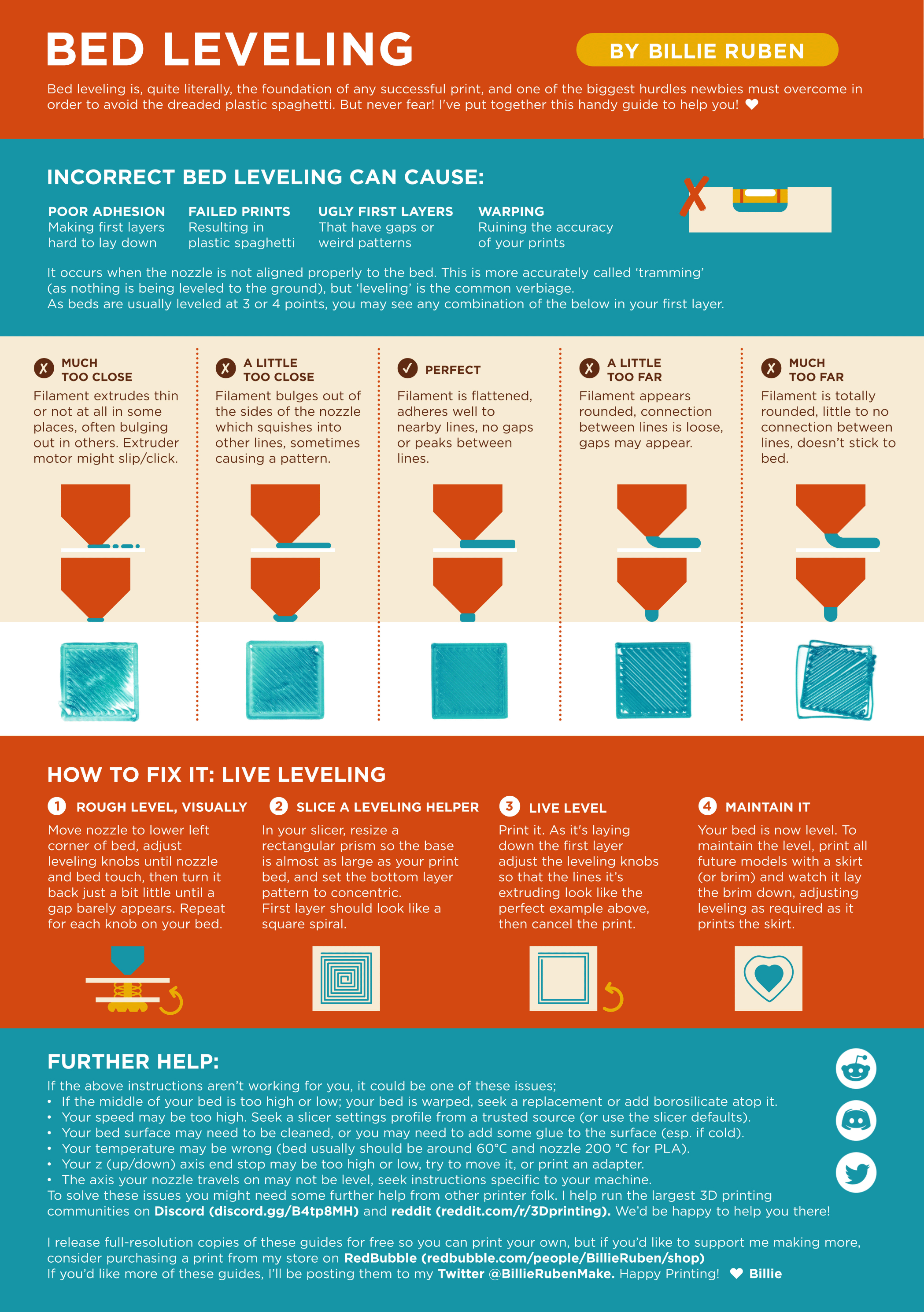
?leveling requested by: m.von.d#0
 sand shore
Should look like the middle
slender vigil
There are no adjusting knobs on this printer, it's a fully automatic bed leveling system. So how do I go about this?
sand shore
slender vigil
There are no adjusting knobs on this printer, it's a fully automatic bed levelin...
Posted it just for the visualization in the middle. You can adjust z offset.
haughty loom
^
Adjust your up and down levels by 0.01mm - 0.1mm until the bed and nozzle are a paper sheet apart
It’ll take some fine tuning
Lmk how things go @slender vigil

 slender vigil
After doing the paper technique, all of my left side layers look good. But it's the right side that is giving me trouble. And there are no individual knows to adjust each side independently. Other than maybe tinkering with the vertical axis. @haughty loom @sand shore
 haughty loom
It looks like it still needs to be lowered
There should be no lines on the print
Like it should literally be one square with no lines anywhere
Here’s what I did a week ago. Start the flatness test print, and while it’s going, do your adjustments. Change it and let it print like a line or two, and if it’s still not all one object, keep lowering it. Do this until you get no breaks or lines in your print.
Hope that helps
slender vigil
I realised that my bed itself is not level
So now working on fixing that with spacers
