#Bed adhesion issues
1 messages · Page 1 of 1 (latest)
 abstract ravine
 blazing shoreBOT
abstract ravine
My Ender 3 v2 neo is having issues with build plate adhesion on the first layer....
AI Help
It sounds like you've taken some good troubleshooting steps already. In addition to what you've done, here are a few more tips to improve build plate adhesion on the first layer:
-
Bed Leveling: Double-check that your nozzle distance is uniform across the entire build plate. You can use a sheet of paper to help gauge the proper distance.
-
Initial Layer Height: Make sure your initial layer height is set appropriately. It should be closer to the bed than the following layers for better adhesion.
-
Bed Temperature: Consider raising the bed temperature to around 60-70°C for PLA. A slightly higher temperature can help with adhesion.
-
Bed Surface Preparation: Using adhesion aids like glue stick, hairspray, or specialized bed adhesion sheets can sometimes help with first layer adhesion.
-
Enclosure: If you're printing in a drafty or cold environment, consider enclosing the printer to maintain a more stable temperature.
-
Print Speed: You mentioned printing at 75% speed. You c...
WARNING: This response is AI generated and may contain errors.
The first layer is quite literally the foundation of a successful print. These are some of the things to keep in mind:
- Wash your print surface with dish soap and water, refer to
?bedcleaning.- Ensure your printing temperatures are appropriate. For PLA, the ideal bed temperature is 55°C-60°C. If the lines appear to come out "gummy" and forms clumps, raising the nozzle temperature may help. Calibrate your nozzle temperature by printing a temperature tower. Refer also to
?platemps.- Relevel your bed and ensure your nozzle distance is equally spaced at each corner, refer to
?paperlevel. If your printer is equipped with a bed meshing probe such as a BLTouch or CRTouch, make sure your Z-offset positions the nozzle close enough to the bed, refer to?z-offsetfor additional information. If your printer has automatic Z-offset calibration, make sure the nozzle is clean while the calibration runs.You can confirm that your leveling and Z-offset is correct by observing your first layer extrusion by printing a full layer test: Printables, Thingiverse Refer to
?levelingfor help with the interpretation of the results.
- Ensure the nozzle is not colliding with the print. This usually presents itself as loud noises and layer shifting. Some causes may include overextrusion, insufficient cooling, mechanical Z axis issues, or insufficient Z hop
- For warp-prone materials such as ABS, Nylon, Polypropylene and others an enclosure is recommended, ensure ambient temperatures are high enough (40°C+) and stable. Consider using a specialized bed adhesive.
Leveling Your Printer
Here is a handy infographic that will help with levelling your printer.
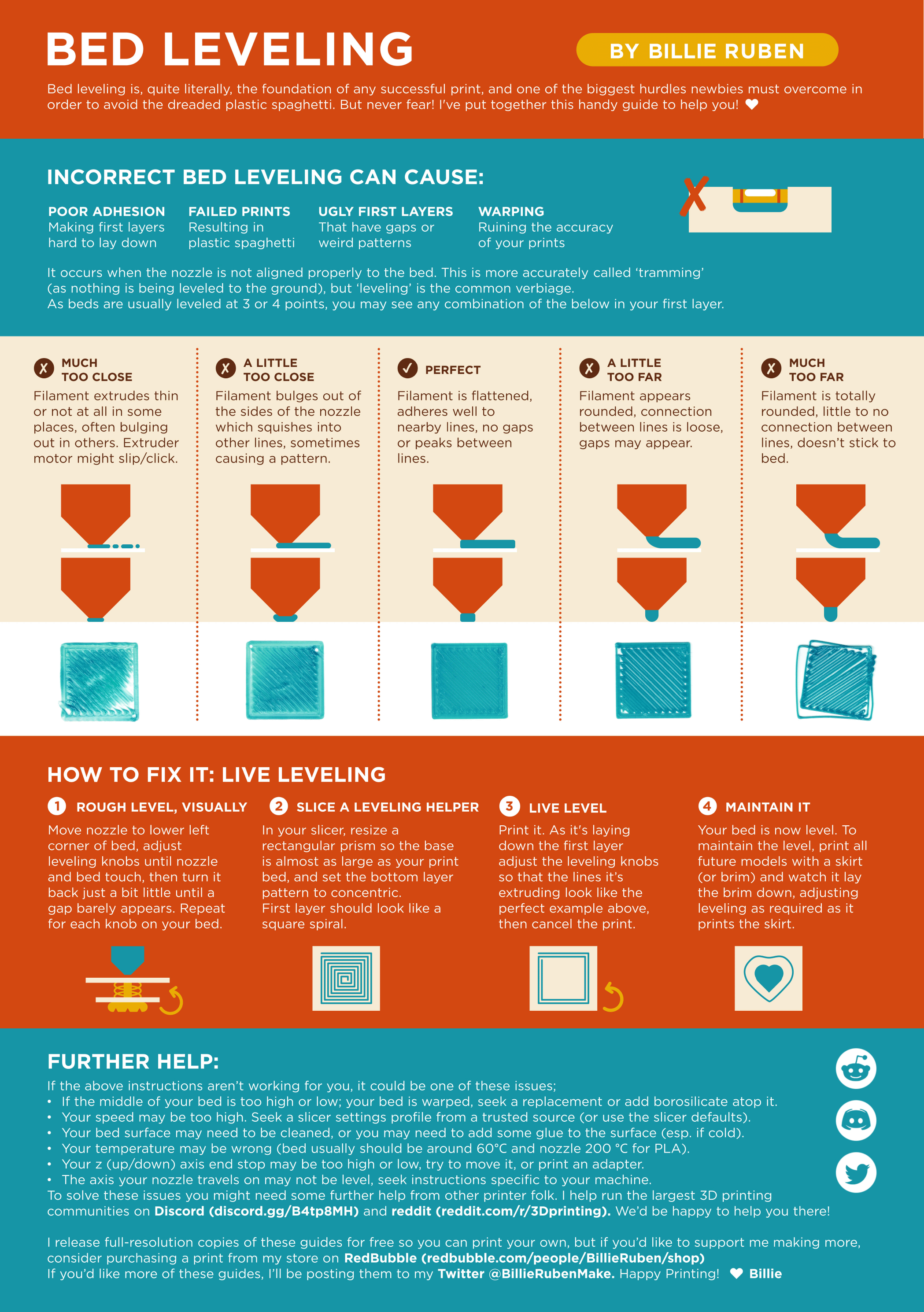
?leveling requested by: bdx.#0
abstract ravine
Thanks
 stiff lagoon
I don't have the exact same printer as you (I'm running an ender 3 pro with bltouch installed) but I was getting a similar thing, I found changing the z offset slightly or going into tune during a print and lowering the z axis just slightly helped a lot
Make sure you bed is level too (either with a probe or the good old paper trick)