#Problems with X-Smart 3

1 messages · Page 1 of 1 (latest)

minor dew
#

Hi, i have bought X-Smart 3 some time ago and i was happy at first but it was never printing like i wanted, there were always some little issues and when i tried to solve one then i was having more of them. I started tuning tutorial but I stopped on the first layer squish. Problem is that its printing uneven on the plate, one side too high and the other one too low, it has inductive probe and its using KAMP, but still something goes wrong, i suspect that its a problem with the firmware. I was contacting the support but they are not helping at all, i am too tired to explain it, i can give some screenshots from it. This is the video of what happens: https://drive.google.com/file/d/1-3tXXbjdSlQb0Y1nyE_jF3iLbPksfFdT/view?usp=drivesdk

near leafBOT
#
AI Help

It looks like you are experiencing bed leveling issues with your X-Smart 3 3D printer, specifically related to first layer squish. Uneven printing on the bed could be caused by a variety of factors, including incorrect probe calibration, bed leveling settings, or firmware issues.

Since you suspect that the problem may be related to firmware, it might be worth checking if the firmware on your printer is up to date. You could also try recalibrating the inductive probe and double-checking your KAMP settings to ensure they are optimized for your specific printer model.

If you are still experiencing issues after checking these aspects, you may need to dive deeper into troubleshooting or reach out to the manufacturer for technical support. However, if the support from the manufacturer has not been helpful, you may want to consider seeking assistance from online communities or forums where experienced users can provide guidance based on the screenshots or video you mentioned.

If you enc...

knotty fractal
#

According to the video, your z offset is very wrong

minor dew
#

but first square was alright

#

you see?

knotty fractal
#

You need to adjust that

near leafBOT
#

ABL (Auto Bed Leveling) uses a probe to measure the bed surface and compensate for deviations in flatness. It is not meant to replace manual bed leveling, but to compensate for imperfections.

Upgrading to ABL requires firmware modifications, so ensure your machine is compatible or you are comfortable with the modification process. Additionally start gcode in the slicer must be updated to enable and load or reprobe for mesh compensation.

Probe Z offset, the distance between the nozzle tip and the probe trigger point, must be set accurately for best results. You can adjust this through Configuration>Advanced Configuration>Probe Offsets or during the first layer of a print using live leveling.

knotty fractal
#

last paragraph

minor dew
#

where are these settings

knotty fractal
#

All have to be perfect otherwise either your z offset is wrong or you are not using the bed mesh

minor dew
#

i am using it...

#

its using KAMP before each print

#

its doing the mesh

#

or maybe there is something wrong in the config that causes the problems

#

im not klipper expert

minor dew
knotty fractal
minor dew
#

i can type the commands

#

and there is something in the menu but it seems to not always work??

#

just Z-offset option

#

so can u help me with this printer or i wont find the help here too?

open ferry
#

under 'calibrating probe z offset'

minor dew
#

// Z position: -1.093 --> -1.073 <-- -1.063

#

// probe: z_offset: 1.080

minor dew
#

should i run this test again or what?

#
17:55:20 
$ PROBE_ACCURACY
17:55:20 
// PROBE_ACCURACY at X:61.500 Y:89.000 Z:49.990 (samples=10 retract=3.000 speed=5.0 lift_speed=5.0)
17:55:30 
// probe at 61.500,89.000 is z=-0.002500
17:55:32 
// probe at 61.500,89.000 is z=-0.005000
17:55:33 
// probe at 61.500,89.000 is z=-0.005000
17:55:35 
// probe at 61.500,89.000 is z=-0.007500
17:55:36 
// probe at 61.500,89.000 is z=-0.007500
17:55:38 
// probe at 61.500,89.000 is z=-0.007500
17:55:39 
// probe at 61.500,89.000 is z=-0.007500
17:55:41 
// probe at 61.500,89.000 is z=-0.007500
17:55:42 
// probe at 61.500,89.000 is z=-0.007500
17:55:44 
// probe at 61.500,89.000 is z=-0.010000
17:55:44 
// probe accuracy results: maximum -0.002500, minimum -0.010000, range 0.007500, average -0.006750, median -0.007500, standard deviation 0.001953

i have run probe accuracy cuz i was curious

#

isnt it bad??

#

idk it seems good

knotty fractal
# minor dew idk it seems good

very good. Try printing a full layer test. Create a block in the slicer and scale it to the bed size and one layer height. While printing observe the lines and increase or decrease z in tiny increments until it looks right.

#

Right as in like the middle here:

near leafBOT
#

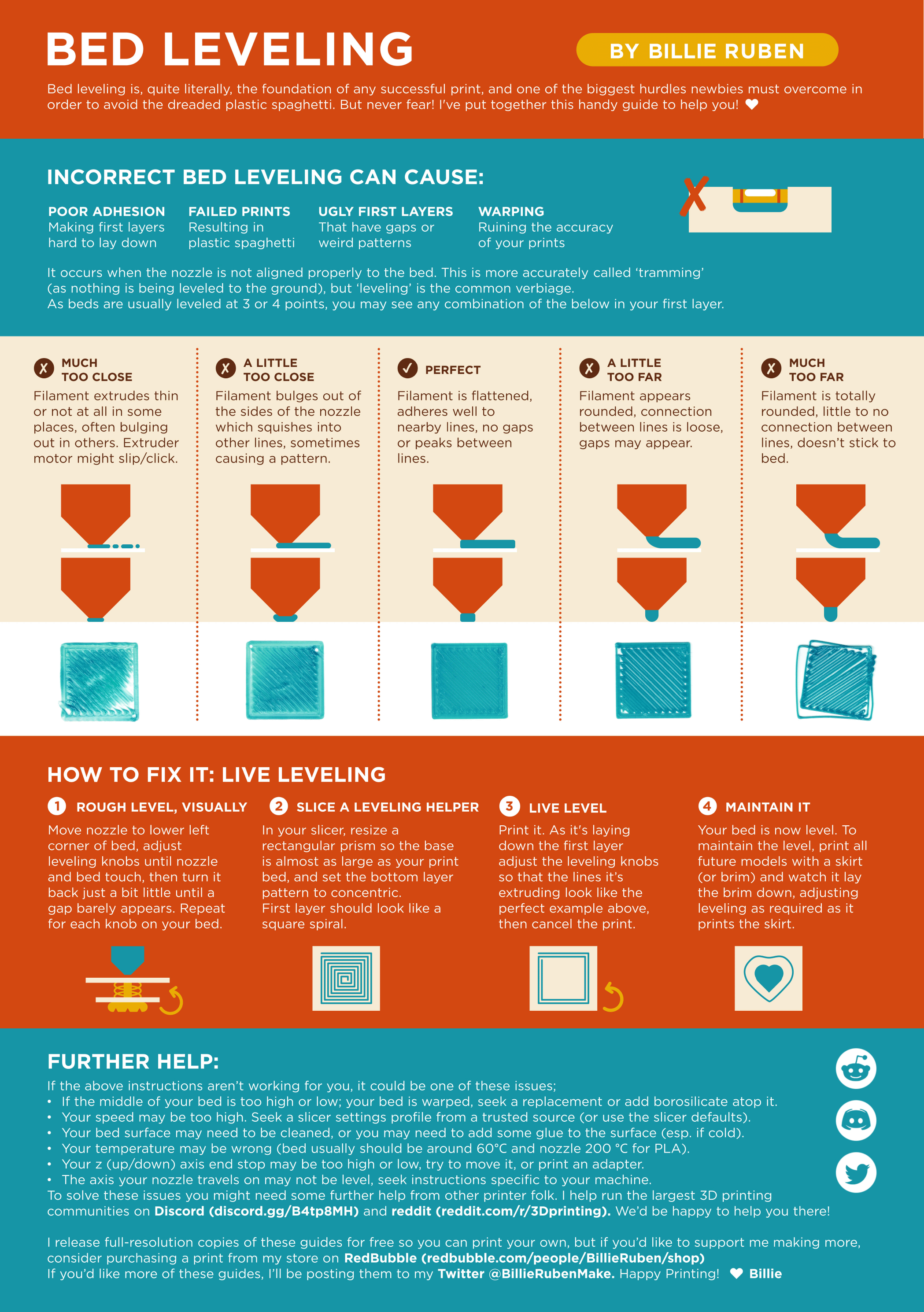
Leveling Your Printer
Here is a handy infographic that will help with levelling your printer.

minor dew
minor dew
#

like honestly

#

which way is better?

open ferry
#

i personally do a larger rectangle. but ig that doesn't necessarily show me the results in each of the corners

viscid sentinel
#

don't adjust z offset in fluidd on qidi. you have to use their menus or things get messed up

knotty fractal
viscid sentinel
#

Yeah, and lots of bugs depending on your firmware version

#

Current version is buggy too. Resets to 0 when you go into the menu so you can’t see previous setting and adjust from there you have to start over

knotty fractal
#

Was qidis firmware rooted in the meantime?

near leafBOT
#
This post has been closed due to inactivity.

This post has been inactive for over 1 hour and so has been closed. To reopen this post simply send another message.

minor dew
viscid sentinel
#

write down your z offset when you adjust it cause i believe it will reset to 0 if you go back into the adjustment menu later

minor dew
#

it goes to 0

#

but support told me that it shows 0 but its not 0

#

like its relative from current or whatever

viscid sentinel
#

oh well thats even more confusing

minor dew
#

yes

#

this entire printer is confusing

#

i got tired of it

#

but somehow it started to do consistent first layers

#

suport told me to use their filament

#

i wanted to callibrate the printer according to this guide

#

because print results werent as good as i wanted

#

so i guess that my z-offset is good rn??

#

like im not sure if it wont reset or whatever

#

if i do SAVE_CONFIG in fluidd then it breaks and is really set to 0

#

its very strange

#

and its not even happening always

viscid sentinel
#

i'm not sure. i dont actually have a qidi printer yet, i only know what i've found in my research trying to decide to buy it or not

minor dew
#

like there are many bugs

viscid sentinel
#

yeah, seems that way

minor dew
#

im waiting for some fixes but it takes them so long...

#

@viscid sentinel look at this

#

or this

#

they are not fixing some of the issues, im waiting like for months

#

this is the worse issue probably??

#

you dont have option to push filament back in printer's UI after the latest update

#

how tf they missed that

#

but you can use fluidd

viscid sentinel
#

their answer is ridiculous

minor dew
#

no way

minor dew
#

i have send them video that nozzle is scratching the bed at the back while KAMP should compensate this

#

they have told me that extruder has a problem with extruding

#

how is it supossed to not have the problem if its literally scratching the bed in this place

#

there is not only the issue with z-offset but also entire compensation

#

or maybe the second one is caused by the first??

#

idk but i have lost hours trying to fix that

#

and im messaging the support for days

#

nothing goes forward

viscid sentinel
#

thats the thing i dont get either. bad prints are one thing, but these firmware issues are literally causing printers to damage themselves and they're not fixing the underlying problem. they're just shipping out new parts

minor dew
#

yes

#

they have gave me the new parts many times because something broke

minor dew
#

its strange

#

like after some of the updates it was getting worse or better

#

now i have printed something and it went good

#

idk what happens with this printer

#

maybe there are some strange bugs in firmware like race conditions or whatever

#

isnt it easy to do memory bugs in firmware?

#

and it seems that their developers are incompetent in some ways

viscid sentinel
#

oh, i should ask you cause i haven't been able to find the information anywhere... so the x-plus-3 and x-max-3 basically had a recall last summer where qidi redesigned a bunch of stuff... one thing was the bottom of the chamber, the old version was plastic and would expand and contract based on temperature, causing problems with z-offset changing. so they redesigned it so its metal. is the bottom of the x-smart-3 chamber metal or plastic?

minor dew
#

the thing that is under the bed or total bottom of the printer?

viscid sentinel
#

The bottom of the printing chamber like where the bottom of the z axis rods attach

minor dew
#

it is plastic

viscid sentinel
#

Ok thx

minor dew
minor dew
minor dew
# minor dew

there is no way to get consistent first layer lol

viscid sentinel
#

Oof

minor dew
# viscid sentinel Oof

i regret that i bought this printer, but idk what else should i have bought, someone on this discord server told me to buy X-Smart 3

#

and then people had no problems

viscid sentinel
#

Yeah I’m trying to decide what to buy and seems like there’s no good options

#

You can try bypassing the runout sensor and/or reroute the filament path to fix your problem

#

And the qidi firmware will probably improve or people will get vanilla klipper working on it eventually.

viscid sentinel
#

i believe theres an option on the screen or in the menus to turn the runout sensor off

#

then route the filament without going through the sensor

#

i think you can take the boden tube off the top of the sensor?

minor dew
#

but is that a good solution?

#

bouden tube is there for a reason i guess

#

i will try to feed it like that

minor dew
viscid sentinel
#

from what i can find, support for the screen on the printer hasn't been ported back to vanilla yet, so it works, but no screen... not sure if there's other things missing

minor dew
#

but idk

viscid sentinel
#

oh maybe. i dont know about that

minor dew
#

its made for the vorons

#

KlipperScreen should run on any touchscreen that you can connect to a host (Raspberry, PC, Tablet), but not screens that connect directly to the printer MCU board.

#

so it wont work if its connected to MCU

#

and this printer is using MCU

#

do u maybe know where could i connect the screen?

#

it seems you have some more knowledge overall about printing

viscid sentinel
#

i dont really know anything about that. it sounds like something for printers that have a separate raspberry pi or something running klipper instead of the qidi where its built in

minor dew
#

not to the MCU

#

there is one raspberry pi in the head

viscid sentinel
#

yeah, qidi has both host and mcu on the same board

minor dew
#

hmm

#

so could it work?

#

what do u think?

viscid sentinel
#

i dont think there's anywhere to connect it, unless its usb

minor dew
#

its incompatible or something

viscid sentinel
#

oh

minor dew
#

like they are plugging the raspberry into motherboard

#

idk how it works

#

you know what, i will take a look at how voron is built

#

i need to see how everything gets plugged in and i will compare it

near leafBOT
#
This post has been closed due to inactivity.

This post has been inactive for over 1 hour and so has been closed. To reopen this post simply send another message.

minor dew
#

and klipperscreen works

#

the thing is, you cant use some screen through hdmi cuz there is no hdmi port

minor dew
#

idk if its a good idea to install vanilla klipper now, how im gonna connect to the machine without wifi?

near leafBOT
#
This post has been closed due to inactivity.

This post has been inactive for over 1 hour and so has been closed. To reopen this post simply send another message.

minor dew
#

@viscid sentinel im installing vanilla klipper

#

i have got this error

#

do u have an idea why?

#

nvm i have found out

#

it works??

#

yes it works

viscid sentinel
#

Nice

minor dew
# viscid sentinel Nice

there is a problem, their custom board, there is no way to compile original klipper firmware for it...

#

i will figure something out tomorrow

near leafBOT
#
This post has been closed due to inactivity.

This post has been inactive for over 1 hour and so has been closed. To reopen this post simply send another message.

minor dew
# viscid sentinel Nice

ok i just needed to update THR MCU and thats all, everything works and i will need to test more to find out if i still have any bugs

near leafBOT
#
This post has been closed due to inactivity.

This post has been inactive for over 1 hour and so has been closed. To reopen this post simply send another message.

minor dew