

1 messages · Page 1 of 1 (latest)
 azure radish
Tried printing this, all was going well under it started making the roof and it just started stringing.
 opaque cosmosBOT
azure radish
Tried printing this, all was going well under it started making the roof and it ...
The stringing issue you mentioned is a common problem in 3D printing. Here are a few possible solutions:
Check your retraction settings: Increase the retraction distance and speed in your printer's software. This can help to pull the filament back and prevent stringing during travel moves.
Adjust the temperature: Lowering the temperature of the printer nozzle can sometimes reduce stringing. Experiment with slightly lower temperatures within the recommended range for your filament type.
Enable combing: Combing is a feature in some slicer software that prevents the nozzle from traveling across open spaces during printing. Enabling combing can help reduce stringing.
Use a filament fan or cooling fan: Cooling the filament as it comes out of the nozzle can quickly solidify it and reduce the chances of stringing. Make sure your printer has a fan and that it is properly configured.
Check filament quality: Poor quality or moisture-absorbed filament can contribute to stri...
azure radish
AnyCubic Vyper, Inland PLA+, Cura
 gentle patio
azure radish
Tried printing this, all was going well under it started making the roof and it ...
mess with your leveling, it fails there when the nozzle is not quite close enough to the bed
opaque cosmosBOT
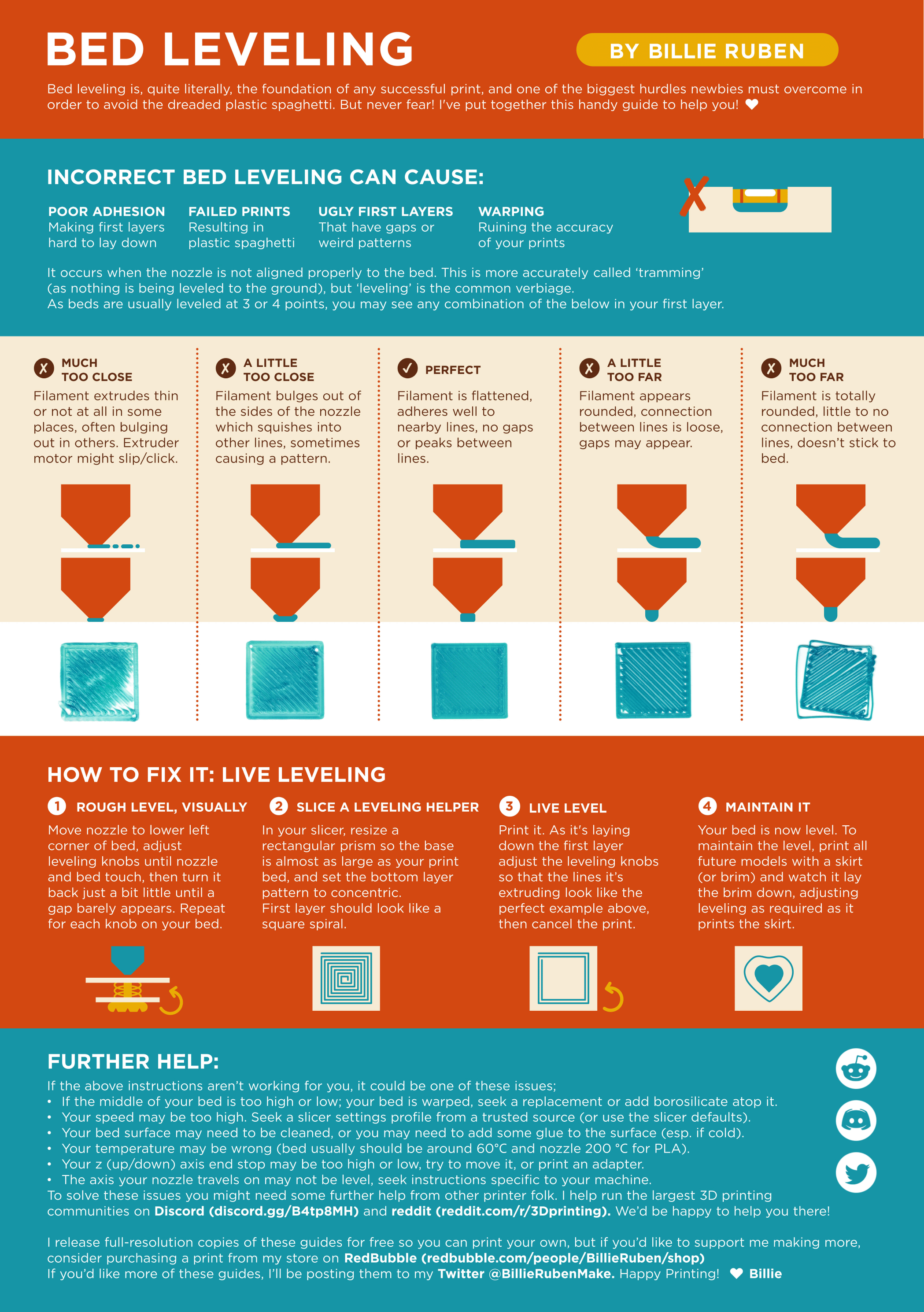
Leveling Your Printer
Here is a handy infographic that will help with levelling your printer.
 azure radish
gentle patio
mess with your leveling, it fails there when the nozzle is not quite close enoug...
would it be possible on an auto leveling printer?
gentle patio
azure radish
would it be possible on an auto leveling printer?
you can lower the z offset, and make sure you enable the mesh in slicer start gcode (g29 or m420 s1)
azure radish
id presume cura allows that?
gentle patio
yeah, check under machine settings for the code, and z offset is on the printer itself