1 messages · Page 1 of 1 (latest)
 plush dawn
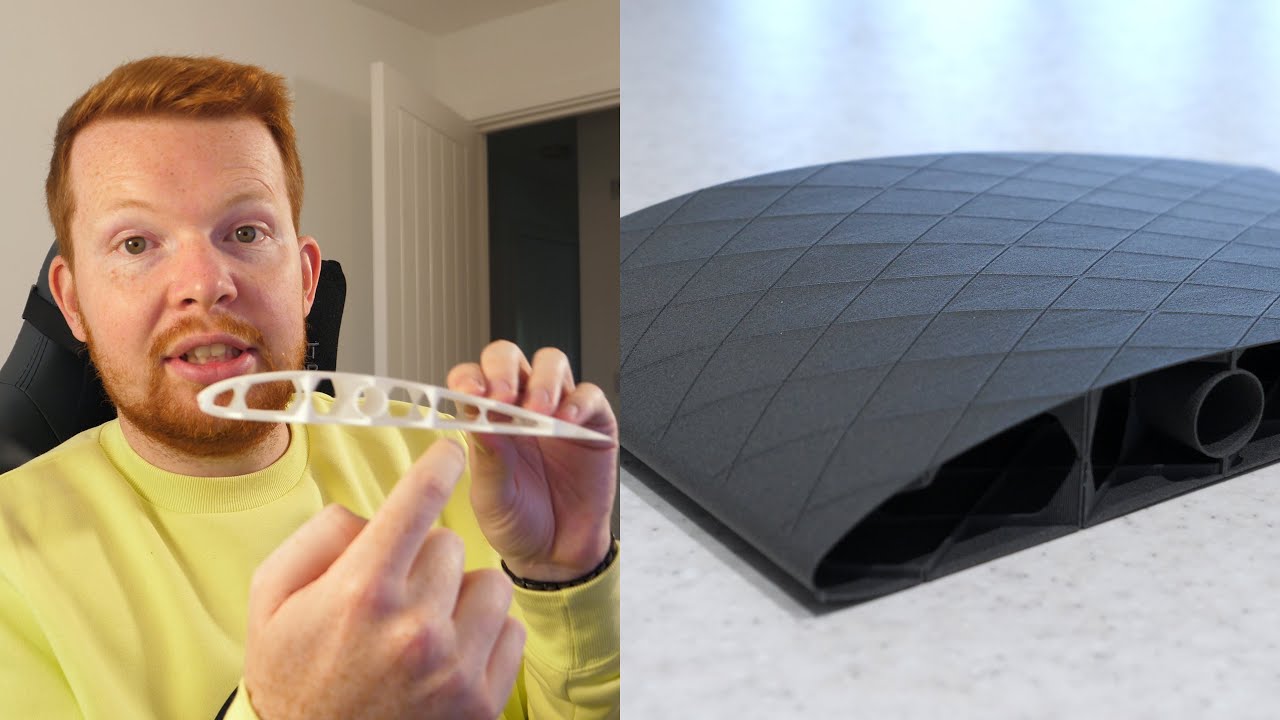
So i got some problem with my new HT-LW-PLA after printing a wing i noticed that the wall was 2x the size that i def. in creo. I did change the flow rate (that i calculated via the tests given by the producer of the filament colorfabb) and it seemed to have worked for 1/2 the height of the wing. Its just all in all weird.
-3d printer: A1-mini
-printing temp 250 °C
-https://colorfabb.com/lw-pla-ht-black
Not sure about anything else that is important to it. If there is a need for the CAD model i can also give that
Meet our new generation LW-PLA-HT Black. This formulation features an increased temperature resistance compared to our generic LW-PLA.
Thin printed structures will be able to handle heat from external sources such as the sun much better and prolong the time until failure. Not convinced? Check out our comparison video in the image gallery betwee...
 ember tuskBOT
plush dawn
So i got some problem with my new HT-LW-PLA after printing a wing i noticed that...
It seems like you are experiencing an issue with over-extrusion, which is causing the walls of your print to be larger than intended. Here are a few troubleshooting steps you can try:
Check the filament diameter: Ensure that the filament diameter setting in your slicer software matches the actual diameter of the filament you are using. It should be around 1.75mm for most PLA filaments.
Calibrate the extruder steps/mm: There might be an issue with the extruder steps/mm calibration. You can find guides online on how to recalibrate it for your specific printer model.
Retraction settings: Check your retraction settings in the slicer software. Proper retraction can help reduce the amount of excess filament being oozed out during travel moves and minimize over-extrusion.
Print temperature: While the ColorFabb website suggests a temperature of 250°C for their LW-PLA HT filament, it might be worth experimenting with slightly lower temperatures to see if it improves the over-...
 next valley
"For printing thin structures such as RC plane parts we recommend printing the first layer at 100% flow using 200C printing temperature. Then increase the temperature for the second layer (around 235C) to activate the foaming and reduce flow to 50-60%."
From their page.
Lightweight PLA is foaming, ie it expands
plush dawn
next valley
"For printing thin structures such as RC plane parts we recommend printing the f...
that is what i did. It only starts to be weird at around half the size of the wing.
next valley
I think you need to do a flow calibration
next valley
But as it goes up the structure gets thinner, you might be running into lower layer times and need to reduce the temperature
Smaller object will mean slower printing speeds and more dwelling toward the top vs the bottom
plush dawn
Hm, is there a gradual temperature option?
next valley
Not afaik, another solution would be to change the print speeds so that it stays at the same speed throughout
plush dawn
next valley
Smaller object will mean slower printing speeds and more dwelling toward the top...
It’s a solid wing so I am not sure. The size stays the same
next valley
plush dawn
It’s a solid wing so I am not sure. The size stays the same
The wing is thinner towards the top isn't it?
plush dawn
 next valley
Or rather, smaller?
plush dawn
Nope
next valley
Oh nevermind
plush dawn
Stays the same
plush dawn
Here are the calibration cubes. 260-210

(they are a bit burned since i tested how high the temperature could get before they start melting. 110 °C if curious)
 light maple
Pay attention to your printer’s behaviour at the point where the change happens
It could be that your gcode is suddenly asking your printer to revert to its previous non-60% flow
Not too sure though
But Bambu A1 with creality?
plush dawn
creality?
plush dawn
yeah, is that a problem?
light maple
There’s a vase mode in Bambu Studio’s advance mode
plush dawn
yeah picked that one
light maple
Nono, there’s nothing wrong with it
I was just curious because even I can’t find printer profiles for Bambu in cura
plush dawn
light maple
Sorry, I mean cura
The reason i use cura is just laziness. Don't want to learn a new program i started with a ender 3.
plush dawn
light maple
I was just curious because even I can’t find printer profiles for Bambu in cura
made my own lol.
light maple
plush dawn
The reason i use cura is just laziness. Don't want to learn a new program i star...
🤝🤝
light maple
plush dawn
made my own lol.
That’s fair enough
Any extra per model settings?
Or is it just a pure vase mode with a temp and flow change on the second layer and that’s it
plush dawn
but yeah is there a way to inspect the g code for flow changes
light maple
Unfortunately I don’t delve deep enough into gcode to know that, but I believe your answer is yes if you’re tedious enough
plush dawn
light maple
Or is it just a pure vase mode with a temp and flow change on the second layer a...
thats it. 0 retractions (because that forms bumps which are aerodynamically problamatic)
light maple
I really want to say try doing it in Bambu Studio
But if you insist that you don’t want to, I’m outta ideas too
plush dawn
good point. I just have to make sure this time it actually works since the filament is way too expensive unfortunatly.
light maple
Are you aware if it “reverts” at a set height (i.e. have you tried printing this part multiple times and the error happens exactly at the same spot)?
plush dawn
first time printing it and i unfortunatly did not watch it that closely. Just made sure it did not turn into spaghetti and then left
light maple
Fair enough
I’d say take some cheap ass filament you have lying around and redo it in bambu’s slicer
Maybe like a 80% flow instead of 60%
So that it still prints out and has structure
And if you see the same fail, then you can rule out slicers
plush dawn
will that damage anything? I did not play with it until now
plush dawn
the lower flow rate in combination with cheao filament
plush dawn
ok, yeah will try and see in 5h
light maple
I’m not asking this to be a final part, but rather as a dry run to make sure the gcode isn’t faulty
Because it seems to me that using that expensive filament is… well… expensive
🫡 good luck, I’ll be interested with the results
plush dawn
yeah, unfortunately. I wished LW pla would be cheaper.
light maple
Are you okay with it being hollow though?
You could always try aligning your z seam to the trailing edge of your wing
That should ensure the rest of the body is smooth
plush dawn
light maple
Are you okay with it being hollow though?
it has to be hollow or else the plane will end up too heavy.
light maple
Aaaah alrighty that’s fair enough
plush dawn
i did some calculation and max tension that i can expect are 10 MPa so it should be fine
light maple
10MPa on plastics with non-homogeneous material properties is abit yikes for me 
But I’m not the LW filament maker so I can’t say for sure 😭
plush dawn
they advertise it as 30 MPa at 250 °C printing temp so it should be fine
honestly a bit of experimentation on my part
light maple
Aah that’s fair enough then, SF of 3 should suffice
Actually, genuinely curious - how’d you calculate stresses around your parts?
Atleast I’m assuming you’re not just hand calculating all the Bending axial and moments
plush dawn
light maple
Actually, genuinely curious - how’d you calculate stresses around your parts?
ik the lift and approximate drag force then i put that into the FEM module of creo. Unspectacular i know but its the easiest way.
light maple
Aaaah
plush dawn
light maple
Atleast I’m assuming you’re not just hand calculating all the Bending axial and ...
oh god no. I had enough of that in Uni
light maple
I’m assuming it’s a shelled model with the same approx thickness as your line width then?
plush dawn
2 line widths jup
light maple
I apologize I was just curious because I can’t really find any software that can take infill into account 😭
So I’m stuck assuming a thick shelled hollow part is handling all of the stresses that way 💀
plush dawn
light maple
I apologize I was just curious because I can’t really find any software that can...
i gotta admit i used this video for it
ember tuskBOT
This post has been inactive for over 1 hour and so has been closed. To reopen this post simply send another message.
plush dawn
@light maple did not fix it, ill troubleshoot later
light maple
Aaah shoot, any visual references?
plush dawn
the diffrence is not really visible since its only 0.2 mm or so. (thats also why i did not include a picture) I assume it has to do with the model
light maple
Probably a good luck at the prepared gcode in the slicer world show and thickness inconsistency
ember tuskBOT
This post has been inactive for over 1 hour and so has been closed. To reopen this post simply send another message.
plush dawn
found the issue and its incredibly stupid. It was the nozzle i used the same one from when i got the printer and well it was a bit degraded from carbon fiber filaments but i did not expect that much
switched it and now it prints fine
i did not expect carbon fiber to be so corrosive to basically kill my nozzle with 2 rolls
light maple
I assume you were using a stock A1 mini
but god damn that's good to know
time for a hardened steel nozzle I guess 
next valley
plush dawn
i did not expect carbon fiber to be so corrosive to basically kill my nozzle wit...
Yep, glow in the dark and glass fiber will do it… in about 50g.
Carbon fiber in about a spool
plush dawn
light maple
time for a hardened steel nozzle I guess <:Hahaa:428592780646809600>
i used a hardened steel nozzle 
plush dawn
next valley
Yep, glow in the dark and glass fiber will do it… in about 50g.
is glow in the dark that much worse?
next valley
plush dawn
is glow in the dark that much worse?
So, so much worse than carbon fiber.
light maple
plush dawn
i used a hardened steel nozzle <:PolkaPOLMAO:927204457127772181>
😭
actually, where can I find a hardened steel for the A1?
light maple
I was gonna say that I don't live in North America but Aliexpress' fair