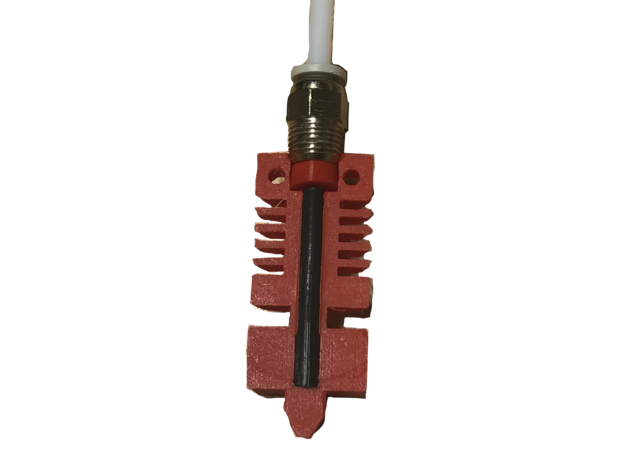
#Ender 3 Pro Hot End Clog Issues

1 messages · Page 1 of 1 (latest)

last night
#

Hello, I have an Ender 3 Pro with the following modifications:

  • CR Touch
  • Glass bed
  • Upgraded fans (I don't remember the exact details but it does work wonders)

I used to have fan issues which led to my whole hot end to clog and quit printing but it doesn't do that anymore, thankfully. The fan upgrade fixed that and I have printed for 48h straight without even thinking about looking at the printer because it's doing amazingly

My issue now is when the print ends. I've been having a lot of fun practicing multiple colored prints using pauses for making small things like name tags for my dogs and whatnot. Everytime I'm switching spool I've noticed that the very tip of my PLA that was last used for printing is in a "clog" shape I guess, it's the same tip shape that was an issue when I was having massive clog problems and it's that familiar blob shape at the tip, which tells me it's a hot end issue. I constantly have to trim that tip to get it out of the tube to switch.

The solution I was considering doing is drilling a bigger hole in the extruder assembly but I'd like to look into other options first and I want to know what you guys think could fix the issue. I print at 200 50mm/s for my regular PLA, 215 30mm/s for my TPU and 200 40mm/s for my lower grades PLAs who have a harder time adhering and my prints always come out looking great so it's really just my spool changing that's inconvenienced.

regal gorgeBOT
#
AI Help

It sounds like you're experiencing issues with filament clogging at the hot end when you switch spools. Drilling a bigger hole in the extruder assembly may not be the best solution for this problem.

Instead, I would recommend the following steps to troubleshoot and potentially resolve the issue:

  1. Check your retraction settings: Ensure that your retraction distance and speed are properly calibrated. Excessive or insufficient retraction can cause clogs or oozing.

  2. Clean the hot end: Heat up the hot end and carefully clean it using a fine needle or cleaning filament to remove any trapped filament or debris that may be causing the clogs.

  3. Check the PTFE tube: If you haven't already, inspect the PTFE tube in your hot end assembly. Over time, it can degrade and lose its smooth interior surface, leading to filament resistance and clogs. Consider replacing it if necessary.

  4. Calibrate your hot end temperature: Make sure you have the correct temperature settings for the filament ...

gray geode
#

show a pic of this tip?

#

@last night

last night
gray geode
#

ok, no rush. just keep forgetting to ping, people sometimes don't notice the replies

last night
#

@gray geode

#

(currently changing spool brb 1 min)

gray geode
#

you might look into Luke's PTFE fix. Basically the bowden goes through the connector, all the way to the nozzle, and this can cause the gap/void.

last night
#

I actually printed that a while ago when I had my fan issues and I ended up removing it thinking it did nothing

#

So I will put it back and see if that can fix it

#

I didn't do a lot of spool changing back then my husband was still crazy for playing with my printer so I would have to ask him if it also did that back then

gray geode
#

otherwise, you're just looking at the void of your nozzle, and might need to do some more retraction at the start of your color change pause

last night
gray geode
#

it would print ok, until retraction got some filament into the gap, then it'd jam, so you're probably right about it not being that

last night
#

so it seems to start happening before it even prints

gray geode
#

yeah I'm guessing that's just the nozzle then. you can try to incorporate some ramming for the unload, like a MMU. move out of way of print, extrude some fast then retract fast, possibly back and forth a few times. gives a nice tip for me every time, I saved the sequence as a gcode to make it easier.

last night
#

Oh i'll look into it thank you

gray geode
#

probably just this part should do:

G1 E-15 F6000
G1 E-17.5 F5400
G1 E-5 F2700
G1 E-2.5 F1620
G1  X201.575  E10 F370
G1  X173.575  E-10 F398
G1  X201.575  E10 F427
G1  X173.575  E-10 F456
G1  X201.575  E10 F485
G1  X173.575  E-10 F514
G1  X201.575  E10 F542
G1  X173.575  E-10 F571
; SKINNYDIP START
G1 E31 F1980
G4 P0
G1 E-31 F4200
G4 P0
; SKINNYDIP END
G4 S5
G1 E-30 F2000```
#

you can remove the X moves because that is intended for a wipe tower