#Horrible build plate adhesion (SV06)
1 messages · Page 1 of 1 (latest)
 lapis lightBOT
AI Help
It sounds like you've tried many different settings to get your first layer to adhere properly, which is great. Here are a few more suggestions for troubleshooting:
-
Clean the build surface thoroughly: Sometimes residue or oils from handling the bed can prevent proper adhesion. Use isopropyl alcohol or a similar solution to clean the build surface completely.
-
Adjust the bed level: Make sure your bed is properly leveled. If the nozzle is too close to the bed, the filament won't have enough room to flow and adhere properly. If it's too far, the filament won't stick at all. Follow your printer's bed leveling instructions carefully.
-
Check your filament quality: Make sure your filament is not old or compromised in any way. Moisture or dust can affect the filament's ability to stick. Try using fresh filament to see if that solves the issue.
-
Slow down your print speed: Printing too fast can lead to poor first layer adhesion. Try reducing the overall print speed, especially f...
WARNING: This response is AI generated and may contain errors.
 ripe wharf
z offset is the most important thing for bed adhesion, is the nozzle close enough to the bed?
 midnight nebula
Im pretty certain it is
ripe wharf
how certain is pretty?
midnight nebula
I can send a video of me alligning it
ripe wharf
sure
midnight nebula
It will take a bit though
ripe wharf
@ me so ill see it
lapis lightBOT
This post has been closed due to inactivity.
This post has been inactive for over 1 hour and so has been closed. To reopen this post simply send another message.
midnight nebula
@ripe wharf This is how I level it, I will send footage of 1st layer failing too
I preheat it to printing temps, auto home it and lower Z offset until I get a bit of friction on the paper
And then I save the settings
midnight nebula
Here is the print failing
lapis lightBOT
This post has been closed due to inactivity.
This post has been inactive for over 1 hour and so has been closed. To reopen this post simply send another message.
ripe wharf
midnight nebula
Here is the print failing
yeah, that zx offset needs to go down some more, you are just barley laying the filament onto the bed, you should be mashing it into it
lapis lightBOT
Leveling Your Printer
Here is a handy infographic that will help with levelling your printer.
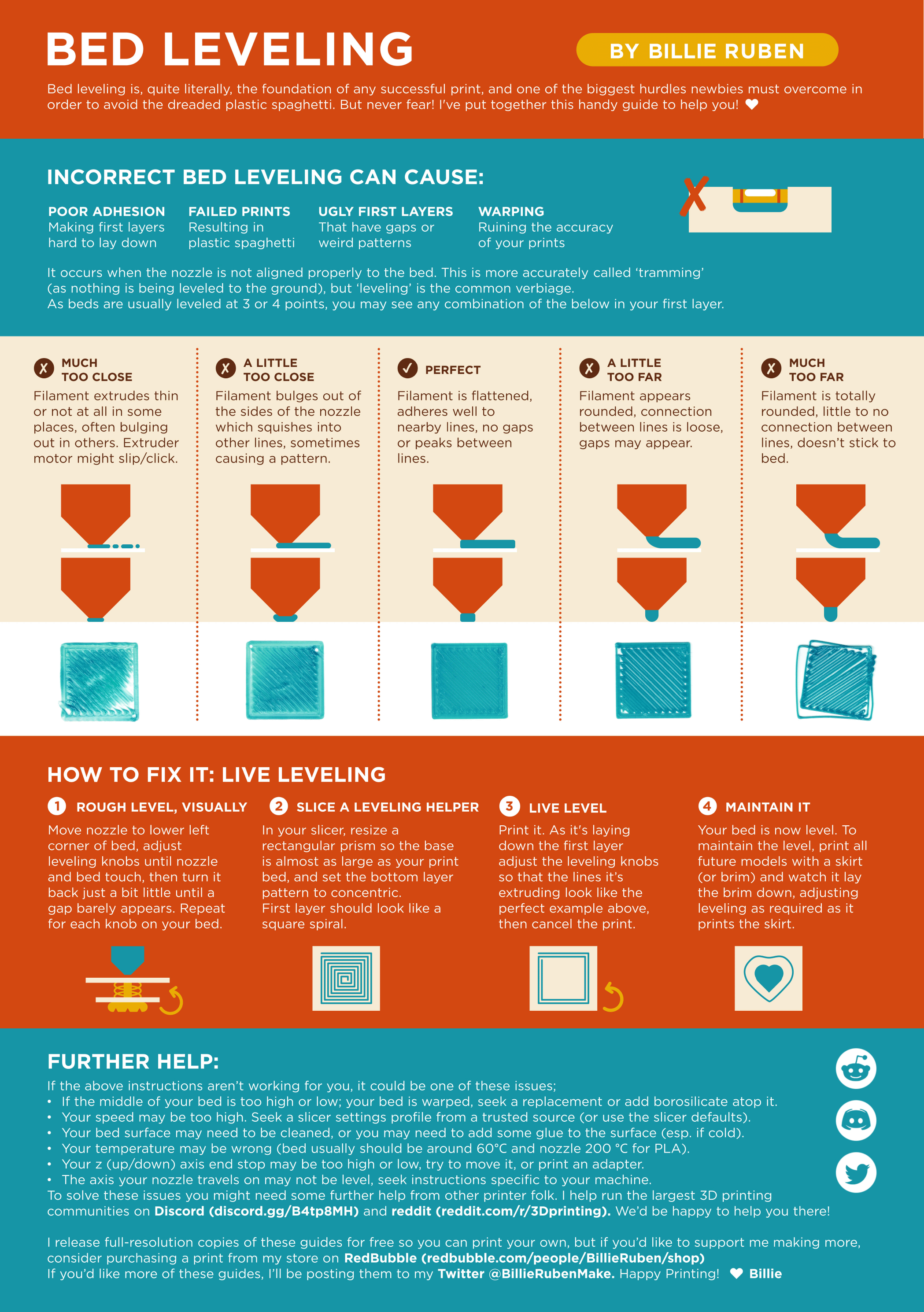
?leveling requested by: jack3939#0
ripe wharf
see the nozzle depictions
 frail glen
you could try putting glue stick on the plate too
lapis lightBOT
This post has been closed due to inactivity.
This post has been inactive for over 1 hour and so has been closed. To reopen this post simply send another message.