#Ender 3 Neo not printing properly
1 messages · Page 1 of 1 (latest)
 grand frigateBOT
AI Help
It sounds like you may be encountering some common issues with your Ender 3 Neo printer. Here are a few troubleshooting steps you can try:
-
Filament feed issues: Make sure the filament path is clear and there are no obstructions. Ensure that the filament is properly seated in the extruder and that the tension on the filament is not too tight. You can also try increasing the extrusion temperature slightly to improve flow.
-
Poor adhesion: Ensure your print bed is properly leveled and cleaned. You can try using a surface treatment, such as glue stick or painter's tape, to improve adhesion. Increasing the bed temperature slightly can also help PLA adhere better.
-
Inconsistent extrusion: Check if the extruder gear is slipping or grinding against the filament. If so, you might need to adjust the tension on the extruder. Additionally, ensure that your nozzle is clean and clear from any debris that might affect the filament flow.
If you continue to experience issues, I recommend c...
WARNING: This response is AI generated and may contain errors.
 fresh zephyr
I'd start with proper bed leveling, how do your first layers look?
 bleak reef
fresh zephyr
I'd start with proper bed leveling, how do your first layers look?
they from what ive seen look fine, my dad helped level it last night but this morning, the problems are still prevelent
fresh zephyr
do you have an image of a first layer?
also regularly clean the print surface, try not to get ur hand greases on the surface afterwards
bleak reef
fresh zephyr
also regularly clean the print surface, try not to get ur hand greases on the su...
I only got it 2 days ago, which I havent really touched the surface. but I will clean it rn to see if it helps. what should I use to clean it, any cleaning supplies or?
fresh zephyr
just warm water and soap is fine
fresh zephyr
improper bed leveling, even if it might look fine to you it could be a little too close or too far, that's a very common issue
bleak reef
how do you know if the leveling is perfect?
also, it seems that when it does properly print for 5 mins, it comes off jagged and not proper
heres a exampe
 fresh zephyr
step by step, first I'd make sure that bed leveling really is perfect
bleak reef
fresh zephyr
step by step, first I'd make sure that bed leveling really is perfect
how do I test that
fresh zephyr
you can take any model and just print the first layer / take a video of it printing the first layer
bleak reef
ok
im printing first layer now
sorry if its taking A min
its not coming out correctly, imma try to remove some fillament
fresh zephyr
what temperature is your nozzle at?
bleak reef
fresh zephyr
what temperature is your nozzle at?
is that tempature good or should I adjust it
fresh zephyr
that's good for now, shouldn't be the source of any issues for this
fresh zephyr
again, probably bed bed leveling.
grand frigateBOT
Leveling Your Printer
Here is a handy infographic that will help with levelling your printer.
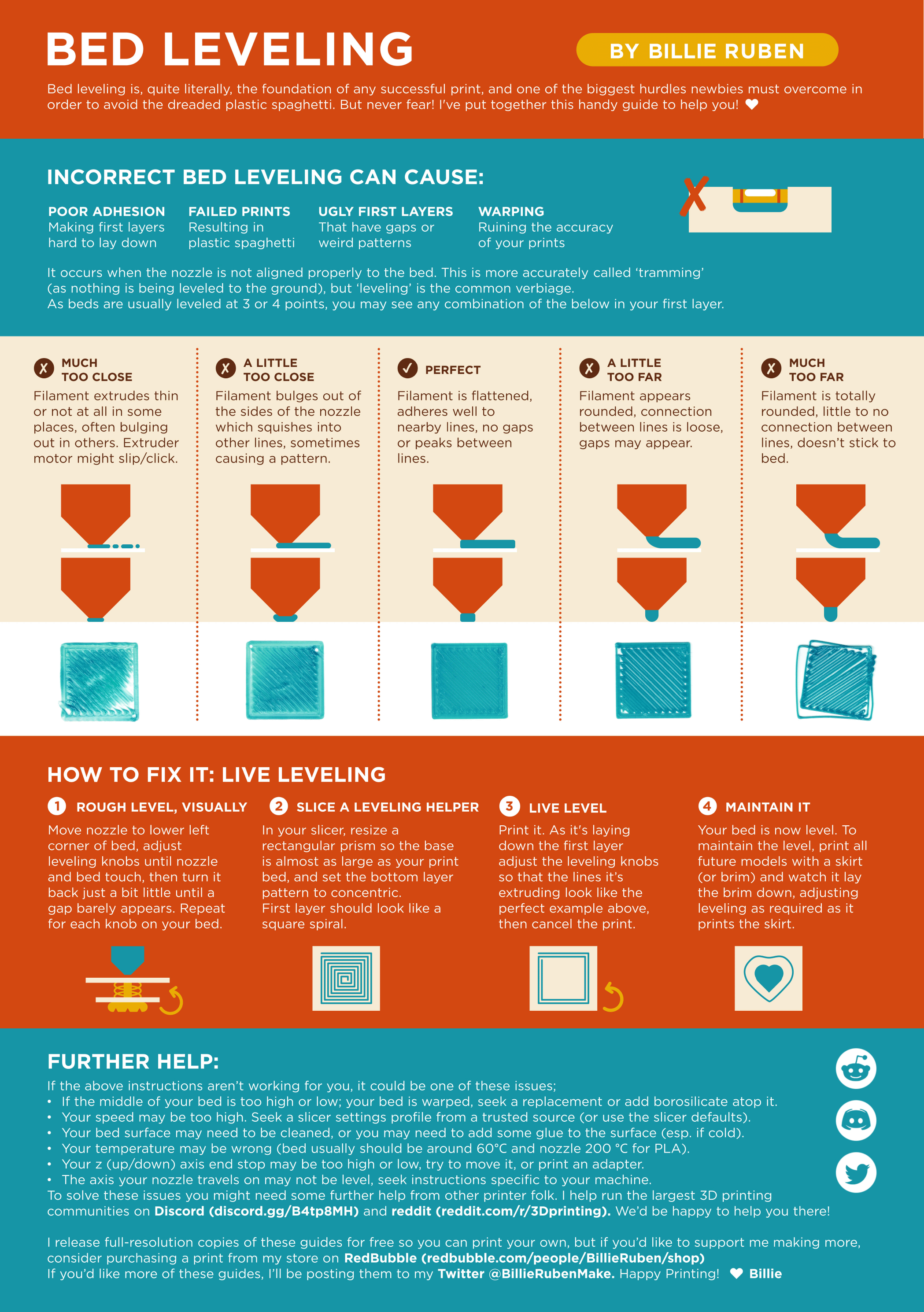
?leveling requested by: fallenaims#0
bleak reef
how do I get the nozzle in the correct position, because I think it is way to high
I know im adjusting the board but Im pretty sure the nozzle is normally farther down
fresh zephyr
you don't have to adjust the board at all, there should be a setting in the printer menu that's either Z-offset or prob z offset, you can tune that
bleak reef
fresh zephyr
you don't have to adjust the board at all, there should be a setting in the prin...
ok, I leveled the board (I know I did it right because I followed a tutorial
fresh zephyr
nice, can you send an image of how your first layer looks now?
bleak reef
is there a specific model I should use for my first layer?
fresh zephyr
anythign works, this here is a specific model to only test first layer
fresh zephyr
soo how does it look
bleak reef
It went into the board
And there's a huge print
I ca t look at it rn tho cuz I'm not at the house
I can tomorrow tho
bleak reef
fresh zephyr
soo how does it look
so my dad took a look at it and so far its working really well. turns out, it had a big clog since the tube was not put in properly when it came in. we unclogged it and now its working great