 cobalt sequoia
Hello all, I’m wondering if anyone might help me brainstorm some ideas for a problem I’ve been having.
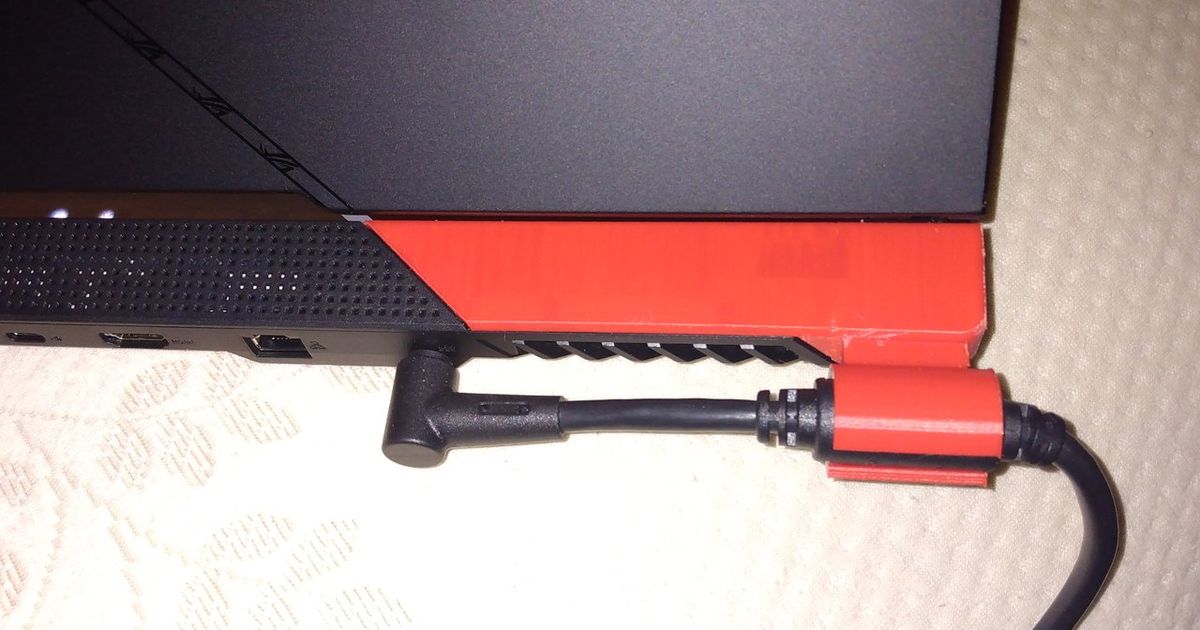
I have an ASUS ROG G533 laptop and it’s been giving me hell for months. The issue is that the charger wiggles around in the port, bending the pins out of place and leading to intermittent charging until the pins are bent back into place. This has been very annoying and I am trying to minimize bending of the pins so they don’t fall victim to metal fatigue.
In addition, the pins apply a good bit of pressure to the inside of the barrel connector of the charger and this causes them to scrape divots into the connector when it rotates, further exacerbating the issue.
I tried designing a simple interface that would slot into the charger port, filling the empty space around the barrel and preventing it from wiggling around. This was partially successful, but what it ultimately does is act as a lever that translates the side to side wiggling force into a perpendicular force that causes the barrel connector to fall out of the port.
I have been trying to come up with a way to secure the barrel connector that meets these criteria:
- allows you to choose whether you want the cord to hang to the left or right
- uses a locking mechanism to prevent the charger from rotating or falling out of the port
- is minimally intrusive (i.e. i can put my laptop into my backpack without fear of breaking something)
My latest idea is to have a 2-part connector, one part which lives in the laptops charging port and another which lives on the barrel connector of the charger. I was thinking the barrel connector piece would slot into the charging port piece and i could use a large threaded fastener to hold the two together. I think this idea has promise, but it still doesn’t solve the problem of the charger falling out as i have no way of securing the charging port piece to the actual port.
 mighty pike
 humble plover
