#fine tune please.
1 messages · Page 1 of 1 (latest)
 grizzled leafBOT
AI Help
It's great to hear that you've been experimenting and learning about 3D printing! Warping and an unlevel base can indeed be common issues. Here are a few troubleshooting steps you can try:
-
Ensure proper bed leveling: Make sure your printer bed is leveled correctly. Use a piece of paper or feeler gauge to ensure there is a small gap between the nozzle and the bed, which allows for good adhesion.
-
Improve bed adhesion: Consider using a bed adhesive like hairspray, glue stick, or a specialized print surface like PEI or BuildTak. This can help with bed adhesion and reduce warping.
-
Fine-tune bed temperature: Experiment with slightly higher bed temperatures. Gradually increase the temperature by a few degrees (e.g., 5°C) and monitor the results on your prints. This may help mitigate warping without causing excessive oozing or elephant foot issues.
-
Adjust initial layer height: Decreasing the initial layer height can help improve the adhesion of the first layer to the bed, th...
WARNING: This response is AI generated and may contain errors.
 steady trout


If I move my bed first layer even 5° I get this...


I'm reading but I don't understand what value it is but I think if somehow if I can have my initial bed temp higher but the cooling to work better or something. I could also start trying values like 71 72 73 74. I just went from 75 (elephants foot) to 70 and it fixed it so I printed the terrain.
 sonic saddle
70 is a lot higher than I've ever had to print on for the bed with PLA, do you have fan cooling disabled for the initial layer? (nvm, I can just read your settings)
your extruder is a lot hotter than I have needed to go to as well, how do your prints turn out at like 200C for extruder and 60C for your bed?
steady trout
sonic saddle
70 is a lot higher than I've ever had to print on for the bed with PLA, ~~do you...
I haven't tried that low tbh.
sonic saddle
maybe try printing a temperature tower
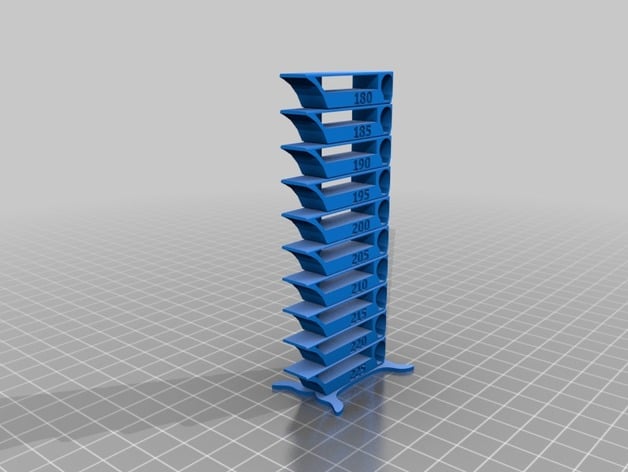
Yet another temperature calibration tower. It suppose to be smart, compact and fulfill several purposes.
it is functioning as a regular temperature tower
it contains several test patterns like
overhangs from 60 deg to 25 deg
bridges from 15 mm - 30 mm
stringing test
curvy shapes
One floor is exactly 10 mm and stand is 1.4 mm. Optimized for 0.2...
steady trout
The settings you see are the lowest. I was told if I go under 70 my print will not stick (I'm new to printing and I personally don't know) maybe I can try straight 200 each side and 60 each side?
steady trout
sonic saddle
maybe try printing a [temperature tower](https://www.thingiverse.com/thing:27290...
I tried to but it didn't work lol, like I guess I have to manually change the heat per and it only printed all at one heat idk.
sonic saddle
in cura, you can set a script to change the temps at specific Z heights
steady trout
I use prisa slicer but I think I'm going to swao
Everyone I keep talking to for help uses cura lol. One guy tried to help me and just didn't know prusa
sonic saddle
maybe try printing a few cubes at diff temps just to see what looks good and what doesn't, my ender 3 came stock at printing 200C and 60C so I figured that was prob the baseline
I used to use the creality slicer at first but I switched to cura bc it seemed more common and I prefer it now lol
steady trout
This warping? Is it cause from low bed temperature?


I'd I turn it down would this not make it worse or will it help with that?
I should probably not print this then 🙃😂

Not sure if it matter but I'm also using esun pla+

205 225 60 80
sonic saddle
ah, I'd stick in their recommended temps then, I haven't printed with PLA+ yet so I prob won't be of much help
 plush snow
Also, try to be patient and let everything cool down naturally and slowly before removing a print with a large flat surface. If you flex the hot steel plate you flex the print and therefore a wavy bottom.
Also 200/60 is pla temp
Anything hotter only for fast printing or special usecases
sonic saddle
they're using PLA+ and the packaging recommends 205-225/60-80
plush snow
At least my opinion to temps
steady trout
plush snow
Also, try to be patient and let everything cool down naturally and slowly before...
The print finished at like 2 am so it cooled for like 4 5 hours and wasn't even on the bed when I removed it. I was told if I don't wait I can rip the coat off so I do chill I don't wanna damage anything.
I can lower my temps
plush snow
steady trout
The print finished at like 2 am so it cooled for like 4 5 hours and wasn't even ...
Okay then its not that.
sonic saddle
it definitely looks temperature related to me
steady trout
plush snow
At least my opinion to temps
I personally don't know what's right or wrong lol!
Ok ill try and do like, 210 maybe instead of 220 and I'll lower my bed temp 5 10 and see.
I'll keep just dropping them by like 5ish each maybe until I have a nicer print.
sonic saddle
yeah, that's what I'd do. Maybe try having a small flat surface on some test print, to try to get that same warped look
well, by overhang I mean the lil droopy bit touching the bed
under...hang
plush snow
steady trout
I personally don't know what's right or wrong lol!
No one does 😊 trial and error.
steady trout
I gotcha haha.
steady trout
plush snow
No one does 😊 trial and error.
Thanks man, considering this is where I started lol!


To actually being able to print 😂😂
Ish
sonic saddle
yeah, I got my printer like a week or two ago and have been tweaking settings nonstop, so much to learn and I still have a hard time seeing what's wrong in my prints
might be dealing with my first bent hot end idk yet I hope not
steady trout
I think the REALLY hard part is there's so many things it CAN be and im so inexperienced that something so obvious for everything is so hard for me 😂
Plus when I see the print, tbh I'm not sure what I'm looking at or like the signs that cause x x and x lol
 sonic saddle
tons of experience to figure that out


