I just bought this printer a week or so ago. Earlier today I asked on how to ensure a level bed when the right side was level but the left side wasn’t. I was told to tram the gantry and sent a video where it was done with two cans of soup. I followed the video and it didn’t level and now when the x axis hits the left side it makes a grinding noise similar to when you auto z align and it hits the top. I was gone for 3 hours with a print on and I was told by my family it sounded like it was grinding often during the print. I got home and the print was messed up. Anyone know what I could have done to make this happen and how to fix it?
#sv06 making weird noises on the x-axis
1 messages · Page 1 of 1 (latest)
 rocky heath
 desert lodgeBOT
rocky heath
I just bought this printer a week or so ago. Earlier today I asked on how to ens...
AI Help
It sounds like you may have unintentionally caused some damage while attempting to tram the gantry. The grinding noise and disrupted print suggest that something is misaligned or obstructed. Here's a troubleshooting process to help you identify and fix the issue:
-
Start by examining the X-axis carefully. Check if there are any visible obstructions or loose components, such as debris or loose belts.
-
If you don't find any apparent issues, try manually moving the X-axis back and forth to see if you can pinpoint where the grinding noise is coming from. This might help identify the specific part causing the problem.
-
Once you've identified the problematic area, consult your printer's user manual or manufacturer's resources for guidance on how to address the issue. They may provide specific instructions on how to realign or replace components.
-
If you're unable to find a solution in the provided resources, consider reaching out to the manufacturer's customer support or their ...
WARNING: This response is AI generated and may contain errors.
 rotund rain
Is there a microswitch or is it sensorless homing?
rocky heath
rotund rain
Is there a microswitch or is it sensorless homing?
I am pretty sure it is sensorless homing
I changed the sensitivity on it and it seems to have fixed it but now I am having a problem with the bed leveling still and the nozzle is picking up parts of the print as it goes by
rotund rain
rocky heath
I changed the sensitivity on it and it seems to have fixed it but now I am havin...
Yeah that's what I figured didn't realize you could change that on the machine itself. As for the other issue does the sv06 have bed leveling screws?
rocky heath
unfortunately not, otherwise I would have it down pat. It auto levels. The right side of my printer is level but the left side is not
rotund rain
Does the printer home up to the top or to the bottom? If you can I would change it to homing to the top so that it trams naturally
rocky heath
It homes to the top
Actually, there is a setting you hit that makes it go up and hit the top to tram the gantry then the actual home puts it at the bottom
rotund rain
interesting are you able to view the bed mesh?
 rotund rain
no problem I don't think you can since your using a basic knob screen right?
rocky heath
correct
rotund rain
What you could do is see if there is new firmware and see if that fixes it. Just save your z-offset value
rocky heath
So, people brought it up to Sovol and it looks like they already added it into the firmware, its the M420 S1 that is in the starting g-code
rotund rain
alright so what does your start g-code look like?
rocky heath
M201 X500.00 Y500.00 Z100.00 E5000.00 ;Setup machine max acceleration
M203 X500.00 Y500.00 Z10.00 E50.00 ;Setup machine max feedrate
M204 P500.00 R1000.00 T500.00 ;Setup Print/Retract/Travel acceleration
M205 X8.00 Y8.00 Z0.40 E5.00 ;Setup Jerk
M220 S100 ;Reset Feedrate
M221 S100 ;Reset Flowrate
G28 ;Home
M420 S1 ;use bed mesh, must have used G29 previously
G92 E0 ;Reset Extruder
G1 Z2.0 F3000 ;Move Z Axis up
G1 X10.1 Y20 Z0.28 F5000.0 ;Move to start position
G1 X10.1 Y200.0 Z0.28 F1500.0 E15 ;Draw the first line
G1 X10.4 Y200.0 Z0.28 F5000.0 ;Move to side a little
G1 X10.4 Y20 Z0.28 F1500.0 E30 ;Draw the second line
G92 E0 ;Reset Extruder
G1 Z2.0 F3000 ;Move Z Axis up
rotund rain
alright so I would add
G28
G29
G28 ;Home
M420 S1 ;use bed mesh, must have used G29 previously
rocky heath
So it looks like this?
M201 X500.00 Y500.00 Z100.00 E5000.00 ;Setup machine max acceleration
M203 X500.00 Y500.00 Z10.00 E50.00 ;Setup machine max feedrate
M204 P500.00 R1000.00 T500.00 ;Setup Print/Retract/Travel acceleration
M205 X8.00 Y8.00 Z0.40 E5.00 ;Setup Jerk
M220 S100 ;Reset Feedrate
M221 S100 ;Reset Flowrate
G28
G29
G28 ;Home
M420 S1 ;use bed mesh, must have used G29 previously
G92 E0 ;Reset Extruder
G1 Z2.0 F3000 ;Move Z Axis up
G1 X10.1 Y20 Z0.28 F5000.0 ;Move to start position
G1 X10.1 Y200.0 Z0.28 F1500.0 E15 ;Draw the first line
G1 X10.4 Y200.0 Z0.28 F5000.0 ;Move to side a little
G1 X10.4 Y20 Z0.28 F1500.0 E30 ;Draw the second line
G92 E0 ;Reset Extruder
G1 Z2.0 F3000 ;Move Z Axis up
I'm doing this in Cura, that is correct right? I am also going to go through the process to update the firmware just in case anyways
rotund rain
Yes
Also I think you have dual z-steppers so I would review this vid and that should level the x gantry automatically as well
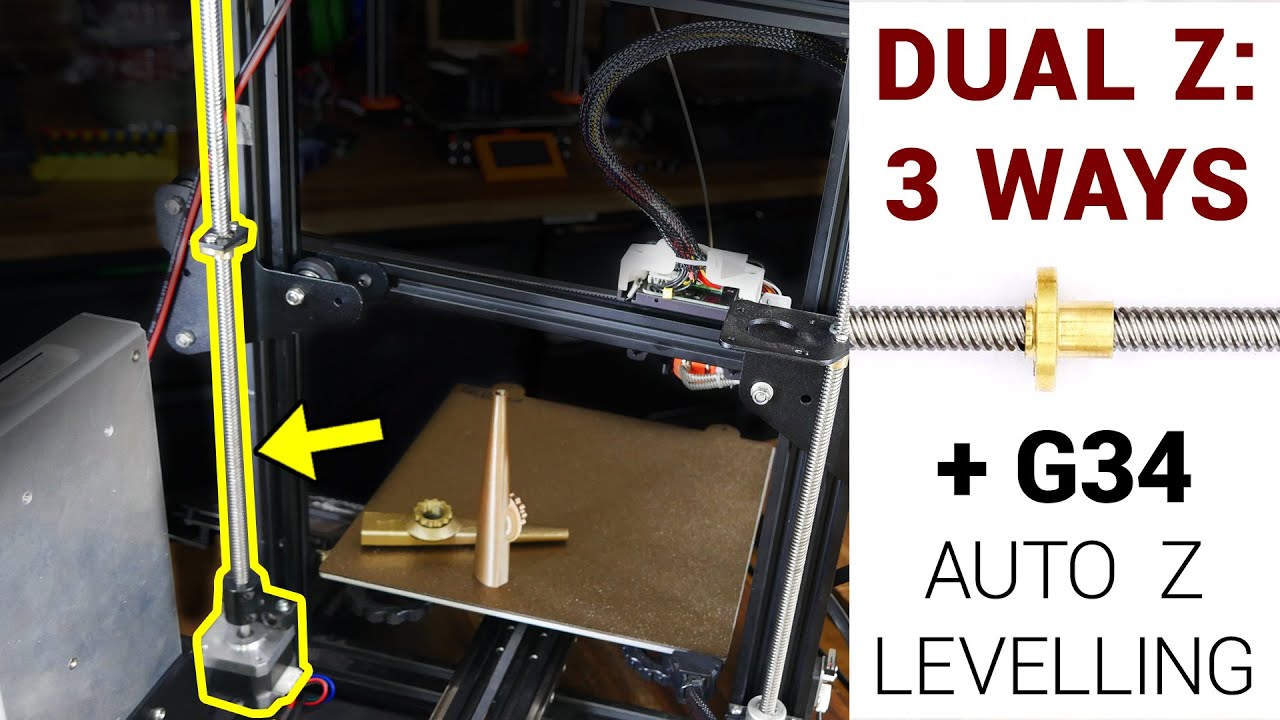
A patreon request: make a guide on how to add a second Z axis to an Ender 3. In this video we achieve that, showcasing three methods to get the gantry level. This includes a mechanical belt driven kit from TH3D, adding a 2nd stepper motor in parallel, and a 2nd firmware controlled stepper with G34 auto z levelling.
If you were looking to do thi...
Not sure tho so don't quote me on that
rocky heath
rotund rain
Also I think you have dual z-steppers so I would review this vid and that should...
I am trying to figure out the firmware update right now. Of course I can't even get it done correctly either
rotund rain
you should be able to just upload the firmware to a sd card and insert it into the sd card slot
rocky heath
I should be able to but it wont flash the firmware onto the printer
desert lodgeBOT
This post has been closed due to inactivity.
This post has been inactive for over 1 hour and so has been closed. To reopen this post simply send another message.
rotund rain
rocky heath
I have to get off but thank you for the advice and help
No problem let me know if you have more questions