
#my printer won’t print
1 messages · Page 1 of 1 (latest)
 tired wraith
 grand templeBOT
tired wraith
My ender 3 Neo won’t finish a print it only barely starts the bottom like the ph...
AI Help
There could be a few reasons why your Ender 3 Neo is not completing prints. Here are some troubleshooting steps you can try:
-
Check bed leveling: Ensure your bed is properly leveled. Use a sheet of paper or a leveling tool to make sure the nozzle is at the right distance from the bed.
-
Adjust first layer settings: Double-check your first layer settings. Make sure the initial layer height and initial layer line width are appropriate for your printer.
-
Verify filament diameter and temperature: Ensure that you have selected the correct filament diameter in your slicing software. Also, check if the printing temperature is suitable for the type of filament you are using.
-
Clean or replace the nozzle: A clogged nozzle can cause printing issues. Try cleaning it using a nozzle cleaning tool or replace it if necessary.
-
Check filament feed: Ensure that the filament is feeding smoothly through the extruder. Make sure it is not tangled or stuck, and check that the extruder gear ...
WARNING: This response is AI generated and may contain errors.
 near mural
ohh good lord, your nozzle is digging into the glass plate! adjust your z offset
@tired wraith
grand templeBOT
Leveling Your Printer
Here is a handy infographic that will help with levelling your printer.
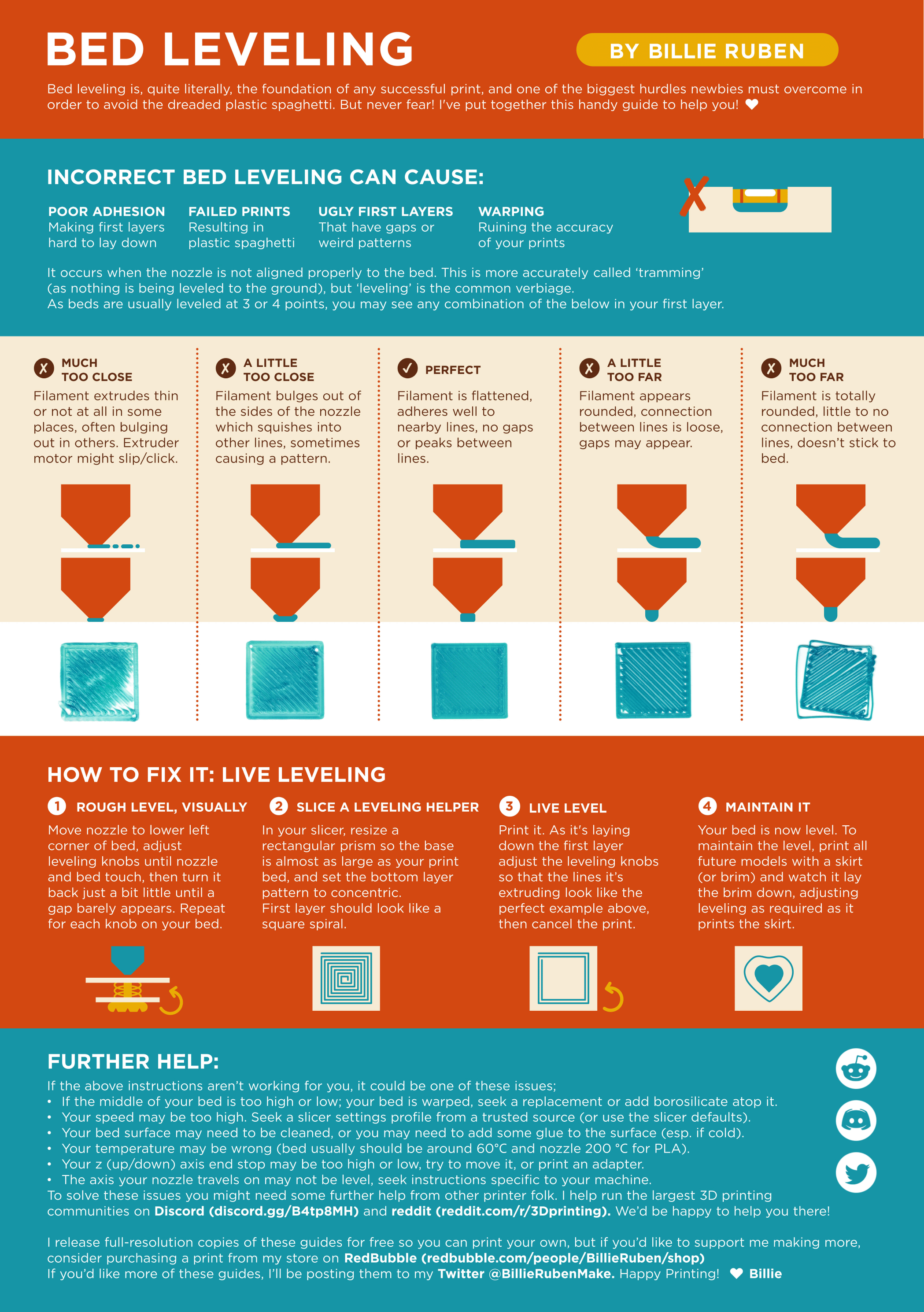
?leveling requested by: _deflock_#0
 zinc yew
adjust Z offset by a ton
i wish they could auto adjust it by using the probe but what ever
tired wraith
@zinc yew
zinc yew
up by idk how much
tired wraith
I’ll take a photo later
tired wraith
But I’m pretty sure the first number is like a 3
tired wraith
It’s on 03.400
grand templeBOT
This post has been closed due to inactivity.
This post has been inactive for over 1 hour and so has been closed. To reopen this post simply send another message.
zinc yew
well just up by alot