#I need help with my Photon Zero Settings
1 messages · Page 1 of 1 (latest)
 drowsy maple
 hybrid thistleBOT
drowsy maple
Hello everyone im just getting into the hobby and bought myself a used photon ze...
AI Help
Congratulations on getting your own Photon Zero! The optimal settings for your Anycubic Basic Grey Resin may vary depending on the specific brand, model, and batch of resin you have. However, I can provide you with some rough guidelines that should help you get started.
First, you should check the manufacturer's website or manual for recommended exposure times and layer thickness settings. You can also find suggested settings on various user forums and Facebook groups.
To get an idea of some basic settings to start with, try the following:
- Layer thickness: 0.05mm - 0.1mm
- Exposure time: 5-10 seconds for the bottom layers, and 1-2 seconds for each normal layer.
- Bottom layers: 5-10 layers at 90-120 seconds exposure time
- Off-time delay: 1-2 seconds
These are just rough guidelines and you should adjust them based on your personal preferences, the specific resin you're using, and the ambient temperature of your workspace.
Regarding the slicing program, Lychee is one of the mo...
WARNING: This response is AI generated and may contain errors.
hybrid thistleBOT
This post has been closed due to inactivity.
This post has been inactive for over 1 hour and so has been closed. To reopen this post simply send another message.
 deep crypt
As all printers are slightly different and even resin batches can vary, you would be best off printing some samples / tests to determine the best exposure times. I found this one very useful for basic set up. https://www.thingiverse.com/thing:4707289
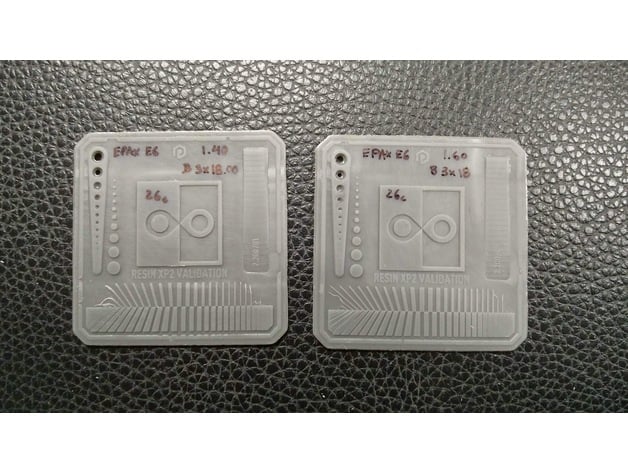
How to use Validation Matrix (Tyler Schubert)https://youtu.be/GL-9Ia0SibQ
The Validation Matrix must be printed with 4 or less base exposures for a correct test result.
The Photonsters Validation has a couple of features to make it easy to find if the exposure is balanced.
Pins/Holes should be the same number
Teardrops in the central square sho...