
#very bad print
1 messages · Page 1 of 1 (latest)
 dense mulch
 spare marlinBOT
dense mulch
Hello, in the picture you can see how bad it prints the holes and the lines
On t...
AI Help
There are several factors that could cause poor hole and line printing quality in 3D printing. Here are a few things you can try to improve the print quality:
-
Check the printer bed leveling: Make sure that the printer bed is leveled correctly. An uneven bed can cause poor print quality, especially on the first layer.
-
Adjust the print temperature: Try adjusting the print temperature. Different filaments require different temperatures. Printing too hot or too cold could cause poor quality.
-
Check for filament clogs: Uneven filament flow and clogs can cause poor print quality. Clear the nozzle of any debris that might be clogging it.
-
Check your printer settings: Check your printer settings in Cura. Make sure that the print speed, layer height, and nozzle size are set correctly.
-
Check bed adhesion: Ensure that the print bed adhesion is good enough. Poor bed adhesion can cause the print to shift
If the issue persists, please share more details about the printing setti...
WARNING: This response is AI generated and may contain errors.
 grand raft
Looks like your nozzle is too far off the bed
spare marlinBOT
Leveling Your Printer
Here is a handy infographic that will help with levelling your printer.
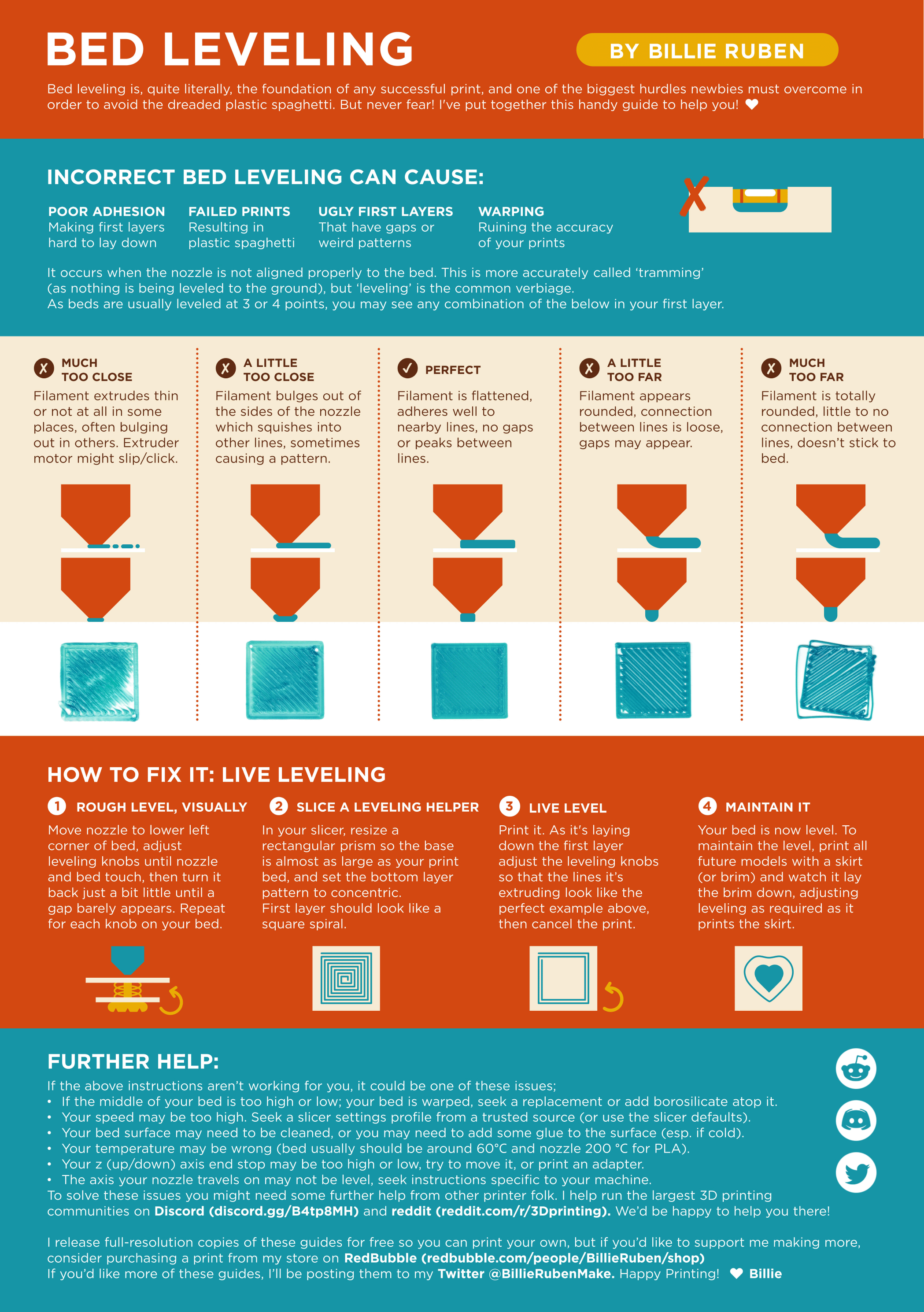
?leveling requested by: enid#1234
dense mulch
grand raft
Looks like your nozzle is too far off the bed
But it works fine with all other prints
grand raft
Hm :/ I don't know then, sorry
Was just the first thing I'd have looked for
dense mulch
I checked it, but the nozzle is fine
spare marlinBOT
This post has been closed due to inactivity.
This post has been inactive for over 1 hour and so has been closed. To reopen this post simply send another message.
 past narwhal