#Wootility v5.1.0-beta.0 Feedback
1 messages · Page 1 of 1 (latest)

 simple dust

 quiet nymph
😳
 night elm
Wootility v5.1.0-beta.0 Feedback
 midnight mirage

 undone zenith
 dapper silo
 brazen mountain
where the knob support?
 bold nova

 night elm
bold nova
<a:HanaCrying:813322592114573313>
night elm
bold nova
<a:HanaCrying:813322592114573313>
You like burning your eyes? 😜
simple dust
light theme bad
 obsidian vault
typo in the first bullet point of changelog?
bold nova
night elm
You like burning your eyes? 😜
Yes 
Gimme 
night elm
obsidian vault
typo in the first bullet point of changelog?
colour > color
 molten marlin
Wait, there's been a 5.0.5 version?
simple dust
yes, this one has more on top of 5.0.5
 hexed tiger
5.0.5 launched a few hours ago 😛
molten marlin
Oh okay I've been at work so haven't seen it
simple dust
we wanted to play it safe and release these ones as beta because of the mentioned under the hood changes
molten marlin
I just know that when I went to bed there was only 5.0.4 hence the confusion 😄
simple dust

 hazy pilot
simple dust
<:SwitchyCool:1272510043853553686>
hazy pilot
simple dust
<:SwitchyCool:1272510043853553686>
that animation preview in-app looks cool
bold nova

 neat steeple
Wait wait....background process?!?!
Does that mean y'all are working towards macros?
 finite merlin
simple dust
<:SwitchyCool:1272510043853553686>
finite merlin
simple dust
<:SwitchyCool:1272510043853553686>
Been waiting for this a long time
 vale gate
first.... :)
hexed tiger
Something in my primal monkey brain loves seeing the firmware update progress bar on the LED indicator 
vale gate
im late to the party :(
finite merlin
For some reason my rapid trigger settings reset when I updated
 nocturne peak
yay
vale gate
night elm
colour > color
hes right tho and you know it 😭
neat steeple
hexed tiger
Something in my primal monkey brain loves seeing the firmware update progress ba...
.....TIME FOR ME TO GET AN 80HE THEN!!!
hazy pilot
hexed tiger
Something in my primal monkey brain loves seeing the firmware update progress ba...
me2 xD
simple dust
finite merlin
For some reason my rapid trigger settings reset when I updated
would be nice to get more details on this, that's not really expected
 chilly tapir
Hey, I can not update the keyboard firmware. The program succesfully updated, but the keyboards fails everytime, the program just tells me to unplug and plug it in again, but the update will just fail one more time.
 ebon tusk
simple dust
<:SwitchyCool:1272510043853553686>
ebon tusk
simple dust
<:SwitchyCool:1272510043853553686>
How did u do that?
simple dust
ebon tusk
How did u do that?
if you are on latest beta firmware and wootility it should just work ™️
simple dust
chilly tapir
Hey, I can not update the keyboard firmware. The program succesfully updated, bu...
which keyboard?
chilly tapir
simple dust
which keyboard?
Wooting 80HE
ebon tusk
simple dust
if you are on latest beta firmware and wootility it should just work ™️
I am now on the latest firmware
simple dust
ebon tusk
I am now on the latest firmware
what keyboard?
hazy pilot
you have some rgb effects enabled?
 gritty bison
When can my 80HE Produce BigMacs for me?
I paid for that
hazy pilot
ebon tusk
is it like using the effect spiral?
this one? looks like spiral
simple dust
ebon tusk
is it like using the effect spiral?
my screen recording is with spiral, yes
simple dust
chilly tapir
Wooting 80HE
do you get any specific error?
 earnest wadi
chilly tapir
Hey, I can not update the keyboard firmware. The program succesfully updated, bu...
earnest wadi
chilly tapir
Hey, I can not update the keyboard firmware. The program succesfully updated, bu...
I have same with a wooting 60 HE
ebon tusk
kk thanks guys ❤️
simple dust
@chilly tapir @earnest wadi are you on Desktop or web?
earnest wadi
simple dust
<@1262594772879671357> <@882998695770091612> are you on Desktop or web?
web
simple dust
which browser?
gritty bison
Wootility has a desktop App? I thought web only
earnest wadi
simple dust
which browser?
Chrome
chilly tapir
simple dust
do you get any specific error?
Nothing specific, only a "An error occured while completing the update". I am using the latest beta of the Windows program.
hazy pilot
gritty bison
Wootility has a desktop App? I thought web only
yes
 timber urchin
I'm still waiting for the software on ps5 
gritty bison
hazy pilot
yes
Good to know, but i think i stay with the Web App - or does is have any features that web doesnt have?
simple dust
gritty bison
Good to know, but i think i stay with the Web App - or does is have any features...
web>>>
hazy pilot
what about background service that will be provided in future?
earnest wadi
simple dust
web>>>
it's good it works
hazy pilot
it will work while using web app too?
simple dust
hazy pilot
it will work while using web app too?
Yes
 hazy pilot
okay, nice
chilly tapir
@simple dust I tried to update from the beta web too, it just gave me the same error and crashed my Chrome 😄
 ornate anvil
Question I have, are all users going to be forced to run Wootility in the background for the Background Services?
simple dust
ornate anvil
Question I have, are all users going to be forced to run Wootility in the backgr...
definitely not, it's optional
ornate anvil
 all I care about cause I dont need any of those features and enjoy not needing something running in the background
hexed tiger
Opt in, correct?
simple dust
chilly tapir
<@176019265659338763> I tried to update from the beta web too, it just gave me t...
 unsure why that would happen, feel free to DM me your logs and I can take a look
chilly tapir
simple dust
<:SwitchyCry:1272510047683084309> unsure why that would happen, feel free to DM...
I will, thank you 🙂
simple dust
hexed tiger
Opt in, correct?
Opt in, yes. Of course, we will have certain features that require it to be running, but you won't ever lose anything that is possible without it
👀 👀
ornate anvil
Glad both groups got what they wanted, you guys are amazing 
 hasty sun
@night elm, have you made a build of this latest firmware that incorporates your test key bounce filtering?
night elm
hasty sun
<@178235161857490944>, have you made a build of this latest firmware that incorp...
It's included now
simple dust

 shadow hound
is this safe for the two he avr?
ornate anvil
Depends what you mean by safe
shadow hound
was it tested
 not going to break your board tho
shadow hound
not going to break your board tho
shadow hound
k then i ll wait
shadow hound
ornate anvil
<:dogekek:1134256020156317706> not going to break your board tho
last time it did. was pain in the ass


 ornate anvil
shadow hound
last time it did. was pain in the ass
ornate anvil
shadow hound
last time it did. was pain in the ass
Never had a problem with any beta, others do, avoid if you feel it will give you problems
simple dust
shadow hound
last time it did. was pain in the ass
believe me, it was a pain in the ass for us too 
We've taken steps that will prevent it from happening again
and yes, I've tested it on my 2he avr
shadow hound
thanks
 granite otter
I just got my first working the other day so these updates I’m excited to test and see
shadow hound
took ages, to update to the beta, but now it works. thx
was stuck at step 4 out of 7 for 2-3 mins
i got scared
simple dust
maybe your internet is super slow ?
shadow hound
i have a 100mbit dedicated business line, so probably not
ornate anvil
shadow hound
i have a 100mbit dedicated business line, so probably not
That is pretty slow, relatively speaking. Guessing that is all depedent on location tho
shadow hound
so how big is the beta update firmware?
simple dust
it shouldnt really take long at all, but im glad it worked. it's like a couple hundred kb
shadow hound
thats what i thought. im glad it worked out in the end
 bleak cedar
always look forward to a new beta wootility and beta board fw for whatever reason... thank you wooting gods and goddesses

 frozen fog
Here's a bit of a nit, and not a new issue:
When you change profile while in the Light Indicator config it kicks you back out to Profile Effects (none selected), even if you were, say, editing a Global Effect. Minor inconvenience.
New features seem great though, thanks for the update! 👍
nocturne peak
 cinder eagle
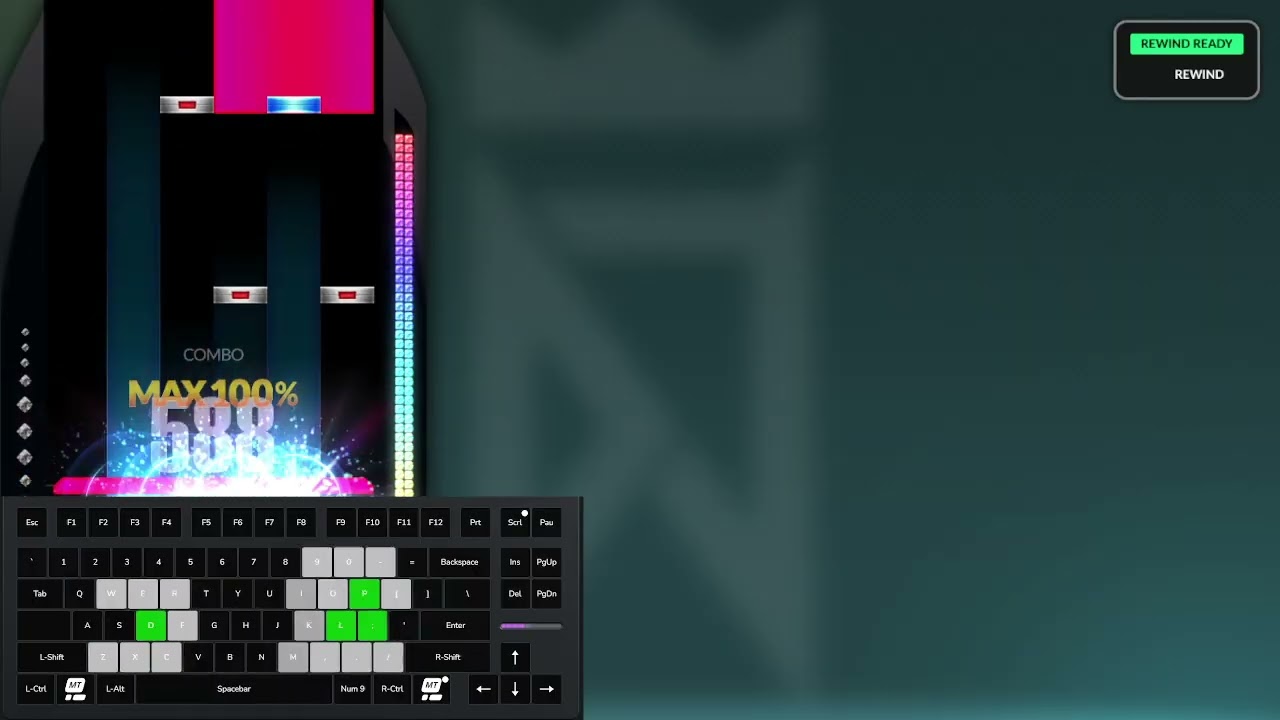
Based on that
With 80he and this beta feature + keeping wootility on, you have KPS, and keypress indicator.
 errant swan
simple dust
<:SwitchyCool:1272510043853553686>
errant swan
simple dust
<:SwitchyCool:1272510043853553686>
code?
simple dust
huh?
errant swan
simple dust
huh?
code for that rgb prof
simple dust
it's the default spiral effect
 strong portal
simple dust
<:SwitchyCool:1272510043853553686>
strong portal
simple dust
<:SwitchyCool:1272510043853553686>
Wow that butifull
errant swan
why does it still say v2 at the bottom

 fringe charm
Still no repeat while holding features for macro. Saddening sadsad.
 bitter lion
Don't know if it's because of this update, but my 60he doesnt work with usb-c anymore (doesnt get recognized at all).
worked fine immediately after the update, but no more after the first restart.
Tried the Restore and reset device, but no luck.
Luckily it works fine with the usb-c to usb-a dongle.
molten marlin
errant swan
why does it still say v2 at the bottom
The firmware and Wootility are separate, hence different versions
molten marlin
fringe charm
Still no repeat while holding features for macro. Saddening sadsad.
Well this is Wootility not Wootomation 🙂
 vocal junco
how are you guys finding the debounce filter
 errant swan
Keyboard Unresponsive After Waking from Sleep Mode in Beta Update
Description:
After installing the latest beta update, my keyboard becomes unresponsive when waking the PC from sleep mode. The keyboard has no lights and does not respond to inputs until it is unplugged and replugged.
Steps to Reproduce:
Install the latest beta update.
Put the PC into sleep mode.
Wake the PC from sleep mode.
Observe that the keyboard does not respond and has no lights.
Unplug and replug the keyboard – it starts working again.
**
Expected Result:**
The keyboard should function normally after waking the PC from sleep mode.
Actual Result:
The keyboard remains unresponsive until it is unplugged and replugged.
Reproducibility:
Tested twice – the issue occurs consistently.
System Information:
Beta Update Version: Wootility v5.1.0-beta.0
Keyboard Model: Wooting 80HE
PC motherboard: ASUS TUF GAMING B650M-PLUS WIFI Bundkort
errant swan
Update:
i just unchecked the beta program, and it asked me to downgrade.
it seems like working normally again, as it did before i updated it
**Recommendation **
Dont do the newest beta program update
 charred crest
errant swan
why does it still say v2 at the bottom
charred crest
errant swan
why does it still say v2 at the bottom
Why I don’t have sdk on the wootility ? Because I’m on Mac ?
simple dust
yes
 digital magnet
Where is the debounce setting? Can't find it.
One more thing, is there any chance to add a visual feed back for the Rapid Trigger? The same as you did for the actuation point feedback on the UI @night elm
vocal junco
digital magnet
Where is the debounce setting? Can't find it.
in the setting tab where u change polling rate
frozen fog
errant swan
**Keyboard Unresponsive After Waking from Sleep Mode in Beta Update**
**Descrip...
I just had this occur to me for the first time since the update, never happened before the beta. Also on 80HE, Win11. It hasn't been a consistent issue for me, I've put the machine to sleep several times since the beta upgrade without this issue.
errant swan
New Update
Im still facing the same issue.
i think its because my keyboard itself is stuck at the beta firmware
 frozen fog
errant swan
frozen fog
errant swan
Yes
 errant swan
frozen fog
Yes
errant swan
frozen fog
Yes
oh, so you may still face the same issue as me
mine still doesnt repond after waking up from sleep mode
 slow dawn
because you are still running the beta firmware, you just downgraded to non-beta wootility
 scenic parcel
errant swan
**Keyboard Unresponsive After Waking from Sleep Mode in Beta Update**
**Descrip...
scenic parcel
errant swan
**Keyboard Unresponsive After Waking from Sleep Mode in Beta Update**
**Descrip...
Also having to unplug & replug my 80HE every time I turn my PC on, similar mobo
errant swan
scenic parcel
Also having to unplug & replug my 80HE every time I turn my PC on, similar mobo
You need to downgrade and opt out of the beta program
 charred silo
Having a problem where my 3rd profile gets randomly overridden by my 4th profile so my third profile gets deleted and i have to remake my third profile
vocal junco
debounce filter has been really damn good I can set all my keys to 0.15mm rapid trigger again
 fathom mirage
my rapid trigger settings reset all time when i launch the wootility i saved my setting i leave the software i relaunch and my rapid trigger setting reset to 0.4 somebody have same behavior?
simple dust
Known bug, we have a fix in the works
fathom mirage
simple dust
Known bug, we have a fix in the works
Ok thanks but the settings are saved in the keyboard and it reset when i open wootility or they are not saved?
 lusty musk
errant swan
**Update:**
i just unchecked the beta program, and it asked me to downgrade.
it...
lusty musk
errant swan
**Update:**
i just unchecked the beta program, and it asked me to downgrade.
it...
this happened to me on every bootup on my pc, I downgraded since i needed to unplug and replug everytime i booted my pc and before i even got to the login screen
 swift harbor
Seems like the update completely broke razer chroma integration for me. tried reinstalling both apps

Wooting 60HE
simple dust
@errant swan @frozen fog and anyone else that has issues with the keyboard not waking up properly with this latest firmware:
- Use this link https://beta.wootility.io/?test-builds=true (this URL has Test builds enabled)
- Click on "Settings"
- Select "Updates"
- Select "Your keyboard"
- Press "Get Test Firmware"
- Press "Select Test Build"
- Select
2.11.0-beta.0+fix-wakeup
errant swan
simple dust
<@456226577798135808> <@177215732600274945> and anyone else that has issues with...
But, i have already downgraded the firmware. as you told me
and opted out from the beta program
 pearl cedar
simple dust
<@456226577798135808> <@177215732600274945> and anyone else that has issues with...
pearl cedar
simple dust
<@456226577798135808> <@177215732600274945> and anyone else that has issues with...
sorry if im slow but wym by waking up
errant swan
pearl cedar
sorry if im slow but wym by waking up
after you put you computer on sleep mode, and turn it back on. The keyboard doesn't respond
which result in, you have to unplug it, and re-plug it
errant swan
pearl cedar
i havent had that issue myself w the latest beta firmware
we faced it with 80HE model
errant swan
@simple dust maybe you should put that on a note^
people with 60HE, may not face the issue. only people with 80HE face the issue
pearl cedar
only reason i got the new firmware was cause of debounce filter which lwk feels rlly nice
i mean i rarely had an issue w lowest setting act point and rapid trigger but other than that it feels really good
frozen fog
simple dust
<@456226577798135808> <@177215732600274945> and anyone else that has issues with...
Thanks, I'll see if I experience the wakeup issue on this version.
 frozen fog
I just put it through a half dozen sleep-wake cycles without issue. I only hit this problem twice in around 10 sleep-wake cycles though, so I'll keep my eye on it, but looking promising.
scenic parcel
simple dust
<@456226577798135808> <@177215732600274945> and anyone else that has issues with...
Just installed it, will reply next time I restart my PC
 astral nest
simple dust
<@456226577798135808> <@177215732600274945> and anyone else that has issues with...
astral nest
simple dust
<@456226577798135808> <@177215732600274945> and anyone else that has issues with...
just messaging to let you know I've also been experiencing the wake up bug, and have now installed this firmware. I will message again if I still have issues with the new firmware
 heady bobcat
I installed the fix, works so far, thanks !
frozen fog
Several more sleep-wake cycles later, the patched firmware seems to have done the trick for me as well.
scenic parcel
Fixed for me too
undone zenith
Thanks devs for not releasing fake firmware update with 0.1rt and switch selector on april 1st
 cunning pollen
undone zenith
Thanks devs for not releasing fake firmware update with 0.1rt and switch selecto...
cunning pollen
undone zenith
Thanks devs for not releasing fake firmware update with 0.1rt and switch selecto...
They should have inverted our rgb profiles for today
 young sigil
 dusk zodiac
Yea I can confirm it fixed the wake up bug for me too!
 dense roost
guys how can i install the new firmware cuz i have problem every time i lunch my pc or restart the keybored didn't turn on till i replug the usbc again
molten marlin
dense roost
guys how can i install the new firmware cuz i have problem every time i lunch my...
The steps are listed here #1354496567423271083 message
swift harbor
swift harbor
Seems like the update completely broke razer chroma integration for me. tried re...
has anyone figured out a fix for chroma connect module unexpectedly failed? I even tried rolling back off beta and it didnt fix
 whole turtle
When my PC sleeps for a long time, and then i wake it up, the keyboard doesnt work unless i unplug and replug. Im on windows 11 latest version and on Firmware v2.11.0-Beta.0
undone zenith
whole turtle
When my PC sleeps for a long time, and then i wake it up, the keyboard doesnt wo...
whole turtle
undone zenith
https://discord.com/channels/167181566978555904/1354496567423271083/135621006033...
oh nice i didnt see that
thank you
maybe that will work
undone zenith
worked for others i think
undone zenith
does your kb work?
whole turtle
okay that took ages for it to get the firmware that was 4 minutes of waiting
scared me for a second
undone zenith
whole turtle
do i click update device or leave it as is ?
 undone zenith
whole turtle
do i click update device or leave it as is ?
undone zenith
whole turtle
do i click update device or leave it as is ?
leave it like that
whole turtle
alright
undone zenith
update when they release new firmware
night elm
https://wooting.io/wootility/changelogs/5.1.0-beta.1
New version out, trying to fix most of the issues that have cropped up
Read about the changes and improvements in Wootility version 5.1.0-beta.1.
night elm
digital magnet
One more thing, is there any chance to add a visual feed back for the Rapid Trig...
We plan to sort that as part of making it accurately show the actuation :)
 remote ocean
How faar is this 6 month ago plan? im still annoyed from the reddish color of the 80he "white" 😉
--> Igwoot | Calder — 21.09.2024 21:23
White is difficult with RGB LED that gets diffused by materials. BUT we are still missing a calibration step, calibrating specific productions bins with certain color shifts for each keyboard.
It’s a bit of a next level thing that we can still update by software once implementation is 100% complete. We have all the info for backwards compatible implementation

 toxic tangle
remote ocean
How faar is this 6 month ago plan? im still annoyed from the reddish color of th...
toxic tangle
remote ocean
How faar is this 6 month ago plan? im still annoyed from the reddish color of th...
For now you can try: R 227, G 255, B 215. I tried offsetting the red with a green tint, it looks pretty white to me, at least on my keycaps.
remote ocean
toxic tangle
For now you can try: R 227, G 255, B 215. I tried offsetting the red with a gree...
yeah did that but it realy is still not ok.. in the end i see when i activate the ripple effect that it CAN BE white becouse the ripple literly shows good white values but as it gets "darker" its not as good
in my book this means it needs valibration with difrent values and can be solved quite well
toxic tangle
remote ocean
yeah did that but it realy is still not ok.. in the end i see when i activate th...
Yeah, sadly, this only works well when you use it without any effects. :/
remote ocean
toxic tangle
Yeah, sadly, this only works well when you use it without any effects. :/
actualy the effect is the whitest white for me while most fix colors are not resulting in me using a very very dark white just to minimal illuminate
fact is this what calder stated is now 6+ month ago and i still dont see any progress and you cant do all with just RGB there is more in the mix^^ im sad that the keyboard doesent hafe a WRGB but oh well..
toxic tangle
They are probably still working on it, we just gotta wait a bit more. 😩
remote ocean
i mean it never will be the cleanest white BUT it should be better than White= red/Pink
remote ocean
this is the whitest white i could get and thats actualy vvery sad..


 young violet
changelogs for beta.2? nothing special maybe
 young violet
Changes since v5.1.0-beta.1
Fix Flaretech boards (Wooting One and Wooting Two) having issues connecting to Wootility beta
Fix some issues around gamepad configuration which could result in a profile not applying/saving properly
Fix issue where Ctrl/Cmd + S would always trigger a profile save even if one was not needed/available
The UI now gets blocked when a profile is saving, to prevent issues with certain actions interfering with the saving process
alr
 viral umbra
Hi, I was pointed this way for my suggestion regarding a wootility feature https://discord.com/channels/167181566978555904/1362224962508947538
A post on reddit a few months ago asked the same question I have now which is regarding a dedicated remappable button for muting the mic input. The answer then was that there is no OS level binding in the same way that volume and play/pause has, however this is not the case with linux where many more keysims are available like XF86AudioMicMute for mic muting that are used in the same way as the existing XF86AudioPlay (play/pause) commands that I'm guessing wootility already makes use of.
 fading knoll
I can't change the RGB lighting after updating my board. Tachyon mode is off as well. It was fine yesterday but I turned on my PC just now and the RGB is all weird.
 wide iron
swift harbor
has anyone figured out a fix for chroma connect module unexpectedly failed? I ev...
wide iron
swift harbor
has anyone figured out a fix for chroma connect module unexpectedly failed? I ev...
aww man 😦 i actually had it off for a while cause even though i had the brightness for it at 100 percent it was very dim.. now that im trying to give it another shot i get the same message.. lame.. hopefully this is fixed soon.
wide iron
fading knoll
I can't change the RGB lighting after updating my board. Tachyon mode is off as ...
try restoring the keyboard.. the instructions are in the wooting settings under the help tab. you will lose your settings but worth trying to give it a shot..
charred silo
wide iron
try restoring the keyboard.. the instructions are in the wooting settings under ...
You can save settings by exporting them and saving them somewhere (like google docs or in a dm) and after reset import them back
wide iron
charred silo
You can save settings by exporting them and saving them somewhere (like google d...
yes. my bad forgot to mention this.
remote ocean
I'm a bit confused about how key assignments work when using special functions like ModTap. It seems that a single key can still have a third binding, even though it already has:
a DKS action,
For example, I reused the Enter key on Layer 2 for DBeaver with a dual-function setup (DKS):
normal press triggers Shift + Home,
deep press triggers Shift + Home than on release Ctrl + Enter.
However, in Remap, this key still shows MUTE (its default function), which is misleading and confusing, because the UI doesn't reflect the actual configured behavior. - or it even has 3 actions wich would be although strange. how is this intended?


 dense dawn
Dunno if this is from the recent update or not, but the app won't lemme update the firmware, and I can't use it otherwise. Both app and web version.

Hovering over gives a 🚫 and presssing does nothing
 balmy fiber
Is it possible to have the option of the trail effect activating on key release rather than key press?
scenic parcel
Is there a way to downgrade the firmware from beta to stable?
simple dust
You have to restore.
dense roost
should i do the update or still the restart pc and keyborard not lunch till i replug the usb c (bug)
 kindred sphinx
Can't unlock brightness shortcuts to go to 100% with Techyon mode enabled
I've encountered a bug where when I have Tachyon mode enabled with brightness unlocked I can't use the brightness shortcuts on my 80HE (FN + F11/F12 by default) to go above 70%, despite it being unlocked in the RGB Settings.
This is on the release version of Wootility, but I was recommended to post it here.
charred silo
kindred sphinx
**Can't unlock brightness shortcuts to go to 100% with Techyon mode enabled**
I...
You using wooting’s cable?
kindred sphinx
charred silo
You using wooting’s cable?
Yes, the one that came with the keyboard
young violet
are we dead until 60hev2 released?
bleak cedar
young violet
are we dead until 60hev2 released?
When this beta released I think Simon said there were a few surprises coming, albeit we don’t know when.
vale gate
young violet
are we dead until 60hev2 released?
A bit late but we're dead mostly due to computex, should get back on cleaning this beta up once we're back to normal
young violet
oh, thanks for telling that.
dense roost
should i do the update or still the restart pc and keyborard not lunch till i replug the usb c (bug)?
 mortal bane
Beta version, should I upgrade it?
molten marlin
mortal bane
Beta version, should I upgrade it?
If you want to? I haven't had any issues
mortal bane
molten marlin
If you want to? I haven't had any issues
I just want to know if it will be better than the normal version if I update it.
molten marlin
mortal bane
I just want to know if it will be better than the normal version if I update it.
You can check the changes for 5.1.0-beta.0-2 here https://wooting.io/wootility/changelogs?version=5.1.0-beta.0
mortal bane
If I want TachyonMode to work at 1ms, at what percentage should I adjust the keyboard brightness?
nocturne peak
mortal bane
If I want TachyonMode to work at 1ms, at what percentage should I adjust the key...
it doesn't work that way, asssuming on you're on 60he, it'll always be on 1ms no matter what brightness your keyboard is in when tachyon is enabled.
molten marlin
mortal bane
If I want TachyonMode to work at 1ms, at what percentage should I adjust the key...
The reason brightness gets locked to <70% is because of the extra power draw that not all cables can handle, you can click the padlock to unlock it
mortal bane
So it shows that if you adjust the brightness to 70%, TachyonMode is 1 ms, right?
molten marlin
mortal bane
So it shows that if you adjust the brightness to 70%, TachyonMode is 1 ms, right...
Brightness doesn't affect Tachyon mode, as I said the reason it gets limited is because a lot of cables don't support the extra power draw.
If you use a good cable you're free to unlock it
mortal bane
And will the efficiency decrease? Will the response decrease as well if the brightness is adjusted to 70%?
molten marlin
mortal bane
And will the efficiency decrease? Will the response decrease as well if the brig...
It's just power to the LEDs, as long as the keyboard gets enough power it's all fine
mortal bane
But if TachyonMode is enabled, the lighting effects will not be there, right?
molten marlin
mortal bane
But if TachyonMode is enabled, the lighting effects will not be there, right?
Correct because they would take computational power
 grizzled needle
why discord
well anyway, linux, 5.1.0-beta.2, looks like this
make of that what you will
 hearty olive
Once the background program hits: Will we be able to swap profiles by having a game open? And can we sync RGB to stuff like Hue lights then?
night elm
hearty olive
Once the background program hits: Will we be able to swap profiles by having a g...
One of our plans with the background service is to add the feature to have profiles that are automatically loaded depending on the app/game you have in the foreground.
Second thing, that's something for RGB software like Artemis RGB or Signal RGB
https://wooting.io/wootility/changelogs/5.1.0-beta.3
New lil beta update, aiming to push this to stable next week if nothing else comes up
hearty olive
night elm
One of our plans with the background service is to add the feature to have profi...
That is freaking awesome cannot wait.
 cedar relic
reporting Bug for firmware 2.11.0_beta2 . It is not correctly detecting double/multiple active profiles, which is the purpose of this firmware build:
Where this build was released for the purpose of preventing the addition of profiles that are already active, but in my testing I was able to occupy 2 (two) slots on the keyboard with the same profile configuration (b41e54b157061631f7b31b2a8337512c6362)
This is reproducible in multiple keyboards
 slow dawn
cedar relic
reporting Bug for firmware 2.11.0_beta2 . It is not correctly detecting double/m...
slow dawn
cedar relic
reporting Bug for firmware 2.11.0_beta2 . It is not correctly detecting double/m...
I think it was meant, that switching between multiple same profiles does not unload and load said profiles anymore. Not preventing you from adding them multiple times
cedar relic
slow dawn
I think it was meant, that switching between multiple same profiles does not unl...
That does not make sense. Why would some one invest development time on such a thing that brings absolutely no benefit, while at the same time burning a write cycle on the flash? That does not make sense ....
And still, taking my example above, the keyboard does toggle between onboard slots 3 and 4, so that is not the correct justification or understanding of the proposed functionality this firmware version delivers
frozen fog
Suggestion for the background service: the ability to change backlight levels based on time of day. At least a "daytime" and "nighttime" setting would be pretty swell so we don't get flashbanged at night.
night elm
cedar relic
reporting Bug for firmware 2.11.0_beta2 . It is not correctly detecting double/m...
You're misunderstanding the changelog. The update was only to skip reloading the profile on the keyboard when you activate it again while it's already the active one.
night elm
frozen fog
Suggestion for the background service: the ability to change backlight levels ba...
That's a cool idea! I've added it to our idea list :)
 coral fern
yall need to fix the onboard profiles getting wiped when you follow the troubleshoot OR at the bare minim make it way more clear its a FACTORY RESET
 cedar relic
coral fern
yall need to fix the onboard profiles getting wiped when you follow the troubles...
cedar relic
coral fern
yall need to fix the onboard profiles getting wiped when you follow the troubles...
Save your profiles on wootility 🙂
 coral fern
cedar relic
Save your profiles on wootility 🙂
coral fern
cedar relic
Save your profiles on wootility 🙂
smart
errant swan
hello, this thing that is talked about rappid trigger in minute 6:52 will come in a beta?https://youtu.be/2ZK_XODi7zY?si=NQ5cYtUhVawZ1nKF&t=412

These new Hall Effect keyboards are claiming to have better latency, accuracy and rapid trigger performance than the Wooting 80HE.
⚪ Check out ChatLLM: https://chatllm.abacus.ai/tlx (sponsored). ⚪
Keyboards tested (affiliate links):
🛒 Wooting 80HE: https://wooting.io/wooting-80he?partner_id=techless
🛒 IQUNIX EZ80: https://geni.us/Lv5...
undone zenith
errant swan
hello, this thing that is talked about rappid trigger in minute 6:52 will come i...
Yes, 0.1 rapid trigger is coming soon™
swift harbor
Does anyone know if the chroma bug has been fixed yet?
 glass vigil
simple dust
<@456226577798135808> <@177215732600274945> and anyone else that has issues with...
glass vigil
simple dust
<@456226577798135808> <@177215732600274945> and anyone else that has issues with...
in case anyone has waking up from sleep issues, this fixed it for me: #1392842246583357482 message
night elm
errant swan
hello, this thing that is talked about rappid trigger in minute 6:52 will come i...
Aiming to land it in Wootility v5.2 
night elm
swift harbor
Does anyone know if the chroma bug has been fixed yet?
Not yet unfortunately, it got more complicated than expected. Although I'd recommend using something like Artemis RGB, as you can get a better experience than the Chroma Connect integration
[v5.1.0-beta.4] Various fixes and a couple of new things
https://wooting.io/wootility/changelogs/5.1.0-beta.4
Got a new beta update today. The goal has been to push this v5.1 to stable for a while, but I've been busy with a lot of things, so been unable to push it.
So here's a build with some of the things and fixes that have been happening in the background. Hopefully this will be the real last™ beta of v5.1 before it lands in stable
swift harbor
night elm
Not yet unfortunately, it got more complicated than expected. Although I'd recom...
The issue is my whole setup is synced with chroma and it all reacts to my games...
for example when im healing it all turns green etc
grizzled needle
I like that this channel is forever pretending to have an unread message now
discord 😒
swift harbor
I really wish this was somehow fixed even in the basic capacity it was at before
night elm
swift harbor
I really wish this was somehow fixed even in the basic capacity it was at before
Fix is being worked on 
 jolly star
night elm
Fix is being worked on <:SwitchySalute:1389233620350140426>
jolly star
night elm
Fix is being worked on <:SwitchySalute:1389233620350140426>
Was wondering have you had any reports on the keyboard being unresponsive if spamming the mouse click? If so is there an fix?
hexed tiger
jolly star
Was wondering have you had any reports on the keyboard being unresponsive if spa...
I've not heard of this before, but perhaps your USB bus is being saturated.
Eg, if your mouse is sending a ton of data via USB and your keyboard is sending a ton of data via USB, maybe your USB bus doesn't have enough bandwidth
Consider making a post in #1019755933959733258 for further assistance
jolly star
hexed tiger
I've not heard of this before, but perhaps your USB bus is being saturated.
Eg,...
Will Do! i had one but didnt get much attention.
night elm
[v5.1.0-beta.5] Restore Chroma connect + small fixes
https://wooting.io/wootility/changelogs/5.1.0-beta.5
Chroma Connect is fixed now @swift harbor
swift harbor
night elm
**[v5.1.0-beta.5]** Restore Chroma connect + small fixes
https://wooting.io/woot...
Legend!
 hollow leaf
In Wootility 5.1, could we get an option to make toggle keys that are only accessible in the FN layer? Currently when making a toggle key in an FN layer, you need have the FN layer active to toggle it on, but you don't to toggle it off. This makes toggles pretty much unusable with FN layers, since if I wanted to bind a toggle to my E key or something, it would toggle off the second I start typing on the main layer. Along with that, the active state RGB for the toggle (white light when toggle is on) should only be visible in the FN layer.
Additionally, I have a couple of QoL suggestions to make toggles more customizable that could also maybe be added later.
- It would be nice if we could change the color of the active state RGB for toggles like we can with caps lock.
- It would also be nice if we could make toggles show up on the light indicator for the 80HE. Currently there's only an AnyKeyActuated condition in the effect creator, but a SpecificKeyActuated condition or even just a condition exclusively for toggles would be great.
night elm
hollow leaf
In Wootility 5.1, could we get an option to make toggle keys that are only acces...
Good feedback
swift harbor
night elm
**[v5.1.0-beta.5]** Restore Chroma connect + small fixes
https://wooting.io/woot...
Bug report (I think) - seems like the current reimplementation leaves out the last left row of keys when using chroma connect. Was not like this in the past @night elm
 simple dust
swift harbor
Bug report (I think) - seems like the current reimplementation leaves out the la...
simple dust
swift harbor
Bug report (I think) - seems like the current reimplementation leaves out the la...
Fixed and will be included in the next update, thanks for the report
swift harbor
simple dust
Fixed and will be included in the next update, thanks for the report
Awesome, thanks
 wanton flame
After 5.1 wootility update I was trying to change my rgb color on my 80 he so I opened a chrome tab to select color from it and rpidetly move my cursor on my keyboard keys to change the keys colors but after that my keyboard gets disconnected from the wootility and I must to restart my pc to get it back it happens multiple times on my 4th profile
wanton flame
I posted a video about it on community support too
hollow leaf
When using the eye dropper to pick the color of a key in the RGB settings, the color is darker than it should be. Wootility darkens the color of the key on the screen when you hover over it, and that darkened overlay applies to the eye dropper tool as well. Maybe it shouldn't darken when using the eye dropper tool, or make the eye dropper tool ignore it somehow.
hollow leaf
I just made a report about it here with a video to show what I'm talking about https://github.com/WootingKb/wootility-issues/issues/339
GitHub
Describe the bug When using the eye dropper tool in the RGB Settings tab to pick the color of a key, the resulting color is darker than expected due to Wootility darkening the color of keys that ar...
cedar relic
hmm... HDR?
balmy fiber
setting for the trail rgb effect to be initiated on key release rather than key press
vale gate
hollow leaf
I just made a report about it here with a video to show what I'm talking about h...
The eyedropper is a little misleading, it takes the raw pixel. If you want to use a color that's already on some other key, right click that key
remote ocean
OKEY here a big request
CAPS LOCK is used by gaming but what is not wanted is the capslock itself is it somehow possible to send the key withoput locking? or AT LEAST CHANGE IT TO OFF WITH MODE CHJANGE OR WINDOWS KEYPRESsß
good example what usaly happens after game seassions and typing..