

9 messages · Page 1 of 1 (latest)
 dusk portal
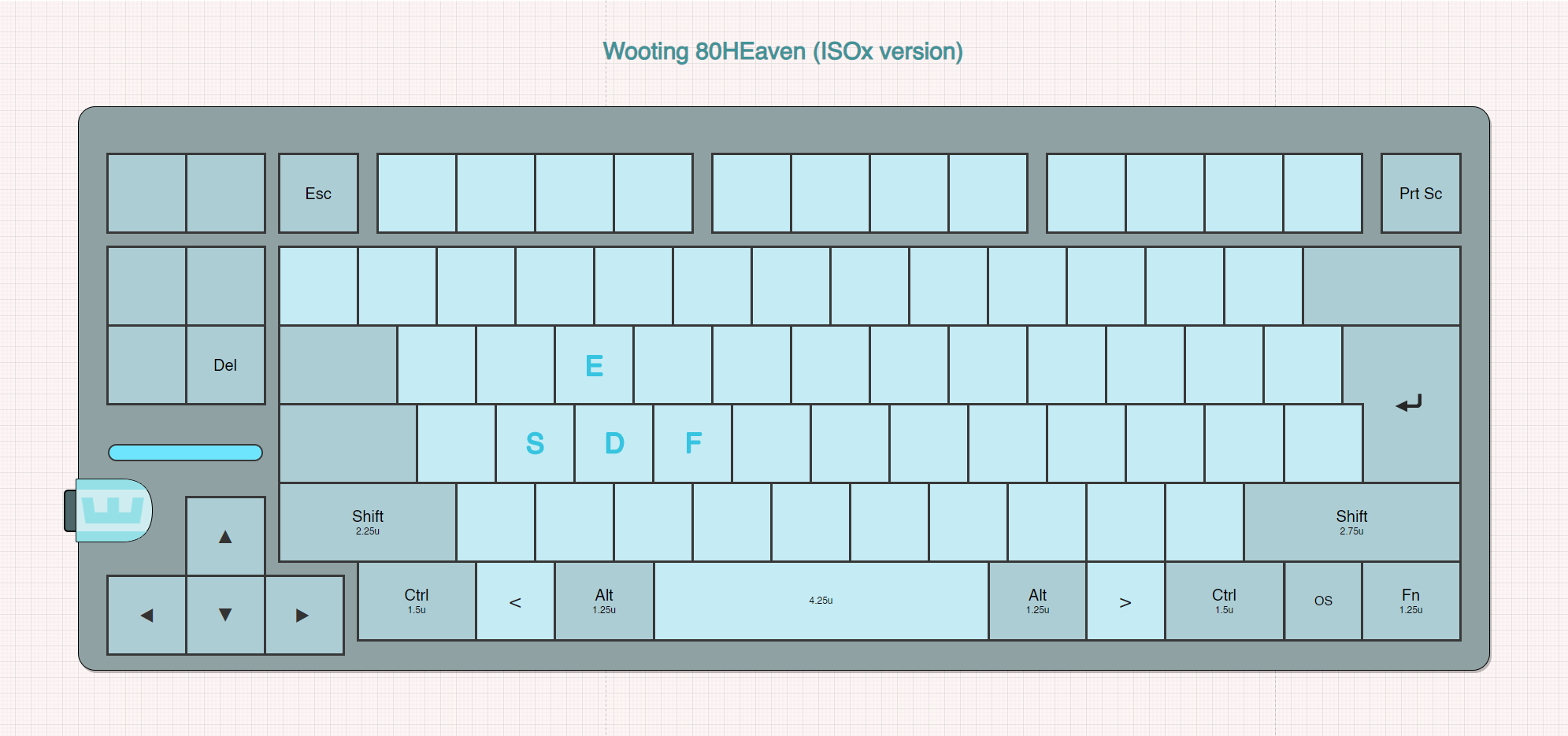
IMPROVED LOOK (LAST IMAGE) https://i.imgur.com/lBtVTul.png
with additional comments in replies below
This new keeb isn't just different for the sake of it. Aiming to perfect the traditional keyboard layout (especially for ISO users, with new ISOx layout) - either you're a software user, coder, gamer or typist, this keyboard improves something for everyone.
Main improvements and features (in addition to all other 80HE features):
* To begin with you might think you bought 80HEll - this is a common reaction to a new layout, stay strong and faithful and you will eventually get to 80HEaven.
- For ISOx layout, can make the "< >" key look more like horns - something sinners/demons have - they are locked out of 80HEaven, just like the key is.
- Colors are not final of course, etc. Some special extra keycaps included expected too (heaven theme) (maybe also a choice between default knob addon, and some heaven themed one (but can also add the one you didn't to cart separately after)).
dusk portal
Refined it a bit with Ps
 dusk portal
Another alternative

 quiet mica
Pretty interesting tbh. Shout out to ESDF! One thing though is that a lot of games use arrow keys and ZXC keybindings (mainly JRPG or RPGMaker) games, so arrow keys on the left side are probably not ideal for those games.
 dull kestrel
The tiny space bar though, wooting were trying to help with keycap compatibility, not hinder it
It's hard enough being an iso UK user already
dusk portal
dull kestrel
The tiny space bar though, wooting were trying to help with keycap compatibility...
They did try it with 80HE yeah, but they also said they won't try as much in the future (because of feedback on arrows).
But also this is a special edition (that might also have a different Spacebar included if you want, and probably another color/set of keycaps all together, so you have a bit of choice like this). Special edition, that also tries to perfect all the previous and old standardized "wrongs" (esp. for ISO), trying to do "Dream Scenario" keyboard, with as little compromise as possible (still largely keeping the standard key positions).
One thing though is that a lot of games use arrow keys and ZXC keybindings
Still not that bad to move kb a bit and use those bindings but with different hands (also can't you often rebind ZXC to like JKL?).
But there is also some games that use Arrow keys + Mouse, and with this it's the opposite, easier to use.
dusk portal
Some further observations
I think you would need to factory-bind "Shift + < >" on the " > " switch slot (if choosing that layout), since I don't think ISO supports just " > " (OS does either ISO or ANSI, not both). (Still remappable after.)
In pretty common scenarios it's nice to use Arrows and Enter with same hand, so maybe include a 1.0u " ⏎ " keycap (to the left of Del, remappable if needed).
With shifted and closer to center Ctrl and Alt, it's now easier to open Linux terminal with its default binding "Ctrl + Alt + T".
Not great text manipulation with Arrows, unless you learn to do it all with one hand on the left, and/or shift left hand position a bit during it; and learning using both hands is possible too (either using right Shift/Ctrl or left). Not great because you use left Ctrl or/and Shift with A, Z, X, C, V. But still not that bad if you get used to it.