#Wootility v4.6.6 Feedback thread
1 messages · Page 1 of 1 (latest)

 coral basin
does it fart
 tall pier

 lunar brook
Wootility v4.6.6 Feedback thread
 near lodge
You are able to update thru the wootility app right?
 honest haven
how does this affect lebrons legacy
lunar brook
near lodge
You are able to update thru the wootility app right?
Yes!
 polar sequoia
Web version is still not updated?
Force refresh did it.
polar sequoia

 reef thistle
yep, ctrl+f5
 mental cave
new welcome page looks smooth
 vale elbow
bro

 sour notch
already been on 4.6.6 for 2 days 🔥 beta moment
near lodge
I think you should also be able to set it so wootility launches on start of your system. And might just be my issue but when starting wootility it takes too long to find the keyboard (it literally takes like 4 seconds but im just inpatient)
 boreal mountain
near lodge
I think you should also be able to set it so wootility launches on start of your...
boreal mountain
near lodge
I think you should also be able to set it so wootility launches on start of your...
as a workaround you could put wootility shortcut in the windows startup folder, it should do that
polar sequoia
near lodge
I think you should also be able to set it so wootility launches on start of your...
How often do you need to change things that you want a popup every time you log in?
 gusty saffron
The "Ripple" effect seems to be broken, selecting it has no effect.
boreal mountain
gusty saffron
The "Ripple" effect seems to be broken, selecting it has no effect.
works for me 👀
gusty saffron
Nevermind, firmware was out of date I guess
near lodge
polar sequoia
How often do you need to change things that you want a popup every time you log ...
Well i change the profile as i switch the game and i usually play Tarkov and osu at the same time, loading into a raid and load screens mostly, and i just switch back and forth.
polar sequoia
Your keyboard can switch profiles without opening Wootility.
near lodge
polar sequoia
Your keyboard can switch profiles without opening Wootility.
Yeah.. im stupid XD dont mind me, thanks for the help
polar sequoia


 hearty halo
hello when i updated wootility all of my profiles are gone, is there a way to get it back?
lunar brook
hearty halo
hello when i updated wootility all of my profiles are gone, is there a way to ge...
oh boy, I think there could be a bug there  , I don't think they are recoverable if they're already gone
hearty halo
oh ok
lunar brook
Gonna look into it now to make sure no-one else gets that
 mild crown
hi, i updated my wooting one to this version of wootility (i was previously on 4.5) and updated firmware to 2.7 but now the rgb is broken. Most of the switches are off and the ones working don't show the colour set in wootility. Changing preset or manually doesn't work. Tried restoring the keyboard a couple of times nothing changed
 tardy canyon
Is there maybe other rgb software enabled that is interfering with wootility?
mild crown
i have openRGB but i unchecked the wooting one from the supported devices. Never gave problems before
tardy canyon
Hmmm that’s odd
lunar brook
mild crown
hi, i updated my wooting one to this version of wootility (i was previously on 4...
Could you send a screenshot of how your Wootility configuration looks and how your keyboard looks?
@mild crown Wait, hold up, don't bother. I tried on my Wooting One and I get the same thing, it must've got broken during the beta at some stage, as when I go back to an earlier beta firmware, it's fine
tardy canyon
Stable build not so stable 
mild crown
thank god is not an hardware problem
lunar brook
tardy canyon
Stable build not so stable <:LULW:952566043530895371>
Well, I guess it was a good idea for me not to push the stable on Friday 
polar sequoia

 round knoll
Oop? It’s being pulled?
lunar brook
round knoll
Oop? It’s being pulled?
Not yet, I've already pushed a fix for the profile losing issue, so that should be contained
round knoll
How would we go back to older firmware?
lunar brook
so far only aware of Wooting One having issues, all the rest seem fine
tardy canyon
lunar brook
Well, I guess it was a good idea for me not to push the stable on Friday <:dogek...
yeah that's true 
lunar brook
@mild crown I've got a fix lined up now, going to push a new stable build in a min
round knoll
lunar brook
<@192549270371434496> I've got a fix lined up now, going to push a new stable bu...
oh this applies for the wooting60he? updated the firmware like 10 mins ago and all is fine
or do you mean the app version itself
lunar brook
It's a firmware update, v2.7.1
@mild crown try updating to v2.7.1 now, works fine for me
round knoll
lunar brook
It's a firmware update, v2.7.1
i am on 2.7.1 for the wooting60
had to update firmware twice lol rip
 umbral ravine
@lunar brook What about the error logs? Like mentioned for the beta the stable now misses the rendere log file too. That is really helpful to check out what went wrong.
By the way, the beta desktop version had trouble multiple times putting my W60HE ARM into restore mode. It only worked on the fourth attempt. Sadly I don't know why due to the missing intel.
lunar brook
umbral ravine
<@178235161857490944> What about the error logs? Like mentioned for the beta the...
It's been fixed, but it all goes into main.log now
umbral ravine
lunar brook
It's been fixed, but it all goes into main.log now
This is the error log, the Wootility attempt multiple times to schedule a device reset but the device didn't respong to that.
[2023-10-23 14:42:33.576] [debug] Queueing Command  GetCurrentKeyboardProfileIndex
[2023-10-23 14:42:34.171] [debug] Execute firmware update
[2023-10-23 14:42:34.173] [debug] Queueing Command  ResetToBootloader
[2023-10-23 14:42:34.179] [info]  Device disconnected 5 id: 57521021
[2023-10-23 14:42:34.234] [debug] Searching for bootloaders with  { ids: [ { vid: 12771, pid: 4895, type: 5 } ], type: 5 }
[2023-10-23 14:42:34.235] [debug] Giving permissions for device {
...
}
...
[2023-10-23 14:42:34.860] [debug] Found device  WOOTING_60_HE_ARM
[2023-10-23 14:42:34.861] [debug] Ensuring there's a valid connection
[2023-10-23 14:42:34.862] [debug] Queueing Command  Ping
[2023-10-23 14:42:35.689] [debug] Giving permissions for device {
...
Sadly I currently can't check the USB RAW data.
The given permissions were still applied to the device in the normal mode.
 little crow
There's a spelling mistake, when you change your triggerpoint for the y-Key on a ISO-German Keyboard it shows that you changed it for the z-Key. Nothing problematic but maybe you wanna fix it
 white horizon
just like with all beta versions i am still having to do Troubleshoot -> Reset in order to get either of my devices to update to the new firmware
the intended update procedure just keeps asking me to unplug and replug my device
and then even though it results in wootility showing it as now having the newest firmware and what not it also still showed this as the outcome from the Resets

again, exact same experience i have had with all the firmware updates since i got my uwu. so perhaps it is related to having two devices plugged in? am i supposed to unplug all devices during that update procedure?
ive had my global brightness on 7 and just refreshed the settings on the uwu 
also can the rainbow preset for the keypad PLEASE set it to an actual rainbow scheme like how they are set when you first install fresh firmware instead of what its currently set as? i thought i remembered that being brought up in one of the beta feedback threads but idk


to clarify, the one with ZXC as the same color is the one shown with fresh firmware while the other is what wootility has the Rainbow preset's LEDs set to
 nimble valve
 round knoll
So if i try to acess wootlity, while l connect 3 is open, it will give me an error message, but if i refresh it will connect
bnut now apps like l connect 3 and usb deview will not respond and require a full system restart
this is the web version btw
polar sequoia
Other RGB apps interfering is a known issue.
polar sequoia
Gotta close them down while configuring with Wootility.
round knoll
this happens now

wont load anything app is frozen, did not happen in last update
even after exiting wootlity
yea its the wootility web app version, usbdeview (a program to see usb devices will hang) and l connect 3 will freeze
just wanted to report it
round knoll
Could also be the firmware. Didn’t open wootilty and it did not happen, (I rarely change my settings anyway)
It works if I quit l connect 3, if I don’t. Usbdeview will hang and l connect 3 will stop working
umbral ravine
The L-Connect 3 app is known to cause timeouts when the host tries to communicate with the Wooting. Sadly there isn't a fix for that issue available yet.
Normally that should not causes problems to other devices nor the Lian Li app. But maybe the USB driver of the host can't handle the issue and so maybe somehow locks a system resource which causes the issue for you.
Regardless, unless there is a fix the Wootility should not be used side by side with the L-Connect 3 app.
round knoll
umbral ravine
The L-Connect 3 app is known to cause timeouts when the host tries to communicat...
yea this seems to be it, usbdeview also says it will hang if there is a bad driver
so ur right
round knoll
umbral ravine
The L-Connect 3 app is known to cause timeouts when the host tries to communicat...
only started happening this update/firmware tho
umbral ravine
The issue somehow depends on a specific race condition and so seems to be timing related. Meaning it's basically a hit or miss if you encounter it or not.
The more USB requests the host schedules the more likely it can happen.
round knoll
umbral ravine
The issue somehow depends on a specific race condition and so seems to be timing...
this makes sense thank you
i dont use the web app much anyway, i have myh settings where i need em
umbral ravine
The Lian Li app scans for USB devices without using a filter. Due to this the host floods the Wooting with specific requests and it seems if these come in at a bad time the device is in a lock for a few seconds and so don't reply to the requests during that.
round knoll
umbral ravine
The Lian Li app scans for USB devices without using a filter. Due to this the ho...
could this explain why usbdeview also hangs?
umbral ravine
Yes, that basically does the same. It searches for USB devices too and so likely also causes that the host driver floods the Wooting with requets.
I saw that multiple requests can occur within a milliseconds on some systems while on other there is only one requests each few milliseconds.
round knoll
umbral ravine
Yes, that basically does the same. It searches for USB devices too and so likely...
okay just wanted to check if it was my pc or just an app
thanm
umbral ravine
Both...
Because it don't happen on all systems and because it's likely timing related it's hard to figure out what the root cause is.
round knoll
umbral ravine
Both...
oh there is something wrong with my pc?
oh i see
if I quit the l connect 3 app it loads fine
sometimes it loads with it
umbral ravine
Your system (driver) seems to be one who schedules a lot of requests within a milliseconds.
round knoll
umbral ravine
Your system (driver) seems to be one who schedules a lot of requests within a mi...
this is a bad thing?
umbral ravine
Yes, the device needs to respond to every request properly. So if there are a lot of requests which are also kind of useless it's a wast of resources.
round knoll
umbral ravine
Yes, the device needs to respond to every request properly. So if there are a lo...
so what do i do to fix it?
do i rma the whole pc?
umbral ravine
This is nothing which eligible for a RMA.
I assume it's just not an efficient driver.
The issue is likely within the Wooting firmware. It's just triggered by the host.
round knoll
umbral ravine
The issue is likely within the Wooting firmware. It's just triggered by the host...
omg i thought u meant my whole pc was the issue LOL
umbral ravine
There is a good chance that this maybe can be figured out and so fixed in the next months.
round knoll
like i was gonna start swappiong parts
umbral ravine
round knoll
omg i thought u meant my whole pc was the issue LOL
Seems you didn't fully understood me.
While your system likely contribute that the issue appears (or at least that it occur more often) the problem seems to be the Wooting firmware.
So even if the system driver is maybe not very efficient, which isn't great, that should normally not cause such a problem.
round knoll
umbral ravine
While your system likely contribute that the issue appears (or at least that it ...
i see what ur saying now, is there a way to improve a syhstem driver? or no?
system*
umbral ravine
Not that I know.
I haven't tested yet what happened if on the same system where it occur on Win Linux is used instead.
I'm also not really familiar with writing drivers in general. Not how the USB drivers are written on Win.
round knoll
umbral ravine
I haven't tested yet what happened if on the same system where it occur on Win L...
yea, it is a wootinjg firmware, im glad i reported it tho.
round knoll
umbral ravine
I haven't tested yet what happened if on the same system where it occur on Win L...
did not get a usb disconnect sound tho
umbral ravine
round knoll
did not get a usb disconnect sound tho
What do you meant? Have you test it on Linux on the same system?
round knoll
umbral ravine
What do you meant? Have you test it on Linux on the same system?
no i mean like, while the issues above were happening i did not get a disconnect sound for my wooting
like u know the windows disconnect sound
on windows 11
so in short, yes u are right
umbral ravine
The device don't disconnect. The device just don't responds for around three seconds to a request which then blocks the entire communication to it.
round knoll
umbral ravine
The device don't disconnect. The device just don't responds for around three sec...
I see, thank you for clearing all this up btw. I apperciate it.
so TLDR: close l connect 3 when modifying wooting settings in wootility (web)
umbral ravine
Yes, as long as the Wootility is open L-Connect 3 should be completely closed (terminated).
But you only need the Wootility if you want to change something. Even for cycling through the profiles you don't need the Wootility, just use the shortcuts.
round knoll
umbral ravine
But you only need the Wootility if you want to change something. Even for cyclin...
ah okay, onboard memory saves it correct?
umbral ravine
round knoll
ah okay, onboard memory saves it correct?
All the keyboard settings are stored within the device as long as you saved them.
The W60HE should have 8 MB of storage. A lot for a keyboard which will likely never used.
round knoll
umbral ravine
All the keyboard settings are stored within the device as long as you saved them...
okay thank you, hopefully simon sees this convo above
umbral ravine
I collaborated with them on the issue and already shared all my findings so far with them.
round knoll
umbral ravine
I collaborated with them on the issue and already shared all my findings so far ...
oh, on the same issue I was having?
umbral ravine
Yes...
round knoll
umbral ravine
Yes...
that was fast.. LOL wow
thats good wooting team goes hard
S tier customer support
umbral ravine
Huh? The issue isn't new, as mentioned it's only somehow rare.
round knoll
oh ok LOL, still thats good to hear
umbral ravine
Possible that there is some progress in November or December.
round knoll
umbral ravine
Possible that there is some progress in November or December.
ah, for the next firmware?
umbral ravine
They currently have trouble dealing with customer support. Simon was and is busy with the UwU launch and Wootility updates. So he likely is still busy the next weeks.
Then he will continue with whatever is next on his priority list.
white horizon
white horizon
also can the rainbow preset for the keypad PLEASE set it to an actual rainbow sc...
i think this change was pushed to the release version? thank you all for your help 🙂
i also feel as though the seawave and inferno presets could have a little more variation to them as well. at least on my keypad they pretty much appear as just solid blue for seawave and solid red for inferno, but i think there are enough LEDs to have a slight gradient on both, unless having it solid colored is intended
for reference


not sure if the presets look better when set to something besides static or what
also i would like to ask again, does the ABC key remap preset on the keypad mean "ace lemon"? 

 rotund spindle
all my saved profiles with effects other than "cycle" and "wave" fall back to "static", when selected. only when I change something and then "undo" I can see the originally configured profile settings. I have wootility 4.6.7 with a lekker edition, latest firmware 2.7.1
lunar brook
rotund spindle
all my saved profiles with effects other than "cycle" and "wave" fall back to "s...
Any chance you're able to do a screen recording for me? I wonder if internally it's not selecting the settings properly and as a result showing static rather than the relevant effect
lunar brook
white horizon
i think this change was pushed to the release version? thank you all for your he...
Yeah, I got the updated Rainbow in, for the rest, I still need to update them
lunar brook
white horizon
also i would like to ask again, does the ABC key remap preset on the keypad mean...
I'll say yes, although that's a bit coincidence as those remap presets are the same as for the full keyboard
rotund spindle
lunar brook
rotund spindle
I see, it still shows the effect correctly on your keyboard right?
lunar brook
Wootility v4.6.9 changelog
Just fixing up some things
https://wooting-technologies.notion.site/v4-6-9-15cff8ce50ad462f9f2267f4bae25ca4?pvs=4
 lunar brook
**Wootility v4.6.9 changelog**
Just fixing up some things
https://wooting-tech...
lunar brook
lunar brook
**Wootility v4.6.9 changelog**
Just fixing up some things
https://wooting-tech...
 limber vale
i dont believe this happened with last firmware update
 umbral ravine
- For me the jumping elements are quiet annoying due to the changed size when the mouse is hovering over. For example the device list in the update window of the settings menu. Like a device entry changes its size just due to a different border while the element don't even needs more space.
- The show change list for the Analog SDK don't has line breaks for each point.
 nova ravine
Hey guys! Glad to see 4.6 and beyond being released!
Would anyone be able to give an update on the feature improvements I discussed with Simon earlier this year? He mentioned they were both added to the scope for 4.6.
#1:
#1108441039892656228 messageI
#2:
https://github.com/WootingKb/wootility-issues/issues/209
Discord
Discord is the easiest way to communicate over voice, video, and text. Chat, hang out, and stay close with your friends and communities.
GitHub
Title says it all Keyboard Type - Wooting 60HE ARM Software Version - Wootility v4.5.0 Firmware Version - v2.6.13 Operating System - Windows 10
rotund spindle
lunar brook
I see, it still shows the effect correctly on your keyboard right?
yes
lunar brook
Wootility v4.6.10 changelog
A small release fixing up a few more things
https://wooting-technologies.notion.site/v4-6-10-404baecfa8d94f6186421b8feb5a6c7b?pvs=4
 lunar brook
round knoll
whats different in the new firmware?
lunar brook
round knoll
whats different in the new firmware?
 lunar brook
nova ravine
Hey guys! Glad to see 4.6 and beyond being released!
Would anyone be able to gi...
lunar brook
nova ravine
Hey guys! Glad to see 4.6 and beyond being released!
Would anyone be able to gi...
Your second one I do have in the scope. For the first one, if you're able to make an issue on github for it, that'd be very helpful (as I use github for my scope tracking)
lunar brook
limber vale
i dont believe this happened with last firmware update
I've fixed this with v4.6.10
round knoll
lunar brook
**Wootility v4.6.10 changelog**
A small release fixing up a few more things
ht...
New firmware released as well? 2.7.3? (Not home atm)
lunar brook
round knoll
New firmware released as well? 2.7.3? (Not home atm)
No new firmware, just fixing up some Wootility bits
 stone surge
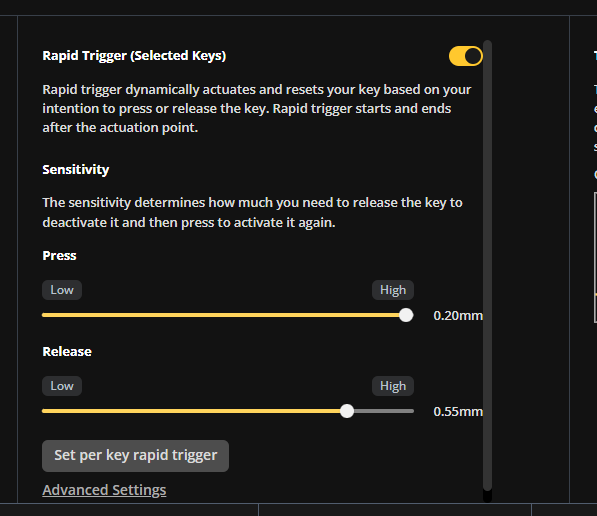
Minor things, but the ISO Enter key looks ugly in wootility, it's slightly off-position and the corners are rounded differently from other keys. Also the scrollbar in the Rapid Trigger section has some personal boundary problems https://i.imgur.com/yKKb7wF.png
 rotund spindle
yes
rotund spindle
rotund spindle
yes
any news?
lunar brook
rotund spindle
any news?
Not yet sadly, Jeroen is out on Paternity leave right now, so I have my hands extra full. It's high up on my list though, as it's the main outstanding issue I'm aware of right now
 main saddle
Is there any capability / possibility of adding a toggle mute for system voice input? I see there's one for system output but I would love to toggle a mute from my mic as a bind.
I have several mics / headsets that run into the issue of the physical mute button not working. Having different keybinds for different voice software is highly inconvenient. If wootility had this feature, I would use it 100% daily.
 lunar brook
main saddle
Is there any capability / possibility of adding a toggle mute for system voice i...
lunar brook
main saddle
Is there any capability / possibility of adding a toggle mute for system voice i...
Right now, this feedback is more relevant to #💻│wootomation as that functionality relies on having software running in the background, which Wootility currently does not
@rotund spindle I've done some work to get this fixed up now, could you try out this preview build and let me know if it works properly for you? https://wootility-git-fix-avr-rgb-effects-wooting.vercel.app?_vercel_share=uok1VtiXrqysX3AOiwqaHDRZk46IPbpF
main saddle
lunar brook
Right now, this feedback is more relevant to <#1063455997575843921> as that func...
Oh thank you, I didn't realize I was in the wrong channel.
rotund spindle
lunar brook
<@727167697389092965> I've done some work to get this fixed up now, could you tr...
looking good 👍
 tawdry summit
I've just started running into this 'bug' but it's more of an annoyance, I can open Wootility and make no changes to anything, but when closing it, it will say there's unsaved changes, When choosing to close it, Wootility will close and nothing will be different, which makes sense, its moreso of a small annoying thing as it doesn't actually change anything around.
Things i've done before this happened:
Enabled the controller settings alongside the double movement app, changed them back previously though and the unsaved box will come up regardless
Deleted some random unused profiles when i've accidentally duplicated them

 lunar brook
tawdry summit
I've just started running into this 'bug' but it's more of an annoyance, I can o...
lunar brook
tawdry summit
I've just started running into this 'bug' but it's more of an annoyance, I can o...
I've ran into this issue as well, I'm not exactly sure yet why it happens. But it is quite annoying for sure
tawdry summit
Yeah it’s more so annoying rather than anything but it spouted from nowhere for sure
 limpid sparrow
ripple: with random colors is there a way to have it fade to the random color (when base brightness is at 30 or something) instead of resetting to the underlying color or scheme? It used to work that way. I could press two keys and get (for example) a green and a red wave and afterwards half the keys would be green and half would be red. Now after the ripple it's just the same solid color everywhere as before pressing 😦
EDIT reverting to firmware 2.6.13 brings it back
rotund spindle
would you release a standalone wootility? I do prefer that over the web version
lunar brook
rotund spindle
would you release a standalone wootility? I do prefer that over the web version
Uhhhhhh, we've always had a standalone version? Way before the web version lol https://wooting.io/wootility

The Wootility is used to configure your Wooting keyboard. Get the most out of your keyboard and download the Wootility
lunar brook
limpid sparrow
ripple: with random colors is there a way to have it fade *to* the random color ...
Hmmm, I can have a look to adding this as an option. We had a tricky balance with this update to preserve as much behaviour as possible, but also making things behave more consistently. A lot of the behaviours that existed before, especially around random colours, were somewhat unintentional.
I hear you and will see what I can do, although I can't make any promises of it happening very soon, as I'm moving counties atm
lunar brook
Right, sorry, we had to wait to get our new Windows signing key, so I wasn't able to release a desktop version yet
 keen harness
I have an issue where, after I hibernate my PC and then wake it up, it will constantly ghost press the 'media track previous' button. This is visible in the "see what you're pressing" part of Wootility.
This causes all sorts of response issues, but is cleared up when I manually press the 'media track previous' button myself (currently FxL2 with MOD tap tap on 1). It is NOT fixed if I only press the 1 button, so it is not a hardware pressing issue.
Wootility v4.6.10
Wooting 60HE ARM
Firmware v2.7.2
Windows 22H2 (19045.3803)
 cunning mountain
^ I have this issue aswell
 wild meadow
^ I have this issue aswell
lunar brook
@umbral ravine can you take a look at above plox 🙏
umbral ravine
- How often does it happen? Like did it only happen once in a while or every time?
- Does it also clear up when another media key is pressed? So without pressing the key which is ghost pressing?
- Does it happen on the default mapping? What happens when a different key is bound there?
- Does this also happen on the new alpha 13 firmware on Wootility v5?
@keen harness
@cunning mountain
@wild meadow
umbral ravine
- How does the setuo look like? For example how is the device conneted to the system, are there any hubs used or so or is it a straight connection?
wild meadow
umbral ravine
- How often does it happen? Like did it only happen once in a while or every tim...
The majority of times that I boot my computer (60%~)
No, strictly the previous media track, it also prevents me from using the windows key to open the start menu for some reason?
Haven’t tried remapping it
Currently just using whatever the newest version that it auto updates to
The usb is straight into the pc without any buffers
umbral ravine
wild meadow
The majority of times that I boot my computer (60%~)
No, strictly the previous ...
Please check the key signaling via https://analog-monitor.wootility.io/ while the system still thinks that the key is pressed and provide a screenshot of it.
wild meadow
umbral ravine
Please check the key signaling via https://analog-monitor.wootility.io/ while th...
Alright, but I can’t right now, going to be in class for 4-5 hours
wild meadow
umbral ravine
Please check the key signaling via https://analog-monitor.wootility.io/ while th...
hey so the glitch is finally happening
however im on the site and it doesnt let me press the connect device button?
umbral ravine
Please create a thread under #1019755933959733258 and tag me there. This here isn't the best place to check out the details of the issue.