#tachyon mode actuation point not accurate
657 messages · Page 1 of 1 (latest)
 idle fern
 exotic geyser
idle fern
Do you use the stock USB cable directly connected to the PC or an active USB Hub...
exotic geyser
idle fern
Do you use the stock USB cable directly connected to the PC or an active USB Hub...
stock directly on motherboard
idle fern
Please completely turn off the brightness (set to zero) and then test it again.
exotic geyser
idle fern
Please completely turn off the brightness (set to zero) and then test it again.
i already do that it's exactly the same
idle fern
Here is an overlay which may help: https://github.com/DjCrqss/Woot-verlay
But I can't help you with that and I can't say if it's save or not.
Normally I would recommend to use the touch RGB effect so the analog value is shown on the number row but that don't work with Tachyon.
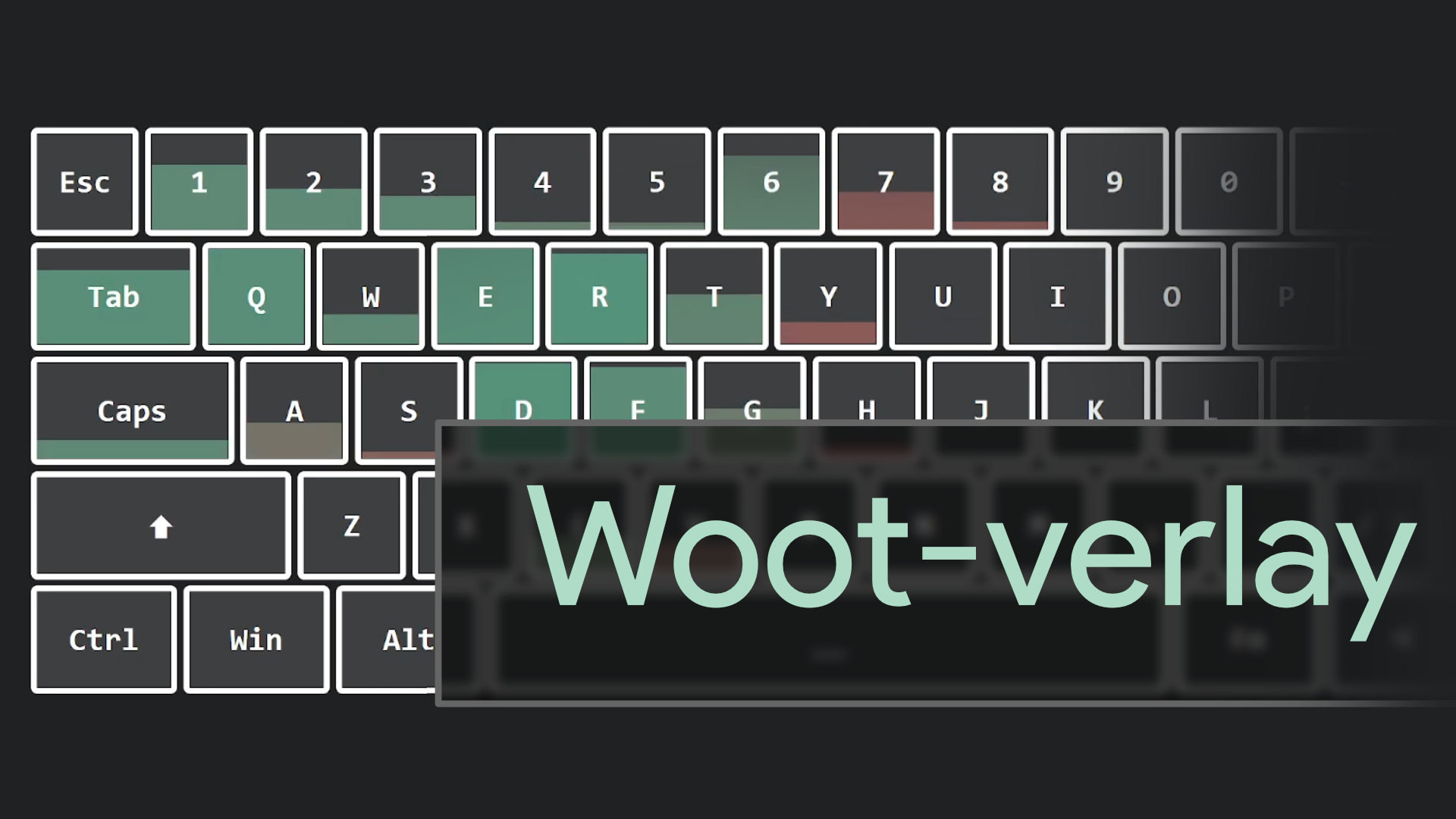
GitHub
Pressure sensitive display for the analog values of your Wooting keyboard! Visit the page to mess around, or add it as a fully functional overlay to your streams. - GitHub - DjCrqss/Woot-verlay: Pr...
Besides that overlay you can use an analog profile and bind a controller axis to that key. Make sure the digital key isn't disabled then.
Then the analog value would be show in the gamepad controls, like on https://gamepad-tester.com/.
Test gamepads, controllers, joysticks, and other peripherals that use the web gamepad API. Compatible with XBox, Playstation, Switch, and many others.
So when Tachyon is off and you use the touch RGB effect they should match. Then you would need to enable Tachyon and check how the gamepad input changes. If possible please provide a video with some explanation.
I need to know how it behaves differently otherwise it's very hard to help you.
exotic geyser
idle fern
So when Tachyon is off and you use the touch RGB effect they should match. Then ...
ok thx for your help.actually im in dm witth Syte Simon i willl try your method if he cannot help me.i send him a dignastic of my keyboard
 fluid sapphire
yeah
same for me, tach off 0.1 is hair trigger, 0.1 with tach on is more like 0.5-0.6mm
 sage quiver
fluid sapphire
same for me, tach off 0.1 is hair trigger, 0.1 with tach on is more like 0.5-0.6...
sage quiver
fluid sapphire
same for me, tach off 0.1 is hair trigger, 0.1 with tach on is more like 0.5-0.6...
You also tried with the overlay? I’ll try and see if I get the same problem later. I’m curious to see if the overlay will show it as 0.5 it feels like or the 0.1 it should be.
exotic geyser
fluid sapphire
same for me, tach off 0.1 is hair trigger, 0.1 with tach on is more like 0.5-0.6...
ok we have exactly
the same problem.the question is it's the problem on all keyboard and people don't really understand or test this actuation difference cause they are not sensitive like us or your and my keyboard are defective cause tachyon iqs not supposed to do that
exotic geyser
fluid sapphire
same for me, tach off 0.1 is hair trigger, 0.1 with tach on is more like 0.5-0.6...
im on azerty keyboard but for me it's more noticeable on some key .for exemple my Z key i can easily feel the actuation difference tachyon on vs off
fluid sapphire
exotic geyser
im on azerty keyboard but for me it's more noticeable on some key .for exemple m...
qwerty / US for me
exotic geyser
fluid sapphire
qwerty / US for me
ok and for you the problem is equal on all keys or like me more noticable on Z for exemple
?
fluid sapphire
dunno, haven't tested directly
i do know that replugging the keyboard forces it to recalibrate the switches, so to make sure u dont press any of them when plugging it in
exotic geyser
fluid sapphire
i do know that replugging the keyboard forces it to recalibrate the switches, so...
yes recalibrate do nothing for me.but i doin't understand you have not the problem anymore?or like me the tachyon on make the actuation point not accurate?for me 0.1 MM is more like 0.5MM
exotic geyser
fluid sapphire
im just stating how the board recalibrates
ah ok i understand.in my side im still waiting Simon from wooting team come back to me with the data he ask me and find a solution i hope.but im really disapointed cause we are not solo with this problem so we need to understand and know what to do to fix that.i don't want not use tachyon mode and 0.1 actuation pmoint for the price i invest in this keyboard
exotic geyser
fluid sapphire
yes it is still bugged as u said
and what batch are you ?maybe it's related to the last batch.i have EU SOKKEN
fluid sapphire
socks
although i have a friend that got one earlier and says same thing
it was the NA batch b4 socks
exotic geyser
fluid sapphire
socks
ok so it's look like not batch related.ask him if oyu can to comze in this post give feedback that can help to fix that and support will see we are not alone.in my opinion the problem is on all keyboard just some people cannot fell this difference .from all my test it's not a placebo feeling ecetera it's a fact the actuation with tachyon enabled is totaly different and not accuracy
fluid sapphire
bc cloudy cant remember worth jack lmao
exotic geyser
fluid sapphire
bc cloudy cant remember worth jack lmao
?? sorry im french i don't understand this
exotic geyser
fluid sapphire
it was the NA batch b4 socks
ok so we are both socks sokken batch
idle fern
You two can still help continue investigating into the problem.
#1075339050011074620 message
exotic geyser
exotic geyser
ok so we are both socks sokken batch
im just sad i cannot make a video to show the problem
exotic geyser
idle fern
You two can still help continue investigating into the problem.
https://discord....
i try to use it but i don't understand how that's work i think my browser block or something maybe Felt can try this
exotic geyser
idle fern
You two can still help continue investigating into the problem.
https://discord....
and you rocky you are 100 certain you have not this problem?
fluid sapphire
idle fern
You two can still help continue investigating into the problem.
https://discord....
if u make a version that is like
10x more sensitive, then it can be used, but your program half the time isnt sensitive enough, and the other half of the time, it does not visibly show exactly what i am doing
idle fern
I have don't have this issue. I don't even have the ARM version, I have the AVR version which was only used on the first batch. If the problem would be common more people should encounter it.
fluid sapphire
yes and all three of us have arm versions
idle fern
fluid sapphire
yes and all three of us have arm versions
Who? So far you are two. Or who else has it?
fluid sapphire
my point is, i have to press the key in like, 0.3mm with tachyon on @ 0.1mm actuation, but with tachyon off, i can literally practically "tilt the keycap" and it will go off
exotic geyser
idle fern
I have don't have this issue. I don't even have the ARM version, I have the AVR ...
ah ok maybe it's ARM related.but ARM what i read is a sort of upgrade so why we have this problem with better MCU
exotic geyser
fluid sapphire
my point is, i have to press the key in like, 0.3mm with tachyon on @ 0.1mm actu...
exactly the same for me
and particulary on Z key don't know why
idle fern
All batches beside the first one are ARM. There are many batches so far. And again I'm not aware what a lot of users have this specific issue. So no, so far I don't think this is common.
fluid sapphire
it probably is common, its just so small that only the schizos notice it
exotic geyser
i already try dissable the keyboard pcb ecetera swap switch and no difference
idle fern
fluid sapphire
it probably is common, its just so small that only the schizos notice it
On which data you believe that this is the case?
fluid sapphire
it takes 2 min for yall to just plug a board in a debugger and just check values
idle fern
Please refer to two more people here who have the same issue. Should be a problem because there are a lot of Wootings out there.
fluid sapphire
again, we are talking on the magnitude of <0.2mm
most people just get their board, turn on tachyon, and then never touch the software again
exotic geyser
fluid sapphire
it probably is common, its just so small that only the schizos notice it
lol
fluid sapphire
like, you guys have internal tools and hw, and you are telling the randoms to "collect more people complaining bc we cant be cared to investigate" a thing that would take less than an hour to fact check and prove us wrong
if u polled all wooting owners, >65% of em would just say they turned on tachyon, and set their settings, and haven't touched the software since
like every reviewer did in their videos
exotic geyser
fluid sapphire
most people just get their board, turn on tachyon, and then never touch the soft...
it's what i think too, but maybe rocky is in the right
we cannot know
fluid sapphire
yeah and its the same thing finalmouse said when they were told their firmware was gimping the sl12 so hard it lost to the orochi v2 by 7ms, they told me my testing was irrelevant, 5 months later releases a "competitive firmware"
idle fern
The problem don't seems to be common, I don't have it so I can't reproduce it. I would need data to have the chance to rule it down.
I have a debugger but that would not help you. It would only help if I would have your keyboard to have a look into that.
By the way, I hope that it's clear that I don't work for Wooting.
exotic geyser
we need to wait Simon comeback
fluid sapphire
yeah i get that u dont directly work for wooting, im just saying, this could be tossed to someone that does have the tools and could check it out relatively quickly
exotic geyser
idle fern
The problem don't seems to be common, I don't have it so I can't reproduce it. I...
yes np man help appreciated
idle fern
fluid sapphire
like, you guys have internal tools and hw, and you are telling the randoms to "c...
You misunderstood it. No one is tying to prove you wrong. But a problem can only be fixed if the cause is known, otherwise it can't be addressed. Even for a workaround you should at least know how to circumvent it.
fluid sapphire
yes, disable tach
idle fern
Or use another keyboard. 😄
fluid sapphire
why would i
im not saying it kills the keyboard, im saying it just heavily neuters actuation distance when using tachyon, i aint gonna just "not use" my $175 board i bought specifically for rapid trigger just because one software toggle has a bug 😂
idle fern
Because I would not call disabling Tachyon a workaround to address the issue that the detection is wrong on Tachyon.
fluid sapphire
no, obviously not, but the 0.2mm or so saved in actuation distance is going to save a lot more in e2e latency than whatever tachyon gives itself
idle fern
Removing the switch, replugging the device and then inserting the switch would be a workaround. Because due to this recalibration the scanning would be more sensitive. But because you would need to do that each time you replug the device I would not say that this is usable workaround.
fluid sapphire
yeah but the point of calibration is to set the zero point
idle fern
And?
fluid sapphire
wouldn't having no zero point just, activate the switch at all times when inserted
idle fern
I don't get what you want to say here. If the keyboard is calibrated without a switch these keys become more sensitive. Then you would be able to control the actuation point again with the settings. Of course you would lose range / granularity but it should be possible to get a real activation of 0,1 mm again.
fluid sapphire
yeah, id get the 0.1 on tach, but then it would negatively impact the accuracy of switch, ie, what it relies upon for using rapid trigger?
ik you said "not an ideal workaround" to do it for the whole board, but kinda sounds worse than just turning off tach
idle fern
I still don't get what you mean. This was just something theoretical anyway and that don't help anyone.
So it doesn't matter... I understand it what way, that you two aren't willing to make tests to provide more data to help to figure out what the problem is. I'm totally fine with that. Instead you want to wait that Simon knows what the issue is and that he will be able to help you. So I keep my fingers crossed that this can be addressed soon. Good luck...
exotic geyser
idle fern
I still don't get what you mean. This was just something theoretical anyway and ...
Simon make me instal a developer wootility app and send him a scanning date file and im waiting he come back with fix or help
idle fern
exotic geyser
Simon make me instal a developer wootility app and send him a scanning date file...
I was already aware of that.
sage quiver
It seems like I can also recreate this. But mine doesn't go from 0.1 to 0.5 or something, but a miniscule 0.1 to 0.2 at most
exotic geyser
sage quiver
It seems like I can also recreate this. But mine doesn't go from 0.1 to 0.5 or s...
ok for me on my Z key it's 0.1 MM is 0.5MM on other key it's like you 0.1MM is more like 0.3MM
exotic geyser
idle fern
Removing the switch, replugging the device and then inserting the switch would b...
Do you think this method can work?
idle fern
exotic geyser
Do you think this method can work?
This would be a workaround but as mentioned only theoretical.
sage quiver
I can confidentially trigger it with my S key, as that seems to be sensitive enough for it to activate when I only rock the keycap around.
But it will only ever do so with Tachyon off.
Ah, and J too.
idle fern
Tachyon is used to speed up the detection as fast as possibel. In order to archive that there are some sacrifices needed. Like to disable the RGB effects and to lose some analog precision. Normally a keys is scanned multiple times in a row before the analog value is determined to smoothen the signal and so reduce noise as much as possible. When Tachyon is used a key is scanned less times to determine it's analog value. But the analog value is the base to determine if a key is handles as pressed or not. So it is acceptable that a key press is not 100% the same for both modes. So while on Tachyon off the activation is maybe really at 0,1 mm when set to this setting it would be fine if the activation happens at 0,2 mm when Tachyon is used of the exact same settings. But it would be not ok if the activation then happens at 0,5 mm. This would not be in tolerance anymore. I guess.
exotic geyser
idle fern
This would be a workaround but as mentioned only theoretical.
ok i do what's you suggest and my Z key look more sensitive but the other key have still the problem.i cannot remove allswitch all time i reboot my pc but you find find something interessing
exotic geyser
exotic geyser
ok i do what's you suggest and my Z key look more sensitive but the other key ha...
i will reboot my pc maybe the change stay let's try
idle fern
Again as already mentioned, removing the switches wasn't meant in any way as a suitable workaround. It was only an example what I would call a workaround for this case.
Rebooting the PC should not change anything. The keyboard only calibrate itself every first time it gets power. But when you reboot the PC the keyboard don't loses power and so it would not calibrate.
sage quiver
For me this is very much a non-issue, but for just for information's sake, this is what the overlay registers. All the 0,02 are when Tachyon is off, the other ones are with it on.
 exotic geyser
idle fern
Rebooting the PC should not change anything. The keyboard only calibrate itself ...
exotic geyser
idle fern
Rebooting the PC should not change anything. The keyboard only calibrate itself ...
ok reboot don't change like oyu say my Z key is still fixed.how can i make my keyboard loose power?unplug?
sage quiver
Yeah, unplug, then plug then don't touch it for a few seconds
exotic geyser
ok let's try
sage quiver
touching the keyboard while it starts up can cause issues, so just plug it in and let it do it's thing for a bit
exotic geyser
idle fern
Again as already mentioned, removing the switches wasn't meant in any way as a s...
the problem comeback so what we can conclude of this?
to resume when i unplug the keyboard and remove the switch my Z key tachyon on and replug the keyboard and put the switch the actuation point is fixed but when i unplug the keyboard and plug again the fix is done
idle fern
I helped and assisted them multiple times by now. You only need to check my previous posts. But no, I don't work for them. I'm more like a technical consultant when it comes to the USB stuff.
exotic geyser
idle fern
I helped and assisted them multiple times by now. You only need to check my prev...
so what oyu can conclude with the thing i tell you?
idle fern
exotic geyser
to resume when i unplug the keyboard and remove the switch my Z key tachyon on ...
I don't get what you mean. It looks you are still referring to the removing of switches which again should not be done.
idle fern
exotic geyser
so what oyu can conclude with the thing i tell you?
I don't get what you mean. So I can't conclude anything.
exotic geyser
idle fern
I don't get what you mean. It looks you are still referring to the removing of s...
Ok i resume again.i unplug the keyboard, and remove the switch off my Z key , I plug my keyboard and i wait 10 seconds.i put back the switch and voila the actuation is 0.1MM
exotic geyser
idle fern
I don't get what you mean. So I can't conclude anything.
but when i unplug the keyboard again and replug the fix is done
idle fern
Yeah, you tricked the calibration as I predicted. So I don't get what you want to tell me here. It adds nothing new.
When you disable Tachyon the key would be more sensitive too and likely handled as pressed as soon as the switch is installed.
exotic geyser
idle fern
Yeah, you tricked the calibration as I predicted. So I don't get what you want t...
i don't understand you we find something no?
idle fern
Give me a minute and I can explain a test which would help.
exotic geyser
if we trick ther calibration maybe we can fix the problem in some way?
idle fern
- Import this profile
bc85d4dc4c4e6a45f50e854b0d2240eb1c12 - Replug the device
- Select the imported
Test1profile - Open the Wootility in the analog settings submenu of this profile
- Put some weights on the pink
Wkey until the analog preview shows a small value - Start a video capturing
- Go to the performance sub menu and disable Tachyon
- Go back to the analog settings submenu
- Go to the performance sub menu and enable Tachyon
- Go back to the analog settings submenu
- Stop the capturing
The difference in the shown analog preview value would be the difference of the pressed depth of the key.
exotic geyser
idle fern
Give me a minute and I can explain a test which would help.
like suggested by Felt wooting can make a offset in the settings of wootility app to fix that
idle fern
exotic geyser
if we trick ther calibration maybe we can fix the problem in some way?
No... At first we need to know how bad the problem is. If it's consistent over all batches it would may help to internally apply a different function to convert the signals into a linear curve depending on the mode.
If it's consistent per keyboard then there should be an independent calibration depending if Tachyon is on or off.
If it's inconsistent it can't be really addresed.
exotic geyser
idle fern
1. Import this profile `bc85d4dc4c4e6a45f50e854b0d2240eb1c12`
2. Replug the dev...
im sorry i have nothing to record i never do that im just a player of game
exotic geyser
idle fern
If it's consistent per keyboard then there should be an independent calibration ...
yes but if we fix the problem with the calibration trick it can be fixed no?
idle fern
You can use the internally Win function in the case your graphics card driver supports it or you can use a smartphone and record the screen.
exotic geyser
idle fern
You can use the internally Win function in the case your graphics card driver su...
im on tv my condition actually are not optimal i alreadfy try to make a video but my we see nothing cause the tv appear greyed
idle fern
exotic geyser
yes but if we fix the problem with the calibration trick it can be fixed no?
Your problem is that there is a difference in the detected analog signal depending if Tachyon is used or not. So by the current calibration one would be off. So no, it would not really help.
exotic geyser
idle fern
Your problem is that there is a difference in the detected analog signal dependi...
sad
idle fern
As long as you are on a PC it should not matter that you are using a TV as a screen.
Only the Wootility need to work for this test.
exotic geyser
idle fern
*As long as you are on a PC it should not matter that you are using a TV as a sc...
the only way i can record is with my phone and when i want record we see nothing cause the screen appear greyed
idle fern
exotic geyser
the only way i can record is with my phone and when i want record we see nothing...
This would mean you need to change the ISO value of the recording.
So the camera sensor isn't overexposed by bright objects.
exotic geyser
idle fern
This would mean you need to change the ISO value of the recording.
i will try
idle fern
Or you can just reduce the brightness of the TV.
 idle fern
This is the difference for me on the W60HE. I used around 32 g.
exotic geyser
idle fern
This is the difference for me on the W60HE. *I used around 32 g.*
ok so you have the same problem right?
idle fern
It kinda differs by around 8% of the total value. It's around 16% with Tachyon off and 8% if on.
This only happens on the lower range, on the upper they are more and more identical.
idle fern
exotic geyser
ok so you have the same problem right?
It depends... Like there is a dead zone on the lower end. I can't reach a value between 0 and 8%. It's either 0% or 8+%. So the analog control kinda starts with 8%.
exotic geyser
idle fern
It depends... Like there is a dead zone on the lower end. I can't reach a value ...
ok but the problem is here ?
We see a difference between teachyon on vs off
idle fern
As mentioned due to the lesser precision on Tachyon it's expected that it's not as good when enabled compared to when it's disabled.
Also especially the analog precision at the start is very hard to archive. So it's possible that Wooting added an additional safety zone at the start of the range for Tachyon to prevent wrong inputs. Only Simon would be able to either confirm or deny this assumption.
exotic geyser
idle fern
As mentioned due to the lesser precision on Tachyon it's expected that it's not ...
ok can you contact him and follow that ?
idle fern
There is a reason why other Hall effect keyboards don't allow such sensitive settings.
exotic geyser
idle fern
There is a reason why other Hall effect keyboards don't allow such sensitive set...
ok i understand wooting play with the limit
but i don't say that negatively
idle fern
The question is more if this is intended or not. Also this don't tell us if it's the same for you or worse.
exotic geyser
on my Z key worse (i think)cause the rest of key are not problematic at the same point
i can handle 0.2 margin of error
idle fern
In the case it is intended it would be more logical to me personally to maybe reduce the possible settings when Tachyon is on then messing around with the internal curve. For example to maybe only allow to start the actuation when Tachyon is enabled at 0,4 mm or whatever a save value would be and to not allow for 0,1 mm steps and instead maybe only 0,4 mm steps.
exotic geyser
idle fern
In the case it is intended it would be more logical to me personally to maybe re...
im french so i try to understand to make thius simple you recommend me to put 0.4MM on my actuation point?
idle fern
exotic geyser
im french so i try to understand to make thius simple you recommend me to put 0....
No, that Wooting offers different settings depending if Tachyon is enabled or not.
exotic geyser
idle fern
No, that Wooting offers different settings depending if Tachyon is enabled or no...
ah ok you speak about how wooting can try to fix that?
idle fern
Like if Tachyon is off that the allowed range is from 0,1 mm to 4,0 mm and if on from 0,4 mm to 4,0 mm.
exotic geyser
idle fern
Like if Tachyon is off that the allowed range is from 0,1 mm to 4,0 mm and if on...
ok for you it's the only way to fix this?
idle fern
So that the used settings is the same, so that 0,4 mm is the same depth regardless if it's enabled or not.
exotic geyser
idle fern
So that the used settings is the same, so that 0,4 mm is the same depth regardle...
ok so if i put 0.4MM the problem is still here just not at the same actuation point
idle fern
exotic geyser
ok for you it's the only way to fix this?
I don't know how difficult the scanning is at the start of the range. This is the crucial and important part.
As long as the signal is good enough and stable calibration helps.
We still don't know if it's worse for you compared to me or not.
exotic geyser
idle fern
I don't know how difficult the scanning is at the start of the range. This is th...
ok you will be able to go up this info to simon to forward this story?
exotic geyser
idle fern
I don't know how difficult the scanning is at the start of the range. This is th...
actually simon only ask mùe to send him the troobleshoot scan and im waiting the following
idle fern
For me personally this is a none issue and at most only annoying. I don't even use such a low actuation point and I also don't use Tachyon.
idle fern
exotic geyser
actually simon only ask mùe to send him the troobleshoot scan and im waiting the...
He most likely knows how the scanning works. So he should be able to tell if this is intended or not.
exotic geyser
idle fern
For me personally this is a none issue and at most only annoying. I don't even u...
im not good with informatic ecetera but trust me i feel little detail like this and it's sad i cannot use the lowest setting for a keyboard i pay
exotic geyser
idle fern
He most likely knows how the scanning works. So he should be able to tell if thi...
ok so i must wait he comaback and send me a message
cause i spend more time this days on discord than pplay with my mates
idle fern
It would be still nice to know how it's behaving for you. At least from my video it's obvious that there is a difference in the detected analog mode depending on the Tachyon mode.
It would be good to know how different keyboards behave here.
exotic geyser
idle fern
It would be still nice to know how it's behaving for you. At least from my video...
i have a clean windows instal and all recording stuff ecetera are deleted and like i tell you i cannort make a video cause of my fucking bad phone or tv screen
exotic geyser
idle fern
It would be good to know how different keyboards behave here.
i understand
idle fern
Remember I put 32 g on the key. I forgot how the switch was defined, I somehow remember it starts at 40 cN and ends at 60 cN.
exotic geyser
idle fern
Remember I put 32 g on the key. I forgot how the switch was defined, I somehow r...
yes i see
idle fern
But 40 cN somehow appears high for me. But if so it would mean the spring contracts earlier.
exotic geyser
idle fern
But 40 cN somehow appears high for me. But if so it would mean the spring contra...
it's maybe approximative
idle fern
I don't have something to really measure the exact depth of a press. It would be necessary to compare the exact results from a depth - analog curve.
exotic geyser
idle fern
But 40 cN somehow appears high for me. But if so it would mean the spring contra...
what tachyon do exactly?it's the polling rate of 1OOOmhz like mouse?
idle fern
No, as mentioned it improves the scanning interval in sacrifice of analog precision. Like before on the normal mode only one multiplexer was scanned at a time. On Tachyon four are scanned together in a group. Also the RGB effects are disabled to reduce the communication to the LED controller to a minimum.
It's a while since I tested it. So it can be that nowadays it's scanned all the time in parallel, but I doubt it.
exotic geyser
idle fern
No, as mentioned it improves the scanning interval in sacrifice of analog precis...
some people say tachyon on is 1000 polling rate
the keyboard is 1000 polling rate tachyon on or off with no ddifference?
idle fern
exotic geyser
some people say tachyon on is 1000 polling rate
Tachyon has nothing to do with the polling rate. Tachyon influences the scanning rate. The polling rate is at 1000 Hz all the time.
exotic geyser
idle fern
Tachyon has nothing to do with the polling rate. Tachyon influences the scanning...
ok it's 2 different things
idle fern
The polling rate is how often the PC should ask the keyboard to check if there is new data available. The scanning rate is the rate at which the keyboard actually scans for key presses.
exotic geyser
i read on thee discord somewhere i dont remember wooting keyboard is 5OO hertz when tachyon off and 1000 when on
exotic geyser
idle fern
The polling rate is how often the PC should ask the keyboard to check if there i...
ok thx for clarification
exotic geyser
idle fern
The polling rate is how often the PC should ask the keyboard to check if there i...
and both are measured with MHZ?
exotic geyser
idle fern
The polling rate is how often the PC should ask the keyboard to check if there i...
you still here?
idle fern
All Wooting have a polling rate of 1 kHz. The scanning rate depends on which keyboard you have. For a W60HE it's advertised as 1 ms if Tachyon is on vs. 2 ms when off.
A W60HE only has four multiplexer and because four can be scanned at the same time all keys can be scanned in one rush if Tachyon in on.
A W2 HE has seven multiplexer, so it needs two cycles to scan all keys while one of the multiplexer can be scanned each cycle.
exotic geyser
idle fern
All Wooting have a polling rate of 1 kHz. The scanning rate depends on which key...
ok so the 60he is faster with simple word?
idle fern
For the older Flaretech keyboards the scan rate was a bit faster than 1 kHz, like 1050 Hz.
idle fern
exotic geyser
ok so the 60he is faster with simple word?
Yeah, a little bit because less keys need to be scanned.
exotic geyser
idle fern
Yeah, a little bit because less keys need to be scanned.
ok thanks again for all this info.i have 2 last question after i need to go sleep and let you do others things you spend already a lot of time to try to help me today.my keyboard backplate is little hot it's normaL?and you speak sooner about the analog curve for switch ecetera i use the typing profile he use the analog curve too for the actuation point?
cause the problem i have and we speak since a moment is not when i use analog profile it's with the default profile with tachyon on vs off
idle fern
For cross reference, this is the difference for me on the W2 LE. I used 35 g here.
exotic geyser
idle fern
For cross reference, this is the difference for me on the W2 LE. *I used 35 g he...
ok difference look bigger on the wootting he2
idle fern
exotic geyser
ok thanks again for all this info.i have 2 last question after i need to go slee...
It would depends how warm it is. Tachyon consumes additional power because then four multiplexer are always on. On a high brightness the LED controller also consumes some more power. The keyboard can consume up to 4 W which will dissipate in heat. So the LEDs will get warm too but a lot of it will go into the PCBA and so the case.
idle fern
exotic geyser
ok difference look bigger on the wootting he2
Indeed, it's 5% vs. 17%.
exotic geyser
idle fern
It would depends how warm it is. Tachyon consumes additional power because then ...
ok i understansd then it's normal its not too hot but i can feel it with my hand under the keyboard
idle fern
But be aware that I needed 3 more grams. So it can be that the dead zone at the start is just a bit worse and that the difference comes from the additional weight.
exotic geyser
I use 100 brightness so like you tell it's maybe normal with the power used by led and tachyon
exotic geyser
idle fern
But be aware that I needed 3 more grams. So it can be that the dead zone at the ...
yes it's probably that
idle fern
This test isn't scientific in any way. As mentioned I don't have the proper testing equipment for that.
exotic geyser
idle fern
**This test isn't scientific in any way. As mentioned I don't have the proper te...
i understand but i think it's a good start
idle fern
A real depth to analog curve would be needed.
exotic geyser
idle fern
A real depth to analog curve would be needed.
i hope Simon will come speak more about this here with all the discussion and test you do .i really need to go sleep tomorrow morning i will be dead for job
idle fern
A weight to analog curve would do the same. For both the switches to switch tolerance would matter.
exotic geyser
idle fern
A weight to analog curve would do the same. For both the switches to switch tole...
you right.on this word i will go sleep thaznks again for the time you take really appreciate have a goodnight see oyu soon and i hope Simon will complete all this thinking.goodnight man
idle fern
@warm cosmos As a short summary so far.
The users mentioned that the real actuation point changes depending on the Tachyon state while the other settings remain unchanged.
I was able to reproduce this issue on my W60HE as shown here: #1075339050011074620 message
And on my W2 LE as shown here: #1075339050011074620 message
The used test method is described here: #1075339050011074620 message
The question is if this behavior and inconsistency of the real actuation point is expected because it's kind of confusing that the needed force for the registration of a keypress for a low actuation point changes depending of the Tachyon mode state and so don't match the used settings.
Discord
Discord is the easiest way to communicate over voice, video, and text. Chat, hang out, and stay close with your friends and communities.
idle fern
@exotic geyser Here are some thermal images of the back of the module.
100% brightness, Tachyon off


0% brightness, Tachyon on


Depending on the case the heat can be maybe transferred to that. On the original case you should not feel much heat due to the dampening mat. All the banked up heat should move up anyway.
exotic geyser
idle fern
Depending on the case the heat can be maybe transferred to that. On the original...
ok nice with this i understand.but what's the original case with dampening mat you speak?
idle fern
The case the module was put into when you bought your W60HE.
- EPDM foam (dampening mat)
- ABS Tray-mount case (original case)

If you use a metal case and a foam material which transfers heat then the case would most likely get warm after a while.
I don't think the original case would get warm. Kind of hart to validate because my laptop blows onto the left side of my keyboard. I don't want to create a thermal image for it because it would mean I need to put my keyboard to the side for a while and this means I can't really use it anymore. So it would be a hassle to do so.
exotic geyser
idle fern
The case the module was put into when you bought your W60HE.
i have the original case andd with tachyon on i feel a good amount of heat.today i disable tachyon and the heat is less pronounced
idle fern
Where is the heat? On the left or right? On the front or back?
exotic geyser
idle fern
Where is the heat? On the left or right? On the front or back?
on the left and middle
idle fern
So on the keycaps?
exotic geyser
exotic geyser
on the left and middle
cable side
exotic geyser
idle fern
So on the keycaps?
no just under the case
idle fern
Please mark it on a picture.
exotic geyser
idle fern
*Please mark it on a picture.*
have you a picture then i could mark
idle fern
You can make a photo with your smartphone.
exotic geyser
idle fern
You can make a photo with your smartphone.
im in bed long story but i find a picture on google
idle fern
 exotic geyser
 idle fern
Hmm, there should be nothing under the label. Not sure how the design has changed. My thermal images are from an earlier batch.
The right red circle can be explained by the MCU and the Tachyon. As shown in the thermal images Tachyon causes a transistor to heat up even more than the MCU.
exotic geyser
when i disasemble the keyboard i see like a burn on the dampening
idle fern
That is not good. Please provide pictures of the PCBA and the foam.
As mentioned I would expect that you should not really feel some heat there.
exotic geyser
idle fern
That is not good. Please provide pictures of the PCBA and the foam.
i need to disasemble again and it's already hard for me to equilibrate the board.cause the screws are not equilibrate
idle fern
What?
exotic geyser
idle fern
As mentioned I would expect that you should not really feel some heat there.
i inspect the pcb when i see this burn on foam but everything look clean
idle fern
If there are burn marks on the foam we should see something on the PCB.
exotic geyser
idle fern
What?
yes im not solo with this problem the pcb or i dont know the name is more inclined on the right side. cause they put a screw on the right side of the space bar and not on the left
 idle fern
The board shout fit in the case without problems. It should not be hart to keep it balanced while inserting and screwing in the module.
exotic geyser
idle fern
*If there are burn marks on the foam we should see something on the PCB.*
no mark on pcb i inspect with my phone flash when i disasemble it's maybe just a fabric mark
idle fern
I always start on the right side. So after the two screws are put in the module is already stable.
exotic geyser
idle fern
The board shout fit in the case without problems. It should not be hart to keep ...
some people have saùme problem and mansen if i remember say unscrew a little to equilibrate
idle fern
The case and this matches the explosion schematics from above. My units matches these pictures.
 exotic geyser
idle fern
I always start on the right side. So after the two screws are put in the module ...
exotic geyser
idle fern
I always start on the right side. So after the two screws are put in the module ...
i do same but with my case i need a lot of micro adjustement to equilibrate
idle fern
This maybe means that the foam isn't well cut or placed.
Or that a stand off isn't correctly inserted.
Normally all the stand offs should be on the same height plane.
exotic geyser
idle fern
This maybe means that the foam isn't well cut or placed.
i try everyplacement possible and the only way for me is micro screw adjustement and i must don't use the screw on the right side of space bar
idle fern
So please also provide a picture of the case.
exotic geyser
idle fern
Or that a stand off isn't correctly inserted.
what is stand off
idle fern

In your case the plastic bars with the metal inserts where the screws are screwed in which are creating a height difference from the bottom of the case.
exotic geyser
idle fern
ok for me everything look good inside except in my opinion the board need a screw on the left side of the space bar to equilibrate.for mye it's logik

6 screws not 5
idle fern
If I push the board flexes a bit on the left lower corner but everything is fine.
So I would say the five screws are enough if there isn't a problem with the foam or case.
exotic geyser
idle fern
If I push the board flexes a bit on the left lower corner but everything is fine...
when you look your keyboard from from you dont see the spacebar inclined on the right side?
idle fern
I'm not sure what you mean.
Looking from the front side the keycaps are aligned for me all the way through from left to right.
The left side is maybe 1 mm higher than the right side. But the most left screw is damaged for me.
exotic geyser
idle fern
The left side is maybe 1 mm higher than the right side. But the most left screw ...
for me the left side is 2 or 3 mm higher
with mmy micro adjustement it's ok
idle fern
Hmm, seems off to me. Did the unit came this way?
exotic geyser
idle fern
Hmm, seems off to me. Did the unit came this way?
yes
idle fern
I'm looking towards the pictures, maybe we can find something.
exotic geyser
idle fern
I'm looking towards the pictures, maybe we can find something.
i try to find you the picture of the guy with same problem
idle fern
No, please do the pictures yourself.
I need to see how your keyboards looks and not from a different user.
exotic geyser
idle fern
I need to see how your keyboards looks and not from a different user.
i don't want again disasemble it i spend more hour to fix problem than use it
idle fern
Then I can't help you anymore. So you need to start a RMA or live with it as is.
exotic geyser
idle fern
I need to see how your keyboards looks and not from a different user.
i think you can understand
idle fern
exotic geyser
i think you can understand
Because it would not make sense that I put any more time here myself. I think you can understand.
exotic geyser
idle fern
Then I can't help you anymore. So you need to start a RMA or live with it as is.
i make support post post all time i have a problem . and im feeling ignored except by you .now i have in part fix myself and like i tell you usualy im plug and play guy but i pay and wait 3 months for this keyboard and i like it but my copy have problems so im little sad.you help me i appreciate but you must understand im done
exotic geyser
idle fern
Because it would not make sense that I put any more time here myself. I think yo...
and i dont coùmplain just say facts with my posts
exotic geyser
idle fern
Because it would not make sense that I put any more time here myself. I think yo...
i spend hours to aligned my keyboard i dont want to unscrew again just to take a photo.my bad is to not take photo at the good moment and it's my mistake
idle fern
I can't do anything without your assistance. So if you don't have the 10 mins to remove the module again and taking the pictures so I can see how it looks like for you it don't make sense anymore for me to think what may or may not happens. Without data it would be only waste of time for me and only just wild guesses.
The misalignment alone maybe is already a problem of it's own and maybe worth to request a replacement. But maybe it can be fixed easily. Who knows... Pictures maybe can help, at least there is a chance.
Like a picture of just the misalignment should only take a minute.
exotic geyser
idle fern
I can't do anything without your assistance. So if you don't have the 10 mins to...
dissable takee 1mn i already do 10 times .realignate and screw micro adjustement take a lot more
but np i understand your argument thx for the time spend
to try to help me.it's my only keyboard i give my old one to a friend so if i rma i have no keyboard
exotic geyser
idle fern
I can't do anything without your assistance. So if you don't have the 10 mins to...
 idle fern
It don't look that off to me. I assume this is after you correcting it. So it would not represent the actual problem.
Also I thought you are using a TV. This don't look like a TV to me.
 hazy lintel
I think i have the same problem too. When tachyon mode is on, 0.1mm feels like 0.5mm. think they can fix it with an update.
exotic geyser
idle fern
It don't look that off to me. I assume this is after you correcting it. So it wo...
exotic geyser
idle fern
It don't look that off to me. I assume this is after you correcting it. So it wo...
it's not mine. it's a joke i hope?
idle fern
I'm out here, bye...
exotic geyser
idle fern
It don't look that off to me. I assume this is after you correcting it. So it wo...
i tell you i cannot disasemble again so i find you the post with same problem
exotic geyser
idle fern
It don't look that off to me. I assume this is after you correcting it. So it wo...
and you say no problem on the picture we clearly see the spacebar is inclined
and my keyboard was exactly like this when i receive it
exotic geyser
idle fern
I'm out here, bye...
pfff i loose hours and sleep time for this
exotic geyser
hazy lintel
I think i have the same problem too. When tachyon mode is on, 0.1mm feels like 0...
yes we can hope but not too much im waiting Simon feedback
 ripe tiger
We are currently looking into this issue, we will get back to you soon with more information
exotic geyser
ripe tiger
We are currently looking into this issue, we will get back to you soon with more...
ok thank you.Glad this issue is taken seriously.im waiting the information then.
ripe tiger
At the moment, tachyon mode does unfortunately come with this compromise. We are currently working towards optimizing this.
This is not just the case with your board, rather a general limitation of the tachyon mode in its current implementation
exotic geyser
ripe tiger
At the moment, tachyon mode does unfortunately come with this compromise. We are...
ok i understand thanks for shared informations here really appreciate can you inform here when the optimisation will be done?
 steep crater
after reading this i tested my keyboard, mainly use wasd on 0.1 and w,a,d keys all have a similarly fast instant reaction whereas s key takes a bit more force
I do have both avr and arm version, i'd say my s key is better on my avr. However I also know all springs are not perfectly weighted so that could contribute to the actuation
 unreal blaze
hazy lintel
I think i have the same problem too. When tachyon mode is on, 0.1mm feels like 0...
unreal blaze
hazy lintel
I think i have the same problem too. When tachyon mode is on, 0.1mm feels like 0...
I’m having the same issue
steep crater
ripe tiger
This is not just the case with your board, rather a general limitation of the ta...
Looking forward to this.
 hoary gorge
idle fern
1. Import this profile `bc85d4dc4c4e6a45f50e854b0d2240eb1c12`
2. Replug the dev...
hoary gorge
idle fern
1. Import this profile `bc85d4dc4c4e6a45f50e854b0d2240eb1c12`
2. Replug the dev...
are you using a newer version of wootility than the latest publicly available one? I'm getting this "profile is for a newer Wootility version" error on both my desktop Wootility and the web one.
version on both is 4.4.13
wanted to try this to see if Tachyon mode increases my actuation distance, I use either RGB off or 1% on the two profiles I use just to distinguish them and couldn't tell if having it on caused an increased actuation point from feel alone

 left hawk
hoary gorge
are you using a newer version of wootility than the latest publicly available on...
left hawk
hoary gorge
are you using a newer version of wootility than the latest publicly available on...
most likely beta
hoary gorge
fwiw I can't tell a difference in key actuation at 0.1mm with tachyon mode on/off, for comparison I set it to actual 0.4mm with both modes and could tell that it was obviously different than 0.1mm
is the "fundamental limitation" thing that Bexin mentioned absolute? I tested with RGB off if that changes anything. everything stock inc. cable
 opaque flicker
I have this same “problem”. I was in the socks batch. It doesn’t really matter to me and I only noticed it on the caps lock key. But with tachyon mode on the actuation point increases. I only have a Mac so I’m unsure if I can help to troubleshoot. Lmk if I can be of assistance. Also, I didn’t read this entire mega thread, so excuse me if a solution has already been offered.
opaque flicker
Is the conclusion that this behavior is the nature of tachyon mode as it exists at the present moment?
That seems fine given the nature of analog mechanisms
Just curious
left hawk
currently (according to the lead firmware dev) yes
 magic skiff
left hawk
currently (according to the lead firmware dev) yes
magic skiff
left hawk
currently (according to the lead firmware dev) yes
ok but the team is working to optimize tachyon mode and maybe fix the actuation point not accurate right?i have the same problem others people have and i read Bexin say team working to optimize this
left hawk
we are
magic skiff
ripe tiger
This is not just the case with your board, rather a general limitation of the ta...
can you confirm when the optimisation will done here then i have no need to check all channel all day thanks
magic skiff
left hawk
we are
ok perfect can you connfirm here when it's done that can be more easy
ripe tiger
Sure sure, it may take some time too, we will let you know about any news. I think good way will be, anyone who wants a ping, react to my message. And best don’t send too many messages under so it’s visible, and I can ping everyone then
magic skiff
ripe tiger
Sure sure, it may take some time too, we will let you know about any news. I thi...
ok i understand thanks i will wait and appreciate your reactivity
steep crater
I’ll just put an emoji on your message
exotic geyser
ripe tiger
Sure sure, it may take some time too, we will let you know about any news. I thi...
Ok perfect happy to hear that i react to your message and im waiting your ping when optimisation are done.i speak for all people in this post and say thank you for your professionalism
exotic geyser
ripe tiger
Sure sure, it may take some time too, we will let you know about any news. I thi...
just a message to keep the post alive
 wet wren
No need to keep pinging the thread if there are no updates. It's not forgotten.
exotic geyser
wet wren
No need to keep pinging the thread if there are no updates. It's not forgotten.
Ok but this morning he was removed from my history so i think he was close or something
ripe tiger
Threads automatically close after a week, but dw, as soon as there is an update, writing a new message will reopen it, so it will appear when I ping you, once there are updates on this
exotic geyser
ripe tiger
Threads automatically close after a week, but dw, as soon as there is an update,...
oh ok thx for info i don't know this it's ok then.sorry for the ping and im waiting for the updates then .have a nice day 😉
exotic geyser
I see in your wootility alpha you say tachyon mode optimisation or something like this.it's a fix for the problem of actuation point not accurate with tachyon on or not related?and have you any news or progress about this problem?
ripe tiger
If you are referring to the newest alpha version I believe this would not be related, though I may be wrong
exotic geyser
ripe tiger
If you are referring to the newest alpha version I believe this would not be rel...
Yes i referring to this alpha version.ok so it's not related thanks for info.have you idea when a fix for the not accurate actuation point will be release? cause im hurry to use full potiential of the keyboard
 warm cosmos
It's still being worked on, no ETA yet
exotic geyser
warm cosmos
It's still being worked on, no ETA yet
Ok i understand .we still waiting then .thanks for fast response
steep crater
Does the new update fix this issue?
 pseudo wigeon
feels good to me
exotic geyser
steep crater
Does the new update fix this issue?
not for me and this normal the tachyon improvement in this update is not about the problem i speak in this support post.but i speak today with wooting's Simon and they work hard to fix this issue.soon we will have good improvement.and he will post here when he will have something to share
steep crater
exotic geyser
not for me and this normal the tachyon improvement in this update is not about ...
Thanks for the update appreciated
exotic geyser
steep crater
Thanks for the update appreciated
no problem it's normal you are welcome .community utility 😉
 reef meadow
exotic geyser
no problem it's normal you are welcome .community utility 😉
reef meadow
exotic geyser
no problem it's normal you are welcome .community utility 😉
i‘m getting my wooting soon, should i not use tachyon?
exotic geyser
reef meadow
i‘m getting my wooting soon, should i not use tachyon?
you can use tachyon but if you want really accurate actuation point tachyon off is ok.but like i say wooting working on improvement in tachyon enabled
exotic geyser
any progress about the fix of the actuation point not accurate?
left hawk
@warm cosmos would know best. i just dont know if he might have forgotten to post here
exotic geyser
left hawk
<@178235161857490944> would know best. i just dont know if he might have forgott...
ah ok can you remind him ?i would really appreciate it
left hawk
i think hell see the tag and check it out when he got time
exotic geyser
left hawk
i think hell see the tag and check it out when he got time
ok thanks 😉
warm cosmos
I'm actively working on the issue, it's at the top of my list atm
exotic geyser
warm cosmos
I'm actively working on the issue, it's at the top of my list atm
nice happy to ear that ;)don't forget to post here when everything is done have a nice day and thanks for your work
 barren portal
warm cosmos
I'm actively working on the issue, it's at the top of my list atm
barren portal
warm cosmos
I'm actively working on the issue, it's at the top of my list atm
Has this been resolved?
warm cosmos
Not yet sadly, UwU Wootility has taken a ton of my time and energy the past few weeks. We have some exiciting developments on it, so I hope I'll have enough time to get it wrapped up ASAP
 maiden zephyr
warm cosmos
Not yet sadly, UwU Wootility has taken a ton of my time and energy the past few ...
maiden zephyr
warm cosmos
Not yet sadly, UwU Wootility has taken a ton of my time and energy the past few ...
Pls fix this asap pls.
exotic geyser
warm cosmos
Not yet sadly, UwU Wootility has taken a ton of my time and energy the past few ...
Ok i can understand you work on a lot of things but please do it as soon as possible then we can use the keyboard at real full potential .btw thank you for keeping us informed and thanks for your work
barren portal
warm cosmos
Not yet sadly, UwU Wootility has taken a ton of my time and energy the past few ...
Thanks for the update 🙂 Hope it can be soon as I am really looking forward to using wooting tachyon without compromises!
pseudo wigeon
So does this mean as of the moment it’s faster and more responsive to use tachyon off
exotic geyser
pseudo wigeon
So does this mean as of the moment it’s faster and more responsive to use tachyo...
Not 100 % faster but probably more consistent
pseudo wigeon
So it’s slower but the actuation is more consistent
exotic geyser
pseudo wigeon
So it’s slower but the actuation is more consistent
The actuation point is not accurate so on some Keys it's faster and others slower hard to explain but if you want accuracy and consistency tachyon off is a good choice.and soon wooting's Simon will improve that.he is working on it
pseudo wigeon
exotic geyser
The actuation point is not accurate so on some Keys it's faster and others slowe...
Gotcha
pseudo wigeon
exotic geyser
The actuation point is not accurate so on some Keys it's faster and others slowe...
Have you did any testing with it off? And found that all keys are the same?
exotic geyser
pseudo wigeon
Have you did any testing with it off? And found that all keys are the same?
Yes i do a lot of test it's for that reason i open this ticket.In my case yes. tachyon off all Keys actuation look accurate
pseudo wigeon
Gotcha thanks for the catch up
exotic geyser
pseudo wigeon
Gotcha thanks for the catch up
Np you are welcome 😉 i hope the fix will come soon
reef meadow
can confirm what he said, i also noticed inconsistencies after playing 0.1 rapid trigger before and after tachyon off.
on was inconsistent and didnt feel like accurate 0.1 so i left it disabled 
exotic geyser
reef meadow
can confirm what he said, i also noticed inconsistencies after playing 0.1 rapid...
Yes exactly some people don't notice the problem but if they test diligently it's easy to see the thing. but wooting team will optimise this asap we need to wait a little.and we will be informed by Simon here
pseudo wigeon
exotic geyser
Yes exactly some people don't notice the problem but if they test diligently it'...
Idk why but mine feels more consistent with tachyon on
exotic geyser
pseudo wigeon
Idk why but mine feels more consistent with tachyon on
Like i say some keys can be faster and the problem can be more or less on each wooting keyboard.btw happy if you have or feel no problem .
pseudo wigeon
I’m wondering do you have any 3td party programs at ALL running background that could potentially change something
There was a problem with the Wooting before not being able to connect properly from 3rd party RGB apps
exotic geyser
pseudo wigeon
I’m wondering do you have any 3td party programs at ALL running background that ...
No third party program i already test everything.other pc other wooting keyboard different cable ecetera the problem is perceptible.when tachyon on the travel distance when key press is not accurate.the problem exist and wooting Know it and work to fix it or improve tachyon on. lot of people have the same problem if for you it's ok it's a good thing btw thanks to try to help i appreciate man.if you read the entire post you will have a better view of the problem
pseudo wigeon
I see
 light beacon
Any ETA on this? Other boards with RT are popping up so this would be a good to fix now before they start testing them vs each other
 vivid lintel
warm cosmos
Not yet sadly, UwU Wootility has taken a ton of my time and energy the past few ...
vivid lintel
warm cosmos
Not yet sadly, UwU Wootility has taken a ton of my time and energy the past few ...
Looks like UwU took priority over this but there's still some progress behind the scenes? Hopefully there's an update now on where it stands
warm cosmos
I'm going to be spending a lot of time on it this week, things had been moving behind the scenes and they have started to come together now. I made a lot of progress today and I hope to have a testing/beta build this week
 meager jetty
great to hear
light beacon
Super great to hear
exotic geyser
warm cosmos
I'm going to be spending a lot of time on it this week, things had been moving b...
You rock ;)don't forger to post here then everybody can be informed when the fix or beta ecetera are up
Thanks again
warm cosmos
Hey all, thanks for your patience. I now have a testing build that you all can try! It's not perfect yet, we still have some adjustments to do to fully get it to where we want, so you may get some weird edge case issues. However, it already has a really significant improvement to the analog signal in Tachyon mode (in our testing, it's almost more sensitive than non-Tachyon now).
To try it out right now, you'll need to use the testing build. Later in the week, we may have a beta build to simplify things.
- Go to https://wootility.io/?test-builds=true
- Connect keyboard
- Go to Settings -> Updates
- Click “Get test firmware” under your device
- When loaded, select
v2.7.1-test.signal.0 - ... - Click “Install firmware” and follow the steps
Let me know how you get on!

Instantly edit your Wooting keyboard profiles and colors from the browser.
meager jetty
Thanks, will try later
exotic geyser
warm cosmos
Hey all, thanks for your patience. I now have a testing build that you all can t...
Hello thanks for this i will try this rhis when im back at home in the week-end.thanks for your job happy to see the improvement
light beacon
will test today 🙂
 lethal spruce
I think it works for me
 surreal sand
I just tested it and noticed significant improvement.
No more chatter on low rapid trigger settings either.
I'll keep testing and update this message if i encounter any weird issues.
meager jetty
Seems very fast
Atleast im not really able to notice a difference between Tachyon on and off
 mossy sentinel
Been playing with it for a good chunk now, have yet to encounter those weird occurrences I did before
Simon is the real mvp
pseudo wigeon
Can confirm, its way better now
exotic geyser
warm cosmos
Hey all, thanks for your patience. I now have a testing build that you all can t...
so first thing thanks for the update i test this so the actuation point now seems accurate and 0.1 MM tachyon on or off look ok but i cannot superglide anymore with my dks setting.im used to have 8/10 superglide accuracy and now it's more like 2/10 i test different dks profile ecetera and the problem is here
and when i go back to normal 2.7.1 the problem disapear
warm cosmos
exotic geyser
so first thing thanks for the update i test this so the actuation point now seem...
Huh, interesting, I'll have a look with @pallid hearth as he's quite familiar with the superglides
exotic geyser
warm cosmos
Huh, interesting, I'll have a look with <@131124253700521984> as he's quite fami...
ok thanks.i test 5 time with 2.7.1 signal 0 and 2.7.1 classic and i can clearly see the difference.with 1 hour shooting range training's stand superglide only practice
pseudo wigeon
exotic geyser
ok thanks.i test 5 time with 2.7.1 signal 0 and 2.7.1 classic and i can clearly...
Do you think it’s because the actuation point is just more sensitive to whatever the points where set at and your not fully use to it? As well have you tried mutiple superglide settings with the same results? More then the 2 you mentioned?
 glad horizon
i accidentally updated mine after updating the wootility app and now i dont have access to the test builds. i've tried it on opera gx too and it's also the same.
do i have to fully reset my keyboard or is there a fix to this?
this is what it looks like on opera
ok i did it and it still doesn't work
also tried to use the restore method but its still the same
pseudo wigeon
I’d make a ticket bout it in discord I can’t fathom the problem
glad horizon
warm cosmos
Hey all, thanks for your patience. I now have a testing build that you all can t...
so i guess for those who have this build on their wooting i suggest they don't update cause the new firmware is the same like the previous one where tachyon mode's actuation point is still innacurate and the new wootility v4.6.9 bugs out like crazy when launched
look like this
can someone send me the previous version of wootility
pseudo wigeon
@glad horizon you don’t use a 3rd party software for LED lights do you
glad horizon
nope
no other peripherals i own have rgb
made a ticket regarding this issue
hope they can help me out
pseudo wigeon
I wouldn’t use opera ether
I have a feeling that might have something to do with it but I’m not sure at this point
glad horizon
i use both just to make sure it wasnt one or the other browser bugging out
pseudo wigeon
I think wootility is only suppose to be used on specific search engines im pretty sure
glad horizon
but i used opera for installing the test firmware and it worked so i think it must have to do something with the new firmware
yeah, I read it's chrome, opera, and edge
pseudo wigeon
What I don’t understand is there was a other guy on this thread who could update back to his original firmware and the test firmware without problem so I feel like something is interfering with the interface
Best just to wait for a reply on the ticket with someone who is more software inclined
glad horizon
pseudo wigeon
What I don’t understand is there was a other guy on this thread who could update...
I did that before updating to the latest firmware (v2.7.2), I was comparing the normal v2.7.1 and the test build v.2.7.1. I was installing back and forth to confirm that the test build was faster with no problems until a few minutes ago when I updated Wootility and the firmware to v.2.7.2.
and now im stuck on v.2.7.2 cause by default after restoring or restting, Wootility will flash the latest firmware onto your keyboard.
pseudo wigeon
@warm cosmos little update ive noticed ghost inputs as of late of the test build
exotic geyser
pseudo wigeon
Do you think it’s because the actuation point is just more sensitive to whatever...
I test more than 1 hour now. And lot of superglide setting or combination and i still have the problem.in early i think like you maybe im not used but after a full Day of training thé accuracy of superglide is not the same.and when i put back the normal 2.7.1 build i can superglide 8/10
warm cosmos
glad horizon
i accidentally updated mine after updating the wootility app and now i dont have...
In this case, you can't see it because you need to open Wootility web with the special link to access test builds
warm cosmos
glad horizon
this is what it looks like on opera
For this, I may have broken it and have got a fix ready now 😅
warm cosmos
glad horizon
look like this
this is super weird, this is the desktop version right? Do you always get this?
warm cosmos
pseudo wigeon
<@178235161857490944> little update ive noticed ghost inputs as of late of the ...
The firmware will dynamically learn the signal, but it stops once an input is detected. So if you reach the ghost input stage, currently, you should replug to reset it and then it should be fine
glad horizon
warm cosmos
this is super weird, this is the desktop version right? Do you always get this?
with the previous version no, it was smooth
glad horizon
warm cosmos
For this, I may have broken it and have got a fix ready now 😅
alright, can't wait for it to be fixed
glad horizon
warm cosmos
In this case, you can't see it because you need to open Wootility web with the s...
yes, i forgot to record when i used the link you provided but it's basically the same like the one in opera. i tried the same thing on my other pc but the results are the same. on edge, chrome, and opera.
pseudo wigeon
warm cosmos
The firmware will dynamically learn the signal, but it stops once an input is de...
its what i did works great now
warm cosmos
glad horizon
alright, can't wait for it to be fixed
Build with it fix is being pushed out currently, v4.6.10
warm cosmos
glad horizon
alright, can't wait for it to be fixed
wootility.io should be live with the fix now, just give it a couple Ctrl+F5 refreshes to be sure
glad horizon
alright
pseudo wigeon
@warm cosmos should we all do the update for the fix
exotic geyser
@warm cosmosand about the superglide thing have you find a track with Darren?
warm cosmos
pseudo wigeon
<@178235161857490944> should we all do the update for the fix
The Wootility release is just fixing up some stuff, so no rush if you're unaffected, but may as well update
warm cosmos
exotic geyser
<@178235161857490944>and about the superglide thing have you find a track with D...
I haven't been able to dig into it with Darren yet sadly
exotic geyser
warm cosmos
I haven't been able to dig into it with Darren yet sadly
no problem i understand.keep me informed when you find time to look about it thanks for your job btw 😉
 pallid hearth
On the "ghost input" topic:
Keys on this test build can get stuck in a ghostly "on" state, although rare and often only certain keys
The best conditions for this to occur is using 0.1mm actuation, or just Rapid Trigger with a high upstroke setting in continuous mode
The most likely keys to be influenced are keys with stabilisers (such as shift), but it can also be a random key somewhere on the keyboard
Best you reconnect the keyboard (replug usb cable without touching the keys) to recalibrate it. That will likely solve it for you otherwise feel free to send any more feedback on the issue
we are of course going to continue to improve on this and find a proper solution for this. for now manually recalibrating the keyboard when you see ghostly behaviour should do the trick
We don't expect "ghost inputs" unless you are changing the brightness above 70% in Tachyon mode, or use a long USB cable that brings power draw issues
(however that same phenomenon should happen on previous firmware, so we're not too interested in that here)
mossy sentinel
So we can get off the test build and update to 2.7.2... Or are people still experience less sensitivity compared to 2.7.1...? I have yet to update
pseudo wigeon
i updated feels good still hoping that he pushed whatever fixes made to the analog signal in with the 4.6.10 update
glad horizon
I will try to test it out after this. I'm on the test build right now and I still feel that it's way faster than 2.7.2.
glad horizon
tested it and the test build is still faster
exotic geyser
glad horizon
tested it and the test build is still faster
2.7.1 test signal zero is faster and more accurate actuation point with tachyon on than 2.7.2?
glad horizon
yes, with tachyon mode on, test build 2.7.1 test singal 0 is more accurate
mossy sentinel
Figured, I will stay on the test till Simon pushes this out to stable
Thanks fella's 
exotic geyser
glad horizon
yes, with tachyon mode on, test build 2.7.1 test singal 0 is more accurate
ok thanks i will wait then
glad horizon
you can try it out for yourself by going to a keyboard polling rate tester website and just scraping the keyboard gently without tachyon mode then turn on tachyon mode and repeat it. you'll get more inputs when you turned off tachyon mode because the actuation point isn't accurate with it on. But on the test build you will get around the same number of inputs with both tachyon mode on or off.
i didn't test it out like that but it's a good way to check for yourself if you don't want any hassle
exotic geyser
glad horizon
you can try it out for yourself by going to a keyboard polling rate tester websi...
thanks for tips but i trust you and in all case i need to wait Simon and Darren look about the problem i have with the test build and dks superglide accuracy
glad horizon
I've never really thought about using the dks for superglides before. I've always used macros. Gonna try it out after this!
pallid hearth
exotic geyser
thanks for tips but i trust you and in all case i need to wait Simon and Darren ...
It just works for me
your timing might just be off because you are now using a different actuation point
even when I was on apex over the weekend I had not noticed any trouble with my manual superglides
#1071597896581001297
Otherwise send us your profile code and I'll give that a try
exotic geyser
@pallid hearthfirst thing thanks to try to help me here but the timing is just press space bar on the top of climb so i cannot fail or not at this point .i test different dks actuation point and dks apex profile all the day and still not effective .if i use the old build 2.7.1 i have no problem at all so for me something look off but don,t know what
 slow trail
Any luck with this Tachyon/actuation point issue yet, @pallid hearth/@warm cosmos?
warm cosmos
slow trail
Any luck with this Tachyon/actuation point issue yet, <@131124253700521984>/<@17...
barren portal
warm cosmos
https://discord.com/channels/167181566978555904/1075339050011074620/116848112703...
is test firmware still recommended? or does 2.7.2 include it?
left hawk
2.7.2 doesnt include it as far as i know
also simon is the lead firmware dev so hed know
warm cosmos
@barren portal 2.7.2 does not include the changes. I'm hoping to release a beta with the signal improvements ASAP
barren portal
warm cosmos
<@115569337506463745> 2.7.2 does not include the changes. I'm hoping to release ...
Thank you
slow trail
warm cosmos
<@115569337506463745> 2.7.2 does not include the changes. I'm hoping to release ...

 left hawk
@safe flax #1075339050011074620 message
 boreal elk
have you looked into the issue where you lightly press a key down where it inputttttts a tttton at the same ttttttitme? its doing with my t key right now
testing in both 2.7.1.0 test signal and normal 2.7.2 I have the same issue, its just not as bad in 2.7.1 (better performance in 2.7.1) the white still makes tachon mode suffer at the .05mm float point thats with tachon cap
 naive jewel
So all i have to do is upgrade to v2.7.1 and thats it?
wet wren
You need to use the test version specifically
vivid lintel
I'm sure @warm cosmos can speak for the pending changes and where the team currently stands with this
slow trail

 tender meadow
i have 0 clue about the subject but i like your criticism (mby little bit aggressive but i can understand why if it is like you say)
wet wren
Simon's already in the thread, so there's no need for me to ping anyone regarding this
 idle juniper
I can understand the frustration, especially if you are aware and it's always at the edge of something coming.
This ultimately is my responsibility and fault for it (still) not being amended. It's in my power to move priorities and I have not pushed this high up the list amidst other developments. This has made developments sluggish until about 2 months back when this was shot to the top of the list.
Does this mean nothing was done since February? No, that is not the case. Simon and Darren have been chipping at this issue for months. And at multiple points has it been flipped around when new discoveries were made. But it never got a 100% the time to breath and then push it all the way to the finish line. I am, honestly, also not sure if we had the capability to push it through the finish line earlier this year.
The reason is that we've learned an incredible amount of new things that has helped us better understand the underlying causes and what can be done to solve, and even improve it. See this as digging deeper and deeper into our understanding of an undocumented terrain.
End of the day it isn't a "spend some time in the code and come with a quick fix" because a quick fix might fix it for a handful of people, but not everyone, nor guarantee it doesn't cause new issues.
That's because we'd be tinkering with firmware fundamentals and every keyboard has it's own unique characteristics due to:
- Manufacturing tolerances (switch magnet position, hall sensor position, magnet strength, hall sensitivity, pcb thickness, switch installation)
- User's direct environment (EMI by electronic devices, weather)
- User's computer setup/quality (motherboard, usb ports, usb hubs, kvm, cables etc.)
Minor differences stack up together, causing unique scenarios that aren't applicable broadly on every keyboard.
What that means is that we need a broader understanding and a far more flexible firmware that is able to tailor the input to output behavior on a per key basis based on live data (things change over time). Far more complex than calibrating the keys and mapping it out to a certain expected behavior.
This makes large rollouts also more scary and slower.
What you might have noticed that we have released incremental improvements to deal with points 1 to 3, with the aim to improve overall stability. Also before February. From what I remember, it's one of these updates that also caused Tachyon mode to take a hit in analog accuracy (for stability). We just didn't expect it would remain for so long.
All that said, Simon and Darren have made incredible progress, a beta is going to roll out within this month. It has a few more improvements over v2.7.1-test.signal.0 firmware , but this is fundamentally the firmware improvement. We haven't reached a cap in this development, and know there is more we can do, but this is a leap forward in what is currently in Public.
Lastly, I need to emphasize that Tachyon was made so we can push the limits at the expense of other features. If performance is affected by things such as full white RGB at any %, then we will limit you here and disable it.
We'd then mark this as the limitation and aim to improve. This usually means further innovation in hardware/firmware development.
Also lol. Time has passed so fast.
idle juniper
It comes down to that if tachyon mode is not delivering on the best performance because other features or settings are influencing it, then we limit the other features.
idle juniper
boreal elk
testing in both 2.7.1.0 test signal and normal 2.7.2 I have the same issue, its ...
This issue for reference. All white LED draws far more power than any other color (it needs to turn on all 3 led color to get white ) and exceeds/nullifies the purpose of our brightness cap.
boreal elk
So far the test version helps but there is still the occasional triple input but its almost impossible to get pure spam
idle juniper
boreal elk
So far the test version helps but there is still the occasional triple input but...
Tachyon mode, 0.1mm actuation and 0.15 rapid?
boreal elk
idle juniper
Tachyon mode, 0.1mm actuation and 0.15 rapid?
Correct
255 230 0 at 70% is color profile
exotic geyser
@warm cosmos@pallid hearth today i discover a thing on the signal test build when i switch profile using FN+enter shortcut some key are spammed usually the W and V key,that not happen with 2.7.2 build have you idea whats wrong and have you the same problem?
tachyon or off same problem
pallid hearth
exotic geyser
<@178235161857490944><@131124253700521984> today i discover a thing on the signa...
I could also simulate a similar experiences on the live test build with the most sensitive settings by leaving my keyboard on an idle state for a long period of time on a all-white RGB profile (with or without tachyon)
Next build should have much more consistencies there
exotic geyser
pallid hearth
I could also simulate a similar experiences on the live test build with the most...
ok for me that happen with test build ,rgb on rgb off tachyon on tachyon off
pallid hearth
here is a handy webpage that can show you your key events and history: https://config.qmk.fm/#/test
QMK Configurator is an online tool used for easily creating firmware files for keyboards supported in qmk_firmware
pallid hearth
exotic geyser
ok for me that happen with test build ,rgb on rgb off tachyon on tachyon off
feel free to share the profile code if you want, I'll load it onto mine to crosscheck
exotic geyser
d5ea08e1cd07a30305ad1b4588fdfab7b5d9
pallid hearth
can you also share the profile you switch to?
exotic geyser
if i press a key after i switch profile and the key is spammed the spam stop
149e27dd82c01b7b13c7a8f83e29c5323eab
the normal rapid profile
pallid hearth
yep I get almost the same result, thanks for sharing :)
exotic geyser
pallid hearth
yep I get almost the same result, thanks for sharing :)
ok when you switch profile you have w v or ; key spammed right?
pallid hearth
for my device I only get it to press v
exotic geyser
pallid hearth
for my device I only get it to press `v`
ok strange and for me thats not happen on the 2.7.2 build ;but happy if im not solo with this then you can work on it .can you make me a sign when you find a fix with the same performance with the test signal build
exotic geyser
pallid hearth
for my device I only get it to press `v`
the problem only happen to you with my 2 profile combination or no matter?
pallid hearth
for me it only happens with the combination of those two profiles
I'll have to look into it to figure out why that is
exotic geyser
pallid hearth
for me it only happens with the combination of those two profiles
I'll have to l...
ok keep me informed here when you find something i really appreciate .thanks for your reactivity 😉
barren portal
pallid hearth
for me it only happens with the combination of those two profiles
I'll have to l...
thx for all your work on this btw
vivid lintel
idle juniper
I can understand the frustration, especially if you are aware and it's always at...
Are we still on track for the beta to be rolled out this month?
 dim merlin
is this solved
exotic geyser
dim merlin
is this solved
not totally.signal test signal build 2.7.1 improve tachyon mode actuation point not accurate but Darren work to improve more and work on a issue with profile switch and maybe other things i didnt know
warm cosmos
vivid lintel
Are we still on track for the beta to be rolled out this month?
Yes, I hope to get a build out ASAP, just got delayed a bit as I was moving countries
We already have improvements on top of the test build which should resolve some of the known issues
dim merlin
so how do i revert to firmware 2.7.1 i’m on 2.7.2 as of rn
exotic geyser
dim merlin
so how do i revert to firmware 2.7.1 i’m on 2.7.2 as of rn
but with this build if you swap between TYPING PROFILE and RAPID PROFILE you will have key spam problem but the tachyon not accurate is improved
exotic geyser
dim merlin
so how do i revert to firmware 2.7.1 i’m on 2.7.2 as of rn
everything clear?
dim merlin
exotic geyser
everything clear?
yeah thank you the latency seems to be better i like it thanks
exotic geyser
dim merlin
yeah thank you the latency seems to be better i like it thanks
np you are welcome. yep accuracy of actuation point with tachyon mode is improved on the signal test build just waiting for final build for more improvements and fix for the key spam problem and then we can finaly close this post
dim merlin
exotic geyser
np you are welcome. yep accuracy of actuation point with tachyon mode is improve...
accidentally switched my profile how do i get rid of key spammed or is just gon be stuck
exotic geyser
dim merlin
accidentally switched my profile how do i get rid of key spammed or is just gon ...
click on the key spammed stop the spam for me
or just plug unplug keyboard
dim merlin
exotic geyser
or just plug unplug keyboard
lastly any idea why it keeps on auto pressing shift it messing up all my games because it sprint then stop sprinting
exotic geyser
dim merlin
lastly any idea why it keeps on auto pressing shift it messing up all my games b...
you have this problem when you switch profile or only since you update to the test signal build?
dim merlin
exotic geyser
you have this problem when you switch profile or only since you update to the te...
it only happened with the test signal build
exotic geyser
dim merlin
it only happened with the test signal build
and this happen before you accidentely switching the profile?
in my case after the build test signal my keyboard actuation become more accurate and the key really sensitive at 0.1mm but it's normal but no shift or other keypress unintentional except wjhen i switch profile like i tell you sooner.if you up the actuation point on the shift key this still happen?
exotic geyser
@dim merlinproblem solved?
warm cosmos
#📰│wootility_updates message Beta release is out 🔥
exotic geyser
warm cosmos
https://discord.com/channels/167181566978555904/1029444797095743569/118786235772...
this fix the problem about key spam i speak with darren sooner in this post?
warm cosmos
My expectation would be that it would, but you'll have to check yourself
This version will save the calibrated properties on a per profile basis, so it should now go straight into a good state when switching to a profile that has been calibrated
exotic geyser
warm cosmos
My expectation would be that it would, but you'll have to check yourself
ok i will try and give you a feedback thanks for sharing here all the progress i appreciate
 viscid stream
warm cosmos
https://discord.com/channels/167181566978555904/1029444797095743569/118786235772...
viscid stream
warm cosmos
https://discord.com/channels/167181566978555904/1029444797095743569/118786235772...
yessssssssss
YESSSSSSSSSSSSS CHAT
IVE BEEN WAITING FOR THIS
exotic geyser
viscid stream
YESSSSSSSSSSSSS CHAT
dont rush i see some people having problem after update
@viscid streamhttps://discord.com/channels/167181566978555904/1187862357720977530
viscid stream
exotic geyser
dont rush i see some people having problem after update
ofc
viscid stream
exotic geyser
dont rush i see some people having problem after update
i NEVER had spamming problems once or key problems
so i should be fine for now
exotic geyser
viscid stream
i NEVER had spamming problems once or key problems
ok perfect 😉
viscid stream
exotic geyser
ok perfect 😉
v2.7.3-beta.0 right
i cant tell if i feel a difference or not yet lol
feels more responsive
exotic geyser
viscid stream
i cant tell if i feel a difference or not yet lol
you use the new beta 4.6.12?
viscid stream
exotic geyser
you use the new beta 4.6.12?
yea, the firmware v2.7.3-beta.0
exotic geyser
viscid stream
yea, the firmware v2.7.3-beta.0
web version right?
viscid stream
exotic geyser
web version right?
yea
exotic geyser
viscid stream
yea
2.7.3 is a improved version of 2.7.1 signal test improving the accuracy of actuation point when tachyon is ON and effectively its more accurate and responsive but for me and darren from wooting that had a problem of keys spamming when you switch profile between typing profile and rapid profile
warm cosmos
exotic geyser
2.7.3 is a improved version of 2.7.1 signal test improving the accuracy of actua...
Do you get it on 2.7.3-beta.0 as well?
exotic geyser
warm cosmos
Do you get it on 2.7.3-beta.0 as well?
i can test it with no problem? cause i read on feedback 4.6.12 some people have some problem with shif key ecetera and i dont want to mess with my keyboard
exotic geyser
warm cosmos
Do you get it on 2.7.3-beta.0 as well?
i take the risk for the moment the problem look to be fix
exotic geyser
warm cosmos
Do you get it on 2.7.3-beta.0 as well?
do you ask me about the spam key or the actuation point improvment?
viscid stream
exotic geyser
do you ask me about the spam key or the actuation point improvment?
He is asking if your keys are spamming on the beta firmware
exotic geyser
viscid stream
He is asking if your keys are spamming on the beta firmware
the key spamming look to be fix on 2.7.3. beta 0
exotic geyser
@warm cosmosi desactivate tachyon for test and most of keys have deep actuation point now(like 0.1MM is 2MM or more) i re enable tachyon and the problem is still here
reef meadow
fr
reef meadow
exotic geyser
<@178235161857490944>i desactivate tachyon for test and most of keys have deep a...
Ye Thus
Like bro it's getting worse per update
exotic geyser
reef meadow
Like bro it's getting worse per update
you have same problem?
reef meadow
Ye\
Like when switching to 1.0 to all my switches the switches I set to accuate at 0.1 accuate at 1.0 or more
exotic geyser
reef meadow
Like when switching to 1.0 to all my switches the switches I set to accuate at 0...
ok its late today.when Simon or Darren from wooting will come back from christmas holydays they will probably try to fix that.i already ping him about this
reef meadow
Also the 0.1 is still not accurate
exotic geyser
reef meadow
Also the 0.1 is still not accurate
for the moment the best build look like this one have you already test it?
2.7.1 test signal
exotic geyser
reef meadow
No not at all it feels like 4 or smth
ok its another problem i think you need to create another support thread cause its look like it's different problem
reef meadow
exotic geyser
ok its another problem i think you need to create another support thread cause i...
When u have tachyon off in the new version is it 0.1?
Its like .4 in 2.7.1
No clue never tested older versions
.1 with it tach on or off
.1 with tach off is perfectly fine in 2.7.1 but with it on it's not really accurate
Is it for you not accurate with it on?
it feels like 4 when on 2.7.3 off
exotic geyser
reef meadow
Is it for you not accurate with it on?
yes close to accurate on 2.7.1
reef meadow
exotic geyser
yes close to accurate on 2.7.1
^
Hope they fix the issue where it's not accurate with it on
exotic geyser
reef meadow
it feels like 4 when on 2.7.3 off
for me on on 2.7.3 ON or OFF its more like 2 OR 3 MM
exotic geyser
reef meadow
Hope they fix the issue where it's not accurate with it on
yes we will see
reef meadow
exotic geyser
for me on on 2.7.3 ON or OFF its more like 2 OR 3 MM
It feels more stable but instead of 0.1 its like 0.6 - 0.7
exotic geyser
reef meadow
It feels more stable but instead of 0.1 its like 0.6 - 0.7
maybe a calibration problem we will see when wooting Simon will come back
glad horizon
I have an issue with the test build occurring lately, sometimes I cant enter my pin when I want to sign into my pc. I'd have to unplug and replug the keyboard or use the on-screen keyboard from the accessibility menu if replugging the keyboard doesn't work.
and I also notice lately i get more frequent ghost inputs
warm cosmos
@exotic geyser @reef meadow With this build, you can't just change tachyon mode and test immediately. The keyboard progressively learns the signal for every key while the keyboard is idle, and changing tachyon mode will reset it. So if you want to compare, you need to have one profile which is tachyon on and one that is off and switch between (and leave them idle for a bit to calibrate)
exotic geyser
warm cosmos
<@276459758322450432> <@456226577798135808> With this build, you can't just chan...
thanks for your reply ah ok you change the calibration system i understand ok i will test this after the christmas.the calibration is made all time the keyboard is plug or powered (from first boot or idle mode)or one time and after we are ok forever?
warm cosmos
It will continuously learn while it is powered on. In this build, it will save the profiles' learned parameters when you switch profiles. So once you have learned once on a profile and it has saved, it will load it immediately every time that profile is loaded. But it will still do it when it's idle to ensure that it has the most accurate calibration for all keys
However, if you change tachyon mode on the profile, it will reset it and have to learn from scratch again. (Which is a fairly normal thing to do, so I need to make that quicker to respond and not fully reset)
exotic geyser
warm cosmos
It will continuously learn while it is powered on. In this build, it will save t...
ok thakns for clarifications and explanation.last question can i save my settings on wootility immediately or i need to wait all the calibration process is done before i click on the SAVE button?
warm cosmos
exotic geyser
ok thakns for clarifications and explanation.last question can i save my setting...
You can save it immediately. You should just press the mode key or profile key to make sure it saves the calibration
exotic geyser
warm cosmos
You can save it immediately. You should just press the mode key or profile key t...
ok thanks i will test this after christmas cause yesterday all my keys have not accurate actuation point but its probably caused by this new calibration system.and i try to use the new toggle on the FN key ,it work but i have not the rgb color i choose when its toggle. merry christmas to you 🎅
 warm cosmos
@exotic geyser Merry Christmas to you too!
Btw, do you have RGB layers? (As in holding Fn gives you different per key colors?) Because that will override any indicator for that. (And right now it will use the white colour from the toggle key, not the colour for the Fn toggle, that's something I should have a look at)
exotic geyser
warm cosmos
Btw, do you have RGB layers? (As in holding Fn gives you different per key color...
no when i press or hold fn i have not different per key color.when i toggle fn key i have white color on fn key and i put blue in the little circle
warm cosmos
exotic geyser
no when i press or hold fn i have not different per key color.when i toggle fn k...
I see, i know what's happening, it's a bit of a gap/inconsistency in the UX right now. I'll keep it in mind and try and get it to behave as expected
exotic geyser
warm cosmos
I see, i know what's happening, it's a bit of a gap/inconsistency in the UX righ...
my caps lock when toggle is blue like i want but fn key is white and that will be perfect if i can have blue too.ok thanks to work on that too .sorry to give you lot of job since i opened this post 😅 but it's for the improvement of the keyboard
warm cosmos
No worries, the weirdness you're hitting with it isn't great and needs improvement. So it's a good thing to highlight :)
exotic geyser
warm cosmos
No worries, the weirdness you're hitting with it isn't great and needs improveme...
happy to ear that.merry christmas and thanks again for the job done and keep improving the keyboard 😉
slow trail
warm cosmos
No worries, the weirdness you're hitting with it isn't great and needs improveme...
Thank you so much for all your hard work, @warm cosmos. Merry Christmas and a happy New Year to you and your loved ones! 

 zinc aurora
been saying this ahhaahah glade someone else noticed this
 haughty silo
Hello so yesterday I disabled tachyon mode and my keyboard is back to responsive asf
My keyboard with it on felt slower than my logitech g pro keyboard
But yesterday when disabling tachyon mode the keyboard now is so responsive that i miss click some times so if anyone has problem with latency or delay just disable tachy mode
exotic geyser
@haughty silo if you use tachyon ON and you totaly disable the rgb do you have latency improvement?
exotic geyser
zinc aurora
been saying this ahhaahah glade someone else noticed this
Notice what?
left hawk
haughty silo
Hello so yesterday I disabled tachyon mode and my keyboard is back to responsive...
are you even using the beta?
exotic geyser
 pliant pawn
So should 60he be turned off or turned on tachyon mode?
pliant pawn
So should 60he be turned off or turned on tachyon mode?
Turned On for better latency
pliant pawn
Which version has this problem?
exotic geyser
Dont know, the Guy with this problem don't explain more
dim merlin
what more accurate and faster the 2.7.3beta or the 2.7.1testsignal
exotic geyser
dim merlin
what more accurate and faster the 2.7.3beta or the 2.7.1testsignal
I am still testing don't hesitate to share your experience
viscid stream
dim merlin
what more accurate and faster the 2.7.3beta or the 2.7.1testsignal
cant tell
idle juniper
The beta should include improvements on top of signal
dim merlin
might just be the calibration thing but i feel like test signal felt a little bit faster just based off of what i feel and the inputs
exotic geyser
dim merlin
might just be the calibration thing but i feel like test signal felt a little bi...
I have same feeling and actuation point accuracy look better on 2.7.1 test signal .need more time on it to be sure and like you say it's maybe the new calibration thing
pallid hearth
#1187862357720977530
after update you may need to leave the keyboard idle for a bit to learn new calibration
~20s at most
exotic geyser
pallid hearth
after update you may need to leave the keyboard idle for a bit to learn new cali...
yep Simon explain that before holidays .but with 2.7.3 you change the actuation point accuracy compared to 2.7.1 signal test build or you change only the calibration method?
reef meadow
exotic geyser
yep Simon explain that before holidays .but with 2.7.3 you change the actuation ...
How can you change it
exotic geyser
reef meadow
How can you change it
change what ?
reef meadow
The accuracy of actuation
exotic geyser
reef meadow
The accuracy of actuation
i ask Darren from wooting if they improve or change the actuation accuracy between the 2 firmware
pallid hearth
changed some things about calibration hopefully making it faster and store the past calibration when switching profiles (hopefully also having better accuracy right away instead of needing to wait for it)
if you try the build out there send feedback in the beta channel so we can keep track of what build you're running
we do currently have a known problem when changing the brightness though, so do use it as a beta build it is definitely not tournament ready at this stage
reconnecting the keyboard when anything weird happens should be the fastest fix if you do need to get things going agian quickly
exotic geyser
pallid hearth
reconnecting the keyboard when anything weird happens should be the fastest fix ...
ok thanks hope we can have in a close future a final stable build and close this support thread.
boreal elk
pallid hearth
we do currently have a known problem when changing the brightness though, so do ...
I switched from avr to arm and it helped push brightness limits for stability
boreal elk
100% white brightness and no actuation issues :D so happy
exotic geyser
double click on my keys and in majority on the space key since the update of 2.7.3 firmware and same behaviour on 2.7.1 signal test build i roll back to the oldest firmware i find 2.6.21 and the problem disapear.it's seem related to rapid trigger
exotic geyser
2.7.2 build work too
exotic geyser
the build 2.7.3 beta 2 improve the actuation point accuracy and sensitivity but do something wrong with the rapid trigger lot of double click and in majority on space bar regardless of the setting of the actuation point. Disabling rapid trigger or up the upstroke to 2.35mm reduce a little the problem.i need to rollback to 2.7.2 to stop this problem but i loose the benefit of the actuation point more accurate
slow trail
I have the same issue with spacebar double clicking.
dim merlin
works just fine for me
what i really wonder is, is there any room of space to further improve the tachyon mode or is it at its best right now? in terms of input delay
exotic geyser
slow trail
I have the same issue with spacebar double clicking.
yep i inform Simon of the problem but it's weekend we need wait monday i think.i post a long description here if you want add your problem to mine here that can accelerate the fix #1187862357720977530 message
boreal elk
fast and slow press nothing for me only time I had issue was when I slammed my space bar into the plate
then it doubled
yeah that I can replicate, I bottom out the space bar on the spacebar counter test and it doubles
using: https://skill-test.net/spacebar-counter I press my spacebar hard into the plate and then release and it triggers a double accuation

Skill-test.net
The simplest spacebar counter that shows how many times you have pressed the spacebar on this page.
exotic geyser
boreal elk
should I leave the last bit about the double press or no <@276459758322450432>
yes ofc man
exotic geyser
on this website when i press space bar with 2.7.2 firmware my key press is register only when i release the key(normal thing).when i do the same with 2.7.1 signal test build or 2.7.3 beta 0 or 2 sometimes the space bar key press register when i press the key (1 count) AND when i release the key(2count) it's the double click problem im speaking .so it's obvious something change with the rapid trigger system or become too sensitive with the last build .it's look like my upstroke rt is counted as downstroke rt so that make the double click https://skill-test.net/spacebar-counter
Skill-test.net
The simplest spacebar counter that shows how many times you have pressed the spacebar on this page.
warm cosmos
@exotic geyser do you know if it is also the case for you like @boreal elk described? It would be very helpful to know if it is happening at the start of the press or at the end
and if how hard/fast you press the key changes it
exotic geyser
warm cosmos
<@276459758322450432> do you know if it is also the case for you like <@93507042...
at the end of press and like i tell you in the message just before your it count 2 press .i press slow the key one input registred i hold the key and when i release a second input is registred.if i press hard like a slam the double click increase but that happen with slow press or normal press too
exotic geyser
warm cosmos
<@276459758322450432> do you know if it is also the case for you like <@93507042...
if i press like literallly slam the key i can have triple click but it's not normal use
@warm cosmosdid you read all my messages about the problem?i do a lot of test and the upstroke rapid trigger is the problem if i up upstroke at 2.35 mm that reduce a little the number of double click .if i disable the rapid trigger that reduce a little more the problem and 2.7.2 build fix the problem
warm cosmos
Yeah I read all the details you gave. I think the best next step would be for me to get a little test thing running where we can easily see the history of the analog signal, so we can get a better understanding of what the underlaying analog signal is actually doing to cause this
exotic geyser
warm cosmos
Yeah I read all the details you gave. I think the best next step would be for me...
what i must do?
warm cosmos
Nothing right now, I'll follow-up with some instructions when I have some things together. I need to make something so we can get better insight into it
exotic geyser
warm cosmos
Nothing right now, I'll follow-up with some instructions when I have some things...
ok i understand thanks.keep me informed when we can do that
warm cosmos
I have built up some tools to help me get insight, so if anyone else is having issues with key registration, please DM me so I can follow-up with you and investigate your issue
vivid lintel
@exotic geyser
exotic geyser
@vivid lintel yes what's happen?
barren portal
warm cosmos
I have built up some tools to help me get insight, so if anyone else is having i...
ur a a hero
dim merlin
if the developer could is it possible to improve the tachyon mode even further? or is it at it limit? by this i mean input latency etc
warm cosmos
dim merlin
if the developer could is it possible to improve the tachyon mode even further? ...
There are still some small optimisations that can be made, but at this stage, it's already pretty good. With the 60HE for example, it's already scanning the keys at close to 2khz in tachyon mode and the polling rate is at 1khz
vivid lintel
warm cosmos
I have built up some tools to help me get insight, so if anyone else is having i...
How has the data collection been progressing, and have any patterns been noticed among the cases?
warm cosmos
vivid lintel
How has the data collection been progressing, and have any patterns been noticed...
I haven't been able to collect much data
So it would be very helpful if people are able to tell me that they are using the latest beta v2.7.3-beta.2 and if it is all working fine or if they are experiencing some issues
lethal spruce
I’ll try it later today
lethal spruce
warm cosmos
So it would be very helpful if people are able to tell me that they are using th...
Its working fine for me, did some testing on https://skill-test.net/spacebar-counter and I see no double inputs
Skill-test.net
The simplest spacebar counter that shows how many times you have pressed the spacebar on this page.
lethal spruce
one more thing I noticed, especially when I am playing osu (on the 60HE), when holding a key longer then 2 secs it suddenly stops sending the input. idk why
 snow crown
ln disaster