#🎹│analog_midi_feedback
1 messages · Page 1 of 1 (latest)
 vivid urchin
 rough plinth
vivid urchin
Wooting 60he does not have analog support for onboard memory? I use a xim apex o...
rough plinth
vivid urchin
Wooting 60he does not have analog support for onboard memory? I use a xim apex o...
you need to set your gamepad mode in the keyboard settings to 'Classic Controller' for the XIM Apex
slightly outdated guide: https://wooting.helpscoutdocs.com/article/72-guide-how-to-set-up-a-wooting-keyboard-for-the-xim-apex
Sidenote The XIM Apex is a third-party device, Wooting doesn't offer any support for that device nor can guarantee that it will work with it. Preconditions The
vivid urchin
rough plinth
you need to set your gamepad mode in the keyboard settings to 'Classic Controlle...
Doesn’t seem to work… my keyboard is not turning on it seems 😵💫
vivid urchin
Got it working thank you!!!
 brazen cedar
Yes!!
Not sure what DAW you're using, but in Bitwig I just map pressure to CC. With the new CLAP standard Surge for example will even have per voice expression with the Wooting. Works great when the preset is set up properly.
 severe idol

 upbeat verge
I wonder what analog could be useful for... perhaps dynamics control?
 prisma raft
severe idol
https://www.youtube.com/watch?v=wAuKVsBuHEU
prisma raft
severe idol
https://www.youtube.com/watch?v=wAuKVsBuHEU
yo ive got those same keycaps. glad to see they actually sell on aliexpress... i thought i might be the only one to buy them
rough plinth
severe idol
https://www.youtube.com/watch?v=wAuKVsBuHEU
awesome
severe idol
prisma raft
yo ive got those same keycaps. glad to see they actually sell on aliexpress... i...
ah they're pretty nice my s/o bought them as a birthday gift!
severe idol
 rough plinth
severe idol
https://www.youtube.com/watch?v=KY7kqri6I1s
rough plinth
severe idol
https://www.youtube.com/watch?v=KY7kqri6I1s
this is beautiful
keeps toggling the fps overlay lol
I believe you can disable your keyboard keys on your analog profile to avoid that
severe idol
rough plinth
I believe you can disable your keyboard keys on your analog profile to avoid tha...
it's actually because of the program in the top left, it uses alt + 1-9, and q-m to control the dynamics since Roblox doesn't accept midi
severe idol
rough plinth
this is beautiful
thank you so much <3
 edgy anvil
Btw, I released a bump update for the analog midi app, it's mainly project cleanup & dependency updates but should hopefully improve stability: https://github.com/WootingKb/wooting-analog-midi/releases/tag/v0.2.2

GitHub
This is more of a stability release, with project cleanup and dependency updates. This update includes targeting Tauri v1.0 which should result in much better application stability & reliability
 short pivot
What is the advantage to having an analog keyboard as a MIDI? I am not a musician, so don't waste too much time on my question. But, a keyboard (the one with a piano layout, not for computers in this reference) isn't analog usually right?
 fossil oak
They are, the harder you press a key, the louder it goes. And fancier ones also have aftertouch, whatever that is
severe idol
tbh its more about the speed on wooting than actual firmness though
 dark night

 misty pendant
It's the same with pianos (including any modern electric keyboard)—the faster you press down the key, the louder the noise. It's called "velocity sensitivity", as opposed to, eg, "displacement sensitivity".
theoretically with an analogue keyboard you could simulate either, but displacement sensitivity would probably be quite hard to control given the minimal amount of force required to press a key.
If you've ever played around with a regular piano/keyboard, you'll know that if you press a key slowly it will make no noise, even if you press really hard when it bottoms out.
because ultimately, the noise is created by a "hammer" that is basically thrown at the strings by the key. The key works like a see-saw to launch the hammer into the strings. If you don't press it fast enough, the hammer will not be launched from the key.
brazen cedar
Normal MIDI keyboards detect velocity, but few have polyphonic aftertouch. This means that few have analog pressure control for each key after the notes are played. The ones that do feel terrible at it so it's not easy to take advantage of. Think of it like this- after the note is played on a synth it can sustain indefinitely. If play a chord and hold it, then move the keys up and down without releasing them, on a standard device it makes no difference in the sound. But with polyphonic aftertouch or poly pressure control you can change the sound while it sustains, and each key controls the sound for its respective note instead of changing everything all at once. That's what the Wooting analog MIDI lets you control vs a standard MIDI keyboard.
severe idol

one of my favorite sheets
arranged by luvzr
https://trello.com/b/sNn2j9sI/luvzrs-vp-sheets
 celest needle
Hello Wooting Midi community. I'm thinking of getting a Wooting 2 HE primarily as a MIDI instrument, as I'm only an occasional gamer. However, I have a macbook. Is the analog functionality significantly limited on OSX? I've been reading about how Analog input isn't genereally supported on OSX since Xinput is windows only. However, games supporting DirectInput can still provide Analog input... so, does that solve the compatibility issue? I'm having a hard time finding basic compatibility information on the website so thank you for your help!
In particular, I'm super excited about the Wooting because it can probably work like a small version of the Lumatone but at a fraction of the price.
edgy anvil
@celest needle I understand your confusion. We aim to have all our stuff work cross platform, I even mainly dev on a MacBook.
On MacOS you can use the keyboard in classic controller mode if you want to take advantage of gamepad bindings. That should work without issues on mac for games.
When it comes to MIDI you can use it fully, it just involves a bit of extra set-up but you should be able to use it with any Midi software you use on mac
misty pendant
Might also be worth clarifying that MIDI usage basically involves special handling of the Wooting device (ie, not going through gamepad emulation). Any "analog" support provided by macOS/Windows/Linux (eg, for gamepads) probably won't be relevant. The existing Wooting MIDI software reads the analogue state of all keys directly through a special USB endpoint provided by Wooting keyboards, rather than using the OS' interpretation of an input device.
(Wooting keyboards present multiple USB HID endpoints—at least one that looks like a normal computer keyboard, one that provides raw analogue values (used by wooting-analog-midi) and maybe some others for gamepad emulation and other things)
The different endpoints are basically just treated as separate devices by the OS, so it looks like you're plugging in multiple input devices at the same time.
celest needle
Thank you, @edgy anvil @misty pendant ! That’s very helpful. I now understand better what Wooting means that support depends on the game. Thanks!
 bronze cove
On my Mac I'm getting MIDI device not found after going through all the steps, any suggestions?


Very excited to use analog keys for playing instruments in Ableton
edgy anvil
@bronze cove What model is your keyboard and which version of the Analog SDK did you install?
 shrewd hull
@edgy anvil am I missing something or is this still impossible? https://github.com/WootingKb/wooting-analog-midi/issues/37

GitHub
be able to set keys to lower and uppercase characters
edgy anvil
shrewd hull
<@178235161857490944> am I missing something or is this still impossible? https:...
Yeah, this hasn't been added
I haven't added any features since the initial thing I made as there hasn't been much of a push
shrewd hull
okay that's fine sorry
edgy anvil
shrewd hull
okay that's fine sorry
No bother for asking 🙂, am curious to hear when people are interested in more features. The more interest the more likely I can allocate time to work on them 😁
 rose gull
edgy anvil
No bother for asking 🙂, am curious to hear when people are interested in more f...
rose gull
edgy anvil
No bother for asking 🙂, am curious to hear when people are interested in more f...
Is this not a prereq to some other features tho? Like bottom out for capitalization/enter
 old meadow
I’m thinking about getting a Wooting for Virtual Piano, but I heard it’s mostly by how fast you play that changes volume, is there any setting to have it how hard you press a key (similar to how my digital piano works)
prisma raft
hard and fast is the same
a real piano or electric piano dont sense how hard you press it but the velocity of they key stroke
this doesnt mean how fast you spam press it but how fast it goes from not pressed to fully pressed
 odd jacinth
 granite veldt
how would i set this up to use with bandlab
probably am dumb and havent figured up how to set up everything properly
so far have the midi app set up but unable to use it as a midi input?
edgy anvil
granite veldt
how would i set this up to use with bandlab
probably am dumb and havent figured ...
You need to have a virtual midi device that the midi app can send data to, then whatever software that can read from MIDI should be able to just read from the virtual device
On Windows you normally have one there by default, on Mac you have to manually configure it (The project readme links to this guide: https://medium.com/@keybaudio/virtual-midi-devices-on-macos-a45cdbdffdaf)
edgy anvil
Great 😁
 desert flicker
Hi, since i asked the support about mpe possibilities, and they send me here. Did you get anywhere with the keyboards and mpe support?
Would be interesting to hear some feedback in general, for using the keyboard as a controller/„keyboard“ for synthesizers etc.
@latent field
Ah wooting-analog-midi seems to be a thing
Does it use multiple channels? Else i dont see midi handling all this data, or putting it out.
 steel frigate
I think there is a special type of midi software for mpe besides the standard midi stuff but that's all I remember off the top of my head. @desert flicker what synth programs do you use?
desert flicker
Mhh different ones, initially, i think i would test it with Vital, but then wanted to try it with the udo super 6
In Ableton Live
desert flicker
@steel frigate
 compact helm
SUPER cool FEATURE oh capss is stuck
 short dune
Anyone know if multiple Wootings can be connected to a computer at the same time with different midi channels? Was looking at the Lumatone instrument (v. cool) but it's the cost of 21 Wooting 60HEs, so would be super funny to just stick a bunch together and save some money
 flat sinew
Hi, is there any plan to make it possible to bind multiple keys to one pitch with this? Would be nice to be able to make a layout for isomorphic keyboard layout for example.
 vast karma
Well, in theory you can do it by remapping the physical keys to the same logical key at https://wootility.io/
flat sinew
I suppose you could, but then it wouldn't work as a regular keyboard at the same time
vast karma
I'm not sure what exactly you're looking to accomplish, but you could use a different profile and use one of the top-right keys for switching between the profiles.
 sterile wyvern
Hey there, I setup the midi keyboard and it works great, but to use it effectively I wanted to ensure all keys have no other function so I created a special MIDI profile with the F13-F24 keys, which again works as expected, but there arent really any other keys that have no function that I can use to extend the keyboard beyond 12 keys. How did you all solve this? Thinking about using AHK to disable my numpad and use these keys instead, but that seems like a really bad hack
I sadly cant get the analog value of unbound keys via the sdk or add private HID codes using wootility, so for now I am stuck it seems
vast karma
From what I can tell, there are some unused key codes you can map onto your keyboard by talking to it directly, but the firmware will not report these at all. You might be better off trying to convince your OS that your keyboard is not actually a keyboard (because I assume that's your issue)? As for how I personally use wooting-analog-midi, I just focus that window so that my inputs are swallowed.
Or... you can just use "mod tap" on advanced keys, that will allow you to unmap the digital key while keeping the analog input.
sterile wyvern
I settled with the AutoHotKey solution, in case anyone else ever stumbles upon this: https://github.com/Paul1365972/wooting-analog-midi/blob/personal/disable_numpad.ahk

GitHub
Cross-platform virtual MIDI device for (Wooting) analog keyboards! - Paul1365972/wooting-analog-midi
 clear vine
very cool software paul
 rain thorn
idk if this idea has been proposed before but a feature where you can import "sheet music"?
assuming there's a standarized set of keybinds for notes, using rgb you can "load up" songs to play based on the color that shows up
would be fun
prisma raft
not what this channel is for lol. its for an app to convert the analog keys into midi input for music creation tools
rain thorn
oh damn didnt know i was just scrolling and saw that some people were using it for piano keyboard programs
prisma raft
it doesnt do anything on its own really except output midi
severe idol
rain thorn
idk if this idea has been proposed before but a feature where you can import "sh...
theres a standardized layout
https://vp-sheets.fly.dev/index

its just 1234567890qwertyuiopasdfghjklzxcvbnm
prisma raft
all keys are analog so a program can convert all of them into fully functional midi keys
celest needle
Has anyone tried mapping out something like the Lumatone? I don’t have a wooting keyboard, but if it worked for something like that I’d buy it in a heartbeat
How usable have you found it as a piano/synth keyboard
In particular, I’m interested in isomorphic layouts like Wicki-Hayden, and Harmonic Table for exploration. I’ve also found that the WH layout is extremely fun and easy to play chords on
They should be easier to set up—just a layout—than microtonal layouts, but if you’ve heard Sevish you know that microtonal interfaces can be super rewarding, too! (Traditional East, South-East, and South Asian too!)
 covert raptor
Hello, everyone. I don't know anything about music at all, but recently wanted to learn piano. Regarding WOOTING TWO HE, I'm curious how much the sound made changes when pressing the keyboard at different speeds, or if it's possible to play light and heavy sounds easily?
If it can, and it works pretty well, does that mean it can replace an electric piano to some extent? 🧐
Can anyone answer that? plz~
vast karma
I think it's a bit heuristic, but mostly it works such that if you press slowly, it makes a rather silent sound, and if you press quickly, it makes a louder sound.
it's also pretty easy to learn to read this basic notation

just start at C4 (the one on the left in this graph), then you see the dot goes up like half a bar, that means you just play a semitone higher, aka the key to the right of it
then sometimes the dot has the # before that that means you play the black key but that's already beyond basic imo
 random tiger
Can you please add support for ctrl notes??? for qwerty keyboards they only have the 61 key range, while full pianos have 88 keys, to circumvent this, you can press the keys 1-t while holding the ctrl key to play the lower notes, and the keys y-j to play the higher notes
 zealous crown
i have a midi kb so i'd probably mainly use the analog functionality of this board to change automation on a track or bus while listening back to it, live
for swells, fades, modulated things, panning
i don't know how i'd go about doing that with an analog keyboard but that would be a killer feature IMO
zealous crown
vast karma
I think it's a bit heuristic, but mostly it works such that if you press slowly,...
it's called velocity
vast karma
idk, it just feels wrong, but I am far from an audio person, as my explanation of how to read sheet music may have given away
zealous crown
I’m just telling you that the thing you were describing is called “velocity” in midi data
rain thorn
hey im having some trouble setting this up on mac
says i need the dependencies like the analog sdk and ive installed it through brew but upon running the app it says it has issues initializing the sdk
is it a me issue (missing dependencies) or is the project not up to date ?
im on sonoma 14.2.1


 karmic topaz
Are there solutions for making use of „wooting midi“ on mobile OSes?
prisma raft
rain thorn
hey im having some trouble setting this up on mac
says i need the dependencies ...
brew install wootingkb/wooting/wooting-analog-sdk
idk how updated this is
id try the local method from our repo
vast karma
karmic topaz
Are there solutions for making use of „wooting midi“ on mobile OSes?
Well, I suppose you can probably plug your keyboard into a phone. Android is supposed to be a Linux, so you can probably use hidraw with the proper permissions to talk to the analogue channel.
prisma raft
iirc android blocks those kinds of communication
vast karma
I'd figure it's just the usual permission restrictions of hidraw?
So would either need root or have an exception in that one funny file
So, probably would need root either way
I suppose it could be a good project to try to get analogue input support into the Linux kernel with userspace APIs exposing that data. Just a tiny problem being that Linux doesn't have any input API at all.
Microsoft Windows® does have userspace input APIs, but I can't just PR the NT kernel to add support for analogue input, haha.
rain thorn
i apologize, didnt check the github thoroughly, seems like someone else also had this issue and solved it
https://github.com/WootingKb/wooting-analog-midi/issues/26

GitHub
I have already installed the SDK with Homebrew (followed the instructions here) Using the latest version v0.2.2 Running on apple silicon mac with macOS Monterey version 12.3
ive managed to get the app to open but its not recognizing my keyboard (two HE), any recommendations?
 vast karma
Does it work when you run it as root?
rain thorn
im not sure how to do that
vast karma
sudo ...
rain thorn
ah
same issue, there are a few problems i think might be the culprit
- im using a usb hub for the keyboard connection, not sure if that messes with anything
- the sdk the midi app is using is 0.7.0, not sure if the latest version addresses this
im gonna try swapping to the latest and see if that does anything

hmm i seemed to have messed up where the files are supposed to go
probably will give up running this on mac, i'll try this on windows again later
vast karma
actually it seems Mac doesn't have hidraw, so I have no idea how that works
rain thorn
interesting, i downloaded wootility so i should have the latest sdk, but it gave me the same error on windows
rain thorn
severe idol
theres a standardized layout
https://vp-sheets.fly.dev/index
can this be pinned; also really enjoyed your videos furnik, they are so cool to watch
rain thorn
how do you play something like [Wd] where theres an uppercase key
 mortal kestrel
So how do I bind Analog movement in a game?
zealous crown
This is for analog midi
 balmy pier
rain thorn
hey im having some trouble setting this up on mac
says i need the dependencies ...
balmy pier
rain thorn
hey im having some trouble setting this up on mac
says i need the dependencies ...
dont use mac
vast karma

severe idol
rain thorn
how do you play something like [Wd] where theres an uppercase key
you just roll the note so play W then let go of shift and press d
severe idol
rain thorn
can this be pinned; also really enjoyed your videos furnik, they are so cool to ...
tysm :D <33
 fiery dove
can you guys add the option to bind alt + key and ctrl + key?
random tiger
Yes please
 tepid lynx
no compatible devices could be found?
 glass mica
Is it possible to transpose the keys directly from the analog midi program? (Not talking about the shift key)
I've been searching for months but I still can't manage to find it
I'm asking this because I'm using another programs along with it for the sound quality etc but it doesnt have transposing options so I need to play everything at transposition 0 which sounds weird most of the times
misty pendant
@glass mica If you're using Linux and/or are able to hack some Rust code, you could try my alternative program that does transposition: https://gist.github.com/Maxdamantus/c5d5133cab1ef3596ac589d2449b25ef

Never really got around to making that usable for other people, just made it a few years ago to the point where it works for me (using a B-griff layout).
 exotic rapids
what is analog midi?
misty pendant
exotic rapids
what is analog midi?
An application that generates MIDI output based on how fast you press down each key on a Wooting keyboard, similar to a piano.
MIDI is the standard protocol/transport for representing electronic instruments, where the instrument is potentially a separate device from the sound synthesizer.
exotic rapids
wow nice
 marble field
misty pendant
MIDI is the standard protocol/transport for representing electronic instruments,...
marble field
misty pendant
MIDI is the standard protocol/transport for representing electronic instruments,...
Are there piano apps for midi?
vast karma
Are there text editing apps for USB?
misty pendant
marble field
Are there piano apps for midi?
Maybe a late response, but .. not entirely sure what the question is. Before I had a Wooting keyboard, I was using a program called "vmpk" (available for Linux/Windows/macOS) as a piano keyboard MIDI application.
If by "app" you meant a phone app, I made this: https://maxdamantus.gitlab.io/bayan/ which can be installed as a PWA and works with both touchscreens and keyboards and can generate MIDI (by changing from the "Oscillators" option), though it only supports the B-griff layout that I use, and it doesn't support velocity sensitivity as is possible with Wooting keyboards. I use that on Android in combination with the "FluidSynth MIDI" app from the Play Store for actual synthesis.
I've also made an Android app that is able to generate MIDI from Wooting keyboards (so I plug my keyboard directly into my phone), including velocity sensitivity, though I haven't published it anywhere, and the device detection is sometimes a bit finnicky.
marble field
misty pendant
Maybe a late response, but .. not entirely sure what the question is. Before I h...
This was the correct response “app as in application on windows” thanks!
misty pendant
Right, so in combination with the piano application, you'd also normally run some other application to synthesise the sound. On Linux that would usually be fluidsynth, or some wrapper around it. Not sure what's available for Windows. In theory you could also plug it into an external synthesiser using some sort of USB/MIDI adapter (sometimes external synthesisers would have USB built in).
 low wraith
How can I output midi to something else? In my case, I want it to work with that virtual piano roblox game
prisma raft
midi is grabbed by whatever program takes it as an input
low wraith
it seems that game doesnt recognize it by itself and needs an external program
but when I try executing it:

i got it working
 stiff plinth
Hi people! Happy to have my wooting arrived in the mail today. I see MIDI apps but I was wondering has anyone did a OSC bridge or transcriber for wooting? Cheers
stiff plinth
Any idea why analog midi can't see my two he? I'm on a mac and I think I installed the sdk (0.7.0) fine
vast karma
If Mac is anything like Linux, it's possibly a permission issue? Does it work as root?
 undone dawn
I bought a Two HE to play around with MIDI. It arrived today. Plugged it into my Mac. The Wootility app works great. I installed the SDK and plugins. When I run the MIDI app, it loads the plugins. But it does not see the device. Screenshots below. Any thoughts on things to try?

 undone dawn
stiff plinth
Any idea why analog midi can't see my two he? I'm on a mac and I think I install...
undone dawn
stiff plinth
Any idea why analog midi can't see my two he? I'm on a mac and I think I install...
Hi. Did you have any luck getting your Two HE recognized?
vast karma
undone dawn
I bought a Two HE to play around with MIDI. It arrived today. Plugged it into my...
Try running it as root?
Oh, wait, I see you sudod
Looks like there's some error with the HID enumeration, possibly because it did not guarantee to MacOS that it supports this "secure restorable state"
Unfortunately I have no clue about how you access HID devices on MacOS
undone dawn
Thank you. That’s a clue I can work with.
 frozen ingot
undone dawn
Thank you. That’s a clue I can work with.
frozen ingot
undone dawn
Thank you. That’s a clue I can work with.
I think it’s related to the startup security. There is a setting in startup options to “reduce security” policy. Then reinstall the program after.
undone dawn
Thx for the tip. I uninstalled, switched to reduced security, restarted, reinstalled but unfortunately I got the same result: no devices found. 🤔
stiff plinth
Cheers, thanks - unfortunately no luck on my side, I tried sudo, reduced security and root user but analog midi still can't find the device. Also gave the app any possible access via system settings
undone dawn
stiff plinth
Cheers, thanks - unfortunately no luck on my side, I tried sudo, reduced securi...
Thanks for sharing. Bummer tho.
undone dawn
So I picked up a Raspberry Pi. Followed the directions for building on Linux and the app is working. Now I’m going to try to have the Pi act as a MIDI controller that can be seen by macOS. The goal is to see if I can get the Wooting to send MIDI notes with velocity to GarageBand and Logic Pro.
stiff plinth
That sounds like a good solution I may try as well, cheers
 gray sky
I am suddenly starting to experience extreme delay with this feature on roblox. I've tried everything, any suggestions?
severe idol
gray sky
I am suddenly starting to experience extreme delay with this feature on roblox. ...
it works for me, what game and software are you using
gray sky
severe idol
it works for me, what game and software are you using
I fixed it lol. I think it was other software running in the background causing it to have a huge delay 🙃 But I use arijans midi to qwerty and loopMIDI
Also funny seeing u here😭
severe idol
ikr i didnt expect to see u lol
i also use arijans and loopbe so u should be all good
gray sky
Yea, it was def background software causing the delay
severe idol
bit mining in the background
 fathom pond
kablam
 lavish oxide
How do I get this to work on Roblox?
vast karma
umm, what?
 hasty rain
how to get analog to work for rblx
vast karma
wrong channel for this, but typically you'd emulate gamepad buttons on your keyboard, e.g. WASD -> left stick
the wootility has options for this, check the analogue profiles
hasty rain
ok thanks
 vernal whale
helppp
celest needle
undone dawn
So I picked up a Raspberry Pi. Followed the directions for building on Linux and...
Keep us updated, I’m hoping for the same thing! (Haven’t ordered an 80HE yet, though.) Currently, I’ve used Bome to have any qwerty keyboard output midi in any isomorphic hexagonal layout. However, of course I don’t have velocity, which is what I’m hoping a wooting will do
celest needle
celest needle
Keep us updated, I’m hoping for the same thing! (Haven’t ordered an 80HE yet, th...
The Japanese layout 80HE seems to have the most hexagonally arranged keys, so that’s what I was hoping to get. But I stopped myself from ordering when I saw this
 nova vapor
Hi! Is Wooting MIDI dead?
vast karma
Depends on what you mean by "dead".
The app still works, but the dev doesn't really have the time to maintain it.
 minor verge
undone dawn
So I picked up a Raspberry Pi. Followed the directions for building on Linux and...
minor verge
undone dawn
So I picked up a Raspberry Pi. Followed the directions for building on Linux and...
I am keen to get going with this too. I've lent my wooting to some friends but will beg them to give it back soon! 🙂
It's not a bad poor-person's Lumatone though ...
🙂

The wootless version ...
https://youtu.be/2kxLhwZb7P8

Basic prototype of a simple generalised isomorphic keyboard for microtonal music. This layout is for 19 equal steps per octave. White keys are equivalent to normal diatonic white keys and a major(ish) scale. Black keys are sharps and yellow keys are flats. Red keys are B# and E#.
3D printed keycaps replace Cherry-style keycaps. Keys are remapped...
nova vapor
minor verge
The wootless version ...
https://youtu.be/2kxLhwZb7P8
Amazing!
 unborn ermine
minor verge
The wootless version ...
https://youtu.be/2kxLhwZb7P8
unborn ermine
minor verge
The wootless version ...
https://youtu.be/2kxLhwZb7P8
OH THATS BADASS HOLY
Do you plan on making a video on how to set it up?
nova vapor
Hey community! I'm a little confused about the status of analog midi. Are you personally actively using it? I'd love to purchase a Wooting 80he but it would be primarily for MIDI so I need to know how this project is going. I emailed Wooting for support but they just wrote back one line that Analog Midi a community project. Can someone let me know what the current status is? Does analog midi work on Windows? On MacOS? Are several people actively working on it or does the project feel abandoned? Does it require sophisticated programming or might a novice programmer such as myself be able to make headway with the help of Copilot? Thank you in advance!
vast karma
nova vapor
Hey community! I'm a little confused about the status of analog midi. Are you pe...
It's a project started by a Wooting dev (afaik), but he's mostly busy with writing firmware and Wootility stuff, so it's effectively abandoned. The codebase is pretty bad, so if you do want to dig into it, I suggest you use your own brain to do so. But as of right now, it works perfectly fine, at least on Windows.
Ah yeah, here's a funny thing that just came to mind, it's not gonna work out of the box with your 80HE unless someone updates a certain SDK.
(but I promise you should get a keyboard from this poor indie company, even tho it looks like they're self-sabotaging, they're still very good keyboards!)
nova vapor
hmm, interesting @vast karma. Thank you for the reply! So, if I understand, there's no good reason why it definitely won't work, so it's probably worth tinkering with. Maybe I'll jump the gun.
vast karma
I mean, I've seen like most of the issues with this, and probably already fixed them 6 months ago, it's just a matter of patching the shit on your end, so it should be fine. 🙂
nova vapor
And somebody's got to do it so it may as well be me 😛
nice, I appreciate the encouragement
exotic rapids
minor verge
I am keen to get going with this too. I've lent my wooting to some friends but w...
Woah that is sick
celest needle
Hey! Anybody taken a look a the keychron q1 he? It runs QMK, so, I think that would make coding it for analog MIDI easier. The keys look more stable, too
vast karma
celest needle
Hey! Anybody taken a look a the keychron q1 he? It runs QMK, so, I think that wo...
This is a plugin you can install for the analogue SDK so the keyboard is accepted/recognised
but mind that the Keychron stock firmware has a really bad interface for analogue input, so I advice you flash this firmware: https://analogsense.org/firmware/
I already PR'd this into their upstream firmware but nothing seems to be happening there 
Let me know if you have any issues 😛
celest needle
vast karma
Let me know if you have any issues 😛
K I bought it. Yay
vast karma
I don't really see why you'd intentionally buy an analogue keyboard from a company other than Wooting, but alright 😛
celest needle
I just don’t get the feeling that wooting is supporting analogue midi… they have bigger issues, like how many mm between the r-shift and arrow keys is aesthetically ideal lol. Just different priorities. I feel a lot more comfortable in a fully open source firmware environment, especially since my main purpose for the keyboard is music and exploring hexagonal isometric layouts
vast karma
I mean, Wooting is more than 1 person, but I do agree that they often don't focus on the right things. That being said tho, they are still working on improving the SDKs and stuff. Still, MIDI is probably not gonna be more than a toy project.
The open-source version of the Keychron firmware also doesn't seem to be a 1:1 match with what they actually ship, but it's close enough.
I'd just prefer if they shipped it with a better way to read analogue input so you don't have to flash custom firmware for it, lol.
celest needle
Do you have both?
vast karma
Both what?
celest needle
Keyboards
vast karma
I think Wooting has more than 1 keyboard 😄
but I do have a few analogue keyboards laying around here
celest needle
lol I see
celest needle
Also, I was reading your comments on the implications of Rust’s unstable ABI, and it seemed like alternatives probably wouldn’t be offered any time soon. ChatGPT is suggesting “atomic operations” and “specific compiler flags” to enforce strict ordering, so maybe it is doable? I really have no idea, though
vast karma
celest needle
Also, I was reading your comments on the implications of Rust’s unstable ABI, an...
ChatGPT is really bad when it comes to Rust. The solutions are already given in my github issue on the topic.
celest needle
I don’t really understand this stuff, but I did see that the issue has been open for almost a year. That, plus homiemusic’s issues on MacOS, made me think fully open source might be a safer bet at least for the short term
vast karma
celest needle
I don’t really understand this stuff, but I did see that the issue has been open...
You really shouldn't be worried about Rust's ABI . This doesn't impact normal users at all. It's only worth noting for plugin developers, and they can simply use the C ABI, instead.
 stray tartan
minor verge
I am keen to get going with this too. I've lent my wooting to some friends but w...
stray tartan
minor verge
I am keen to get going with this too. I've lent my wooting to some friends but w...
where did u get this keycaps ?
 hollow stone
minor verge
I am keen to get going with this too. I've lent my wooting to some friends but w...
hollow stone
minor verge
I am keen to get going with this too. I've lent my wooting to some friends but w...
?? how do i get my hands on these
asap
 proper flicker
minor verge
I am keen to get going with this too. I've lent my wooting to some friends but w...
proper flicker
minor verge
I am keen to get going with this too. I've lent my wooting to some friends but w...
yea this are cool
minor verge
Maybe I can make a few sets of keys. What would be an okay price for a set of around 46 keys (enough for the main letter and number keys to get a neat four rows of tiled hexagons)? Shipping from Oz should not be too bad as they would not weigh too much.
I have some ideas to make them channel the light through better by darkening the sides.
 knotty cape
how do you use this on windows pc
vast karma
knotty cape
how do you use this on windows pc
knotty cape
is there a way to get a preset virtual piano format?
instead of having to manually write it down
 dense verge
Are there any videos on this, just want to see how it functions
severe idol
severe idol
https://www.youtube.com/watch?v=hqJE79Ehq0E
@dense verge
 obtuse geode
anyone gotten analog midi to work with FL studio
have it installed and the app detects key inputs as midi but having trouble getting it to receive midi in channel rack
is there supposed to be like a virtual device that shows up here

 winged yacht
obtuse geode
anyone gotten analog midi to work with FL studio
winged yacht
obtuse geode
anyone gotten analog midi to work with FL studio
Try loopmidi
 humble hawk
guys, what setting do yall use for virtual piano games?
like keyboard and programm settings
 vernal epoch
Hey everyone, I made a web-based alternative implementation of analog-to-midi, which may be useful for some ppl here
First demo - https://mind-ext.github.io/AnalogueKeyboardMidi/
vast karma
Based
 tacit loom
i need someone to explain me ho to enable the analog mode

why the game pad tester isn't working????
 patent burrow
 tacit loom
patent burrow
tacit loom
patent burrow
what's this?
patent burrow
tacit loom
what's this?
This channel is for the analog MIDI project https://github.com/WootingKb/wooting-analog-midi, it's the wrong place to ask what you're asking
tacit loom
I saw analog and I asked for help
exotic rapids
tacit loom
i need someone to explain me ho to enable the analog mode
Make sure to enable gamepad mode (xbox in your case), also I suggest using wootility web v5. Next time if you have these questions, please ask them in #💬│general as it's not related to analog midi!
tacit loom
Okey thx
 sturdy slate
mhm... i think i have a problem, can someone help?
vast karma
Well, that seems like an issue with your keyboard and not just midi specifically
it might be useful to know that the keys in your Wooting keyboard are actually just magnets
so try not to have any magnets nearby, idk
 rare bolt
add better macros, and and them to wootlity web no download software please
 mighty current
How do I macros
vast karma
Also not the correct channel for that
mighty current
vast karma
Also not the correct channel for that
Where do I put it
vast karma
Probably #1019755933959733258
gray sky
I am very confused 😔

says i need the dependencies, but i thought the dependencies were auto installed with wootility
i got it to work 😅
just didnt have wootility open...
 fierce oracle
Can i use any magnet switches and still have all the wooting features
 stray rose
features arent tied to switches]
 old pine
i have no idea if this is the right channel so im sorry if its not, i dont see a software support channel tho, is there a way to change the color of my caps lock? like the light it shows when its on
vast karma
Probably #1019755933959733258
but it's the little dot on the capslock key in wootility
 severe locust
thank god we have people with programming experience, or we would never be able to solve these complex problems
 odd plover
cheers, did anyone manage to get this running on Red Hat / Fedora?
 tall ledge
there is a problem that occurs when you shift for a note
let's say you have [Teup]
since there is some sort of double key-press in order to prevent weird long key presses or some other bug, it registers the T key twice
one for unshifted - t (double press)
one as the shifted T you have to press in the chord of [Teup] (intended press)
severe idol
tall ledge
there is a problem that occurs when you shift for a note
let's say you have [Teu...
you have to setup a profile and bind 1-m to a controller input and disable keys with gamepad bindings
severe idol
tall ledge
there is a problem that occurs when you shift for a note
let's say you have [Teu...
78a5ca39fa5fa554ad05d83112ae2f89ab8e heres my profile
tall ledge
i use a non rooting keyboard lol
severe idol
o
severe idol
yeah you want the sdk to see your kb presses but not type in game
 nova widget
Does the sdk work with keyboards not from Wooting?
vast karma
nova widget
Does the sdk work with keyboards not from Wooting?
The Analog SDK is modular in design, and there is already a plugin to expand the capabilities: https://github.com/AnalogSense/universal-analog-plugin
Although obviously third-party, i.e. the keyboard vendors didn't actually put effort into exposing analogue input so can be a subpar experience for sure
nova widget
Fantastic, thanks!
nova widget
vast karma
Although obviously third-party, i.e. the keyboard vendors didn't actually put ef...
So if I get a wooting keyboard, it will be easier to program support for analog keys?
vast karma
If you're just looking to integrate analogue input support to your apps, there is technicaly also the test plugin with a GUI to submit fake inputs
but I'd definitely recommend getting a Wooting keyboard. They're just good keyboards in general, and the analogue input support is unmatched (tho more for a lack of no one really caring, I guess). 😛
 half granite
how does it compare to midi keyboards? have been wondering for a while but could never find a straight answer
vast karma
Well, they're different kinds of keyboards in terms of what keys and in what layout, but I don't think the data transmitted in regards to how you are interacting with the keys is much different
half granite
I see, how much does velocity differ? actually usable to play something?

 amber bane
I have to try the piano experiment out some time
humble hawk
is there any way to disable keys instead of doing gamepad method?
it makes my game lag
 winged carbon
severe idol
you have to setup a profile and bind 1-m to a controller input and disable keys ...
winged carbon
severe idol
you have to setup a profile and bind 1-m to a controller input and disable keys ...
@severe idol is there a way to enable sustain for this?
it disables keys, but the gamepad also disabled any other setting other than 1-m, even if space is bound to RB
severe idol
winged carbon
<@171156645773180929> is there a way to enable sustain for this?
don't bind spacebar or arrow keys to a controller bind and they should still work, there's an option to enable keyboard keys
winged carbon

this is how i have it currently
i tried with and without the spacebar enabled, still wont work either way
severe idol
winged carbon
i tried with and without the spacebar enabled, still wont work either way
 winged carbon
isee isee
severe idol
the secret sauce
severe idol
whats da issue
 winged carbon
severe idol
78a5ca39fa5fa554ad05d83112ae2f89ab8e heres my profile
winged carbon
severe idol
78a5ca39fa5fa554ad05d83112ae2f89ab8e heres my profile
im using this profile (the one you supplied
severe idol
you are the first to notice that
winged carbon
do you need to rebind things?
severe idol
i have no idea
severe idol
yeah F is actually g
winged carbon
it just plays Cap G twice
winged carbon
here it should be going up a note

but rather its skipping one
causing a completely different key than intended
severe idol
yeah
winged carbon
it cant be fixed on VP, its basically replicated on normal key inputs
heres the shift map
{!@$$%^**(QQWETTYIIOPSSDGGHJLLZCCVBM}
it should be the entire qwerty system but not doubled
not sure if it can be rebound
to match qwerty VP standards
severe idol
i dont think theres a way in the software to
winged carbon
hmm
could there be a possible way to rebind them in Woomidi and turn off shift amt?
severe idol
rebind them in what way?
winged carbon
let me try and forge an example rq
severe idol
like a custom layout to match?
winged carbon
somewhat?
if you can think of it as that
becuase woomidi just creates a shift, not move it to a custom map
which in VP it is a custom map for shifting
you can see it here

that fixes the double notes
severe idol
uhh..
you can make shift amount 0
i dont really understand the layout
arent you missing the other notes now though?
winged carbon
nope, thats in the Shift form, so now it plays all notes instead of just trans+1
thats why there is lowercased and some uppercased
so instead of just setting the transpose up 1 (which it does rn, it instead just changes the keymap itself
it plays these

and then transposes it up as a shift input for every octave
its probably very confusing
severe idol
ya im a bit lost xd
winged carbon
thats fine, its just a unique algorithm its set up
severe idol
im still on whether or not the wierd note issue is fixable
thats the minor layout thing you sent a ss of
but i dont get how that changes to fix it
winged carbon
sorry wait im so dumb i was looking at the wrong map

here, THIS is the shifted map
severe idol
a h
winged carbon
so this only plays the black keys, nothing more
the notes that are in the grey play normal notes since itll just lead to the same note (such as f and g are the same note
severe idol
ohhh
winged carbon
yeah
and just bind the shifted notes to the black keys, yeah thats what im trying to do
severe idol
nono
if you set the shift amount to 0
then shift in game
the game detects left shift being pressed
winged carbon
couldnt i just disable shift key as a gamepad input?
wouldnt that disable spacebar input though
severe idol
just make sure it doesnt have any gamepad stuff on it
it works just fine
i tested rn
winged carbon
hmm ill see what i can do
thisll take some time
my issue is that

(that says left shift)
whenever i go to bind the capital letters, it thinks im trying to bind shift
severe idol
you can do all white keys the normal layout
winged carbon
elaborate
severe idol
say you do shift +3, woot mid just plays 3 but roblox sees you pressing shift and the 3 from woot mid so it play the correct note
well rather the 3 from midi to qwerty
winged carbon
im lost
winged carbon
sure
 eternal prism
 smoky harness
@vast karma do you know if he NuPhyX BH65 will work with the software ?
vast karma
smoky harness
<@1107687889460002836> do you know if he NuPhyX BH65 will work with the software...
It should with the appropriate plugin
smoky harness
vast karma
It should with the appropriate plugin
What about the aula 68he hero ?
vast karma
smoky harness
What about the aula 68he hero ?
Hmm, yet more Chinese clones of the 60HE. Probably won't work out-of-the-box, but I bet the protocol is very similar to the other Chinese knock-offs. Just buy a Wooting if you want proper analogue input.
smoky harness
im broke 💔
vast karma
Whatever money you save in the short-term is negated by the hardware breaking sooner, probably 
 zinc crypt
what app can you use the midi control on the wooting for?
 night viper
anything that supports midi controllers?
night viper
zinc crypt
what app can you use the midi control on the wooting for?
idk what kind of midi controller it is exactly but I’m assuming it could be useful for DAWs
 tepid shell
prisma raft
tepid shell
prisma raft
you prob need to make your own
the spacing of the locating pegs is quite consistent so measuring it and making a new component should be quick and easy
tepid shell
Cool Thanks!
I was thinking of designing a 3D printed spacer between the PCB. This gives some more room for the leds and hall sensors so I can actually max out the switches
idk if the pegs will reach the pcb, but I feel like I will need the holes for them regardless
just in case
prisma raft
you prob want to do what most companies do with HE boards which is mounting the sensor on the back
they should be able to get maxed out anyway
the worst thing would be you get the wrong sensors with a too low max flux value
tepid shell
Oh that's a very good recommendation! Any sensor you can recommend?
I also have leds in my design. Any tips for how to mount those?
prisma raft
leds is a bit more tricky. you can reverse mount them on the backside (we do this a lot) or just find super tiny ones for the front that fit under the switch
 fallow venture
We have an (ancient) reference that might be useful to you, but note that this was written in 2021 so the products suggested may no longer be the best choices or even available at all
What particular advice to give is based on amount of switches/sensors in the project:
< 8: recommend I2C sensor

≥ 8: recommend analog sensor

>16: recommend analog [multiplexer](https://www.digikey.com/en/products/detail/texas-instruments/CD74HC4067SM96/390310) in combination with analog sensor

1. I2C sensor: https://www.allegromicro.com/en/products/sense/linear-and-angular-position/linear-position-sensor-ics/a1454
2. Sensor with analog output: https://www.ti.com/lit/ds/symlink/drv5053.pdf


DigiKey Electronics
Order today, ships today. CD74HC4067SM96 – 1 Circuit IC Switch 16:1 160Ohm 24-SSOP from Texas Instruments. Pricing and Availability on millions of electronic components from Digi-Key Electronics.
The A1454 linear Hall-Effect sensor IC provides a 12-bit digital output word that is proportional to the strength of the magnetic field that is present. Its quiescent output value is at mid-scale, and it comes in 2 different factory programmed sensitivity ranges: 2LSB/G & 4LSB/G.
tepid shell
fallow venture
What particular advice to give is based on amount of switches/sensors in the pro...
Great! My current design and firmware also used the 74hc4067. Works pretty well
What sensitivity would you recommend for the DRV5053?
fallow venture
That question is waaaay beyond my technical knowledge 😅
tepid shell
Haha, I'll manage. I'll look up the sensitivity of the ones I am currently using
https://www.tinytronics.nl/en/sensors/magnetic-field/oh49e-hall-effect-switch-ss49e-compatible
It's these ones, there really cheap

This hall sensor is the compatible version of the SS49E hall sensor from Honeywell.
The output of this sensor is analog/variable and based on the magnetic field strength.
For more information see the datasheet under the tab
 tame totem
Wooting 80HE v2 Aluminiumet ect = mon rêve
vast karma
tame totem
Wooting 80HE v2 Aluminiumet ect = mon rêve
Le rêve est réel

 charred elbow
Hey so i'm on a mac and been trying to use the midi setup, I've seen at least two other people in the past have issue getting the keyboard being recognized by the midi software. Has anyone been able to get their keyboard to work as midi for logic pro here?
 finite fractal
Maybe it's time for a revival  😈
😈

 analog frigate
I want to use a Wooting60he v2 to switch effects in AmpliTube 5. How can I do that?
 stray belfry
analog frigate
I want to use a Wooting60he v2 to switch effects in AmpliTube 5. How can I do th...
stray belfry
analog frigate
I want to use a Wooting60he v2 to switch effects in AmpliTube 5. How can I do th...
funny thing you ask
you cant
finite fractal
stray belfry
funny thing you ask
Funny thing is, you can...
 steep copper
finite fractal
Maybe it's time for a revival <:shrug:940680857256079431> 😈
steep copper
finite fractal
Maybe it's time for a revival <:shrug:940680857256079431> 😈
You fork the original repo?
 sand elbow
I am new
Hi
Can someone give me overview what’s the current best method to use wooting as a midi and how useful are the results
Can it actually replace an actual midi keyboard or is that a bit of a stretch. Thanks
sand elbow
Anybody home?
 west raven
sand elbow
Can someone give me overview what’s the current best method to use wooting as a ...
west raven
sand elbow
Can someone give me overview what’s the current best method to use wooting as a ...
the usefulness of the analog api really depends on your use case and if you’re willing to write your own software to create what you need
i think it’s cool as a gimmick but won’t really replace an actual midi controller
sand elbow
west raven
the usefulness of the analog api really depends on your use case and if you’re w...
I can’t write my own software so I guess I should not look at this as alternative to midi controller
 flint saffron
<@&1098943457654997093> missed spam.
finite fractal
sand elbow
I can’t write my own software so I guess I should not look at this as alternativ...
Oh trust me you can
 grim pawn
tepid shell
What sensitivity would you recommend for the DRV5053?
grim pawn
tepid shell
What sensitivity would you recommend for the DRV5053?
if speed is important then such a multiplexer isn't that good compared to a tmux1208, with ohm rating of 5 ohms and 5 picofarad capacitances if im not wrong, also if possible use the ti drv5055a series, they have automatic temperature compensation and have far better bandwidth and stability for a few cents more, also use lcsc with jlcpcb because from what ive seen it is far far cheaper there, might differ for you though if you are not close to china
grim pawn
fallow venture
What particular advice to give is based on amount of switches/sensors in the pro...
one more thing DO NOT USE I2C for it is quite slow unless you're using it in precision electronics, cheaper analog sensors will outperform it in most scenarios
tepid shell
grim pawn
if speed is important then such a multiplexer isn't that good compared to a tmux...
Great! What kind of sensitivity would you recommend for hall keyboards?
grim pawn
tepid shell
Great! What kind of sensitivity would you recommend for hall keyboards?
I don't know I don't own a he keyboard 😭
I only know how they work
 quiet wraith
tepid shell
Great! What kind of sensitivity would you recommend for hall keyboards?
quiet wraith
tepid shell
Great! What kind of sensitivity would you recommend for hall keyboards?
I think it's personal preference since we all use different different settings
grim pawn
quiet wraith
I think it's personal preference since we all use different different settings
some might like high some might like low
its up to you
tbh
sand elbow
finite fractal
Oh trust me you can
?
 hazy verge
Z
 glossy cedar
<@&1098943457654997093> some missed money
 gritty fulcrum
weird
glossy cedar
Yea, no one wanted the money
gritty fulcrum
well it showed he was already banned about 10 mins ago by shafie
yet message was still lingering
glossy cedar
Weird things happen I guess
gritty fulcrum
Discord tings
 low dawn
Anyone successfully get Analog SDK running on Mac?
fallow venture
low dawn
Anyone successfully get Analog SDK running on Mac?
You don't need it unless you're developing games/tools
low dawn
fallow venture
You don't need it unless you're developing games/tools
https://github.com/WootingKb/wooting-analog-midi says I need Analog SDK running under the hood. And when I try to open the wooting-analog-midi app, I get bonked saying I need the SDK.

GitHub
Cross-platform virtual MIDI device for (Wooting) analog keyboards! - WootingKb/wooting-analog-midi
fallow venture
For that you do, yea
@deft garnet can you assist this individual with this?
 deft garnet
low dawn
https://github.com/WootingKb/wooting-analog-midi says I need Analog SDK running ...
deft garnet
low dawn
https://github.com/WootingKb/wooting-analog-midi says I need Analog SDK running ...
wootility has some issues installing the software at the moment
so instead you can download this directly from github
https://github.com/WootingKb/wooting-analog-sdk
GitHub
Native support for Analog Keyboards #WootDev. Contribute to WootingKb/wooting-analog-sdk development by creating an account on GitHub.
low dawn
deft garnet
wootility has some issues installing the software at the moment
so instead you ...
I downloaded and extracted wooting-analog-sdk-v0.9.1-x86_64-apple-darwin.tar.gz to my desktop.
In terminal, I then created the /usr/local/lib directory and copied libwooting_analog_sdk.dylib there.
I then created the /usr/local/share directory and copied plugin.h there.
I downloaded and installed wooting-analog-midi to my applications, but when I run it, I get and error:
Error Occured
Wooting Analog SDK Failed to initialize.
Please make sure you have all the dependencies installed correctly including the Analog SDK!
Am I still missing a file or path that's needed? Happy to contribute to updating these directions or providing a follow-along for others if I get this figured out.
deft garnet
(software wise i have some limits on this subject)
@steel cargo
any chance you may be able to assit on mac / analog sdk
 steel cargo
deft garnet
(software wise i have some limits on this subject)
<@176019265659338763>
any ch...
steel cargo
deft garnet
(software wise i have some limits on this subject)
<@176019265659338763>
any ch...
I am quite busy at the moment but I'll try to give this a look.
edgy anvil
Calling all Music people. We've just launched the MVP of our experimental virtual MIDI device for our keyboards. You check it out here (https://github.com/WootingKb/wooting-analog-midi) and let us know what you think here!
edgy anvil
edgy anvil
Calling all Music people. We've just launched the MVP of our experimental virtua...
fossil oak
Ah nice, guess I can stop thinking about my never-gonna-be-finished Wootidi project then
 half wraith
This is relevant to my interests.
 tacit delta
Awesome! 🙂 I am looking forward to the journey with everyone!
 broken bramble
I'm interested in trying this. I have yet to use MIDI input, but it'd be fun to try. Is it possible to configure what keys go to what notes or have what function?
 soft solar
I'm interested in trying this. I have yet to use MIDI input, but it'd be fun to try. Is it possible to configure what keys go to what notes or have what function?
@broken bramble Yeah in the analog midi app you can bind keys to certain notes. You'll see a piano display which you can just click and bind
Let us know once you tried it
broken bramble
Trying it out now, feels like the velocity sensing is a bit off, but then again, that could just be me (trying to play piano with a keyboard is harder than it looks, and it doesn't help that I'm pretty rusty at actually playing piano). Also, binding wasn't the easiest as (1) the black keys were slightly offset and (2) after clicking a key, it would immediately stop showing the remap button as if it got its input. Both of these considered, clicking on a black key would often result in it mapping a white key. If you want a screen capture demonstrating this, I can try to provide one.
Regarding (1), it looks (mostly) fine when the window is maximized, but in its default state things look a little weird. I'm still playing around with it to see what's up
broken bramble
Also, the GitHub page states that the Shift key shifts octave, but trying it out, it seems to only transpose the notes up one semitone and not a whole octave (12 semitones)
edgy anvil
Trying it out now, feels like the velocity sensing is a bit off, but then again, that could just be me (trying to play piano with a keyboard is harder than it looks, and it doesn't help that I'm pretty rusty at actually playing piano). Also, binding wasn't the easiest as (1) the black keys were slightly offset and (2) after clicking a key, it would immediately stop showing the remap button as if it got its input. Both of these considered, clicking on a black key would often result in it mapping a white key. If you want a screen capture demonstrating this, I can try to provide one.
@broken bramble Hmmm, interesting, we would like to revamp the binding UI and iron out some of those oddities. As I'm sure you can tell, the UI is pretty barebones at the moment as we wanna see where things should end up before spending a ton of time polishing the current design
Also, the GitHub page states that the Shift key shifts octave, but trying it out, it seems to only transpose the notes up one semitone and not a whole octave (12 semitones)
@broken bramble Ah yes, that's a slight inconsistency, at one point in time it was shifting a full 12 semitones. What behaviour would you like to see for that? I was thinking of setting up that to be configurable for the amount it shifts and the keybinding for what actually shifts the semitones
 plucky flume
Hi guys ! Just looking for more infos about the Wooting MIDI ! So does it exist any video or demo of this in action ?
Or is it in a too early state ?
broken bramble
As I'm sure you can tell, the UI is pretty barebones at the moment as we wanna see where things should end up before spending a ton of time polishing the current design
This is understandable. Figure out what you want to do with the software before investing a lot of time into something that probably won't make the cut in the release version.
What behaviour would you like to see for that? [referring to key shift]
I think it would be good to have the option to set keys that, when pressed once, transpose all the notes played. It's hard to put into words, so I'll use an example from another PC piano program I use called Freepiano. In Freepiano, you can bind keys to shift complete octaves (+/- 12 semitones), and once pressed, it keeps the octave transposition (within that session; it resets automatically after exiting) so you don't have to hold it down. I'd like to see that kind of functionality, but on top of that, also allow binding keys that transpose the notes by just a semitone (+/- 1). If you want to take it a step further, allow binding a key that resets transposition to ±0 so the user doesn't have to do that manually.
Hi guys ! Just looking for more infos about the Wooting MIDI ! So does it exist any video or demo of this in action ?
I think it is a bit early for that; it's still in version 0.1 and it seems like it was just introduced not even a week ago, but perhaps sometime soon there will be. I'm currently playing with it myself to get to know it
plucky flume
I think it is a bit early for that; it's still in version 0.1 and it seems like it was just introduced not even a week ago, but perhaps sometime soon there will be. I'm currently playing with it myself to get to know it
@broken bramble Owkay ! So right timing for me ^^
What behaviour would you like to see for that? [referring to key shift]
@broken bramble Do you know Ableton ? Or GarageBand ? I really like the layout of the keyboard they are proposing: only one octave avaliable but more control over the octave shifting !!
broken bramble
Do you know Ableton ? Or GarageBand ? I really like the layout of the keyboard they are proposing: only one octave avaliable but more control over the octave shifting !!
I have heard of them, but I have yet to use either. More than one octave at a time would be nice (the layout I have set forth for both Wooting MIDI and Freepiano cover three) but I'm interested in knowing how they'll treat octave shift.
plucky flume
With W and X you can go up or down one octave
(on an AZERTY keyboard sorry ^^')
So it's Z or X in qwerty ^^
broken bramble
I see. I was going to ask how then the actual keys themselves would work, but I can see how if it's ZX/WX (I assume it's where the "white keys" are A-K (QWE) and "black keys" are W-U (QWE)?)
Also, I don't know AZERTY all that well, is it only Q-A and W-Z that are swapped?
plucky flume
Yes that's it
broken bramble
So for you it'd be Q-K and Z-U for white and black keys?
plucky flume
Exactly and the M is not at the same place niether
broken bramble
Where's that?
plucky flume
after the L
And even if it's one octave, the fact that it could be possible to map any other key to different parameters in the software (cutoff filter frequency or anything else :p)
broken bramble
I see
Freepiano comes with some extra functions that can be mapped to other keys too, but I use most of the main alphanumeric cluster for piano input keys, so that's what I did with Wooting MIDI too
just to get the convo back on topic, this is what my configuration looks like
And here's ultimately the same notes but shown on the keyboard. Yes, this is Freepiano, and the notes themselves are where the numbers are (1 being C and 7 being B/H). I think the dotless ones are octave 4, so 1 is Middle C / C4)
plucky flume
Owkay I get it !
But, in my opinion splitting octaves seems kind of disturbing for me ^^
But is it gonna be hard coded or will it be possible to re map the "whites" and "black" key as we want ?
broken bramble
You can freely remap keys to notes, but only one key per note that I know of (but you can have multiple notes per key)
plucky flume
we are still talking about WootingMIDI ?
Interesting to be able to map multiple notes to one key (accordion layout incoming ! )
broken bramble
So, for example, if you wanted to map F#3 and C#4 to A, you could, but you can't map F#3 to both A and I
we are still talking about WootingMIDI ?
Yes, we are
broken bramble
My bad for not making it clearer, but yes, you can modify your key bindings for Wooting MIDI as you can with Freepiano (but it's a bit easier with WM than FP as with WM it's as easy as a click and a press whereas with FreePiano you have to modify a text document)
plucky flume
just to get the convo back on topic, this is what my configuration looks like
@broken bramble So just to be sure, this is the first picture is Wooting MIDI and the other picture is FreePiano
broken bramble
Yes
plucky flume
Owkay ! And you are the main developer of the project ?
broken bramble
No, I'm just a user trying it out
plucky flume
owkay great 🙂
thanks for the answers I am more and more interested in this keyboard ^^
broken bramble
It's definitely worth checking out, especially if you play video games that could benefit from analog input
edgy anvil
I think it would be good to have the option to set keys that, when pressed once, transpose all the notes played. It's hard to put into words, so I'll use an example from another PC piano program I use called Freepiano. In Freepiano, you can bind keys to shift complete octaves (+/- 12 semitones), and once pressed, it keeps the octave transposition (within that session; it resets automatically after exiting) so you don't have to hold it down. I'd like to see that kind of functionality, but on top of that, also allow binding keys that transpose the notes by just a semitone (+/- 1). If you want to take it a step further, allow binding a key that resets transposition to ±0 so the user doesn't have to do that manually.
@broken bramble
Hmmm, interesting. I think it could be worthwhile to have the option for the shift to be a 'toggle' or not? So then you could choose between the behaviour of shifting while pressed or a press toggles between the states of it being shifted or not.
The possibility that I am a bit stuck on in relation to this is the behaviour of multiple shift keys. So let's say you have an Octave shift and a Semitone shift key both set to toggle. Do they behave independent of eachother? So if you toggle Octave shift on you have +12, then you toggle Semitone shift on and have a total of +13? Or should only one be active at a time, so if you do an Octave shift and then a Semitone shift, the Octave shift is disabled and you only have +1? And if they behave independently then the behavour of the "±0"/reset key is tricky. I'm guessing based on your description that FreePiano follows the approach where only one is active? So the current transposition is whatever the value is of the last transposition key you pressed?
You can freely remap keys to notes, but only one key per note that I know of (but you can have multiple notes per key)
@broken bramble
That is the current behaviour, but it doesn't have to be like that. I could change it pretty easily to allow for multiple keys per note, we removed that behaviour as in the current basic UI it isn't very clear when you have multiple keys bound to a note. But if that is behaviour that is of interest I'm sure we can figure out how to make it at least somewhat intuitive
Owkay ! And you are the main developer of the project ?
@plucky flume btw I'm the main developer, if you have any more questions let me know!
broken bramble
I think it could be worthwhile to have the option for the shift to be a 'toggle' or not?
If this means what I think it means, it could be good to allow the user to select whether the transposition applies only while pressing the key or have it stay transposed after releasing the transposition key. The one I've had in mind is the latter, where even after releasing the transposition key, the transposition stays there.
Do [octave shift and semitone shift] behave independent of each other?
What I was thinking is that they'd stack. So if I press the +12 then +1 keys, they'd add up to +13. After that, I can press another key to reset the transposition back to ±0.
I'm guessing based on your description that FreePiano follows the approach where only one is active?
I must have been unclear, then; the transposition in FreePiano stacks, so pressing +12 then +1 adds up to a +13 transposition instead of replacing +12 with +1.
I could change it pretty easily to allow for multiple keys per note
This would be interesting to see, so you can freely map multiple keys to a single note and multiple notes to a single key. I can understand if it wasn't intuitive enough, though; perhaps there is a way to make it work, but I'd have to think on it awhile.
edgy anvil
@broken bramble Sounds good, I've created an issue on the repo here (https://github.com/WootingKb/wooting-analog-midi/issues/4) for tracking/discussion around this particular feature. So if you've got any more ideas on this you can throw them in there. I've also created one for the binding of multiple keys to a note (https://github.com/WootingKb/wooting-analog-midi/issues/5)

GitHub
Cross-platform virtual MIDI device for (Wooting) analog keyboards! - WootingKb/wooting-analog-midi
broken bramble
Great, thanks. I'll check them out soon.
 fierce star
Anyone made a song yet?
half wraith
This fucking window is simply the worst.
edgy anvil
wth, that's really weird, the analog sdk installer is fully self contained and doesn't have any network dependencies, windows pls
prisma raft
i dont remember the installer having that red symbol in the top
 vocal lake
hmm
 cinder ridge
That is why i like terminal, much less wacky ui and for me ending in pressing every button
broken bramble
It didn't look like that for me as far as I could recall. I was on Windows 10
 charred sphinx
Log file?
Did you actually install or change the feature states afterwards from the Windows control panel?
 fierce bloom
Ok so I have an idea of something I'd like to see: Wooting lekker switches + per key rgb + planck layout COMBINED WITH theoryboard style midi input (https://www.kickstarter.com/projects/irijule/theoryboard-thy333-music-theory-made-easy)
you'd probably need the lekker switches so you could play the notes very softly
it would be probably the most effective planck style keyboard ever built as well because you could have different key layers based on depth
you'd technically need 2x planck keyboards to get the full theoryboard layout but I think theres a way to simplify it onto one half
 tepid shell
FreePiano is a opensource software that can let you play music with your computer keyboard.FreePiano | Advanced virtual MIDI
Website: http://freepiano.tiwb.com/en/
Free Piano - Browse Files at SourceForge.net https://sourceforge.net/projects/freepiano/
Search · freepiano · GitHub https://github.com/search?q=freepiano
Features of FreePiano:
Fixed a bug on input channel select setting.
Completely free, you do not need to purchase to use all the features.
Using VSTi, you don’t need to install a virtual MIDI device.
Support a variety of audio output, including DirectSound, WASAPI and ASIO.
You can define any key on the keyboard and display functions.
Multi sets of keyboard layout can be switched anytime during play.
Export your song to mp4 directly.
2015-05-09 Freepiano 2.2.2
MID file can be opened directly in freepiano.
Fix a bug that output type did not save correctly on 64bit version.
Fix a crash bug when using some VST plugins when exit.
2014-03-14 Freepiano 2.2.1
Show detailed error when failed to load VST plugin.
Adds a null audio output.
Displays note first in muti-bind commands.
Fixed a bug in LYT key map.
Fixed a bug that sequence label did not saved in fpm file.
Adds lots of demo songs.
2014-03-06 Freepiano 2.2
New ‘Sequence’ command.
Support both sharp and flat modifier on notes.
Export ‘mid’ file is now supported.
New ‘SendKey’ command, smuliates key press to another program.
Adds a preset to control windows default photo viewer pages.
New ‘Menu’ command, activates main menu on keyboard.
New ‘Release’ value change modifier, restores to current value before any key is released.
Adds a preset to simulate sustain pedal.
New ‘ChannelVolume’ and ‘ChannelPan’ command.
‘Pitch’ command now takes a ‘Smooth’ value modifier.
New ‘Loop’ option on playback setting.
New ‘Fullscreen when maximized’ option on GUI setting.
Can reset to default layout in other key signatures (No transpose).
Random velocity option is now saved.
Displays subfolders in keymap menu.

SourceForge
Download Free Piano for free. A virtual MIDI keyboard and a piano for Windows. FreePiano is a virtual MIDI keyboard and a VST host for windows. You can use freepiano to Play piano with computer keyboard or MIDI keyboard with any vst instrument you like, or output through MIDI.

GitHub
GitHub is where people build software. More than 50 million people use GitHub to discover, fork, and contribute to over 100 million projects.
 civic pond
I got news of the new Wooting releasing, congratulations! I am designing a MIDI device using Arduino and would like to see about building a prototype with analog switches to get velocity-based response. I was wondering if individual switches would be available and if a connection with an analog port would be possible without the keyboards standard PCB/controller.
tepid shell
A suggestion: The default audio source (Microsoft GS Wavetable Synth) has a lot of latency when I played music quickly. Can the user change the audio source by himself?There are a lot of excellent vsti audio sources (Addictive keys, Mad piano, Hypersonic2, pianoteq 6 stages, TheGrand2, TruePianos, Plucked String, Addictive Drums 2), if we can load the vsti sources of sound,That will be very great!😃
edgy anvil
I got news of the new Wooting releasing, congratulations! I am designing a MIDI device using Arduino and would like to see about building a prototype with analog switches to get velocity-based response. I was wondering if individual switches would be available and if a connection with an analog port would be possible without the keyboards standard PCB/controller.
@soft solar
A suggestion: The default audio source (Microsoft GS Wavetable Synth) has a lot of latency when I played music quickly. Can the user change the audio source by himself?There are a lot of excellent vsti audio sources (Addictive keys, Mad piano, Hypersonic2, pianoteq 6 stages, TheGrand2, TruePianos, Plucked String, Addictive Drums 2), if we can load the vsti sources of sound,That will be very great!😃
@tepid shell There is an option in the UI for "Output Port" which can be changed to whatever virtual port you want. A recommendation for Windows users from WootingPiano(https://github.com/microdee/WootingPiano) is to use loopMidi(https://www.tobias-erichsen.de/software/loopmidi.html) instead of "Microsoft GS Wavetable Synth" as it performs a lot better
tepid shell
@edgy anvil thanks a lot . I setuped the loopmidi,restart the wooting analog midi ,and selected loopmidi port but no sound? what should i do next ? 😂
edgy anvil
You need to use a DAW or any application that accepts a MIDI input. This page has a nice overview of the setup: https://bvavra.github.io/MIDI_Accordion/midi-playback/ under the "Virtual MIDI Controller/Playback Software" section. I tried out the "Virtual MIDI Piano Keyboard" application it mentioned (https://vmpk.sourceforge.io/) and that appears to work quite well with loopMidi and gives you nice customisation.

So now that we have our Arduino sending MIDI data, it's time to turn that data into music! ### Goal Have the Arduino send MIDI data to the PC and have the PC recognize the data as MIDI and play it back for us using software that supports MIDI Input...
edgy anvil
Hmmm, looks like vmpk is no longer packaging fluidsynth so the setup is a bit awkward. If you're using the new Chromium based Edge or Google Chrome you should be able to use https://virtualpiano.eu/ with loopMidi for playback. That's what I mainly use for testing on Linux

The best Virtual Piano Keyboard Online, 128 Sounds preset, play a professional Synthesizer with this Web App! 🼠🹠ğŸ¥
But really, anything that accepts MIDI input should work, that's our main goal with Wooting Analog MIDI, to make the keyboard into a MIDI device that can nicely integrate into existing music workflows
severe idol
So i'm a qwerty player and play piano with a normal keyboard and the idea of getting a wooting keyboard to have velocity control instead of just on or off is the main reason i have even been interested in wooting keyboards so this is like a dream come true. As for notes and what not there is actually already a standard for keyboard piano and tons of sheet music to go along with it using those notes. If you go to a website like virtualpiano.net is a good example but my favorite website would be pianorhythm.me as it has midi support and support for qwerty players. Having the ability to show dynamics like a normal piano but with qwerty keyboard is amazing <3 As an example for notes i do have a trello page which a lot of other people who play qwerty piano use as their main source of sheet music: https://trello.com/b/ZLpezOwO/furniks-piano
Organize anything, together. Trello is a collaboration tool that organizes your projects into boards. In one glance, know what's being worked on, who's working on what, and where something is in a process.
tepid shell
Everyone Piano - Forever Free Piano Software, Download Numerous Music Scores, Stave and Numbered Musical Notation, and EOP File. https://www.everyonepiano.com/
severe idol
four rows
1-0
q-p
a-l
z-m
from row 1-0 to row q-p
octaves are one down 2 left
same for q-p to a-l
a-l to z-m
octaves are one down 1 left
from a qwerty piano discord ^
tepid shell
 🙂
🙂
severe idol
o thats wierd ive never seen that layout before
tepid shell
This layout makes full use of the keyboard and USES normal notation and staff, making it very easy to use.
severe idol
hows the sheet music look for that
tepid shell
hows the sheet music look for that
@severe idol just visit https://www.everyonepiano.com and https://www.everyonepiano.cn/ and https://jp.everyonepiano.com/
Lots of music sheets over there
severe idol
ya really wierd lol
severe idol
i wonder if something like freepiano is possible so you can setup your own custom layout that way it works with multiple types of keyboard piano music sheets
dark night
Hi... i want to use the velocity information for a different project. I tried the analog read c# example but it is way to slow. how do i get that velocity information that is udsed for MIDI velocity control?
fossil oak
Luckily it's open source so you can see what it does.. hint: last time I checked it simply polls every 10ms
dark night
Looks like it reads every 10mS, but if i record all readings when typing in normal text on the keyboard, i most often get the first analog value at 1, to get analog values below 1 i need to type quite slowly on the keyboard. Reading the buffer faster than 10mS i just get repeats of the same analog value. This is not fast enough for my application.... Is it possible to calculate the velocity in the keyboard processor itself, so that it can determine that velocity much faster? i need readings in the order below 1 mS. Any suggestions on how to read velocity of fast keypresses ??
Anyway....observing the speed of the lightbar in the "touch" preset in wootillity, the velocity is being read much more accurately and faster. this is what i try to obtain for my application.....
edgy anvil
@dark night The raw analog data that you can get through the Analog SDK is sent from the keyboard every tick, at the same rate that regular keyboard input is sent and RGB effects are processed. Make sure to disable any RGB effects on your keyboard and you can also enable Tachyon mode, this should give you much faster scanning & input rate and as such should be able to get new analog values at a higher frequency
dark night
...set Tachyon mode, and i am now reading the driver with max speed. Its a lot faster, but still on the slow side for my application. Basically.....if you considder someone typing away normal tekst on the kaybord, i still get half of the readings showing fully depressed, unable to determine the speed.
I am considdering opening the keyboard, and read directely from the optical sensor, just to see if my application will fly.
Are there any optins that you can share some information about the hardware architecture inside the keyboard? I expect that some tailored formware can give me the readings i am after.
@edgy anvil The initial target is to device a setup that will recognise indivdual users based on their typing behaviour....sort of a signature, that you cannot tamper with 😉
edgy anvil
@dark night Sounds like a very interesting project! What rate are you getting new data at currently? If you're getting close to the 1KHz of the polling speed then I'm not sure how much progress can be made assuming you were wanting to still do stuff over USB
There's a lot of finicky details to the hardware architecture that are hard to get right, so without lots of embedded development experience I imagine you'd struggle to get something working well from scratch before pulling your hair out from the frustration of it all. On the other note, I don't think I can share with you much of the current firmware source, given that it's closed source. @soft solar thoughts?
soft solar
Readings below 1 ms will be hard to do even with the right firmware. How did you get to this number? From what I've heard from researcher a keypress on average takes 30-50 ms. Did you verify the C# application delay? I'm not sure what the number is with that now
dark night
Some testing.... inside the keyboard each individual key is measured every 8,4 mS and in Tachyon mode, every 2,48 mS. (every tenth scan takes a little longer for some reason, and makes it a little unreliable....) I did some measuring directely on one of the keys (had to disconect the multiplexers and IR led supply etc. to get a pure analog reading on the oscilloscope), and for my application the keypress variations are within 1 to 10 mS. (difference between fast press, and farly slow press. (this is the downward key travel time... disregarding the duration of keydown!) So for my application the keyboard is just not fast enough. Unlesss: the firmware is adopted to read even faster. A suggestion would be super fast scanning, and the stop the scanning at first key pressed, calculate the down travel, and then continue normal scanning. But i guess this is a far call for me...
This is actually the only way to get a usefull MIDI experience as well.....
dark night
Another thougt.... on a MIDI keyboard with weighted keys, pressing a key actually causes a weight to accellerated. The velocity is then an expression of the force acting on the key.... this is quite different from just compressing a spring, here the force is always the same, and it is simply not possible to press the key with varying force, because the force of the spring is always the same. One can only vary the speed that the key is presse, and it makes it a bit tricky to measure how "hard" the key is actually pressed.
Complicated physics 😉
 bitter rampart
priority rescanning for active sensors is quite common - use fast/inaccurate all over scans if nothing is pressed (no sense waiting for an adc to stabilize anyway) - then once something starts to show activity, reserve a precentage of the scantime for a specific key
then keep scanning "near" keys in some prio matrix to find out of secondary presses are happening
for pianokeyboards this is extra easy because human hands are only so big, and next keys are usually within some probability map of an octave
also -> due to human hearing -> once you have more than 1 key pressed and you need to split priority on highspeed sampling many sensors, you can actually afford to lose -some- detail again because with so many different notes going on the ear will not really be able to hear the difference in scanning speed
@soft solar for percussive actions, most people start to feel latency over 4 to 5msec - but take in to account that you need to add this to the total audio system latency -> 1msec reserved from keyboard -> cpu only leaves you about 3msec of latency in your audiodriver which is asking a lot from your operating system on heavy loads
ears are annoyingly detailed compared to eyes
for phasing/repeated rhythms ears are MUCH more sensitive than 4msec even
but that is not always so relevant for human input
although some drummers manage to hit a single drum twice within that span to create odd effects
soft solar
Right, very interesting. We're working now on some better scanning methods, which we can also apply to the flaretech keyboards. We should have a consistent <1ms experience, without these "random" pauses in between. I wonder if that in itself will be fast enough, otherwise some extra speed output could be nice to have
Because it sounds like even with the fastest scanning possible, if you include the whole USB + OS chain just calculating the speed from the raw values you get will never be fast enough for a great experience
Thinking how we can output a raw analog speed representation.
 cedar coral
soft solar
Right, very interesting. We're working now on some better scanning methods, whic...
cedar coral
soft solar
Right, very interesting. We're working now on some better scanning methods, whic...
The random pause, for me it also input s as if I'm reducing presure
soft solar
cedar coral
The random pause, for me it also input s as if I'm reducing presure
What do you mean?
cedar coral
if i do the mode
if i use tuch
*If i use the tutch rgb effect for example
im pushing down on my key going down slowly at a constant pressure
it lights up
f1
then f2
then f3
upto 6
for my h
it goes to 7
unlights 7
then unlights 6
then continues normaly
every switch does it at a differnt place
fierce star
@drifting pagoda
severe idol
does the midi application have support for capital letters and symbols? so s and S would able to be bound to different keys on the piano along with 1 and !
although jank heres an example
edgy anvil
There's no way to bind different notes to the normal and capitalisation of a characters as the note gets bound to the particular key. Although, if you're thinking of using it with like holding shift, then that allows you to shift the notes you're playing by an arbitrary amount (I can't remember what the current downloadable build has, but it may be just at a fixed octave shift, but there's a newer dev version which defo has full customizability for that)
severe idol
Yeah holding shift just shifts everything by a semitone technically so as long as when you let go it returns back to the normal then that should work too
also heres an example of the playing
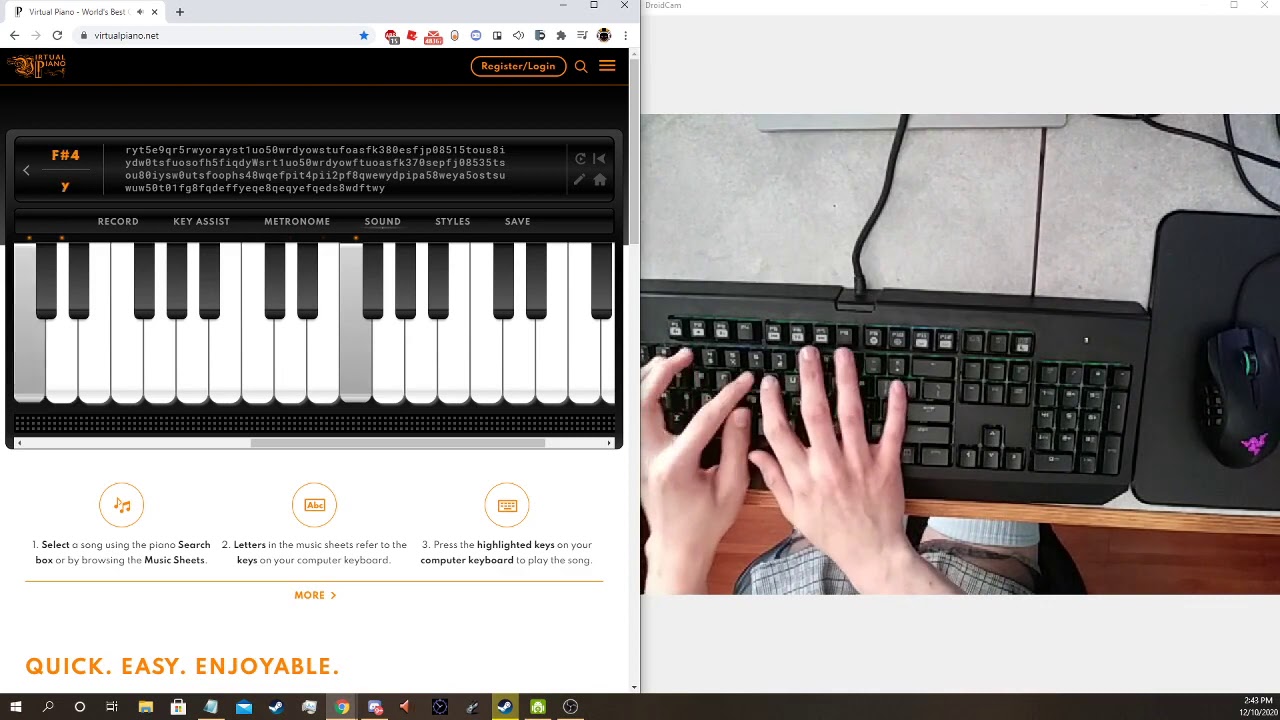
Final Fantasy Theme VII - Nobuo Uematsu, By J. Nguyen
Music Sheet:
[150t] y u
[3tua] [80eup]
[150] t y [50tu]
[@W8to] i [^W49t] y
[150t] y u
[3tua] [80eup]
[150] t y [50tu]
[480eo] i t y
[3wu] 7
[28qe] u i u
[E4y] ^ 9 q 9 q r y
[5et] 9 q r [5wr] y [ro] [ya]
[1tuos] 5 0 w [ryod] w [tuof]
[asfk] 3 8 0 [epsfj] 0 8 6
1 5 [8tuos] 0 [wyosd] 0 [tuosf...
 fiery bridge
can you lube these switches without losing the analog movement im a semi pro fortnite player and trying to get the best quality and feel out of my board. i have o rings on them now but id like to see how amazing these would fee lubed
severe idol
fiery bridge
can you lube these switches without losing the analog movement im a semi pro f...
the wooting 1 and 2 can be lubed but you have to be careful. wooting lekker and he can be lubed no problem and i think come lubed from factory
rough plinth
fiery bridge
can you lube these switches without losing the analog movement im a semi pro f...
flaretech wooting keyboards can be lubed if you're being cautious where and how much you apply
but I'd recommend getting the HE (lekker switches) once available if you want the highest tier of analog control
 vast bear
@fiery bridge @rough plinth you can safely lube these from the outside without endangering the internal prism.
 quick summit
severe idol
quick summit
severe idol
That is a very interesting idea. Renoise has used the computer keyboard as a velocity-less midi keyboard for years and never implemented anything like using the shift as a modifier for your notes. That's a really good idea.
I'm not sure if I would want different notes, or if I would prefer it to be an octaver, so that I could have say 5 full octaves rather than the usual 2.5
If you treated the two (left and right) shifts differently, you could even get a full 7.5 octaves out, I would think, maybe more
It could be super duper interesting to have each shift act differently, like say the left shift makes the note flat and the right shift goes sharp. Then you could naturally play a C note by hitting right-shift+"B" or play an E note by hitting left-shift+"F". Of course, left-shift+"E" would play an E flat or a D sharp (same note)
Maybe control would be the octaver? I would still like to have all my sharps and flats available without having to hit shift, but having the shift be a full semitone shift in the direction of the handedness of the key would be really cool.
severe idol
quick summit
That is a very interesting idea. Renoise has used the computer keyboard as a vel...
yeah the most common standard for virtual piano is having the shift key move a semitone and then ive seen ctrl as a modifier to allow for 88 key input
but the ctrl thing isnt really common or standardized
quick summit
I mean, I invented the ctrl key thing as I was typing... kind of pulled it out of my ass, but thinking of it...hrm. yeah, in renoise you can jump to an octave with ctrl+1,2,3.. and can move the octave up and down with ctrl+[ & ctrl+]. That's a pretty intuitive way of navigating octaves it seems.
You're right though about [ctrl], because in Ableton to go up and down octaves it's z and x rather than ctrl modifiers. I don't think shift does anything in ableton, but velocity can be affected with c and v, which is only kinda awk.
I haven't seen any layouts that require shift to access flats or sharps though, interesting concept. You could definitely get a full 88 out of it that way, but might take some re-programming of thought on it. OTOH, it could be great for always playing in key... it would make accidentals more...intentional haha
severe idol
quick summit
I mean, I invented the ctrl key thing as I was typing... kind of pulled it out o...
yeah people use transposition to turn most songs into c major to avoid shifting and making it much easier to play
quick summit
severe idol
yeah people use transposition to turn most songs into c major to avoid shifting ...
What DAWs / soft instruments are you using? 🙂
severe idol
quick summit
What DAWs / soft instruments are you using? 🙂
not sure
severe idol
quick summit
What DAWs / soft instruments are you using? 🙂
a bit strange but this game : https://www.roblox.com/games/5593470048/Virtual-Piano-Visualizations-2?refPageId=52a09f34-3209-49dc-80e0-09c670bf5923 has the best virtual piano using the format

ROBLOX
Check out Virtual Piano Visualizations 2. It’s one of the millions of unique, user-generated 3D experiences created on Roblox. aka VPV 2.0
work in progress.
expect this game to break often!
Credit:
Past VP Creators - NickPatella, Repansniper, FumeiSencho, et al.
Main dev / Owner - Hirumiro
Co-Owner / Founder - brianops1
Building / Thumbnail - I...
 brave glen
This abandoned thing looks interesting. I just install it and it works?
soft solar
brave glen
This abandoned thing looks interesting. I just install it and it works?
Not abandoned, just inactive. It should work if you follow the instructions here: https://github.com/WootingKb/wooting-analog-midi#getting-started
GitHub
Cross-platform virtual MIDI device for (Wooting) analog keyboards! - WootingKb/wooting-analog-midi
edgy anvil
The download is a bit old, there's more recent changes in the codebase with many improvements
I'll see if I can get a release with the latest stuff out, but the download should work in at least a basic form
fierce star
This isn't really my area sorry
GitHub
Cross-platform virtual MIDI device for (Wooting) analog keyboards! - WootingKb/wooting-analog-midi
Should help
edgy anvil
@drowsy temple the release build is a bit old but should work, if you want to use the latest stuff right now you'd need to compile it yourself but am planning on making another release soon with latest stuff
soft solar
 drowsy temple
is it a standalone app
drowsy temple
is it a standalone app
It's a standalone app, you can download and install the latest version here: https://github.com/WootingKb/wooting-analog-midi/releases/tag/v0.2.0
GitHub
Updated to latest Tauri
Display analog value and velocity of pressed keys/notes
Configuration of Note trigger threshold, Velocity scaler & amount of notes to shift by when shift is held
Basic D...
edgy anvil
Only other thing you need is the Analog SDK. If you're on Windows and have Wootility installed you should be good to go
Otherwise, follow the getting started on the readme to get set up: https://github.com/WootingKb/wooting-analog-midi#getting-started
GitHub
Cross-platform virtual MIDI device for (Wooting) analog keyboards! - WootingKb/wooting-analog-midi
drowsy temple
@edgy anvil
keep getting a fataql error occured during initialization
nvm
fixed it
how do i remap keys tho
edgy anvil
@drowsy temple You click on the piano key and then press the key on your keyboard that you want to bind to that note
drowsy temple
@edgy anvil that doesnt seem to work
edgy anvil
Does it say you have a device connected as iirc it won't work properly unless something is there
 steel mountain
i cant bind to more than one channel
correction i cant bind anyhting
unbinding dosent unbind either,
 grim grove
i'm in the same boat :')
edgy anvil
@steel mountain @grim grove Version 0.2? What does it say on the top left? Does it correctly identify a keyboard connected?
steel mountain
edgy anvil
<@!265691493006573568> <@!168881429113995264> Version 0.2? What does it say on t...
yes shows wooting two
do i need to use a different keyboard to set the binds?
edgy anvil
Hmmm, strange, you on Windows?
steel mountain
yes
also
unbinding not working
you can see even when i unbind H it still plays the note
edgy anvil
hmmmm, lemme have a look into this
steel mountain
let me know if you need anything
edgy anvil
Figured out the problem and have fixed it, pushing new release now. Will link here when done as there is no auto-updating
edgy anvil
👀
@steel mountain @grim grove Could you try out this version: https://github.com/WootingKb/wooting-analog-midi/releases/tag/v0.2.1 ? Should be all good now

GitHub
Fixed broken rebinding & cleanup behaviour
steel mountain
edgy anvil
<@!265691493006573568> <@!168881429113995264> Could you try out this version: ht...
nice works
now if only it supported changing instruments
im using the coolsoft synth and cant figure out how to force it to use different instrments
midi players work though
but the wooting midi just dose the same instrument on all channels
edgy anvil
afaik midi is midi, not aware of it defining an instrument. I believe that's something that'd be up to the virtual midi port to determine or the application that's reading from the port
The analog midi app just pipes midi packets through the selected virtual port
don't think there's anyway to control instrument type that way
steel mountain
um you can definitely change instruments over physical midi.
you can select bank and preset
128 presets and like 256 banks
edgy anvil
physical midi != virtual midi
physical midi will be defining its interface and its capabilities. the virtual midi will define those by the app that's hosting the virtual midi port. The analog midi app just pipes messages through whatever port you have selected, it has no control over the other properties that it exposes
well, may have spoke too soon
steel mountain
i was going to say windows virtual midi has full general midi support
edgy anvil
getting a clear definition of the midi spec is tricky, different places is giving me different sets of capabilities
edgy anvil
From what I can find, it looks like this "Program Change" message is how instrument changing works http://midi.teragonaudio.com/tech/midispec/pgm.htm
How would you expect changing instruments to work through the app?
i.e. how would you want it to work
steel mountain
i mean just a simple per channel would be fine, nothing to fancy
edgy anvil
Alright, will open an issue for it. Very little priority is on the analog midi app atm so not sure when I'll be able to get around to it
grim grove
I just woke up! I'll give it a try once I'm at my computer :)
grim grove

keyboard: wooting two lekker (linear 60g analog)
software: https://github.com/WootingKb/wooting-analog-midi
@edgy anvil it works well!! thanks for the fix
steel mountain
grim grove
https://youtu.be/B6rGESv3wNI
man are lekkers that loud or is that just the mic?
that seems louder than even my clicky flaretechs
grim grove
i put my mic right on top of the keyboard on purpose LMFAO
i've never done a keyboard sound test but the lekker definitely isn't loud
grim grove
steel mountain
that seems louder than even my clicky flaretechs
I'm also learning to be more precise with the analog, so i'm practicing not bottoming out
steel mountain
ah
grim grove
i was def bottoming out on all keypresses in that video but my 'normal' use on the lekker is the quietest keyboard i've had for sure, coming from browns and blues
tepid shell
@grim grove Try this:loopMIDI | Tobias Erichsen http://www.tobias-erichsen.de/software/loopmidi.html
With LoopMIDI, you can load different audio sources to create a stack of sounds. Like Pianoteq V6.7.0


 grim grove
tepid shell
<@!168881429113995264> Try this:loopMIDI | Tobias Erichsen http://www.tobias-er...
grim grove
tepid shell
<@!168881429113995264> Try this:loopMIDI | Tobias Erichsen http://www.tobias-er...
oo thank you for sharing! I'll take a look :)
 wary nacelle
Hey, I don’t know if this is the right place to ask, but I’m building a MIDI instrument, and I’d really like to use the Lekker switches in it. Would it be possible for me to source the switches and hall-effect sensors at this time?
severe idol
wary nacelle
Hey, I don’t know if this is the right place to ask, but I’m building a MIDI ins...
I dont think you can buy lekker switches atm
 sick timber
wary nacelle
Hey, I don’t know if this is the right place to ask, but I’m building a MIDI ins...
sick timber
wary nacelle
Hey, I don’t know if this is the right place to ask, but I’m building a MIDI ins...
You can send an email to social@wooting.io with the request. Please also introduce your project and (commercial) intention. Then we are able to send over samples to help you along with development.
wary nacelle
@sick timber thank you! 😁
misty pendant
FYI, regarding changing instruments, it shouldn't actually be necessary to do it in the application itself. Not familiar with Windows, so maybe there's something weird there that makes this irrelevant, but .. changing an instrument is just another control instruction, which can be sent from any MIDI source.
So as long as you can connect multiple sources to the same synth, you can use one of those sources to change instruments.
(though I imagine it would generally be an expected feature within such an application, so you don't have to rely on another one)
Anyway, don't have a Wooting keyboard yet (preordered one the other day mainly for this potential MIDI functionality), but I wonder if anyone else has considered using a B-griff or C-griff layout (as featured on chromatic button accordions) instead of a piano layout. Seems to match a computer keyboard layout a lot more closely.
I've been playing random melodies on my non-analogue keyboard for a while using the B-griff layout. Made a webpage for it if anyone else wants to try: https://maxdamantus.gitlab.io/bayan/
(that webpage can output MIDI when using Chrome)
 dull mortar
Good afternoon you magnificent people,
For some reason I'm receiving this error when launching Wooting Analog Midi for the first time

By the time I installed this 0.2.1_x64, I did not had Edge installed as I had it removed earlier with Revo unistaller, but apparently this requires some Edge functionality.. So I uninstalled this, re-installed Edge, re-installed this again, but the error remains the same
prisma raft
it doesnt require edge
dull mortar
but the installer triggered WebView2 Runtime
dull mortar
well, Wootility works just fine but this one doesn't

I doubt it will work after Edge uninstallation
prisma raft
ya so it prob changed cause it uses something else as engine
dull mortar
 dull mortar
so if there's a fix available then I'm interested :b
misty pendant
Wootility uses Electron, the MIDI application here seems to use some "Tauri" framework, not familiar with it.
dull mortar
are there any troubleshooting tips for the "invalid title with quotes" error upon initializing this midi software? I really would like to get it up and running nvm opened issue on github
edgy anvil
@dull mortar Please see the github issue for my response to the issue
 severe idol
wonder if its possible to add a button to disable keyboard output and have it only output the midi signal instead of both
fossil oak
For now you can do that by making an analog profile with digital keys disabled
edgy anvil
severe idol
https://www.youtube.com/watch?v=yIMIQsMwgUs
Very cool! What do you think of the app?
severe idol
edgy anvil
Very cool! What do you think of the app?
works well i like it although i couldnt get it working with another program that converts midi into keyboard input with velocity
severe idol
fossil oak
For now you can do that by making an analog profile with digital keys disabled
dont think this works
sick timber
severe idol
https://www.youtube.com/watch?v=yIMIQsMwgUs
Since the MIDI app uses the Analog SDK, you can take an analog profile and then off digital keys which disables the keyboard keys.
Really awesome to hear/see this - would it be possible for us share a clip such as this but with a keyboard cam included?
fossil oak
So you didn't even try my suggestion heh
fossil oak
Yeah that's not it, there is an option somewhere to enable or disable digital keys.. maybe, don't actually know how it's on HE/LE
 severe idol
ah that works
severe idol
sick timber
Really awesome to hear/see this - would it be possible for us share a clip such ...
 sick timber
severe idol
https://www.youtube.com/watch?v=jBLE7eLu0g8
sick timber
severe idol
https://www.youtube.com/watch?v=jBLE7eLu0g8
Awesome - any idea why numpad 0 was continually pressed?
severe idol
uh
oh i jsut noticed that
wierd
numpad 0 is gone but now its left arrow being registered
sick timber
Hmm
Replug the keyboard and it’ll calibrate
I assume the SDK takes the padding into account as wel but might be missing something here if it continues.
severe idol
ya that fixed it
sick timber
severe idol
ya that fixed it
Do you mind to repeat the above but now without the issue 😅 the numpad basically disguised all the presses
severe idol
ya sure give me a minute
severe idol
sick timber
Do you mind to repeat the above but now without the issue 😅 the numpad basicall...
 sick timber
Thanks so much. Do you mind if I use this as an example for the MIDI app GitHub and perhaps it’ll end up somewhere on our website as the same type of example?
You can let me know which credit you’d like me to add as either a watermark or caption when displayed
severe idol
ya no problem you can use it anywhere you'd like and for credit just whatever is easier for you :)
sick timber
Then I’ll refer this as Furnik from the Discord community - thanks 👏
tepid shell
@severe idolVery nice playing👍 ,more midi videos, please!😋
severe idol
ty <3
fierce star
severe idol
https://www.youtube.com/watch?v=3tl_nhiA49Y
Late response but epic
severe idol

 deft lodge
How's the lekker switches on the xim for analog?
fierce star
Lekker switches are insanely good with Analog vs flaretech
rough plinth
pretty much perfect 0.1mm to 4mm sensitivity
 winter crane
Hey if this works for midi control does it also have velocity sensitivity? Just wondering.
severe idol
winter crane
Hey if this works for midi control does it also have velocity sensitivity? Just ...
ya it does
winter crane
severe idol
ya it does
Nice! then I might actually give it a go using it as a midi controller.
winter crane
Are you guys using a software to connect your keyboards to a DAW or just doing it directly?
winter crane
Hey guys, what midi programs/DAWs are you using? I'm having a real hard time getting Cubase to recognize my keyboard as a midi device. Any help would be appreciated.
severe idol
winter crane
Hey guys, what midi programs/DAWs are you using? I'm having a real hard time get...
im using the wooting program outputting to loopbe then just to any piano program you want
if you want it setup like a piano you can use something like freepiano or pianorhythm website
tepid shell
@winter craneloopMIDI Software | Tobias Erichsen http://www.tobias-erichsen.de/software.html
misty pendant
And if you want to try something different to the traditional diatonic piano layout, my website can be used to produce MIDI output from a B-griff layout (like on a Russian accordion): https://maxdamantus.gitlab.io/bayan/
(Might be worth pointing out that all of these web versions will very likely not support velocity sensitivity)
Also, the web versions will only be able to output MIDI on Chrome.
severe idol
https://trello.com/c/bMxrPxlw/33-comprehensive-list-of-other-sheet-sources
https://trello.com/c/3ED5yrW9/25-our-vp-guidebook
https://www.roblox.com/games/5593470048/Piano-Visualizations-2
𝐇𝐨𝐰 𝐭𝐨 𝐬𝐞𝐭𝐮𝐩 𝐏𝐢𝐚𝐧𝐨𝐫𝐡𝐲𝐭𝐡𝐦 𝐟𝐨𝐫 𝐕𝐏: When you enter the Pianorhythm website you won't be able to instantly play VP. First you need to choose the correct input, and to do so you have to do this. First click on Settings > Input > Keyboard Input Mapping > Choose VIRTUAL_PIANO
To change transpose you press the HOME button to go up [+] and END for [-] And before you begin you need to change the octave to 2 so press PGUP to go higher and PGDN to go lower. You always start at 3 so just press PGDN. If you don't have those keys, there is a menu where you can change that too.
hi I'm sharing all the resources someone would need to get started playing with the same layout i use! there are also communities if you look a bit deeper with thousands of other people who play actively. you can play with them in piano games on platforms such as Garry's mod and Roblox
people that (usually) transpose their sheets:
iulian - https://trello.com/b/n3cbomdF/virtual-piano-sheets
xjdiivision/nebula/kinlei - https://trello.com/b/0dGCsaeK/classical-qwerty
iriome - https://trello.com/b/vi7kJsjk/iriome-sheets
gimek - https://trello.com/b/FcKY7JbS/gimek222-qubeks-vp-sheets
tenebris - https://trello.com/b/gdo7qxlS/tenebri...
Comments
12
𝐁𝐞𝐟𝐨𝐫𝐞 𝐰𝐞 𝐬𝐭𝐚𝐫𝐭 𝐨𝐟𝐟, 𝐈 𝐰𝐚𝐧𝐭 𝐭𝐨 𝐞𝐬𝐭𝐚𝐛𝐥𝐢𝐬𝐡 𝐚 𝐬𝐢𝐦𝐩𝐥𝐞 𝐫𝐮𝐥𝐞 𝐟𝐨𝐫 𝐡𝐚𝐧𝐝 𝐩𝐥𝐚𝐜𝐞𝐦𝐞𝐧𝐭𝐬. 𝐈𝐟 𝐲𝐨𝐮 𝐥𝐨𝐨𝐤 𝐝𝐨𝐰𝐧 𝐨𝐧 𝐲𝐨𝐮𝐫 𝐤𝐞𝐲𝐛𝐨𝐚𝐫𝐝, 𝐥𝐨𝐨𝐤 𝐚𝐟𝐭𝐞𝐫 𝐭𝐡𝐞 [ 6 y h n ] 𝐤𝐞𝐲𝐬. 𝐓𝐡𝐚𝐭 𝐢𝐬 𝐚 𝐥𝐢𝐧𝐞 𝐟𝐫𝐨𝐦 𝐧𝐨𝐰 𝐨𝐧. 𝐍𝐨 𝐡𝐚𝐧𝐝𝐬 𝐬𝐡𝐨𝐮𝐥𝐝 𝐩𝐚𝐬𝐬 𝐭𝐡𝐚𝐭 𝐥𝐢𝐧𝐞. 𝐋𝐞𝐟𝐭 𝐩𝐢𝐧𝐤𝐢𝐞 𝐬𝐡𝐨𝐮𝐥𝐝 𝐦𝐨𝐬𝐭 𝐨𝐟 𝐭𝐡𝐞 𝐭𝐢𝐦𝐞 𝐛𝐞 𝐨𝐧 𝐭𝐡𝐞 𝐬𝐡𝐢𝐟𝐭 𝐛𝐮𝐭 𝐜𝐚𝐧 𝐛𝐞 𝐮𝐬𝐞𝐝 𝐭𝐨 𝐩𝐥𝐚𝐲 𝐭𝐡𝐞 𝐙 𝐭𝐨 𝐌 𝐧𝐨𝐭𝐞𝐬, 𝐚𝐧𝐝 𝐲𝐨𝐮𝐫 𝐭𝐡𝐮𝐦𝐛 𝐬𝐡𝐨𝐮𝐥𝐝𝐧'𝐭 𝐛𝐞 𝐮𝐬𝐞𝐝 𝐭𝐨 𝐩𝐥𝐚𝐲 𝐧𝐨𝐭𝐞𝐬. ...
Labels
Important Information
PianoRhythm is a multiplayer social web app to play music and play casual games with other people!

Roblox
Check out Piano Visualizations 2. It’s one of the millions of unique, user-generated 3D experiences created on Roblox. formerly VPV 2.0
work in progress. (rework soon)
expect this game to break often!
Credit:
Past Piano Creators - NickPatella, Repansniper, FumeiSencho, et al.
Main Dev / Owner - Hirumiro
Co-Owner / Founder - brianops1
Building /...
 sharp steppe
severe idol
https://trello.com/c/bMxrPxlw/33-comprehensive-list-of-other-sheet-sources
htt...
sharp steppe
severe idol
https://trello.com/c/bMxrPxlw/33-comprehensive-list-of-other-sheet-sources
htt...
you can use it on roblox??
that's surprising lmao
sharp steppe
neatoo
severe idol
you dont need a wooting to play any of these btw just for velocity ^^
severe idol
tepid shell
<@!171156645773180929>Very nice playing👍 ,more midi videos, please!😋
https://youtu.be/1GvBTB7qE_g i did another song

hi
rubato lol
Sheet: https://trello.com/c/utE7pU4Y/1041-arcade-fire-song-on-the-beach-photograph-her-ost
Keyboard: Wooting Two HE (using velocity midi program)
edgy anvil
severe idol
https://youtu.be/1GvBTB7qE_g i did another song
super cool! Love the use of the aoe effect for it!
 minor aspen
sdf
 grand steeple
edgy anvil
super cool! Love the use of the aoe effect for it!
grand steeple
edgy anvil
super cool! Love the use of the aoe effect for it!
Is there a quick guide somewhere on how to set up my system for the bare minimum of just playing around with a keyboard like this?
severe idol
grand steeple
Is there a quick guide somewhere on how to set up my system for the bare minimum...
if you have a Roblox account you can just join the piano vis game
link for everything you need I put above in a message ^^
misty pendant
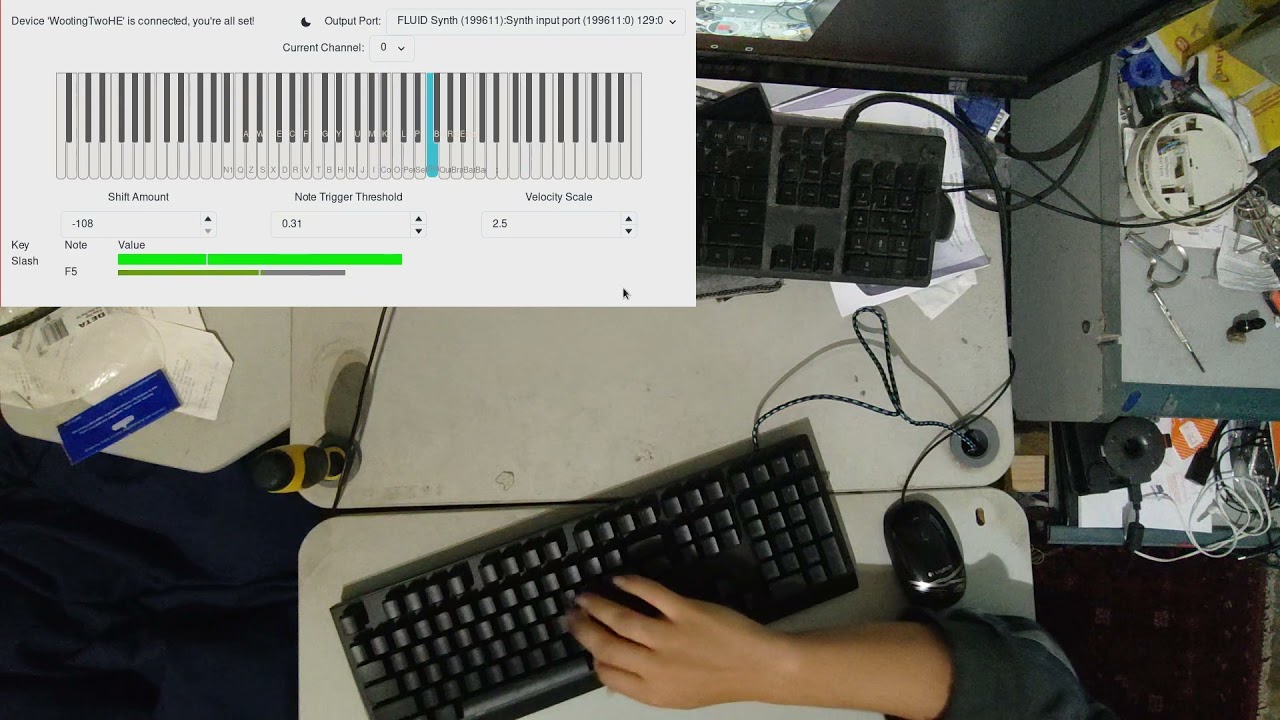
(not a guide on using velocity sensitivity, just a demo)
FYI, for velocity to work, you basically have to make sure you're using Wooting MIDI program to interpret the keystrokes.
Also, in my experience velocity sensitivity is fairly inaccurate without enabling tachyon mode.
(in normal mode, I could see that it was providing somewhere around 160 updates per second while in tachyon mode it was over 800 per second---pressing a key often involves only 8 updates in normal mode)
er, sorry. that 8 number was in tachyon mode.
in normal mode I can press a key and see only one event, so not possible to sense velocity from that.
grand steeple
I downloaded the analog midi too but it has a TON of latency?
severe idol
download loopbe and make the wooting midi program output to it then select loopbe as the input on piano rhythm
I highly suggest using the same format I play in since the community that plays with it has been developing for over like 15 years so there's lots of sheet music and resources that support it
severe idol
misty pendant
https://www.youtube.com/watch?v=lE8TbDVWs8Y
your velocity scale is set really high so it's just playing most of your keys at 100% volume
obv it's preference but seems to work better and actually able to hear and control when it's set lower
misty pendant
@severe idol Hmm.. With the velocity I chose there (2.5), I have to hit fairly hard to get max velocity.
You can see the velocity in the bar that shows up at the bottom while a key is pressed.
misty pendant
Anyway, I'm planning on experimenting with different ways to produce the velocity, and maybe other modes that are not pure velocity.
misty pendant
Sorry, gotta go to work, will explain later.
severe idol
ciao
misty pendant
Don't have scrorlback so dunno if was anothec message since my last one (switched clients), but with velocity, I suspect there should be a tendency for velocity sensitivity ta reduce at higher velocities, so you should be able to get a lot of control in the softer notes but it should get harder and harder to reach max velocity.
maybe just a matter of applying some logarithmic/exponential scale.
and for the non-velocity aspech, I'd like to look into using displacement sensitivity, which would be more suitable for simulating violin/trumpet etc, where you can play a single notu at varying volumue, and with vibrato.
and maybe some combination of both, will require experimentation.
severe idol
misty pendant
Don't have scrorlback so dunno if was anothec message since my last one (switche...
I like this idea
I've struggled with having a lot of control over velocity
seems like it would help
also playing very soft is a bit strange have to slowly press keys but sometimes won't register
tepid shell
If the button is 10mm high, the velocity effect is even more obvious, 4.1mm seems a bit short.
misty pendant
I think a lot of it is just learning to control it, just like with a regular piano.
I've been randomly messing around on a regular compuher keyboald for over a year, so it feels strange having the additional control.
To the extent that I've played muiscal keyboards (not much), I don't think I've had very good control there either.
grand steeple
severe idol
I highly suggest using the same format I play in since the community that plays ...
do I have to assign all the keys in the wooting analog tool for that?
grand steeple
severe idol
download loopbe and make the wooting midi program output to it then select loopb...
if I have the piano rhythm window selected, it detects both the midi and the digital key stroke?
misty pendant
You need to configure the keys in the wooting analogue tool, yes. You'll also w'nt to make sure you're only inputting in the wooting analogue tool, not another tool.
not familiar with piano rhythm, but I'm guessing it can interpret keyboard and midi input. You'll only want to interpret midi input in that application, because wooting analogue midi should be handling the keyboard input.
One thing to note, at least on Linux, the wooting analogue midi application will interpret key presses regardless of application focus, so you'll need to wake sure you're noh fogused on another applicationp
severe idol
grand steeple
if I have the piano rhythm window selected, it detects both the midi and the dig...
You'll have to disable digital keys in the wootility I just set a separate profile with it disabled
severe idol
grand steeple
do I have to assign all the keys in the wooting analog tool for that?
Yeah

 grand steeple
severe idol
You'll have to disable digital keys in the wootility I just set a separate profi...
grand steeple
severe idol
You'll have to disable digital keys in the wootility I just set a separate profi...
There's an option in room settings to accept midi input only
grand steeple
severe idol
Right shift doesn't work I noticed
grand steeple
severe idol
but youll need another program for that lol
For what?
grand steeple
severe idol
still required for roblox
What's required?
severe idol
if you want velocity on roblox pianos
the program
youll have to input midi into this program
and it converts it back to keypresses
but then in roblox
to get velocity it uses a kinda jank method
the program press like alt + w or alt + t and that controls the volume of your piano in game
along with the key you pressed
if you look at the video i sent earlier the little blue bar on the top right of the piano gui indicates the velocity
it was originally designed just for actual midi keyboards (pianos) to play on roblox
but also works for keyboards that output midi lol
grand steeple
so I have everything set up for using pianorhythm but there's quite a bit of latency still (far less than before, but still a noticeable amount that is annoying. Any ideas?
misty pendant
Looks like pianorhythm is a website, so I'd expect latency if it's pcoducing the audio.
Personally I use fluidsynth for rendering the audio, but that's on Linux, not sure how well it works on Windows.
(and when i do use fluidsynth, I specifigally avoid usdnf yilseaudio for lahtency reasons)
pulseaudio*
severe idol
grand steeple
so I have everything set up for using pianorhythm but there's quite a bit of lat...
youll have to download a soundfont and select it

also under the keymap menu select the vp.map
to load soundfont go to instrument and click browse then find your soundfont of choice
grand steeple
I'm getting the same double input issue here
I see no way to disable keyboard inputs here
🤷🏻♂️
grand steeple
severe idol
this just doubles everything
severe idol
click into something else
grand steeple
then why does the keyboard map matter?
severe idol
transpose on arrow keys
personally sometimes i dont wann aplay with velocity
esp if im just testing a song or something
grand steeple
ah
what settings do you use for note trigger and velocity scale when you do?
seems hard to get anything that isn't just ᑫᵘᶦᵉᵗ or LOUD
 vernal nymph
Hellooo!
I guess this question comes up alot but, what software should i download to get out the CC's from the keyboard?
I have tried a thing called WootingPiano from microdee but i can't get that to work...
edgy anvil
Try the one linked in the channel description: https://github.com/WootingKb/wooting-analog-midi @vernal nymph

GitHub
Cross-platform virtual MIDI device for (Wooting) analog keyboards! - GitHub - WootingKb/wooting-analog-midi: Cross-platform virtual MIDI device for (Wooting) analog keyboards!
vernal nymph
Ah! Did not know about channel descriptions 😄 Wil try!
vernal nymph
Hmm, there is no midi device showing up in my software, maybe thats not what that software is supposed to do?
I can see that Wooting Analog Midi is recieving signals since the bars is moving.
edgy anvil
What platform are you on?
You'll need some virtual midi software to connect it to
on Windows you can use loopMidi
vernal nymph
Sorry, yeah on windows.
So then i choose loopMidi in the "Wooting analog midi" software, and then choose loopmidi in my software?
prisma raft
so i can use my wooting in flstudio?
vernal nymph
You should be able to @prisma raft
prisma raft
hmmm been trying to get the background music going for a song
tried using garageband on my macböök but im not good at this
vernal nymph
Woho, got it to work now!
 chilly cave
I tried setting up analog midi on mac os, but I only get a white screen. Does anyone else have this issue in MacOS?
edgy anvil
chilly cave
I tried setting up analog midi on mac os, but I only get a white screen. Does an...
did you install the analog sdk?
chilly cave
Yes, the issue seems to only occur in the packaged dmg. When I directly build from source it works perfectly
edgy anvil
Oh, interesting, could be something broke with the release build
misty pendant
I think I know what that is.
When I built it from source (on Linux—haven't tried a precompiled build), I had to change the CSP used by the framework.
index 31fe859..aa871f0 100644
--- a/src-tauri/tauri.conf.json
+++ b/src-tauri/tauri.conf.json
@@ -61,7 +61,7 @@
       }
     ],
     "security": {
-      "csp": "default-src blob: data: filesystem: ws: http: https: 'unsafe-eval' 'unsafe-inline'"
+      "csp": "default-src blob: data: filesystem: ws: http: https: tauri: 'unsafe-eval' 'unsafe-inline'"
     }
   }
 }
Might be related to some versioning thing. Maybe a different version ignores the CSP or maybe it uses a scheme other than "tauri://". iirc when I looked into it, it looked like a lot of that configuration was probably just copied from some example tauri application.
(without that change, I also just got a white screen, since the HTML was referring to a script using a URL that was something like "tauri://blah/abcdef012345.js", which was blocked by the CSP)
FYI, the original CSP is pretty silly. It basically just allows everything.
 thin cloud
any chance wooting will add native midi support? (make keyboard appear as a midi device like how xbox controller stuff works)
misty pendant
I'd be surprised if it went in that direction, since the X-Box controller stuff works like that for compatibility reasons and I imagine doing it in the keyboard (as opposed to emulating a joystick in Windows/macOS/Linux) is probably still relatively natural since the keyboard is already a USB HID.
And usually when people are doing MIDI stuff on a computer, they're already running multiple specialised bits of software in the OS, so an extra bit of software for simulating a MIDI controller is not going to seem unusual. It's also pretty typical for MIDI sources to be created in software, unlike joysticks.
If I could request something particular to MIDI handling, it would be adding some sort of monotonic timestamp to the analogue HID reports, since at least in Linux (using /dev/hidraw) and Android (using UsbRequest), there are no timestamps provided, so you have to use an extra system call after reading each report and hope that there was no significant delay between generation of the report and the return of whatever system call is used to tell the time.
I feel like the Linux and Android programs I've written (haven't published them anywhere) achieve noticably better latency handling than the wooting-analog-midi program (using the wooting-analog-sdk, which imo doesn't work very well when you need precise timing information between changes).
misty pendant
Actually, I guess a further improvement for MIDI handling would simply be somehow producing key distance data more frequently, since even 800 reports per second doesn't seem like quite enough to detect velocity smoothly. It's pretty easy to press a key such that it will only receive 3, 2 or even 1 report before bottoming out, so I think it tends to work better just measuring the time between the first detection of the key press and when the key is pressed below the activation point (and often the first report will be of the key being below the activation point, so velocity is basically infinity).
 lavish silo
I don't know everything about their set up, but I would guess the communication buffer is basically the only thing responsible for the slow down. The sensors are more than capable of naturally producing a proportional speed output. It is very likely that the processor could as well, for it does detect fractional changes across any key as it does is a good reason to believe it could respond to those sensors. Atmel-xmega-128a4u, seemingly inside wooting one, sure seems fast enough to handle the job of calculating key speed and it would be what you are looking for. Time stamping the inputs as they occur is a pretty good idea so it can buffer up everything and you might get a real world offset for what might be called USB frametime though this really seems like something that should be baked in to the midi standard. I am guessing the wooting midi extension is all being applied by the computer to create a virtual midi device. The keyboard processor will likely need to onboard some of that.
prisma raft
lavish silo
I don't know everything about their set up, but I would guess the communication ...
processing doesnt happen on the kbd
at least for midi
the midi apps use the abalog sdk to receive the analog data every few ms
so all calculations happen on the pc
thin cloud
i just know it's relatively easy to make a midi hardware controller, and although it would obviously take a little more work to implement and integrate with wootility, it would create a hugely useful and reliable compatibility layer to use wooting keyboards not just for music but also control software and hardware for lighting and fx that all uses midi
prisma raft
i think such a midi compat layer should still be a seperate software since the wootility is just a heavy software
misty pendant
I don't think the timestamping is as important if the MIDI data has already been produced, since the MIDI data already has the computed velocity.
It's just that whatever is computing the velocity needs accurate timestamps, which is currently software on the computer.
I suspect it would also be sufficient for the USB host controller to record a timestamp when it starts receiving the packet (which is already on an interrupt endpoint), but dunno if HCs normally do that.
Probably also sufficient for the OS to record a timestamp when the HC interrupts the CPU, though I'm not entirely sure how that works. As mentioned before, Linux at least doesn't seem to provide a timestamp coupled either through hidraw or directly through the USB ioctls (as used by libusb, or by UsbConnection/UsbRequest on Android)
But yes, another issue with MIDI in the keyboard itself as BigBrainAFK alluded to is you might want to tune it, and Wootility is pretty heavy.
I've been using my own program to do MIDI using the wooting on Android, and I don't expect there's going to be a Wootility for Android.
thin cloud
if there was onboard midi, you could set it up on pc with Wootility (or just turn it on to some default with Mode+M) and then use it on Android with any midi app. That seems like an ideal use case to me.
Also I'm sure you could get more accurate velocity info from firmware dedicated to it instead of polling
misty pendant
Well, if the device includes timestamps in reports (and produces reports as a sufficient frequency), then the computer (or phone) can calculate the exact same velocity.
(fwiw, my current Android solution also works with any MIDI app/website, since it just uses the Android MIDI API)
(I particularly just use an app called "FulidSynth MIDI")
FluidSynth*
misty pendant
also regarding polling: reading analogue values from the device as-is does not need to involve polling. In my programs, the keyboard reader is normally idle because it's waiting for the OS to receive the next USB interrupt packet.
though using the wooting-analog-midi API, you do need to poll (one of the reasons I avoided it)
misty pendant
er, using the wooting-analog-sdk API*
thin cloud
how else do you read analog values other than wooting-analog-sdk?
(i'm still new to wooting stuff)
oh you're doing direct requests to the keyboard via the usb stack?
so basically writing your own driver
i'd say that's too low level for the vast majority of users and even devs
(i don't consider wootility, which doesn't even have to be running unlike every other modern keyboard and mouse driver, "heavy")
misty pendant
But when you're doing stuff with some MIDI controller you'd probably expect some visual feedback of what the state is, and maybe also be able to graphically configure some of it.
eg, which MIDI channel it's currently outputting to, what the current transposition is.
and you'd likely want to be able to change both of those settings, maybe more. For transposition I have that control bound to the arrow keys, but I can also see the current setting on my screen.
misty pendant
I also like seeing a graphical view of the keyboard layout, so I have that as part of my application, where it shows names/colours of notes for all the keys, and graphically shows both the MIDI velocity and displacement distance for each key.

I guess another aspect is that having that special application allows an obvious focus place for MIDI to work.
When my application receives focus, it opens the hidraw file and starts reading from it. When it loses focus, it closes that file, so it won't keep producing MIDI output while I'm doing other things on my computer.
(My Android application actually works differently; in Android I just claim all interfaces on the USB keyboard while my activity is alive, so I can keep using it while looking at other things on the device, or while switching instruments in the synthesiser application)
(I don't normally use a keyboard on Android for other things, so claiming the entire device seems fine for me there)
I guess such behaviour would also be something you might expect to control graphically while you're doing MIDI stuff, since I can imagine my Android behaviour might still be desirable on a computer in some cases.
 scarlet merlin
Hi, I’m diy builder for electronics for audio. I’m interested to build a midi controller with analog mechanical switches. I saw wooting blog post about analog switches, and it mentioned I can contact wooting guys if interested about the switches like lekker. Not sure this is the right channel to ask, but maybe it’s close enough. May I know can I buy the analog switch and corresponding sensor from wooting?
prisma raft
the sensor is any hall effect sensor
the switch just moves a magnet up and down
you can probably get swiTches from wooting but the sensors arent anything special and the switches dont have any real magic in them either
@scarlet merlin
edgy anvil
You can email us at social@wooting.io to enquire