#🔌│tech
1 messages · Page 962 of 1
 proud nacelle
 astral haven
What you could do is only cache the data
proud nacelle
There's also cache on the disks, but that can be turned off too.
As in store it in tmpfs or something?
astral haven
Just buy more ram
proud nacelle
Yeah that could work
 ashen spindle
no cache needed if you just buy SLC drives 
astral haven
Idea of caching is making the data not be in multiple places
If it's only in ram and you can set 2v vdimm on your motherboard in hardware the data can be erased very quickly :P
ashen spindle
to more important topics, the shader for my command prompt is broken, anyone with HLSL knowledge here? 😛
astral haven
Define evil
ashen spindle
it has less features than amd can offer so far, but I would otherwise call them equal
proud nacelle
Well. Intel ME runs Minix, does it not?
proud nacelle
There are? TIL.
astral haven
There's the processor one and the bios one
Processor one is still fully black box
Bios one was minix in the past
proud nacelle
Ok. But Intel ME is still less secure or well, more shady than PSP... right?
astral haven
Bios me is
But bios me is disableable
In fact it's only enableable on some special boards
proud nacelle
That's Libreboot, isn't it? Not many supported boards though
astral haven
No it's Also called the intel management engine
proud nacelle
I meant is it a TEE
Sorry
As in does it do the same thing kinda like PSP/TrustZone?
Or is there more to it?
astral haven
Psp is similar to the processor management engine
Trustzone is not a processor
Trustzone is a way of securing a processor
Intel me (processor not bios) and psp are dedicated processors
Both are blackboxes
Trustzone is basically firmware
proud nacelle
Perfect then.
astral haven
(Extreme simplification)
proud nacelle
That's all I need to know. Thank you again for having the patience of dealing with me.
astral haven
Anyways neither vendors security processor has ever been compromised
They are outright inaccessible
And probably always will be
proud nacelle
Right. At least with TrustZone, that can be turned off. But, as you told me, it's actually useful.
ashen spindle
oh wow, I looked it up bc of this discussion, looks like the latest threadripper pro series also got the SME/SEV features
thats cool
astral haven
yea
tr pro is straight up epyc
its not in any way threadripper
its fully locked 😦
ashen spindle
well it is marketing wise to not upset shareholders and server customers 😛
ashen spindle
then idk, WEPYC for workstation-epyc would've been a nice name
astral haven
and deprioritized support
🤷♂️ its threadripper for pros
so all of the consumer features got ripped out
ashen spindle
maybe it's so different teams handle it, support wise etc.?
astral haven
🤷♂️ amd doesnt have multiple support teams 😛
ashen spindle
they are getting bigger 😛
astral haven
i have a friend who runs a few epyc servers and has a ryzen desktop processor and got one of the same support people when he had an issue
he had alot of issues
he doesnt use epyc any more
epyc is really useless for any of the hardware people
you have to use it as a disposable unit with proper failover

 ashen spindle
well, that is proven as intel dropped prices by a ton after epyc started adoption
ashen spindle
on intel yeah, hence if you are not one of them you need to go epyc for that 😛
 astral haven
eh if you have a server, its pretty easy to get ice lake for it
 cursive summit

As always, 華强北 the North of HUAQIANG, the electronics capital city of the world provides this unreleased APU.
The very first hint of this APU I could find on Chinese reddit, Tieba, is around early Jan, 2021. This video is finished on the second day of the lunar new year.
- NO DEDICATED GRAPHIC DRIVER NOW.
- Even if installed a modified graphi...
proud nacelle
 that picture i recall
cursive summit
Hm
ashen spindle
maybe now
astral haven
you just gotta "contact us"
ashen spindle
but not when epyc first came out lmao
 ashen spindle
errm, august 2019 for rome launch, ice lake this month probably, that is a bit more
and the nda'd pre-release options are avaiable on both sides
astral haven
ice lake has existed outside of facebook for a year now
ashen spindle
sure, they were sampling ice lake in 2019 but nowhere outside of T1 customers
astral haven
facebook had ice first but smaller peeps could get ice begining of 2020
ashen spindle
that would still be half a year off then if we give amd a 3-4 month lead too
- the recent nvida offerings could only use epyc since they can't sell pre-release ice lake obviously
astral haven
nah amd announced epyc while sampling to t1
ashen spindle
nope, they had twitter on stage saying they already had the chips for weeks/months and were using them in live servers
idk if there was others too
astral haven
"while sampling to t1"
facebook had ice ages ago
im talking about "contact us" availability
amd had that in august and intel had it before q1 finished (no exact date given)
ashen spindle
lets hope it fixes the wooting issues
but yeah, I wish I could read the old semiaccurate stories, I'm pretty sure charlie has somewhat accurate dates when those chips were actually available
astral haven
What?
ashen spindle
https://www.semiaccurate.com/ not familiar?

 zenith sonnet
AGESA 1.2.0.1 is apparently amazing for memory OC
astral haven
Until someone else leaks the data
ashen spindle
I mean, I don't have a subscription so I can't tell for sure but it seems to be at least >50%
astral haven
They are only correct after someone else is 🤷
ashen spindle
not denying it, but if that's the case I'm not familiar with the places that get it earlier
astral haven
I know that they sourced their ice lake leak from brutus
ashen spindle
yup, never heard of them before lmao
astral haven
Admin of overclocking discord
Business is small scale but very fast hosting
And he didn't leak his own chip
He only posted a pic of a chip that he got from unnamed sources
ashen spindle
 cant comment on what I have no clue about
astral haven
I try to follow the leak scene as closely as possible
 ashen spindle
oh god did you kill another part of your pc
astral haven
And 50% leak accuracy is worse than my guesswork lmao
astral haven
Zen 3 isn't overclockable
All you can do to improve performance is mess with power limits
ashen spindle
ram/IF OC is what you should try rather than simple core OC
astral haven
Yup
zenith sonnet
astral haven
All you can do to improve performance is mess with power limits
I really hope that AMD can do something similar with memory
astral haven
Not possible
Unless amd starts making memory
Which they did do in the past
But it was awful
 proper crystal
astral haven
Which they did do in the past
proper crystal
astral haven
Which they did do in the past
Eh... they sold their branding for memory. They didn't really make it.
Not even like say Corsair makes memory.
astral haven
Amd doesn't make processors either
But they can do qc for them
That's all they would need to do
zenith sonnet
Of course it's possible
Even if you don't make the memory
Like, build an advanced training feature with error detection and the ability to write to BIOS into the IMC, for example
astral haven
That would take hours to run and years to develop
And presets would break every 3 months
proper crystal
astral haven
Amd doesn't make processors either
They design them. Corsair doesn't design memory ICs, only maybe PCB and headspreader.
And yet, AMD's involvement with Radeon branded memory was even lesser than Corsair's with theirs
astral haven
🤷
Corsair does alot of testing
And they don't put in the spd
You can have identical spds with different ics
And it's dumb
 atomic wharf
G.Skill is still the best imo they are stable as a rock and many of them use Bdie
 wheat plume

http://www.twitter.com/danooct1
This required a couple reinstalls and re-takes to get everything to work mostly fine, and even then the worm did what it wanted to do anyway, so this is what you get.
ashen spindle
help my cmd cat is broken
 wheat plume
150Mbps OR Gigabytes per second

 misty pier
i want 150 gigabyes per second
wheat plume
same..
misty pier
i can watch everything in 420k
zenith sonnet
We should start measuring speed in GB per hour instead of Mbps
At least that figure is relatable
 analog aspen
ashen spindle
help my cmd cat is broken
analog aspen
ashen spindle
help my cmd cat is broken
Quintosh having fun with the cmd
analog aspen
looking for ways to disable the MSI in hardware drivers now
anybody familiar with this let me know ;-;
zenith sonnet
Was MSI the old or new thing? What was the other called again?
Also, I think you just need a different driver
analog aspen
Message-Signaled Interrupts
I guess the default is called line-based?
anyways I don't even know if it's really better to turn that on xD
all I can find is this
I looked around regedit and found like 12 PCI VEN_ xxx folders
zenith sonnet
Ideally you want only MSI based drivers
That 100% gotta be a bug with a specific driver
analog aspen
each VEN_xxx folder have a different MSISupported key
changing the key from 0 to 1 supposedly enable it
but I don't wanna do that before I know exactly wtf I'm doing
since there are 10+ folders in there
xD
okay I found it thanks to this guide

can I only change the graphic card driver?
nothing else?
mouse? keyboard?
 pale sigil
analog aspen
Quintosh having fun with the cmd <:lul:576475280303063096>
pale sigil
analog aspen
Quintosh having fun with the cmd <:lul:576475280303063096>
"fun" is a foreign concept for him
analog aspen
he's just nerdy. I do that a lot actually
okay the regedit change didn't do anything. device still working properly but IRQ doesn't go negative
pain
how tf 2080Ti doesn't work in MSI mode
astral haven
Thought it requires msi-x
analog aspen
what's msi-x
anyways restarted the 2nd time it's negative now. Jesus christ spooked the shit out of me
how come a 2019 device can't MSI
astral haven
Messaged signal interrupts for pcie?
Oh it's a 3.0 feature
So yea the 2080ti uses that
analog aspen
I downloaded the tool just now and only my Intel Chipset SATA/PCIe RST controller and Intel Wireless support MSI-x
still no idea what it is but
astral haven
It's a way to send communication packets over pcie
Aka not data
But doesn't require a specific pin, it just uses the pcie data bus
What are you trying to do?
Yea you can disable msi
analog aspen
its a long story. keep it short I mentioned about wanting to get Razer Viper 8kHz polling for League, but worry about game compatibility (stutters it's having right now). Partly because 8kHz polling hit the CPU pretty hard, and League is CPU-bound game because it can only use 2 cores
Dag said enabling MSI for my devices should free up the CPU for 8kHz polling
astral haven
No
Msi is required for pcie devices and speeds up communication between the pcie device and the system
Just change the affinity of league
Set it so that it isn't using core 0
analog aspen
using Task manager or Lasso
analog aspen
astral haven
Either or
what's the difference between them
analog aspen
astral haven
Also overclock your ram
ye I did. It's a treacherous path tho ngl
astral haven
Wut
astral haven
Uh
The preset calculation isn't practical for ryzen...
You can get way better performance by just following the integral guide lel
analog aspen

GitHub
C# WPF to automate HCI MemTest. Contribute to integralfx/MemTestHelper development by creating an account on GitHub.
oh yeah this
I used this
anyways can I just turn on MSI mode on all devices
including "Synaptics SMBus Driver" (no idea why it's in my desktop tho)
astral haven
I'd recommend not touching it
Also
What stability tool did you use for the ram oc?
analog aspen
Buncha memtest.exe
Cause I have 32gb and 4 DIMM slots mobo (not the best config for RAM OC)
Maxxmem
And Thaiphoon
I gave up OC-ing because I OC’d the RAM first, then when I OC’d CPU it caused the RAM to become unstable as well
It takes lots of time so I put it off till now
Current setup is really safe 5.2ghz 1.32v 3200mhz cl14 1.3v
9900k & bdie memory running at XMP
I only downvolted a bit
zenith sonnet
B-die is temperature sensitive and its ideal range is ~30-40°C.
I noticed that already. Damn you, Noctua
zenith sonnet
Yeah, but fans that I need
Been going with barely any cooling for over a year now :p
astral haven
get a pwm co from arctic in the size you need (p12 for 120 or p14 for 140)
zenith sonnet
I want my NF-A12x25 chromax
Not gonna settle for anything less
astral haven
p12 co is slightly better and alot cheaper
zenith sonnet
Certainly is cheaper
And louder
It may be a close match to the A12x25 in performance
But I sure as hell don't expect it retain those metrics even half as long as the Noctua fan
Then I got 8 times the noise?
I got 3 fans, that cost a grand total of 10€ for the pack of three and top out at 1100 RPM :p
Bitfenix Spectre or whatever they were called
Glorified plastic waste
I actually need 12, 6 per rig
It could have been 18, but by the time the O11D XL distro plate came out I already had a res in the third rad slot
It's in the vertical slot
Rads are top and bottom
When I built this thing, it was 'Noctua fans next quarter'
Just needed something to pass a few months, tops
Over a year later it's still 'next quarter'

Don't have a better pic right now

I lied

Pre-tubing 😄
Anyway, with these shitty fans my VII still never even hits 50°C, so I'm good with waiting
Sure, might lose 50MHz max CPU boost freq due to the water nearing 40°C after hours of gaming, but eh, could be worse
Only sucks for the memory, since there close to no airflow in the case
Hits over 50°C at 1.48V stress testing with HCI 😦
proper crystal
Are you using 120 or 140mm fans on the rad?
Oh, 120.
On the rad, Noctua 120s have the edge, but for the case Arctics are just as good and way more economical.
zenith sonnet
The case doesn't really have any fan slots 
Getting those rads was a trip, though...
proper crystal
Given you have two 360 rads, I think you'll be just fine with Arctic P12s. They do get louder than Noctuas at top RPM, but given the cooling potential you should be more than fine capping them at low noise and still getting more than enough cooling.
And Arctic P14s are in a league of their own.
zenith sonnet
Iunno
Didn't know better?
proper crystal
As for longevity, Arctic offers longer warranty than Noctua, and I haven't had any problems with Arctic fans, ever. Even from what I heard, the only failures are with fans not working out of the box, which is easy to RMA.
zenith sonnet
But in all fairness, the huge res looks cool
This unfortunately released half a year to late
https://www.ekwb.com/shop/ek-quantum-reflection-pc-o11d-xl-d5-pwm-d-rgb-plexi

EKWB - Premium Liquid Cooling solutions
The EK-Quantum Reflection PC-O11D XL D5 PWM D-RGB, a custom water cooling reservoir, routing, and pump solution. This “distro plate” is specifically designed to provide an advanced water cooling solution with the strongest pump that can be fitted for the O11D XL chassis by LIAN LI. This waterway is also equipped with a physical flow indicator th...
Could switch things around...
But 700€ for two them? 
analog aspen
@Dag#5457 @astral haven not related to 8kHz polling but MSI mode + Lasso made my games giga-responsive lol.
The gain is almost as noticeable as going from 144Hz to 240Hz
If not more
Thank you guys

Maybe if I finish OC-ing my rig to the max it’s possible to get stable 240fps in League

astral haven
you check if you are actually stable with occt?
astral haven
occt also does cpu
analog aspen
It’s takes a really looping amount of time
astral haven
and gpu
analog aspen
I can’t OC GPU jack
astral haven
eh max out your memory on the gpu
analog aspen
I use the Curve auto OC of MSI Adter burner
astral haven
ah
analog aspen
And +978 memory
astral haven
ah nice
analog aspen
But when I check ingame
The GPU max frame goes up
Meaning
I think GPU OC cause me more harm than good
It’d stable because it never cause crash
But also fluctuate frames
astral haven
so yea it has ecc memory (sorta)
so you will not crash when your memory is unstable
you will lose a bit of performance
astral haven
yep
its fun isnt it
basically you need to use a super consistent benchmark
and bring your memory up until the performance starts decreasing
analog aspen
I use the Haven benchmark
analog aspen
astral haven
and bring your memory up until the performance starts decreasing
At least it still takes less time than other parts xD
 astral haven
it took a looong time to find the optimal memory clock
astral haven
cause also there are different timings in the gpu memory but you dont control it
yes but you can get the full performance of your ram by following a few instructions
gpu memory is a ton of trial and error
analog aspen
Hmm I guess if you’re moving +5 every time and benchmark every time
astral haven
yup
analog aspen
Also what do you think about the Curve thing of MSI Afterburner
I think the performance being inconsistent have to do with it
astral haven
im too lazy to bother with manual on my new gpu
on my 2080ti i did manually do it but i cba now
analog aspen
astral haven
on my 2080ti i did manually do it but i cba now
At least you managed to get lastest Gen
Right now the only option is to rip off prebuilt but I honestly don’t wanna deal with the hassle of reselling that entire build
astral haven
get on the waitlist
analog aspen
From NVIDIA?
astral haven
evga
astral haven
eh
theres a limit to how many scalpers there can be
also you have to have an evga product registered to be able to get on the list
im on the list for a few friends lel
 reef patrol

 fickle ore
Good discussion about the subject, I find it very interesting
reef patrol
Mhmm 😦
fickle ore
I had kind of hoped 6700 xt would be easy to get
 vagrant pagoda
I'm just glad I didn't need a gpu as bad as a cpu lol
reef patrol
cries in buying an entire PC to get 3080
pale sigil
@reef patrol won't get selling my 3080 bte
Got an extension
Unless I get lucky and get a 3070
At a normal price
reef patrol
Not to worry. Got my own 🙂
pale sigil
Ooft evga hasn't sent out my new Psu
Also ooft
You actually got an entire pc
How much @reef patrol
reef patrol
I literally bought an entire PC, yes XD
pale sigil
How much
reef patrol
1675p for the Omen.
Hoping to get 1100 for the PC and my old 2080.
If that happens... I basically paid release MSRP forthe 3080.
pale sigil
Rough
reef patrol
Already got bids 🙂
pale sigil
Still rough haha
reef patrol
It's kind of ridiculous.
But at least I got a full reference board, which are the cheapest ones to watercool. 😄
Best bid so far is 1075p
pale sigil
Founder card or?
reef patrol
Naw.
Only nVidia themselves do those. Ref are "what everyone else gets - unless they decided to fuck them up" 😄
It's basically a PNY card with HP branding as far as I can sus.
reef patrol
Air cooler is... not great. But perfect for WC.
pale sigil
Aren't reference also smaller than usual
reef patrol
Glad it's not an FE. Their waterblocks are so hilariously pricy. 😄
pale sigil
Less fans etc (not that you need the fans but size if imagine is an issue?)
reef patrol
The PCB is actually just a tiny bit smaller on the FE cards this gen. At least for 3080.
FE

Ref

Coolers can be one fan or triple fan. Entirely up to the manufacturer. The double fan HP cooler is... not great though. Very loud 😄

Mini datacenter 😄
 reef patrol
Anyhow - I'll deal with the noise till my WB arrives in a week and a half.
astral haven
there were blower 3090s for a short while before nvidia banned them
reef patrol
Mine? 3080 in my own case 😄
My old 2080 just BARELY doesn't fit. A bit of cutting and it'll do nicely.
 pale sigil
Oh you actually have a 3080 right now
astral haven
ton of peeps with 3080s
pale sigil
What's the frequencies etc
reef patrol
astral haven
ton of peeps with 3080s
Haha no.
astral haven
800k on steam
reef patrol
pale sigil
What's the frequencies etc
No clue - Considering the fan noise... probably not amazing 😄
 fallow crypt
@reef patrol did u buy it from a company as prebuilt? how did u get ur hands on a 3080??
pale sigil
Have one
reef patrol
fallow crypt
<@!158168189300244480> did u buy it from a company as prebuilt? how did u get ur...
Bought an HP Omen.
pale sigil
fallow crypt
<@!158168189300244480> did u buy it from a company as prebuilt? how did u get ur...
Hp pre build
reef patrol
It was on sale as well 😄
astral haven
"sale"
fallow crypt
Ahh okay gg bro are you planning on reselling parts accept from the 3080 or keeping the whole pc?
reef patrol
Selling the whole PC and my 2080 😄
pale sigil
This might have been yours mansen
 astral haven
anyways new version of hwinfo has hotspot temperatures on the 20 and 30 series at least
fallow crypt
Yeah would be ur best bet tbh how much was it
astral haven
id be curious what your deltas are mansen and how they improve with a waterblock
reef patrol
Scroll up.
pale sigil
Mansen what's the frequencies or w.e
reef patrol
shrug
astral haven
hwinfo it up
reef patrol
cba
astral haven
pls
pale sigil
Really curious
reef patrol
Too loud 😄
pale sigil
For reference cards
fallow crypt
Yeah i am too @pale sigil
pale sigil
I'd imagine they are basically founder clones
fallow crypt
curious to see what they are tbh
reef patrol
They are 100% ref.
So... any other ref card will be exactly the same, except for cooler differences. And that is why I can't recommend going the Omen route if you plan on keeping the cooler 😄
pale sigil
So lowest but not enough to care about
astral haven
you should definetly check your hotspot temperatures with the air cooler to make sure your wb is working properly
reef patrol
Why bother. It's literally designed for it 😄
astral haven
could have messed up the paste?
reef patrol
Naw.
astral haven
air bubbles do happen every once in a while
pale sigil
Does that matter since afaik
reef patrol
No bubbles here.
pale sigil
Hes gonna replace it?
reef patrol
Air cooler is fine.
pale sigil
Dyson hoover though
astral haven
but you want to make sure the hotspot temp went down with the waterblock
reef patrol
It tops out at around 75C at 100% fans.
reef patrol
I give up 😄
pale sigil
Hot-spot temp mason
reef patrol
Again - Waterblock literally designed for card. Won't make a difference.
pale sigil
What do they mean mason
astral haven
62c core gives me 76c hotspot
astral haven
yup
reef patrol
Mansen knows how to apply thermal paste. He is not going to take the card apart to do it again, except to slap on the waterblock 😄
astral haven
"core temp" is the average across all the core temp sensors
hotspot is the highest one
 hard thicket
reef patrol
My old 2080 just BARELY doesn't fit. A bit of cutting and it'll do nicely.
hard thicket
reef patrol
My old 2080 just BARELY doesn't fit. A bit of cutting and it'll do nicely.
what case is that mansen ?
hard thicket
looks kinda modified
pale sigil
He's not on about where you apply thermal paste
reef patrol
His question is pointless. Because there is no variable possible here 😄
Whatever temps I'm getting now are temporary.
pale sigil
But the water itself only touched the core no?
astral haven
the point is to check what they are now to make sure that they get better
reef patrol

pale sigil
Or does the water block cool the entire pcb
astral haven
no
pale sigil
Actual question
reef patrol
Of course they'll get better xD
astral haven
this is core only
pale sigil
Never water cooled
astral haven
hotspot is on the core
pale sigil
Ah
reef patrol
WB cools core and the surrounding chips.
reef patrol
 astral haven
yeup
pale sigil
That triggers me
astral haven
the problem is there are alot of waterblocks that dont cover the entire core with cooling
afaik both the corsair and the ek are yikes hotspot wise
aka worse than good air cooling
astral haven
good thing with bad air cooling is that itll throttle and the hotspot temps will never get that high
reef patrol
astral haven
aka worse than good air cooling
 pale sigil
At least his pcb isn't the size of a football field
astral haven
top is "core temperature"
mid is g6x temp
bottom is hotspot
 astral haven
this is my old card (20 series so no vram temp)

 astral haven
eh thats not full length
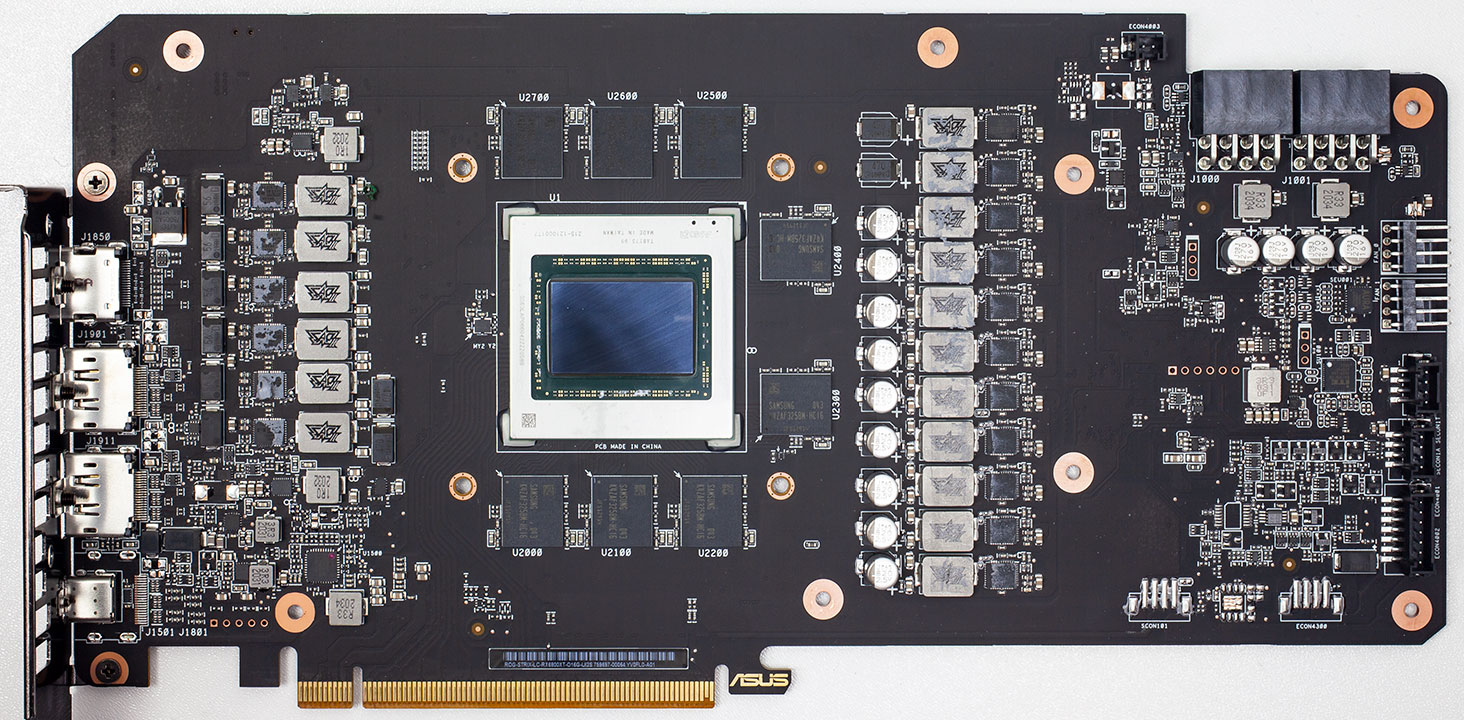
reef patrol

You can tell how bare the PCB is. They extended it to give the power connectors a better position.
astral haven
well id bet there are a ton of capacitors on the back tho
reef patrol
They'd uh... show through.
astral haven
https://www.techpowerup.com/review/asus-radeon-rx-6800-xt-strix-oc-lc-liquid-cooled/images/front.jpg

this one has smd caps on the back that you cant see
right under here
 reef patrol
Yes... and those do not make up most of the PCB 😛
If you look at the back of the Trio, the bare areas more of less match both sides. 😉
astral haven
it is true that most of the vendors who put caps on the back put them on the back because they ran out of space on the front
and fuck msi for not doing that
 pale sigil
Still long
reef patrol
Yep.
It's long for the power connectors, not because the PCB needs it.
Which is what I've been saying for ten minutes now 😄
astral haven
eh
considering the capacitor count that may be a 6 layer pcb
which could require them to have the vrm controllers that far back to prevent collisions
reef patrol
Something something reference is significantly more dense and packed 😛
astral haven
reference is 10 layers
reef patrol
It's not exactly as if it's the PCB that's the high ticket item here 😛
They made a design choice.
astral haven
if they really wanted they could have made the pcb full length tho
reef patrol
Full length - Or almost half the length of what it is.
pale sigil
IT'S STILL LONG
astral haven
oh ok with the cooler it does extend to full length pcie
direct heatpipes
i too like to live dangerously
 astral haven
when will gpu manufacturers learn that direct heatpipes are only ok when cooling a heatspreader
 astral haven
vrm cooling ✅
memory cooling ✅
cpu cooling ✅
gtx 480 ✅
gpu ❌
laptop cpu ❌
id bet that you are cpu limited
astral haven
you sure?
astral haven
check the per core usage
 old marlin
but it at max is spiking


like ye it goes to 100% temporarily
but doesn't stay there
astral haven
i was at 50% on gigabit on my cpu but it was still heavily bottlenecking
astral haven
it also depends on the game you are downloading
old marlin
BL3 
astral haven
rust for example is 1 core of decompression and thrashes my disk to hell and back
i dont know why i have it installed lol
old marlin
buying the ultimate edition for steam was only slightly more expensive than buying the second season pass on epic

astral haven
 old marlin
astral haven
rust for example is 1 core of decompression and thrashes my disk to hell and bac...
old marlin
astral haven
rust for example is 1 core of decompression and thrashes my disk to hell and bac...
yea my disk is 100% not the problem
is 2 m.2 drives in a hardware raid0
old marlin
a software raid for sure
doubt a hardware raid would
if the controller was made for that task
astral haven
theres no such thing as nvme hardware raid technically
astral haven
hardware raid for sas and sata do exist
astral haven
actually thats not always true
old marlin
I mean ig a CPU is just logic gates
reef patrol
So do NAND controllers :3
astral haven
yea
so technically you cant get any form of raid without going through some software
but you can have a raid controller that is hardware
old marlin
ye
astral haven
scsi is such a simple protocol that you can straight up do that nonsense
its slow compared to an actual processor doing shiz but its still a thing
hard thicket
don't forget the windows limitations in file transfer
im hitting nearly 13gb/s in benchmarks, but that's nowhere near what windows can actually do
it's 2021 and they still have not change that
old marlin
that is just installing via steam
I can hit more than that
might also be steam servers
used the katowicz one this time
cause german ones are 
and even my shitty connection at home can get not always get capped
vagrant pagoda
There are old school ide and scsi devices that did raid 1 via dedicated chip
They had to be two of the exact same drives with same layouts
And they didn't allow any drive cacheing
ashen spindle

 wheat plume

I made a snake game in Python that works in the terminal... but this time, you're the food! lol
You can check out the game and the code here: https://replit.com/talk/share/snake-game-but-youre-the-food/126048
You can find my implementation of the regular snake game here: https://replit.com/talk/share/snake-on-terminal/125833
You can check out @...
zenith sonnet
old marlin
german ISPs <a:PepEsAd:608392118636904534>
Ever heard of Deutsche Glasfaser GmbH?
 umbral knot
for some reason that sounds familiar but I'm not German
old marlin
zenith sonnet
Ever heard of Deutsche Glasfaser GmbH?
that is exactly the provider

9% packet loss on average
zenith sonnet
Oooof
They wanna built fiber in our village
They're slightly more expensive than Vodafone KD
 zenith sonnet
But I'm mostly curious what their service is like
If they're a good ISP
Well, it's not like Vodefone is free of packet loss either... :/
But not 9%
zenith sonnet
old marlin
9% packet loss on average
Any good way to test for packet loss? Particularly long term?
 tawny prism
I'm just glad Comcast never noticed that I'm over-provisioned.
old marlin
zenith sonnet
Any good way to test for packet loss? Particularly long term?
pfsense 
aka
our firewall
this feels good
 tawny prism
Like I pay for the 50/10 chud package but my internet speed is bottlenecked by my router currently.
Which has like 600mbit throughput
zenith sonnet
Thinkbroadband has some packet loss testing, but it's lacking...
analog aspen
@astral haven 5.3Ghz 1.4v 3900MHz 17-17-17-35 1.5v VCCIO 1.35v
It's stable for now but my voltages are loose af

haven't touched 2nd timing at all so maybe I can tighten it a bit more then tighten down all the voltages before I fry everything
heard expected bdie latency is 35-40ns but I don't think I can reach it with this setup
computer wouldn't boot past 3900MHz, or CL lower than 17. Pretty sure tightening 2nd and 3rd timing would shape off ~2ns at best
zenith sonnet
AGESA 1.2.0.2 is seemingly the one
Once GIgabyte gets a stable BIOS with 1.2.0.2 out I'll finally start working on the memory
Wonder if I can hit the same latencies again
It's ok
analog aspen
it means wasting days just to get 2% more fps. Don't go down this hole
I'm 90% sure if I spent all that time playing the game to git gud I'll net more result than doing all this
zenith sonnet
analog aspen
it means wasting days just to get 2% more fps. Don't go down this hole
More like 15-20% with Zen2/3
It's actually that big
ashen spindle
Do you want to know what things mean or is it just a comment to express you don’t care?
zenith sonnet
It depends a little on the game/engine, but with Zen2/3 a memory latency reduction translates to an FPS gain at a almost 1:1 ratio
analog aspen
ashen spindle
Do you want to know what things mean or is it just a comment to express you don’...
Quintosh how do I get 40ns with my bdie 🥺
Mine gets to 50ns and there’s hella errors from OCCT I’m loosening the clock back now
zenith sonnet
Lower clock, and much lower latency
ashen spindle
Idk I have cjr and not touching it outside of xmp till the agesa that fixes usb
zenith sonnet
ashen spindle
Idk I have cjr and not touching it outside of xmp till the agesa that fixes usb
What's your board manufacturer?
vagrant pagoda
SSF life. New motherboards vrm is too big, so I can't fit radiator anymore
zenith sonnet
I know Asrock has 1.2.0.2 out already
ashen spindle
But since b die is quite popular it should be easy to find tips on that online
zenith sonnet
For b-die:
Run 1.5V, make sure you have active memory cooling, get CL12 stable, then the clock as high as possible
ashen spindle
Idk unless asrock has something nobody else has or is better at price, I tend to avoid it
analog aspen
zenith sonnet
For b-die:
Run 1.5V, make sure you have active memory cooling, get CL12 stable, ...
Trfc and CR?
vagrant pagoda
Any manufacturer actually put vapor chamber coolers on memory anymore?
ashen spindle
Ram or gpu memory?
analog aspen
Also I don’t have active memory cooling I think
vagrant pagoda
ashen spindle
Ram or gpu memory?
Ram
The sexiest ram I own is ddr2 mushkin assents
ashen spindle
canj't recall that on any ddr4 really
vagrant pagoda
They have amazing coolers
Vapor chamber and finns

Lmao
I remember sd ram
And damn rambus
ashen spindle
tino you would be old enough to attend such an event wtf are you on about 
ashen spindle
depends on how much pressure you put on the loop :p
 chrome estuary
@vagrant pagoda nfc, test it and tell us
zenith sonnet
You don't want a kink in the tube
vagrant pagoda
Why is this a thing now
vagrant pagoda
zenith sonnet
You don't want a kink in the tube
It's the fitting...
zenith sonnet
Aren't fittings rigid?
vagrant pagoda
Exactly
zenith sonnet
How can you bend a piece of brass?
vagrant pagoda

Needs to go down another 1/4"
Well
I went am3->intel-am4
And thought I could just swap the mount back
Nope
So my custom loop got pulled out
I had to grind the aio mount to work on am4
There wasn't enough meat on the custom block to amek it work
I mean
I got 2 screws in
Should work until I get new block
To big
No handles
analog aspen
bclk frequency : ram frequency ratio
@zenith sonnet what is that setting? I just changed from “Auto” to “100:100” and latency zoomed into 75ns
Edit: nvm that’s just because 100:100 automatically make MHz turn into “Auto”
vagrant pagoda
I got 3 screws in
2 in one fan, 1 on the other
Good enough right?
F
I forget to run wires behind it
vagrant pagoda
Well
The OCP on this psu isnt enough for dead shorts
Used the wrong esp12 wire
I don't even know where I got a single different modular cable from
 edgy hull
zenith sonnet
But I sure as hell don't expect it retain those metrics even half as long as the...
edgy hull
zenith sonnet
But I sure as hell don't expect it retain those metrics even half as long as the...
Simple stuff, you buy ten Arctic fans and only use like four, when they die you use the other four, and so forth. Perf is basically the same, lifespan/$ is better due to how cheap it is.
Even then, Noctua is meh for lifespan compared to smth like Gentle Typhoon which has longer lifespan and serviceable bearings (reoiling).
Or you know, go push/pull Arctic and get quieter then push or pull only Noctua
vagrant pagoda
I mean I have almost 10 year old noctuas
And the only bad ones are 2 my dog broke blades off
Over 10
 edgy hull
right, but I was using a comparison to the other fans. Not outright stating Noctua has low lifespan
vagrant pagoda
I mean they haven't been in the market long enough to fail
zenith sonnet
I seriously want someone to do benchmarks on fans that have been in 16/7 operation for at least two years
vagrant pagoda
I've had them in 24 operation almost the whole time
They only get loud when dirty
 fair gull
so
the noctua fans where running for almost 10years straight
and still are super quiet
i somehow doubt that
vagrant pagoda
Yep
It was my main machine
Then it became backups setup
Still running
D14 for the cooler and 4 of these fans are still in thetr
ashen spindle
https://twitter.com/BradChacos/status/1370411744020070401  wouldn't be too shabby for a first gen effort

20x faster than Crystal Well with 3DMark on the screen, eh? @Gordonung did the math and Intel's upcoming Xe HPG graphics card for gamers ~could~ wind up battling the RTX 3070: https://t.co/fUws8awBIm https://t.co/VQlDrOOfNN

 Twitter
·
vagrant pagoda
Twitter
·
vagrant pagoda
Also why would a psu manufacturer use the same connector on both ends of a cable, but not make them straight though cables
 crisp granite
ashen spindle
https://twitter.com/BradChacos/status/1370411744020070401 <:pepoThink:393104457...
crisp granite
ashen spindle
https://twitter.com/BradChacos/status/1370411744020070401 <:pepoThink:393104457...
that would be insane
if true
and I do have my doubts
ashen spindle
are you sure?
tsmc 7nm, 2022, not a ton of optimization, potential driver issues
I would hope it would at least have general compute performance of a 3070 with all that
crisp granite
ashen spindle
tsmc 7nm, 2022, not a ton of optimization, potential driver issues
I'm worried about the latter two
and I guess the TSMC 7nm isn't gonna help supply much
ashen spindle
intel has much more manpower than amd, that will be a much faster catchup
and by then amd is moving toward 5nm
ashen spindle
so you think it'll be better?
ashen spindle
we're still talking about intel here
the issue are withing the process nodes, the design teams had not had really any issues for a while now
so the track record would suggest it could be even better
crisp granite
I'm still skeptical, ok quin?
intel has kinda dropped the ball lately
so, I don't expect them to absolutely nail it here either
ashen spindle
as I said, people making the node != the people designing the hardware on it
and the ball dropping was solely the 10/7nm nodes
ashen spindle
crisp granite
I never take corps at face value
it's just me
I like independent benchmarks more
 reef tundra
Corpos REeeeeeEEeeee
zenith sonnet
Won't it actually sucks for game devs to have to support a third brand?
crisp granite
I guess
besides
unless intel comes out with something ray tracing and AI upscaling, they'll be disadvantaged hard
zenith sonnet
Considering how many indie devs already ignore AMD hardwarw for the most part...
ashen spindle
ofc they have RT accelerators
idk about dlss equivalent, but you need to keep in mind intel has billons in AI companies and AI acceleration stuff in cpus etc.
whereas AMD is like nonexistant there
reef tundra
AI? artificial Intellect. 🧠
 reef tundra
Makes head traumas less likely. Smart thinking there
zenith sonnet
I'm sure you'll want to deploy rocm unless you want Nvidia to have a quasi monopoly 
zenith sonnet
Somebody has to start using it, unless you wanna Nvidia tax for the rest of your life
vagrant pagoda
Installing windows from a NVMe usb-c 20gbps drive to a NVMe boot drive, takes under 5 minutes
Nice
 latent mural
Nvme 20gbs drive? Which one is that?
vagrant pagoda
its a m.2 nvme enclosure that is 20gbps type c
vagrant pagoda
So new mobo/cpu and now my gpu won't detect the right resolution for my monitors...
That's a new one
zenith sonnet
Update firmware time
 formal meteor
Probably have to reinstall drivers
zenith sonnet
vagrant pagoda
on what
The monitors?
If that doesn't help, I guess CRU can fix those EDIDs
zenith sonnet
Try clearing them with CRU and see if they reload properly maybe?
zenith sonnet
You also installed the chipset driver?
zenith sonnet
What GPU is it?
vagrant pagoda
1080ti
zenith sonnet
What CPU did you upgrade from?
vagrant pagoda
4790k
zenith sonnet
Bios is also up to date?
Did you check if there is new firmware for the monitors?
vagrant pagoda
yes and eys
zenith sonnet
Hrm
reef tundra
"WIndows just works"
zenith sonnet
Tbf, I never heard of that issue before, either
vagrant pagoda
i mean, nvidia drivers on linux are a joke
reef tundra
They work atleast
vagrant pagoda
some times
zenith sonnet
It might just be the Nvidia driver that doesn't play nicely today
vagrant pagoda
i run a vega 64 on my linux workstation
zenith sonnet
If CRU can't solve it, I'm out of ideas
reef tundra
Ethereum miners get shafted lmao
analog aspen
Couldn’t get 3900mhz 17-17-17-37 to stable 0 error in OOCT
Settled with 3600mhz 14-14-14-34.
Going from 56.8ns XMP to 53ns for all that effort
Either my setup sucks at RAM OC or I just lose the silicone lottery hard lmao
astral haven
remember slightly unstable ocs wont have any errors show up cause the cpu will just deal with it, but will decrease your performance
analog aspen
uwu I heard Integral said average of bdie is 40-45ns I’m so mad that my kit won’t even go past 50
astral haven
also did you yeet refi into the ground?
thats where most of the bdie perf comes from
analog aspen
What does refi mean
analog aspen
Didn’t touch it honestly
astral haven
its kinda the most important timing for bdie

lower is better ofc
you should be able to hit 300 or better on 3600
analog aspen
Kk what else
astral haven
whats rfc at rn
astral haven
yikes
analog aspen
XD
astral haven
yea just change that and you should hit 48ns
analog aspen
I didn’t knowww
astral haven
yea integrals guide has you mess with rfc before even dealing with primary timings lmao
 astral haven
yea so while you were gone i checked integrals guide and trfc is literally step 2
analog aspen
I know I suck at OC 🥲
astral haven
thats why you follow the instructions...
analog aspen
Maybe just skipped straight over it
It’s hard tho
In the BIOS
So I have to read that guide on my tiny phone screen
astral haven
gimme 30 s and ill give you a tool to change it in windows (everything but cl you can change)
analog aspen
ASUS AI Suite 3 got taken down I think
Can’t find it anywhere online anymore
I use MAXIMUS XI mobo
thaiphoon

no idea how to read report tho
astral haven
ah the classic 3200 14-14-14
analog aspen
I was like “it’s exact same bin why it’s so cheap”
Compared to non-RGB
I heard RGB kits OC worse because different layout
astral haven

difference isnt something you will be able to take advantage of
this link still up?
memtweakit 2 keeps vanishing, this is the most recent one shared
analog aspen
ye I dont know why Asus taking down the old wares
astral haven
its actually not old
astral haven
theres a new version released with every new series of boards
analog aspen
new boards don't even get them
all they get is the junk armoury
that update old drivers with out-of-date drivers
and mostly for RGB
"error during driver installation"
astral haven
there is memtweakit for z490

 astral haven
🤷♂️
if it really doesnt work, use xtu
hope that the option is there for you there
astral haven
xtu the program not the bios option
analog aspen
Next is tRFC. Default for 8Gb ICs is 350ns (note the units).
this is step 2 of Tightening Timings
I gave up at Tightening Timings
didn't think it would net more than 2ns
astral haven
did you set the timings that integral just gave you raw numbers for?
analog aspen
if you're correct then this could net 4ns
analog aspen
astral haven
did you set the timings that integral just gave you raw numbers for?
nope. I used to it the past but nothing POST
astral haven
this can get alot more than 4ns if you spend the time to tune it properly
analog aspen
actually, is it even okay when I OC ram outside of BIOS
will my windows go brrrr
I have a restore point for this morning but
astral haven
be careful lel
analog aspen
last time I tried OC memory it corrupted the restore point file
I'd imagine it's more damaging when Windows is running
astral haven
🤷 always a risk no matter how you oc memory
And nah
Usually system files get corrupted most often while booting
The problem is that entering settings into bios causes a retrain
analog aspen
Max Dual Channel Bandwidth (MB/s) <~ what is this for
analog aspen
occt
astral haven
as in to benchmark
analog aspen
astral haven
as in to benchmark
o Maxxmem2
zenith sonnet
analog aspen
thaiphoon
I have the exact same memory, except with a different XMP profile
analog aspen
yeah I remember
my last attempt at OC-ing RAM you showed me your timing
3600 14-13-13-28 iirc
zenith sonnet
3666 14-13-13-21 😄
analog aspen
damn
zenith sonnet
 analog aspen
my bin can't get there at all
it wouldn't even boot with 3600 14-13-13-34
is your RGB kit tho
analog aspen
Uninstall Windows update KB4571756 and it should work again.
yeah literally hopeless sigh
time for xtu
zenith sonnet
Aorus Master, and Auto, so 1.05 or 1.1V?
zenith sonnet
Call it whatever 🤷
analog aspen
MSI dragon ball time
astral haven
I just remembered Asus has real-time memory tweaking off by default
zenith sonnet
I got my tRFC down to 244
analog aspen
zenith sonnet
Aorus Master, and Auto, so 1.05 or 1.1V?
how many DIMM slots
analog aspen
astral haven
I just remembered Asus has real-time memory tweaking off by default
eh. that's fucked up
astral haven
You need to enable it in bios
zenith sonnet
2 DIMMs
zenith sonnet
Why do you need so much memory?
astral haven
You can't compare io to soc
analog aspen
i tried disabling 2 in BIOS but can't change the layout I guess