
#💻│wootomation
1 messages · Page 1 of 1 (latest)
 earnest bridge
 earnest bridge

 pure salmon
ayay
 sonic acorn

pure salmon
@austere zinc
earnest bridge
I must warn you - It is Friday and I was about ½ second away from hitting ban out of habit 😛

 shy lotus
thats too sensible for people for some reason. (the suggestion of using macro app X)
usually the reason is that logitech and razer etc they have macros included in the necessary to run config app so games cant really disallow running those
 lucid harbor
earnest bridge
I must warn you - It is Friday and I was about ½ second away from hitting ban ou...
lucid harbor
earnest bridge
I must warn you - It is Friday and I was about ½ second away from hitting ban ou...
Legit just opened the channel and PTSD kicked in for me too.
earnest bridge

sonic acorn
I also had some PTSD hit in
earnest bridge

 lucid kite
Does anyone how a script for ahk
 half echo
lucid kite
Does anyone how a script for ahk
half echo
lucid kite
Does anyone how a script for ahk
yea its called waiting for wootility macros
shy lotus
lucid kite
Does anyone how a script for ahk
quickly write your own?
ahk isnt hard for simple macros like synapse and logitech ghub have
shy lotus
i mean you didnt even say for what
lucid kite
shy lotus
i mean you didnt even say for what
For Fortnite
shy lotus
i dont even know how macros are useful in fortnite
lucid kite
For like aim
shy lotus
so hacks
lucid kite
But I wanna use ahk
 rough thorn
have you considered asking in the AHK discord if you want something with AHK?
shy lotus
idk if ahk discord will help with cheating/hacking
half echo
lucid kite
But I wanna use ahk
are u trying to make a colour aimbot?
because they’re detected so good luck LOL
lucid kite
half echo
are u trying to make a colour aimbot?
I don’t even got to be color aimbot
lucid kite
half echo
because they’re detected so good luck LOL
Not on GeForce
shy lotus
anyway no hax or cheating discussions here
rough thorn
then ask on a fortnite discord or cheater discord if you want to use it for that, not sure why you're asking for AHK scripts on a keyboard server lol
half echo
shy lotus
anyway no hax or cheating discussions here
my apologies sir
 visual girder
What is this macro app

 opaque coral
Yep, it's for the new app that unifies Wootility with other keyboard/mouse company's apps hence the name "macro". It's large scale.
(To be clear, I'm kidding)
 latent ibex
Is there a timeline for when a Macro function will be available in Wootility?
Got my Wooting 60HE on Friday, and this is the only thing I am missing. I have a cryptic password on my work computer and having a macro that "paste" the password is AWESOME 😉
earnest bridge
Stay tuned for news here
latent ibex
WOW That was fast response!!! Thanks for updating us! I love the keyboard by the way!! Never going back to Steelseries! The Wooting is 100 times better!!
sonic acorn
mansen has to be chronically online
earnest bridge
Just happened to be looking at Discord. Ultrawide monitor - I can split it in half
 wild ocean


 solid solar
earnest bridge
Just happened to be looking at Discord. Ultrawide monitor - I can split it in ha...
solid solar
earnest bridge
Just happened to be looking at Discord. Ultrawide monitor - I can split it in ha...
Only half?
Gotta split it into 200px wide slivers for max productivity
earnest bridge
1440PUW in half is almost a 1080 window, so it works well for me 😄
Basically two monitors in one without the bezel
solid solar
I'll keep my triple screen
I wish they'd give monitors more than 4 dacs so I can go back to 5
 reef trench
earnest bridge
Stay tuned for news here
reef trench
earnest bridge
Stay tuned for news here
A macro function would be the best news for me as well. I work from home and I use my Corsair K95 to simply paste text for my tasks, if I could do that with my Wooting 60 HE, then I can finally have a single keyboard on my desktop.
pure salmon
Hey everyone, we are ready to present the first release of the Wootomation - a macro app developed by @knotty sapphire and @pure salmon (me) 😄
We know this has been a long time requested feature and will have a much more in-depth talk and information available soon. For now, you can check out our repository:
https://github.com/WootingKb/wooting-macros
and the release page:
https://github.com/WootingKb/wooting-macros/releases/latest
to try out the app! We hope you'll like it and of course are ready for any questions and or requests you might have 😄
PS: You can also use the F13-F24 bindings in your Wootility to get access to keys with no pre-defined functions and make the macros run via those ^_^ We intend to implement a deeper integration with your Wooting keyboard in the future.
pure salmon
pure salmon
Hey everyone, we are ready to present the first release of the Wootomation - a m...
reef trench
The app wont let me paste text into remote desktop on Win 11.
 knotty sapphire
What are you using to access the remote desktop?
reef trench
The default remote desktop program from win 11
Maybe its because I can't paste text in general from my desktop into the remote whatsoever.
I can only do it if the text/macro is store on HW level into the keyboard itself. That how I do it with my Corsair K95
But it does not work with simple copy paste from my pc into the remote, because of security reasons I guess.
knotty sapphire
That could be the case, I myself never tested that use case.
Perhaps @pure salmon can provide more insight as to whether or not there is a solution
shy lotus
reef trench
Maybe its because I can't paste text in general from my desktop into the remote ...
that would mean you disabled some guest integrations (The option is usually called smth like Clipboardmode or so and if its not set correctly it wont work)
knotty sapphire
Does the paste action work normally in your local machine?
reef trench
shy lotus
that would mean you disabled some guest integrations (The option is usually call...
Most likely my firm has done that for security reasons. I was only able to bypass it if the macro is stored on a hardware level on the keyboard, any chance of that happening in the future?
pure salmon
reef trench
But it does not work with simple copy paste from my pc into the remote, because ...
yeah its mostly security reasons
pure salmon
reef trench
Most likely my firm has done that for security reasons. I was only able to bypas...
we tend to separate the macros from the hardware for various reasons like security and multiplatform support. So unfortunately I can't guaruantee that
however as Tony noted, you could install perhaps the macro app on the client and use it there if your usecase would make sense for that
shy lotus
pure salmon
we tend to separate the macros from the hardware for various reasons like securi...
well macros can be crossplatform to an extend... aka just using the keyboard like the user would. everything else would be platform dependant or impossible
reef trench
Yea. I have limited access. I will however ask help-desk if they can either 1. Allow me to install the app on my remote or 2. Remove the copy/paste limitation.
 reef trench
I don't know what that is sorry, not familiar.
pure salmon
reef trench
Yea. I have limited access. I will however ask help-desk if they can either 1. A...
yes but then there are also hardware limitations - memory and the amount of things you could do
we will have a much more indepth introduction soon as well as a Q&A 👀
and we'll answer these questions in much more detail
shy lotus
i mean could macroapp be portable?
reef trench
Don't get this the wrong way, I love this keyboard, its the most advanced thing today and will be for some while. At the same time kinda frustrated that I can't have funtions that other keyboards, who are years behiind this one, like on-board storage of macros and such. I understand that there is a good reasoning behind it.
shy lotus
well it could
its just that the majority of the community pushed us to software macros as they want to be able to open apps, have mouse movement and what not
and developing and maintaining 2 macro solutions is not really doable atm
id personally also want hardware macros
reef trench
Ok what about just a simple function like copy/pasting text into the Wootility at a hardware level. Nothing else that's fancy, like delays and so on.
shy lotus
oh you can totally do delays in hardware
but as soon as we even hit unicode
its not doable in hardware anymore
(at least in a crossplatform manner)
reef trench
Lets say you limit each text paste funtion to 250 characters and 10 slots, for it to not take to much storage on the HW level.
shy lotus
you could store hundreds of thousands of chars actually
or well "commands" so a character, delay, key down, key up, key press
but as previously mentioned the community just wanted more than hardware can do. and as we arent a multimillion dollar company with the resources to just casually also maintain a second macro system, we went with what the community wanted
reef trench
I understand. Thank you all for replying to my feedback.
knotty sapphire
reef trench
Don't get this the wrong way, I love this keyboard, its the most advanced thing ...
While I can't comment on hardware vs software, it is unfortunate that your use case is not covered by Wootomation. Sorry for that
If only there was no limitation on you for copy/pasting. I can paste into my remote machines through ssh with no problems. 😦
reef trench
knotty sapphire
While I can't comment on hardware vs software, it is unfortunate that your use c...
Appreciate the kind words.
 waxen dagger
Can we do releases in the same way as how we ||(planned to)|| do it in #📰│wootility_updates
Would be nice
latent ibex
Ah bummer 😦 I was really hoping for macros to be HW, this as I use my keyboard both for work and private. My work computer does not allow me to install any software... hence the desired macros will not work on my work computer. For me, delay and simple text/sentences would be sufficient... for programs and other really cool macros I fully understand that SW would be needed...
To some extent the HW already has macros today, but only single characters (or 4 if you use the DKS), an extension of this function to include more than one character and potential delay would do wonders 🙂
Mod tap with the possibility to have more than 1 character would go a long way 😄
 austere zinc
latent ibex
Ah bummer 😦 I was really hoping for macros to be HW, this as I use my keyboard ...
austere zinc
latent ibex
Ah bummer 😦 I was really hoping for macros to be HW, this as I use my keyboard ...
One of the challenges that comes from text/sentence macros is that the keyboard isn't really able to input arbitrary characters. It just sends a key code and the computer interprets what character it should be based on the keyboard language set in the OS. Although, if that is an acceptable limitation for you then it may be worthwhile to investigate.
I am interested in adding more advanced keys for good use cases, e.g. I've got an advanced key for more hotkey input possibilities planned. So hardware macros are not necessarily ruled out, just needs a good use case and reasonable implementation possible
shy lotus
i mean there is the whitepaper i sent ya
austere zinc
shy lotus
i mean there is the whitepaper i sent ya
Yeah, but arbitrary macros are not something I particularly want to go for right now. That use case is much better suited for the macro app with the additional capabilities it includes
shy lotus

latent ibex
For me those limitations regarding language set in OS and the keyboard only sending "codes" is not an issue. I noticed this limitation as I am Norwegian but have a US ANIS keyboard. As we have æøå letters in Scandinavia I was hoping to map those to the keyboard.... but that was not possible while keeping a US OS language 😉 I mitigated this by just having a shortcut for swapping language in the OS when needed 😉 Of course being able to map NO letters to the US ANSI keyboard while the OS language is US would be good 🙂
For me just being able to store certain words and short sentences to a Mod Tap would be sufficient... this way I do not need to type my user ID and password for the software we use 50 times during the day... My company has really strict rules, so time out from systems happens only after 3 min of idle time...
latent ibex
Not really 😉 you need a code generator with a personal code as well... so the user id and password is worthless without the code generator 😉
shy lotus
that reduces you to 1 code being all your security basically... discussions of good security practices aside im unsure if we would implement it for that as other people will do the same (and they will with the software aswell but at least losing their keyboard wont compromise their passwords)
latent ibex
You are absolutely right, the security is reduced 😉 What about being able to map ÆØÅ to a keyboard using an OS that is in English? I assume that might not be possible as I believe the code for one of the letters in NO is the same as the code for comma in the US...
shy lotus
as the codes dont change when you change your os language correct
the os just prints a different char for the same scancodes
latent ibex
That is what I thought 😉 However, that would be a cool function 🙂
shy lotus
so the 2 solutions to this are either something like AHK or other macro tool OR
making a custom OS keyboard layout that can print those chars as an alt code or smth
or well.. locking the keyboard to only be able to print those on 1 OS
latent ibex
But, just hitting alt+shift and changing the OS language works fine for me 😉
I also have other needs for being able to store more then one character on a mod tap, but as you pointed out... the function can/will be used for purposes that might not be as safe
 weary peak
is there a way to bind several jump inputs to a single press of the space bar so I dont need scroll wheel?
shy lotus
with dks yes
latent ibex
I actually figured out the new Logitech G502 X Lightspeed is able to store macros with multiple characters in HW, so my need for HW macros has to some extent been reduced.
However, it is to some extent a shame that basic macros (or at least mod tap don't include more than 1 character) as that would be a really nice feature... DKS is ok, but again that is limited to 4 characters. I send a lot of standardized confirmations in my job, and now I have to cut and paste from "templates", but having them stored on the keyboard via Mod Tap would be awesome and time saving.
 forest kayak
MacOS eta wen?
 tough swallow
does wootomation work on regular keybaoprds or only wooting?
austere zinc
tough swallow
does wootomation work on regular keybaoprds or only wooting?
any keyboard
earnest bridge

austere zinc
forest kayak
MacOS eta wen?
We don't have much of an ETA just yet, but it is high up on our priorities :)
tough swallow
@austere zinc can I make it so when I press a key it actives and when I let go it does too?
 fickle hazel
does this allow for macros with smooth mouse movement with adjustable speed? basically like turnbinds on csgo etc. (i’ve had turnbind auto hot keys but the cursor movement is far from smooth)
pure salmon
fickle hazel
does this allow for macros with smooth mouse movement with adjustable speed? bas...
we haven't done the frontend UI for the mouse movements and one of the reasons is that we didn't quite know what the expectation was for the mouse movement macros - whether to move the mouse slowly or instantly for example. Feedback like this is something we wanted to get post launch ^_^
 chilly lion
I assume this is VAC safe? I understand that no one really knows what will set off a VAC ban but if this works like other macro apps (and if you don’t use it in game) will this be fine to run in the background?
rough thorn
as vac safe as anything can be, valve wont say anything and since the hours of release nobody is banned xD thats as far as one can know
 gray ivy
Is it possible to make a bind where you press certain key on and it activates/disamples mouse1 rapid fire when you press mouse1
 coral laurel
We're all steam gamers and haven't had any issues with the alpha versions, but that's not something we can promise or guarantee
chilly lion
yeah valve is quite secretive with VAC but thanks for the answers 👍
 main pine
Can wootomation send macros to specific applications without them being in focus?
pure salmon
main pine
Can wootomation send macros to specific applications without them being in focus...
we have OBS integration planned - and that will be sending commands to a specific application for example ^_^
main pine
Hype, being able to send to non-focused applications would be a big game changer for me personally
Can automate stuff while doing something else then at least, instead of leaving your pc unusable
pure salmon
depends on if the application has the API we can use 😄
but if it does, a plugin can be made for it 😄
 slender burrow
Does it only work with an english keyboard ?
 rough bridge
So far, this is awesome! But, I did encounter an issue. Shift + NP1 hasn't worked for me. I assume it's because shift makes NP1 act as End instead of NP1, but not while recording the macro, for some reason.
shy lotus
slender burrow
Does it only work with an english keyboard ?
any keyboard should work
slender burrow
Alright, then I guess some combinations don't seem to activate the macro such as Alt + A for example (or maybe I'm doing it wrong I don't know)
 lilac niche
I'd also prefer simple HW macros, as there are already other macro apps on the market such as Pulover's Macro Creator/AHK.
sonic acorn
can the application differentiate between different keyboards?
for example running a keyboard only used for macros
shy lotus
someone wants to know if they can replace lua macros
shy lotus
rough bridge
So far, this is awesome! But, I did encounter an issue. Shift + NP1 hasn't worke...
i think thats more of a windows issue i think
windows does some OS level modifiers to make shift+numpad 1 be numpad end
same it does for ctrl + alt being altgr on languages that have altgr
 violet haven
pure salmon
but if it does, a plugin can be made for it 😄
violet haven
pure salmon
but if it does, a plugin can be made for it 😄
if you want help with discord integration for a mute hotkey i can help, the API is not public though :(
rough bridge
Alright, I suppose that makes sense, but it isn't doing so in the macro, which is a little confusing. I'm on Windows 7, btw.
shy lotus
violet haven
if you want help with discord integration for a mute hotkey i can help, the API ...
rpc is quite public https://discord.com/developers/docs/topics/rpc
Discord Developer Portal
Integrate your service with Discord — whether it's a bot or a game or whatever your wildest imagination can come up with.
violet haven
For now, RPC is in a private beta. We are not currently accepting any new developers into the program at this time.
you can work around this but it's more work for the user
wooting as a brand might get Discord's attention though, no idea. logitech, razer, etc have access
shy lotus
since setting activity works without being approved or in the list
i dont see why the voice settings would be hidden
knotty sapphire
lilac niche
I'd also prefer simple HW macros, as there are already other macro apps on the m...
The goal of Wootomation compared to the ones you mentioned is that we wanted to streamline the process and user experience, while providing a very simple (for now) and stable service.
For advanced macros, we didn't plan on replacing them with this release, but I would say, of the users who do use macros, this should* cover most of the casual use cases.
I can't speak about HW macros, but let's both hope Wooting continues getting the support they are getting, so they can look into HW macros as they expand.
This application is just dipping toes into macros. There are plenty of avenues to explore, and we definitely haven't looked at all of them, as it is currently not feasible.
 tame crane
Doesn't work on Numpad?
(Or well Numpad Decimal)
knotty sapphire
tame crane
Doesn't work on Numpad?
(Or well Numpad Decimal)
Do other numpad buttons work?
 lapis monolith
it is only for me that it work 1 time on 10?
tame crane
All works but Decimal
knotty sapphire
lapis monolith
it is only for me that it work 1 time on 10?
What kind of macro did you create?
knotty sapphire
tame crane
All works but Decimal
Hmm, interesting. I'll test this in a bit and will raise an issue if I experience it as well
tame crane
The Numpad Decimal only works on the key next to question mark
The normal Fullstop
it seems to act as if it's "Numpad Decimal" is that key
knotty sapphire
Are you on Windows or Linux?
knotty sapphire
Thanks for letting us know. If you find any more issues like this keep posting them here, it's really helpful!
tame crane
Additionally: Numpad Enter is acting as it would normally and doesn't want to start a Macro Sequence
violet haven
shy lotus
i dont see why the voice settings would be hidden
i don't see either but i didn't make it work without having each user create its own app in the discord dev console
 wise creek
That language overview 👀
knotty sapphire
tame crane
Additionally: Numpad Enter is acting as it would normally and doesn't want to st...
I've made an issue regarding this, but if you do have a 60HE perhaps you could try to do a mod tap where tapping those keys return F13-24, and set F13-24 as the trigger keys for a macro
I dont know if that will 100% work though 😛
tame crane
I have Lekker, but that does seem logical. Seems like it should.
knotty sapphire
I don't know if lekker also uses the old wootility, but with my W2 I just put the F13-24 keys in the Fn layer for the numpad and it works
If it isn't too much of an inconvenience to press Fn, then this is probably the best workaround for now
earnest bridge
knotty sapphire
I don't know if lekker also uses the old wootility, but with my W2 I just put th...
The HE boards use a newer version of Wootility, but in terms of keybinds they are basically identical. Flaretech boards getting a Wootility update soon™️ to have everything merge into a single app
knotty sapphire
Should work then, binding the F13-24 keys in any Fn layer where the numpad keys are
lapis monolith
knotty sapphire
What kind of macro did you create?
osu alternating keys cheat
i mean
not for cheating
its for a tweet
knotty sapphire
Is the issue that the macro only activates 1/10 times (when pressing the trigger key)? Or is the issue, the sequence is not being output as expected?
lapis monolith
when i save the macro, 1/10 time it doesnt work
so i have to re edit the macro and save multiple times for the macro work
knotty sapphire
Oh, so its not saving properly. Hmm
lapis monolith
maybe, like i only change the delay and nothing work
pure salmon
lapis monolith
so i have to re edit the macro and save multiple times for the macro work
Are you on Windows?
lapis monolith
yes
knotty sapphire
Can you post a screenshot of the macroview?
I will try to recreate it.
pure salmon
im thinking permissions issue or maybe using some activedirectory stuff
it saves to %appdata%/wooting-macros
 knotty sapphire
The macro saves properly and works for me, though by the way you probably don't need the 2nd delay element.
 formal bolt
Can the profile of the keyboard be automatically switched if a certain programm is started?
knotty sapphire
At this point in time, no it cannot. I can't speak on behalf of Wooting, but maybe in the future there will be something like that if the boards keep selling well.
However, something like application detection was out of scope for us with the time we had for this project.
lapis monolith
knotty sapphire
The macro saves properly and works for me, though by the way you probably don't ...
i thought that if the key is still spressed, it will wait the second delay element to redo
knotty sapphire
Ahh I think I see where the confusion is.
At this point in time there is only 1 type of macro you can create:
- Single, i.e. the sequence will play once when the trigger key is pressed
The two other types we planned but didnt have time for were:
- Repeat/Toggle, i.e. the sequence will play when the trigger key is pressed, and then continuously replay until the trigger keys are pressed again
- On Hold, i.e. the sequence will only play while the trigger keys are held down
We would like to implement these in the future.
 jagged condor
Hey, i'm one of those reviews in the announcements channel. Thanks for releasing macro support!
formal bolt
knotty sapphire
At this point in time, no it cannot. I can't speak on behalf of Wooting, but may...
Can i change the profile with a macro? Or wootility only?
knotty sapphire
As of right now, the A1, A2, A3, and Mode keys cannot be used in Wootomation, since they are wooting specific keys
Future deeper integration with Wooting boards is something we considered, but this initial release was meant to be as general as possible.
So no, you cannot create a macro to change the keyboard profile right now.
If you are using a 60HE you should be able to switch profiles easily using Fn layers and remap though. Don't really see why you'd use a macro to do it
 floral silo
thought of giving the wooting-macros a try. I dont have a wooting keyboard but the github repo suggests it should work with any keyboard
https://github.com/WootingKb/wooting-macros.
attached are the images for a sample macro that I created which types a text when I hit alt + 2, but nothing seems to be happening.
what am I missing.

 knotty sapphire
floral silo
thought of giving the wooting-macros a try. I dont have a wooting keyboard but t...
knotty sapphire
floral silo
thought of giving the wooting-macros a try. I dont have a wooting keyboard but t...
You aren't missing anything, it seems like there is an issue with using alt and ctrl as a modifier.
L-SHIFT + 2 works for me, could you please try that?
floral silo
knotty sapphire
You aren't missing anything, it seems like there is an issue with using alt and ...
is this by design ? or a bug
knotty sapphire
Okay, thanks for reporting. I will also list this as an issue.
shy lotus
floral silo
is this by design ? or a bug
bug for sure
knotty sapphire
It's definitely not intended hahaha
floral silo
thanks for clarifying.
formal bolt
knotty sapphire
As of right now, the A1, A2, A3, and Mode keys cannot be used in Wootomation, si...
Didnt know IT was possible to change the profile through FN layers or something like that. My last knowledge was that profiles can only be changed manually throu wootility. Thanks for your fast and long reply
knotty sapphire
formal bolt
Didnt know IT was possible to change the profile through FN layers or something ...
I personally don't have a 60HE, but I'm sure this is possible based on some comments I've read elsewhere in the discord. Don't hold me to it though, haha
shy lotus
its possible ever since the AVR 60he
which was the first delivered
all Wooting keyboards have a way to change between onboard profiles using either FN+Some key or with the W2 dedicated keys
visual girder
OMG Finally a good macro software
knotty sapphire
visual girder
OMG Finally a good macro software
Happy to hear that the first impression is good!
But, like Tony mentioned we do have some issues to sort out, as expected given the relatively short amount of time spent on this project as well as on testing.
If you have any feedback or run into issues, please do post them here!
pure salmon
yes if there are any issues i'll start ironing them out asap
visual girder
knotty sapphire
Happy to hear that the first impression is good!
But, like Tony mentioned we do...
i will! Trust me, What are the most know issues atm ?
 native pike
i don't know if anyone has talked about it yet but i think a setting for each macro profile to either repeat the macro on press or on hold
knotty sapphire
We should have a list of them sometime soon, but for now, just be aware that some trigger key combinations may not work, especially when using ctrl, alt and shift modifiers
We recommend using the F13-24 keys as trigger keys when possible
knotty sapphire
native pike
i don't know if anyone has talked about it yet but i think a setting for each ma...
Definitely, see my comment here #💻│wootomation message
native pike
ah okay 👍
just wanted to give my suggestion
but it looks really good so far, very easy to use
 azure seal
ui is nice but the macro only seems to work while other keys arent being pressed. not sure if this has been mentioned or not yet
fickle hazel
pure salmon
we haven't done the frontend UI for the mouse movements and one of the reasons i...
ah gotcha, i think having both as an option would be cool, because both are useful regardless. cant wait to see smth done with that
knotty sapphire
azure seal
ui is nice but the macro only seems to work while other keys arent being pressed...
It hasn't been mentioned here, but the functionality of setting whether a macro can be activated while other keys are pressed or not is definitely something we planned, but just didn't have time to include in this version.
Thanks for bringing it up, helps us better gauge what to prioritize.
azure seal
😎 👍
pure salmon
we'll get some additional infrastrucutre stuff out first as an update (for example easier logging) and some bugfixes as well
thankfully the app has a built-in updater ^_^
 magic cobalt
is there a setting that constantly loops the macro?
knotty sapphire
magic cobalt
is there a setting that constantly loops the macro?
Unfortunately not at this time, please see #💻│wootomation message
 mortal sable
Is it possible for certain collections of macros to be bound to specific keyboard profiles (optionally of course)
pure salmon
mortal sable
Is it possible for certain collections of macros to be bound to specific keyboar...
that is an interesting idea
i'll put it on the whiteboard for the future
mortal sable
alright, thank you !
 charred berry
how exactly does this macro work?
 tiny umbra
I know the question has been mentioned, but HW macros work in scenarios where SW macros don't. E.g. Remote Desktop/Terminal Server. I use my keyboard a lot for work and this is critical for me. One reason I have not yet switched to my Wooting board for work. I am not in a situation where I can't test this yet, but I know (e.g. AutoHotkey / Synapse 3 and others) simply don't work in this environment.
rough bridge
I'd like to be able to change cursor position, and make a macro that toggles on and off other macros. One of the best things about this for me is how fast it can change what inputs do. Even the keyboard itself takes a moment to change profiles. It's not something that can easily be done in the middle of a racing game, for example, or other games where you don't have a moment to spare.
 tame cliff
how to remove macro? stuck on keyboard after removing profile
knotty sapphire
tame cliff
how to remove macro? stuck on keyboard after removing profile
Can I get more details on this? The macro still functions even after you delete the macro?
tame cliff
knotty sapphire
Can I get more details on this? The macro still functions even after you delete ...
yeah so i deleted the macro and when i click my f key it still registers as e
so in the messages i have been pasting f in to not look like a moron whilst typing
in addition i removed the macro and uninstalled the software but that did not change anything. so I redownloaded, saw the profile came back from the dead and here I am. Stuck with two e keys
knotty sapphire
One sec
I'm having trouble trying to re-create this situation.
Can you DM me screenshots of the application?
tame cliff
knotty sapphire
One sec
wanna just hop on call eor a eew?
knotty sapphire
Sure, that works too
 brisk pivot
Anyone made a null movement macro yet? If unaware, an example of null movement would allow you to press move back while still holding move forward, and it would allow move back command to override the move forward command. It's nice because it means you don't have to pick up and reset your finger when wanting to switch directions. It's very powerful in games like overwatch.
 twilit yacht
can you open applications in wootomation, if so how
knotty sapphire
Add an 'Open File' action, and press the Browse for Files button
You'll need to know the path to the exe.

 sullen notch
Is there an available list of considered additions to Wootomation with status (soon/later/never)? It is assumed that things like scroll wheel up/down in the mouse buttons section would be there. Maybe selecting a group in a sequence to move or delete. Would an expanding list help others to look for things that you have not already explored? Would the time maintaining a list save time in other ways? Your work on macros is very much appreciated. Thank you.
knotty sapphire
knotty sapphire
Add an 'Open File' action, and press the Browse for Files button
You'll need to...
If you don't know the path, simply search for the application in the windows start menu, right click, and press on 'open file location'
and copy the path from the file explorer
 twilit yacht
knotty sapphire
Add an 'Open File' action, and press the Browse for Files button
You'll need to...
twilit yacht
knotty sapphire
Add an 'Open File' action, and press the Browse for Files button
You'll need to...
thanks, is there any way to open steam games this way though?
it doesn't recognize mcosu for me
knotty sapphire
sullen notch
Is there an available list of considered additions to Wootomation with status (s...
Can't speak about the timing for a roadmap/list of planned features, but I can say that moving groups of elements in the sequence was something I wanted to get in, but did not have time to do (more complex than it sounds)
Personally, I believe that after we do some more organization with the project, there will be a dedicated planned features list and a known issues list that is easy to access and read by everyone
Thanks for the feedback
twilit yacht
probs cause it's an internet shortcut
 knotty sapphire
Can you try right clicking on the internet shortcut and pressing "go to file location"?
It should bring you to the actual exe file
 knotty sapphire
Hmm, I'll have to look into it another time as I have to go, but thanks for bringing this up!
twilit yacht
np
sullen notch
Is mouse scroll wheel up/down a future feature for sequences?
 worn finch
hey quick question idk if its possible but rn if i hold down a key eg. 's' and input anything else like 'adad' i have to take my finger off and re hold 's' , is there any way to keep the 's' going after 'adad' without having to re hold it?
knotty sapphire
twilit yacht
these are the game files btw
Hey, had some time sooner than I thought haha
I was able to open a steam game through the Open File action
You can see the path to find the exe of a game in my screenshot
 knotty sapphire
sullen notch
Is mouse scroll wheel up/down a future feature for sequences?
knotty sapphire
sullen notch
Is mouse scroll wheel up/down a future feature for sequences?
Possibly, though whether or not it is a priority to implement depends on how many people want it, and if its a pain for @pure salmon to do lol
knotty sapphire
worn finch
hey quick question idk if its possible but rn if i hold down a key eg. 's' and i...
What does "S" do?
Currently, we only have 1 type of macro, i.e. the macro plays out to completion once you press the trigger key
See my comment here: #💻│wootomation message
sullen notch
Count me as one. And, yes, there needs be many that could make use of it.
twilit yacht
knotty sapphire
Hey, had some time sooner than I thought haha
I was able to open a steam game t...
hm for the game i'm trying to run it doesn't have a similar path 😦 but I think it's specific to the game i'm trying to run
thanks for showing me how though i can probably use it on other games

this is what it looks like btw
knotty sapphire
unlucky
worn finch
knotty sapphire
What does "S" do?
Currently, we only have 1 type of macro, i.e. the macro plays...
preciate the quick reply, maybe this could explain it better
is there any way to keep 's' going after i input other stuff , with wootility wootomation or any other software xd
sullen notch
Is there an easy way for a "list of considered features" to collect votes from people to see the volume of interest?
knotty sapphire
sullen notch
Is there an easy way for a "list of considered features" to collect votes from p...
At this point in time, no. I can't give any promises on timelines as that is not my jurisdiction. But I do think it would be nice to have a place for people to easily vote on features they want prioritized.
Also, the project is open source, so anyone who wants to work on a feature, even if it is not what everyone else wants, may request it to be looked over and added.
sullen notch
Sounds like a good plan.
knotty sapphire
worn finch
is there any way to keep 's' going after i input other stuff , with wootility wo...
I'm not too sure, sorry. Perhaps @pure salmon will have an answer for you, though I don't think this is something currently possible with wootomations.
worn finch
knotty sapphire
I'm not too sure, sorry. Perhaps <@206720832695828480> will have an answer for y...
ty bro all good preciate ur time <3
pure salmon
sullen notch
Is mouse scroll wheel up/down a future feature for sequences?
its definitely possible, just a question of if its enough for just that one action to be its own trigger
meaning - no CTRL+scrollwheel or CTRL+SHIFT+scrollwheel as we purposefully kept mouse binds separate
this could be tweaked down the line though
but i'll add it to the TODO list
pure salmon
sullen notch
Is there an easy way for a "list of considered features" to collect votes from p...
as Necron said, currently we don't have a roadmap

GitHub
The official Wooting Macros software. Contribute to WootingKb/wooting-macros development by creating an account on GitHub.
but you may look here and see the feature enhancements that have been noted down
pure salmon
worn finch
is there any way to keep 's' going after i input other stuff , with wootility wo...
this might get fixed with a special tweak we have ready, will test it soon and let you know 👀
austere zinc
tiny umbra
I know the question has been mentioned, but HW macros work in scenarios where SW...
What do you need HW macros to be able to do? I am looking into adding more advanced keys for good use cases
tiny umbra
austere zinc
What do you need HW macros to be able to do? I am looking into adding more advan...
Mostly keystrokes. Quickly entering server names being just one of them. We use jump boxes and once on a jump box I might need to jump to multiple different servers. I have HW keystroke macros set to do that. But it doesn't work with software macros if I can't install the software on the jump box. Which I can't for multiple reasons. One being that the jump boxes keep changing. They are very simple use cases, but make my daily work flow much more efficient.
austere zinc
tiny umbra
Mostly keystrokes. Quickly entering server names being just one of them. We use ...
So you pretty much just need text input? That was brought up by someone else as well, it's something I'm starting to think about how to implement. Obv there will be some limitations due to the fact that keyboard inputs get transformed by the OS language layout, but can at least have something that works providing you have the same layout set
tiny umbra
austere zinc
So you pretty much just need text input? That was brought up by someone else as ...
Correct. Yes, I saw that post. This was in support as I need much the same functionality.
austere zinc
tiny umbra
Correct. Yes, I saw that post. This was in support as I need much the same funct...
Alright, I'll see what I can do :)
latent ibex
I do a lot of copy and paste on my work computer (not able to install software, hence HW macro). I would love to have a way to copy and paste in the same macro, and have a set delay between the copy and the paste function. Example, having a mod tap top to first copy and 3 sec later paste.
That might be difficult as it requires two buttons pressed at the same time, and not just entering multiple characters?
pure salmon
austere zinc
Alright, I'll see what I can do :)
will we be able to somehow communicate setting up the hardware keys via the macros app too? something that came to mind
austere zinc
pure salmon
will we be able to somehow communicate setting up the hardware keys via the macr...
Possibly, we'll have to see what the UX will be like. But the scope of the ones on hardware side will be a lot more narrow so shouldn't really need any complex ui
 obsidian shuttle
are there any options of adding a macro of mouse navigation, moving the cursor in a pattern and stuff
knotty sapphire
charred berry
how exactly does this macro work?
Hi there, I'm not sure I quite follow your question, feel free to rephrase it.
However, macros are basically a sequence of actions which you create. Each macro must have a trigger key set, e.g. F13
When you press the trigger key, the macro plays out.
knotty sapphire
obsidian shuttle
are there any options of adding a macro of mouse navigation, moving the cursor i...
Mouse movement was something under consideration, but didn't make it into this first version.
It can definitely be a possibility, but I cannot give a timeline.
If you can share examples of the kind of controls you'd like to have with regards to mouse movement, that would be helpful. Thanks!
knotty sapphire
rough bridge
I'd like to be able to change cursor position, and make a macro that toggles on ...
Thanks for the feedback!
With regards to mouse movement, please see the comment I just replied to above.
For being able to make a macro to toggle macros on/off (or even entire collections on/off), I personally don't know the possibility of that, but perhaps @pure salmon knows if it is feasible
Do you have examples of other software doing this? AHK script perhaps?
obsidian shuttle
knotty sapphire
Mouse movement was something under consideration, but didn't make it into this f...
the idea I had in mind was that you record movement and the clicks and after a certain amount of time you let it repeat, this with other macros would be really good for farming games
 cinder rain
knotty sapphire
You aren't missing anything, it seems like there is an issue with using alt and ...
cinder rain
knotty sapphire
You aren't missing anything, it seems like there is an issue with using alt and ...
I'm facing the same issue.
knotty sapphire
cinder rain
I'm facing the same issue.
There is a fix in the works for this, though I can't share an ETA. For now, please try using L-SHIFT or other keys, such as F13-24
Reference: #💻│wootomation message
Thanks.
pure salmon
cinder rain
I'm facing the same issue.
that issue should be already fixed, but there are some special cases like shift+numpad that isn't handled yet properly, or alt+anything (since windows takes the cake on that one first), as well as difference between left and right modifier keys which we are trying to fix 😄
cinder rain
pure salmon
that issue should be already fixed, but there are some special cases like shift+...
I'm using v1.0.0 and macros using alt and ctrl still aren't working for me.
pure salmon
cinder rain
I'm using v1.0.0 and macros using alt and ctrl still aren't working for me.
alt might be broken for a while yet, ctrl is already fixed on our dev branch, we'lre thinking whether to wait and try to fix the alt keys together or push a fix for the ctrl ones at least
but some combinations are still not fixed yet, shift+NUM1 for example, we have to handle that a bit differently
i was working on log support first and some fixes to the keys, hopefully we'll be able to merge that very soon
rough bridge
knotty sapphire
Thanks for the feedback!
With regards to mouse movement, please see the comment...
The closest thing I can think of that does this is the Wooting KB's profile keys, but besides that, autoclicker programs have their start and stop hotkeys. In at least one of them that I can think of (OP Auto clicker), it even allows cursor coordinates. I've gotten myself into big trouble with that before, where it was taking my cursor back to a single location many times per second, and it was set to repeat forever. I can't remember why, but I'm also pretty sure I couldn't use the hotkey to stop it either. That's one example of why it's needed though, at least whenever there becomes the ability to do repeat macros and cursor coordinates.
But, what I was thinking when I made the on/off macros suggestion is that it just seems cumbersome to have to go into the program and click the toggle for each thing I want to turn on and off. I was imagining that there could be a module for it, so that a macro could enable or disable other macros, but it could be handled more traditionally as well. I prefer the module idea because it's simply more powerful. For example, I press G, it does a function, enables another macro and disables its own. I press G again, it now does something else. It could just toggle back and forth, or it could keep rolling forward that way. Maybe you press G, it does some repeating pattern. You press it again, it moves to the next repeating pattern. That way of handling things just seems to have a lot more utility. But, at the basic necessity of the situation, I think there needs to be some form of hotkey for toggles. Especially if repeating macros get introduced, which I would also like to see.
twilit yacht
for some reason I can't open wootomation anymore
it just doesn't do anything when i try to open it
pure salmon
twilit yacht
for some reason I can't open wootomation anymore
isnt it running in the background by any chance already?
twilit yacht
pure salmon
isnt it running in the background by any chance already?
it is but I can't open the app to edit my macros
pure salmon
twilit yacht
it is but I can't open the app to edit my macros
use the app icon in the system tray
left click it to open the app
we had to implement a detection so the app wouldnt run more than once but unfortunately it has some unforeseen side effects
ill check it and try to tweak it if possible
 normal tangle
Is there any way to make an auto clicker where I its only on while I hold it
shy lotus
if you get banned for using it in a multiplayer game its on you. we specifically recommend not to do that
 wet quartz
worn finch
preciate the quick reply, maybe this could explain it better
wet quartz
worn finch
preciate the quick reply, maybe this could explain it better
bro u play brawlhalla lol lets spar some day
pure salmon
normal tangle
Is there any way to make an auto clicker where I its only on while I hold it
not yet
 lime island
im sorry if this already been answered, but can you set the macros so they "repeat until stopped" "repeat #times" "repeat when holding" `?
rough bridge
normal tangle
Is there any way to make an auto clicker where I its only on while I hold it
I've done this by just making a left click macro. In fact, I don't really know how to make it hold the button down and then release it as you do. For now, I just have a full left click bound to Z, so when I hold Z, it does a bunch of left clicks, just like an auto clicker, but it does take a moment to fully kick in. That's because it's just sending the Z key signal and converting it into a click, so when I hold Z, it waits a moment, and then sends bunch of them. It clicks as fast as the Z key signal is sent, so whatever repeat rate you have your keyboard set to (assuming it's via USB).
pure salmon
rough bridge
I've done this by just making a left click macro. In fact, I don't really know h...
what the 
thats actually amazing 😄
pure salmon
lime island
im sorry if this already been answered, but can you set the macros so they "repe...
also if anyone knows some rust feel free to contribute 😄
or typescript for that matter
normal tangle
rough bridge
I've done this by just making a left click macro. In fact, I don't really know h...
Can you send the macro?
 pastel basin
shy lotus
if you get banned for using it in a multiplayer game its on you. we specifically...
pastel basin
shy lotus
if you get banned for using it in a multiplayer game its on you. we specifically...
does wootomation use software or the keyboard itself to input the macros?
cinder rain
pure salmon
what the <:havo:975821613415157860>
I assigned a macro to an ahk script and If I keep the macro held down it keeps on spawning multiple instances of the ahk script.....
cinder rain
Is there any way to limit it to one instance per macro key press for launching applications?
I know I can use #singleinstance force in the ahk script to prevent that for happening but wouldn't want other applications to repeatedly launch while the macro is held down.
Maybe the command can be sent on key up?
It happens for potplayer too.
pure salmon
cinder rain
Is there any way to limit it to one instance per macro key press for launching a...
try having multiple triggers e g shift+F13 or smth
 outer cloak
I'm having trouble running the app, i had it installed on my computer but just got a new one and it wont start. Freezes on white screen
pure salmon
outer cloak
I'm having trouble running the app, i had it installed on my computer but just g...
move out the data.json and config.json from %appdata%/wooting-macro-app i think is the directory
and relaunch to see if it launches correctly
outer cloak
This didnt work!
pure salmon

hmmm well try to reinstall it and if it still doesn't work
well, we will have a logging update soon but until that happens you do have several options of checking the logs, just not really that intuitive yet
up to you if you'd prefer to wait for the logging update or not 😄
outer cloak
Haha i'll reinstall and let you know if i need the logs! Thanks for the help
outer cloak
Alright, still not working! How can i get the logs?
pure salmon
outer cloak
Alright, still not working! How can i get the logs?
linux or windows?
outer cloak
windows
pure salmon
outer cloak
windows
$ENV:RUST_LOG="debug" put this into your terminal and then with that terminal launch the wootomation exe
you should see the console output in there
outer cloak
So i'm having trouble making that happen, i am not super well versed in using the terminal but putting in the first command doesnt do anything, and then i terminal launch the wootomation.exe and it just freezes like usual. Is there something im missing?
Here's what i put in the terminal and what shows up on wootomation
 shy lotus
do it without the start
outer cloak
 shy lotus
ah crap forgot without start only works if youre in that folder
im sadly also strapped on time as its midnight rn. Might be best for you to wait for David to reply to you tomorrow when hes up again
outer cloak
You guys are awesome! Thank you
pure salmon
outer cloak
You guys are awesome! Thank you
lmk when you are ready 😄
outer cloak
pure salmon
lmk when you are ready 😄
Hey there, ready! Sorry, just waking up
pure salmon
outer cloak
Hey there, ready! Sorry, just waking up
sure
alright soo
just cd C:\Program Files\Wootomation
and then do Wootomation.exe
and before you do that do the $ENV:RUST_LOG="debug"
because these ENV things reset when you relaunch the shell
pure salmon
yeah always press tab to autocomplete 😄
 pure salmon
yeah.. yeah
i mean it almost looks like it crashes before.. hm
try running as admin
but that really shouldnt be the culprit
outer cloak
Are there any pre-requisite installations i might not have? I'll try admin too
Admin also failed
pure salmon
outer cloak
Are there any pre-requisite installations i might not have? I'll try admin too
not any that i know of, all libraries are statically linked to the binary
although
windows webviewv2 is required
it should be preinstalled for everyone on win10 newer than 2018 i think
but i'd check windows udpates just to be sure
Learn more about WebView2
or maybe try to get it here it should install in case its not
outer cloak
This seems to already be installed
knotty sapphire
Could it be an issue with folder read/write permissions?
pure salmon
outer cloak
This seems to already be installed
we should have the logging system ready soon
and also some fixes
outer cloak
You guys rock, thanks for everything
 fervent otter
Two quick questions: #1. Does wootomation have the ability to record mouse movements? If not, are there plans to add this? and #2. Does wootomation have the ability to make the macro repeat indefinitely? With the steelseries macro you could set it to play once, or use the macro as a toggle, and the macro could play indefinitely as long as the macro was toggled on.
pure salmon
fervent otter
Two quick questions: #1. Does wootomation have the ability to record mouse movem...
- not yet, but the plans are surely there if people want it 😄
- not yet but the framework is there and all it needs is to be implemented on the backend and some frontend buttons
we started out with a smaller featureset and feedback is very important to help us prioritize things
 deft phoenix
Is it just me or does Wootomation not work in games? cause i can only activate the macro if im trying to type and in game it only works if i want to send a message in game
knotty sapphire
deft phoenix
Is it just me or does Wootomation not work in games? cause i can only activate t...
Could you summarize what the macro does, as well as what game?
deft phoenix
Its in the game Apex Legends and im using it to quickly grab stuff off drop using a macro that is simply spamming E but it does not want to work while im in game walking around or even standing still and will only activate it when i want to type a message to my teammates for example
pure salmon
deft phoenix
Its in the game Apex Legends and im using it to quickly grab stuff off drop usin...
i wouldnt be surprised if thats an anti-cheat catching it
deft phoenix
could be but ghub steelseries gg and some other random applications can do it so its just a bit weird
shy lotus
idk what our company stance on macros in games is but i personally would love to see games enforce the no macro rules they have even if it means banning someone for using ghub or whatever
deft phoenix
yeah im just using cuz i have a very weak index finger sadly enough
fervent otter
pure salmon
we started out with a smaller featureset and feedback is very important to help ...
awesome, I would love both these capabilities. Running the macro repeatedly is the most important to me. Is there a proper place to provide official feedback on this, or is this the place?
shy lotus
deft phoenix
yeah im just using cuz i have a very weak index finger sadly enough
sadly accessibility is often not covered as a reason to use them. and in general many games lack accessibility functions for more restrictive hand motions or even 1 handed use. wish the gaming scene would start having more inclusive setups in general
pure salmon
fervent otter
awesome, I would love both these capabilities. Running the macro repeatedly is t...
https://github.com/WootingKb/wooting-macros/issues/91
it is already up, but make sure to vote with an emoji
helps us prioritize thinigs
i'll make a better project page very soon to help everyone get a better look and vote for features etc
fervent otter
pure salmon
https://github.com/WootingKb/wooting-macros/issues/91
it is already up, but mak...
vote where with an emoji, here in discord?
deft phoenix
shy lotus
sadly accessibility is often not covered as a reason to use them. and in general...
would be if they went into that but even if they where to it would still take ages dor them to do it 😦
deft phoenix
they did get to the point that some of the bigger games now have some colorblindness settings so thats a start i guess
shy lotus
ya but from friends i heard it makes the game playable but they still find it hard to often time differentiate stuff
deft phoenix
Yup...
knotty sapphire
deft phoenix
Its in the game Apex Legends and im using it to quickly grab stuff off drop usin...
How many E elements did you put? If you have a wooting board, you could just put DKS on your E key or in your Fn layer and the DKS can turn 1 E press into 4
deft phoenix
I dont have one yet bout to order it tho cuz that 1mm actuation point could and will prob help me dealing with my disability in game more and i put many E's in there
pure salmon
fervent otter
vote where with an emoji, here in discord?
on github 😄
fervent otter
pure salmon
on github 😄
ok done, ty
fervent otter
pure salmon
on github 😄
I'm not too familiar with github, just figured itg out
pure salmon
i'll make a nicer page for that 😄 github has more user friendly features to make all of this easier
fervent otter
If I want to change the delay on multiple keystrokes at once, is there a way to highlight all of the keystrokes and change the value in one place, or must I go through them one by one manually?
pure salmon
fervent otter
If I want to change the delay on multiple keystrokes at once, is there a way to ...
one by one i think but you could change the default delay in the settings and add delays and them move them inplace i think
fervent otter
yah I looked into the auto-add delay feature but I don't quite understand what it does
knotty sapphire
Auto-Add delay, automatically adds a delay element when you add other elements to the sequence
So if you put in A and then B, a delay is automatically inserted between them
fervent otter
knotty sapphire
So if you put in A and then B, a delay is automatically inserted between them
I turned the feature on and off and it doesn't seem to do anything when I record a macro
pure salmon
hmm it should tho
knotty sapphire
Ah, I see. You're using the recording mode
pure salmon
i'd like to note that we have a number of bugfixes on the way
knotty sapphire
Currently the recording mode tracks your real time delays. I can understand the want to have it use a consistent delay instead
fervent otter
knotty sapphire
Ah, I see. You're using the recording mode
oh, I get it. It only works when creating a macro not using the record function
knotty sapphire
Yeah unfortunately, I did not have time to adjust that, sorry
fervent otter
knotty sapphire
Currently the recording mode tracks your real time delays. I can understand the ...
yes there should be an option when recording a macro to choose a static delay, no delay, or record in real time
in the meantime, you could add in the description of the auto-add delay that it only works when not recording
knotty sapphire
@zinc flower another one on the list lol
knotty sapphire
fervent otter
yes there should be an option when recording a macro to choose a static delay, n...
Yeah, the example I can think of is logitech's ghub. Hopefully it's not too much of an inconvenience right now, and thank you for the feedback!
outer cloak
pure salmon
windows webviewv2 is required
I figured it out! I don't know how but i actually had TWO copies of WebView2 installed. Uninstalled one and it worked immediately. Thanks for the help!
pure salmon
outer cloak
I figured it out! I don't know how but i actually had TWO copies of WebView2 ins...
wow
yeah i thought it could be something like that
nice ^_^
fervent otter
knotty sapphire
Yeah, the example I can think of is logitech's ghub. Hopefully it's not too much...
Of course. Loving the simplicity of the app so far and really looking forward to seeing the improvements come.
 stark grove
So far I like the app, my only suggestion would be to clarify Minimize on close to be Close to tray, minimize implies it would minimizeto the bar, but it's actually close to tray
 empty elm
had a wacko idea of being able to program rgb settings/animations as part of the macro sequences, not expecting it to become a thing but sounds dope on paper
austere zinc
Wootomation Contributor chat
 plush marsh
It'd be really dope if it was possible to use non-modifiers alongside modifiers for macros instead of 1 non-modifier + 3 modifiers
profile switching would be killer too, but i can see why it's not a feature currently due to the application being for multiple platforms
also, thank you for making wootomation ❤️ love y'all
plush marsh
plush marsh
It'd be really dope if it was possible to use non-modifiers alongside modifiers ...
(caveat: if 2 non-modifiers are used as inputs in a macro, all keys beyond the first are treated as modifiers and can't be bound)
that way you can have macros for stuff like left/right + <something>
example:
D+space = macro to dodge to the right
A+space = macro to dodge to the left
 lime plaza
Does the program work on windows 11?
I cant get it to run at all
the macros that is
earnest bridge
lime plaza
Does the program work on windows 11?
Yep.
pure salmon
lime plaza
Does the program work on windows 11?
if you scroll up maybe you will find some solution someone else found to the same problem
lime plaza
I found the solution on the issues page. Ran it as admin and it's working now. But it's fairly inconsistent. If I press the trigger key multiple times I get the macro or the trigger.
pure salmon
lime plaza
I found the solution on the issues page. Ran it as admin and it's working now. B...
hmmmm
knotty sapphire
lime plaza
I found the solution on the issues page. Ran it as admin and it's working now. B...
It may require a restart, e.g. kill it and re-open
 twin lava
Is there a way to loop macros currently?
I cant add the trigger key in the sequence unfortunately
shy lotus
pretty sure that would make it infinitely looping without stop
shy lotus
i think looping is in dev
shy lotus
yes
twin lava
thank you
shy lotus
theres quite a big list of stuff people already gave as feedback and were trying to work through it as fast as a david can. so just keep your eyeballs peeled for the next few updates and their changes
twin lava

pure salmon
shy lotus
theres quite a big list of stuff people already gave as feedback and were trying...
not just me! we already got some contributors ^_^
 grave light
having problems getting the macros to actually do something. I'm just testing it out and hitting the hotkey i set to open up a webpage (google.com) doesn't do anything. It also doesn't start up any file or folder when I hit the hotkey as well. I've swapped hotkeys and combinations and it just doesn't seem to do anything for me. I've started it as admin and restarted as well
EDIT: It just doesn't seem to launch my browser, but after another restart and a reinstall, it seems to work for the most part
knotty sapphire
grave light
having problems getting the macros to actually do something. I'm just testing it...
Are you using windows or Linux? If windows, are you on 10 or 11?
grave light
knotty sapphire
Are you using windows or Linux? If windows, are you on 10 or 11?
my bad, windows 10 22H2
fervent otter
Possible to darken the icon or provide more contrast? It's just a blob of yellow on my screen and it's hard to see the logo. Looks even worse in the taskbar as a a tiny icon.
Like maybe a black background instead?
 tranquil crag
Anyone know how to delete setup macros, there are no config files, nothing in %appdata% and uninstall doesnt help either. I've accidently setup a left click macro and now im unable to turn off said macro when wootomation is running as it wont register.
anyone know where the macros are saved?
pure salmon
tranquil crag
anyone know where the macros are saved?
they should be saved in appdata/wooting-macro-app
tranquil crag
pure salmon
they should be saved in appdata/wooting-macro-app
thanks!, i was looking for wootomation but should've figured to check in there. Had my 60HE since oct and just love the utilities you guys keep bringing out, thanks for all the hard work!
Just an FYI though, noticed a day ago a few of my keys weren't working, checked wootility and reset my profiles to default and still no response, multiple system reboots and still the same... figured the worst and that it'd gone faulty and some switches had died. I ended up just removing the power cable and reinserting then it cleared and everything worked as normal bit odd but could be a bug in the memory.
Suggestion - in wootomation it might be worth adding a macro disable keybind to the wootomation settings that kills all macros incause of user errors such as above rather than having to delete/edit the appdata files.
pure salmon
tranquil crag
thanks!, i was looking for wootomation but should've figured to check in there. ...
hmmm there will be a wootility + firmware update out very soon maybe that will help with some odd bugs that have been fixed
pure salmon
tranquil crag
Suggestion - in wootomation it might be worth adding a macro disable keybind to ...
that is an interesting setting - though we already have the button that disables macro listening
on windows no key macros are execute while you have the macro window focused as well, making for a safer space to test out stuff
tame crane
Quick question, is it not possible to initiate a macro only when the key is fully pressed down(or at a certain depth).
Allowing us to press a key without a macro if we tapped it.
The only method I could think of is using wootility to press another key using dks which then initiates the macro.
shy lotus
that would be possible but would require some hard work making sure that the key we read via the analog sdk is actually P for example and not smth else because the user remapped their keyboard.
 cerulean rapids
I dont know if im doing something wrong but my macro wont work if im holding down any key on my keyboard. For example when Im moving in a game I hold down W and when I press my macro it wont work but when I let go of W and press my macro then it works.
shy lotus
@pure salmon would know
pure salmon
cerulean rapids
I dont know if im doing something wrong but my macro wont work if im holding dow...
well you have to play around with how the macro works. It pushes down W or releases it. you letting go of W releases it and if it was pushed by the macro, it will still release it
its timing stuff
 bleak wolf
how do i turn off macro if the macro is binded on mouse 1
tame crane
pure salmon
they should be saved in appdata/wooting-macro-app
@bleak wolf Read that thread. They had the same issue.
Just close Wootomation then remove the Config
pure salmon
or maybe focus the window using the keyboard and use TAB and ENTER to turn off the macro
it should immidiately apply
@bleak wolf
tame crane
@pure salmon Sorry for the ping but another question or bug?
When a macro button is held down it doesn't wait for the current thread to finish. It creates a new one.
E.g:
Binding the sequence:

Holding it down would do:
11ooo21ooo1ooo2ooo3o2ooo12ooo3o43324544355545
If we ignore the "o" then
11211232123(Let go of key here)43324544355545
Takes it's time finishing all the threads.
Is there a way to wait for the sequence to finish then repeat instead of repeating the same sequence without checking if it's already running?
pure salmon
tame crane
<@206720832695828480> Sorry for the ping but another question or bug?
When a ma...
oh thats intentional
its all independent so you can launch as many (instances of) macros as you want - all async
to handle actualy holding down a button to repeat a single instance - thats in the works
tame crane
Okay thank you, good to know it's in the works.
 tame crane
Oooo, I should have checked the Github, sorry about that.
pure salmon
tame crane
Oooo, I should have checked the Github, sorry about that.
thats fine :D, afterall manytimes people suggest the same thing but slightly different and sometimes i end up creating an entirely new issue based on that. multiple views help to create an accurate implementation of the fix
twin lava
Is there a way to manipulate mouse input yet?
Not like mouse buttons, but mouse movement
knotty sapphire
twin lava
Not like mouse buttons, but mouse movement
Not right now. We were considering it during development but it was cut due to other things being of higher priority and also we kind of wanted to do a survey for users who want mouse movement to see the best way to implement it and have a good user experience.
Obviously we couldn't do that when the project was under wraps haha
But it is definitely something that can be added in the future.
twin lava
knotty sapphire
Not right now. We were considering it during development but it was cut due to o...
Thank you. Def a very useful feature, please add in the future. I appreciate all the work so far. 
pure salmon
twin lava
Thank you. Def a very useful feature, please add in the future. I appreciate all...
if you know anyone who'd like to contribute to frontend, then that'd be fabulous 😄
we couldn't finish the frontend part in time, but the backend does support it. How it supports it is, however, a question more for a discussion on our GitHub. i'll open up a discussion about it soon
one of the reasons why we didn't finish the mouse movements was that people do have different expectations of the implementation and we wanted to consult this with the community first
twin lava
pure salmon
if you know anyone who'd like to contribute to frontend, then that'd be fabulous...
Unfortunately I do not 😔 if I stumble upon anybody I will promote
 turbid trellis
Thank you guys so much for creating this tool. Love that feedback and feature requests are being worked on :D
 ripe sedge
is it possible to disable macros in wootomation using a key input
or do I have to do it manually on the app
knotty sapphire
As of right now you will need to do it manually. Others have talked about this too, so I would think that this could be a feature in the future, but @pure salmon would be able to tell you more
What level of disabling would you like, just out of curiosity?
For example, currently, you can disable macros manually on 3 levels:
- entire app
- per collection
- per macro
Would you want key binds to toggle enable/disable only the entire app? or would you want more granular control?
ripe sedge
uh the entire app would work too I think
basically I want to be able to turn macros off and on
would closing the app be good enough actually?
knotty sapphire
you can just kill the app too, yes
knotty sapphire
yep, its on by default since usually people will want it to run in the background (i think lol)
 wicked ridge
Everytime I try to install wootomation it gives me this error code can someone help
 pure salmon
wicked ridge
pure salmon
wicked ridge
 wicked ridge
So what do I do?
waxen dagger
why are so many people their temp folders restricted to their users
how does that happen
waxen dagger
Ah, that does line up with how common it was to occur for Fortnite players
They would definitely run programs like that
shy lotus
TAKEOWN /F C: /R /D Y
ICACLS "C:" /reset /T /C
those 2 in an elevated cmd line should resolve it though
you can even modify those further to only work on C:\WINDOWS\Temp by replacing C:\ with just the temp folder
waxen dagger
isn't it meant for the %TEMP% folder
shy lotus
?
oh if you specify a volume only it should restore all windows known paths to their default perms
which would include %TEMP% (better known as C:\WIndows\Temp)
waxen dagger

GitHub
When I try to install the application I just get an error code. I have tried installing 7 times now. Windows 10 1909 Driver 457.51
shy lotus
on the topic of changing those dynamic known paths like user folders etc... id advise against it. happened way too often that win updates broke it
shy lotus
i think thats localtemp or smth
but ya shouldnt need that shebang of manual clicking around
pure salmon
shy lotus
prevents bloat or some shit they claim
lol wtf
is that the malware people love to install?
the "demicrosoftier"
shy lotus
idk its usually cutting so much stuff from the win install that a lot of stuff is missing
like dx
.net
and what not
lots of default services removed
wicked ridge
Yea I play a lot of fort and I’ve had my pc tweaked by paragon I’m not a computer wiz just trying to figure out how to install I figured wootomation had better input delay than wootility that’s what I’m using atm
shy lotus
ICACLS "%TEMP%" /reset /T /C
Run that in a command prompt as administrator
should fix your permissions
 earnest bridge
I just saw "Icacl" and my brain thought it should make a joke. 😄
wicked ridge
Lil jokey joke never hurt nobody
shy lotus
ngl this is one the reasons i hate those tuner utilities
they always fuck shit up
like deleting registry keys for no reason
 dry ember
Can wootomation store macros onto the 60HE?
I have a huge list of ideas for features, but one way to make this great and promote marketing is by not having it only work universally, but allow it to save macros created by it only onto wooting hardware.
pure salmon
dry ember
I have a huge list of ideas for features, but one way to make this great and pro...
there are talks of making stuff like hardware macros happen somehow but we havent quite finalized the ideas yet
for now its software only, but that has its own benefits
 wide knot
if it is changed to hardware based (the only way i will ever use it) would it require a new keyboard? or would the original 60he cope?
would rather not get banned from games, due to software macro programs, or a reskinned autohotkey being installed
apex pro retains macros and hold to rapid fire without its software being installed. Would be nice to have the same functionality here
pure salmon
wide knot
if it is changed to hardware based (the only way i will ever use it) would it re...
that's a question more for @austere zinc 👀
shy lotus
main issue with hardware macros is mainly tournament whitelisting
there is a way to make a lot of macro functions work natively on 60HEs and Wooting Two HEs but the flexibility you get would likely make it not tournament legal as players could just sneakily install macros or the likes.
this is compounded by the simple fact wootility works in any chromium based browser including edge
basically every PC in any tournament setting comes with the tool to quickly make changes to a wootings settings and macros if we had them onboard... even if PC and keyboard are from the tournament organizers
if we do macros on hardware it would be very simple stuff without any complexity and most likely no timing or looping or the likes
think of it more as an expanded DKS. Hardware macros would not be able to open files or programs, interact with any other software or smarthome devices. thats a thing reserved for software macros as a keyboard just does not have access to that info and does not possess the power to act on such things.
shy lotus
wide knot
would rather not get banned from games, due to software macro programs, or a res...
also on this point... it doesnt matter how you use macros software or hardware both are grounds for a ban in most online games
if not all nowadays
tl;dr: tricky topic and not as simple as just do it
rough thorn
An idea for that could be reaching out to ESL or a different tournament organization and get direct feedback or ideas how they would handle it/what they would accept perhaps
shy lotus
thats a thing for simon to decide on i assume
rough thorn
yup, just throwing out the idea that came to my mind when I read it
shy lotus
ngl i know simons stance is the fear of hw macros getting us banned from tournaments but idk if he considered asking the big tournaments orgs
pastel basin
pure salmon
there are talks of making stuff like hardware macros happen somehow but we haven...
well the moment hardware macros come out are the moment im buying the wooting
fortnite drag edit macros go crazy
pastel basin
shy lotus
main issue with hardware macros is mainly tournament whitelisting
how come brands like logitech and razer are able to get tournament whitelisted with hardware macros?
do they get special treatment?
shy lotus
unsure maybe they provide separate tournement fw/sw
usually players cant install anything on the pcs they get
also we strongly discourage macros in online games due to them breaking the rules and being a bannable offense
if people just want hardware macros for use in online games i dont know how well that sits with us
pastel basin
ive been using macros on my logitech mouse for a while now with no bans
but ik its bannable
shy lotus
not getting banned for it doesnt mean we need to be a solely money drive brainless corporation and do whatever people want and use all the buzzwords they like to hear just to suck money out of their pockets for recycled products
we welcome suggestions for what you want hardware macros
i might take this too personal as i love gaming and esports but... i wish games would just not try to cover their social media bumms and collect keystroke data and timings to catch hardware macros and act on their rules.
 lethal shoal
I whould love if u guys made some sort of like tutorial on how to download/set it up. cus im lost haha
pure salmon
lethal shoal
I whould love if u guys made some sort of like tutorial on how to download/set i...
not a bad idea actually
waxen dagger
pastel basin
fortnite drag edit macros go crazy
it is clarified for that game that one button performing multiple actions is not competitive or tournament legal inputs methods
there is rarely a reason to need hardware macros
the only reason you would want that is to avoid the anti cheat measurements, which in this case you are suggesting that you are trying to do that
pastel basin
waxen dagger
there is rarely a reason to need hardware macros
the only reason you would want ...
nah man
totally not like that
lethal shoal
pure salmon
not a bad idea actually
There wasnt a wootomation suggestion serv so i thought i'd day it here but i whould love if yall whould do that
pure salmon
lethal shoal
There wasnt a wootomation suggestion serv so i thought i'd day it here but i who...
sounds nice, here is where all the suggestions are being taken
lethal shoal
Oo alright thanks 🙂
wide knot
shy lotus
i might take this too personal as i love gaming and esports but... i wish games ...
well to address both points you made to my comment, 1. i think the vast majority of purchasers are not trying to enter in person tournaments with a wooting, so making product decisions for the 0.1% seems a little odd.. given the 60hes ability to have its case changed and such, if someone REALLY wanted to have a macro keyboard, they could just put a different board into a wooting case and fake it.. only solution to that would be for tournaments to individually inspect each kb.
as for the point of hardware vs software, its about policy/detection/compatability. a lot of games, wont ever detect a macro if it is a basic one, to simply relieve hand strain for example, or for people with disabilities. they will however fail to launch or ban you if they detect certain programs installed like autohotkey. most games that ban simple macro use would require a user to be reported by another with proof. I use macros in black desert, like having my interact key spammable by holding it down, prevents my wrist from dying while question or gathering. wished rapid fire would do that in a wooting but it doesnt.. the apex pro remains king in that regard. as for compatability, some games just wont take macros from certain sources. i have foot pedals for some functions to relieve hand strain, but half the brands dont work in half the games. only hardware macros always work. They are also the most lag proof. they wont mess up if a program in the background causes a hitch.
and for tournaments, im pretty sure the current multiple keys depending on how far you press the button would mess with that anyway right? multiple actions with one key..
i just want something that has timings possible, so i can use a key as a single press, but if i hold it for more than 200ms it will press once every 50ms until i let go. that is why my hands have hurt so much more going from the steelseries to the wooting, repetitive strain injury sucks, hardware macros help. software macros get indiscriminate bans, or simply wont let you launch a game if its running in the background. For tournament use, i would suggest you have it perform some kind of function if macros are saved to hardware. some little alert on the wootility website, that says "macros are saved to this board, press this to reset to default settings for tournament spaces" or similar
but the great thing with the wooting, is for people who use macros to help with injury/injury prevention. a macro that only activates once the key is bottomed out, would be awesome for preventing rsi from spamming in games. there is so much possibility with a keyboard like this, and to have it hamstrung for the sake of probably less than 0.1% of people who do tournaments, seems silly
rough thorn
it's not that it would limit the people using it in lan events, if it would get banned, you have lots of people who wont see zywoo or the other pros use it, then shit ton of the sales that comes from that wont happen
it's not just the people using in tournaments that would be affected from that
and for the case that you use macros to prevent rsi, that doesn't really need to be saved on the board directly then, does it?
thats some reasons I can see but I'm sure they have more and thats why it's not something easy to decide on
wide knot
if it is not saved to the board directly, and run without software, it can be detected as macro software and banned without questioning why. the fact i would need to install any software at all to have the macros play, is the deal breaker. as for the tournaments, lots of these esports teams keep getting caught cheating in various ways, so surely there must just be a way for the tournament runners to check an individual keyboard for macros before a game begins? with that much money on the line just hire some kid to go around and reset all keyboards to default/some tournament approved setting
but to gut a setting just for that seems weird. have separate firmwares, one for tournament use one for everyone else. within the tournament, open wootility, read the firmware version and sorted?
rough thorn
the feature is not gutted due to it, it is just one consideration, there has been so far no final decisions on it
wide knot
well then i can only hope i am not living in the timeline where that does end up happening
also just a little thing, it would help if wooting employees/purples were listed in the member list on the right, i cant find anyone at all, so it makes it harder to know who it is that is speaking, if that makes sense
dry ember
How is it anyones business with what one does with their own hardware? I am pretty certain that if a game can’t have its own software/anti cheat that can’t distinguish timings being exact from variable then that’s a game issue. There will always be a disconnect with what gamers want and what developers want, how can people pretend that dma devices and various other methods of cheating don’t exist. Mouse macros and or keyboard macros are nothing lmao.
shy lotus
wide knot
and for tournaments, im pretty sure the current multiple keys depending on how f...
well yes but also there is 0 precise timing in DKS
shy lotus
rough thorn
the feature is not gutted due to it, it is just one consideration, there has bee...
and this
 rich marsh
enjoying the Wootomation, love is around the corner im sure..
lucid harbor
In time
rich marsh
would it be possible to import and export macros? via xml of text file
rich marsh
Req 2: shift select multiple elements to edit delay time and or move them up and down the tree
 shy lotus
rich marsh
would it be possible to import and export macros? via xml of text file
shy lotus
rich marsh
would it be possible to import and export macros? via xml of text file
we do have some plans but no concrete timeframe
ideally we want it to be like wootility profile sharing
pure salmon
rich marsh
would it be possible to import and export macros? via xml of text file
you can always get the json file in %appdata% 😄
but eventually yes
even importing macros from other apps is on the table
rich marsh
cool
austere zinc
@wide knot @rough thorn @shy lotus (just @ing those that were in the discussion). I've mentioned in a few different places (easily buried so not expecting ye to have seen it) that hardware macros are not necessarily ruled out. The main thing with them is that my focus is around use cases, as I want to develop good implementations for good use cases (as i.e. different advanced keys), tailoring the experience to work best for that use case. By "good use cases", I mean use cases which there's a good reason to have it on-board (as opposed to software) and is useful. I don't particularly want to just blindly implement arbitrary macros, especially when software macros are able to cover much more of the things that people want to do with arbitrary macros (e.g. opening software, deeper software integrations, arbitrary unicode characters/text). The whole story with macros & cheating, concern with tournaments etc is mainly an area of treading carefully with how implementation of macro use cases in hardware is done. I am reaching out to some tournament organisers to see if there's a nice way to reduce how careful we need to be with this aspect (e.g. tournament mode/fw, tournament validation etc).
Outside of that, @wide knot do you mind creating an issue for your use case on here: https://github.com/WootingKb/wootility-issues then it can be discussed a bit more in-depth and can look into how it could potentially be implemented :)

GitHub
A place to report issues with the Wootility and help with feedback on existing issues - GitHub - WootingKb/wootility-issues: A place to report issues with the Wootility and help with feedback on ex...
 tacit gale
so weird issue, if I have wootomation running, even if I'm not actively using it for anything, any of my other peripheral programming apps that try to send modified keys to FF14 get the modifiers stripped as far as toolbars go, but not as far as things like chat go, for instance if I have a toolbar bound to shift+1 and press a key on my mouse that sends shift+1 with wootomation loaded, the toolbar for the 1 button activates, as if the shift was stripped, however if I open chat and hit that button, it types a !, so it's typing shift+1 but for some reason the game isn't registering it right, but if I close wootomation, the game behaves as expected
that's only for keys that send the combination all at once, if I bind shift to another key and press both at once, then shift+1 will get sent, but if a single keypress sends shift+1, only 1 activates
 blissful prairie
hello there! thanks for making the wootomation. maybe it could be the savior for many many people stuck with garb.. ahem. software like g hub and synapse. well but here is my issue: it do not do trick? sob :/ i made a simple macro for test. mb4 as trigger, output letter T. open notepad, press mb4. nothing happens. what me do wrong, me don't get it :p
blissful prairie
i just saw there is a github link, which noticed that mouse with more than 5 buttons may not work. maybe that's the issue, nvm then. sorry 😄
actually i just set a key like f12 to the mb4 through mouse software (old glorious software for the model o, not core), then set trigger to F12 in wooto to output t. well that works but that's extra steps. i'll see what the future brings, but otherwise i like the design of wootomation
knotty sapphire
blissful prairie
i just saw there is a github link, which noticed that mouse with more than 5 but...
Yeah, the implementation for mouse buttons 4, 5, etc are a bit weird but may be possible to improve in the future.
We didn't do much testing with the mouse buttons, so thanks for the feedback!
@pure salmon can definitely speak on this more
rich marsh
Auto-add Delay
When enabled, a delay element is automatically added to the sequence, if the last element of the sequence is not a delay. What does this mean exactly? or when does this apply?
Is there a way to update all delay times of a recorded macro to the default ms?
pure salmon
rich marsh
Auto-add Delay
When enabled, a delay element is automatically added to the sequ...
no way to update them automatically yet, but basically auto add delay should add a delay between everything you click from the left menu
patch 1.0.1 coming soon, hopefully sometime next week
rich marsh
check.. I needed this app SO bad! its already perfect 🥰
just noticed this fucker 😄 i WILL use it professionally, i promise
 fervent otter
how do I create a macro that will trigger while I'm running? so if I'm holding w and I hit the macro tied to the q key, I want the q key macro to trigger. But it's not currently triggering since I'm holding down the w key when I hit it.
pure salmon
fervent otter
how do I create a macro that will trigger while I'm running? so if I'm holding w...
you could set the trigger to w + q
fervent otter
pure salmon
you could set the trigger to w + q
but I also need the macro to work when I'm moving left using the A key and moving right when using the D key and moving backwards using the S key...And also using a combination of those movement keys to move diagonally...How would I set up the macro to trigger with w+q? I can only seem to record one button per macro.
 chrome horizon
what does "1+ elements may trigger this macro again or another macro!" mean? it wont let me save my macro. can someone help me out?
pure salmon
chrome horizon
what does "1+ elements may trigger this macro again or another macro!" mean? it ...
it should prevent you from looping or launching another macro, to not end up in an infinite loop
fervent otter
how do you assign more than one button to a macro?
pure salmon
fervent otter
how do you assign more than one button to a macro?
mouse button?
stark grove
What if Wootomation and the Wooting firmware could communicate, or Wootomation could somehow block keys from working normally in such a way that the numpad could be a dedicated macros pad, similar to the stream deck.
I and probably many people don't use my numpad and would vastly prefer a dedicated macropad.
I know there's a way to do this manually with AHK, so maybe this can all be done software with Wootomation
shy lotus
use f13 and onwards
that way you could remap everything but numlock and the operators
and with dks you could remap those to be shift+f13-f24
stark grove
I already use F13-24 on F1-12 with Fn in AHK
Wootomation can already detect NP0-9 keys but it doesn't block the input, I suppose an option to just block a macro trigger is the setting I need. for some reason I can't get it to trigger macros though
pure salmon
stark grove
Wootomation can already detect NP0-9 keys but it doesn't block the input, I supp...
could SHIFT+F13-24 work?
block the macro trigger?
stark grove
like if I press use a numpad as a macro trigger a setting to block that so other programs don't register pressing a number key
pure salmon
the macro app already grabs inputs but i fear it goes to the OS first.. kinda has to
its not a kernel driver
stark grove
Hmm I don't think cross platform, not really possible with X, macros in general aren't possible with Wayland, I'm not sure about macOS
That's why I initially said some wooting firmware communication, disable the keys firmware and send a signal over some communication protocol, that would fix cross platform but require wooting devices
shy lotus
but... wootomations works.on linux afaik
stark grove
Having windows only settings/features/actions shouldn't be a problem, nothing major anyway, I could see some winapi and Xorg only macro actions being added to interact with windows
pure salmon
stark grove
Hmm I don't think cross platform, not really possible with X, macros in general ...
we didnt have anywhere near enough linux testers but in theory it should work on wayland
stark grove
Last I checked wayland didn't support global input events "for security" not sure if that's changed, or if Gnome and/or KDEs implementations added that, I haven't tested any wayland compositors in awhile I just know wlroots is the most popular and they didnt like nvidia last I tried to run wayland
fervent otter
pure salmon
mouse button?
Any button. Like if I wanted F3 and F4 to trigger the same macro
pure salmon
fervent otter
Any button. Like if I wanted F3 and F4 to trigger the same macro
i think the easiest way is to duplicate the macro right now and just assign it to F4
having parallel scanning is not really design possible rn, in order to keep the latency to the absolute minimum
 half swan
The intended way on Linux is to simply open the desired devices directly, do grabs so no other process gets the events, and forward events through a virtual device. See e.g. keyd, or kmonad for examples
pure salmon
its using the evdev library on the backend right now
fervent otter
pure salmon
i think the easiest way is to duplicate the macro right now and just assign it t...
duplicate macros? easy enough. is it possible to make an option that allows you to use a macro while pressing other keys? so if I want to use a macro while I'm moving in any direction (using a combination of the wasd keys), I can still use the macro? would this even be possible?
fervent otter
pure salmon
having parallel scanning is not really design possible rn, in order to keep the ...
you said I could "set the trigger to w + q" but I don't know what that means
pure salmon
fervent otter
duplicate macros? easy enough. is it possible to make an option that allows you ...
ahaha good thing you mention this, there is a toggle that is currently a bit.. unimplemented when you add a trigger
i'll see if i can get it to work for next week's patch : )
but yes that would be possible
pure salmon
fervent otter
you said I could "set the trigger to w + q" but I don't know what that means
well since the keys pressed are W+Q, then you setting the trigger to W+Q means it will only activate while you hold down W
 chrome wasp
Niiiice, I was literally looking into that in wootomation. Ill just wait untill its fully added :)
pure salmon
chrome wasp
Niiiice, I was literally looking into that in wootomation. Ill just wait untill ...
yeahh.. alright i'll finish up the new logging tommorow and then go straight into implementing that one
chrome wasp
Dont stress it too much, dont forget to have some off time to chill :)
pure salmon
chrome wasp
Dont stress it too much, dont forget to have some off time to chill :)
yeahh its gaming weekend for me this time 😄 thanks! 😄
fervent otter
pure salmon
ahaha good thing you mention this, there is a toggle that is currently a bit.. u...
This would be AWESOME. Thank you! I can't use the utility currently because of my specific use case, but this change would allow me to use it.
fervent otter
pure salmon
well since the keys pressed are W+Q, then you setting the trigger to W+Q means i...
I don't know what you mean by "setting the trigger to W+Q" though. I thought you couldn't set a macro to be triggered by separate keys unless you created a duplicate macro?
pure salmon
fervent otter
This would be AWESOME. Thank you! I can't use the utility currently because of m...
i'll try to get it implemented into the bugfix release
pure salmon
fervent otter
I don't know what you mean by "setting the trigger to W+Q" though. I thought you...
well if you need the Q key only when you hold W then you can do W+Q and it will trigger only then
fervent otter
pure salmon
well if you need the Q key only when you hold W then you can do W+Q and it will ...
what do you mean "do W+Q" though? I literally don't understand how to do that.
pure salmon
oh right because we disallowed more than one key being pressed as triggers
well i gotta finish that customizable key order fast
fervent otter
pure salmon
well i gotta finish that customizable key order fast
implementing that feature we were discussing about allowing pressing a macro button while any other key is being held down would fix it entirely for me personally, then I wouldn't need to set multiple triggers at all
 hardy jetty
Hi, may I ask if Wootomation works with any mouse/kb, or any WOOTING mouse/kb?
earnest bridge
The macro app is keyboard agnostic as of right now - Any future functionality that taps into the Wooting API will probably be exclusive.
hardy jetty
OK now I got that out of the way, I'll troubleshoot some more before I follow-up w/ my problem. Ty
hardy jetty
Alright. I've a problem with my razer keyboard not activating from trigger keys (it registered the keys in the setting up of it tho.).
pure salmon
hardy jetty
Alright. I've a problem with my razer keyboard not activating from trigger keys ...
hmm any particular macro that doesnt register?
earnest bridge
Razer's drivers are notorious for ... fucking things up. Wouldn't surprise me in the slightest that their software is interefering or intercepting things in an unsual way.
We've had several reports of the Chroma RGB stuff breaking keyboard inputs - which is just crazy.
hardy jetty
By golly it works after I closed their software. what in the
pure salmon
 rich marsh
can i request an restart option in this menu?

req2: will actions also get a " Set to default" button?

 pure salmon
rich marsh
can i request an restart option in this menu?
pure salmon
rich marsh
can i request an restart option in this menu?
what would you wish to restart? the entire app?
rich marsh
yhea i do alot of RDP into the machine, never reboot it. lost some focus eventhought the ap still functioned correct
pure salmon
ehm im not sure if i understand that one 😄
rich marsh
yhea.. I think that the app, lost the ability to execute macros. even thought the app still seemd to function as intended. I could use the app, make new macros etc. But pressing the F13 key did not execute the macro somehow. A restart of the app seem to fix that. Although, looking at the setup i run, i'm not convinced its the wootomation that was faulty.
 static pelican
possible in future? (spamming keys like for mmo games)
 pure salmon
static pelican
possible in future? (spamming keys like for mmo games)
pure salmon
static pelican
possible in future? (spamming keys like for mmo games)
on-hold macros are on the way
btw 1.0.1 is out as a pre-release
static pelican
ty mate ! 👍
cinder rain
Alt + (Any alphabet key) still doesn't seem to be working for me in the new pre release.
Eg. Alt + e doesn't do anything
pure salmon
cinder rain
Alt + (Any alphabet key) still doesn't seem to be working for me in the new pre ...
yeah we had to move the fix for that to 1.1, its the way the key capturing works and ignores some bits that windows gives with the information + windows also really really loves to immidiately capture the ALT key however possible
didn't have the time to fit it all in yet unfortunately
pure salmon
visual girder
is there a toggle repeat on/off feature?
most likely in 1.1, this was a bugfix update
visual girder
ok thanks
 ashen gale
is it windows only?
earnest bridge
ashen gale
is it windows only?
https://github.com/WootingKb/wooting-macros
Read the big ole' feature list? 😄

GitHub
The official Wooting Macros software. Contribute to WootingKb/wooting-macros development by creating an account on GitHub.
ashen gale
thx
 thorn lichen
earnest bridge
https://github.com/WootingKb/wooting-macros
Read the big ole' feature list? 😄
thorn lichen
earnest bridge
https://github.com/WootingKb/wooting-macros
Read the big ole' feature list? 😄
Nice being able to bind macros to mouse from wootility
 cobalt olive
is the keyboard safing those macros or do i need to constantly run rhis programm?
pure salmon
cobalt olive
is the keyboard safing those macros or do i need to constantly run rhis programm...
you need to have it running on the background
earnest bridge
Unless it runs standard Windows or some kind of Linux I don't think you will. If it's Arm based I mean.
 late moon
I downloaded wootomation today and haven't been able to get it running. Any suggestions?
 pure salmon
late moon
I downloaded wootomation today and haven't been able to get it running. Any sugg...
pure salmon
late moon
I downloaded wootomation today and haven't been able to get it running. Any sugg...
hmm did you try the 1.0.1 pre-release on github?
late moon
pure salmon
hmm did you try the 1.0.1 pre-release on github?
still the same issue though
 late moon
I did that like 30 times now
pure salmon
if you have the 1.0.1 could you check the %appdata%/wootomation directory and send me the logs?
late moon
yes
pure salmon
also one more thing - check if you have microsoft webview 2 installed correctly
late moon
how do I check if it's installed correctly? I don't even know that is to be honest.
This is what I see
 pure salmon
late moon
how do I check if it's installed correctly? I don't even know that is to be hone...
pure salmon
late moon
how do I check if it's installed correctly? I don't even know that is to be hone...
Learn more about WebView2
try to download the installer/repairer here and uninstall any older ones, we had a similair problem like this already and this solved it
late moon
pure salmon
try to download the installer/repairer here and uninstall any older ones, we had...
okay, I'll try that. No log files by the way.
@pure salmon so when I uninstalled the existing WebView2 it showed a message that the file might have already been uninstalled. I'm guessing it was indeed a faulty installation. Wootomation works now x) thank you
pure salmon
ahaha nice ^_^
i thought thats gonna be the case since the log files didnt even generate 🙂 enjoy the app!
late moon
I do have a question though. Is there a way to play a sequence and also activate the button that is used to trigger the sequence? for example if I press "4" to trigger the sequence "Shift+R" can I set it to press Shift+R followed by 4? I hope thats not too confusing lol. Right now it's activating 4 after about 5 or 6 sequence triggers when I hold the trigger key down.
pure salmon
late moon
I do have a question though. Is there a way to play a sequence and also activate...
yes you can i actually developed a bugfix specifically to do that on 1.0.1
i think
late moon
pure salmon
yes you can i actually developed a bugfix specifically to do that on 1.0.1
mind telling me how?
pure salmon
late moon
mind telling me how?
the trigger keys get manually released just before the macro starts executing all the keys it needs to
late moon
Okay I need a sec to process that lol
shy lotus
not atm
macos is in the works but will release at a later date when the macro engine and the config front end are 2 separate things. macos doesnt like the current way we do the app
visual girder
alr sounds great cant wait until it releases bc ik mac has been doing things to mess some downloads so it wont work properly
shy lotus
no its not the download. its the actual way the app works
visual girder
ohhhh
well thank you for responding quickly so i wont have to go on a hunt why it wouldnt work
 warm forge
Is there any reason why wootomation won't work in a game but works fine checking in notepad?
pure salmon
warm forge
Is there any reason why wootomation won't work in a game but works fine checking...
this requires further testing, i think most games have their own way of processing inputs and the wootomation processes what windows gives it basically - meaning a game could perhaps grab the inputs sooner or some other shenanigans could happen
 tropic herald
pure salmon
you need to have it running on the background
tropic herald
pure salmon
you need to have it running on the background
Is it planned for wootomation to get integrated into wootility or something in order to get saved in-board so It won't need any programs running background?
Or Is it even seemingly possible to be so at this point?
pure salmon
tropic herald
Or Is it even seemingly possible to be so at this point?
hmm
there are plans for something like that yes but current time frame is a bit busy
lets say it is also tied to the macos support as well
the app was designed in a way that would allow that though
tropic herald
I see, that's still very hopeful to hear. Thanks!
warm forge
pure salmon
this requires further testing, i think most games have their own way of processi...
Cheers. Would be great if u could get it to work, save running software for macros that take up a load of resources when u don't need it all - i.e. synapse (plus their macros break  )
)
 thick terrace
does the macro work well for games?
 fervent otter
shy lotus
read the disclaimer in the link of the channel topic
fervent otter
shy lotus
read the disclaimer in the link of the channel topic
How is it disabled temporarily using an appropriate function? And how would that affect the functionality of the app itself?
 restive dirge
sorry if this has been answered before, but is there a way to set the macro to loop? press the activation key and the sequence loops until you press it again
pure salmon
restive dirge
sorry if this has been answered before, but is there a way to set the macro to l...
not yet, that feature is open and has been thought of but its not yet implemented
earnest bridge
Sure - We fully expect them to. But they've been warned.
thorn lichen
There a way to force it to not analyze key strokes permanently?
earnest bridge
That would make for a ... non-functional app?
shy lotus
i think they mean the referred function to temporarily disable it
earnest bridge
But if you permanently disable the ability to read keystrokes (which you can disable temporarily), you break that functionality 😄
So no more AHK like key intercept behaviour.
pure salmon
thorn lichen
There a way to force it to not analyze key strokes permanently?
turn off the app
it must analyse keystrokes to know what you press there is no way around that
pure salmon
Hey everyone, we just released 1.0.2  You'll get a prompt to auto-update when you next launch Wootomation! Let us know how the new bugfix update works! For more information on what's changed, check out: https://github.com/WootingKb/wooting-macros/releases/tag/v1.0.2

GitHub
Wooting brings you the first much needed patch to Wootility - a bugfix release! We listened to your feedback and fixed a lot of bugs to make the Wootomation app that much more stable and reliable.
...
 candid peak
I want to be able to make a macro for the CTRL+ALT+V action and route it to a single key, can someone help me with this?


both dont work for me
waxen dagger
candid peak
V is probably still held down when you activate the macro. Try adding a key-up event for V at the start
shy lotus
wouldnt it also loop
knotty sapphire
cant have v as the trigger if v is in the sequence, hopefully one day this limitation is resolved
candid peak
knotty sapphire
cant have v as the trigger if v is in the sequence, hopefully one day this limit...
Ah makes sense, but I’ve tried to use a different trigger as well but it didn’t work for me
candid peak
waxen dagger
`V` is probably still held down when you activate the macro. Try adding a key-up...
How would the sequence look like?
knotty sapphire
With the following sequence i get the following output but I'm not sure how an actual program would deal with the input


 sand escarp
Hi all. I have a question for the developers concerning the automation macro wooting app
I appreciate the decision and design for it, however have you tested some custom macros to ensure that it doesnt interfere with other keys that might be pressed simultaneously?
shy lotus
as in?
sand escarp
Most common example I would see is holding down the W key and executing a macro on the 'k' key which enables it to execute twice instead of once. Have you tested to ensure that pressing the K key for the macro wont disable the rest of the other keys such as W in this example?
sand escarp
Unfortunately this has been the case for a lot of other keyboard macro software so I'm hoping the same mistake isn't repeated so that I dont regret switching out my hardware
sand escarp
Seriously?
knotty sapphire
yes
shy lotus
yes
we might add special features for wootings but the base functions work on any keyboard
shy lotus
nono we try to make a good macro util for any keyboard
keyboard specific macro stuff is a blight
knotty sapphire
There shouldn't be any case of keys being disabled afaik
and like tony mentioned, the only time you could run into an issue is if you set a key up event without later adding a key down event (cant remember if I added a warning for not closing an up event or not...)
If you do run into issues, then killing the app should stop the behaviour
shy lotus
the only issue i could imagine is k not triggering a macro if w is being held throughout as then youd input w+k which wouldnt be the macro trigger
pure salmon
sand escarp
Most common example I would see is holding down the W key and executing a macro ...
it will result in you holdin W + K
it simulates pressing keys
and also -- releasing them
basically there is no difference between you holding down a key and the macro app
some games may interpret them differently though - that is due to the way where you hold a key you actually spam it, whereas the macro app just presses it and doesnt spam it
but then again gaming usage is discouraged because of various anticheats etc
sand escarp
Wasnt expecting this tbh! Did a bit of testing. It could be this specific keyboard, but when I set the trigger for the macro to be the same as a alpha key, e.g Q X2 for Q, the macro executed on every other key, but when I set it on a numerical key e.g QX2 for 7, it worked completely fine executing Q twice.
I am going to try it on another keyboard as I suspect the keyboard I am currently using is causing a few issues with the app
sand escarp
pure salmon
but then again gaming usage is discouraged because of various anticheats etc
Absolutely nevertheless identifying hardware flaws and benchmark tests is pretty much what my life revolves around these days, so its pretty much a given for me to want to do a deep dive into these kinds of things in as many different environments as possible to understand their full capabilities lol
sand escarp
User feedback: After testing the app with two keyboards, it appears evident that the trigger keys only function properly with the numeric keys, which might have been intentional. If it is, in my personal opinion, it would be worth highlighting this to avoid potential mistaken expectations. When the trigger key is set to a key like 'T', the macro will only execute on every other key that is full pressed, which is a slightly odd.
shy lotus
dont use the trigger key in the macro
knotty sapphire
sand escarp
User feedback: After testing the app with two keyboards, it appears evident that...
What kinda sequences are you testing?
For a simple paste text action, using single keys like "T" or "," works every time for me. This is without any delay elements.
For more complex sequences, well, I'm not a heavy macro user so I haven't tested those and am unsure of the behaviour of the execution in that case
pure salmon
sand escarp
User feedback: After testing the app with two keyboards, it appears evident that...
it should execute only when T and only T is pressed
we will have more options tweaking this behaviour in future releases
sand escarp
knotty sapphire
For more complex sequences, well, I'm not a heavy macro user so I haven't tested...
The response feedback is great! I was using complex sequences to type out 5-7 letter like words and repeated keys.
sand escarp
pure salmon
it should execute only when T and only T is pressed
Yeah for whatever reason, it only executed when a numerical key was pressed on the two keyboards i was using. I absolutely plan to test further, but I gotta eat and pray lol
shy lotus
report all dem bugs so david can fix em
 open tangle
G'day g'day, before I report it as a bug, I'm just curious if I'm the only one experiencing a problem with AutoHotKey v2 hotstrings when Wootomation is running?
I have among other things a couple of auto-replacing hotstrings that gets mangled only when Wootomation is running, even if all Collections are off. It seems to mainly involves pipe characters, backslashes, brackets, curly brackets and parenthesis. Shutting Wootomation down fixes the issue.
Anyone having similar problems? Thanks!
shy lotus
in general its not really recommended to run multiple macro utils
id recommend just merging everything to one or the other
 gleaming rampart
Hello there - do you guys know if I can trigger a Macro via Fn-key + any other key? Because for some reason it won't let me..
Trying to create a small autoclicker.. 🙂
knotty sapphire
With the way it's implemented currently, you can only have one "normal key" as a trigger plus up to 3 "modifier keys"
e.g. F13 or CTRL + F13
gleaming rampart
Shoot - oh well, I'll have to adjust my workflows then 🙂
But just noticed as well while testing: it fires a single time, when pressing the trigger button - ist there a setting for it to fire continuously as long as the trigger button is pressed?
knotty sapphire
gleaming rampart
But just noticed as well while testing: it fires a single time, when pressing th...
From the latest release notes found at https://github.com/WootingKb/wooting-macros/releases/tag/v1.0.2

the thing you are probably looking for is the "on-hold" type of macro
this was something we wanted to get in for v1.0 but it didn't make it
shy lotus
gleaming rampart
Hello there - do you guys know if I can trigger a Macro via Fn-key + any other k...
well very simple reason: FN isnt a key send to the OS
 alpine cloak
Anyone been able to get a left mouse click to work with this utility?
I'm trying to left click wherever my mouse cursor currently is, and then press enter
shy lotus
depending on the software it might not read simulated mouse clicks
if i recall correctly some input libraries can differentiate them
alpine cloak
ah I see. I was trying inside diablo 3 to make salvaging gear faster. Maybe it's related to something like "hardware cursors"
shy lotus
depending on the mouse and if it supports profiles maybe a profile where one of the mouse buttons makes it send leftclick and enter
 eternal eagle
has anyone created a macro for PUBG?
or FPS games?
I'm curious as to what type of macro someone would create for FPS games. I have no clue.
open tangle
shy lotus
id recommend just merging everything to one or the other
Wish it was possible but it isn't. Can't live without any of them :) I'll just manually activate Wootomation on demand then. ¯_(ツ)_/¯
shy lotus
but you could just merged wpotomation into ahk
alpine cloak
I'm trying to make pressing q toggle spamming q until I press it again. I'm not seeing a repeat toggle feature. Where is it?
Also, how can I make the key led a different color when toggled?
Like how caplock becomes white when toggled.
knotty sapphire
alpine cloak
I'm trying to make pressing q toggle spamming q until I press it again. I'm not ...
"toggle" type macros are not available yet but have been noted as coming in a future update along side "on hold" type macros
alpine cloak
knotty sapphire
"toggle" type macros are not available yet but have been noted as coming in a fu...
Good to know. What about led color on key lock?
knotty sapphire
alpine cloak
Good to know. What about led color on key lock?
That I'm afraid I have no clue about, or even if it's possible. Maybe in the future if the wooting team adds further integration between Wootomation and a wooting board then maybe? Or maybe using the Artemis RGB thing could work
But I'm not the best person to comment on this cause I don't know much haha
shy lotus
we have key lock colors. just unsure how far we want to take toggle macros changing colors of the keyboard
 pure salmon
try releasing the trigger keys manually in the sequence
add both ctrl and tab to be released before the alt sequence
 wintry comet
it's starting to work, but it doesn't yet switch to the app on ctrl release. I have to click it with the mouse, but progress has been made, ty
Ok, it works but only switches between the last two apps by adding a return after at the end. This might be all I need


 solemn cradle
Is there no way to create a macro that triggers with two non modifier keys? I need to make a trigger with Spacebar+J
wintry comet
I think you need to use the key down and key up events for that.
solemn cradle
I'm talking about the trigger, not the macro itself
pure salmon
solemn cradle
I'm talking about the trigger, not the macro itself
yeahh the trigger was purposefully limited for just one trigger key
makes a looot of questions and user interactions a lot easier
solemn cradle
So there is no way to achieve what i'm looking for? Maybe some way to manually create the key combination trigger in a text editor?
pure salmon
solemn cradle
So there is no way to achieve what i'm looking for? Maybe some way to manually c...
hmmmmmmmmmmmmmm welllll technically if you edit the json 😄
the input sanitisation happens on the frontend, not the backend so technically
but that brings a good point - maybe having an "unlock unforseen consequences" button for the trigger would be interesting
but i recall the issue was specifically that to get a proper modifier key anyorder thing going on - that will be bugged for sure if you change that
solemn cradle
Does the json use windows key codes? Doesn't seem to match https://learn.microsoft.com/en-us/dotnet/api/system.windows.forms.keys?view=windowsdesktop-6.0

Specifies key codes and modifiers.
pure salmon
solemn cradle
Does the json use windows key codes? Doesn't seem to match https://learn.microso...
no, we use our internal representation
reason is to have a portable json file across platforms
solemn cradle

pure salmon
solemn cradle
<:NotLikeThis:230352627991445504>

GitHub
The official Wooting Macros software. Contribute to WootingKb/wooting-macros development by creating an account on GitHub.
solemn cradle
Oh thanks
pure salmon
you can find the list here
solemn cradle
Nice! Works exactly how I want it to now
pure salmon
nice 😄
solemn cradle
Thanks a ton
pure salmon
no problem 😄
thorn lichen
Anyone been banned in warzone for using double binds to a key/multiple clicks for one click?
waxen dagger
thorn lichen
Anyone been banned in warzone for using double binds to a key/multiple clicks fo...
As long as every input is caused from your own movements and reactions, and have independent delays from each other, it is not detectable as a macro.
DKS for example can be setup to not behave like macros, in some cases it isn't considered a macro either.
Can you share how you have set up your binding in question? That might give us better judgement if you're looking for that
Otherwise, most gamedevs consider "a single keypress performing multiple actions" as a macro
thorn lichen
waxen dagger
As long as every input is caused from your own movements and reactions, and have...
Was just wondering before I made some stuff when I get my board
waxen dagger
thorn lichen
Was just wondering before I made some stuff when I get my board
DKS & Mod-tap can be setup in games like warzone as they don't have to be/behave-as macros
But we advise against using Wootomation for any game with anti cheat (even for non-macro use) as it is always going to behave like macros and is also very easy to detect from their end software side
 valid loom
Yo I was wondering if i could make a modifierer make my leftclick to right click
when i hold the modifierer
knotty sapphire
Afaik that is not possible. The only thing you can do right now is bind right click to your left click button, but that's not what you want
Maybe in the future Wootomation could have a feature where you can set a hotkey to toggle a certain macro on/off then you'd be able to do what you want
valid loom
does anyone know a software that is capable of that?
 wintry goblet
So I'm trying to add this macro with L-ALT + E as trigger keys which is supposed to write this : é
But nothing happen when I hit the trigger keys
I tried other sequences such as random letters in random order, which work, but it just does not for L-ALT + 130 for some reason.
I also tried other trigger keys such as L-CTRL + T but it still does not work.

Am I missing something ?
knotty sapphire
Seems like it should work to me, but why don't you just have a Paste Text action instead?
to paste é
pure salmon
wintry goblet
So I'm trying to add this macro with L-ALT + E as trigger keys which is supposed...
alt key handling is pretty broken rn, we are trying to find a fix but it may be complicated
waxen dagger
wintry goblet
So I'm trying to add this macro with L-ALT + E as trigger keys which is supposed...
You can use CAPS as a trigger modifier here, so that may give you a replacement workaround
 muted badge
Is there a way to add macros to a single key instead of key combinations?
pure salmon
that should work shouldnt it?
muted badge
I can’t save the trigger key with only one key added
 pure salmon
yeahhh
hmmmm
uhm technically you can try to modify the json manually and replace the keycode
but ill rethink the approach to keys
muted badge
Can I bind my shift key to different key in wootility? And then add a macro?
Or I could just use rewasd i guess
pure salmon
yes and then change the key number code in the json file
but not sure if that will work properly
will try to figure out a solution
muted badge
Appreciate it
solemn cradle
Is it possible to have a macro be a down up event with multiple keys rather than sequenced??
I'm trying to make a macro in a single event be LControl+LShift+F1
It lets me do it for the trigger key, but not for the macro itself it seems
pure salmon
solemn cradle
I'm trying to make a macro in a single event be LControl+LShift+F1
ideally you have to make it so you press down L control, press down Lshift, pressrelease F1, release Lshift, release L control
solemn cradle
I tried that and this doesn't work https://i.imgur.com/ajcwNgQ.png
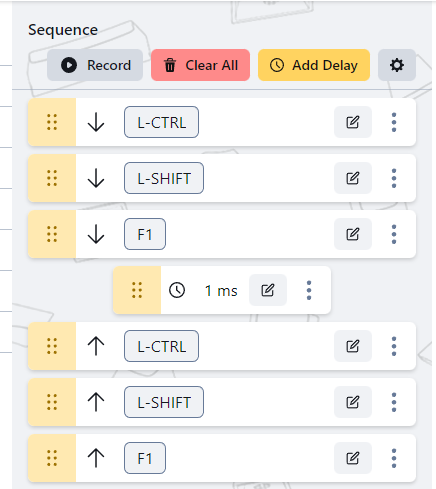
 pure salmon
solemn cradle
I tried that and this doesn't work https://i.imgur.com/ajcwNgQ.png
pure salmon
solemn cradle
I tried that and this doesn't work https://i.imgur.com/ajcwNgQ.png
try releasing all the trigger keys manually before the sequence, that should help
a fix for that is in the works and was originally intended for 1.0.2, but we have to rework it a bit better to allow users to change the default behavior at will, instead of forced by an update
solemn cradle
Not sure what you mean release trigger, the trigger is Spacebar+D
Oh you mean adding a release of the triggers in the sequence
Did not help
 abstract wind
Is there a way to make a macro that only triggers when a key is held down? For instance if I want a macro to spam E, I want to be able to bind it such that when I hold down E, it spams E.
 frigid kiln
Adding on to Guesso3o, will there be a repeat while held option and/or actions on release option, also will there be scrollwheel output?
frigid kiln
logitech has an on press, while pressed and on release section for every key in their software
pure salmon
abstract wind
Is there a way to make a macro that only triggers when a key is held down? For i...
not yet but it is planned
frigid kiln
pure salmon
not yet but it is planned
adding on that will there be on release actions and scrollwheel output?
pure salmon
frigid kiln
adding on that will there be on release actions and scrollwheel output?
scrollwheel is something i even worked on during a weekend
and it turned out to be a bit difficult to implement in the way we structure our key events
abstract wind
Until that is introduced, is there a way to bind a macro to E and have the macro click E say 3 times without it triggering the macro again? Causing an infinite loop and not doing anything?
pure salmon
i think someone might have achieved something of sorts a bit higher up in the chat
visual girder
im trying to use this in fortnite but it doesnt work
i need it to open my inventory, press x, then close my inventory
it works outside of fortnite idk how to fix
pure salmon
visual girder
im trying to use this in fortnite but it doesnt work
anticheat probably kicking in
visual girder
it works with razer
pure salmon
interesting
there are some tradeoffs we had to make to make the app multiplatform and some bugs are yet to be fixed
either way, game macros are not something game devs prefer
pure salmon
visual girder
yea but they wouldnt know
uhm how wouldnt they?
they have 2 anticheats running
pure salmon
well if its saved on the board and executed by the razer keyboard
tats something specifically what we are careful about even approaching
because macros are not fair for competetive setting - or rather there is no consenzus yet on it
visual girder
i figured it out