#classic-doom-maps-mods
1 messages · Page 124 of 1
 trail steeple
 shadow trail
https://cdn.discordapp.com/attachments/534802812719333391/926206894840889344/coo...
shadow trail
https://cdn.discordapp.com/attachments/534802812719333391/926206894840889344/coo...
kebab stone
also,looks interesting
shadow trail
low res texture moment
 night pond
 trail lion

E1M1 Magazine's GameJam #2 entry
Download links :
https://www.moddb.com/mods/bloodwar-standalone-game
https://gamejolt.com/games/BloodWar/676098
https://audom-moy.itch.io/bloodwar
 wispy relic
 severe swift
A program for making wads.
severe swift
A program for making wads.
The two major programs are Ultimate Doom Builder and SLADE3
• UDB is what you will use to do any and all mapping.
• SLADE allows you to open up your WADs and add in everything else - new textures, sprites, music, etc. etc.
There is one other thing worth mentioning, if you're interested in strictly Vanilla modding
• DeHackEd / WhackEd is what you will need to modify a lot of different things in non-advanced source ports
severe swift
Thanks a lot!!
 red abyss
Olá,algum brasileiro aqui????
 loud spruce
Half-Life 2 (1994)

 sterile berry
Is there a mod that adds level intermission screens similar to Doom 1 where it shows the levels as a map? I know a mod exists for TFC but would one for 2 even be possible? The best option imo would be splitting the screens into segments based on when the intermission screen with text appears.
 thick raft
is there a doom mod that has eternal’s weapons and mechanics?
there’s already one for doom 2016 so I believe it is possible for a mod to have doom eternal’s mechanics and guns
 still dagger
Embers of Armageddon iirc
 slate turtle
That looks pretty cool. Reminds me of the secret stage from TTL
shadow trail
slate turtle
That looks pretty cool. Reminds me of the secret stage from TTL
yeah i got the textures from that
it looks very good
slate turtle
Very nice, glad to hear more people heard about it, it's a great mod.
From seeing your vid, i am presuming you're making a racer mod or?
shadow trail
yeah its a time trial mod
basically you have to finish the whole track under 2 minutes
and its gonna also include a rating system as well
as well as other maps
slate turtle
Yoooo, that sounds awesome
Excited to see more ngl
 runic breach
still dagger
Embers of Armageddon iirc
runic breach
still dagger
Embers of Armageddon iirc
eoa is a doom 2016 to doom 2 mod
eoa eternal exists though
i got it from their discord server (googling embers of armageddon discord should do it, i can't send server links here)
thick raft
still dagger
Embers of Armageddon iirc
that’s doom 2016
runic breach
yeah but eoa eternal
thick raft
that’s a reskin
 lilac swift
When do we get a doom slayer mod on doom 2
 crisp dragon
thick raft
is there a doom mod that has eternal’s weapons and mechanics?
crisp dragon
thick raft
is there a doom mod that has eternal’s weapons and mechanics?
EOAE
it isn't just a reskin, it's got actual mechanics
 twin shadow
EOAE is incomplete and in the current available public build, not worth your time.
crisp dragon
there's modifications like hellomemy's version which fixes some stuff, and it's still your best bet if you're looking for Eternal stuff
otherwise, you're shit out of luck
 haughty flower
junko wad is a good wad
crisp dragon
 onyx vector
can someone tell me how to bind tackle in treasure tech land
onyx vector
can someone tell me how to bind tackle in treasure tech land
Search it up in the options search
onyx vector
crisp dragon
Search it up in the options search
its not there
runic breach
thick raft
that’s a reskin
nope
slate turtle
onyx vector
its not there
Go to Options > Customise Controls, and look down, it should be a tab that says Treasure Tech keys
sterile berry
So I have the metadoom mod, three marauders in one level so far
onyx vector
slate turtle
Go to Options > Customise Controls, and look down, it should be a tab that says ...
it was "body check". god fucking damn it
crisp dragon
Oh oof
runic breach
opinions on brutal doom?
haughty flower
it's alright
crisp dragon
its ok
haughty flower
don't see why people have to get so pissed about it tbh
 gusty bough

Mod DB
Various bug fixes here and there I found on version 0.5 There are also new improved animations for a couple of weapons and a couple of balance tweaks.
wispy relic
runic breach
opinions on brutal doom?
woudl rather play nu-doom
runic breach
understandable
trail steeple
runic breach
opinions on brutal doom?
not my cup of tea
 edgy mesa
is there any outdoors textures? like new grass texture, wall texture etc
edgy mesa
i found some textures from MOH:AA but i cant find an barbed wire textures
slate turtle
runic breach
opinions on brutal doom?
It's 🥱😴 after you have played anything else. It had that charm of being "oh lord this is so brutal It's cool." But after there were like 10 other mods that made demons explode into a bunch of shredded meat it kinda got boring, the mapset it came with was pretty cool but other than that i don't think I'll ever return to it unless Mark releases the fixed and midernised Mapset he's been working on for like- 3 years now?
runic breach
are there any mods that improve the enemy ai to dodge more
crisp dragon
Hm
I suppose you can download corruption cards
It adds new perks to enemy AI as a subbranch
Like one of them being that they can dodge incoming attacks
runic breach
thanks
onyx vector
runic breach
opinions on brutal doom?
project brutality is 10x better
sterile berry
So I’m doing a continuous run throughout all of classic doom with metadoom as well. Instant marauder on E4M1
slate turtle
 whole blade
he's been working on brutal fate for 3 years
whole blade
he's been working on brutal fate for 3 years
The hell is that?
haughty flower
slate turtle
The hell is that?
a game that the dev of Brutal Doom has been working on
ngl, it looks pretty promising
sterile berry
Any trailers or anything?
 upbeat path
sterile berry
Any trailers or anything?
upbeat path
sterile berry
Any trailers or anything?
Look it up on steam, he also has a Twitter @BrutalFate that he updates regularly
slate turtle
haughty flower
a game that the dev of Brutal Doom has been working on
ngl, it looks pretty prom...
Hmmm, I'll be sure to give it a watch, although if it's anything like BD then oh boy
onyx vector
just finished shrine 2. pretty good but honestly kind of crap
every one of the last 3 levels are blood references 
onyx vector
wait…. seancon.wad??? NOOOOO

 flat pebble
What's the map editor people commonly use for the orignal doom?
whole blade
flat pebble
What's the map editor people commonly use for the orignal doom?
ultimate doombuilder
flat pebble
whole blade
ultimate doombuilder
Would you happen to have a link for the download? As when I search it up there's quite a few different ones I get.
whole blade
gimme a sec
whole blade
flat pebble
Would you happen to have a link for the download? As when I search it up there's...
Development Builds
flat pebble
whole blade
beep beep
https://devbuilds.drdteam.org/ultimatedoombuilder/
Thank you!^
whole blade
you'll want the x64 build at the top
once you've installed it (literally just unzip in a folder) it will autoupdate whenever a new build is out
flat pebble
Also, seeing that ones needs a copy of the doom 2 wad, is the one from the steam version of doom 2 sufficient?
whole blade
flat pebble
Also, seeing that ones needs a copy of the doom 2 wad, is the one from the steam...
no that should be fine
just copy doom2.wad into to folder of the port that you are using (gzdoom/dsda/cripsy etc)
flat pebble
gotcha 👌
flat pebble
whole blade
just copy doom2.wad into to folder of the port that you are using (gzdoom/dsda/c...
I was thinking about using gzdoom but is there an port people commonly use/what's the main difference?
wispy relic
Chocolate doom is a fairly conservative port: it doesn't fundamentally change much about the game experience. It's as close to playing the original Doom as you'll probably get. The mouse functions like in the original, keys are bound to their original defaults, the resolution is like 320 x 200, and so on. About the only thing that's not "true to the original" is the music-playback, since in the past midi soundfonts were a bit weird.
Crispy Doom is like Chocolate doom, but has a few modern conveniences added - increased screen resolution, widescreen support, the ability to turn on looking up/down, an optional crosshair, etc. The out of the box settings are close to the default, but you can toggle optional QoL stuff that will start to change the experience
GZDoom runs Doom in essentially a different engine. This might not be noticeable to the untrained eye, but things more under-the-hood like the game's physics differ drastically from the original Doom. On the other hand though, GZDoom offers things like full mouselook, jumping, crouching, support for Dynamic Lights, etc. etc. that goes well beyond the scope of what the original Doom could do. This becomes much more apparent when you play mods made for GZDoom, such as the popular Brutal Doom/Project Brutality mods. And that's largely the draw of GZDoom: it's a more modern engine, and it supports a lot more freedom with mods that target it.
this ends the list of doom ports I'm personally familiar with. I know there's also DSDA Doom, PrBoom+, and a few other ports, but I've never really used or looked into them, so I can't really comment on them.
flat pebble
wispy relic
**Chocolate doom** is a fairly conservative port: it doesn't fundamentally chang...
thank you!^
crisp dragon
flat pebble
thank you!^
If you plan on making a map that isn't ZDoom strict, make sure you test on a more vanilla port as well as GZDoom
haughty flower
test it on all ports
flat pebble
So after I download a source port(Doing GZdoom to start), what do I do? I notice when I clicked gzdoom.exe it gives an error and does not run.
"zmusic.dll was not found"
Actually got it to work wack
for some reason the one from the site shown in video's didn't work, but the offical site for Zdoom's did xD
wispy relic
P much with any port, you put a copy of your main WADs in the folder with the executable and run it, and it should work
For some of them though you may need to do something to specify a different WAD (GZDoom for example by default will ask you which WAD you want to use, but Chocolate/Crispy Doom will automatically open Doom 2 if they detect it, so you have to use their respective setup programs to play a different IWAD)
flat pebble
Is there any way to move around when in the visual mode?
haughty flower
flat pebble
Is there any way to move around when in the visual mode?
wdym
flat pebble
haughty flower
wdym
Nvm
Only issue I'm running into now is textures not seeming to render
but it mostly seems to be due to me misplacing sectors/skipping small spots of textures.
whole blade
haughty flower
test it on all ports
lol no
haughty flower
whole blade
lol no
why yes
whole blade
haughty flower
why yes
no you test your map in only the ports you intend for it to be played in
trail steeple
haughty flower
test it on all ports
ah yes
time to test my mod in obscure stuff like vavoom,amiga doom,gxdoom,doomsday and a bunch of other ports i don't recall anyone using
runic breach
trail steeple
ah yes
time to test my mod in obscure stuff like vavoom,amiga doom,gxdoom,dooms...
sorry but what's gxdoom
trail steeple
runic breach
sorry but what's gxdoom
did you even read that message
runic breach
trail steeple
did you even read that message
"test it on all ports"
i don't remember any ports named gxdoom, i think you mean gzdoom
trail steeple
runic breach
"test it on all ports"
i don't remember *any* ports named gxdoom, i think you me...
no,i don't
runic breach
trail steeple
no,i don't
then what's gxdoom
trail steeple
a source port
runic breach
trail steeple
a source port
gzdoom is a source port
trail steeple
do you really think gzdoom is the only one ?
runic breach
trail steeple
do you really think gzdoom is the only one ?
gxdoom does not exist
trail steeple
oops,i fucked up
i meant Lxdoom
runic breach
trail steeple
oops,i fucked up
i meant Lxdoom
oh
still dagger
Test on all ports that exist 
 torn remnant
i have started another project

 coarse spruce
As somebody that's never rly delved into map making. I'm curious, what exactly is a linedef, sector, etc.?
wispy relic
They're different components that make up a map. Doom maps are drawn on a 2d plane, like so:

"Linedefs" are the lines you see there; they can be one-sided or two-sided, and they usually have some texture(s) on them. Linedefs are where you put your action triggers for things like doors, teleporters, switches, and so on
"Sectors" are essentially a group of linedefs. They usually make a single closed shape, but it's possible to have more complex sectors that are made of multiple disconnected shapes. Whereas lines will have textures on them, sectors will have a floor and ceiling "flat"; this can be a simple texture, or it can display the sky instead

Sectors will also have a brightness level, and can have a bunch of different effects (flickering lights, damaging floors, etc.)
This (and more) all comes together to make a map:
 wispy relic
coarse spruce
As somebody that's never rly delved into map making. I'm curious, what exactly i...
wispy relic
coarse spruce
As somebody that's never rly delved into map making. I'm curious, what exactly i...
any other questions?
coarse spruce
Not at the moment lol. As somebody that's played classic doom for years I've always been kinda curious about this kinda stuff even tho me myself would probably never try to make a map
 glacial skiff

 old panther
cool map
 runic breach
hideous destructor is how the game would actually go irl
 sage nimbus
yall know some good horde doom maps?
like maps where you just fight a crud ton of enemies
runic breach
sage nimbus
yall know some good horde doom maps?
they're called slaughter maps
search for them
sage nimbus
thx
loud spruce
runic breach
hideous destructor is how the game would actually go irl
Unless if we put the 2016/Eternal timeline Slayer however...then it'll just go like Doom even IRL.
sage nimbus
need some help with gz doom
crisp dragon
sage nimbus
need some help with gz doom
If you want something more toned down, then get Micro Slaughter Community Project, because the ones Bridge listed are quite difficult
Also, what's the problem
crisp dragon
Mhm
sage nimbus
but it its a litttle glitched in the way that the backgrounds for the blood is black and not tansparent
same for bullet holes and explosion ash
crisp dragon
That's decals isn't it?
sage nimbus
i think?
crisp dragon
Also I recommend turning decals off tbh
sage nimbus
i turned both to just particles but it aint working
crisp dragon
Playing slaughtermaps with GZDoom and decals is generally a bad idea
Most of the time on most computers, people using GZDoom can't handle slaughtermaps
Add decals onto that with hundreds of monsters dying at the same time... yikes
sage nimbus
lol i learned that the hard way
slaughter max and russian overkill
ill try turning off decals and see if that works
runic breach
i use this smooth doom fork for gore
whole blade
Decals have pretty much zero performance impact
Gzdoom handles lots of monsters fine. You have to get into the 10s of thousands before all the monster call checks become an issue
slate turtle
sage nimbus
yall know some good horde doom maps?
Sunlust gets pretty funky after a few maps. Although nit traditionally a slaughtermap wad it does have some levels where it feels like you have to play like a brutal maniac 
Aka da real doom man
sage nimbus
i only play them to combine mods like russian overkill with them
whole blade
Sunlust only has 4 or so maps you can actually classify as slaughter
upbeat path
Any set that doesn't already have mods added should be fine
whole blade
Most of the maps have enemy counts in the few hundred
slate turtle
whole blade
Sunlust only has 4 or so maps you can actually classify as slaughter
I know, but it does have alot of slaughter map elements
sage nimbus
yall should i try nuts?
upbeat path
Fuck around, find out
slate turtle
sage nimbus
yall should i try nuts?
sage nimbus
wait a second
whole blade
slate turtle
I know, but it does have alot of slaughter map elements
It has a lot of difficult fight elements and set pieces, which is different to slaughter. Something like stardate is closer to slaughter
slate turtle
Oop, I haven't heard of Stardate
Sounds funky tho
torn remnant
 flat pebble
how do you edit lighting?
flat pebble
figured it out nevemind!^
flat pebble
how do you enable "thing" visibility(when you are in edititor and are in 3D view mode)
whole blade
flat pebble
how do you enable "thing" visibility(when you are in edititor and are in 3D view...
Press 't' to toggle thing visibility
flat pebble
ty^!
sage nimbus
yall recommend some weapon mods?
 shell jetty
Russian Overkill
sage nimbus
already have it
shell jetty
Brutal doom
sage nimbus
maybe
whole blade
supercharge
runic breach
sage nimbus
yall recommend some weapon mods?
high noon drifter
trail steeple
sage nimbus
yall recommend some weapon mods?
extreme weapons pack 
sage nimbus
hmmmmmm
slate turtle
sage nimbus
yall recommend some weapon mods?
Iron Snail
torn remnant
 flat pebble
I have 3 questions:
-1.) Which sorce port was closest to the original version of doom/doom2?(If possible could I also have a download link?)
-2.) How would I go about testing to make sure the level I made works on said sorce port from the first question.
-3.) Would the level file (wad) be compatible with an orignal copy of doom/doom2 if I so have an orignal copy on an older pc?(I have an older disc copy of ultimate doom, wondering if I can make levels on my "newer pc" and transfer them, and I find doom builder much easier to use then DEU mainly due to being able to view what I've done)
wispy relic
flat pebble
I have 3 questions:
-1.) Which sorce port was closest to the original version of...
- I think Chocolate Doom is your best bet
- Chocolate Doom has a setup program that comes with it, and you can use that to do command line stuff like load levels from another WAD
- Most likely yes, though from what I remember technically the disc versions of Ultimate Doom/Doom 2 are the ones that have "Doom 95", which is a port
Alternatively, if you purchased Doom/Doom 2 off of Steam, those come with DOSBox and the original EXE iirc, so you can play "truly original" Doom that way
haughty flower
flat pebble
I have 3 questions:
-1.) Which sorce port was closest to the original version of...
- Chocolate Doom
- Also yes, if you use the autobuilds you can drag and drop the wad on the chocolate doom exe and you don't have to suffer with the command line stuff
- If it works with chocolate doom, it can work with the original Doom 1 and 2
wispy relic
for all intents and purposes, when people make a WAD that they say is "vanilla compatible", 99% of the time they mean that it plays without issue in Chocolate Doom. No one's really expected to dig out the original EXE and hardware to play it on in order to make that claim
crisp dragon
flat pebble
I have 3 questions:
-1.) Which sorce port was closest to the original version of...
Chocolate doom is your best bet, although I would recommend using Boom format to make your wad and to test it using a Boom sourceport and above
Vanilla is quite limited although it makes it compatible with every sourceport
flat pebble
Alright thanks a bunch everyone^.
just one last thing, is it possible to test with Chocolate doom through the editor?
crisp dragon
I think so, it allows you to select a sourceport and test the WAD directly
flat pebble
How do I add the sourceport, as my current one selected is GZdoom
wispy relic
In UDB,
Tools -> Game Configuration

Make sure you have the right map format selected and navigate to the "testing" tab of the window that pops up
you can add, remove, and change out sourceports from there
flat pebble
Smh trying to post the screenshot of the error I keep getting
bot just had to delete it twice
 wispy relic
"W_LumpLength: %i >= numlumps
A request to retrieve the length of a particular lump referenced a lump number out of the range of the master WAD directory."
there is likely an error with your PWAD
flat pebble
how do I figure out what's causing the issue then?
wispy relic
You can upload your PWAD here and we can take a look at it
there's also the Doomworld forums you can go to for more help
flat pebble
🤦 wait is the format wrong
wispy relic
nah, .wad is the right format
Ah
Your map appears to be made in UDMF
This is an advanced map format, and Chocolate doom/the original doom cannot read it properly
If you want to make maps that are vanilla compatible, you need to select "Doom: Doom (Doom Format)" or "Doom: Doom 2 (Doom Format)" depending on if you're making your wad for Doom or Doom 2/Final Doom
 flat pebble
is there any way to change the format it's currently in?
wispy relic
Yes
You will have to fix a lot of things though
In UDB, click "Edit" -> "Map Options" and that box above should pop up
Change the game configuration to the right one
et voila
 crisp dragon
mhm
so far UDMF is only supported on advanced sourceports like Eternity and ZDoom based ports
but it allows you to have the most creativity when mapping
Boom is underneath that, and it still allows you to map creatively but it caters to a wider range of sourceports
flat pebble
hmm odd
When I click edit and go to map options only gives 1 option, that of which I am using
wispy relic
I wouldn't say "most creativity". Perhaps "most freedom" is more appropriate
wispy relic
flat pebble
hmm odd
When I click edit and go to map options only gives 1 option, that of whi...
go back to your "Game Configurations" window, and check off the map formats you want displayed there

The checkboxes change what's displayed for the "Map Options" window when making/modifying a map
wispy relic
That's not going to matter in the vanilla map format
flat pebble
Gotcha, thanks for the help!
Ngl I find it funny how it really just messed up mostly the lava texture as I personally disliked it.
wispy relic
Yeah, so the original doom format doesn't allow normal textures on floors/ceilings, only 64 x 64 "flats"
so you'll have to get used to working with the rather limited library of those
torn remnant
daily screenshots

 flat pebble
Well fixed all the textures, only thing is, whenever I run to test it, it crashes and doesn't run. No error nothing.
do you have to include an end objective when testing with chocolate doom? No clue why it's not running the level since there's no error
trail lion

Welcome to the PreAlpha showcase.
Alpheus Commando is a reboot of the universe of my DOOM mod Swan Fox (well call it commercial Swan Fox)
Storyline : you play as Sarah Elisabeth "Werewolf" Silvers, you were adopted by a former CIA Agent named as Suzanne "Shepherd" Silvers and the president of Russia.
The game takes place in the year 2020 in ...
flat pebble
flat pebble
do you have to include an end objective when testing with chocolate doom? No clu...
How do you run custom wads on chocolate doom, as trying to figure out why this is happening, and that likely I'll get an error if there's an issue.
crisp dragon
flat pebble
How do you run custom wads on chocolate doom, as trying to figure out why this i...
The thing with Chocolate Doom is that it's mean to emulate vanilla as closely as possible
so the only WADs that can run on it are vanilla WADs
if you try to say, run even a limit-removing WAD in Chocolate Doom, it will not run.
and so on, like Boom format WADs and UDMF format WADs.
flat pebble
what would be the best way to test if my map works on the windows 95 version of ultimate doom then?(I have tested this wad in GZDoom and works fine).
crisp dragon
if you truly wanted to, you'd possibly have to change the map format or worst case scenario, rebuild it in vanilla format
wispy relic
crisp dragon
if you try to say, run even a limit-removing WAD in Chocolate Doom, it will not ...
Not necessarily. "Limit-removing" maps should run until it actually encounters something that will cause a crash (for example a visplane overflow), since it's not the map format that's different, just the static limits and stuff that have been raised
If the map can't be opened at all, then there is likely something else the matter
wispy relic
flat pebble
Well fixed all the textures, only thing is, whenever I run to test it, it crashe...
if you can upload the current version of your WAD, I can go ahead and troubleshoot it a bit to see what's going on
flat pebble
that should be it
it is in doom 2 format, but still wouldn't run. Map is unfinished but nothing that I've been able to find with check is untextured/problematic(only some intentional mis-alignments).
wispy relic
All right, so I moved the player start and was able to get it to actually open, but when I moved into the open area with the lava I got this error
 wispy relic
I think I have it figured out
try running this and make sure you don't have any problems with it either
flat pebble
Works, I noticed that the ceilings in the 3 spots where removed, was that the issue?
wispy relic
The issue is pretty much that you were not making solid walls in the way that they are normally made.
As a result of all the extra information on each line, it was throwing that "solidsegs overflow" error (at least, this is my limited understanding of it)
In the future, when you're going to make a pillar or a wall that never lowers or opens up or anything like that, what you need to do is delete the sector (in Sectors mode, not Lines mode) after drawing it
This will make its interior void space, and all you have to do is put middle textures on the lines
If you want to have a room, for example in that structure where the shotgun is in your map, you simply draw a new sector inside the void, leaving a thin space to act as your wall
Like so:

you can then add a door or windows or whatever from there
flat pebble
Alright thank you!^
Kind of thought I was doing something wrong with making each pillar a sector in the first place.
Was able to edit it all out of mine.
wispy relic
Cool
Also, for vanilla mapping, there's a very handy tool that UDB has called "visplane explorer", which will allow you to deal with the notorious Visplane Overflow crash should you get it
This mode checks to see if the number of visplanes in your map exceeds the limit that vanilla doom will allow, and it'll highlight the places that go over the limit.
You will usually get this crash if you try to detail your map by drawing a lot of sectors and doing stuff like very gradual brightness changes or trying to make fake-slopes, or creating very large and open areas
flat pebble
How exactly does the app work?
wispy relic
Ah, it's not even a separate program or anything. Just go to Mode -> Visplane Explorer in UDB
it'll basically make a heatmap of the visplanes in your map

Brighter areas have more visplanes, and wherever it's red, that's where you'll get a visplane overflow crash when playing the map
Note that it's not when you're looking at the areas in red from a different location, but rather when you're standing in those specific places looking at the rest of the map while playing you'll get a crash
flat pebble
so if it's in an unreachable spot it would technically be fine.^
wispy relic
Yeah, probably
flat pebble
now I have a great idea for a troll map
wispy relic
weird graphical glitches can happen as you get close to the limit though
so it's still helpful to keep it in mind even if you're not going over the limit anywhere
flat pebble
gotcha 👌
thanks for the help!^
wispy relic
o7
whole blade
wispy relic
weird graphical glitches can happen as you get close to the limit though
you can run right up to 127 visplanes and not have an issue. it's a hard limit (128)
the issue with going that close to the limit is if something changes slightly and tips it over you get a hard crash. like a door opening or an archvile hitting the player and they see more. buffers are good to account for unexpected events
and the UDB visplane explorer is not 100% accurate. it's an approximation. chocorenderlimits is the best thing to use to check visplanes.
 plush cave
wispy relic
it'll basically make a heatmap of the visplanes in your map
plush cave
wispy relic
it'll basically make a heatmap of the visplanes in your map
so thats how some maps crash the game
upbeat path

A first attempt at an ENDOOM screen for Dancing in the Abyss- hand-drawing a triquetra was much more challenging than I anticipated but I think I made it work! #doom #modding

 Twitter
·
Twitter
·
 full agate
Any good western full conversion for Doom 2?
flat pebble
I'm finding a bunch of things regarding how to make 3d floors/bridges. What is the current method of doing them?(And does it work in doom2 format)
 safe steppe
flat pebble
I'm finding a bunch of things regarding how to make 3d floors/bridges. What is t...
safe steppe
flat pebble
I'm finding a bunch of things regarding how to make 3d floors/bridges. What is t...
in vanilla doom you have to use self referencing sectors, pretty complicated and breaks often but if you can pull it off it will work.
in boom format you simply use linedef action 242.
in UDMF format you use 3D Floors.
this is the only video tutorial that exists for doom 2 format but it's kinda hard to understand https://www.youtube.com/watch?v=AH7UWvNKRIg

IMPORTANT NOTE: Forgot to mention at 4:48 to hold Ctrl while dragging the self-referencing sector over the bridge so the lines cross without creating a bunch of vertices.
Someone on Doomworld asked about this, so I thought to create this video. First of all sorry about the blurry sections - those are screens that came out really small for some ...
flat pebble
It is lol
and I'm more after creating a flat "pathway" bridge rather than a "wood bridge", but that video is confusing.
torn remnant
1 map done! no music yet
wispy relic
flat pebble
I'm finding a bunch of things regarding how to make 3d floors/bridges. What is t...
imo, over/under bridges are just not worth the amount of effort that it takes to pull them off properly in vanilla doom. I think your time is better spent simply making a lift that can lower and working on the other parts of your map with the saved time
runic breach
full agate
Any good western full conversion for Doom 2?
i like playing high noon drifter with a fistful of doom
severe swift
Im going to make a wad really interesting
Udoom but with the ssg
Im going to call it
The ultimate doom: ssg edition
Im going to change some shotguns to ssgs
 limber monolith
anyone familiar with slade? what's the name of the object that supplies the graphic for the background of the startup screen?
whole blade
titlepic pretty sure
limber monolith
Found it, thanks
whole blade
👍
 red zinc

 crude isle
Beautiful
runic breach
recommendations for maps that look great?
i really liked bridgeburner's bastion of chaos wad
upbeat path
Slaughter Spectrum, also from Bridgeburner, Lullaby by Danlex, Technicolor Antichrist Box by me, Sunder from Insane Gazebo (although it's hella hard)
runic breach
thank you
limber monolith
How does one change the level music in Slade?
upbeat path
Format?
limber monolith
Generally, I mean, how do I choose a different MIDI?
torn remnant
if its not udmf, then you put the midi in the wad and rename it according to the map you want the midi in (i think there should be a list on doomwiki of what track plays on what map and how its called in the files)
crisp dragon
runic breach
i really liked bridgeburner's bastion of chaos wad
Also Heartland, but that requires the Eternity Engine
torn remnant
torn remnant
if its not udmf, then you put the midi in the wad and rename it according to th...
i dont know how it works in udmf i havent used it
wispy relic
torn remnant
i dont know how it works in udmf i havent used it
Regardless of map format, putting in replacement MIDIs will work as long as your new levels use the same naming convention as the IWAD you're playing from. So for the original Doom, if your replacement levels are named E1M1-E3M9 it'll work fine, and for Doom 2/Final Doom, if the levels are named MAP01-MAP32 it'll work there as well.
Things only get more complicated if you decide to name your maps something different internally. Like if you use E1M1 and so on for a project that uses Doom 2 as its base, or if you use an entirely different naming convention like "LEVEL01" for your maps. If you do that, you'll have to use a MAPINFO lump of some kind to properly define all the properties of your levels (not just the music they have).
limber monolith
torn remnant
if its not udmf, then you put the midi in the wad and rename it according to th...
Thanks, do you have a link to the wiki location for this?
safe steppe
limber monolith
Thanks, do you have a link to the wiki location for this?

Doom Wiki
All of Doom II music was composed by Bobby Prince also known as Robert Prince. Same music used in "No Rest for the Living".
Many of the songs were inspired by or closely mirror popular rock and metal songs of that era, from groups such as Alice In Chains, Megadeth, Black Sabbath, Pantera and Slayer.
whole blade
runic breach
recommendations for maps that look great?
Adding in ar luminae by Aurelius, tartarus by rjd and deus vult by huy pham to Arlene's recs
runic breach
whole blade
Adding in ar luminae by Aurelius, tartarus by rjd and deus vult by huy pham to A...
thanks

 onyx vector
here is the entirety of john goodman's x-decathlon because yes
severe swift
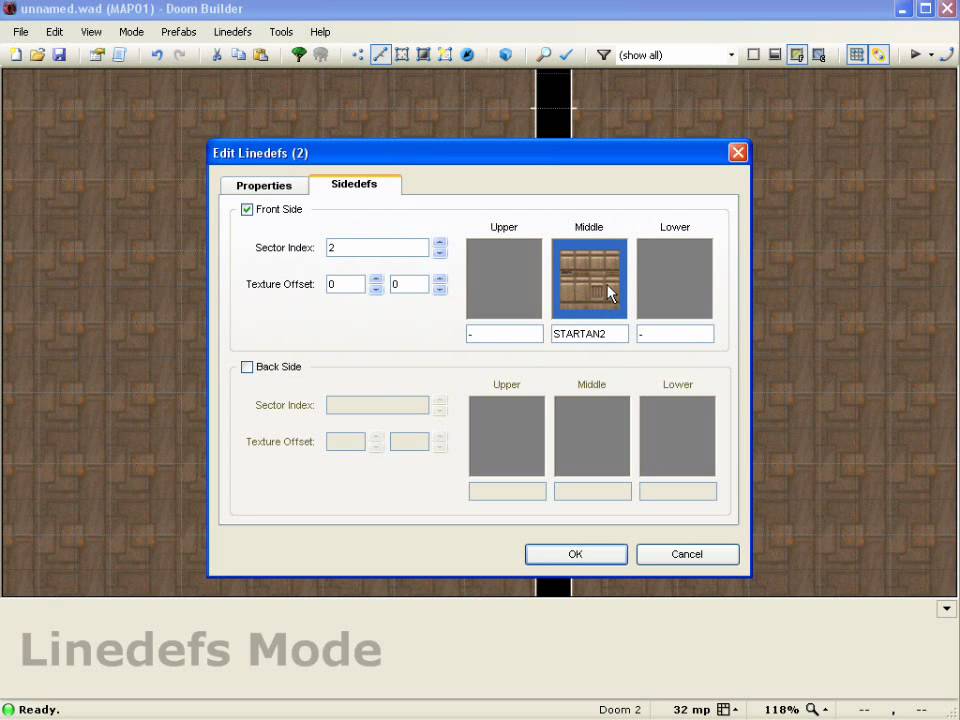
What is a sidedef?
whole blade
One side of a linedef
Contains the information about what texture is applied and where
Among other things
severe swift
Oh tramos
 agile shoal
The anatomy of a wad file is very interesting, my project for university is to understand how it all works. Sidedefs are used for something much more important than textures: getting the linedefs of a sector. Because a linedef can belong to 2 sectors, these sidedefs tell the which sectors are in each side.
So these sidedef are often overlooked and are not known as well as linedefs, but they are a key part of the map structure
So the sidedefs are the missing link between linedefs and the sectors
 safe steppe
I honestly love the structure of wad files once you understand how it works it's actually very simple yet so powerful
Very interesting read if you're a dev https://doomwiki.org/wiki/WAD
DoomWiki.org
WAD (which, according to the Doom Bible, is an acronym for "Where's All the Data?"[1]) is the file format used by Doom and all Doom-engine-based games for storing data. A WAD file consists of a header, a directory, and the data lumps that make up the resources stored within the file. A WAD file can be of two types:
whole blade
agile shoal
The anatomy of a wad file is very interesting, my project for university is to u...
Sector references on each sidedef are well explored. It's how you make self referencing sectors (both sidedefs point to the sector enclosed by the lines)
onyx vector
made my first proper doom-like animation. thoughts?

also the casing dematerialises because i couldnt be bothered to animate it
runic breach
onyx vector
made my first proper doom-like animation. thoughts?
shading is required for that doom-y feel
safe steppe
If it's meant for a cartoon-ish mod then it's pretty good
runic breach
safe steppe
If it's meant for a cartoon-ish mod then it's pretty good
mhm
safe steppe
Otherwise I agree it requires shading
onyx vector
runic breach
shading is required for that doom-y feel
i suck at shading 
runic breach
onyx vector
i suck at shading <:doomcry:668559689205940249>
dw, i do too
it's why i don't make sprites
onyx vector
i could probably shade in but in pixel studio its way harder than it needs to be
fuck it im pirating aseprite 
shadow trail
slate turtle
shadow trail
https://cdn.discordapp.com/attachments/534802812719333391/931185824123469894/hel...
Op shotgun
shadow trail
slate turtle
~~Op shotgun~~
yeah i should have mentioned that this mod is a semi slaughter house/power fantasy mod thing
and also yeah that shotgun can fire 5 shells at the same time
 white saddle

glacial skiff
PS1/PsyDoom are really neat and interesting to map for

You have to more carefully consider texture choices sometimes to hide warping (like seen on the stargr on the left on that platform), consider memory constraints, be mindful of how much audio you're loading, etc.
(Also worth mentioning is PSXDOOM-RE, hint hint)
white saddle
this is genius omg
 rancid cypress
how do i mod the ultimate doom?
runic breach
rancid cypress
how do i mod the ultimate doom?

Gone and done an updated Doom mod tutorial because I've had a few folks ask me about getting mods working and load orders. So here's a basic tutorial video on GZDoom and ZDL, hope this is helpful to anyone that might need it.
Download links:
GZDOOM - https://zdoom.org/downloads
ZDL - https://zdoom.org/wiki/ZDL#Versions
CONTENTS:
INTRO - 00:00
...
rancid cypress
thank you
runic breach
rancid cypress
thank you
welcome
although doomrunner is better than zdl other than the fact that adding engines is a pain
rancid cypress
ok
rancid cypress
uhh i dont think GZdoom works with the ultimate doom
rancid cypress
nevermind
torn remnant
white saddle
this is genius omg
i dont want to come off as rude but this is like straight up a ripoff of my map
torn remnant
torn remnant
daily screenshots
this room specifically
safe steppe
👀 👀 👀
 teal mirage
i want brutal doom
runic breach
shhhhhh
they're going to murder you
 safe steppe
That reminds me I have a ps4 that I can probably play GZDoom on
It wasn't updated in ages so I can jailbreak it
teal mirage

crisp dragon
torn remnant
this room specifically
The similarities are definitely uncanny
glacial skiff
PSX lighting is yummy

Has some limitations but figuring out how to work with the 256 hardcoded sector colors is part of the fun
glacial skiff
Screamshots follow

 severe swift
im going to use doom builder for the first time
safe steppe
Click a vertex and click delete on your keyboard
safe steppe
You mean a linedef? You right click or click enter
severe swift
no
haughty flower
severe swift
hey <@!881878874479292466> how do i make a vertex without closing it?
just right click twice
severe swift
no
safe steppe
You mean just one vertex? Click Ins on your keyboard
severe swift
i mean, im trying to make a hall but i cant close it
haughty flower
can you post a screenshot?
 safe steppe
The line between two vertexes is called a linedef, choose the linedef tool then use insert to create a new linedef
severe swift
How was the tag for a sr blazing door?
glacial skiff
You should probably try exploring the interface at least in a cursory way first before asking those kinds of questions (you can usually very easily solve these yourself)
"How do I (...) a sector?" can probably be answered by going into sector mode and right clicking an existing sector for example
safe steppe
Also should probably watch a tutorial first
severe swift
Oh ok
safe steppe
severe swift
well im trying to connect to vertexes
BTW you should download Ultimate Doom Builder it's a newer version of Doom Builder with a lot of tools that makes things easy
safe steppe
I think it still works on win7
if not GZDoom builder is also an option that works on win7
severe swift
Ok
glacial skiff
Quick protip: press Ctrl+D to immediately enter line drawing mode anywhere
severe swift
I ussually use gzdoom as my source port
severe swift
glacial skiff
Quick protip: press Ctrl+D to immediately enter line drawing mode anywhere
Noice
safe steppe
Don't worry all doom builders have many formats and can made to work on any doom source port
severe swift
Im just trying to make a simple map to start
glacial skiff
Another thing I have found helpful, but your mileage may vary: set the grid to 8 and forget it exists as much as possible
severe swift
Just making halls with every demon
Its like starter room (with weapons items and some powerups):hall with a demon : another hall with the next demon etc.
In order of the doom 2 final
edgy mesa
Anyone here knows how to use Bradwurst Recooked? You can call me an dumbass for not knowing
severe swift
edgy mesa
Anyone here knows how to use Bradwurst Recooked? You can call me an dumbass for ...
I dont even know what is that
edgy mesa
severe swift
I dont even know what is that
Basically replaces all enemies to Nazis
severe swift
Oh
safe steppe
Download the mod and drag and drop the *.wad or *.pk3 file on GZDoom
severe swift
what does dr/d1 mean?
safe steppe
D means Door
R means Repeatable
1 means One Time
DR is a normal door, D1 is a door you open only one time
severe swift
oh thanks
i have a rare problem
when i put a door,either it cant be opened or it appears opened even if i dindt touched it
safe steppe
can you send the wad file so I can see the problem?
safe steppe
alright
you can't create walls and doors using linedefs
you have to create a sector
safe steppe
You gotta lower the ceiling of the door until it hits the floor
then give it a texture
 severe swift
this is my first wad
trail steeple
severe swift
this is my first wad
let's see
severe swift
idk how it works
i used doom builder and tested it on gzdoom
it uses doom 2 assets
i tested it on complevel 2
trail steeple
2 doors on the map lack textures
 severe swift
what?
 severe swift
what does it mean?
trail steeple
that they don't have textures on them i.e they will be invisible
severe swift
oh on what doors?
trail steeple
also,there is a HUGE issue
the linedefs on the doors are heading the wrong way
 severe swift
srry this first map in my entire life
severe swift
trail steeple
also,there is a HUGE issue
the linedefs on the doors are heading the wrong way
so?
trail steeple
understandable
severe swift
but its doable right?
trail steeple
severe swift
so?
since the lindefes are heading the wrong way,the doors won't work
trail steeple
every single door has a linedef going the wrong way
trail steeple
pro-tip:
putting enemies like archviles,cyberdemons and spider masterminds in such tight spots is not a good idea
 trail steeple
what
here,have some tutorials that might help you
https://youtu.be/EucWtn__O8Q
https://youtu.be/6arDCzmhONY

Several people have asked me how to get into making Doom levels themselves! In this video, I spend ten minutes explaining the software you'll need and how to set it up, and then wing it through making a small but technically complete level.
If people think this is useful, I could try making more specific ones for other techniques!
Spectacular ...

From my experience playing beginner maps, some advice about guiding the player gently through a map by making choices about textures, flats and so on in your map elements!
00:00 Science
04:05 Doors
06:25 Switches
10:15 Shootable switches
11:10 Bars
13:05 Platforms
14:05 Teleports
15:15 Damaging floors
17:20 New con...
trail steeple
if you ever need help with anything,feel free to ask here
severe swift
ok thanks a lot
glacial skiff
This started as a generic Doom 64 MAP05 type computer maze and I kinda started thinking about E1M2 somewhere along the way
 glacial skiff
 upbeat path

new torches are finally done, and so am I
#doom #modding #gamedev https://t.co/3CawV7X8uy
Twitter
·
 stuck vapor
is this about classic doom map mods or modding in general/
runic breach
stuck vapor
is this about classic doom map mods or modding in general/
classic doom maps and mods
runic breach
stuck vapor
so, how do i install project brutality correctly?
gzdoom
stuck vapor
i dragged it onto gzdoom and got to play it for it a lil bit but once i died the game crashed
i couldnt play it again
runic breach
tfw
stuck vapor
im new to the modding community
runic breach
i have no idea how to help
but what was the crash like
safe steppe
Make sure you have the latest version of GZDoom
 tepid edge
Anyone know any gore mods that mimic the style of the gore in the Build engine games like Blood?
glacial skiff
 still dagger
trail steeple
pro-tip:
putting enemies like archviles,cyberdemons and spider masterminds in s...
still dagger
trail steeple
pro-tip:
putting enemies like archviles,cyberdemons and spider masterminds in s...
I’m going to do exactly that
crisp dragon
trail steeple
pro-tip:
putting enemies like archviles,cyberdemons and spider masterminds in s...
Honestly it's not that bad since they can't fit through the doors
Archvile probably can though
severe swift
hi
severe swift
still dagger
I’m going to do exactly that
you want to see the world burn
still dagger
what
severe swift
i thought you meant to put some strong enemies to f*ck the people
in enclosed rooms
still dagger
oh yeah
trail steeple
still dagger
I’m going to do exactly that
i wouldn't recommend doing this
trail steeple
crisp dragon
Archvile probably can though
and that's a big issue
 lime needle
Importing classic map to eternal?
glacial skiff

 royal wave


Gardevoir. Gardevoir go brrrrrrrrrr. Garde-brrrrrrrrrr.
#Gardevoir #Doom https://t.co/AzeMrDyqkR
Twitter
·
plush cave
nice

 glacial skiff
Ok, I like ... literally cannot add any more geometry to this level, lol
 wise drum
glacial skiff
wise drum
glacial skiff
It's that much more stressful on the hardware, too
There is literally no more memory available, at all, anywhere
glacial skiff
I'm almost positive I'm hammering the 1K dcache for leafs as much as possible too
(There is some limit on the number of leaves that can be drawn because of a memory limitation there)
royal wave
is your PC not up to spec? I feel like any software rendering port could handle that
glacial skiff
The PS1 is not up to spec for large levels, no
The way the hardware draws the level is fundamentally slightly different from the traditional software renderer and therefore has some more esoteric limitations
glacial skiff
Toolset is by GEC team, check out Doom Builder PSX if you're interested
So far, no horrific wrecks

Framerate gets dicey occasionally but no crashes in emulator is a good sign
 severe swift
nice
severe swift
glacial skiff
So far, no horrific wrecks
it looks like a map from doom on ps1
 carmine chasm
how do I play a .pke file such as heartland with gzdoom? It says i need to upgrade eternity engine
glacial skiff
severe swift
it looks like a map from doom on ps1
It literally is
whole blade
carmine chasm
how do I play a .pke file such as heartland with gzdoom? It says i need to upgra...
Eternity engine is a different port. Heartland won't run on gzdoom
carmine chasm
ty
glacial skiff
Speaking of, I'm looking into releasing that map I've been showing, but there is a specific problem I wanted to ask about regarding it's distribution
I can provide an ISO, which would contain only the minimum data requires to launch and play the one level - is this allowed
(As in literally no other levels or data are included other than what that one level uses)
safe steppe
@whole blade ^^
glacial skiff
I can alternatively supply an Xdelta or IPS patch or something
(If you're a moderator feel free to ask for the ISO in DMs if you want a look to verify)
carmine chasm
I got the eternity engine, when i drag a .pke over it to run it i just get a black console, what am I meant to do?
whole blade
An iso of what?
glacial skiff
Of my level
whole blade
Is it not a doom map?
glacial skiff
Yes, for the PS1 version
whole blade
So why does it need an iso?
Distribution of any commercial doom content is prohibited
glacial skiff
So that people can actually play it - the ISO version contains a bare minimum of what is loaded into video and audio memory when the level is run
whole blade
You're not explaining what is in the iso and why it's required to run a doom wad
glacial skiff
The alternative is to release an Xdelta patch version or something similar, which isn't impossible to deal with, but is an extra step to get the same thing
The level is literally designed to run on the PS1
As in you actually are intended to make a disc and play it on the PS1
safe steppe
Ps1 doom maps dont use wad files I am assuming
glacial skiff
They use a bunch of files
The way that version works assumes that a bunch of files which contain basically direct memory uploads of the art and sound required for that one level be situated spatially next to each other on the disc, or in other wordals, distributing an ISO means you cannot use it to play anything but the one level
whole blade
Sounds murky to me and therefore above my pay grade so the answer is currently no. You'll have to take it up with an admin
glacial skiff
@royal wave
I completely trust you in where this is going, but if you're unsure I'd rather someone definitively say no
safe steppe
If its not allowed here a good idea is to share it on doomworld
wispy relic
glacial skiff
The alternative is to release an Xdelta patch version or something similar, whic...
from what I've seen in the Fire Emblem community, ROM hacks and stuff are distributed as patches like this
that way people aren't sharing the actual ROM file or any of the assets
glacial skiff
Fundamentally because of the way PS1 Doom works I literally have to share the copyrighted assets no matter what
wispy relic
it's much the same as making a PWAD with just the level architecture and thing placement, and not the actual assets/resources from the IWAD included
glacial skiff
Even in patch form I have to distribute the texture, sprite and sound files
This is actually required unfortunately
wispy relic
then it sounds like you may be SOL in legal terms if there's no way around it
whole blade
glacial skiff
Fundamentally because of the way PS1 Doom works I literally have to share the co...
This is a hard no then
glacial skiff
Then I just can't release my map 🤷♂️
whole blade
Legally? No
safe steppe
glacial skiff
Then I just can't release my map 🤷♂️
Doomworld :)
whole blade
Which means it can't be posted here
wispy relic
eh even on doomworld I don't think this would fly
whole blade
You can't post copyrighted assets on doomworld either
Speaking as a doomworld moderator c:
safe steppe
It has copyrighted stuff?
glacial skiff
My distaste for Doomworld notwithstanding anyway
wispy relic
could make your own site to host it or something ofc, b/c I really don't see the copyright holder for PSX doom going after you
but yeah prob can't share it in places like this directly
safe steppe
Can u replace assets with freedoom perhaps?
glacial skiff
My map is made for a version of the game that requires that the needed assets be packed into a special format to be loaded in a special way at runtime - it doesn't work like having a single IWAD and just supplying a map replacement
carmine chasm
I got the eternity engine, when i drag a .pke over it to run it i just get a black console, what am I meant to do?
glacial skiff
Imagine making a map where all you use is BROWN1 -- you must therefore supply BROWN1 in a special separate archive
royal wave
glacial skiff
<@123250812829958149>
The solution to this would have to be providing instructions on how to patch it into the .iso
glacial skiff
To be clear, even a patch must contain some copyrighted content, even if unusable without a real copy of the game - is this acceptable?
royal wave
As much of a legally grey area distributing games that are no longer sold, the doom community at large strongly believes in legally acquiring the games, and we have to enforce that here being official
royal wave
glacial skiff
To be clear, even a patch *must* contain some copyrighted content, even if unusa...
What copyrighted content is in it
glacial skiff
The textures, sprites and sounds absolutely required to run the map and no more
This is, again, because of how the PS1 version works
royal wave
the textures in of themselves are stored in the map?
glacial skiff
Basically in simple terms, yes
royal wave
That I find hard to believe
Assuming the PS1 port still uses .wads, the map components are separate entities from the assets it uses
glacial skiff
It is true - look in your PSX Doom CD and you will find that each map has an accompanying texture sprite and sound archive
Called mapspr##, mapsnd## and maptex##
royal wave
I'll investigate this
glacial skiff
Thank you for hearing me out
royal wave
But, as it stands now: Distribution is not okay, so I am sorry
if your statement stands true
safe steppe
@glacial skiff is it not possible to replace the textures and other assets?
Maybe with something like freedoom?
glacial skiff
Impossible unfortunately, as there is no way of converting between the PS1's unique asset formats
safe steppe
Darn it
glacial skiff
Even if I did that could change how memory is allocated which would break everything (I'm running the PS1 at it's absolute limit)
crisp dragon
carmine chasm
how do I play a .pke file such as heartland with gzdoom? It says i need to upgra...
you can't play pke files on GZDoom
also, you have to run it via command console
run the Eternity Engine executable, put in -file heartland.pke, and then run it
then it'll allow you to select an IWAD, and then you'll be able to play it
royal wave
Don't know what you're doing wrong @glacial skiff but the maps are 100 percent separate from the textures

 carmine chasm
crisp dragon
run the Eternity Engine executable, put in -file heartland.pke, and then run it
carmine chasm
crisp dragon
run the Eternity Engine executable, put in -file heartland.pke, and then run it
cant enter text
glacial skiff
The maps will not run at all without their accompanying archives
royal wave
Then whatever tools you are using are incomplete
glacial skiff
The IWAD is not used for this purpose because the PS1 version made special concessions regarding asset loading from disc
royal wave
I'm looking at the disc directory right now
it's all separate
each map is a separate wad
glacial skiff
Yes, but please listen to what I'm saying
The archives you see labeled mapspr##, maptex##, and mapsnd## are level specific; the IWAD is not used from the disc for those purposes
They are in fact required to run each level and are not interchangeable in any way
royal wave
which are also separate files
crisp dragon
carmine chasm
cant enter text
hm
glacial skiff
Yes, and if I use the stock maptex01.img then the game will refuse to run because the assets are not laid out correctly
Same for any of the other files
royal wave
Definitely sounds like the modding tools you're using are incomplete
glacial skiff
This is literally the way the engine works :/
Ask any of the GEC guys, or the developer of PsyDoom, or Fabien Sanglard if you prefer
royal wave
It's not going to change that it's distribution of copyrighted assets
Which aren't under protection of the same "good faith" clause the PC port of Doom had
glacial skiff
That isn't my contention, you just seemed to not want to understand why I am having this problem to begin with
wispy relic
carmine chasm
cant enter text
have you ever opened command prompt before
carmine chasm
Idk what that is
wispy relic
On Windows operating system, click on the Start menu and type 'cmd'
should get something like this to pop up

alternatively on older versions of Windows, you should have an "Accessories" folder in your Start menu
Command Prompt should also be available there
wispy relic
You'll need to type the path to the exe file for Eternity
For example, for the file path to my GZDoom exe, I can get it real easily by finding it in the File Explorer and clicking on the bar at the top:

"C:\GZDoom" is the folder with the exe, so the path to the exe itself is:
"C:\GZDoom\GZDoom.exe"
wispy relic
crisp dragon
run the Eternity Engine executable, put in -file heartland.pke, and then run it
You'll get the proper path for Eternity on your computer, copy it into the command prompt, and then copy the "-file" stuff mentioned here as well
It should be one long line that looks something like this before you hit enter
 crisp dragon
Yeah like that
wispy relic
Also, to be careful, put the Eternity folder somewhere that the file path doesn't have any spaces in it
For example, if you have it in a folder named "My Games", either rename that folder to something like "Games" or just put it somewhere else entirely
carmine chasm
Cheers 👍
 distant terrace
hi folks... im back in another classic doom cycle 😄
if i want to learn mapping, what are some good general resources? i know a fair bit of the terminology but you know...dunning-kruger effect etc
(i don't mean forums, don't want to spam questions constantly. more like a website or tutorial that really takes you through the basics)
trail steeple
distant terrace
hi folks... im back in another classic doom cycle 😄
if i want to learn mapping,...
you can always ask about stuff in this channel
as of tutorials,i have some
https://youtu.be/EucWtn__O8Q
https://youtu.be/6arDCzmhONY
Several people have asked me how to get into making Doom levels themselves! In this video, I spend ten minutes explaining the software you'll need and how to set it up, and then wing it through making a small but technically complete level.
If people think this is useful, I could try making more specific ones for other techniques!
Spectacular ...
From my experience playing beginner maps, some advice about guiding the player gently through a map by making choices about textures, flats and so on in your map elements!
00:00 Science
04:05 Doors
06:25 Switches
10:15 Shootable switches
11:10 Bars
13:05 Platforms
14:05 Teleports
15:15 Damaging floors
17:20 New con...
distant terrace
Thank you so much! This is exactly the sort of thing I was looking for ❤️
severe swift
hey guys how do you recomend making a slaughter map?
 twilit monolith
severe swift
hey guys how do you recomend making a slaughter map?
twilit monolith
severe swift
hey guys how do you recomend making a slaughter map?
I would say go for it! I think slaughter maps are quite fun 🙂 Unless its Okuplok Difficulty
flat pebble
Personally I'd follow the this "style":
-have weapons match the enemy or be higher than(Don't pit people against 10 cyberdeamons with only a super shotgun). Scale it with enemy count.
-don't do "very" small spaces(Imo)
-don't go overboard on powerups.
severe swift
ok
crisp dragon
severe swift
ok
You can look at other slaughtermaps and see how they style it
A few good examples imo is Scythe's Map26, Fear, and Micro Slaughter Community Project(MSCP)
glacial skiff
Geometry-only playtest release of my PSX map, "Silent Outpost"
You will need to find a way to generate the soundbank and DRAM uploads yourself
You must specifically replace map01.wad (with this file), maptex01.img and mapspr01.img with the appropriate uploads, and map01.lcd with the soundbank
whole blade
severe swift
hey guys how do you recomend making a slaughter map?
Good slaughter maps are the hardest maps to make in doom imo. It's very easy for them to degenerate into either mindless grindfests or dull circle strafe parties. When setting up encounters try to think about pressure points on the player. Where are you attacking them from? Where are you putting resources? How are you making them hard to reach? What are the goals and objectives of the fight? Where are you putting cover? Painsectors for area denial? How are you using height variance? Which monsters are coming from where and how quickly are they attacking the player?
glacial skiff
It's always worth considering even things like using lighting to draw the player's eyes and using contrast to highlight important items, even in big scale slaughters
Or hell, even using darkness to make the slaughter itself nontrivial
whole blade
I'd put that under broad good level design rather than specific to slaughter. Definitely do no neglect light variance to highlight points of interest and create atmosphere. Dark areas can make threats more mysterious and foreboding as well
glacial skiff
Yeah, for sure! What I'm saying basically applies anywhere, but I know I need to be reminded of lighting specifically so I figured I'd mention it
whole blade
Also study good slaughter maps. Sunder, Bastion of Chaos, Ar Luminae, Abandon etc
whole blade
Useful post from Ribbiks
https://www.doomworld.com/forum/topic/69457-slaughter-map-making-tips/#comment-1289545
Doomworld
What are some tips and trick of making a slaughter style map (like in sunder, Combat shock, stardate, etc.)
glacial skiff
I was not aware until just now the PS1 engine could do the Doom 64 style 3D trickery, but now I think I'm going to have some fun :^)
 crisp dragon
ooh that's cool
glacial skiff
 glacial skiff
 royal wave
 plush cave
finally playing this amazing mod
 plush cave
royal wave
plush cave
royal wave
there will be a chainsaw on ghag?
runic breach
plush cave
finally playing this amazing mod
what mod is this
plush cave
runic breach
what mod is this
sorry i didnt respond https://forum.zdoom.org/viewtopic.php?f=43&t=72802
Discussion about ZDoom
kevansevans did it
runic breach
cool mod
haughty flower

Mod DB
Mission details: : Entropic DOOM is a new weapon set that gives you the slight edge against the armies of hell. play as the new prtagonist, SullFace. a fully replaced weapon set that includes NEW exhilarating weapons such as the lense rifle and the BFG...
royal wave
plush cave
there will be a chainsaw on ghag?
 crisp dragon
👀
severe swift
royal wave
download link plsss
royal wave
severe swift
download link plsss
https://forum.zdoom.org/viewtopic.php?f=43&t=72802
However latest stable isn't the version pictured
Discussion about ZDoom
severe swift
thanks
haughty flower
a funny I did with boom
plush cave
haughty flower
a funny I did with boom
that would be cool for multiplayer
haughty flower
plush cave
that would be cool for multiplayer
I'm planning on possibly adding multiplayer support at some point
haughty flower
I will post a video of it in the morning but
I have figured out how to do fake room-over-room in boom format
my power is growing
whole blade
height transfers have been able to do that for a while
glacial skiff
Just wait until they discover Boom script :^)
haughty flower
already have :)
glacial skiff
I wonder if anyone's reimplemented ACS using that method
That would be a fucking bananas tech demo
haughty flower
that would be cool to see, actually
anyways, here is the video of the room over room thingy i did
plush cave
so it teleports you
plush cave
royal wave
will they replace the torture blade?
royal wave
plush cave
will they replace the torture blade?
They will
severe swift
can i make a texture strech?
like, i can make them strech to the sector floor instead of repeating itselF
upbeat path
If you're in udmf, yes, otherwise no
severe swift
udmf?
glacial skiff
TEXTURES is another possibility, but if you're using TEXTURES then you can also use UDMF anyway
severe swift
hey how do i make a sector without ceiling?
safe steppe
Use F_SKY texture on the ceiling
severe swift
oh thanks
im making a slaughter map and if you are playing on hard you can only have a backpack in secret wall
fuck i dont have it
runic breach
mod that makes damage a set value instead of RNG-based?
even better if it uses dehacked
but i'm fine with playing in gzdoom
safe steppe
idk
 haughty flower
so im working on a new map
 haughty flower
 haughty flower
 glacial skiff
Suggestion
Set the grid to 8 units and just ignore the 64px boundaries [for the most part]
I see what you're trying to do and I'm all about it
flat pebble
how do you change the default grid size? somehow mine accidently got stuck at 1x1 no matter what I zoom in/out too.
nvm found it
but it still doesn't "change" the size when I zoom in/out found it also(dynamic grid size)
glacial skiff
[ and ]
distant terrace
gotta question. i'm using a weapons pack and would like to add a quick melee. i remember from some years ago that would basically mean adding an alt-fire to each gun, right?
(note: purely for my own use, not planning to redistribute)
glacial skiff
Not necessarily
That is certainly the easiest way to do it, but using ZScript you can directly check if buttons are being pressed iirc
torn remnant
biblical violence

 haughty flower
Hi all I was wondering if someone could help me regarding a doom wad I have
it is v17 and I cant find info on the wad other then wad archive where I got it from
maybe there is coding wrong inside ( I am not coder) just a thing I thought it could be
 distant terrace
glacial skiff
That is certainly the easiest way to do it, but using ZScript you can directly c...
distant terrace
glacial skiff
That is certainly the easiest way to do it, but using ZScript you can directly c...
gave it some more thought! got recommended some super solid videos recently when i asked about mapmaking, so i'll just toss this one out there. what's the best way to get into zscript?
(clarification: i'm someone who likes to tinker with stuff so learning-by-doing, videos, etc, are all good w/ me. if there's a specific place I should go for Zscript stuff, i'll gladly be pointed in the right direction)
distant terrace
also -- how do I use shaders with GZdoom? i'm so enchanted by capabilities of the engine
whole blade
distant terrace
gave it some more thought! got recommended some super solid videos recently when...

GitHub
ZScript entry guide. Contribute to jekyllgrim/ZScript_Basics development by creating an account on GitHub.
distant terrace
Thank you! Doom community is awesome
 severe swift
pretty cool
runic breach
*very cool
haughty flower

Mod DB
Mission details: : Entropic DOOM is a new weapon set that gives you the slight edge against the armies of hell. play as the new prtagonist, SullFace. a fully replaced weapon set that includes NEW exhilarating weapons such as the lense rifle and the BFG...
shadow trail
working on one of my early hell maps


 plush cave
that looks cool
shadow trail
much obliged
distant terrace
ok i just tried it!
looks snazzy, could use some more animation frames though?
old panther
whole blade
https://github.com/jekyllgrim/ZScript_Basics
oh no its "for dummies guy"
distant terrace
well, i had no idea this existed but it was exactly what i was looking for
omg slade3 is amazing.
it supports ALL THE THINGS!
can't wait to start tinkerin' & tweakin'!
where would i go to look at what "makes" a good texture pack? (i.e. what does it need?) i think my partner Dagmar would like to hand draw some hieronymous bosch salvador dali stuffs
shadow trail
yeah slade3 is the best for modding currently
by modding i mean adding custom content or changing stuff etc
distant terrace
like, how are the files organized
btw I bit the bullet and bought doom 3 bfg edition, doom64, doom16/eternal, can't even run it properly on this tack-and-balls-PC but DAMN the setttings change things around
money well spent
i support what this game has brought modding
one day. i will merge DOOM and openTTD
trail steeple
shadow trail
working on one of my early hell maps
and you are telling me this is doom
crisp dragon
Ye, it's UDMF
shadow trail
trail steeple
and you are telling me this is doom
yep a udmf map
flat pebble
A couple questions regarding mods:(I am using GZDOOM)
-first and foremost what is the best way to play/install them? I'm looking to run and play Bloom(GZDOOM mod that merges blood and doom together and is pretty cool)
-Second, when it comes to multiplayer, how do I run a modded lan "server"(I have gotten lan to work with zandronum, just don't know how to do modded setup)
-lastly how do I make/create levels based around a mod? I'd love to include a sniper riffle/scoped weapons in my current map I've been working on.
safe steppe
flat pebble
A couple questions regarding mods:(I am using GZDOOM)
-first and foremost what i...
- Using GZDoom is the best option for mods, simply drag and drop your mods onto GZDoom or use a Doom launcher to make the process easier and more flexible
- Run doomseeker that's included with Zandronum then create a server and choose all the mods you want, if you want to connect to the server from another device just make sure to load the same mods and it will work (you can use the connect command if the server doesn't appear on doomseeker)
- When you first open a map or create a new one in Ultimate Doom Builder it asks you which resources you want to load, other than the doom/doom2 iwad file you should also add whatever mod you want to work with and it hopefully should automatically add the mods assets and monsters/guns
safe steppe
flat pebble
how do you remove the mod if you drag and drop them onto GZDOOM?
It automatically disables mods when you exit the game
Next time you launch it there won't be any mods until you drag and drop them again
flat pebble
Also is the only thing you need from the download the pk file? because bloom downloads a bunch of others
turns out bloom also installs gzdoom for you.... yikes
lol time to delete all that
glacial skiff
You might wish to invest the extra time to create shortcuts (or scripts, as the case may be) containing whatever mod lists you wish to keep around
Anything is better than drag-and-drop imo
safe steppe
I believe the newer doom launchers allow you to do that as well
royal wave

Context sensitive kinesis ability for my #Gardevoir #Doom mod (In dev footage, not final) https://t.co/DwrJ0Ac5aQ
Twitter
·
glacial skiff
That feel when obvious cache fragmentation problem :)))
 glacial skiff
Late-beta of my first PSX level. To prevent any amount of fuss from the unaware, this is an Xdelta patch against the NTSC version of ABIN/PSXDOOM.WAD. It will from there create a stand-alone disc image to play the level
As far as I'm aware, this patch doesn't allow unauthorized distribution of copyrighted IWAD stuff (e.g. you need to provide your own IWAD anyway, so...)
flat pebble
royal wave
https://twitter.com/kbeevans/status/1485741364109209602?s=20
||barrels o' fun, now that levels gotta be barrels o' really fun||
flat pebble
safe steppe
1) Using GZDoom is the best option for mods, simply drag and drop your mods onto...
where do you choose the mods at in it?
wispy relic
alright, so for the more advanced (G)ZDoom modders here, how can I get airborne bullets to render their sprites like this?

compared to how when I tried to implement it and it still used the regular sprite rotations
 royal wave
flat pebble
where do you choose the mods at in it?
royal wave
flat pebble
where do you choose the mods at in it?
Peruse a forum that's centered around Doom modding. Doomworld has a section, ZDoom centralizes on it, and there's always the id Games archive where you can play roulette with what wads you download
royal wave
wispy relic
alright, so for the more advanced (G)ZDoom modders here, how can I get airborne ...
The bullet sprite that's pictured here is using the XScale value to stretch itself longer
Alternatively, you can just go into your favorite photo editing program and stretch it yourself
 royal wave
wispy relic
https://www.youtube.com/watch?v=WZ00BnDP500
royal wave
wispy relic
https://www.youtube.com/watch?v=WZ00BnDP500
What mod is this, so I can dig up the appropriate flags
wispy relic
It's brutal doom v19
royal wave
oh dear, that's some unfriendly code you're having to parse
crisp dragon
^
wispy relic
I already went poking around in it, but didn't find anything in the actor definition that seemed like it would do this
royal wave
My best guess it it's using +FloorSprite and setting the actor's pitch based on the player's pitch
wispy relic
I ripped the sprites and decorate code for the bullets wholecloth, but when I implemented them in a separate wad https://www.youtube.com/watch?v=ZIViHh4sw3k

no dice 😔
royal wave
The sprites properties are definitely being changed outside of those classes
Also, some advice, I would strongly recommend making your stuff from scratch if you're not familiar with Doom modding
I know it seems like a good idea to borrow other already working examples, but it's a lot harder getting things to work the way you want if you don't know how the source works to begin with
GZDoom mods do not blend together like a smoothie
wispy relic
Ah yeah, I'm not new or unfamiliar with this by any means, don't worry
That's mostly what's making this so frustrating for me lol
flat pebble
royal wave
Peruse a forum that's centered around Doom modding. Doomworld has a section, ZDo...
I meant when setting up the server, didn't realize you put the pk file in the same place as you put wads.
wispy relic
wait, I've figured it out
it uses a 3D model
wispy relic
YES

okay, so I had to find the model definition and associated files, and restructure the WAD into a pk3
But I've got it working
runic breach
plush cave
i like tea
br*tish
trail steeple
glacial skiff
You might wish to invest the extra time to create shortcuts (or scripts, as the ...
ZDL is a thing
runic breach
DoomRunner is a thing
glacial skiff
Never been worth using for my use cases
runic breach
glacial skiff
Never been worth using for my use cases
ZDL is always worth it wdym
crisp dragon
ZDL to many people is messy, clunky, looks outdated, and unuseful
Vull calls it a "glorified command prompt"
runic breach
crisp dragon
Vull calls it a "glorified command prompt"
that's what it is
runic breach
crisp dragon
ZDL to many people is messy, clunky, looks outdated, and unuseful
it's all of those except for unuseful
doomrunner is still better
crisp dragon
in all honesty I'm just waiting for PBeGood4's crossplatform doom launcher which is probably better than anything we have at the moment
runic breach
but ZDL really helps with loading mods
runic breach
crisp dragon
in all honesty I'm just waiting for PBeGood4's crossplatform doom launcher which...
doomrunner would be perfect if i didn't have to edit the actual json file to add a new engine
 runic breach
crisp dragon
looks like this
runic breach
crisp dragon
looks like this
it looks good
honestly though the thing i want the most is a launcher that looks video-gamey
glacial skiff
I have been using the command line to load mods for 20 years, ZDL and the like just don't speak to me like they might newer players is all
Like, yes, I could download ZDL or some such, but -file ... -iwad ... works just fine too
Put yourself in my place: you know basically all of the important command like parameters for the major source ports by heart, so is it lazier in practice to press Windows+R and type "I:/Doom/GZDoom -file..." or download a program and configure it to do the same thing
runic breach
glacial skiff
Put yourself in my place: you know basically all of the important command like p...
i could do that
but i can start the game faster with ZDL
glacial skiff
Missing my point
distant terrace
coming back to AGAIN thank the person who recommended me SLADE3, this is similar to the C&C mixer (for westwood RTS) stuff where one program can handle all file types in archives. THANKS. this is so intuitive to use!!
lovely work ❤️
i was wondering, those weapon/reload sprites (smoothened and/or interpolated) are some of the most used pixels on the internet. how do people modify that kinda stuff?
pixel bash till it looks good? i see some mods just rotate/tilt etc
is there like a base set that people draw from and modify? i keep encountering the same(-ish) MP40, MG42, etc etc in all kinds of projects
glacial skiff
MP40 likely comes from ROTT
whole blade
good sprite artists are not super common so you'll find the same sprites popping up in projects over the years. sometimes slightly altered, sometimes not. every now and then something top tier gets released and then those sprites flood the modding scene (anything be Amuscaria fits that bill).
Aseprite is the best/most used program to create from scratch from what i've seen but any pixel editing program can do the job
and if you're using gzdoom there are a bunch of functions that allow you to roll, tilt etc existing sprites which can make it easier to interpolate frames without having to manually create new sprites
oh and then there's ripped assets
glacial skiff
I endorse Grafx2 and GIMP for what that's worth
safe steppe
Gimp can do pixel art?
glacial skiff
Yes??
safe steppe
what I never knew
glacial skiff
Press N, click sliders on toolbox, select size=1 and brush type "pixel"
distant terrace
thinking about adding a BioMenace class (Snake Logan) for my FinalDoomer+
safe steppe
I've always used paint dot net even though I had GIMP installed 🤦♂️
distant terrace
ripper chaingun, grenades, plasma bolts, etc
 polar terrace
do you know how to mod doom 2 from the microsoft store?
safe steppe
if it's the unity port you can't mod it, however you can use a source port usch as GZDoom
flat pebble
For brutal doom, when hosting a server what are the deathmatch exclusive maps marked as(Like if you're hosting, you choose a starting map like MAP01 or MAP03 ect...)
also can't figure out how to disable bots on zandronum
 flat pebble
Figured it out, for some reason it lets you switch to deathmatch maps in multiplayer(while on the server)-which they have bots. Found the format(It's like BDDM01 or something idr) for the deathmatch levels via console and set them to starting level which those didn't have bots.
royal wave
 flat pebble
For mod addons, how do you install those? same as a regular mod? As I'm trying to load a sniper riffle one for brutal doom and doesn't seem to work(will grab error message in a momment)
"10 errors while parsing DECORATE scripts"
severe swift
3
 glacial skiff
Be wary of lots of tiny details popping out or sinking into the floor; that changes the physics and can introduce really annoying navigational quirks
whole blade
flat pebble
For mod addons, how do you install those? same as a regular mod? As I'm trying t...
Generally, yes. You just add them to your load order. Specially? Varies massively based on the quality and fidelity of the mod. 10 errors indicates the mod is broken
severe swift
what?
whole blade
Do I need to get you a dictionary to help you understand the English language
whole blade
Good thing I was replying to someone else then isn't it
severe swift
oh
wispy relic
alright, I come posing another GZDoom question
Is there a way that I can make it where weapons are not picked up automatically when a player walks over them, but they instead have to press a key as well to do so?
severe swift
i dont think so
severe swift
wispy relic
Is there a way that I can make it where weapons are not picked up automatically ...
but why, why would you do that?
wispy relic
non TL;DR version
Right now I'm working on making a large weapon set to be used for deathmatch, and one of the things I want to do is have the player restricted to carrying only one gun per weapon slot (1-9). For example, they can have the pistol, shotgun, chaingun, and plasma gun in their inventory concurrently since they use different weapon slots, but they can't have the shotgun and the super shotgun at the same time since they're both in slot 3. I've managed to get this part working fairly well mechanically by forcing the player to drop any other weapons from the same slot whenever they switch to a given weapon.
However, this can be a little frustrating in practice since the player will automatically pick up weapons that they don't have in their inventory when they come across them, which isn't a problem normally, but it can make something of a feedback loop if (for example) the player picks up the Super Shotgun -> drops the regular Shotgun -> waits a second before moving -> inadvertently picks up and switches to the regular Shotgun, dropping the Super Shotgun in the process.
in a deathmatch/last one standing scenario especially, I want the player to be able to amass a larger arsenal of weapons than the usual 2 in most FPS games these days, but I also don't want them to be able to hoard resources
so I thought limiting it to one weapon per slot (with 3-4 different weapons per slot available) would be a good way of handling it
whole blade
wispy relic
Is there a way that I can make it where weapons are not picked up automatically ...
Yes there is. Pretty supercharge does this (it's a toggleable option)
wispy relic
Are you familiar with how it's implemented?
whole blade
You're better off asking in a more specialized mapping discord
It might be possible with decorate?
wispy relic
Would you be able to point me in such a direction? I thought that Doomworld would have its own "official" discord server, but it doesn't 😔
whole blade
wispy relic
Would you be able to point me in such a direction? I thought that Doomworld woul...
I'll dm you some options in a sec
wispy relic
cool
torn remnant


 glacial skiff
I don't think I expressed in the other place how much I really like your use of MODWALL*
severe swift
i think im going to make a map of parkour with archivle jumps only
trail steeple
any tips into getting back to doom modding
safe steppe
trail steeple
any tips into getting back to doom modding
Open doom builder, have some music playing, start mapping away, if you lack inspiration look at other people's work
glacial skiff
Repeating previous advice: set the grid to 8 units and just kind of ignore the 64-pixel guides, see what you come up with
Try unconventional shapes
whole blade
trail steeple
any tips into getting back to doom modding
- Get UDB
- Draw some lines
- Fuck around
- Find out
No substitute for just diving back in
severe swift
trail steeple
any tips into getting back to doom modding
try making a slaughter map or a simple one
like just fool around with enemies
haughty flower
Making a sandbox version for doom

A sandbox mod where u can spawn anything and build anything
Monsters and weapons design will be updated
haughty flower
good
plush cave
haughty flower
Making a sandbox version for doom
nice, i always wanted a big map to test things
severe swift
how do i make a switch?
glacial skiff
Attach any effect prefixed S1 or SR to a line and give it a switch texture (typically starts with SW1 or SW2)
severe swift
prefixed¿
distant terrace
whole blade
You're better off asking in a more specialized mapping discord
care to share links? i'd like to lurk n learn
 charred haven
torn remnant
charred haven
torn remnant
Love this
shadow trail
haughty flower
Making a sandbox version for doom
i did make the flatgrass from gmod in doom before
i think that map is also useful for texting stuff
i meant this

 simple wigeon
Who's the fecking sadist that made Sunder?
haughty flower
simple wigeon
Who's the fecking sadist that made Sunder?
Insane_Gazebo
whole blade
lol you're gonna be cursing the gods by the time you get to map 16
 runic breach
what map
haughty flower
How?
wispy relic
Is that #1DWANGO from the maximum levels
haughty flower
crisp dragon
isn't that... windows doom?
It's something called DOOM: pack 2 or something
I think dwars made a video on it I don't remember
severe swift

haughty flower

severe swift
key
haughty flower
Ye.
trail steeple
 remote widget
holy shit...
remote widget
holy shit...
i don't remember map01 this way
runic breach
trail steeple
i don't remember map01 this way
the mandela effect
remote widget
haughty flower
It's something called DOOM: pack 2 or something
yep it's DOOM PACK II, now i will now find a way to get those maps.
remote widget
wispy relic
Is that #1DWANGO from the maximum levels
yes.
i got the main appx from this website store.rg-adguard.net, i usually got the game link thanks to those guys who played it back then and added the link to the game, after that i installed the game but... i had the 0x80 error, months later i founded it out now, i just that certificate file thingy and i reinstalled the game it worked.
 trail bolt
trail steeple
any tips into getting back to doom modding
trail bolt
trail steeple
any tips into getting back to doom modding
get UDB and watch a shit ton of tutorials
wispy relic
I have successfully made a BFG ball that fires tendrils like the quake 2/doom 3 iteration


Things are finally coming along smoothly now with this deathmatch weapon set
crisp dragon
Nice
flat pebble
what are some popular deathmatch maps for brutal doom(outside of what it comes with) or russian overkill
 pseudo pendant

 haughty flower
He plays too? :0
runic breach
haughty flower
He plays too? :0
of course
 fallen panther
Yes because even the one who died for our sins enjoys smiting the wicked
runic breach
what do you think jesus did in the 3 days that he was in hell after getting crucified
 quick crag
Mass demon slaughter
 slate basalt
SPOILER: Jesus is the Doom Slayer
glacial skiff
:)
 glacial skiff
haughty flower
hehe
~~also yo what editor is this?👀~~
glacial skiff
haughty flower
hehe
~~also yo what editor is this?👀~~
UDB
Here's the raw colors, I've been playing with them to semi-imitate the SLADE light theme
 haughty flower
glacial skiff
UDB
haughty flower
glacial skiff
UDB
damn, for real!?
I thought it was like
wadauthor
glacial skiff
WadAuthor is ... how do I put this
I've used WadAuthor a lot and it was my first Doom editor, but I'm not fucking going back to it. Period
It was great for 1999-2004 or so, but then Doom Builder came out and honestly WA became instantly obsolete
haughty flower
yeah, true
 turbid silo
What do people actually use to make maps these days? It's been a long time for me, last one i used was Doom builder 2 and apparently there's been a GZDoom builder that came out since then?
flat pebble
Ultimate doom builder
glacial skiff
I would actually recommend SLADE before UDB for most use cases, unless you make specific use of GZ features a lot
turbid silo
Thanks! I use dont use slade that often tbh
upbeat path
I mean if you're using UDMF format the grid rotate function at the very least is super useful
glacial skiff
I don't recommend sticking to the base grid at all anyway