
#〉bugs-reports
2 messages · Page 60 of 1
 dire yarrowBOT
 stray granite
ToS?
 stray granite
Ah, you are right
 teal oak
I quickly searched and wasn't able to find any proof this has been reported. When a user has an animated profile picture, !rank picks a different frame than Discord does which makes it harder to recognize it as my profile picture
 faint dome
known bug unfortunately
teal oak
The "unfortunately" makes it sound this won't be fixed...
 wooden mountain
discord shows the first frame
for us it is a random one, depending on processing time and lagg
i will see if we can pause the gif at the first frame before making the image
 slow sleet
i have a dutch discord sever whit mee6 if a meber see moeder he was warned but moeder is in english mother
so you can't say a mother in dutch?
 uncut mulch
 faint bear
@uncut mulch if you aren't here to report a bug and would like to spam, do it in #〉commands
wooden mountain
@valentij#4832 ik versta je niet, kan je eens in het nederlands proberen
 fading harness
dire yarrowBOT
fading harness
dire yarrowBOT
 Something went wrong in MEE6 land!
If this happens when using:
Custom commands:
‣ Bot tries to give the role that higher than his own. To fix that, move the bot's role above the role he tries to give.
‣ Missing Manage roles permission. Go to Server Settings -> Roles -> Bot role ->  Manage Roles permission
Moderator commands:
‣ Muted role is above Mee6's role. Bot can't give roles that higher than his own. Move it down.
‣ Missing Manage roles permission. Go to Server Settings -> Roles -> Bot role -> Manage Roles permission
 viral sage
the site is taking a long time to start
faint bear
Which browser?
viral sage
chrome
faint bear
Which device?
 sand hound
My mee6 is broken -_-
 knotty rose
Broken how? @sand hound
 hoary stream
What part doesn't work?
sand hound
I was using it but I got a message that it does not work contact mee6 support
or maybe I'm stupid and in maintenance
I dont know
@hoary stream ?
hoary stream
Was it this message?
dire yarrowBOT
Something went wrong in MEE6 land!
If this happens when using:
Custom commands:
‣ Bot tries to give the role that higher than his own. To fix that, move the bot's role above the role he tries to give.
‣ Missing Manage roles permission. Go to Server Settings -> Roles -> Bot role -> Manage Roles permission
Moderator commands:
‣ Muted role is above Mee6's role. Bot can't give roles that higher than his own. Move it down.
‣ Missing Manage roles permission. Go to Server Settings -> Roles -> Bot role -> Manage Roles permission
hoary stream
" Something went wrong in MEE6 land! Contact our support team for instructions if this keeps happening."
sand hound
I speak Spanish I do not understand it, maybe I'm in maintenance
SLEEP6 Something went wrong in MEE6 land! Contact our support team for instructions if this keeps happening.
That tells me :(
@hoary stream
hoary stream
En su servidor, ponga la función MEE6 por encima de todas las demás funciones
sand hound
is not maintenance? because I was using it and suddenly I did a wrong command I put it well and I get that
hoary stream
It isn't maintenance. You need to set it up correctly, that's all
hoary stream
Great!
sand hound

 light pumice
Yeah so, I'm in a server with over 1700 people, and it got raided 2 times today, and both times it almost completely destroyed the server. How did the people raid the server? You see, MEE6 is an important asset in our server, so it had literally every permission in the server. Unfortunately, both times we were raided, the person somehow hacked into MEE6, and then had MEE6 give this person roles which had certain permissions in the server. I can provide proof if you want.
Although this isn't really a bug, this goes to show how unprotected MEE6 is to getting exploited/hacked.
faint bear
Did that user have bot master or administrator permissions in the server? or have any contact to a user with these perms?
Also, check audit logs to make sure it was actually MEE6 giving the roles
light pumice
I don't believe so. The person joined the server, and then shortly after, they hacked into MEE6 somehow. Then in the 2nd raid, it was a different user, most likely an alt, that joined the server, and then hacked MEE6.
Alright, let me get pics rq.
dire yarrowBOT
Dashboard Access
You need Administrator permission or Bot master role to access the Mee6 dashboard.
How to add Bot master role can be found below:
https://cdn.mee6.xyz/s/bot_master.png
for servers that added MEE6 after 12 may you need to have premium to add additional bot master roles
 faint bear
Only users with these perms can make changes and "hack" the bot
its not actually "hacking" they are just adding commands in the custom commands plugin to give themselves stuff
light pumice
I dunno, he was completely new person, who didn't have any special roles other than the base ones mostly everyone else had. Also, here.
faint bear
How many people in your server are administrators?
one of your staff made the command
faint bear
Yeah
many people who are able to make changes
Also. Please send a Trust & Safety ticket to discord about these raids. Include the raiders name and ID in the ticket. Make a ticket here: https://support.discordapp.com/hc/en-us/requests/new
light pumice
So what you're saying is, if you have a role that has Administrator permissions, they are able to make commands for MEE6?
dire yarrowBOT
You can access my dashboard at https://mee6.xyz/dashboard, and login with your Discord Account.
or you can use !dashboard in your server for a direct link
faint bear

light pumice
Hm. Very interesting, thank you for all of the help.
faint bear
np
 tough nimbus
This you tube video posted 3 hours ago, but Mee6 didn’t post it on my server.

MARVEL Strike Force -I have other teams I like to use. I'll showcase them later
 limber knoll
@tough nimbus youtube probably hasn't told mee6 about the video
tough nimbus
It doesn’t look like anything has posted since yesterday. The ones yesterday were posted almost immediately. This one has been up several hours.
Is there a limit?
 twilit bluff
i know that sometimes the video doesn't show up if you don't have a space at the end of your sentence pre-hyperlink before you shift+enter the link
server mods/admin can also revoke the mini video privilege that's usually shown
 deft haven
Shouldn't it say: (user) has no infractions
wooden mountain
Maybe
 buoyant moon
I can't add server
dire yarrowBOT
It appears that you may be on the wrong account, or something went wrong since the time you logged into my website.
-Please navigate to https://discordapp.com/login and select the gear :gear: in the bottom left, then press Logout.
-After that, please navigate to https://mee6.xyz/dashboard to disconnect from my website. Click on your profile picture and press Logout
-Once finished, select "Add to Discord" again, and follow the instructions to access my dashboard again.
https://cdn.mee6.xyz/s/logout.png

 rustic otter
MEE6 is BROKE
faint bear
Some servers MEE6 is offline, will be back soon. The dashboard will also be available once its online
 jade orchid
I assure u. Mee6 has enough money
buoyant moon
MEE6 isn't working in my server :C
knotty rose
It should be back up now
buoyant moon
Posting emotes sometimes considered as spam if they contain manny repetetive letters. But as result thats only 1 emote being posted lol.
Emotes like REE and emotes like trumps FFF ... or feelings like mmm
 rare spear
role insert command does not work
deft haven
How doesn't it work? @rare spear
dire yarrowBOT
Something went wrong in MEE6 land!
If this happens when using:
Custom commands:
‣ Bot tries to give the role that higher than his own. To fix that, move the bot's role above the role he tries to give.
‣ Missing Manage roles permission. Go to Server Settings -> Roles -> Bot role -> Manage Roles permission
Moderator commands:
‣ Muted role is above Mee6's role. Bot can't give roles that higher than his own. Move it down.
‣ Missing Manage roles permission. Go to Server Settings -> Roles -> Bot role -> Manage Roles permission
rare spear
the command I made on other servers does not work on my server
yes already this error was quite a while ago
but only takes and does not give roles
okey
 teal plinth
Guys the MEE6 bot doesn't detect me the server in the server they are pure staff
dire yarrowBOT
It appears that you may be on the wrong account, or something went wrong since the time you logged into my website.
-Please navigate to https://discordapp.com/login and select the gear :gear: in the bottom left, then press Logout.
-After that, please navigate to https://mee6.xyz/dashboard to disconnect from my website. Click on your profile picture and press Logout
-Once finished, select "Add to Discord" again, and follow the instructions to access my dashboard again.
https://cdn.mee6.xyz/s/logout.png
jade orchid
You have to remove some webhooks
Go to server settings -> Webhooks -> remove useless ones
 coarse steppe
I only have 5
jade orchid
in the entire server?
coarse steppe
Only 5
jade orchid
Hmmm
coarse steppe
That are those that i just created
jade orchid
Try deleting it and re adding then
coarse steppe
Like, just one ?
jade orchid
Yeah
coarse steppe
Or everything
Ok
Ok, i removed one, and when in tried to add it again (the one i removed) it didnt work
It says there that the cause for that might be the server overloadedr
jade orchid
ok try logging out
dire yarrowBOT
It appears that you may be on the wrong account, or something went wrong since the time you logged into my website.
-Please navigate to https://discordapp.com/login and select the gear :gear: in the bottom left, then press Logout.
-After that, please navigate to https://mee6.xyz/dashboard to disconnect from my website. Click on your profile picture and press Logout
-Once finished, select "Add to Discord" again, and follow the instructions to access my dashboard again.
https://cdn.mee6.xyz/s/logout.png
jade orchid
thats how ^
coarse steppe
I reloged on the mee6 website and it didnt work
knotty rose
Any VPN/adblocker enabled?
coarse steppe
No, im on the phone
knotty rose
Try using another browser. (Firefox, or Opera)
coarse steppe
I installed and tried firefox and didnt work
knotty rose
Have you tried logging out of Discord from the browser version?
coarse steppe
Yes
knotty rose
Invite me in DMs, please
 strange field
Hey, im by computer, firefox
When i want to enter in mee6.xyz it says 500: Internal Server Error
Is it for the fire fox or something?
knotty rose
It could be Discord's issue right now. Try Chrome.
dire yarrowBOT
 OST_Cam#2601 has been warned
Reason: Bad word usage
OST_Cam#2601 has been warned
Reason: Bad word usage
OST_Cam#2601 has been warned
Reason: Bad word usage
 knotty nacelle
can i be unmuted
dire yarrowBOT
 xXBrianXx#9989 has been warned
Reason: Bad word usage
 dapper cairn
k
limber knoll
@coarse steppe too many webhooks
dire yarrowBOT
 solaire toast#8246 has been warned
Reason: Bad word usage
solaire toast#8246 has been warned
Reason: Bad word usage
solaire toast#8246 has been warned
Reason: don't spam
solaire toast#8246 has been banned
Reason: Too many infractions
 snow axle
<@&193123929701875712> Can I DM a staff about a bug ?
 onyx widget
 Sure thiing
Here will also do, but you may choose which ever option you feel most comfortable with
@snow axle
dire yarrowBOT
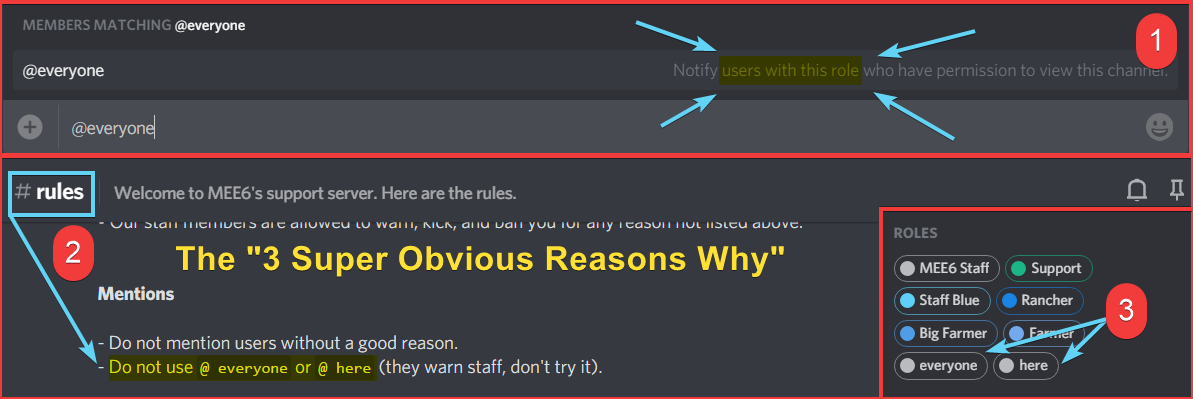
what about you don't ping all those members?
https://i.imgur.com/tbelvp2.png
https://cdn.discordapp.com/attachments/302245580673908740/569445165878476811/unknown.png
 onyx widget

You cant actually ping everyone
its a role, which will warn you when you attempt to ping everyone
snow axle
But it make a ghost ping not ?
onyx widget
Yeah for the user who has the everyone role, but it wont actually ping everyone in this server
 naive crystal
when i go to mee6.xyz and i modify the youtube thing i cant find the discord text channel i want... Can anyone help?
anyone?
wooden mountain
can you try to logout of both MEE6 and discordapp.com in your browser pls
then try again
naive crystal
thx it worked
dire yarrowBOT
:nauseated_face: CopyPasta :nauseated_face:
SIX SIMPLE REASONS WHY WHAT YOU POSTED IS FAKE (and why I'm now roasting you)
Reason 1: Discord doesn't reveal your IP address; This isn't Skype, they keep you safe
Reason 2: If they did reveal your IP address, you wouldn't get it from a friend request; Because that is dumb
Reason 3: If they can delete 453 account in 60 seconds, 1 account is childs play
Reason 4: If there was an issue, they just normally send out a tweet or a reddit post. It's easier then word of mouth
Reason 5: It has an @everyone in it. 95% of large servers don't allow you to do @everyone, so it sends out the wrong message
Reason 6: It's pretty much similar to this: https://www.hoax-slayer.net/christopher-jessica-davies-hacker-hoax-warning/
https://cdn.mee6.xyz/s/copypasta.png
https://cdn.mee6.xyz/s/copypasta2.png?1
https://cdn.mee6.xyz/s/copypasta3.png

Message warns not to accept a friend request from Christopher Davies or Jessica Davies because they are hackers who can gain access to your computer.


 clement_quiv#6848 has been warned
Reason: Pasting copypasta | Talking in the wrong channel | Only use #〉chat or #〉commands for talking purposes and please, do not share fake news
 cerulean ridge
hello
dire yarrowBOT
 jpshi#7061 has been warned
Reason: Posted an invite
deft haven
Have a bug report or need help?
 zinc saffron
I finally managed to log into my account on Mee6's website after all these tries.
wooden mountain
so the update we just pushed worked? awesome
zinc saffron
👌
buoyant moon
i can not play songs from vimeo...
buoyant moon
how to turn off that mee6bot lvl up spam?
wooden mountain
use !dashboard in your server => click link => click levels => either disable the whole plugin using the button on top, OR disable the level up message
@buoyant moon
buoyant moon
@wooden mountain thanks 😄
buoyant moon
why i cant clear more ?
wooden mountain
(2weeks)
buoyant moon
oh ok
wooden mountain
can't delete them fast
we can slow technicly but we don't bother as it spams discord to much
tough nimbus
How do I get Mee6 to post the welcome in the drop zone I set up. They posted it in the lounge area. Posted the person leaving in the drop zone.🤦🏾♀️
dire yarrowBOT
You can access my dashboard at https://mee6.xyz/dashboard, and login with your Discord Account.
or you can use !dashboard in your server for a direct link
tough nimbus
Maybe that’s it. I thought I switched it, but probably forgot. Thanks!
👌🏾 TY! I’d forgotten to switch it. Lol.
buoyant moon
I cant mute people
dire yarrowBOT
Something went wrong in MEE6 land!
If this happens when using:
Custom commands:
‣ Bot tries to give the role that higher than his own. To fix that, move the bot's role above the role he tries to give.
‣ Missing Manage roles permission. Go to Server Settings -> Roles -> Bot role -> Manage Roles permission
Moderator commands:
‣ Muted role is above Mee6's role. Bot can't give roles that higher than his own. Move it down.
‣ Missing Manage roles permission. Go to Server Settings -> Roles -> Bot role -> Manage Roles permission
‣ Missing Kick or Ban Members permissions. Go to Server Settings -> Roles -> Bot role -> Kick Members and Ban Members permissions
‣ For ban or kick, MEE6 role needs to be higher than the role of the user. Move it up.
buoyant moon
@buoyant moon ^^
wooden mountain
@buoyant moon "cant' mute" can also be permission error..... pls check what the actuall problem is before giving potentially wrong information that can confuse a user
 lost marlin
I have 1 main problem with mee6. I have a couple youtube channels added to mee6 yt plugin and never get notifications on the channel i have it set to when they upload a vid
wooden mountain
you know how yt doesn't always send notification to your subscribers?
same issue
if yt doesn't notify us, then we can't forward it
lost marlin
Oh
buoyant moon
So..I invited MEE6 to my sever..and when I try my comand I Put it says: Something went wrong in MEE6 land! Contact our support team for instructions if this keeps happening.
dire yarrowBOT
Something went wrong in MEE6 land!
If this happens when using:
Custom commands:
‣ Bot tries to give the role that higher than his own. To fix that, move the bot's role above the role he tries to give.
‣ Missing Manage roles permission. Go to Server Settings -> Roles -> Bot role -> Manage Roles permission
Moderator commands:
‣ Muted role is above Mee6's role. Bot can't give roles that higher than his own. Move it down.
‣ Missing Manage roles permission. Go to Server Settings -> Roles -> Bot role -> Manage Roles permission
‣ Missing Kick or Ban Members permissions. Go to Server Settings -> Roles -> Bot role -> Kick Members and Ban Members permissions
‣ For ban or kick, MEE6 role needs to be higher than the role of the user. Move it up.
 wild stratus
coarse steppe
wild stratus
coarse steppe
I dont know if i should call this a bug but.. on #┃upvote-suggestions instead of typing too, they typed to
faint bear
Just a spelling mistake....
 bright owl
when I put several timers the timers remain the same
wooden mountain
what do you mean?
bright owl
I can not put several timers...
wooden mountain
refresh the site and try again
 minor basalt
when adding a livestream with !add command and then playing it doesnt work
minor basalt
huh?
minor basalt
yes
 ocean oracle
всем привет
 lone geyser
hello
 stark raven
Does it say an error message?
dire yarrowBOT
Something went wrong in MEE6 land!
If this happens when using:
Custom commands:
‣ Bot tries to give the role that higher than his own. To fix that, move the bot's role above the role he tries to give.
‣ Missing Manage roles permission. Go to Server Settings -> Roles -> Bot role -> Manage Roles permission
Moderator commands:
‣ Muted role is above Mee6's role. Bot can't give roles that higher than his own. Move it down.
‣ Missing Manage roles permission. Go to Server Settings -> Roles -> Bot role -> Manage Roles permission
‣ Missing Kick or Ban Members permissions. Go to Server Settings -> Roles -> Bot role -> Kick Members and Ban Members permissions
‣ For ban or kick, MEE6 role needs to be higher than the role of the user. Move it up.
stark raven
check your role hierarchy
 full vault
!join
dire yarrowBOT
 PolsatFun2007PL, this command is disabled in this channel
PolsatFun2007PL, this command is disabled in this channel
stark raven
try in #〉commands
buoyant moon
y is there such a large blank space
faint dome
yup then app bug confirmed 
 lapis nymph
It happened to me too also with other bots (only with mobile versions)
knotty rose
Discord bug, nothing we can do
 fallow crystal
So I made a command where if you type "!nsfw" it gives you the nsfw role in my server. One of my members who didnt have the role typed the command and mee6 said something went wrong and contact support
dire yarrowBOT
Something went wrong in MEE6 land!
If this happens when using:
Custom commands:
‣ Bot tries to give the role that higher than his own. To fix that, move the bot's role above the role he tries to give.
‣ Missing Manage roles permission. Go to Server Settings -> Roles -> Bot role -> Manage Roles permission
Moderator commands:
‣ Muted role is above Mee6's role. Bot can't give roles that higher than his own. Move it down.
‣ Missing Manage roles permission. Go to Server Settings -> Roles -> Bot role -> Manage Roles permission
‣ Missing Kick or Ban Members permissions. Go to Server Settings -> Roles -> Bot role -> Kick Members and Ban Members permissions
‣ For ban or kick, MEE6 role needs to be higher than the role of the user. Move it up.
limber knoll
@fallow crystal☝
fallow crystal
o thanks
limber knoll
most likely mee6's role is below the role given on the server
fallow crystal
it worked, thanks a lot
limber knoll
np
 still cape
It doesn't shows me the other server who I'm admin in it
This is the server
My rule have all promessions
 bitter owl
@still cape try logging out from both discord for web and MEE6 please
dire yarrowBOT
MEE6 says I have no servers, but that's not true...
Well, that can be caused by:
‣ You don't own any servers
‣ You don't have Administrator permissions or a bot master role on any server you're on
‣ You're logged on with a wrong account (the most common problem)
Third one can be fixed by following these steps:
1. Logout from Discord in your browser (not installed client or mobile app)
1.1 Open https://discordapp.com/app in your browser
1.2 Click on \⚙ icon (User Settings)
1.3 Scroll down, click Log Out and confirm action
2. Logout from MEE6 website
2.1 Open https://mee6.xyz in the same browser
2.2 Click on avatar icon in upper right corner
2.3 Click Logout
3. Login using correct account
3.1 Open https://mee6.xyz and click Login button in upper right corner
3.2 In new window login to Discord. After that you will be redirected back to MEE6 website
3.3 That's all! Now you're using correct account and MEE6 website lists servers where you can modify his settings
P.S. If you're on mobile and some elements are not visible, enable Desktop site mode or switch screen to Landscape (vertical) mode.
bitter owl
☝️
still cape
Ok , I'll try
 twilit pine
<@&193123929701875712> Hi in a server the personalized comand don't work whi?
twilit pine
Im spanish I don't know what does mean "wym"
twilit pine
Yes
buoyant moon
what does it say?
twilit pine
SLEEP6 Something went wrong in MEE6 land! Contact our support team for instructions if this keeps happening.
dire yarrowBOT
Something went wrong in MEE6 land!
If this happens when using:
Custom commands:
‣ Bot tries to give the role that higher than his own. To fix that, move the bot's role above the role he tries to give.
‣ Missing Manage roles permission. Go to Server Settings -> Roles -> Bot role -> Manage Roles permission
Moderator commands:
‣ Muted role is above Mee6's role. Bot can't give roles that higher than his own. Move it down.
‣ Missing Manage roles permission. Go to Server Settings -> Roles -> Bot role -> Manage Roles permission
‣ Missing Kick or Ban Members permissions. Go to Server Settings -> Roles -> Bot role -> Kick Members and Ban Members permissions
‣ For ban or kick, MEE6 role needs to be higher than the role of the user. Move it up.
buoyant moon
try that
twilit pine
Thanks
 oblique ivy
why can't I authorize the bot on my server?
dire yarrowBOT
It appears that you may be on the wrong account, or something went wrong since the time you logged into my website.
-Please navigate to https://discordapp.com/login and select the gear :gear: in the bottom left, then press Logout.
-After that, please navigate to https://mee6.xyz/dashboard to disconnect from my website. Click on your profile picture and press Logout
-Once finished, select "Add to Discord" again, and follow the instructions to access my dashboard again.
https://cdn.mee6.xyz/s/logout.png
oblique ivy
Thanks
 hushed spruce
when I try to add a payment metod the page refresh and give me back the same menu asking to
nvm now its working ?????
wooden mountain
good enough
 jagged prawn
Custom commands doesn't work
dire yarrowBOT
Something went wrong in MEE6 land!
If this happens when using:
Custom commands:
‣ Bot tries to give the role that higher than his own. To fix that, move the bot's role above the role he tries to give.
‣ Missing Manage roles permission. Go to Server Settings -> Roles -> Bot role -> Manage Roles permission
Moderator commands:
‣ Muted role is above Mee6's role. Bot can't give roles that higher than his own. Move it down.
‣ Missing Manage roles permission. Go to Server Settings -> Roles -> Bot role -> Manage Roles permission
‣ Missing Kick or Ban Members permissions. Go to Server Settings -> Roles -> Bot role -> Kick Members and Ban Members permissions
‣ For ban or kick, MEE6 role needs to be higher than the role of the user. Move it up.
jagged prawn
Thank you
buoyant moon
hi
knotty rose
Any bugs to report?
 dire yarrowBOT
Using ID
To use channel tags, emojis, role tags and user mentions in custom commands, level up messages and the welcome plugin use the following formats:

 fresh notch
Ok
 burnt girder
The bot skips the first song on the queue and goes onto the 2nd song on the queue whenever there’s 2 songs on the queue
Did you get that?
faint bear
Known @burnt girder
burnt girder
not okay
 ivory blaze
Using ad blocker or VPN?
 edgy gulch
It's working when I try this for a different server
But it doesnt working this server (this server: my friends server)
I have manager role
ivory blaze
Is your role listed as bot master role?
edgy gulch
I have this authority in my role
I'm sorry, ı forget change the language
Wait a minute
ivory blaze
Is that admin?
ivory blaze
You should be able to access that dashboard
ivory blaze
you mean custom commands?
edgy gulch
Yeah
ivory blaze
one moment, internet is being slow here
ivory blaze
Yes, I've let the devs know about the problem
edgy gulch
thx
ivory blaze
@edgy gulch you should be able to access it now
edgy gulch
Oh, thank you so much ❤
ivory blaze
you're welcome 
 proper stratus
ahh hi i need help with a soft ware problem
dire yarrowBOT
 caillou#2616 has been warned
Reason: Bad word usage
proper stratus
thats my software problem
 lime shard
yea
buoyant moon
Well i have an thing that i get this when i am on my main account
but it doesnt show up any servers.
lime shard
add your servers
dire yarrowBOT
MEE6 says I have no servers, but that's not true...
Well, that can be caused by:
‣ You don't own any servers
‣ You don't have Administrator permissions or a bot master role on any server you're on
‣ You're logged on with a wrong account (the most common problem)
Third one can be fixed by following these steps:
1. Logout from Discord in your browser (not installed client or mobile app)
1.1 Open https://discordapp.com/app in your browser
1.2 Click on \⚙ icon (User Settings)
1.3 Scroll down, click Log Out and confirm action
2. Logout from MEE6 website
2.1 Open https://mee6.xyz in the same browser
2.2 Click on avatar icon in upper right corner
2.3 Click Logout
3. Login using correct account
3.1 Open https://mee6.xyz and click Login button in upper right corner
3.2 In new window login to Discord. After that you will be redirected back to MEE6 website
3.3 That's all! Now you're using correct account and MEE6 website lists servers where you can modify his settings
P.S. If you're on mobile and some elements are not visible, enable Desktop site mode or switch screen to Landscape (vertical) mode.
buoyant moon
Thanks
lime shard
thats ok
lime shard
lol
proper stratus
ok
buoyant moon
lmao the problem is that i didnt have administator perms but ty
buoyant moon
i don't sure if its bug or something but i will report that...
in the last few 2-3 weeks the dashboard page taking a lot of time until its up...
i saw this issue for more then 5 peeps...
its on https://mee6.xyz/dashboard
its taking some times up to 25s and its annoying
wooden mountain
i just tried as you...... are you really complaining that it takes a while? it loads faster for you then for me and you got way more servers to manage then i have
 karmic elk
!tempmute @karmic elk
I just read that there was a chanel specific for bugs :B
Im sorry before to tell it in support :B
The bot does not recognize the comand.
Is a gloval comand, like ban or mute.
dire yarrowBOT
!mute @CoolGuysNameHere You have been too cool.
!tempmute @SecondLameGuyHere 3h Too lame.
- I must have "Manage Channels", and "Manage Roles" for my permissions.
- I must have a role above the "Muted" role I create.
If there are problems, please check that the Muted Role does not have send messages globally or per channel.
Durations for tempmute command.
50m50 minutes.50h50 hours.50d50 days.
you can NOT mute for less then a minute
 merry sentinel
!rank
dire yarrowBOT
Ares God of War, this command is disabled in this channel
deft haven
Try in #〉commands
knotty rose
MEE6 is currently down for this server. Will be locked until he comes back on.
 digital gate
if you delete the message and warn the user for saying a bad word it shows the bad word in the warning
digital gate
but everybody can still see it
faint bear
you are supposed to make the mod log channel private, thats just for your staff to see
otherwise disable it
dire yarrowBOT
You can access my dashboard at https://mee6.xyz/dashboard, and login with your Discord Account.
or you can use !dashboard in your server for a direct link
digital gate
ohhh ok
 midnight ocean
@dire yarrow help
faint dome
@midnight ocean what’s your problem?
midnight ocean
I am not able to run mee6 bot in my server
bitter owl
@midnight ocean Is it offline for you?
midnight ocean
No it's showing online
bitter owl
So it's just not working right?
midnight ocean
Ya
bitter owl
Because our system is experiencing a bit of outage
But try checking the folllowing topics please
dire yarrowBOT
Bot doesn't react on commands!!!
That usually happens because:
- Plugin is disabled -> Go to https://mee6.xyz/dashboard and enable the plugin with needed command!
- Permission is missing -> Ask your server's owner to go to https://mee6.xyz/dashboard -> Settings -> Bot master -> Add your role
- Command is disabled -> Go to https://mee6.xyz/dashboard, open plugin settings and enable the command!
- Do not reply to command option is enabled -> Go to https://mee6.xyz/dashboard, open plugin settings, click [Edit] button, scroll down and disable the option!-
You're using command in wrong way! -> Moderator commands like !mute !kick !ban etc. need the user to be mentioned. Example: !kick @user annoying
bitter owl
Anytime
buoyant moon
Hello
faint bear
Bug to report @buoyant moon ?
faint dome
Not a reason to spam this channel with useless messages
 drifting talon
dire yarrowBOT
drifting talon
dire yarrowBOT
Something went wrong in MEE6 land!
If this happens when using:
Custom commands:
‣ Bot tries to give the role that higher than his own. To fix that, move the bot's role above the role he tries to give.
‣ Missing Manage roles permission. Go to Server Settings -> Roles -> Bot role -> Manage Roles permission
Moderator commands:
‣ Muted role is above Mee6's role. Bot can't give roles that higher than his own. Move it down.
‣ Missing Manage roles permission. Go to Server Settings -> Roles -> Bot role -> Manage Roles permission
‣ Missing Kick or Ban Members permissions. Go to Server Settings -> Roles -> Bot role -> Kick Members and Ban Members permissions
‣ For ban or kick, MEE6 role needs to be higher than the role of the user. Move it up.
faint bear
Check this ^
drifting talon
Ok
bitter owl
@crude gulch as
Please use #〉commands
 pure crescent
Je me suis fait bannir de plusieurs serveurs (3) sans aucune raison valable par Mee6 et sa raison était <<Ban~~~>> pouvez-vous régler de problème Merci
wooden mountain
@ripe rivet ^^
buoyant moon
When i active the slowmode with mee6 and after use !slowmode off the user can't write the same the 5 minutes after...
When answer me pls ping me
wooden mountain
@buoyant moon blame discord
we use the slowmode integrated in discord, wich can be weird like that
buoyant moon
So it's a discord error?
wooden mountain
kinda
 frigid turret
MEE6 won't let the YouTube function work. I set the perms right so it should be working
dire yarrowBOT
in order for Mee6 to find your YouTube channel, you need:
- 3 or more videos
- your the most viewed video needs to have sufficient views
- it takes some time (up to couple days) for YouTube to index your channel
only once YouTube has indexed your channel, we will be able to find it.
frigid turret
Thanks
 fringe rivet
MEE6 isn’t working apparently in a server I’m in. I continue to do the command !rank, and it won’t work. Following that bug report, it shows on our server (that I’m in) MEE6 is “offline”.
 burnt hazel
Fixed ^
 hoary axle
The time intervals on the timer is slightly off by a variable of 8 seconds to an hour at random.  And the profile pictures on the "!rank" command sometimes does not show.
faint dome
For the timer it shouldn’t be more than a few minutes (legit when you have thousands of timers to send at the same time). More probably means that your channel wasn’t active
And about the pfp in rank card... usually a discord problem. We’ll try to fix it later, but for now the best way to fix it is to change your pfp (even with the same image) so discord refresh it
hoary axle
Ok, thank you!
faint dome
 you’re welcome
 mental plume
onyx widget
mental plume
onyx widget
State it and stop spamming
hoary axle
Oh no, Instead of saying the user's name, it says a lot of numerals. Can I fix this?
hoary axle
I did that
dire yarrowBOT
A full list of variables you can use in Mee6 commands and other functions can be found here: https://github.com/Mee6/Mee6-documentation/blob/master/docs/commands_variables.md
There's also random variables that can be used:
- {random:x:y} picks a random number between
xandy. Values must be pre-entered. Example: {random:1:10} would pick a random number between 1 and 10 - {random} picks a random number between 0 and 10
hoary axle
Alright.
faint dome
Because you can’t mention in a code block (sorry maybe too late lol)
dire yarrowBOT
Something went wrong in MEE6 land!
If this happens when using:
Custom commands:
‣ Bot tries to give the role that higher than his own. To fix that, move the bot's role above the role he tries to give.
‣ Missing Manage roles permission. Go to Server Settings -> Roles -> Bot role -> Manage Roles permission
Moderator commands:
‣ Muted role is above Mee6's role. Bot can't give roles that higher than his own. Move it down.
‣ Missing Manage roles permission. Go to Server Settings -> Roles -> Bot role -> Manage Roles permission
‣ Missing Kick or Ban Members permissions. Go to Server Settings -> Roles -> Bot role -> Kick Members and Ban Members permissions
‣ For ban or kick, MEE6 role needs to be higher than the role of the user. Move it up.
 acoustic pivot
thanks
 wispy pulsar
hi
wooden mountain
MEE6 offline
because of a issue with most bots on discord, MEE6 is offline
do NOT DM staff members, you will be able to talk again once MEE6 is back online IN ALL SERVERS
 tardy plinth
MEE6 ofline
In all servers too
jade orchid
Not all servers. Just a few servers but it is being fixed
tardy plinth
Oh. Ty
 tough ermine
Mee6 is offline for me to
faint dome
READ ABOVE PLS
tough ermine
Just have lol sorry
faint dome

tardy plinth
They know why the failures of yesterday and today?
faint dome
today is because of a discord outage which affect a lot of big bots
dyno, mee6, snailbot and more
tardy plinth

 ancient crypt
MEE6 shows that its offline in my server but not in any other servers i'm in. The dashboard for my server is stuck on the loading screen as well.
bitter owl
@ancient crypt discord outage is doing this
tardy plinth
Thank you already back
 fading sinew
!info
 maiden nacelle
So that’s why my mee6 is not working thx
onyx widget
Hey there! The staffs are aware and have contacted the devs about this. Please be patient while we sort things out 
buoyant moon
when is it going to be up again??
limber knoll
@buoyant moon should be up
 full jewel
Hi, I’m coming to you to set up the timer. I made a message to repeat every four hours but the bot, do not transmit as program. I made a second message to repeat every 24 hours, idem. How to solve this problem? Thank you
faint dome
Probably because your channel isn’t active
Mee6 won’t post a timer in a channel if the last message in this channel isn’t a user message (not a timer)
full jewel
Hi, I’m coming to you to set up the timer. I made a message to repeat every four hours but the bot, do not transmit as program. I made a second message to repeat every 24 hours, idem. How to solve this problem? Thank you
oups sorry
faint dome
full jewel
Mee6 is programmed to send a message every 4 hours but it does so with intervals of 5 hours, 9 hours and 10 hours. My channel is active
faint dome
Then... delete the timer and the webhook. And create it again
It may have broken with the recent discord issues
full jewel
ok thank you, i do it
buoyant moon
my mee6 is gone what should i do!!!
 mystic kiln
It says some went wrong in the Mee6 Land
dire yarrowBOT
Something went wrong in MEE6 land!
If this happens when using:
Custom commands:
‣ Bot tries to give the role that higher than his own. To fix that, move the bot's role above the role he tries to give.
‣ Missing Manage roles permission. Go to Server Settings -> Roles -> Bot role -> Manage Roles permission
Moderator commands:
‣ Muted role is above Mee6's role. Bot can't give roles that higher than his own. Move it down.
‣ Missing Manage roles permission. Go to Server Settings -> Roles -> Bot role -> Manage Roles permission
‣ Missing Kick or Ban Members permissions. Go to Server Settings -> Roles -> Bot role -> Kick Members and Ban Members permissions
‣ For ban or kick, MEE6 role needs to be higher than the role of the user. Move it up.
mystic kiln
Yep but I tried them and it didnt work
wooden mountain
can you DM me a invite pls
mystic kiln
Ok I did
sand hound
@tardy plinth
faint dome
@sand hound what’s your problem with mee6?
sand hound
I have fix it :/
 novel stump
merry sentinel
novel stump
merry sentinel
lol
buoyant moon
Why cant I add mee6 to my server?
limber knoll
@buoyant moon chrome?
buoyant moon
i have it fixed had to clear cache and cookies
 spare pond
hI
 north heath
<@&193123929701875712> i need some support. you see, I made a custom conman and it is not working like It should.
faint dome
What's the exact problem?
north heath
so i tried to give a user a warning role and remove his co owner role. but it didnt work. I tried many times
faint dome
You can't target members with a custom command for now. But the idea is in #┃upvote-suggestions and may be added later
Atm custom commands can only give or remove roles to the user who types the command
buoyant moon
hi i saw an bug i was trying to invite the bot but it won't work from my server but other server works. can you please help fix this bug
buoyant moon
why i cant use commands?
 snow otter
I don’t know
 pearl aspen
@buoyant moon Do you have admin perm in the server what you are trying to call MEE6 ?
@buoyant moon Explain more please
 vagrant scroll
Hello
dire yarrowBOT
 G3B=Glory3Buldeur#5646 has been warned
Reason: Posted an invite
 upbeat jay
Hey there! I'm having a small issue with MEE6.
I've set up a command that is specific to people in my server who don't have a role yet.
The command is !i-agree, which is them agreeing to the rules of the server.
After they use this command, MEE6 is supposed to assign them the role of "New Member," allowing them to access the other channels. But, it doesn't seem to be working. I checked the command on mee6.xyz and everything seems to be right...
Any advice?
merry sentinel
<@&193123929701875712>
north heath
duhhh
upbeat jay
Ahh, my bad.
limber knoll
@merry sentinel was answered in another channel
 naive crag
Hi, the MEE6 commands are not working meanwhile the music quiz.
 unique crown
holaaaa
pearl aspen
Hola ? necesitas de ayuda ?
unique crown
si
pearl aspen
Vaya adelante
unique crown
como pongo un mee6 en mi server ?
dire yarrowBOT
Lets spice this up a bit! https://discord.gg/mee6
If you want to invite the bot instead... https://mee6.xyz/dashboard
pearl aspen
El segundo link
Usted vinculará su cuenta de discord y elija el servidor que desea
Usted necesita tener permiso de administrador para llamar al MEE6
unique crown
te puedes unir a mi server?
pearl aspen
Llámame en privado
unique crown
ok
 drowsy veldt
que quieren
 storm garnet
Uhh, my servers levels aren't working
Using !rank and !levels doesn't work
jade orchid
are u the owner
storm garnet
No I'm an administrator though
jade orchid
ok so go to the dashboard
and go to the levels plugin
firstly make sure its enabled
Secondly make sure u arent typing these commands in a banned channel
to check that u scroll down until you see the command
click edit and banned channels
and also check allowed roles/ banned roles
storm garnet
The bby is the most important part
buoyant moon

 gentle sinew
Hello, I am having a problem, I do not know if it is a bug but the auto mederator doesn't work for me.
dire yarrowBOT
Hey ! MEE6 won't sanction the following people:
• The Owner of the server;
• People with Administrator permission;
• People with Bot Master permission;
• And the role(s) you set as moderator on the dashboard.
Note: MEE6 think moderators are responsible people, like the police . So he doesn't want to blame your police 
bitter owl
☝️
gentle sinew
?
bitter owl
Auto moderator will not work on you
Since you have power (permission)
Ask an user without any grants to test auto moderator please
gentle sinew
But it's on my server
bitter owl
Yes, that's not what I am talking about
You said your MEE6 is not reacting when it supposed to trigger auto moderator right?
gentle sinew
It worked 1 time after nothing.
bitter owl
That might means things: Or you're testing using an account with a moderator role/admin or MEE6 doesn't have the tool
Which means or it's not activated in https://mee6.xyz/dashboard or MEE6 no longer have permission to read/manage messages/etc
gentle sinew
And I use an account without moderator role
bitter owl
Again, read everything I provided to you and compare to your situation
Go check https://mee6.xyz/dashboard and check server settings please
gentle sinew
Can I send screens here?
bitter owl
Sure
bitter owl
Which one are you trying to trigger?
faint dome
Repeated text isn’t spam, but means tkt same text in a single message
dire yarrowBOT
Duplicated Text
• You can't be owner/bot master/admin to test it.
• You must ask normal users to test this feature.
This is a duplicated text:
text text text text text text text text text text text text text text text text text text text text text text text text text text text text text text text text text text text text text text text text text text
Oh thx and the spam trigger?
faint dome
What do you mean?
gentle sinew
How it works? I already had a case of spam but the Bot did not react.
faint dome
Again, except slowmode, we don’t have spammed messages protection (spam means the same message over and over, repeated/duplicated text means the same text in a single message)
gentle sinew
Yes, the Bot didn't react with a repeated message.
faint dome
screenshot please
buoyant moon
@faint dome my server members saying mee6 isnt working
 mortal oxide
Spammed caps = THIS IS A MESSAGES WITH CAPS (this would trigger Spammed Caps if wasn't a mod here).
Moreover Allowed role: @ everyone
@gentle sinew
dire yarrowBOT
Something went wrong in MEE6 land!
If this happens when using:
Custom commands:
‣ Bot tries to give the role that higher than his own. To fix that, move the bot's role above the role he tries to give.
‣ Missing Manage roles permission. Go to Server Settings -> Roles -> Bot role -> Manage Roles permission
Moderator commands:
‣ Muted role is above Mee6's role. Bot can't give roles that higher than his own. Move it down.
‣ Missing Manage roles permission. Go to Server Settings -> Roles -> Bot role -> Manage Roles permission
‣ Missing Kick or Ban Members permissions. Go to Server Settings -> Roles -> Bot role -> Kick Members and Ban Members permissions
‣ For ban or kick, MEE6 role needs to be higher than the role of the user. Move it up.
faint dome
@buoyant moon
buoyant moon
hey usually checking their rank with mee6
now it isnt working
we were usually using it so it isnt the problem
faint dome
What does MEE6 say when you use it?
buoyant moon
dire yarrowBOT
Getting your server ID
go to your server and use !dashboard then copy this link and give to staff.
Or if that didn't work: open Server Settings in your Discord Server. Select Widget and press Copy ID next to Server ID.
You can also use Developer Mode as an alternative method.
mortal oxide
@gentle sinew also, MEE6 doesn't have antispam feature yet.
You can use Slowmode to avoid spam and Duplicated text.
One more thing, please, remove everyone Allowed role, else, everyone is allowed to bypass that moderator feature.
dire yarrowBOT
 RoleModel#9022 has been warned
Reason: Posted an invite
buoyant moon
oh
faint dome
hopefully I said name/id, not invite
buoyant moon
ill dm u my server link and try it in my server
Happy Together (해피투게더)
cant copy id
u cant search name in server nane searching system
faint dome
ok please logout from https://discordapp.com, then https://mee6.xyz/logout

Manage your Discord server with leveling, moderation, Twitch, Youtube and Reddit notifications.
dire yarrowBOT
It appears that you may be on the wrong account, or something went wrong since the time you logged into my website.
-Please navigate to https://discordapp.com/login and select the gear :gear: in the bottom left, then press Logout.
-After that, please navigate to https://mee6.xyz/logout to disconnect from my website.
-Once finished, select "Add to Discord" again, and follow the instructions to access my dashboard again.
https://cdn.mee6.xyz/s/logout.png
faint dome
same. But you need to use the same browser as MEE6 website, not the app
faint dome
nice
buoyant moon
and what now
faint dome
now you can login back in MEE6 website x)
faint dome
wait... are you the owner of the server, or not?
basically the error i found was that the owner never logged in our dashboard, so MEE6 couldn't find them
faint dome
uww
buoyant moon
hopefully
buoyant moon
@faint domedid he log out and login?
faint dome
looks like nope. I'm still waiting an answer from devs 👀
buoyant moon

 gaunt helm
Help? I set up a MEE6 to give people roles when they type !blank into a channel but it just keeps saying error instead of giving them that role. I'm wondering if its a certain setting in permissions that i'm messing up that won't let it happen.
dire yarrowBOT
Something went wrong in MEE6 land!
If this happens when using:
Custom commands:
‣ Bot tries to give the role that higher than his own. To fix that, move the bot's role above the role he tries to give.
‣ Missing Manage roles permission. Go to Server Settings -> Roles -> Bot role -> Manage Roles permission
Moderator commands:
‣ Muted role is above Mee6's role. Bot can't give roles that higher than his own. Move it down.
‣ Missing Manage roles permission. Go to Server Settings -> Roles -> Bot role -> Manage Roles permission
‣ Missing Kick or Ban Members permissions. Go to Server Settings -> Roles -> Bot role -> Kick Members and Ban Members permissions
‣ For ban or kick, MEE6 role needs to be higher than the role of the user. Move it up.
gaunt helm
Works now
 empty plume
My mee6 site is not loading when I m trying to check !levels !dashboard etc
No net issues so if u can solve or give me suggestion how to solve this problem then please tell me TY.
buoyant moon
Reset it?
 tender citrus
What do i do if !clear is not working?
<@&193123929701875712> what do i do if !clear is not working?
Please help
@dire yarrow what do i do if "!clear" is not working?
please help.
dire yarrowBOT
 7ofRedSpadesYT#2112 has been warned
Reason: Bad word usage
tender citrus
fu k
this is to get attention
<@&193123929701875712> what do i do if !clear is not working?
<@&193123929701875712> what do i do if !clear is not working?
<@&193123929701875712> what do i do if !clear is not working?
<@&193123929701875712> what do i do if !clear is not working?
empty plume
@buoyant moon its not working that's why I m here
Facing this problem with all servers
buoyant moon
@empty plume don’t ping the whole damn server god damn it
empty plume
😒 I pinged u not all
empty plume
OK but this channel is not for talking so if u can help me then suggest or else leave it
dire yarrowBOT
 Dummy#0000 has been banned for 4 weeks, 2 days
Reason: Spam Support mention, bad words bypass
Banned until
·
faint dome
@empty plume (pls don’t even try to mention everyone) what browser are you using?
empty plume
Chrome & discord both tried
Also clicked on his name & his name is everyone that's why its seems like I pinged all
faint dome
Well you can forgot discord built in browser lol, fully bugged
For chrome, do you have any adblocker? Or vpn?
empty plume
No
faint dome
Hmmm
Can you try to clear your cache please?
You can choose to delete existing cookies, allow or block all cookies, and set preferences for certain websites.
What cookies are
Cookies are files created by websites you visit. They make your onli
faint dome
Weird
Just send it here, if someone else need to help you, it’ll be easier
empty plume
OK
faint dome
Next step is to open the chrome console and check for errors
empty plume
faint dome
Ewww
Well try to open the console, we’ll see if we can find something there
Probably a proxy issue but I’m not sure
buoyant moon
Hi, i have to report a Bug.I have the problem at costum commands.I sad he should remouve an role and give a new one.But than he sends that:
Something went wrong in MEE6 land! Contact our support team for instructions if this keeps happening.
dire yarrowBOT
Something went wrong in MEE6 land!
If this happens when using:
Custom commands:
‣ Bot tries to give the role that higher than his own. To fix that, move the bot's role above the role he tries to give.
‣ Missing Manage roles permission. Go to Server Settings -> Roles -> Bot role -> Manage Roles permission
Moderator commands:
‣ Muted role is above Mee6's role. Bot can't give roles that higher than his own. Move it down.
‣ Missing Manage roles permission. Go to Server Settings -> Roles -> Bot role -> Manage Roles permission
‣ Missing Kick or Ban Members permissions. Go to Server Settings -> Roles -> Bot role -> Kick Members and Ban Members permissions
‣ For ban or kick, MEE6 role needs to be higher than the role of the user. Move it up.
onyx widget
read above please
buoyant moon
my bad.yeah that helps thx
onyx widget
np
buoyant moon
Hi, I am here to report a bug. Everytime I try to do the reddit and youtube thing with MEE6, the dashboard would just crash...What can I do?
 plush lance
Лохи
 idle sphinx
@faint dome désolé de te nommer mais je dois me dépêcher car j'ai accès au bot du serveur d'un pote et je veut lui faire une farce mais est ce que il peut voir que c'est moi qui est fait des modifs dans son bot ?
 idle sphinx
oh cool merci bcp
et est ce que tu sais si par hasard si tu sais si on peut supprimer les logs d'un serv ?
idle sphinx
ok et est ce que si on reset le niveau d'un joueur les gens peuvent le voir ?
faint dome
ils verront que ça a été reset, mais pas par qui. Par contre c'est irrémédiable, aucun moyen de revenir en arrière
idle sphinx
ok c super ça
 dense fox
Does that command give a role?
buoyant moon
yes
dire yarrowBOT
- I must have a role higher than the role you are trying to give in your Discord Server Settings.
https://cdn.mee6.xyz/s/give_roles.png
 buoyant moon
ah ok
 smoky stream
<@&193123929701875712> one of my commands gives me the something is wrong in mee6 land, what can i do?
dire yarrowBOT
Something went wrong in MEE6 land!
If this happens when using:
Custom commands:
‣ Bot tries to give the role that higher than his own. To fix that, move the bot's role above the role he tries to give.
‣ Missing Manage roles permission. Go to Server Settings -> Roles -> Bot role -> Manage Roles permission
Moderator commands:
‣ Muted role is above Mee6's role. Bot can't give roles that higher than his own. Move it down.
‣ Missing Manage roles permission. Go to Server Settings -> Roles -> Bot role -> Manage Roles permission
‣ Missing Kick or Ban Members permissions. Go to Server Settings -> Roles -> Bot role -> Kick Members and Ban Members permissions
‣ For ban or kick, MEE6 role needs to be higher than the role of the user. Move it up.
buoyant moon
@smoky stream ^^
smoky stream
thx
buoyant moon
np!
faint dome
YouTube api rate limit. Again. Nothing we can do
buoyant moon
Ohwww
dire yarrowBOT
 OOFRooster#3901 has been warned
Reason: spam image
 wicked fulcrum
i dont know if this is a bug but when you ban someone it says Dummy#0000 has been banned but when you enable logs you can see that he is banned
so it works
it just says Dummy#0001 is banned
faint dome
Means that this user wasn’t in your server anymore, so mee6 is too lazy to find his name (our devs may change this later, but it’s not a priority)
 shell arrow
are the mee6 servers down
faint dome
No
 solemn cove
Hey so I have made some custom commands which gives new members roles but MEE6 responds with "Something went wrong in MEE6 land! Contact our support team for instructions if this keeps happening."
 pure obsidian
server settings => roles and make sure MEE6's role is above the role he is trying to give
solemn cove
it has become a problem for new members since MEE6 is a big thing on the server.
ah okay
thank you
 nova agate
What is the proper method to remove mee6? Kicking it still leaves behind the role.
wooden mountain
stupid discord update
invite the bot and UNCHECK all permissions
then kick him again
nova agate
Really? xD
I'll try that now.
wooden mountain
inviting a bot will all permissions unchecked, even if the bot is already in the server, will remove the role
 mortal agate
The music of mee6 is incredible
dense fox
Appreciate it but this is bug reports channel
dense fox
No worries
buoyant moon
<@&193123929701875712> Im Trying to add mee6 and it saying that it is added but it not on my sever and wont let me add it
What to do
burnt hazel
@buoyant moon Go to server settings > members > search for MEE6
buoyant moon
no i put admin roles but my mods cant use them 😐
they wont work
See i give them roles and they cant use admin
burnt hazel
You add them as allowed roles inside the commands, not that section
dire yarrowBOT
You can use the images below to help you configure my Moderator Plugin.
https://cdn.mee6.xyz/s/modinfo.png
https://cdn.mee6.xyz/s/modinfo2.png

 burnt hazel
"and can use any of the moderator commands" in screenshot above is wrong.
It changed
Only by each command like shown in the second screenshot
 soft stratus
!help
jade orchid
 rugged wave
dire yarrowBOT
rugged wave
dire yarrowBOT
Hey ! MEE6 won't sanction the following people:
• The Owner of the server;
• People with Administrator permission;
• People with Bot Master permission;
• And the role(s) you set as moderator on the dashboard.
Note: MEE6 think moderators are responsible people, like the police . So he doesn't want to blame your police
dire yarrowBOT
 Profile --__--_Дима_--__--#9091 has been warned
Reason: Posted an invite
Profile --__--_Дима_--__--#9091 has been banned
Reason: Too many infractions
 glossy vine
pure obsidian
glossy vine
pure obsidian
Mee6 can warn himself yes, but can't ban or kick.
like the way moderators can warn each other (and themselves) if they don't have a moderator role defined on dashboard
 native mortar
 runic crescent
 winter grail
i cant purchase mee6 Premium , all my info is put in correctly but it keeps giving me a error
" Problem while processing your payment method. Please verify your payment method details. "
 devout orbit
I can't put mee6 in my server
faint bear
Why not
devout orbit
I deleted mee6 cus I can't go to the settings of mee6
There is no button to add mee6
dire yarrowBOT
You can access my dashboard at https://mee6.xyz/dashboard, and login with your Discord Account.
or you can use !dashboard in your server for a direct link
faint bear
Click the link to add him
faint bear
no authorize button bottom right?
devout orbit
No
faint bear
what browser
devout orbit
Your link
 faint bear
and which device
devout orbit
My device?
faint bear
yes
devout orbit
You mean like apple and Samsung?
faint bear
whats the device name lol
devout orbit
Sorry, my English is not very good
faint bear
i.e Samsung galaxy tab A
devout orbit
HUAWEI P8 lite 2017
faint bear
Try adding MEE6 on PC instead

 flat quartz
what dubba said, try using PC
burnt hazel
@devout orbit you can scroll further touch and hold the dark gray area under the text "deze applicatie Kan geen....." And scroll up
devout orbit
That doesn't work @burnt hazel
burnt hazel
@devout orbit this part
Below
Or even better, press the 3 dots in the right of the screen and press "desktop mode/view"
devout orbit
I didvdesktopvqnd after that I get the white screen
 noble ice
MEE6 does not notify everyone about the new movie on the YouTube Fileq channel
stark raven
youtube's fault, it doesn't give mee6 notifications sometimes
noble ice
ok
buoyant moon
Help
dire yarrowBOT
Something went wrong in MEE6 land!
If this happens when using:
Custom commands:
‣ Bot tries to give the role that higher than his own. To fix that, move the bot's role above the role he tries to give.
‣ Missing Manage roles permission. Go to Server Settings -> Roles -> Bot role -> Manage Roles permission
Moderator commands:
‣ Muted role is above Mee6's role. Bot can't give roles that higher than his own. Move it down.
‣ Missing Manage roles permission. Go to Server Settings -> Roles -> Bot role -> Manage Roles permission
‣ Missing Kick or Ban Members permissions. Go to Server Settings -> Roles -> Bot role -> Kick Members and Ban Members permissions
‣ For ban or kick, MEE6 role needs to be higher than the role of the user. Move it up.
 hollow wedge
оу щит
 opal magnet
Manage your Discord server with leveling, moderation, Twitch, Youtube and Reddit notifications.
This isn't working in any browser
I tried 50 times
I want answer 
ivory blaze
 minor nimbus
My MEE6 is offline on my server
burnt hazel
@minor nimbus Is MEE6 still offline?
minor nimbus
Yes
burnt hazel
Can you try kicking him and invite him back pls
minor nimbus
Yea
burnt hazel
Let me know if it works
 Discord is weird like that sometimes
 barren light
Help
limber knoll
@barren light with?
 velvet bane
faint dome
velvet bane
faint dome
Blame YouTube api. We reached their limit again
velvet bane
ah
 shut acorn
Пиздец
 eager girder
i wanted to add mee6 to my server, but when i click "select server" i don't see my server's name. i only see "---------"
dire yarrowBOT
It appears that you may be on the wrong account, or something went wrong since the time you logged into my website.
-Please navigate to https://discordapp.com/login and select the gear :gear: in the bottom left, then press Logout.
-After that, please navigate to https://mee6.xyz/logout to disconnect from my website.
-Once finished, select "Add to Discord" again, and follow the instructions to access my dashboard again.
https://cdn.mee6.xyz/s/logout.png
eager girder
no no i'm on the right account
but i'll try it out i guess
also, there's another server where mee6 posts a message in a channel when we warn/mute/ban someone - but when i ban someone, it doesn't send the message
yes
this is the command, right
! ban [user]
but without the space
🤷
should i try doing it again
oh well
eager girder
omg ok it works now @ripe rivet
dire yarrowBOT
Southwest4365, this command is disabled in this channel
 gleaming whale
I can't add the mee6 bot to the my discord server
faint dome
@gleaming whale why exactly?
 lilac musk
Whenever i use a command i get the following error:
MEE6BOTToday at 1:27 AM
:SLEEP6: Something went wrong in MEE6 land! Contact our support team for instructions if this keeps happening.
dire yarrowBOT
Something went wrong in MEE6 land!
If this happens when using:
Custom commands:
‣ Bot tries to give the role that higher than his own. To fix that, move the bot's role above the role he tries to give.
‣ Missing Manage roles permission. Go to Server Settings -> Roles -> Bot role -> Manage Roles permission
Moderator commands:
‣ Muted role is above Mee6's role. Bot can't give roles that higher than his own. Move it down.
‣ Missing Manage roles permission. Go to Server Settings -> Roles -> Bot role -> Manage Roles permission
‣ Missing Kick or Ban Members permissions. Go to Server Settings -> Roles -> Bot role -> Kick Members and Ban Members permissions
‣ For ban or kick, MEE6 role needs to be higher than the role of the user. Move it up.
onyx widget
Read above please
 past bobcat
well, my friend created a costume command in his server, did every thing he was supposed to do, and i only said:
:SLEEP6: Something went wrong in MEE6 land! Contact our support team for instructions if this keeps happening.
onyx widget
Can you read mee6's message above please
past bobcat
yes i just did
onyx widget
Right, what does the command do? Give a role to the user that uses the command?
 subtle plume
In my friends server, ive noticed that MEE6 isnt counting the xp and messages properly. By that i mean, for myself (as well as the other users), when we talk in the server no xp/messages is/are being added onto their/my score. And if they are being added, its not once every minute. For example, we had a new user join the server a week ago. Theyve sent about 500 messages already and yet their score on MEE6 is only "4 messages & 89 xp".
Another thing i discovered is that when using the command "! rank", it uses a previous pfp rather than an updated one. This happened to myself when i updated my pfp just yesterday, and my previous one is still being used, even after 12+ hours
Ive been in the server for almost 17 months and this is the first time ive seen this occur
dire yarrowBOT
If I appear to be denying your hard earned experience, or !rank and !levels aren't working properly...
- Make sure Levels is Enabled.
- Check that you do not have a banned role in the levels configuration, and that you aren't in a banned channel either.
- Make sure that I can see the channel you are talking in with "Read Messages" and send messages with "Send Messages".
buoyant moon
Hey MEE6 Developers
I have founded a bug or a glitch
Now you have job to done
Wish you guys and girls having a good day
Good luck 😊
knotty rose
Thanks for the bug report
 slow rock
I have an issue. I keep trying to do my !bot-instructor command and my !e command but it wont go through. it only shows the "Something went wrong in MEE6 land! Contact our support team for instructions if this keeps happening." And i need somebody to help me... Thank you for listening.
dire yarrowBOT
Something went wrong in MEE6 land!
If this happens when using:
Custom commands:
‣ Bot tries to give the role that higher than his own. To fix that, move the bot's role above the role he tries to give.
‣ Missing Manage roles permission. Go to Server Settings -> Roles -> Bot role -> Manage Roles permission
Moderator commands:
‣ Muted role is above Mee6's role. Bot can't give roles that higher than his own. Move it down.
‣ Missing Manage roles permission. Go to Server Settings -> Roles -> Bot role -> Manage Roles permission
‣ Missing Kick or Ban Members permissions. Go to Server Settings -> Roles -> Bot role -> Kick Members and Ban Members permissions
‣ For ban or kick, MEE6 role needs to be higher than the role of the user. Move it up.
stark raven
Which browser?
stark raven
That’s not a supported browser, chrome firefox and opera should work
stark raven
Firefox is alright for that
stark raven
👍
 modest gulch
Just that browser not eating too much memory
stark raven
That’s probably because it’s older
modest gulch
But what If I am update orbitium 
nah I think it's still will not work
Ok thanks again
stark raven
Np
 dry shuttle
I have a problem I have made a custom command called !rmember it should give the user a member role but it says that something went wrong in mee6land how can I help it?
dire yarrowBOT
Something went wrong in MEE6 land!
If this happens when using:
Custom commands:
‣ Bot tries to give the role that higher than his own. To fix that, move the bot's role above the role he tries to give.
‣ Missing Manage roles permission. Go to Server Settings -> Roles -> Bot role -> Manage Roles permission
Moderator commands:
‣ Muted role is above Mee6's role. Bot can't give roles that higher than his own. Move it down.
‣ Missing Manage roles permission. Go to Server Settings -> Roles -> Bot role -> Manage Roles permission
‣ Missing Kick or Ban Members permissions. Go to Server Settings -> Roles -> Bot role -> Kick Members and Ban Members permissions
‣ For ban or kick, MEE6 role needs to be higher than the role of the user. Move it up.
stark raven
dry shuttle
Thank you 🙏
 vapid arrow
it keeps trying to get my personal info
 frosty stone
Uploaded a new video, bot has not send any messages, i have them enabled in 4 servers
onyx widget
Check if mee6 can read and send messages in that channel
If he can
Then blame youtube for not sending the notification
frosty stone
It can and it just already send messages, thanks
onyx widget
np
buoyant moon
Another bug was coming again from YouTube
 vernal wyvern
Dont know if its on our end but the !rank is not responding for any user in our discord
dire yarrowBOT
Bot doesn't react on commands!!!
That usually happens because:
- Plugin is disabled -> Go to https://mee6.xyz/dashboard and enable the plugin with needed command!
- Permission is missing -> Ask your server's owner to go to https://mee6.xyz/dashboard -> Settings -> Bot master -> Add your role
- Command is disabled -> Go to https://mee6.xyz/dashboard, open plugin settings and enable the command!
- Do not reply to command option is enabled -> Go to https://mee6.xyz/dashboard, open plugin settings, click [Edit] button, scroll down and disable the option!-
You're using command in wrong way! -> Moderator commands like !mute !kick !ban etc. need the user to be mentioned. Example: !kick @user annoying
stark raven
@vernal wyvern
vernal wyvern
thx
Ok so we haven't changed anything in the mee6 settings at all in the last week or so. It was working fine yesterday, now its not. @stark raven I went through that list and everyting is correct still not responding
faint dome
Server ID please
dire yarrowBOT
Getting your server ID
go to your server and use !dashboard then copy this link and give to staff.
Or if that didn't work: open Server Settings in your Discord Server. Select Widget and press Copy ID next to Server ID.
You can also use Developer Mode as an alternative method.
vernal wyvern
384833017732136970
faint dome
@vernal wyvern looks like an internal problem indeed. I'm investigating. Can you please kick MEE6 and invite it back? (you won't loose any data)
faint dome
Are you sure this is your server ID? MEE6 can't see this server
vernal wyvern
Im 10k % sure been a discord admin for about 4 years now lol
wooden mountain
@vernal wyvern i am unable to find MEE6 in that server
vernal wyvern
yea i kinda gathered that from Runner
wooden mountain
if he is in your server then pls kick him and invite him back from https://mee6.xyz/dashboard
vernal wyvern
I'm wondering what triggered it seeing as we have been running mee6 in here for over a year
wooden mountain
discord acting up again
vernal wyvern
See and the other issue is every time I go to go to the dashboard its acting as i need to invite it to the discord even though its there @wooden mountain
vernal wyvern
ok bud, Appreciate it
 elder seal
Strange things here :x
wooden mountain
@vernal wyvern should be fine now
vernal wyvern
@wooden mountain thx bud, you know the cause of it and yes my issue is fixed.
wooden mountain
discord
vernal wyvern
ahh figured
 exotic warren
whenever i go to sign in, it already signs into a different account and it doesnt let me change it. can someone help please?
dire yarrowBOT
It appears that you may be on the wrong account, or something went wrong since the time you logged into my website.
-Please navigate to https://discordapp.com/login and select the gear :gear: in the bottom left, then press Logout.
-After that, please navigate to https://mee6.xyz/logout to disconnect from my website.
-Once finished, select "Add to Discord" again, and follow the instructions to access my dashboard again.
https://cdn.mee6.xyz/s/logout.png
faint dome
@exotic warren
 sleek hedge
Something went wrong in MEE6 land! Contact our support team for instructions if this keeps happening.
dire yarrowBOT
Something went wrong in MEE6 land!
If this happens when using:
Custom commands:
‣ Bot tries to give the role that higher than his own. To fix that, move the bot's role above the role he tries to give.
‣ Missing Manage roles permission. Go to Server Settings -> Roles -> Bot role -> Manage Roles permission
Moderator commands:
‣ Muted role is above Mee6's role. Bot can't give roles that higher than his own. Move it down.
‣ Missing Manage roles permission. Go to Server Settings -> Roles -> Bot role -> Manage Roles permission
‣ Missing Kick or Ban Members permissions. Go to Server Settings -> Roles -> Bot role -> Kick Members and Ban Members permissions
‣ For ban or kick, MEE6 role needs to be higher than the role of the user. Move it up.
faint dome
MEE6 is restarting in some servers, please be patient 
faint dome
Guess what? MEE6 is back 
 drifting path
it keeps saying that there is a problem and saying something about something went wrong
drifting path
yes
dire yarrowBOT
Something went wrong in MEE6 land!
If this happens when using:
Custom commands:
‣ Bot tries to give the role that higher than his own. To fix that, move the bot's role above the role he tries to give.
‣ Missing Manage roles permission. Go to Server Settings -> Roles -> Bot role -> Manage Roles permission
Moderator commands:
‣ Muted role is above Mee6's role. Bot can't give roles that higher than his own. Move it down.
‣ Missing Manage roles permission. Go to Server Settings -> Roles -> Bot role -> Manage Roles permission
‣ Missing Kick or Ban Members permissions. Go to Server Settings -> Roles -> Bot role -> Kick Members and Ban Members permissions
‣ For ban or kick, MEE6 role needs to be higher than the role of the user. Move it up.
 tawdry kite
@drifting path
 half socket
faint dome
half socket
faint dome
MEE6 is currently unresponsive. We have notified the devs to resolve this issue.
 still roost
my commands are not working
limber knoll
@still roost solved?
buoyant moon
Make sure you’re logged into the right account
 graceful surge
im logged into right account
buoyant moon
Have u added mee6 to a server
graceful surge
yes
buoyant moon
Um that’s interesting
graceful surge
can i post screenshots here?
 crisp pasture


 graceful surge
@buoyant moon plz not ignore me!
buoyant moon
I’m going to an interview sorry
 cold bear
@graceful surge does avatar in the right upper corner is the same as yours? on the mee6 dashboard?
cold bear
means you're logined under wrong account
so previous statement was false
logout on mee6 dashboard and logout from https://discordapp.com/app website
then login again
buoyant moon
Sometimes when someone torjt say teh dashboard command and he/she taps it, it go him to the page but it's not loading, when you say by yourself the dashboard command opens.