#〉bugs-reports
2 messages · Page 58 of 1
 ivory blaze
 gleaming sundial
 strong bloom
i cant kick/ban player if he has some ROLE i need to demote him and then i can kick or ban him pls FIx that
its bug
ivory blaze
it's not a bug
 dire yarrowBOT
Hey  ! MEE6 won't sanction the following people:
• The Owner of the server;
• People with Administrator permission;
• People with Bot Master permission;
• And the role(s) you set as moderator on the dashboard.
Note: MEE6 think moderators are responsible people, like the police  . So he doesn't want to blame your police
strong bloom
but if i ADMIN on the top and some people is FARMER down and i cant ban him
ivory blaze
depends on the permissions of that role
strong bloom
it says this :XMARK6: Missing permissions. Please move my role above other roles in your server settings.
but im on the top him down
strong bloom
ohhhhhhhh..... Thanks XD
ivory blaze
No problem

 normal acorn
when i write !clear 10 in my server it cancel 1 message
ivory blaze
are the other messages older than 2 weeks?
ivory blaze
it only deletes one message?
 radiant gale
my commands have an error message when someone tries to enter ! and the command.
dire yarrowBOT
 Something went wrong in MEE6 land!
If this happens when using:
Custom commands:
‣ Bot tries to give the role that higher than his own. To fix that, move the bot's role above the role he tries to give.
‣ Missing Manage roles permission. Go to Server Settings -> Roles -> Bot role ->  Manage Roles permission
Moderator commands:
‣ Muted role is above Mee6's role. Bot can't give roles that higher than his own. Move it down.
‣ Missing Manage roles permission. Go to Server Settings -> Roles -> Bot role -> Manage Roles permission
 buoyant moon
I cant use commands
 onyx widget
@buoyant moon Screenshot please
buoyant moon
2 seconds
onyx widget
np
buoyant moon
onyx widget
Have you enabled the Search Anything plugin?
buoyant moon
Yes
onyx widget
Can mee6 read and send messages in that channel?
onyx widget
Can you please your server's dashboard ~> Search Anything ~> Anime command ~> If its set to Do Not reply to command
onyx widget
Dm invite please with admin perms
buoyant moon
Oh ok
dire yarrowBOT
 @cobalt token has been warned
reason: Bad word usage
@buoyant moon #〉commands for pictures not here
 candid cobalt
It’s don’t work
 burnt hazel
Hey there. 
Discord seems to be having some issues.
You can follow up on the issue here: https://status.discordapp.com/incidents/kz4ky0cydym1
Once it's resolved it might possibly take MEE6 some time to appear back online in your server.

 long yew
All my other servers with MEE6 works correctly. Only one server has a bug or something. It always shows a placeholder.
 bitter owl
@buoyant moon Can you show the audit log of mee6 giving it?
 wooden mountain
@long yew you need to gain a little bit of xp in that guild and it will be fixed (command usage does not give xp)
bitter owl
Also it might be a give role for a custom command. If possible share the server id here
buoyant moon
I wish I could, but I removed the role from people
bitter owl
That's doesn't interfere
buoyant moon
563802618778878021
bitter owl
Audit log keep all the logs
buoyant moon
ok
long yew
@wooden mountain I know but thanks for the hint.
bitter owl
Very well organized dashboard, really cool. I'm investigating
bitter owl
@buoyant moon I finished investigatind and couldn't find any glitch
buoyant moon
no, it's only me
buoyant moon
im pretty positive
bitter owl
Weird. I will collect more info later so I can present it to our devs
I'm leaving right now so I can't keep with the investigation, sorry
 south thorn
Ok bye google night xd
buoyant moon
Hello the mee6 I banned from the server being less than I told me the OWNER
 faint dome
Hmm sorry?
faint dome
Yup we know, our devs will change it later
 sly ivy
Rank Card Customize Page didn't load After the Crash yesterday, testet on Samsung, Safari, Google chrome and other Browsers on Smartphone. Anyone else has the same Problem?.
ivory blaze
request desktop version in your browser on mobile
 zealous tangle
Autorole dosent work
ivory blaze
^ being helped in #〉volunteer-support
sly ivy
@ivory blaze it works 😅 thank you.
ivory blaze
You're welcome 
 stable wasp
I put in a command where mee6 will give a role to anyone who’s says the command but it says that there’s a problem
dire yarrowBOT
Something went wrong in MEE6 land!
If this happens when using:
Custom commands:
‣ Bot tries to give the role that higher than his own. To fix that, move the bot's role above the role he tries to give.
‣ Missing Manage roles permission. Go to Server Settings -> Roles -> Bot role -> Manage Roles permission
Moderator commands:
‣ Muted role is above Mee6's role. Bot can't give roles that higher than his own. Move it down.
‣ Missing Manage roles permission. Go to Server Settings -> Roles -> Bot role -> Manage Roles permission
stable wasp
Thanks
 wanton tide
 silver patrol
MEE6 is not clearing text well... I dont know if it is my discord or MEE6 but it wont delete the auctual command and I cant delete it neither, I think it gets glitched?
ivory blaze
Discord bug iirc
buoyant moon
Won't let me invite
 knotty rose
@buoyant moon What browser are you using?
buoyant moon
knotty rose
Google or Chrome?
buoyant moon
Google Chrome
knotty rose
Any VPN/adblockers enabled?
knotty rose
No, don't use that
buoyant moon
I got a virus protector though
knotty rose
Try going in incognito mode
knotty rose
No problem 
 hybrid vigil
hi
 faint dome
Use nicknames 
 twin kayak
Can't warn people
onyx widget
What does mee6 respond with
 short stump
@twin kayak you should set setting in site:mee6.xyz
faint dome
@twin kayak make sure this user is still in the server, and if yes, try on someone else. If the problem still occurs, we’ll need the server ID/Name
buoyant moon
is this supposed to say Save instead of Edit?
wooden mountain
not a bug
 jade orchid
That’s intended?
buoyant moon
Oh yeah that bug when you put your screen Landscape and your typing goes backwards. Is that fixed yet?
On web
 bright grove
On my server I have variations of the n-word listed as bad words.
onyx widget
And?
dire yarrowBOT
@bright grove has been warned
reason: Bad word usage
MEE6 doesn't catch the bad word if it's used once within spoiler tags.
It does however catch it when the bad words are spammed within the spoiler tag.
The following image will explain what I mean:
 honest ledge
Not sure if this counts as a bug but when I use !kick it says something went wrong every time
dire yarrowBOT
Hey ! MEE6 won't sanction the following people:
• The Owner of the server;
• People with Administrator permission;
• People with Bot Master permission;
• And the role(s) you set as moderator on the dashboard.
Note: MEE6 think moderators are responsible people, like the police . So he doesn't want to blame your police
 bright grove
thanks
honest ledge
The problem is I’m trying to test it on someone who isn’t any of that. Just a random person who agreed to be a test subject to make sure it’s working properly 😂
Ping me back so I see please!
dire yarrowBOT
Something went wrong in MEE6 land!
If this happens when using:
Custom commands:
‣ Bot tries to give the role that higher than his own. To fix that, move the bot's role above the role he tries to give.
‣ Missing Manage roles permission. Go to Server Settings -> Roles -> Bot role -> Manage Roles permission
Moderator commands:
‣ Muted role is above Mee6's role. Bot can't give roles that higher than his own. Move it down.
‣ Missing Manage roles permission. Go to Server Settings -> Roles -> Bot role -> Manage Roles permission
 faint bear
@honest ledge
You are getting that error, correct?
Ensure MEE6 has kick members permissions
honest ledge
Yeah that’s showing up and MEE6 has kick perms
faint bear
Do you have role rewards @honest ledge ?
honest ledge
Yeah it’s giving a low role only when people join, nothing past that because I don’t have premium
faint bear
Alright, try kicking MEE6 then bringing it back. No settings will be lost when doing this
honest ledge
Does that apply to XP as well? Will that reset or no?
honest ledge
Awesome
I’ll come back here if it isn’t working after that. Thank you so much for your help! 😃
faint bear
no problem, hope it fixes it 
dire yarrowBOT
@zenith moat has been warned
reason: Posted an invite
 zenith moat
Hello!
I have a problem: I decided to add the! Tian command to the server, which will issue the role. The fact is that when issuing a role, the bot gives an error. If you delete the "issue role" command, everything works fine.
Please help solve the problem!
If you need a link to the server itself, write me a private message, as the bot does not allow her to send.
dire yarrowBOT
Something went wrong in MEE6 land!
If this happens when using:
Custom commands:
‣ Bot tries to give the role that higher than his own. To fix that, move the bot's role above the role he tries to give.
‣ Missing Manage roles permission. Go to Server Settings -> Roles -> Bot role -> Manage Roles permission
Moderator commands:
‣ Muted role is above Mee6's role. Bot can't give roles that higher than his own. Move it down.
‣ Missing Manage roles permission. Go to Server Settings -> Roles -> Bot role -> Manage Roles permission
 stark raven
Read above 
zenith moat
Thanks!
I solved the problem!э
stark raven
np
 jovial gorge
happidy hoopla
onyx widget
Need help?
jovial gorge
uhm no
 tired meteor
Idk if this is a bug or not, and if this is a bug i didn't really wanna report this, so when i invite mee6 into a server i still have access to the role reward there. And i or others haven't payed premium for that and it was not added before the 9/1/19 (well some of my servers had the bot before that time so i don't want to lose that perk there if you guys are going to change something)
 dire yarrowBOT
Something went wrong in MEE6 land!
If this happens when using:
Custom commands:
‣ Bot tries to give the role that higher than his own. To fix that, move the bot's role above the role he tries to give.
‣ Missing Manage roles permission. Go to Server Settings -> Roles -> Bot role -> Manage Roles permission
Moderator commands:
‣ Muted role is above Mee6's role. Bot can't give roles that higher than his own. Move it down.
‣ Missing Manage roles permission. Go to Server Settings -> Roles -> Bot role -> Manage Roles permission
 small kayak
why commande for give rôle don't fonction
dire yarrowBOT
Something went wrong in MEE6 land!
If this happens when using:
Custom commands:
‣ Bot tries to give the role that higher than his own. To fix that, move the bot's role above the role he tries to give.
‣ Missing Manage roles permission. Go to Server Settings -> Roles -> Bot role -> Manage Roles permission
Moderator commands:
‣ Muted role is above Mee6's role. Bot can't give roles that higher than his own. Move it down.
‣ Missing Manage roles permission. Go to Server Settings -> Roles -> Bot role -> Manage Roles permission
small kayak
no
faint dome
Then pls explain better your problem
faint dome
read
small kayak
yes i have copy and coll but it was bad written (sorry for the fault)
faint dome
The problem is that I asked you if MEE6 message was the "Something went wrong" error message, and you told me "no"
But it is
So please now just read MEE6's message above, and you'll find how to fix this error message
 robust flame
When I'm trying to add role rewards in a friends server it says I have to buy premium, but when I'm in my own server doing the same thing it works perfectly fine. Is this a bug of on purpose?
ivory blaze
Premium is a per server based subscription
robust flame
so I can only do it if I'm the owner of the server?
ivory blaze
No, it only works for the server you got premium for
robust flame
ah okay
ivory blaze
Else it would be very easy to bypass the system
 lime widget
I was testing a MEE6 custom command and it keeps saying something went wrong in MEE6 land
dire yarrowBOT
Something went wrong in MEE6 land!
If this happens when using:
Custom commands:
‣ Bot tries to give the role that higher than his own. To fix that, move the bot's role above the role he tries to give.
‣ Missing Manage roles permission. Go to Server Settings -> Roles -> Bot role -> Manage Roles permission
Moderator commands:
‣ Muted role is above Mee6's role. Bot can't give roles that higher than his own. Move it down.
‣ Missing Manage roles permission. Go to Server Settings -> Roles -> Bot role -> Manage Roles permission
 rose frost
@lime widget see above 
 gray nebula
 daring matrix
So my youtube notifications aren't working and yes he can send messages because he sent a daily reminder and it went through, but not the youtube notifications
onyx widget
@stiff field Can you check if mee6 role is above the role he is giving?
dire yarrowBOT
Role hierarchy is important for me to give out roles. Oh and also Manage Roles perm:
https://cdn.mee6.xyz/s/fix_hierarchy.gif
 onyx widget
dire yarrowBOT
leon#1491 was muted for 2 hours
reason: spamming in support channel
 civic mirage
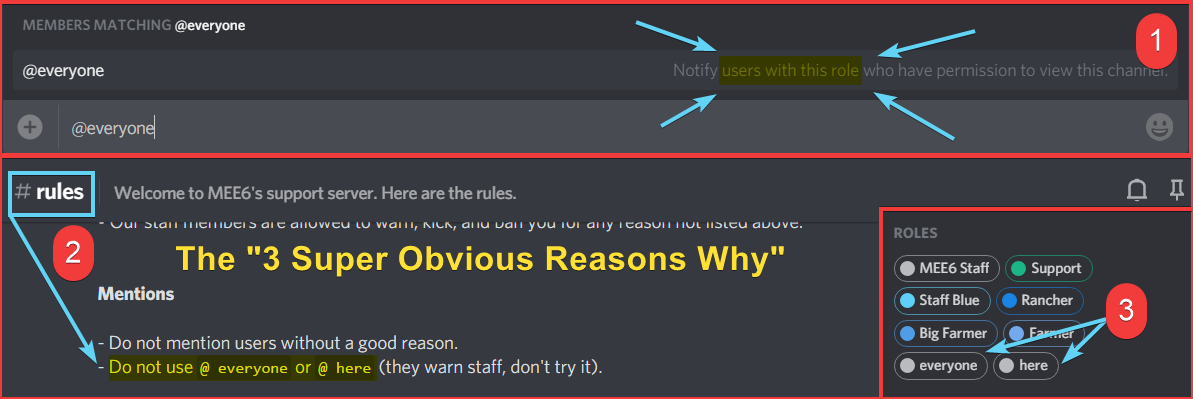
I strong recommand to turn off the everyone authority in this server
Big problem is I can tag everyone in this server, and that should be off
when I got everyone from meaningless one...rip
civic mirage
so how can you explain this
 onyx widget
Glad to hear that
faint dome
I'm in DM with him
 sullen agate
dire yarrowBOT
sullen agate
dire yarrowBOT
Something went wrong in MEE6 land!
If this happens when using:
Custom commands:
‣ Bot tries to give the role that higher than his own. To fix that, move the bot's role above the role he tries to give.
‣ Missing Manage roles permission. Go to Server Settings -> Roles -> Bot role -> Manage Roles permission
Moderator commands:
‣ Muted role is above Mee6's role. Bot can't give roles that higher than his own. Move it down.
‣ Missing Manage roles permission. Go to Server Settings -> Roles -> Bot role -> Manage Roles permission
 limber knoll
@sullen agate☝
dire yarrowBOT
@torn oasis has been warned
reason: Posted an invite
 somber mason
:SLEEP6: Something went wrong in MEE6 land! Contact our support team for instructions if this keeps happening.
this happened to me and my friends multiple times
dire yarrowBOT
Something went wrong in MEE6 land!
If this happens when using:
Custom commands:
‣ Bot tries to give the role that higher than his own. To fix that, move the bot's role above the role he tries to give.
‣ Missing Manage roles permission. Go to Server Settings -> Roles -> Bot role -> Manage Roles permission
Moderator commands:
‣ Muted role is above Mee6's role. Bot can't give roles that higher than his own. Move it down.
‣ Missing Manage roles permission. Go to Server Settings -> Roles -> Bot role -> Manage Roles permission
jade orchid
read that ^
 chilly nova
:sleep MEE6

:SLEEP6: Something went wrong in MEE6 land! Contact our support team for instructions if this keeps happening.
dire yarrowBOT
Something went wrong in MEE6 land!
If this happens when using:
Custom commands:
‣ Bot tries to give the role that higher than his own. To fix that, move the bot's role above the role he tries to give.
‣ Missing Manage roles permission. Go to Server Settings -> Roles -> Bot role -> Manage Roles permission
Moderator commands:
‣ Muted role is above Mee6's role. Bot can't give roles that higher than his own. Move it down.
‣ Missing Manage roles permission. Go to Server Settings -> Roles -> Bot role -> Manage Roles permission
limber knoll
@chilly nova☝
limber knoll
needs manage roles
chilly nova
Bot roles
dire yarrowBOT
Role hierarchy is important for me to give out roles. Oh and also Manage Roles perm:
https://cdn.mee6.xyz/s/fix_hierarchy.gif
chilly nova

limber knoll
is dragged above the roles like right pic?

 feral oak
The bot doesn't seem want to give roles for some reason ... Help pls
In my server
NVM I just see the needed hierarchy
bitter owl
@feral oak which plugin?
 verbal tide
I keep can not use the command that give others role
onyx widget
You cant give roles to others through custom commands atm
verbal tide
so is that bot give role useless???
onyx widget
The user can give themselves the role through the command
verbal tide
but it also not work for myself
dire yarrowBOT
Something went wrong in MEE6 land!
If this happens when using:
Custom commands:
‣ Bot tries to give the role that higher than his own. To fix that, move the bot's role above the role he tries to give.
‣ Missing Manage roles permission. Go to Server Settings -> Roles -> Bot role -> Manage Roles permission
Moderator commands:
‣ Muted role is above Mee6's role. Bot can't give roles that higher than his own. Move it down.
‣ Missing Manage roles permission. Go to Server Settings -> Roles -> Bot role -> Manage Roles permission
onyx widget
Read above please
verbal tide
ok thx
onyx widget
np
 gritty temple
eyy im the only one that cant play music?
 tough wind
My music is being very cliche. It won't keep songs we add to the playlist.
bitter owl
@tough wind could you please give me your server id?
dire yarrowBOT
Getting your server ID
go to your server and use !dashboard then copy this link and give to staff.
Or if that didn't work: open Server Settings in your Discord Server. Select Widget and press Copy ID next to Server ID.
You can also use Developer Mode as an alternative method.
bitter owl
☝️
tough wind
Here you go! https://mee6.xyz/dashboard/571401446705201168 WIZARD6

Skill up and manage your Discord server with automations, commands and awesome plugins!
@bitter owl
bitter owl
Thanks
tough wind
Np
bitter owl
@tough wind after several testings we could not spot the problem
Could you please change your server region?
Server Settings -> Overview -> server Region and test again for us
tough wind
Ok
 velvet cloak
!help
faint bear
#〉commands for commands 
 pure trout
I have a bit of an issue my timers are not working in any channel in our discord server, I checked and everything looks fine as far as content and set timers and days etc but nothing however the welcome functions are working ? ami i in the right place for help?
faint bear
Welcome to the bug reports channel!
To fix your issue, is the channel the timer is set in active?
active meaning, people talking frequently
pure trout
yes
i have it set for every 24 hours 5 days a week it posts to 3 different channels in the server and hasnt worked for some time , what i havent tried is simply to recreate the timers I just wasnt sure if this is a known issue or if theres a fix
faint bear
Are there 10 webhooks in the channel?
 tawny timber
hello is this chat open?
tawny timber
i am having a problem with mee6
mee6 is working but one comand just wont do its job
faint bear
which command is that
tawny timber
i get this :SLEEP6: Something went wrong in MEE6 land! Contact our support team for instructions if this keeps happening.
dire yarrowBOT
Something went wrong in MEE6 land!
If this happens when using:
Custom commands:
‣ Bot tries to give the role that higher than his own. To fix that, move the bot's role above the role he tries to give.
‣ Missing Manage roles permission. Go to Server Settings -> Roles -> Bot role -> Manage Roles permission
Moderator commands:
‣ Muted role is above Mee6's role. Bot can't give roles that higher than his own. Move it down.
‣ Missing Manage roles permission. Go to Server Settings -> Roles -> Bot role -> Manage Roles permission
faint bear

tawny timber
ya mee6 have all perms but still wont work
dire yarrowBOT
Role hierarchy is important for me to give out roles. Oh and also Manage Roles perm:
https://cdn.mee6.xyz/s/fix_hierarchy.gif
dire yarrowBOT
 LegitPickle27™, this command is disabled in this channel
 forest leaf
!rank
dire yarrowBOT
TheAlmightyFrog, this command is disabled in this channel
 limpid oak
rose frost
limpid oak
rose frost
what's the issue?
gleaming sundial
The white theme
faint dome
@limpid oak
faint dome
@tepid ginkgo screenshot pls
faint dome
I know, but mee6 can’t be incognito
 tepid ginkgo
What I meant by that is that it had the member role so it didn’t appear as a bot
Not actually incognito
faint dome
Ahh ok, my bad
 ocean egret
mee6 doesn't work in my server
knotty rose
What do you mean by that? Can you show a screenshot?
dire yarrowBOT
Something went wrong in MEE6 land!
If this happens when using:
Custom commands:
‣ Bot tries to give the role that higher than his own. To fix that, move the bot's role above the role he tries to give.
‣ Missing Manage roles permission. Go to Server Settings -> Roles -> Bot role -> Manage Roles permission
Moderator commands:
‣ Muted role is above Mee6's role. Bot can't give roles that higher than his own. Move it down.
‣ Missing Manage roles permission. Go to Server Settings -> Roles -> Bot role -> Manage Roles permission
knotty rose
Follow steps above
knotty rose
No problem
 shadow bear
I Can 't add bath words
dire yarrowBOT
Bad Words Problems
- Make sure Bad Words have been added.
- Regular users, who are not allowed to swear, must not have an Allowed Role.
- Channels that people shouldn't be able to swear in must not be in the Ignored Channel section
* MEE6 does not warn Owner, Admins, Bot Masters or users with a Moderator Role.
How to add Bad Words:
https://cdn.mee6.xyz/s/bad_words.gif

 south pivot
is dis normal??? (just saying
 deft haven
@south pivot Try ingoncito mode.
 soft niche
The bot in my server still doesn't mute a person.
dire yarrowBOT
Having problems muting someone/they aren't muted? Check the following
Prerequisites:
- Moderator plugin is enabled
!mutecommand isn't disabled- Bot has role with Manage Roles and Manage Channels permissions
- Muted role is under MEE6 role
- You're trying to mute someone using
!mute @mention reason, otherwise it will not work
If user got Muted role but still can talk means there's issue with your channel permissions
Go to Channel Settings -> Permissions
- If that's public channel that can be accessed by anyone:
- Set

Send Messagesfor all roles except Muted - Set

Send Messagesfor Muted role
- If that's secret channel that requires *special* role to access it:
- Set
Send Messages Read Messagesfor special role - Set
Send Messages Read Messagesfor Muted role - Set
Send Messages Read Messagesfor@everyonerole
bitter owl
@soft niche it means you put somewhere send messages 
That's wrong
Go to the channel's perms and at the everyone tab/ other roles you've added there permissions and turn send messages from  to
to 
bitter owl
Check all the other roles below the muted role as well please
Cannot have a otherwise discord overrides the permission
soft niche
ah found the issue. I was focused on category permissions and forgot to sync with the channel haha. thanks for help @bitter owl
bitter owl
No worries, enjoy your day, cheers
buoyant moon
how do you make ranks
 opaque spear
i can't select a channel in webhook to log in moderator 
 pure obsidian
@opaque spear you are in wrong account on browser version of discord
open this in your browser https://discordapp.com/app => logout, then login to your current account
opaque spear
thanks @pure obsidian
dire yarrowBOT
@buoyant moon has been warned
reason: Bad word usage
Did you try to ping everyone or here?
faint dome
nah just a basic bad word
buoyant moon
I Wes just joking lol
faint dome
Pls don't speak here if you haven't any bug to report
faint dome
Well, don't test it here then
 thorny gorge
i found a bug
faint bear
State it
thorny gorge
where
faint bear
Here
dire yarrowBOT
Something went wrong in MEE6 land!
If this happens when using:
Custom commands:
‣ Bot tries to give the role that higher than his own. To fix that, move the bot's role above the role he tries to give.
‣ Missing Manage roles permission. Go to Server Settings -> Roles -> Bot role -> Manage Roles permission
Moderator commands:
‣ Muted role is above Mee6's role. Bot can't give roles that higher than his own. Move it down.
‣ Missing Manage roles permission. Go to Server Settings -> Roles -> Bot role -> Manage Roles permission
Something went wrong in MEE6 land!
If this happens when using:
Custom commands:
‣ Bot tries to give the role that higher than his own. To fix that, move the bot's role above the role he tries to give.
‣ Missing Manage roles permission. Go to Server Settings -> Roles -> Bot role -> Manage Roles permission
Moderator commands:
‣ Muted role is above Mee6's role. Bot can't give roles that higher than his own. Move it down.
‣ Missing Manage roles permission. Go to Server Settings -> Roles -> Bot role -> Manage Roles permission
jade orchid
Yikes
faint bear
Evil atom
jade orchid
no u
faint bear
Follow those steps @thorny gorge
faint bear
Np
 naive walrus
!help
thorny gorge
thanks it works!
stark raven
#〉commands, you've been told 3 times PotatoOP
faint bear
Np
buoyant moon
Commands are down
onyx widget
What does mee6 reply with when you use them?
buoyant moon
It doesn't do anything. For example, I have all the custom commands set up, sitting there looking at them and even refreshed both my browser and Discord. If I type !pizza it doesn't do anything. Doesn't auto role like it's set up and doesn't auto-delete the message.
wooden mountain
disable the "do not send...." option near the bottom
buoyant moon
The "Do Not Reply to Command"?
Just got the error message that something is wrong in MEE6 land lol
dire yarrowBOT
Something went wrong in MEE6 land!
If this happens when using:
Custom commands:
‣ Bot tries to give the role that higher than his own. To fix that, move the bot's role above the role he tries to give.
‣ Missing Manage roles permission. Go to Server Settings -> Roles -> Bot role -> Manage Roles permission
Moderator commands:
‣ Muted role is above Mee6's role. Bot can't give roles that higher than his own. Move it down.
‣ Missing Manage roles permission. Go to Server Settings -> Roles -> Bot role -> Manage Roles permission
onyx widget
Read above please
dire yarrowBOT
Role hierarchy is important for me to give out roles. Oh and also Manage Roles perm:
https://cdn.mee6.xyz/s/fix_hierarchy.gif
buoyant moon
@onyx widget Thank you so much! All fixed. User error lol
onyx widget
No worries
 lofty robin
how do i disable warnings for mass ping?
dire yarrowBOT
You can access my dashboard at https://mee6.xyz/dashboard, and login with your Discord Account.
or you can use !dashboard in your server for a direct link
civic mirage
⬆
 wispy bridge
I chose a nickname for MEE6 that is Droid, it went well, until i set a timer and when the timer runs, the the one that shows up is MEE6, not Droid.
But when i do some commands like !rank, the one that shows up is Droid.
Is there any way to fix that?
onyx widget
Not possible to change nicknames for webhooks (timers)
Its a discord limitation iirc
 obtuse peak
We have a problem with the ranks in a server, can someone help us ?
faint dome
What's your problem?
faint dome
nan je sais pas, suffit de lire mon pseudo, de voir que j'ai un drapeau français, de réfléchir deux secondes et magic 
obtuse peak
Cool x3
À chaque fois que certaines personnes du serveur font la commande "!rank" alors qu'ils parlent dans le serv depuis un moment, le bot met
" You aren't ranked yet. Send some messages first, then try again"
Pourtant, ils ont largement assez parlés pour être minimum niveau 3 voir 4
faint dome
tu as regardé dans le leaderboard ?
(commande !levels)
Sinon c'est que soit ils ont parlé dans un salon sans xp, soit ils ont un rôle sans xp (configurable dans le plugin Levels)
 golden stump
The bot registered this command, but it seems to not support tempmute for seconds in practice.
ivory blaze
I've reported it ^
golden stump
Thanks
dire yarrowBOT
Something went wrong in MEE6 land!
If this happens when using:
Custom commands:
‣ Bot tries to give the role that higher than his own. To fix that, move the bot's role above the role he tries to give.
‣ Missing Manage roles permission. Go to Server Settings -> Roles -> Bot role -> Manage Roles permission
Moderator commands:
‣ Muted role is above Mee6's role. Bot can't give roles that higher than his own. Move it down.
‣ Missing Manage roles permission. Go to Server Settings -> Roles -> Bot role -> Manage Roles permission
knotty rose
@buoyant moon Follow steps above
buoyant moon
thanks
 knotty rose
That's the intended function of tempmute
buoyant moon
After the time passes
knotty rose
How did you use the command?
buoyant moon
!tempmute @wkksks 10s emoji spam
knotty rose
Short durations are bugged
buoyant moon
6 minutes was buggged to then
knotty rose
MEE6 will unmute, but it will have a bit of delay for the short durations bug
buoyant moon
My guy
I muted a guy for 6minutes
And he could not type after 10m
I had to unmute him
knotty rose
Yes, that's a known bug right now
 azure dome
wa
 fading trout
Why?
dire yarrowBOT
Something went wrong in MEE6 land!
If this happens when using:
Custom commands:
‣ Bot tries to give the role that higher than his own. To fix that, move the bot's role above the role he tries to give.
‣ Missing Manage roles permission. Go to Server Settings -> Roles -> Bot role -> Manage Roles permission
Moderator commands:
‣ Muted role is above Mee6's role. Bot can't give roles that higher than his own. Move it down.
‣ Missing Manage roles permission. Go to Server Settings -> Roles -> Bot role -> Manage Roles permission
knotty rose
@fading trout Follow steps above
wooden mountain
delete and remake the command
you got across bug that we have fixed but not yet pushed to the bot
for now you have to remake the command to fix it
fading trout
Ok thanks ill try
fading trout
@wooden mountain its working! thanks
wooden mountain
🎉
 stable delta
@DaPandaGirl
 haughty gate
Hi, i've this error each time someone type a command to have a role on my server what can i do to correct this ?
dire yarrowBOT
Something went wrong in MEE6 land!
If this happens when using:
Custom commands:
‣ Bot tries to give the role that higher than his own. To fix that, move the bot's role above the role he tries to give.
‣ Missing Manage roles permission. Go to Server Settings -> Roles -> Bot role -> Manage Roles permission
Moderator commands:
‣ Muted role is above Mee6's role. Bot can't give roles that higher than his own. Move it down.
‣ Missing Manage roles permission. Go to Server Settings -> Roles -> Bot role -> Manage Roles permission
haughty gate
Really thank you that's working for me, i don't see that my other fonders have move mee6 role in list and so makes him don"t work with custom commands. Thank you for the help.
 remote pollen
I need help when I go to the Mee6 site and go to plugins and press on one the page doesn't load in?
faint dome
@remote pollen what browser are you using? And do you use any adblocker or vpn?
remote pollen
@faint dome I'm using google and i'm not using an add block or a vpn
faint dome
You mean chrome?
remote pollen
yes
faint dome
Try to open the console and reload the page pls, so we can know from where the error comes
faint dome
May be a problem of cache/cookies then
remote pollen
@faint dome oh
 lament carbon
For some reason it’s keep logging me in my old account.
buoyant moon
There's a thing called auto password where it just auto log in your account without typing the password, idk how about apple
lament carbon
How do I fix it though?
dire yarrowBOT
It appears that you may be on the wrong account, or something went wrong since the time you logged into my website.
-Please navigate to https://discordapp.com/login and select the gear :gear: in the bottom left, then press Logout.
-After that, please navigate to https://mee6.xyz/dashboard to disconnect from my website. Click on your profile picture and press Logout
-Once finished, select "Add to Discord" again, and follow the instructions to access my dashboard again.
https://cdn.mee6.xyz/s/logout.png
 onyx widget
@lament carbon Read above please
 prisma roost
'!clear' deletes pinned messages can you guys fix it ?
ivory blaze
It's in #┃upvote-suggestions
prisma roost
@ivory blaze thx
limber knoll
@prisma roost messages over 2 weeks are ignored during a bulk delete
so if the pinned message is over 2 weeks it stays
prisma roost
@limber knoll ok thx!
limber knoll
np
 quaint vector
why my mee6 is ofline?
faint dome
We have some outages right now, but it shouldn't be too long (like less than 5min)
wooden mountain
we have found the issue and are busy fixing it
 marsh tendon
still ofline?
marsh tendon
okey
 vocal stirrup
MEE6 called me a stupid virgin
buoyant moon
🤦🏼♂️
vocal stirrup
I think there is a bug
dire yarrowBOT
@vocal stirrup has been warned
reason: Bad word usage
@vocal stirrup has been warned
reason: Capital letters
@vocal stirrup has been warned
reason: bypass
Jayurary#5357 was banned
reason: Too many infractions
thanks
ivory blaze
!clear @frail fogurary#5357 - sorry for ping
ivory blaze
Didn't realise they left
ivory blaze
lagged for me
wooden mountain
does teh bot give a error?
buoyant moon
(the roles are displayed in the dashboard
wooden mountain
moderator roles can not be muted, but that doesn't mean they can mute
scroll down in the moderator plugin and click on edit for the mute command
add moderator roles there
buoyant moon
 wooden sierra
It says that this role is above it even though it isn’t, I gave mee6 everything on the role manager
wooden mountain
and does MEE6 have the manage roles permission?
wooden sierra
Yes
dire yarrowBOT
Role hierarchy is important for me to give out roles. Oh and also Manage Roles perm:
https://cdn.mee6.xyz/s/fix_hierarchy.gif
wooden mountain
can i get a invite and admin permissions pls?
wooden sierra
Ok
wooden mountain
send in DM
 low loom
On multiple occasions I have had the mee6 music plugin skip over one or more songs.
faint bear
Its a known bug at the moment. Hang in there 
low loom
ok its what i figured just wanted to make sure
faint bear
Sounds good
 proven oracle
Hey i think the server has a mistake
If you put quotation marks around a banned word it wont be marked as a swear word
pure obsidian
you can upvote this suggestion to improve this behavior https://discordapp.com/channels/159962941502783488/534041825694973952/550836292867588106
not really a bug... just that current bad words filter doesn't detect words in a wild card
 primal kestrel
been having this problem on this server i’m trying to start up :/
it keeps doing this
burnt hazel
@primal kestrel Move MEE6 above the muted role in your server role settings
dire yarrowBOT
Role hierarchy is important for me to give out roles. Oh and also Manage Roles perm:
https://cdn.mee6.xyz/s/fix_hierarchy.gif
primal kestrel
that seemed to have worked, thanks!
 obsidian arrow
Commands r not working
 white notch
we're aware
obsidian arrow
Ok wats going on
white notch
if I knew I would say so
 strange nova
so everyone's custom commands is not working right?
faint dome
They are
dire yarrowBOT
Something went wrong in MEE6 land!
If this happens when using:
Custom commands:
‣ Bot tries to give the role that higher than his own. To fix that, move the bot's role above the role he tries to give.
‣ Missing Manage roles permission. Go to Server Settings -> Roles -> Bot role -> Manage Roles permission
Moderator commands:
‣ Muted role is above Mee6's role. Bot can't give roles that higher than his own. Move it down.
‣ Missing Manage roles permission. Go to Server Settings -> Roles -> Bot role -> Manage Roles permission
 rapid coyote
Bug (?
Is reported
I am using Bing translation because I do not understand English in Japanese.
That's the real issue.
I joined the MEE6 server to send a message to the new participants.
Show a video on a regular basis even though you are not running the youtube command The notification is confusing with the user's message, so please improve it.
rapid coyote
Is this what it is?
buoyant moon
When i use the mee6 slowmode wgen i remove it by !slowmode off the slowmode remain for many user and it is very annoying
Exsist a way to fix it?
P.s. when answer me pls PING me
deft haven
@buoyant moon Discord bug.
 supple rivet
We wanted to use !rolegive command, it didnt work. It said to contact you. What should we do?🤔
dire yarrowBOT
Something went wrong in MEE6 land!
If this happens when using:
Custom commands:
‣ Bot tries to give the role that higher than his own. To fix that, move the bot's role above the role he tries to give.
‣ Missing Manage roles permission. Go to Server Settings -> Roles -> Bot role -> Manage Roles permission
Moderator commands:
‣ Muted role is above Mee6's role. Bot can't give roles that higher than his own. Move it down.
‣ Missing Manage roles permission. Go to Server Settings -> Roles -> Bot role -> Manage Roles permission
faint dome
supple rivet
Thank you
faint dome
 my job
 frail patrol
The Mee6 website does not load and I want to customize some plugins what should I do?
wooden mountain
try again
frail patrol
I have reloaded it 200 times since 5 days
faint dome
What browser?
frail patrol
Firefox
wooden mountain
what plugin?
i'm looking at your dashboard and everything works fine for me
so what plugin is it that you are having trouble with
frail patrol
I try to open the Youtube and Twitch plugin where it show´s me automatically show me who is live etc. but it does not load for me
wooden mountain
both plugins load for me on chrome
frail patrol
oh okay 😅 for me too, just firefox has that problem I guess... thanks for the tip with the other browser 😄
wooden mountain
np 😄
 ivory gust
My MEE6 isn't working
jade orchid
How so
ivory gust
I made a custom command !1-3 to give a role and it's not setting it
jade orchid
To give a role to another user?
ivory gust
To myself
ivory gust
No, it did before and I fixed that, but now it just doesn't do anything
jade orchid
Ok what did u do to fix it
ivory gust
I retried it
jade orchid
erm ok so
dire yarrowBOT
Something went wrong in MEE6 land!
If this happens when using:
Custom commands:
‣ Bot tries to give the role that higher than his own. To fix that, move the bot's role above the role he tries to give.
‣ Missing Manage roles permission. Go to Server Settings -> Roles -> Bot role -> Manage Roles permission
Moderator commands:
‣ Muted role is above Mee6's role. Bot can't give roles that higher than his own. Move it down.
‣ Missing Manage roles permission. Go to Server Settings -> Roles -> Bot role -> Manage Roles permission
jade orchid
do this ^
ivory gust
I reset the roles and then I put them back on
jade orchid
Ok do what mee6 said above
ivory gust
I did it and tested others, and only one of them isn't working
jade orchid
make sure mee6 is above the role
dire yarrowBOT
Role hierarchy is important for me to give out roles. Oh and also Manage Roles perm:
https://cdn.mee6.xyz/s/fix_hierarchy.gif
ivory gust
Yep, it's above all the ones I'm trying to assign
ivory gust
Also, on the website it is not letting me save that specific command
Yeah, only one isn't working
jade orchid
ok can u screenshot the custom command that gives the role that is not working
ivory gust
jade orchid
and its above Just Relapsed and 1-3 day?
ivory gust
yep
I click Save and it doesn't do anything, instead I have to press the X at the top
faint dome
It may be this known bug when you delete a role which was given in a custom command (this bug should has been fixed a few days ago but uh)
So please delete the command and add it again
faint dome
eww
Can yo create a test command and try to delete it pls? So we can know if t's only this command or the whole dashboard
 outer cypress
comend mute is not working 😦
dire yarrowBOT
!mute @CoolGuysNameHere You have been too cool.
!tempmute @SecondLameGuyHere 3h Too lame.
- I must have "Manage Channels", and "Manage Roles" for my permissions.
- I must have a role above the "Muted" role I create.
If there are problems, please check that the Muted Role does not have send messages globally or per channel.
Durations for tempmute command.
50m50 minutes.50h50 hours.50d50 days.
you can NOT mute for less then a minute
ivory gust
it's just the one command
and I can't press any of the blue buttons with that one command
outer cypress
ok thanks
jade orchid
Try refreshing Bearly
buoyant moon
Not being able to use the command !rank on my server. He says it's not even more, but I own it. Help me please
 pearl aspen
@buoyant moon Olá Júnior , pode explicar melhor ? Talvez uma print
pearl aspen
O primeiro erro significa que você não tem XP
O segundo que algo aconteceu errado no API
pearl aspen
Não tem como editar XP
dire yarrowBOT
you can NOT give XP to a user.
Reasons?
- We want to avoid bias in our system.
- It's easily abused by admins.
- Not worth the time to add.
- Because we don't want that being a feature.
buoyant moon
não sabia
buoyant moon
mas em alguns servidores, pode por o comando mesmo sem xp
com o comando do bot: +editxp @pearl aspen
pearl aspen
@buoyant moon o prefixo do MEE6 não é + , então foi outro bot
MEE6 é apenas !
Olha por exemplo o meu #〉commands
buoyant moon
o xp do + não funciona pra o !?
buoyant moon
hm.
Última dúvida @pearl aspen.
Tem um servidor Brasileiro famoso em que entrei. Na msm hora que entrei usei o comando !rank e funcionou. Pq nesse meu n funciona?
pearl aspen
@buoyant moon Você adquiri xp falando , você deve ter mandando alguma mensagem e o @dire yarrow lhe deu XP
dire yarrowBOT
 pearl aspen
☝
buoyant moon
irei conferir
 last wadi
Привет
ivory blaze
need help or got a bug to report?
buoyant moon
i need help
dire yarrowBOT
I would like to help you, but if you don't tell us what your problem is then I can't really help. Please tell us what your problem is and not that you have one.
buoyant moon
i need help on how to suggest in this server
buoyant moon
When i go to welcome and press 'when a new member join put a role' and it doesn't work
dire yarrowBOT
@buoyant moon has been warned
reason: Bad word usage
move mee6 role up in server settings - roles
 ashen notch
!rank
dire yarrowBOT
matysek 38, this command is disabled in this channel
tired meteor
you can use it in #〉commands
dire yarrowBOT
@buoyant moon has been warned
reason: Posted an invite
 rapid cave
Seems the moderation logs are no longer getting placed in my mod logs section on my server
pearl aspen
Which type of mod Actions ? @rapid cave
rapid cave
bad word usage
dire yarrowBOT
Hey ! MEE6 won't sanction the following people:
• The Owner of the server;
• People with Administrator permission;
• People with Bot Master permission;
• And the role(s) you set as moderator on the dashboard.
Note: MEE6 think moderators are responsible people, like the police . So he doesn't want to blame your police
pearl aspen
Look at this list , and check If everything is good
rapid cave
My mods said they are still being removed but not placing the log in the channel
Yea all is correct
I'm going to try re-adding it
pearl aspen
Did you config the LOGGING CHANNEL ? @rapid cave
rapid cave
Yes, it was working flawlessly but stopped out of nowhere. Someone on my server may have changed something
pearl aspen
Someone with perms for enter in Dashboard
dire yarrowBOT
Dashboard Access
You need Administrator permission or Bot master role to access the Mee6 dashboard.
How to add Bot master role can be found below:
https://cdn.mee6.xyz/s/bot_master.png
for servers that added MEE6 after 12 may you need to have premium to add additional bot master roles

 pulsar nova
So i'm on mee6 dashbored trying to add it to my new server so I click the dropdown in select a server and the servers not there plz help
dire yarrowBOT
It appears that you may be on the wrong account, or something went wrong since the time you logged into my website.
-Please navigate to https://discordapp.com/login and select the gear :gear: in the bottom left, then press Logout.
-After that, please navigate to https://mee6.xyz/dashboard to disconnect from my website. Click on your profile picture and press Logout
-Once finished, select "Add to Discord" again, and follow the instructions to access my dashboard again.
https://cdn.mee6.xyz/s/logout.png
pulsar nova
thanks i will try it
 tender barn
so I keep trying to add twitch streamers to my twitch notifications thru mee6, but every time i go to open the page it won't load up
Actually, none of the plug-ins seem to be working for me
bitter owl
@tender barn what's your server id please?
dire yarrowBOT
Getting your server ID
go to your server and use !dashboard then copy this link and give to staff.
Or if that didn't work: open Server Settings in your Discord Server. Select Widget and press Copy ID next to Server ID.
You can also use Developer Mode as an alternative method.
tender barn
https://mee6.xyz/dashboard/536403870021189643 @bitter owl
Skill up and manage your Discord server with automations, commands and awesome plugins!
bitter owl
Lovely will check what could be going wrong and get back for you
@tender barn couldn't find any issues. So I do recommend you kicking MEE6 from your server since it solves many problems
dire yarrowBOT
bitter owl
☝️ quick link to add to back
bitter owl
Hm good news then
buoyant moon
MEE6 is dead, doesn't respond to any commands for everyone.
deft haven
Staff is aware.
 buoyant tulip
Ok.
 deft wharf
was gonna say the same thing
ivory blaze
it should be fixed now
buoyant moon
TY
 tight stone
i have i selver but 1 CUSTOM COMMAND is not working.
the command name is !SANS. selvers name is pihtla kool can you fix it????
bitter owl
@tight stone does this command supposed to give a role?
tight stone
yes
dire yarrowBOT
Something went wrong in MEE6 land!
If this happens when using:
Custom commands:
‣ Bot tries to give the role that higher than his own. To fix that, move the bot's role above the role he tries to give.
‣ Missing Manage roles permission. Go to Server Settings -> Roles -> Bot role -> Manage Roles permission
Moderator commands:
‣ Muted role is above Mee6's role. Bot can't give roles that higher than his own. Move it down.
‣ Missing Manage roles permission. Go to Server Settings -> Roles -> Bot role -> Manage Roles permission
Role hierarchy is important for me to give out roles. Oh and also Manage Roles perm:
https://cdn.mee6.xyz/s/fix_hierarchy.gif
tight stone
thx
 median folio
The initially ranks don't work for me
ivory blaze
what do you mean?
 glad jasper
j'ai des gros bug avec mee6 on peut m'aider
stark raven
@faint dome
glad jasper
un francais svp
stark raven
Z_runner est francais
glad jasper
ouais mais du coup je te traduis en anglais?
faint dome
@glad jasper dis moi ? (dsl pour le retard, j'étais en train de bosser)
glad jasper
Ouais alors en gros j'ai mis une commande pour give un rôle et à chaque fois que quelqu'un l'effectue sa me met ça: SLEEP6 Something went wrong in MEE6 land! Contact our support team for instructions if this keeps happening.
faint dome
Ca peut vouloir dire deux choses
- soit le rôle de MEE6 est trop bas pour donner ce rôle, dans ce cas il faut bouger le rôle de MEE6 plus haut dans la liste des rôles
- soit MEE6 n'a pas la permission "Gérer les rôles", donc il faut la lui donner
faint dome
oui, c'est comme ça que Discord fonctionne
glad jasper
Mais si il a les perm d'admin sa devrait pas suffir?
faint dome
Non
glad jasper
Juste mee6 à un rôle bot si ce rôle est devant sa marche aussi? Ou sa doit forcément être le rôle mee6 devant
faint dome
Il faut que le plus haut rôle de MEE6 soit devant, peu importe lequel c'est ^^
 true jay
glad jasper
true jay
glad jasper
je vais voir si sa marche merci
faint dome
@true jay try to change your pfp, get some xp, do !rank and see it it works. If yes, you can change it back
buoyant moon
@pliant star with?
 pliant star
Auto role is not working in my server
buoyant moon
for the welcome plugin?
make sure it is enabled
if it is diable and enable it again
pliant star
It is bro
dire yarrowBOT
Something went wrong in MEE6 land!
If this happens when using:
Custom commands:
‣ Bot tries to give the role that higher than his own. To fix that, move the bot's role above the role he tries to give.
‣ Missing Manage roles permission. Go to Server Settings -> Roles -> Bot role -> Manage Roles permission
Moderator commands:
‣ Muted role is above Mee6's role. Bot can't give roles that higher than his own. Move it down.
‣ Missing Manage roles permission. Go to Server Settings -> Roles -> Bot role -> Manage Roles permission
limber knoll
@pliant star role order and permission part
 young marlin
Interesting
 crisp dagger
Bots muting our mates for sending multiple messages for 0.10 or less than a sec and detects it as spam
limber knoll
@crisp dagger bot doesn't have that as such, it's probably more the content in the messages
crisp dagger
Oh! More content. Thanks
buoyant moon
Ok so when I type in a selection of bad words in the section where If you say a swear word it gives you a warning I type them in and when I say ok there not there??
ivory blaze
Don't forget to save
dire yarrowBOT
Bad Words Problems
- Make sure Bad Words have been added.
- Regular users, who are not allowed to swear, must not have an Allowed Role.
- Channels that people shouldn't be able to swear in must not be in the Ignored Channel section
* MEE6 does not warn Owner, Admins, Bot Masters or users with a Moderator Role.
How to add Bad Words:
https://cdn.mee6.xyz/s/bad_words.gif
buoyant moon
I need help. I created a second account, and now MEE6 thinks, that I am that second account, and I can't log in the dashboard.
wooden mountain
logout of both MEE6 and discordapp.com websites
or use ingocnito tab
ctrl + shift + n
 flat kite
The rank command seems to display one of the first few frames of an animated avatar, and not the very first one, as of a static version of said avatar.
https://i.imgur.com/42gSy17.png
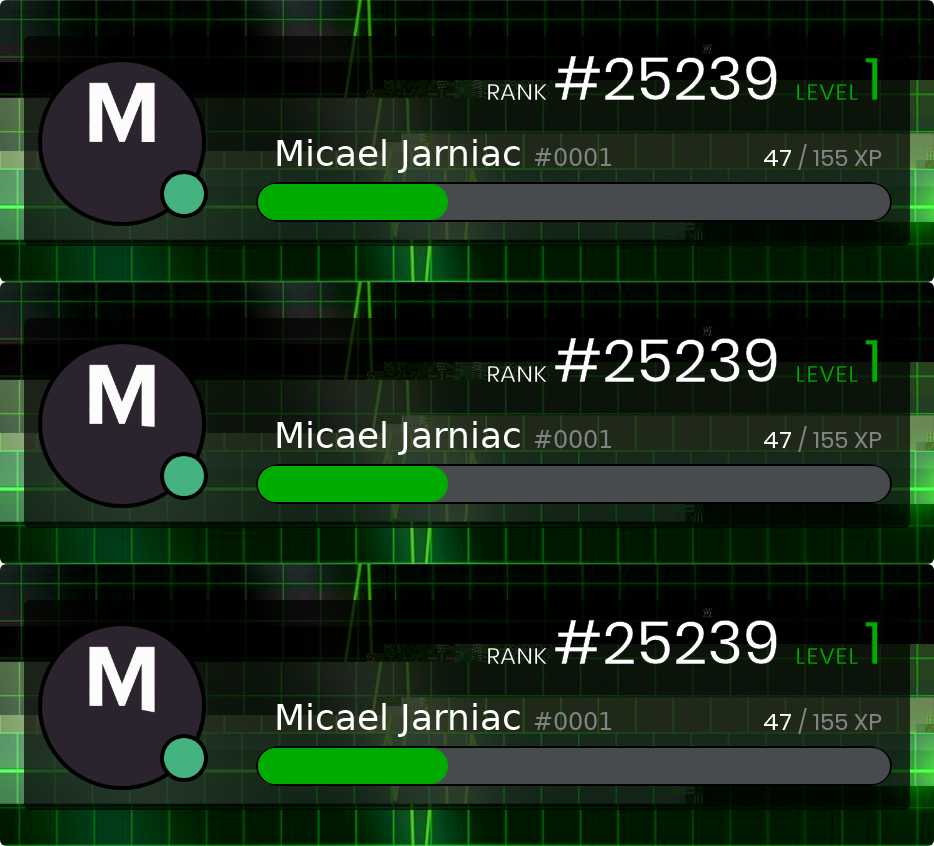
they're all different frames from my avatar.
 distant gate
i said 5 meme on a server and i not won xp why ?!!
stark raven
There is a cooldown on xp to prevent spam @distant gate
dire yarrowBOT
stark raven
It also could be one of the things below
dire yarrowBOT
If I appear to be denying your hard earned experience, or !rank and !levels aren't working properly...
- Make sure Levels is Enabled.
- Check that you do not have a banned role in the levels configuration, and that you aren't in a banned channel either.
- Make sure that I can see the channel you are talking in with "Read Messages" and send messages with "Send Messages".
distant gate
i know the cooldown but on 1 or 2 hours i won nothing
stark raven
Then it’s the second message, check all of those things please
 jaunty tusk
The website is down
 static zealot
This Custom Command is broken **Editing command
stark raven
@jaunty tusk Any adblocker or vpn?
jaunty tusk
Yes adblock I have to remove it? I've never done it before and it worked
Sorry my English is not perfect
stark raven
it blocks a couple of thing wrongly, but there are no ads on the dashboard
stark raven
Which browser?
jaunty tusk
I use Google Chrome on Windows 10
stark raven
Is it up to date?
jaunty tusk
Yes always
buoyant moon
Yes, it was working flawlessly but stopped out of nowhere. Someone on my server may have changed something
 robust heron
faint bear
robust heron
faint bear
No random text here please
dire yarrowBOT
Chara/Frisk, this command is disabled in this channel
faint dome
Get some xp in order to refresh it
 vestal plume
Ok
buoyant moon
Shouldnt it be 5 seconds not 1 minute? Texting every 5 seconds isnt spamming
 warped bramble
t en kel version?t en kel version?
faint bear
@warped bramble dont repeat the same question in every channel
warped bramble
pas compris
 shrewd pelican
Yo
onyx widget
Need help or have a bug to report?
 signal hinge
So for my Server it's necessary that user write a little introduction about theirself. But mee6 keep deleting them, because of spam even if its just one text block. like
Name: x
age: x
favorite game: x
in one text, and i can't see it in any logs. But i saw user writing that one text block and him just instanly deleting it..but just in that introduction channel.. but in other channels it was.. okay.. no problem .-.
faint dome
Do you have anything in the moderator logs of MEE6? (can be enabled in the moderator plugin)
If it's indeed a duplicated text, you can add an ignored channel in your configuration of this automod
signal hinge
yes i have them, but he never post when he deletest messeges.. but i just asked for the text itself and i know why he deleted it for spam .-. she used space instead of enter
thanks for the help, still ._.
faint dome
you're welcome
 polar tartan
Hey, question.
Apparently as per today, MEE6 glitches on mute command. Basically even when the role's applied, people still can text. This never happened before. Any idea why and how to solve this?
dire yarrowBOT
Having problems muting someone/they aren't muted? Check the following
Prerequisites:
- Moderator plugin is enabled
!mutecommand isn't disabled- Bot has role with Manage Roles and Manage Channels permissions
- Muted role is under MEE6 role
- You're trying to mute someone using
!mute @mention reason, otherwise it will not work
If user got Muted role but still can talk means there's issue with your channel permissions
Go to Channel Settings -> Permissions
- If that's public channel that can be accessed by anyone:
- Set
Send Messagesfor all roles except Muted - Set
Send Messagesfor Muted role
- If that's secret channel that requires *special* role to access it:
- Set
Send Messages Read Messagesfor special role - Set
Send Messages Read Messagesfor Muted role - Set
Send Messages Read Messagesfor@everyonerole
onyx widget
onyx widget

polar tartan
Okay so apparently it worked, but it only muted them in one channel. They still could text in other channels whilst being muted there around the server, @onyx widget.
onyx widget
set the perms for the channel that worked for other channels
polar tartan
You mean you have to separate them for each channel?
Mind elaborating it?
Also
"So I was trying to make the security tight af by disabled the permission to send message for everyone. Only those who have the Guests roles who are allowed to send messages here. New comers would get the Guests roles after 10 minutes staying in the server. I didnt know this could fvked up the muted systems"
This is what the owner did before the bot started to screw up. Again it is working well now, but only works for the channel where the user gets muted.
polar tartan
Hm..
 strong bane
dire yarrowBOT
strong bane
dire yarrowBOT
Having problems muting someone/they aren't muted? Check the following
Prerequisites:
- Moderator plugin is enabled
!mutecommand isn't disabled- Bot has role with Manage Roles and Manage Channels permissions
- Muted role is under MEE6 role
- You're trying to mute someone using
!mute @mention reason, otherwise it will not work
If user got Muted role but still can talk means there's issue with your channel permissions
Go to Channel Settings -> Permissions
- If that's public channel that can be accessed by anyone:
- Set
Send Messagesfor all roles except Muted - Set
Send Messagesfor Muted role
- If that's secret channel that requires *special* role to access it:
- Set
Send Messages Read Messagesfor special role - Set
Send Messages Read Messagesfor Muted role - Set
Send Messages Read Messagesfor@everyonerole
knotty rose
@strong bane Try the steps above
knotty rose
Is the mute command enabled in your MEE6 dashboard?
stark raven
@knotty rose
 red flower
Wat
dire yarrowBOT
Dummy#0000 was banned for 2 days
reason: Using racial derogatory slur``` heady pulsar
when i do <!mute> it doesnt work
dire yarrowBOT
Having problems muting someone/they aren't muted? Check the following
Prerequisites:
- Moderator plugin is enabled
!mutecommand isn't disabled- Bot has role with Manage Roles and Manage Channels permissions
- Muted role is under MEE6 role
- You're trying to mute someone using
!mute @mention reason, otherwise it will not work
If user got Muted role but still can talk means there's issue with your channel permissions
Go to Channel Settings -> Permissions
- If that's public channel that can be accessed by anyone:
- Set
Send Messagesfor all roles except Muted - Set
Send Messagesfor Muted role
- If that's secret channel that requires *special* role to access it:
- Set
Send Messages Read Messagesfor special role - Set
Send Messages Read Messagesfor Muted role - Set
Send Messages Read Messagesfor@everyonerole
 pastel creek
Ok
 shy cypress
hello i have an issue with the plugins
knotty rose
What's exactly the issue?
shy cypress
I own a youtube channel discord, and i added mee6 so that i can give my members the best expierience. However, one issue i have is with the custom commands. One of the options is giving roles when a command is given. I put a role for subscribers so they can have an exclusive category
knotty rose
Does MEE6 send a message to contact support?
shy cypress
yes
dire yarrowBOT
Something went wrong in MEE6 land!
If this happens when using:
Custom commands:
‣ Bot tries to give the role that higher than his own. To fix that, move the bot's role above the role he tries to give.
‣ Missing Manage roles permission. Go to Server Settings -> Roles -> Bot role -> Manage Roles permission
Moderator commands:
‣ Muted role is above Mee6's role. Bot can't give roles that higher than his own. Move it down.
‣ Missing Manage roles permission. Go to Server Settings -> Roles -> Bot role -> Manage Roles permission
knotty rose
No problem
buoyant moon
Hey, so I have a YT channel and anytime I post a vid, mee6 won’t send a notification. Can you guys help me with that?
burnt hazel
means that YouTube did not send a notification out to your subscribers, if it did MEE6 was part of a portion that did not receive that notification.
That's why it did not announce, that's a YouTube issue unfortunately @buoyant moon
buoyant moon
Oh.
burnt hazel
If MEE6 doesn't get that notification he can't send one to your server
burnt hazel
np
crisp dagger
How to setup Self Assign Role command on MEE6?
dire yarrowBOT
- I must have a role higher than the role you are trying to give in your Discord Server Settings.
https://cdn.mee6.xyz/s/give_roles.png
 rose frost
@crisp dagger see above
crisp dagger
oh! Thank you very much. I've been for these for days
rose frost
no problem, sorry to hear that.
crisp dagger
Thanks
 misty galleon
Do you guys know how to fix mee6 if it says there are no results when you add a song
I’ve tried every song, not just a specific one
faint bear
If you have left a question or concern in a support or bug reports channel, somebody who can help you will answer when they are available. Please be patient, and dont hop between channels (dont ask in multiple channels). Thank you!
misty galleon
K sorry
 crude vigil
Hi
onyx widget
Hey there, need help or got a bug to report?
 vale stump
doesn't seem that music MEE6 bot works for live music on youtube (live streams)
I've got it working now, but i'm not sure how. it wouldnt work directly when trying to add + play. had to add it to the playlist and skip to it.
wooden mountain
that is how MEE6 works
 void laurel
Hi my bot is not responding when someone abuses
faint dome
What kind of abuse?
void laurel
Means Indian bad words
faint dome
Did you add these words on your dashboard?
dire yarrowBOT
Hey ! MEE6 won't sanction the following people:
• The Owner of the server;
• People with Administrator permission;
• People with Bot Master permission;
• And the role(s) you set as moderator on the dashboard.
Note: MEE6 think moderators are responsible people, like the police . So he doesn't want to blame your police
faint dome
void laurel
So what to do
faint dome
Test with another member, not a moderator
 trail sage
why isnt my timer is working because i am trying to annoy some friends back and one the timers repeat every 30 minutes but it isnt repeatnng
faint dome
There’s an anti spam protection
 hidden magnet
ok
dire yarrowBOT
@cerulean lintel has been warned
reason: Posted an invite
 wooden mountain
we are not going to spam a channel if there is no other activity
 dreamy wraith
anyone else not able to do anything on the website?just stays on a grey screen?
knotty rose
What browser are you using?
dreamy wraith
chrome
knotty rose
Any VPN/adblockers enabled?
dreamy wraith
no i have them switched off
knotty rose
Try incognito mode
vale stump
doesn't seem that music MEE6 bot works for live music on youtube (live streams) (it's a problem again. can't get it to play chilled cow lofi on youtube)
buoyant moon
try enabing and disabling plugin
dreamy wraith
@knotty rose thank you feline friend
knotty rose
No problem
 ivory nest
SLEEP6 Something went wrong in MEE6 land! Contact our support team for instructions if this keeps happening.
dire yarrowBOT
Something went wrong in MEE6 land!
If this happens when using:
Custom commands:
‣ Bot tries to give the role that higher than his own. To fix that, move the bot's role above the role he tries to give.
‣ Missing Manage roles permission. Go to Server Settings -> Roles -> Bot role -> Manage Roles permission
Moderator commands:
‣ Muted role is above Mee6's role. Bot can't give roles that higher than his own. Move it down.
‣ Missing Manage roles permission. Go to Server Settings -> Roles -> Bot role -> Manage Roles permission
buoyant moon
<@&193123929701875712> can u make it so when you put in your coustimizable command for MEE6 it doesn't show that you put it
knotty rose
Enable Delete Invocation Message @buoyant moon
buoyant moon
where can u find that
knotty rose
Edit the command => Scroll to bottom
white notch
No
buoyant moon
i am confused
white notch
There will be 3 options down the bottom of the command screen
Select the one that has delete in it
buoyant moon
delete command usage?
white notch
Yes
buoyant moon
that doesn't seem right
white notch
That will delete the command that you use
So if you do !test it will delete that and only show the bot response
buoyant moon
oh ok
@white notch but in the time period that it deletes will anybody be able to see it
<@&193123929701875712> read message above and pls answer
knotty rose
It depends. It could delete in an instant or have delay.
buoyant moon
but like im able to see the command for like 1 second
knotty rose
It does the job though. Deleting messages instantly to where you can't see it all is not possible.
Due to how Discord works
 brisk sphinx
In a certain server that I"m in, MEE6's status changes from offline to online, and the whole time it stays in the "offline" section of the members list. I am also unable to use the commands "!rank" and "!levels" (those are the only ones I tried using.)
knotty rose
Is MEE6 still offline for that server? @brisk sphinx
brisk sphinx
Yes.
knotty rose
Can you try kicking and re-inviting MEE6? Dashboard configuration and levels will be saved.
brisk sphinx
I don't own the server 😓.
I'm just pretty active there so that's how I noticed.
I'll DM the server owner about it.
knotty rose
Ok
 terse horizon
I saw bugs
faint bear
State the bug please
 civic oriole
Hi
 cyan moon
 Hi do you need help with anything?
 steel bluff
dire yarrowBOT
@dull arrow has been warned
reason: Posted an invite
 unkempt rapids


 frozen dome
Can somebody help me i try to do the bot give role and i type the command but its not working
dire yarrowBOT
Something went wrong in MEE6 land!
If this happens when using:
Custom commands:
‣ Bot tries to give the role that higher than his own. To fix that, move the bot's role above the role he tries to give.
‣ Missing Manage roles permission. Go to Server Settings -> Roles -> Bot role -> Manage Roles permission
Moderator commands:
‣ Muted role is above Mee6's role. Bot can't give roles that higher than his own. Move it down.
‣ Missing Manage roles permission. Go to Server Settings -> Roles -> Bot role -> Manage Roles permission
ivory blaze
Move the mee6 role up
dire yarrowBOT
Role hierarchy is important for me to give out roles. Oh and also Manage Roles perm:
https://cdn.mee6.xyz/s/fix_hierarchy.gif
ivory blaze
Right image
frozen dome
Thank you!
dire yarrowBOT
Modular
I am currently a modular bot. Nothing will be enabled by default and must be enabled in each plugin manually.
So to enable the plugins, go to https://mee6.xyz/dashboard and select your server.

 buoyant moon
i already went there
ivory blaze
Those are the plugins/modules the bot has to offer
buoyant moon
thats it?!?
ivory blaze
What makes you say that?
 kindred frost
Bonjour, j'ai un problème avec une de mes commandes personnalisé.
faint dome
Oui ?
kindred frost
Je fais la commande et on me demande de venir voir le Support
faint dome
La commande est censé donner un rôle ?
kindred frost
Non
faint dome
Faire quoi alors ?
kindred frost
Écrire un message
faint dome
Et elle renvoie l'erreur "Something went wrong in MEE6 land" ?
kindred frost
Cette erreur :
SLEEP6 Something went wrong in MEE6 land! Contact our support team for instructions if this keeps happening.
faint dome
C'est ça
Essaie de la supprimer puis de la recréer (la croix rouge au survol, sur le dashboard)
kindred frost
Quoi ?
faint dome
ton texte fait quelle longueur ?
faint dome
Il y a des variables dedans ? Genre {server}, {user} ou autre ?
kindred frost
Oui
faint dome
C'est sans doute pour ça alors
Il faut savoir que par exemple, la variable user renvoie la mention du membre, ce qui correspond pour discord à @kindred frost
Donc beaucoup plus de caractères
kindred frost
Ah
faint dome
je vois que ça
kindred frost
Mais avant que vous partez
J'ai fait une suggestion et je voudrais savoir si elle vas être pris car j'en ai besoin d'en pas longtemps
Elle me sera très utile
faint dome
Laquelle ?
kindred frost
C'est pour les commandes personnalisé, qui est de pouvoir créer des alias pour ne pas recréer plusieurs fois le même commande
faint dome
Je l’ai vue passer oui, je crois que les admins ont aimé l’idée, mais vu comme ils sont occupés en ce moment, peu de chance qu’elle sorte rapidement
kindred frost
Au moins elle est pris ?
faint dome
Personne ne sait, comme 99% des idées listes dans #┃upvote-suggestions
faint dome
buoyant moon
ca bug la non ?
faint dome
Non ?
faint dome
Longtemps ? Ou juste deux trois secondes ?
faint dome
Quel navigateur ?
faint dome
Tu as un bloqueur de pub ou un vpn ?
buoyant moon
non
faint dome
Hmm
D’autres extensions ?
Sinon ouvres la console, relance la page et regarde si tu vois des erreurs
faint dome
Ah super
buoyant moon
Mee6 skipped my song for no reason :)