#〉bugs-reports
2 messages · Page 54 of 1
 bitter owl
Already, I'm not in the mood
 abstract mulch
bro you literally told me to type something into there
bro you literally told me to type something into there
bro you literally told me to type something into there
 dire yarrowBOT
Alright, @abstract mulch has been warned for 'Pranking staff | Feel yourself lucky'.
Alright, @abstract mulch has been warned for 'Capital letters'.
Cyrus got kicked for Pranking staff | Feel yourself lucky! 
 frank totem
lol that's another r/madlads
dire yarrowBOT
Alright, @frank totem has been warned for 'Chatting in wrong channel | Please, keep comments and conversation in #〉chat or #〉commands only'.
 fierce fjord
When I'm going live/when I wait for other streamers to go live mee6 has been up to half an hour late on more than one occasion, not sure if that is fixable/worth even reporting but yeah.
This is on twitch just to clarify
 burnt hazel
@fierce fjord It can take upto 30mins because of the Twitch API, nothing we can do about it unfortunately.
If they want the announcement to be faster they need more viewers. (Thats just how the API works)
 vocal agate
So when I mute someone on my server, but they do not get muted on someone of the channels. Could somone help MEEE
Thanks
 faint dome
@vocal agate does this member get the muted role?
faint dome
Then it's a problem with your permissions 
dire yarrowBOT
Having problems muting someone/they aren't muted? Check the following
Prerequisites:
- Moderator plugin is enabled
!mutecommand isn't disabled- Bot has role with Manage Roles and Manage Channels permissions
- Muted role is under MEE6 role
- You're trying to mute someone using
!mute @mention reason, otherwise it will not work
If user got Muted role but still can talk means there's issue with your channel permissions
Go to Channel Settings -> Permissions
- If that's public channel that can be accessed by anyone:
- Set

Send Messagesfor all roles except Muted - Set

Send Messagesfor Muted role
- If that's secret channel that requires *special* role to access it:
- Set
Send Messages
Read Messagesfor special role - Set
Send Messages Read Messagesfor Muted role - Set
Send Messages Read Messagesfor@everyonerole
faint dome
check the 2nd part of the message
faint dome

vocal agate
Thank you @faint dome
faint dome
You're welcome!
 tall patio
apparently theres a thing where if mee6 is on the top role, lower role users can apparently configure the bot, and give themselves mod
is this intentional?
dire yarrowBOT
Dashboard Access
You need Administrator permission or Bot master role to access the Mee6 dashboard.
How to add Bot master role can be found below:
 tall patio
thanks mee6
 pure obsidian
also bot masters are the one that can do that
 shrewd pecan
{"error":{"message":"The server encountered an internal error and was unable to complete your request. Either the server is overloaded or there is an error in the application."},"status_code":500}
its on the timer its been like that sence last night
 ivory blaze
Too many webhooks probably
faint dome
Webhooks are different than timers
shrewd pecan
its in the authorization window
faint dome
I know
Please go to your channel settings (in Discord), then the Webhooks tab, and remove them
dire yarrowBOT
 MEE6 Premium
What do I get?
> Music plugin
> Record plugin
> Music Quiz plugin
> Leaderboard background for your server
> Server custom rank cards
> Faster support in the MEE6 server
Note: When joining MEE6 Support Server you get automatically the Premium role 
For information about premium, go to https://mee6.xyz/dashboard and select your server, then click on premium.
https://cdn.mee6.xyz/s/premium.png
 shrewd pecan
if i get it for a month dose it automaticly charge me monthly ?
 undone turret
hallo ich habe ein problem mit @dire yarrow leider funktioniert das automatische zuweisen von rollen nicht habe auch eine Fehlermeldung erhalten!
hello I have a problem with @dire yarrow unfortunately the automatic assignment of roles did not work also got an error message!
dire yarrowBOT
Role hierarchy is important for me to give out roles. Oh and also Manage Roles perm:
https://cdn.mee6.xyz/s/fix_hierarchy.gif
 burnt hazel
@undone turret 👆 put MEE6 above your welcome role
 vital pumice
Hi, I enabled the youtube plugin and I added some channels on it but bot isn't announcing them from a couple of days
I don't know if this was already reported but it is totally random
ususally works, then goes down without advice
dire yarrowBOT
Alright, @faint dove has been warned for 'Posted an invite'.
bitter owl
!tempmute @[SFa] 1h Walker Cromwell [1]#8893 Bad language in russian | Do not repeat or get banned

Now you will be banned for good young guy
 obsidian flume
sup
i need help
my !warn and !ban !mute ect does not work even tho i enebled it
dire yarrowBOT
Bot doesn't react on commands!!!
That usually happens because:
- Plugin is disabled -> Go to https://mee6.xyz/dashboard and enable the plugin with needed command!
- Permission is missing -> Ask your server's owner to go to https://mee6.xyz/dashboard -> Settings -> Bot master -> Add your role
- Command is disabled -> Go to https://mee6.xyz/dashboard, open plugin settings and enable the command!
- Do not reply to command option is enabled -> Go to https://mee6.xyz/dashboard, open plugin settings, click [Edit] button, scroll down and disable the option!-
You're using command in wrong way! -> Moderator commands like !mute !kick !ban etc. need the user to be mentioned. Example: !kick @user annoying
bitter owl
Make sure of that ☝
obsidian flume
k thanks... bot humanoid thingy ?
bitter owl
What? No
!warn @obsidian flume testing
You should do that in a normal user account
If you do it in a Moderator it won’t work
obsidian flume
k
 normal night
Whenever you add a word to the bad word list, it doesn't apply for when you bolden the bad word, underline, or anything like that, and you have to keep on making it bold, underline, etc, so my idea is when a person types in a bad word, it creates duplicates with the ** for boldness or __ for underlining
<@&193123929701875712>

 buoyant moon
<@&193123929701875712> *** Bug*** : right here -> 🐛
Jks, but there’s a bug where mee6 YouTube thingy isn’t working, I uploaded a vid and it’s been 10 mins and mee6 hasn’t announced it yet
burnt hazel
It can take upto 30mins (that is what we expect)
buoyant moon
30?!?!?
burnt hazel
yes because of the YouTube API
burnt hazel
where? @whole rose
 whole rose
The quiz
 dense fox
Fixed I think
whole rose
Was bugged or something with a song
burnt hazel
And MEE6 has perms to post in the channel ? @buoyant moon
burnt hazel
I will send you a DM
buoyant moon
okie
buoyant moon
Youtube command wont working <@&193123929701875712>
bitter owl
@buoyant moon we are aware. MEE6 reached the quota limit of YouTube Api and now users need to wait a bit to be able to use it again
Sorry, not our fault since we asked to a raise and they never gave and sorry the inconvenience
 wooden mountain
They never even responded on that
 peak wraith
!ban
 stark raven
@peak wraith got a bug to report?
peak wraith
!ban me
wooden mountain
are you sure?
 deft nest
Hello. I need help with YouTube plugin. When I put channel's name into the special window, it looks like this channel doesn't exist. But, i STILL can see it in YouTube. What should I do
dire yarrowBOT
in order for Mee6 to find your YouTube channel, you need:
- 3 or more videos
- your the most viewed video needs to have sufficient views
- it takes some time (up to couple days) for YouTube to index your channel
only once YouTube has indexed your channel, we will be able to find it.
deft nest
Oh, thanks
buoyant moon
ok
bitter owl
@buoyant moon Talking in wrong channel | Please use only #〉chat or #〉commands in case you have no question
 slow prawn
mee6 is no longer responding to any commands in every server I am in.
Online, but not responding.
 tulip heath
Mee6 is not giving me a role when the command set is typed. A error message is replied by mee6 and nothing happens.
dire yarrowBOT
Oops, something went wrong in MEE6 land!  This error has been reported to our Team. We'll work hard to fix it.
If this happens when using:
Custom commands:
‣ Bot tries to give the role that higher than his own. To fix that, move the bot's role above the role he tries to give.
‣ Missing Manage roles permission. Go to Server Settings -> Roles -> Bot role -> Manage Roles permission
Moderator commands:
‣ Muted role is above Mee6's role. Bot can't give roles that higher than his own. Move it down.
‣ Missing Manage roles permission. Go to Server Settings -> Roles -> Bot role -> Manage Roles permission
tulip heath
Thanks!
slow prawn
@wooden mountain sorry for not noticing what you said sooner, but it looks to have fixed itself.
wooden mountain
👍
 upper carbon
MEE6 pls give premium
dire yarrowBOT
GoyeGamerYT got kicked for performing everyone, annoying and pranky!
 jovial snow
mee6 dashboard is very laggy
bitter owl
Should not be
It's fine to all our millions users so that's only for you
Which means: bad connection or external factors like malfunctioning plugins or so
 obtuse solstice
Mee6 doesn’t give me the roles that it should. It just reply’s that it has been reported. Pls help.
dire yarrowBOT
Oops, something went wrong in MEE6 land! This error has been reported to our Team. We'll work hard to fix it.
If this happens when using:
Custom commands:
‣ Bot tries to give the role that higher than his own. To fix that, move the bot's role above the role he tries to give.
‣ Missing Manage roles permission. Go to Server Settings -> Roles -> Bot role -> Manage Roles permission
Moderator commands:
‣ Muted role is above Mee6's role. Bot can't give roles that higher than his own. Move it down.
‣ Missing Manage roles permission. Go to Server Settings -> Roles -> Bot role -> Manage Roles permission
obtuse solstice
Ok
 crystal dagger
Hello
stark raven
Got a bug to report?
 lofty shoal
my bot isnt working
dire yarrowBOT
Bot doesn't react on commands!!!
That usually happens because:
- Plugin is disabled -> Go to https://mee6.xyz/dashboard and enable the plugin with needed command!
- Permission is missing -> Ask your server's owner to go to https://mee6.xyz/dashboard -> Settings -> Bot master -> Add your role
- Command is disabled -> Go to https://mee6.xyz/dashboard, open plugin settings and enable the command!
- Do not reply to command option is enabled -> Go to https://mee6.xyz/dashboard, open plugin settings, click [Edit] button, scroll down and disable the option!-
You're using command in wrong way! -> Moderator commands like !mute !kick !ban etc. need the user to be mentioned. Example: !kick @user annoying
bitter owl
That guides with all possibilities
lofty shoal
the server invites moderation dosent work ima dm u my server and give u admin so u can fix
bitter owl
@lofty shoal MEE6 will not moderate invites generated from your own server
bitter owl
Exactly
dire yarrowBOT
Alright, @hushed dagger has been warned for 'Talking in the wrong place | Please use only #〉chat or #〉commands for that purpose'.
 hushed dagger
do you have a problem
bitter owl
@hushed dagger Sir/Ma'am or you move now from this channel as advised or get muted
Go to #〉chat or #〉commands and please do not reply to this message here
 dark cloud
Bug: You can create two (or more) !Commands with the same name, then deleting one of them deletes both of them.
bitter owl
Is it saying: no ranked yet?
 fair lagoon

bitter owl
Calm down
wooden mountain
@dark cloud frontend bug, it didn't make a second command, it overrifed the first one
bitter owl
Make sure to enable levels in https://mee6.xyz/dashboard
fair lagoon
Ya bro i enabled it my rank is 32 or 31 in previous month i seened but i cant see anything now
@bitter owl
bitter owl
Ok can you confirm if you MEE6 role has Administrator permissions?
If so please go back to your server channel and do !dashboard and paste the link here
So we can take a look
bitter owl
So paste the dashboard for us please
fair lagoon
Ok let me see the dash board
dark cloud
Ah ha, but for the duration of one screen refresh, it showed two of the same. So it must have created the one, refreshed the screen and then deleted the old one.
 nimble monolith
<@&193123929701875712>
faint dome
@nimble monolith
nimble monolith
ok so i am trying to get mee6 to notify when ytrs and twitch streamers go live on my serv w/ the mention of @yt-notify and ttv-notify does that not work?
faint dome
Use the ID of the role, something like <@&role-ID>
dire yarrowBOT
Using ID
To use channel tags, emojis, role tags and user mentions in custom commands, level up messages and the welcome plugin use the following formats:
 faint dome
Yes
nimble monolith
how do u find that?
faint dome
Just type \@role in your server, as MEE6 said above
faint dome
Yes, with the brackets etc
nimble monolith
ok ty
faint dome
you're welcome!
 dim torrent
nimble monolith
dim torrent
nimble monolith
me too
 brave basin
Hi Everyone
stark raven
Got a bug to report?
 shrewd condor
Hey, i changed a name of a chat in my server, but now the welcome message is saying #deleted-channel, i have fixed this before by simply editing the welcome command on the dashboard, but now when i go to save my changes, it just loads and never completes, 3 other people also tried within the server and had no luck. Any help is appreciated 🙏
faint dome
Hmm... you can try to use the ID instead of the name @shrewd condor. Something like <#ID>, with the brackets. But I’m not sure at 100% if it will let you to save :/
dire yarrowBOT
Using ID
To use channel tags, emojis, role tags and user mentions in custom commands, level up messages and the welcome plugin use the following formats:
shrewd condor
Thanks, ill try it 👍
 late plaza
Your message could not be delivered because you don't share a server with the recipient or you disabled direct messages on your shared server, recipient is only accepting direct messages from friends, or you were blocked by the recipient.
pure obsidian
self-explanatory
late plaza
=/
 winter lava
When I go to edit my rank card and upload an image, I crop the image but it stays at "Uploading" forever.
wooden mountain
refresh
winter lava
Still the same problem
wooden mountain
can you check if there are some errors in the console
winter lava
How would I do that?
wooden mountain
windows or mac?
winter lava
windows
winter lava
bitter owl
@lyric mortar define offline please
Can you see a grey status?
Or it's just unresponsive?
 lyric mortar
It’s just in the offline section
bitter owl
Kick and add again pls
dire yarrowBOT
bitter owl
Link to add it back real quick
lyric mortar
Still offline
bitter owl
Ok can you invite to your server please? In my dm
 carmine sail
- The Auto Mod
+ Does not
*** Scan for bad word usage
! If composed message like this
@carmine sail ?
carmine sail
If you use bad words, mee6 won't count it as a bad word if you format it like that^^
Tell me a word that mee6 will warn me in this server so I can show you
@bitter owl ?
bitter owl
Just need to add emoji manually
carmine sail
What? I'm talking about mee6 automatically warning you if you use a bad word
Not emojis?
If I put a bad word like this, mee6 won't warn me
np
bitter owl
Actually not weird since you put the bad word inside those quotes
Like bad word in spoiler format
Or a bad word with double F
If you did not teach the bot how to read it he can't do nothing about it
Since there's no A.I.
carmine sail
But If I tell it is a bad word it still doesn't work
bitter owl
But it's inside the quotes
Bots can't be triggered with stuff inside markdowns as far as I know
carmine sail
oh
buoyant moon
!rank
dire yarrowBOT
마스터 그레이트 [Master Great], this command is disabled in this channel. 
 limber knoll
works in #〉commands @buoyant moon
 jade terrace
It seems as tho the YouTube and twitch notifications are broken.
It spams you a notification for the same video about 4 times
wooden mountain
Yr or twitch
jade terrace
both
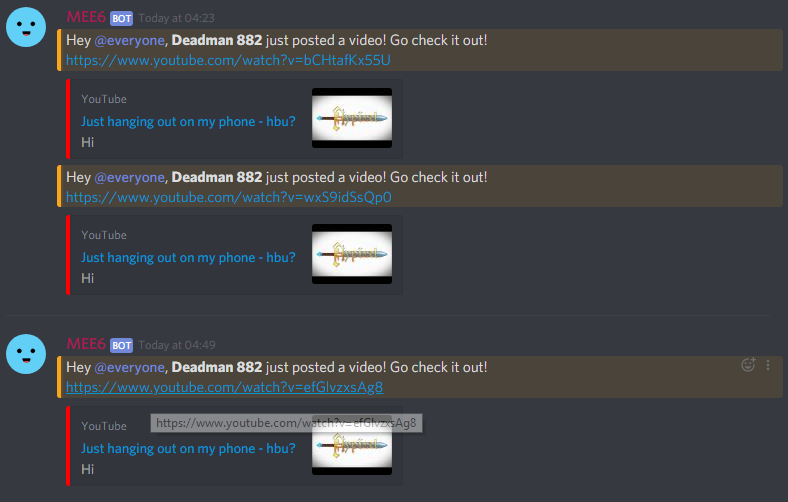
not too sure about twitch
he might have streamed and then stopped and then started again so not enough evidence on that
stark raven
They're all different videos, the url is different @jade terrace
dire yarrowBOT
Luis Tigzn, this command is disabled in this channel.
Alright, @rustic notch has been warned for 'Performing commands outside #〉commands | Only use them in the correct place'.
 rain lantern
if you write caps LIKE THESE, auto-moderator will not work.
pure obsidian
because bot reads that as **TEXT** unlike what you see as a human user (and in addition any symbol that returns a markdowned text in output) and in this case he typically wont catch because capital letters is less than 70% of the text. (similar to when bot DoEnSt MoDeRaTe ThIS)
dire yarrowBOT
Alright, @shy venture has been warned for 'Capital letters'.
dire yarrowBOT
Alright, @spare rain has been warned for 'Posted an invite'.
 civic cape
Oops, something went wrong in MEE6 land! :SAD6: This error has been reported to our Team. We'll work hard to fix it.
I do !clear [amount] and it says that ^
dire yarrowBOT
Oops, something went wrong in MEE6 land! This error has been reported to our Team. We'll work hard to fix it.
If this happens when using:
Custom commands:
‣ Bot tries to give the role that higher than his own. To fix that, move the bot's role above the role he tries to give.
‣ Missing Manage roles permission. Go to Server Settings -> Roles -> Bot role -> Manage Roles permission
Moderator commands:
‣ Muted role is above Mee6's role. Bot can't give roles that higher than his own. Move it down.
‣ Missing Manage roles permission. Go to Server Settings -> Roles -> Bot role -> Manage Roles permission
bitter owl
@civic cape ☝ how to fix it
civic cape
Thanks
dire yarrowBOT
Role hierarchy is important for me to give out roles. Oh and also Manage Roles perm:
https://cdn.mee6.xyz/s/fix_hierarchy.gif
 indigo needle
I want to warn my member, but Mee6 whrite me: "Uuuh, you can't warn a moderator.". I didn't get my member moderator. What is that?
stark raven
Do they have administrator or bot master permissions @indigo needle?
Because mee6 won't punish the following:
dire yarrowBOT
Hey  ! MEE6 won't sanction the following people:
• The Owner of the server;
• People with Administrator permission;
• People with Bot Master permission;
• And the role(s) you set as moderator on the dashboard.
Note: MEE6 think moderators are responsible people, like the police  . So he doesn't want to blame your police
indigo needle
@stark raven they don't have administration pepremission, and bot masrer pepremission.
stark raven
then they do have a moderator role
Could I have a screenshot of the moderator plugin ( ) on your dashboard?
stark raven
Does the user have the role "Admin"?
stark raven
Can you take a screenshot of the "Settings" tab on the dashboard
indigo needle
I have other screenshots
limber knoll
@indigo needle in dashboard what rules are in settings?
indigo needle
buoyant moon
Hi
indigo needle
@limber knoll I want to warn my member, buy Mee6 whrite me "Uuuh, you can't warn a moderator".
limber knoll
server settings > roles > everyone role untick administrator @indigo needle
dire yarrowBOT
Oops, something went wrong in MEE6 land! This error has been reported to our Team. We'll work hard to fix it.
If this happens when using:
Custom commands:
‣ Bot tries to give the role that higher than his own. To fix that, move the bot's role above the role he tries to give.
‣ Missing Manage roles permission. Go to Server Settings -> Roles -> Bot role -> Manage Roles permission
Moderator commands:
‣ Muted role is above Mee6's role. Bot can't give roles that higher than his own. Move it down.
‣ Missing Manage roles permission. Go to Server Settings -> Roles -> Bot role -> Manage Roles permission
stark raven
@buoyant moon 
dire yarrowBOT
Role hierarchy is important for me to give out roles. Oh and also Manage Roles perm:
https://cdn.mee6.xyz/s/fix_hierarchy.gif
 vernal saddle
Something is not working with the moderator commands i literally added all his roles to the allowed roles and he still cant use the clear command
vernal saddle
i have everything removed
pure obsidian
If you left the Banned Roles empty and added at least one Allowed Role they possess then it should work fine.
vernal saddle
thats what i did still doesnt work
pure obsidian
may I have your server ID?
vernal saddle
but for some weird reason it works with my higher up role
where can i find my id ?
dire yarrowBOT
Getting your server ID
go to your server and use !dashboard then copy this link and give to staff.
Or if that didn't work: open Server Settings in your Discord Server. Select Widget and press Copy ID next to Server ID.
You can also use Developer Mode as an alternative method.
vernal saddle
404036568999788544
pure obsidian
There is literally no Allowed Role in your clear command.
make sure you hit the save after adding
vernal saddle
doesnt it automatically use those roles stated above ?
pure obsidian
no
Moderator Role is just action immunity
if you want your moderators to be able to use the commands, you need to give them an Allowed Role inside each command
pure obsidian
your "higher up" roles were able to use it because they were either a bot master or had a role with admin perm
vernal saddle
the person mentioned also has admin perms
pure obsidian
admins, bot masters and owners, they bypass all banned roles and are able to use all commands
vernal saddle
but i will try that out
it could be that someone messed with the roles again but that is our problem
pure obsidian
these are roles in your server with admin perms
they can use all commands regardless of allowed roles
pure obsidian

 hardy vortex
My Mee6 won’t say something I put in my timer setting. It’s suppose to say it every 30 minutes but it won’t say anything
I’m active on my channel but it won’t work
How do I do that?
Do I add it in permissions?
I don’t see webhooks slot
It is
Ok
On your website?
dire yarrowBOT
You can access my dashboard at https://mee6.xyz/dashboard, and login with your Discord Account.
or you can use !dashboard in your server for a direct link
dire yarrowBOT
W1llzy, it doesn't look like you can use that.
!clear [@name] [messages to remove]
!clear xto clear the last x messages (!clear 10)!clear @nameto clear all the messages of@name(!clear @MEE6)!clear @name xto clear the last x messages of@name(!clear @MEE6 10)
- I need Manage Messages and View Message History permissions
- Moderator plugin and !clear command should to be enabled
- Only users with Allowed roles can use the command, don't forget to add their roles in command's settings!
 sterile storm
i did a command and my level reset
 gray birch
My !clear commands wont work with the permissions on
bitter owl
@sterile storm Cannot reset the level using commands
dire yarrowBOT
To reset levels, you need to have the Administrator perm (which grants you the ability to access the servers dashboard). The leaderboard can be found by doing !levels or https://mee6.xyz/leaderboard/SERVERID where SERVERID is the server's ID
https://cdn.mee6.xyz/s/reset_xp2.png
 gray birch
No, it's not responding
bitter owl
Well we noticed some shards are down and your server might have been affected
So we ask you to be a bit patient and wait while it self-heal
gray birch
Alright thanks
sterile storm
does the owner sometimes troll
bitter owl
Never
We take this serious and our responsibility is to keep the your privacy held and bot stable
bitter owl
Cool. I can say I am the president of the United States Of America. Does that turns me the president? Pretty much no
 ornate yew
Okay so my me6 profile on one of my servers transferred to my new one that I just created and I have the exact same level
Is there a way to reset
buoyant moon
@ornate yew go to server leaderboard by typing *** !levels*** in the server and ***reset all xp ***, but that shouldnt happen, did you select the wrong server or something
ornate yew
When I hit ranking before it showed up as my ranking level 20 and since I've been working on the server it went up because right now I'm creating a server that's D&D RP text based and I'm using your Bot as a leveling system
Now I'm level 20 on one of my Discord servers and now I'm level 22 on my brand new server that I just created not but two days ago
buoyant moon
did u get xp from talking?
ornate yew
Yes that's why I leveled up two levels
Because I'm just posting new material for my new server
buoyant moon
soz gtg, @zealous glen can you help
ornate yew
I just want to figure out how to reset it
 zealous glen
xp shouldnt transfer between servers to my knowlage, especially not to level 20. to reset for one of the servers just do !levels to find the leaderboard and there should be an option to reset your own level when you hover over your rank
ornate yew
Ok kool and this is what im talking about
I just created that one server 2 days ago and I'm already level 22
But I'll just reset it thank you so much
zealous glen
np
 young cradle
Hello, I can not configuer my bot. Indeed, when I am in the "plugins" part of your site and I press on one of the categories (for example "levels" or "welcome") the page puts me a black screen. Please help me. Thank you in advance.
buoyant moon
@young cradle its probably just connection, its fine for me
try again later and see
young cradle
ok thx
 hexed sparrow
The MEE6 bot in my server has gone offline and wont go back online
faint dome
Server ID please
dire yarrowBOT
Getting your server ID
go to your server and use !dashboard then copy this link and give to staff.
Or if that didn't work: open Server Settings in your Discord Server. Select Widget and press Copy ID next to Server ID.
You can also use Developer Mode as an alternative method.
hexed sparrow
526894640641736714
buoyant moon
The MEE6 bot in my server has gone offline
faint dome
Please don’t use multiple channels
buoyant moon
ok
faint dome
@hexed sparrow are you sure this is your server ID? Mee6 tell us he’s not there lol
faint dome
buoyant moon
😄
faint dome
@hexed sparrow after some investigations... can you go to your server dashboard and log in please ? It should be back in a couple of minutes for you too
buoyant moon
On Anarachy is MEE6 offine
faint dome
Is that a question?
faint dome
Ok, so we have a little outage right now. But as you can see above, mee6 is slowly restarting
 loud breach
yay
buoyant moon
@faint dome and it was again
faint dome
Ik, you already said it twice
 flat topaz
lol
faint dome
On a un léger problème, on ne sait pas d’où. Attend 5min, s’il n’est pas revenu vient nous voir
flat topaz
english?
buoyant moon
No French 😦
flat topaz
i know XD
burnt hazel
MEE6 will be back with you shortly
hexed sparrow
Its back up. Thanks so much
faint dome
Maybe a Discord outage
 grim hound
Bonjour
faint dome

buoyant moon
I have 2 other bots too that are frankly weird OFF what's going on:that was what he meant@buoyant moon
buoyant moon
perhaps
 shell rover
buoyant moon
shell rover
buoyant moon
@faint dome
Toujours off
dire yarrowBOT
Dark | Hydra™#3220 (386601944363433984) is muted for 1 hour because of 'Spam', boss.
faint dome
Pas besoin d’une demande d’ami mdr
Pour l’instant on n’y peut rien, on attend des nouvelles de nos devs ou de Discord
buoyant moon
Ah voilà enfin 😃
dire yarrowBOT
Danielius_J, this command is disabled in this channel.
buoyant moon
hi owner
faint dome
Do you need help?
dire yarrowBOT
Alright, @vernal ether has been warned for 'Posted an invite'.
 errant widget
dire yarrowBOT
errant widget
dire yarrowBOT
https://support.discordapp.com/hc/en-us/articles/210298617-Markdown-Text-101-Chat-Formatting-Bold-Italic-Underline- and https://cdn.mee6.xyz/s/markdown.png . To do colours with codeblocks like
this
Take a look on this server: https://discord.gg/DGahTNn

 clear coral
Excuse me my mee6 cammand has stopped working idk why it just stopped cooperating
wooden mountain
There is a restart going on, pls try again later
 steel jay
!buymee6premium
 hardy hamlet
@wooden mountain @wooden mountain
wooden mountain
no no
buoyant moon
@정현#6114
bitter owl

 floral wigeon
Why did that get deleted?
floral wigeon
No I explained that to help Devs fix that problem
wooden mountain
we are aware
floral wigeon
I didn't mean to explain users how to exploit stuff
buoyant moon
I have automod enabled and it warns mutes and bans sometimes when someone simply says I disagree or just I? Is that because I have set it up wrong or a bug?
 brazen bough
Sounds like you or another admin added blocked words?
buoyant moon
Qui peut m'ajouter mee6 sur mon serveur svp
bitter owl
Si vous êtes administrateur, vous pouvez l'ajouter
dire yarrowBOT
bitter owl
Utilisez ce lien s'il vous plaît ☝
bitter owl
Êtes-vous le propriétaire ou au moins l'administrateur de ce serveur?
bitter owl
Parce que vous avez besoin de cette permission pour ajouter le bot
buoyant moon
Si enfaite le probleme c'est que j'ai mee6 mais jpeut pas lui créer les commandes
Ça reste comme ça
C'est sont site
bitter owl
Il semble que votre version d'iOS n'est pas compatible avec notre site
buoyant moon
A bah d'accord rip
bitter owl
Essayez de mettre à jour le téléphone ou d'utiliser un ordinateur
buoyant moon
D'accord merci
 turbid quiver
Can I drive
bitter owl
@queen tulip only talk in #〉chat or #〉commands please
 queen tulip
ok
bitter owl
Thx
dire yarrowBOT
Alright, @buoyant moon has been warned for 'sending emojis jn wrong place | Stop the arrows in wrong place or get muted | Test them in #〉commands'.
dire yarrowBOT
Alright, @buoyant moon has been warned for 'Please test emotes in #〉commands.'.
marshmellou#7794 (525844569594527764) is muted for 2 hours because of 'Ignoring Staff, testing emotes outside of #〉commands, spam.', boss.
 wintry dome
Mee6 bot can't join the server
wintry dome
I'm clicking to add him and when it's takes me too the discord site I can't select a server
dire yarrowBOT
It appears that you may be on the wrong account, or something went wrong since the time you logged into my website.
-Please navigate to https://discordapp.com/login and select the gear :gear: in the bottom left, then press Logout.
-After that, please navigate to https://mee6.xyz/dashboard to disconnect from my website. Click on your profile picture and press Logout
-Once finished, select "Add to Discord" again, and follow the instructions to access my dashboard again.
https://cdn.mee6.xyz/s/logout.png
 faint dome
Be sure to logout from the discord website (not the app)
wintry dome
Thanks. It worked
 clever abyss
 crude mantle
Your server may be old enough to qualify for Role Rewards.
 swift cloud
Mee6 role rewards require premium, and I don’t remember it being like this.
dire yarrowBOT
Over the last few years the bot has exploded in popularity, and is now in millions of servers.
The computing power needed to simply run such a bot is immense, and the resources in terms of server rentage is big, which we pay out of our own pocket.
Making the Role Rewards a premium feature is not as a cash grab, but as an attempt of simply keeping the bot online.
Role-rewards
For old servers that added MEE6 BEFORE 9/1/19 to their server role-rewards are free.
For new servers that only recently added MEE6 you will need premium.
We made this change because MEE6 takes a lot of time, maintenance and development, and this is not free.
Premium helps us to support MEE6 and to keep the MEE6 dream going, without it, there wouldnt be a MEE6, as you can't run bots like this for free, its not possible.
We try to keep as much as possible of MEE6 free but this is just not possible.
 jade orchid
read that @swift cloud
swift cloud
Ok, thanks.
jade orchid
np
burnt hazel
de quoi avez-vous besoin d'aide ? @buoyant moon
 craggy oak
Timer is not working!
burnt hazel
@craggy oak What happens?
burnt hazel
Que se passe-t-il lorsque vous essayez d'utiliser la commande? Est-ce que MEE6 dit quelque chose?
buoyant moon
Non il ne dit rien
burnt hazel
Puis-je avoir votre numéro de serveur s'il vous plaît
dire yarrowBOT
Getting your server ID
go to your server and use !dashboard then copy this link and give to staff.
Or if that didn't work: open Server Settings in your Discord Server. Select Widget and press Copy ID next to Server ID.
You can also use Developer Mode as an alternative method.
buoyant moon
Je ne sais pas faire
burnt hazel
ou un lien vers votre tableau de bord
buoyant moon
Here you go! https://mee6.xyz/dashboard/533007003253997570 MEE6

Skill up and manage your Discord server with automations, commands and awesome plugins!
burnt hazel
Merci
buoyant moon
Dr
burnt hazel
allez à la commande sur le tableau de bord, et désactivez cette option
buoyant moon
Voilà c'est fait
burnt hazel
testez-le maintenant et voyez s'il fonctionne / mee6 répond
buoyant moon
Merci bcp
burnt hazel

buoyant moon
Bjr j'ai payer un compte premium de mee6 et puis là je viens de voir que j'ai perdu mon compte premium quel est ce problème
Oui voilà sur mon serveur je l'avais payer
Et il a disparue c'est inadmissible
@ripe rivet
Je ne l'ai pas annuler
Je l'ai depuis une semaine
Here you go! https://mee6.xyz/dashboard/533007003253997570 MEE6
Skill up and manage your Discord server with automations, commands and awesome plugins!
Alors c'est quoi le problème
@ripe rivet
Ok
Et il se passera quoi après
De quoi
Ok
Tu pourras me mp pour me dire la rép et j'aurais quand la rep
Car c'est inadmissible
De gros beug comme ca
dire yarrowBOT
Alright, @velvet narwhal has been warned for 'Posted an invite'.
buoyant moon
@ripe rivet hey tu sais pourquoi tout le monde s'appel BuyMeMee6bot Prenium ?
craggy oak
@burnt hazel ı don't know.!
burnt hazel
Is there any errors? Are you trying to add one from the Dashboard, or are you waiting in your server for one to happen? @craggy oak
craggy oak
@burnt hazel ı can take photo and send u?
burnt hazel
yes
burnt hazel
what happens when you press "update"?
Remember Timers will only send if the channel is Active, so make sure people are talking in the channel.
craggy oak
@burnt hazel o don't know
I don't understand
I'm understand
Thx
Now I have to find active people.
burnt hazel
👌
 forest tulip
when mee6 messages its blocked
 soft sapphire
None of the custom commands in my server work. It says something went wrong in mee6 land
dire yarrowBOT
Oops, something went wrong in MEE6 land! This error has been reported to our Team. We'll work hard to fix it.
If this happens when using:
Custom commands:
‣ Bot tries to give the role that higher than his own. To fix that, move the bot's role above the role he tries to give.
‣ Missing Manage roles permission. Go to Server Settings -> Roles -> Bot role -> Manage Roles permission
Moderator commands:
‣ Muted role is above Mee6's role. Bot can't give roles that higher than his own. Move it down.
‣ Missing Manage roles permission. Go to Server Settings -> Roles -> Bot role -> Manage Roles permission
burnt hazel
@soft sapphire ^^
burnt hazel
No problem 😄
 icy quest
he want to get to my server
PLEASE SELECT A SERVER
Oops, looks like you don't have any server 😦 .
Are you sure to be connected to the right Discord account?
!^
dire yarrowBOT
It appears that you may be on the wrong account, or something went wrong since the time you logged into my website.
-Please navigate to https://discordapp.com/login and select the gear :gear: in the bottom left, then press Logout.
-After that, please navigate to https://mee6.xyz/dashboard to disconnect from my website. Click on your profile picture and press Logout
-Once finished, select "Add to Discord" again, and follow the instructions to access my dashboard again.
https://cdn.mee6.xyz/s/logout.png
 brazen zodiac
A mod tell me to report this here:
-the timers  still not work
faint dome
We meed details: what exactly doesn’t work? How long is the timer? Is your channel active? How long is the message? Etc
@brazen zodiac
As only you have this bug...
faint dome
Server ID?
limber knoll
@brazen zodiac☝
brazen zodiac
327583360924778498
limber knoll
@brazen zodiac 24hr timers are bugged
brazen zodiac
I know that's why i'm here
buoyant moon
@brazen zodiac means *** you cannot use them***
brazen zodiac
I know ... I know that's why i'm here
brazen zodiac
Si ça marchait je serais pas la ici je suis dans #〉bugs-reports donc je report ce bug la je sais lire qd meme
Je sais que ca marche pas je suis pas débile
 vital zealot
Um guys how to add roles to people
I made the command
But it just poped sth is wrong
dire yarrowBOT
Role hierarchy is important for me to give out roles. Oh and also Manage Roles perm:
https://cdn.mee6.xyz/s/fix_hierarchy.gif
 serene bridge
hi when i put the bot to give a rol, i go to mi chanel y put the comand and he tell it
dire yarrowBOT
Oops, something went wrong in MEE6 land! This error has been reported to our Team. We'll work hard to fix it.
If this happens when using:
Custom commands:
‣ Bot tries to give the role that higher than his own. To fix that, move the bot's role above the role he tries to give.
‣ Missing Manage roles permission. Go to Server Settings -> Roles -> Bot role -> Manage Roles permission
Moderator commands:
‣ Muted role is above Mee6's role. Bot can't give roles that higher than his own. Move it down.
‣ Missing Manage roles permission. Go to Server Settings -> Roles -> Bot role -> Manage Roles permission
burnt hazel
@serene bridge ^^ Move MEE6 above the role he is trying to give
serene bridge
how do I do it?
 lethal relic
https://gyazo.com/40ab4627475b2006b267425713695a1f Whenever I go to Invite MEE6 It brings me to this page and shows nothing.
 burnt hazel
!hierarcht
dire yarrowBOT
Role hierarchy is important for me to give out roles. Oh and also Manage Roles perm:
https://cdn.mee6.xyz/s/fix_hierarchy.gif
serene bridge
ok
burnt hazel
Safari isnt a supported browser
lethal relic
Alright, I'll try google chrome. Thank you.
burnt hazel
No problem 😄
 icy iron
you sure there isn't a bug in mee? i changed nothing on my discord and have the same issue energy squad is describing.
i checked the role hierarchy as well as the manage roles permission, everuhings is fine
 cold bear
what your command supposed to do?
icy iron
give a user a certain role
 native mural
i am unable to have bad words :(
native mural
chrome
icy iron
@cold bear sure
cold bear
and what happens when you try to enter bad word?
cold bear
hmm, are you on mobile?
cold bear
do you have any bad words in list already? @native mural
native mural
just removed all
cold bear
what's your server id
native mural
how do i find that?
cold bear
numbers in dashboard url of your server
cold bear
hope so, one minute
not sure what can cause an error, if you have adblock/privacy extentions it's better to disable them. works fine for me
native mural
ok
 devout sluice
I've noticed that when I set a timer for every 4 hours, it sends the pre-set message every 5 hours instead.
dire yarrowBOT
@devout sluice did 'spam' and got the ban hammer for 8 days!
dire yarrowBOT
Role hierarchy is important for me to give out roles. Oh and also Manage Roles perm:
https://cdn.mee6.xyz/s/fix_hierarchy.gif
dense fox
^^^
 hard lance
I didn't understand
 white urchin
Is language filter broken?
limber knoll
nope
white urchin
Seems like it is considering it stopped working...
dire yarrowBOT
Alright, @buoyant moon has been warned for 'Bad word usage'.
Alright, @buoyant moon has been warned for 'bypass'.
 eternal iron
I can't add a rôle with commande
Do you speak French?
 ivory hornet
tempmute doesn't work in my serve but it works in other servers 
ivory hornet
yes
 deft haven
Can you send a screenshot of you using the command?
ivory hornet
dire yarrowBOT
!mute @CoolGuysNameHere You have been too cool.
!tempmute @SecondLameGuyHere 3h Too lame.
- I must have "Manage Channels", and "Manage Roles" for my permissions.
- I must have a role above the "Muted" role I create.
If there are problems, please check that the Muted Role does not have send messages globally or per channel.
Durations for tempmute command.
50m50 minutes.50h50 hours.50d50 days.
you can NOT mute for less then a minute
deft haven
@ivory hornet
ivory hornet
thanks the problem was the muted role was above mee6 for some reason
deft haven
Np.
 storm tapir
yups,
it figures i posted in the wrong channel, my bad.
i'm currently trying to acces to my discord server dashboard through https://bots.ondiscord.xyz/bots/...
@candid night silence 😉
[i'm currently trying to acces to my discord server dashboard through https://bots.ondiscord.xyz/bots/...]
but it doesn't suceed to connect...
dire yarrowBOT
[YT]PedroAikau12062010#0266 (464749780883734528) is muted for 45 minutes because of 'Spamming', boss.
storm tapir
thx @dire yarrow 😄
pure obsidian
@storm tapir https://mee6.xyz/dashboard
storm tapir
@pure obsidian I meant this link... not the "bots.ondiscord.xyz"
Once I selected my server, nothing happen
happens
pure obsidian
Do !dashboard in your server and use that link instead
storm tapir
Didn't remember the shortcut, but still not working 😦
storm tapir
chrome
pure obsidian
Any adblockers or VPN?
buoyant moon
Nie da się resetować bota mee6. Polish
storm tapir
no VPN, and popular adblockers
just tried with Firefox and it works :/
thx for the help
 candid night
 hollow snow
silence
burnt hazel
@candid night Why are you pinging them?
Do you need help?
dire yarrowBOT
Alright, @candid night has been warned for 'pinging staff for no reason'.
buoyant moon
i cant change language of MEE6 😦
wooden mountain
yet
buoyant moon
why
wooden mountain
because we are busy adding multiple languages support
 boreal delta
@wooden mountain hi
@wooden mountain i have a issue
@wooden mountain sir how do i mute people using this bot
wooden mountain
I'M WORKING, PING SUPPORT 😡
buoyant moon
Enable Moderation Plugin. !mute @user (optional reason) or !tempmute @user TimeFormat (Optional Reason)
 devout fossil
Lol
boreal delta
ok
dire yarrowBOT
Durations for time based commands.
50m50 minutes.50h50 hours.50d50 days.
seconds are not supported for most commands.
slowmode only uses seconds so no time interval should be given.
buoyant moon
that is your time formats
boreal delta
then how?
buoyant moon
not !mute
boreal delta
!tempmute @boreal delta 50m
dire yarrowBOT
TanishGreninja, it doesn't look like you can use that.
boreal delta
right?
buoyant moon
like this
boreal delta
ok thanks
dire yarrowBOT
TanishGreninja#5572 (537224900285300737) is muted for 50 minutes because of 'Test', boss.
TanishGreninja#5572 (537224900285300737) is now unmuted!
buoyant moon
!tempmute @TanishGreninja 50m Test
 wispy geode
when will back the 24 hours timing sender?
burnt hazel
Not sure sorry. But we are working to fix it.
 signal gate
This is not somehow working.
pure obsidian
server settings => roles and make sure Mee6's role is above the Heroic Spirit role
also do note that this gives the role to the user invoking command only
signal gate
It worked. Thanks. ❤
 dense latch
ok so i just made a custom command & it didn't work so i deleted it & made it again , it worked then, it's ok but if newer people get this issue they would be very confused so, try to fix it.
 thorn rose
Hey there, I am having some issues with the custom commands. Every time a member tries to type the registration acceptance command, it just says "Oops, something went wrong in MEE6 land! :SAD6: This error has been reported to our Team. We'll work hard to fix it."
Just wanted to know if there was a fix for this.
dire yarrowBOT
Oops, something went wrong in MEE6 land! This error has been reported to our Team. We'll work hard to fix it.
If this happens when using:
Custom commands:
‣ Bot tries to give the role that higher than his own. To fix that, move the bot's role above the role he tries to give.
‣ Missing Manage roles permission. Go to Server Settings -> Roles -> Bot role -> Manage Roles permission
Moderator commands:
‣ Muted role is above Mee6's role. Bot can't give roles that higher than his own. Move it down.
‣ Missing Manage roles permission. Go to Server Settings -> Roles -> Bot role -> Manage Roles permission
jade orchid
read that @thorn rose ^
thorn rose
Will do, thank you!
jade orchid
np
 silver oar
bot ne vypolnyayet komandu pishet oshibku, u kogo takoye zhe? Vtoroy den' takaya fignya
dire yarrowBOT
Alright, @buoyant moon has been warned for 'Bad word usage'.
limber knoll
Ой, что-то пошло не так на земле MEE6! MEESAD6 Об этой ошибке было сообщено нашей команде. Мы будем усердно работать, чтобы исправить это.
Если это происходит при использовании:
Пользовательские команды:
‣ бот пытается дать роль, которая выше, чем его собственная. Чтобы это исправить, переместите роль бота выше той роли, которую он пытается дать.
Permission Отсутствует разрешение на управление ролями. Зайдите в Настройки сервера -> Роли -> Роль бота -> GreenTick Управление ролями
Команды модератора:
‣ Приглушенная роль выше роли Mee6. Бот не может давать роли выше своих. Переместите это вниз.
Permission Отсутствует разрешение на управление ролями. Зайдите в Настройки сервера -> Роли -> Роль бота -> GreenTick Управление ролями
@silver oar
 viral solstice
Hi
 azure canopy
Hallo
dire yarrowBOT
Oops, something went wrong in MEE6 land! This error has been reported to our Team. We'll work hard to fix it.
If this happens when using:
Custom commands:
‣ Bot tries to give the role that higher than his own. To fix that, move the bot's role above the role he tries to give.
‣ Missing Manage roles permission. Go to Server Settings -> Roles -> Bot role -> Manage Roles permission
Moderator commands:
‣ Muted role is above Mee6's role. Bot can't give roles that higher than his own. Move it down.
‣ Missing Manage roles permission. Go to Server Settings -> Roles -> Bot role -> Manage Roles permission
faint dome
Remove admin perms and add Manage Messages please, as mee6 doesn’t look at admin @buoyant moon
@gentle night blame discord 
 gentle night

buoyant moon
Works now thanks!
 devout chasm
...
devout chasm
it's a fake role
 vapid drift
aaaaah
 mortal oxide
You'll see that you won't be able to
vapid drift
Sorry, is panic :/

 coral field
Bot no longer in our server
dire yarrowBOT
Oops, something went wrong in MEE6 land! This error has been reported to our Team. We'll work hard to fix it.
If this happens when using:
Custom commands:
‣ Bot tries to give the role that higher than his own. To fix that, move the bot's role above the role he tries to give.
‣ Missing Manage roles permission. Go to Server Settings -> Roles -> Bot role -> Manage Roles permission
Moderator commands:
‣ Muted role is above Mee6's role. Bot can't give roles that higher than his own. Move it down.
‣ Missing Manage roles permission. Go to Server Settings -> Roles -> Bot role -> Manage Roles permission
burnt hazel
@buoyant moon ^^
buoyant moon
@burnt hazel Dont work
dire yarrowBOT
Alright, @carmine jackal has been warned for 'Bad word usage'.
limber knoll
@coral field were you wanting to reinvite the boot to your server?
coral field
Can I invite the bot even if I am not an admin @limber knoll
limber knoll
@coral field no sorry
coral field
Can I get instructions so our admin can invite back
limber knoll
used to be multiple roles could invite but due to abuse made it for administrator perms and owner now
tell them to just go https://mee6.xyz/dashboard, you can copy and paste this message, this will invite the bot and also the link to configure the bot
Skill up and manage your Discord server with automations, commands and awesome plugins!
coral field
Awesome thx Lockey much appreciated
limber knoll
np
dire yarrowBOT
Alright, @buoyant moon has been warned for 'Posted an invite'.
 thorny meteor
Le site pour modifier le bot me force a passer premuim pour pouvoir modifier les levels .... Normal ou non ??? Merci pojr votre réponse
faint dome
@thorny meteor oui, si tu a invite mee6 après le 9 janvier, il faut payer pour pouvoir donner des rôles en fonction de l’xp. Mais le reste du plugin reste gratuit, pour tout le monde ^^
thorny meteor
c'est un peu con du coup pour les nouveaux qui ne savent pas s'en servir ....
 viral tundra
il ne peux pas redevenir gratuit ?
faint dome
Non, malheureusement les devs ont trop besoin d’argent pour héberger le bot... le mieux qu’on a pu faire, c’est proposer 3 gratuits par serveur dans #┃upvote-suggestions
viral tundra
il sera mis en place quand ?
faint dome
Quand les devs l’accepteront, en supposant qu’ils le fasse
 simple bluff
Please help my custom command isn’t working
bitter owl
Oops error message?
simple bluff
Yeah
dire yarrowBOT
Oops, something went wrong in MEE6 land! This error has been reported to our Team. We'll work hard to fix it.
If this happens when using:
Custom commands:
‣ Bot tries to give the role that higher than his own. To fix that, move the bot's role above the role he tries to give.
‣ Missing Manage roles permission. Go to Server Settings -> Roles -> Bot role -> Manage Roles permission
Moderator commands:
‣ Muted role is above Mee6's role. Bot can't give roles that higher than his own. Move it down.
‣ Missing Manage roles permission. Go to Server Settings -> Roles -> Bot role -> Manage Roles permission
Role hierarchy is important for me to give out roles. Oh and also Manage Roles perm:
https://cdn.mee6.xyz/s/fix_hierarchy.gif
bitter owl
It means you need to bring mee6's roles to above the others you want to give
 cunning forge
When I try using the "!warn" command, even though it is enabled, it will not work in my server.
burnt hazel
@cunning forge Does MEE6 respond with anything?
Whats your server ID?
cunning forge
I added so MEE6 deletes my command incovation message, nothing gets deleted.
I'm getting the ID.
Hold on, Instant invite?
dire yarrowBOT
Getting your server ID
go to your server and use !dashboard then copy this link and give to staff.
Or if that didn't work: open Server Settings in your Discord Server. Select Widget and press Copy ID next to Server ID.
You can also use Developer Mode as an alternative method.
cunning forge
Skill up and manage your Discord server with automations, commands and awesome plugins!
This one?
burnt hazel
thx
cunning forge
It's just a random server for my friends.
burnt hazel
@cunning forge turn this OFF
cunning forge
Thx.
burnt hazel
No problem
cunning forge
No.
cunning forge
I put no toxicity in my rules.
burnt hazel
!warn @user [reason]
burnt hazel

cunning forge
Thx a lot.
burnt hazel
No problem
 thin otter
Uhhhhh, you can't ban a moderator. but is that just me? So why
buoyant moon
MEE6 ignores moderators. So mee6 doesn't ban 'em.
thin otter
thx
!warn @Anonimus no spam
:XMARK6: Uhhhhh, you can't warn a moderator.
??
wat
why
hmm
well, I do not know
buoyant moon
As i said, MEE6 doesn't warn/ban moderators
Try testing it on normal users or remove his/her moderator permission.
dire yarrowBOT
Alright, @thin otter has been warned for 'Capital letters'.
thin otter
he is not a moderator!
ok
<@&193123929701875712> Oops, something went wrong in MEE6 land! :SAD6: This error has been reported to our Team. We'll work hard to fix it.
dire yarrowBOT
Oops, something went wrong in MEE6 land! This error has been reported to our Team. We'll work hard to fix it.
If this happens when using:
Custom commands:
‣ Bot tries to give the role that higher than his own. To fix that, move the bot's role above the role he tries to give.
‣ Missing Manage roles permission. Go to Server Settings -> Roles -> Bot role -> Manage Roles permission
Moderator commands:
‣ Muted role is above Mee6's role. Bot can't give roles that higher than his own. Move it down.
‣ Missing Manage roles permission. Go to Server Settings -> Roles -> Bot role -> Manage Roles permission
deft haven
buoyant moon
Not a real important bug but yeah my user tag is noxgamingqc#3942 but it use my server nickname so ノックスガミング~センパイ instead of noxgamingqc
buoyant moon
Pretty sure almost all bots use the server nickaname rather than your discord username.
 bold ocean
!계급
buoyant moon
automod does not work n
dire yarrowBOT
Hey ! MEE6 won't sanction the following people:
• The Owner of the server;
• People with Administrator permission;
• People with Bot Master permission;
• And the role(s) you set as moderator on the dashboard.
Note: MEE6 think moderators are responsible people, like the police . So he doesn't want to blame your police
burnt hazel
@buoyant moon 👆
buoyant moon
All our custom role commands are no longer working, and when someone types the command, it says "Oops, something went wrong in MEE6 land! :SAD6: This error has been reported to our Team. We'll work hard to fix it." Is anyone else experiencing this problem or does anyone know how to fix it?
dire yarrowBOT
Oops, something went wrong in MEE6 land! This error has been reported to our Team. We'll work hard to fix it.
If this happens when using:
Custom commands:
‣ Bot tries to give the role that higher than his own. To fix that, move the bot's role above the role he tries to give.
‣ Missing Manage roles permission. Go to Server Settings -> Roles -> Bot role -> Manage Roles permission
Moderator commands:
‣ Muted role is above Mee6's role. Bot can't give roles that higher than his own. Move it down.
‣ Missing Manage roles permission. Go to Server Settings -> Roles -> Bot role -> Manage Roles permission
jade orchid
read that ^
buoyant moon
Thanks man !
jade orchid
np
buoyant moon
welp, i guess one of the admins moved the bot, pretty simple solution, thanks for the speedy help man !
jade orchid
no worries. That issue happens all the time
buoyant moon
Lol, i bet, it's always the simple things man , thanks again
buoyant moon
bonjour on me prélève tous les mois je veux mettre fin à ce paiement que je n'ai pas autorisé merci de m'apporter une réponse objective
limber knoll
dans le tableau de bord> paramètres, impossible d'annuler l'abonnement? @buoyant moon
buoyant moon
@limber knoll oui il semblerait, j'ai juste logout, et manage card rank
h=je retourne voir
limber knoll
désolé je voulais dire prime onglet dans https://mee6.xyz/dashboard
Skill up and manage your Discord server with automations, commands and awesome plugins!
dire yarrowBOT
Sanjay, this command is disabled in this channel.
buoyant moon
Auto moderator does not detect swear words if they are right next to a full stop (I think).
burnt hazel
we are aware
 chrome urchin
the roles arent working and neither are commands
limber knoll
@chrome urchin?
dire yarrowBOT
Role hierarchy is important for me to give out roles. Oh and also Manage Roles perm:
https://cdn.mee6.xyz/s/fix_hierarchy.gif
limber knoll
what does !help give you in your serve? @chrome urchin
chrome urchin
ok the roles aren’t working again
ok the commands are working
but the roles aren’t still
limber knoll
does mee6 have manage roles?
faint dome
Any adblocker, or vpn?
 wicked fulcrum
On mobile that is a common problem
try on pc if you have one
or if you are on pc do what Z_jumper said
 blissful surge
No i am in pc and i haven’t got à vpn or ad block
faint dome
what browser are you using?
blissful surge
I use Google
faint dome
Chrome?
blissful surge
Oui
faint dome
Il va falloir ouvrir la console de l'app et regarder les erreurs alors
buoyant moon
For some reason if I setup role rewards it gives all roles to all users even if they aren't at the required level. This has happened many times before.
 verbal nacelle
Having issues with the mute not working in my server
Says their is an issue with mee6
dire yarrowBOT
Alright, @clever heron has been warned for 'Duplicated text'.
 empty plank
hello @devout chasm
I set the MEE6 bot but it tells me an error message that is:Oops, something went wrong in MEE6 land! :SAD6: This error has been reported to our Team. We'll work hard to fix it.
dire yarrowBOT
Oops, something went wrong in MEE6 land! This error has been reported to our Team. We'll work hard to fix it.
If this happens when using:
Custom commands:
‣ Bot tries to give the role that higher than his own. To fix that, move the bot's role above the role he tries to give.
‣ Missing Manage roles permission. Go to Server Settings -> Roles -> Bot role -> Manage Roles permission
Moderator commands:
‣ Muted role is above Mee6's role. Bot can't give roles that higher than his own. Move it down.
‣ Missing Manage roles permission. Go to Server Settings -> Roles -> Bot role -> Manage Roles permission
deft haven
empty plank
i gave all the autorisations but
it does not work
empty plank
@devout chasm
dire yarrowBOT
Role hierarchy is important for me to give out roles. Oh and also Manage Roles perm:
https://cdn.mee6.xyz/s/fix_hierarchy.gif
wooden mountain
Make sure the bot his role is high enough
empty plank
Thank you so much
 white hemlock
I cant use this wtf???
dire yarrowBOT
Over the last few years the bot has exploded in popularity, and is now in millions of servers.
The computing power needed to simply run such a bot is immense, and the resources in terms of server rentage is big, which we pay out of our own pocket.
Making the Role Rewards a premium feature is not as a cash grab, but as an attempt of simply keeping the bot online.
Role-rewards
For old servers that added MEE6 BEFORE 9/1/19 to their server role-rewards are free.
For new servers that only recently added MEE6 you will need premium.
We made this change because MEE6 takes a lot of time, maintenance and development, and this is not free.
Premium helps us to support MEE6 and to keep the MEE6 dream going, without it, there wouldnt be a MEE6, as you can't run bots like this for free, its not possible.
We try to keep as much as possible of MEE6 free but this is just not possible.
 left patio
custom commands do not work gives error
dire yarrowBOT
Oops, something went wrong in MEE6 land! This error has been reported to our Team. We'll work hard to fix it.
If this happens when using:
Custom commands:
‣ Bot tries to give the role that higher than his own. To fix that, move the bot's role above the role he tries to give.
‣ Missing Manage roles permission. Go to Server Settings -> Roles -> Bot role -> Manage Roles permission
Moderator commands:
‣ Muted role is above Mee6's role. Bot can't give roles that higher than his own. Move it down.
‣ Missing Manage roles permission. Go to Server Settings -> Roles -> Bot role -> Manage Roles permission
 open grove
check this @left patio
white hemlock
because auto roles pays
dire yarrowBOT
Alright, @white hemlock has been warned for 'Bad word usage'.
Alright, @white hemlock has been warned for 'Capital letters'.
dire yarrowBOT
Officialmursu#5588 (539483800112201768) is muted for 1 hour because of 'bypass', boss.
buoyant moon
Moderation is offline idk why but anywords wont work
dire yarrowBOT
Hey ! MEE6 won't sanction the following people:
• The Owner of the server;
• People with Administrator permission;
• People with Bot Master permission;
• And the role(s) you set as moderator on the dashboard.
Note: MEE6 think moderators are responsible people, like the police . So he doesn't want to blame your police
 sturdy plover
Whenever I try to click on one of the features here a blank screen pops up so I can only see my open tabs
burnt hazel
disable adblocker/VPN, make sure to use chrome @sturdy plover
dire yarrowBOT
If you keep failing to logout from MEE6 website, these steps can help you:
Chrome:
1. Open https://mee6.xyz
2. Click on lock icon in address bar
3. Click on \🍪 Cookies
4. Pick mee6.xyz from the list and click Remove
5. Click Done
6. Repeat same steps for https://discordapp.com but pick discordapp.com in cookies list instead
Firefox:
1. Click the menu button ≡ and choose \⚙ Preferences
2. Click on \🔒 Privacy & Security and go to Cookies and Site Data section
3. Click on Manage Data...
4. Search for mee6.xyz and discordapp.com sites. Remove them if found
Chrome Mobile:
1. Open https://mee6.xyz
2. Tap on \🔒 icon in address bar
3. Tap on Site settings button
4. Tap on \🗑 icon under Usage and tap Clear all
5. Repeat same steps for https://discordapp.com
Firefox Mobile:
Sadly, but Firefox Mobile doesn't allow to clear cookies for certain website, only clearing them for all websites. If you're ok with that:
1. Tap menu mutton ⋮
2. Tap Settings
3. Tap Clear Data
4. In appeared menu check Cookies & active logins
5. Tap CLEAR DATA
mortal oxide
@sturdy plover try this so ^^
 dull raven
Why I can’t ban a moderator?
sturdy plover
It is still doing the same thing
mortal oxide
Hey ! MEE6 won't sanction the following people:
• The Owner of the server;
• People with Administrator permission;
• People with Bot Master permission;
• And the role(s) you set as moderator on the dashboard.
Note: MEE6 think moderators are responsible people, like the police . So he doesn't want to blame your police . @dull raven
@sturdy plover can you try to restart Google Chrome please?
burnt hazel
@sturdy plover disable adblockers/VPN and try clearing your cache
sturdy plover
it's working now
 chrome flicker
hi
open grove
Hey
dire yarrowBOT
Alright, @wary pulsar has been warned for 'Bad word usage'.
dire yarrowBOT
Malo#4589 (552429651306348544) is now muted for 'spam', alright?
buoyant moon
why was i pinged here 14 times 
limber knoll
@buoyant moon removed them
buoyant moon
what was it tho
limber knoll
spamming user
buoyant moon
-_-
 onyx widget
@limber knoll 
limber knoll
user that just got themselves banned
 limber knoll
was same user
 lusty sand
Not sure if this is an actual bug, but if you disable the music plugin while mee is in a vc, it gets trapped there
 tawny lion
wooden mountain
tawny lion
wooden mountain
@lusty sand we Know that, but he isn't trapped, he will leave once our music system restarts (might take a couple months)
wooden mountain
@proud schooner that is either "welcome" "level up" or a response from a custom command. These are all message that server owners/admins can change and we can't take responsibility for.
 versed dawn
 proud schooner
@wooden mountain He talked tocme
To me*
And he invited me to server
And I have 2 MEE6 in my private message
Finally, the commands aren't ok
I can't do !help
See
@dire yarrow
@wooden mountain
MEE6 haven't # right?
The # of the TRUE MEE6 is #4867
 valid surge


 ionic meteor
@valid surge You mean refunding? Or disable the autorenewal?
ionic meteor
You can go to the premium page of your guild, press the "Edit" button and remove your payment method 😃
 boreal mauve
Hey @dire yarrow its look Something happening in all Discord Server when I Trying the !verify command its not Working my problem is like in this user @proud schooner
burnt hazel
@boreal mauve does MEE6 respond with anything?
boreal mauve
@burnt hazel No but I want MEE6 Staff Fix the Problem.
burnt hazel
I am MEE6 staff
boreal mauve
Can you help us With that ERROR?
burnt hazel
Error? Does MEE6 respond with "oops, something went wrong in MEE6 land"?
boreal mauve
Yes
burnt hazel
Move the MEE6 role above the roles in your server settings. like shown on the right side of this gif
dire yarrowBOT
Role hierarchy is important for me to give out roles. Oh and also Manage Roles perm:
https://cdn.mee6.xyz/s/fix_hierarchy.gif
boreal mauve
@burnt hazel and @dire yarrow TY have a Great day!
burnt hazel
You too 
proud schooner
So @Sil what do you do
buoyant moon
bug in commands music