#〉bugs-reports
2 messages · Page 52 of 1
 charred crag
I set a timer up and the bot only posts when someone says something in that channel after 20 minutes which I set
 dull ledge
Something went wrong at here. I can't delete some commands i used
 wooden mountain
@dull ledge custom commands plugin or a different plugin?
 thorn pivot

wooden mountain
Yes
thorn pivot

dull ledge
like this! I cant delete it
thorn pivot
ok
wooden mountain
MEE6 deleted that message already but either your client didn't receive that or you received the "new message" after the "delete message"
Restart your discord (or refresh) and it will be gone
wooden mountain
Could be, don't know
dull ledge
I tried it and it didn't delete
 wheat stone
charred crag
wheat stone
charred crag
Im having a hard time getting timers to work they only work after i post something after the timer is up
charred crag
can i do anything about that
 void breach
my server mee6 bot has bug.. i dont have premium and my bot has record active. and if ı write !join voice channel joined rhytm and mee6 bot ?
charred crag
Thats because your commands are the same and both bots join at the sametime, premium you have to pay for!
 copper halo
i guess the prefix is the same
void breach
@charred crag ı know ..
charred crag
ya thats the problem
 burnt hazel
@void breach
You can change rythem prefix using !settings prefix [new prefix]
charred crag
i dont thinjk you can without paying for premuim
charred crag
i dont mean that i mean using the record command
burnt hazel
He is able to use it as he purchased it before we introduced our premium subscription
burnt hazel
Nope, you need to send messages between timers for them to send
void breach
@charred crag but ı dont want to mee 6 come to my voice channel
burnt hazel
Then change rythm prefix if you dont want MEE6 to listen. @void breach
void breach
my users use !join for rhytm
but mee 6 joined.. ı changed rhytım command . but my users use ! join ... and mee 6 joined voice channelş
 buoyant moon
then disable the music plugin...
void breach
how to listen musıc ?
burnt hazel
He seems to have plugins already purchased if MEE6 is joining....
So he won't need premium, "and MEE6 joined voice channels".
 dire yarrowBOT
 Music Plugin
• Enter a Voice Channel and then type:
!join -> This brings MEE6 to the voice channel you are connected to.
!add <Name of the Song or URL> -> This adds the song of the playlist.
!play -> This starts the added song.
!next -> This skips the current song.
!stop -> This stops MEE6 from playing the current song.
!playlist -> This shows songs added to the playlist.
Note: Searching by "Name of the Song" is from YouTube only !!
void breach
hey guys how can change mee6 prefix ? (!)
buoyant moon
Not possible to change mee6's prefix
 blazing radish
!play
dire yarrowBOT
LexLuther(Влад), this command is disabled in this channel. 
 faint dome
@blazing radish pls #〉commands
 vivid thicket
custom commands don't work at all, always says
"Oops, something went wrong in MEE6 land! :SAD6: This error has been reported to our Team. We'll work hard to fix it."
dire yarrowBOT
Oops, something went wrong in MEE6 land!  This error has been reported to our Team. We'll work hard to fix it.
If this happens when using:
Custom commands:
‣ Bot tries to give the role that higher than his own. To fix that, move the bot's role above the role he tries to give.
‣ Missing Manage roles permission. Go to Server Settings -> Roles -> Bot role ->  Manage Roles permission
Moderator commands:
‣ Muted role is above Mee6's role. Bot can't give roles that higher than his own. Move it down.
‣ Missing Manage roles permission. Go to Server Settings -> Roles -> Bot role -> Manage Roles permission
 hallow oak
MEE6's command board wont load for me. it shows a back screen
 teal lantern
that happned with me the other day
buoyant moon
There was a raid at my server, and Mee6 spammed the muted roles
 cold bear
make sure mee6 role is not at the bottom of the list
remove old roles and try to mute some user
also make sure bo has manage channel permission
dire yarrowBOT
Alright, @topaz terrace has been warned for 'Posted an invite'.
Alright, @topaz terrace has been warned for 'Posted an invite'.
Alright, @topaz terrace has been warned for 'Posted an invite'.
Alright, @topaz terrace has been warned for 'Posted an invite'.
 crude mantle
If I recall, server specific rank cards are premium, right? If so, I've a bug to report. Please ping if it is.
burnt hazel
Yes they are premium for server rank carda @crude mantle
crude mantle
https://cdn.discordapp.com/attachments/534175482766163978/535267427794026496/card.png
https://cdn.discordapp.com/attachments/280870279746420736/535267072511574045/card.png
So why did it change on two different servers?

 burnt hazel
Do you mean server rank cards, for that 1 server, or Personal rank cards you take everywhere with you?
crude mantle
Server rank cards for that 1 server.
burnt hazel
Yes, server rank card is for the server you buy premium on.
If you want a custom rank card wherever you go you need the personal rank card.
crude mantle
Ooh, never realized I had to go to "visibility" and check them all off.
burnt hazel

crude mantle
 dull ledge
What?
wooden mountain
What about you use the commands correct
dire yarrowBOT
Music Plugin
• Enter a Voice Channel and then type:
!join -> This brings MEE6 to the voice channel you are connected to.
!add <Name of the Song or URL> -> This adds the song of the playlist.
!play -> This starts the added song.
!next -> This skips the current song.
!stop -> This stops MEE6 from playing the current song.
!playlist -> This shows songs added to the playlist.
Note: Searching by "Name of the Song" is from YouTube only !!
dull ledge
oh thanks
 past agate
야이 씨발년들아 뭐라 쳐 씨부리는 거야
wooden mountain
English pls
dull ledge
It means Ya this year, what are you doing?
buoyant moon
They left instantly when they finished that message
wooden mountain
Lol
dull ledge
lol
 deep verge
The mee6 wont update Its been like this for 23 mins now
deep verge
hmm ok
buoyant moon
dire yarrowBOT
Oops, something went wrong in MEE6 land! This error has been reported to our Team. We'll work hard to fix it.
If this happens when using:
Custom commands:
‣ Bot tries to give the role that higher than his own. To fix that, move the bot's role above the role he tries to give.
‣ Missing Manage roles permission. Go to Server Settings -> Roles -> Bot role -> Manage Roles permission
Moderator commands:
‣ Muted role is above Mee6's role. Bot can't give roles that higher than his own. Move it down.
‣ Missing Manage roles permission. Go to Server Settings -> Roles -> Bot role -> Manage Roles permission
 mighty anvil
I cant add a youtube channel to the youtube announcments for my server
dire yarrowBOT
in order for Mee6 to find your YouTube channel, you need:
- 3 or more videos
- your the most viewed video needs to have sufficient views
- it takes some time (up to couple days) for YouTube to index your channel
only once YouTube has indexed your channel, we will be able to find it.
buoyant moon
i dont have any videos on my channel but mee6 found it lol
mighty anvil
nvm i was doing the link
 steel phoenix
you have to be premium to have the grades with the levels
faint dome
That's not a bug
steel phoenix
not grave
 amber pelican
When you change your profile in anyway from changing the name to changing pfp it doesnt show your true level at all when you rank up
 tiny crow
Why aren't few bots in our server responding like we did -help for emojify but won't respond and it use to but won't anymore.
Dm me please if you know answer.
burnt hazel
@tiny crow You will need to seek that bot support server, as we dont really know that bot
 haughty walrus
Mee6 went offline after being used in my server 1 week
 ocean dragon
MEE6 is offline on my discord send help
ocean dragon
k
 carmine breach
Oops, something went wrong in MEE6 land! :SAD6: This error has been reported to our Team. We'll work hard to fix it.
dire yarrowBOT
Oops, something went wrong in MEE6 land! This error has been reported to our Team. We'll work hard to fix it.
If this happens when using:
Custom commands:
‣ Bot tries to give the role that higher than his own. To fix that, move the bot's role above the role he tries to give.
‣ Missing Manage roles permission. Go to Server Settings -> Roles -> Bot role -> Manage Roles permission
Moderator commands:
‣ Muted role is above Mee6's role. Bot can't give roles that higher than his own. Move it down.
‣ Missing Manage roles permission. Go to Server Settings -> Roles -> Bot role -> Manage Roles permission
buoyant moon
Hi,
I've found that external links, Allowed websites filter doesn't work
I've copied the website from the warning reports and added as allowed, but it still send the warnings.
Settings were saved)
 pure obsidian
https://cdn.discordapp.com/attachments/530838388669153320/535799620220092416/Discord_2019-01-18_16-02-33.png
https://cdn.discordapp.com/attachments/530838388669153320/535799634107301888/Discord_2019-01-18_16-02-41.png
https://cdn.discordapp.com/attachments/530838388669153320/535799649416511498/chrome_2019-01-18_16-02-56.png


Works fine
buoyant moon
mee6 keeps saying that something is wrong in mee6 land anytime new people keep trying to input a specific command
dire yarrowBOT
Oops, something went wrong in MEE6 land! This error has been reported to our Team. We'll work hard to fix it.
If this happens when using:
Custom commands:
‣ Bot tries to give the role that higher than his own. To fix that, move the bot's role above the role he tries to give.
‣ Missing Manage roles permission. Go to Server Settings -> Roles -> Bot role -> Manage Roles permission
Moderator commands:
‣ Muted role is above Mee6's role. Bot can't give roles that higher than his own. Move it down.
‣ Missing Manage roles permission. Go to Server Settings -> Roles -> Bot role -> Manage Roles permission
 jade forge
is a problem with! mute because if someone mutates, for example! mute @XYZ 1h is the reason: alraight @XYZ has been muted for 1h
dire yarrowBOT
Durations for time based commands.
50m50 minutes.50h50 hours.50d50 days.
seconds are not supported for most commands.
slowmode only uses seconds so no time interval should be given.
jade forge
zara sprawdzę jak działa
 bitter owl
Pewnie
 bright drift
BUG! AUTOMATED ACTIONS. only the first one works and not the others?
bitter owl
Try to flip the order of the sanctions @bright drift
 worn briar
Bo
bright drift
@bitter owl to flip does not help
faint dome
Screenshot of your configuration pls?
bright drift
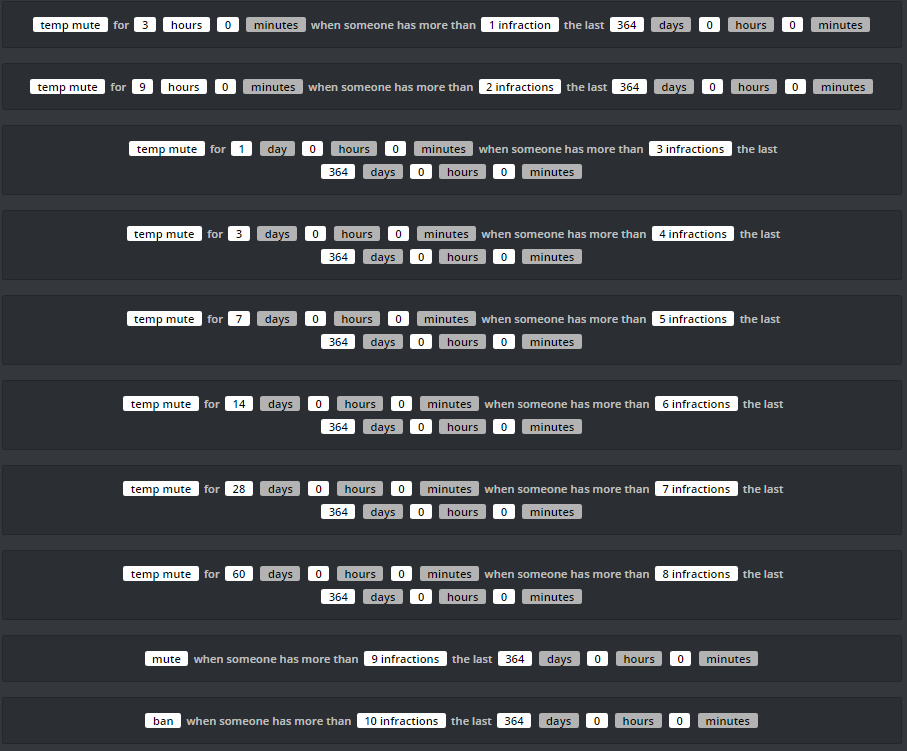 faint dome
The more infractions an action need, the higher it need to be
For example 10 then 9, 8, 7 etc
bright drift
@faint dome thank you. Всё получилось! 😃 👌
faint dome

amber pelican
@wooden mountain it still is not working
wooden mountain
what
amber pelican
It still doesn't work it a bug the owner of that server has to reset levels Everytime someone changes their name
wooden mountain
invite pls
faint dome
@buoyant moon oui ?
buoyant moon
Salut
@faint dome comment ça se fait mes touches de chiffre à droite elles fonctionne plus depuis que j'ai mee6?
Ça a un rapport??
faint dome
Aucun non xD
MEE6 ne fait qu'envoyer des messages dans Discord, il ne peut contrôler ni l'application, ni ton ordinateur, ni quoi que ce soit
buoyant moon
Et tu sais pas c du à quoi?
 plain root
I had made some custom commands for rolls in my discord server but when ever my friend and I tried it, it would always pop up with an error, I can send pictures and what the commands do... (also is this the right chat to type this in... I'm new)
dire yarrowBOT
Oops, something went wrong in MEE6 land! This error has been reported to our Team. We'll work hard to fix it.
If this happens when using:
Custom commands:
‣ Bot tries to give the role that higher than his own. To fix that, move the bot's role above the role he tries to give.
‣ Missing Manage roles permission. Go to Server Settings -> Roles -> Bot role -> Manage Roles permission
Moderator commands:
‣ Muted role is above Mee6's role. Bot can't give roles that higher than his own. Move it down.
‣ Missing Manage roles permission. Go to Server Settings -> Roles -> Bot role -> Manage Roles permission
burnt hazel
@plain root 👆
plain root
Thank you
 sour dock
!help
dire yarrowBOT
Alright, @buoyant moon has been warned for 'Posted an invite'.
 stiff umbra
Oops, something went wrong in MEE6 land! :SAD6: This error has been reported to our Team. We'll work hard to fix it.
dire yarrowBOT
Oops, something went wrong in MEE6 land! This error has been reported to our Team. We'll work hard to fix it.
If this happens when using:
Custom commands:
‣ Bot tries to give the role that higher than his own. To fix that, move the bot's role above the role he tries to give.
‣ Missing Manage roles permission. Go to Server Settings -> Roles -> Bot role -> Manage Roles permission
Moderator commands:
‣ Muted role is above Mee6's role. Bot can't give roles that higher than his own. Move it down.
‣ Missing Manage roles permission. Go to Server Settings -> Roles -> Bot role -> Manage Roles permission
stiff umbra
:SAD6:
buoyant moon
It doesn't work the MEE6 warn command for me and doesn't do it automatically can someone help?
 vague prism
Help me
vague prism
buoyant moon
Do you have moderator or administrator in that group?
vague prism
I am admin
buoyant moon
But are you the owner?
vague prism
No
vague prism
It alredy work for me
buoyant moon
OH ok
vague prism
3 hour earliar
buoyant moon
ok
buoyant moon
Um I think you might have to be either a owner or a moderator
Or send the owner the link
vague prism
I am admin is it not enough
vague prism
So how it work me 3 hour before?
buoyant moon
Or mod or admin
Sorry owner
Science you were the owner you were able to connect to that group
It depends what permissions the owner gave you when you got admin
vague prism
I see
buoyant moon
So ask him/her what perms you got when you got admin
buoyant moon
Seeing what?
dire yarrowBOT
MEE6 says I have no servers, but that's not true...
Well, that can be caused by:
‣ You don't own any servers
‣ You don't have Administrator permissions or a bot master role on any server you're on
‣ You're logged on with a wrong account (the most common problem)
Third one can be fixed by following these steps:
1. Logout from Discord in your browser (not installed client or mobile app)
1.1 Open https://discordapp.com/app in your browser
1.2 Click on \⚙ icon (User Settings)
1.3 Scroll down, click Log Out and confirm action
2. Logout from MEE6 website
2.1 Open https://mee6.xyz in the same browser
2.2 Click on avatar icon in upper right corner
2.3 Click Logout
3. Login using correct account
3.1 Open https://mee6.xyz and click Login button in upper right corner
3.2 In new window login to Discord. After that you will be redirected back to MEE6 website
3.3 That's all! Now you're using correct account and MEE6 website lists servers where you can modify his settings
P.S. If you're on mobile and some elements are not visible, enable Desktop site mode or switch screen to Landscape (vertical) mode.
faint dome
@vague prism please try that, even if it’s already your right account 
 limber knoll
@vague prism try incognito tab
vague prism
Ok
limber knoll
@vague prism worked?
limber knoll
is your chrome up to date?
limber knoll
your android right?
vague prism
Yeah bro
limber knoll
open play store and check chrome isn't waiting for an update
limber knoll
try again
vague prism
Ok
limber knoll

Skill up and manage your Discord server with automations, commands and awesome plugins!
limber knoll
if it still fails dm invite me to the server please
dire yarrowBOT
Alright, @finite sphinx has been warned for 'Capital letters'.
 finite sphinx
Bug in music
dire yarrowBOT
@finite sphinx did 'Posting Nsfw Voice Files' and got the ban hammer! 
wooden mountain
LOL
 stark raven
Obviously a music bug 👌 👌 👌
 frozen fog
the youtube plugin is not working. i have a few youtubers who posted videos over 2 hr ago and Mee6 as not posted the message notification. ( the plugin is active the accounts are corrected, mee6 is an admin and is working fine with twitch)
 dense fox
Try delete and re add the channel + message
frozen fog
ok. would mee6 post the videos even thow its been over an hr or should i post another video to test it
@dense fox
dense fox
Another video should be uploaded to test it
frozen fog
thank you that worked
dense fox
No problem
 rich plover
I think there is a bug with timers. I have it set to automatically post a certain message every 2 hours, but it does it randomly, about 8 hours apart on average.
dull ledge
It will auto but between 2 sends of it, need some sends of other users
or just 1 send between timer's sends
rich plover
ok, thanks.
dull ledge
No problem
 pine pelican
...
 honest basin
Hi
 rigid garnet
i think i discoved a bug (only happens for me)
i entered into the plugins/ levels and the screen goes blank after 1 second
please tell me how to fix this
rigid garnet
chrome
bitter owl
If yes please press F12 and then select Console
So that you can take a screenshot and paste here so we can check the errors ;D
 rigid garnet
please wait
bitter owl
No worries
bitter owl
@rigid garnet it’s a adblocker related issue
rigid garnet
hmm
wait ill remove my adblocker completely
i removed it and it still becomes black/
its very annoying
@bitter owl
Dude?
bitter owl
No need to remove it
Just to add it MEE6 to the whitelist of the adblocker
If it’s still going on maybe your browser need a refresh
To close the browser and open again
dire yarrowBOT
You can access my dashboard at https://mee6.xyz/dashboard, and login with your Discord Account.
or you can use !dashboard in your server for a direct link
 silver widget
hey
bitter owl
☝ try through that link
silver widget
@bitter owl
dire yarrowBOT
Oops! My crystal ball just broke and I can't read your mind. Could your describe your problem, please? @silver widget
silver widget
asap try to remove the premium for levels
bitter owl
What do you mean?
buoyant moon
I mean, the level plugin itself is free. You can still use levels, just not the additional feature role-rewards if you don't want to get premium.
 gritty olive
This a bug (maybe) If i add "Timer" the @dire yarrow created new Webhook. Idk for why. Maybe this run in Python. But if i delete Timer then not delete Webhook.
wooden mountain
we know, intended behavior
wooden mountain
either tell us what the bug is or get out
worn briar
Why does mee6 not speak?
wooden mountain
what do you mean
worn briar
And why do I have to pay for mee6 premium
wooden mountain
😐
wooden mountain
have you tryed using it correct
dire yarrowBOT
Music Plugin
• Enter a Voice Channel and then type:
!join -> This brings MEE6 to the voice channel you are connected to.
!add <Name of the Song or URL> -> This adds the song of the playlist.
!play -> This starts the added song.
!next -> This skips the current song.
!stop -> This stops MEE6 from playing the current song.
!playlist -> This shows songs added to the playlist.
Note: Searching by "Name of the Song" is from YouTube only !!
dire yarrowBOT
It appears that you may be on the wrong account, or something went wrong since the time you logged into my website.
-Please navigate to https://discordapp.com/login and select the gear :gear: in the bottom left, then press Logout.
-After that, please navigate to https://mee6.xyz/dashboard to disconnect from my website. Click on your profile picture and press Logout
-Once finished, select "Add to Discord" again, and follow the instructions to access my dashboard again.
https://cdn.mee6.xyz/s/logout.png
 buoyant moon
i did that
wooden mountain
on both MEE6 and discordapp.com IN YOUR BROWSER?
if that doesn't help, then use incognito mode
 burnt oak
Hi, the bot don't mute people with AUTO-MODERATOR & AUTOMATED ACTIONS
dire yarrowBOT
Auto-Moderator is not working! This can be because of many different reasons.
Main Problems
Make sure Moderator
is enabled.
Make sure the sanction option is selected (Warn Author, Delete Message or Warn Author and Delete Message)
https://cdn.mee6.xyz/s/automodhelp.png .
Make sure MEE6 has:
-> Read Messages
-> Send Messages
-> Mange Messages
* MEE6 does not warn Owner, Admins, Bot Masters or Moderator Role Holders.
 burnt oak
Not working
 pearl aspen
Are you sure what Warn Author or Delete Message & Warn Author is enable ?
If yes , the person get one warn ?
pearl aspen
Give me one screenshot from the Automated Actions
burnt oak
dire yarrowBOT
Role hierarchy is important for me to give out roles. Oh and also Manage Roles perm:
https://cdn.mee6.xyz/s/fix_hierarchy.gif
 pearl aspen
You need config It 
pearl aspen
Create one alt account , swear tree times in less of 30 minutes and say for me what MEE6 do
burnt oak
On my server ?
pearl aspen
Yes
pearl aspen
MEE6 have perm for ban ? @burnt oak
pearl aspen
Do you tried disable the Moderator Plugin and enable Again ? @burnt oak
burnt oak
Yes
 mental hatch
Hello, I wanted to inform you that the reward role of mee6 no longer works on one of my servers, while it walks on all the others. When trying to add one, a message appears, asking me to buy the premium version, while the message does not appear at all on other servers. I hope you can enlighten me on this topic thanks to you
pearl aspen
@mental hatch read the pinned message in #〉volunteer-support
mental hatch
ok
burnt oak
:/
stark raven
@burnt oak switch the order of your automated actions around, so the one at the bottom goes to the top.
That will fix it.
wooden mountain
not yet
stark raven
Can I have a screenshot of it now?
dire yarrowBOT
Having problems muting someone/they aren't muted? Check the following
Prerequisites:
- Moderator plugin is enabled
!mutecommand isn't disabled- Bot has role with Manage Roles and Manage Channels permissions
- Muted role is under MEE6 role
- You're trying to mute someone using
!mute @mention reason, otherwise it will not work
If user got Muted role but still can talk means there's issue with your channel permissions
Go to Channel Settings -> Permissions
- If that's public channel that can be accessed by anyone:
- Set

Send Messagesfor all roles except Muted - Set

Send Messagesfor Muted role
- If that's secret channel that requires *special* role to access it:
- Set
Send Messages Read Messagesfor special role - Set
Send Messages Read Messagesfor Muted role - Set
Send Messages Read Messagesfor@everyonerole
 hexed dove
i have a problem where every member that joins automatically gets the muted role, given by mee6. if muted role is deleted, it just gets remade. Please help
wooden mountain
invite pls
stark raven
Yes in dms, invites aren't allowed here.
hexed dove
ok
 manic belfry
Say suka
 glass vigil
MEE6, we have the MOO6 sometimes glitches out for some reason
dire yarrowBOT
Alright, @glass vigil has been warned for 'Please dont spam'.
tiny crow
Can you reset support 2 because it's so laggy for me to type.
faint dome
What do you mean?
glass vigil
When did I spam?
faint dome
'g'
buoyant moon
I wanted the level scheduling of the MEE6 did not need Premium, just because I was going to put on my server that needed such level to reach such a position :( Please someone help me
buoyant moon
So this is the bad one, and because before I did not need it, and right now I need
 vocal lake
My commands are copying themselves into other made commands? Any one have this issue or know what that's about? Here is a short explanation of the error.
I made the cmds !joke, !joke2 and !talk. I added jokes to the first two and and random MOTD I would update daily to !talk. After saving them and using them, I went back to change the jokes and the !talk input was in the !joke2 and so on.
wooden mountain
the website is bad, you probably just need to reload the website and it will be fixed
 carmine sail
For the auto moderator bad words plugin if you have the f word listed as a bad word, the user can pass it if they add an -ing to the word, and they don't get warned
 rough vessel
Curious, is the add/remove role action having problems? I have setup the proper action and commands and its giving me the error message "Oops, something went wrong in MEE6 land! :SAD6: This error has been reported to our Team. We'll work hard to fix it."
dire yarrowBOT
Role hierarchy is important for me to give out roles. Oh and also Manage Roles perm:
https://cdn.mee6.xyz/s/fix_hierarchy.gif
dense fox
^^
rough vessel
im dumb, thx
 devout jungle
i have mee6 above the roles and it has manage roles but i get the same error
burnt hazel
@devout jungle Are you sure MEE6 is above the roles? DM invite to server pls
devout jungle
yeah, it doesnt work with most of them but its above all
buoyant moon
Glitch, or what?
burnt hazel
@buoyant moon Refresh your Discord client
burnt hazel
memedog is bad word, to prevent copypasta spam.
buoyant moon
O
 torn pulsar
so, I just added mee6 as a bot and I gave it mod perms so that it can ban certain words. whenever I use n*g**r to test it, it still doesn't work. Any help
dire yarrowBOT
Alright, @torn pulsar has been warned for 'Bad word usage'.
burnt hazel
helped in #〉volunteer-support
 verbal loom
Hmmm....
 spring hazel
Plss help me my mee6 bot commands are not working properly plss help guys
buoyant moon
Can you show me how do you use commands?
And what commands are exactly not working?
buoyant moon
silence
 manic eagle
hello how do you change the prefix of your mee6 bot
buoyant moon
not possible atm
buoyant moon
np
 sly bramble
i made a server and i would like to just write a command fx !set_coleader and then @ the one i would like to make a co leader. but when i does that they dont get coleader but instead i get it. anyone know how to fix this?
buoyant moon
BUG 💛
pure obsidian
this is not an issue to fix, giving roles to other users with custom commands isn't even a feature yet
 tawdry sapphire
<@&193123929701875712> Hey i have a problem with commands... tehy dont works, whene i write for exemple !kick {name} {reason} nothing , no message no kick.
 devout chasm
have you even the moderator plugin enabled?
tawdry sapphire
Whene its good i have detected th problem
 devout chasm
yeah then remove the channel from deleted channels
glass vigil
!rank
dire yarrowBOT
Kevin the Candy Cane, this command is disabled in this channel.
pure obsidian
 idle sentinel
If you want to !warn somebody, but the user gets kicked before you send the command, this happens.
faint dome
We know, but it’s not a priority for now
faint dome
Thanks
dire yarrowBOT
Alright, @buoyant moon has been warned for 'Posted an invite'.
tiny crow
Music command won't work since I can't hear it
tiny crow
But help me pls on off topic and commands
tiny crow
I heard nothing @dense fox
dense fox
Make sure mee6 isnt muted and that your volume is on
dense fox
Make sure mee6 is muted
Your muted automatically anyways
Make sure mee6's volume is up as well
And that mee6 isnt mute for you
tiny crow
How do I do it though ?
dense fox
Rigth click mee6
dense fox
Hold mee6
dire yarrowBOT
Alright, @hollow tartan has been warned for 'Bad word usage'.
dire yarrowBOT
Alright, @lapis zinc has been warned for 'Duplicated text'.
dire yarrowBOT
Alright, @buoyant moon has been warned for 'Bad word usage'.
Alright, @buoyant moon has been warned for 'Bad word usage'.
Alright, @buoyant moon has been warned for 'Bad word usage'.
dull ledge
Please change Mange to Manage @wooden mountain
wooden mountain
No u
 silk mango
help me
buoyant moon
MEE6 ignores Moderators & Admins.
buoyant moon
Also if you are server owner, MEE6 can't even warn you smh. (it ignores admins tho)
silk mango
Can You Come And Adjust Me?
buoyant moon
Just get another server member that isn't moderator / admin to test it.
buoyant moon
As i said, just tell another server member that doesn't have admin/mod perm to test it. Also make sure that you clicked save.
stark raven
@silk mango you have “everyone” as an allowed role, if you remove that then they will get punished.
buoyant moon
Already told him in his server.
stark raven
Ah
buoyant moon
Also @everyone role has all perms in his server
stark raven
😬
 lime talon
Halp. This only happens to one specific custom command and it has no banned roles. Any idea why?
buoyant moon
Follow these steps. If they don't work, let me know. 
dire yarrowBOT
Oops, something went wrong in MEE6 land! This error has been reported to our Team. We'll work hard to fix it.
If this happens when using:
Custom commands:
‣ Bot tries to give the role that higher than his own. To fix that, move the bot's role above the role he tries to give.
‣ Missing Manage roles permission. Go to Server Settings -> Roles -> Bot role -> Manage Roles permission
Moderator commands:
‣ Muted role is above Mee6's role. Bot can't give roles that higher than his own. Move it down.
‣ Missing Manage roles permission. Go to Server Settings -> Roles -> Bot role -> Manage Roles permission
lime talon
MMmmmmmmmm none of those apply in this case o.o the other custom commands all work.
buoyant moon
Only that cc doesn't work?
Dm me an invite link of your server if it doesn't work even though you did these steps.
lime talon
Roger that
buoyant moon
Solved. 
lime talon
Thanks! 🙌🏽
 willow kayak
🤔 MEE6 don't give XP...Why ?
burnt hazel
@willow kayak
Is MEE6 not giving XP in your server?
dire yarrowBOT
If I appear to be denying your hard earned experience, or !rank and !levels aren't working properly...
- Make sure Levels is Enabled.
- Check that you do not have a banned role in the levels configuration, and that you aren't in a banned channel either.
- Make sure that I can see the channel you are talking in with "Read Messages" and send messages with "Send Messages".
 exotic pagoda
i have not been able to use any mute command for the past 5 months
dull ledge
Does it say Oops something went wrong... when you use !mute?
exotic pagoda
yes
dire yarrowBOT
Oops, something went wrong in MEE6 land! This error has been reported to our Team. We'll work hard to fix it.
If this happens when using:
Custom commands:
‣ Bot tries to give the role that higher than his own. To fix that, move the bot's role above the role he tries to give.
‣ Missing Manage roles permission. Go to Server Settings -> Roles -> Bot role -> Manage Roles permission
Moderator commands:
‣ Muted role is above Mee6's role. Bot can't give roles that higher than his own. Move it down.
‣ Missing Manage roles permission. Go to Server Settings -> Roles -> Bot role -> Manage Roles permission
dull ledge
Did you try this?
 cyan moon
how did you do that
dull ledge
just a command
cyan moon
which command
dull ledge
please use !index at #〉commands
cyan moon
ok
exotic pagoda
the bot has admin permissions
dull ledge
ohh
limber knoll
@willow kayak dm invite please
 old mantle
It stoped working.on my channel,y?
faint dome
Wdym?
old mantle
!??
faint dome
what do you mean?
old mantle
The bot is not working at all on my channel
dire yarrowBOT
Bot doesn't react on commands!!!
That usually happens because:
- Plugin is disabled -> Go to https://mee6.xyz/dashboard and enable the plugin with needed command!
- Permission is missing -> Ask your server's owner to go to https://mee6.xyz/dashboard -> Settings -> Bot master -> Add your role
- Command is disabled -> Go to https://mee6.xyz/dashboard, open plugin settings and enable the command!
- Do not reply to command option is enabled -> Go to https://mee6.xyz/dashboard, open plugin settings, click [Edit] button, scroll down and disable the option!-
You're using command in wrong way! -> Moderator commands like !mute !kick !ban etc. need the user to be mentioned. Example: !kick @user annoying
buoyant moon
my rank system does not work on my server
faint dome
buoyant moon
and although I want to change the added role in the level system but by a bug I can not remove them or clean which ... I have no premium
dire yarrowBOT
Alright, @real fractal has been warned for 'Posted an invite'.
dire yarrowBOT
I would like to help you, but if you don't tell us what your problem is then I can't really help. Please tell us what your problem is and not that you have one.
faint dome
Any adblocker/vpn?
 faint dome
What version of Firefox do you use?
 near girder
were I see dat?
near girder
64.0.2 (64-bit)
faint dome
good 
near girder
Ok
faint dome
so windows
near girder
I took pictures of my PC thingies
faint dome
can you type ctrl + Maj + K when you are on the dashboard, then refresh the page pls? You'll see a console log, and probably some errors messages
 tepid schooner
Help me
near girder
@faint dome Ima send the pics
dire yarrowBOT
Alright, @buoyant moon has been warned for 'Please read our #〉rules , especially the 7th point'.
tepid schooner
Oops, something went wrong in MEE6 land! :SAD6: This error has been reported to our Team. We'll work hard to fix it. ?
dire yarrowBOT
Oops, something went wrong in MEE6 land! This error has been reported to our Team. We'll work hard to fix it.
If this happens when using:
Custom commands:
‣ Bot tries to give the role that higher than his own. To fix that, move the bot's role above the role he tries to give.
‣ Missing Manage roles permission. Go to Server Settings -> Roles -> Bot role -> Manage Roles permission
Moderator commands:
‣ Muted role is above Mee6's role. Bot can't give roles that higher than his own. Move it down.
‣ Missing Manage roles permission. Go to Server Settings -> Roles -> Bot role -> Manage Roles permission
faint dome
@tepid schooner
tepid schooner
Not Work why?
faint dome
@near girder can you type ctrl + Maj + K when you are on the dashboard, then refresh the page pls? You'll see a console log, and probably some errors messages
near girder
wheres maj?
faint dome
oh sorry, that's the french word lol. Capital?
near girder
Xd
near girder
maj is shift?
faint dome
yeah
faint dome
can you reload the website, then do a screenshot of it pls?
near girder
I got alot of guild not found messages
near girder
this is all i got tho
faint dome
can I have a screenshot please?
faint dome
lol
near girder
rip
Ima get 10 fo em
Ima get 10 of the shots
i got 10 shots
rip
there u go
faint dome
Thanks. I'll contact a dev
near girder
No prob. 
faint dome
@near girder can I have the url of where the page bug pls?
near girder
Wdym
 ionic meteor
The link 😉
ionic meteor
Yes
near girder
Not loading: https://mee6.xyz/dashboard/515747157782036480
Skill up and manage your Discord server with automations, commands and awesome plugins!
BUffering forever
faint dome
thanks
dire yarrowBOT
[SeviX] FreezGood123, it doesn't look like you can use that.
faint dome
yes?
buoyant moon
can I dm u a question
faint dome
Nope, if you haven't any real good reason
buoyant moon
k
faint dome
@near girder Are you sure that you have access to the dashboard? I mean, do you have at least one of these roles?
faint dome
That's what I can see on the dashboard
faint dome
Or are you the owner, if you don't have one if these roles?
near girder
Im owner
dire yarrowBOT
Dashboard Access
You need Administrator permission or Bot master role to access the Mee6 dashboard.
How to add Bot master role can be found below:

 faint dome
@buoyant moon bot masters are roles that doesn't have admin perms on your Discord server but can see/edit MEE6 dashboard
@near girder Tea has an other idea
dire yarrowBOT
It appears that you may be on the wrong account, or something went wrong since the time you logged into my website.
-Please navigate to https://discordapp.com/login and select the gear :gear: in the bottom left, then press Logout.
-After that, please navigate to https://mee6.xyz/dashboard to disconnect from my website. Click on your profile picture and press Logout
-Once finished, select "Add to Discord" again, and follow the instructions to access my dashboard again.
https://cdn.mee6.xyz/s/logout.png
faint dome
near girder
im on my account'
faint dome
Try it, sometimes Discord is weird
Also be sure to logout from the discord website, not the app
near girder
i did\
faint dome
Try again pls, now
near girder
k
ill relogin
but not here
ok
and
boom
still
i relogged
from the website
faint dome
from MEE6 of Discord website?
faint dome

faint dome
you can see the dashboard?
near girder
yes
faint dome
near girder
How I choose another server?
faint dome
click on your name (right-top corner), and select "My servers"
near girder
is it iamanoob1122345's server u chose?
faint dome
I took the link you gave me. I can't see all of your servers
 faint dome
If you're the owner, you don't need these roles
faint dome
Yes, read the description of the roles ^^
faint dome
Then you know why you can't edit them
faint dome
What do you mean?
near girder
wut next
faint dome
What do you want to do?
near girder
nvm
faint dome
¯_(ツ)_/¯
dire yarrowBOT
Alright, @fluid meteor has been warned for 'Capital letters'.
buoyant moon
Umm I have to report a bug when I went to the dashboard and clicked "levels" this happened
please fix this bug
wooden mountain
looks like a "browser not supported" issue
or a browser extension that is blocking somehting
buoyant moon
I have nothing in my extension bar and nothing has pooped up saying that it's not supported
 burnt girder
Nothing should pop up saying that its not supported
try using google
if you have any ad blockers
Disable them as they can interfere with the website too
buoyant moon
I used firefox (because it's the other software that I have I dont use google chrome) and it works now thanks ^-^
burnt girder
kk
 novel thorn
oh dang do i have a bug to say...
its on iOS
and oh boy is it annoying
i have to record it tho
faint dome
is it a MEE6 bug?
novel thorn
website error
its going to take a while tho... my iPad doesnt connect to the internet well
unless i can repro on my pc
oh joy i can
hold on, wait 5 or so min
 low wagon
novel thorn
low wagon
novel thorn
thx win movie maker
burnt hazel
We are already aware of this bug
novel thorn
ok then...
cyan moon
@low wagon привет что тебе нужно?
buoyant moon
is @cyan moon russian wow xD
cyan moon
lol
buoyant moon
xD
novel thorn
no sorry, unless google translate helps
 flint hearth
I have been getting this message from the bot all day MEE6BOTToday at 9:09 PM
Oops, something went wrong in MEE6 land! :SAD6: This error has been reported to our Team. We'll work hard to fix it.
dire yarrowBOT
Oops, something went wrong in MEE6 land! This error has been reported to our Team. We'll work hard to fix it.
If this happens when using:
Custom commands:
‣ Bot tries to give the role that higher than his own. To fix that, move the bot's role above the role he tries to give.
‣ Missing Manage roles permission. Go to Server Settings -> Roles -> Bot role -> Manage Roles permission
Moderator commands:
‣ Muted role is above Mee6's role. Bot can't give roles that higher than his own. Move it down.
‣ Missing Manage roles permission. Go to Server Settings -> Roles -> Bot role -> Manage Roles permission
flint hearth
Thank you
burnt hazel
@violet sinew What does your command do exactly?
 violet sinew
I did the thing that fixes moderator commands and it still didn’t work it just keeps Saying Oops,something went wrong in MEE6 land! this error has been reported to our team. We’ll work hard to fix iteven after I did the thing to fix it
dire yarrowBOT
Oops, something went wrong in MEE6 land! This error has been reported to our Team. We'll work hard to fix it.
If this happens when using:
Custom commands:
‣ Bot tries to give the role that higher than his own. To fix that, move the bot's role above the role he tries to give.
‣ Missing Manage roles permission. Go to Server Settings -> Roles -> Bot role -> Manage Roles permission
Moderator commands:
‣ Muted role is above Mee6's role. Bot can't give roles that higher than his own. Move it down.
‣ Missing Manage roles permission. Go to Server Settings -> Roles -> Bot role -> Manage Roles permission
 trim pelican
@violet sinew Read above
 verbal storm
I’ve noticed when on iOS and using the Google app, mee6.xyz dashboard doesn’t load. I’ll get to the login, I login in, and then just a white page. Everything works fine in safari though.
buoyant moon
@dire yarrow it's saying fuf
dire yarrowBOT
Alright, @limpid lava has been warned for 'Posted an invite'.
 rancid umbra
The verification command don't work.
We did verify command and it didn't work.
Because we said !verify
And MEE6 told us it's a bug.
dire yarrowBOT
Oops, something went wrong in MEE6 land! This error has been reported to our Team. We'll work hard to fix it.
If this happens when using:
Custom commands:
‣ Bot tries to give the role that higher than his own. To fix that, move the bot's role above the role he tries to give.
‣ Missing Manage roles permission. Go to Server Settings -> Roles -> Bot role -> Manage Roles permission
Moderator commands:
‣ Muted role is above Mee6's role. Bot can't give roles that higher than his own. Move it down.
‣ Missing Manage roles permission. Go to Server Settings -> Roles -> Bot role -> Manage Roles permission
 tribal zodiac
ok thanks guys u made the best bot tysm
 young prawn
Can you please change level roles back to free. I hate that it is in premium
young prawn
Oh
faint dome
If you want more info about it, check this message
https://discordapp.com/channels/159962941502783488/463809001273032715/534187739739062304
 dense gate
Does tempban really work? Because i banned someone for 1m and he he doesnt get unbanned
//Solved It took 5 instead of 1 minute for automatic unban
 stark agate
wooden mountain
stark agate
wooden mountain
can you give me a link to your dashboard pls?
novel thorn
I personally have never seen those variables
dire yarrowBOT
A full list of variables you can use in Mee6 commands and other functions can be found here: https://github.com/Mee6/Mee6-documentation/blob/master/docs/commands_variables.md
There's also random variables that can be used:
- {random:x:y} picks a random number between
xandy. Values must be pre-entered. Example: {random:1:10} would pick a random number between 1 and 10 - {random} picks a random number between 0 and 10
 brittle hull
Ya des logs mee6 ?
faint dome
Mis à part pour les commandes de modération, non
brittle hull
Pour les changement des commandes perso
brittle hull
oui
Ah
Ya qqun sur mon serv qui a changer les commandes perso pour dire des choses deplacé
faint dome
ça ne peut être qu'un admin, ou un bot master
dire yarrowBOT
Dashboard Access
You need Administrator permission or Bot master role to access the Mee6 dashboard.
How to add Bot master role can be found below:
wooden mountain
that is not how the bot will generate the image
novel thorn
I know, but it gives you the idea
novel thorn
Ok
Well iOS only allows WebKit so all browsers are actually the same on ios
Zoomed out
Can't scroll left or right
faint dome
ça ne sert à rien de répéter l'évident, encore moins de le dire en français à une personne anglophone 
 tidal helm
when i go to mee6 invite it logs me in as random account
dire yarrowBOT
It appears that you may be on the wrong account, or something went wrong since the time you logged into my website.
-Please navigate to https://discordapp.com/login and select the gear :gear: in the bottom left, then press Logout.
-After that, please navigate to https://mee6.xyz/dashboard to disconnect from my website. Click on your profile picture and press Logout
-Once finished, select "Add to Discord" again, and follow the instructions to access my dashboard again.
https://cdn.mee6.xyz/s/logout.png
buoyant moon
Quand qqn de mon serv est warn 3 fois il est pas kick maisjuste encore mute...
faint dome
inverse les deux actions : plus une action nécessite de warns, plus haut elle doit être
buoyant moon
Ok merci et sinon des fois je doit demute 2 fois c'est normal?
faint dome
c'est à dire ?
buoyant moon
Quand qqn est mute par mee6, en warn par les deux :
Je doit le unmute 2 fois sinon ça marche pas...
Et j'ai changé
faint dome
weird
buoyant moon
!translate weird
faint dome
"étrange"
faint dome
et MEE6 dit les deux fois que l'utilisateur est unmute ?
faint dome
j'veux bien un screen oui
buoyant moon
Tel a mon pote
Il peut pas écrire alors que je l'ai demute et je doit refaire la commande
faint dome
il a toujours le rôle muted ou pas?
faint dome
donc mee6 l'a bien unmute
faint dome
C'est le seul membre à avoir ce problème ?
buoyant moon
Non
Mais un modo a faut clear 999...
Quel con...
Si je savait que j'allais en avoir besoin...
Donc?
faint dome
Je peux tester moi-même ?
buoyant moon
Stv
faint dome
invite en MP
buoyant moon
Ok
 glass cosmos
Fix Grammarly won't work when you are editing a text on a phrase box from Custom commands.
burnt hazel
We are aware of this issue
glass cosmos
And why when I right click
Or click to fix a mistake, the current task background exits out
burnt hazel
yes, we know. Devs are aware and are looking into the issue
dire yarrowBOT
Alright, @solemn thunder has been warned for 'Posted an invite'.
Alright, @atomic depot has been warned for 'advertising'.
 atomic depot
Hi
 desert thistle
potential bug
New monthly sub, through PP
Initially tried to change BG here and failed. Ended up here.
https://gyazo.com/85f5574569ad57e08bfbe7bc5dd77fc7
However, in Levels plugin I was able to mod BG fine
https://gyazo.com/6441c16c66895737b8569e141aa2c6b3

 pure obsidian
server rank card and global rank card are different things
you have server rank card as a perk of your premium subscription for the server you have purchased the premium for
global rank card payment is a separate and lifetime payment, and totally unrelated to premium
first screenshot of yours is the global rank card
@desert thistle
desert thistle
so ultimately premium does not offer much as a whole
dire yarrowBOT
 MEE6 Premium
What do I get?
> Music plugin
> Record plugin
> Music Quiz plugin
> Leaderboard background for your server
> Server custom rank cards
> Faster support in the MEE6 server
Note: When joining MEE6 Support Server you get automatically the Premium role 
desert thistle
music - no
record - no
music quiz - no
leaderboard bg server - ok
server custom rank cards - ok
faster support - ok
would be nice to see leaderboard in server vs offsite
no sure i see much value keep premium right now, ill give it a month
burnt hazel
@buoyant moon Go to your Channel settings > Webhooks > and check how many MEE6 webhooks there are.
Go to your Timers plugin and Save the timer you have by placing it into a notepad, then remove the MEE6 webhooks from your channel and re-make the timer.
🤔
 warm nest
there is a way to get arround the curse filter\
dire yarrowBOT
Bad Words Problems
- Make sure Bad Words have been added.
- Regular users, who are not allowed to swear, must not have an Allowed Role.
- Channels that people shouldn't be able to swear in must not be in the Ignored Channel section
* MEE6 does not warn Owner, Admins, Bot Masters or users with a Moderator Role.
How to add Bad Words:
https://cdn.mee6.xyz/s/bad_words.gif
 pearl aspen
Yes , of course
dire yarrowBOT
Alright, @warm nest has been warned for 'Bad word usage'.
pearl aspen
No
warm nest
bitch
pearl aspen
You setup it yourself
warm nest
boom
pearl aspen
Dont bypass
warm nest
no im saying u can
warm nest
its called an example
 main flint
hay mucho buu
 dull trellis
 frigid adder
 Hello! Do you have a bug to report?
 hidden spear
Yes
faint dome
Then please state it
hidden spear
 opaque kite
 dawn oxide
Hello,
I have to report something
The give role feature doesn't working
dire yarrowBOT
Role hierarchy is important for me to give out roles. Oh and also Manage Roles perm:
https://cdn.mee6.xyz/s/fix_hierarchy.gif
dawn oxide
hi
 elfin pollen
The website is to wide for my iPad
dawn oxide
When I try to set up mee6 role rewards, a message pops up and says it's a paid feature
Since when is it premium? Until a short time ago I set up the role reward for my discord server for free
hm
ok, thanks
buoyant moon
commands doesn't work
wooden mountain
define "doesn't work"
what command
how are you trying ot use it
does the bot give any response
 thorny patrol
The giverole/removerole doesn’t work or i am doing something wrong ? It is a custom command right?
faint dome
Just read Sil' message above yours pls
thorny patrol
I already did that, i have some screenshots to prove it
faint dome
define "doesn't work" please
thorny patrol
I can post 3 photos to Show you what i mean? If not i made 2 custom commands: 1. !giverole and where it says bot gives roles i put every role in my discord server and banned roles i banned those to don’t use the command. 2. !removerole That it’s the same as the first one.
dire yarrowBOT
Role hierarchy is important for me to give out roles. Oh and also Manage Roles perm:
https://cdn.mee6.xyz/s/fix_hierarchy.gif
thorny patrol
Can i post those 3 photos to Show you?
 velvet marlin
im trying to add another bad word that cant be said with mee6 but it wont work
stark raven
(Handling zeko in #463809001273032715)
burnt hazel
@velvet marlin Who is testing the bad words?
velvet marlin
my other account
dire yarrowBOT
Hey  ! MEE6 won't sanction the following people:
• The Owner of the server;
• People with Administrator permission;
• People with Bot Master permission;
• And the role(s) you set as moderator on the dashboard.
Note: MEE6 think moderators are responsible people, like the police  . So he doesn't want to blame your police
burnt hazel
Make sure they are a normal user, not a moderator or admin etc... ☝
velvet marlin
they have the same role as the people who join
but when i click the add button it just stays there and doesnt add it on the list
burnt hazel
what device are you using?
velvet marlin
ios
burnt hazel
you can't add bad words with IOS currently, we are aware of this issue and are working to fix it.
It would be best to use PC for now.
burnt hazel
np
glass cosmos
Role rewards becoming free when you create a server
wooden mountain
that is indeed a bug
buoyant moon
<@&193123929701875712>
dense fox
Yes?
buoyant moon
i have a question
dense fox
Go for it
dense fox
Are you on mobile?
buoyant moon
yes
dense fox
I would recommend using a PC if it doesnt work on mobile but it should work on mobile.
buoyant moon
?
dense fox
Computer
dense fox
No problem
buoyant moon
My bot isn’t working with !rank
dire yarrowBOT
If I appear to be denying your hard earned experience, or !rank and !levels aren't working properly...
- Make sure Levels is Enabled.
- Check that you do not have a banned role in the levels configuration, and that you aren't in a banned channel either.
- Make sure that I can see the channel you are talking in with "Read Messages" and send messages with "Send Messages".
 hoary hamlet
@buoyant moon ^
buoyant moon
Yes
hoary hamlet
read mee6's messages
hoary hamlet
levels plugin must be disabled
buoyant moon
It’s not disabled
hoary hamlet
is the command disabled?
hoary hamlet
I can't join your server
buoyant moon
Ok
buoyant moon
Can’t you message me privately
hoary hamlet
I guess
burnt hazel
@buoyant moon
Invite me pls.
Only staff can join servers
 nocturne depot
At some point yesterday the bot seemed to have vanished from my server and the commands aren't working. I also don't see it in the member list where it should be. Do I need to attempt to re-add it back to the server?
 kindred thicket
Try re-adding mee6 and if that doesn’t work report back here
nocturne depot
Alright
kindred thicket
:3
nocturne depot
Yeah re-adding it did fix it. I'm not really sure how it was removed but I'm happy it saved all of the previous setup info and rank #'s
dire yarrowBOT
Alright, @buoyant moon has been warned for 'Bad word usage'.
 sour mason
Is MEE6 down? On my server, it is not responding at all.
pearl aspen
@sour mason About what ? One Command ?
sour mason
Anything
dire yarrowBOT
Modular
I am currently a modular bot. Nothing will be enabled by default and must be enabled in each plugin manually.
So to enable the plugins, go to https://mee6.xyz/dashboard and select your server.
 sour mason
It is
pearl aspen
You need active the plugins yourself
sour mason
It was working fine
Until it just stopped
I trough it was down as some people said but I see here and some other servers works
pearl aspen
Check if the plugin is enable and edit in some Command not is Actived Do not reply
sour mason
sorry for replying I don't know what was the problem, but the bot is now working like it should be...
pearl aspen
 snow marlin
XP stoped, Why ?
pure obsidian
@snow marlin what do you mean? can't earn xp anymore?
snow marlin
No problem thanks
buoyant moon
I can't login dashboard
faint dome
 barren tusk
My bot insnt working with command !rank
faint dome
@barren tusk what does MEE6 say?
barren tusk
@faint dome never mind it works now but thx anyway
faint dome
 grand cairn
@faint dome you russian ?😑
stark raven
What was the error? @elfin pollen
 subtle swift
In his server I said “hi” and then mee6 warned me for no reason
buoyant moon
Hey there's a gif in #〉chat and #〉volunteer-support that's crashing my discord Android
 lost trail
Does Bot lag count like a bug?
pearl aspen
If lag = delay , no
 sturdy radish
So I'm setting up a discord server and when I tested bad words it didn't work.
sturdy radish
I have a friend in the server with me that's who tested it
dire yarrowBOT
Hey ! MEE6 won't sanction the following people:
• The Owner of the server;
• People with Administrator permission;
• People with Bot Master permission;
• And the role(s) you set as moderator on the dashboard.
Note: MEE6 think moderators are responsible people, like the police . So he doesn't want to blame your police
pure obsidian
means your friend is one of the above
 muted lake
I use an alternate account to test stuff like this
dire yarrowBOT
Alright, @barren tusk has been warned for 'Bad word usage'.
dire yarrowBOT
@barren tusk did 'Being annoying and continuously triggering bad words filter, wash your mouth with soap' and got the ban hammer for 2 days!
 hazy token
i star with name joaocdc, but i renamed to jocc, but i renamed again for joaocdc, that for me, name jocc is weird, but in !rank the name is jocc! please, solve that
sorry for my bad english
 fair folio


 buoyant moon
- Custom commandlerini kontrol et. Birileri trollüyor olabilir.
- Ayarladığın timerları kontrol et.