#〉bugs-reports
2 messages · Page 49 of 1
 buoyant moon
 junior wraith
@buoyant moon send me private an invite
 upbeat cypress
For some reason the welcome button keeps turning off and have to turn on only for it to turn off again
 wooden mountain
@upbeat cypress check if they bot has the permission to talk in the selected channels
 hoary compass
hi
upbeat cypress
It does
 tiny onyx
If I add a lot of youtube channels,will the notifications get blocked?
Because I added a lot of youtube channels and I get notifications of some of them
 dire yarrowBOT
Alright, @vague palm has been warned for 'Duplicated text'.
Alright, @vague palm has been warned for 'Duplicated text'.
Alright, @vague palm has been warned for 'Talking in channels other than #〉chat'.
 lucid hearth
@pure obsidian THX this work
 pure obsidian

lucid hearth
Mee6❤
 cunning jungle
my friend just reached level 4545
wooden mountain
impossible
cunning jungle
 winged garnet

wooden mountain
nice custom command
winged garnet
its not custom 
wooden mountain
or it is the good old {level}{level} again
cunning jungle
no 
winged garnet
its actually a bug
 bitter owl
By giving us your dashboard could help
Just type in your server !dashboard
And paste the url to us
wooden mountain
or !levels and give the leaderboard url that it gives
bitter owl
They already sent and you, Sir, were one hundred per cent right
wooden mountain
like usual
dire yarrowBOT
Alright, @graceful scarab has been warned for 'Sending pictures in the wrong pleace, use #〉commands'.
 graceful scarab
Srsly? that doesn't make sense, then just delete the permission to put pics in the channels
Like, Duh.
bitter owl
Go away please
graceful scarab
Why
bitter owl
This is a designed area for bug reports
dire yarrowBOT
Alright, @graceful scarab has been warned for 'Bad word usage'.
@graceful scarab did 'Annoyign and toxic, not following server directives' and got the ban hammer! 
 zealous hull
ok thnx
 craggy pendant
I have a problem with custom commands
dire yarrowBOT
Oops, something went wrong in MEE6 land!  This error has been reported to our Team. We'll work hard to fix it.
If this happens when using:
Custom commands:
‣ Bot tries to give the role that higher than his own. To fix that, move the bot's role above the role he tries to give.
‣ Missing Manage roles permission. Go to Server Settings -> Roles -> Bot role ->  Manage Roles permission
Moderator commands:
‣ Muted role is above Mee6's role. Bot can't give roles that higher than his own. Move it down.
‣ Missing Manage roles permission. Go to Server Settings -> Roles -> Bot role -> Manage Roles permission
bitter owl
☝ How to fix it
buoyant moon
I was trying to do the !clear command in my server and it didn’t work it would be greatly appreciated if I could get some help
dire yarrowBOT
!clear [@name] [messages to remove]
!clear xto clear the last x messages (!clear 10)!clear @nameto clear all the messages of@name(!clear @MEE6)!clear @name xto clear the last x messages of@name(!clear @MEE6 10)
- I need Manage Messages and View Message History permissions
- Moderator plugin and !clear command should to be enabled
- Only users with Allowed roles can use the command, don't forget to add their roles in command's settings!
 crude mantle
@buoyant moon
crude mantle
How does he respond?
crude mantle
Check and see if the command/plugin is on. This is oddly enough a common occurrence.
crude mantle
Of you trying to do !clear.
buoyant moon
Oh
crude mantle
If you can get a screenshot of it, then he clearly isn't clearing.
crude mantle
For one, you don't mention the channel.
But why didn't just trying to clear yours work?
A few questions...
- Does MEE6 have manage messages?
- Can MEE6 see the cannel you're in?
crude mantle
Can he manage messages?
buoyant moon
hm ill try to see more info about the website this might have to do with the that bot crash discord tweeted about
 limber knoll
@buoyant moon enable your moderator plugin, and ensure no banned roles in the command
crude mantle
In your server?
 sturdy scaffold
Yeah
crude mantle
Are you in a no-xp channel?
crude mantle
Check and see if you have a no-xp role.
sturdy scaffold
I dont
crude mantle
Did you check the dashboard?
sturdy scaffold
Yes
crude mantle
Hold on..
 burnt hazel
@sturdy scaffold Can i have your server ID please
sturdy scaffold
Like an invite?
dire yarrowBOT
Getting your server ID
go to your server and use !dashboard then copy this link and give to staff.
Or if that didn't work: open Server Settings in your Discord Server. Select Widget and press Copy ID next to Server ID.
You can also use Developer Mode as an alternative method.
sturdy scaffold
Sorry i am kinda new to this bot
burnt hazel
Its fine 
You can send me the ID or a link to your dashboard
dire yarrowBOT
Alright, @fluid locust has been warned for 'Posted an invite'.
sturdy scaffold

Skill up and manage your Discord server with automations, commands and awesome plugins!
burnt hazel
Thanks
sturdy scaffold
Is that it?
burnt hazel
Can i have an invite to your server in DM's pls
sturdy scaffold
Ok
 outer bear
I cleared the phrase when it rises above the level and now no longer appears the mention nor the level as it does to correct now?
dire yarrowBOT
Alright, @buoyant moon has been warned for 'Bad word usage'.
 granite kestrel
<@&193123929701875712> I need help with my mee6 dashboard, i can't go on it beacuse my google screen goes gray. How can i do?
limber knoll
@granite kestrel using chrome? And which device?
Also please don't ask in multiple channels
limber knoll
And which browser?
limber knoll
Try updating your chrome
granite kestrel
how?
limber knoll
Should be click the 3 dots > settings and about
granite kestrel
i cant find about
limber knoll
Let me get you a guide
granite kestrel
thx
limber knoll
To make sure you're protected by the latest security updates, Google Chrome can automatically update when a new version of the browser is available on your device. With these updates, you might someti
granite kestrel
done it dosent tell mer to update
limber knoll
Ok try https://mee6.xyz/dashboard after you clear your cache and cookies
Skill up and manage your Discord server with automations, commands and awesome plugins!
limber knoll
Can you press f12 and click on console?
limber knoll
Can you screen shot what the console says please
limber knoll
Just passing it onto someone that has more resources then me and see if they can find the issue, however due to timezones it might not be immediate
granite kestrel
ok
granite kestrel
in witch sense?
limber knoll
Like any adblockers and any chrome browser add ons
 lapis burrow
People can bypass the bot's delete invite command
wooden mountain
how? @lapis burrow
lapis burrow
I Don't know how he did it. Some guy came into my server and was able to bypass the bot and sent links. Fortunately I was able to get him on my side and I used him to test out other bots. My server is secure but others aren't. Idk how he did it
wooden mountain
interesting, i will investigate
 blazing thorn
@lapis burrow did he use edit message? Just asking (Sil don't warn me for this plz)
wooden mountain
nope
blazing thorn
Hmm
@wooden mountain I recall editing messages is a way to bypass auto-moderating right?
dire yarrowBOT
Alright, @nocturne sand has been warned for 'Posted an invite'.
buoyant moon
How to create bot?
wooden mountain
step 1, learn to code
step 2, use your coding knowledge
step 3, ....
step 4, profit
dire yarrowBOT
Alright, @buoyant moon has been warned for 'Posted an invite'.
dire yarrowBOT
Alright, @buoyant moon has been warned for 'Posted an invite'.
 woeful bobcat
🤔
burnt hazel
This is possible because they do not have a Moderator role in the Moderator plugin on the MEE6 dashboard.
They are also not a bot master or Admin
Therefore they are not protected against Moderator commands.
zealous hull
is there any new updates
dire yarrowBOT
Alright, @still hollow has been warned for 'advertising spam x3'.
buoyant moon
!play shotgun
dire yarrowBOT
Rees_Tonox, this command is disabled in this channel. 
bitter owl
Well, music is premium. You need subscribe the feature to get access to music/records among other cool tools
dire yarrowBOT
Alright, @buoyant moon has been warned for 'Capital letters'.
dire yarrowBOT
Alright, @buoyant moon has been warned for 'Bad word usage'.
 Music Plugin
• Enter a Voice Channel and then type:
!join -> This brings MEE6 to the voice channel you are connected to.
!add <Name of the Song or URL> -> This adds the song of the playlist.
!play -> This starts the added song.
!next -> This skips the current song.
!stop -> This stops MEE6 from playing the current song.
!playlist -> This shows songs added to the playlist.
Note: Searching by "Name of the Song" is from YouTube only !!
bitter owl
☝
bitter owl
Thank you @buoyant moon
I banned the guy that added NFSW on the music channel we’re sorry
dire yarrowBOT
Rees_Tonox, this command is disabled in this channel.
buoyant moon
:ZZmusiccc:
 pallid rose
My moderators are not able to use mod commands. But I can as the server owner.
limber knoll
@pallid rose in each command add the mod roles
make sure they are in allowed roles and nothings in the banned roles
 burnt girder
Scroll down red
Then where u see the commands press "edit"
and add the roles in the "allowed roles" section
@pallid rose
pallid rose
Oh okay. I'll do that. Thank you
 faint dome
@hollow holly ok, then let’s try to find the bug. Do you have any vpn or adblocker enabled? Which browser do you use? Is it up to date?
 hollow holly
Nope. I use Google Chrome. Yes, it is up to date.
dire yarrowBOT
Alright, @buoyant moon has been warned for 'Bad word usage'.
dire yarrowBOT
Alright, @acoustic atlas has been warned for 'Bad word usage'.
buoyant moon
is Mee6 at the top?
 fervent dawn
Yeah
 obtuse tendon
maybe the person you want to warn is a mod
fervent dawn
?
buoyant moon
oh bot mod
fervent dawn
Nope
buoyant moon
special role.
buoyant moon
What?
fervent dawn
Oof*
obtuse tendon
what
fervent dawn
And I know how did it
obtuse tendon
do you have mod perms?
obtuse tendon
administration permission on your role
buoyant moon
or Mange roles
fervent dawn
Oh yes
buoyant moon
That should fix it
fervent dawn
No
buoyant moon
make sure you've got those?
pure obsidian
Role hierarchy doesn't matter in issuing warnings.
dire yarrowBOT
Hey  ! MEE6 won't sanction the following people:
• The Owner of the server;
• People with Administrator permission;
• People with Bot Master permission;
• And the role(s) you set as moderator on the dashboard.
Note: MEE6 think moderators are responsible people, like the police  . So he doesn't want to blame your police
pure obsidian
@fervent dawn ☝
pure obsidian
The person the user was trying to warn has a moderator role assigned on dashboard (under moderator plugin) or a bot master role (dashboard -> settings) or has a role with Administrator permission.
fervent dawn
Umm..k?
pure obsidian
Your solution: remove their role from Moderator Roles
dire yarrowBOT
You can use the images below to help you configure my Moderator Plugin.
https://cdn.mee6.xyz/s/modinfo.png
https://cdn.mee6.xyz/s/modinfo2.png

 limber knoll
@fervent dawn means they have a moderator role
fervent dawn
Done that
But weird it still happens
Well I did what it said but -_- nope
I even have proof
Yup
Same problem
Why?
obtuse tendon
you need to remove the roles you listed above from the person ypu want to warn
fervent dawn
Yes?
obtuse tendon
the person you want to warn shouldnt have those roles
you need to remove it from them
obtuse tendon
is he the owner of the server?
obtuse tendon
or is the "member" role has admin perms enabled
fervent dawn
Yes I'm co-owner
I'm trying to fix it for 1 hour and I tried everything I could so I gave up and came here
obtuse tendon
Does youe co-owner role have admin perms?
 white notch
@buoyant moon
buoyant moon
Okay
fervent dawn
Yup
white notch
@fervent dawn server ID/dashboard link please
white notch
the same way you copy a URL for a website
white notch
so you've never had to grab a websites link and copy it?
fervent dawn
I just don't know I'm really hard to teach
white notch
go the dashboard for the server having the issue=>open the URL window at the top of the browser=>copy the full link
fervent dawn
K?
white notch

obtuse tendon

white notch
fervent dawn
white notch
Please tell me you can actually click that
white notch
never had to paste a link on your phone?
fervent dawn
No?
obtuse tendon
hold click the chatbox
obtuse tendon
oops sorry
fervent dawn
What chat box
white notch
@fervent dawn click on the chatbox to send a message=>paste option
chatbox=>the place where you type to send messages
white notch
the link not the screenshot
I am really losing my patience over how long it is taking just to get a simple website link
fervent dawn
I'm a Noob ok!!!
Ok ill try to solve it Because I don't want you to get mad at me because I'm hard to teach
Like
:(
Everyone else
obtuse tendon
this is chatbox
white notch
I shouldn't need to be teaching you how to copy a website link for me to fix this issue
fervent dawn
You can just go I don't want you to be like the others :(
white notch
okay fine then your issue will remained unresolved
Firefox for Android supports copy and paste, this article shows you how to do it.
fervent dawn
Oh ok
But -_-
It doesn't let me 🤦
Well I'm sorry for wasting your time I'm really am sorry :(
xyz/dashboard/477371859705528320
Yes
My tablet works
fervent dawn
Wow my phone was useless
white notch
you forgot the https venus
obtuse tendon
oh
obtuse tendon
lmao
fervent dawn
I wonder why it didn't work on Android but in my tablet yes
obtuse tendon
whats wrong delta
white notch
this, is really really really messed up
fervent dawn
Wait
obtuse tendon
it does have admin perms 👀
fervent dawn
What
obtuse tendon
I've asked it before
white notch
all of this should not be there as well
https://mee6.xyz/dashboard/477371859705528320/settings go look for yourself
Skill up and manage your Discord server with automations, commands and awesome plugins!
obtuse tendon
that is a lot
white notch
someone who has no idea what they are doing
 thin jetty
I have a problem. Can't add my Mee6 Discord bot to find a solution to this event?
limber knoll
@thin jetty which browser and device?
 gritty maple
Images are broken for me in #430479271803224077
white notch
it's broken for everyone
gritty maple

white notch
we're reworking the channel info
dire yarrowBOT
Alright, @buoyant moon has been warned for 'Capital letters'.
buoyant moon
oops caps
buoyant moon
Hello! (╯°□°)╯︵ ┻━┻
wooden mountain
hey, i'm working on that table
buoyant moon
LOL
limber knoll
@buoyant moon i wouldn't insult staff
 trim badge
Uhm, the image(s) in #430479271803224077 are broken..
limber knoll
@trim badge known
buoyant moon
Haiii
 dry ibex
Whenever I type !level. Nothing comes up. But when I type up !rank, something does
burnt hazel
!levels  not
not !level 
dry ibex
Yh but I just want my level not everyone else’s
dry ibex
Oh okay mate thanks
 jovial pagoda
There is a bug with the timers
If I make a timer that says something every 2 hours and when I edit it to say it every 4 hours for example it doesn't update that and it still says it every 2 hours
(Sorry for my English)
 cold bear
known
jovial pagoda
Okey
buoyant moon
hey
burnt hazel
Got a bug to report? @buoyant moon
buoyant moon
yes
burnt hazel
Report away
 deft rock
The pictures aren't working in #430479271803224077
 limber skiff
 dire yarrowBOT
Oops, something went wrong in MEE6 land! This error has been reported to our Team. We'll work hard to fix it.
If this happens when using:
Custom commands:
‣ Bot tries to give the role that higher than his own. To fix that, move the bot's role above the role he tries to give.
‣ Missing Manage roles permission. Go to Server Settings -> Roles -> Bot role -> Manage Roles permission
Moderator commands:
‣ Muted role is above Mee6's role. Bot can't give roles that higher than his own. Move it down.
‣ Missing Manage roles permission. Go to Server Settings -> Roles -> Bot role -> Manage Roles permission
cold bear
no channel is wrong for support
deft rock
Ok
 shy void
when i typed @ every one MEE6 warned me for bad word usage
cold bear
intentional
don't try to mentioned everyone/here, it's obviously disabled and you shouldn't try to do that on any big server you're on because same reason
shy void
oh
 warped yew
dire yarrowBOT
warped yew
dire yarrowBOT
You can access my dashboard at https://mee6.xyz/dashboard, and login with your Discord Account.
or you can use !dashboard in your server for a direct link
buoyant moon
i havr a report
buoyant moon
!play toto by africa
dire yarrowBOT
Evgenithebest, this command is disabled in this channel.
buoyant moon
@buoyant moon
 fringe adder
Dashboard is down
burnt hazel
No its not, helping in #〉volunteer-support
dire yarrowBOT
Alright, @buoyant moon has been warned for 'Posted an invite'.
Alright, @buoyant moon has been warned for 'Posted an invite'.
 rapid silo
What is going on?
On my server we use levels plugin from MEE6, which add many roles for users. But when we use mute for person who has got many roles and this person will get many infractions, get tempmute then (get appropriate role given by MEE6 too). Role for mute person is added, but he can still write on the channels, because priority has grant permissions instead revoke despite we set permissions properly.
What am I suggest?
When person is getting tempmute automatically, his all roles (except mute role) will deleted. When tempmute will end, previously roles will back.
Is this possible to add for MEE6?
burnt hazel
It has been suggested before, but you can fix this by configuring your roles correctly in the channel settings.
@rapid silo
dire yarrowBOT
Having problems muting someone/they aren't muted? Check the following
Prerequisites:
- Moderator plugin is enabled
!mutecommand isn't disabled- Bot has role with Manage Roles and Manage Channels permissions
- Muted role is under MEE6 role
- You're trying to mute someone using
!mute @mention reason, otherwise it will not work
If user got Muted role but still can talk means there's issue with your channel permissions
Go to Channel Settings -> Permissions
- If that's public channel that can be accessed by anyone:
- Set

Send Messagesfor all roles except Muted - Set

Send Messagesfor Muted role
- If that's secret channel that requires *special* role to access it:
- Set
Send Messages Read Messagesfor special role - Set
Send Messages Read Messagesfor Muted role - Set
Send Messages Read Messagesfor@everyonerole
rapid silo
+ You're trying to mute someone using !mute @mention reason, otherwise it will not work
Do I understand correctly, there is no way to this functionallity work automatically currently?
limber knoll
Is via your automod
dire yarrowBOT
Information about our automod feature (located in the moderator plugin) condensed in a pic for you  (PLEASE READ ALL THE BLUE TEXT IN THE IMAGE)
https://cdn.mee6.xyz/s/automod.png

Automated Actions
• Insert the punishment you want to be performed first at the top and the rest will be from lesser to harsher respectively, refer to pic to use as a guide.
• Do not forget that MEE6 need the following permissions:
- BAN
- Kick
- Manage Roles
 limber knoll
@rapid silo both lots tie in
rapid silo
We have got set this as above, but when MEE6 give tempmute don't revoke write permission despite mute role is above another and MEE6 role is above another. But I probably see where is mistake. I will try to fix this. Thanks for help
 mortal leaf
!rank
dire yarrowBOT
lil fifi, this command is disabled in this channel.
dire yarrowBOT
moxibluez, this command is disabled in this channel.
burnt hazel
Commands in #〉commands pls
 unkempt pasture
When you create a timer (say for 1 hour repeats) and then later change the repeater time (say to 24 hours), that change is being ignored. The dashboard shows the new time but the bot keeps firing the timer at the previous time interval.
faint dome
We are aware, and our devs are working on it. Sorry for the inconvenience
 sick summit
I have OCD and this random double space in the cooldown Message is annoying 😂
wooden mountain
it actually says 0seconds in taht double space
 sand cove
No funciona el plugin de yt
 fierce hinge
All my members and bots were kicked except from me and one person and mee6
burnt hazel
Check your audit log to see who kicked/banned your members.
Server settings > Audit log
If it was MEE6 then someone with the permissions to kick people using MEE6 (i.e. one of your moderators) must of done it as MEE6 does not do things byy himself
cold bear
you need to check it on pc
audit log isn't available for mobile yet (only on beta currently)
fierce hinge
Okay
dire yarrowBOT
Alright, @fierce hinge has been warned for 'Bad word usage'.
fierce hinge
Sorry sir
burnt hazel
Then that is the user that kicked your members.
You need to be more careful with who you give permissions like this to.
 glacial olive
dire yarrowBOT
glacial olive
dire yarrowBOT
scrubs for lyfe#7769 (494607766321758221) is muted for 20 minutes because of 'Spam', boss.
Modular
I am currently a modular bot. Nothing will be enabled by default and must be enabled in each plugin manually.
So to enable the plugins, go to https://mee6.xyz/dashboard and select your server.
 dire yarrowBOT
Alright, @oblique beacon has been warned for 'Duplicated text'.
 oblique beacon
hi
 atomic mulch
Hey, everyone’s levels in my server have been stuck for the past month, any ideas?
cold bear
common role is in no xp roles list
cold bear
¯_(ツ)_/¯
atomic mulch
oof, thx
cold bear
np
crude mantle
Do they say "oops?"
 storm canyon
yes
dire yarrowBOT
Oops, something went wrong in MEE6 land! This error has been reported to our Team. We'll work hard to fix it.
If this happens when using:
Custom commands:
‣ Bot tries to give the role that higher than his own. To fix that, move the bot's role above the role he tries to give.
‣ Missing Manage roles permission. Go to Server Settings -> Roles -> Bot role -> Manage Roles permission
Moderator commands:
‣ Muted role is above Mee6's role. Bot can't give roles that higher than his own. Move it down.
‣ Missing Manage roles permission. Go to Server Settings -> Roles -> Bot role -> Manage Roles permission
storm canyon
ohhh
dire yarrowBOT
Role hierarchy is important for me to give out roles. Oh and also Manage Roles perm:
https://cdn.mee6.xyz/s/fix_hierarchy.gif
 limber knoll
Right pic nee6 role needs to be moved up
 real zephyr
hello is anyone here
 austere ember
Hi, do you need help? @real zephyr
real zephyr
yes
austere ember
What seems to be the problem?
real zephyr
so im trying to use the youtube plugin but its not letting me add youtube channl
sry for spelling mistakes
austere ember
how are you trying to add it?
all good
real zephyr
im clicking on the add channel button i type in the channel i choose a channel to make the annoucemnts in but when itry to add it its not letting me do it
austere ember
may i see a screenshot please
austere ember
Because you havent selected one. A youtube channel i mean
real zephyr
selected what
austere ember
a youtube channel. it needs to have a picture in front of it
real zephyr
oh is it saying thats not a channel
austere ember
its saying that youtube channel doesnt exist. it has to be like this
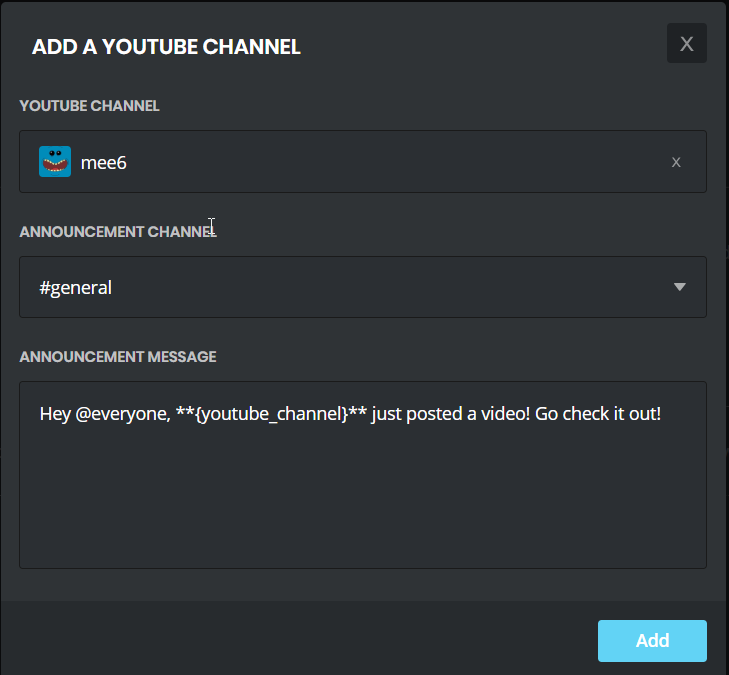 austere ember
the youtube channel, correct?
real zephyr
yeah thats how i spell it
austere ember
it has to be public and have at least 3 videos
austere ember
yeah np
 cedar jacinth
i've set timer for test (5 minutes) but it doesn't work..the setting pic as below..
timer
burnt hazel
@cedar jacinth Try deleting and remaking the timers, we are aware of the current issue and are working to fix
cedar jacinth
thanks @burnt hazel I'll try again and wait for the update. 😊
burnt hazel
No worries 😄
 quartz lily
Hey just wanted to make a note that someone came to my stream today and tried to tell me a new upgraded MEE6 needed verification etc to give me all these perks blah blah blah MEE6#8019 I already banned them. If you want their twtch username as well just let me know.
They made this MEE6 join my discord and pretended to be MEE6 support during my stream.
quartz lily
No, They just wanted to take over my discord asking for it to have admin privs etc.
So I banned it
It is not your discord bot just a fake one
buoyant moon
When the bot joined, did it have the "BOT" tag on the side?
limber knoll
Sadly there are such bots around at the moment, do you have their id? @quartz lily
quartz lily
All I have is the MEE6 nae with their numbers it says their online right now MEE6#8019 I am not sure if they are a "bot" with the tags but I could see this fooling less techy discord server owners. I just wanted to let you know. It did no harm to me as I have my MEE6 with a special colour. I wouldn't trust a random NEW MEE6 being a beta bot unless you formally invited server owners to try a new bot out. I am just giving you a heads up as it seems they are targeting streamers and pretending to be support in their twitch chat telling them about the new MEE6 joining their discord.
I knew it was a fake and attempt at the server so I just banned it. Unfortunitly others might fall for it so I just wanted to let you know of it.
buoyant moon
Also I'm not an admin or have anything related to the bot/server it's selfm I've just used mee6 alot.
limber knoll
@quartz lily dm invite to your server please
buoyant moon
If you look at mee6 in the top right corner, it says "bot" next to their name.
I'm just wondering if it said that.
quartz lily
I have removed it during a stream so I had to jump back over to my game, I didn't get a chance to see if it was an official bot or not but here is a screen in my welcome channel when it showed up "Ironically" welcomed by MEE6
Probably just a troll trying to use the MEE6 name because it's used in a lot of servers.
quartz lily
I am not worried myself, I just wanted to make sure you were informed in case you hear of some servers falling victim to any of these fakes.
limber knoll
Np i just meant i could pass the info on, and we can also deal with it our end
quartz lily
Up to you, it is almost 1 am here hah so I will be taking a mini break. If you need any future information feel free to ask. The official MEE6 on my server is safe and sound. I also use two-factor verification with discord.
limber knoll
Np, we're also a verified server here
 fallen eagle
Hey, is it normal that sometimes a kicked user (with another bot, not with mee6) when he comes back the mee6 bot gives him the muted role? When he got kicked he wasn't having that role
bitter owl
Yes
MEE6 remember muted users
If a person got muted by MEE6 he can leave how many times he want
MEE6 will always mute them back
Unless you do !unmute @User#7794
fallen eagle
Yeah, i did that
 mystic current
Help please I’m on mobile and fixing my roles and mee6 just gave himself admin. And I can take it off ?????
pure obsidian
channel hop'd
buoyant moon
Guys, when I user !warn command in the chat, bot doesn't removed it afterwards and everyone could see it
Basically,.
<my warning message here>
<bot action message here>
I've checked it from second account
burnt hazel
MEE6 will not remove his warning response like the one in the image below.
https://i.imgur.com/8VXA4u7.png
If you are talking about the mod log action you need to change that in the MODERATOR  plugin under the "Moderation logs" to a private channel.
 buoyant moon
Thanks
Hm i can see only logging channel. And it's marked to separate one we have for logs
And it's happens not always, so I think it's bug
 weary steppe
burnt hazel
weary steppe
burnt hazel
Helping in #〉volunteer-support
 north ermine
Custom command not working, command adds role, and replies privately, I'm not sure if either of these factor it, but just to narrow it down.
limber knoll
@north ermine dm invite please
north ermine
For the server?
limber knoll
Yes please
north ermine
It's a work in progress puzzle server so lol it's going to be wierd
 plush lily
Mee6 isnt sending recent youtube videos!
white notch
bug on our end, we're working on it
 ornate crane
There's bug right now which is changing my commands to do the command above them.
It happened when I disabled one of them.
The one beneath it showed disabled, but the one I clicked was greyed.
Also, some commands below it now don't work.
Now I can't delete commands or anything.
wooden mountain
just refresh
wooden mountain
it is just the website
ornate crane
That fixed it, thanks.
 brittle parcel
Hablan español ?
 pearl aspen
Si , pero ca es for reportar uno Bug
 crimson frost
hello I need help the bot mee6 sometimes, no public of the videos of youtube some solution?
cold bear
sorry, i don't understand
buoyant moon
@cold bear I have a question, can I contact you?
crimson frost
Non-public videos, previously published well today I stop posting videos
cold bear
ok
 stone meadow
I’m trying to do commands on my friend’s server, but it won’t allow me to select the server ;;
dire yarrowBOT
Dashboard Access
You need Administrator permission or Bot master role to access the Mee6 dashboard.
How to add Bot master role can be found below:
 burnt hazel
@stone meadow You need to be an admin or bot master to access the dashboard
stone meadow
I am a admin of the server tho, do I need to add it in the additional bot masters?
dire yarrowBOT
It appears that you may be on the wrong account, or something went wrong since the time you logged into my website.
-Please navigate to https://discordapp.com/login and select the gear :gear: in the bottom left, then press Logout.
-After that, please navigate to https://mee6.xyz/dashboard to disconnect from my website. Click on your profile picture and press Logout
-Once finished, select "Add to Discord" again, and follow the instructions to access my dashboard again.
https://cdn.mee6.xyz/s/logout.png
 burnt hazel
@stone meadow Try logging out of the Dashboard then back in by following the steps above, you need to log out of Discord Browser also
stone meadow
Oh, thank you very much
 royal trail
i cant get mee6 it wll not lode 😭
burnt hazel
@royal trail What browser are you using?
royal trail
microsoft edge
burnt hazel
Can you try using Chrome or Firefox if possible @royal trail
burnt hazel
Can you make sure your adblockers are disabled, and you are not using a VPN.
Also try clearing your cache.
We don't really support Edge or Safari browsers so there will be some issues for users using them most likely.
royal trail
idk how to do tat and my mom wod be mad
burnt hazel
How old are you?
burnt hazel
If you can't disable any adblockers or attempt to clear the cache then there isnt much we can do to try and solve the issue.
You are trying to access the server you own on MEE6's Dashboard?
royal trail
and my disc server is the tanner fans caz i want to get a yt and my yt is in my dics btw if u can add it in my server
burnt hazel
invite me to your server in DM's pls.
I'll need the YT name of the channel and a role that will let me use the Dashboard.
royal trail
ok i did it
 crude pawn
Драсте
 heady osprey
i love to punch what to do?
 frigid adder
Do you have a bug report or do you need help?
buoyant moon
Banned people still occurs on leaderboard
Intended, known?
@buoyant moon Intended. If you wish to not have users who are banned or no longer in your server on the leaderboard, simply reset their XP.
K, thanks 
dire yarrowBOT
Alright, @rapid silo has been warned for 'Duplicated text'.
rapid silo
<@&193123929701875712> Can I send private message for you? Because I got warn for this what bug i wanted to report xd
bitter owl
Hold on
Too many dots in the sentence @rapid silo
If the same character is repeated more than 70% of the content from the sentence it’s considered Duplicated Text
faint dome
@buoyant moon commands in #〉commands , and chat on #〉chat please
faint dome
No problem 
 toxic orbit
I don't think I ever had a problem with the bot but in our server we have a game where people use emojis to describe a movie/tv show and others gotta guess it. The bot's mass emoji limit is set to 7, plenty of games were played for weeks and no problem so far, but today one member got his post with 4 emojis deleted twice with a warning, another member tried the same combination and got warning/delete aswell. She tried a couple different combinations of other emojis and nothing happened.
The ones used were these (in this order) -> "couple" "x" "angry" "family_mwgb"
white notch
screenshots and Server ID please
toxic orbit
Sorry, wasn't sure I could post screenshot here.
Server ID => 461607098091044888
Screenshots (4) => https://imgur.com/a/rx6OVuj
wooden mountain
@toxic orbit hey, this is because of the way emoji's work,
👨👩👧👦 family_mwgb is a combination of 7 emojis all compressed in 1
👨 👩 👧 👦 with "connector symbols" in between
toxic orbit
Wow. Now that you explained it seems obvious, never ocurred it could be the reason 😂
I guess I'll switch the emoji limit to +1 then. Thanks for explaining.
white notch
same here 😄
wooden mountain
i just checked and we don't count the connector symbol, but we do count all the persons in that family emoji
so we see that family one as 4
 next gale
Please don't spam.
dire yarrowBOT
Alright, @sick shore has been warned for 'spam'.
 verbal harbor
there is small problem with timers
for example when I nicked mee6 bot "hi"
when the timer (webhook) works the name of webhook is still "mee6"
not change like nickname like
( Knowing that another bots did it and I am sure that the timer is a webhook)
wooden mountain
intended
buoyant moon
türk support varsa mee6 yı svme çağramıyorum yardım
 slim haven
buoyant moon
slim haven
buoyant moon
ooo gardaşımm
 wide phoenix
oo türk
buoyant moon
Ok it says my bot is offline
 dense fox
Discord issue
buoyant moon
my MEE6 is offline
 ornate rover
ok
dense fox
.
buoyant moon
thx
 honest cove
me too
dire yarrowBOT
MEE6 says I have no servers, but that's not true...
Well, that can be caused by:
‣ You don't own any servers
‣ You don't have Administrator permissions or a bot master role on any server you're on
‣ You're logged on with a wrong account (the most common problem)
Third one can be fixed by following these steps:
1. Logout from Discord in your browser (not installed client or mobile app)
1.1 Open https://discordapp.com/app in your browser
1.2 Click on \⚙ icon (User Settings)
1.3 Scroll down, click Log Out and confirm action
2. Logout from MEE6 website
2.1 Open https://mee6.xyz in the same browser
2.2 Click on avatar icon in upper right corner
2.3 Click Logout
3. Login using correct account
3.1 Open https://mee6.xyz and click Login button in upper right corner
3.2 In new window login to Discord. After that you will be redirected back to MEE6 website
3.3 That's all! Now you're using correct account and MEE6 website lists servers where you can modify his settings
P.S. If you're on mobile and some elements are not visible, enable Desktop site mode or switch screen to Landscape (vertical) mode.
bitter owl
@honest cove @buoyant moon ☝
dire yarrowBOT
Dashboard Access
You need Administrator permission or Bot master role to access the Mee6 dashboard.
How to add Bot master role can be found below:
bitter owl
☝ also
honest cove
thanks it's ok
buoyant moon
Cool
Just an other question how can we change the account because it say me just 1 account but i can't change
 low dragon
Like this @buoyant moon
dire yarrowBOT
Lets spice this up a bit! https://discord.gg/mee6
If you want to invite the bot instead... https://mee6.xyz/dashboard
 solar nymph
Still doesn’t work
dire yarrowBOT
Internet Explorer? Edge? Safari? Ew... :nauseated_face: It's time to use REAL BROWSER!!!
Firefox: https://www.mozilla.org/firefox
Chrome: https://www.google.com/chrome/browser/desktop/index.html
Opera: https://www.opera.com/
Note: If you use Windows XP or Vista, consider upgrading your system to Windows 7 or higher because these stopped getting updates. Chrome on these are unsupported too so the MEE6 website will not work on it. As an alternative you can try to use Firefox.
 west tinsel
people join my discord and mee6 is not welcoming them even through he is set to
buoyant moon
Did you enable the welcome plugin on the dashbaord?
dire yarrowBOT
Alright, @buoyant moon has been warned for 'Posted an invite'.
buoyant moon
Censoring is only effective if the message is not edited to include the censored word.
<@&193123929701875712> ^ huge flaw which bypasses censoring
burnt hazel
@buoyant moon We know, warning for editing is planned and coming soon.
@buoyant moon MEE6 is sending an oops?
buoyant moon
cool ty
dire yarrowBOT
Oops, something went wrong in MEE6 land! This error has been reported to our Team. We'll work hard to fix it.
If this happens when using:
Custom commands:
‣ Bot tries to give the role that higher than his own. To fix that, move the bot's role above the role he tries to give.
‣ Missing Manage roles permission. Go to Server Settings -> Roles -> Bot role -> Manage Roles permission
Moderator commands:
‣ Muted role is above Mee6's role. Bot can't give roles that higher than his own. Move it down.
‣ Missing Manage roles permission. Go to Server Settings -> Roles -> Bot role -> Manage Roles permission
Role hierarchy is important for me to give out roles. Oh and also Manage Roles perm:
https://cdn.mee6.xyz/s/fix_hierarchy.gif
 dire yarrowBOT
Alright, @buoyant moon has been warned for 'Bad word usage'.
 zenith oasis
dire yarrowBOT
zenith oasis
dire yarrowBOT
Oops, something went wrong in MEE6 land! This error has been reported to our Team. We'll work hard to fix it.
If this happens when using:
Custom commands:
‣ Bot tries to give the role that higher than his own. To fix that, move the bot's role above the role he tries to give.
‣ Missing Manage roles permission. Go to Server Settings -> Roles -> Bot role -> Manage Roles permission
Moderator commands:
‣ Muted role is above Mee6's role. Bot can't give roles that higher than his own. Move it down.
‣ Missing Manage roles permission. Go to Server Settings -> Roles -> Bot role -> Manage Roles permission
dire yarrowBOT
Alright, @regal kayak has been warned for 'Mass emoji'.
 lime ivy
Not sure if this has already been posted, but when asking for authorization to use a custom channel to post the logs of auto-moderation, it doesn't allow you to select a channel. Not inherently breaking, but still. ((It could also just be my internet sucks, which it does.))
Never mind, I figured it out. It wasn't actually logged into my account, but somehow accessing the server lol
burnt hazel
@lime ivy Can you try logging out of the MEE6 site and Discord browser site and logging back in.
Also make sire your role has Manage webhooks permission.
 clever bolt
What happen to dank meme bot it not work @dire yarrow
burnt hazel
You will have to ask their support server @clever bolt
 foggy notch
hello i wanted to invite mee 6 . I clicked on 'add to discord' and I clicked on a server when it asked me to select one. a new window opened up and when i wanted to click on select a server there were no servers i could select
dire yarrowBOT
MEE6 says I have no servers, but that's not true...
Well, that can be caused by:
‣ You don't own any servers
‣ You don't have Administrator permissions or a bot master role on any server you're on
‣ You're logged on with a wrong account (the most common problem)
Third one can be fixed by following these steps:
1. Logout from Discord in your browser (not installed client or mobile app)
1.1 Open https://discordapp.com/app in your browser
1.2 Click on \⚙ icon (User Settings)
1.3 Scroll down, click Log Out and confirm action
2. Logout from MEE6 website
2.1 Open https://mee6.xyz in the same browser
2.2 Click on avatar icon in upper right corner
2.3 Click Logout
3. Login using correct account
3.1 Open https://mee6.xyz and click Login button in upper right corner
3.2 In new window login to Discord. After that you will be redirected back to MEE6 website
3.3 That's all! Now you're using correct account and MEE6 website lists servers where you can modify his settings
P.S. If you're on mobile and some elements are not visible, enable Desktop site mode or switch screen to Landscape (vertical) mode.
burnt hazel
@languid venture You can use !help in your server to see a list of currently enabled commands for your server.
and make sure to enable some more on your MEE6 Dashboard.
dire yarrowBOT
Modular
I am currently a modular bot. Nothing will be enabled by default and must be enabled in each plugin manually.
So to enable the plugins, go to https://mee6.xyz/dashboard and select your server.
 languid venture
thanks
 feral lion

 wooden mountain
That is a custom command, tell the admin of that server to fix it
 craggy jacinth
I noticed a bug with the !clear command
dense fox
What is it?
craggy jacinth
When you clear it always clears the !clear command as well
So if you do !clear 1 it doesn’t clear any messages
And !clear 2 only clears one not counting the command itself
dense fox
If it is still happening let us know
craggy jacinth
Ok
 jaunty helm
The bot role assign suddenly stopped working
dire yarrowBOT
Oops, something went wrong in MEE6 land! This error has been reported to our Team. We'll work hard to fix it.
If this happens when using:
Custom commands:
‣ Bot tries to give the role that higher than his own. To fix that, move the bot's role above the role he tries to give.
‣ Missing Manage roles permission. Go to Server Settings -> Roles -> Bot role -> Manage Roles permission
Moderator commands:
‣ Muted role is above Mee6's role. Bot can't give roles that higher than his own. Move it down.
‣ Missing Manage roles permission. Go to Server Settings -> Roles -> Bot role -> Manage Roles permission
bitter owl
☝ @jaunty helm
bitter owl
Suddenly your staff moved MEE6 roles ¯_(ツ)_/¯
jaunty helm
Nope
It's still at the top
It's above all the colour roles (The ones it's supposed to assign)
bitter owl
Does it have manage role?
jaunty helm
Yep
bitter owl
Could you triple check for me please?
Also MEE6 cannot give a role that is on his own
bitter owl
And if user already got that role it will gives error message
jaunty helm
It was working and we were all using it, but then it stopped working
bitter owl
Want to mitigate the problem for good?
Create a new command
Copy content from previous one
jaunty helm
There are multiple commands
bitter owl
Which means create a clone
jaunty helm
All the role assigns don't work
jaunty helm
The dice commands that were added in work
bitter owl
Please invite me in DM
So as soon as I get free I will check that and fix it for you
Ok?
jaunty helm
Okay apparently it now works after Jarred removed admin perms from it
jaunty helm
Even though it always had them
I'll ask him when they were added
about a month ago
And it stopped working again
faint dome
Yeah that's a known problem, mee6 doesn't check if it has admin perms, only if it has Manage Role (same goes for every other permission)
jaunty helm
It seems that it can remove roles but not add them?
It has both manage roles and admin perms though
jaunty helm
So, from what I've seen, it removes roles, but it doesn't add them
 floral belfry
!rank card customizer does not work at all, I would like a refund
Multiple platforms, does not work and if I do not use the device I bought it on it wants me to buy it again.
white notch

dire yarrowBOT
Alright, @buoyant moon has been warned for 'randomly mentioning staff'.
dire yarrowBOT
Devil, this command is disabled in this channel.
burnt hazel
#〉commands for commands pls
 keen crystal
So this has been happening since Thursday, and I believe it started working again for a couple of days and then today it starts doing this again. When a user tries to assign themselves a role the bot responds back with an error.
dire yarrowBOT
Oops, something went wrong in MEE6 land! This error has been reported to our Team. We'll work hard to fix it.
If this happens when using:
Custom commands:
‣ Bot tries to give the role that higher than his own. To fix that, move the bot's role above the role he tries to give.
‣ Missing Manage roles permission. Go to Server Settings -> Roles -> Bot role -> Manage Roles permission
Moderator commands:
‣ Muted role is above Mee6's role. Bot can't give roles that higher than his own. Move it down.
‣ Missing Manage roles permission. Go to Server Settings -> Roles -> Bot role -> Manage Roles permission
keen crystal
Well speaking of errors.
burnt hazel
Make sure MEE6 is above the role it is trying to give to users in Server settings > Roles
 uncut rose
cold bear
uncut rose
cold bear
if you don't have bug to report don't send anything in this channel please
keen crystal
This was a bug report.
I looked at everything including the role being on top of everything and the permission to manage roles and it's still not working.
cold bear
referring to person above that sent random messages
can you show screenshot that confirms that mee6 role has manage roles permission and he's role is above role he tries to give?
also please no need to jump between channels, it's better to continue in the same
buoyant moon
i cant using custom command
buoyant moon
You cannot ping roles/people and you cannot use emojis in the Twitch and YouTube things.
cold bear
known
dire yarrowBOT
Using ID
To use channel tags, emojis, role tags and user mentions in custom commands, level up messages and the welcome plugin use the following formats:
 cold bear
@buoyant moon ^ this method should work
buoyant moon
Thank u
cold bear
@buoyant moon what happens when you try to use command and what supposed to be happen?
buoyant moon
i repaired this one min ago 😃
cold bear
good
next time be more specific, doesn't work is not quite understandable, better to say "command should do x but did y instead" or smth
 green glen
Can someone tell me why this does not work?
pure obsidian
What happens when command is used?
green glen
Oops, something went wrong in MEE6 land! SAD6 This error has been reported to our Team. We'll work hard to fix it.
pure obsidian
Put MEE6's role above the MYSTIC role.
dire yarrowBOT
Role hierarchy is important for me to give out roles. Oh and also Manage Roles perm:
https://cdn.mee6.xyz/s/fix_hierarchy.gif
oblique beacon
buoyant moon
Oof
 grand trout
guys need help!
my MEE6 doesn't give us videos from Youtubers
why the hell?
Some maddos just posted videos long while ago and MEE6 keep silence
wooden mountain
hey there @grand trout
can you try to remove them all and set it up again? i know that it is a lot of work but that should fix it
grand trout
buoyant moon
:(
wooden mountain
#blameTheNetwork
 brittle wadi
Nie ma takiej komendy !tempmute
W celu uzyskania pomocy wpisz !pomoc
dire yarrowBOT
Freddie7890#9442 (413816787499614209) is muted for 20 minutes because of 'Pinging everyone in a non-chat channel.', boss.
dire yarrowBOT

 dire yarrowBOT
@wooden mountain greeted @buoyant moon
wooden mountain
!greet
dire yarrowBOT
@wooden mountain greeted {1}
 sinful bobcat
<@&193123929701875712> when I open the MEE6 website to try and add the bot to my server, the website opens up as a gray background with nothing on it, refreshing doesn't fix and I don't know what to do. Do you know how to fix this issue?
white notch
You on Windows?
sinful bobcat
yeah
white notch
What browser?
sinful bobcat
internet explorer
white notch
 delicate wigeon
i cant login into my discord on the MEE6 website it logs me into my old account and i cant switch to my new account on the website
dire yarrowBOT
It appears that you may be on the wrong account, or something went wrong since the time you logged into my website.
-Please navigate to https://discordapp.com/login and select the gear :gear: in the bottom left, then press Logout.
-After that, please navigate to https://mee6.xyz/dashboard to disconnect from my website. Click on your profile picture and press Logout
-Once finished, select "Add to Discord" again, and follow the instructions to access my dashboard again.
https://cdn.mee6.xyz/s/logout.png
dire yarrowBOT
Alright, @dense flame has been warned for 'Posted an invite'.
 bitter glacier
what's wrong with twich announcements a lot of people are asking.
wooden mountain
the problem is that some people work so hard that they don't see the "that thing is broken" message that i have send them
bitter glacier
oh ok sorry sil
wooden mountain
we are aware, and investigating
sand cove
ok thanks
buoyant moon
This thing completely is a BUG
wooden mountain
what do you mean?
wooden mountain
i don't know how good your eyes are but  and 🐛 don't really look the same for me
buoyant moon
Hahah NOT FUNNY KIDDO
 sly skiff
dx
dire yarrowBOT
Alright, @sly skiff has been warned for 'Bad word usage'.
 rose stirrup
Hi
buoyant moon
!rank
dire yarrowBOT
Wolfi xD, this command is disabled in this channel.
rose stirrup
how i can use @dire yarrow in a server
pure obsidian
Go http://mee6.xyz/dashboard and login with your discord account, select your server and enable plugins of your choice. in your server (or #〉commands) you can use !help command to see a list of available commands.
dense fox
Authorisation page
rose stirrup
Yes but how i do the last thing? Is always any diferent thing, whats that? The last thing?
<@&193123929701875712>
dense fox
Its just a joke kinda thing
Not really important
Usually like "Bake a cake for you".
frigid adder
(It doesn't matter If that's ticked or unticked, you can still log in @rose stirrup )
rose stirrup
What i have to do now?
frigid adder
Just carry on... press log in... or wherever you are
rose stirrup
I cant do anything...
frigid adder
uhm.. I don't actually know what you're doing so... I'll let Steve take over.. or something....
rose stirrup
@dense fox
pure obsidian
You need to scroll down and click AUTHORIZE (its a blurple button) or Autorizar in your language.
Try enabling desktop site mode if you still can't see the button.
dire yarrowBOT
Alright, @rose stirrup has been warned for 'Capital letters'.
 dense crag
I tried to add a new command, “!iordered” and it says there is an error. Do you know what I can do?
dire yarrowBOT
Oops, something went wrong in MEE6 land! This error has been reported to our Team. We'll work hard to fix it.
If this happens when using:
Custom commands:
‣ Bot tries to give the role that higher than his own. To fix that, move the bot's role above the role he tries to give.
‣ Missing Manage roles permission. Go to Server Settings -> Roles -> Bot role -> Manage Roles permission
Moderator commands:
‣ Muted role is above Mee6's role. Bot can't give roles that higher than his own. Move it down.
‣ Missing Manage roles permission. Go to Server Settings -> Roles -> Bot role -> Manage Roles permission
 scarlet stream
When a user joins my server (Sanity Dies Here) the "send message when a user joins the server" option disables by itself.
burnt hazel
Helping in #〉volunteer-support
scarlet stream
OK.
buoyant moon
I have the owner ship of the server and when i try to kick/warn a moderator it says sorry but seems you can't warn a modertor and i have the owner ship wtf
dire yarrowBOT
Hey ! MEE6 won't sanction the following people:
• The Owner of the server;
• People with Administrator permission;
• People with Bot Master permission;
• And the role(s) you set as moderator on the dashboard.
Note: MEE6 think moderators are responsible people, like the police . So he doesn't want to blame your police
pearl aspen
Because it
buoyant moon
w8 wat the bot replied?
pearl aspen
You can't ban they because the have the perm of Administrator | Bot Master or as moderator on the dashboard
buoyant moon
gotcho, ty
 proper umbra
meee6 is too great for my eyes
dense crag
Ty!
What do I do if I added a custom command, but whenever I try out the command, it doesn’t respond with anything. What should I do?
burnt hazel
@dense crag Is "Do not reply" enabled on the command at the bottom?
dense crag
Oh my xD Tysm @burnt hazel
burnt hazel
Np :p
dense crag
Im sorry that I don’t understand anything, but it still won’t work when I manage the roles.
How do I fix it?
burnt hazel
is MEE6 above the role it is trying to give? @dense crag
dire yarrowBOT
Role hierarchy is important for me to give out roles. Oh and also Manage Roles perm:
https://cdn.mee6.xyz/s/fix_hierarchy.gif
 humble wren
3 of my discord members have been streaming for at least 1 or 2 hours.
However there's no announcement what so ever for the past 12h.
humble wren
did some more searching. Last announcement seems to have been around 00:23 last night (currently it's 10:44 here)
wooden mountain
thanks, that actually helped us narrow the problem down
humble wren
no problem, I'll keep an eye on things and let you know what's happening. Announcements seem to be back on track
 errant ferry
In my server, MEE6 rarely adds any level roles to anyone, and there have been reports of members getting their post images role taken away for no reason. I looked on the logs, it was MEE6 removing them. No mods had activated any commands for MEE6 to remove those roles, neither had the members done anything to get it removed either.
humble wren
Seems announcements has frozen again (11:05 was the last)
wooden mountain
tahnks
 rose wagon
Oops, something went wrong in MEE6 land! :SAD6: This error has been reported to our Team. We'll work hard to fix it.
<@&193123929701875712>
dire yarrowBOT
Oops, something went wrong in MEE6 land! This error has been reported to our Team. We'll work hard to fix it.
If this happens when using:
Custom commands:
‣ Bot tries to give the role that higher than his own. To fix that, move the bot's role above the role he tries to give.
‣ Missing Manage roles permission. Go to Server Settings -> Roles -> Bot role -> Manage Roles permission
Moderator commands:
‣ Muted role is above Mee6's role. Bot can't give roles that higher than his own. Move it down.
‣ Missing Manage roles permission. Go to Server Settings -> Roles -> Bot role -> Manage Roles permission
dense fox
^^
rose wagon
Wrong,
dense fox
Right.
dense fox
No problem.
dire yarrowBOT
Alright, @drifting laurel has been warned for 'Posted an invite'.
dire yarrowBOT
Alright, @umbral plaza has been warned for 'Bad word usage'.
 marble schooner
Yeah, I've been having trouble with announcements not posting as well... 😦
 bright bear
@marble schooner Same, MEE6 is posting my friends stream announcements, but not my own, went live yesterday, but no announcement.
burnt hazel
@bright bear We fixed something earlier today so it should be resolved.
bright bear
Sweet, I'll try again this evening 😃
burnt hazel
Thanks, if it doesnt work let us know. 😄
dire yarrowBOT
Music Plugin
• Enter a Voice Channel and then type:
!join -> This brings MEE6 to the voice channel you are connected to.
!add <Name of the Song or URL> -> This adds the song of the playlist.
!play -> This starts the added song.
!next -> This skips the current song.
!stop -> This stops MEE6 from playing the current song.
!playlist -> This shows songs added to the playlist.
Note: Searching by "Name of the Song" is from YouTube only !!
faint dome
@buoyant moon 
wooden mountain
buoyant moon
how to level?
dire yarrowBOT
 buoyant moon
it doesn`t work i write a message and i dont show up in the leader board
dire yarrowBOT
If I appear to be denying your hard earned experience, or !rank and !levels aren't working properly...
- Make sure Levels is Enabled.
- Check that you do not have a banned role in the levels configuration, and that you aren't in a banned channel either.
- Make sure that I can see the channel you are talking in with "Read Messages" and send messages with "Send Messages".
limber knoll
@buoyant moon dm invite please
buoyant moon
When i press add to discord server i can only select 1 and not any others ? i have 5 discord groups and i can only add it to the first one i added it to ?
faint dome
#〉volunteer-support keep only one channel please
 true kiln
no puedo desbanear
 verbal swan


 buoyant moon
hy
buoyant moon
Mee6 keeps spamming thumbs up
pure obsidian
@buoyant moon What's the discriminator of the Mee6 in question?