#〉bugs-reports
2 messages · Page 42 of 1
 buoyant moon
 bitter owl
Https://mee6.xyz/dashboard -> Moderator -> Auto Moderator -> Server Invites -> disable @buoyant moon
 faint dome
@bitter owl that check edited messages too ? 
faint dome
If mee6 had to check each message edition, this would be much too hefty I guess
bitter owl
It doesn’t... From the others dyno do that iirc
 dire yarrowBOT
Alright, @buoyant moon has been warned because 'Bad word usage'.
 azure patio
@buoyant moon-_-
 green isle
when i try muting someone it comes up saying they were muted but they can still type
 pure obsidian
@green isle A fail in channel perms
green isle
whats that?
pure obsidian
If they have the muted role but can still talk, then follow below 
dire yarrowBOT
Having problems muting someone/they aren't muted? Check the following
Prerequisites:
- Moderator plugin is enabled
!mutecommand isn't disabled- Bot has role with Manage Roles and Manage Channels permissions
- Muted role is under MEE6 role
- You're trying to mute someone using
!mute @mention reason, otherwise it will not work
If user got Muted role but still can talk means there's issue with your channel permissions
Go to Channel Settings -> Permissions
- If that's public channel that can be accessed by anyone:
- Set

Send Messagesfor all roles except Muted - Set

Send Messagesfor Muted role
- If that's secret channel that requires *special* role to access it:
- Set
Send Messages
Read Messagesfor special role - Set
Send Messages Read Messagesfor Muted role - Set
Send Messages Read Messagesfor@everyonerole
pure obsidian
tl;dr Make sure they don't have a role with send messages set to on the permission settings of the channel(s)
And muted role has the send messages perm set to
green isle
thank you so much
 bold seal
Like Twitch plugin sometimes
 strong rivet
@bitter owl mee6 never gives notification after the youtuber uploads the video
bitter owl
Due several restrictions from youtube plus some bugs encountered, we decided to put this plugin in maintenance. And it’s in order to give you guys the best feature that you deserve, instead of a buggy plugin  @strong rivet
strong rivet
👍
 wise saffron
Hello i can't add MEE6 to my Discord
 cold bear
does it say you have no servers?
wise saffron
yes
dire yarrowBOT
It appears that you may be on the wrong account, or something went wrong since the last time you logged into the website.
- Please navigate to https://mee6.xyz/dashboard to logout from our website. Click on your profile picture and press Logout https://rebrand.ly/LogoutMEE6.
- Then navigate to https://discordapp.com/channels/@me and select the gear in the bottom left, then press Logout.
- Log into the account you want to use on the Discord website
- Once done, select "Add to Discord" again, and select the server dashboard you want to access

MEE6 connects people to the communities they love.
wise saffron
thats same
cold bear
means you did it wrong
cold bear
1. Logout from Discord in your browser (not installed client or mobile app)
1.1 Open https://discordapp.com/app in your browser
1.2 Click on \⚙ icon (User Settings)
1.3 Scroll down, click Log Out and confirm action
2. Logout from MEE6 website
2.1 Open https://mee6.xyz in the same browser
2.2 Click on avatar icon in upper right corner
2.3 Click Logout
3. Login using correct account
3.1 Open https://mee6.xyz and click Login button in upper right corner
3.2 In new window login to Discord. After that you will be redirected back to MEE6 website
3.3 That's all! Now you're using correct account and MEE6 website lists servers where you can modify his settings
P.S. If you're on mobile and some elements are not visible, enable Desktop site mode or switch screen to Landscape (vertical) mode.
cold bear

 opal pebble
!rank
dire yarrowBOT
The Phoenix 2, this command is disabled in this channel. 
 strong path
go to #〉commands for commands please @opal pebble
opal pebble
@strong path Soory I'am new I don't Know what are this channels
dire yarrowBOT
Alright, @steel spade has been warned because 'Bad word usage'.
Alright, @steel spade has been warned because 'Bad word usage'.
buoyant moon
youtube links dont work
strong path
YouTube plugin is bugged. Sorry about that.
buoyant moon
oh
ok
they worked for 1 day
then stopped
uh no scrollbars on menu's
on website
strong path
🤔 What browser you're using? @buoyant moon
strong path
Can you show me a screenshot of what you mean?
buoyant moon
huh
strong path
Please don't try to ping everyone... It's a fake role
buoyant moon
really?
strong path
Now please, let's get back to your case
strong path
Wait, wth, same thing for me 😐
strong path
idk if that's a problem with Chrome's new update 🤔
strong path
But you can still use the mousewheel though
buoyant moon
yea
buoyant moon
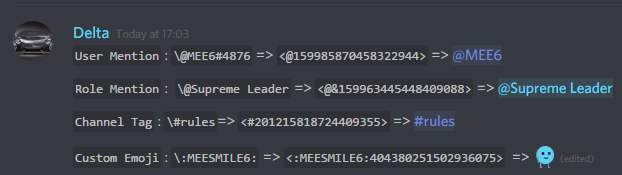
Bug: When I try to tag a role with the @@ annotation in a command, it does not highlight the role correctly. It just types it as plain text and doesn't notify the role.
dire yarrowBOT
To use channel tags, emojis, role tags and user mentions in custom commands, level up messages and the welcome plugin use the following formats:
 buoyant moon
Thanks i'll try that
 toxic talon
@dire yarrow We Have A BUG With You:
Bug:In Music Bot The Quiz Is Bugged And When You Start A Quiz It Says That A Quiz Is Started And It Don't Load :c pls help.Thanks for read this
@limber knoll pls help :) ↑
strong path
They working on it, it's still in beta
toxic talon
Yeah, but i am reporting The bug :)
strong path
ok
toxic talon
:)
strong path
!hierarchy
dire yarrowBOT
Role hierarchy is important for me to give out roles. Oh and also Manage Roles perm:
https://cdn.discordapp.com/attachments/302245580673908740/479426065668898826/81d15f9a.gif

 stark harness
Can Somebody Help
i've tried a lot to fix this but i couldn't
strong path
!hierarchy
dire yarrowBOT
Role hierarchy is important for me to give out roles. Oh and also Manage Roles perm:
https://cdn.discordapp.com/attachments/302245580673908740/479426065668898826/81d15f9a.gif
strong path
Please read mee6's message above @stark harness
strong path
Invite me in DMs and give me admin perm please
stark harness
ok
 jaunty robin
when i mute someone they can text but i dont wont that they can text
dire yarrowBOT
Having problems muting someone/they aren't muted? Check the following
Prerequisites:
- Moderator plugin is enabled
!mutecommand isn't disabled- Bot has role with Manage Roles and Manage Channels permissions
- Muted role is under MEE6 role
- You're trying to mute someone using
!mute @mention reason, otherwise it will not work
If user got Muted role but still can talk means there's issue with your channel permissions
Go to Channel Settings -> Permissions
- If that's public channel that can be accessed by anyone:
- Set
Send Messagesfor all roles except Muted - Set
Send Messagesfor Muted role
- If that's secret channel that requires *special* role to access it:
- Set
Send Messages Read Messagesfor special role - Set
Send Messages Read Messagesfor Muted role - Set
Send Messages Read Messagesfor@everyonerole
 west citrus
hi
 verbal tide
error
message "The server encountered an internal error and was unable to complete your request. Either the server is overloaded or there is an error in the application."
status_code 500
<@&193123929701875712> this pops up when trying to authorize a channel for a timer not sure when im doing wrong 😅
verbal tide
and its only one channel that will not authorize
figured it out! i had too many webhooks in my channel. deleted all of them allowed me to authorize the channel again 😁 sorry for the trouble
 limber knoll
@verbal tide means you have more than 10 webhooks dedicated to a channel
Change the channel the timers on
 south pier
<@&193123929701875712> i have ha big Problem with Mee6 bot.. The youtube poste funktion is in my dashborad Broken on me -.-
my Youtube Dashboard : https://mee6.xyz/dashboard/421391924201783296/youtube
I have to mutch Youtube Acc registered (maby 70+ acc)
Now I have the problem -.- I can not open the youtube category in the Dashboard...
if I want to open the dashboard in the webinterface. Cancels my Explorer.
Tried everything ... even other PC is not too
can someone my mee6 offered to reset the youtube acc cache????
I can not use my server for youtube anymore on my server.
(sorry for my bad englisch)
MEE6 connects people to the communities they love.
one sec make screenshot
limber knoll
@south pieryoutube plugin is bugged, we're currently looking into it but we can't promise an estimated time it will be fixed
 sand echo
Can someone help me with adding roles to messages? I tried doing what was mentioned here yesterday (Changing the message to be @rolename and it still did not post the role tag correctly: https://puu.sh/Bxoxe/79ee54ee98.png

Bottom is how it should be
bot posted the role tag but it didnt behave like a tag
dire yarrowBOT
To use channel tags, emojis, role tags and user mentions in custom commands, level up messages and the welcome plugin use the following formats:
strong path
you tried what's in there?
strong path
I mean the <@&453610540686639115>
strong path
The image explains how to get it
You make the role mentionable > do \@rolename(keep in mind that'll still mention the role members) then you get the output and put it in your streamer announcement message
 sand echo
sure, trying it one more time and making sure i did it right first
it worked, i must have typed it wrong the first time
ty
strong path
yw
 tame slate
My MEE6 not is not working when I use a self assign command
strong path
says something like "oops"? @tame slate
tame slate
@strong path yes
strong path
!hierarchy
dire yarrowBOT
Role hierarchy is important for me to give out roles. Oh and also Manage Roles perm:
https://cdn.discordapp.com/attachments/302245580673908740/479426065668898826/81d15f9a.gif
strong path
Please read mee6's message above @tame slate
tame slate
@strong path Thanks
strong path
yw
 atomic kraken
!hierarchy
dire yarrowBOT
Role hierarchy is important for me to give out roles. Oh and also Manage Roles perm:
https://cdn.discordapp.com/attachments/302245580673908740/479426065668898826/81d15f9a.gif
 burnt hazel
@atomic kraken Commands in #〉commands for testing please
 zenith gust
The bot commands do not work in my stats checker on my server <@&255513346428764161>
dire yarrowBOT
Alright, @zenith gust has been warned because 'Bad word usage'.
Alright, @zenith gust has been warned because 'Bad word usage'.
zenith gust
I am not typing bad words
What is wrong with this bot
The staff needs to fix this bot, the commands do not work right now and now it is telling me I am saying bad words when I @ everyone
burnt hazel
Helping in #〉volunteer-support
 placid mauve
Wanted to report something. I tried using the !pokemon (Pokemon Name) command, and it gave me an error. It still isn't working. I decided I'd let you know, even though it said it sent the error to you anyways.
buoyant moon
!rank
dire yarrowBOT
Grouch`-, this command is disabled in this channel.
 little pond
We tried to mute someone using the command and it didn't work.
dire yarrowBOT
Having problems muting someone/they aren't muted? Check the following
Prerequisites:
- Moderator plugin is enabled
!mutecommand isn't disabled- Bot has role with Manage Roles and Manage Channels permissions
- Muted role is under MEE6 role
- You're trying to mute someone using
!mute @mention reason, otherwise it will not work
If user got Muted role but still can talk means there's issue with your channel permissions
Go to Channel Settings -> Permissions
- If that's public channel that can be accessed by anyone:
- Set
Send Messagesfor all roles except Muted - Set
Send Messagesfor Muted role
- If that's secret channel that requires *special* role to access it:
- Set
Send Messages Read Messagesfor special role - Set
Send Messages Read Messagesfor Muted role - Set
Send Messages Read Messagesfor@everyonerole
 gray niche
@little pond ☝
little pond
Thanks
 primal forge
did you guys fix the bugs that when i command the info-server that it is showing the right info
bitter owl
Server-Info collects information from Discord side. Problem is their side then
 mystic marsh
!help
dire yarrowBOT
@mystic marsh couldn't find your question
strong path
Make sure that mee6 has a role above that user's role in server settings > roles @buoyant moon
buoyant moon
@strong path ok thanks! your the best
 full oracle
I believe the ranking system is down?
strong path
No?
buoyant moon
the timer is supposed to send every 15 mins but its sending in like every 1 min how do i fix this? 😦
strong path
delete the old one and create a new one in its place
buoyant moon
um ok
 last rivet
Mee6 don't send any Youtube notifications. I did it all good, nothing's empty. Selected which yt channel to which of my channels and... nothing. Pewdiepie don't work. Nintendo don't work. But why ? How can I solve that ?
strong path
YouTube plugin is bugged. Sorry about that.
strong path
We don't know
strong path
yw
 rich ridge
Hey <@&193123929701875712> , i have a problem on one of my discord servers. I have activated the "Youtube" Plugin at the MEE6 Dashboard. I have saved some YouTubers, who i want to get a notification in my #youtube-news channel. Notifications are sent by some YouTube channels, but unfortunately not by all of them. When you want to look at it, send me a pm and i will send you a link to the Discord Server. I hope I will get a answer soon. Thank you! 😃
Ok, do you know when its fixed?
sorry, but what is "ETA"? 😬
Ok, thank you for your help. 
last rivet
really want that yt feature to work lol
 onyx umbra
Bad words filter not working
 mental acorn
Same
 sour scaffold
hey how do i make a time limit to send a message
 pearl aspen
@sour scaffold !slowmode (time)
pearl aspen
Moderator Plugin
sour scaffold
ok
pearl aspen
the next time you ask, use #〉chat or #〉volunteer-support or #463809001273032715
gray niche
(they can ask questions in this channel btw)
pearl aspen
I do not think so, because it's not a bug
gray niche
make sure it's enabled
pearl aspen
Plugin Moderator is on ?
dire yarrowBOT
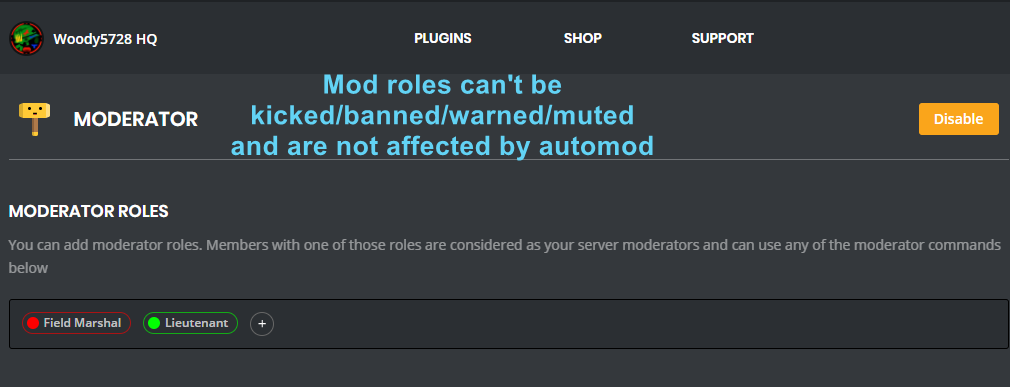
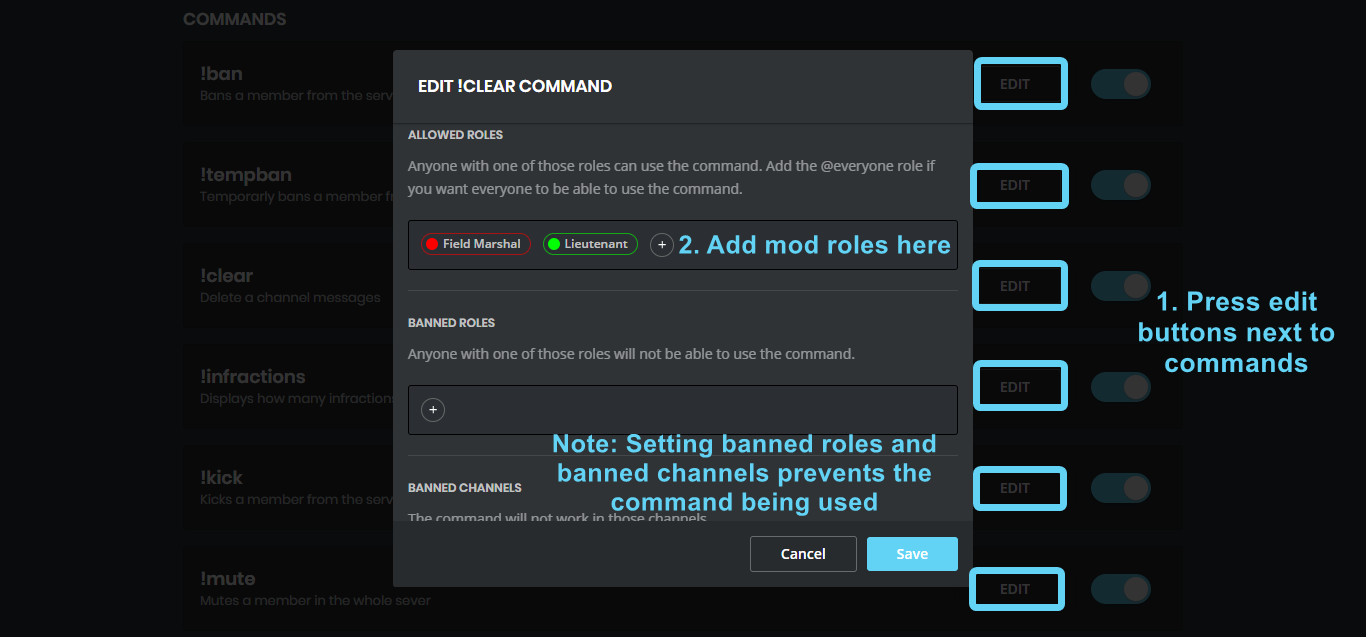
You can use the images below to help you configure my Moderator Plugin.
https://i.imgur.com/ZL24div.png https://i.imgur.com/675FdYd.png
 pearl aspen
You must activate the moderator plugin and you will have this command and many others
 harsh saddle
the youtube plugin is still not working🙁
 austere ember
yeah, known
austere ember
it is under maintence
austere ember
no idea, sorry
austere ember
yeah np
bitter owl
@harsh saddle Please, stop asking every single day for the same thing. It won't be ready so quickly. Once per fortnight you may ask so you won't be frustrated and won't bug us at the same time ;)
dire yarrowBOT
Alright, @quasi ore has been warned because 'Duplicated text'.
Alright, @heavy plume has been warned because 'Posted an invite'.
 grave linden

dire yarrowBOT
Having problems muting someone/they aren't muted? Check the following
Prerequisites:
- Moderator plugin is enabled
!mutecommand isn't disabled- Bot has role with Manage Roles and Manage Channels permissions
- Muted role is under MEE6 role
- You're trying to mute someone using
!mute @mention reason, otherwise it will not work
If user got Muted role but still can talk means there's issue with your channel permissions
Go to Channel Settings -> Permissions
- If that's public channel that can be accessed by anyone:
- Set
Send Messagesfor all roles except Muted - Set
Send Messagesfor Muted role
- If that's secret channel that requires *special* role to access it:
- Set
Send Messages Read Messagesfor special role - Set
Send Messages Read Messagesfor Muted role - Set
Send Messages Read Messagesfor@everyonerole
bitter owl
☝
bitter owl
Oh automated actions you mean
bitter owl
So exactly what I pasted for you
You need to configure your server to work with muting feature
bitter owl
Listen, when you first enable moderator role. You perform !mute <@&453610540686639115>
Then mee6 creates the muted role
(Bot creates it, not you)
 ornate dome
Ok
bitter owl
Then this same muted role is used to silence users by !mute command or auto moderator
ornate dome
ornate dome
Ok
bitter owl
!mute @ornate dome reason
ornate dome
I think it works
bitter owl
Ok
bitter owl
Then you need to configure server to mute a person in text channel
ornate dome
Ok😀
bitter owl
Once user received the muted role
And that's explained how in last MEE6 message in this channel
bitter owl
Delete previous one and add again to make it work
And channel need to be active (at least one message between one timer and another)
bitter owl
What you need help with? @buoyant moon
buoyant moon
oh its
i had a chat with scratch
its a long story if u want to understand me
but
bitter owl
I couldn't find nothing related to MEE6's errors
buoyant moon
no
just u wait
<@&193123929701875712> i need to ask if they patched this scratch told me that this the most top one only works and the one under wont work so is this patched?
Oof
wrong channel
sorry for that :c
bitter owl
The first infractions is in the top
bitter owl
If you put ban in the top, the first action that mee6 will take is banning
limber knoll
@bitter owl means the bug
buoyant moon
:<
buoyant moon
3rd also ?
limber knoll
Correct
buoyant moon
that was my question
bitter owl
Oh so we need to fix that
 thin matrix
@bitter owl Its possible to make a timer, without need activity in channel ?
bitter owl
@thin matrix not with mee6, since we have anti-flood system
thin matrix
before we can do this @bitter owl
before the new design of the website
before there is an option, to choose to send messages with or without activity
 molten junco
@dire yarrow is a tank! Works like a beast!
dire yarrowBOT
lucdiep, this command is disabled in this channel.
 coral lance
Is MEE6 down?
buoyant moon
!rank
dire yarrowBOT
zRedflashツYT, this command is disabled in this channel.
burnt hazel
Commands in #〉commands pls
buoyant moon
Got a problem
burnt hazel
Whats the issue?
buoyant moon
I make my own commands at the Website but its not working
burnt hazel
Do they say an Oops error when trying to use them?
If not, what happens and what does the command do.
buoyant moon
Can i send a picture
burnt hazel
Yes
burnt hazel
Im assuming that command gives roles to people correct?
in which case can you go to:
Server settings > Roles > MEE6
Press and hold the MEE6 role and drag it above the roles you want to give to others.
dire yarrowBOT
Role hierarchy is important for me to give out roles. Oh and also Manage Roles perm:
https://cdn.discordapp.com/attachments/302245580673908740/479426065668898826/81d15f9a.gif
burnt hazel
Like shown in the image on the right
buoyant moon
Oh ok thx
 marsh walrus
The clearfunction doesn't work 🙈 I checked, if it was activated, and i checked if mee6 was allowed what it needs to be allowed...
dire yarrowBOT
The clear command allows you to clear the last xx amount of message or to clear one user without clearing anyone else.
Use !clear 1-1000 to clear the last xx messages (example !clear 10)
or !clear @name to clear all the message of @name in the last 2 weeks
+ I need manage messages permission
+ I need view message history permission (otherwise I will respond with -1 messages cleared)
+ you need to enable the plugin on the website
+ you need to check the checkmark next to clear on the plugin page.
+ you need to set your role as moderator (located at the top of the plugin page in the moderator tab)``` that one I mean
marsh walrus
ok so i checked all the points all of them are fullfiled still no deleted messages >.<
strong path
Actually... Lemme do a quick test here...
OOF
welp, it's Discord having problems, wait for a bit until they fix it
marsh walrus
okay xD thank you so much
 vocal glen
Why is this bot always bugged? i can't play music. in this month i was able to add and play music only twice !!!

 wooden mountain
we are in the process of restarting the bot to recover from discord there incident from the past 2 hours
vocal glen
Cool. Many thanks 😃
 sterile orchid
You're a member off the discord staff ?
wooden mountain
no
wooden mountain
admin
sterile orchid
of this server or of discord ?
wooden mountain
this server
buoyant moon
Is it normal that mee6 stop worked since 20.02 ?
 nimble osprey
 tight ice

 west cedar
Oof
 errant tree
I'm trying to setup a verification what someone has read my discord rules and I set the command to be iagree, but it says there is an error
It should assign them a role the has access to the server when they type that
wooden mountain
!woops
dire yarrowBOT
Oops, something went wrong in MEE6 land!  This error has been reported to our Team. We'll work hard to fix it.
If this happens when using:
Custom commands:
‣ Bot tries to give the role that higher than his own. To fix that, move the bot's role above the role he tries to give.
‣ User don't have all roles bot tries to remove, that's known bug.
‣ Missing Manage roles permission. Go to Server Settings -> Roles -> Bot role -> Manage Roles permission
Moderator commands:
‣ Muted role is above Mee6's role. Bot can't give roles that higher than his own. Move it down.
‣ Missing Manage roles permission. Go to Server Settings -> Roles -> Bot role -> Manage Roles permission
wooden mountain
!oops
errant tree
Thank you!
 neon seal
Hi would like to ask is mee6 down at the moment? cuz it doesnt seems to prompt us in the server when 1 of the youtuber uploaded a video/ doing live stream
burnt hazel
Answered in #〉volunteer-support
 limpid pebble
How come that 'post a message every 12 hours' is somehow translated to 'post one every minute'??? My users are getting realy annoyed and so am I 😃
strong path
Try deleting the old timer and making a new one in its place
dire yarrowBOT
Alright, @warm current has been warned because 'Posted an invite'.
dire yarrowBOT
Alright, @reef topaz has been warned because 'Posted an invite'.
last rivet
@strong path hey normal buds can ping @ everyone can you modify it please ?
 maiden pine
Hey mee6 HS ?
last rivet
Lol en français
maiden pine
Ok merci
dire yarrowBOT
Alright, @last rivet has been warned because 'Bad word usage'.
 leaden crow
not working commands?
 patent fractal
last rivet
patent fractal
last rivet
@leaden crow mee6 was off few minutes ago that's why you can't use the commands
@patent fractal
And @thenextonewhoaskwhyhecantusecommands
xD but true
 iron pulsar
!rank
dire yarrowBOT
giggle goblin wants(tacobell, this command is disabled in this channel.
 vale cliff
Hi i have some problem with mee6
I mean about a side
When i try change some on a Youtube Notification's they change in to a blank side and when i'm try to refresh, this happened again
faint dome
YouTube plugin is brocken atm, we're sorry about that 😕
developpers are working hard on it
faint dome
probably not...
This breakdown has been going on for a few weeks, we have no date to give unfortunately
 thick sentinel
@faint dome any idea if mee6 could be kicking people out of a discord called D7 Army? I believe it has happened before where it’s kicked a mass amount of people for no reason
faint dome
how are you sure this is mee6 ?
thick sentinel
I’m not but I’m asking if this could happen
faint dome
thus the answer is 'nope'
faint dome
yw
 drifting osprey
Why my page of configuration of levels is... grey ?
Even when I refresh
Anyone ?
bitter owl
@drifting osprey is this fixed?
drifting osprey
I'll tried
bitter owl
Are you using Windows and Google Chrome (updated?)
drifting osprey
Google chrome, updated ? Idk
dire yarrowBOT
You can access my dashboard at https://mee6.xyz/dashboard, and login with your Discord Account.
drifting osprey
And nope, still grey
bitter owl
And then press F12 and select Console tab please
drifting osprey
drifting osprey
Yes, i have one, but i'm trying to stop it and refresh the page, didn't work
burnt hazel
@slow scaffold
Is this trying to add a Timer of MEE6 itself.
Also what browser is that?
 slow scaffold
Google I guess
burnt hazel
Can you try google chrome please, basic google isnt supported.
 compact ravine
!invite
dire yarrowBOT
Lets spice this up a bit! https://discord.gg/mee6
If you want to invite the bot instead... https://mee6.xyz/dashboard
burnt hazel
Commands in #〉commands
slow scaffold
Thx fore the help
burnt hazel
Anytime 
 warm peak
<http://discord.com/invite/<INVITE_CODE>> doesn't get deleted
dire yarrowBOT
Alright, @buoyant moon has been warned because 'Posted an invite'.
dire yarrowBOT
Alright, @floral blaze has been warned because 'Posted an invite'.
 craggy wolf
hey dudes, when i'm want to click on the 1 thing, black screen is coming, help me pls!
 deep belfry
same
cold bear
@craggy wolf который из них
craggy wolf
любой
cold bear
используеш vpn?
cold bear
не надо
craggy wolf
👌 😔
cold bear
можно ссилку на дашборду
craggy wolf
скрин?
craggy wolf
🤔
cold bear
отключи адблок и перезалогинся на mee6.xyz
cold bear
кикни бота и пргласи его назад
cold bear
можешь попробовать на другом браузере или на телефоне например
cold bear
xiaomi нынче дешевые
craggy wolf
хех
cold bear
попробуй на firefox
я буду спрашывать разраба что можно поделать
cold bear
👍
craggy wolf
спс
cold bear
не за что
 maiden crescent
i set up a get role command on the website, but when the user tries to use it, this happens
cold bear
!oops
dire yarrowBOT
Oops, something went wrong in MEE6 land! This error has been reported to our Team. We'll work hard to fix it.
If this happens when using:
Custom commands:
‣ Bot tries to give the role that higher than his own. To fix that, move the bot's role above the role he tries to give.
‣ User don't have all roles bot tries to remove, that's known bug.
‣ Missing Manage roles permission. Go to Server Settings -> Roles -> Bot role -> Manage Roles permission
Moderator commands:
‣ Muted role is above Mee6's role. Bot can't give roles that higher than his own. Move it down.
‣ Missing Manage roles permission. Go to Server Settings -> Roles -> Bot role -> Manage Roles permission
maiden crescent
i dont understand how to move the role higher
cold bear
!hierarchy
dire yarrowBOT
Role hierarchy is important for me to give out roles. Oh and also Manage Roles perm:
https://cdn.discordapp.com/attachments/302245580673908740/479426065668898826/81d15f9a.gif
cold bear
like that
maiden crescent
oh ok, thank you!
cold bear
strong path
I assume that's Chrome you're using?
dire yarrowBOT
Alright, @waxen zealot has been warned because 'Posted an invite'.
 waxen zealot
😮
 graceful rune
Remember, No Russian.
 cunning hull
why would the bot post deleted channel instead of the channel that I was referencing to if the channel exists
 sullen venture
Bot down... Please be patient
buoyant moon
The bot is having problems.
austere ember
MEE6 is slowly coming back online, please be patient.
buoyant moon
K
 buoyant furnace
MEE6 is déconnectéd im french
faint dome
@buoyant furnace Discord a quelques problèmes avec les bots, soit patient
buoyant furnace
Sa serais régler quand ?
faint dome
D’ici 30min max je pense
buoyant furnace
Ok merci
buoyant moon
dans notre serveur mee6 a commencé a supprimer tout les messages de tout le monde
buoyant furnace
Avec tout les bot ou juste avec MEE6
buoyant moon
jusqu'a ce qu'on enleve le slowmode
faint dome
La plupart des bots
buoyant moon
MEE6 is Offline in some Discord Servers.
faint dome
Yes, we know
limber knoll
Read #〉announcements
burnt hazel
Timers are buggy, you can try to remove and remake them to fix the issue @white burrow
 white burrow
i tried this workaround but its working only one time
dire yarrowBOT
Alright, @tardy ravine has been warned because 'Posted an invite'.
white burrow
the 1 minute interval are not works
 haughty otter
The bot has disconnected from my server. I cannot get in for some reason.
 dusty apex
Is it offline? @haughty otter
haughty otter
That's what it says. I can get into another server I have permissions for... just not my own.
@dusty apex
dusty apex
@haughty otter I mean is it offline on your server?
haughty otter
yes @dusty apex
burnt hazel
Can i have your server ID please @haughty otter
dire yarrowBOT
Open Server Settings in your Discord Server. Select Widget and press Copy ID next to Server ID.
You can also use Developer Mode as an alternative method.
burnt hazel
thx
haughty otter
thank you
 lilac flicker
Mee6 keeps double-doing commands, like if I try to mute someone it creates two new muted roles and puts both on the user. or if someone breaks an infraction once, mee6 warns them twice
burnt hazel
Can you try kicking and re-inviting MEE6 to your server to see if this fixes the issue @haughty otter
haughty otter
Let me do that really quick @burnt hazel
burnt hazel
Thanks for the report @lilac flicker
haughty otter
Okay.. kicked and re-invited @burnt hazel. Just waiting on it to return.
burnt hazel
ok, if its still offline dont panic, I'll let the devs know
haughty otter
ok. I'll let you know as soon as it's back.. I can't even get into it on the web browser.. Not sure if that is typical. @burnt hazel
burnt hazel
Yes, i see, sorry about that,
haughty otter
np.. How long before it accepts the invite, typically? I don't want to overwhelm you if all is normal @burnt hazel
burnt hazel
Not sure how long it will take, i have let the devs know MEE6 is offlien for you, so as long as MEE6 is in your server right now then they will fix asap
 bleak raven
My rank card wont show my profile pic.
haughty otter
Oh... It's reappeared. Just offline @burnt hazel
bleak raven
!rank
dire yarrowBOT
Apollyon, this command is disabled in this channel.
haughty otter
If you find out, that I did something to cause it to go offline, can you tell me what it was @burnt hazel? I don't want to break it again if it's my fault. Otherwise, hopefully they can figure out how to get me back up and running. Thank you very much for your help with all of this, btw.
burnt hazel
@haughty otter its not your fault! dont worry 
MEE6 had an outage earlier along with many other bots and this may be the reason behind it.
haughty otter
Ahh okay. Sounds good @burnt hazel
dire yarrowBOT
Alright, @tardy ravine has been warned because 'Bad word usage'.
 cedar dirge
uhh idk if i shoukd be in support or bug reports but the mee6 bot keeps sending 2 of every message
like when i do ! rank it gives me my rank twice
and 2 welcome messages for one person
<@&193123929701875712>
cedar dirge
ok ty!
 stiff jetty
Why the robot is not working on my server <@&193123929701875712>
burnt hazel
Is MEE6 offline?
stiff jetty
yes
burnt hazel
The devs are working on bringing MEE6 back to you, it wont be long but please stay patient. 
stiff jetty
ok thanks for all
 cobalt rose
I cant get it in my server.
cobalt rose
No I fixed it.
strong path
ok
cobalt rose
Sorry.
 sage cypress
MEE6 is offline?
sage cypress
oh yes sorry he is back ahah
 lethal lance
<@&193123929701875712> mee6 isnt working in one of my servers but its working in another, so not sure whats up
i tried kicking and reinviting and he has all perms and stuff
lethal lance
yes
 raven tapir
I enabled the !urban command in my server but it doesn't work, can explain to me why or fix it or something.
strong path
Do other commands work?
 timber drift
Hi, it seem youtube alert don't work for me, can i have some help please
cold bear
known bug, devs are working hard on fixing it
timber drift
So that don't work for the moment?
cold bear
yes
timber drift
Ok
 fleet sonnet
Why Bot is not working
Anyone can share invite link in my server
Bots are not deleting them
cold bear
- make sure remove invite is set to remove meesage or messave message and warn aurthor option
- check +settings for that automod, none of their roles should be listed in allowed roles, bot will ignore then
- bot will not remove invites that direct to current server or invalid invites
- if they have manage server/admin permissions or their roles are listed in moderator roles bot will ignore them aswell
buoyant moon
Here is mee6 bug lmao
strong path
oh
buoyant moon
U got it?
buoyant moon
Ok
strong path
In DMs
buoyant moon
Ok
strong path
Wasn't a bug, just a misunderstanding
buoyant moon
Oh
 uncut zephyr
Oh
dire yarrowBOT
Alright, @daring salmon has been warned because 'Bad word usage'.
Alright, @daring salmon has been warned because 'Posted an invite'.
 daring salmon
@burnt hazel
burnt hazel
Do you need help with a MEE6 issue?
fleet sonnet
@burnt hazeli need
burnt hazel
@fleet sonnet what do you need?
fleet sonnet
@burnt hazel i wanna check my bot is working or not
I have done warn and delete auto mod for invites
burnt hazel
Try using warn on a server member, !warn @user [reason] if it works, it will give them a warning
burnt hazel
!rank @user
Make sure to enable the Levels  plugin on the dashboard
fleet sonnet
@burnt hazelokay thankyou
white burrow
Hi! News about the bug timers?
burnt hazel
Still being fixed, no ETA on when it will be resolved, but it should be soon-ish @white burrow
white burrow
thank you @burnt hazel
white burrow
Hi again!! New problem with timers plugin! Mee6 spam the server. i disabled the plugin.
 leaden osprey
maybe you added a bit too much timers?
 pseudo steeple
MEE6 doesn't let me login to change rank's color ._.
leaden osprey
also check channel settings -> webhooks to see if you haven’t added too many
burnt hazel
@pseudo steeple Are you logging in on the wrong account on the dashboard?
 white burrow
nope the timer are properly configured to 4 hours but the bot send the message every 1 minute
timber drift
WHen youtube alert will be fixed?
burnt hazel
@white burrow As i said earlier, Timers are still being fixed, no ETA on a fix.
@timber drift No ETA, but the devs are working on making this plugin stable again
timber drift
Soory i'm newbi what mean ETA plz?
burnt hazel
Estimated Time of Arrival
(unknown when it will be fixed)
timber drift
Ok thx U dude
buoyant moon
{"error":{"message":"The server encountered an internal error and was unable to complete your request. Either the server is overloaded or there is an error in the application."},"status_code":500}
😦
I tried to authorize to general in my discord for messaging the timer and each time I click authorize it comes up this message.
I click authorize
Even on pc as well
bitter owl
You reached the limit of webhooks
Server Settings -> Webhooks -> Delete them to be 10 or less
 gusty merlin
getting the same error
buoyant moon
When you type (Explain) !tempmute {user} @every1 bot ping/tag @every1 or @.here if you type that
How it works:
 mystic grove
Just replace @ ... with 'Tagging everyone' or 'Tagging here'.
Sorry for the tag i wrote @ ...
 still karma
Although I have repeatedly set the streamers up, after a stream the list blanks and stops alerting
buoyant moon
Hi, I have a problem 😦
dire yarrowBOT
I would like to help you, but if you don't tell us what your problem is then I can't really help. Please tell us what your problem is and not that you have one.
faint dome
@buoyant moon
buoyant moon
My rank does not appear in MEE6
faint dome
what do you mean ?
faint dome
on your server, or here ? With the !rank or !levels command ? And what is the answer of mee6 ?
buoyant moon
Tells me : Seems like you aren't ranked yet. :HEHE6:
faint dome
oh ok
buoyant moon
In my server
faint dome
then you just need to speak a little
dire yarrowBOT
 buoyant moon
Ok
faint dome
have you any xp-banned role ?
faint dome
you're welcome
lethal lance
My mute function isn’t working in any of my discords <@&193123929701875712>
dire yarrowBOT
Having problems muting someone/they aren't muted? Check the following
Prerequisites:
- Moderator plugin is enabled
!mutecommand isn't disabled- Bot has role with Manage Roles and Manage Channels permissions
- Muted role is under MEE6 role
- You're trying to mute someone using
!mute @mention reason, otherwise it will not work
If user got Muted role but still can talk means there's issue with your channel permissions
Go to Channel Settings -> Permissions
- If that's public channel that can be accessed by anyone:
- Set
Send Messagesfor all roles except Muted - Set
Send Messagesfor Muted role
- If that's secret channel that requires *special* role to access it:
- Set
Send Messages Read Messagesfor special role - Set
Send Messages Read Messagesfor Muted role - Set
Send Messages Read Messagesfor@everyonerole
dire yarrowBOT
I would like to help you, but if you don't tell us what your problem is then I can't really help. Please tell us what your problem is and not that you have one.
dire yarrowBOT
Role Rewards are available via my Leveling Plugin. You gain XP and Levels as you are active and can be used to give active members special perks in your servers.
- I must have "Manage Roles" and a role that is higher in the Discord Settings list then the role you are trying to add with me -> https://its.mee6.xyz/i300v5r1zx.png
- I do not add roles instantly, I only check when changes are made or someone levels up.

 dry glen
👆🏻 @buoyant moon
dry glen
Just follow what Mee6 saids and the image
dry glen
Ok 👍🏻
buoyant moon
hellow?!?!?!?!?
dry glen
Stuck?
dire yarrowBOT
Alright, @lapis wraith has been warned because 'Posted an invite'.
 lapis wraith
Lol
 junior pike
!rank
dire yarrowBOT
Sonja dreamhart, this command is disabled in this channel.
buoyant moon
!rank
dire yarrowBOT
Amir, this command is disabled in this channel.
 velvet jungle
MEE6 isn't responding to any of the commands I attempt to run.
buoyant moon
same
velvet jungle
The bot is online at the shard where I tried to use the commands.
Now it's offline. :v
velvet jungle
All shards are doen right now.
 pale stirrup
Are the uploads broken for anyone else?
burnt hazel
Yes, YouTube and Twitch are currently being fixed if they arent working correctly for you.
they should be fixed soon-ish, but no ETA
pale stirrup
Ok
 sharp wasp
I'm trying to do a welcome message, but it won't save!
sharp wasp
@limber knoll chrome on Android
limber knoll
hmm which android version?
sharp wasp
Sorry I don't know why that screenshot sent!
I don't know, sorry clearly not a techy person! How do I check?
limber knoll
settings > about
or in settings >system >about phone
usually it's in settings last option
might be easier to invite me to your server in private message
@sharp wasp 👆
 muted schooner
MEE6 isn't playing any songs eventhoug it says.
MEE6 isn't playing songs even when we add one. What is happing?
junior pike
I am alone
burnt hazel
Is MEE6 muted in your server? @muted schooner
and does MEE6 have permission to Speak in the voice channel
muted schooner
no not in my server in this one.
burnt hazel
Sounds ok for me @muted schooner Try again
little pond
Rank command isn't working
burnt hazel
@little pond does it display anything when used?
Is it enabled on the MEE6 dashboard in the levels plugin?
dire yarrowBOT
You can access my dashboard at https://mee6.xyz/dashboard, and login with your Discord Account.
little pond
One sec
Oh it just didn't work the first time lmao
It said something went wrong in mee6 land the first time
burnt hazel
So it works as normal now? @little pond
little pond
Yes
 hushed lance
buoyant moon
hushed lance
buoyant moon
I am getting a 500 error when trying to add a timer. The error occurs when it's trying to get the authorization from the Channel. I've tried several times. Completely logged out and back in and get same 500 error.
faint dome
this error means that you already have 5 webhooks on this channel, which is the maximum allowed, so mee6 can't add any more @buoyant moon
buoyant moon
I only have 1 timer, where would the other webhooks be?
buoyant moon
gotcha, 5 per channel. Old ones were stuck in there. Thank you @faint dome
faint dome
you're welcome
 gloomy lintel
hey so MEE6 isnt putting the YT videos it is supposed to when they are uploaded its only happened once so it might be fixed considering that was yesterday and it was down yesterday based on the announcments but if it happens again ill say so in here
burnt hazel
YouTube plugin is currently buggy, the devs are working hard to resolve the issues and bring this plugin to everyone @gloomy lintel
gloomy lintel
ok
im sure it didnt work yesterday because it was offline while they were fixing some problems so im sure this problem im having is probably not anymore a problem but i wont find out till around 6pm
burnt hazel
Its a hit and miss, it works sometimes, but not other times.  theres no ETA on a fix,but it should be soon-ish
dire yarrowBOT
ChknDoesGaming couldn't find your question
 austere shadow
im having trouble putting you my friend into my server
well when i try to it renders my alt name
dire yarrowBOT
It appears that you may be on the wrong account, or something went wrong since the last time you logged into the website.
- Please navigate to https://mee6.xyz/dashboard to logout from our website. Click on your profile picture and press Logout https://rebrand.ly/LogoutMEE6.
- Then navigate to https://discordapp.com/channels/@me and select the gear in the bottom left, then press Logout.
- Log into the account you want to use on the Discord website
- Once done, select "Add to Discord" again, and select the server dashboard you want to access
austere shadow
mi ?
wooden mountain
yes
austere shadow
oke
wooden mountain
log out of discordapp.com WEBSITE
austere shadow
but i did
and i logged in this account
on the website version but it dosent work
wooden mountain
then logout and back in on Mee6.xyz
 primal nexus


 dire yarrowBOT
Enter a voice channel and type !join, this will add me to the voice channel.
To add music, type !add <TrackName or URL> and then simply type !play.
You can also use !next, !playlist, !stop, and !leave to control me a bit more.
Please note, searching by "TrackName" is from YouTube only.
wooden mountain
you can fix it yourself 😮 just use that in #〉commands ^^ @primal nexus
dire yarrowBOT
Alright, @primal nexus has been warned because 'Capital letters'.
pearl aspen
Yes, you receive warning
wooden mountain
lol
wooden mountain
i helped a lot in this server in the early days of Mee6
 raven abyss
kewl
wooden mountain
when he was not yet in 1000 servers
haughty otter
Mee6 is not announcing live streamers
leaden osprey
please use this channel for real bug reports
buoyant moon
ok sorry
dire yarrowBOT
Our team of developers is aware of the situation with the Twitch plugin that is not working properly, but are unable to give an ETA on the fix.
Technical stuff/explanation:
This is down to us trying to avoid ratelimits on Twitch's old API, which is taking a long time and causes delayed/no announcements. We can't move to their new API until they raise ratelimits for us
austere ember
@haughty otter please read mee6 message above me
 thick sage
<@&193123929701875712> intento modificar a el bot desde la pagina web y me dice un mensaje asi: Oops, looks like you don't have any server 😦 .
Are you sure to be connected to the right Discord account?, y estoy usando el discord de escritorio
dire yarrowBOT
Oops, something went wrong in MEE6 land! This error has been reported to our Team. We'll work hard to fix it.
If this happens when using:
Custom commands:
‣ Bot tries to give the role that higher than his own. To fix that, move the bot's role above the role he tries to give.
‣ User don't have all roles bot tries to remove, that's known bug.
‣ Missing Manage roles permission. Go to Server Settings -> Roles -> Bot role -> Manage Roles permission
Moderator commands:
‣ Muted role is above Mee6's role. Bot can't give roles that higher than his own. Move it down.
‣ Missing Manage roles permission. Go to Server Settings -> Roles -> Bot role -> Manage Roles permission
bitter owl
@thick sage ☝ tienes que traduzilo para inglés
thick sage
ok
<@&193123929701875712>
I try to modify the bot from the web page and it says a message like this: Oops, it seems that you do not have any server: frowning :.
Are you sure you are connected to the correct Discord account, and I am using the desktop discord?
bitter owl
Tu no intendeu. Yo dice para tu traduzi la ultima mensagem del mee6
thick sage
what?
bitter owl
You need to read last message of mee6
dire yarrowBOT
Oops, something went wrong in MEE6 land! This error has been reported to our Team. We'll work hard to fix it.
If this happens when using:
Custom commands:
‣ Bot tries to give the role that higher than his own. To fix that, move the bot's role above the role he tries to give.
‣ User don't have all roles bot tries to remove, that's known bug.
‣ Missing Manage roles permission. Go to Server Settings -> Roles -> Bot role -> Manage Roles permission
Moderator commands:
‣ Muted role is above Mee6's role. Bot can't give roles that higher than his own. Move it down.
‣ Missing Manage roles permission. Go to Server Settings -> Roles -> Bot role -> Manage Roles permission
bitter owl
@thick sage ☝ read
thick sage
ok srry
nothing works for me
for some reason the website is not synchronized with my discord account
bitter owl
@thick sage what about now?
thick sage
???
bitter owl
Is it working?
dire yarrowBOT
You can access my dashboard at https://mee6.xyz/dashboard, and login with your Discord Account.
bitter owl
☝
warm peak
no time stated for the wait message during command slowmode
buoyant moon
@odd fractal
 ember snow
BANNED ROLES
Anyone with one of those roles will not be able to use the command.
buoyant moon
@dire yarrow Is not announcing that anyone is going live in my discord.
dire yarrowBOT
Our team of developers is aware of the situation with the Twitch plugin that is not working properly, but are unable to give an ETA on the fix.
Technical stuff/explanation:
This is down to us trying to avoid ratelimits on Twitch's old API, which is taking a long time and causes delayed/no announcements. We can't move to their new API until they raise ratelimits for us
 hidden swallow
Hai I have got a problem with the timer. Though I set the timing interval for hourly, whenever I send a message 30 seconds later the message is sent
bitter owl
@hidden swallow delete old timer and add again with correct hour
 graceful trout
MikHail is my second account, and instead of being with this account I am now with another account of mine!
dire yarrowBOT
It appears that you may be on the wrong account, or something went wrong since the last time you logged into the website.
- Please navigate to https://mee6.xyz/dashboard to logout from our website. Click on your profile picture and press Logout https://rebrand.ly/LogoutMEE6.
- Then navigate to https://discordapp.com/channels/@me and select the gear in the bottom left, then press Logout.
- Log into the account you want to use on the Discord website
- Once done, select "Add to Discord" again, and select the server dashboard you want to access
graceful trout
Thank You. @bitter owl
hidden swallow
ahhh got it thanksssss
 earnest eagle
I can not click to authorize! @bitter owl 
bitter owl
Você precisa estar logado no seu navegador @earnest eagle
earnest eagle
I got it Google, Thanks! @bitter owl
bitter owl

bitter owl
Faça login da sua conta no navegador que você está tentando autorizar. E você também precisa ter no mínimo Gerenciar Servidor como permissão
strong rivet
@bitter owl when i mute someone they still send messages
strong path
Make sure you set up your channel permissions correctly, this gif could help https://cdn.discordapp.com/attachments/302245580673908740/479691288103616512/2018-04-10_01-13-56.gif @strong rivet


 tall bear
Tenho uma problema...
No Site do MEE6, na parte que cria comandos ta com um erro.
Eu coloco os comandos con o mesmo nome para se fazer, exemplo : " !roleta "
Se eu colocar maos comandos com esse mesmo nome, não é executado, quando saio do site para testar os comandos e volto pro site, só ta o último comando que eu adicionei.
Isso me prejudica muito e não sei mais o que fazer, podem me ajudar?
I have a problem ...
In the MEE6 Site, the part that creates commands is with an error.
I put the commands with the same name to do, for example: "! Roulette"
If I put more commands with the same name, it does not run, when I leave the site to test the commands and I go back to the site, only the last command I added.
It hurts me a lot and I do not know what else to do, can you help me?
<@&193123929701875712>
bitter owl
@dusty apex first I’m taking the case personally. Second of all: what? The purpose of our role is being pinged for problems
@tall bear Hm, estranho. Tente sair de todo seu login no discord e no mee6 e então entre novamente
dire yarrowBOT
It appears that you may be on the wrong account, or something went wrong since the last time you logged into the website.
- Please navigate to https://mee6.xyz/dashboard to logout from our website. Click on your profile picture and press Logout https://rebrand.ly/LogoutMEE6.
- Then navigate to https://discordapp.com/channels/@me and select the gear in the bottom left, then press Logout.
- Log into the account you want to use on the Discord website
- Once done, select "Add to Discord" again, and select the server dashboard you want to access
tall bear
@bitter owl Irei tentar isso
bitter owl
Até do discord e entrou novamente?
 unreal cedar
Ауууу вы русские
bitter owl
Qual sistema e navegador você ta usando?
bitter owl
Qual seu pc
Windows/linux/mac
Qual navegador
Firefox/chrome/opera
Isso que quis dizer
@tall bear preciso de uma resposta, está tarde onde moro e pretendo dormir
tall bear
@bitter owl Sai e entrei da minha conta no discord, sai do login no MEE6 e agora entrarei
bitter owl
Exato de ambos
tall bear
@bitter owl Não funcionou... Testei com o nome " !oi "
bitter owl
Quando der esse problema novamente, clique em F12 (teclado) e Console
tall bear
Ai sai dequela paetee só tava o último novamente
bitter owl
E manda print pf
tall bear
As 17:40 horário de Brasília eu volto
bitter owl
Beleza mais tarde a gente tenta
Eu vou ta dormindo nesse horario. Umas 19 pode ser que eu já esteja acordado
 muted temple
Twitch autoposting has stopped working in all servers I'm in that use it & youtube autoposting still doesn't work
dire yarrowBOT
Alright, @buoyant moon has been warned because 'Bad word usage'.
buoyant moon
I found a bug in mee6
I gsve him the choice to post youtube videos in my server and he aint posting em
Fix it please
dire yarrowBOT
Our team of developers is aware of the situation with the Twitch plugin that is not working properly, but are unable to give an ETA on the fix.
Technical stuff/explanation:
This is down to us trying to avoid ratelimits on Twitch's old API, which is taking a long time and causes delayed/no announcements. We can't move to their new API until they raise ratelimits for us
buoyant moon
Thx
muted temple
k
buoyant moon
Do you now any bot that does work
For youtube vids
Cause im sick of it
By this point
limber knoll
Unfortunately i do not
buoyant moon
Will it ever be fixed
limber knoll
The Api we use with google got changed so basically we're trying to still debug the new way googles doing things
buoyant moon
K can you msg me when it is fixed
limber knoll
Will try
limber knoll
Its a nickname for our music channel
 ionic meteor
let's move to #463809001273032715 😃 @buoyant moon
buoyant moon
Oh ok sry
 sweet widget
Hello. There is a bug that is happening for months now. On the twitch plugin that announces live streams the link is not written properly. In the end of the name two underscores ( __ ) are missing, so the link takes you to another twitch channel. The photo and the name of the live streamer are correct tho
limber knoll
Try **{streamer}** @sweet widget
sweet widget
i dont think thats the problem. the problem is the link. i even removed the {link} and typed the correct one but the problem still happens
 lilac wharf
My mee6bot isn't working, it haven't done the stream notifications Monday ?
dire yarrowBOT
Our team of developers is aware of the situation with the Twitch plugin that is not working properly, but are unable to give an ETA on the fix.
Technical stuff/explanation:
This is down to us trying to avoid ratelimits on Twitch's old API, which is taking a long time and causes delayed/no announcements. We can't move to their new API until they raise ratelimits for us
strong path
Please read mee6's message above @lilac wharf
lilac wharf
thanks @strong path
strong path
yw
tall bear
@bitter owl Não deu certo meu amigo...
Pedi ajuda a um amigo meu que usa só computador e no dele também deu aquele bug de desaparecer e sobrar apenas 1
Não sei mais oque fazer mano
bitter owl
@tall bear poderia me dar o ID do seu server, pf?
dire yarrowBOT
Open Server Settings in your Discord Server. Select Widget and press Copy ID next to Server ID.
You can also use Developer Mode as an alternative method.
tall bear
@bitter owl ok
dire yarrowBOT
Alright, @lapis wraith has been warned because 'Posted an invite'.
lapis wraith
Lol
 steep creek
hey guys besides the twitch problem, I still have a problem with the youtube announcements on both my servers. the videos won't show up as news on the specific rooms. when I log into the dashboard the next video that is released does appear, but every after that doesn't... so why is that? do I have to login to the dashboard website thing every day? I honestly don't know what to do, as I just filled out the specific lines and saved the thing 😃 any help would be highly appreciated.
limber knoll
@steep creek yt is bugged unfortunately
basicaly it's due to the api code being changed
steep creek
ah okay, so it happens for others aswell? I wasn't sure, was thinking maybe I did something wrong 😃
dire yarrowBOT
Alright, @buoyant moon has been warned because 'Posted an invite'.
 burnt sphinx
Oh crap
 idle ridge
And the twich plugin is working ?
burnt sphinx
I need that urgently
faint dome
Nope
idle ridge
ok that why
faint dome
Twitch and YouTube are both bugged
burnt sphinx
😖
idle ridge
okay thanks for your responce
faint dome
Actually you can’t with mee6. Discord.RSS can do that if you find the RSS feed
burnt sphinx
Do you know how to do that?
faint dome
Can’t remember, srry. Try to ask google lol
burnt sphinx
Can you help me to get discord.RSS
Fk bro Google has many but I don't understand 😢
I need 5 YouTube channels updated
faint dome
This bot has a reddit page
burnt hazel
@burnt sphinx
You can use webhooks and IFTTT to send notifications to your server in the meantime.
This guide can help you understand how it works and what you need to do:
https://birdie0.github.io/discord-webhooks-guide/services/ifttt.html
faint dome
(YouTube rss link was https://www.youtube.com/feeds/videos.xml?channel_id=<ID>)
 hasty veldt
Hello, is there a bug with custom commands ?
I configured some commands, to give and remove roles, but the bot responds that :
https://puu.sh/BBNno/fee109e39f.png


Does it work for somebody ?
dire yarrowBOT
Oops, something went wrong in MEE6 land! This error has been reported to our Team. We'll work hard to fix it.
If this happens when using:
Custom commands:
‣ Bot tries to give the role that higher than his own. To fix that, move the bot's role above the role he tries to give.
‣ User don't have all roles bot tries to remove, that's known bug.
‣ Missing Manage roles permission. Go to Server Settings -> Roles -> Bot role -> Manage Roles permission
Moderator commands:
‣ Muted role is above Mee6's role. Bot can't give roles that higher than his own. Move it down.
‣ Missing Manage roles permission. Go to Server Settings -> Roles -> Bot role -> Manage Roles permission
hasty veldt
I'll check that, thx
 stark kiln
!help
strong path
go to #〉commands for commands please @stark kiln
stark kiln
k
 dusty maple
!help