#〉bugs-reports
2 messages · Page 35 of 1
 proud tundra
 dire yarrowBOT
Alright, @proud tundra has been warned because 'Mass emoji'.
proud tundra
@pure obsidian ali tamammı lütfen
 arctic sphinx
Do i get a level
 bitter owl
@arctic sphinx could you explain the problem for us, please?
dire yarrowBOT
Alright, @viscid yarrow has been warned because 'Posted an invite'.
 buoyant moon
Mee6 didn't send message when youtuber post video?
And the timing message is dead >.<
dire yarrowBOT
So... @buoyant moon, I've decided you should be level 1.
Don't get too excited, mmk.
 burnt hazel
@buoyant moon YouTube the devs are aware of the issue and are working to fix.
Can you try removing the timer webhook from your channel settings and readding it on the dashboard
buoyant moon
Okay thanks 😛
 steel surge
Bot hasn't announced twitch streamer going live since last Monday. This is the third time we've gone days with no announcements. What's up with that?
dire yarrowBOT
Our team of developers is aware of the situation with the Twitch plugin that is not working properly, but are unable to give an ETA on the fix.
Technical stuff/explanation:
This is down to us trying to avoid ratelimits on Twitch's old API, which is taking a long time and causes delayed/no announcements. We can't move to their new API until they raise ratelimits for us
 vague sluice
<@&193123929701875712> I'm having issues setting timers for one of my channels
dire yarrowBOT
So... @vague sluice, I've decided you should be level 1.
Don't get too excited, mmk.
vague sluice
I'm trying to set a timer for my channel, but I keep getting status code 500
But there are zero timers for the channel
 faint bison
the maximum number of webhooks
sorry for butting in, i thought you only thought it related to timers @ripe rivet
 zinc niche
<@&193123929701875712> plugin Youtube doesn't work ??
i say that because on my discord server it doesn't work but maiby, i can remake the configuration ^^
 quick tapir
@dire yarrow comment le bot m'envoie une photo
 dense fox
Utiliser le lien vers la photo
zinc niche
je ne sais pas mdr
d'ailleurs pour les stream ça ne marche pus non plus xD
ok pas de problème (c'est juste que je vient de m'en rendre compte) ^^
 hasty notch
sur un serv où j'ai les droits d'admins, mee6 ne fait pas les annonces alors qu'elles sont activés P-S: c'est à partir de mon compte pour deux abonnements à annoncer
ah d'accord
mais à un moment ça marchait puis plus rien
merci 😃
 copper widget
Ah oui et j'ai un bug moi , j'ai changé le nom de mon bot et quand je met des messages à des horrible par exemple toute les 2h sa remet son nom de base
Heures*
Ah ok , merci beaucoup 😊
Et j'ai un autre soucis , je défini toute les 2 h le message du bot et il le met desfois au bout de 5 minutes
dire yarrowBOT
So... @ripe rivet, I've decided you should be level 40.
Don't get too excited, mmk.
copper widget
Enfaite il se met à chasser fois que quelqu'un ecrit
Chaque*
Et je sais pas comment régler sa si tu peux m'expliquer en détail sa serait sympa, merci
Ah ok ducoup vaut mieux que je le désactive ?
dire yarrowBOT
So... @copper widget, I've decided you should be level 1.
Don't get too excited, mmk.
dire yarrowBOT
Alright, @smoky vigil has been warned because 'Bad word usage'.
 smoky vigil
copper widget
smoky vigil
copper widget
C'est bon j'ai préféré le désactiver , je ss pas sur pc ducoup pour le Configurer c'est plus , merci beaucoup 😊
 sacred fern
copper widget
sacred fern
copper widget
Plus dur*
 meager quartz
The but isn't working for me, in my discord. It's been like a few weeks now. Any help from anyone?
Bot
dense fox
Have you tried kicking and re inviting?
dense fox
Np
meager quartz
:)
buoyant moon
<@&193123929701875712> can i change the prefix of the bot? like from ! to something else
dire yarrowBOT
Hey! My prefix is currently ! and cannot be changed, but don't sweat. It will be in the future sometime! 
 merry basin
Any ETA on when twitch plugin will be fixed?
dire yarrowBOT
Our team of developers is aware of the situation with the Twitch plugin that is not working properly, but are unable to give an ETA on the fix.
Technical stuff/explanation:
This is down to us trying to avoid ratelimits on Twitch's old API, which is taking a long time and causes delayed/no announcements. We can't move to their new API until they raise ratelimits for us
 weak osprey
Hi, so the bot not announcing when stream is live is known ?
 cold bear
yes
dire yarrowBOT
Our team of developers is aware of the situation with the Twitch plugin that is not working properly, but are unable to give an ETA on the fix.
Technical stuff/explanation:
This is down to us trying to avoid ratelimits on Twitch's old API, which is taking a long time and causes delayed/no announcements. We can't move to their new API until they raise ratelimits for us
weak osprey
Ok Thanks !
 iron mulch
the !play command is not working properly
I can add songs to playlist, and check the playlist but i try to play and it says no songs in playlist
burnt hazel
@iron mulch Known bug, apologies the Devs are working to fix the issue soon.
 dawn rock
Level up announcements are disabled in my server, but the bot is sending them out. Support suggested me to reinvite the bot and it fixed it a for a bit, but an user just told me they received a PM afterwards anyway.
bitter owl
@dawn rock We are sorry to hear about this issue. Would you invite me to your server in my DM, please?
 winged gorge
Wow, still blaming Twitch rather than fixing your code... Give this to your devs, if they can't sort it based on this I'd look into new devs... here's a clue - Pub/Sub Pure Helix.
team_json['users'].each do |user|
  uri = URI.parse("https://api.twitch.tv/helix/webhooks/hub")
  request = Net::HTTP::Post.new(uri)
  request.content_type = "application/json"
  request["Client-Id"] = $brain.twitch['client']
  request.body = "{\"hub.mode\":\"subscribe\",\"hub.topic\":\"https://api.twitch.tv/helix/streams?user_id=#{user['_id']}\",\"hub.callback\":\"#{$brain.discord['callback']}\",\"hub.lease_seconds\":\"#{lease_seconds}\",\"hub.secret\": \"s3cRe7\"}"

  req_options = {
    use_ssl: uri.scheme == "https",
  }

  response = Net::HTTP.start(uri.hostname, uri.port, req_options) do |http|
    http.request(request)
  end

  if response.code.to_s == "202"
    puts "subscribed to ID: #{user['_id']}, Channel: #{user['name']}"
  end
  sleep 3
end

$mongo = Mongo::Client.new($brain.mongo['replSet']['members'], :database => $brain.mongo['db'])
Mongo::Logger.logger.level = ::Logger::FATAL
$collection = $mongo[:streamevents]
get '/callback/streamup/handler' do
  # We must return the challenge passed to the endpoint for the subscription to stick.
  return params['hub.challenge']
end

post '/callback/streamup/handler' do
  # Pull in the stream info and send it to the bot.
  payload = JSON.parse(request.body.read)
  puts payload
  if !payload['data'][0].nil?
    # this is an active stream.
    # {"data"=>[{"community_ids"=>["0eecd51c-0a78-4247-b1b1-3b09a03352d6", "2285bbfa-45cc-441d-88e7-e3dd5feb5b5a", "4f606450-c6e6-4303-91b4-e09446f67d8a"], "game_id"=>"490757", "id"=>"28459797280", "language"=>"en", "started_at"=>"2018-04-25T02:54:26Z", "thumbnail_url"=>"https://static-cdn.jtvnw.net/previews-ttv/live_user_k5rto-{width}x{height}.jpg", "title"=>"[SOV]{CVG} The Great Houses of Space War", "type"=>"live", "user_id"=>"108392478", "viewer_count"=>13}]}
    data = payload['data'][0]
    lookup = $collection.find( { :id => data['id'] } ).first
    if lookup.nil?
      $collection.insert_one( { :id => data['id'] } )
      $brain.redis.publish "livestatus", data.to_json
    end
  end
end
obfuscated
 strong path
gotsa
winged gorge
redis DB stores that sort of stuff separately from the code.
Also, these are snips form a functional open source bot, not a drop in solution. Base code is Ruby
But you can basically eliminate the ratelimit issues using this
There are API limits, but they are hard to hit if done right.
 trim haven
This bot @dire yarrow deleted my friends server the name is Irons Mine and he had 105 members
buoyant moon
Thus Bot @dire yarrow Doesnt delete your Server since he doesnt do something on his own. Neither did he have the Ownership since you cant give ownership to a bot.
strong path
Or if you meant that he deleted channels, he still can't do that
buoyant moon
Neither does the website work on Safari or IE, Why would you want support for a browser noone really uses? Why would you even want to setup a Discord Bot over a PS4 browser in the first place?
 sage citrus
can someone ban this guy
 fast granite
There is like a 3 second cooldown on deleting messages
So if you send two deleting messages in that time
It won't delete the second
 frank rain
Just throwing this out there, Mee6 notifications for twitch channels stops working to the point where disabling it then reenabling it doesn't work so you have to kick the bot and reinvite it to the server...
dire yarrowBOT
Our team of developers is aware of the situation with the Twitch plugin that is not working properly, but are unable to give an ETA on the fix.
Technical stuff/explanation:
This is down to us trying to avoid ratelimits on Twitch's old API, which is taking a long time and causes delayed/no announcements. We can't move to their new API until they raise ratelimits for us
strong path
check your perms
dire yarrowBOT
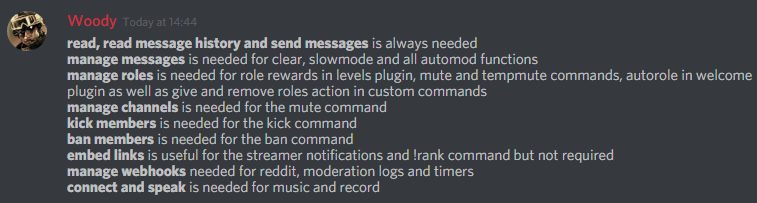
Full List of my Permissions that I use...
https://i.imgur.com/3Wd5wKZ.png
 strong path

It better not be discord messing up again
No?
do you have other bots that can purge?
dire yarrowBOT
Multitype, this command is disabled in this channel. 
 daring pagoda
Rip
strong path
check that you enabled the levels plugin
dire yarrowBOT
You can access my dashboard at https://mee6.xyz/dashboard, and login with your Discord Account.
strong path
did you by any chance put @everyone as a banned role?
 astral shuttle
Yes
strong path
don't
astral shuttle
Ok i removed it but it still does not work
dire yarrowBOT
Full List of my Permissions that I use...
https://i.imgur.com/3Wd5wKZ.png
strong path
could be a perms problem
astral shuttle
Ok i fixed it @strong path
 wooden mountain
@winged gorge thanks for trying to help but that is useless to us.
The problem we have with helix is the limit of streamers you can "subscribe" to, that is way to low for us. We did request a limit raise but did not receive any response yet (understandable if you ask a limit raise from 1000 to what we need). And the reason it is not working now is because twitch is giving us error response on there old API even though nothing changed.
also wrong program language
 zenith geyser
Twitch ankündigen geht nicht.
 limber knoll
Unser Entwicklerteam ist sich der Situation mit dem Twitch-Plugin bewusst, die nicht richtig funktioniert, aber es ist nicht möglich, eine ETA für die Fehlerbehebung zu geben.
Technische Sachen / Erklärung:
Dies liegt an uns, indem wir versuchen, Ratenbeschränkungen auf Twitchs alter API zu vermeiden, was eine lange Zeit dauert und verzögerte / keine Ankündigungen verursacht. Wir können nicht zu ihrer neuen API wechseln, bis sie die Ratenbegrenzungen für uns erhöht haben
@zenith geyser
 amber horizon
hi... I got a problem that mee6 doesn't give XP for rankings and that the moderator commands don't work..pls help
dire yarrowBOT
If I appear to be denying your hard earned experience, or !rank and !levels aren't working properly...
- Make sure Levels is Enabled.
- Check that you do not have a banned role in the levels configuration, and that you aren't in a banned channel either.
- Make sure that I can see the channel you are talking in with "Read Messages" and send messages with "Send Messages".
buoyant moon
With Moderator Commands, make sure you added the Roles to the commands
dense fox
What command was that?
buoyant moon
!noxp
dense fox
Oh ok thx
buoyant moon
yw c:
amber horizon
thx btw I'll try it
amber horizon
well thanks and all but I still have a problem with the moderator command ..they don't work
winged gorge
@wooden mountain fair enough, but then I would counter that you should just not use Helix until the rate limits are resolved for you. Kraken isn't going anywhere for a while, they have way too much to do on Helix still, so just hold fast on the Kraken code until Helix can do what you need.
 sudden horizon
dire yarrowBOT
sudden horizon
dire yarrowBOT
Hey! My prefix is currently ! and cannot be changed, but don't sweat. It will be in the future sometime!
 primal haven
Hi , i've installed the bot in my server
But its not showing up the streamers when they are online
dire yarrowBOT
Our team of developers is aware of the situation with the Twitch plugin that is not working properly, but are unable to give an ETA on the fix.
Technical stuff/explanation:
This is down to us trying to avoid ratelimits on Twitch's old API, which is taking a long time and causes delayed/no announcements. We can't move to their new API until they raise ratelimits for us
wooden mountain
@winged gorge kraken seems kind of broken, we have been getting a lot of error respondses from them even though we are still sending the exact same requests as we used to
sometimes it works
most of the time ..... nope
winged gorge
I find that interesting as there are no reported issues, devs don't see anything, and all my bots, and several others that I know the devs for, are working normally.
wooden mountain
i just got a twitch announcements in a other server
so it is currently working
but the last couple weeks i have seen more errors logs about twitch then actual announcements
amber horizon
moderator commands are not working pls help
dire yarrowBOT
Full List of my Permissions that I use...
https://i.imgur.com/3Wd5wKZ.png
bitter owl
Did you gave mee6 all these permissions? Also they need to be turned on in https://mee6.xyz/dashboard -> Moderator
After that test it in normal users
All of them won’t work against other admins or whoever has access to mee6’s website
amber horizon
I didn't give him all the needed perms thank you now it works
dire yarrowBOT
So... @amber horizon, I've decided you should be level 1.
Don't get too excited, mmk.
bitter owl
That's great have a wonderful time with mee6 :_
buoyant moon
I do not load sections with the settings of the bot.
bitter owl
You need to use google chrome or firefox pls
dire yarrowBOT
Internet Explorer? Edge? Safari? Ew... :nauseated_face: It's time to use REAL BROWSER!!!
Firefox: https://www.mozilla.org/firefox
Chrome: https://www.google.com/chrome/browser/desktop/index.html
Opera: https://www.opera.com/
cold bear
chrome doesn't have speed dial as opera and bookmark manager and windows splitting as firefox and opera
also extentions
wooden mountain
cold bear
not really, you can't just migrate easily
cold bear
i remember that one but that's for 14+ versions, alot of old extentions lost forever
just use browser you like, but don't forget it should be same updated as world around.
 jolly wigeon
I use the North Korea browser, they don’t have youtube though 😢
 civic jay
Hello,
is this twitch notification fixed or just temporary working ?
civic jay
ok thx
 pure briar
i enable the youtube thing but when i upload a video it will not post the link at my discord server
burnt hazel
@pure briar The YouTube plugin has just been fixed, can you try reading your channel.
it will only announce for new Videos also.
Make sure MEE6 has the correct perms such as:
send messages
read text & see voice channels
read message history
embed links
 heavy roost
hey guys! any progress update on the mee6 twitch announcements? 
heavy roost
aight nice! thanksi guys love ya 
burnt hazel

 fleet bay
Hello, I have a problem with the YouTube tab on mee6.xyz
buoyant moon
What is the problem?
fleet bay
I wanted to add a YouTube channel, I go to the YouTube tab and suddenly everything becomes gray and nothing can be done.
limber knoll
So just a blank screen?
fleet bay
Yes
limber knoll
Tried ctrl +f5?
Next step would be press f12 click >>> click application tab
The click local storage, select mee6.xyz and clear token in there
fleet bay
No
fleet bay
I updating
dire yarrowBOT
So... @fleet bay, I've decided you should be level 2.
Don't get too excited, mmk.
 fervent robin
someone earlier said the youtube plugin was fixed but the channel uploaded a few minutes ago and mee6 didn't post a message
buoyant moon
Did you delete the channel and add it again?
fervent robin
I was told it was done. I'll try it again myself this time
dire yarrowBOT
So... @fervent robin, I've decided you should be level 4.
Don't get too excited, mmk.
sage citrus
so, which bugs were fixed
 ancient crystal
When I do the command !clear x .. sometimes it bugs out and the messages (the command i typed) reappears and is not deletable. What should I do?
 hardy trail

 arctic lagoon
thanks @dire yarrow for fixing your api with twitch
dire yarrowBOT
So... @arctic lagoon, I've decided you should be level 1.
Don't get too excited, mmk.
dire yarrowBOT
PurpleGem#0354 (457131355222835202) is now muted for 'spaming, bad words not reading #〉rules muted until I decide when to be unmuted by Lockey', alright? 
 hidden plinth
@crisp wedge why is it not working?
dire yarrowBOT
So... @hidden plinth, I've decided you should be level 1.
Don't get too excited, mmk.
 crisp wedge
Oooh i see
You need to put mee6's role above the role
And if it still doesn't work
Make sure mee6 has "manage roles" permission
buoyant moon
hey i got a bug on mine. the bot wont send out message when i upload a new YouTube video
 cursive osprey
Yo
crisp wedge
It takes a few minutes before sending the thing i think
dire yarrowBOT
Alright, @cursive osprey has been warned because 'Posted an invite'.
Alright, @cursive osprey has been warned because 'Bad word usage'.
 pure obsidian
<@&193123929701875712> Ad ☝🏽
buoyant moon
yea not been working tho
wooden mountain
@cloud crest try to clear your config and set it up again
buoyant moon
<@&193123929701875712> help me pls
Oops, something went wrong in MEE6 land! SAD6 This error has been reported to our Team. We'll work hard to fix it.
 wind windBOT
Oops, something went wrong in MEE6 land! This error has been reported to our Team. We'll work hard to fix it.
If this happens when using:
Custom commands:
‣ Bot tries to give the role that higher than his own. To fix that, move the bot's role above the role he tries to give.
‣ User don't have all roles bot tries to remove, that's known bug.
‣ Missing Manage roles permission. Go to Server Settings -> Roles -> Bot role ->  Manage Roles permission
Moderator commands:
‣ Muted role is above Mee6's role. Bot can't give roles that higher than his own. Move it down.
‣ Missing Manage roles permission. Go to Server Settings -> Roles -> Bot role -> Manage Roles permission
 still urchin
It also gives that error when you are trying to ban / punish a user that is not in the server anymore
 acoustic osprey
Hi ! I'm on a French server where Mee6 does not work, I do not know how to explain it... 😅
wooden mountain
what do you want Mee6 to do that he is not doing?
acoustic osprey
Hmm ?
wooden mountain
or what plugin is not working?
acoustic osprey
All
dire yarrowBOT
So... @acoustic osprey, I've decided you should be level 1.
Don't get too excited, mmk.
 kindred pelican
@primal topaz Any luck with the bot in my server?
dire yarrowBOT
So... @kindred pelican, I've decided you should be level 6.
Don't get too excited, mmk.
acoustic osprey
👀
 faint dome
@acoustic osprey je peux aider ?
acoustic osprey
@faint dome, oui
Je ne suis pas administrateur sur le serveur mais je viens quand même demander de l'aide 🤷🏻
Je peux donner un lien d'invitation si possible ?
faint dome
Essaie déjà ici de m'expliquer ^^
acoustic osprey
Et bah là sur le serveur en questions plus aucun bots ne fonctionnent dont Mee6, et c'est juste là bah que ça ne fonctionne plus 😕
faint dome
C'est étonnant... ces bots ont un rôle en commun ? Vous avez vérifié les perms ?
faint dome
Il faudrait voir directement avec l'un d'entre eux, c'est compliqué de chercher un bug sans savoir exactement les manipulations faites
acoustic osprey
Ok, je vais voir 🤷🏻
 clear crypt
Share your videos with friends, family, and the world.
faint dome
@clear crypt ?
 odd tree
@faint dome Bonjour, je suis l'administratrice du discord dont vous a parlé @acoustic osprey.
Effectivement, Mee6 reste en "offline" et ce depuis plusieurs heures.
faint dome
Ah, ça c'est étonnant... c'est le seul bot offline ?
Vous pouvez essayer de le kick puis réinviter, souvent ça suffit
faint dome
Oui, c'est dommage que le rôle soit supprimé lorsqu'on kick un bot...
<@&193123929701875712> anyone here ?
odd tree
Pour le moment on laisse ainsi et on verra, mais c'est vraiment bizarre.
acoustic osprey
😕
odd tree
UP : J'ai vérifié, tous nos bots publics sont off.
Le seul qui est on est le notre créer par notre développeur.
faint dome
Ah ?
odd tree
Dans le tas il y a : Rythm, Ayana, Dyno et Mee6.
faint dome
Il le faut l'id de votre serveur
odd tree
350185814640295936
acoustic osprey
@odd tree, keke l'a reload c'est pour ça je crois
dire yarrowBOT
So... @acoustic osprey, I've decided you should be level 2.
Don't get too excited, mmk.
faint dome
Sil va le redémarrer
wooden mountain
👌
odd tree
@acoustic osprey Je crois oui.
faint dome
Sans doute un bug de l'api discord
odd tree
Je ne sais pas 😕
dire yarrowBOT
So... @odd tree, I've decided you should be level 1.
Don't get too excited, mmk.
acoustic osprey
Discord fait n'importe quoi en ce moment, je dis ça, je dis rien 🤷🏻
faint dome
Bref, Sil va redémarrer le shard correspondant, ça devrait aller mieux après
buoyant moon
Tell us when you restart the shard Sil 😉
wooden mountain
i can't do that
i can only forward it to the people who can do that
and they are offline
acoustic osprey
😞
buoyant moon
Okay, we'll wait, you have a rough idea of when will it be possible that it is restarted ?
ancient crystal
strong path
!!tag mutehelp
wind windBOT
Prerequisites:
- Moderator plugin is enabled
!mutecommand isn't disabled- Bot has role with Manage Roles and Manage Channels permissions
- Muted role is under MEE6 role
- You're trying to mute someone using
!mute @mention reason, otherwise it will not work
If user got Muted role but still can talk means there's issue with your channel permissions
Go to Channel Settings -> Permissions
- If that's public channel that can be accessed by anyone:
- Set

Send Messagesfor all roles except Muted - Set

Send Messagesfor Muted role
- If that's secret channel that requires *special* role to access it:
- Set
Send Messages Read Messagesfor special role - Set
Send Messages Read Messagesfor Muted role - Set
Send Messages Read Messagesfor@everyonerole
kindred pelican
have had an issue with the bot for 2 months, no word on it even being looked at. One support member joined the server i was having the problem in, but so far hasn't given any update on the situation
the function of the bot that is broken, is the main reason i need mee6.
strong path
It's still broken?
kindred pelican
Yes
Nothing has changed
Hasnt been acknowledged by the people who fix things afaik
But i dont know, no one has said anything
it's all about the twitch api being broken these days
strong path
twitch should be fixed now btw <.<
kindred pelican
Eh i dont use that so
but it's all i see when i look in this channel
Maybe.. one day the toggle will be fixed
 rain ember
I enabled youtube noftication when I upload video in youtube mee6 won't responding when I add my channel to post new video
burnt hazel
@rain ember
MEE6 will need embed links permissions.
Also the video should announceme between 15-30 minutes of it being uploaded to public.
Also try removing and re-adding your YouTube channel to see if this fixes the issue next time.
rain ember
Ok
buoyant moon
Twitch functionality not working?
 potent geode
Clear command doesn't work?
strong path
!!tag clearinfo
wind windBOT
The clear command allows you to clear the last xx amount of message or to clear one user without clearing anyone else.
Use !clear 1-1000 to clear the last xx messages (example !clear 10)
or !clear @name to clear all the message of @name in the last 2 weeks
+ I need manage messages permission
+ I need view message history permission (otherwise I will respond with -1 messages cleared)
+ you need to enable the plugin on the website
+ you need to check the checkmark next to clear on the plugin page.
+ you need to set your role as moderator (located at the top of the plugin page in the moderator tab)```have you read @wind wind 's message above?
nvm, It's discord having problems, other bots can't purge too
 merry crystal
Ripp
buoyant moon
!rank
dire yarrowBOT
₮ዙℭ♚չєคɭђ๏ยภ๔, this command is disabled in this channel.
strong path
go to #〉commands for commands
 fringe sentinel
Levels aren’t working, what do I do?
dire yarrowBOT
If I appear to be denying your hard earned experience, or !rank and !levels aren't working properly...
- Make sure Levels is Enabled.
- Check that you do not have a banned role in the levels configuration, and that you aren't in a banned channel either.
- Make sure that I can see the channel you are talking in with "Read Messages" and send messages with "Send Messages".
 dapper kayak
Aye so um.. Idk if its discord, MEE6 or my pc, but whenever I try to create the greeting message for the server, this happens. I keep reloading but it just stays like this. Idk if this does the same with the other plugins, but yeah.
limber knoll
@dapper kayak recent version of chrome?
dapper kayak
Nope.
limber knoll
try updating
dapper kayak
And it does the same for the other plugins.
limber knoll
adblockers disabled?
limber knoll
np
 lone stirrup
strong path
lone stirrup
strong path
means it may take some time before mee6 posts that someone got live
strong path
OH. Typo xD
 livid portal
#〉bugs-reports i can not do commands work on other players, only me (example: !user-info [user] doesn't work but !user-info does)
 rugged ibex
Made sure to @ them?
livid portal
i tried that as well
strong path
talking about custom commands?
livid portal
that too
strong path
!user-info @livid portal
dire yarrowBOT
Userinfo Command for DaBoss#3615
UserID | 454685411109765140
Server Permissions
Read Messages, Send Messages, Embed Links, Attach Files, Read Message History, Use External Emojis, Connect, Speak, Use Vad
User Status
None
Server Infractions
0 total
Joined Server at
Sun, Jul 15, 2018 05:58 AM
Joined Discord at
Fri, Jun 08, 2018 04:37 PM

Requested by Discord Pedestrian#7331 | 409245039487614988
 smoky hornet
wooden mountain
smoky hornet
wooden mountain
both are working as for as i know
 ember gull
dire yarrowBOT
ember gull
dire yarrowBOT
Jillu0310, it doesn't look like you can use that.
 mortal oxide
!user-info @ember gull
dire yarrowBOT
Userinfo Command for Jillu0310#6230
UserID | 457967729492754462
Server Permissions
Read Messages, Send Messages, Embed Links, Attach Files, Read Message History, Use External Emojis, Connect, Speak, Use Vad
User Status
None
Server Infractions
0 total
Joined Server at
Sun, Jul 15, 2018 06:47 AM
Joined Discord at
Sun, Jun 17, 2018 06:00 PM

Requested by WolfGang1710#6782 | 199615256882970624
jolly wigeon
!user-info @jolly wigeon
dire yarrowBOT
Not Discord Stuff, it doesn't look like you can use that.
jolly wigeon
Oof
bitter owl
You can do it in your own server @jolly wigeon
jolly wigeon
Ok
bitter owl
Or do you want to know when you joined this server?
dire yarrowBOT
SzymPlayz, it doesn't look like you can use that.
wooden mountain
but you still need to go to the website in order to enable stuff
 cloud thicket
mee6 doesn't send youtube vids of youtubers
 ionic radish
Unable to to add more than 5 Twitch streamers to the Mee6 Twitch plugin. Add button is greyed out.
jolly wigeon
You have to do the steamers name not he link we all ready told you!
 vagrant raven
The Youtuber that I added uploaded a video but there is no message
 white notch
@ionic radish not a bug, works fine
I can add that channel as a 7th channel on a server
ionic radish
Okay...did something change? The previous times I added them using the link and it worked fine. Also, sorry I must have misunderstood when "channel name" was said. I thought it was the same as the link and not the actual streamer name. Thanks for the help. 👍
 jovial condor
Help me why i cant mute
Oops, something went wrong in MEE6 land! :SAD6: This error has been reported to our Team. We'll work hard to fix it.
What is it
?
dire yarrowBOT
!mute @CoolGuysNameHere You have been too cool.
!tempmute @SecondLameGuyHere 3h Too lame.
- I must have "Manage Channels", and "Manage Roles" for my permissions.
- I must have a role above the "Muted" role I create.
If there are problems, please check that the Muted Role does not have send messages globally or per channel.
jovial condor
 dusty apex
does mee6 have manage role perm?
 paper sluice
!user-info
dire yarrowBOT
Weather 99, it doesn't look like you can use that.
dusty apex
@paper sluice thats a admin command do it in your own server
 modest snow

 primal steppe
gr
 chrome oracle
twitch announcment is working again. thx for the good work 
but mee6 is still not announicing YT-Videos on my server. is it still bugged? or should i try readding stuff or something like that?
dusty apex
readd pls
chrome oracle
👌 thx. will do.
 pearl cipher
!help
 copper swift
when using the clear command and clearing an amount of messages it doesn't clear the clear command message and it glitches and stays there for ever and you can't even delete the message manually
dusty apex
@copper swift reload your client
copper swift
client?
dusty apex
Ctrl+R
copper swift
oh ok
dusty apex
the app
copper swift
ok it worked thanks sorry for pinging you for nothing
dusty apex
you didnt ping 😃
copper swift
oh ok 😄
vagrant raven
@chrome oracle from where you got the animated Emoji
 wispy cliff
Automod actions don't seem to work after the first action just repeats the first one over and over.
strong path
!!tag infractions
wind windBOT
 wispy cliff
Oh i see
chrome oracle
@vagrant raven don't know for sure. some site i found when google searching discord gif emoji 😅
 high knoll
it wont let me autherize
strong path
Your server doesn't appear you mean?
 distant pivot
sever id :464908077464813590 I've been using the bot for bout a week on this server, starting yesterday I can no longer enter the youtube plugin dashboard. I can enter that plugin on other servers and i can enter other plugins on the same server as the problem. The plugin still updates on uploads to the server. I tried disabiling adblocker on firefox the main browser i use. and on chrome. I've try incoginto on both browsers. I was told to post in here after trying a bit in support chat. thanks for the time.
dusty apex
go ahead
 rotund pewter
i cant
enter mee6 page
says select server
i select
but
i cant
in my server
rotund pewter
and sorry i havent good english
strong path
!!tag logout
wind windBOT
MEE6 says I have no servers, but that's not true...
Well, that can be caused by:
‣ You don't own any servers
‣ You don't have Manage Server or Administrator permissions on any server you're on
‣ You're logged on with a wrong account (the most common problem)
Third one can be fixed by following these steps:
1. Logout from Discord in your browser (not installed client or mobile app)
1.1 Open https://discordapp.com/app in your browser
1.2 Click on \⚙ icon (User Settings)
1.3 Scroll down, click Log Out and confirm action
2. Logout from MEE6 website
2.1 Open https://mee6.xyz in the same browser
2.2 Click on avatar icon in upper right corner
2.3 Click Logout
3. Login using correct account
3.1 Open https://mee6.xyz and click Login button in upper right corner
3.2 In new window login to Discord. After that you will be redirected back to MEE6 website
3.3 That's all! Now you're using correct account and MEE6 website lists servers where you can modify his settings
P.S. If you're on mobile and some elements are not visible, enable Desktop site mode or switch screen to Landscape (vertical) mode.
strong path
read that
rotund pewter
can i send ss ?
strong path
Are you saying that your server doesn't appear there?
strong path
What browser?
rotund pewter
google chrome
strong path
try incognito mode
rotund pewter
okey
dire yarrowBOT
So... @rotund pewter, I've decided you should be level 1.
Don't get too excited, mmk.
 ancient elk
Hello! I have trouble with the Youtube plugin which is not posting on my 2 Discord servers: ID 397794584580849674 and 375611547717861377
I did remove the channels and added them again, I also check the bot has permissions to post
strong path
leave him alone @buoyant moon
strong path
We already tried
buoyant moon
hmm so it's a bug
buoyant moon
well too late
strong path
Yeah don't do that again, he still gets the red box
buoyant moon
that's my mistake
delete the ping?
yeah
max my bad for pinging you (just in case you check your discord and you're wondering why you got pinged)
i just tried and it worked @strong path
that's why i asked him
strong path
It works for some not for others, need some info to debug the situation
He's not the first one
buoyant moon
hmm okay well do you want my server id? so you can compare the log with mine and his
strong path
Don't really need it, I don't think 🤔
the devs can compare it with their own working youtube
buoyant moon
if you need it lmk man im always more than happy to help
 fading whale
Hi! I was wondering how you clear a warning.
strong path
Clearing infractions is currently not a feature, it's planned though
fading whale
Can you use the bot Dyno to clear a warning?
strong path
!!help clearwarn
wind windBOT
**Command:** !!clearwarn
Description: Clear warnings a user
Usage: !!clearwarn [user]
Example:
!!clearwarn NoobLance
!!clearwarn all
strong path
can't clear a single warn though
fading whale
Who's Zz-Top?
 buoyant moon
mee 6 isent putting youtuber notifications anymore
strong path
didn't answer my question in #463809001273032715 <.<
 subtle dew
I am facing an error
strong path
give role?
subtle dew
Mee6 can't post the video link of 2 different youtube channels
strong path
tried re-adding the channels?
strong path
give me the name of those channels
strong path
anbru with 33k subsribers?
subtle dew
Ya
strong path
the other with 12k subs, right?
subtle dew
ya
:-|
It is posting the video of multiplayer gameplays but it is unable to post KingAnBru's channel video
<@&193123929701875712>
dire yarrowBOT
So... @subtle dew, I've decided you should be level 1.
Don't get too excited, mmk.
strong path
Was it posting the videos of anbru before then stopped? 🤔
bitter owl
All our specialists are busy right now. Could you reach us a bit later? @subtle dew
Sorry inconvenience
Or not
wooden mountain
yt plugin? we are looking into why it is not posting
if you have any info that you think could be usefull for us then you are welcome to tell us
subtle dew
I am facing error
In yt plugin
It can't post 2 channels video at same. It is posting only 1 channel video
Channel name-
- KingAnBru(Not posting)
- Multiplayer Gameplays(posting)
buoyant moon
Why mee6 not auto uploading about YouTube vids
@dire yarrow @wooden mountain @bitter owl @strong path
Pls answer me
dire yarrowBOT
So... @buoyant moon, I've decided you should be level 1.
Don't get too excited, mmk.
buoyant moon
@devout chasm @limber knoll
buoyant moon
@limber knoll ok sorry but pls answer me
limber knoll
The devs are working on the issue please be patient, they had thought the issue was fixed but as you can see its not
If you can think of any information that might help pin point the issue then post it
But next time use support to ping and not staff as thats the quickest way to get banned and no answers.
And dont spam it
buoyant moon
Ok
 wet smelt
please help me i have already add your bot intout my serveur but I was on ?
dire yarrowBOT
Alright, @wet smelt has been warned because 'Bad word usage'.
strong path
What do you mean by "but I was on"?
limber knoll
@wet smelt use your native language
Google's free service instantly translates words, phrases, and web pages between English and over 100 other languages.
buoyant moon
!warn @dire yarrow
dire yarrowBOT
Aηαтнσѕ77, it doesn't look like you can use that.
wet smelt
ok so i have find the problem 😃
dire yarrowBOT
Alright, @buoyant moon has been warned because 'no trolling support channels use #〉chat or #〉commands'.
 quasi smelt
yesterday, mee6 added and removed 4 roles from 2 members in my server, but these roles weren't configured in mee6 panel
limber knoll
@quasi smelt how is your levels plugin setup?
limber knoll
Roles removed?
limber knoll
Might help sorry
quasi smelt
limber knoll
Not all devs might understand that
quasi smelt
limber knoll
Can i get your serverid?
quasi smelt
347920685357858816
 midnight olive
Hello I have a problem with my discord mee6 is disconnect since 1weeks so we don't have level
Can u help me plz ?
limber knoll
@midnight olive hi is mee6 in your server?
midnight olive
yes
limber knoll
Online or offline
midnight olive
is offline
dire yarrowBOT
You can access my dashboard at https://mee6.xyz/dashboard, and login with your Discord Account.
limber knoll
Use that link
midnight olive
So we are going to loose all lvl ?
midnight olive
ok
buoyant moon
When my friend trys !rank the bot says Seems like you aren't ranked yet. :HEHE6:
German pls?
limber knoll
In server settings you'll have move mee6 role to the top again @midnight olive
entweder verbotene Kanäle oder verbotene Rollen @buoyant moon
limber knoll
in levels hast du entweder keine xp-kanäle oder keine xp-rollen
midnight olive
Thank you @limber knoll
limber knoll
@midnight olive np
midnight olive
it's all right
buoyant moon
Nein bei rank
limber knoll
Dm invite
buoyant moon
Generell auch das yt system geht nicht
limber knoll
Yt bekannte Entwickler arbeiten daran
buoyant moon
Ok aber das rank system geht immer noch nicht ich sehe den fehler nicht :(
dire yarrowBOT
So... @buoyant moon, I've decided you should be level 1.
Don't get too excited, mmk.
limber knoll
Ich habe dir gesagt, dass du mich zu deinem Server einladen sollst
limber knoll
Außerdem müssen Sie über https://translate.google.com übersetzen
Google's free service instantly translates words, phrases, and web pages between English and over 100 other languages.
buoyant moon
Hä
 frank lintel
The bot doesn't notify programmed videos from youtube ... <@&193123929701875712>
 fringe heron
Any support peeps here online wise
burnt hazel
Whats the problem?
burnt hazel
Is this a giverole command?
burnt hazel
Make sure MEE6 has manage roles permission in his role.
Server settings > Roles > MEE6/Bot role > manage roles
Also make sure the MEE6 role is above the apple role as this is the role MEE6 is giving people.
Server settings > Roles > MEE6/Bot role > Click and drag it up 
dire yarrowBOT
Role hierarchy is important for me to give out roles. Oh and also Manage Roles perm:
https://birb.is-a-me.me/81d15f9a.gif
 burnt hazel
like image shown on right
fringe heron
I have allowed everything
burnt hazel
Can you send a screenshot of the MEE6 role with manage roles enabled
fringe heron
Yes
burnt hazel
and where its positioned on the list
fringe heron
Here’s the first one
dire yarrowBOT
So... @fringe heron, I've decided you should be level 3.
Don't get too excited, mmk.
fringe heron
burnt hazel
where is MEE6 located on the roles list
fringe heron
6th to the bottom of 42roles
burnt hazel
is it above Apple role?
if not, move MEE6 above the apple role, and any roles you are using as give role commands.
fringe heron
Ah that’s why cheers will get to it once on laptop 😃
burnt hazel
np, i believe you can press and hold and drag it up on mobile btw @fringe heron
fringe heron
Will try
dire yarrowBOT
Alright, @clear crypt has been warned because 'Posted an invite'.
 next berry
Bug: MEE6 is responding to "Custom commands", even though told not to, in dashboard.
cold bear
@next berry can you show an example with screenshot of settings for current command?
 stark raven
When My staff are trying to warn users it says they dont have permission even though they clearly do?
dire yarrowBOT
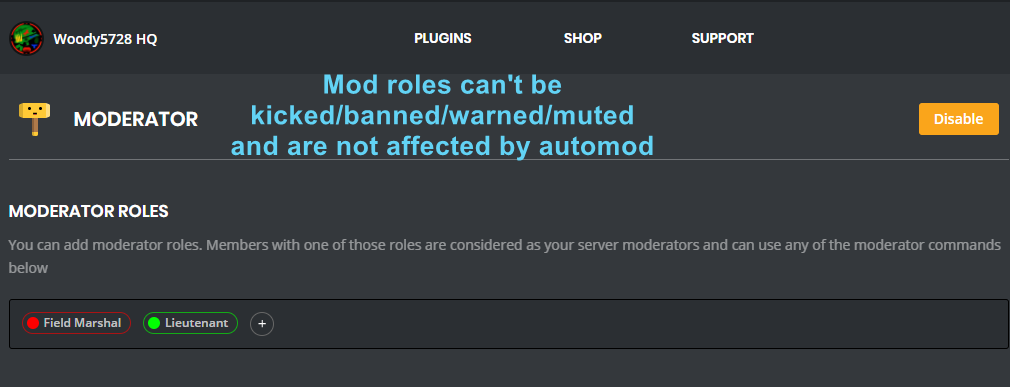
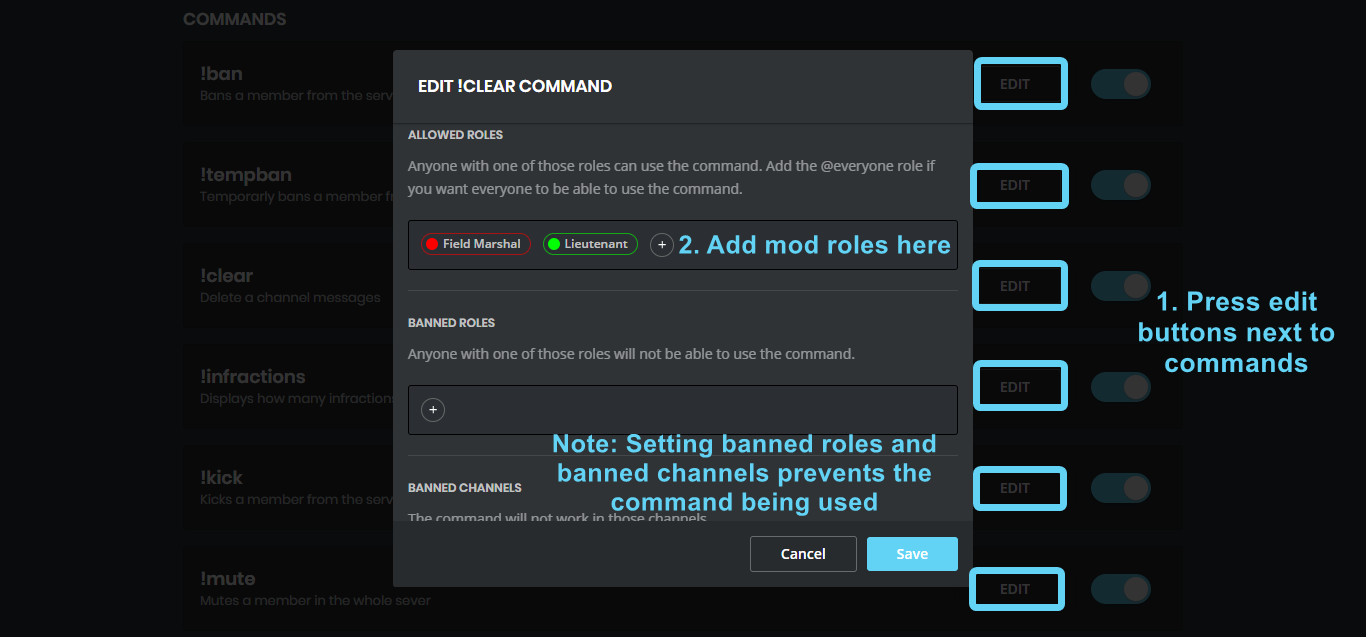
You can use the images below to help you configure my Moderator Plugin.
https://i.imgur.com/ZL24div.png https://i.imgur.com/675FdYd.png
 strong path
Also remove @everyone from banned roles(if you put it)
strong path
You followed the steps there?
stark raven
oh hang on
next berry
@cold bear
dire yarrowBOT
So... @next berry, I've decided you should be level 1.
Don't get too excited, mmk.
next berry
After !shooter command
stark raven
yeah i got it to work thanks @strong path
cold bear
@next berry just remove reply action, do not respond disables other kind of messages like you don't have perms for this or error message
next berry
Thanks! I'll try!
 white stag
On the main site, i cant click login or add to discord. but i click teh discord icon and it brings me here. how do i install mee6 in my channel?
burnt hazel
@white stag What browser are you using?
white stag
chrome
burnt hazel
Any adblockers?
VPN?
Tried clearing the cache?
white stag
i didnt try clearing cache one sec.
burnt hazel
can also try an incognito tab ctrl+shift+N
white stag
That worked. Thank you so much!
burnt hazel
np
stark raven
A couple of the youtubers i added dont show up when ik they have uploaded
(Mumbo jumbo) mainly
dire yarrowBOT
So... @stark raven, I've decided you should be level 1.
Don't get too excited, mmk.
limber knoll
@stark raven we're working on the issue
dire yarrowBOT
If I appear to be denying your hard earned experience, or !rank and !levels aren't working properly...
- Make sure Levels is Enabled.
- Check that you do not have a banned role in the levels configuration, and that you aren't in a banned channel either.
- Make sure that I can see the channel you are talking in with "Read Messages" and send messages with "Send Messages".
faint bison
@vague urchin ^
faint bison
are you absolutely sure the plugin meets those requirements
any message starting with ! also doesnt grant xp
cold bear
but commands work?
 vague urchin
Yes.
cold bear
can you check no xp roles list
cold bear
can you invite me to server, please?
vague urchin
Sure.
dire yarrowBOT
So... @vague urchin, I've decided you should be level 1.
Don't get too excited, mmk.
buoyant moon
how to i clean an chat whit MEE6?
the command is !clear and the ammount of messages to erase, or the user being erased
dire yarrowBOT
The clear command allows you to clear the last xx amount of message or to clear one user without clearing anyone else.
Use !clear 1-1000 to clear the last xx messages (example !clear 10)
or !clear @name to clear all the message of @name in the last 2 weeks
+ I need manage messages permission
+ I need view message history permission (otherwise I will respond with -1 messages cleared)
+ you need to enable the plugin on the website
+ you need to check the checkmark next to clear on the plugin page.
+ you need to set your role as moderator (located at the top of the plugin page in the moderator tab)```@full quiver do you have a bug to report?
 abstract fable
I tried to ban a bad member,
it didn’t work.
it said something went wrong in mee6 land
limber knoll
@abstract fable move mee6 role above other roles
dire yarrowBOT
Alright, @full quiver has been warned because 'do not spam support channels'.
buoyant moon
The auto assign role bug with the XP role, even if the auto assign role is on top of the XP role, when you re join the server and you have a XP role it take off the autoassing role
 vapid pagoda
!color
buoyant moon
Is twitch.tv API is acting up because I'm not getting any notification's that anyone is going live?
limber knoll
Sometimes the links need to be removed and re-added for the plugin to update @buoyant moon
buoyant moon
K Thanks
dire yarrowBOT
So... @buoyant moon, I've decided you should be level 1.
Don't get too excited, mmk.
kindred pelican
@primal topaz give up then?
 primal topaz
@kindred pelican not yet, I was just clearing servers. We added it to our todo list, but still no exact eta.
dire yarrowBOT
bolib945, this command is disabled in this channel.
 topaz zenith
!sa
bitter owl
@topaz zenith in #〉commands
 placid badge
!rank
dire yarrowBOT
Cracker, this command is disabled in this channel.
 terse falcon
how do make levels for roles
dire yarrowBOT
Role Rewards are available via my Leveling Plugin. You gain XP and Levels as you are active and can be used to give active members special perks in your servers.
- I must have "Manage Roles" and a role that is higher in the Discord Settings list then the role you are trying to add with me -> https://its.mee6.xyz/i300v5r1zx.png
- I do not add roles instantly, I only check when changes are made or someone levels up.
 terse falcon
i tried to go back but it stop working
pure obsidian
Read MEE6's message above you please.
terse falcon
noice
 fiery fossil
!skip
burnt hazel
@fiery fossil > #〉commands
 rocky light
someone know why on discord, if i go online on streaming, it not set it on discord announcement? cause i do the same things about my friends and it works, but for me not
 sacred nexus
Rip I dunno
strong path
Are you talking about mee6 twitch plugin?
rocky light
yep
i add my twitch and im online, but it not works on announcement. maybe its like some restrinction but i dont know what i miss xD
strong path
Can you try re-adding your channel?
rocky light
yep, i expel him and re-addit in channel
ancient elk
The youtube plugin worked twice since 16.7 but then stopped again yesterday afternoon. Will I need again to remove all channels and add them again? :/
dire yarrowBOT
So... @ancient elk, I've decided you should be level 4.
Don't get too excited, mmk.
burnt hazel
@ancient elk You can try to add them again, if this doesnt work the plugin is still a little buggy so will need to wait until fixed
jolly wigeon
I think snail racing bot is Down 
strong path
Why in the #〉bugs-reports channel? <.<
jolly wigeon
Idk what else
jolly wigeon
Well shouldn’t it be up at all the time? So doesn’t make it kinda a bug
burnt hazel
(its working btw)
jolly wigeon
Ok
ancient elk
@burnt hazel thank you! Will try that again 😛
 limber galleon
 leaden osprey
also for this server, please wait a bit
leaden osprey
https://status.discordapp.com/ for more info
Welcome to Discord's home for real-time and historical data on system performance.
 keen linden


 gentle mural
So I but the Mee6 bot in my server and I enabled the YT plugin and added a channel and that channel has uploaded about 9 times and no notifications came through. If tryed re adding the YT channels and different ones and no notifications came through
buoyant moon
YouTube is bugged for some servers afaik
gentle mural
Ok thank you 🙂
dire yarrowBOT
So... @gentle mural, I've decided you should be level 1.
Don't get too excited, mmk.
 arctic wagon
twitch function is not working for me
burnt hazel
@arctic wagon Try removing and re-adding the streamer to the plugin
arctic wagon
still not working :/
strong path
wait a few hours
 subtle gale
hello
dire yarrowBOT
So... @subtle gale, I've decided you should be level 1.
Don't get too excited, mmk.
arctic wagon
working on a fix?
strong path
twitch plugin is still restarting after the bot went down, need to wait for it
arctic wagon
copy copy. thank you @strong path , you guys keep up the great work!!! 😃
 stable whale
 karmic stratus
he said 2 hours i think a little while ago
 true jackal
I've just bought the Record module and I'm trying to use it. I have set the replies for all 4 commands to be sent as DMs, but the only one which is respecting that is !join. The others are still sending responses in the channel where the command is invoked.
 regal vapor
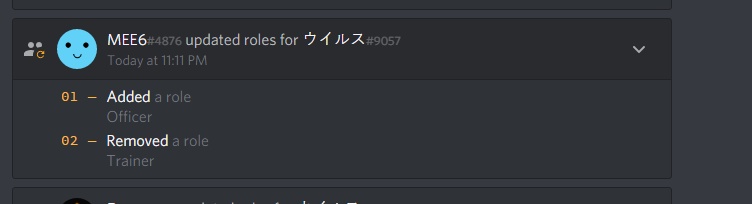
So, the way my server works, the user is given an automatic role through the use of Dyno, and then level up roles are given by Mee6. The level up rewards are exclusive, however when members who have leveled up to a point where they should have one special role, mee6 jumbles up and removes the Dyno autrorole that should be given
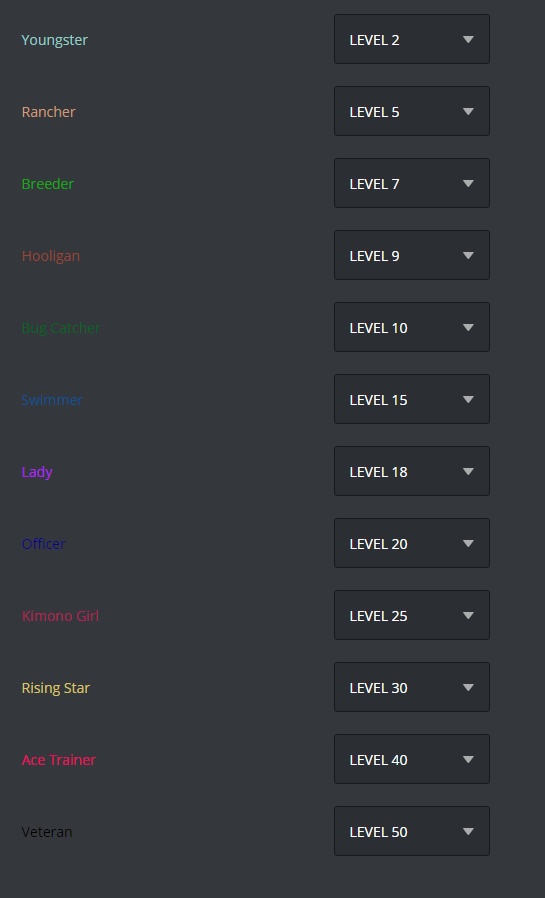
here are the level up roles given on my server dashboard

here is a picture of the audit-log https://i.gyazo.com/thumb/1200/5876bfc5304991fe1e897ecd86f63700-png.jpg

Mee6 is removing the auto role even though it is not in the list
A wider view of my dashboard

 magic rampart
Twitch plugin still down for anyone else?
burnt hazel
Try removing and re-adding the streamer @magic rampart
magic rampart
I mean it's not working for any of the 35 streamers I added yesterday
burnt hazel
Because Discord went down as a result of a google cloud error and the Plugin had to restart.
Also the plugin was rebooted the other day so hopefully removing and re-adding the streamer should fix the issue.
magic rampart
Can I just edit and save each streamer, or do I need to physically remove and re-add each one?
magic rampart
removed and re-added every single one, took half an hour, will see if it starts posting now
bitter owl
@magic rampart Our team is resetting this plugin so it may start again soon
buoyant moon
I see that the twitch plugin is having issues, is the youtube one too? I've noticed that on certain servers I have MEE6 it doesn't work, and when it does, it's only certain youtubers.
bitter owl
@buoyant moon exactly, our devs are investigating what is wrong to fix this asap
 sterile basin
When i use a custom command while auto-delete command invocation Message is on it doesn't deletes the message, I need to manually delete them
strong path
Yeah someone else was having this weird behavior
burnt hazel
Random variables with arguments does not work, instead displays the variable with the arguments instead of a random generated number.
 bleak relic
@buoyant moon The youtube plugin is working just fine so it must just be the twitch
 unborn epoch
MEE6 doesn't recognise cyrillic symbols and drops tofu (squares) insted of them.
https://cdn.discordapp.com/attachments/363605485770768396/469184996142481419/card.png
https://cdn.discordapp.com/attachments/363605485770768396/469179327242567702/card.png
Maybe that's the font issue?

 strong path
Yeah it's a font issue
unborn epoch
Could it be fixed?
unborn epoch
I can try to find the cyrillic font, if you will write its name here.
 acoustic abyss
I have a question is the Youtube bug already fixed?
It hasn't work for a while for me
strong path
Tried re-adding the channels? If yes, then it's still a bit bugged
acoustic abyss
I will try
 verbal drum
the "tempmute" function timer does not unmute them in the time specified. sometimes hours late sometimes likely never
strong path
Yeah known
verbal drum
hard to fix?
strong path
idk, I'm not one of the devs xD
verbal drum
ic. as long as the devs are aware of this. hope a fix soon.
dire yarrowBOT
So... @verbal drum, I've decided you should be level 1.
Don't get too excited, mmk.
limber knoll
@verbal drum can i ask how long was the mute?
verbal drum
it varies, but 10m is common
for example right now i have a 10 minutes tempmute (solely for testing purposes) has already been 70 minutes without auto unmute
@limber knoll
limber knoll
Can i have the server id as well please
verbal drum
339694740201275392
@limber knoll do you need an invite?
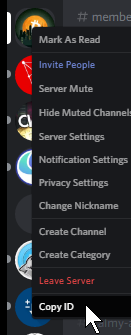
this is how i copied server ID, not sure if that's the correct way of doing it
limber knoll
There's multiple ways to get it, that one is fine
@verbal drum 👆
And thanks for the id
@verbal drum currently tempmute is delayed allot so will unmute after a few hours
@pure obsidian you here?
limber knoll
@verbal drum sometimes it might be the unmute command doesnt activate due to the delay of the command
verbal drum
i'm talking tempmute command tho. unmute always works
limber knoll
The unmute commands built into the tempmute as well
verbal drum
@limber knoll do you expect a fix anytime soon?
 kindred wren
I have added 2 YouTube attachments and they did not come in and then I deleted 1 of them and it still does not work Help
limber knoll
@verbal drum cant gaurentee the fix, devs have been looking at it
verbal drum
ok. seemed reliable in the past and only stopped working properly recently.
dire yarrowBOT
So... @verbal drum, I've decided you should be level 2.
Don't get too excited, mmk.
 worn jay
I've muted people into different servers and it doesn't seem to be muting them I think there is an issue with the mute role
dire yarrowBOT
So... @worn jay, I've decided you should be level 1.
Don't get too excited, mmk.
worn jay
hmmmk
limber knoll
!!tag mutehelp
wind windBOT
Prerequisites:
- Moderator plugin is enabled
!mutecommand isn't disabled- Bot has role with Manage Roles and Manage Channels permissions
- Muted role is under MEE6 role
- You're trying to mute someone using
!mute @mention reason, otherwise it will not work
If user got Muted role but still can talk means there's issue with your channel permissions
Go to Channel Settings -> Permissions
- If that's public channel that can be accessed by anyone:
- Set
Send Messagesfor all roles except Muted - Set
Send Messagesfor Muted role
- If that's secret channel that requires *special* role to access it:
- Set
Send Messages Read Messagesfor special role - Set
Send Messages Read Messagesfor Muted role - Set
Send Messages Read Messagesfor@everyonerole
limber knoll
Try that guide
worn jay
ok
worn jay
thx @limber knoll some servers don't look at permissions 😀
 sour lagoon
!rank
dire yarrowBOT
MacGyver, this command is disabled in this channel.
strong path
go to #〉commands for commands
kindred wren
@limber knoll
acoustic abyss
I think the Youtube plugin don't work for me
dire yarrowBOT
So... @acoustic abyss, I've decided you should be level 1.
Don't get too excited, mmk.
burnt hazel
Answered in #463809001273032715 ^
 onyx citrus
Role mention doesnt work
dire yarrowBOT
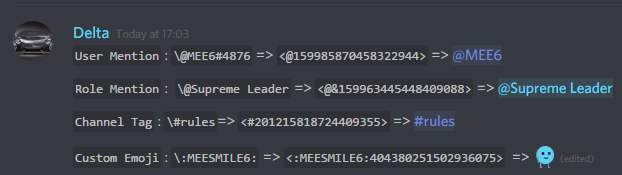
To use channel tags, emojis, role tags and user mentions in custom commands, level up messages and the welcome plugin use the following formats:
 onyx citrus
But why it displayed in list?
cold bear
@onyx citrus @role aren't working for twitch and youtube and that's known issue. use <@&id> as ali said
 buoyant moon
@modest mirage same for me
 modest mirage
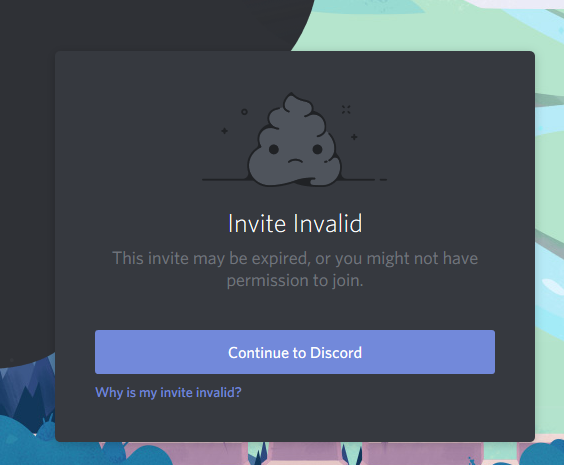
 ionic meteor
modest mirage
ionic meteor
modest mirage
What
buoyant moon
Lol
modest mirage
I tried with 2 accounts
ionic meteor
maybe in 100 servers already
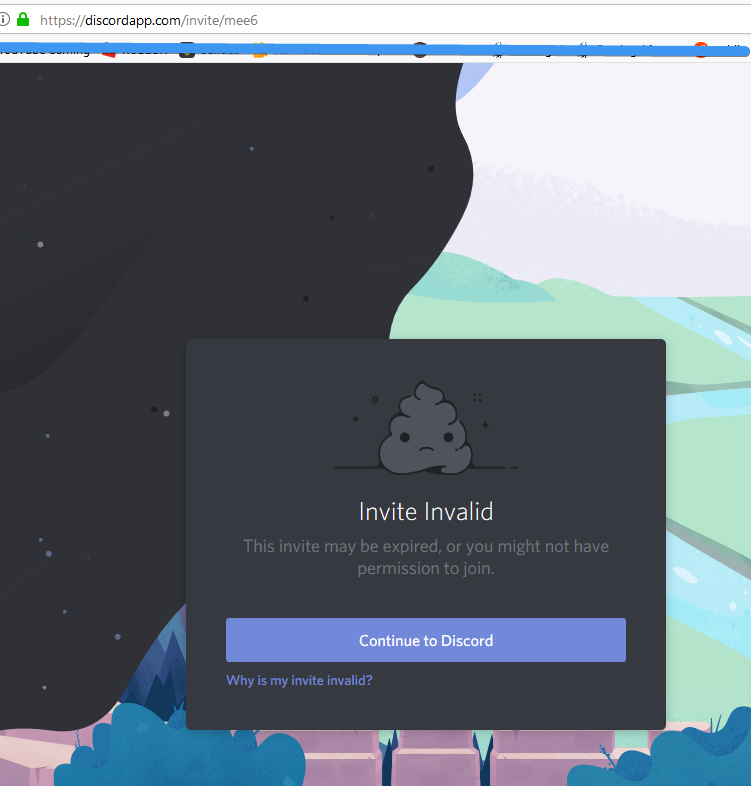
 strong path
cool
jolly wigeon
Probably a discord loading problem with my bad internet
modest mirage
It's working now
buoyant moon
my mee6 isn't showing the servers on the pop up
does anyone know how to fix it
dire yarrowBOT
Alright, @buoyant moon has been warned because 'Bad word usage'.
 glacial python
hi there, anyone having issues getting to the Mee6 Control Panel website? having issues managing my settings and whatnot due to the dreaded 404 error
ionic meteor
Let's move to #463809001273032715 and see if we can find the issue 😉 @glacial python
 obtuse bear
My Auto-Moderator is not working What should I do
wooden mountain
@jolly wigeon there is a nsfw filter, we just send the term you search and we take the first result and send that to discord
 prisma hawk
Hey the youtube plugins doesn't work someone can explain me why ? (sorry for my bad english)
 deft siren
cant add twitch to music or mee6 cant add it
 granite vessel
Twitch announcements are taking a shiet again.
 pearl belfry
 cedar fjord

 lethal kiln
I have this bot on a server so it happens that I have another server that I also want to enter the bot but when I select the server it only appears on the server that the voice is already inside and the other one I can not select it
Yes
buoyant moon
@lethal kiln You own those servers right?
lethal kiln
Yes
buoyant moon
If you own those servers, make sure your browser is logged in with the correct account.
Like if you using MEE6 on chrome, make sure you logged in with the right account on Chrome
dire yarrowBOT
So... @lethal kiln, I've decided you should be level 1.
Don't get too excited, mmk.
lethal kiln
Wtf?
buoyant moon
@lethal kiln Make sure your account is logged in
In the right browser
What browser you use?
strong path
!!tag logout
wind windBOT
MEE6 says I have no servers, but that's not true...
Well, that can be caused by:
‣ You don't own any servers
‣ You don't have Manage Server or Administrator permissions on any server you're on
‣ You're logged on with a wrong account (the most common problem)
Third one can be fixed by following these steps:
1. Logout from Discord in your browser (not installed client or mobile app)
1.1 Open https://discordapp.com/app in your browser
1.2 Click on \⚙ icon (User Settings)
1.3 Scroll down, click Log Out and confirm action
2. Logout from MEE6 website
2.1 Open https://mee6.xyz in the same browser
2.2 Click on avatar icon in upper right corner
2.3 Click Logout
3. Login using correct account
3.1 Open https://mee6.xyz and click Login button in upper right corner
3.2 In new window login to Discord. After that you will be redirected back to MEE6 website
3.3 That's all! Now you're using correct account and MEE6 website lists servers where you can modify his settings
P.S. If you're on mobile and some elements are not visible, enable Desktop site mode or switch screen to Landscape (vertical) mode.
strong path
that may help
lethal kiln
I've tried with normal Google and with Chrome
buoyant moon
@lethal kiln Do you know your account login?
lethal kiln
Yes
buoyant moon
@lethal kiln Did you read what @wind wind sent you?
Take your time to follow the instructions and everything will be cool
lethal kiln
No i no see thank
buoyant moon
You see what?
lethal kiln
Sorry i from spain and mi inglis is bad
buoyant moon
Ohhh okay np
@lethal kiln Make sure when you go to Google Chrome, that you log in with the right account
lethal kiln
Ym use google to traslate
buoyant moon
Go to http://discordapp.com/ and press login, on top of screen
Discord
Step up your game with a modern voice & text chat app. Crystal clear voice, multiple server and channel support, mobile apps, and more.
lethal kiln
Waht i do
the only option that I get is to download discord and I have already downloaded
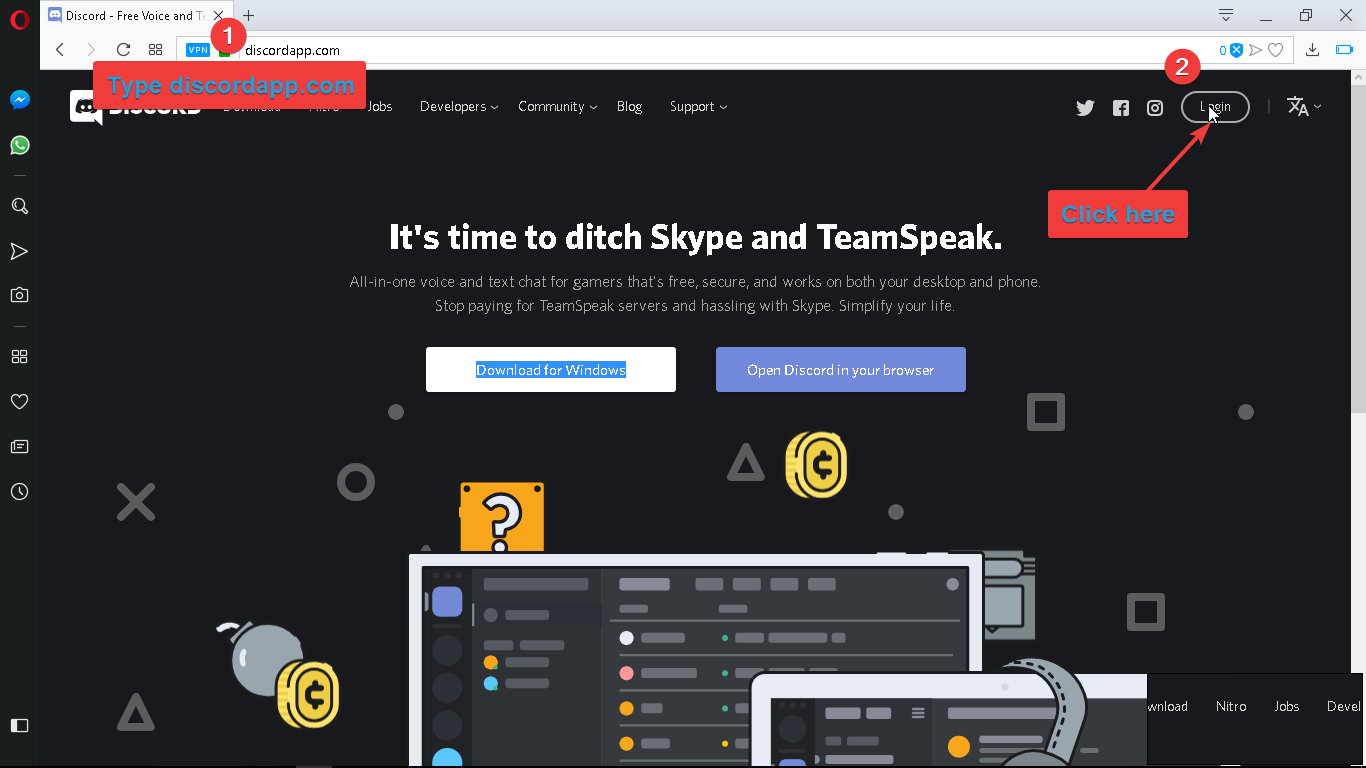 lethal kiln
ok I got to look at it if I'm with the right account
buoyant moon
@lethal kiln Go to https://discordapp.com/login and enter your email address and password where it says to

Discord
Step up your game with a modern voice & text chat app. Crystal clear voice, multiple server and channel support, mobile apps, and more. Get your free server now!
lethal kiln
thank you for your attention in the end I managed to get in by taking another account and doing it from the other account and entering a code so that from the account that I have now I can enter the settings of the bot
dire yarrowBOT
So... @lethal kiln, I've decided you should be level 2.
Don't get too excited, mmk.
buoyant moon
@lethal kiln Okay
 grand pelican
YouTube video alert function does not work.
What should I do?
the bot did not work when I reset it.
grand pelican
If I re-adding,Is the level reset?
strong path
He means the YouTube channel, try deleting then re-adding it.
dire yarrowBOT
Alright, @warm peak has been warned because 'Capital letters'.
 warm peak
strong path
warm peak
strong path
^
grand pelican
I've already tried that removing the channel and re-addin it
dire yarrowBOT
So... @grand pelican, I've decided you should be level 1.
Don't get too excited, mmk.
strong path
Then YouTube is still bugged
dire yarrowBOT
Alright, @buoyant moon has been warned because 'Posted an invite'.
verbal drum
for the record, the tempmute test i have done for 10 minutes still hasn't been auto unmuted after 30 hours, just for your information in case it helps with your bug fixing
buoyant moon
So I found a bug I was going on the website it looked diffrent it had mee6's face everywhare i could not press something i try to go to dashbored nothing happend
buoyant moon
@buoyant moon When you go to the http://mee6.xyz/dashboard, you saw nothing?
Youtube plugin still bugged?
cold bear
yes
buoyant moon
Okey
dire yarrowBOT
Alright, @bitter junco has been warned because 'Posted an invite'.
cedar fjord

dire yarrowBOT
Alright, @cedar fjord has been warned because 'Mass emoji'.
 brave flax
Rip
 rain galleon
filter is not saving bad words
sage citrus
you need to press enter after each word @rain galleon
dire yarrowBOT
 rain galleon
rgr tht ty bro
sage citrus
yw
rain galleon
still cant get it to work but it did save
seems i was to high of a role for it to work ! any way to make it apply to all ?
sage citrus
automod doesnt affect mods and admins
rain galleon
rgr tht thx
limber knoll
Explain more please?
buoyant moon
Well I use a custom command and it would do what I requested but would delete what it posted
limber knoll
It shouldn't do
buoyant moon
Ikr that's why I'm here
limber knoll
Screenshot of your command?
limber knoll
Sure another bot isn't deleting it?
buoyant moon
No I checked
limber knoll
Dm invite please
dire yarrowBOT
So... @buoyant moon, I've decided you should be level 1.
Don't get too excited, mmk.
 random mortar
!rank
dire yarrowBOT
Broken dreams, this command is disabled in this channel.
 green sleet
(Id me please)
Hi, in my discord, we (everyone) cant use de !ran.k
I dont undestand because in you website all is ok :/
sage citrus
@green sleet Is the command enabled?
verbal drum
update: i have manually unmuted the test tempmute of 10 minutes as it hasn't auto-unmuted after 48 hours
so apparently the bug isn't just "delayed" it seems it may be "forever"
limber knoll
serverid please I'll pass it onto the person who was looking into it for you
@verbal drum 👆
verbal drum
339694740201275392
i already manually unmuted as moderator though (by removing the muted role not via mee6)
 supple dew
Hi friend
supple dew
I wanted to talk
green sleet
@sage citrus yes the command is enabled, when I use the !ran.k the bot say « Seems like you aren't ranked yet. »
white notch
you need to send a message to gain xp first
green sleet
I now
white notch
so if you know that you need to send a normal message in chat, that doesn't start with !, before you do !rank......why are you still saying you have this problem?
 worn wren