#〉bugs-reports
2 messages · Page 34 of 1
 gilded hawk
 dire yarrowBOT
So... @gilded hawk, I've decided you should be level 1.
Don't get too excited, mmk.
gilded hawk
And an other thing, can I have it sending a link to the video?
 limber knoll
@gilded hawk on yt do a test make sure the fix works
 ivory drift
Hello,
I just wanted to report the following problem: when you create a new command and that we execute it , the bot does not work he puts me the following message : Oops, something went wrong in MEE6 land! :SAD6: This error has been reported to our Team. We'll work hard to fix it.
 strong path
!!tag oops
 wind windBOT
Oops, something went wrong in MEE6 land!  This error has been reported to our Team. We'll work hard to fix it.
If this happens when using:
Custom commands:
‣ Bot tries to give the role that higher than his own. To fix that, move the bot's role above the role he tries to give.
‣ User don't have all roles bot tries to remove, that's known bug.
‣ Missing Manage roles permission. Go to Server Settings -> Roles -> Bot role ->  Manage Roles permission
Moderator commands:
‣ Muted role is above Mee6's role. Bot can't give roles that higher than his own. Move it down.
‣ Missing Manage roles permission. Go to Server Settings -> Roles -> Bot role -> Manage Roles permission
 indigo pagoda
the bot is currently not giving off stream notifications when i and multiple other people go live
 burnt hazel
@indigo pagoda
The Twitch API is currently buggy, this is a problem on Twitch's end so this is not a MEE6 problem unfortunately.
 buoyant moon
As of lately @dire yarrow has not been posting when anyone goes live on twitch
strong path
Twitch API is having problems
buoyant moon
So it’s not the bot
See that’s weird because Now Live has been posting some of my fellow streams when they goes live.
Now Live uses a different Connection than Mee6. Twitch sometimes blocks connections
Oh ok
K Thanks a lot
dire yarrowBOT
Alright, @olive quarry has been warned because 'Bad word usage'.
dire yarrowBOT
Alright, @charred pendant has been warned because 'Bad word usage'.
dire yarrowBOT
Alright, @mild mantle has been warned because 'bad word usage'.
Sun_Jiin#0037 (416703629328908298) is muted for 1 day because of '** too many infractions**', boss.
 fiery basalt
hee the bot dont send message when someone is live
strong path
Twitch API is having problems
strong path
Since yesterday I think
 stiff kelp
yea same, i run a discord thats rather big... and everyones panicking and im like wtf i dont know either hahah
buoyant moon
hey pls i have a problem with Mee6 on my discord channel they dont want to notifiate my youtube video
<@&193123929701875712> hey pls i have a problem with Mee6 on my discord channel they dont want to notifiate my youtube video
seriousely
Sorry my English is really bad
@ripe rivet So you'll be when his will be repaired
@ripe rivet you are french???
moi aussi
😃
asi merci on garde contact
dire yarrowBOT
So... @buoyant moon, I've decided you should be level 1.
Don't get too excited, mmk.
buoyant moon
moi je parle pour les bug de mee6 c est tout
comme ca je sais avec qui parler en francais avec un support ci jamais j ai un probleme
 faint dome
et moi, même si je fais pas partie du staff ça fait un moment que je participe
ui
mais je continue de lire ce qui s'y passe ^^
la preuve je suis presque lvl30
 floral jolt
The live notifications for twitch aren't working
 leaden osprey
Twitch API is having issues
 wary nebula
The levels messed up in my server
floral jolt
Yeah twitch api
 real lily
The levels messed up in my server
 hoary iris
!levels and !rank don't seem to be working
dire yarrowBOT
Doom--, this command is disabled in this channel. 
 dry glen
bot is slow
hoary iris
What happened to the -- in front of my name
 vagrant pike
mee6 website won't load for me
 carmine oasis
They are working on it.
 slim viper
Ditto
hoary iris
I didn't change my name
 analog abyss
Nope the website isn't working
hoary iris
Why would one of the mods change it
buoyant moon
We know about the Issues and the Developer is looking into it. Please stay Patient 
hoary iris
Ok
analog abyss
@hoary iris You do have "--" in front of your name!
 uncut mural
carmine oasis
uncut mural
carmine oasis
They are working on it.
analog abyss
ok
 plush wing
Anyone having mee6 issues notifying users when a streamer is online? I know there's a delay but it doesn't appear to be working at all.
Thanks for letting me know.
 zinc lily
When I change the image of !rank then it doesn't changes when I make the command on a other user (like !rank @buoyant moon#13423)
dire yarrowBOT
You can access my dashboard at https://mee6.xyz/dashboard, and login with your Discord Account.
 trail remnant
i think the card thing is just for the user who changed it
hoary iris
It is
buoyant moon
The Zalgo Automod does not Seem to work at all currently
 leaden charm
Does not always work
 undone kraken
I have a problem where I disabled the level up announcement but it still sent me one via dms
 maiden jackal
Is the Twitch and Youtube notification plugins having issues? They seem not work for me. They do not send any notifications at all when people go live or post new videos.
Ahhh gotch ya. Thank you @ripe rivet Guess we will have to wait then ya?
Thanks again!
 foggy lichen
My youtube isn't putting notfications for some reason on my discord. Is it bugged?
For any of my videos.
burnt hazel
@foggy lichen Try removing the YouTube channel and re-adding it.
I'm unsure if the issues regarding this plugin is fixed so if this dosent work the devs are aware and are working to fix.
foggy lichen
I did and it didn't work.
 native roost
idk if its a bug its not linking youtube uploads
it did for a while and not anymore
burnt hazel
Read above your message @native roost
native roost
^
 unique eagle
!rank
dire yarrowBOT
JACK_SPARROW, this command is disabled in this channel.
 dusty apex
@unique eagle pls use that in #〉commands
 minor sand

 solemn rover
dire yarrowBOT
solemn rover
dire yarrowBOT
!mute @CoolGuysNameHere You have been too cool.
!tempmute @SecondLameGuyHere 3h Too lame.
- I must have "Manage Channels", and "Manage Roles" for my permissions.
- I must have a role above the "Muted" role I create.
If there are problems, please check that the Muted Role does not have send messages globally or per channel.
 sage citrus
 vocal arch
So the bot hasn’t been sending the stream updates in my discord since Tuesday. Is there anything i can do to fix that?
nvmd, guess the twitch api is broke, is there any way i can stay updated with that?
 rotund gyro
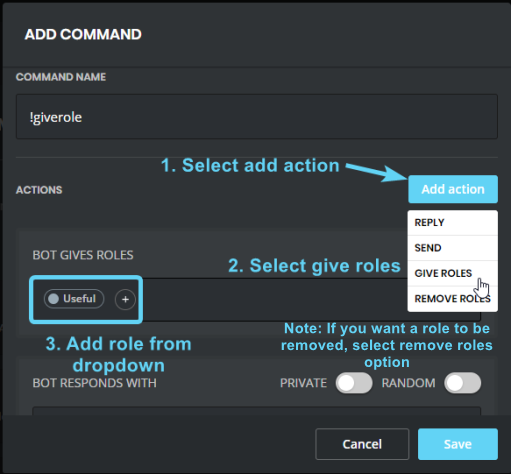
My bot won’t use my custom command to assign roles
dire yarrowBOT
https://i.imgur.com/acBvAv5.png
- I must have a role higher than the role you are trying to give in your Discord Server Settings.
 pure obsidian
@rotund gyro ☝🏽 Also Mee6 needs manage roles perm
rotund gyro
He has it mee just says that there was an error but it won’t tell me what’s wrong
 jovial folio
when is the twitch api getting updated?
 carmine holly
Don't know ETA?
buoyant moon
not sure, waiting patiently though...
 austere karma
member received rank up notif even it is disabled
limber knoll
@austere karma block dm messages from bot is the only way sorry
gilded hawk
<@&193123929701875712> hi, my timed message isn't working
 bitter owl
@gilded hawk need to have an active text channel to make it work
Since mee6 has an anti-spamming system (no messages, no timer)
gilded hawk
I don't get it
limber knoll
@gilded hawk he means if bot has posted it wont post again
and it requires a user to type in the chat it's announcing in
for it to send it's message
buoyant moon
ol
limber knoll
@buoyant moon why the random postings in the chanels?
dire yarrowBOT
Alright, @buoyant moon has been warned because '** read #〉rules next time it's a ban**'.
strong path
Twitch API is having problems
 scarlet dust
Im using Google Chrome on ubuntu linux 16.04 x64 bit and when i click to edit a plugin, the page being gray, i tryed to refresh restart close and open widow and still not work.
Someone?
Cleared my cache, still not.
 cold bear
sounds like levels plugin, is that right @scarlet dust
scarlet dust
Yes
dry glen
that’s not a bug to the bot
dire yarrowBOT
Alright, @buoyant moon has been warned because 'Posted an invite'.
scarlet dust
On Phone still Not
cold bear
doesn't matter the device, there' other fix
to fix that you need to do one thing
open plugins list page for 10-15 mins, leave it in background
then do ctrl+r and try open levels page again
@scarlet dust
 stoic yoke
my MEE6 bot has not announced anything in 3 days, I've disabled and renabled with no success any other suggestions?
strong path
twitch?
dire yarrowBOT
Alright, @rigid gyro has been warned because 'Bad word usage'.
 rigid gyro
Really?
buoyant moon
Nani?
rigid gyro
Auto mod is bad
burnt hazel
@rigid gyro Whats up with it?
rigid gyro
But thanks
strong path
I saw his message that got deleted, I answered it
burnt hazel
o sorry 
 vocal abyss
twitch bot still down ?
dire yarrowBOT
So... @vocal abyss, I've decided you should be level 1.
Don't get too excited, mmk.
burnt hazel
@vocal abyss Yes, this is a Twitch API issue and is nothing the staff here can do to fix the problem unfortunately
vocal abyss
@burnt hazel thanks
 fallow raven
!playlist
dire yarrowBOT
GhostBlood22, this command is disabled in this channel.
dire yarrowBOT
GhostBlood22, this command is disabled in this channel.
fallow raven
!next
dire yarrowBOT
GhostBlood22, this command is disabled in this channel.
 dense fox
fallow raven
dense fox
fallow raven
o sey
dire yarrowBOT
So... @fallow raven, I've decided you should be level 4.
Don't get too excited, mmk.
 gaunt zenith
so when i upload a video the bot was not working like its not putting the video up it happen two days ago and yesterday
gaunt zenith
can you fix it?
gaunt zenith
oh
 teal ridge
Hey , I'm Brazilian !!
 terse estuary
@stoic yoke My server is having the same issue and so is another server I'm in. Did you ever get an answer as to what the issue is or when it will be fixed?
leaden osprey
@terse estuary the Twitch plugin? that’s bugged currently, we can’t do anything about it right now unfortunately since it’s a Twitch-sided issue
terse estuary
Yes, thank you! I've been searching for days trying to figure out what was going on.
 echo quest
When adding words on the "Bad Words List" it doesn't delete the word if it's combined with other stuff or written purposefully with a space inbetween the letters/added other stuff
That'd be a really useful thing to fix
<@&193123929701875712>
Or have I done something wrong? 😅
cold bear
they got added to other words
spaces and commas got removed and put as separate banned words
echo quest
Ah, well it'd be really useful if they made it so that you couldn't say a word embedded into other things, since people like to troll.
Let's say the word "Banana" is banned. Then they can still write "banana!" or "ba nana" or "bananabread", which is quite annoying because you have to ban all possible versions of saying the words, which will take hours haha
If you think of "banana" as a really bad word that shouldn't be said haha
cold bear
better bad words automod is planned
but not sure about inclusion
since some bad words list can work against user sometimes
 graceful nebula
how's the progress on the youtube updates
leaden osprey
no information yet
 normal herald
I don't know when but for now, twitch plugin doesn't work
buoyant moon
YouTube plugin doesn’t work
normal herald
@limber knoll done but doesn't work on every server
dire yarrowBOT
So... @normal herald, I've decided you should be level 3.
Don't get too excited, mmk.
 arctic lagoon
@dire yarrow can u fix the Twitch api Please! :3
arctic lagoon
is there any other bots that would work right now
limber knoll
same issue
their api wont work coz twitch re wrote the entire code
@arctic lagoon 👆
arctic lagoon
im looking for a other suggestion thanks
arctic lagoon
how do i manual it
limber knoll
@gritty crest ok
 gritty crest
and mee6 has admin perms
limber knoll
local storage
gritty crest
ok
limber knoll
and use chrome
dire yarrowBOT
Awooo (ProudToBe)#1144 (464136497763713055) is muted for 30 minutes because of 'interupting staff', boss.
limber knoll
@gritty crest try it in chrome
gritty crest
i'll try it
dire yarrowBOT
@buoyant moon did 'insulting staff' and got the ban hammer! 
gritty crest
yeah, its working now
limber knoll
np
gritty crest
👍
gaunt zenith
when i upload a video the bot does not show the video {is the youtube thing broken?}
dire yarrowBOT
So... @gaunt zenith, I've decided you should be level 2.
Don't get too excited, mmk.
pure obsidian
@gaunt zenith YouTube plugin is currently bugged, please wait for a fix. (and no ETA too)
dire yarrowBOT
Alright, @buoyant moon has been warned because 'Bad word usage'.
buoyant moon
wtf
 worldly flame
Is the Twitch channel function not working anymore or is there an issue on my side? Last time it worked for me was Tuesday....
buoyant moon
Twitch api is broken @worldly flame
limber knoll
@worldly flame twitch is doing an upgrade on the api
worldly flame
@buoyant moon @limber knoll Ah ok, thank you guys for the feedback.
buoyant moon
twitch and youtube's plugins ain't working for me
burnt hazel
@buoyant moon
Twitch has an API issue, nothing you or the staff here can do to fix, just have to wait for Twitch.
YouTube the devs are aware and are working to fix the issue. No ETA unfortunately.
buoyant moon
gotcha
floral jolt
Ah twitch Api problems
buoyant moon
I got a issue that when someone puts an announcent i go to read it and then it stills has that 1 thingy it is bugging me a lot please fix is asap
A mention
burnt hazel
@buoyant moon This is a discord bug not a MEE6 issue, try closing your application.
buoyant moon
Oh i did that it didnt work
 green oasis
ah? Is it why notification are not sent? Because API issue? Thought Maybe it was because the bot can't get past the "everyone" notification
strong path
Yes, API issues
 foggy ingot
I am Brazilian someone can join this group to program the bot I already program but is in trouble
dire yarrowBOT
Alright, @foggy ingot has been warned because 'Posted an invite'.
leaden osprey
what’s the problem exactly?
bitter owl
@foggy ingot se precisar de ajuda eu te ajudo a programar
 spice bone
Hi, I'm having this problem with my rank card. I don't know if its because of my nitro avatar or what. It started happening after I bought the backgrounds on the mee6 website, any clue how to fix?
burnt hazel
@spice bone
Gif avatars are not supported on the rank cards.
spice bone
ah ok, cheers for the reply
foggy ingot
DjGoogle You are Br?
 cedar swallow
Hi, i need help with the bot, its not sending out the notification's for twitch 😃
will it be fixed? 😃
gilded hawk
YouTube plugin is fixed
strong path
no need
dire yarrowBOT
So... @gilded hawk, I've decided you should be level 2.
Don't get too excited, mmk.
strong path
no worries
buoyant moon
when someone say a "bad word", the bad word is not delete
dire yarrowBOT
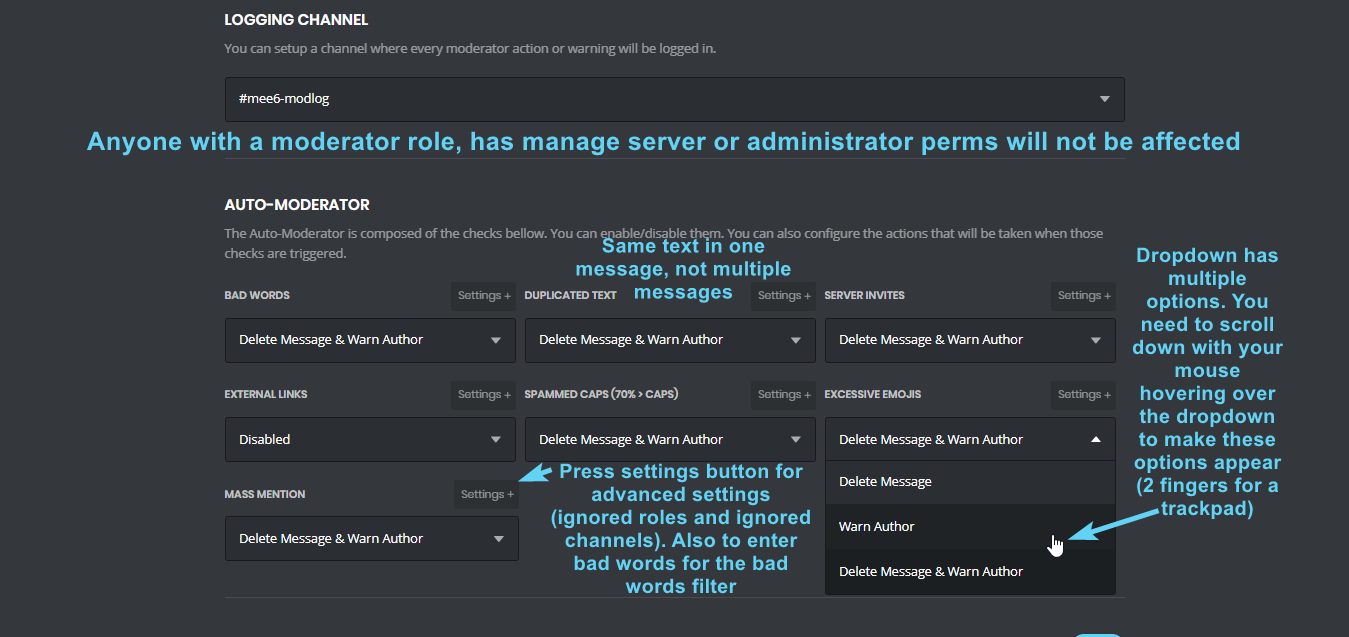 strong path
It also ignores owners
buoyant moon
how to do ranks?
strong path
you mean like leveled roles?
buoyant moon
yes
dire yarrowBOT
Role Rewards are available via my Leveling Plugin. You gain XP and Levels as you are active and can be used to give active members special perks in your servers.
- I must have "Manage Roles" and a role that is higher in the Discord Settings list then the role you are trying to add with me -> https://its.mee6.xyz/i300v5r1zx.png
- I do not add roles instantly, I only check when changes are made or someone levels up.

You can access my dashboard at https://mee6.xyz/dashboard, and login with your Discord Account.
 median dune
hi, mee6 has stopped posting a live announcement since Tuesday when i go live on Twitch
strong path
Twitch API is having problems
median dune
thank you @strong path
strong path
np
 quasi prawn
so is there anything that can be done?
 pale axle
Twitch now live still not working?
strong path
Twitch API is having problems
 nimble oasis
Twitch is being twitchy.
strong path
Twitch API is having problems
 worn wren
Its been a while since the Twitch mee6 feature is not working
More than 2 weeks
You should guys check that 
 smoky dirge
true@worn wren
dusty apex
@worn wren it is twitch problem so we cant really fix it
dusty apex
mainly because mee6 could be requesting too much data from them
worn wren
That's a lot of damage data 
worn wren
Oh ?
limber knoll
Twitch has been redoing their api
Problem is they are rewriting their code from scratch
worn wren
But they dont let open the current API while they're reworking the current one ?
Why close the API while working on it 
limber knoll
Apparently they stopped it
worn wren

limber knoll
Other bots have the same issue unless the devs look at the release due on the 9th i think
worn wren
True 🤔
dire yarrowBOT
So... @worn wren, I've decided you should be level 1.
Don't get too excited, mmk.
limber knoll
We hope to have it back just no eta sorry
worn wren
Dont be sorry 
Still trying to know why they did stop to handle the current API while working on it, many things uses the Twitch API 
 karmic haven
привіт
wind windBOT
 💢|πmS¶4deYT💢#3495 was banned
strong path
softban
 harsh vortex
@ripe rivet Hello, I am not sure if this has been addressed and if it has I'm sorry but I cannot find it. Mee6 is not working with Twitch Stream announcements. If this has been reported I understand and we can be patient. thank you and let us know.
So we report to twitch?
Nightbot works but ofc isn't as nice as our reliable mee6 who does it automatically
Ok I see
Well thank you for your time
 versed needle
Auto-Moderator does not work for kick and temp-mute
 stable yoke
auto moderator is buggy
wind windBOT
 versed needle
Mr nice guy your fr ?
dire yarrowBOT
So... @versed needle, I've decided you should be level 2.
Don't get too excited, mmk.
 obtuse tulip
YouTube notifier isn't working.
dire yarrowBOT
So... @obtuse tulip, I've decided you should be level 1.
Don't get too excited, mmk.
strong path
It's bugged
 worthy lodge
is anyone elses mee6 bot not telling people when twitch is live?
Ahh, Any clue when twitch will send someone to fix it? 😃
ok, thank's!
strong path
!!tag mutehelp
wind windBOT
Prerequisites:
- Moderator plugin is enabled
!mutecommand isn't disabled- Bot has role with Manage Roles and Manage Channels permissions
- Muted role is under MEE6 role
- You're trying to mute someone using
!mute @mention reason, otherwise it will not work
If user got Muted role but still can talk means there's issue with your channel permissions
Go to Channel Settings -> Permissions
- If that's public channel that can be accessed by anyone:
- Set

Send Messagesfor all roles except Muted - Set

Send Messagesfor Muted role
- If that's secret channel that requires *special* role to access it:
- Set
Send Messages Read Messagesfor special role - Set
Send Messages Read Messagesfor Muted role - Set
Send Messages Read Messagesfor@everyonerole
buoyant moon
dire yarrowBOT
So... @buoyant moon, I've decided you should be level 3.
Don't get too excited, mmk.
buoyant moon
Can someone help..
faint dome
Please read the message from @wind wind
 idle apex
hmmmm
dire yarrowBOT
s76222#3268 (406617111352311812) is muted for 45 minutes because of 'spamming every channel', boss.
 lime idol
bot not announcing streams anymore.. tried with another channel, still the same?
access level is at admin..
strong path
Twitch API is having problems
 fervent robin
Will it be announced when the YouTube bug is fixed?
 raven lotus
Queria em português
buoyant moon
Sim o que tem ai? @raven lotus
raven lotus
Queria saber algumas coisas a mais
Queria saber colocar os rank para quando alguém colocar "!rank" aparecer seu rank
Entendeu?
Tipo isso
Tem o modo "!help" mas é tudo em inglês e não entendo quase nada
Por isso
buoyant moon
O que você quer dizer?
raven lotus
Que eu queria que fosse tudo em português
Aquele modo help
Mas parece q é tudo em inglês
buoyant moon
é em inglês, você não pode mudar isso
buoyant moon
desculpe @raven lotus
raven lotus
dire yarrowBOT
So... @raven lotus, I've decided you should be level 1.
Don't get too excited, mmk.
raven lotus
Até isso eu queria kk
 raven lotus

buoyant moon
@raven lotus Eu só falei que você fala de português 😉
buoyant moon
:D
 digital spire
Where on the interweb does it say twitch's API is broken?
buoyant moon
The part where when we check if our end is fine and when it is, Twitch updated their API which broke things, so not on our end
 winged gorge
Are you using Kraken or Helix? Because Helix isn't finished and is broken af, and Kraken works exactly as it should and has been for quite some time.
dire yarrowBOT
So... @winged gorge, I've decided you should be level 2.
Don't get too excited, mmk.
limber knoll
@winged gorge is that a random posting or actually a message for help?
winged gorge
It was a question to the team regarding the statement that Twitch API is broken, because it isn't. It's working just fine, if you're using the right one.
limber knoll
the new twitch api has been recoded from scratch
winged gorge
You mean Helix?
limber knoll
the new pathways only just got released today
we only access the public api and this is broken at their end
winged gorge
Right, Helix is "New Twitch API" and Kraken is v5. Helix is not finished and doesn't have all the required calls and endpoints to function the way one would want. Kraken hasn't changed at all and is working normally and without error.
My Kraken calls are functioning without issue.
Both are public APIs btw
Neither is "broken" in the sense that it doesn't work at all, it's just that Helix is still being built, so it doesn't have all the features Kraken does.
limber knoll
none of our coding has changed in regards to twitch
winged gorge
Well, from what I can see here, nothing has changed on Twitch's side either, aside from extending Kraken.
 glad mortar
Hey, the site is having some isseus I think, whenever I go to the website MEE6.xyz/dashboard/myserver and click on the pluggins, it takes me to MEE6.xyz/dashboard/myserver//commands what is an empty page, this is easally fixed by removing one / before the command, however it may be something to look in to!
dire yarrowBOT
You can access my dashboard at https://mee6.xyz/dashboard, and login with your Discord Account.
limber knoll
@glad mortar that one?
glad mortar
Yea, if I go from there to my server and press custom commands for instance, it will take me to MEE6.xyz/dashboard/myserver//commands, this shows an empty page
If I go to remove one / it works
limber knoll
screenshot please
limber knoll
which browser is that?
glad mortar
firefox
limber knoll
ah
glad mortar
But it's a link issue, not browser
glad mortar
Yea, happened Yesterday as wel, found out today that I just need to remove a / before commands, however this is pretty confusing and may cause issues with other people
 acoustic abyss
Hello I have a question. Mee6 is working fine only the youtube plugin don't work but it did work before.
acoustic abyss
okey
 ripe kestrel
toute mes custom commandes se sont mélanger, et certaine supprimées !
limber knoll
Quelles commandes personnalisées ?
ripe kestrel
oui j'en ai modifier pour les remettre j'ai actualiser et certaines ont disparues
celles que j'avais créer moi meme Lockey
a... ça va être long...
buoyant moon
twitch please say today is the day your api is fixed! 
wind windBOT
Our team is aware of the situation of the Twitch plugin who is not working properly. Our team of Developers is working on it but we aren't able to give you any ETA. More information here: https://discuss.dev.twitch.tv/t/twitch-api-update-delaying-v5-end-of-life/16277
TL;DR: Twitch API is having some issue because they want to remove the V5 of their API.
winged gorge
^ this is bad info. Kraken works perfectly fine and isn't going anywhere for the foreseeable future as a result of Helix not being finished yet. Stop trying to migrate to an incomplete and unfinished API, and then blaming it on Twitch. Use Kraken and wait for Helix to be finished.
winged gorge
I read it, along with what others have posted, and your team seems to want to shirk responsibility for this issue to Twitch, when it's not their fault. https://cdn.discordapp.com/attachments/404049263971139604/465799300396351498/unknown.png
 buoyant moon
well, our developers have other stuff to do in their life other than coding a Free Bot they dont even get paid for. And you can never know what is going on at Twitch. Maybe they take off the older API every now and then to have stuff with the new One.
strong path
btw @buoyant moon is a normal user along with annoying avatar(always be skeptical of him)
winged gorge
I understand the first part, of course. As for the second, I do know what's happening with Twitch API as talk with them regularly about it, and can confirm from their devs that nothing has changed with v5 in several weeks.
strong path
He's not a staff
buoyant moon
Yes Hi im a normie btw 
 desert basalt
The API isn't broken as the announcement is working just fine with other bots, but it still refuses to work with Mee6. What gives?
winged gorge
If the API was broken my bots wouldn't work (Twitch chat bots, not Discord bots, though with this might just code one). My guess is a change on the Mee6 side to try and migrate to Helix but it failing because Helix isn't done and still needs Kraken calls to get all data needed.
buoyant moon
well, lets reword it:
Since Mee6 is in more than one million servers, and has alot of Twitch Users to check for Live announcements, Twitch decides to rate limit mee6' Connection which leads to it not being able to see who is online and who isnt.
winged gorge
Again, that's not the API being broken. My issue here isn't that so much that Mee6 isn't announcing, it's that Twitch is being blamed for it when their side of things is working as it is supposed to. Don't want the new rate limit hits? stay with Kraken or use Pub/Sub Helix/Kraken combos.
But don't blame Twitch.
Own the issue.
 white notch
@winged gorge I asked the dev for clarification on this, haven't heard back
we just got told it was a Twitch problem
if that really isn't the case, we apologise for giving out misleading information
winged gorge
Looking forward to what they have to say on it.
buoyant moon
Ich werde euch finanziell unterstützten
 thick skiff
Mute command don't work on my server.
strong path
!!tag mutehelp
wind windBOT
Prerequisites:
- Moderator plugin is enabled
!mutecommand isn't disabled- Bot has role with Manage Roles and Manage Channels permissions
- Muted role is under MEE6 role
- You're trying to mute someone using
!mute @mention reason, otherwise it will not work
If user got Muted role but still can talk means there's issue with your channel permissions
Go to Channel Settings -> Permissions
- If that's public channel that can be accessed by anyone:
- Set
Send Messagesfor all roles except Muted - Set
Send Messagesfor Muted role
- If that's secret channel that requires *special* role to access it:
- Set
Send Messages Read Messagesfor special role - Set
Send Messages Read Messagesfor Muted role - Set
Send Messages Read Messagesfor@everyonerole
thick skiff
Thanks, I'm looking at it
strong path
btw I recommend you change your pfp <.<
thick skiff
PFP ?
 viscid willow
ROLE REMOVE AND ASSIGN
We had something in our server that occurred earlier today involving the mee6 bot and roles.
To my knowledge the bot is removing roles not connected to the levels plugin. Our role rewards are also set to stack roles, not remove.
We do not use anything that should be conflicting with the mee6 role rewards plugin either.
The roles that were removed were both trusted, and members do not have the ability to self assign them or manipulate them in any way without permissions.
Hoping this helps in trying to figure out if its a bug.
dire yarrowBOT
So... @viscid willow, I've decided you should be level 2.
Don't get too excited, mmk.
rigid gyro
@winged gorge so if you are saying that it’s mee6 boy that’s causing the issue then what bots are working and using the live announcement?
winged gorge
Several
limber knoll
@viscid willow can you dm me an invite please
viscid willow
sure
winged gorge
Well PhantomBot works, Now Live works, a custom bot a fellow dev buddy of min wrote for a community works, several.
rigid gyro
Nowlive bot doesn’t work actually
If it does work it’s also atleast 2 hours behind someone going live
winged gorge
It still makes the announcement, which is the point.
dire yarrowBOT
So... @winged gorge, I've decided you should be level 3.
Don't get too excited, mmk.
rigid gyro
I said if it works
Bearing in mind none of the mods in my community have found a single bot that is working currently I’m surprised you’re making such a bold statement
dire yarrowBOT
So... @rigid gyro, I've decided you should be level 1.
Don't get too excited, mmk.
burnt hazel
Can this discussion please continue in #〉chat as yes MEE6 and Twitch have an API issue it seems its gone a bit offtopic from the bug report.
winged gorge
Well here is a gif of a bot using Twitch API to announce live channels working normally. All posting in here are from today, and all are automated. https://gyazo.com/e85647a0bedb5b99886821ea4c46907d
 winged gorge
And another example, that I did literally just now -
buoyant moon
Great. Your Point?
winged gorge
It's not Twitch.
buoyant moon
Staff updated the Command. 
 solemn moon
My pp doesnt update in the !rank (only on MEE6 server)
dire yarrowBOT
So... @solemn moon, I've decided you should be level 2.
Don't get too excited, mmk.
winged gorge
This update?
buoyant moon
potential problem. developers are aware
winged gorge
Would remove the link, that has literally nothing to do with the issue. It's a link to a post from Twitch saying that they are leaving Kraken in place for now. That's it.
buoyant moon
Your Point? Staff updated the Command it says POTENTIAL It gives all the information needed that the developers are aware. Now its better if we both stop.
winged gorge
Anyway, issue reported, examples of the API functioning normally provided. I'm off to do my coding for my things. For Staff, if you need anything else from me or one of your devs want's to chat just DM me and I'm happy to go over all this with them.
buoyant moon
I don't think the YouTube plugin is working.
strong path
it isn't
 untold geyser
mee6 doesnt notify the groups when I or someone else goes live. I have the feature and settings all correct
strong path
!twitch
dire yarrowBOT
Our team of developers is aware of the situation with the Twitch plugin that is not working properly, but are unable to give an ETA on the fix. More information related to the potential problem can be found here: https://discuss.dev.twitch.tv/t/twitch-api-update-delaying-v5-end-of-life/16277
 whole sonnet
I cant get mee6 to work how Do i Do What Do i miss?
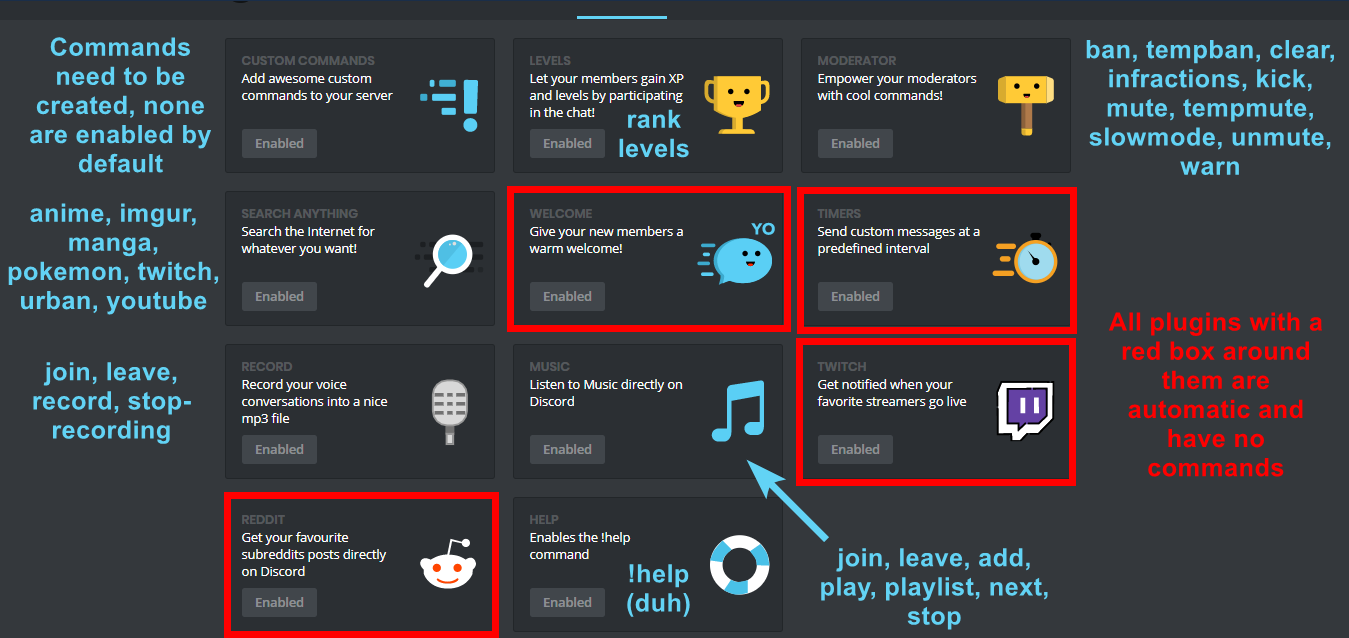
dire yarrowBOT
I am currently a modular bot. Nothing will be enabled by default and must be enabled in each plugin manually.
https://i.imgur.com/V93V8Dg.png
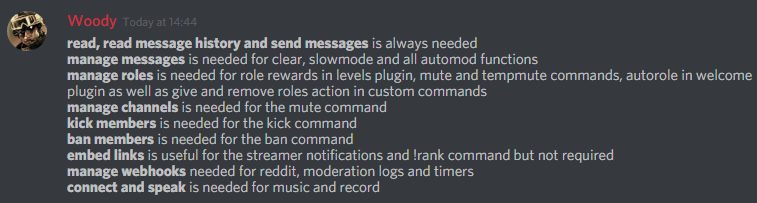
Full List of my Permissions that I use...
https://i.imgur.com/3Wd5wKZ.png
 whole sonnet
Ok i missed that Thanks so much for the help
limber knoll
Np
glad mortar
Ey, just want to make sure you guys know that MEE6 isn't playing !info anymore!
 ionic meteor
whut?
It used to be Playing mee6bot.com
But I think they removed it on purpose, not really a think that could bug I believe
 west linden
hello, the bot doesn't indicate when I stream, the plugin is activated
strong path
!twitch
dire yarrowBOT
Our team of developers is aware of the situation with the Twitch plugin that is not working properly, but are unable to give an ETA on the fix. More information related to the potential problem can be found here: https://discuss.dev.twitch.tv/t/twitch-api-update-delaying-v5-end-of-life/16277
 native plank
Hi! Im currently trying to Enable some of the modes on my discord server but whenever I click enable all it does is send me to a grey screen. When I inspect the website, I see a bunch of unknown errors. Do you know what I should do?
strong path
What browser?
strong path
tried ctrl-f5?
native plank
i tried, still nothing
strong path
tried an incognito window?
native plank
tried that too
All it does is send me to a grey screen
Maybe i could try a different browser?
strong path
sure, firefox. It's weird that it isn't working though
native plank
I know right
I just tried a different browser and it worked! Thanks for trying to help 😄
strong path
What browser btw?
native plank
I tried Safari (i'm on a Mac)
dire yarrowBOT
So... @native plank, I've decided you should be level 1.
Don't get too excited, mmk.
limber knoll
@EchoFace#2758 try chrome
 split parcel
So does Mee6 Streamer announcements works? Havent worked for me in over a week
pure obsidian
Not at the moment
dire yarrowBOT
Our team of developers is aware of the situation with the Twitch plugin that is not working properly, but are unable to give an ETA on the fix. More information related to the potential problem can be found here: https://discuss.dev.twitch.tv/t/twitch-api-update-delaying-v5-end-of-life/16277
split parcel
👍🏽
 mighty glen
?help
 glass ether
For el go to #〉volunteer-support
dire yarrowBOT
So... @glass ether, I've decided you should be level 1.
Don't get too excited, mmk.
dire yarrowBOT
Alright, @hollow gull has been warned because 'Bad word usage'.
Alright, @hollow gull has been warned because 'bad words read #〉rules'.
 thorny surge
?help
limber knoll
@thorny surge you needing help?
dire yarrowBOT
You can access my dashboard at https://mee6.xyz/dashboard, and login with your Discord Account.
 look for that icon
thorny surge
look for that icon
thorny surge
Okay
limber knoll
and enable it
thorny surge
And deaktivieren
limber knoll
inside you can configure the setting and the message
thorny surge
Okay
glass ether
K
 real skiff
There is a bug
dire yarrowBOT
So... @real skiff, I've decided you should be level 1.
Don't get too excited, mmk.
strong path
state said bug
real skiff
I want to add mee6 to my server and then my server is not there
dire yarrowBOT
It appears that you may be on the wrong account, or something went wrong since the time you logged into my website.
Please navigate to https://discordapp.com/channels/@me and select the gear in the bottom left, then press Logout.
After that, please navigate to https://mee6.xyz/logout to disconnect from our website.
Once finished, select "Add to Discord" again, and follow the instructions to access my dashboard again.
real skiff
real skiff
Yes I am logged in
 faint bison
you may be logged in
but not on the correct account
that or you dont have permission to add the bot you need manage server permission
real skiff
It's my server
buoyant moon
Hi, Da ich sehe das du Deutsch bist uebernehm ich hier mal
real skiff
Ok
buoyant moon
Also, Wie es aussieht bist du entweder nicht auf dem Account mit dem du hier schreibst eingetloggt, oder du hast die "Administrator" bzw "Server Bearbeiten" Erlaubnis nicht
buoyant moon
Kannst du versuchen dich auf der Discord Seite auszuloggen und wieder neu einzuloggen
real skiff
Ja kann ich Mall machen
So jetzt habe ich das Problem das ich nicht mehr mit meinem Haupt Account einloggen kann
buoyant moon
Genau deswegen sollst du dich auf der Discord Website ausloggen
buoyant moon
Und dich mit dem Account mit dem du momentan hier bist wieder einzuloggen
buoyant moon
Das ist die Mee6 website
Nicht Discord
Discord
Step up your game with a modern voice & text chat app. Crystal clear voice, multiple server and channel support, mobile apps, and more.
real skiff
Soll ich mich jetzt aus loggen
dire yarrowBOT
So... @real skiff, I've decided you should be level 2.
Don't get too excited, mmk.
buoyant moon
auf der Discord website ja
Und dann loggst du dich wieder ein, mit dem Account mit dem du hier schreibst
real skiff
Das ist die flache Webseite
buoyant moon

Discord
Step up your game with a modern voice & text chat app. Crystal clear voice, multiple server and channel support, mobile apps, and more. Get your free server now!
Achja, benutz Chrome btw ^^
real skiff
Kommt das gleiche. XD
buoyant moon
Sekunde
real skiff
Ja ich habe Ferien. Keine Stress
buoyant moon
real skiff
??
buoyant moon
Dem Bild Folgen
strong path
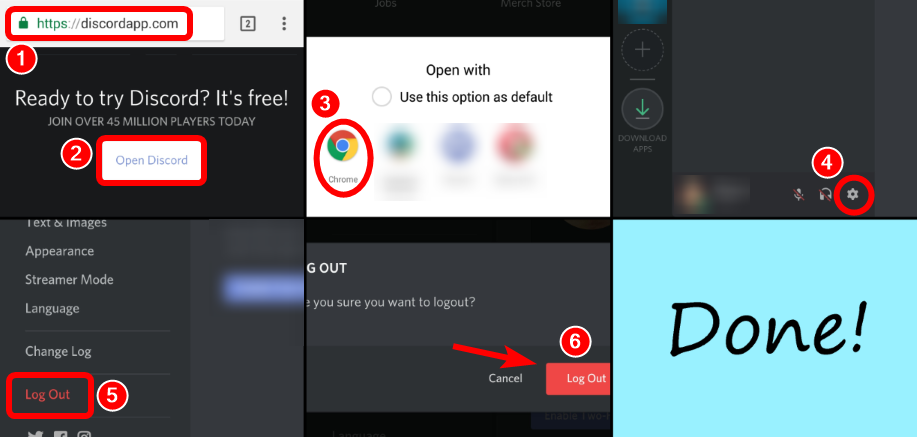
!!tag mobile
wind windBOT
Logout from Mee6 and Discord websites on mobile:
Discord:
- Go to https://discordapp.com and scroll down to the bottom of page.
- Tap Open Discord button.
- If Open with .. dialog appears pick the browser you are currently using.
- Tap ⚙ button at the bottom of screen -> Log Out -> Confirm.
P.S. If website loads more than 30 seconds or you can't see ⚙ button at the bottom of screen, tap three dots menu and enable Request desktop site option.
Mee6:
- Go to https://mee6.xyz.
- Tap on your avatar or username.
- Tap Logout.
 strong path
yw
buoyant moon
THanks Ped
real skiff
:( es funktioniert nicht ist das für ein Tag heute ??
buoyant moon
Hast du auch das was ZZ=Top geschrieben hat versucht?
real skiff
Ja. EM einbischen wenn ich in Chrome den link. Schreib. Dan kommt Das
buoyant moon
Runterscrollen versucht?
real skiff
Die wollen das ich das herunterlade ob will ich das schon habe
buoyant moon
Im Bot steht wenn du runterscrollst kommt "Open Discord"
- Go to https://discordapp.com/ and scroll down to the bottom of page.
real skiff
Ne es kommt das
buoyant moon
Kannst du die 3 Punkte oben bei Chrome klicken und "Request Desktop Version" anklicken? (Mein Handy is leer sonst koennt ichs dir zeigen)
 buoyant moon
Genau
buoyant moon
Wenn du discord oeffnen klickst?
real skiff
Eben
real skiff
Jo
buoyant moon
If you set an app to do a certain thing by default, you can clear that setting.
Einstellungen
Apps & notifications.
Tipp auf Discord, wenn du es nicht siehst klick auf "Alle Apps anzeigen"
Klick "Standardmaessig oeffnen" > "Standards Loeschen"
real skiff
was??
buoyant moon
Einstellungen (Deine Handy einstellungen)
Apps
Auf Discord Druecken
Dann steht da irgendwo was mit Standard
real skiff
OK ich such
dire yarrowBOT
So... @real skiff, I've decided you should be level 3.
Don't get too excited, mmk.
buoyant moon
Genau
Standardwerte Loeschen
Und dann sollte dich Die website fragen wie du das oeffnen Moechtest, da waehlst du deinen Browser
real skiff
Ihr seit die besten. Wie kann ich mir bedanken
buoyant moon
Einfach Danke sagen :D
dire yarrowBOT
Alright, @real skiff has been warned because 'Capital letters'.
buoyant moon
Und wenn du weitere Fragen hast, Stell sie ruhig wir sind immer hier :D
real skiff
Danke ihr seit die besten
buoyant moon

buoyant moon
Ja aber die is nich schlimm :D
real skiff
Aber trotzdem
Noch ne Frage
Kann man ihrgend wann auch Mall mit Kreditkarte bezahlen???
OK:)
buoyant moon
Kann man glaube ich so schon
Du kannst ne Kreditkarte zu paypal hinzufuegen und dann damit zahlen
real skiff
Habe es gerade gemacht Danke
buoyant moon
so i made 2 channels for streams and youtube - iadded channels and streamers but the bot cant seem to post, altho all permissions are set to post so it should have no issue posting.. Any advice?
dire yarrowBOT
Our team of developers is aware of the situation with the Twitch plugin that is not working properly, but are unable to give an ETA on the fix.
Technical stuff/explanation:
This is down to us trying to avoid ratelimits on Twitch's old API, which is taking a long time and causes delayed/no announcements. We can't move to their new API until they raise ratelimits for us
buoyant moon
^ For Streamers
YouTube already got explained by pwe (owo)
dire yarrowBOT
Our team of developers is aware of the situation with the Twitch plugin that is not working properly, but are unable to give an ETA on the fix.
Technical stuff/explanation:
This is down to us trying to avoid ratelimits on Twitch's old API, which is taking a long time and causes delayed/no announcements. We can't move to their new API until they raise ratelimits for us
buoyant moon
!rank
dire yarrowBOT
jaguarul gamer, this command is disabled in this channel.
faint bison
limber knoll
Any more information?
 velvet jungle
All it said was "Oops, something went wrong in MEE6 land! This error has been reported to our Team. We'll work hard to fix it"
buoyant moon
MEE6 not working on the servers when I do !rank
limber knoll
And what was the command?
buoyant moon
Yeah, I got the problem too lol.
limber knoll
Is the bot offline?
velvet jungle
It seems like none of the commands work
buoyant moon
Mee6 is slow in responding right now we know
limber knoll
@velvet jungle server id please
 prisma wharf
Custom commands doesnt work
velvet jungle
?
limber knoll
Need your server id to find the issue
 peak umbra
Rank command has gone down in a couple servers I’m a part of at the same time, including my own and one I moderate
Looks like the custom commands for them are also down as well
buoyant moon
Mee6 is slow in responding right now we know
peak umbra
Levels works on my server for some weird reason, but not on others
 last pagoda
MEE6 Isn't working
buoyant moon
Mee6 is slow in responding right now we know
 mortal oxide
API issue.
limber knoll
Looking into it @velvet jungle
 tropic crystal
What does it mean if this message shows up?
"Oops, something went wrong in MEE6 land! This error has been reported to our Team. We'll work hard to fix it."
limber knoll
Known we're working on it
 lunar sleet
DashBoard Its Not WORKING
 sly granite
DashBoard Its Not WORKING
buoyant moon
If your Dashboard is not working Press F5
buoyant moon
no me funciona
 outer kite
MEE6 offline only on my server and I dont know why 465621189147099137
dire yarrowBOT
So... @outer kite, I've decided you should be level 1.
Don't get too excited, mmk.
Alright, @buoyant moon has been warned because 'Posted an invite'.
buoyant moon
Mee6 offline 456604538816692226
 graceful wharf
I got a bug report A BUG ON MY COUNTER!!!
 woven bobcat
When I try to auto give members ranks when they say something it doesn't work and says "Oops, something went wrong in MEE6 land! :SAD6: This error has been reported to our Team. We'll work hard to fix it."
strong path
!!tag oops
wind windBOT
Oops, something went wrong in MEE6 land! This error has been reported to our Team. We'll work hard to fix it.
If this happens when using:
Custom commands:
‣ Bot tries to give the role that higher than his own. To fix that, move the bot's role above the role he tries to give.
‣ User don't have all roles bot tries to remove, that's known bug.
‣ Missing Manage roles permission. Go to Server Settings -> Roles -> Bot role -> Manage Roles permission
Moderator commands:
‣ Muted role is above Mee6's role. Bot can't give roles that higher than his own. Move it down.
‣ Missing Manage roles permission. Go to Server Settings -> Roles -> Bot role -> Manage Roles permission
 fervent falcon
bot isnt posting custom twitch links API issue?
dire yarrowBOT
Our team of developers is aware of the situation with the Twitch plugin that is not working properly, but are unable to give an ETA on the fix.
Technical stuff/explanation:
This is down to us trying to avoid ratelimits on Twitch's old API, which is taking a long time and causes delayed/no announcements. We can't move to their new API until they raise ratelimits for us
 fair kelp
when I add to MEE6 to my discord server are offline?
What can I made?
 lofty vector
Seems it's known, but I have not gotten a twitch live stream post from MEE6 since July 2nd.
burnt hazel
@fair kelp Can you post your server ID here saying your MEE6 is offline and someone will look into it for you
dire yarrowBOT
Our team of developers is aware of the situation with the Twitch plugin that is not working properly, but are unable to give an ETA on the fix.
Technical stuff/explanation:
This is down to us trying to avoid ratelimits on Twitch's old API, which is taking a long time and causes delayed/no announcements. We can't move to their new API until they raise ratelimits for us
burnt hazel
@lofty vector Read the above
dire yarrowBOT
Alright, @fair kelp has been warned because 'Posted an invite'.
lofty vector
@burnt hazel ya i read that, mostly was just posting to make sure it was known that it's not been working for about a week+ now
for me at least
 keen prairie
417381505900347392 Mee6 bot was offline so i kicked it and reinvited it but its not on my server list
 chrome pendant
347391238535774209 Mee6 is offline in my server, i kicked and reinvited it but its offline yet
chrome pendant
will anyone help me?
white notch
shard your server is on shows as being online
chrome pendant
what does that mean? I went to my server and mee6 keeps on being offline :(
 grand rose
MEE6 Didn't want to send my YouTube video when I upload it
strong path
it's bugged
 vestal holly
@strong path but some people’s work
strong path
Yeah it's still isn't working 100/100, it's what the devs are looking into
vestal holly
Oh ok
buoyant moon
Anyone know why the give role action isnt working?
white notch
does it respond with an error when you try it?
buoyant moon
Yeah
white notch
!hierarchy
dire yarrowBOT
Role hierarchy is important for me to give out roles. Oh and also Manage Roles perm:
https://birb.is-a-me.me/81d15f9a.gif
 white notch
check that the bot is above the role being given ^
white notch
np
 upbeat fable
record plugin... but im sure you guys already know 
bitter owl
Yes we are aware and we currently have no ETA about the fixing
dire yarrowBOT
Alright, @random anchor has been warned because 'Bad word usage'.
 random anchor
 normal maple
I added the youtube notifications, and yet it never reports when the publishers post new vids. Any ideas?
burnt hazel
@normal maple The developers are aware about the issue with the YouTube plug-in and are working to fix it
normal maple
Sweet. Thanks! Easy peasy lemon squeezy.
 proud tundra
@burnt hazel oduspu usagi
@burnt hazel tesekkurler
@burnt hazel sizin ve Alinin sayesinde yasak kelimeleri yapdim
dire yarrowBOT
Alright, @frail wave has been warned because 'Capital letters'.
proud tundra
Aq
dire yarrowBOT
Alright, @proud tundra has been warned because 'Bad word usage'.
proud tundra
Aa sizdede calisiyor
 frail wave
vous faite chier mais bon de toute façon vous comprener rien
proud tundra
Mr Tea Biraz Çabuk Yazın Lütfen
 calm gulch
the clear command doesn't seem to be working atm, not sure if that was known already.
strong path
!!tag clearinfo
wind windBOT
The clear command allows you to clear the last xx amount of message or to clear one user without clearing anyone else.
Use !clear 1-1000 to clear the last xx messages (example !clear 10)
or !clear @name to clear all the message of @name in the last 2 weeks
+ I need manage messages permission
+ I need view message history permission (otherwise I will respond with -1 messages cleared)
+ you need to enable the plugin on the website
+ you need to check the checkmark next to clear on the plugin page.
+ you need to set your role as moderator (located at the top of the plugin page in the moderator tab)```What browser?
calm gulch
currently on firefox
strong path
have you read top's message, lsharp?
buoyant moon
<@&255513346428764161>
calm gulch
o shiz, i disabled the entire auto moderator plugin due to the emoji bug the other day, there in lies the issue. thanks. got it
dire yarrowBOT
Alright, @buoyant moon has been warned because 'Bad word usage'.
buoyant moon
WTF
white notch
excuse me
please do not try and mention everyone on this server (it does not work and is in #〉rules)
thank you very much
 tropic spindle
i tried (seemingly successfully) to edit an existing timer and it continued to post on the old schedule. went to create a new timer and it fails - get an error, and not showing channel for webhook
burnt hazel
@tropic spindle
Remove some timers from that channel you have too many
Right click the channel > Webhooks > remove the ones you dont need
You are limited to 10 per channel
 tulip dune
NVm
 fading dune
A user is muted, but can write ...
wind windBOT
Prerequisites:
- Moderator plugin is enabled
!mutecommand isn't disabled- Bot has role with Manage Roles and Manage Channels permissions
- Muted role is under MEE6 role
- You're trying to mute someone using
!mute @mention reason, otherwise it will not work
If user got Muted role but still can talk means there's issue with your channel permissions
Go to Channel Settings -> Permissions
- If that's public channel that can be accessed by anyone:
- Set
Send Messagesfor all roles except Muted - Set
Send Messagesfor Muted role
- If that's secret channel that requires *special* role to access it:
- Set
Send Messages Read Messagesfor special role - Set
Send Messages Read Messagesfor Muted role - Set
Send Messages Read Messagesfor@everyonerole
tropic spindle
@burnt hazel i have 9 webhooks and 2 timers. Are webhooks used for anything else besides timers? I don't know which ones to delete. if they are all for new/old timers, then i'll delete them all and can quickly copy/paste content. thanks!
burnt hazel
@tropic spindle
You can delete all MEE6 ones then edit and save your timers on dashboard to refresh the webhook.
Personally i would copy and save the timers just to be safe.
tropic spindle
got it - thanks so much, @burnt hazel !
dire yarrowBOT
So... @tropic spindle, I've decided you should be level 2.
Don't get too excited, mmk.
tropic spindle
I'm excited, @dire yarrow ! 😃
 stuck tusk
!rank
dire yarrowBOT
Zillkone0305, this command is disabled in this channel.
buoyant moon
This is bug report channel.
 drifting wren
!help
strong path
go to #〉commands for commands
buoyant moon
hey i tried muting someone with MEE6 and it said that it muted him but it didn't
wind windBOT
Prerequisites:
- Moderator plugin is enabled
!mutecommand isn't disabled- Bot has role with Manage Roles and Manage Channels permissions
- Muted role is under MEE6 role
- You're trying to mute someone using
!mute @mention reason, otherwise it will not work
If user got Muted role but still can talk means there's issue with your channel permissions
Go to Channel Settings -> Permissions
- If that's public channel that can be accessed by anyone:
- Set
Send Messagesfor all roles except Muted - Set
Send Messagesfor Muted role
- If that's secret channel that requires *special* role to access it:
- Set
Send Messages Read Messagesfor special role - Set
Send Messages Read Messagesfor Muted role - Set
Send Messages Read Messagesfor@everyonerole
 junior valley
The bot isn't working on a server i'm in.
faint bison
how so?
buoyant moon
i tried muting someone with the mod plugins and it didn't work
dire yarrowBOT
So... @buoyant moon, I've decided you should be level 1.
Don't get too excited, mmk.
junior valley
idk.why.for.my.friends.server.it.aint.working
tryna.say.!rank.and.!levels.but.aint.working
faint bison
make sure the module is enabled
dire yarrowBOT
You can access my dashboard at https://mee6.xyz/dashboard, and login with your Discord Account.
faint bison
and that mee6 can send messages in the channel you are trying in
junior valley
kk.ty
faint bison
and click enable on the levels module
junior valley
ight.ty
dire yarrowBOT
So... @junior valley, I've decided you should be level 1.
Don't get too excited, mmk.
buoyant moon
yo sejam how can i make a custom command that gives a role?
dire yarrowBOT
https://i.imgur.com/acBvAv5.png
- I must have a role higher than the role you are trying to give in your Discord Server Settings.
 vestal swallow
!slowoff doesnt work
pure obsidian
!slowmode off*
 sharp cedar
Bug with youtube new vidéos 

Just me ?
Sa me les affiche plus
Dans les salons discord
Alors qu'il a toute les autorisations
Oui 😅
🇫🇷
 cold skiff
Nopr
faint bison
something that was added by an admin on your server who was messing with the dashboard
cold skiff
I’m the leader
faint bison
only explaination
anyone with admin or manage server permission can access the dashboard
and subsequently can mess with the bot
dire yarrowBOT
Alright, @cold skiff has been warned because 'Bad word usage'.
faint bison
¯_(ツ)_/¯
cold skiff
It just called me a fsg
dire yarrowBOT
So... @cold skiff, I've decided you should be level 1.
Don't get too excited, mmk.
faint bison
thats a timer/custom command
buoyant moon
so the bot just randomly warned someone on my server for using bad words when they didn't say anything at all and we don't have the swearing filter on
faint bison
im not allowed to check it out
just check the dashboard for anything that shouldnt be there
faint bison
i cant
im literally not allowed to
@ripe rivet when you have a sec mind helping this guy lol
o
¯_(ツ)_/¯
limber knoll
@cold skiff dm invite
 neat python
When I type !help it doesn't show all my commands. Is there something not right there?
dire yarrowBOT
I am currently a modular bot. Nothing will be enabled by default and must be enabled in each plugin manually.
https://i.imgur.com/V93V8Dg.png
You can access my dashboard at https://mee6.xyz/dashboard, and login with your Discord Account.
 dusky island
Does any people had problem with twitch notification with mee6?
dire yarrowBOT
Our team of developers is aware of the situation with the Twitch plugin that is not working properly, but are unable to give an ETA on the fix.
Technical stuff/explanation:
This is down to us trying to avoid ratelimits on Twitch's old API, which is taking a long time and causes delayed/no announcements. We can't move to their new API until they raise ratelimits for us
neat python
If the bot response was for me. I know that the auto doesn’t show up on the list of commands. What I am saying is only about 1/2 of my custom commands show up when I do the “!help”
 oak horizon
opda
limber knoll
@neat python it only shows x amount of custom commands
neat python
Is there a way to show them all? Kind of makes it hard to let ppl know what all they can do.
dire yarrowBOT
So... @neat python, I've decided you should be level 4.
Don't get too excited, mmk.
 grave garden
Mee6 won't be a steady time
limber knoll
Been answered by me if staff see this
 empty parrot
😮 Is Mee6 controlled by a person sometimes? Or always a bot
 zinc arrow
I got a issue with slowmode not working
cold bear
bot code
zinc arrow
Anyone know if this is a issue?
cold bear
describe it at least
zinc arrow
Just using the command in the server does not engage slow mode
cold bear
if bot doesn't respond on command means you did command wrong
otherwise some permissions are missing or you tesong bot on yourself or someone with high permissions
dire yarrowBOT
So, you are interested in slowmode? Here is everything I can tell you.
🐌 Slowmode automatically deletes messages given between a XX second interval of the users last sent message.
📁 Usages: -- !slowmode xx : Enabled Slowmode : xx=Message Cooldown Per User -- !slowmode off : Disables Slowmode : No Params
cold bear
xx stands for seconds, without s m etc
zinc arrow
Yeah I am aware of this
Its a 40k server so I am not sure why its not working
just tried to use it while the world cup was finishing and it was quite hectic
cold bear
so bot said slowmode is enabled or not?
zinc arrow
nothing
cold bear
did you send it as above? just slowmode with number without anything after it
!!tag command
wind windBOT
Bot doesn't react on commands!!!
That usually happens because:
1. Plugin is disabled -> Go to https://mee6.xyz/dashboard and enable the plugin with needed command!
2. Command is disabled -> Go to https://mee6.xyz/dashboard, open plugin settings and enable the command!
3. Do not reply to command option is enabled -> Go to https://mee6.xyz/dashboard, open plugin settings, click [Edit] button, scroll down and disable the option!
4. You're using command in wrong way! -> Moderator commands like !mute !kick !ban etc. need the user to be mentioned. Example: !kick @user annoying
cold bear
check this
zinc arrow
I sent it as !slowmode 10
dire yarrowBOT
So... @zinc arrow, I've decided you should be level 1.
Don't get too excited, mmk.
zinc arrow
does slowmode need certain plugins enabled?
zinc arrow
thats on
cold bear
is command on too?
zinc arrow
custom commands?
cold bear
what's about inside moderator plugin
zinc arrow
server admins are mods
logging channel is set
and all the auto mod functions are off
its also set to not sanction our other bots
and slow mode should be the only command active
cold bear
can i join server to check that
cold bear
:\
cold bear
:/
zinc arrow
you can join for that
cold bear
did you fix that already?
 tardy folio
A server that I help moderate is having some trouble with the bot. There are a few custom commands that are supposed to give members a role when used. For some strange reason, however, whenever members use the commands they don’t work. The bot just sends an error message. I checked and the Mee6 role is above all the assignable roles, so it isn’t that. This has been an issue for a couple days now; please help! ❤️🙏🏻
strong path
!!tag oops
wind windBOT
Oops, something went wrong in MEE6 land! This error has been reported to our Team. We'll work hard to fix it.
If this happens when using:
Custom commands:
‣ Bot tries to give the role that higher than his own. To fix that, move the bot's role above the role he tries to give.
‣ User don't have all roles bot tries to remove, that's known bug.
‣ Missing Manage roles permission. Go to Server Settings -> Roles -> Bot role -> Manage Roles permission
Moderator commands:
‣ Muted role is above Mee6's role. Bot can't give roles that higher than his own. Move it down.
‣ Missing Manage roles permission. Go to Server Settings -> Roles -> Bot role -> Manage Roles permission
tardy folio
Thanks, I’ll have the server’s owner check the permissions and see if that’s the issue
tardy folio
Update: the server owner checked the bot and it has all the required permissions. Mee6’s role is also above all the others. We dunno what’s wrong
buoyant moon
Does the Command remove any Roles?
tardy folio
No, the commands only give roles to members
buoyant moon
Can you try deleting the Custom Command and adding it new?
tardy folio
Yea we’ll give that a go
buoyant moon
and mee6 role is above the other role in hierarchy yes?
tardy folio
Yep
dire yarrowBOT
So... @tardy folio, I've decided you should be level 1.
Don't get too excited, mmk.
 stone solstice
MEE6 is broken, because we trying to add song and play. It didn't play, so please fix.
tardy folio
The commands are working now, thank you guys so much! 
 karmic lark


 strong path
it's bugged
 vapid whale
I see yt announce is broken. That include twitch announce too?
dire yarrowBOT
Our team of developers is aware of the situation with the Twitch plugin that is not working properly, but are unable to give an ETA on the fix.
Technical stuff/explanation:
This is down to us trying to avoid ratelimits on Twitch's old API, which is taking a long time and causes delayed/no announcements. We can't move to their new API until they raise ratelimits for us
velvet jungle
!!tag oops
pure obsidian
Sa 👋🏽 Sorun mu var?
proud tundra
Lütfen Özele Gelirmisin
pure obsidian
Sorunu burda suyle lutfen =)
pure obsidian
Peki 👍🏽
proud tundra
Mee6 ile mesela !cekilis yazdığı zaman çekilişe kaç gen kaç saat kaç dakika ve kaç saniye kaldığınl göstere bilirmi?
Anlamadınmı?
pure obsidian
Hayir, Mee6 de bu eklenti yok
pure obsidian
Yok, ben normal user im, buyle vakit derde turklere yardimci olarim
pure obsidian
Malesef benim bildiyim kadar yok
proud tundra
Offffffffffffffffff
😗
Birde senden 1 öneri ala bilirmiyim
Gurupa hangi komutları eklemem konusunda
??
dire yarrowBOT
I am currently a modular bot. Nothing will be enabled by default and must be enabled in each plugin manually.
https://i.imgur.com/V93V8Dg.png
proud tundra
Rankların altındaki YO yazan
pure obsidian
Biri sunuca girince Mee6 mesaj yollar. mesela:
<@&453610540686639115> Sunucumuza Hos Geldin!
proud tundra
Bak benim gurupumda !haberler , !komutlar , !hakkinda var başka ne ekiliye bilirim
Enn birincisi
Add awsome commands your server olan
@ocean grove sa
buoyant moon
I can't use role adder commands.
limber knoll
!!tag giveroles
wind windBOT
Make sure that MEE6's role is above the role it's trying to give and that it has the manage roles perm
https://birb.is-a-me.me/81d15f9a.gif
limber knoll
Then in custom role add action give roles and select the roles you want to give
proud tundra
Ali
@pure obsidian ali 1 dakikan varmı
Bir görevli varmı
Aliiii
@pure obsidian ali bir şeh sorucam serverimde birisi sa yazdığında bot as yaza bilirmi??
proud tundra
@pure obsidian alii
@pure obsidian ali acill
@proud tundra lütfen küfür engellemesini diğer gurupumada yap
pure obsidian
proud tundra
@pure obsidian lütfen küfür engellemesini diğer gurupumada getir
dire yarrowBOT
So... @proud tundra, I've decided you should be level 5.
Don't get too excited, mmk.
pure obsidian
Benim senin gurupa gelmek iznim yok, kendin yapman gerek.
dire yarrowBOT

