#〉bugs-reports
2 messages · Page 33 of 1
 urban ibex
 strong path
!!tag clearinfo
 wind windBOT
The clear command allows you to clear the last xx amount of message or to clear one user without clearing anyone else.
Use !clear 1-1000 to clear the last xx messages (example !clear 10)
or !clear @name to clear all the message of @name in the last 100 messages
+ I need manage messages permission
+ I need view message history permission (otherwise I will respond with -1 messages cleared)
+ you need to check the checkmark next to clear on the plugin page.
+ you need to set your role as moderator (located at the top of the plugin page in the moderator tab)```Enable the moderator plugin
 dire yarrowBOT
You can access my dashboard at https://mee6.xyz/dashboard, and login with your Discord Account.
strong path
there
urban ibex
Thanks!
 buoyant moon
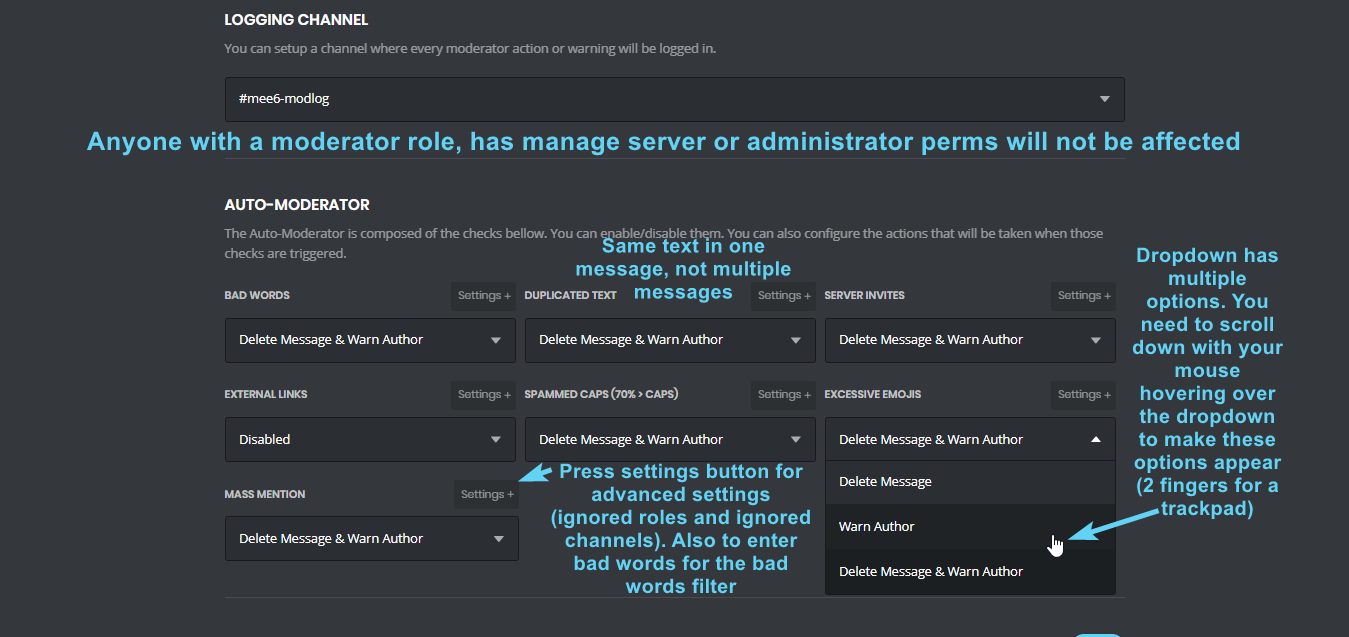
Hello the big word function in moderation does not work I enter the forbidden word it does not work.
@strong path
dire yarrowBOT
 strong path
top text
buoyant moon
Thanks
strong path
np
dire yarrowBOT
Alright, @worn crater has been warned because 'Posted an invite'.
 mental condor
I am using the Youtube plugin but whenever The utuber uploads a vid mee6 never announes it
oh
Crap
@ripe rivet will it be fixed?
Ok thx
plz fix ASAP
 wary moss
Why is it that the max lvl on my server is 10
and i cant find anything to put it higher
i have a rank of 25 added to
 carmine holly
Make sure mee6 role is above the role it is offering
wary moss
Ahhh
Ill look for that
Wait
its not
-,-
@carmine holly have any onther ideas ?
 faint dome
It needs to be
 pure obsidian
Is Mee6 role above that bot's?
buoyant moon
Yes
pure obsidian
can you double check?
strong path
Can't kick the bot manually?
 wicked condor
Bot is slowing down i think
buoyant moon
Because the bot keeps clashing with my other bots
So that’s why I wanna kick it but I can’t even manually kick it
I can’t kick it! It’s my server
It’s over in grey
wicked condor
You are the owner of said server?
buoyant moon
I’m on iPhone I know how to kick it it’s over in grey I can’t kick it
buoyant moon
It is
dire yarrowBOT
So... @buoyant moon, I've decided you should be level 3.
Don't get too excited, mmk.
buoyant moon
Guys when you figure what’s wrong @ me
 hoary stream
@buoyant moon Server Settings > Members > The User > Kick User
buoyant moon
I know how to kick but when I try kick/ban it’s highlighted over in grey
 sacred nexus
Well... Good luck..
 kindred pelican
mee6 ignores other bots completely now
no idea if the devs know why or if they're tryna fix it
for automod, probably will ignore bots regarding other things too, talking to dynamite
yeah
unsure if his problem would be fixed if the toggle was fixed
doubtful
 harsh smelt
I find a bug: I put that when a person joined my server gives him a role except that MEE6 gives him the role but in addition he gives Muted !
pure obsidian
That means they were muted when they were present in the server, and Mee6 is trying to persist that. (to avoid mute evasion on rejoining)
 loud hamlet
Connect to a server is so hard... Can I send a video?
buoyant moon
I have a problem !clear is no longer working
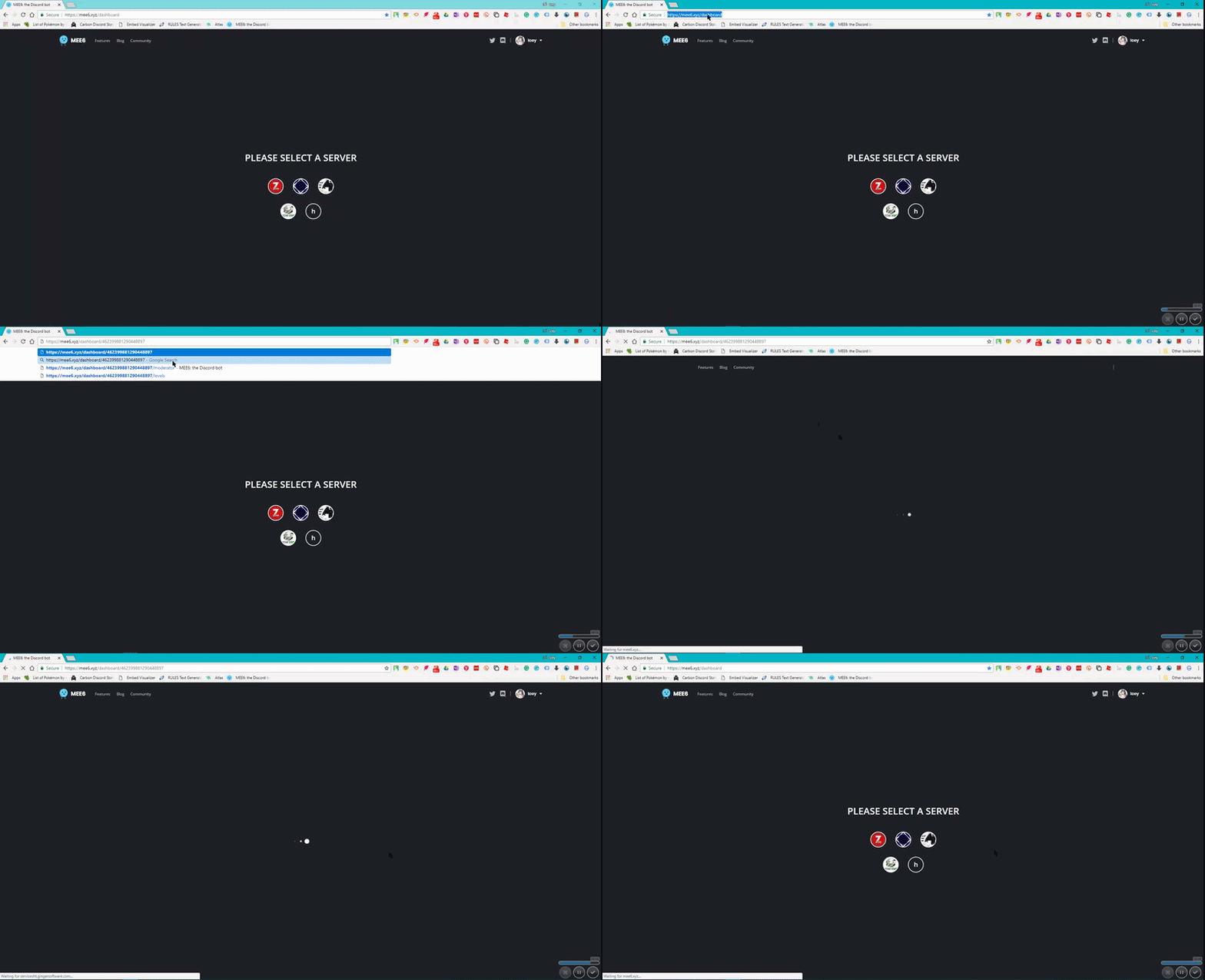
When i go into the dashboard all i see is this and it never goes away
It only forever loads
strong path
!!tag clearinfo
wind windBOT
The clear command allows you to clear the last xx amount of message or to clear one user without clearing anyone else.
Use !clear 1-1000 to clear the last xx messages (example !clear 10)
or !clear @name to clear all the message of @name in the last 100 messages
+ I need manage messages permission
+ I need view message history permission (otherwise I will respond with -1 messages cleared)
+ you need to check the checkmark next to clear on the plugin page.
+ you need to set your role as moderator (located at the top of the plugin page in the moderator tab)```Are you using Safari?
strong path
Use Chrome or Firefox
 strong path
For the !clear command, it's discord, nothing mee6 can do @buoyant moon
Other bots are having the same problem
strong path
For the !clear command, it's discord, nothing mee6 can do. Other bots are having the same problem.
 alpine walrus
yes just wait it out
dire yarrowBOT
So... @buoyant moon, I've decided you should be level 1.
Don't get too excited, mmk.
harsh smelt
@pure obsidian how repear the bug ? (I find a bug: I put that when a person joined my server gives him a role except that MEE6 gives him the role but in addition he gives Muted !)
alpine walrus
@harsh smelt check his permissions
harsh smelt
?
pure obsidian
@harsh smelt Let me as well repeat what I said: That means they were muted when they were present in the server, and Mee6 is trying to persist that. (to avoid mute evasion on rejoining)
not a bug
harsh smelt
ok but how can I prevent her ?
strong path
Let ali take care of this
alpine walrus
kk
harsh smelt
ok but how can I prevent her ? @pure obsidian
pure obsidian
You can't, this is an intended behaviour (fair too) just !unmute the user rejoining the server.
perhaps their mute was a leftover
harsh smelt
mee6 automute when i join 2x or more ?
pure obsidian
No, it persists the mute if you were already muted while being in the server.
harsh smelt
I leave when i have 0 role and i join i have muted and auto role is normal ?
dire yarrowBOT
So... @harsh smelt, I've decided you should be level 4.
Don't get too excited, mmk.
harsh smelt
ok when new user join his no muted ? just more join, exactly ?
harsh smelt
i am frensh sorry for my langage 😃
ok when a new user join the server he is not mute ? but if he leaves and comes back he is muted ?
pure obsidian
User joins the server
-A mod/admin mutes them
User leaves and joins back trying to evade the mute
-Mee6 persists their mute and gives them back the muted role
harsh smelt
ok tanks
pure obsidian

 cerulean flint
In custom commands If remove role is given before the give role it stops the bot.
@strong path ask him lol
 grand island
Bug report on MEE6 page
After i add the bot to the server for some strange reason it keeps staying on this page
No matter how many times i click the server i want it doesnt work
I have no ad blocker, i use chrome, and i even tried using an incoghito tab but still nothing works
just chrome

with incognito in chrome

stays on this one page
buoyant moon
@grand island Have you tried a different browser?
 sage citrus
it should work in chrome though
carmine holly
Google only uses Google Chrome
 fallen forum
I accidentally kicked mee6 out from my server, how do I re invite, invite link isn't working anymore
strong path
Here's the link to invite it back
https://discordapp.com/oauth2/authorize?client_id=159985415099514880&scope=bot&permissions=66321471&response_type=code&redirect_uri=https%3A%2F%2Fmee6.xyz%2Fguild-oauth

Discord
Step up your game with a modern voice & text chat app. Crystal clear voice, multiple server and channel support, mobile apps, and more. Get your free server now!
 frail sky
@grand island same problem for me.
buoyant moon
Can some1 help me !mute command is no longer working
It says that something went wrong in MEE6 land
<@&193123929701875712>
 limber knoll
!!tag mutehelp
wind windBOT
Prerequisites:
- Moderator plugin is enabled
!mutecommand isn't disabled- Bot has role with Manage Roles and Manage Channels permissions
- Muted role is under MEE6 role
- You're trying to mute someone using
!mute @mention reason, otherwise it will not work
If user got Muted role but still can talk means there's issue with your channel permissions
Go to Channel Settings -> Permissions
- If that's public channel that can be accessed by anyone:
- Set

Send Messagesfor all roles except Muted - Set

Send Messagesfor Muted role
- If that's secret channel that requires *special* role to access it:
- Set
Send Messages
Read Messagesfor special role - Set
Send Messages Read Messagesfor Muted role - Set
Send Messages Read Messagesfor@everyonerole
limber knoll
try that
limber knoll
np
dire yarrowBOT
Alright, @buoyant moon has been warned because 'Posted an invite'.
pure obsidian
what happens when you try to open it?
fallen forum
This dashboard site is blank
pure obsidian
@fallen forum whats the browser?
pure obsidian
can you try with desktop mode enabled?
dire yarrowBOT
So... @fallen forum, I've decided you should be level 1.
Don't get too excited, mmk.
pure obsidian
@fallen forum Try opening on incognito tab, if that didn't work too, clear browser caches/cookies and try again.
fallen forum
@pure obsidian still not working
pure obsidian
I'm out of solutions to be honest, I can only suggest you to use firefox or opera.
fallen forum
Ok, I'll try opera
pure obsidian
is that chrome app of yours up to date btw?
carmine holly
What is your android version btw..
carmine holly
Then do it...
 novel wigeon
strong path
fallen forum
novel wigeon
strong path
fallen forum
@pure obsidian thanks, it worked
pure obsidian
Glad to hear 👍🏽
fallen forum
@carmine holly thanks to you too
dire yarrowBOT
Alright, @buoyant moon has been warned because 'Bad word usage'.
Alright, @buoyant moon has been warned because 'Bad word usage'.
Alright, @buoyant moon has been warned because 'Bad word usage'.
 red relic
i enabeled tempmute command and it doesn work pls help
wind windBOT
Prerequisites:
- Moderator plugin is enabled
!mutecommand isn't disabled- Bot has role with Manage Roles and Manage Channels permissions
- Muted role is under MEE6 role
- You're trying to mute someone using
!mute @mention reason, otherwise it will not work
If user got Muted role but still can talk means there's issue with your channel permissions
Go to Channel Settings -> Permissions
- If that's public channel that can be accessed by anyone:
- Set
Send Messagesfor all roles except Muted - Set
Send Messagesfor Muted role
- If that's secret channel that requires *special* role to access it:
- Set
Send Messages Read Messagesfor special role - Set
Send Messages Read Messagesfor Muted role - Set
Send Messages Read Messagesfor@everyonerole
dire yarrowBOT
!mute @CoolGuysNameHere You have been too cool.
!tempmute @SecondLameGuyHere 3h Too lame.
- I must have "Manage Channels", and "Manage Roles" for my permissions.
- I must have a role above the "Muted" role I create.
If there are problems, please check that the Muted Role does not have send messages globally or per channel.
Durations for time based commands.
50s50 seconds.50m50 minutes.50h50 hours.50d50 days.
 fresh plaza
 grand kestrel
mee6 is off
strong path
Does it appear in the offline list?
grand kestrel
strong path
Alright, what's your server ID?
grand kestrel
its not my server
strong path
I mean in that server where it's offline
strong path
thx
dire yarrowBOT
So... @grand kestrel, I've decided you should be level 1.
Don't get too excited, mmk.
grand kestrel
lol
 mortal oxide
@grand kestrel  , does MEE6 is still offline on the server (
274260111415836675)?
mortal oxide
Np 👌🏻
 serene fossil
it's not working on our server either... but it shows online
mortal oxide
@serene fossil currently restarting.
serene fossil
ah ok, thankies
dire yarrowBOT
So... @serene fossil, I've decided you should be level 3.
Don't get too excited, mmk.
serene fossil
orale XD
dire yarrowBOT
Alright, @uneven ginkgo has been warned because 'Posted an invite'.
dire yarrowBOT
lick.mp4#9720 (329390153170681856) is muted for 1 hour because of 'craposting in #〉bugs-reports | not using #〉commands for memes when he has been told to', boss.
buoyant moon
when your mee6 subscribes to reddit, it can break rules that you got in your discord like advertising, perhaps there should be in more depth options?
 quasi tree
!add bot
dire yarrowBOT
Bala, this command is disabled in this channel. 
strong path
 sudden yoke
debil XD
dire yarrowBOT
Alright, @icy pagoda has been warned because 'Posted an invite'.
 orchid shoal
strong path
orchid shoal
strong path
disable it in the moderator plugin
carmine holly
Xd
 fading saddle
I have a problem, when I go to the MEE6 website, I go there where the plugins are, when I click to configure the plugins, it stays on an infinite black screen, what do I do?
limber knoll
banned role?
limber knoll
what roles do you have?
 main edge
everything except manage server
limber knoll
that's perms
I meant roles
such as lvl 1 plugin, admin, and head user for example
or like my roles for example
 surreal rampart
why isn’t he playing music??!!!!
dire yarrowBOT
Alright, @charred moon has been warned because 'Posted an invite'.
 storm bloom
Any one else having trouble with the !clear command?
dire yarrowBOT
Alright, @finite frost has been warned because 'Posted an invite'.
 grave knot
nani?
dire yarrowBOT
So... @grave knot, I've decided you should be level 2.
Don't get too excited, mmk.
grave knot
:v
 dusty rampart
 bitter owl
@dusty rampart about?
limber knoll
?
buoyant moon
when your mee6 subscribes to reddit, it can break rules that you got in your discord like advertising, perhaps there should be in more depth options?
 acoustic gyro
hey, when i say the bot a command that should give roles it says that there is an error .what did i do wrong?
strong path
!!tag oops
wind windBOT
Oops, something went wrong in MEE6 land!  This error has been reported to our Team. We'll work hard to fix it.
If this happens when:
* using custom commands, apparently:
* Role bot tries to give is higher than his own. To fix that, move the bot's role above role he tries to give.
* User don't have all roles bot tries to remove, that's known bug.
* Missing Manage roles permission. Go to Server Settings -> Roles -> Bot role -> Manage Roles permission
* using moderator commands:
* Muted role is above Mee6's role. Bot can't give roles that higher than his own. Move it down.
* Missing Manage roles permission. Go to Server Settings -> Roles -> Bot role -> Manage Roles permission
carmine holly
Finally this tag..
 ivory yacht
MEE6 not deleting the correct amount of messages when you go to clear them
carmine holly
 dire yarrowBOT
MaSt𝓮𝓡 |━╤デ╦-(ಠ_ಠ)┌П┐, this command is disabled in this channel.
strong path
 molten robin
 still owl
that happened to me when i did the !clear cmd i did !clear @MEE6#4876 5
storm bloom
@cold bear I can’t get the command to work at all. Not for 10 messages not for 100. 😦 tried in 2 diff servers where it has admin access.
Wound up just using the copy channel discord command to create a new one and deleted the old
buoyant moon
Did you add your role to the command in the moderator plugin @storm bloom ?
dire yarrowBOT
Alright, @swift zealot has been warned because 'Posted an invite'.
Alright, @swift zealot has been warned because 'Posted an invite'.
@swift zealot did 'invite spam' and got the ban hammer! 
 split jolt
Is it possible that the twitch command is not working properly? Because a friend of mine tried to stream recently and it didn't got shown on my server
 cold bear
!twitch has no relation to twitch plugin, make sure you added right account and saved settings, also you need to wait at least 15 mins
 keen obsidian
discrim?
buoyant moon
Notification bot dont work for youtube i didn't get notified
limber knoll
Try deleting and readding the channel @buoyant moon
Othwise its buggy try adding via link
buoyant moon
ty!
buoyant moon
:CHECK6:
 wicked mauve
Hey, I am new to Discord and bot thing. the problem I have caught is that I added MEE6 in my server and I want to test it out if it work fine. I tried to use !help but turned out it doesn't work like Mee6 didn't reply to !help for some reason. Is there anything I have made mistake?
Never mind, just found it is working fine lol
 sour sentinel

This crap is constantly happening with anyone I want to warn, tempmute, tempban, ext.
cold bear
!!tag oops
wind windBOT
Oops, something went wrong in MEE6 land! This error has been reported to our Team. We'll work hard to fix it.
If this happens when:
* using custom commands, apparently:
* Role bot tries to give is higher than his own. To fix that, move the bot's role above role he tries to give.
* User don't have all roles bot tries to remove, that's known bug.
* Missing Manage roles permission. Go to Server Settings -> Roles -> Bot role -> Manage Roles permission
* using moderator commands:
* Muted role is above Mee6's role. Bot can't give roles that higher than his own. Move it down.
* Missing Manage roles permission. Go to Server Settings -> Roles -> Bot role -> Manage Roles permission
buoyant moon
btw mee6 website cannot work on my laptop. and only mine... for some reason. if i go to the dashboard it will take me back to home.
limber knoll
@buoyant moon have you cleared your cache and cookies?
buoyant moon
k
sage citrus
Looks like there's an issue with adding timers, i selected the channel multiple times and it did create a webhook but it seems the dashboard didn't realize i selected the channel because it still says "please select a channel" and the Create button is grayed out (note: this is for adding new timers, IIRC this issue with editing timers is already known)
 lament dome
!hi
lament dome
@limber knoll
how can i help U
limber knoll
Your in #〉bugs-reports
Generally this area is for those needing help with mee6 in some way
lament dome
what!
dire yarrowBOT
So... @lament dome, I've decided you should be level 2.
Don't get too excited, mmk.
lament dome
@limber knoll a couple of days before my general channel got delete autometically
limber knoll
And your audit logs show mee6 removing it?
lament dome
@limber knoll mee6 in my server not deleting the invites messages !!!!!!!!
not warning the and not blocking the bad words
limber knoll
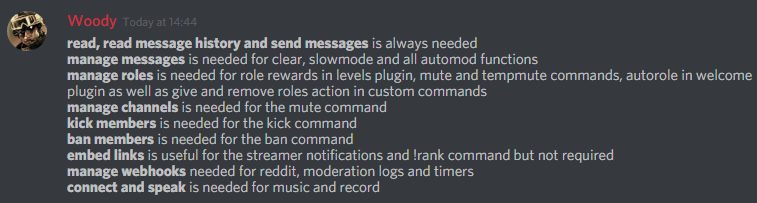
Mee6 needs manage messages, read messages, read history, send messages and will not remove them if said by a moderator
lament dome
@limber knoll my moderator is enabled but isn't working at all!!!
limber knoll
I meant moderators bypass your filters
@lament dome invite me into your server
We'll get it fixed together
dire yarrowBOT
Alright, @lament dome has been warned because 'Posted an invite'.
limber knoll
Dw i got it
lament dome
like this my mee6 isn't working
wind windBOT
The clear command allows you to clear the last xx amount of message or to clear one user without clearing anyone else.
Use !clear 1-1000 to clear the last xx messages (example !clear 10)
or !clear @name to clear all the message of @name in the last 100 messages
+ I need manage messages permission
+ I need view message history permission (otherwise I will respond with -1 messages cleared)
+ you need to check the checkmark next to clear on the plugin page.
+ you need to set your role as moderator (located at the top of the plugin page in the moderator tab)```i want to clear all the messages
lament dome
how to do
limber knoll
it will clone the permissions in it
right click on the channel you want to delete and select clone channel
lament dome
its been 3days my bro created our channel
limber knoll
ok so !clear then 100000 will do it
limber knoll
np
buoyant moon
I can't invite Mee6 to a second server I own, as in directly passed the 'Please select a server' screen when I select a server it doesn't show up.
limber knoll
@buoyant moon dashboard screenshot please
buoyant moon
It isn't on the dropdown.
Alright well I am no longer experiencing an issue with it
limber knoll
sometimes it's dns related as to why it doesn't refresh immediately
kindred pelican
Lockey, got any info about that problem?
kindred pelican
😃
dire yarrowBOT
Danya Albatros, this command is disabled in this channel.
strong path
dire yarrowBOT
Alright, @buoyant moon has been warned because 'Posted an invite'.
I would like to help you, but if you don't tell us what your problem is then I can't really help. Please tell us what your problem is and not that you have one.
 serene ruin

buoyant moon
Hi <@&435889630408081408>#4876. I am on mobile trying to get the auto mod on. I put some bad words in the list but it doesnt work. What else should I do to make it work
dire yarrowBOT
So... @buoyant moon, I've decided you should be level 1.
Don't get too excited, mmk.
buoyant moon
Anybody have a clue?
pure obsidian
What doesn't work exactly? you can't add words to the list or you already did and testing it?
buoyant moon
Testing
pure obsidian
who is testing it?
buoyant moon
I tried testing it and invited a friend to test the auto mod but doesnt work
pure obsidian
Auto-moderator ignores users with admin/mod and manage server privileges.
buoyant moon
There's nothing to screenshot
Its just normal I mean what should I do else than give the bot authority
And list some bad words
pure obsidian
Do note that if you have added the word curse for example, Mee6 won't be able to detect if you add an another character before and after, like .curse. or ,curse (can be commas, dots, etc)
@buoyant moon So let me get this straight, you set it to delete the message and warn user?
or just delete?
pure obsidian
I'm not referring to the list, I'm referring to the moment when the user is trying to use a badword in a message.
if you screenshot me your badword configuration page + screenshot when the user is using the word, we can get a grasp on whats up
buoyant moon
No need for when the user uses it imagine a normal guy using one of these words
I think it refers to allowed roles and stuff
pure obsidian
did they add any commas or dots after the word? like curse, or curse. or even "curse"
buoyant moon
No
pure obsidian
can you double check mee6's permissions on that channel, Read Messages, Send Messages, Read Message History and Manage Messages.
buoyant moon
Ok did
dire yarrowBOT
So... @buoyant moon, I've decided you should be level 2.
Don't get too excited, mmk.
pure obsidian
So Mee6 had those perms already?
buoyant moon
No I just set them I will check again
pure obsidian
Alright, make sure he has those perms and re-test the system again via a user who is not admin/mod
buoyant moon
Ok
dire yarrowBOT
аня, this command is disabled in this channel.
аня, this command is disabled in this channel.
аня, this command is disabled in this channel.
аня#1189 (462977413089853440) is muted for 2 hours because of 'complete brainless idiot spamming a command when it clearly said to him that he can't use it in the channel, gg', boss.
 mild crescent
Ahahahahahahah
 sand orbit
When i warn some1 it goes into a text channle not dms
pure obsidian
@sand orbit Intended behaviour, not a bug.
sand orbit
How do i fix it
pure obsidian
It's not a bug that's just how it works.
sand orbit
And the bad word thing doesnt work eaither
pure obsidian
Can't test it on yourself.
pure obsidian
did you set it to warn and delete or just delete?
sand orbit
Both
dire yarrowBOT
Full List of my Permissions that I use...
https://i.imgur.com/3Wd5wKZ.png
 pure obsidian
☝🏽 make sure Mee6 has those perms on that channel, especially read messages/read message history/send messages and manage messages
sand orbit
And the warn it says privatly msg them and i checkes that and it still sent it to a text channle
pure obsidian
@sand orbit I'm repeating again, that's intended, none of the moderator commands send a direct message to the user
strong path
Are you talking about automod warns?
If yes, then yeah, they do DM you about bad words 'n duplicate text 'n stuff
strong path
lol
buoyant moon
@Alireza#4876 thanks alot it worked
 cosmic night
Man the MEE6 filter is bad because if you take a bad word and make spaces like t h i s the bad word wont get filtered
limber knoll
You can put spaces in the bad word filter
 heady epoch
!clear command is not working? Please help me.
wind windBOT
The clear command allows you to clear the last xx amount of message or to clear one user without clearing anyone else.
Use !clear 1-1000 to clear the last xx messages (example !clear 10)
or !clear @name to clear all the message of @name in the last 100 messages
+ I need manage messages permission
+ I need view message history permission (otherwise I will respond with -1 messages cleared)
+ you need to check the checkmark next to clear on the plugin page.
+ you need to set your role as moderator (located at the top of the plugin page in the moderator tab)```Error : Oops, something went wrong in MEE6 land! SAD6 This error has been reported to our Team. We'll work hard to fix it.
I look
Thanks Its Work Now
 shadow steppe
The clean message doesn't work on my server
sage citrus
can u explain?
 shell frigate
if someone edits a message that has a bad word it doesn't delete it
dire yarrowBOT
So... @shell frigate, I've decided you should be level 1.
Don't get too excited, mmk.
strong path
Yes, sadly, mee6 can't protect against edits
shell frigate
so people in my server have been spamming "hey" and edit it it a bad words thing
shadow steppe
when i do the copmmand !clean @tame oriolee or !clean 50 it doesn't work
strong path
!!tag clearinfo
wind windBOT
The clear command allows you to clear the last xx amount of message or to clear one user without clearing anyone else.
Use !clear 1-1000 to clear the last xx messages (example !clear 10)
or !clear @name to clear all the message of @name in the last 100 messages
+ I need manage messages permission
+ I need view message history permission (otherwise I will respond with -1 messages cleared)
+ you need to check the checkmark next to clear on the plugin page.
+ you need to set your role as moderator (located at the top of the plugin page in the moderator tab)```Moderator plugin enabled?
shadow steppe
but in my other server that work ....
strong path
Did you put the @everyone role as a banned role?
strong path
Just give me an invite
shadow steppe
i send you an invitation
strong path
In DM, right? :/
shadow steppe
yes
strong path
hmmm... Did Clyde give you a message? 🤔
You know just post your invite right in here
dire yarrowBOT
So... @shadow steppe, I've decided you should be level 2.
Don't get too excited, mmk.
Alright, @shadow steppe has been warned because 'Posted an invite'.
shadow steppe
thank you 😉
buoyant moon
On my server there are two autoroles and three roles p/lv in Mee6.
When a user join, Mee6 removes all autoroles and gives only the level role. I wanted Mee6 only give the level role. 
 loud cloak
Idk if this is really a bug, technically it is working how it is ment to be, but it's not the preferred outcome. Whenever a person goes live on YouTube and ends the stream, the bot posts the video of the offline stream instead of the link to the live streamed video
 grave reef
Mee6 is offline for my server
id: 399915524781506562
 supple magnet

 sage citrus
@supple magnet works fine for me
make sure the server id is valid and u have perms on it
bitter owl
@sage citrus Problem was solved, vpn was restricting
sage citrus
oh
sage citrus
#〉commands @pliant hamlet
 burnt swan
When im using custom commands to gove roles it shows a error
 fringe heron
Right on my server when I use the “!level” it does nothing to view levels I use “!rank” as “!level” doesn’t work
limber knoll
@fringe heronhi
dire yarrowBOT
You can access my dashboard at https://mee6.xyz/dashboard, and login with your Discord Account.
limber knoll
Go there enable levels plugin

And ensure mee6 has read messages, read history, send messages and if giving roles manage roles, and be above the roles being rewarded
fringe heron
It’s all enabled and dunno why it doesn’t bring the leaderboard
dire yarrowBOT
Alright, @toxic oyster has been warned because 'Posted an invite'.
 dense ether
...
buoyant moon
what is the commande for clear
 leaden osprey
!clear <amount of messages> @buoyant moon
buoyant moon
thx
 thin forge
!clear 1000
dire yarrowBOT
Chaosverursacher, it doesn't look like you can use that.
buoyant moon
we doesn't work
faint dome
it's not mee6
buoyant moon
that what
strong path
!!tag clearinfo
wind windBOT
The clear command allows you to clear the last xx amount of message or to clear one user without clearing anyone else.
Use !clear 1-1000 to clear the last xx messages (example !clear 10)
or !clear @name to clear all the message of @name in the last 100 messages
+ I need manage messages permission
+ I need view message history permission (otherwise I will respond with -1 messages cleared)
+ you need to check the checkmark next to clear on the plugin page.
+ you need to set your role as moderator (located at the top of the plugin page in the moderator tab)```Also enable the moderator plugin
dire yarrowBOT
You can access my dashboard at https://mee6.xyz/dashboard, and login with your Discord Account.
 eternal fiber
If you are the creator of the server do you get levels or no
 unique brook
On #〉announcements, duplicate emojis are mentioned, but what about duplicate messages? this is qualifying as duplicated text 🤔
Or maybe that's intended? I was hoping it would be more like, anti-spam
cold bear
premium only repeats there 4 times
unique brook
So it is intended? guess I'll have to disable it :(
cold bear
intended yes
cold bear
congratz
but this is not mee6 issue, we can't fix that :^)
 zealous leaf
:(
carmine holly
Xd lol..
 hollow tiger
oh lol
 teal viper
@dire yarrow как тебя настроить?
 cinder lantern
well I got muted 5 mins after rank in bots and offtopic
cinder lantern
im reporting a staff
dire yarrowBOT
Alright, @snow gust has been warned because 'Posted an invite'.
Alright, @snow gust has been warned because 'Posted an invite'.
Alright, @snow gust has been warned because 'Posted an invite'.
@snow gust did 'invite spam' and got the ban hammer!
strong path
What is that file?
Upload to something like youtube then post the link here if you want to show something
@tired anchor
 dawn lava
so well I have some problems with the auto-moderator:
I set FFFF for exsample in the bad word list, but when I write it i dont get warned like I set it up
dire yarrowBOT
dawn lava
thank you 😄
 abstract cave
My leaderboard and the members individual ranks aren't the same 😦 tried trouble shooting with an admin, and told me to post in here
dire yarrowBOT
Alright, @buoyant moon has been warned because 'Posted an invite'.
Alright, @buoyant moon has been warned because 'Posted an invite'.
 sharp cedar
I have a problem on mobile, I can not change account for Mee6, it reconnects me automatically with the other account
strong path
!!tag logout2
wind windBOT
If you keep failing to logout from MEE6 website these steps can help you:
Chrome Mobile:
1. Open https://mee6.xyz
2. Tap on 🔒 icon in address bar
3. Tap on Site settings button
4. Tap on Trash bin icon under Usage and tap Clear all
5. Repeat same steps for https://discordapp.com
6. Done!
Chrome:
1. Open https://mee6.xyz
2. Click on lock icon in address bar
3. Click on 🍪 Cookies
4. Pick mee6.xyz from the list and click Remove
5. Click Done
6. Repeat same steps for https://discordapp.com but pick discordapp.com in cookies list instead
Firefox:
1. Click the menu button ≡ and choose ⚙ Preferences
2. Click on 🔒 Privacy & Security and go to Cookies and Site Data section
3. Click on Manage Data...
4. Search for mee6.xyz and discordapp.com sites. Remove them if found
5. Done!
sharp cedar
Thanks😃
dire yarrowBOT
Alright, @idle imp has been warned because 'Posted an invite'.
kindred pelican
mee6 just did this in my server even thought the plugin is disabled https://i.imgur.com/lP0GCOH.png
 sage citrus
screenshot in the dashboard?
buoyant moon
Oops, something went wrong in MEE6 land! :SAD6: This error has been reported to our Team. We'll work hard to fix it.
sage citrus
@buoyant moon it doesn't have permission to do something
@kindred pelican Anyone in your server with the Manage Server permission can access the dashboard and enable plugins
buoyant moon
Okay
 bright chasm
I can not use the clear command on my server!
buoyant moon
Make sure Mee6 has Manage messages Permissions
buoyant moon
Do you have any Banned roles in the clear command?
bright chasm
No
buoyant moon
and you are using !clear x (where x is the number of messages)?
bright chasm
Ye
buoyant moon
Does mee6 give any error message?
bright chasm
No
buoyant moon
Does he have read messages in the channel you are trying to clear?
bright chasm
Yes
dire yarrowBOT
So... @bright chasm, I've decided you should be level 1.
Don't get too excited, mmk.
buoyant moon
hmhm
bright chasm
oh I'm stupid I have no moderator enabled in the dashboard ...
buoyant moon
That would've been my next suggestion 
strong path
with mee6 or you?
bright chasm
Mee6
strong path
Are you on Android btw?
bright chasm
Ye
strong path
oh, also, on what would you like to use emojis? Welcome message? Level up message?
external emojis won't work on timers
should work elsewhere
To use external emojis, you need to use the emoji's id. Do this on Android to get it
On other devices, do \:emoji: to get the id
wind windBOT
 SturleyL#1090 was banned
strong path
softban
 grizzled ocean
If i type stuff in the chanel i have a time set 4 hours betwen mesages, its keep spaming the timer messages
strong path
did you edit the timer to that?
dire yarrowBOT
So... @grizzled ocean, I've decided you should be level 1.
Don't get too excited, mmk.
grizzled ocean
and if i type stuff in the chat its keep showing me the timer message
strong path
delete the old timer then create a new one with the 4 hours
grizzled ocean
i have 6 timers
strong path
delete the one that is spamming
grizzled ocean
3 of them are spamming..
 main breach
como le ago
wind windBOT
MODEGM#8740 was banned
grave reef
Mee6 is offline for my server
id: 399915524781506562
dire yarrowBOT
So... @grave reef, I've decided you should be level 1.
Don't get too excited, mmk.
buoyant moon
Hello
bitter owl
@buoyant moon Need some help?
 deft gull
@limber knoll hey there , ihave been having an issue with mee6 , is not deleting duplicate messages in chats .
can youu help
limber knoll
@deft gull one message or multiple?
deft gull
whats that
limber knoll
!!tag slowmode
wind windBOT
 No tag slowmode found.
limber knoll
!slowmode
dire yarrowBOT
Whoopsises, please provide a valid timeout in 'seconds'.
deft gull
lol
limber knoll
Fine real example
dire yarrowBOT
#〉bugs-reports is now in s l o w m o t i o n. Regular users can only post once every 30 seconds or so.
(Suggestion, type !slowmode off when you want things to be normal again)
limber knoll
Try spamming
deft gull
g
dire yarrowBOT
#〉bugs-reports is no longer slowmoded, keep it calm guys!
deft gull
30 secs . and thats with mee6 ?
limber knoll
Yes
deft gull
soo the duplicate delet is not funtioning ?
limber knoll
Its !slowmode seconds
Duplicated text is for one message
Like test test test test test test test
deft gull
the commands is !slowmode seonds ?
limber knoll
Yes
deft gull
ys that what ive been testing and is not working on my servers
and i also tried !slowmode 20 and not working lol
limber knoll
Mee6 has manage messages perms?
limber knoll
He doesn't know what admin is
dire yarrowBOT
Full List of my Permissions that I use...
https://i.imgur.com/3Wd5wKZ.png
deft gull
he has administrator powers
deft gull
he is under me
limber knoll
And in the channels ensure mee6 can read them in the channel perms
That's fine
Try the command now
deft gull
it dont work
dire yarrowBOT
So... @deft gull, I've decided you should be level 4.
Don't get too excited, mmk.
limber knoll
@deft gull dm invite please
deft gull
ok
 untold salmon
For some reason Mee6 appears offline on my server, while it's works here and on other servers
strong path
kick it then reinvite
untold salmon
Is there way to reset it on my side or something?
Okay, will it loose all levels and stuff?
strong path
No
untold salmon
Okay, thanks! 🙂
strong path
np
 crude rampart
Pls help meh lmao
strong path
YouTube is bugged
thin forge
Mute in speak-rooms is not working
bitter owl
@thin forge Bot is not meant to mute in Voice Channels
So you will need to add muted role manually
Want to learn the step-by-step?
thin forge
yes
thin forge
ok
bitter owl
Once you found it, press it and select Muted (grey role)
And repeat it for all Voice Channels (or do it in the Category that will affect all Voice Channels in it)
thin forge
ok
bitter owl
Then when you muted someone, it will restrict muted person in voice channels as well
thin forge
ok thank you
bitter owl
At anytime
buoyant moon
Comment on mets admis quelqun
kindred pelican
The level and timer plugins keep re-enabling themself, no one has access to the bot
I have disabled them 3 times today
buoyant moon
When I try to ban peopel it does not let me it says "You can't ban Mod's" even know they are not!
strong path
check their role perms
buoyant moon
I have
strong path
they may have manage server or admin perm
buoyant moon
Okay thanks
strong path
np
strong path
Not mee6's problem ¯_(ツ)_/¯
buoyant moon
!add Minecraft Song
dire yarrowBOT
Amir, this command is disabled in this channel.
 steady slate
lol
buoyant moon
!play Minecraft Song
dire yarrowBOT
Amir, this command is disabled in this channel.
leaden osprey
#〉commands @buoyant moon
 chrome moon
I was told to post this here after asking in support. We have it set to where the bot will message in a specific channel for level up notifications but it’s also messaging everyone when they level up as well.
 glad crane
!rank
dire yarrowBOT
YourSpaceMan, this command is disabled in this channel.
cold bear
#〉commands dude
steady slate
#〉commands is for commands @glad crane
glad crane
Thanks.
chrome moon
@cold bear it just started doing this, this week. I’m not sure if it’s just one private message or more than one after leveling up. I just wanted to make sure it was just a one time thing.
cold bear
afaik it will be sent only once
to make user know he can check level using !rank
and customize card
chrome moon
Ok awesome thank you.
cold bear
np
dire yarrowBOT
Alright, @idle imp has been warned because 'Posted an invite'.
So... @idle imp, I've decided you should be level 2.
Don't get too excited, mmk.
 bleak sky
<@&193123929701875712> hi, i was trying to use the bot in my server, making it send a message whenever i start to stream, but it just stopped at one point, it worked 3 times, then suddenly stopped working and i didn't change anything, anything at all
strong path
twitch api is having problems
bleak sky
oh so it's the same for everyone ?
strong path
yes
bleak sky
should i just leave everything as it is till when it gets automatically fixed ?
strong path
sure
bleak sky
alright, thanks !
strong path
have you enabled the moderator plugin?
strong path
Well, make sure it's not a perms problem first
dire yarrowBOT
Full List of my Permissions that I use...
https://i.imgur.com/3Wd5wKZ.png
 warm hull
nope it´s not that
strong path
did you add the @everyone role to banned roles? @warm hull
warm hull
yea
strong path
don't
dire yarrowBOT
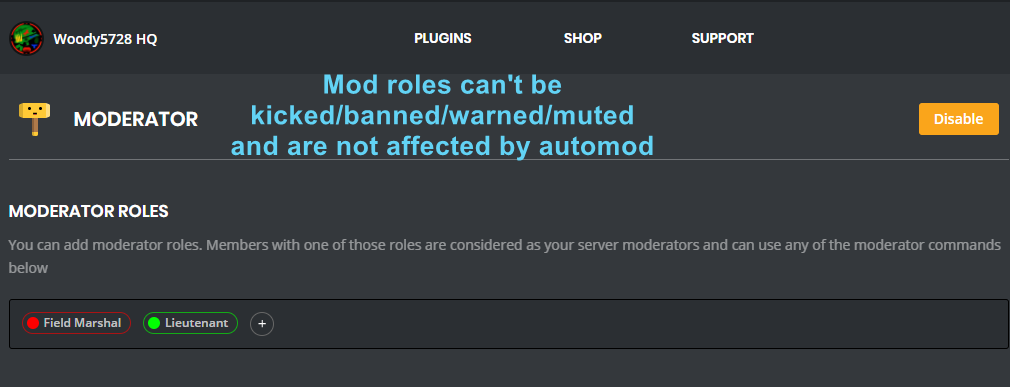
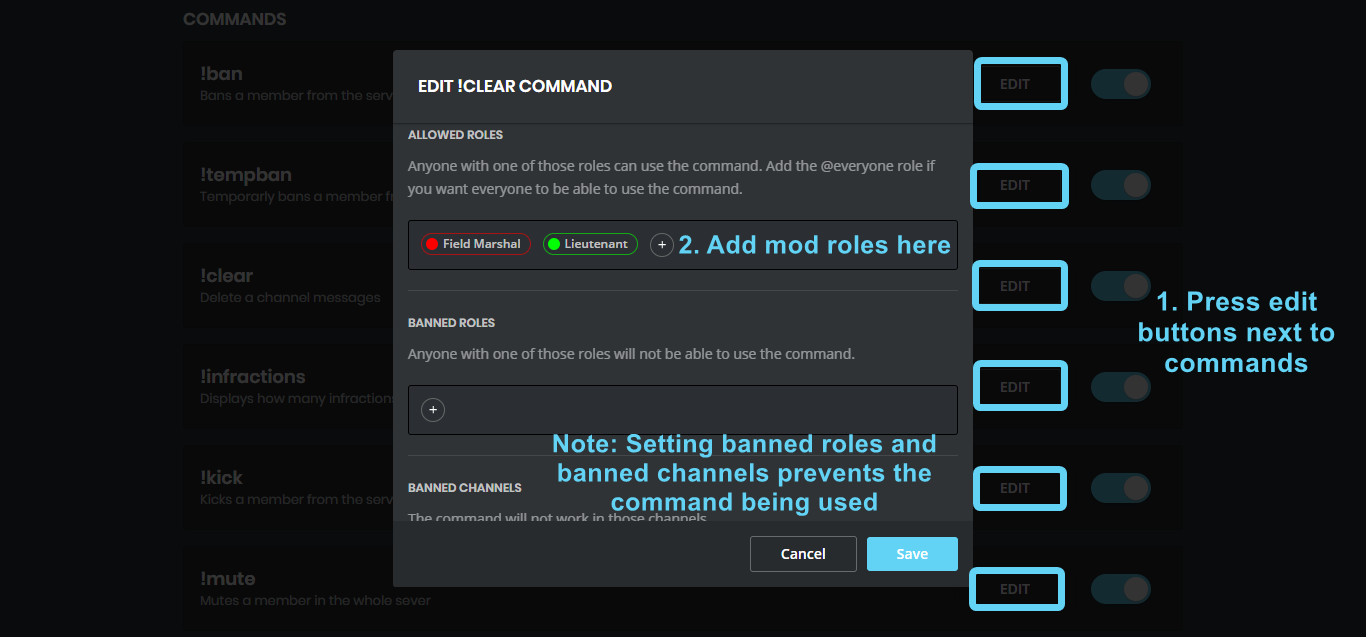
You can use the images below to help you configure my Moderator Plugin.
https://i.imgur.com/ZL24div.png https://i.imgur.com/675FdYd.png
 warm hull
still doesnt work
dire yarrowBOT
So... @warm hull, I've decided you should be level 1.
Don't get too excited, mmk.
warm hull
please help to fix
 fringe flax
Lol rekt.
warm hull
what
fringe flax
What are you having problems with?
warm hull
nothing
fringe flax
Refresh mee6 page and make sure it’s enabled.
warm hull
have already done that
fringe flax
^
warm hull
nope
fringe flax
Is it in the online list?
fringe flax
Try to kick it the add it back, had to do that for one of my servers last night.
warm hull
ok
strong path
Can you let the support guy handle this please? @fringe flax
fringe flax
✌️
strong path
Can you give me an invite please?
warm hull
ok
dire yarrowBOT
Alright, @warm hull has been warned because 'Posted an invite'.
warm hull
cant
fringe flax
Lmao
warm hull
add me
fringe flax
Dm it to him
 zenith notch
dire yarrowBOT
zenith notch
dire yarrowBOT
So... @zenith notch, I've decided you should be level 1.
Don't get too excited, mmk.
dire yarrowBOT
gabs, it doesn't look like you can use that.
wind windBOT
Prerequisites:
- Moderator plugin is enabled
!mutecommand isn't disabled- Bot has role with Manage Roles and Manage Channels permissions
- Muted role is under MEE6 role
- You're trying to mute someone using
!mute @mention reason, otherwise it will not work
If user got Muted role but still can talk means there's issue with your channel permissions
Go to Channel Settings -> Permissions
- If that's public channel that can be accessed by anyone:
- Set
Send Messagesfor all roles except Muted - Set
Send Messagesfor Muted role
- If that's secret channel that requires *special* role to access it:
- Set
Send Messages Read Messagesfor special role - Set
Send Messages Read Messagesfor Muted role - Set
Send Messages Read Messagesfor@everyonerole
 last ether
the youtube announcement thing doesnt work in my server
last ether
ok thx
 misty zodiac
I have a bug to report
strong path
do it
 viscid pawn
My bot isn't annoucing my Twitch streamers anymore. Is it bugged?
strong path
Twitch API is having problems
strong path
np
 faint bison
use incognito
limber knoll
@buoyant moon chrome?
faint bison
thats chrome
faint bison
try doing ctrl+shift+r
nah chrome is the most compatible along with firefox and opera
and also disable adblocks
if you use them
buoyant moon
Ah...
limber knoll
Before trying the other browsers
Clear your cache if cookies and general cache
Then press f12
faint bison
¯_(ツ)_/¯
buoyant moon
Nothing happened.
buoyant moon
What else do I need to do...?
limber knoll
As i said application tab then clear storage in there
It will remove your token
Enabling you to log in again
buoyant moon
Application Tab...
buoyant moon
No, no, as in, the Applications Tab in Google Chrome or Mee6?
limber knoll
Yes
buoyant moon
OK. Gotcha.
limber knoll
Now try reloading the page
buoyant moon
Still went blank on me...
dire yarrowBOT
So... @buoyant moon, I've decided you should be level 2.
Don't get too excited, mmk.
buoyant moon
Signing in and all.
limber knoll
Can you screenshot the console please
buoyant moon
Yes.
limber knoll
Press the windows key
Type ipconfig /flushdns
Space between the g and the /
Then press enter
limber knoll
Try reloging into the site
buoyant moon
Nope. Nada.
limber knoll
Ok must be higher up
limber knoll
Was gonna ask you thomas lol
 ionic meteor
lol xD
buoyant moon
limber knoll
He cant get into dashboard
ionic meteor
Im always lurking 
buoyant moon
I wish I knew what this error means.
limber knoll
Token issue i think
ionic meteor
can you press ctrl + shift + i and see if there are errors in console? @buoyant moon
ionic meteor
hmm
could still be the API not returning enough data
can you go to the Application tab -> open up local storage -> click on the mee6 website name -> delete the token
and then refresh
ionic meteor
👌
buoyant moon
For some reason when I went back in the token is still there...
buoyant moon
Aaaaaand it just went blank on me again...
ionic meteor
those errors you screenshotted, did you expand those?
buoyant moon
Expand as in...?
ionic meteor
wait, could you go back to the console, right click the console, and then select all, put that in a file, and DM the file to me
so we can do some investigation 😛
ofcourse don't forget to actually copy it xD
buoyant moon
Righto.
 primal topaz
@buoyant moon Thank you for the information, it appears to be a global issue and I am currently looking for the cause. I will get back to you as soon as possible!
 edgy escarp
I set it every hour [Mee6 Timers]
but it works every minute {This is a bug report, please correct this.}
primal topaz
@buoyant moon Alright, it appears that one of your subscriptions you added has a mis-communication.
https://www.equestriadaily.com was the only part I could recover, however your dashboard should load now
@edgy escarp our timers are very finniky, try re-creating it or using a different time. It usually is corrected after we issue a restart (which is not common)
https://www.youtube.com/channel/UCHPEAlLlzUttTD94ythcwVw was the channel, it was terminated and likely caused the issue.
edgy escarp
ok
buoyant moon
That explains it... I did hear that channel did get flakked.
Thank you, Samuel!
primal topaz
@buoyant moon no worries, we reported the problem to the developer so hopefully it won't be possible in the future.
buoyant moon
dire yarrowBOT
So... @buoyant moon, I've decided you should be level 3.
Don't get too excited, mmk.
 foggy ingot
@devout chasm
The Bot automatically exited from my server
dire yarrowBOT
So... @foggy ingot, I've decided you should be level 2.
Don't get too excited, mmk.
buoyant moon
Add it back then someone may have kicked it
foggy ingot
It appears that it is on the server but it is not in the list
buoyant moon
Okay, can you go to Server Settings -> Members and search for Mee6, then see if its offline?
foggy ingot
Not yet returned
buoyant moon
foggy ingot
Now it's back that some moderator took?
buoyant moon
That's a Link a Dev send in case the normal authorize doesnt work
 halcyon olive
Hey me and my friends have the mee6 bot to notify people when we’re live and it isn’t doing it. We kicked the bot and reinvited it and it’s still not working. Is it down?
carmine holly
@halcyon olive Youtube and twitch are having some issues. Developers are working on it..It will be back soon...
halcyon olive
Ok. Where can I go to stay updated on that? @carmine holly
carmine holly
It will updated on #〉announcements channel..
halcyon olive
Oh I just joined today sorry
carmine holly
NP
halcyon olive
Thank u tho
buoyant moon
Twitch plugins also down?
mortal oxide
No.
buoyant moon
Well they are not working on my server.
mortal oxide
@buoyant moon blame Twitch and his API, you need to wait for get the announcements (between 15 and 30 minutes approximately).
buoyant moon
Yesterday 2 streamers went online and we didn't receive any announcements yet
mortal oxide
Can MEE6 send messages there? Check again.
buoyant moon
The last announcements were at july 3
dire yarrowBOT
So... @buoyant moon, I've decided you should be level 4.
Don't get too excited, mmk.
buoyant moon
Some streamers went live yesterday and no announcements from then.
 wraith drum


 sturdy steppe
My live announcements didnt work at all yesterday
buoyant moon
How come if I access the bad words on mobile website using Safari I can’t type anything or paste or anything
 burnt hazel
@buoyant moon Safari is not a supported browser for the MEE6 dashboard
only Chrome, Firefox and Opera
burnt hazel
Did you try desktop mode on chrome @buoyant moon
 livid oasis
Who can help me plz
burnt hazel
What with @livid oasis
@buoyant moon Do you have access to a PC where you can add these bad words?
livid oasis
With Mee6, I have it :
buoyant moon
Yeah I have a pc, it’s just that when I need to access the section when I’m not home it’s annoying
livid oasis
the role "invité"
but when a person join my server, I dont have this role (invité) can u help me plz
burnt hazel
@livid oasis you need to move MEE6 above the roles to give in your server settings.
Server Settings > Roles > move Mee6 up
 blazing rover
Hello @burnt hazel , my bot does not show me stream, video or other alerts.
Is this normal? Do I have to uninstall Mee6 and reinstall it?
cold bear
no, this is know issue and there's nothing you can do from your side but waiting @blazing rover
blazing rover
@cold bear thank you for your reply
cold bear
👌 you're welcome
dire yarrowBOT

 buoyant moon
!tempmute
strong path
hmm?
 devout vessel
Sorry guys can anybody help, Mee6 isn't showing our going live notifications for our twitch streamers?
 feral carbon
Same
buoyant moon
Notification bot for youtube don't work i try everything but twitch is okay
strong path
youtube is bugged
 white notch
ok my auto-mod isn't working. whenever i spam the word spam it wont delete it. the only thing that works is the emoji spam preventer.
dire yarrowBOT
strong path
top text
 floral citrus
Mee6 bot has been offline in my server for the last few days at least. Server ID 239849884109242370. Thank you for any help!
 static whale
Twitch is currently having API issues @strong path This is why its not announcing, just have to wait as its a problem on Twitch's end
buoyant moon
The mute dont work why?
dire yarrowBOT
!mute @CoolGuysNameHere You have been too cool.
!tempmute @SecondLameGuyHere 3h Too lame.
- I must have "Manage Channels", and "Manage Roles" for my permissions.
- I must have a role above the "Muted" role I create.
If there are problems, please check that the Muted Role does not have send messages globally or per channel.
 thorny yacht
Does anyone know why Twitch alerts aren't appearing when streamers go live? Is this a Twitch related issue?
Ok. That's what I thought. Did they give you any ETA on when it should be fixed?
Alright. We shall wait. Thanks.
floral citrus
nvm about my post - kicking and reinviting Mee6 worked
dire yarrowBOT
So... @floral citrus, I've decided you should be level 1.
Don't get too excited, mmk.
 little obsidian
Ah, Twitch API is broken. Okay!
 gaunt quarry
yep having the same problems, is there a SLA on a fix for this?
 digital spire
Twitch alerts aren't working
strong path
Twitch API is having problems
 gilded hawk
When will YouTube video announcement will be fixed?
strong path
No ETA
gilded hawk
I don't understand
strong path
means there is no specific time on which they'll fix it
limber knoll
@gilded hawk delete your links and re add them if yt
@strong path if links already there it never refreshes
limber knoll
Should do