#〉bugs-reports
2 messages · Page 29 of 1
 strong path
 sterile basin
Got to check it again.
 buoyant moon
No one has manage server, no ones even admin on my server
buoyant moon
Google Chrome, I even tried on FireFox and same thing
I saved the commands, I even edited them to make sure, but i go back and its gone like i didnt even make a command
Maybe when you save it press f12 see if there are any errors.
I shall try that.
There is 1 error, but idk what to look for the error.
Screenshot it
And send it here
It may help the developers if there is an issue.
 stone depot
Cant add any music since the restart or w/e they ddid
sterile basin
It still can't give the role i want it to give... Gave all the permissions that i can give to mee6.
strong path
Have you moved it above the role it's trying to give?
sterile basin
It is higher than the role it's trying to give in the first place,I just checked it again and it has the manage roles permission
strong path
Is that command supposed to remove another role also?
sterile basin
No.
 dire yarrowBOT
So... @sterile basin, I've decided you should be level 1.
Don't get too excited, mmk.
strong path
Does that role that it's supposed to give exist still?
Also screenshot your custom command
sterile basin
Okay
buoyant moon
Doesn't let me put a specific YouTube channel down.
 sage citrus
buoyant moon
sage citrus
buoyant moon
Oh
sterile basin
That role it's supposed to give still exists.
Finally it's sent.
It's turned on.
 high depot
The bot won't complete the "!clear (number)" command.
strong path
!clearinfo @high depot 👇
dire yarrowBOT
The clear command allows you to clear the last xx amount of message or to clear one user without clearing anyone else.
Use !clear 1-1000 to clear the last xx messages (example !clear 10)
or !clear @name to clear all the message of @name in the last 100 messages
+ I need manage messages permission
+ I need view message history permission (otherwise I will respond with -1 messages cleared)
+ you need to check the checkmark next to clear on the plugin page.
+ you need to set your role as moderator (located at the top of the plugin page in the moderator tab)
Who's testing it?
high depot
I typed in every single swear word in my langauge, and then when we say one of them, it doesn't delete & warn the user.
dire yarrowBOT
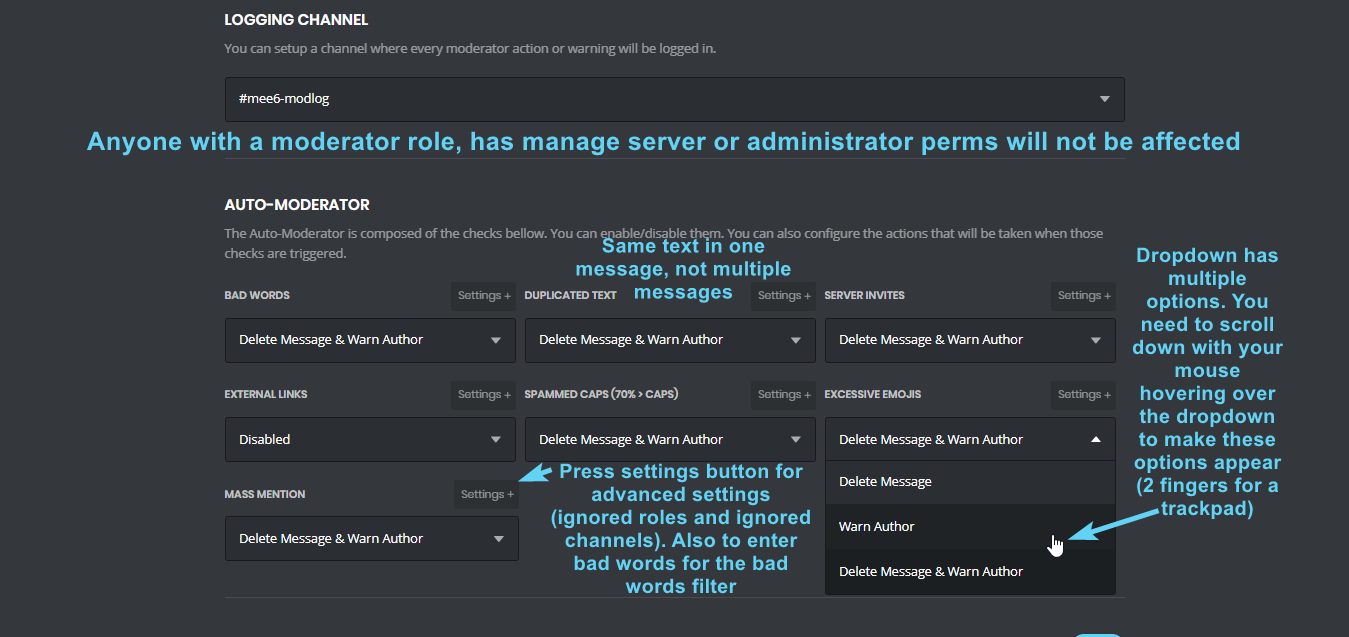 high depot
Yes.
strong path
top text
strong path
np


 wooden mountain
!id
dire yarrowBOT
to use some stuff in custom command or any other text from Mee6 you need to use the ID:
first get the ID of that object by typing it in your server with a \ in front:
emoji: \ ➡ !soontm
animated emoji: \ ➡ !baguette_spin
mention: \@dire yarrow ➡ @dire yarrow
role: \<@&325291851106091019> ➡ <@&325291851106091019>
channel: \#announcements➡ #announcements
then copy that ID(with the < > and everything in between),
now paste that in your custom command, welcome message, stream announcement, etc...
https://cdn.discordapp.com/attachments/235378515866812417/269195258640728075/2017-01-12_22-05-03.gif

 eternal hull
This = Stream
sterile basin
the custom command is now working, it's just that another server moderator is messing the Permissions of the Bots, it's not a bug, thank you for the support.
 fair delta
Bugs I’ve been hearing about on here:
•”Uploading...” message when trying to upload a rank card pic.
•YouTube and music plugins are broken.
wooden mountain
uploading is because of a communication issue between our data storage and the api
youtube is because of a qouta limit that we have hit 2 days in a row
music works..... but nothing from youtube, you can still use links to other sites
@fair delta
strong path
Thank you for the explainations
fair delta
@wooden mountain Ahh, okay. Thanks for explaining. I heard !add’ing anything for the music doesn’t work. I hope they’re fixed soon.
wooden mountain
links to anything but youtube should work
fair delta
Hm, all right.
wooden mountain
the youtube plugin will work now (the qouta just reset)
@fair delta @strong path ^^
fair delta
Great!
strong path
Will it not reach the limit shortly again?
wooden mountain
probably
youtube qouta limitations are kind of weird
you have 1 000 000 units a day, but 1 action is more then 1 unit worth
for every letter you type, there is a read action that fetches channels matching your search, each of them is 3~5 units
so just typing "mee6bot" will start 7 read actions, each are 3~5 units, 21~~ 35 total, and that is still a short name
do that for the 900 000+ servers Mee6 is in and count the music plugin..... easely hit that million
 sullen venture
YouTube plugin: Mentions does not work (I used self)
strong path
Have you tried using your ID?
 river aurora
I found a bug. I disabled the welcome plugin on the dashboard for mee6 but it keeps welcoming members
sullen venture
@river aurora gimme that
or... which bug
Rank card editor: Serif font for the username
While it should use some 🤔
buoyant moon
@river aurora just remove the welcome message to where nothing is there aha
fair delta
That doesn’t help.
 dire wadi
custom commands not work im my server
strong path
What is your command supposed to do?
dire wadi
remove the role and the second command to give the role
 cold bear
does bot say something?
dire wadi
Oops, something went wrong in MEE6 land! :SAD6: This error has been reported to our Team. We'll work hard to fix it.
buoyant moon
in my server MEE6 don't work
strong path
Elaborate please...
buoyant moon
...
cold bear
can't read your minds
 dire wadi
I did but still not working
cold bear
means you did it wrong
can you show role list screenshot?
second reason can be missing manage role permission
cold bear
ew
dire wadi
It does not give the role an error
 limber knoll
what commands are you doing? Screenshot or the variables in the commands would help @dire wadi
 slim wagon
Mee6 is just...broken. Won’t do anything when I type !help when the !help command is enabled.
strong path
!no-help
dire yarrowBOT
Doing !help and it's not showing any commands? Wondering why I'm not doing my job?  This is caused by commands not being enabled in plugins. To do so you must:
* Create custom commands in the commands plugin
* Enable Levels plugin (this will enable !rank and !levels
* Enable commands in Moderator plugin (these will only show if you have a mod role selected for each command)
* Enable commands in the Search Anything plugin
* Enable commands in the music and record plugins (these plugins require payment)
After that you can do !help and you can see all my lovely commands  Just don't disable the command on yourself. You can also do
 !help in #〉commands or look at this image: https://i.imgur.com/V93V8Dg.png
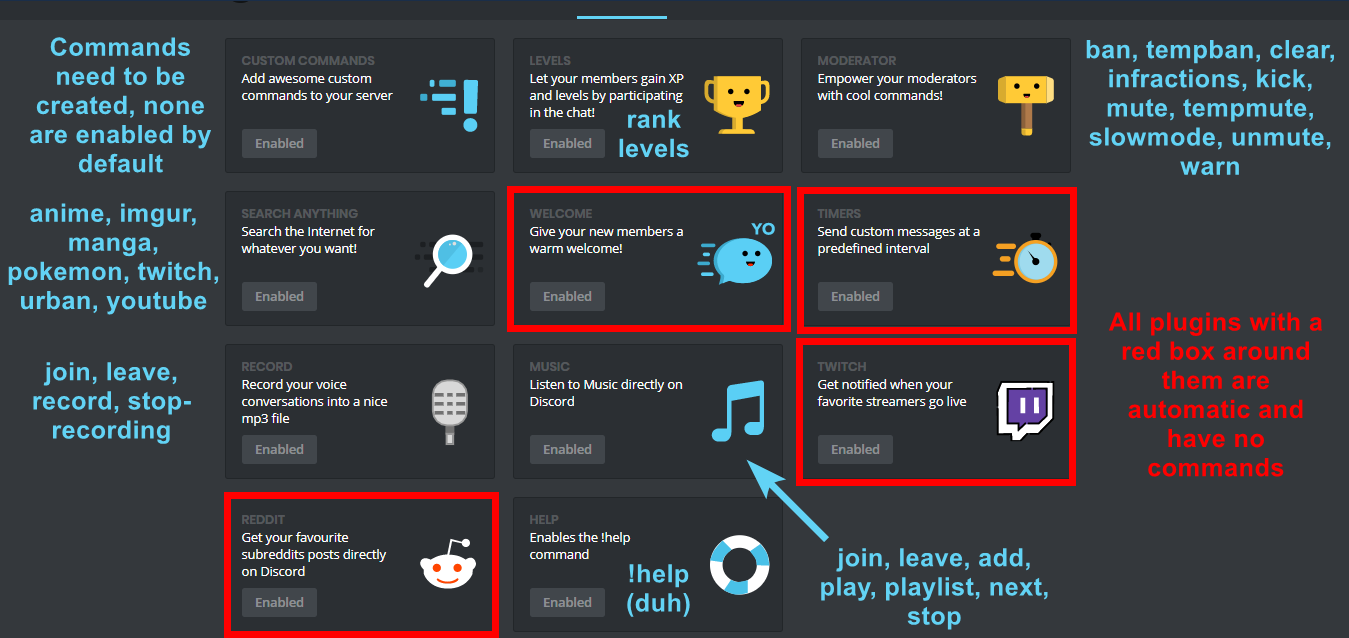 strong path
np
 astral abyss
i have made the welcome text and its not working svag should i do
and It doesnt give the role i made it give
 ionic meteor
Mee6 it's role needs to be ABOVE the role you're trying to give.
astral abyss
oh thank u but What about the rest
ionic meteor
you mean it doesnt save?
ionic meteor
try removing that, it's a little bugged
dire yarrowBOT
So... @astral abyss, I've decided you should be level 1.
Don't get too excited, mmk.
ionic meteor
sure DM me an invite
astral abyss
Ok
 floral monolith
I scrolled up to see if there was anyone talking about this but didn't seem to be. Mee6 seems to be having trouble over the last two days? Sometimes it's not responding to my server's custom commands (which I've doubled checked in settings and nothing's changed) and it's sending one of our timed messages more often than it should be
ionic meteor
@floral monolith Mee6 is having a little rough time recently yea
astral abyss
@ionic meteor dm the removing thing doesnt work
ionic meteor
hmm?
 storm fossil

 chrome zealot
hello
dire yarrowBOT
So... @chrome zealot, I've decided you should be level 1.
Don't get too excited, mmk.
 shadow widget
Its not working rn
When I click on my server, it asks me to add mee6, even though I already have it
When I "Re-add" it, It takes me back to the server selection page
 serene fossil
mee6 isn't responding to any commands at all in our server... but it seems to work here
wooden mountain
restart in progress @serene fossil
shadow widget
MEE6 is offline in my server
wooden mountain
@shadow widget restart in progress, pls wait
serene fossil
ah, ok
shadow widget
Oh ok
 tender mural
.!rank doesnt support custom text like my name
 viral bridge
Is the restart finished? Because he doesn't responding on my server
viral bridge
OK Thank you
serene fossil
utoob function is down atm, is in #425409486820474881
 obsidian ermine
o
buoyant moon
MEE6 Does Not Want to Show Panel and Goes Offline
 merry hollow
It is restarting at the moment
buoyant moon
Ok Thanks
 winter scarab
Bot Down in my Server ? Someone have the same issues ?
dire yarrowBOT
Alright, @wispy beacon has been warned because 'used commands in the wrong channel.'.
 wanton frost
The server restart
 mortal oxide
@winter scarab we are aware of that.
winter scarab
Well didn't know that. Thats why I ask! Cheers
 obtuse ferry
Bot is offline
dire yarrowBOT
So... @obtuse ferry, I've decided you should be level 1.
Don't get too excited, mmk.
obtuse ferry
Ah i see
buoyant moon
@obtuse ferry the shards are still rebooting
serene fossil
it's been restarting for almost an hour... is it broken? ~worried look~
buoyant moon
@high valley what it is, stranger?
 high valley
i do !rank in my server and it's not working
buoyant moon
@high valley Is mee6 online in your server?
buoyant moon
@high valley They're having a truckload of issues with the shards right now, bro
That may be it
high valley
ok
buoyant moon
The Bot is Offline? How long? Maybe?
OKAY PEOPLE
It is restarting, so please wait.
It is restarting in some servers at a time, not all at one time.
It is global, don't worry.
Random btw
So it may take a while
Many Hour or a few Minutes?
mee6 stopped
I've read it.....>.>
@buoyant moon it's taken over an hour for me and it appears to have completely gone offline now
I think they may be resetting it
 spice prawn
Youtube Announcement config is bugged
cold bear
@spice prawn #425409486820474881
spice prawn
Are they going to fix it?
cold bear
sure
 gloomy prism
doesnt let me add a Youtube announcement
sage citrus
 coarse plume
Hi I can’t get the music bot to pick up any songs at all it just keeps giving my discord an error
mortal oxide
wooden mountain
use links that don't go to youtube
coarse plume
What do you mean by that we do the !.add Africa Toto and it’ll be error constantly, do we have to do like !.add Vimeo Toto Africa?
 faint bison
dire yarrowBOT
faint bison
dire yarrowBOT
The music plugin supports these sites: BBC |Patreon |ABC7News |SoundCloud IMDB |ABC News |Facebook |YouTube NHL |Dropbox |SchoolTV |PBS and Member Stations Twitch (livestreams and recorded streams) and much more.
DISCLAIMER: Mee6 cannot play music from Spotify or other sites where you have to log in.
And search is still youtube only
coarse plume
So then what do I put in to get music? !add abc7news national anthem like what guys
I understand the search only works for YouTube but then that’s broken af on our discord rn
mortal oxide
@coarse plume no, you need the link beacque do !add <something> will make MEE6 research in YouTube
coarse plume
So !SoundCloud pusha t?
Give me a literal example of what I can play lol . I want the command line like add because I just don’t understand and kinda need too, so I can explain it to my 50 people on our discord
mortal oxide
Nope, you can't choose the search.
Get a link (for example from SoundCloud) and do
!add the_link
coarse plume
Also ty for helping Wolfgang
dire yarrowBOT
So... @coarse plume, I've decided you should be level 1.
Don't get too excited, mmk.
mortal oxide
Np 👌🏻
coarse plume
Ahh ok
mortal oxide
😄
mortal oxide
Yup
coarse plume
Kk ty have a great day!
mortal oxide
Thank you, you too!
 spark fiber
How does the link actually work support I'm a software developer
mortal oxide
@lean sphinx if you can take time to answer him please ❤️.
spark fiber
I just need to know because I'm a software developer who can code bots to do things like this and my bot does the same thing as this bot
coarse plume
@mortal oxide even with links it’s not working, says y’all getting errors tho, lots of em hehe

The Story of Adiddon
DAYTONA out now https://pushat.lnk.to/DAYTONA
dire yarrowBOT
Aaron Balton, this command is disabled in this channel. 
wooden mountain
link a song, not a album
wooden mountain
and anything that requires a account won't work
spark fiber
Well nothing is working boss man
coarse plume

Official video : https://youtu.be/h_vqyIrxCxc
Mixed/Mastered by Rasneek, Cover by NastySterling
Instrumental from Kool John & P-Lo's " Blue Hunnids"
dire yarrowBOT
Aaron Balton, this command is disabled in this channel.
coarse plume
Not an album this time or on an account o don’t mean to be a bother but if mee6 has other features we can use I totally want to take advantage of that/ understand it fully, I do love the bot
dire yarrowBOT
So... @potent dove, I've decided you should be level 2.
Don't get too excited, mmk.
spark fiber
buoyant moon
I can't add a YT channel D:
cold bear
 prime olive
mee6 keeps reverting the LOGGING CHANNEL specified in the moderator plugin to the old channel, no matter how often i change it
 sinful trout
!rank
dire yarrowBOT
clorox_bleach, this command is disabled in this channel.
strong path
 foggy elm
I like the implimentation of YouTube uploads, but the channel search doesn't seem to work.
strong path
buoyant moon
!rank
dire yarrowBOT
ℐBeнiω Nσкнαlε, this command is disabled in this channel.
strong path
@buoyant moon #〉commands
buoyant moon
Ok thanks
strong path
huh? What's the problem?
 void aurora
help me
dire yarrowBOT
I would like to help you but if you don't tell us what your problem is then I can't help, pls tell us what your problem is and not that you have one.
wooden mountain
One for the stream and one for the archive video (different link) @sullen venture
sullen venture
So MEE6 can anounce the stream start?
dire yarrowBOT
Alright, @formal zealot has been warned because 'Tried to use command (!rank) everywhere.'.
wooden mountain
Not sure, haven't tested it
cold bear
pick channel that has less than 10 webhooks or remove not needed ones from it @brave patrol
 brave patrol
ok I'll try that. thanks
 ripe pilot
Hello excuse me, I have an English language, I'm French, I tried to mention a role for the stream, but it does not work, and I do not know why, could you help me fixed bug?
dire yarrowBOT
to use some stuff in custom command or any other text from Mee6 you need to use the ID:
first get the ID of that object by typing it in your server with a \ in front:
emoji: \ ➡ !soontm
animated emoji: \ ➡ !baguette_spin
mention: \@dire yarrow ➡ @dire yarrow
role: \<@&325291851106091019> ➡ <@&325291851106091019>
channel: \#announcements➡ #announcements
then copy that ID(with the < > and everything in between),
now paste that in your custom command, welcome message, stream announcement, etc...
https://cdn.discordapp.com/attachments/235378515866812417/269195258640728075/2017-01-12_22-05-03.gif
ripe pilot
hum ???
strong path
You can also use !role-info [role name] to get its ID
strong path
Show me what you've inputed
ripe pilot
role !stream
cold bear
doesn't work meant role isn't highlighted or you didn't get a mention?
ripe pilot
if
cold bear
🤔
ripe pilot
I do them
whatever the name of the role, it does not mention
I'm only talking about the stream part
no mention
dire yarrowBOT
So... @ripe pilot, I've decided you should be level 1.
Don't get too excited, mmk.
strong path
@ripe pilot try !role-info Stream?
ripe pilot
already done x)
strong path
oh, problem solved?
ripe pilot
nope
ripe pilot
bot does not mention role when there is a stream
it does not work that I change the role or not in !stream or stream
strong path
Does !user-info work though?
strong path
Make sure that the bot has read and send and embed links perm
sullen venture
Moderator Plugin?
ripe pilot
hum ?
sullen venture
Enable that
cold bear
go to moderator command -> one of these *-info commands -> edit button and add everyone role to allowed ones
cold bear
send me server invite, i will try to fix this by my own
ripe pilot
ok, thanks
cold bear
resolved. moderator plugin was disabled
strong path
Yep, I thought so
cold bear
ofc
ripe pilot
I still have not figured out how to solve my concern about notification ...
thank you for help, I'm sorry if I'm not good at it ^^
dire yarrowBOT
So... @ripe pilot, I've decided you should be level 2.
Don't get too excited, mmk.
 feral quartz
Oops, something went wrong in MEE6 land! :SAD6: This error has been reported to our Team. We'll work hard to fix it. ... Why ? I just test In my server .. !tempmute ... Argg
I'm not happy
So, I report a bug: I wanted to make the command "!tempmute" but! Mee6 .. do not work ... What can one help me? Please?
cold bear
means bot can't give muted role
because
- you moved muted role above mee6 role
- bot role doesn't have manage role permission
feral quartz
Thanx @cold bear ^^
 autumn briar
 ควยไรสัส
 slim viper
Bug Report: Mee6 is not giving roles when a command is input when it should. it's supposed to remove a role and give one, all it has been doing is removing the role and they stating an error. Checked the commands and roles and nothing's changed, just buggy.
 sudden burrow
wooden mountain
sudden burrow
wooden mountain
Try reading...
buoyant moon
Tempban command won't work, it doesn't even cone up with you can't use that, it doesn't respond, however it responds to every other command.
Also same problem with tempmute
 plush star
I can't connect mee6 to my serv, when it says "select a server" i only have "-----------------"
but I am admin of three server, it should detect at least one, no ?
you're right, i wasn't connected on the browser, thanks ^^'
 hazy idol
Hello, I tried to make a command give a role to the one doing it but it says there is an error. Can anyone help me? Am i doing something wrong?
 faint dome
Check if mee6 has "manage role" permission, and if its role is above this role @hazy idol
hazy idol
Okay i will try thank you.
buoyant moon
Tempban command won't work, it doesn't even cone up with you can't use that, it doesn't respond, however it responds to every other command.
dire yarrowBOT
So... @buoyant moon, I've decided you should be level 1.
Don't get too excited, mmk.
hazy idol
Oh wait i think i know whats wrong mee6 needs connection to both servers. I am sorry for asking while i shouldn't even have to ask.
buoyant moon
can someone please answer my bug report
buoyant moon
my life is a bug
 tough latch
the level bug in a server
 candid fulcrum
there is a bug where mee6 is sending 5 to 10 video on my server even if i have it disable.
cold bear
what plugin?
candid fulcrum
youtube notified
strong path
biscuit's problem got solved
dire yarrowBOT
Alright, @torn field has been warned because 'Capital letters'.
wooden mountain
enable the plugin => remove all youtubers= > disable the plugin
wooden mountain
try tomorow
candid fulcrum
i have had this for atleast a week
candid fulcrum
ok, i try tomorow
 simple quest
hello i have a problem
whenever mee6 announces a stream, he doesnt ping a specific role
dire yarrowBOT
to use some stuff in custom command or any other text from Mee6 you need to use the ID:
first get the ID of that object by typing it in your server with a \ in front:
emoji: \ ➡ !soontm
animated emoji: \ ➡ !baguette_spin
mention: \@dire yarrow ➡ @dire yarrow
role: \<@&325291851106091019> ➡ <@&325291851106091019>
channel: \#announcements➡ #announcements
then copy that ID(with the < > and everything in between),
now paste that in your custom command, welcome message, stream announcement, etc...
https://cdn.discordapp.com/attachments/235378515866812417/269195258640728075/2017-01-12_22-05-03.gif
dire yarrowBOT
Alright, @molten sparrow has been warned because 'Posted an invite'.
Alright, @buoyant moon has been warned because 'Bad word usage'.
 wooden cradle
yo my mee6 music bot keeps saying error song not found no matter what i try to !add , am i doing something wrong
strong path
helping him in #〉volunteer-support
 fierce kite
When ever I try to add a YouTube channel it won't let me add it I have a pic to show you
 old ridge
Mee6 is down/not working in Doni's Discord
 cobalt kindle
Bug n°1
MEE6 cmd: !rank not working anymore on my server.
"MEE6BOT-Aujourd'hui à 02:02
Oops, something went wrong in MEE6 land! :SAD6: This error has been reported to our Team. We'll work hard to fix it."
Bug n°2
Not able to add any YouTube channel (not even mine), so i can't use the "YouTube feature".
Thanks for reading & for your time
 ionic juniper
#2 see #425409486820474881
 hearty wolf
Mee6 is currently down on our server, is it down for other people?
 near matrix
The bot is down
 tawny lagoon
When I am editing commands, and I delete one, all of the commands mess up and become mis aligned. Let's say I have a command for !1 and the response is #1 then !2 gives #2, if I delete !1 it would cause !2 to give #1 <@&193123929701875712>
Hard to explain
 bright geyser
<@&193123929701875712> there is a porblem about the timer cuz i have setup reminder it every 4 hours but it dosent publish on 4 hours need to be fixed not 4 hours all the other one to.
 white notch
@tawny lagoon known bug
tawny lagoon
Sorry have only just seen the instruction to read known bugs, is it in the process of being fixed?
@white notch
white notch
maybe, not sure
bright geyser
@white notch what about the prob of mine?
white notch
I was about to type a response
tawny lagoon
For now I am trying Dyno bot instead as I have lots of commands which have just messed up 😦
white notch
@bright geyser check that a message has been sent in the channel the timer is posting in. It will not trigger if the last message is a timer post to prevent spam
!timers
dire yarrowBOT
You're limited to 5 timers per guild, with the message interval being in minutes. If nobody posts a message after the timer has been sent, the channel is considered "non active" and so the next timer will not be sent. The bot needs the MANAGE_WEBHOOKS perm otherwise it'll auto disable if the channel isn't found or it can't create webhook
bright geyser
@white notch what ii try to say is i setup to 4 hours but it publish it to early u know
dire yarrowBOT
So... @bright geyser, I've decided you should be level 2.
Don't get too excited, mmk.
white notch
bot uses UTC time
 cursive robin
everyone here eats glue
 spring skiff
good
dire yarrowBOT
So... @spring skiff, I've decided you should be level 4.
Don't get too excited, mmk.
 calm summit
 cedar hazel
buoyant moon
cedar hazel
buoyant moon
Tempban command won't work, it doesn't even cone up with you can't use that, it doesn't respond, however it responds to every other command. Also, I have the tempban module enabled and I have certain roles that can use it, even those certain roles can’t use it. Please help.
<@&193123929701875712>
strong path
Screenshot me your allowed and banned roles for your tempban command
buoyant moon
okay
cold bear
also screenshot of how you using the command
cold bear
you need to add time as well
also scroll down
k think you have enabled do not respond option
cold bear
!duration
dire yarrowBOT
For the tempmute and tempban commands, use the following formats for muting/banning users for a certain time period:
s for seconds
m for minutes
h for hours
d for days
Examples:
!tempmute @user 10m timeout
!tempban @user 3d annoying
buoyant moon
dire yarrowBOT
So... @buoyant moon, I've decided you should be level 2.
Don't get too excited, mmk.
cold bear
look on example again
buoyant moon
Ohh I need a duration
buoyant moon
I thought there was an auto set time haha
cold bear
no reading mind functionality yet
buoyant moon
gotta agree on that
 formal pier
Hi I am unable to add a YouTube channel to the bot
dire yarrowBOT
So... @formal pier, I've decided you should be level 1.
Don't get too excited, mmk.
strong path
formal pier
What is a Quota Limit
 calm steppe
idk if someone spotted this bug, I didn't see it in #425409486820474881 , !levels not working
ionic meteor
should work fine, shall we move to #〉volunteer-support so we can help you without flooding this channel? 😃 @calm steppe
floral monolith
Having a problem with timed commands. Set to every four hours but comes more often. Was set for two hours and was coming anywhere between after an hour to the actual two hours. I know about the delaying for someone to speak but this was during an active channel.
Been having this problem for 4 days
buoyant moon
Hello Bot Youtube part does not work What can I do?
cold bear
nothing, wait. #425409486820474881
 fringe terrace
ok so I made a custom commands that is !resigntmod to resign the tmod rank and it says an error
 leaden osprey
@fringe terrace try:
- put MEE6’s role above the role it’s trying to give
- give mee6 manage roles permission
dire yarrowBOT
So... @fringe terrace, I've decided you should be level 1.
Don't get too excited, mmk.
dire yarrowBOT
tom32000, it doesn't look like you can use that.
fringe terrace
work
wooden mountain
it works, but it does help if you tell the bot what role you want info for
!role-info developers
dire yarrowBOT
Role Name
Developers
RoleID
400016048952442890
Users in Role
5
Mentionable
No
Hoisted
No
Color
#d32929
Server Name: MEE6 Community | ServerID: 159962941502783488
wooden mountain
@fringe terrace
fringe terrace
ohhh
 fleet bay
custom commands not working
 pure obsidian
@fleet bay They should work, whats the issue?
fleet bay
Hi writes me "Oops, something went wrong in MEE6 land! :SAD6: This error has been reported to our Team. We'll work hard to fix it."
fleet bay
to add the role of a "boy"
pure obsidian
Check if:
- Mee6 has the 'Manage Roles' perm
- Mee6's integrated role is above the role its trying to give
 modest swift
hello
 past plinth
i dont know if this is the correct way to phrase this but uh
if you have the nickname of @ everyone/here and do !clear it pings everyone
no idea if this is already known or not but uh
may not work here because theres an @ everyone pingable role but yeah its a problem lmao
pure obsidian
Not really, I just tested, it works for me.
past plinth
if youre replying to what i said thats not what i meant
like if you have the nickname of @ everyone (without the space) and do !clear it says @ everyone, you dont have the permission to use that
!clear
dire yarrowBOT
elijah, it doesn't look like you can use that.
pure obsidian
right...apologize I misread.
 cold portal
I do !infractions (my name) and dont do anything...
 west gyro
Infinite loading when choose the server in:"please select a server"
past plinth
yeah
limber knoll
Thanks
past plinth
basically here my nickname is set to @ everyone without the space
dire yarrowBOT
So... @past plinth, I've decided you should be level 1.
Don't get too excited, mmk.
limber knoll
Ah
pure obsidian
Yikes, now I get it 
wooden mountain
we are aware of this and it is on our list to fix
limber knoll
Thanks Sil
 kindred pelican
Mee6 bot has Auto-Moderator ignores and doesn't sanction other bots disabled but is still ignoring other bots, these other bots do not have admin privileges. This only started happening recently.
Last time it didnt ignore was 05/22/2018
 native anvil
@kindred pelican are the other bots below Mee6 in the roles list? If not put them beneath and that may fix your problem
kindred pelican
Nope, didnt fix it
Nothing has been changed at all
On my discord server
It's just started ignoring it, for no reason.
cold bear
you mean bot ignores commands from other bots?
kindred pelican
It's not moderating another bot i have
dire yarrowBOT
So... @kindred pelican, I've decided you should be level 2.
Don't get too excited, mmk.
kindred pelican
I have a bot that relays messages from an MC server
cold bear
what's about manage server perm on bots role?
kindred pelican
i have to censor certain words
the other bot doesnt have manage server perms
The thing is, it was working before
Nothing has been changed on my server to cause this
pure obsidian
That's right, it doesnt sanction other bots even if you have the said option disabled, pretty sure its supposed to disallow it posting an invite
pure obsidian
yes
kindred pelican
..?
cold bear
i don't think that option is disabled in current server @pure obsidian
pure obsidian
thats my test server
cold bear
uwu you have my bot
hmm
i remember ignoring commands by other bots started like >1 month ago so i don't know if this somehow related
need to ask dev
kindred pelican
Can i send an examople of it working and it not working?
it does include crude language
actually i can avoid the crude language
when it worked: https://i.imgur.com/Y1s8BnA.png
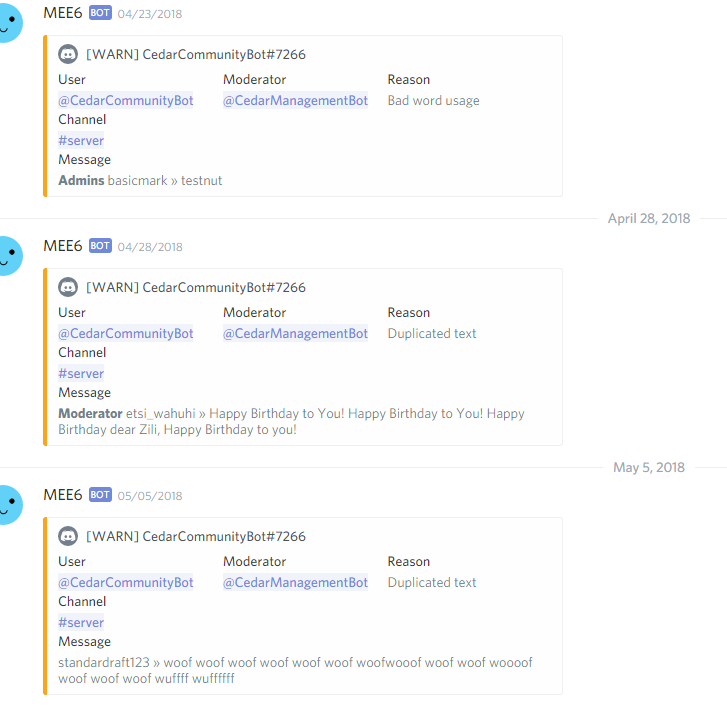
Testnut is a word on the filter to test the filter
The mee6 usually deletes then warns the user about it
but now
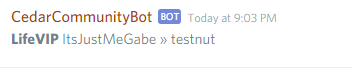
Nothing has been changed in either bots roles/permissions
cold bear
ok, inverstigating
kindred pelican
thank you
shadow widget
Hey, <@&424994160387293184> , could you make it so on the rank card it doesn't show their #tag? Some people need to use streamer mode. Sry If I, uh, annoyed you.
 fervent chasm
its been a while since i noticed that but never thought on why - apparently the bot doesnt give me xp while chatting because of the special digits in my nick but idk if thats the reason, only appears to be
 wintry isle
on youtube notification tab can't set any yt channel and button "add" isn't working (dashboard page)
buoyant moon
@wintry isle #425409486820474881
 sweet hemlock
Server-info command not working
 thick kindle
@shadow widget
 bold heron
So the YouTube plugin just spammed a discord with 50 messages xoxo appreciation is been sent your way
buoyant moon
@bold heron Plugin is kind of bugged, stay tuned 😃
 rich fossil
Hellü
buoyant moon
@strong sandal Don't troll report please.
 strong sandal
oopise
 toxic fractal
hey, the youtube plugin does not work  x2
x2
strong path
toxic fractal
AAAAAAAAA
 pseudo mesa
Guys what is this.. Is this any bug?
strong path
one sec
Make sure that MEE6's role is above the role it's trying to give and that it has the manage roles perm
https://birb.is-a-me.me/81d15f9a.gif
 sullen venture
Invalid Cyrillic rendering (and possibly japaneese too) on !rank command
pure obsidian
Dashboard removes the last letter/character from the custom command when you are linking a user/mentionable role or a channel inside the textbox
kindred pelican
Any info on the issue I was having?
cold bear
still investigating
kindred pelican
Mmmk, can you @ me if you find anything out?
dire yarrowBOT
So... @kindred pelican, I've decided you should be level 3.
Don't get too excited, mmk.
cold bear
ok
kindred pelican
It's not to do with the roles, I set a person to the same role that my other bot has and mee6 sanctioned the person so
 ornate flicker
@buoyant moon Oui, mais dans #175714280648343552
buoyant moon
Merci
 storm iris
Mee6 is randomly assigning roles in my discord and giving people ALL roles including all admin privileges.
 drifting rampart
when I try to log on in the browser app it automatically signs me in, but its the wrong account
dire yarrowBOT
So... @drifting rampart, I've decided you should be level 1.
Don't get too excited, mmk.
 burnt hazel
@drifting rampart Log out of the browser version of Discord.
https://discordapp.com/?
Discord
Step up your game with a modern voice & text chat app. Crystal clear voice, multiple server and channel support, mobile apps, and more.
And sign in on the correct account.
Then try to sign in again on MEE6 website
 atomic anchor
dire yarrowBOT
atomic anchor
dire yarrowBOT
to use some stuff in custom command or any other text from Mee6 you need to use the ID:
first get the ID of that object by typing it in your server with a \ in front:
emoji: \ ➡ !soontm
animated emoji: \ ➡ !baguette_spin
mention: \@dire yarrow ➡ @dire yarrow
role: \<@&325291851106091019> ➡ <@&325291851106091019>
channel: \#announcements➡ #announcements
then copy that ID(with the < > and everything in between),
now paste that in your custom command, welcome message, stream announcement, etc...
https://cdn.discordapp.com/attachments/235378515866812417/269195258640728075/2017-01-12_22-05-03.gif
sinful trout
Yeet mee6 bot
dire yarrowBOT
Alright, @plucky aurora has been warned because 'Bad word usage'.
 plucky aurora
omfg
 shy dawn
hey
my server just got raided just now because someone called themself @everyone and used the !clear command pretty much spamming everyone multiple times
wooden mountain
pls read my second last message
just don't give Mee6 the permission to mention @ everyone
shy dawn
alright
 verbal violet
Hey i have a problem with the voice channel, it cuts off the music now and then for some people and it cannot find any song unless i put a link as (!add) also when i use command playlist it says it cannot be found on the website.
 manic zealot
If you make your name @glossy anchorryon e and do a command you have no perms to use, mee6 will mention everyone. this bypasses turning off @glossy anchorryon e .
and i cant not mention ppl
:/
wooden mountain
don't give Mee6 that permission
 glossy anchor
Please can you check your ping instead of individually pinging me :)
wooden mountain
sorry eve
also Tapu, next time add a space, mentioning everyone in this server will just automaticly delete the message anyway
 sonic lava
@wooden mountain Well the problem is, I am a moderator on that server where the bug happened, and I cant change the permissions also the owner is away. So how can we fix this problem then?
wooden mountain
and nobody with manage channels permission?
sonic lava
Well I have it but it will be annoying since the role hes in is the owners role
and we cannot change that permission
wooden mountain
can you not just ban the person who does that?
 wanton lagoon
mee6 is warning and deleting links in a channel where it says its okay to post
sonic lava
Well thats also the problem
since the bot is the highest role
It will be impossible to mute
I already tried that so to speak
wooden mountain
not the bot.... the user with nickname everyone
sonic lava
Yeah we can do the people who do it
wooden mountain
wait... i have a better idea
wanton lagoon
Sure @wooden mountain can I dm you?
wooden mountain
yes
@sonic lava testserver, bot test server or friends? or a server where you don't have access to Mee6 dashboard?
sonic lava
also the bug is when they have @@ everyone the first one is from discord itself
dire yarrowBOT
So... @sonic lava, I've decided you should be level 1.
Don't get too excited, mmk.
wooden mountain
in what server is the issue?
sonic lava
Ill dm you it
 near heart
mee6
@ everyoneed in my server
i dont know if that is suppost to happend and how do u get rid of it
burnt hazel
pure obsidian
Thats not Mee6, its your users exploiting a bug
near heart
thank u @burnt hazel @pure obsidian
 ornate flame
https://i.imgur.com/PzPK0ne.png Why can the bot mention @everyone  it shouldnt be able to even with perms
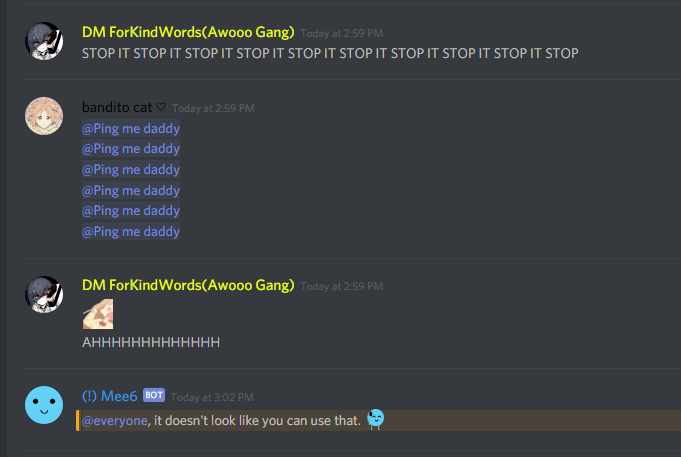
I realize the warnings, but thats a bot inconvenience and bots are made to enhance the end user experience
Which with this feature it clearly does not do.
near heart
its a person not the bot
ornate flame
It is the bot actually, as per the ability to disable @everyone mentions within the bots code
pure obsidian
read messages above
wooden mountain
@ornate flame what server is that in? just hte name of the server
ornate flame
@wooden mountain Weeb Empire
We have disabled its perms for the time being afaik, and it was only abused one time before we took the perms to mention @everyone
wooden mountain
i will disable the "you don't have permissio to use this" message for that server
ornate flame
thanks
wooden mountain
is it only wiht moderator commands?
or are there other command limited to only certain roles?
ornate flame
Im not sure, i wasnt there. Only my moderation team was. Ill ask in a bit
It appears my moderation team thinks they used !clear @wooden mountain
No reports of any other commands thus far
wooden mountain
the only commands that they could have used where clear and the server/user/role info commands
and i set those 4 to not send the no permission message anymore
ornate flame
 hm okay
 neat star
You can tag everyone by doing a restricted command
buoyant moon
If someone has there nickname or name as @ everyone (without the space) then when they interact with mee6, it tags everyone
dire yarrowBOT
Alright, @neat star has been warned because 'Bad word usage'.

 main bolt
The @ everyone thing or my YouTube issue?
pure obsidian
Sil, you disabled those globally? tried to get one of my members to test but failed 
 neon blaze
^ It was just spammed in a discord I moderate with over 18k people....
pure obsidian
(...nevermind I had 'do not respond' option enabled)
ornate flicker
We can not afford to shutdown globally the bot unfortunately.
If the issue is critic for you, consider kicking the bot until everything is fixed.
main bolt
This is a bit of a carry on to the problem I posted earlier, I checked the YouTube tab on the website, and it won’t load, and I’ve been waiting for 10 minutes.
 worthy breach
@neon blaze Or - you can disable the mention @ everyone and @ here permission for Mee6.
ornate flicker
@main bolt This is more of a #〉volunteer-support issue. Check #425409486820474881 for more information.
--
The development team is aware of the atEveryone loophole and is working to resolve it. Thank you for your patience, and please accept our apologies for this inconvenience!
In the meantime, you can resolve this issue by denying MEE6's permission to use atEveryone and atHere mentions.
wooden mountain
it is fixed..... once someone with access to the server deploys my fix
ornate flicker
 raven flume
That isn't useful. I'd think your support would be more helpful.
wooden mountain
the youtube not disabling thing?
i told Cookie about that the day it got released
white notch
yeah this that got deleted grr, prarallax
ornate flicker

wooden mountain
i don't want to remove perms from partners because of 1 person
so stop doing bad
 coral raft
mee6 keeps pinging people named @[everyone]
ornate flicker
wooden mountain
@coral raft we know, stop telling us
coral raft
ok
wooden mountain
and remove Mee6 his permissions
 high elbow
Good day, is it known that i cant find !add music? or am i doing something wrong.
 wooden mountain
i already fixed it (probably) but i'm waiting for someone with access to deploy it
 hollow hill
I'm just memeing. Thanks for the hard work 
 cobalt bolt
3 servers I’m in have been raided by your bot. You need to fix this
white notch
cobalt bolt
I’m just tired of raids
dire yarrowBOT
So... @cobalt bolt, I've decided you should be level 1.
Don't get too excited, mmk.
sage citrus
@cobalt bolt The bot doesnt do anything by itself, an admin must have abused a feature (probably Custom Commands or Timers)
cobalt bolt
What happens is someone names them self everyone and does !clear and it pings
cobalt bolt
I’m one of those people who doesn’t like pings so I’m just mad right now
white notch
You aren’t the only one
 vast fulcrum
I have a bug. The website as I put on the welcome, It sometimes does not work. I have saved it and it does not work.
Warm welcome*
buoyant moon
This is a server glitch (why can i ping everyone)
burnt hazel
buoyant moon
um mk
white notch
we're aware (deleted message)
 runic bough
Kk, thank you
 void mica
Thank you support team
white notch
we're aware (to those 20 messages I just deleted)
 proud pasture
Please fix as soon as possible, thanks for being quick
white notch

 night bough
smh
 stiff geode
There is an extra space in between "wait to"
 upbeat pasture
The auto-moderator cersor (bad words) is not working reeeee
white notch
 narrow pivot
i c
buoyant moon
Not even sure if it's safe to post it here.
white notch
vast fulcrum
white notch
@floral cliff https://cdn.discordapp.com/attachments/159963812189962240/454031402829217802/image.png
 untold vortex
@white notch its not fixed yet
ionic juniper
Did you actually read the whole quote?
untold vortex
ops sorry
ionic juniper
ty
untold vortex
but cmon whats taking so long huhu
 lime sun
is the music bot still not working
when will my music bot be fixed i paid for this and cant use it
if not i want a refund
ive been waiting weeks now
white notch
when we stop hitting YouTube limits with our API keys
buoyant moon
@white notch
 oak karma
The simple solution, to the tagging problem is to use a one line code block.
So simple
white notch
it's not as easy as that
oak karma
Because, while you can add some code to prevent everyone and here from being tagged, it can still target individual users by setting the tag as nickname
white notch
we already fixed it, just that the only person who can deploy the fix has not deployed it yet
ionic juniper
😐
they fixed it already, they just don't have the fix deployed yet.
there's a difference.
 empty snow
http://b1nzy-banned.me/D9qBv.png
Pls fix
 white notch
empty snow
white notch
empty snow
Fair
buoyant moon
not sure if this is a bug or im doing something wrong on my part, but im trying to add a YouTube streamer to my list and I filled everything out (announcement message, the channel, and the YouTube channel) but the "Add" button is still blank and wont let me add the YouTuber...
white notch
known bug
buoyant moon
kk, thanks
 hasty cradle
Yeah not sure if this is a bug, but when I load the youtube plugin, it is just continuously loading. I don't get any option, it just loads forever.
white notch
Known bug
hasty cradle
okay thanks
ornate flame
https://i.imgur.com/PqlbfJC.png Might wanna fix this too, as it can be used to spam mention people as the bto instead of the actual user
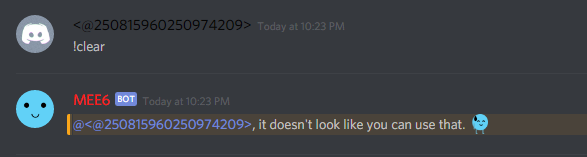
You can also do this with role mentions
Easily fixed, but its an issue similar to the @ everyone so i thought id mention it
white notch
known
ornate flame

dire yarrowBOT
So... @ornate flame, I've decided you should be level 3.
Don't get too excited, mmk.
 lucid stag
you guys know about this right?
lucid stag
nice
 unborn haven
I wanna report a bug
If someone nicknamed <@&255513346428764161> mee6 ping everyone
white notch
Should be fixed
unborn haven
And yet some people abuse this bug in different server
white notch
should be fixed
buoyant moon
I am getting an exclamation mark in front of user ids
using the {user} parameter to print the output
white notch
it recently happened and will be fixed quickly, so I don't see a point in adding it there
 cobalt venture
I am so smart I deleted the message.
white notch
yes because we already fixed it
white notch
like, 20 minutes ago
 harsh hull
@white notch so its fixed? The everyone thing
white notch
Yea
 snow coral
The Twitch feature does not clear formatting from the username. Let's say one username ends with _ and you have the Twitch message that has {link} used after {username}, both _ at the end of the username and at the end of the link will make the within part italic and break the sent Twitch link.
wooden mountain
change {streamer} in **{streamer}**
that will make the streamer name bolt and will stop the cursief that removes the _
snow coral
I see, I would do this but I actually saw it on a different server. I think it would fix it for everyone for the future (that isn't aware yet) if you add \ before each formatting symbol or if you simply implement this solution that you just suggested.
Also, if we're having freedom of choice, some people will always want to leave usernames with no formatting at all, not even in bold.
 obtuse tulip
The MEE6 website for YouTube setting will not load. I tried like everything I could think of but nothing works.
strong path
obtuse tulip
Oh. I should have checked that first. Thanks!
white notch
@buoyant moon this got fixed about 2 hours ago
buoyant moon
Oh, thanks.
I've lost about 30 members when we reached 600 members.... But no worries ill get it back
 azure kettle
Hey I want to use mee6 on my server and use a certain rank to buy another rank by saying (it requires this rank to use that command and I gives you the requested rank then says it removes the rank) this should create basically a rank currency but instead it says "you've encountered and error in mee6 land" what should I do
dire yarrowBOT
Role rewards will give a role as reward for active users in chat.
You gain xp by talking in chat, when you gain enough xp you get a level.
in order to let me give role rewards i need :
+ manage roles permission
- at least one of my roles needs to be ABOVE the reward roles(bots can't give roles that are higher than their own role)
! I will only check for role rewards to be updated when:
+A user leveled up to a level. Note this only checks role rewards for them and not everyone
+You update any part of the levels plugin. This does a role reward check on the whole server
 azure kettle
Thank you
 fair breach
yea same bug as @buoyant moon (we had to kick mee6 in a server i mod because the owner was not there)
kindred pelican
Any luck in sorting out the ignoring bots problem?
wooden mountain
What problem? I'm not aware of a problem with ignoring bots
wooden mountain
It is a option that you can enable and disable on the moderator plugin
 sterile sun
@white notch Hello, Sir. This issue could be ignored enough but I'd just like to let you know what kind of trouble we have.
As you see the image below, multi-byte name is not supported in the result image of EXP when we request "!rank".
Are you going to fix it by any chance?
wooden mountain
Is on our to do list @sterile sun
strong path
@wooden mountain The problem is that the option isn't actually doing anything, I turned it off, the test-bot didn't have the manage server perm or the admin perm, but still, mee6 ignored it
sterile sun
@wooden mountain Awesome!!!!!! Thanks!!!!!
wooden mountain
Did someone from support confirm that?
 lunar stone
jhgvhj
dire yarrowBOT
So... @lunar stone, I've decided you should be level 1.
Don't get too excited, mmk.
 idle frost
Can mee6 timer stop crashing ... ?
 solar cargo
I dont know if that a "bug" but with the !rank and 0% opacity there are a little black line around the text
 thin merlin
my profile pic in the !rank card is black
nvm not bug but glitch just changed servers and back and it fixed
dire yarrowBOT
So... @thin merlin, I've decided you should be level 2.
Don't get too excited, mmk.
cold bear
@thin merlin did you change your avatar lately?
thin merlin
I did yesterday I think but it was working perfectly before.
that was the first time I joined this server with it though
cold bear
ok
thin merlin
sometimes if Mee6 is supposed to delete a message after it finishes the response of the commands it deletes then puts it back and is then un-deletable
dire yarrowBOT
@vocal elbow did 'ads' and got the ban hammer! 
 keen gale
I have a problem with the youtube plugin on the website.
The site won't load. Sometimes it works but most of this time not.
There is just a load gif of the youtube plugin site but the list isn't there
wooden mountain
buoyant moon
I can not mute people into my Discord Server by using the Moderator commands. I can not ban, kick
pure obsidian
@buoyant moon none of the said commands are enabled by default (mee6 is a modular bot), are you sure you have enabled them?
http://mee6.xyz/dashboard --> select server --> enable  Moderator --> inside scroll down and enable the said commands
buoyant moon
Yes, I have everything on only when I do !mute {user} reason he says that that person is muted only he can still talk. @pure obsidian
dire yarrowBOT
!mute @user - gives mentioned user the muted role
Requirements:
+ Manage Roles perm
+ Manage Channels perm
+ I must have a role above the muted role
+ User being muted must not have a role that has a green tick next to the send message perm in channel settings->permissions as this will override the muted role. They must also not have a user perm override on that channel
P.S. You can't mute people who have the permission to mute others, this includes: owner, other moderator or members with Administrator or Manage Server permissions!!!
https://cdn.discordapp.com/attachments/302245580673908740/433026975670730771/2018-04-10_01-13-56.gif
 pure obsidian
@buoyant moon please read the information above ⏫
buoyant moon
Sure
buoyant moon
He does that all the time. Music is Dutch but okay. He does that all the time and sometimes I get x in Dashboard
dire yarrowBOT
So... @buoyant moon, I've decided you should be level 1.
Don't get too excited, mmk.
 bright crag
Somthing happend
dire yarrowBOT
So... @bright crag, I've decided you should be level 1.
Don't get too excited, mmk.
bright crag
Mee6 something weird happend you randomly said a cus word
So uh
Do you know anything?
pure obsidian
!ohno @bright crag ⬇
dire yarrowBOT
if Mee6 started to say offensive or weird things on your server and his name shows as Mee6#0000 means one of your members with Manage Server permission has too much free time, so they edited timers on your server. :gun:
To fix it go to Mee6's dashboard (https://mee6.xyz/dashboard) -> pick your server -> Timers plugin -> edit/remove timers.
 torn token
It won't let me change which role I have my mee6 bot in
Im trying to put it in my mods role but it won't let me anybody know why?
pure obsidian
@torn token Are you trying to assign Mee6's integrated role to users?
@buoyant moon Any adblocks?
 queen sluice
Ummm I have a tiny problem
 ornate nimbus
@dire yarrow
torn token
@pure obsidian No im trying to change the role that mee6 is assigned to
Is that not possible\
pure obsidian
If the role looks like this, then what James said ⏫
queen sluice
When a member joins , I have permissions for reading message history turned off in my lobby , but I have a welcome message id like peeps to see is a delay that can be set before the welcome message is posted
bright crag
Also mee6 has been saying some insulting things and it’s inappropriate I don’t know what’s happening
dire yarrowBOT
if Mee6 started to say offensive or weird things on your server and his name shows as Mee6#0000 means one of your members with Manage Server permission has too much free time, so they edited timers on your server. :gun:
To fix it go to Mee6's dashboard (https://mee6.xyz/dashboard) -> pick your server -> Timers plugin -> edit/remove timers.
bright crag
But it keeps happening and I checked the timers and nothing was there accept for my normal stuff
...
It’s weird
pure obsidian
Channel Setting -> Webhooks; remove all and remake those 2 in the dashboard
lime sun
is the music bot fixed
pure obsidian
that looked like apparently someone had too much free time and assigned that insulting timer in the dashboard and removed it afterwards, although thats not the way to completely delete a timer, need to remove the webhook created by Mee6 in the channel setting as well
bright crag
OMG
dire yarrowBOT
Alright, @bright crag has been warned because 'Capital letters'.
lime sun
everytime i try to add a song it says error nothing found
pure obsidian
hmm, you sure you got rid of the webhooks in the setting?
bright crag
Yes
dire yarrowBOT
So... @bright crag, I've decided you should be level 2.
Don't get too excited, mmk.
pure obsidian
weird, should probably let a support staff check your server.
dire yarrowBOT
Alright, @bright crag has been warned because 'Posted an invite'.
pure obsidian
oh yikes
bright crag
???
pure obsidian
<@&193123929701875712> 👆🏽 needs help/their server to be checked, user removed webhooks although Mee6 is sending insulting/provocative messages
dire yarrowBOT
Bryce, this command is disabled in this channel.
bright crag
Dean this isnt really a bug but how does the ranks and levels work? Because this is all mee6 says when I say !rank on my server
pure obsidian
What does Mee6 say in your server?
bright crag
 tribal sleet
Heyo! I am an admin in a server and everytime I do a certain custom command it says that it doesn't work and is reported to the head coders in charge of mee6.
mind helping?
bright crag
@pure obsidian
pure obsidian
@bright crag Meaning you aren't ranked up yet, something is blocking you from gaining XP
!noxp
dire yarrowBOT
If Mee6 isn't giving you xp, or either !rank or !levels is not working it is one of the following:
Reason 1: The levels plugins isn't enabled on the dashboard
Reason 2: You have a banned role on you (in which case you should remove it)
Reason 3: Bot can't read messages in that channel (for not gaining xp) or can't send (for !rank and !levels)
Reason 4: Command cooldown if you have a cooldown set super high, set it lower so that both !rank and !levels will work
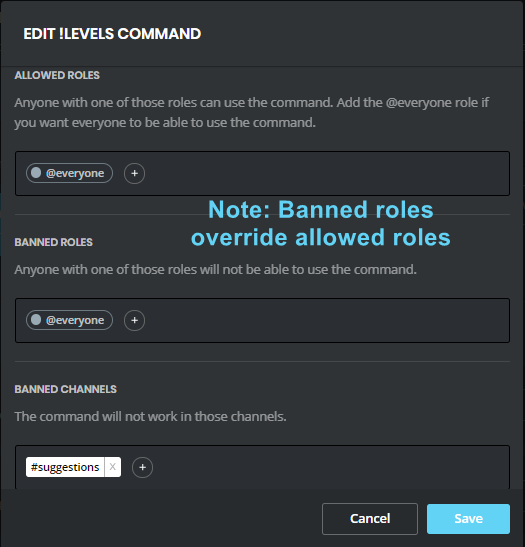
Reason 5: Banned roles and channels. Check that you haven't set a banned role or are using a command in a banned channel: https://i.imgur.com/20QEyzL.png
In case you don't know about banned roles, this pic shows->https://i.imgur.com/dwyc1gt.png


 pure obsidian
@tribal sleet Check if:
- Mee6 has the 'Manage Roles' perm
- Mee6's integrated role is above the role its trying to give or remove
bright crag
Dean lent me check I’ll send a screen shot of what’s up k?
pure obsidian
alright
bright crag
bright crag
Oh
pure obsidian
that will block everyone from gaining XP
bright crag
Oh I’m dumb XD
pure obsidian
call it experience D:
pure obsidian
Okay that compells me to check, please DM me an invite if you are comfy.
bright crag
Ok
pure obsidian
@bright crag 👍🏽
dire yarrowBOT
So... @bright crag, I've decided you should be level 3.
Don't get too excited, mmk.
dire yarrowBOT
Bryce, this command is disabled in this channel.
pure obsidian
#〉commands for commands (and no I dont play roblox :o)
 dusty delta
wow
 smoky seal
the YOUTUBE plugin does not work
limber knoll
dusty delta
😭
bright crag
Uh somethings wrong
Look at this screen show
Why is there so many bugs?
It was just randomly putting my rank
Why?
 kindred sierra
Can't add any YouTube channels, doesn't mater if i paste link or YouTube channel name , any suggestions?
kindred sierra
Is it known how soon it will be fixed?
kindred sierra
okay, thanks! 
white notch
need a bit more context please, as this is intended behaviour
white notch
as far as I'm concerned, that pic means it's working as normal
 sharp oak
really how do i get it to do wat i want then
dire yarrowBOT
!mute @user - gives mentioned user the muted role
Requirements:
+ Manage Roles perm
+ Manage Channels perm
+ I must have a role above the muted role
+ User being muted must not have a role that has a green tick next to the send message perm in channel settings->permissions as this will override the muted role. They must also not have a user perm override on that channel
P.S. You can't mute people who have the permission to mute others, this includes: owner, other moderator or members with Administrator or Manage Server permissions!!!
https://cdn.discordapp.com/attachments/302245580673908740/433026975670730771/2018-04-10_01-13-56.gif
white notch
You can't mute people who have the permission to mute others, this includes: owner, other moderator or members with Administrator or Manage Server permissions!!!
sharp oak
okay thanks can u guys probably add an area that says people that can mute people ho cant be muted?
white notch
already does that with the error command 
dire yarrowBOT
Alright, @limber glade has been warned because 'Posted an invite'.
 green rune
A bug I've noticed with the music plugin, apologies if it's a duplicate.
• Music queue displays as a stack, not a queue (server-side, plays properly as queue)
green rune
I've checked #425409486820474881, no mention of these
limber knoll
So not using YouTube links?
green rune
we've been successfully using youtube links with no issue
dire yarrowBOT
So... @green rune, I've decided you should be level 4.
Don't get too excited, mmk.
green rune
among others that aren't on youtube
same display issue as far as I can tell
clicking on the queue link just returns a 404
limber knoll
Oh sorry I can't help
green rune
I'm just here reporting a bug, it's quite alright if you can't help :P
strong path
You're talking about the link that !playlist posts?
green rune
correct
strong path
It's known that it does not work #425409486820474881
You need to scroll up to see sil's post
green rune
missed that, thank you
strong path
np
strong path
dunno, sorry xD
thanks for reporting
green rune
[bug] !playlist displays as a stack, not a queue (server-side, plays properly as queue)
Steps to Reproduce: Add music to the queue. Use !playlist to view the "queue".
Expected Results: Music shows up as a queue, with the songs sorted in order from oldest to newest added.
Actual Results: Music shows up as a stack, with the songs sorted in order from newest to oldest added.
Screenshots to follow below