#〉bugs-reports
2 messages · Page 27 of 1
 mossy valve
my admin panel shows 3 webhooks but only for 'general' channel and not the 'streaming' channel which i set in the mee6 plugin site
 cold bear
mee6 don't use webhooks for twitch
reddit and timers do
so actually permission overrides on channel can deny his perms
mossy valve
oh ok that must be the timer messages, thanks.
okay thank you @cold bear it looks like it's working again now
 dire yarrowBOT
So... @mossy valve, I've decided you should be level 2.
Don't get too excited, mmk.
cold bear
👍
mossy valve
thanks for your assistance
 vocal spade
Hello
dire yarrowBOT
So... @vocal spade, I've decided you should be level 1.
Don't get too excited, mmk.
dire yarrowBOT
So basically how it works:
You join a voice channel then type !join
Then you add a music like !add name_of_the_music, example : !add nyan cat
Then you do !play
Other commands: !next, !playlist, !stop.
Enjoy your Music 😉
Keep in mind it's still beta beta. So some bugs. 😄
 strong path
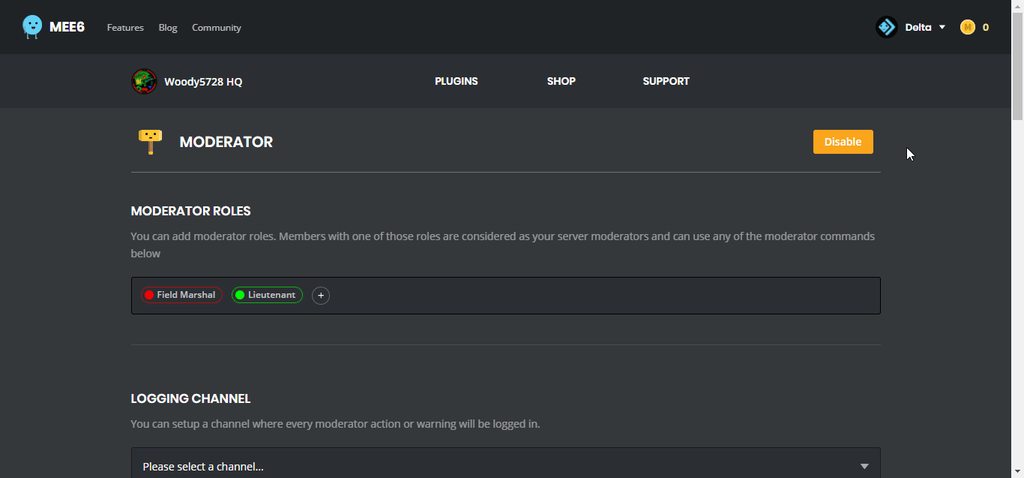
!bad-words
dire yarrowBOT
 strong path
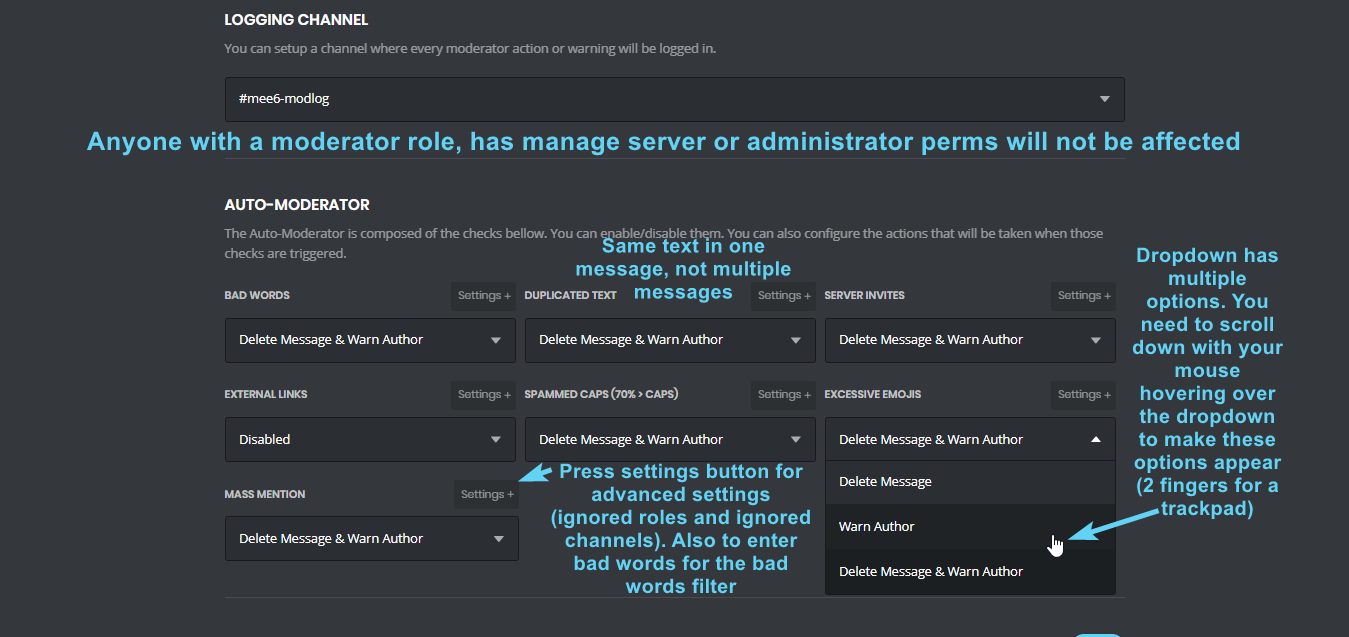
!automod
dire yarrowBOT
 raven bison
ah i see the problem it was the power they had thank very much!
strong path
Next time, ping support or helpers, not random staff ;)
raven bison
got it
 onyx grove
Server invite filter not working sometimes
strong path
!automod
dire yarrowBOT
onyx grove
Okay I tested it on a alt account and it doesn't work
The invite i put is to this server and it doesn't work
The account is a member rank
strong path
Does MEE6 has manage messages perm?
onyx grove
Yes
strong path
Along with read and send and read history perm, right?
 wooden mountain
can you give me a invite pls?
strong path
Do what he says xD
onyx grove
Let me check im pretty sure I gave all permission
strong path
Give Sil an invite, he's a dev
 buoyant moon
hello
onyx grove
@wooden mountain Thanks!
dire yarrowBOT
So... @onyx grove, I've decided you should be level 1.
Don't get too excited, mmk.
strong path
What was it?
onyx grove
Idk maybe mee6 being kinda down yesterday
 pale drum
Is the bot broken for mass mention??? Mee6 is allowing it on my server...
cold bear
@pale drum mass mention in one message
pale drum
Still not working...
 mortal oxide
@pale drum did you enabled the moderator plugin on your dashboard?
pale drum
Yes, it was working earlier but I just tested it since someone was mass mentioning and its not warning or muting...
mortal oxide
Check if it still enabled, check if MEE6 can read messages there. Who tried to do that? MEE6 ignore moderator roles, manage server permission, administrator permission and the owner of that server.
pale drum
Someone who recently joined. I'll look into when I have people on the server tomorrow. Thanks!
 leaden venture
Uhh is it just me or does the bot website only show a gray screen?
 faint dome
which browser/device ?
leaden venture
Safari and im on iOS
wooden mountain
!browser
dire yarrowBOT
Internet Explorer? Edge? Safari? Ew... :nauseated_face: It's time to use REAL BROWSER!!!
Firefox: https://www.mozilla.org/firefox
Chrome: https://www.google.com/chrome/browser/desktop/index.html
Opera: https://www.opera.com/
wooden mountain
go to the plugin selection screen and wait a couple minutes before clicking on a plugin
it first needs to get all the required data (users)
leaden venture
Uh can u give me the website?
dire yarrowBOT
https://mee6.xyz/dashboard press add to Discord, then select your server
dire yarrowBOT
Alright, @lethal rune has been warned because 'Bad word usage'.
 sudden kettle
Hi, the dashboard isnt working for me
its just displaying the solid grey background
wooden mountain
browser?
sudden kettle
chrome
wooden mountain
and what page on teh dashboard?
strong path
servers
dire yarrowBOT
https://mee6.xyz/dashboard press add to Discord, then select your server
strong path
use this one
 mossy valley
عرب
strong path
It's weird that most non-English speaking Arabs usually also have such cancer-ful names
Google's free service instantly translates words, phrases, and web pages between English and over 100 other languages.
buoyant moon
Don't work
 graceful mural
 dense pollen
Is that normal that I can't put any mention in my custom commands?
strong path
^ channel hopping
 proper blade
oi
dire yarrowBOT
Alright, @proper blade has been warned because 'Posted an invite'.
buoyant moon
I have mee6 on two of my servers, yet I am unable to use mee6 commands.
 native anvil
@buoyant moon are your plugins enabled?
buoyant moon
I'm quite certain.
dire yarrowBOT
https://mee6.xyz/dashboard press add to Discord, then select your server
native anvil
click the link and check
native anvil
what browser are you using
native anvil
use chrome
 manic rapids
Dfgjjnj
 potent dove
Timers doesn't work today ?
 limber knoll
Only works if the channel is active, @potent dove
potent dove
Cool ! Active like what ? 10 messages ?
 bitter owl
One message is enough
Mee6 has an anti-spam system
If a chat is completely dead, he won’t keep posting there
potent dove
Cool, thanks 😄
 static willow
so, I've got a problem with the !tempmute command
apparently, it isn't muting the person at all
I tried several times with different people to see if it worked
it stopped working, there's a fix to it?
<@&193123929701875712>
dire yarrowBOT
!mute @user - gives mentioned user the muted role
Requirements:
+ Manage Roles perm
+ Manage Channels perm
+ I must have a role above the muted role
+ User being muted must not have a role that has a green tick next to the send message perm in channel settings->permissions as this will override the muted role. They must also not have a user perm override on that channel
P.S. You can't mute people who have the permission to mute others, this includes: owner, other moderator or members with Administrator or Manage Server permissions!!!
https://cdn.discordapp.com/attachments/302245580673908740/433026975670730771/2018-04-10_01-13-56.gif

 white notch
!duration
dire yarrowBOT
For the tempmute and tempban commands, use the following formats for muting/banning users for a certain time period:
s for seconds
m for minutes
h for hours
d for days
Examples:
!tempmute @user 10m timeout
!tempban @user 3d annoying
leaden venture
Weird
Been trying to access the mee6 website with different browsers and still a gray bg
 ionic meteor
can you try ctrl + f5 ?
leaden venture
Uh im on ios
ionic meteor
oh, so phone?
leaden venture
?
ionic meteor
you're on phone
leaden venture
Yes
ionic meteor
hmm
leaden venture
Also im gonna try the ctrl + F5 when I get to burrow my own pc
dire yarrowBOT
So... @leaden venture, I've decided you should be level 1.
Don't get too excited, mmk.
ionic meteor
alright, most of the time ctrl + f5 fixes it because that refreshes without cache
maybe you could try to clear the browsercache of you phone
leaden venture
Mk
 idle frost
I got an issue
I got a rule that said if someone post a server invite it's gonna be warned, and if someone get warned 3 times per days, it's gonna be kicked
I've try it with a friend, Mee6 said that it's gonna be kicked, but it's not
my friend doesnt got any special rank or admin stuff stc
etc
(Mee6 is admin on my server)
mortal oxide
@idle frost Hi  ! Can you give me a screenshot of your automated actions in the
  plugin please?
By the way you should change your username, it's a kind of advertisement.
dire yarrowBOT
So... @idle frost, I've decided you should be level 1.
Don't get too excited, mmk.
mortal oxide
@idle frost good also // tell me what should I put as a nickname for you.
idle frost
Chanou pls
 idle frost
Thx 😃
 pseudo matrix
Hello, I don't know is it for everyone but when i try to invite mee6 to my server when it redirects me to mee6.xyz/login it is just loading and doesn't let me log in. I tried on phone, and few pc's
mortal oxide
One more people.....
 raw scroll
I cant save on mobile phone plz fix
 ionic juniper
!mobile
dire yarrowBOT
Due to the recent update, the website does not work properly on mobile. You can either use the Google Chrome app and request desktop version (for Android users) or use a PC (for iOS users) https://i.imgur.com/kyt5Akd.png
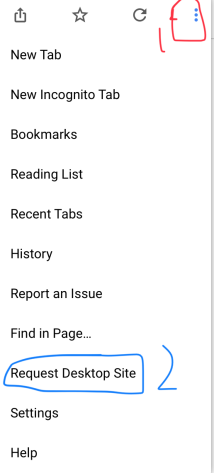 strong path
Better quit using that command, cos the site got updated
strong path
And mobile is experiencing an issue right now and sil is gonna look into it
there are some outdated commands, yeah
raw scroll
I have ios not android :/
ionic juniper
nah, read Ped's comment right above yours here. Ignore what I posted, it's outdated now
raw scroll
It’s working FINALLY !!
dire yarrowBOT
So... @pseudo matrix, I've decided you should be level 2.
Don't get too excited, mmk.
pseudo matrix
And ita like that for looiingtime
limber knoll
Can you explain a bit more?
limber knoll
!music
dire yarrowBOT
So basically how it works:
You join a voice channel then type !join
Then you add a music like !add name_of_the_music, example : !add nyan cat
Then you do !play
Other commands: !next, !playlist, !stop.
Enjoy your Music 😉
Keep in mind it's still beta beta. So some bugs. 😄
 ashen shard
@limber knoll thanks, i'll tryu
limber knoll
Make sure mee6 has voice perms also
 real smelt
!delete
pseudo matrix
@leaden venture same problem for me like mee6 is online but won't respond to any command ive tried everything
@limber knoll ^^^^
limber knoll
Try #〉volunteer-support channel
buoyant moon
Hello i have a bug for me the levels dont work its saying Whoops, it looks like I can't give one of the roles listed here. Please fix that by putting my role above all the roles listed here.
 pure obsidian
Read what MEE6 says, bot's integrated role should be above the one (role reward) it's trying to give @buoyant moon
buoyant moon
were ?
dire yarrowBOT
Role rewards will give a role as reward for active users in chat.
You gain xp by talking in chat, when you gain enough xp you get a level.
in order to let me give role rewards i need :
+ manage roles permission
- at least one of my roles needs to be ABOVE the reward roles(bots can't give roles that are higher than their own role)
! I will only check for role rewards to be updated when:
+A user leveled up to a level. Note this only checks role rewards for them and not everyone
+You update any part of the levels plugin. This does a role reward check on the whole server
 pure obsidian
@buoyant moon 👆🏽
buoyant moon
working
dire yarrowBOT
So... @buoyant moon, I've decided you should be level 1.
Don't get too excited, mmk.
 wraith escarp
help meh
the bot aint giving out roles when the custom command is said
its not listed in known bugs
<@&424994160387293184>
ionic meteor
!role-rewards
dire yarrowBOT
Role rewards will give a role as reward for active users in chat.
You gain xp by talking in chat, when you gain enough xp you get a level.
in order to let me give role rewards i need :
+ manage roles permission
- at least one of my roles needs to be ABOVE the reward roles(bots can't give roles that are higher than their own role)
! I will only check for role rewards to be updated when:
+A user leveled up to a level. Note this only checks role rewards for them and not everyone
+You update any part of the levels plugin. This does a role reward check on the whole server
^^
 flat vault
music bot not working, type: !join, Oops, something went wrong in MEE6 land! :SAD6: This error has been reported to our Team. We'll work hard to fix it.
cold bear
 vestal tree
I didn't see it in #425409486820474881 so I thought I should mention. The API for levels seems to be returning a status 500 as well.
https://api.mee6.xyz/plugins/levels/leaderboard/SERVER_ID?limit=1000&page=0
Returns JSON:
  "message": "The server encountered an internal error and was unable to complete your request.  Either the server is overloaded or there is an error in the application.",
  "status_code": 500
}```@vestal tree change api.mee6.xyz to mee6.xyz/api
dire yarrowBOT
So... @molten wagon, I've decided you should be level 2.
Don't get too excited, mmk.
 molten wagon
Unable to save phrases with non-breaking space in bad words filter
steps:
- Open bad words filter in moderator plugin
- Add phrase with non-breaking space like 'test test' (option+shift+spacebar on Mac OS; ctrl+shift+spacebar on Windows)
- Try to save changes
result:
Saving is stucked. Page refresh returns the previous state.
buoyant moon
Timer Message not running
strong path
dire yarrowBOT
Alright, @fiery basalt has been warned because 'Bad word usage'.
 bright quest
xd
pseudo matrix
Yes but i dont knowbis its global but i have xp glitchd
dire yarrowBOT
So... @pseudo matrix, I've decided you should be level 4.
Don't get too excited, mmk.
 fiery basalt
wauw i say nothing wrong wauw and that the bot does well but further its 9999x down also now i cant come to my dashnpard when the dev gonna do something about it ?? or is this how it gonna be everyday errors offlone FIXIT <@&193123929701875712>
bitter owl
@pseudo matrix your xp is decreasing???
fiery basalt
@bright quest now i cant do that so i dont start it 😉
bright quest
then don't complain bout others...
ok so...
don't complain about mee6
Learn to make your own instead
if you want full up-time
bitter owl
@fiery basalt please read: #〉announcements we made a big update on background of the bot
That downtime were aimed to stop future outage
bright quest
@bitter owl he has now idea how hard it is to make a bot
bitter owl
Only progress. But as all progress, bugs comes together to it
Yeah and 90% of the bot is free... But we have more compliments than complainings. And I care about everybody’s opinion
bright quest
i think 95%
fiery basalt
full uptime hahahah yeah @bright quest funny guy your arguments are stupid an just ridicilous so as example when you get a new internet provider and you dont know how to install so you let someone from the compant do it because they cann but after that you dont agreet with the work they done and you gonna complain then they gonna say yeaah go do it for yourself 
And yeah i understand there is somettime a offline period but not every day 6 hours included rigjt now stil cant login and stil dont get a answer from <@&193123929701875712>
bright quest
no
because you paid for it
and this is free
and ur complaining about not letting somebody install your internet
but it glitched and doesn't work
for a few hours
@fiery basalt
fiery basalt
where is my message
wauw
haha okay
so this is how you handling paying vustomers nicwew
!!!
mortal oxide
@fiery basalt hi did you check #〉announcements?
fiery basalt
i have the music pluggin so eah i did men en @mortal oxide yeaah last message was from today 9 hours ago that it should work but i cant come to my dashboard
mortal oxide
@fiery basalt close and open a new tab.
bright quest
he's saying stuff isn't true XD
mortal oxide
Music plugging is paying.
bright quest
he would have had the early backers role...
bright quest

mortal oxide
We don't do that now
mortal oxide
That's your point of view.
Well, I return testing stuff.
Mention me I won't receive notification.
fiery basalt
@bright quest fine that you dont beleave it also luckely i realy dont care on your opinion i paying for music plugin 😉 but wolfgang now i can login thank
bright quest
mmk
mortal oxide
@fiery basalt np 👌🏻. But please next time be less rude 🙏
fiery basalt
okay @mortal oxide but i just really anoyed that this week the bot is going offline a lot of hours and yeah its one of the main bots in my server
mortal oxide
We are so sorry for this inconveniences 🙏
 elder violet
 lean sphinx
yes, we are aware. Will be fixed 👍
lean sphinx
thx for the report 👌
wooden mountain
Wait... Those are already in production?
 opal ingot
Mee6 isn't properly posting streams that have a _ after the name. Can we get that fixed please?
bitter owl
@opal ingot Put `{streamer}` or **{streamer}** instead of {streamer} only to fix it
opal ingot
so add the ' or ** to each side fixes that @bitter owl , really?
and that'll fix the Link?
bitter owl
You have two options
`{streamer}`
Or
**{streamer**
No secret @opal ingot yes it will fix the link
opal ingot
Awesome, I changed it! Thank You! 
bitter owl
Anytime
opal ingot
Nothing needs be changed with the {link} though? Interesting
dire yarrowBOT
So... @opal ingot, I've decided you should be level 1.
Don't get too excited, mmk.
bitter owl
@opal ingot no need to change {link}
opal ingot
That too is odd, because it's the posted Link that leaves out the _
example:
see how it leaves the _ off the link
 faint bison
Did you have to paste your own twitch link 
and you just tagged a load of angry staff
opal ingot
unfortunately, until the "streamdad" account goes inactive, I'm stuck with the _, DOH!
ionic meteor
it leaves the _ out, because the announcement would get affected by markdown otherwise, so I think they removed the _
you see...that would happen with the text xd
opal ingot
So, I need to change the announcement so the {link} isn't there, and just PUT my own link so it shows up correctly? is that what we're saying here? Sorry, just want to clarify.
buoyant moon
when someone connects the first time on the server he does not receive the private message from the bot.maybe this bug has already been reported.
pseudo matrix
Guys is there some problem with ranking system?
faint dome
Seems
pseudo matrix
My xp is decrasing
faint dome
😶
pseudo matrix
Instead of incrasing
faint dome
Screenshot ?
pseudo matrix
Ok
Gimme a minute
Yesterday first
Today first
Today last
Thats after the maintenance i think
Or i just dont know
pure obsidian
The first one is ranking, not XP
pure obsidian
xD all g
faint dome

buoyant moon
when i try to put the clear command the bot don't say/do anything the same for the rank command
Hi ! Did you enable the commands/plugins in the dashboard? @buoyant moon
dire yarrowBOT
So... @buoyant moon, I've decided you should be level 2.
Don't get too excited, mmk.
 twilit saffron
My bot won't let me mute anyone it keeps saying that it has been reported to the term but it's been doing this for about 2 months now
dire yarrowBOT
So... @twilit saffron, I've decided you should be level 1.
Don't get too excited, mmk.
!mute @user - gives mentioned user the muted role
Requirements:
+ Manage Roles perm
+ Manage Channels perm
+ I must have a role above the muted role
+ User being muted must not have a role that has a green tick next to the send message perm in channel settings->permissions as this will override the muted role. They must also not have a user perm override on that channel
P.S. You can't mute people who have the permission to mute others, this includes: owner, other moderator or members with Administrator or Manage Server permissions!!!
https://cdn.discordapp.com/attachments/302245580673908740/433026975670730771/2018-04-10_01-13-56.gif
dire yarrowBOT
Alright, @buoyant moon has been warned because 'Mass emoji'.
buoyant moon
@dire yarrow sorry
 signal crag
dire yarrowBOT
signal crag
dire yarrowBOT
So... @signal crag, I've decided you should be level 1.
Don't get too excited, mmk.
buoyant moon
you add ir from web
 vocal shoal
There is a bug currently on the bot when going to the dashboard on mobile
buoyant moon
when I click “search everything on the google on Mee6” then I turn on everything and the roles and channel and everything and I try it like !anime then it doesn’t work...
wooden mountain
@buoyant moon what server? machine or club?
buoyant moon
what do You mean by machine or club?
wooden mountain
what server? from the 2 servers that you can manage the bot in
buoyant moon
no 1 Server...
mortal oxide
Why always in bold?
dire yarrowBOT
So... @buoyant moon, I've decided you should be level 1.
Don't get too excited, mmk.
wooden mountain
@buoyant moon i just checked and anime command is working fine in your server
just not in all these channels
!anime random
dire yarrowBOT

The final four episodes of Kokoro Connect.
⏳ Status
finished
🗂 Type
special
➡️ Genres
Comedy, Supernatural, School, Slice of Life, Drama, Romance.
🗓 Aired
from 2012-11-19 to 2012-12-10
💽 Total Episodes
4
⏱ Duration
27 mn
⭐ Average Rating
80.57/100
🏆 Rank
TOP 452
wooden mountain
but you need to specify what you want to search for
faint dome
you're welcome
 limber mica
Jsja
 solemn dagger
o, cool.
solemn dagger
thats why my friend didnt get the role he was supposed to when joined
wooden mountain
that should not be effected
buoyant moon
!server-info
dire yarrowBOT
kispintyi, it doesn't look like you can use that. 
buoyant moon
@wooden mountain im not able to add words to the bad words list .But im on ios and I'm using the latest firefox
buoyant moon
Hello i have a problem maybe a bug i think
https://gyazo.com/4bc0beef01512376ec4d306c0f960fe0

It's already reported ?
wooden mountain
!user-info @buoyant moon
dire yarrowBOT
Userinfo Command for Valère#1676
UserID | 246682382361559040
Server Permissions
Read Messages, Send Messages, Embed Links, Attach Files, Read Message History, Use External Emojis, Connect, Speak, Use Vad
User Status
None
Server Infractions
0 total
Joined Server at
Fri, Apr 20, 2018 09:48 PM
Joined Discord at
Fri, Nov 11, 2016 05:07 PM

Requested by Sil#5262 | 136777781005647872
wooden mountain
🤔 can i have a invite pls
buoyant moon
I give it in private or here ?
wooden mountain
you choice
dire yarrowBOT
Alright, @buoyant moon has been warned because 'Posted an invite'.
wooden mountain
works fine
buoyant moon
In my server doesn't work.
dire yarrowBOT
The clear command allows you to clear the last xx amount of message or to clear one user without clearing anyone else.
Use !clear 1-1000 to clear the last xx messages (example !clear 10)
or !clear @name to clear all the message of @name in the last 100 messages
+ I need manage messages permission
+ I need view message history permission (otherwise I will respond with -1 messages cleared)
+ you need to check the checkmark next to clear on the plugin page.
+ you need to set your role as moderator (located at the top of the plugin page in the moderator tab)
- you cannot clear messages past 2 weeks due to Discord, we cannot change this
I kicked the bot and I'll try to add it again.
wooden mountain
are you using it correct
 sharp valve
Hello guys, i have a problem with MEE6 when I !clear, the !clear message stay here and i can't delete or do anything about it
buoyant moon
It says "I have deleted 2 messages for ya" but it doesn't delete the !clear message doesn't work.
2 messages for example
any number
sharp valve
it stay like this on any channel and i can't do anything about it
buoyant moon
@sharp valve Same.
wooden mountain
thanks for the bug report
sharp valve
I hope it will be fixed before my server will be ready XD
but btw like 2-3 hours ago it didnt act like this, i worked corectly
buoyant moon
I'll try to rejoin the bot sometimes.
buoyant moon
The ot isn't working well...
dire yarrowBOT
So... @buoyant moon, I've decided you should be level 1.
Don't get too excited, mmk.
buoyant moon
:DDD
wooden mountain
what does it do?
 safe coral
!doyounowdawae it gives the tag DaWae
buoyant moon
DA WAE
dire yarrowBOT
Role rewards will give a role as reward for active users in chat.
You gain xp by talking in chat, when you gain enough xp you get a level.
in order to let me give role rewards i need :
+ manage roles permission
- at least one of my roles needs to be ABOVE the reward roles(bots can't give roles that are higher than their own role)
! I will only check for role rewards to be updated when:
+A user leveled up to a level. Note this only checks role rewards for them and not everyone
+You update any part of the levels plugin. This does a role reward check on the whole server
Alright, @buoyant moon has been warned because 'Capital letters'.
wooden mountain
check fi the bot can give that role
safe coral
sorry for my english im of aonther country
wooden mountain
language?
buoyant moon
I'm spanish but I speak perfect english.
dire yarrowBOT
So... @sharp valve, I've decided you should be level 1.
Don't get too excited, mmk.
wooden mountain
Ctrl + R @sharp valve
sharp valve
Nice that work
buoyant moon
Ivan, this was one problem of your discord
dire yarrowBOT
So... @buoyant moon, I've decided you should be level 1.
Don't get too excited, mmk.
 charred elk
sometimes !clear doesn't work
 slate sphinx
bot not leeting the mods use the commands
dire yarrowBOT
So... @slate sphinx, I've decided you should be level 1.
Don't get too excited, mmk.
 echo depot
Mods are not able to use mod commands. They could yesterday. It seems that admin with manage server perms can though.
dire yarrowBOT
So... @echo depot, I've decided you should be level 2.
Don't get too excited, mmk.
 sage citrus
@echo depot Can you make sure the mods are added in the allowed roles for the command?
buoyant moon
It already is @sage citrus I asked that already
sage citrus
Actual bug report - in server-info, MEE6 does not parse the Verified "perk" https://advaithbot.is-really.fun/cGrzJLhDo.png

@buoyant moon hm, maybe check the Moderator Roles? they might have changed something
buoyant moon
Yes I'll asked them that
echo depot
We haven't changed anything
buoyant moon
They changed nothing @sage citrus everything's right
sage citrus
are you two talking about the same server?
buoyant moon
No I think they don't
echo depot
No
sage citrus
k, can you both screenshot both the Moderator Roles section, and the settings for of one of the commands not working?
buoyant moon
@echo depot @slate sphinx
sage citrus
also the settings for one of the specific commands @echo depot
Remove the banned roles
even @everyone
if they dont have an allowed role they wont be able to use it, but banned roles overrides allowed roles
buoyant moon
Your banned roles scorpion ?
slate sphinx
none
buoyant moon
Ok
echo depot
Testing now ty
buoyant moon
@echo depot is it working ?
echo depot
Waiting on staff with the right roles to test. On mobile so a little slow atm
sage citrus
k
@slate sphinx can you just screenshot one of the individual command settings please
slate sphinx
ok so i added mods in an individual commands and it works but it sends a wierd text
hold up will give a s shot
buoyant moon
advaith i already asked for a screenshot he said He can't send a screenshot .But you with the roles .You have got Mich experience bro 👏
Much *
There are no banned roles ? @slate sphinx
slate sphinx
i think i fixed my dannmm issue
dire yarrowBOT
So... @slate sphinx, I've decided you should be level 2.
Don't get too excited, mmk.
slate sphinx
i just went to each role and gave permission to my roles individially
buoyant moon
You said the perms were right -.-
buoyant moon
Ok , so every issue is fixed ?
slate sphinx
i guess for now 😃
buoyant moon
Ok ,
slate sphinx
well thx
buoyant moon
You're welcome
slate sphinx
will cya for next issue XD
echo depot
I think removing the banned roles did it. They weren't there. Just had some people lose access due to unapproved changes. Thank you so much for the help. Sorry for the waste of time.
sage citrus
yw
buoyant moon
@echo depot if one role has one of the banned roles it isn't able to moderate
echo depot
I understand now. Everyone wasn't in the banned roles before. That was definitely the problem. I missed it. My bad.
sage citrus
2 bugs
- The modlog webhook is now sending messages with the default Discord avatar instead of the mee6 avatar https://advaithbot.is-really.fun/twSeMSTRt.png

_ _ 2. In server-info, MEE6 does not parse the Verified "perk" https://advaithbot.is-really.fun/cGrzJLhDo.png
sage citrus
Another bug: mee6 gives the "something went wrong in mee6 land" error if role-info is used without a role name https://advaithbot.is-really.fun/iHwbxoleJ.png

Another bug: For unknown reasons, in some servers, MEE6 gives an error on user-info only for getting info for certain users https://advaith.owns-this.space/wtzljb.png
 mortal oxide
@sage citrus
- I thought it was a bug from my network lol.
- Wdym
- It's
!role-info <role_name> - Same.
wooden mountain
User info not working is because there is no join date
And the webhook missing avatar I reported that yesterday
mortal oxide
@wooden mountain did !user-info only. If no user is mentioned, MEE6 isn't able to give information because no user.
 dim gale
mortal oxide
dim gale
mortal oxide
@dim gale yes we know that.
sage citrus
@mortal oxide
- well its not lol
- it should change it to Verified or something like it changes the other ones, but it leaves it as the long thing it is by d
default - I know, but it should say that instead of just giving a standard error
- User info doesnt need a user mentions, sil says its a bug with join date
mortal oxide
@sage citrus about 4. Work fine with and without user after the cmd
wooden mountain
@mortal oxide user info gives error if no joined at date is found
So does not work correct
 ripe kestrel
!clear does not work above 1
wooden mountain
Works fine
faint dome
(and every other bots)
wooden mountain
Oooo, discord pushed the patch to remove the 2 week limit on bulkclear
strong path
👀
faint dome
wow
It's not obvious, but I'm in great inner joy. That's awesome!
so you're gonna apply it to mee6's clear?
wooden mountain
Apply what?
faint dome
nvm
wooden mountain
Ooo, you mean: change the message from "cannot clear more then 2 weeks" to "the channel is already empty"
We only check how many messages got deleted
faint dome
I mean apply this update. But actually it's automatically
 shell igloo
wooden mountain
shell igloo
wooden mountain
Yep, it is because you don't have a joined at date and we can't parse empty string to a date, will be fixed soon.
 tiny berry
Hi! I am trying to set up a private welcome message in the welcome plugin, but whenever i click save after adding the message i am getting stuck in an infinite save loop (meaning the animated three dots for loading never disappear)
wooden mountain
@tiny berry what does the console say?
tiny berry
please remind me how to open that? 😅
wooden mountain
F12
tiny berry
wooden mountain
Can you try to do the changes again please?
 sullen venture
wooden mountain
sullen venture
wooden mountain
I know
tiny berry
still infinite saving
wooden mountain
@tiny berry can you print screen the config that you are trying to save
tiny berry
the only setting i am trying to change is changing the private message. i managed to save the default message
but fail to add a custom one
buoyant moon
Yeah the playlist no works. 😭
Also when you do !playlist it glitches.
Like I don't get the order.
wooden mountain
@tiny berry are there any " or ' or similar in there?
tiny berry
yes
dire yarrowBOT
So... @tiny berry, I've decided you should be level 1.
Don't get too excited, mmk.
wooden mountain
🤔 that could be the problem, put a \ in front of each qoutemark
I will fix this tonight
cold bear
is your message longer than 2000 chars?
i got infinite loading by trying to put too long message
wooden mountain
Wut? Frondends doesn't allow putting such long text
cold bear
heh
tiny berry
na, i don't think it is more than 2000 characters...trying to get rid of the ' now and putting \ in front of the necessary ones
tiny berry
if i delete the last paragraph of my message it let's me save 🤔
so maybe it is too long...will try to shorten it
wooden mountain
Great, that means that the cap is gone
tiny berry
thanks for the help guys!
also twitch notifications don't seem to work...but you guys know that already 😋
 feral carbon
 gaunt summit
The bot on my server does seem to be able to mute people. Iv set it up with the warnings but when its supposes to mute members it does nothing
 ornate flicker
Is he able to? AKA, does he have enough permissions to do so?
buoyant moon
@ornate flicker You a partner, nice. What server you own?
ornate flicker
buoyant moon
Erm...but which one you own?
dire yarrowBOT
So... @buoyant moon, I've decided you should be level 14.
Don't get too excited, mmk.
buoyant moon
@ornate flicker They all have IDs in their name.
It is hard to tell.
Oh Wait never mind, you own Discord.io.
 daring star
Hi guys, just wanna ask why Mee6 timer isn't functioning on my discord channel?
I have multiple timer set on my discord channel. 2 timer will only pop up every 12 hours and 1 will pop up every 1 hour..
However, Mee6 isn't posting any msg every 1 hour but only applies to 12 hours.. Is there a bug or my setting went wrong?
wooden mountain
cold bear
faint dome
you can go on #〉volunteer-support then 🙃
 humble nacelle
k )
strong path
lol, runner, did you forgot about !asking? xD
faint dome
ow s...
strong path
banned
faint dome
but #〉volunteer-support is more appropriate, although it's not the only one
cold bear

faint dome

buoyant moon
Is it normal of my auto-moderators doesn’t work? I’m maybe lost or I maybe didn’t read something somewhere after all...
*if
gaunt summit
Yeah i cant seem to get my bot to mute people, they can still type after
pure obsidian
@gaunt summit They prolly have a role with the Send Messages permission set to  on that channel, change that to
gaunt summit
Alright ill try that ty
buoyant moon
when i click on my server to see the dashboard it goes back on the the select a server menu
bitter owl
!logout @buoyant moon check if this procedure can fix your problem 
dire yarrowBOT
oops, it looks like you are on the wrong account, you need an account with 'manage server' permissions.
You have to log out from discordapp.com in that browser and then log back in again.
- log out of discordapp site https://discordapp.com/channels/@me and follow the steps in the gif below
- go to http://mee6.xyz/logout and click the 'add to discord' button
https://i.imgur.com/7829TNS.gifv

 bright geyser
<@&424994160387293184> there are problem with mee6 about timer it dosent announce anymore there is a bug somehing with it.
buoyant moon
i have another server and when select it works and it shows the dashboard
ionic meteor
@bright geyser Timers are kinda broken atm
@buoyant moon It might be because the bot is offline in some servers atm
buoyant moon
my bot isnt offline
and i have ben logging out of @dire yarrow so I dont knoe whats going on
 pine swallow
Moderator roles aren’t working
bright geyser
@ionic meteor whens gonna fixed?
pine swallow
When I assign a role to be able to use the commands in moderator plugin, it still says “you can’t use that”
<@&193123929701875712>
dire yarrowBOT
So... @buoyant moon, I've decided you should be level 2.
Don't get too excited, mmk.
ionic meteor
@bright geyser can't say
@pine swallow You need to set the roles as allowed roles for each command as well
 hoary iris
Mee6 seems to be down in some of my servers
As in not replying to commands
Anyone else experiencing This?
bitter owl
@hoary iris yes, due a discord outage
 proud vigil
The panel doesn't seem to be working?
Click on the server the bot is on, then it just goes back to the selection of servers.
ionic meteor
answered in #〉volunteer-support
 forest willow
Mee6 is not responding in a discord server, this has been happening many times and i would like to know why.
ionic meteor
@forest willow Discord is having an little outage right now, it's affecting mee6 in some servers
 quartz geyser
We killed our bot by telling it to mute itself, as evidenced by it failing to respond to commands (in chat and in function) and the rank server going offline.
 hazy beacon
anyone have solution regarding Twitch Plugin it appears the plugin isn't working anymore for me server
strong path
Yeah it seems unstable, #425409486820474881
quartz geyser
Muting the bot is supposed to bring down the website?
 frank lintel
Mee doesn't work very frequently
sage citrus
@quartz geyser no, there is a discord outage, #〉announcements
@frank lintel can you read #〉announcements -.-
strong path
sometimes what's the problem?
strong path
Does it appear offline for you?
nvm
Have you enabled some plugins?
Also make sure it has these perms
!perms
dire yarrowBOT
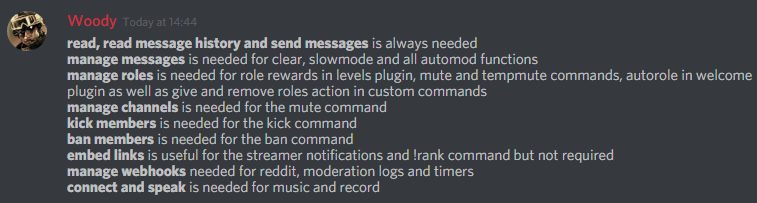 strong path
For timer, #425409486820474881
 dark dome
But it was working before
strong path
IK... :(
dark dome
mee6 has all the perms, and that shouldn't be the problem because custom commands was working this morning
 gaunt zenith
my mee6 just went offline what should i do?
strong path
Wait

 onyx lily
Autoroles not working
bitter owl
@onyx lily Mee6 as overall is not working. Need to be patient until discord fix it
buoyant moon
Sorry if this is a known issue, I didn't see it in the known bugs channel. The playlist command isn't working for me, it just shows a 404
bitter owl
@buoyant moon Yeah it's known #425409486820474881
buoyant moon
why is my command not working in my server
mortal oxide
@buoyant moon did you enable plugin?
mortal oxide
Mmh, may be #〉announcements also @buoyant moon.
buoyant moon
?
mortal oxide
Check that mentioned channel pls.
buoyant moon
Mee6 isn't working in its site
 tacit minnow
Ok so there’s an issue with my server
limber knoll
@buoyant moon is it offline in your server?
buoyant moon
Nope
tacit minnow
I added mee6 and no one could join the server cuz it would always crash
And when I made one without mee6 everyone could join
buoyant moon
ever think about turning the server to mentions only?
limber knoll
Are you using any ad blocker or tried incognito?
tacit minnow
Me?
dire yarrowBOT
So... @tacit minnow, I've decided you should be level 1.
Don't get too excited, mmk.
limber knoll
@buoyant moon
buoyant moon
Nope
dire yarrowBOT
So... @buoyant moon, I've decided you should be level 1.
Don't get too excited, mmk.
Alright, @tacit minnow has been warned because 'Capital letters'.
tacit minnow
I would calm down if @buoyant moon didn’t get level 1 that’s so rare
buoyant moon

tacit minnow
But no srsly someone help my server
limber knoll
@tacit minnow can you post this in #〉volunteer-support please
As in what you get on the site
buoyant moon
hello
I have problems with some of my bots, they appear offline, so I can't use them. But I check in other server that use similar bots, they are working fine
can anyone help?
white notch
read #〉announcements (welcome message did mention this)
buoyant moon
yeah it seems the problem is with the connection to my server, not only this bot but also some others
kinda sucks 😦
white notch
yeah, we know
 blazing thorn
To me only Mee6 is affected...
 lusty shore
Mee6 is offline in my server
buoyant moon
my bot is offline
 royal jolt
same
 burnt hazel
Please read #〉announcements
 noble elbow
panel are buggd
faint bison
In what way?
 cunning tide
How can I go to the page to add more things to the MEE6 bot?
 neat spire
i wanna report a bug
the menu on the webpage is doesnt working
options doesnt appear
 topaz coral
Why can't I connect into the bot panel?
forest willow
Why can't i warn people on a discord server?
noble elbow
i have the bot in my server more i most invite him and if i do that i most reply that action!
blazing thorn
Autorole for up-ranking seems broken...
<@&424994160387293184> <@&193123929701875712>
dire yarrowBOT
So... @blazing thorn, I've decided you should be level 2.
Don't get too excited, mmk.
 shrewd quartz
I'm having an issue as well @neat spire I think... I just tried to access the different modules and they're not there
 quiet cape
I can't access the dashboard. everytime I try it asks me to add the bot to my server
 main gazelle
me too
 somber gulch
same
 junior goblet
buoyant moon
junior goblet
buoyant moon
^ Just got this as well
 upbeat topaz
bot offline in their server for anyone else?
wooden mountain
 languid cloak
I haven't been able to access dashboard for three weeks... Still playing wait and try again?
languid cloak
Have done :)
dire yarrowBOT
So... @languid cloak, I've decided you should be level 1.
Don't get too excited, mmk.
 open grove
I haven't had access to the warn in three days.
ornate flicker
It was definitely operational three days ago. You might want to consider asking for help in #〉volunteer-support ?
open grove
ok
 tranquil timber
The bot was offline from my channel and has the auth loop problem.
bright geyser
when gonna fix that timer bug thing...
wooden mountain
tonight or tomorown
buoyant moon
@dire yarrow please add youtube now live and rss feed mod
 hollow pivot
Mee6 is appearing online, and has permission to post in our stream-announcements channel, but hasn't made an announcement in quite some time.
- Tested the !rank command (to confirm permissions that it's able to post in the channel)
- Twitch Plugin is enabled within the Dashboard, and all users are listed properly
- All other MEE6 functionality is good, except for the Twitch stuff.
Any suggestions to troubleshoot?
wooden mountain
youtube comming soon, rss is on idea's list
@hollow pivot yes, read #425409486820474881 second last message
hollow pivot
Ah, I'd read up on the announcements that maintenance was in the works / rebooting. My apologies for missing the (proper) channel!
Many thanks.
dire yarrowBOT
So... @hollow pivot, I've decided you should be level 1.
Don't get too excited, mmk.
buoyant moon
@wooden mountain thx
bright geyser
are the timers fixed?
 tiny crow
I have a bug bot does not output my twitch link properly. This is the link /wauzie_ and the bot gives /wauzie in oblique step
buoyant moon
Doesn’t always delete the !clear 1 message after I clear the chat
dire yarrowBOT
Kamienski, this command is disabled in this channel.
 abstract nest
Ooops
 cobalt widget
have to manually add moderators to each command
sage citrus
@cobalt widget not a bug
strong path
it is though?
strong path
cobalt widget
I'll just make a suggestion to add a disclaimer to the moderator roles thing
sage citrus
but moderator roles are also roles that can't be warned/kicked/banned
cobalt widget
regardless
the message is still misleading
it implies that once you set a moderator they can use any command when they cant
 midnight cove
Seens like my mee6 has lost his progress
wooden mountain
@sage citrus that mod roles can't use those commands actually is a bug
sage citrus
ok
 sage moth
A large amount of people arent being posting when they go live on twitch
strong path
sage moth
My bad
faint bison
 knotty venture
Bro, the dashboard isn't working
Error 404 everytime
"Major tom, looks like youre on the wrong planet"
dire yarrowBOT
https://mee6.xyz/dashboard press add to Discord, then select your server
wooden mountain
are you on there?
 next pebble
 steel surge
Twitch live announcements haven't worked for me since last Tuesday. 
wooden mountain
dire yarrowBOT
getfrosty, it doesn't look like you can use that.
dire yarrowBOT
!mute @user - gives mentioned user the muted role
Requirements:
+ Manage Roles perm
+ Manage Channels perm
+ I must have a role above the muted role
+ User being muted must not have a role that has a green tick next to the send message perm in channel settings->permissions as this will override the muted role. They must also not have a user perm override on that channel
P.S. You can't mute people who have the permission to mute others, this includes: owner, other moderator or members with Administrator or Manage Server permissions!!!
https://cdn.discordapp.com/attachments/302245580673908740/433026975670730771/2018-04-10_01-13-56.gif
buoyant moon
thx i fixed it
bright geyser
when gonna fix the mee6 timers??
sage citrus
@bright geyser soon
bright geyser
hope soon enough 😃
 shrewd pecan
Role rewards are bugged
strong path
They know, #425409486820474881
 slow oasis
these commands dont work for me !warn !ban !tempban !kick could anyone help me get it working
strong path
Have you enabled the moderator plugin?
slow oasis
yes
white notch
!warn @user [reason] !ban @user [reason] !tempban @user 5m [reason] !kick @user [reason]
[reason] is what you would put in as a message, do not use brackets for it
slow oasis
ok i forgot the resons and @ thank you
white notch
means bot doesn't have manage roles perm, or has a role above the role being given
dire yarrowBOT
So... @buoyant moon, I've decided you should be level 3.
Don't get too excited, mmk.
strong path

 serene fossil
amazing this came up, i just figured out how to get that to work yesterday... however, my issue is trying to get the command to give somebody else a role... goal is to make it quick and easy for mods to grant/remove a specific role, instead of going to the settings and such... can it be done this way?
white notch
no
serene fossil
any chance that will be added? ^^
white notch
in the future, yes
serene fossil
ok, thankies ^^
buoyant moon
???
strong path
Show us your custom command
buoyant moon
wooden mountain
or that they don't have one of those roles to remove
cold bear
that's dumb
wooden mountain
ikr
strong path
oh, I thought that they exactly need to have everyone of those roles?
buoyant moon
Thanks
dire yarrowBOT
So... @buoyant moon, I've decided you should be level 1.
Don't get too excited, mmk.
wooden mountain
don't copy them from our custom command, that has invisable characters in it so the bot won't parse it
type them over
!variables
dire yarrowBOT
you can use variables in your custom commands and other plugins, here is a list:
SERVER VARIABLES
Server: {server}
Server name: {server.name}
Server ID: {server.id}
Server icon: {server.icon}
Server icon link : {server.icon_url}
Server Owner ID: {server.owner_id}
Server Owner: {server.owner}
Server Region: {server.region}
Server verification level: {server.verification_level}
Server creation date: {server.joined_at}
Server member count: {server.member_count}
```__**USER VARIABLES**__
User mention: {user}
User ID: {user.id}
User name: {user.name}
User discrim: {user.discriminator}
User ID: {user.idname}
User mention: {user.mention}
User avatar: {user.avatar}
User avatar link: {user.avatar_url}
User bot (yes/no): {user.bot}
Channel name: {channel}
Channel name: {channel.name}
Channel ID: {channel.id}
Channel type: {channel.type}
Channel mention: {channel.mention}
** **
__**PLEASE DO NOT COPY AND PASTE THESE VARIABLES, AS THEY WILL BREAK. MANUALLY TYPE THEM!**__also some changed since when you made that
serene fossil
it has unexpected results...
didn't give owner's name... date doesn't make much sense... and icon is not an icon o.0
white notch
icon just gives the Icon ID
you want the url variable
{user.avatar_url} instead of {user.avatar}
serene fossil
hmmm, ok... what about the time?
dire yarrowBOT
So... @serene fossil, I've decided you should be level 2.
Don't get too excited, mmk.
white notch
don't think that can be changed, as that's just the way the variable outputs it 🤔
dire yarrowBOT
Userinfo Command for slave#4299
UserID | 409431831100784651
Server Permissions
Read Messages, Send Messages, Embed Links, Attach Files, Read Message History, Use External Emojis, Connect, Speak, Use Vad
User Status
None
Server Infractions
0 total
Joined Server at
Tue, May 22, 2018 09:54 PM
Joined Discord at
Sat, Feb 03, 2018 07:35 PM

Requested by Sil#5262 | 136777781005647872
wooden mountain
!server-info
dire yarrowBOT
Owner
Cookie#1337
VIP Perks
Voice, Vanity, Splash
Server Created
Created 17/03/2016
Total Roles
35
Members
47603 members,
12964 online
20 bots, 47583 humans
Total Channels
59 total channels:
6 categories
47 text, 6 voice

Server Name: MEE6 Community | ServerID: 159962941502783488
serene fossil
oh... lol
wooden mountain
in moderator plugin
pure obsidian
Whats Voice perk?
serene fossil
ok, one more thing... how do u get a custom command to react to @somebody? like that !user_info @serene fossil
white notch
voice servers with lower latency and higher bitrate, that aren't public because of how resource intensive they can be @pure obsidian
wooden mountain
@serene fossil custom commands can't do that, !user-info can be found under the moderator plugin
serene fossil
so i can't make a hug command that sends a hug to others?
wooden mountain
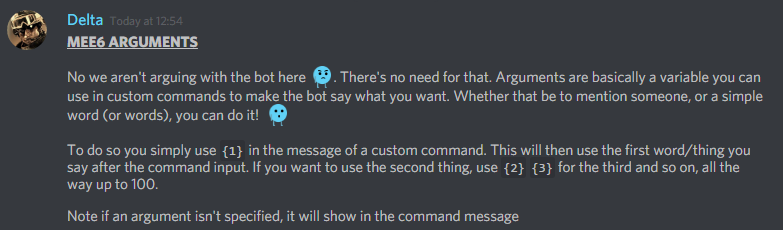
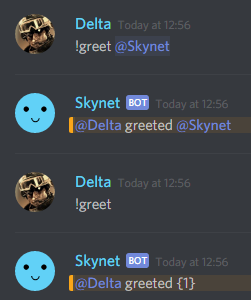
!greet @serene fossil
dire yarrowBOT
@wooden mountain greeted @serene fossil
dire yarrowBOT
 serene fossil
hmm, ok, thankies ^^
 strong cradle
one day my MEE6 are not responding in private for some reason i dont know, and i can ativate the music option but i dont pay for her, and now the MEE6 has back to normal but the music option stil ativated and i cant deactvate it
bitter owl
@strong cradle Known bug
Thanks for letting us know. Dev will disable for people who did not pay
strong cradle
a ok
wooden mountain
@bitter owl nope
bitter owl
Cookie said he was going to lock it :O
wooden mountain
nope
@strong cradle if you want it disable then give me the link to your dashboard
bitter owl
Omg what about now
wooden mountain
free music
strong cradle
wooden mountain
all the commands are disabled but the plugin is still enabled
i can't disable the plugin itself
strong cradle
so he will be ativate but not work
wooden mountain
yes, the plugin will show activited but all the commands are disabled
strong cradle
ok
 unborn rapids
Twitch streams won’t be announced for some reason.
unborn rapids
Oh sorry I didn’t see xD
 quick moat
On my server i enabled twitch notifs and set up the people, but when they go living, the notif dont arrive
strong path
quick moat
oh ok
dire yarrowBOT
Alright, @velvet wraith has been warned because 'Posted an invite'.
 north schooner
<@&424994160387293184> is the stream announcment fixed?
white notch
no
white notch
no
north schooner
and everyone here is soo helpful
strong path
Well, for twitch, there's Now Live bot (inb4 delete)
north schooner
okie thanks
buoyant moon
!help
dire yarrowBOT
Miviner10, this command is disabled in this channel.
buoyant moon
/help
bitter owl
@buoyant moon Try in #〉commands and !help
buoyant moon
i have everything thing enabled and !help still isn't working?
faint bison
!no-help
dire yarrowBOT
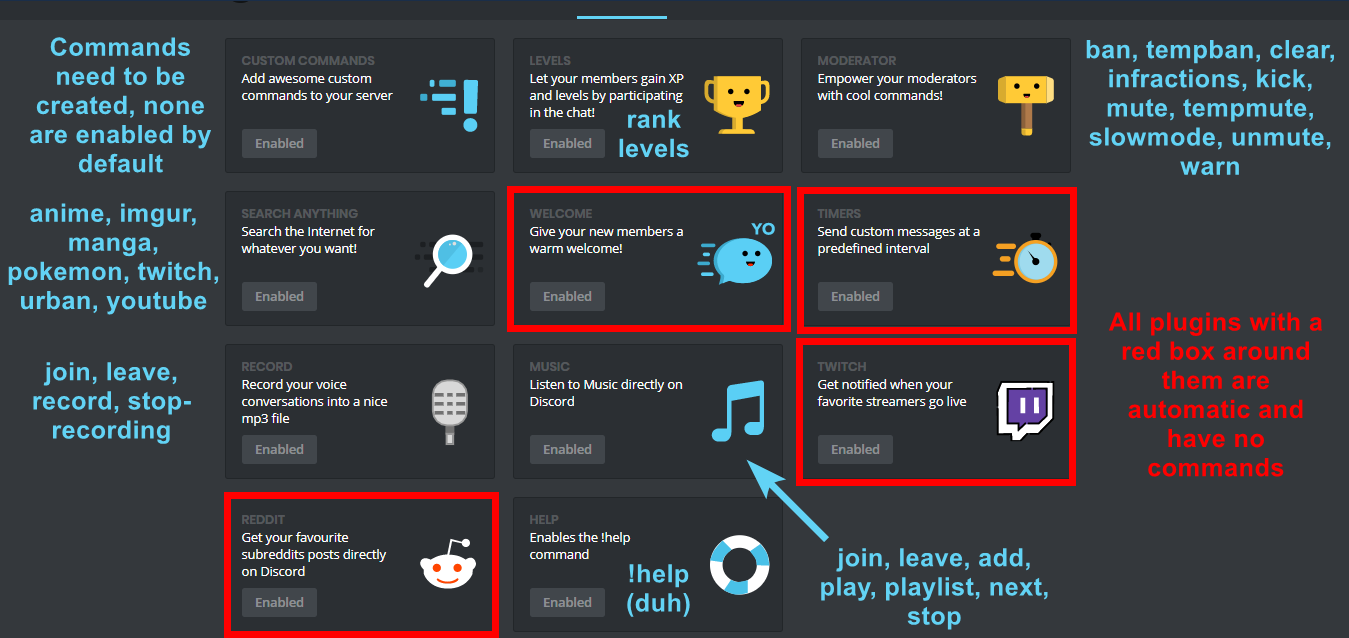
Doing !help and it's not showing any commands? Wondering why I'm not doing my job?  This is caused by commands not being enabled in plugins. To do so you must:
* Create custom commands in the commands plugin
* Enable Levels plugin (this will enable !rank and !levels
* Enable commands in Moderator plugin (these will only show if you have a mod role selected for each command)
* Enable commands in the Search Anything plugin
* Enable commands in the music and record plugins (these plugins require payment)
After that you can do !help and you can see all my lovely commands  Just don't disable the command on yourself. You can also do
 !help in #〉commands or look at this image: https://i.imgur.com/V93V8Dg.png
 faint bison
@buoyant moon 
buoyant moon
thank
 eager solar
Hey my Mee6 twitch plugin just randomly stopped working one the 21st, any suggestions on how to fix the issue? Thanks!
sage citrus
dire yarrowBOT
Alright, @buoyant moon has been warned because 'Posted an invite'.
 silent willow
hello the timer command on my server does not work how to do?
wooden mountain
silent willow
you must wait ?
ionic meteor
Yes
silent willow
ok tanks
 thin merlin
the timer I set up in my server is not showing an avatar picture for Mee6
wooden mountain
you have working timers?
sage citrus
Sil, someone else was reporting their timers were working but firing at the wrong time (every minute instead of 30 mins)
wooden mountain
interesting
(wich is strange as timers part of the bot is not even on for as far as i know)
sage citrus
@wooden mountain fyi timers are working in my server too, but without the avatar
server id is 309101915344470027
wooden mountain
!eval (309101915344470027 >> 22) % 512
dire yarrowBOT
414```idk, it isnt on
thin merlin
he was set for 1 minute no profilepic and only 1 message even though there should be spam
wooden mountain
there is a flood prevention
the bot won't spam timers
there needs to be other talk in there
wooden mountain
yeah.... we need to fix that part
thin merlin
ok thx
 dapper vector
The Role giver commands don't work for me
 scenic quiver
faint bison
scenic quiver
faint bison
#425409486820474881 @scenic quiver
faint bison
@dapper vector make sure the mee6 role is above the role it's giving
mortal oxide
@dapper vector you can't do !cmd_name @user.
dapper vector
Mk
dire yarrowBOT
So... @dapper vector, I've decided you should be level 1.
Don't get too excited, mmk.
 rose dirge


 wooden mountain
!mmk
dire yarrowBOT

 karmic mica
!rank
dire yarrowBOT
captainiron00, this command is disabled in this channel.
strong path
 summer dawn
УГАРАЮ
bitter owl
@grave tree Can you help me urgent here?
bitter owl
LOL yeah that hahahaha
dire yarrowBOT
@summer dawn did 'Keep your NSFW stuff in other servers.' and got the ban hammer! 
bitter owl
Thanks a bunch for take your time <3
strong path
oh 😐
 spring skiff
what just happened
strong path
It was actually nsfw?
 grave tree
no worries, thanks for alerting me!
strong path
I had preview turned off xD
grave tree
lol probably for the best
buoyant moon
mee6 isnt logging what i do
strong path
Have you setup a logging channel?
buoyant moon
yes
strong path
Does MEE6 have read and send and embed links and manage webhooks(both in the channel and server settings)?
strong path
try giving it a in channel settings for those perms
buoyant moon
ok i did
strong path
Try again now, see if it works
buoyant moon
doesnt work
white notch
what are you expecting the bot to log?
cause it only logs mutes, bans, kicks and anything deleted by automod @buoyant moon
white notch
yeah it doesn't log edited or deleted messages
 normal herald
MEE6 doesn't count actual numbers of a server!
white notch
yes