#〉bugs-reports
2 messages · Page 26 of 1
 dire yarrowBOT
 livid comet
Hi my mee6 bot on my Super Smash Bros server is not working pls help
 buoyant moon

 nocturne rapids
Can anyone draw good pfp for YouTube if so DM pls
 cold bear
@nocturne rapids this is wrong place for asking that, no need to repost
 astral veldt
mee6
 tranquil marsh
eee
 wise flame
O
 past brook
wise flame
past brook
wise flame
B
 mortal pawn

 keen flicker
!stop
dire yarrowBOT
oleh, this command is disabled in this channel. 
 strong path
buoyant moon
strong path
buoyant moon
hey guys how do you get the mee6 bot to delete any "bad word" mine is broken
 wooden mountain
 woeful spruce
When using the rank command and the user has a gif as their pfp, it doesn't show
wooden mountain
the gif or the whole embed?
woeful spruce
The user in my server did !rank
dire yarrowBOT
So... @woeful spruce, I've decided you should be level 1.
Don't get too excited, mmk
wooden mountain
🤔 then it is indeed a bug that we did not yet know of
dire yarrowBOT
Alright, @vivid marsh has been warned because 'Posted an invite'.
buoyant moon
!rank
dire yarrowBOT
skztr, this command is disabled in this channel.
strong path
Why... Like just, why do people choose this specific channel for commands? 😓
go to #〉commands for bot commands btw
 rustic fiber

dire yarrowBOT
Alright, @obsidian token has been warned because 'Duplicated text'.
Alright, @obsidian token has been warned because 'Duplicated text'.
Alright, @obsidian token has been warned because 'Duplicated text'.
buoyant moon
I can't edit the bad words 😦
 white notch
you just have to wait
buoyant moon
kk
 valid pulsar
@ here BUG ?
strong path
State your bug report here, yes
 obtuse vault
that can be fixed easy
dire yarrowBOT
Role rewards will give a role as reward for active users in chat.
You gain xp by talking in chat, when you gain enough xp you get a level.
in order to let me give role rewards i need :
+ manage roles permission
- at least one of my roles needs to be ABOVE the reward roles(bots can't give roles that are higher than their own role)
! I will only check for role rewards to be updated when:
+A user leveled up to a level. Note this only checks role rewards for them and not everyone
+You update any part of the levels plugin. This does a role reward check on the whole server
 buoyant moon
@obtuse vault thanks the problem is clear ^^
obtuse vault
I didnt activate the command lel
dire yarrowBOT
Alright, @sweet tide has been warned because 'Bad word usage'.
buoyant moon
how can i change the message
when someone join
message
and when someone leave message
dire yarrowBOT
https://mee6.xyz/dashboard press add to Discord, then select your server
wooden mountain
then the welcome plugin
buoyant moon
thx
dire yarrowBOT
Alright, @uneven folio has been warned because 'Posted an invite'.
 sage citrus
@uneven folio Please delete that as this is a channel to report bugs not spam.
 left nymph
I have a timer set up and mee6 is showing them but its name isn't correct (I changed it) and the color isn't correct (it has a colored rank)
It's the normal grey MEE6
Well I guess white
 bitter owl
@left nymph It's called webhook. All mee6 timers are not really mee6. It's a copy that you can access in your Server Settings -> Webhooks and change even the profile picture if you want
 inner trellis
could you add things who can grow like every time you'll use it it will give you the role ant add one to the number, and if more than 11 guys have it, it won't give (and if you use another command, it will reset the number and ,why not take back the given roles)
dire yarrowBOT
So... @inner trellis, I've decided you should be level 6.
Don't get too excited, mmk
bitter owl
@inner trellis Not possible but you can make a summary and drop your idea in #〉suggestions
inner trellis
oh yeah soory
 proud spindle
Why i cant add mee6 to my own new server?
bitter owl
@proud spindle Try to use proper link please
dire yarrowBOT
https://mee6.xyz/dashboard press add to Discord, then select your server
dire yarrowBOT
Internet Explorer? Edge? Safari? Ew... :nauseated_face: It's time to use REAL BROWSER!!!
Firefox: https://www.mozilla.org/firefox
Chrome: https://www.google.com/chrome/browser/desktop/index.html
Opera: https://www.opera.com/
proud spindle
@bitter owl same stuff happens. Also used opera, chrome and edge for that. Neither works.
dire yarrowBOT
So... @proud spindle, I've decided you should be level 1.
Don't get too excited, mmk
bitter owl
!logout @proud spindle
dire yarrowBOT
oops, it looks like you are on the wrong account, you need an account with 'manage server' permissions.
You have to log out from discordapp.com in that browser and then log back in again.
- log out of discordapp site https://discordapp.com/channels/@me and follow the steps in the gif below
- go to http://mee6.xyz/logout and click the 'add to discord' button
https://i.imgur.com/7829TNS.gifv

 vagrant jolt
one bug: he racist
proud spindle
hmm, i have only one account.. Dno, but it worked. What was the real problem then? Also cheers mate, thanks.
bitter owl
@proud spindle I asked you to logout from your currently account in mee6 and discord web
Did you do it? Is everything working fine to you now?
proud spindle
Yep, altho i try to understand what caused it.
bitter owl
Press F12 @proud spindle
Track previous text in red and send me a screenshot that I can try to identify what is wrong (in case you did not close the window)
 frank lintel
 faint bison
For tempmutes yes, #425409486820474881
faint bison
Ok I’ll just stop already
bitter owl
There's a limit of 5 per server
faint bison
lol
bitter owl
And its timezone is UTC so the hour could not match
faint bison
It’s obv that I’m not helping 
 tough holly
umm... When I tempban a user.. After the time passes they arnt back in.
or the bot doesnt dsend them an invite.
tough holly
Your Welcome!! So thats a known bug?
strong path
@bitter owl It's not in #425409486820474881 actually, that's tempmute
tough holly
It was tempban
strong path
lol, you should-- yeah
bitter owl
Done, thanks
tough holly
This is a bug with my server and MEE6. I have a custom command setup with MEE6 and you have to type !agree to agree to the rules and get acsess to talk and stuff. So !mute is not working.
bitter owl
@tough holly Does a person receive the muted role?
tough holly
yes
dire yarrowBOT
So... @tough holly, I've decided you should be level 3.
Don't get too excited, mmk
bitter owl
So that's a discord "problem"
tough holly
oh
bitter owl
Actually It's because there's another role allowing people to write, which overrides mee6's muted role
tough holly
is there a way i can fix that
bitter owl
So instead of giving (__write -  __) perms to another roles and (__everyone -
  __) in text channel,
The ideal to make everything works good is: (everyone  ), ( unwanted roles and muted {from mee6} - )
tough holly
?
tough holly
idk what that means...
bitter owl
Do you know what a text channel is?
 onyx vale
hi
dire yarrowBOT
Alright, @crisp topaz has been warned because 'Posted an invite'.
bitter owl
@onyx vale Precisando de ajuda?
bitter owl
Então diga jovem, em que posso ajudar? @onyx vale
dire yarrowBOT
Note: Asking for a staff role will decrease your chances of having that role https://cdn.discordapp.com/attachments/302245580673908740/303359859410075648/image.jpg
 onyx vale
to brincando
bitter owl
Blz
bitter owl
!search
dire yarrowBOT
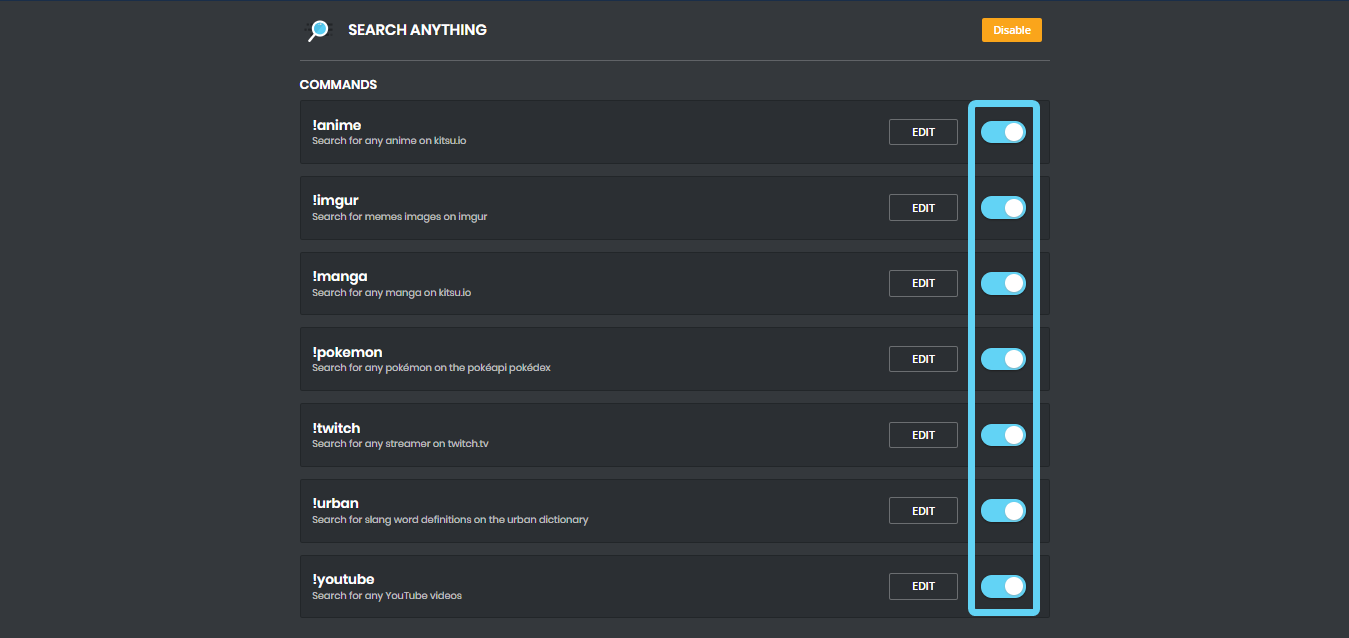
Search Commands
Please Note: You can't search nothing. If google can't allow you to search nothing, the bot won't give any results either. So you need to specify something. It also takes first search result, so you may need to be specific with searching. The following are examples:
!anime naruto
!imgur cats
!manga blame!
!pokemon pikachu
!twitch Squirrel
!urban Mee6
!youtube nyan cat
https://i.imgur.com/XwAC6JY.png
 lone elbow
 nimble ruin
Idk if this technically counts as a bug, or whether I should put this in #〉volunteer-support (let me know), but the {server.created_at} variable doesn't seem to be working
bitter owl
Yeah bugged
tough holly
This is a bug with my server and MEE6. I have a custom command setup with MEE6 and you have to type !agree to agree to the rules and get acsess to talk and stuff. So !mute is not working.
help
Its giving them the mute role.
but not muting them.
.
.
 river drum
hi
 plucky pawn
bye
dire yarrowBOT
Alright, @keen patio has been warned because 'Capital letters'.
 native anvil
@steel viper what browser are you using?
 steel viper
Safari
native anvil
try chrome
steel viper
Yeah but iphone's default browser is safari
native anvil
that can probably be changed in your phone settings, unless you don't want to
dire yarrowBOT
So... @native anvil, I've decided you should be level 14.
Don't get too excited, mmk
 faint dome
(!mobile)
dire yarrowBOT
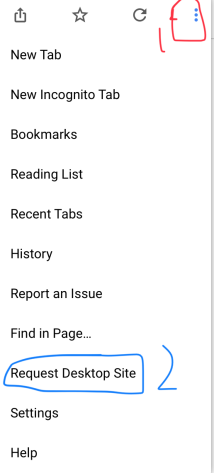
Due to the recent update, the website does not work properly on mobile. You can either use the Google Chrome app and request desktop version (for Android users) or use a PC (for iOS users) https://i.imgur.com/kyt5Akd.png
 native anvil
I'm assuming you tried chrome?
native anvil
alrighty
steel viper
I assume the webite detect resolutions and it's not about different website for mobile and desktop
native anvil
oh
dire yarrowBOT
https://mee6.xyz/dashboard press add to Discord, then select your server
native anvil
ok, don't know if you just installed chrome or not but clear the cookies, and after that if it still doesn't work I don't know what else to suggest. ping support in #〉volunteer-support if you still need help : )
steel viper
Not really i do have chrome but i prefer using safari so i have it but never used it, have you tried it by yourself on iphone?
native anvil
I don't have an iphone and I've basically never used safari before unless i absolutely had to. Always used mozilla firefox or chrome.
steel viper
Not even when apps redirect you to safari? XD
faint dome
On any device other than iPhones, you can choose the default application 😉
but let's go on #〉chat
cold bear
new website isn't compatible with safari*, old explorer and edge browsers. mostly caused because using different framework that was used before. also safari* has known issues with javascript compatibility, so using stock browsers can be bad idea sometimes. same issue can be applied to old stock browsers that rarely get update and don't support new html/js features yet.
edit: old safari*
 shrewd pier
Mee6 is sendint messzages like "you achieved level --" to me but i'm not chatting and not reciving XP
bitter owl
@steel viper what version of iOS are you using? I strongly guess it’s not up to date. Which leads you to blank page
dire yarrowBOT
Alright, @lethal verge has been warned because 'Posted an invite'.
tough holly
This is a bug with my server and MEE6. I have a custom command setup with MEE6 and you have to type !agree to agree to the rules and get acsess to talk and stuff. So !mute is not working.
cold bear
this is how discord permission system works, not actual mee6 bug. if these channels are hidden for users without members role you can move send message permission to neutral position since users that can't see channel can't type in it too. that should fix not working mute
 quaint gazelle
a chaque fois que je fait !clear sa veut pas clear
is bug on me server
the !clear dont want to did clear
bitter owl
@quaint gazelle Mee6 need manage messages to perform this feature and message can not be older than 2 weeks
 nimble vale
Hello! Mee6 on my discord server kicked 2 players out randomly, i wonder if anything have happend to the bot. Thanks for Answering! 😃
My friends
 ionic meteor
You sure it wasnt a moderator command?
nimble vale
Yea
ionic meteor
Hmm, it shouldnt do that xD, maybe someone deleted the message from the logs? You could check the audit log using the API but Im not sure if you know how to use that 😛
nimble vale
Okay
ionic meteor
Do you know how to use it? 😄
nimble vale
Yes! I use it on my own but on my friends server it got kinda mad....
and started to kick
Its nothing in the audit log
ionic meteor
I mean, do you know how to use an API? Because mee6 keeps it owns audit log, which isnt visible on the website or in your discord client, only through the mee6 API.
dire yarrowBOT
So... @nimble vale, I've decided you should be level 1.
Don't get too excited, mmk
ionic meteor
Where?
ionic meteor
No, you can’t see it on the website :x
nimble vale
Wait what? How can i see it then?
ionic meteor
Wait, can you send me a DM? Otherwise we’re kinda flooding this chat xD
 nocturne forge
It needs to be fixed.
Ummmm... Excuse me, the bot curses. What if servers don't want cursing? This isn't very professional.
white notch
because the bot takes the username of the person who used the command
something that is borderline impossible to fix
nocturne forge
@white notch I checked my audit log and there was no nickname change to that
white notch
!rank
dire yarrowBOT
Delta, this command is disabled in this channel.
nocturne forge
You can;t have it check for a word and if that word is there just don't use the username?
It's something that can be fixed. It just a matter of doing it.
buoyant moon
<@&193123929701875712> I have created a command where a user should give a role authorization but it comes only the message that it is not
 warm pike
<@&193123929701875712> I can’t set up all the custom commands ;-;
faint dome
@warm pike why precisely ?
warm pike
@faint dome The website didn’t work, I tried to reset it, but it still didn’t work. I’m stupid I don’t really know how to set stuff up.
warm pike
Google chrome
faint dome
so it's not the browser's fault.
The problem is you don't see the site at all ?
warm pike
Yeah, it’s just kinda grayish
faint dome
Is there a loading bar displayed? And no error on the part of the browser?
warm pike
There is nothing else except for a gray screen
faint bison
what's the URL you're on?
dire yarrowBOT
So... @faint bison, I've decided you should be level 8.
Don't get too excited, mmk.
warm pike
I searched up Mee6 custom commands and the first thing popped up I used that one
dire yarrowBOT
So... @warm pike, I've decided you should be level 1.
Don't get too excited, mmk.
faint dome
website is on www.mee6.xyz
or
dire yarrowBOT
https://mee6.xyz/dashboard press add to Discord, then select your server
faint dome
if you're not on a pc, use Chrome with "Desktop mode" @warm pike
 wintry knoll
Hello, I need help, when i use " !infractions " command, nothing happens. HELP
@hoary stream
@cold bear
cold bear
make sure you added mention after command, not just username or id
dire yarrowBOT
 Meow#8663 's infractions
Last 24 Hours
0 infraction
Last 7 Days
0 infraction
Total
0 infraction
Last 10 infractions
None
Requested
·
cold bear
yes
faint dome
yes
wintry knoll
" !tempban ; !ban ; !kick ; !mute ; !tempmute ; !unmute " in all those commands you need @ ?
faint dome
right
faint dome
!slowmodeinfo
dire yarrowBOT
So, you are interested in slowmode? Here is everything I can tell you.
🐌 Slowmode automatically deletes messages given between a XX second interval of the users last sent message.
📁 Usages:
   -- !slowmode xx : Enabled Slowmode : xx=Message Cooldown Per User
   -- !slowmode off : Disables Slowmode : No Params
you're welcome !
wintry knoll
😃
 naive willow
Putting 1 minute cooldown into a custom command (not indicate the missing time, between wait and to use):
cold bear
put mee6 role above language roles
 magic crown
Hi
I need belp
Help
I add my role to moderator and they still can't use mod ! Clear etc
bitter owl
State the problem
white notch
!moderator
dire yarrowBOT
 white notch
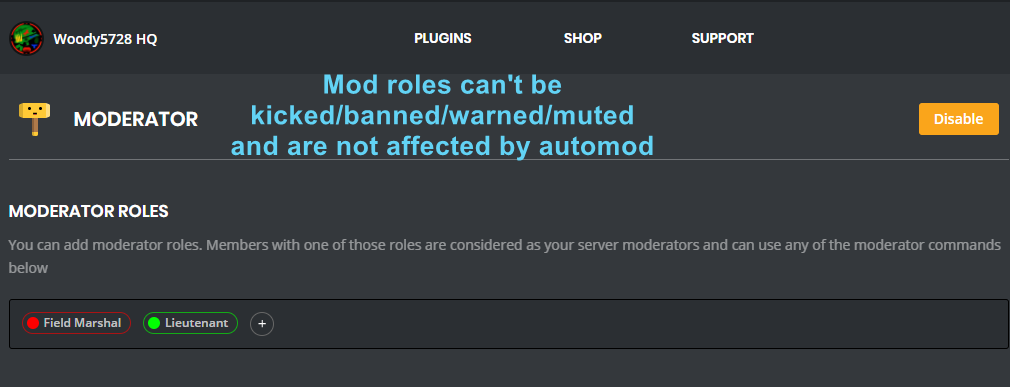
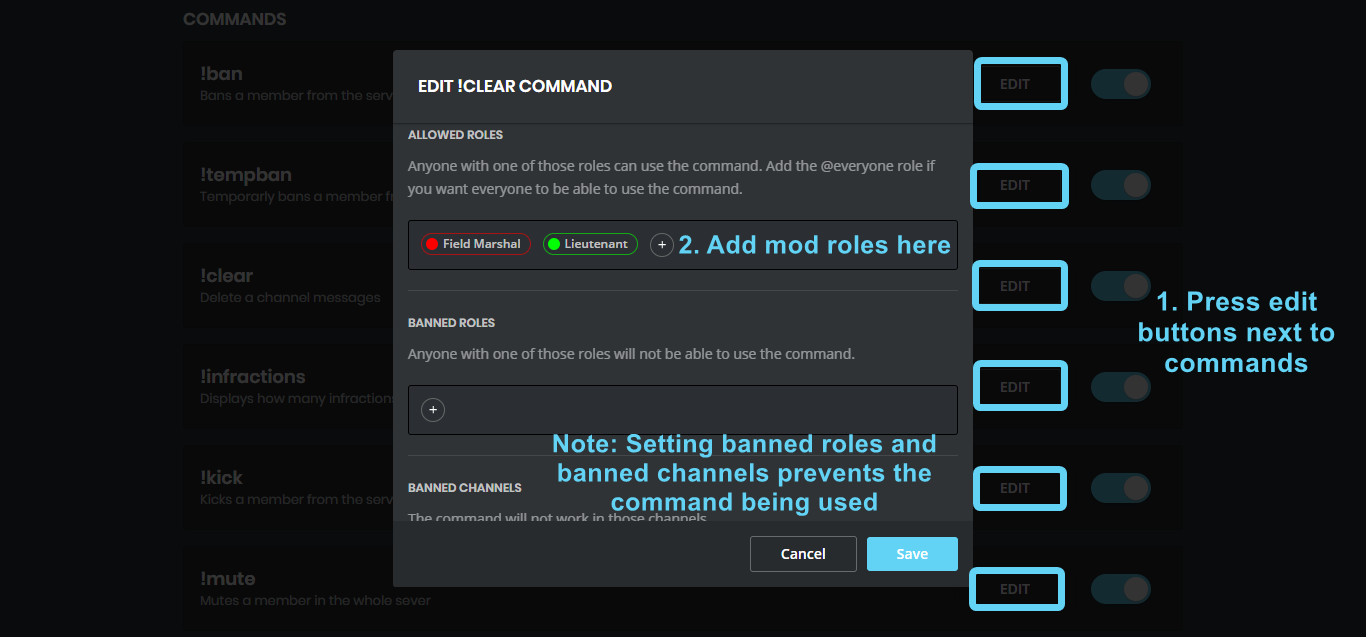
mod role needs to be added inside the command
magic crown
I add the role but still don't have permission
dire yarrowBOT
The clear command allows you to clear the last xx amount of message.
or to clear that annoying spammer without clearing anyone else
just use !clear 1-1000 to clear the last xx messages (example !clear 10),
or use !clear @name to clear all the message of @name in the last 100 messages
+ I need manage messages permission
+ I need view message history permission (otherwise I will respond with -1 messages cleared)
+ you need to check the checkmark next to clear on the plugin page.
+ you need to set your role as moderator (located at the top of the plugin page in the moderator tab)
then check all that
 magic badge
Tempmute doesn't work it says: Oops, something went wrong in MEE6 land! :SAD6: This error has been reported to our Team. We'll work hard to fix it.
Please fix
magic badge
Thanks, it works now.
cold bear
👌
 fleet fjord
When a user leaves the server and comes back it won't give them the role reward back if you have chosen "Remove previous roles". It does however when you choose "Stack up rewards".
 latent matrix
On the rank leaderboard, when clicking the "reset all" button the confirmation dialogue has a "cancel" button the doesn't do anything. You can X out or click outside the box to dismiss it, but "cancel" does nothing.
sage citrus
@fading dune does the bot have the manage messages perm?
buoyant moon
When we mute someone depending on time like for 10 mins. It does not happens. The member starys mute forever until I have to unmute it.
 tired grail
i have the same problem
faint bison
@TheAHMguy#4701 @Zagtapvp#7920 #425409486820474881
dire yarrowBOT
So... @faint bison, I've decided you should be level 9.
Don't get too excited, mmk.
sage citrus
@faint bison it's a discord thing that happens when users aren't cached (usually they're offline or invis)
faint bison
oh right
sage citrus
@buoyant moon @tired grail ^^
 fading dune
@sage citrus Yes, see old messages and manage messages perm.
Often it delete messages , but sometimes not.
wooden mountain
2 weeks limitation
fading dune
The message was send some seconds before the message "Alright Espaviot has been warned"
fading dune
Again capital letter and not removed:
cold bear
check if bot has manage message permission
also try reload your client, sometimes removed messages can be still visible but only on your side
strong path
^ this
 river cairn
In the "moderator" tab, setting a moderator role at the top of it doesn't allow this role to use the commands, it just protects them from getting warned/banned etc.
dire yarrowBOT
So... @river cairn, I've decided you should be level 1.
Don't get too excited, mmk.
river cairn
yay
it can be worked around by giving access to each command specifically, in the details below, by adding the role for each thing
faint dome
inner trellis
why the music is sometimes going faster/slower ?
dire yarrowBOT
So... @inner trellis, I've decided you should be level 7.
Don't get too excited, mmk.
inner trellis
and... just for saying, we can move the channel music with !join
dire yarrowBOT
Alright, @merry geyser has been warned because 'Bad word usage'.
 merry geyser
I want this setting 😨
@ionic meteor
I search how make this setting in my serv but i can't
merry geyser
Bad words
strong path
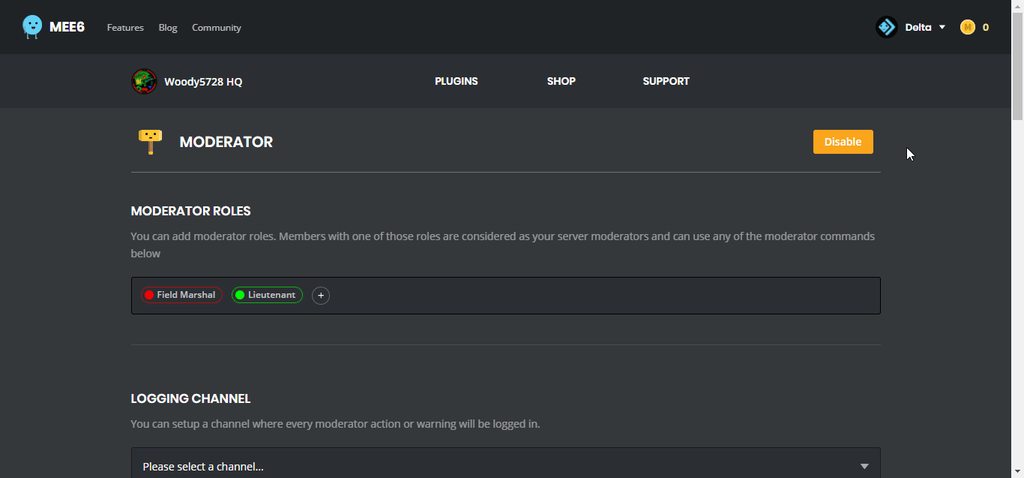
!bad-words
dire yarrowBOT
 strong path
I hope that helps
dire yarrowBOT
So... @merry geyser, I've decided you should be level 1.
Don't get too excited, mmk.
merry geyser
@strong path
strong path
ok, it should work now, try making a normal member test it
Not a mod or someone with the manage server or admin perm, just a normal user
strong path
You can't, they are always immune to it
merry geyser
And the auto mute too ?
strong path
They're immune to automod, so yes
strong path
No problem
 copper vault
Not sure if this helps, but in regards to the temp mutes not working one of my members that was tempmuted by the automod got unmuted correctly at the right time
 foggy barn
The banned roles in custom commands doesnt work.
wooden mountain
left
 mortal oxide
Lazy guild make me able to mention someone who left?
wooden mountain
as long as he is still in your cache
 cobalt oak
Cannot stop MEE6 from giving EXP in chats I've blocked him from.
faint bison
You can mention through IDs as well regardless
wooden mountain
!restrict
dire yarrowBOT
#You want Mee6 to only be in specific channels?
Go to Server Settings -> Roles select the Mee6's role and remove the ADMINISTRATOR perm, as well as removing that perm from any other role it has.
``````diff
+To add Mee6 to specific channels
Select the channels you want Mee6 to be in->channel settings->permissions->add Mee6's role and give it the READ MESSAGE perm.
-To remove Mee6 from specific channels
Select the channels you don't want Mee6 to be in->channel settings->permissions->add Mee6's role and remove the READ MESSAGE perm
IMPORTANT if the bot has any role with the perm for read messages, it will still see the channel (this includes the @everyone role)
wooden mountain
@cobalt oak ^^
 stray olive
bei mir kan findet die homepage die server nicht warum?
bitte schreibt mich privat an name : LordJaxIII
#3829
wooden mountain
can you talk in english?
stray olive
With me, the home page does not find the servers why?
Please write me a private name: LordJaxIII
#3829
Kan no English i translate
dire yarrowBOT
oops, it looks like you are on the wrong account, you need an account with 'manage server' permissions.
You have to log out from discordapp.com in that browser and then log back in again.
- log out of discordapp site https://discordapp.com/channels/@me and follow the steps in the gif below
- go to http://mee6.xyz/logout and click the 'add to discord' button
https://i.imgur.com/7829TNS.gifv
stray olive
With me siht the homepage very different a
stray olive
Yes but it does not the page does not recognize my server
Yes but it does not the page does not recognize my server
dire yarrowBOT
So... @stray olive, I've decided you should be level 1.
Don't get too excited, mmk.
wooden mountain
@devout chasm pls
 harsh smelt
I have find 2-3 bug !!!
 wicked condor
🍰
 honest solar
Our mee6 reddit webhook doesn’t work anymore. Anyone else?
wooden mountain
yes, wait untill we fix it
honest solar
Awesome, thanks
dire yarrowBOT
Alright, @coral tulip has been warned because 'Bad word usage'.
Alright, @coral tulip has been warned because 'Bad word usage'.
Alright, @coral tulip has been warned because 'Bad word usage'.
wooden mountain
stop
 rustic pond
 young stag
block quoting with duplicate messages is enabled causes messages to be deleted
dire yarrowBOT
So... @young stag, I've decided you should be level 1.
Don't get too excited, mmk.
 quaint sparrow
wwwwwwwwwwwwwwwwwwwwwwwwww.orgiCarly
 shell tree
cold bear
shell tree
cold bear
!clearinfo
dire yarrowBOT
The clear command allows you to clear the last xx amount of message or to clear one user without clearing anyone else.
Use !clear 1-1000 to clear the last xx messages (example !clear 10)
or !clear @name to clear all the message of @name in the last 100 messages
+ I need manage messages permission
+ I need view message history permission (otherwise I will respond with -1 messages cleared)
+ you need to check the checkmark next to clear on the plugin page.
+ you need to set your role as moderator (located at the top of the plugin page in the moderator tab)
- you cannot clear messages past 2 weeks due to Discord, we cannot change this
make sure it's enabled
 fallen pumice
 brazen notch
! mute is not working people are bypassing it with the muted role
white notch
because your channel perms aren't set right
dire yarrowBOT
!mute @user - gives mentioned user the muted role
Requirements:
+ Manage Roles perm
+ Manage Channels perm
+ I must have a role above the muted role
+ User being muted must not have a role that has a green tick next to the send message perm in channel settings->permissions as this will override the muted role. They must also not have a user perm override on that channel
P.S. You can't mute people who have the permission to mute others, this includes: owner, other moderator or members with Administrator or Manage Server permissions!!!
https://cdn.discordapp.com/attachments/302245580673908740/433026975670730771/2018-04-10_01-13-56.gif

 vestal skiff
Hi.
I have a problem with the announcements when the streamer went live.
The streamer name has an underscore at the end.
I was using the original announcement message. But Mee6 removed the underscore in the announcement message, so the wrong name and channel was announced. Funny fact the thumbnail IS the correct one.
 vestal skiff
Okay, thanks alot. ❤
 young ingot
Issue
Level plugin page doesn't load after refresh
Reproduce
When i go to the levels plugin page it lets me view it fine if i visit from the link on the dashboard, however, if i am on the levels page and refresh it won't load and sits on a blank screen.
System
Chrome 66.0.3359.139 (Official Build) (64-bit) - Windows 10
Chrome for iOS 66.0.3359.122 - iPhone 8 Plus iOS 11.3.1
buoyant moon
Hi <@&424994160387293184> ! I would like To know if its normal i can't mute or tempmute member of my Channel ?! An error text appear
cold bear
means bot doesn't have manage role perm or you moved muted role above mee6 one and totally ignored the fact that bots can't give roles than higher than their own
@buoyant moon
 turbid sparrow
hello @>:3 when i want to kick or ban someone (or mute) it says "Oops, something went wrong in MEE6 land! We reported this to our team! We will work hard to fix it!"
@cold bear
cold bear
means mee6 role is under muted role
 fervent stone
@strong path i am noy able to see support
cold bear
click on category name
 twilit laurel
Hi, I have a bug to report. If you set up a stream announcement through the Mee6 plugin, if your Twitch username ends in an underscore, the bot won't type out the underscore. Is there a way around this besides just changing the announcement notif into something like a "bitly" URL?
wooden mountain
@twilit laurel change {streamer} in **{streamer}**
you see now that starting from the end of your streamers name to the end of the url, the text is cursief
that is because of the markdown discords apply ( underscores makes cursief)
if you put one of those undersocres within a bolt part (the **) then the cursief won't happen
twilit laurel
Interesting, thanks much!
 blissful oriole
is anyone here a dev on MEE6?
 haughty coral
Hello
blissful oriole
ok
wooden mountain
@blissful oriole yes?
 plush kayak
boi
faint dome
New bug : if you have more than one automatic moderation action, only the first one will be tested. Kind of like the count was reset
buoyant moon
@YOLO🎮 R#9480 salut
 runic wing
I added mee6 to a server on my other account, and now when I try to log out from that account on mee6.xyz I automatically get logged into the same account I just logged out of. Why can’t I choose another account?
faint dome
!logout @runic wing
dire yarrowBOT
oops, it looks like you are on the wrong account, you need an account with 'manage server' permissions.
You have to log out from discordapp.com in that browser and then log back in again.
- log out of discordapp site https://discordapp.com/channels/@me and follow the steps in the gif below
- go to http://mee6.xyz/logout and click the 'add to discord' button
https://i.imgur.com/7829TNS.gifv
faint dome
(old website but works same)
runic wing
Yass it works thx
dire yarrowBOT
So... @runic wing, I've decided you should be level 1.
Don't get too excited, mmk.
runic wing
YAY
 errant orbit
Hi, there’s a typo for the !mute command under the moderator functions.
“Mutes a user in the whole sever”
buoyant moon
BYE
ionic meteor
!mobile
dire yarrowBOT
Due to the recent update, the website does not work properly on mobile. You can either use the Google Chrome app and request desktop version (for Android users) or use a PC (for iOS users) https://i.imgur.com/kyt5Akd.png
 nocturne saffron
Oh thx
 wise iris
Cannot add soundcloud links to the musicbot plug
buoyant moon

 limpid python

 finite surge
la conca
dire yarrowBOT
Alright, @stone sigil has been warned because 'Posted an invite'.
Alright, @stone sigil has been warned because 'Bad word usage'.
 stone sigil
dire yarrowBOT
stone sigil
dire yarrowBOT
Alright, @stone sigil has been warned because 'Capital letters'.
 noble sorrel
!rank
dire yarrowBOT
Diversal, this command is disabled in this channel.
buoyant moon
Mee6 is unmuting people too soon and not following the automoderation things that go by how many infractions someone has. Is this a usual bug? Also, the site isnt loading properly. <@&193123929701875712>
white notch
Is there a reason why you’ve pinged us twice asking the same question in 2 different channels?
buoyant moon
I figured I did it in the wrong channel
and thats why there wasnt a reply, my bad though dude
white notch
-Explain a bit further how it’s unmuting too soon
-Only first automod action gets taken, this is apparently a bug
-Site should load fine, but having just woken up I can’t confirm especially after a bit restart
buoyant moon
Okay the last two are fine, but it will say that the duration of the temp mute according to the automod action would be 30 minutes, but it unmutes them after 13 minutes
white notch
You sure it’s been 13 minutes?
buoyant moon
yeah so i pulled up the infractions list after they got unmuted and it said that they got muted for 30 minutes--13 minutes ago lol
if that makes sense
and it was multiple people
we basically had a raid
so it was super frustrating
white notch
That would only show how long ago the mute action took place
buoyant moon
exactly
dire yarrowBOT
 DjGoogle#1234 's infractions
Last 24 Hours
0 infraction
Last 7 Days
0 infraction
Total
19 infractions
Last 10 infractions
Bad word usage - 27 days ago
Duplicated text - 28 days ago
Bad word usage - 30 days ago
Duplicated text - 30 days ago
Duplicated text - a month ago
Bad word usage - a month ago
Mass emoji - a month ago
Duplicated text - a month ago
Mass emoji - 2 months ago
interrupting support case when support member is awaiting a response from user for a reason - 2 months ago
Requested
·
buoyant moon
when i checked after 13 minutes
white notch
It’s not an indication of how long the mute lasted
buoyant moon
they were already unmuted
white notch
🤔
dire yarrowBOT
Alright, @buoyant moon has been warned because 'Bad word usage'.
buoyant moon
i cant word it correctly
buoyant moon
alright hold on
then I saw that she got unmuted
so i checked infractions and it didnt last long enough
buoyant moon
Ya but the mute was supposed to last 30 minutes, but it lasted like 15
dire yarrowBOT
So... @buoyant moon, I've decided you should be level 2.
Don't get too excited, mmk.
buoyant moon
I checked that stuff in order
white notch
Well, could be the known bug of tempmute being a pain in the gluteus maximus
 swift onyx
Does anyone klnow what the prefix is?
white notch
!prefix
dire yarrowBOT
Hey, wanna know my prefix? It's simply !, which unfortunately can't be changed atm  . But I will have that option some time in the future, so don't sweat
swift onyx
!help
dire yarrowBOT
Gunther ♛, this command is disabled in this channel.
white notch

buoyant moon
yeah I just wanted to make sure that it wasnt something i changed
do you know around when this stuff is gonna be fixed?
white notch
No
white notch
!modular
dire yarrowBOT
 white notch
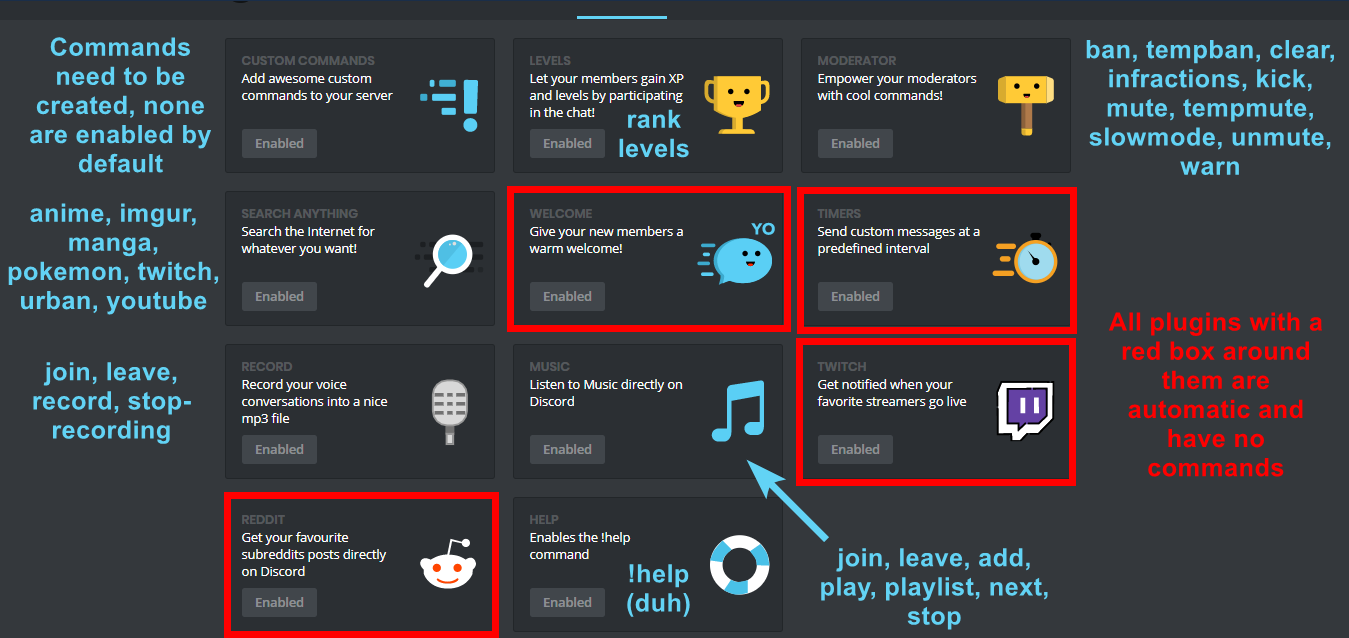
!commands
dire yarrowBOT
 tiny rivet
When using the !clear command on 2 users it cleared the messages but continued to clear in background.
dire yarrowBOT
So... @tiny rivet, I've decided you should be level 3.
Don't get too excited, mmk.
tiny rivet
Deleted 900 messages according to its text
white notch
What did you input?
buoyant moon
Is the bad word command's description not filled in?
sage citrus
@buoyant moon there is no bad words command, you can change the bad word settings in the website dashboard
buoyant moon
Custom command.
sage citrus
you can put in a description while editing the command
 willow locust
Hmm not workin
ionic meteor
@willow locust After logging in, stay on the main dashboard page for a few minutes. then try to go to the plugin
willow locust
I tried that before
buoyant moon
Put in Discord dashboard and it'll come up!
 earnest sage
it will not let me tempban members or do anything really
faint bison
tempmute and tempban dont work #425409486820474881
 plain fossil
oh my.
 haughty prairie
It's not giving the role that I said to when people join
strong path
!autorole
dire yarrowBOT
You can now give members a role on join through the welcome plugin https://i.imgur.com/mhT5oVF.png
 buoyant moon
idk
haughty prairie
I set it up but it's not working
strong path
Does mee6 have the manage role perm?
haughty prairie
Hmm
I would need to check
He did not
Thanks
Now I just got to wait till someone joins to make sure it works
 hard saddle
You can just make an alt and try it out
haughty prairie
I'm just add a bot
strong path
@haughty prairie That will not work, mee6 along with most good bots ignore other bots
You can invite me
dire yarrowBOT
Alright, @haughty prairie has been warned because 'Posted an invite'.
strong path
DM
dire yarrowBOT
Alright, @haughty prairie has been warned because 'Capital letters'.
haughty prairie
Omg
buoyant moon
A user on my servers level keeps resetting over night its now happened 3 times
cold bear
someone with manage server perm doing that
 hexed sorrel
Using TTS via custom commands also doesnt work :)
strong path
Good
cold bear
/tts is client side command, bots can't use it
cold bear
no
 boreal bramble
Oke. Thanks.
 grave tree
Channel locked. Please check #〉announcements for more updates as we get them.
 solar spire
uh
 primal topaz
@solar spire what does !reader do?
solar spire
make the user reader
dire yarrowBOT
So... @solar spire, I've decided you should be level 1.
Don't get too excited, mmk.
solar spire
oak
primal topaz
That error usually follows permissions based problems.
white notch

 grave wigeon
Hi
solar spire
um
grave wigeon
white notch
!integrated
dire yarrowBOT
Having issues with Mee6 (oh hey that's me  ) You may have an integrated role that has this above the role name
http://i.imgur.com/CysWAv0.png
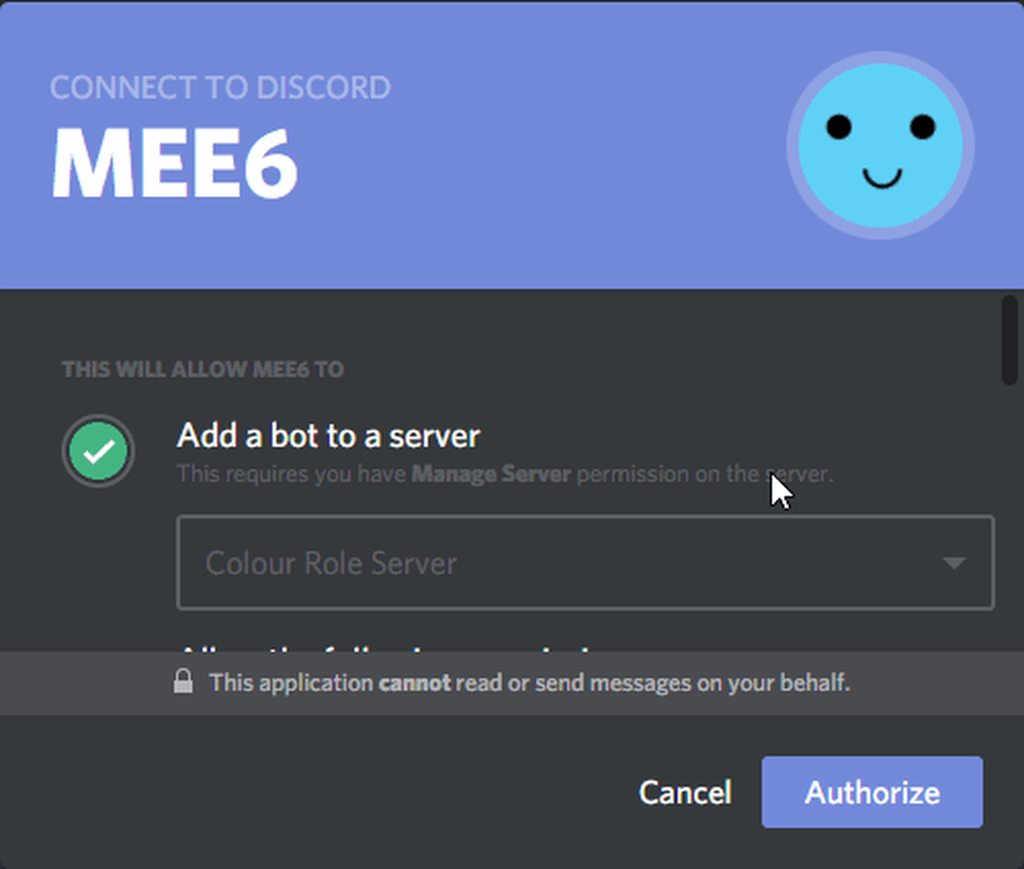
If so, kick the bot and re invite. When you get to the authorization screen, uncheck all the boxes. https://i.imgur.com/pdtzF5Z.gifv
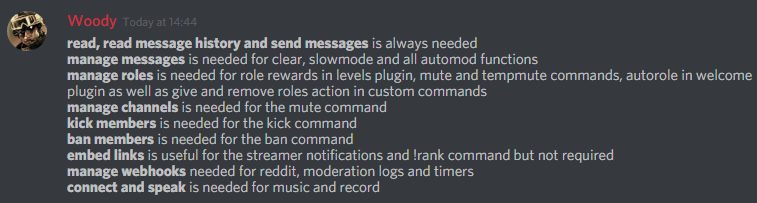
When done, give the bot a role using the following perms:
https://i.imgur.com/3Wd5wKZ.png

 strong path
So I think Sil's pin still stands, right?
grave wigeon
@white notch the command is the custom command, which add roles to the player
white notch
means bot doesn't have manage roles perm or is above the role being given in the server roles hierarchy
 lunar heart
hi hello, I didn't see it in #425409486820474881, but the caps-block feature has issues with emojis.
we found out on our server (I'm not admin there) that including emojis in messages let full-caps messages like these pass through the filter.
Mee6 still deletes any caps-lock message that has no emojis in it tho
 pure obsidian
@fallow latch Change server region, Server Settings -> Overview -> Server Region
 fallow latch
@pure obsidian thanks
sage citrus
@buoyant moon what? are you trying to report a bug?
 upper haven
cold bear
upper haven
cold bear
@upper haven because automod set like that
cold bear
Add that channel to allowed ones in automod settings
buoyant moon
So yesterday I talked with support and MEE6's timer seems to have an issue. This is what happens when I put an image link, mind you it's a direct imgur link, which works with commands perfectly fine. When used with the timer, the image is not embedded.
They tried doing the same in this server, where of all servers it should work, however it did not.
Delta has helped me with this issue.
(I've also even downed the file size of the image if that was even an issue, but even then, MEE6 is just writing it as https://i.imgur.com/XrO9QIl.gifv and not embedding it. (<>)
dire yarrowBOT
So... @buoyant moon, I've decided you should be level 2.
Don't get too excited, mmk.
pure obsidian
Hmm, webhooks act like a bot user as well, maybe try channel settings -> permissions and set the "Embed Links" for everyone to
something tells me this can do the work, never tried before myself
buoyant moon
And I did allow that permission
white notch
I already told the dev this and asked them why this is so 
buoyant moon
white notch
.......
buoyant moon
It has the permission.
white notch
I already asked the dev why it’s not embedding them when it should
And asked them to fix it
I have heard no response
buoyant moon
Yes, sorry, was just explaining to the person above
white notch
Webhooks aren’t effected by bot perms, they have every single text perm on the server by default bar delete messages
Webhooks are what the timers are using
buoyant moon
Hopefully they fix it soon. I can understand they're busy though cuz I'm a mom who's in uni so I know IRL things can easily take over lol
But yes that's strange it isn't working.
pure obsidian
A new issue? looking at old reddits they have no problem with embeding images, since reddit posts were webhooks as well.
white notch
This isn’t reddit related
Couldn’t have even been a new issue if reddit has been disabled for a month
buoyant moon
So commands don't use webhooks, correct? @white notch
buoyant moon
Okay good to know.
buoyant moon
@white notch hey!! Either he fixed it or after a few times it just started working lmao
 arctic minnow
so in my server i reached level 8 in march and have talked more than enough to reach level 9. the thing is im still level 8. its not a role issue because another guy has this same problem and he’s a different role than me. other people with the same roles receive xp.
dire yarrowBOT
So... @arctic minnow, I've decided you should be level 2.
Don't get too excited, mmk.
hard saddle
@arctic minnow maybe mee6 isn't having the permission to give roles anymore?
possibly
cold bear
or you have no xp roles
arctic minnow
sorry if you misunderstood my report but mee6 doesnt give roles
unless you meant xp
and most people get xp except for me and another
hard saddle
doesn't give roles like how?
arctic minnow
well i think he gives the base role if you reach level 2
dire yarrowBOT
Role rewards will give a role as reward for active users in chat.
You gain xp by talking in chat, when you gain enough xp you get a level.
in order to let me give role rewards i need :
+ manage roles permission
- at least one of my roles needs to be ABOVE the reward roles(bots can't give roles that are higher than their own role)
! I will only check for role rewards to be updated when:
+A user leveled up to a level. Note this only checks role rewards for them and not everyone
+You update any part of the levels plugin. This does a role reward check on the whole server
im on mobile so i cant
hard saddle
yh
@arctic minnow do you have permission that can like give me a role that i have perms to mee6 website
arctic minnow
perms to change the plugins?
hard saddle
no
arctic minnow
oh?
hard saddle
mee6 website, i think that's what you meant plugin.
arctic minnow
i gave you the base role if thats what you mean
hard saddle
Ugh give me permissions so i can edit the levels settings
arctic minnow
ask the owner of the server, spiff
arctic minnow
i dont have perms to change bots
hard saddle
!autorole
dire yarrowBOT
You can now give members a role on join through the welcome plugin https://i.imgur.com/mhT5oVF.png
hard saddle
@unreal sigil
 unreal sigil
Oh thanks!
hard saddle
@arctic minnow is he offline?
hard saddle
yep he is probably offline cuz he's status is set to offline when he comes on i'll deal with it.
hard saddle
k
wooden mountain
#〉commands for bot commands
 sharp sandal
Henlo
I have disabled the music command on mee6 for a limited time but the bot is still allowed to join voice
just wondering if I'm doing something wrong
wooden mountain
is record still enabled?
sharp sandal
oh
Thanks I'm a stupid
i completely forgot that plugin
having some problems with overlapping commands with Rowboat
 patent edge
<@&193123929701875712> <@&424994160387293184>
Hey, having a problem/bug. Mee6 seems to beblocking words like assuming/assume/assist...anything that begins with a-ss. we do have a-ss(without the dash) in our bad words list...
hard saddle
remove the word "ass" from the bad words list then?
buoyant moon
@patent edge You should ping one role.
dire yarrowBOT
buoyant moon
@patent edge
buoyant moon
Oh, the what @hard saddle said. Technically "ass" is not a curse word. It means donkey 😄
I'll leave you to the rest, don't want to steal your answers.
patent edge
😂
dire yarrowBOT
Alright, @hard saddle has been warned because 'Bad word usage'.
buoyant moon
😄
native anvil
@patent edge I think it's still a bug but you can circumvent it by typing "spaceas-sspace" so it searches for those specific characters.
buoyant moon
I mean I disabled the word a s s in my server and it doesn't do that to other people.
native anvil
@patent edge actually if I think I know what's going on then "as-sspace" would be better
buoyant moon
@native anvil Is smart
native anvil
Thanks
buoyant moon
No problem 😊
patent edge
Fixed, thanks guys/gals!
buoyant moon
Great!
 somber forge
BUG REPORT:
Every time I make a custom command, the dashboard just closes out on me. I can't even edit the command.
AND the command is automatically deleted somehow.
 limber knoll
@somber forge able to provide what device and browser you use?
 stiff kindle
привет
buoyant moon
@somber forge Happened to me one time, make sure it isn't Microsoft Edge because it don't work well with it because I realized I was using Edge.
!browser
dire yarrowBOT
Internet Explorer? Edge? Safari? Ew... :nauseated_face: It's time to use REAL BROWSER!!!
Firefox: https://www.mozilla.org/firefox
Chrome: https://www.google.com/chrome/browser/desktop/index.html
Opera: https://www.opera.com/
young ingot
Issue
Prefilled custom command inputs on website containing values from recently deleted commands
Reproduce
Using a server with multiple custom commands:
Click the edit button for the first command in the list > close the popup > delete the first command in the list > click the edit button for the second command in the list
The "BOT RESPONDS WITH" input is prefilled with the deleted command's contents
native anvil
 simple quest
i dont know if its a bug but my mee6 doesnt ping someone/a role. what do i do
i dont know if its a bug but my mee6 doesnt ping someone/a role. what do i do
hard saddle
@simple quest
{user} - for pinging someone.
simple quest
and a role?
hard saddle
first make the role mentionable then say the role name with the @
hard saddle
cool!
 glossy flower
I can't dmmee
buoyant moon
inner trellis
hey my bot is down
faint dome
If your bot or your server encounters problems, follow the Discord bugs news here : https://status.discordapp.com/
Welcome to Discord's home for real-time and historical data on system performance.
inner trellis
actually two of my bots are down
inner trellis
my discord outrage ?
inner trellis
oh
 rain talon
;;play 1
faint dome
@rain talon wrong prefix / channel
hard saddle
!prefix
dire yarrowBOT
Hey, wanna know my prefix? It's simply !, which unfortunately can't be changed atm . But I will have that option some time in the future, so don't sweat
hard saddle
^
strong path
And wrong bot
inner trellis
bot mentions are not working
hard saddle
@inner trellis elaborate more pls?
inner trellis
ok, it's not mee6
hard saddle
that's another bot.
inner trellis
and my music bot is'nt workink
strong path
That's unbelievebot, go to their server
buoyant moon
my bot is offline
some help?
Hadn't work at all on 234767214421606400. I've kicked bot and tried to reinvite, but it just opened dashboard with settings and nothing more.
 junior pond
Hello,
Due to the bug, I've kicked out the bot, but can't reinvite in my serv
mortal oxide
link to invite Mee6 back to your server if needed:
https://discordapp.com/oauth2/authorize?client_id=159985415099514880&scope=bot&permissions=66321471&response_type=code&redirect_uri=https%3A%2F%2Fmee6.xyz%2Fguild-oauth @junior pond, also the bot is restarting

Discord
Step up your game with a modern voice & text chat app. Crystal clear voice, multiple server and channel support, mobile apps, and more. Get your free server now!
MEE6 IS RESTARTING PLEASE WAIT.
junior pond
thank a lot, you deserve some cookies
 rustic crater
Oh! That would explain why I cannot access the mee6 browser page.
mortal oxide
@short lintel restarting is not done yet.
Around one hour for restart the whole bot
59,73 minutes (Base 100).
 short lintel
oh. i thought if it was active here. it was active everywhere
mortal oxide
Around 59 minutes 45 sec.
short lintel
oki ty
 halcyon ivy


 hard saddle
It's restarting.
dire yarrowBOT
Alright, @glossy flower has been warned because 'Bad word usage'.
Alright, @glossy flower has been warned because 'Bad word usage'.
Alright, @glossy flower has been warned because 'Bad word usage'.
 coral lion
mee6 is down o my server <@&424994160387293184> <@&193123929701875712>
coral lion
ok
dire yarrowBOT
So... @coral lion, I've decided you should be level 1.
Don't get too excited, mmk.
wooden mountain
invite pls
 balmy yoke
mee6 is also offline at my server
dire yarrowBOT
Alright, @buoyant moon has been warned because 'Posted an invite'.
Alright, @buoyant moon has been warned because 'Posted an invite'.
 spring skiff
wait this isnt discord service desk
 mental sonnet
mee6 is not working on my discord server but it looks like it is working
its offline on my discord server
spring skiff
well discord is shitting bricks rn
mental sonnet
really
spring skiff
i cant scroll through the servers iim in rn
 sharp bolt
commands !mute !tempmute dont work. somone know why?
or somone have that same problem
native anvil
#425409486820474881 for !tempmute and right now there's a discord outage and things are recovering, so it might work later.
dire yarrowBOT
So... @sharp bolt, I've decided you should be level 2.
Don't get too excited, mmk.
sharp bolt
DjGoogle - 28.04.2018
TempMute and TempBan not working properly. Once muted mee6 is not unmuting anymore.
its dont work 3 week?
native anvil
Yes, once it's fixed the message will be crossed out/removed
strong path
See, it seems like it's working for alireza, and it worked here too when they tested it on me
native anvil
Maybe it works/doesn't work sometimes depending on how it's programmed so "it's not perfect" is what they really mean
strong path
Yeah
sharp bolt
maybe it's some dependence on my server's settings?
native anvil
I don't know but if anyone does it would be support members
buoyant moon
?
dire yarrowBOT
Alright, @half rock has been warned because 'Posted an invite'.
 radiant sphinx
Perhaps this is a bug which is already known.
When MEE6 announces a twitch stream, if the username ends with an underscore username_ the announcement doesn't contain the underscore, making the link go to a different page.
dire yarrowBOT
So... @radiant sphinx, I've decided you should be level 1.
Don't get too excited, mmk.
mortal oxide
@radiant sphinx use `{streamer}` instead of {streamer} only.
wooden mountain
@mortal oxide **{streamer}** make it bolt, looks nicer
mortal oxide
@wooden mountain 
 gloomy nebula
Hello, Mee6 sends me when I try to make a command: Oops, something went wrong in MEE6 land! <: SAD6: 403540170629971968> This error has been reported to our Team. We'll work hard to fix it. Is this normal?
cold bear
@gloomy nebula means mee6 role is under role he tries to give
or missing manage role permission
gloomy nebula
@cold bear Okay, Thanks !
 fervent basalt
Hello all!👋🏻
 faint crown
Uhh
I put on the no xp roles on
The website
But i want to take them off
And i cant
So if its not changed
I will have to pay close attention to the chat on my server
strong path
What browser?
strong path
IOS?
faint crown
Yup
strong path
rip...
strong path
Are you trying to access the website from the Safari browser?
faint crown
strong path
Or have you tried other browsers?
faint crown
Well this shows up on google CHROME not regular safari
strong path
oh
faint crown
Ehh It still shows up like that
dire yarrowBOT
So... @faint crown, I've decided you should be level 1.
Don't get too excited, mmk.
strong path
dang it, well, hopefully it'll work on PC(using Chrome or Firefox)
 ionic juniper
that doesn't look like mee's site?
faint crown
And i got nowhere to put it
dire yarrowBOT
https://mee6.xyz/dashboard press add to Discord, then select your server
faint crown
Oh yeah
strong path
You meant this website, right?
faint crown
Well he is on my server
Yeah
@ionic juniper
This is his site
It still does not work
ionic juniper
Okay. I only asked because those two screenshots above were discord
 ancient cliff
On timer once I click Create it made a 100 of them, and I can't remove them.
 proud brook
Why does it say for the wifi provider VIRGIN
sage citrus
@proud brook what do you mean?
white notch
@proud brook that's the mobile network provider not the WiFi provider (also don't mention unrelated stuff to things that have been reported here)
strong path
I told this dude what's the prefix and where he should use bot commands, I even pinged him in #〉commands . He still spammed it in every channel, sigh
(╯°□°)╯︵ ┻━┻
buoyant moon
Hello, my Mee6 isn't working and doesn't respond to any commands at all.
strong path
!no-help @buoyant moon
dire yarrowBOT
Doing !help and it's not showing any commands? Wondering why I'm not doing my job? This is caused by commands not being enabled in plugins. To do so you must:
* Create custom commands in the commands plugin
* Enable Levels plugin (this will enable !rank and !levels
* Enable commands in Moderator plugin (these will only show if you have a mod role selected for each command)
* Enable commands in the Search Anything plugin
* Enable commands in the music and record plugins (these plugins require payment)
After that you can do !help and you can see all my lovely commands  Just don't disable the command on yourself. You can also do
 !help in #〉commands or look at this image: https://i.imgur.com/V93V8Dg.png
strong path
!modular
dire yarrowBOT
dire yarrowBOT
buoyant moon
Hello the levels dont work for me its say to me Whoops, it looks like I can't give one of the roles listed here. Please fix that by putting my role above all the roles listed here.
i do that and dont work
dire yarrowBOT
Role rewards will give a role as reward for active users in chat.
You gain xp by talking in chat, when you gain enough xp you get a level.
in order to let me give role rewards i need :
+ manage roles permission
- at least one of my roles needs to be ABOVE the reward roles(bots can't give roles that are higher than their own role)
! I will only check for role rewards to be updated when:
+A user leveled up to a level. Note this only checks role rewards for them and not everyone
+You update any part of the levels plugin. This does a role reward check on the whole server
 blazing creek
<@&193123929701875712> help. dashbourd wont work
just loads it back to select server
blazing creek
@wooden mountain nope
wooden mountain
then try again
bot just kicked me from the dashboard too
because of discord current issues
Welcome to Discord's home for real-time and historical data on system performance.
if bot can't see server then you get kicked out of that servers dashboard
blazing creek
okee thx
 upbeat sparrow
Mee6 went offline on my server, but on every other server he was online i waited 1 weeks but nothing happened and then kicked him and invited him again just to get him online. dont know if its a bug with the bot or just discord
 calm kraken
MEE6 do not fonction in my serveur
faint dome
https://discord.statuspage.io/incidents/ym7rqncyjqrw @calm kraken
Discord's Status Page - Offline Servers.
calm kraken
Thanks you
 cerulean mango
The mee6 bots is offline on my server can somebody help me plz
 tacit abyss
same here
dire yarrowBOT
Alright, @vivid temple has been warned because 'Posted an invite'.
 vivid temple
@umbral lion
buoyant moon
mee6 is not respoding to commands on my disocrd
 lusty needle
I came to tell this bug... IT is VERY annoying. it keeps happening, and no custom commands will work....
dire yarrowBOT
Role rewards will give a role as reward for active users in chat.
You gain xp by talking in chat, when you gain enough xp you get a level.
in order to let me give role rewards i need :
+ manage roles permission
- at least one of my roles needs to be ABOVE the reward roles(bots can't give roles that are higher than their own role)
! I will only check for role rewards to be updated when:
+A user leveled up to a level. Note this only checks role rewards for them and not everyone
+You update any part of the levels plugin. This does a role reward check on the whole server
@lusty needle ^^
lusty needle
Oh oki thanks
 wraith escarp
ight listen up
when im in the vc with the mee6 bot
and its time for the next song
i cant hear the next song until i leave and rejoin
so i legit have to leave and rejoin to hear the next song everytime
wooden mountain
#blameDiscord
wraith escarp
how is tis discords fault
only happens with this bot
not with my other music bots
wooden mountain
what other bots?
wooden mountain
rythm also has that problem from time to time
wraith escarp
hmm ive never had it
but with mee6 its very consistent
do u know if there is any fix?
wooden mountain
yes, fix your internet connection
wraith escarp
lol @wooden mountain
dire yarrowBOT
So... @wraith escarp, I've decided you should be level 2.
Don't get too excited, mmk.
wraith escarp
lies
it happens to every single person in my discord
so its not my internet connection
its the bot
 glacial tundra
^
wooden mountain
if you can make a situation where 1 person can hear him while a other person can't hear him then it is either discord error or something on your side
glacial tundra
Happens to me as well
on the same server
every time
specifically after song ends
 mossy valve
Anyone else twitch streaming notification feature not work?
 leaden osprey
@mossy valve Twitch notification can take up to 15 min
cold bear
bot should have perms to write into these channels