#〉bugs-reports
2 messages · Page 23 of 1
 bitter owl
Does mee6 has access to your text channel? Does it replies any message when you try to use the command?
let me know, please
 buoyant moon
no it does not
no replies
i try !mute and !warn
nothing pops up
the bot has access to everything
has admin privileges etc
 ionic meteor
You need to mention a user 😃
 dire yarrowBOT
So... @buoyant moon, I've decided you should be level 1.
Don't get too excited, mmk
dire yarrowBOT
Alright, @buoyant moon has been warned because 'Bad word usage'.
 proper shadow
i dont know if this is a bug but the !clear command doesn't seem to work on bot messages any ideas???
bitter owl
@proper shadow Could you send a screenshot?
proper shadow
sure
bitter owl
Is the bot replying nothing at all. Or a error message?
proper shadow
is just deletes my !clear message but not any of the bots messages (it clears all real peoples messages just not the bots)
 shy grail
@buoyant moon ¯(°_o)/¯ ((NA)NAPA) does not seem to work on Timers on the Bot 😦
proper shadow
gimme a sec to find the right screenshots
bitter owl
@proper shadow give mee6 power to manage messages please
proper shadow
how can i do that?
bitter owl
@shy grail O que tá acontecendo ?
shy grail
Discord's new April Fools
bitter owl
@proper shadow Server Settings -> Roles -> Mee6 -> Grant the right powers
shy grail
@buoyant moon (◕‿◕✿) (Vikingduckie) but seems like the bot can't do it 😦
proper shadow
i'm really sorry to be a nusiance
proper shadow
nuisance*
bitter owl
@proper shadow Do not feel that we are support server for that
@flat jetty ¯_(ツ)_/¯ (Kane.Nexus) #4991 I bet you have being annoyed the entire day lol
Jesus, shutup discord
shy grail
@buoyant moon (∩ ͡° ͜ʖ ͡°)⊃━✿✿✿✿✿✿ (Steeapy) I am not tagging you
dire yarrowBOT
So... @shy grail, I've decided you should be level 1.
Don't get too excited, mmk
bitter owl
Not here
shy grail
That's the whole point of of the April Fool's Day joke from Discord
wtf
lol
that's so fail
proper shadow
i gave it all the permissions yet it still isn't deleting the bot messages
dire yarrowBOT
So... @proper shadow, I've decided you should be level 1.
Don't get too excited, mmk
shy grail
Oh wells, so I guess the bot isn't going to work with @buoyant moon ヽ༼ ಠ益ಠ ༽ノ (๖̶̶̶ζきりと)
bitter owl
@proper shadow Did you configured the command or just enabled it?
Go to https://mee6.xyz/dashboard -> MODERATOR (Enable it) -> COMMANDS -> !Clear (edit and configure it)
- Allowed Role - Banned Role or Channel - Cooldown: By User or Entire Server -> set duration
- Send Privately
- Auto Delete Command After Use
- Do not reply to command
proper shadow
aight
bitter owl
Configure it inside the command by the steps I gave you pls
bitter owl
Stop saying sorry, we are here for this
proper shadow
i configured it but it just wont delete the bot messages and i have 100s rip me lmao
bitter owl
Alright, could you invite me to your server pls? Send in DM @proper shadow
I will show you
proper shadow
yeah sure
bitter owl
Thx
bitter owl
Problem identified: Rythm got the same prefix. Must change pls
 autumn forge
hi, i just got the new version of the bot and i went on the website, then something weird happened
i was trying to enable some commands and set them up
but
the page doesnt seem to be responding, its just plain grey
<@&193123929701875712>
bitter owl
@autumn forge Would you mind to try refreshing or using another browser, please?
Like mozilla firefox or Google Chrome
autumn forge
ive tried already
dire yarrowBOT
So... @autumn forge, I've decided you should be level 1.
Don't get too excited, mmk
autumn forge
oh, ok
bitter owl
:)
autumn forge
ill try a new browser
bitter owl
If still not work, please come back with screenshots and we will try other alternatives
bitter owl
@autumn forge Great, have fun :)
buoyant moon
Uhm, mee6 stopped giving reward roles and doesn't notify level up messages all of a sudden. 😐
bitter owl
Can you check for us first the dashboard
If no other moderators or accidentally disabled the plugin
dire yarrowBOT
bitter owl
Cool, does mee6 respond to other enabed commands?
buoyant moon
yes
buoyant moon
okay
 torn lily
The < > tags won't work in the announcement message on Twitch Plugin
 mortal oxide
@torn lily wdym?
torn lily
Example, my message is:
My dudes, **{streamer}** is now live! Go check it out! <https://twitch.tv/{streamer}>
mortal oxide
Normal, MEE6 use embed for twitch announcement
torn lily
But the thumbnail will still show up (flooding the channel in the long term)
mortal oxide
Disable the perm "use embed" or something like that
Embed Links*
Disable it and tell me what happens
torn lily
So it's supposed to work this way, no way to disable it or work-around without getting all embeds off? 😞
mortal oxide
No it's all or nothing
torn lily
I don't understand embeds very well but would it be too hard to add the option of not having them?
We use it in a more minimalistic way in the general chat, it used to work, long long ago
We could disable the link as a whole and use this, but it's quite useful
dire yarrowBOT
So... @torn lily, I've decided you should be level 5.
Don't get too excited, mmk
buoyant moon
Hi
buoyant moon
New Bug/Problem
mortal oxide
Answered in #〉volunteer-support
 wooden mountain
missing permissions
 sinful kraken
Hi, on my server, Mee6 ignores all automated actions starting from 2nd, i.e. only the 1st is being performed. I tried to change their order, and it always performs only the 1st action no matter which one it is.
Also, 1st action is set to be performed when somebody has more than 1 infraction, but today it was performed on a user after his 1st infraction.
sinful kraken
I expect the bug can be similar to the issue with timer messages, i.e. real values set may be different from what the interface shows. Here is my server id, if you need to check the settings: 397378340220043265
buoyant moon
Hello, Mee6 Developer,
I have a problem with the bad words! I have blocked the words but I can still write them!
That's the problem!
LG UnleqitElite
 white notch
owner is exempt from banned words
the fact you can access the dashboard means it won't work for you
buoyant moon
why?
white notch
because what's the point of having all the perms in a server and then being censored?
buoyant moon
That you delete the bad words automatically!
white notch
that defeats the purpose of you being owner
too many people complained that their mods were getting censored
so we changed it so that owner, admin and mods don't get bad words deleted
buoyant moon
why?
white notch
because there's 0 point in being owner, being able to set bad words and then having the bot delete them
buoyant moon
Okay
dire yarrowBOT
So... @buoyant moon, I've decided you should be level 1.
Don't get too excited, mmk
dire yarrowBOT

Alright, @barren tundra has been warned because 'Posted an invite'.
Alright, @barren tundra has been warned because 'Posted an invite'.
Alright, @barren tundra has been warned because 'Posted an invite'.
 sweet sparrow

 trim hemlock
how to remove a warn please
 cold bear
not possible atm
trim hemlock
pk
 ornate flicker
Je vais me mouiller et supposer que tu est français, avec le "pk" et "crafteur".
C'est une fonction qui est prévue mais pas encore implémentée. Si tu regarde #〉suggestions, c'est dans la liste des futures additions.
* Removing/editing Infractions
merci
ornate flicker
Pas de problèmes! Si jamais tu as besoin d'aide en français, je te suggère d'envoyer un message dans #175714280648343552 
trim hemlock
oké
dire yarrowBOT
LeonAgar.io#6843 (414426567972749317) is now muted for 'spam', alright? 
 rotund prism
Hi ! I just have some issue with the bot. I can't mute anyone in my server oO The option is "enabled" but when I mute someon, he just can speak without any problems
 strange wedge
this letter cant be used in the custom commands: ç
cold bear
@rotund prism if user has role that allows him to speak in that channel he will be not muted.
rotund prism
Ah. but before the new mee6 it was possible and very convenient : /
cold bear
it used different mute system
rotund prism
too bad T.T Thanks for the answer
 vivid valve
<@&193123929701875712> i think it's a bug but im not sure. I can't reset xp 😦
vivid valve
Ok, thank's
 balmy oyster
@cold bear hello i was just wondering how i get music to work now on mee6. i paid for mee6 a while back for our server so we could listen to music together but now it no longer works. i tried kicking it and readding it but that hasnt helped.
vivid valve
when that re-work @ionic meteor ?
ionic meteor
not sure
ionic meteor
@balmy oyster is the plugin still enabled?
balmy oyster
as far as im aware aye nothings changed
ionic meteor
so the plugin is still enabled?
balmy oyster
i was just concerned because as i was readding it to the server i saw an add music option for 10 euros....which i wouldnt be happy with. how would i check that?
it in the server and now a bot commander but cant add it through commands
ionic meteor
if you go to the dashboard, is the music plugin enabled?
balmy oyster
whenever i search the dashboard on google i get nothing
is there one in the server?
dire yarrowBOT
ionic meteor
follow that link
dire yarrowBOT
So... @balmy oyster, I've decided you should be level 1.
Don't get too excited, mmk
balmy oyster
no because it was over a year ago now
ionic meteor
paypal has a search option xd
balmy oyster
i dont think it was paypal back then because i dont really use it
this was the early days of mee6 at least to us
the problems only started recently
ionic meteor
I think paypal was the only payment option 🤔
ionic meteor
lol
balmy oyster
so i paid the 3000 mons for a life long mee6 with the music and now we dont have it but only the past few weeks
ionic meteor
yea. some stuff didnt transfer right during the update
but you should have a payment receipt as I just heard paypal is and was the only option to pay :x
balmy oyster
then im not sure how because i dont use paypal
ill have a look give me a sec. would an email conf do if i can find one?
ornate flicker
Paypal allows you to pay without having an account, or used to.
You might want to check with your bank, if your credit card was used to buy the plugin
balmy oyster
debit card and if paypal was used but no account made how am i meant to have a receipt?
ornate flicker
Therefore, it should show on your bank billing receipt?
Either check on their website for "Paypal" or call them.
balmy oyster
is it planet art?
ornate flicker
Unlikely
balmy oyster
thats the only paypal receipt i have
ionic meteor
it might be to Mee6 or to Anis
ionic meteor
can you screenshot the receipt and DM it to me? 😃
balmy oyster
sure no worries 😄
 sharp bolt
muted command dont work.
in the beginning, a mute user could write on. I saw from rank the muted is lower than the rank that he already has. so I moved it higher in the ranking. but now the command does not work at all.
dire yarrowBOT
So... @sharp bolt, I've decided you should be level 1.
Don't get too excited, mmk
sharp bolt
and mee write "Oops, something went wrong in MEE6 land! :SAD6: This error has been reported to our Team. We'll work hard to fix it"
 calm tulip
ok, told to pop in here with a command bug, who should I mwntion it to?
calm tulip
ok, anyway, as mentioned on twitter, since the update, we're having trouble with commands that use emotes
the top of the pic is the updated Mee6 command, only the first emote is showing, below is me pasting it in to check the emotes where actually working
also, as I mentioned on twitter a week or so ago, the way reddit posts now post is different, any way of getting the old style of link post back?
 heavy venture
I’ve been fine before the mee6 update, I was able to add mee6 on servers on mobile, but now I can’t manage to scroll down through my servers to get to the server I want to add it to.
 leaden osprey
!mobile
dire yarrowBOT
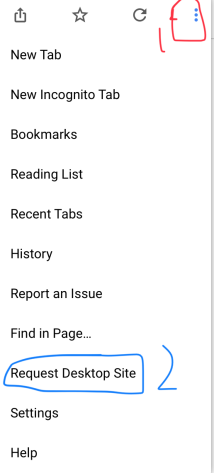
Due to the recent update, the website does not work properly on mobile. You can either use the Google Chrome app and request desktop version (for Android users) or use a PC (for iOS users) https://i.imgur.com/kyt5Akd.png
 leaden osprey
@heavy venture ^
heavy venture
Rip
 grizzled osprey

heavy venture
I’d catch the bleach in my mouth
dire yarrowBOT
So... @heavy venture, I've decided you should be level 1.
Don't get too excited, mmk
cold bear
@calm tulip did you add emojis like :emoji: or ?
cold bear
!id
dire yarrowBOT
to use some stuff in custom command or any other text from Mee6 you need to use the ID:
first get the ID of that object by typing it in your server with a \ in front:
emoji: \ ➡ !soontm
animated emoji: \ ➡ !baguette_spin
mention: \@dire yarrow ➡ @dire yarrow
role: \<@&325291851106091019> ➡ <@&325291851106091019>
channel: \#announcements➡ #announcements
then copy that ID(with the < > and everything in between),
now paste that in your custom command, welcome message, stream announcement, etc...
https://cdn.discordapp.com/attachments/235378515866812417/269195258640728075/2017-01-12_22-05-03.gif
 cold bear
^ try this method
calm tulip
I'll get my techie to have a look, he's the smart one, I'm the charismatic one
cold bear
lol
anyways, if emojis are from same server :emoji: should work
at least worked for my case
calm tulip
ok, well thats one issue
we'll try that tomorrow and report back
the other issue we had was the reddit posting
cold bear
ok
calm tulip
ok, so quick question though, once I have the ID, do I put it int eh command with or without the <> brackets?
 slim oak
heads up
theres also a bug when you go to select custom commands
it displays another commands description
bitter owl
@slim oak You mean when you delete a custom commands and then the next one is with wrong information, right?
 paper shoal
You can bypass the invite link filter if you edit the message after you send it, I assume it's the same with the word filter as well
 still plume
Does anyone knows why this happens, i made a !slap feature but is seema like it doesn't always trigger the response...
You can like trigger it at most 4 times (sometimes not even once) after that it's stops responding...
 somber forge
Bug Report
People are bypassing the anti-flood I made a suggestion about it in #suggestions
Here it is;
 quaint sapphire
Guys I'm on mobile and often the Twitch Streamers Go Live notifications will happen twice!
It's does on my desktop too idk if I did something or not
 warm peak
@Noahm6206#9082 just try renaming the server so it shows up in a different place in the server list
and he's gone
dire yarrowBOT
Alright, @sick sentinel has been warned because 'Bad word usage'.
 sick sentinel
test:fuck
 reef hull
test: fuck wow the bot...
sick sentinel
😄
reef hull
how
 keen linden
(making this automod them) Editing something or adding text isn't a bug, it's a feature we haven't added yet.
sick sentinel
say "fak" and edit it to the word
sick sentinel
ok
dire yarrowBOT
So... @sick sentinel, I've decided you should be level 1.
Don't get too excited, mmk
reef hull
ok
sick sentinel
bot is so cute
reef hull
yes
buoyant moon
I can't mute the bot say : Oops, something went wrong in MEE6 land! SAD6 This error has been reported to our Team. We'll work hard to fix it.
cold bear
means bot haven't needed permissions, like manage roles & channels
buoyant moon
No the bot have all permissions
 narrow haven
 charred prairie
Chat filter will not delete, or warn the author.
cold bear
intended
charred prairie
Why? Is there a problem with the filter?
mortal oxide
@charred prairie
* that person is a moderator.
* that person has Administrator or Manage Server permission.
* that word wasn't added as a bad word.
charred prairie
Oh, thank you.
 tiny rivet
Anyone else having an issue with the bot not unfollowing subreddits?
wooden mountain
it takes a while to update the config
tiny rivet
Well that’s unfortunate.
 pallid wasp
Ive been getting this Error Message today - when trying to add a Timer :
  "message": "The server encountered an internal error and was unable to complete your request.  Either the server is overloaded or there is an error in the application.",
  "status_code": 500
}```that means there's 10 webhooks in your channel. that can be other timers, reddit webhooks or webhooks made by other bots @pallid wasp
still plume
Any comeback om my bug issue??
cold bear
what that was?
still plume
Does anyone knows why this happens, i made a !slap feature but is seema like it doesn't always trigger the response...
You can like trigger it at most 4 times (sometimes not even once) after that it's stops responding...
For the sevend time...🤔
cold bear
can you invite me to that server?
still plume
Sure
dire yarrowBOT
Alright, @still plume has been warned because 'Posted an invite'.
reef hull
xD
 random brook
omg
 frank zealot
aly
random brook
lol
buoyant moon
the command mute is not working
 marble cloud
On the mobile website I can’t save my plugins because the save button goes off the screen, even if I zoom out
dire yarrowBOT
Due to the recent update, the website does not work properly on mobile. You can either use the Google Chrome app and request desktop version (for Android users) or use a PC (for iOS users) https://i.imgur.com/kyt5Akd.png
marble cloud
Hmmm
dire yarrowBOT
ShuTTeR_KLoUD, this command is disabled in this channel. 
 ornate vapor
For moderation on Emoji Excessive Emojis Mee6 still DMs even if the emoji limit is set higher
 silent token
Bot down?
 steady hemlock
seems like it
 halcyon owl
bot is not responding
buoyant moon
Yeah
bitter owl
@dapper yewSyndicate#8031 Yes #〉announcements
mortal oxide
@silent token^
silent token
Yupp I saw. Thanks (;
 icy adder
bro, i can't move to my dashboard. why?
 pearl cargo
bot slower than my grandmas walking'
dire yarrowBOT
So... @somber forge, I've decided you should be level 2.
Don't get too excited, mmk
somber forge
idk
BUG REPORT;
Mee6bot.com ( mee6 website ) will not let me manage my servers ( it takes me back to dashboard every time I click on my server. )
icy adder
omg
somber forge
I had to repost it cause I misspelled something and I hate using edit message
mortal oxide
@somber forge #〉announcements
somber forge
When staff keeps them selves marked "offline"
pearl cargo
pls hurry
somber forge
Why not make a back-up website
pearl cargo
costs more money
mortal oxide
^
 lusty creek
The most expensive website sold was over a million dollars
mortal oxide
You should pay the domain for example
 warm raptor
is Mee6 having backend issues?
lusty creek
yes
mortal oxide
@warm raptor #〉announcements
 vivid copper
what about making a simple wordpress website lol
dire yarrowBOT
So... @vivid copper, I've decided you should be level 1.
Don't get too excited, mmk
 ionic juniper
ew wordpress
lusty creek
The more taxing the process of the website the more it costs to do
somber forge
Oh by the way, I don't like being mentioned, so if you can send me a message VIA Direct Message, I would appreciate that. Kthx
mortal oxide
@vivid copper huh
lusty creek
Like having it control and intereact with all the shards of the bot
vivid copper
blog
mortal oxide
True too
lusty creek
yea that will help right now wont it
vivid copper
well there are loads of websites that let you make your own website for free
mortal oxide
But they are bad
vivid copper
not all of them
lusty creek
Its not the website hosting service thats down anyways
lusty creek
Your making a solution to a problem that doesnt need to be fixed
mortal oxide
LOL 😂
ionic juniper
"Terrible" is a more fitting term, I would feel.
lusty creek
For the needs of mee6 yes all the free sites would be garbage
vivid copper
the website is down like you said

 mild portal
im so pissed, i just made a server and am setting up bots
 trim pine
SAME
somber forge
@trim pine @mild portal @lusty creek #〉announcements The bot is clearly down, please wait until it's fixed.
trim pine
i read
lusty creek
why would you tag me
 wise laurel
my !rank doesnt work
 faint dome
@wise laurel have you enabled it ?
wise laurel
o shiat thx @faint dome
faint dome
😇
wise laurel
sorry i didnt check Xd
dire yarrowBOT
Alright, @mild portal has been warned because 'Capital letters'.
So... @mild portal, I've decided you should be level 1.
Don't get too excited, mmk
faint dome
cold bear
is that safari?
cold bear
try chrome
 gilded apex
Okay Thank you :)
bitter owl
Apple disappointing a lot
gilded apex
Yes thank you its working on chrome!
cold bear
using default system browers
 sage citrus
its broken on edge too lol @bitter owl
bitter owl
I'm aware as well
No one is going to notice this, nobody use edge 😂 except for downloading chrome
sage citrus
lol
 leaden osprey
cough @bitter owl
 open hedge
I'm too poor to buy 1tb of RAM sorry
 mellow geode
faint dome
mellow geode
faint dome
(Firefox is better)
faint dome
Ow sorry 😅
 graceful void
dont know if reported today but playlist is linking songs but no sound when playing, or not playing obviously cant tell
dire yarrowBOT
So... @graceful void, I've decided you should be level 1.
Don't get too excited, mmk
 vital pine
I purchased coins before the update and never used them now I do not have any on my account. Is this a bug on the site?
bitter owl
@vital pine Could you dm me with paypal receipt, please?
 solar cargo
I don't know if that bug was know but the bot give an @ with 91918773....
dire yarrowBOT
So... @solar cargo, I've decided you should be level 1.
Don't get too excited, mmk
gilded apex
Hello again! i did put the MEE6 role above my member role but it is still not working! can someone help me? i would be very happy! 
mortal oxide
@gilded apex did you refresh the page (F5)?
dire yarrowBOT
So... @gilded apex, I've decided you should be level 1.
Don't get too excited, mmk
dire yarrowBOT
Alright, @high gale has been warned because 'Duplicated text'.
mortal oxide
@high gale replace {streamer} by `{streamer}`
 high gale
Oh ok i will try that, sorry for posting here, i thought i was in support, i just posted in support if you wanted to delete it. sorry
 unreal sentinel
hello i tryed doing the moderation bad words but when someone swears it doesn't do it!
like i put it on delete message and warn author
hello?
dire yarrowBOT
So... @unreal sentinel, I've decided you should be level 1.
Don't get too excited, mmk
unreal sentinel
OH CMON!
 weak quarry
@unreal sentinel this is an easy fix
go to the bad words thing
click on settings for the bad words
and put in the words you dont want
sage citrus
@KubeMast3r#4072 that is a bug with the Discord Android app, it will work fine in iOS or a computer.
 rustic pond
timer messages don't have the nickname (excuse the poor joke lol)
cold bear
@rustic pond webhooks can't have nicknames
rustic pond
darn lol
sage citrus
But you can check the bots nickname and set the webhook name to that
But that would be a #〉suggestions
 lost tundra
The images won't show from the reddit pages
 half fox
MEE6 wont give me levels
lost tundra
Stop spamming every chat jesus
half fox
me?
lost tundra
Yes
dire yarrowBOT
So... @lost tundra, I've decided you should be level 1.
Don't get too excited, mmk
half fox
xahxhahxahxahxha do you even know the definition of spam lol
lost tundra
Yes
lost tundra
a large amount of messages sent to a large amount of people under a short amount 9f time
half fox
?
 silent flame
Hi, we are having problems with some roles earning XP even though we have 'turned' them off
white notch
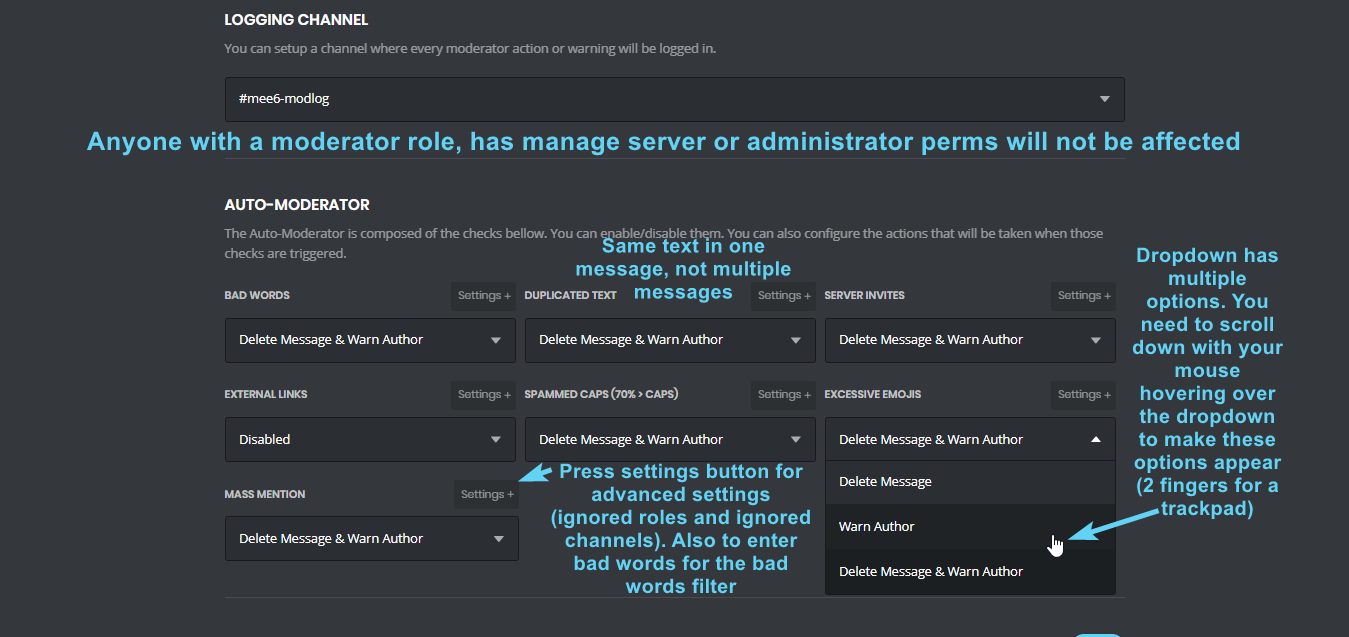
!automod
dire yarrowBOT
 white notch
!bad-words
dire yarrowBOT
 buoyant moon
yes i alredy added it and save changes but users can keep writting them
white notch
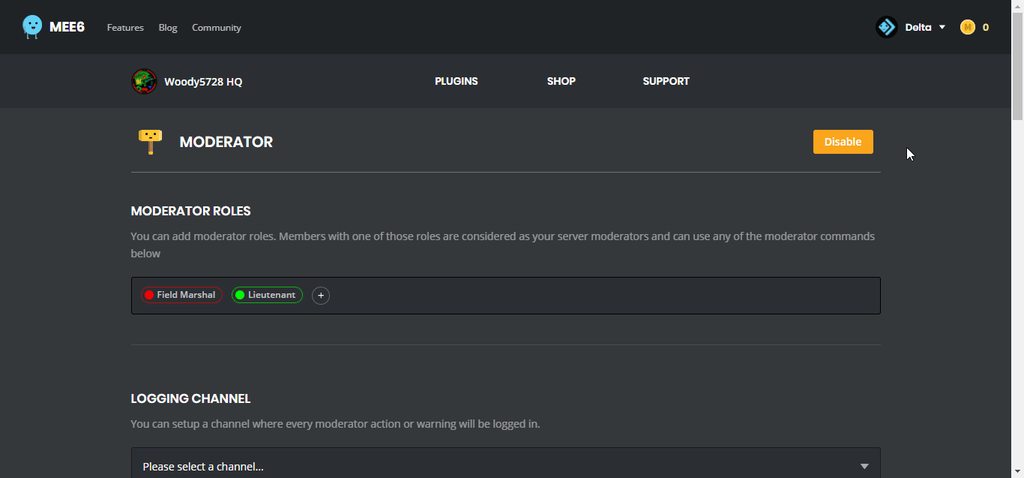
do the bad words have a white box around them?
 hollow yacht
bitter owl
hollow yacht
bitter owl
@hollow yacht Go to https://mee6.xyz/dashboard -> MODERATOR (Enable it) -> COMMANDS -> !Infractions (edit and configure it)
The correct way is: !infractions not !infracte
 marble loom
!support

 native parcel
How can I make mee6 add level roles? I’m really stuck so if you know please tell me 😃
bitter owl
@native parcel Go to https://mee6.xyz/dashboard -> LEVELS (enable it) -> Type (Stack to keep all roles/Single to only highest) -> Select Role To reward
native parcel
Fixed now, thanks 😄
 tribal lion
hi guys
wanna ask you something
the problem is I tried to use the command @buoyant moon
but it doesnt work
mortal oxide
@tribal lion #425409486820474881
And you need to create the command, it's a custom one.
tribal lion
yeah I alr set it but it didnt work suddenly
When I set it it was shown like @buoyant moon (✿ ͡◕ ᴗ◕)つ━━✫・o。 (NeverDie KAGa)
but now dunno why it didnt work
haha 😦
mortal oxide
You need to create it
dire yarrowBOT
https://mee6.xyz/dashboard press add to Discord, then select your server
tribal lion
ok I will check it again
 dry void
hello, i have a problem with the slowmode, thanks to dm me
bitter owl
@dry void Which is?
 thin zephyr
Hi, the Mee6 bot on my server stopped showing subreddit feed. I tried disabling / enabling the option but still nothing. Any idea what the problem could be? I noticed the same thing on another discord server that I frequent (not mine)
bitter owl
@thin zephyr plugin turned until be completely fixed #425409486820474881
thin zephyr
thanks
 cunning quest
Any chance of an ETA for the reddit fix? @bitter owl
dire yarrowBOT
So... @cunning quest, I've decided you should be level 1.
Don't get too excited, mmk
bitter owl
@cunning quest Sorry no, dev is going to fix as soon as possible
As it's an important plugin and it completely stopped. I might know he put as high priority
cunning quest
It's an awesome feature. Can't wait till its sorted. Gonna help my server look much better ☺️
 silver rapids
guys i have this problem where when i do any command it dosent talk or anything
dire yarrowBOT
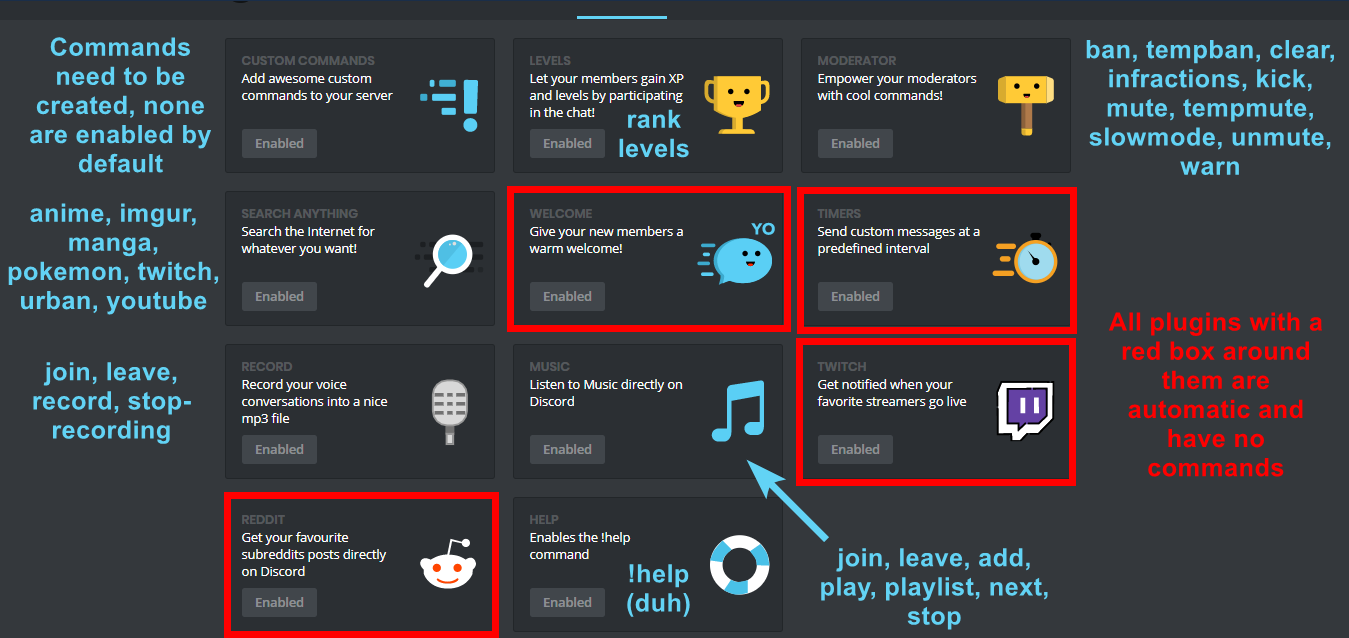 silver rapids
can you come to my server once and check this prob
buoyant moon
how i can invite it
 flint quiver
I tried to ban someone using the ban command and it didn't work
<@&193123929701875712>
cold bear
enable ban command
make sure bot has ban permission
make sure the highest role of that person is under bot's role
flint quiver
Okay thanks, I think I fixed it
 frigid bronze
reddit feed doesnt work
dire yarrowBOT
So... @frigid bronze, I've decided you should be level 1.
Don't get too excited, mmk
mortal oxide
@frigid bronze #425409486820474881
mortal oxide
Np 👌🏻
frigid bronze
till when tho?
mortal oxide
No ETA
frigid bronze

 obtuse vault
the join msg doesnt work on the discord im preparing
sage citrus
@obtuse vault did you enable the Welcome plugin and set it up?
obtuse vault
its dutch but if something is wrong say it
sage citrus
Yw
 jagged otter
dire yarrowBOT
mortal oxide
jagged otter
dire yarrowBOT
mortal oxide
- commands don't give XP anymore
 worthy plank
<@&193123929701875712> the Modderator thinks dont work. I have the right role for that
there are 3 roles for Moddeerator
I have it but It dont work
!clear ... dont owrk
work
<@&193123929701875712>
dire yarrowBOT
So... @worthy plank, I've decided you should be level 2.
Don't get too excited, mmk
Alright, @worthy plank has been warned because 'Capital letters'.
worthy plank
It is SUPORT channel
<@&193123929701875712> the Modderator thinks dont work. I have the right role for that
there are 3 roles for Moddeerator
I have it but It dont work
!clear ... dont owrk
work
@flat nacelle
lol
@cold bear
there is ALLYWAYS StarWarsExperte, it doesn't look like you can use that. :SMILESWEAT6:
but I have the right role
mortal oxide
@worthy plank don't spam Support mention please.
DM an invite and give me admin rights.
unreal sentinel
help so i put the badwords thing on i put words in it and it doesn't work i tried again and again but it still doesn't work can you help me?
mortal oxide
@unreal sentinel you can't test it yourself because Owner, Admins, Manage Server and moderator aren't affected by the moderator plugin.
unreal sentinel
ok
 hushed birch
So
After the update some of my command plugins have been scrambled or are on the wrong commands.
Like !Sword would show a sword, but now it shows something else :v
Its not ALL of them though, is this a known bug? and nothing much can be done about it...? <@&193123929701875712>
 serene birch
Mee6 seems to have trouble playing soundcloud links
dire yarrowBOT
So... @twilit willow, I've decided you should be level 1.
Don't get too excited, mmk
bitter owl
@BG97#9801 que se passa
buoyant moon
What does this mean?
How to solve?
buoyant moon
However, there will be a message where the roles are placed, and no information is displayed after adjusting roles.
white notch
the bot needs a role above the role being given on the roles hierarchy
as bots can't give roles above their highest role
buoyant moon
Thank you
 random lantern
😕
 untold pine
[this is using server cooldown 1 hour + giving role] it keeps on saying it needs to wait space seconds. When they say the command again and it's over, the bot DOESNT gives to role, even tho they have the permissions to. It used to work earlier.
 worldly flame
On my server the Reddit plugin stopped posting stuff. Issue on my side or a known bug'?
worldly flame
@buoyant moon Thank you, it seems I missed that one.
dire yarrowBOT
So... @worldly flame, I've decided you should be level 3.
Don't get too excited, mmk
buoyant moon
Np
steady hemlock
On two servers with Mee6 as admin !mute isnt working (they get assigned the mute role and have no permission to send messages, but they can still message?) it only happens with one person though, any way to fix? discord problem?
white notch
that user has a role/user permission where the send message perm is set to 
needs to be 
as overrides 
steady hemlock
thanks
 tiny oriole
When a user tries to use mod commands and isn't a mod, they can abuse their nickname to trick the bot into pinging everyone or specific people using <@id> as their nickname. Pls fix.
This happens even if they are in the banned roles when using the <@id> nickname.
buoyant moon
Mobile (ios) doesnt work when I try to save something
white notch
known bug
buoyant moon
Is fix machine broke or something?
 sullen coral
There are random audio cut-out using the audio command
white notch
@buoyant moon dunno, I'm not the one fixing it
sullen coral
And thats not the voie channels faults
white notch
guess you mean this server?
white notch
alright checking it all now
@sullen coral should be working now
cut outs could be due to your connection
or lag on Discord servers
sullen coral
I have 5 bars of internet
dire yarrowBOT
So... @sullen coral, I've decided you should be level 1.
Don't get too excited, mmk
sullen coral
Try and play this song:
white notch
5 bars means nothing with ping
sullen coral
Blue Exorcist Wired Life Outro
white notch
I did and it works fine
sullen coral
You played that exact song
white notch
yes
sullen coral
Yoy played nyan cat
white notch
Delta - Today at 19:37
!add nyan cat
!play
MEE6BOT - Today at 19:37
There's no song in the playlist for me to play :XMARK6:. !add a song first.
Nyan Cat 10 hours (original) added successfuly! :SMILE6:
Nyan Cat 10 hours (original)


Added by Delta#5728
Delta - Today at 19:37
!play
!add blue excorsist ending 2
!next
MEE6BOT - Today at 19:38
Blue Exorcist Wired Life Outro added successfuly! :SMILE6:
Blue Exorcist Wired Life Outro


Added by Delta#5728
Delta - Today at 19:38
!add blue excorcist wired
MEE6BOT - Today at 19:38
Blue Exorcist opening 2 added successfuly! :SMILE6:
Blue Exorcist opening 2


Added by Delta#5728
```
text
```
text
Okay
Okay thats how it works
```````nblocks 0 end 50``````
nblocks0end50
(╯°□°)╯︵ ┻━┻
 wraith python
Mobile cannot save changes
dire yarrowBOT
Alright, @cold oar has been warned because 'Posted an invite'.
 brave hill
!mobile
dire yarrowBOT
Due to the recent update, the website does not work properly on mobile. You can either use the Google Chrome app and request desktop version (for Android users) or use a PC (for iOS users) https://i.imgur.com/kyt5Akd.png
brave hill
You don’t have this on tanky
dire yarrowBOT
So... @brave hill, I've decided you should be level 1.
Don't get too excited, mmk
Alright, @brave hill has been warned because 'Capital letters'.
brave hill
Yay
 fast trout
Hello
buoyant moon
Moderators
I noticed the MODERATOR section and i took a look at it.
I've configured the ranks and checked everything, but still they can't do it.
If you found a solution, please @Mention me with:
@buoyant moon, i know how to fix it!
white notch
!moderator
dire yarrowBOT
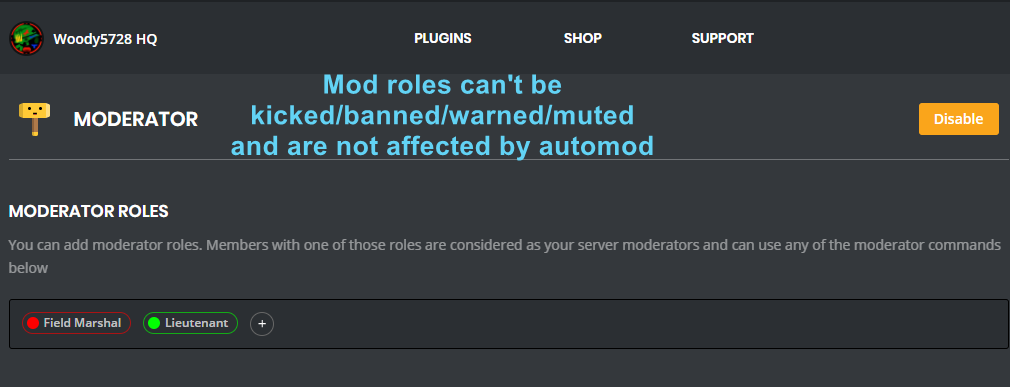
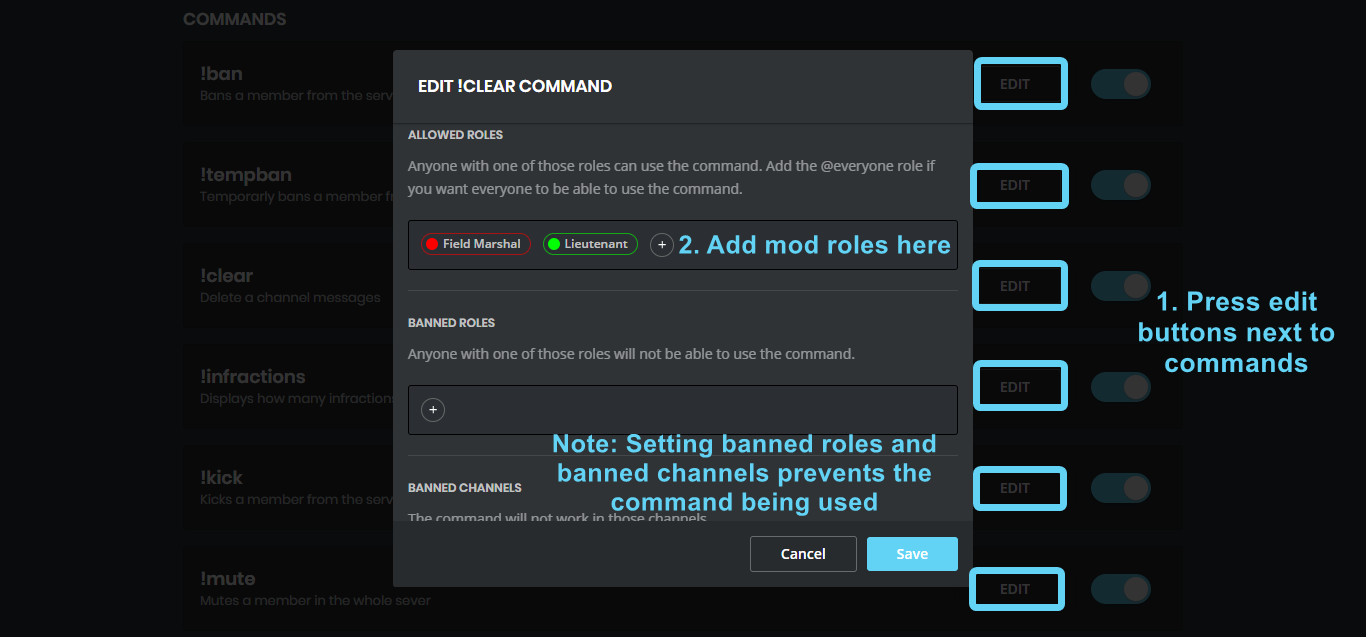 white notch
@buoyant moon
buoyant moon
Yes?
white notch
See above message
buoyant moon
OMFG thanks
 stray bison
dire yarrowBOT
stray bison
dire yarrowBOT
So... @stray bison, I've decided you should be level 1.
Don't get too excited, mmk
 vast root
@cold bear any reason why soundcloud links are not working anymore ?
 acoustic lichen
Is there a reason why Mee6 isn't adding roles back to people who join again?
 royal scroll
@acoustic lichen, it seems to be bugged out at the moment. #425409486820474881.
buoyant moon
@dire yarrow Or all the admins, how come it says theres a error when I do my cmd??
bitter owl
@buoyant moon permissions are missing (most cases)
mortal oxide
🤦
 sullen bobcat

 quick python
the bot doesn't do anything for me server 😦
wooden mountain
@quick python #〉announcements
quick python
oh that would make sense
dire yarrowBOT
So... @light tulip, I've decided you should be level 1.
Don't get too excited, mmk
buoyant moon
Auto-delete command invocation message doesnt work if the command is on cooldown
wooden mountain
🤔 indeed, the delete check gets skipped if it is on cooldown. Consider this issue ffnr (fixed for next release)
 sick sierra
text
 quick verge
cold bear
quick verge
cold bear
@quick verge context? what that command should do?
if giving roles make sure mee6 role is above these roles
manage roles pernission is needed as well
buoyant moon
are the bugs taking too long to fix or is #425409486820474881 not updated yet
 mental pagoda
the mee6 bot are not working a friend he can say nothing how to fix it?
wooden mountain
what do you mean exactly?
mental pagoda
wait
me and a friend were talking and suddenly he could not talk anymore and there is something with slowmode with him but I have not put a slowmode on!
buoyant moon
are the bugs taking too long to fix or is #425409486820474881 not updated yet
dire yarrowBOT
So... @buoyant moon, I've decided you should be level 4.
Don't get too excited, mmk
wooden mountain
we only have 1 dev who is currently busy with other stuff in life
wooden mountain
hmmm, some of thsose are already fixed
ionic juniper
Is that supposed to be a list of known bugs (i.e. bugs you know about) or known bugs (i.e. bugs you know how to fix)
wooden mountain
we know about
ionic juniper
Okay. What is the status on the custom commands page bug with deleting commands messing up commands further down?
(which has been reported in here a few times by various people including myself)
 glacial torrent
white notch
glacial torrent
white notch
!search
dire yarrowBOT
Search Commands
Please Note: You can't search nothing. If google can't allow you to search nothing, the bot won't give any results either. So you need to specify something. It also takes first search result, so you may need to be specific with searching. The following are examples:
!anime naruto
!imgur cats
!manga blame!
!pokemon pikachu
!twitch Squirrel
!urban Mee6
!urban nyan cat
https://i.imgur.com/XwAC6JY.png
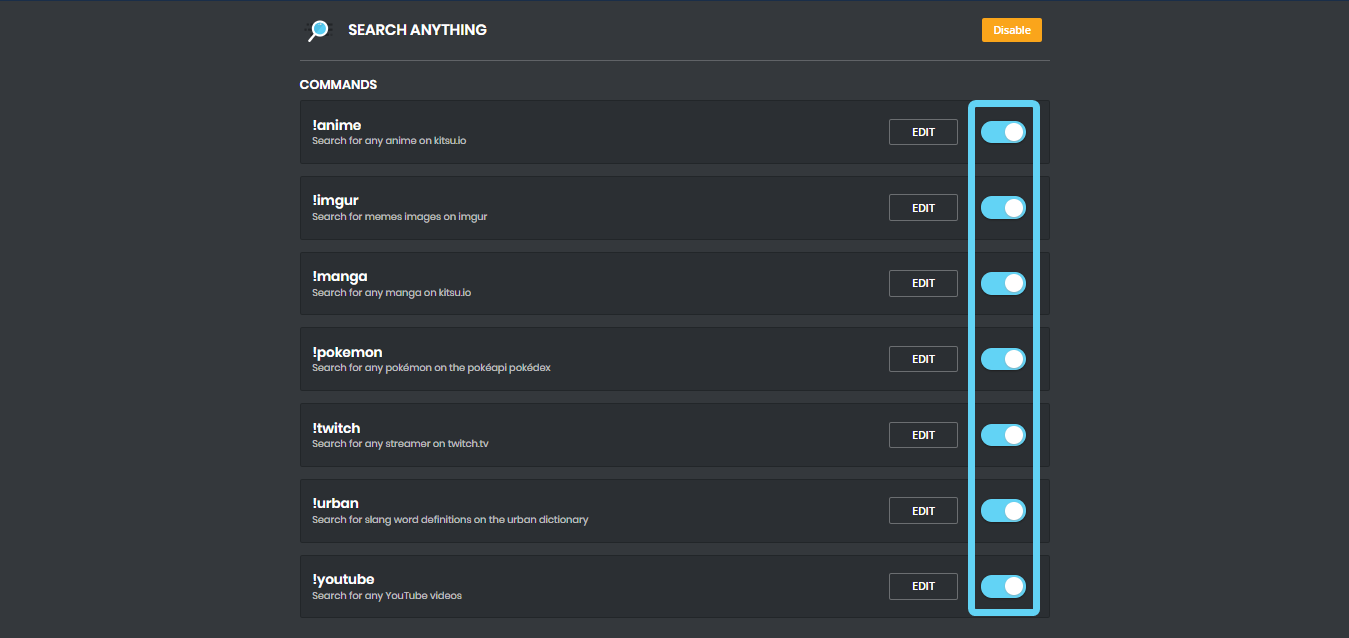 dire yarrowBOT
Alright, @obtuse zodiac has been warned because 'not using commands in #〉commands'.
 mortal rampart
i can not invite mee6 to my server pls help!!
 hardy zodiac
search on google mee6 discord bot
mortal rampart
see
mortal rampart
when i give it perms it becomes black
@maiden depot
can you pls help
@gloomy rivet pls i need help
it is working again
dire yarrowBOT
https://mee6.xyz/dashboard press add to Discord, then select your server
cold bear
try again using this link ^
dire yarrowBOT
Alright, @winter tree has been warned because 'Posted an invite'.
 sonic crystal
I found outside today a LadyBug ( Bug Report )
cold bear
mortal oxide
@spark arch go there #〉commands
buoyant moon
!help
dire yarrowBOT
DayKx, this command is disabled in this channel.
dire yarrowBOT
Alright, @buoyant moon has been warned because 'Posted an invite'.
halcyon owl
first and second featured doesnt woek
 grim perch
@mortal rampart I had the same issue go to Internet Explorer and make sure its ipdates to the latest version
mortal oxide
@grim perch huh, please use real browser (aka Google Chrome or Mozilla Firefox).
grim perch
It only worked with Internet explorer nothing else lol
I kept getting stuck on a grey screen like the guy above
mortal oxide
@grim perch remove your addblock
cold bear
sometimes using adblock, https everywhere other plugins that affect loading pages can break it entirely
grim perch
I don't have any add blockers on mobile
cold bear
chrome or stock browser?
grim perch
Both
cold bear
any vpn software?
cold bear
edge on pc or mobile?
 neat lake
all the commands that mute doesn't work
dire yarrowBOT
!mute @user - gives mentioned user the muted role
Requirements:
+ Manage Roles perm
+ Manage Channels perm
+ I must have a role above the muted role
+ User being muted must not have a role that has a green tick next to the send message perm in channel settings->permissions as this will override the muted role. They must also not have a user perm override on that channel
P.S. You can't mute people who have the permission to mute others, this includes: owner, other moderator or members with Administrator or Manage Server permissions!!!
 fossil vault
The reddit function doesn't seem to be working for me anyone else having this problem?
I saw known bug of reddit being disabled on april 3rd is it still down?
 dusk spoke
Mee6 isn't picking up some of my members and leveling them.
dire yarrowBOT
So... @dusk spoke, I've decided you should be level 2.
Don't get too excited, mmk
 night loom
sage citrus
night loom
sage citrus
@lumberhotpotato#3642 yes reddit is still disabled thats why its in #425409486820474881
ugh they left
steady hemlock
I think I found a new bug, searching for it doesn't bring any results in this discord, deleting a custom command after making a new one, instead of deleting the command, just shuffled the "replies" to different commands...
 lone vine
Hello,
In the custom commands, "add action - give roles", the feature called "banned roles" doesnt work
http://prntscr.com/j2e53c

Means I have made the action to give a role and I didnt want my members to take another role if they have one of the roles they already picked, yet they can still pick all the roles they want
white notch
@steady hemlock known
 radiant cipher
.!rank and other commands don't work
wooden mountain
did you enable them on the dashboard? all plugins and commnads are disbaled by default (except help but if no commands are enabled then help doesn't show anything
radiant cipher
Yes
wooden mountain
and does Mee6 responds if you try to use any command
 digital pendant
I have made up some custom commands but the bot not working I have tried so have all my admins and lower ranks but nothing I even copied and pasted the command to make sure the spelling was correct but nothing is happening
 rare cedar
I don't think it's a bug report but I couldn't find an appropriate channel
When you set the mod stuff to warn author, is it supposed to also delete the message? Because it doesn't and I think it'd be better :v
faint dome
rare cedar
Thanks
 wanton bloom
This is not really a bug, just a type mistake
 gritty dagger
Auto-moderator bug? I found out that mee6 isn't going to delete bad words.
I gave all permission to mee6 or its just my mistake?
cold bear
!automod
dire yarrowBOT
cold bear
read blue text
cold bear
!mobile
dire yarrowBOT
Due to the recent update, the website does not work properly on mobile. You can either use the Google Chrome app and request desktop version (for Android users) or use a PC (for iOS users) https://i.imgur.com/kyt5Akd.png
 unreal jewel
Nvm i can use safari
dire yarrowBOT
So... @unreal jewel, I've decided you should be level 1.
Don't get too excited, mmk
mortal oxide
@unreal jewel iOS (and also Safari) isn't supported yet
unreal jewel
Oh ...
lone vine
any news on the "banned roles" bug guys?
dire yarrowBOT
So... @lone vine, I've decided you should be level 1.
Don't get too excited, mmk
 quick lynx
Bug 1. MEE6's auto moderation for some reason resets infraction counts whenever it takes the first moderative action defined after x amount of infractions have been accrued. This stops the other moderative actions that are defined to never actually happen, which is bad because usually the first action is a temporary mute, so this stops other actions from ever happening. Not sure if this is a bug or a planned feature, but either way I'm reporting it here.
Bug 2. When it says "(action) when (person) has MORE THAN x amount of infractions", it actually takes the action when someone has reached that number of infractions. Example, temp mute for 10 minutes when more than 2 infractions are given, it mutes when the second infraction is given. Not sure if its a bug or just badly written text but reporting it either way.
mortal oxide
@quick lynx hello 👋
it reset all infractions or the last 24h?
Screenshot your configuration please.
Yeah we know that.
dire yarrowBOT
Alright, @random estuary has been warned because 'Posted an invite'.
buoyant moon
why isn't the mee6 dashboard loading for me?\
 candid steppe
Pixel 2
- Selecting a server does not work
quick lynx
As requested by @mortal oxide, I screenshotted my configuration. MEE6 never goes past the temp mute punishment.
Also due to bug number 2 that I reported, I had to +1 all the infraction counts of my config.
buoyant moon
@buoyant moon
dire yarrowBOT
MoeMoeMelkkoe, this command is disabled in this channel.
 vague orchid
keen linden
vague orchid
keen linden
@vague orchid sorry, we actually made it in Sketch :^)
 modest mirage
1. The bot is "mixing" commands. I've got 2 commands. 1. !like 2. !live - Then bot "mix" them. When I type !like: Okay. Like. When I type: !live Like. **2.**And another bug. When I edit command, then bot opens me edit to command before, then you need to click cancel and do this again, and it not showing this again and 3. (This bug it's definitely not important, but I will say it anyway) When you move your cursor on Google Chrome (my browser here, IDK for others), then the bot mix DIV's layers - when you are in EDIT command mode: http://prntscr.com/j2zv2n. Sorry for bad English. SloveniaVideo
 buoyant moon
Ich has buyed 2000 M Coins in the Website and i can't use them
mortal oxide
@buoyant moon wdym?
faint dome
Definition of wdym
Whatever do you mean?
mortal oxide
What do/did you mean in this case @buoyant moon
 knotty tusk
Mee6 stopped responding to commands from other bots
faint dome
@knotty tusk it became an option in the dashboard
knotty tusk
can you show me where it is, please?
dire yarrowBOT
So... @knotty tusk, I've decided you should be level 1.
Don't get too excited, mmk
 uncut moss
In surport lots of people were not awnsering my questions and were telling me to go to talk these were the people they were not including me @faint dome some one else
Oh and samara
I think that's how you spell it
 opaque smelt
cold bear
opaque smelt
cold bear
!no-help
dire yarrowBOT
Doing !help and it's not showing any commands? Wondering why I'm not doing my job?  This is caused by commands not being enabled in plugins. To do so you must:
* Create custom commands in the commands plugin
* Enable Levels plugin (this will enable !rank and !levels
* Enable commands in Moderator plugin (these will only show if you have a mod role selected for each command)
* Enable commands in the Search Anything plugin
* Enable commands in the music and record plugins (these plugins require payment)
After that you can do !help and you can see all my lovely commands  Just don't disable the command on yourself. You can also do
 !help in #〉commands or look at this image: https://i.imgur.com/V93V8Dg.png
cold bear
@opaque smelt ^
quick lynx
Anything for my bug report?
quick lynx
No?
cold bear
can you try to reverse theit order?
i can try to explain why is this happening
when user gets warning his warning number get checked with auto actions rules.
when condition is true (3 infractions for last 14 days) he gets temp mute. that's all, no additional checks.
so if user will break rule again he will get mute again. every time. because bot doesn't check auto actions after finding one that "suits".
reversing order will fix that, i hope, cuz first it will check is there enough warns for ban, then mute and so on. currentry it checks them in order they added to dashboard @quick lynx
quick lynx
I've tried reversing the order, it just does nothing until enough infractions are earned for a ban
So, in other words, it ignores all auto moderative actions past the first one as if they don't exist.
cold bear
🤔
quick lynx
Do they work here?
buoyant moon
<@&193123929701875712> Hello, Mee6 is randomly deleting people's messages, a guy lost 3K. The server is OurServernamesThis.
sage citrus
- fyi the server name doesnt really help anyone
- deleting them right as they send it or deleting them later?
buoyant moon
bug report, i saw a cockroach
dire yarrowBOT
So... @buoyant moon, I've decided you should be level 1.
Don't get too excited, mmk
buoyant moon
Mee6 gets in the way of Rythm
I use !clear for Rythm and mee6 wont shut up
:/
Look
How can I get mee6 to shut up about the !clear command being incomplete?
You can ban the clear command in that channel
Just go to your Moderator plugin and edit the !clear command
buoyant moon
why does Mee6 keep refreshing in my my face when i am trying to make a custom command?
im in browser and it keeps reverting back to the select a server screen
 obtuse oasis
Where: "Custom Commands" section of the management dashboard on mee6.xyz
Cause: Clicking "Save" more than once when creating a new command
Result: Duplicates of the new command are created. Attempting to delete one of the duplicates will cause all instances of the new command to be deleted.
obtuse vault
Website doesnt work on my phone (samsubg galaxy note 2)
dire yarrowBOT
So... @obtuse vault, I've decided you should be level 3.
Don't get too excited, mmk
 hoary stream
!mobile
dire yarrowBOT
Due to the recent update, the website does not work properly on mobile. You can either use the Google Chrome app and request desktop version (for Android users) or use a PC (for iOS users) https://i.imgur.com/kyt5Akd.png
hoary stream
@obtuse vault ^
obtuse vault
Thanks
modest mirage
!no-help
dire yarrowBOT
Doing !help and it's not showing any commands? Wondering why I'm not doing my job? This is caused by commands not being enabled in plugins. To do so you must:
* Create custom commands in the commands plugin
* Enable Levels plugin (this will enable !rank and !levels
* Enable commands in Moderator plugin (these will only show if you have a mod role selected for each command)
* Enable commands in the Search Anything plugin
* Enable commands in the music and record plugins (these plugins require payment)
After that you can do !help and you can see all my lovely commands Just don't disable the command on yourself. You can also do !help in #〉commands or look at this image: https://i.imgur.com/V93V8Dg.png
buoyant moon
<@&193123929701875712> your reset all ranks isn't working
I have like 2k+ people to reset and I want to reset them all for an event but the reset all isn't working
I've been manually resetting them and got it narrowed down to only people level 3 or below but there's still over 1k people to reset
cold bear
@buoyant moon #425409486820474881
buoyant moon
oof so there's nothing that can be done about this
cold bear
also you can wait
 split python
hello...I have a problem for Timer....not set a new one...error is: "The server encountered an internal error and was unable to complete your request. Either the server is overloaded or there is an error in the application.",
cold bear
@LevaN#4971 that means channel you're trying to add timer has 10 webhooks. go to channel settings and remove one of them
 floral lance
clear command not working these days it was working and all of a sudden one day its not and bot seems to be not working now
 humble trail
Mee6 doesn't delete previous roles for members who have multiple level roles after the remove previous reward configuration gets turned on.
 slow bone
mee6 is offline? :C
faint dome
read #〉volunteer-support @slow bone
humble trail
This has been happening for a while, I was waiting to see if it would change but it has been this way since the 2.0 update 😃
 mossy nymph
my mee6 is offline
ionic juniper
 white acorn
 gleaming maple
same
 lime plaza
still offline?
 versed quarry
😦
 obtuse zephyr
my commands arnt working
 gentle crater
but how do i add it, bc i kicked him
 dense pendant
jap
obtuse zephyr
why arnt my commands working
buoyant moon
the bot is offline.
nothing working
it will br back in some time
bonjour les commends ajouter ne s active pas et les nouveaux channels crer ne se voi pa dans le mee6bot.com
dense pendant
!help
dire yarrowBOT
MaximilianL, this command is disabled in this channel.
dense pendant
lol
buoyant moon
back?
dense pendant
i dont konw
faint dome
#〉announcements plz
 river fiber
bot its offline @magic parcel
obtuse zephyr
!help
dire yarrowBOT
XxZtythonZxX, this command is disabled in this channel.
buoyant moon
no its not
river fiber
nmop
versed quarry
😦
gentle crater
@faint dome how do i invite mee6 again to my discord server?
buoyant moon
but its working in this server. bracuse it his server
guys the bot is still no your server1
!
faint dome
Not working here too
dire yarrowBOT
John Taxmi, this command is disabled in this channel.
obtuse zephyr
hes working now
versed quarry
no 😦
faint dome
Not everywhere. Please wait
buoyant moon
the bot is not wrking. stop saying the same
dire yarrowBOT
So... @buoyant moon, I've decided you should be level 1.
Don't get too excited, mmk
 tiny hollow


 gentle crater
gg @buoyant moon
buoyant moon
gg me
gentle crater
but how dafuq i add mee6 again to my server?
dire yarrowBOT
So... @gentle crater, I've decided you should be level 1.
Don't get too excited, mmk
buoyant moon
gg
gentle crater
gg me
 modern bramble
hey, my bot is not working
 pseudo token
MEE6 bot was don't work on my server
faint dome
buoyant moon
the bot is offline
gentle crater
cant text on #〉volunteer-support lol
modern bramble
that means that he is displayed as online but not working
faint dome
So read @gentle crater
 gentle bridge
Hallow
modern bramble
When will the bot go again?
 meager crypt
it worked now
faint dome
Not everywhere, just wait
 trim badge
he doesnt nothing
he is
ye
keeps asking me for perms
autorisation
or something
idk
i just want to add it
pseudo token
MEE6 bot was offline
gentle crater
@trim badge me directly i cant add it again to my server, it goes to control panel directly
faint dome
Read #〉announcements please
trim badge
ok
 rain swallow
pls somebody jut do something <@&424994160387293184> <@&255513346428764161>
dire yarrowBOT
So... @modern bramble, I've decided you should be level 1.
Don't get too excited, mmk
modern bramble
Can someone tell me why my bot does not work, it's online but it does not work =! Help,! Levels
faint dome
Not really working, please wait
modern bramble
is that the same with you?
faint dome
Yup