#〉bugs-reports
2 messages · Page 22 of 1
 tough rampart
Before they updated mee6 it didn't cause any trouble now
Is jsut weird
Look
I can see who comes in but when they leave
It says invalid user
And this is for your channel
 limber knoll
@tough rampart if you scroll up the admins know about it.
 ionic meteor
Yeah, it’s discords weird caching behaviour. Something the dev’s didnt notice because they tested on a smaller server (I guess)
ionic meteor
Mee6 dev’s are aware that trying to tag them isnt the best way
tough rampart
Well can you like report it or do I have to tell a admin or a founder to do it
ionic meteor
They know alreadt 😃
tough rampart
Ok
With the other when someone leaves it say their name
But with mee6 eh
Is not working
@ionic meteor well thanks anyways at first I though that my phone was messing up but now that I know if the bot is fixed again you dm me or friend so I can check again thanks alot
 hard hedge
When I try to make a command and when using the command to give me a rank.Im puting the rank in and its say:Whoops, it looks like I can't give one of the roles listed here. Please fix that by putting my role above all the roles listed here.
hard hedge
 wooden mountain
@hard hedge ^^ check the bot his permissions
hard hedge
thanks
 sick ivy
Music bot having issues joining voice channels?
 buoyant moon
I don't know how i can really prove this, but when i reset the rank of one user it reset everyones
sick ivy
Oh alright, didnt notice it was listed in #425409486820474881 an hour ago
buoyant moon
hello I am french, jais a bug with the command clear it does not work on my server could you help me?
wooden mountain
!clearinfo
buoyant moon
ah, we must do! clear @pseudo or! clear 10
wooden mountain
is it enabled
wooden mountain
sure
buoyant moon
ops
ops google translation was wrong
you speak French because since then I use google translation ?
buoyant moon
oui je vien de trouver la solution sinon merci
mais ?
@mortal oxide ses pas le mec qui fait des bencmark de cartegraphique ?!
 mortal oxide
@buoyant moon qu'est-ce quoi ? XD
buoyant moon
att
mortal oxide
Ce n'est pas moi
 rancid void
wooden mountain
rancid void
wooden mountain
yes
buoyant moon
put the tips in mee6 and I forgot all the advice I said before
 turbid summit
I have XP Suspended role and i deleted my xp roles but mee6 keeps adding them back why
 bitter owl
@turbid summit that didn't suppose to be happening..
You really sure you are assigned with a banned role from xp in dashboard?
turbid summit
There is other people with Xp suspended role but their roles doesn't come back
Also i don't gain mee6 xp while chatting due the role
wooden mountain
then remove that role from yourself
 wintry niche
The excessive emoji automod feature doesn't work in channels where it should be active in my server :o
wooden mountain
@solemn forge Mee6 needs manage message and read message history permission
wintry niche
I set it to 5 max but I've checked with an alt account that I could send at least 6 in a single message
 solemn forge
no itmessed up and just started working agaain
wintry niche
I have people who got warned for sending 4 times the same emoji in a single message due to the duplicated text automod feature
buoyant moon
d
 obtuse oak
Thank you and I am so sry did DM to the Admins. Please understand my rudeness.
I can't access my Mee6 bot server for adjusting things.
Please check this. :)
mortal oxide
@obtuse oak are you on PC?
obtuse oak
How can I check console log
when I access to the Mee6 Server 'https://mee6.xyz/server' this page
Only what I can see is gray screen.
mortal oxide
Np 👌
 sullen venture
wooden mountain
sullen venture
wooden mountain
😐 we will look into this
buoyant moon
Приветствую, иногда когда человеку дают мут, mee6 забирает у него эту роль, что делать?
mortal oxide
@cold bear ^
buoyant moon
Неа
 cold bear
мют роль только одна? для обоих ботов?
cold bear
а автомод?
buoyant moon
Тоже
 twilit narwhal
When I login this comes up and I stay there https://gyazo.com/3fcd4b49965d821ecb80ae9708239ae2
 cold bear
кажется я поняв в чем проблема
нужно проверить кое что
@twilit narwhal press f12 and check for red messages
or ctrl shift i -> console
twilit narwhal
No red messages
wooden mountain
@lean sphinx did you not fix that?
 lean sphinx
should be fixed
monitoring
check out perms
if it's sending Connecting... its prob perms
@karmic bluff Check les perms de MEE6
 karmic bluff
no prob perms
 karmic bluff
oui
 ornate flicker
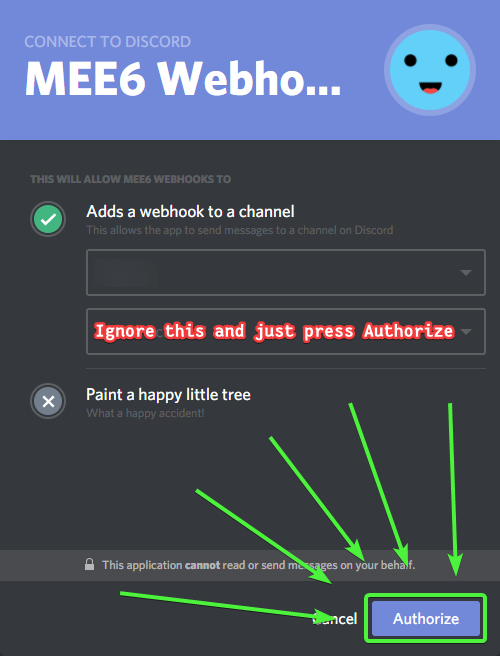
Просто нажмите синюю кнопку // Just press the blue button
Вам не нужно ничего выбирать // You do not need to select anything
 spare iris
variables not working {user.created_at}
mortal oxide
@buoyant moon https://i.imgur.com/5N3pqoA.png
 buoyant moon
Lol thx 😘
mortal oxide
Np 👌🏻
 red island
i am trying to get bots but i need to verify my account but it is verified idk what to do?
ornate flicker
Are you sure you're not logged in with an alt account?
red island
yes i am sure
mortal oxide
You need to verify your email address @red island
red island
well to me it is but i did everything it told me so idk
mortal oxide
Do you received an email from discordapp for verify your email?
red island
yes
mortal oxide
Can give a screen pls?
red island
will try
mortal oxide
👌🏻
 bitter dragon
why the temp ban not working?
cold bear
describe not working
 gritty thicket
It have a problem with mee6 he dont tell the users name when them leave but he tell "@invaliduser"
 lilac mango
bitter dragon
lilac mango
bitter dragon
the kick ban and temp ban not working what you can to do
buoyant moon
@cold bear Ну так есть есть решение?
cold bear
отключи управление ролями для бота или поставь мют роль выше роли миисикса
пока не пофиксят
buoyant moon
👌
cold bear
первый вариант сломает role rewards
 dire yarrowBOT
@limpid portal did 'adv spam' and got the ban hammer! 
 north ermine
I can't save anything with the new website format... It'll say something like: "you've made changes! Save or cancel" but there's no save icon. Is it because I'm using mobile?
 rocky gorge
@north ermine yes. That is a bug they're still working on
north ermine
Ok thanks.
dire yarrowBOT
Alright, @gilded shoal has been warned because 'Posted an invite'.
dire yarrowBOT
Alright, @raw burrow has been warned because 'Bad word usage'.
 raw burrow
fuckk
dire yarrowBOT
Alright, @raw burrow has been warned because 'Bad word usage'.
Alright, @raw burrow has been warned because 'Bad word usage'.
 halcyon owl
mentions doesnt work on twitch posts
 hearty geyser
I cant add a streamer on the twitch streamers section. i can put in a name and select a channel but it wont give me the option to click on add
hearty geyser
it works for the streamers i already have on there but cant add a new streamer to the bot
 ember glacier
hearty geyser
ember glacier
hearty geyser
just name option is also grayed out for me
 lilac leaf
so Im trying to access my server dashborad, and cant seem to get to it, did the new site change the locaton of the server dashboards?
rocky gorge
Mee6.xyz/dashboard
rocky gorge
Np dude
cold bear
!idinfo
dire yarrowBOT
to use some stuff in custom command or any other text from Mee6 you need to use the ID:
first get the ID of that object by typing it in your server with a \ in front:
emoji: \ ➡ !soontm
animated emoji: \ ➡ !baguette_spin
mention: \@dire yarrow ➡ @dire yarrow
role: \<@&325291851106091019> ➡ <@&325291851106091019>
channel: \#announcements➡ #announcements
then copy that ID(with the < > and everything in between),
now paste that in your custom command, welcome message, stream announcement, etc...
https://cdn.discordapp.com/attachments/235378515866812417/269195258640728075/2017-01-12_22-05-03.gif
 cold bear
@halcyon owl ^ you need to add raw mention (<@&id>) instead of @mention text
halcyon owl
Oh
hearty geyser
I got it figured out now think i had to turn off adblock and ublock and refresh the page then it gave me options to choose a streamer and click add
cold bear
hmm
halcyon owl
@cold bear thanks for help, I fixed twitch notifications, but when I am trying to do something similar to welcome messages it doesnt save 😦
dire yarrowBOT
GG @halcyon owl, you just advanced to level 3 !!
cold bear
it's broken for welcome message, known
halcyon owl
oh ok
cold bear
don't put any ids to welcome message.
halcyon owl
ok thanks for help, will wait till its fixed
 celest geode
still getting this https://gyazo.com/ab9054bda23ed610e886f3c841dbfc7c no idea how to fix it..
 dire yarrowBOT
Alright, @crisp pecan has been warned because 'Posted an invite'.
dire yarrowBOT
 AsiliS
Rank
5643/46682
Lvl.
1
Exp.
93/155 (tot. 193)
buoyant moon
Isn't working on my server
rocky gorge
Commands go in #〉commands
buoyant moon
yep
 rustic badge
@buoyant moon turned on in dashboard?
 gusty swan
I am unable to scroll down in the role rewards menu. I try to scroll to a specific role and it will not allow me to unless I click each individual role and keep on doing that until I find what I wanted, then I have to delete all the ones that I did not want. Then, when I am trying to assign a level to be rewarded to that role, it only gives me three options, level 1, level 2, and level 3. My VIP role is set to 50 before the new website came up, and I am trying to set my new Veteran Member role to level 25.
cold bear
you need scroll on list with scroll wheel
 lime tendon
I i added roles to moderator roles, but still they cant use !clear for example
gusty swan
Doesn't work.
lime tendon
I needed to manually add moderator roles to !clear command
gusty swan
Maybe I gotta get a mouse..
 faint dome
@gusty swan you can try to change your explorer (firefox works perfectly for me)
 somber birch
tempmute is broken
dire yarrowBOT
Alright, @long ivy has been warned because 'Posted an invite'.
Alright, @long ivy has been warned because 'Posted an invite'.
 final trench
Hola
 dreamy chasm
 rocky gorge
Mee6 is particularly laggy in my server
 marble mural
hey yall so in my server we had a guy muted before the update and now we cant unmute him
 harsh obsidian
! rank doesn't work for me ;-;
 lime sun
{
"message": "The server encountered an internal error and was unable to complete your request. Either the server is overloaded or there is an error in the application.",
"status_code": 500
i keep getting this when i try to add a timer to my channel this continues to happen
bitter owl
@harsh obsidian Go to https://mee6.xyz/dashboard -> LEVELS (enable it) -> Select Channel {left} and Message {right}
Make sure to allow mee6 to read & write in that channel
 twilit charm
Why cant i say
bitter owl
@twilit charm pardon me?
 balmy summit
So there was an issue with something that happened with mee6. The custom commands got mixed up somehow. Basically I think when I deleted a command, it bugged out and it moved all the commands (even the ones I deleted) description so like when you type in ‘!hello’ and it would give the response. The responses moved down to the commands below them. So for example I had a ‘!swim’ command that was a joke in the discord, I deleted it and it moved to another command for example ‘!welcome’ and the ‘!welcome’ command moved down to another command below it.
Not sure if this is an issue that’s happened to others, I just know it just happened and I had to refigure every command to what it previously was
 ionic juniper
^ that sounds familiar
balmy summit
Yeah. It seems to be when you delete a command or add a new one (not sure about adding new one) it’ll bug. Figured to let you all know and hopefully if others have the same issue you’ll see this post and know that it’s a general issue. Maybe it’s just me. Not entirely sure
ionic juniper
Nah, I had that issue before. Fortunately, I realized it early and refreshed the page before I messed with anything and it was okay
dire yarrowBOT
GG @ionic juniper, you just advanced to level 3 !!
balmy summit
🤔 All you had to do was refresh..
ionic juniper
I'll give a quick example with three commands:
1 - text 2 - mahtxt 3- alltext
Deleting 2 would make the following:
1 - text 3 - mahtxt
and then when I refreshed it went to
1 - tet 3 - alltext
does the middle scenario sound familiar?
balmy summit
Yeah. That’s exactly what happened to me
The only thing though
Is when my friend used the command (which is how I figured out it was messed up) it used a different text
So basically what you said regarding how it changed that
balmy summit
So like. For example, the command she used was to go to a specific channel ‘botspam’ lets just say.
Instead of saying the botspam command it said an entire different command
So what you said is kinda what happened. Except of just 3 commands. It went like this (I’ll do 5)
- Test 2. Text. 3.Tacos. 4.Hungry 5.food
(Deleted the 2nd)
1.Test 3.Text. 4.Tacos. 5.Hungry
Type of deal
ionic juniper
That sounds incredibly familiar
balmy summit
So she used the 3 command which should of been Tacos (just using hte examples) and it said the text command but it was the 3rd command. It just said the 2nd texts
ionic juniper
I'm pretty comfortable saying this is another occurrance of what I mentioned in here last Tuesday (which Sil responded to), so I'm hoping this can be figured out.
((of course, this being a lot more information here by KingJaws, thank goodness))
balmy summit
Yeah. It happened and was confused, since I did join in here once before and left. I figured to rejoin and report it in here. From your experience it does sound the same, so hopefully it can be looked into 😃
 plucky coral
The rank command works in the server I'm in but for some reason it isn't working in our bot-commands channel
mortal oxide
Look if MEE6 can write in/see that channel @plucky coral
Channel settings => overwrite
 dusky musk
have role rewards been fixed yet?
mortal oxide
Yes @dusky musk.
plucky coral
@mortal oxide it works now, thank you 😁
dire yarrowBOT
GG @plucky coral, you just advanced to level 1 !!
mortal oxide
Great! Np 👌🏻
plucky coral
It was working earlier today, dunno what caused it to stop
 sand grove
Is there a fix for the bot not linking to profiles in leave messages? It stopped working and changing it to {user.name} didn't fix it
cold bear
did you save changes?
 molten basin
Mee6 still won't join a channel to record. Is this still a bug, or do I have to do something?
balmy summit
@molten basin #425409486820474881
dire yarrowBOT
GG @balmy summit, you just advanced to level 4 !!
molten basin
Okay thanks @balmy summit - I just noticed Mee was in the Music Box Voice room. 😃
 lavish hemlock
ik u prob already know this but u cant save changes like reward roles on ipad plz fix im making a whole server on discord on ios and i cant use the most important thing called reward roles Xdd
balmy summit
@lavish hemlock Try using Google Chrome and go into Desktop mode
They’ve been having issues with mobile version
I use my ipad but I can access the site when I go into desktop mode
Sorry >:3 Saw you typing haha
cold bear
^
 graceful void
Hi anyone else having problems with mee6 not joining voice channels? have removed him and reinstalled which worked last time but he still wont join and he is used an awful lot on my server 😃
balmy summit
@graceful void #425409486820474881
balmy summit
😛
buoyant moon
uh there is a problem with the site
We can not put the welcome message in the general
(the default general)
cold bear
use scroll wheel on list
balmy summit
Use your mouse scroll wheel
buoyant moon
ah thank you it's work^^
 brave violet
?
 uneven nimbus
oboi oboi why does the filter on servers with mee6 not apply for admins?
 white notch
because we removed it applying for admins
buoyant moon
!rank does not work on my server
cold bear
give mee6 channel permission override in any channel and try again
buoyant moon
why are the bugs taking so long to get fixed?
cold bear
- one dev
- can be busy irl as well
- complexity of bugs: some can take 5 mins, some 1 day, etc
 idle vigil
Clear command doesn't work
buoyant moon
Hi the bot isnt muting members after they been spamming
 hard saddle
@buoyant moon does it warn/delete?
buoyant moon
It warned and deleted then stopped doing it for some reason
I think it glitched because it was spammed
hard saddle
what of duplicated text? do you have that turned on to delete messages/warn author?
buoyant moon
yes
buoyant moon
ok
idle vigil
I used it many times, no clear no response from the bot
hard saddle
do you have it enabled?
white notch
!clearinfo
dire yarrowBOT
The clear command allows you to clear the last xx amount of message.
or to clear that annoying spammer without clearing anyone else
just use !clear 1-1000 to clear the last xx messages (example !clear 10),
or use !clear @name to clear all the message of @name in the last 100 messages
+ I need manage messages permission
+ I need view message history permission (otherwise I will respond with -1 messages cleared)
+ you need to check the checkmark next to clear on the plugin page.
+ you need to set your role as moderator (located at the top of the plugin page in the moderator tab)
Hmm
I allowed it.
But strangly it does work now

So
thanks you for helping
sorry for taking a bit of your precious time
white notch
5 seconds isn't precious
buoyant moon
it is
 crimson juniper
you are eblane
buoyant moon
The moderator logging is broken on mobile devices.
Discord does not support embedded user id and that is what the bot uses.
brave violet
o wow
buoyant moon
<@&193123929701875712>
brave violet
wth is this song
crimson juniper
pink vine
brave violet
o
cold bear
mobile issue
dire yarrowBOT
Alright, @brave violet has been warned because 'Bad word usage'.
brave violet
oops
dire yarrowBOT
Spark#5843 (305776959705841665) is now muted for 'Unspecified.', alright? 
buoyant moon
Could you guys allow the bot to just use the nickname of the user along with the mention? I know it is Discords fault for not being consistent but I cant use this bot if admins cant do their job on mobile
wooden mountain
We plan on doing that
buoyant moon
Thank you
brave violet
xdddddddddddddddddd
dire yarrowBOT
GG @brave violet, you just advanced to level 1 !!
WoizWoiz#1327 (317344363581800469) is now muted for 'Unspecified.', alright?
turbid summit
Since the new update xp suspended role is glitched and the people who used this role after update, roles started being added back by mee6
 foggy barn
^
buoyant moon
same question
ionic juniper
Sil, not sure if you read back, but last night someone mentioned a similar issue to what I posted last Tuesday.
A fair bit more information there than what I had.
wooden mountain
🤔 down in 20%
buoyant moon
Timer why dont worked ?
Hi.. I want to report something here
Thanks for the changes in the reddit feed outlook and stuff ...
I use reddit feeds in a couple of servers.. some of the threads have content warnings..
The problem is even though it shows content warnings properly it shows all the content in the feed
So people who should not see some stuff accidentally see it
Its not really a bug
But it caused major problems
Is it possible to disable showing content if content warning =/= none
<@&424994160387293184> I saw the #〉rules so I'm guessing its okay to tag u guys in here
dire yarrowBOT
GG @buoyant moon, you just advanced to level 1 !!
 eager juniper
Hm, earlier I made mention that mee6's greeting was not working for me, after a quick change in the settings, he started to greet and say goodbye to those who joined and left again. Now it appears it suddenly stopped again and I didn't change a thing in the settings
 scenic reef
i made custom commands to give/take back roles but they don't work
ionic meteor
@scenic reef Make sure mee6 role is above the level reward roles
scenic reef
it is
but still does not work
i tried the warn command, it works, but not my commands
dire yarrowBOT
Role rewards will give a role as reward for active users in chat.
You gain xp by talking in chat, when you gain enough xp you get a level.
in order to let me give role rewards i need :
+ manage roles permission
- at least one of my roles needs to be ABOVE the reward roles(bots can't give roles that are higher than their own role)
! I will only check for role rewards to be updated when someone levels up... so if you added role rewards a bit late then wait till someone levels again before complaining that I am not doing my job.
 ionic meteor
Do you have all of this requirements?
ionic meteor
Ohh
scenic reef
!(command) @(user)
ionic meteor
You can’t give a role to another user
scenic reef
???
 hollow raptor
He can give himself.
scenic reef
oh
dire yarrowBOT
GG @scenic reef, you just advanced to level 2 !!
hollow raptor
Or remove from himself.
scenic reef
but why?
ionic meteor
Because it wasnt made like that 🤔
hollow raptor
He responds to you, which means he already mentions to you.
And that means, all the commands you type (at least if it is responds) will affect only you.
dire yarrowBOT
GG @hollow raptor, you just advanced to level 5 !!
ionic meteor
It gives a role to the executor
scenic reef
hollow raptor
That means someone can !wish-owner and he gets Owner rank?
scenic reef
i tried just the command, dosn't do anything
still, all the role commands has no reactions
(custom +roles)
i'm serious, absolutely nothing is happening
ionic meteor
Do your custom cmds work at all?
scenic reef
only the roles ones has problems
they don't react
but i tried a basic text one, worked
ionic meteor
And mee6 has perms to manage the roles and his role is above the role you’re trying to give?
scenic reef
yes, the only role above is mine, and he has permission on both his roles
ionic meteor
Np
dire yarrowBOT
Alright, @scenic reef has been warned because 'Posted an invite'.
 elfin terrace
Hi 
Could someone help me set up mee6 with the music channel?
I try to add it to a voice channel but with the command !join only the load message appears and it is never added
cold bear
elfin terrace
thanks
 spark kelp
uh is it possible to show the images from the reddit webhook thing
bcos the stuff i want from mee6 webhook is mostly gifs/images etc that i can view from discord but now i have to click on individual links. is there any way to change this?
 gloomy delta
Mee6 dosen't add roles back to a member who left and comeback again, even if he still have his level
lavish hemlock
@balmy summit i can go onto side i just dont know how to save changes it says changes detected please save or cancel i dont even know how to cancel
gloomy delta
Thx!
dire yarrowBOT
Alright, @dire iron has been warned because 'Posted an invite'.
 dire iron
!infractions
 vocal island
is the dashboard site down ?
lavish hemlock
no
dire yarrowBOT
GG @lavish hemlock, you just advanced to level 2 !!
cold bear
🤔
lavish hemlock
so go under mee6 the discord bot it helped for me
dire yarrowBOT
cold bear
!levels
dire yarrowBOT
:3, this command is disabled in this channel.
 lavish hemlock
if u already have the bot on just choose same
ionic meteor
Gg Birdie
vocal island
ok
lavish hemlock
but that link works too
vocal island
ok thanks
lavish hemlock
but it does not if u do it from google for some reason idk maybe a bug
vocal island
im in the dashboard now
lavish hemlock
ok good
 tribal lion
Hi I have some problems with using mee6 system
The problem is the rank system
Does it have a bug?
bitter owl
@tribal lion working just fine
Isn't mee6 giving xp/ not responding to !rank or what?
 stable glade
bitter owl
stable glade
bitter owl
!noxp @stable glade
dire yarrowBOT
If Mee6 isn't giving you xp, or either !rank or !levels is not working it is one of the following:
Reason 1: The levels plugins isn't enabled on the dashboard
Reason 2: You have a banned role on you (in which case you should remove it)
Reason 3: Bot can't read messages in that channel (for not gaining xp) or can't send (for !rank and !levels)
Reason 4: Command cooldown if you have a cooldown set super high, set it lower so that both !rank and !evels will work
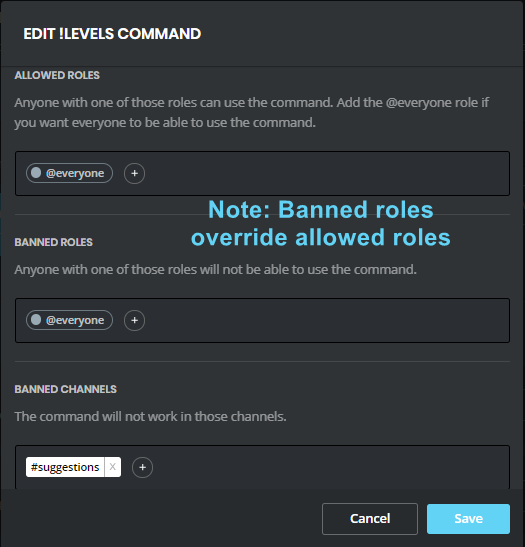
Reason 5: Banned roles and channels. Check that you haven't set a banned role or are using a command in a banned channel: https://i.imgur.com/20QEyzL.png
In case you don't know about banned roles, this pic shows->https://i.imgur.com/dwyc1gt.png
 tribal lion
Yeah I tried to activate !rank system but it does not respond
Let me see the solutions above then let me tell you
Hey then
if the bot cant read the command !levels
How should I do
The funny fact is except the !levels and !rank the other commands also work
dire yarrowBOT
GG @tribal lion, you just advanced to level 1 !!
cold bear
give mee6 role override in channels
i hope your channel perms doesn't look like this https://cdn.discordapp.com/attachments/425361499406729216/427599432570109955/unknown.png

make it look like this then
tribal lion
Tnx :)
tribal lion
Okk
lavish hemlock
thats weird
lavish hemlock
desktop mode worked a minute ago
dire yarrowBOT
Alright, @pale horizon has been warned because 'Posted an invite'.
 simple saffron
Guess mobile isn't the only one having this sort of problem
cold bear
ps4 browser?
 tacit hamlet
The mobile website doesn't have a save button when I change something.
ionic meteor
known, is being worked on. enabling desktop mode might fix it in the meanwhile
tacit hamlet
Ok thanks
tribal lion
Hey mites I tried my best on the solutions you gave above but they didnt work
What shall I gonna do?
TT
 eager tide
Mee6 isn’t giving roles to my server members. Mee6 has administrator permissions and it’s role is above the roles that are given
wooden mountain
invite pls @eager tide
@ClicK#0901 hi 👋 what is your problem? (to lazy to read chat)
tribal lion
Hey
wooden mountain
lol, only now see that the mention failed
tribal lion
Just like
Sry...
Yeah it wasnt work lol
Btw
The main problem with ma bot is
The level plugin
My members try using the command rank and levels
But it didnt work
I checjed alr with enable one and the banned members
wooden mountain
are those commands enabled, allowed in that channel and allowed for those users?
wooden mountain
cqn you give me the link to your Mee6 dashboard
dire yarrowBOT
GG @tribal lion, you just advanced to level 2 !!
wooden mountain
hi
wooden mountain
sure
wooden mountain
sure
tribal lion
M using the mobile one so hard to give you the link
tribal lion
Ok tnx
mortal oxide
I always do that xD.
 neat charm
This is what ClicK want to give you
tribal lion
Tnx mite
Hey Sil I appreciate your helps
It s really helpful for ma channel
If its fixed later in a couple of days , gonna tell you haha
Lol :)
 barren tendon
I'm having issues with the mee6 website
I'm scrolled all the way to the left, and I can't see the page or save changes button
wooden mountain
just hit the save button on that is outside your screen
barren tendon

wooden mountain
!mobile
dire yarrowBOT
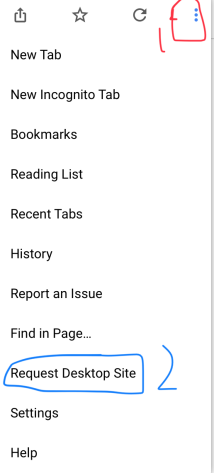
Due to the recent update, the website does not work on mobile. You can either use the Google Chrome app and request desktop version or use a PC https://i.imgur.com/kyt5Akd.png
 wooden mountain
works fine for me
ionic meteor
think that depends on what the size of your phone is 😅
barren tendon
Maybe my browser is forcing the mobile regardless of what I want
wooden mountain
there is no mobile version
barren tendon
Welp, whatever garbled mess I have in front of me, whatever that's called then
 tired moss
hiya, is the mee6 player usually this laggy? didnt seem to lag yesterday at all, my server can finally get mee6 to join an audio channel but its very laggy audio quality
tired moss
the audio option
wooden mountain
try changing tehs erver region
buoyant moon
Whenever I try to add an active subreddit, everything will go through and work but it will simply not post in a channel I have selected.
wooden mountain
it might be delayed a bit
 burnt hazel
Is the !rank command supposed to have different layouts?
I'm getting one in one Channel and a different layout in the other.
wooden mountain
if Mee6 has the permission to "embed links" then he used the bottem one, if he does not have that permission then he uses the top one (as using the bottem one would show e empty message)
burnt hazel
Ah, ok. Thanks. 
 river river
When i add a role to the moderator roles using the web site it still can't mute etc (the role don't have admin permission)
wooden mountain
does he give a muted role
wooden mountain
hat means that you don't have the permission to use that comamnd
dire yarrowBOT
Alright, @buoyant moon has been warned because 'Bad word usage'.
buoyant moon
Oh so profanity is no longer allowed? Alright.
wooden mountain
profanity? what does that mean?
river river
But i added the role i got to the moderator roles on the web site
buoyant moon
Profanity is swearing, cursing, using foul language.
river river
Do i need to have a admin permission to use that command?
Btw the command was the tempmute
wooden mountain
one of your roles need to have the permission to use that command, so eitehr admin perms, manage server perms, or a role set in the settings of that command
river river
okay ty
buoyant moon
so the ! rank command is working in another server im in but not in my server ?
river river
You should enable the plugin i guess
buoyant moon
one of my mods must have messed with mee6
dire yarrowBOT
GG @river river, you just advanced to level 1 !!
river river
ty
buoyant moon
hmm its enabled already
river river
Idk then
mortal oxide
@buoyant moon invite me pls and give me admin rights (DM)
buoyant moon
lemme see what my mod who usually messes with the bots can do then i will if nothing works for him
@mortal oxide
dire yarrowBOT
GG @buoyant moon, you just advanced to level 1 !!
mortal oxide
I saw
tribal lion
Hello
 edgy chasm
you cant scroll Down in the Autorole List, or levels list. (This could've been fixed, but the last i knew, it was broken
buoyant moon
bot doesn't automatically give roles when rejoining a server
 onyx forum
i have a problem, the mee6 dashboard or leaderboard wont load at all
any help <@&193123929701875712> ?
dire yarrowBOT
onyx forum
it will let me log in, but when i want to select a server, i click the icon, but then it loads for a second, then asks me to choose a server AGAIN.
help @white notch
white notch
Press F12 and go to console then dm me what it says
onyx forum
no im not
dire yarrowBOT
GG @onyx forum, you just advanced to level 3 !!
onyx forum
:p
 shrewd perch
:b
white notch
Asking the dev. Can’t figure out the issue myself from what I know
onyx forum
ok
shrewd perch
xd
 lean thicket
So I am trying to add a stream to my bot and it won't let me.
shrewd perch
I better go...
dire yarrowBOT
GG @shrewd perch, you just advanced to level 1 !!
lean thicket
@bitter patio Still can't add streamers to my twitch addon. not sure what to do
buoyant moon
Hey
buoyant moon
Hallo
 rotund lagoon
@buoyant moon I got the same problem, and everything is enabled :/
! rank not working that is :/
bitter owl
@rotund lagoon Check if mee6 can read&write in the channel
rotund lagoon
@bitter owl Omg thank you. Apparently i had to add him to the permission list now even though he's an admin and it worked 3 days ago
bitter owl
Weird, admin should bypass any overrides. I will check that later. But thanks for the feedback :)
white notch
known bug btw
bitter owl
Woody, is this a discord bug?
white notch
no idea
bitter owl
So weird
rotund lagoon
@bitter owl Yeah i thought so too, and it worked fine until 3 days ago xD
dire yarrowBOT
GG @rotund lagoon, you just advanced to level 3 !!
 bitter owl
Discord updated recently but I don't remember when
dire yarrowBOT
Alright, @rotund lagoon has been warned because 'Bad word usage'.
bitter owl
Anyway, it's working to you have fun
rotund lagoon
Wait what
white notch
ass is a banned word here
 snow torrent
My reddit plugin is working mostly
Except for one or two subreddits
In their own channel
dire yarrowBOT
Alright, @frozen crypt has been warned because 'Bad word usage'.
buoyant moon
can someone link me the mee6 vaiable page
mortal oxide
!variables
dire yarrowBOT
you can use variables in your custom commands, here is a list:
https://mee6.github.io/Mee6-documentation/Variables/
or you can use these commands in this server:
!userinfo, !serverinfo, !channelinfo
(pls use #〉commands for bot commands)
Because the link has outdated variables, use the following list for V2 variables:
SERVER VARIABLES
Server: server
Server name: server.name
Server ID: server.id
Server icon: server.icon
Server icon link : server.icon_url
Server Owner ID: server.owner_id
Server Owner: server.owner
Server Region: server.region
Server verification level: server.verification_level
Server creation date: server.joined_at
Server member count: server.member_count
```__**USER VARIABLES**__
User mention: user
User ID: user.id
User name: user.name
User discrim: user.discriminator
User ID: user.idname
User mention: user.mention
User avatar: user.avatar
User avatar link: user.avatar_url
User bot (yes/no): user.bot
Channel name: channel
Channel name: channel.name
Channel ID: channel.id
Channel type: channel.type
Channel mention: channel.mention
@buoyant moon
buoyant moon
Cannot update my commands or activate my welcome message via mobile
thanks @mortal oxide
hey @mortal oxide
i got this message
when i ran the command in my server
User ID : 335405822106664961
User discriminator : 4568
User avatar : {user.picture}

Account Created At : {user.created_at}
Joined Server At : {user.joined_at}

Is user a bot : {user.isbot}```i got this message when i do a command
MEE6BOT - lundi dernier à 17:33
Oops, something went wrong in MEE6 land!
mortal oxide
@buoyant moon check the message of MEE6, don't use the link isn't up to date
 craggy pine
When banning someone the reason won't be added to the server ban list. I see the reason in the audit logs but not in the ban list
dire yarrowBOT
GG @brittle ice, you just advanced to level 1 !!
mortal oxide
!variables
dire yarrowBOT
you can use variables in your custom commands, here is a list:
https://mee6.github.io/Mee6-documentation/Variables/
or you can use these commands in this server:
!userinfo, !serverinfo, !channelinfo
(pls use #〉commands for bot commands)
Because the link has outdated variables, use the following list for V2 variables:
SERVER VARIABLES
Server: server
Server name: server.name
Server ID: server.id
Server icon: server.icon
Server icon link : server.icon_url
Server Owner ID: server.owner_id
Server Owner: server.owner
Server Region: server.region
Server verification level: server.verification_level
Server creation date: server.joined_at
Server member count: server.member_count
```__**USER VARIABLES**__
User mention: user
User ID: user.id
User name: user.name
User discrim: user.discriminator
User ID: user.idname
User mention: user.mention
User avatar: user.avatar
User avatar link: user.avatar_url
User bot (yes/no): user.bot
Channel name: channel
Channel name: channel.name
Channel ID: channel.id
Channel type: channel.type
Channel mention: channel.mention
@brittle ice the link isn't up to date please, look only the MEE6 message in code block
Like this
test
dire yarrowBOT
Alright, @buoyant moon has been warned because 'Bad word usage'.
wooden mountain
those are the exact times we get from discord
faint dome
No more user.joined_at ?
faint dome
Ok
edgy chasm
On the Timer page on the website, you can only make the bot send the message every 1,5 or 10 minutes
cold bear
use mouse scroll wheel
cold bear
mhm
cold bear
touchpad has gestures for scrolling
 keen linden
^
edgy chasm
ok
ionic meteor
it's a known bug 😄
 solar cargo
Okay sorry
ionic meteor
no worries. thanks for reporting anyway
eager tide
Mee6 isn’t allowing mods to use modcommands
Do I have to put the Mee6 role above theirs?
They already have the mod permission in the website but it doesn’t work
edgy chasm
dire yarrowBOT
GG @edgy chasm, you just advanced to level 1 !!
edgy chasm
i dont have staff in that server
or many of them
is this a discord problem?
or mee6
cold bear
no need to pick server/channel, just press authorize
cold bear
it lists all servers tho
edgy chasm
ok
buoyant moon
I have access to Mee6 on another sever even though i don't own the server
bitter owl
@buoyant moon That's because someone gave you Manage Server or Admin power
buoyant moon
ok, let me check that
 onyx smelt
about the timer its bug
I set the time to 1 minute but the mee6 not sending in the right time
 static valve
that could be because of somewhat laggy communications between bot, server, and computer
white notch
KNOWN BUG
 rugged orbit
I need help :/
white notch
I already said this
rugged orbit
Oh thanks
white notch
 floral lance
!clear commmand not workin so does the otr moderator commands in our server
white notch
!clearinfo
dire yarrowBOT
The clear command allows you to clear the last xx amount of message.
or to clear that annoying spammer without clearing anyone else
just use !clear 1-1000 to clear the last xx messages (example !clear 10),
or use !clear @name to clear all the message of @name in the last 100 messages
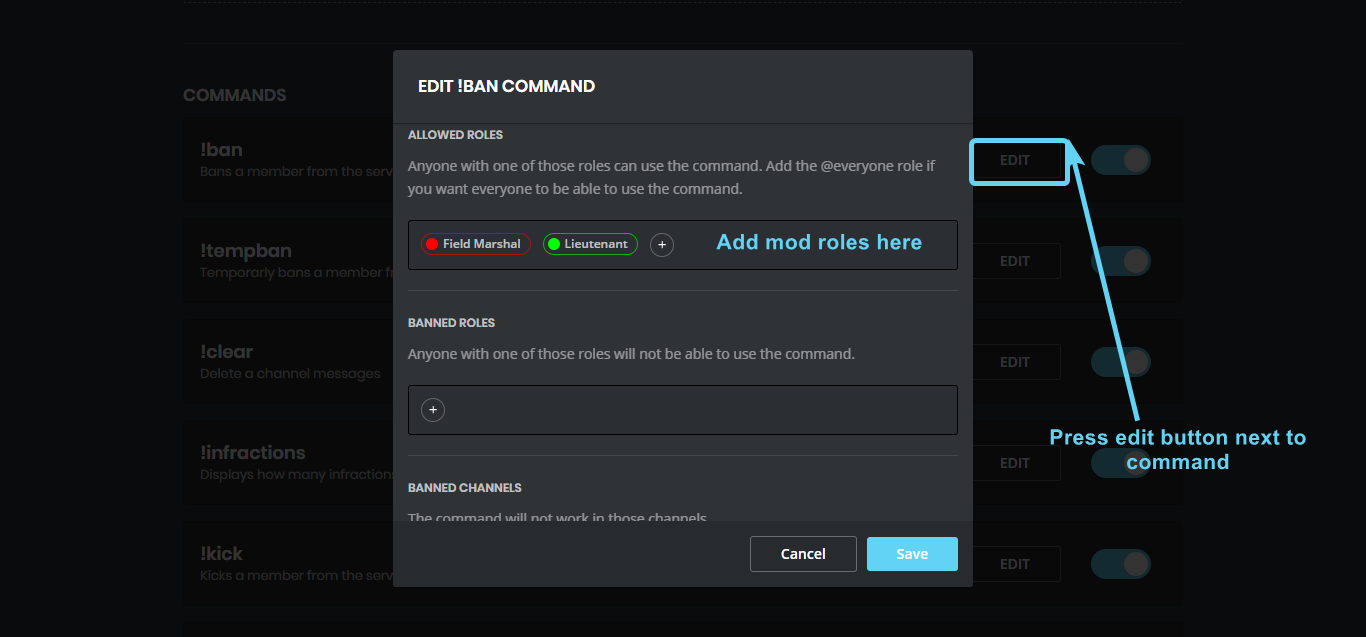
+ I need manage messages permission
+ I need view message history permission (otherwise I will respond with -1 messages cleared)
+ you need to check the checkmark next to clear on the plugin page.
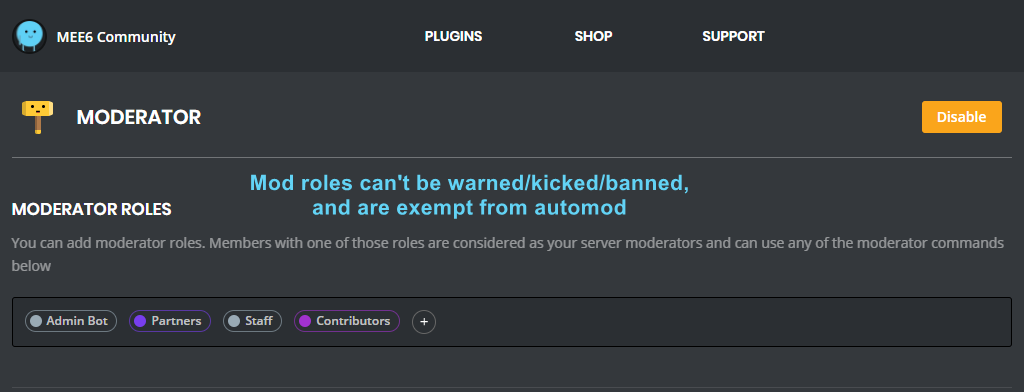
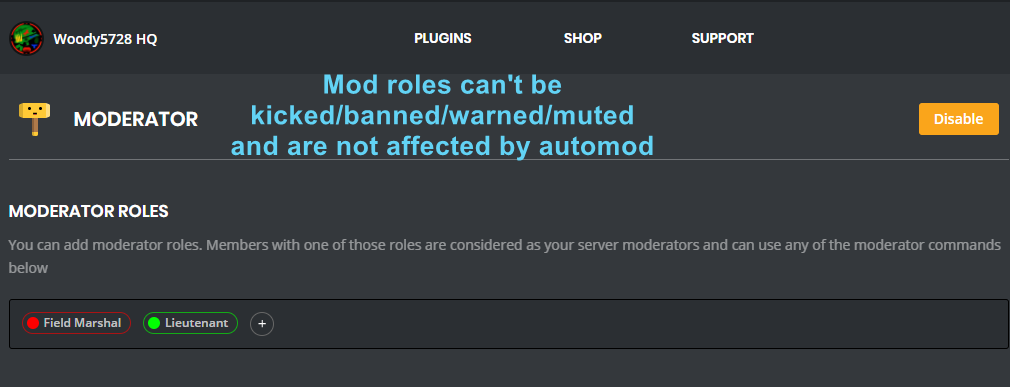
+ you need to set your role as moderator (located at the top of the plugin page in the moderator tab)
!moderator
dire yarrowBOT
 floral lance
It was workin till a few days ago but not now
white notch
please check above info
floral lance
Okay
 reef hull
how is this posible? i can chues 1 rol 2 times o_O
white notch
!mobile
dire yarrowBOT
Due to the recent update, the website does not work on mobile. You can either use the Google Chrome app and request desktop version or use a PC https://i.imgur.com/kyt5Akd.png
 mighty ivy
Thx
rocky gorge
Np
dire yarrowBOT
you can use variables in your custom commands, here is a list:
https://mee6.github.io/Mee6-documentation/Variables/
or you can use these commands in this server:
!userinfo, !serverinfo, !channelinfo
(pls use #〉commands for bot commands)
Because the link has outdated variables, use the following list for V2 variables:
SERVER VARIABLES
Server: server
Server name: server.name
Server ID: server.id
Server icon: server.icon
Server icon link : server.icon_url
Server Owner ID: server.owner_id
Server Owner: server.owner
Server Region: server.region
Server verification level: server.verification_level
Server creation date: server.joined_at
Server member count: server.member_count
```__**USER VARIABLES**__
User mention: user
User ID: user.id
User name: user.name
User discrim: user.discriminator
User ID: user.idname
User mention: user.mention
User avatar: user.avatar
User avatar link: user.avatar_url
User bot (yes/no): user.bot
Channel name: channel
Channel name: channel.name
Channel ID: channel.id
Channel type: channel.type
Channel mention: channel.mention
 flint dawn
I know it is a known issue, but the whole reddit thing isn't working for me at all 😒
dire yarrowBOT
Alright, @buoyant moon has been warned because 'Duplicated text'.
 empty helm
Uhh so I'm trying to change the level system I'm on iPhone, so I set it to desktop so it wouldn't cut off the left side of the screen, yet it still does and there's no change, I still can't save my progress ^^* am I doing something wrong?
^^^ also I've tried chrome normal google and safari
 ember marsh
Why is it that when i use {user} in my welcome message, it just gives a bunch of numbers?
wooden mountain
in welcome or in leave?
ember marsh
Welcome
wooden mountain
then that is either a discord bug or the user left again before you came online
ember marsh
Its been doing that with everyone
wooden mountain
invite pls
 wise grove
Hello, why does the custom order bot mention the wrong role? Example: SQUAD players - Scrim becomes fair @velvet cosmoss
wise grove
by a @
buoyant moon
mets l'id du role @wise grove
wise grove
Euh, je trouve ça ou ?
buoyant moon
Envoie ton discord en mp @wise grove
buoyant moon
!moderator
dire yarrowBOT
 buoyant moon
x
 merry grove
Can't add another twitch streamer on the webpage
 shy fox
Mee6 welcomed one of my fans twice
 fading dune
Hi. Only the message with bad word was deleted, not the message with capital letters.
Oh .. it delete only the first message with capital letters ...
merry grove
Can't add
cold bear
@merry grove click on channel name field and pick streamer from list
merry grove
@cold bear I tried clicking on the dropdown but nothing is popping up.
dire yarrowBOT
So... @merry grove, I've decided you should be level 1.
Don't get too excited, mmk
merry grove
Strange, when I hit enter it refreshes the page.
 torn torrent
when i do !help on my discord server it just do nothing
faint dome
have you enabled the plugin @torn torrent ?
torn torrent
yes
merry grove
Hmm not sure if its a network thing but here:
torn torrent
my bot d'ont work when someone join it do not send messages and yes I activate it in my settings
WHY?
merry grove
@cold bear I'm going to try my phone to see if it works there.
torn torrent
it don't work for 2 discord server
cold bear
you need to enable that feature
check twice
bot should have perms to write in that channel
merry grove
@cold bear Okay it works on my phone when I add it. Probably a network issue. Thanks for the help!
 trail ridge
auto moderation not working
cold bear
auto mod doesn't work against moderators. if you're owner you can't test it on yourself too
trail ridge
Sorry I do not know
 hidden dock
There are no save buttons at all on mobile
cold bear
hidden dock
#425409486820474881 says only welcome doesnt have it im talking all settings dont have a save
 slender juniper
Bot message timer that was for Friday posted today.... on a thursday
dire yarrowBOT
Alright, @oblique bone has been warned because 'Posted an invite'.
 indigo cloud
Oooof
hidden dock
@cold bear oh so thats what that meant
@cold bear so do you know around when it should be fixed
 sage citrus
@hidden dock dont ping staff so much, are you on android or ios?
hidden dock
Android and sorry
dire yarrowBOT
So... @hidden dock, I've decided you should be level 1.
Don't get too excited, mmk
hidden dock
Yaaaaaaaaay
sage citrus
!Mobile
dire yarrowBOT
Due to the recent update, the website does not work on mobile. You can either use the Google Chrome app and request desktop version or use a PC https://i.imgur.com/kyt5Akd.png
buoyant moon
Tempmute not work
white notch
@buoyant moon how are you typing the command?
 orchid portal
Mee6 welcomed himself 3 times in a row about 2h ago. Need screenshot?
white notch
uh, yeah send a screenshot through
orchid portal
white notch
uhh. Do those 3 accounts have the same avatar and discrim at the end?
cause that doesn't look like the bot welcoming itseld
as the names are lower case
white notch
I feel like that's just 3 users joining at the same time
possibly troll accounts, keep an eye on them
orchid portal
all right thanks
molten basin
Ooh! That is weird. Maybe Discord should stop people from using names assigned to bots (including names with the word Bot appended). Only bots should be bots. Let's stand up for bot rights!
 ember spindle
👍
 coarse night
<@&193123929701875712> !playlist is not working, it shows me only a grey website!
white notch
coarse night
thanks
 fast vigil
Mee6 won't connect, again again...
 tiny canopy
<@&193123929701875712>,
At '' timers '' you can not select a channel.
white notch
refer to above image
tiny canopy
That not working.. error: pleast select a channel.
cold bear
make sure you're using correct account in your browser
if not,
logout from mee6 dashboard and discord in your browser and login again.
dire yarrowBOT
So... @tiny canopy, I've decided you should be level 1.
Don't get too excited, mmk
 safe musk
Not sure if this is only my server, but !playlist is showing the playlist backwards lol
cold bear
known
rugged orbit
the command !join don't work
limber knoll
@rugged orbit use #〉volunteer-support
rugged orbit
ok, thanks
dire yarrowBOT
So... @rugged orbit, I've decided you should be level 1.
Don't get too excited, mmk
 thick quiver
Yea...so I have this problem that it keeps deleting everyones message when on slowmode 3, it doesn't matter how long you wait until you send it again, it auto deletes everything
What could this be?
 hoary stream
@thick quiver Recheck to make sure you put it on slowmode 3 instead of slowmode 30 😅
balmy summit
So this happened again, though I was luckily able to fix it just by simply refreshing the screen. Though I figured to still mention it.
When you delete a Custom Command. It moves that deleted command downwards to the Commands below and then that command below the one you deleted gets moved down and then it just goes into the motion. I refreshed my browser and it reloaded up the correct one. Not sure if this counts as a bug but I thought it was worth mentioning since this isn’t the first time I ran into this
sage citrus
yeah i had that problem too
when you delete a custom command (lets say test1) and you try to edit the next one (lets say test2), it will show the details for test1 until you reload
dire yarrowBOT
Alright, @buoyant moon has been warned because 'Posted an invite'.
 warped crown
ok so this is not really a bug but I think its best to post it here
the miss spelling of successfully
bitter owl
Yes Quality Assurance is aware of this thanks @warped crown
warped crown
👍
balmy summit
@sage citrus yeah that’s exactly what it was, I just refreshed my browser and it fixed everything
 outer bobcat
Seems that the dashboard and Levels list (entire site) do not work in Safari! Version 10.0 (12602.1.50.0.10)
(i've got firefox, but not my default, so i hope this gets fixed 😄 )
 still plume
I want to repor a bug in the custom commands
I made my own !slap (person) with a several options however it seems like it doesn't trigger every single time...
😞😞
sage citrus
so some times it just doesnt respond?
still plume
You can tipe it like 4 times after that i takes a while to trigger it back
@sage citrus yep it after like for times or something
And it takes some time to work again, i you want i canake a screenshot or you can take a look ate my server
dire yarrowBOT
So... @still plume, I've decided you should be level 2.
Don't get too excited, mmk
still plume
Se what mean just did the same command twice and de second time no response...
buoyant moon
Twitch announcement module doesn't mentioning role as per config.
white notch
!id
dire yarrowBOT
to use some stuff in custom command or any other text from Mee6 you need to use the ID:
first get the ID of that object by typing it in your server with a \ in front:
emoji: \ ➡ !soontm
animated emoji: \ ➡ !baguette_spin
mention: \@dire yarrow ➡ @dire yarrow
role: \<@&325291851106091019> ➡ <@&325291851106091019>
channel: \#announcements➡ #announcements
then copy that ID(with the < > and everything in between),
now paste that in your custom command, welcome message, stream announcement, etc...
https://cdn.discordapp.com/attachments/235378515866812417/269195258640728075/2017-01-12_22-05-03.gif
 solar cargo
I have a question?
Can i use that émojis in my server?


 ...
...
cold bear
!id
dire yarrowBOT
to use some stuff in custom command or any other text from Mee6 you need to use the ID:
first get the ID of that object by typing it in your server with a \ in front:
emoji: \ ➡ !soontm
animated emoji: \ ➡ !baguette_spin
mention: \@dire yarrow ➡ @dire yarrow
role: \<@&325291851106091019> ➡ <@&325291851106091019>
channel: \#announcements➡ #announcements
then copy that ID(with the < > and everything in between),
now paste that in your custom command, welcome message, stream announcement, etc...
https://cdn.discordapp.com/attachments/235378515866812417/269195258640728075/2017-01-12_22-05-03.gif
solar cargo
Okay sorry
 still glen
 craggy trench
I'm on mobile and it keeps telling me "Changes detected! Please save or cancel." and the save button doesn't exist! Fix this <@&193123929701875712>!
white notch
!mobile
dire yarrowBOT
Due to the recent update, the website does not work properly on mobile. You can either use the Google Chrome app and request desktop version (for Android users) or use a PC (for iOS users) https://i.imgur.com/kyt5Akd.png
dire yarrowBOT
Alright, @idle jetty has been warned because 'Capital letters'.
 idle jetty
this makes my browser so SLOW. slower isnt possible. slooooooooooooooooooooooooooooooooow
dire yarrowBOT
So... @idle jetty, I've decided you should be level 1.
Don't get too excited, mmk
 uneven cosmos
My bot does not send pictures anymore when announcing live Twitch streamers. How do I fix this?
dire yarrowBOT
Alright, @buoyant moon has been warned because 'Posted an invite'.
Alright, @buoyant moon has been warned because 'Posted an invite'.
Alright, @buoyant moon has been warned because 'Posted an invite'.
buoyant moon
@cold bear Может ли Мисикс отсылать причину мута в лс?
cold bear
да
reef hull
а ты как пишешь?
buoyant moon
Темп мут упоминание время причина
dire yarrowBOT
So... @buoyant moon, I've decided you should be level 3.
Don't get too excited, mmk
reef hull
а время как пишешь?
buoyant moon
2h
reef hull
скрин дай где видно что команда включена
buoyant moon
reef hull
нажми на едит
buoyant moon
Угу
reef hull
что там видно?
buoyant moon
reef hull
у тебя хоть 1 из этих ролей есть?
buoyant moon
Да, тест серв
reef hull
у него какие роли есть?
buoyant moon
Никакие
reef hull
хватит меня тролить..?
dire yarrowBOT
Bandi2D#1337 (301763159650336768) is muted for **** because of 'test', boss.
buoyant moon
Неа, ничего
reef hull
а должно?
buoyant moon

cold bear
я даже не помню
reef hull
тут
buoyant moon
Лул
reef hull
что непомнишь?
buoyant moon
Должно или нет
reef hull
проверь
reef hull
опять поменял...
cold bear
🤔
halcyon owl
aw man it still doesnt let to post channels in welcome msg 😦
oh nvm it works
u dont need to code
 pearl ridge
When I try to mute someone it doesn’t work it gives me an error
But it works fine in other severs
cold bear
if user has another role that allow him to talk mute will not work
pearl ridge
Ob
still plume
Amyone back o mu bug report?
bitter owl
@Gasmic#1740 could you be more clear please? :)
dire yarrowBOT
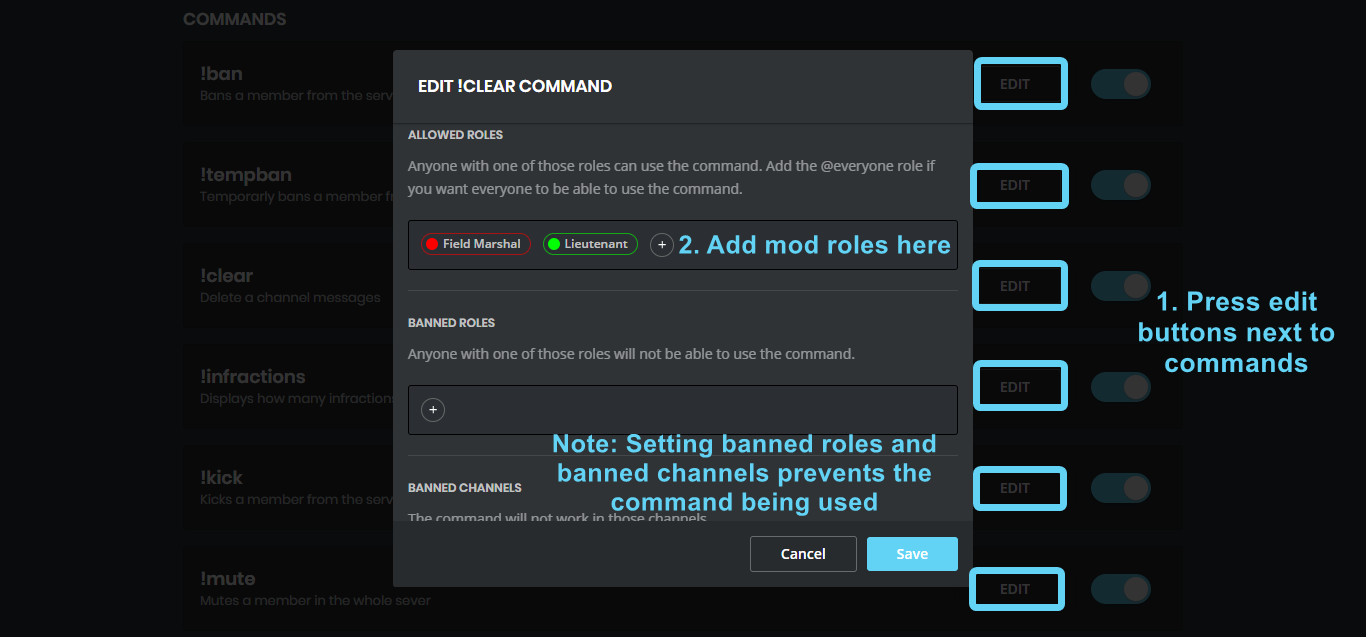


 bitter owl
☝
Make sure
If it says problems on landing is missing grants to mee6 in your server