#〉bugs-reports
2 messages · Page 20 of 1
 somber sky
 gleaming ravine
Hi ! I got a problem on my Discord with the levels, when a level is reach the Role I plained is not given :/ I tried to disable /enable and reset XP, if someone can help me 😃
 wooden mountain
!role-rewards
 dire yarrowBOT
role rewards will give a role as reward for active users in chat.
you gain xp by talking in chat. when you gain enough ex you get a level.
in order to let me give role rewards i need :
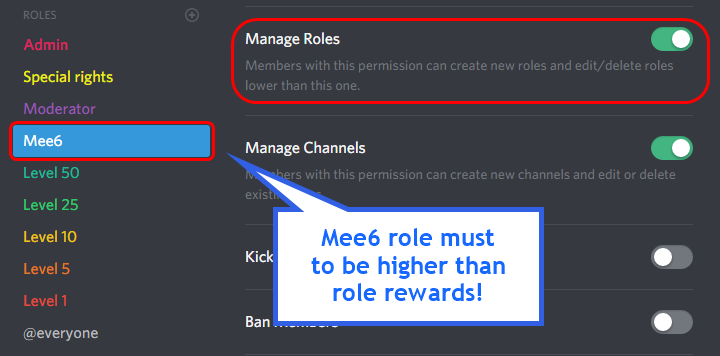
+ manage roles permission
- at least one of my roles needs to be ABOVE the reward roles(bots can't give roles that are higher than their own role)
! I will only check for role rewards to be updated when someone levels up... so if you added role rewards a bit late then wait till someone levels again before complaining that I am not doing my job.
DISCLAIMER: roles will stack up, if you remove a low level role from someone then that person will just get it back over time.
http://i.imgur.com/aPubLMp.png
 wooden mountain
@gleaming ravine
 sinful dawn
due to the nature of discord using double underscores for formatting, my friend's twitch name having two consecutive underscores means that the bot improperly formats the live post and breaks the link
so his name is swag__actual but the underscores within his name and then within the link format the text between as underlined
idk that this is a bug, but it's probably unintended
 keen linden
I'll be fixed in the update, I think.
sinful dawn
alright, thanks!
 kindred jackal
mee6 took over a server
not joking
this is what happoned {and we did not do this.}
keen linden
uhhuh.
 royal scroll
Me and him talked in DM's for a bit. Looks like he isn't on this server anymore.
keen linden

wooden mountain
@sinful dawn if you make your name bolt it will stop the double underscore from doing that, replace {streamer} in **{streamer}**
 gritty wedge
My mee6 keeps disabling the "twitch & co" notification. It's been like that for some weeks. The last time it worked was 19 of february. I check every time before I go live if it's enabled, enable it, and close the window.
Help?
 cold bear
@gritty wedge means bot doesn't have perms write to that channel
gritty wedge
@cold bear how come it'd changed?? And how do i change it again?
 deft fjord
could it be there is a bug in the couldown for the rank command?
deft fjord
ok, thank you for letting me know
 faint dome
😉
cold bear
@gritty wedge go to channel settings -> permissions. make sure mee6 can write there. add override for him or his role for that channel if it set that nobody can write there. apparently bot had admin perm before.
sinful dawn
@wooden mountain that would work if the bot/server was just for one person, but a group of my friends use it to announce all of their streams going live to each other. so i don't think this is a fix in my particular use case, unless i'm misunderstanding you
sinful dawn
i don't understand how that'd help, but i'll give it a try. thanks!
wooden mountain
the server region decides wich physical server your voice chat goes through
and when a voice server from discord starts getting really busy then you hear lagg
often sounds like buffering issues
so just changing server can help
 white notch
Explain specifically what’s wrong
sinful dawn
i think you meant to reply to someone else and not me, sil
dire yarrowBOT
GG @sinful dawn, you just advanced to level 1 !!
 buoyant moon
I need help anybody
I can't add mee6 to my server
It doesn't let me login to my account
It has my old account
What do I do?
 bitter owl
@buoyant moon Keep calm
buoyant moon
Help meh
bitter owl
!logout First use this
dire yarrowBOT
oops, it looks like you are on the wrong account, you need an account with 'manage server' permissions.
You have to log out from discordapp.com in that browser and then log back in again.
- log out of discordapp site https://discordapp.com/login and follow the steps in the gif below
- go to http://mee6.xyz/logout and click the 'add to discord' button
https://i.imgur.com/7829TNS.gifv
 bitter owl
So go up right and click logout :)
dire yarrowBOT
GG @buoyant moon, you just advanced to level 1 !!
buoyant moon
@bitter owl Thank you so much! I GOT it to work!
bitter owl
Always a pleasure
buoyant moon
@bitter owl are you a bot? Or real?
bitter owl
Real person ;)
buoyant moon
Didn't work @bitter owl
bitter owl
!dashboard
dire yarrowBOT
Dashboard: https://mee6.xyz/servers and select your server image
bitter owl
Try this link please @buoyant moon
bitter owl
🙌
bitter owl
Sorry I can't join mate
bitter owl
Because I'm a ghost 😎
buoyant moon
Oooooo scary😯😯😯😯
dire yarrowBOT
GG @buoyant moon, you just advanced to level 2 !!
buoyant moon
Lol
buoyant moon
How do you Setup the bot
bitter owl
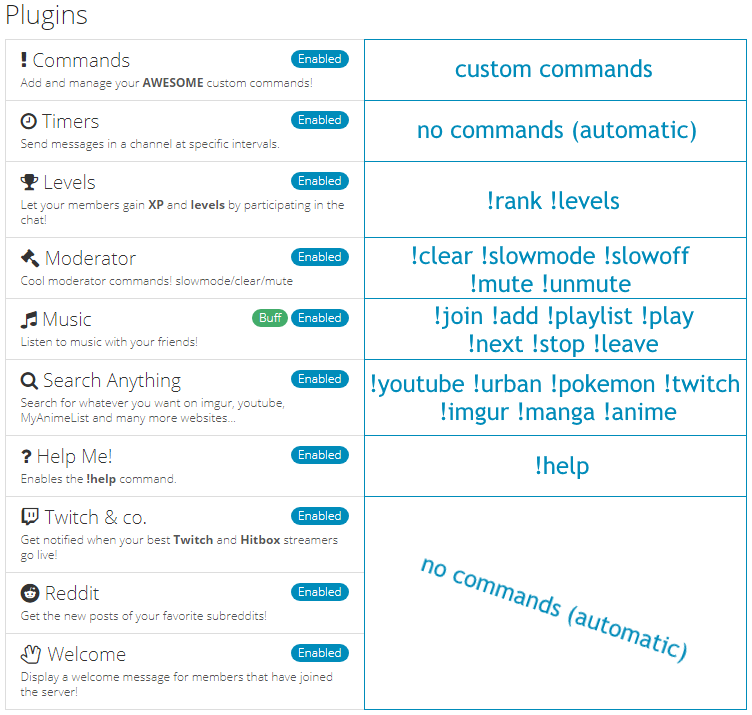
@buoyant moon https://mee6.xyz/servers (Add Him) -> Select the plugins of your choice and then enable it -> Select it and configure inside
 buoyant moon
Thx
buoyant moon
?
 is that...Discord I see?
 mortal oxide
@buoyant moon yes, you can do that on phone
 mortal oxide
:+1:
 lofty holly
I recently changed my avatar, but it didn't update on Mee6. If I check my rank within a server, it still displays my old avatar, and on the website it displays a blank avatar
Any idea what's the reason for this?
wooden mountain
it takes a while before Mee6 detects that kind of stuff
lofty holly
How long usually?
wooden mountain
depends
lofty holly
on what?
wooden mountain
discord
 high beacon
@dire yarrow is not working on my server. Why???
mortal oxide
Can you tell us what is the problem, exactly @high beacon?
high beacon
@mortal oxide commands are not working
mortal oxide
Did you enabled them @high beacon?
high beacon
Yep
mortal oxide
Screen your dashboard please @high beacon
 astral harness
!urban bush monkey
dire yarrowBOT
Bush Monkey
{Methius addictivius}
A Bush Monkey is commonly found in the southern parts of the U.S such as Alabama and Arkansas. Bush monkeys are characterized by their addictions to methamphetamine, opiates and in most cases shady demeanor. They spend most of their time scavenging for scrap metal and hiding in the bushes outside your house to connect to your wifi and take anything that isn't tied down.
Not to be confused with the northern term [Porch Monkey].
Example
God dammit man I think we have a bush monkey outside! Quick disconnect the wifi and lock the fuckin doors
👍
15
👎
0
Sent by Cg420
astral harness
a glitch in the system
 modest jasper
Hello, uhm we have Mee6 in a server with 2k people in. We've had levels for a while but never activated the roles thing. We did just now but roles are not being given
I am pretty sure everything is set up correctly, and Mee6 has complete admin powers
Anyone know any fix or what could be causing this?
Uhm... <@&193123929701875712>
: $
cold bear
!role-rewards
dire yarrowBOT
role rewards will give a role as reward for active users in chat.
you gain xp by talking in chat. when you gain enough ex you get a level.
in order to let me give role rewards i need :
+ manage roles permission
- at least one of my roles needs to be ABOVE the reward roles(bots can't give roles that are higher than their own role)
! I will only check for role rewards to be updated when someone levels up... so if you added role rewards a bit late then wait till someone levels again before complaining that I am not doing my job.
DISCLAIMER: roles will stack up, if you remove a low level role from someone then that person will just get it back over time.
http://i.imgur.com/aPubLMp.png
modest jasper
Mee6 has full admin control, and is above the level roles yes
And someone did level after and still nothing happened :b thus why I am here
Does Manage Roles option need to be active despite having already full admin control?
Hmm let me check
Ok uhh another question
Can it be done so the role replaces itself?
And not stack up?
<@&193123929701875712> sorry
modest jasper
Ah damn, any idea on when this update is coming/
white notch
!!tag v2
 wind windBOT
 No tag v2 found.
modest jasper
We want to have like 16 roles, but them stacking up is going to be a mess with high leveled users
dire yarrowBOT
GG @modest jasper, you just advanced to level 1 !!
white notch
!!tag V2
wind windBOT
 white notch
And check your audit logs to see if the bot has assigned roles to users
modest jasper
Yeah it has already. It worked
But now we have people with 15 roles so yeah, I will eliminate the roles and deactivate the feature for now
Again thanks for your help ❤
 red spade
I want to see in V2 YouTube link when streamer Goes Live ^_^
wooden mountain
Is comming but not on V2 release, will be a bit later
 hollow raptor
You can change the dashboard on any server if you got administrator in them.
I think this is bad...
mortal oxide
@hollow raptor it is a bug report? No.
Well, suggest something in #159963953764499456 also.
😃
hollow raptor
@mortal oxide Okay.
 azure niche
Recently on a server I am heavily active with, I along with others have been encountering an issue that resets our levels. This has happened twice to me and twice to an administrator of the server. I don't know what causes this since I have no control over the bot in the server and was wondering if you guys might could figure out what's going on.
This is a screenshot I got of this happening.
azure niche
Thank you.
 night summit
Meep isnt giving people roles in my server anymore
white notch
!role-rewards
dire yarrowBOT
role rewards will give a role as reward for active users in chat.
you gain xp by talking in chat. when you gain enough ex you get a level.
in order to let me give role rewards i need :
+ manage roles permission
- at least one of my roles needs to be ABOVE the reward roles(bots can't give roles that are higher than their own role)
! I will only check for role rewards to be updated when someone levels up... so if you added role rewards a bit late then wait till someone levels again before complaining that I am not doing my job.
DISCLAIMER: roles will stack up, if you remove a low level role from someone then that person will just get it back over time.
http://i.imgur.com/aPubLMp.png
night summit
duh, ty much
buoyant moon
Um
I’ve encountered a problem with my leveling system
I set all the roles
Yet when the user has earned the rank Mee6 doesn’t equip it
Nvm
Thanks mee6 above this post
 pale coyote
@cold bear I got a bug on my server : I set up the bot on the site to have levels, the roles are set up on the discord, levels are linked on the site, when I level up, I receive the message from the bot to tell me that I leveled up, but the role is invisible on the discord when I click on someone's name who is supposed to have a role
cold bear
read post above
pale coyote
ty !
buoyant moon
ty!
 deft tendon
 past kettle
A server I admin uses the twitch module to announce featured streamers. It works for most of them , but {streamer} and {link} seem to be removing trailing underscores from one of the streamers that fits the criteria. The link in the thumbnail is correct (i.e. twitch.tv/asdf_), but {link} resolves to twitch.tv/asdf
cold bear
add `` around streamer
past kettle
Thanks!
past kettle
the web interface doesn't allow me to add twitch channels with either ' or ` in them. Or did you mean to do that in the announcement message? I looked at the python module and it seems to just to a string replace on '{streamer}' and '{link}', so I assumed that wasn't the right thing to do
cold bear
in announcement message of course
cold bear
good
 exotic wedge
I’ve essentially stopped gaining exp in a server and i’ve been sending messages for days. My rank and exp have not moved at all.
cold bear
!!tag noxp
wind windBOT
If Mee6 isn't giving you xp, or either !rank or !levels is not working it is one of the following:
Reason 1: The levels plugins isn't enabled on the dashboard
Reason 2: You have a banned role on you (in which case you should remove it. Having a banned role also prevents !rank or !levels from working)
Reason 3: Bot can't read messages in that channel (for not gaining xp) or can't send (for !rank and !levels)
Reason 4: Rank cooldown. This used to be bugged, but in a recent update it got fixed. So if you have the rank cooldown set super high, set it lower so that the !rank command work
In case you don't know about banned roles, this pic shows->http://bit.ly/2F9Wflq
 exotic wedge
I forgot I gave myself a visitor role. Thank you.
cold bear
👍
 wary jetty
 wide herald
plase go click
 open hedge
What bout no
wooden mountain
!tempban @PreVen#4405 24h read the rules next time 😡
dire yarrowBOT
@wide herald did 'read the rules next time 😡' and got the ban hammer for 1 day! 
buoyant moon
Why doesn't Reddit work?
I ADDED it as a plug in and posted something but it didn't get on my channek
Channel
Discord channel
 native rose

wooden mountain
😕
 dense jolt
I added a mee6 and he have all permission in rang bot a enable lvl plugin and sotto he don't giving rangs
Rang coldown is 0
!!tag noxp
white notch
!!tag noxp
wind windBOT
If Mee6 isn't giving you xp, or either !rank or !levels is not working it is one of the following:
Reason 1: The levels plugins isn't enabled on the dashboard
Reason 2: You have a banned role on you (in which case you should remove it. Having a banned role also prevents !rank or !levels from working)
Reason 3: Bot can't read messages in that channel (for not gaining xp) or can't send (for !rank and !levels)
Reason 4: Rank cooldown. This used to be bugged, but in a recent update it got fixed. So if you have the rank cooldown set super high, set it lower so that the !rank command work
In case you don't know about banned roles, this pic shows->http://bit.ly/2F9Wflq
white notch
@dense jolt ☝
 unkempt pasture
Why was my bug report deleted? I have paid for the recording feature which has not worked for months now and when I ask for the third time that someone look into it or at least give me a refund, it gets deleted without any comment? Are you guys serious?
Here it is again:
I am really getting a little inpatient here. I have reported this bug months ago and it still hasn't been fixed. The bot immediately stops recording after starting it. And it case it does record, it overlays audio tracks of different speakers, making it sound like they are all talking at the same time.
I wouldn't be complaining, but I actually paid money just to get this feature and it hasn't been working in months. Please fix this or refund me. Thank you.
dense jolt
All is correct
wooden mountain
@unkempt pasture hey there, this is a problem in the communication between Mee6 and discord.
You can let Mee6 play music and mute him, he willrecord you but not himself
unkempt pasture
@wooden mountain that's not the problem I have. I have two problems:
- The bot immediately stops recording after it started. By itself.
- If the bot actually records (which sometimes happens), voices are overlaid as if everybody is talking at the same time.
I don't have a problem with playing music.
wooden mountain
When he is playing music then that first problem won't happen, and that second one got fixed months ago @unkempt pasture
unkempt pasture
@wooden mountain the second problem wasn't fixed for me, it still happens. Last time about 2 weeks ago.
wooden mountain
If it happens again then mention me or Cookie#1337
unkempt pasture
Could I rather have a refund? This has been going on for too long and I am tired of chasing developers (no offence).
wooden mountain
@unkempt pasture dm Cookie#1337
 gusty cedar
Hello! I have a problem with mee6.xyz website, can I report it here?
 frozen heron
🐛
 mental spoke
reddit broke 👌
white notch
we know, it's being worked on
 desert cave
still broken? i see it in #261311113340256267 working, but on my server not
wooden mountain
Working for some subreddits, not for all
desert cave
not sure, i set only gifs . it working on diferent server but not on my server. mee6 have admin rights
 clever flint
Music keeps disconnecting on servers
wooden mountain
Sorry 😦
 twilit charm
Reddit broke
 ionic meteor
@SpectralXayano#4032 they know. Its being worked on 😃
 quasi pebble
wind windBOT
quasi pebble
wind windBOT
 wooden mountain
Mee6 offline
we are working on getting the bot back online, pls wait
white notch
Mee6 Offline
Bot is still not fully back online, we are still trying to get it back online. Please do not ask when it will be back online, as well as sending staff a dm. You will get 0 response from them
🔒 channels are locked to avoid repeated questions 🔒
white notch
UPDATE ON MEE6
Bot seems to be back online and working now, so things are back to normal  . Unfortunately there is no one around to unlock the channels for us. So, no one can talk here
  . We'll try and get them unlocked ASAP
 ancient flicker
I tried to add a message to the timer plugin but I couldn’t select a channel and it kept saying I didn’t give it manage webhocks even though I did!
bitter owl
@ancient flicker channel selectors on the website are all broken, reddit twitch welcome timers, mee6's developer 🛏 💤 so this can take a while
 humble plinth
Dear MEE6 team, I can't use "!rank command cooldown" command. Could you please help me to check it?
cold bear
there's no command like that. all settings are on dashboard
humble plinth
@cold bear I see on web management page. Could you check it ?
humble plinth
OK. Thanks
 turbid vessel
mee6 confuses me with someone else
royal scroll
@turbid vessel, on the dashboard?
turbid vessel
no nothing it's good
 rose osprey
bitter owl
rose osprey
bitter owl
@rose osprey just try again
network error occurred
buoyant moon
Make sure you enable the commands in the dashboard
mortal oxide
@sterile forum you need to enable this plugin (Help me) on the website
And if you want to see something in this !help command, you need to enable others plugin having commands
 sterile forum
XD k
 keen robin
V
buoyant moon
Hello, I have activated 2 subreddits and only 1 works
bitter owl
!reddit @buoyant moon
cold bear
or just there no new posts from the second subreddit
bitter owl
☝ makes more sense
 wheat folio
as
bitter owl
Something really wrong
buoyant moon
Yeey 😄
bitter owl
No it's just under maintenance
buoyant moon
Thanks
bitter owl
Will be normal in few moments to normal usage
keen linden
@bitter owl ?
bitter owl
I used !urban maintenance and urban answer was wrong indecent
keen linden
That's how urban dictionary works
bitter owl
indecently? lol
keen linden
"urban dictionary"
bitter owl
It would show the meaning of the word lol
keen linden
"urban dictionary"
bitter owl
I know but it almost pornog***
 balmy oasis
Oh wow sad
bitter owl
I think it's a mistake or something from urban, I am goign to report to them
 hot sparrow
i cant change the !rank command cooldown
bitter owl
@hot sparrow Broken untill next update
 terse gust
Dj urban dictionary is for slang terms, not regular definitions, and they're almost all dirty like that
keen linden
We will be making a blopost of all the features just before / at release
 worn brook
changing reddit display chan defaults to one permantly and wont change
buoyant moon
reddit plugin problem
 rocky gorge
....my discord just bugged out like it did yesterday
Did that happen to anyone else?
wooden mountain
yes
 tardy mesa
When I clicked Add ✏ on the beautiful Dashboard it said
403 forbidden
cold bear
go to https://mee6.xyz/servers and try again
 lime sun
my @dire yarrow is spamming like 5 times when someone goes live on twitch and sometmes when i mute the music bot it i can stil hear music
@cold bear
 cursive quest
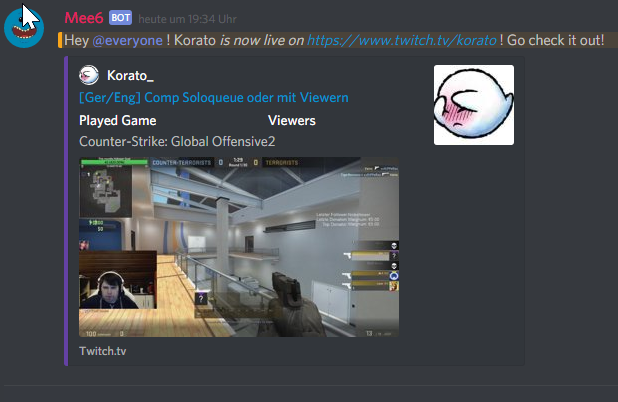
I tried the Twitch & co. Feature but it generates a wrong channel link for me.
My Twitch channel is "korato_" but the bot generates a Link for the channel "korato" I guess it can't register the _ in my name. Could you guys fix that?
It does generate the right preview tho https://files.f-o-g.eu/gca0c0c8f53ac2890afef2edgbaca36e
 white notch
Incorrect variable for the level plugin
You don’t enter the server name or anything in brackets
{player} {level} and (iirc) {server} are the 3 variables for the level plugin
Anything else screws it up
 brave garden
I have been trying to do this 5 hours and I have no idea I’m off my nut
white notch
Screenshot me what you have entered in the level up message box on the dashboard
brave garden
white notch
No wonder it’s screwed up
PEBKAC Error
Use {server} not manually enter the name of the server
brave garden
Ok what’s IIRC stand for
white notch
If I Recall Correctly
 fallen talon
hello I would like to report a bug on the v2 dashboard
bitter owl
@fallen talon Not released yet
fallen talon
well, there's a bug on the dashboard, so obviously Cookie will want to know about it and patch it up
before he releases it
bitter owl
Would be great to know
keen linden
How about you Dm me.
fallen talon
ok
wooden mountain
@white notch nope, you don't recall correct, server variable did not exist in v1 levels
white notch
yep your right. Thought it was, but I manually entered it on my end 🤔
wooden mountain
It will be😉
rocky gorge
spoilers
 buoyant knoll
@keen linden just tried to visit the Mee6 website to access my dashboard. The website is currently down for me. I'm wondering if it's just me or if it's legit down right now.. Cheers!
white notch
buoyant knoll
That's to do with my question I assume?? If so, cheers..
keen linden
 keen linden
Hey guys, gonna have to close off talking for a little bit x)
Love the hype, hold onto it!
v2 is still incoming, we're just working on getting everything out for you. 
 timid rose
Mee6 only takes paypal
yes this is a bug
paypal isnt the only credit card company out there
:3
 desert pollen
I don't know if it should be considered a bug though, it's just a payment option...
timid rose
im not spening my time making a paypal then putting money on it just to get coins
so i call it a bug
that needs to be fixed
bitter owl
@timid rose You can pay with credit/debit card
timid rose
how
bitter owl
Paypal deals with the payment but you don't really need to have a account (it's an extra)
timid rose
oh
bitter owl
You have the opt to use paypal or just use your credit/debit card
timid rose
why is it in the wrong language
bitter owl
I strongly recommend you to use paypal. But in other case: please, DM with the transaction id to validate your donation as soon as possible
I don't know, I am using google chrome (my safari got broken)
timid rose
i am using chrome too
bitter owl
https://mee6.xyz/dashboard/341366641101242368/shop you can use this link to go to payment
but my chrome is not configurated so I can't tell you sure
 tired drum
Djgoogle
 sour oriole
One message removed from a suspended account.
bitter owl
Oui ;)
timid rose
well im english so
bitter owl
Wait a sec @timid rose
white notch
Google changes languages too often
white notch
ignore the fact it's in French
bitter owl
What lol
Sorry not supported to google translate then
Would you mind to ignore the language as advised by Woody and just fill the bars?
I can help you in real time btw
 dusk shard
@bitter owl I have a problem with the mute command
bitter owl
@dusk shard Sorry we all have. Mee6 updated and being fixed #425409486820474881
dusk shard
can i talk to you about it?
bitter owl
Whole moderator plugin is broken
dusk shard
ohh thanks mate
bitter owl
Be Right Back. If Someone Face problem With Payment. PLEASE: DM me or @ionic meteor with SCREENSHOT of the Payment, to get coins back!!!
buoyant moon
Harro: new members getting a private message when I have that option disabled
ionic meteor
Is a known bug
 molten flame
Hello there why does the timer plugin is not sending messages?
 burnt hazel
@molten flame #425409486820474881 Timers don't seem to be working at the moment along with other things.
molten flame
oki thanks
timid rose
every time i change something to work in another channel mee6 asks me to authorize a webhook even though a webhook is already in the channel
bitter owl
@timid rose Could you tell me what are you changing?
timid rose
i wanted to change the mod log but i couldnt think of where to put it so i just selected announcements again and it asked for webhook even tho the webhook from before was already there
 lapis plover
Website have few bugs, that's it.
bitter owl
@lapis plover Do not mislead your friend
@timid rose It suppose to work like that just fine
V2 things are more transparent and you know everything step-by-step of what's going on
timid rose
so im just supposed to let the webhooks build up
lapis plover
no my bug report is that website have some bug, that's it
maybe a lot
i can't remember
 sterile rivet
@bitter owl kannst du mich dann bitte benachrichtigen wenn es wieder funktioniert
bitter owl
@sterile rivet Ein bisschen hart. Da sind viele Menschen. Aber behalte deine Augen im Auge: #〉announcements
 uneven coral
Hey everyone - Ran a quick scan over the messages here, haven't seen reports of it, but the Twitch live feature seems to be not working for the last 2 days-ish. Known issue at all?
sterile rivet
@bitter owl werde ich machen danke nochmals
uneven coral
@bitter owl thank you for the confirmation, no worries
bitter owl
Ok
buoyant moon
Is role reward bug fixed?
 high moon
Hi, I really liked this new update of mee6, but I'm Brazilian and mee6 is not detecting the bad words because it's in Portuguese. Is there any way I can manually put words that are profanity?
buoyant moon
:(
It seems my users in my server don't receive the roles as defined in the dashboard.
Timer don't work
buoyant moon
Cool thanks @ionic meteor 😛
Man, this update really broke a lot of stuff
@ionic meteor What
ionic meteor
@buoyant moon Mee6 had a big update yesterday and it broke some stuff
buoyant moon
@ionic meteor My speak Turkish.Me english bad sorry
ionic meteor
@buoyant moon Can’t deny that, Unfortunately. they are doing the best they can 😃
buoyant moon
@ionic meteor
When automatic message pops up
 eternal summit
When I write !clear X nothing happens
ionic meteor
@buoyant moon o anda bozuldu powered by google translate
 cerulean ravine
@eternal summit read #425409486820474881 moderation commands are broken
eternal summit
ok
buoyant moon
@ionic meteor
Will the Timer Reboot?
ionic meteor
@buoyant moon it will be fixed soon 😃
buoyant moon
I'm sure they're working hard indeed 😛
 tame bronze
When i removed a command on the site, the messages between others commands left got messy. I had to refresh the page
buoyant moon
@ionic meteor
The old interface was easier and there was Turkish language support. Is Turkish language support coming?
mortal oxide
@buoyant moon in the website yes
A crowdin project (aka translation) is being prepared
buoyant moon
@ionic meteor @mortal oxide Thank you. Good work.
mortal oxide
👍
 low otter
what is it "Oops, something went wrong in MEE6 land! Please try again later." ?? commands don't work pls help
 sonic ferry
Yes that happens to me often
mortal oxide
@low otter try again
 worn bane
I have the same problem as lacoste
ionic meteor
@worn bane May be caused by variables. those are broken ATM
worn bane
and the bad words isn't getting censored, even though it is working in other servers
Thank you!
white notch
known bug, dev is working on it
worn bane
Thank you!
 silent token
custom commands down?
buoyant moon
apparently it's in #425409486820474881
white notch
it's on and off for servers
 hard flume
Is it intentionally or a bug that commands now must be at least 3 characters long (excluding the exclamation mark)?
I have a couple on my server which no longer work unless I increase the name by 1 more character:
!go and !no.
I had to change these to !gogo and !noo to get them working.
white notch
bug
buoyant moon
I miss V1
ionic meteor
V2 will be even cooler when everything works 😉
buoyant moon
There are lot of bugs
ionic meteor
yes. and they are working on it 😉
 proven eagle
I have found a bug that mee6 always when I create a command and use it to my server this says always oops something went wrong try again later, how can I fix it?
white notch
do you have anything with {} in the message?
proven eagle
No but sometimes I have it in response and when no it is not working
ionic meteor
the variables (thingys with {}) are currently broken. that's probably why they dont work 😉
buoyant moon
Will dev fix these bugs at tomorrow
proven eagle
Oh OK so why {} is in the option if it's. Not working?
white notch
cause it's bugged
white notch
@buoyant moon he's working on them atm
buoyant moon
Okay
buoyant moon
mee6 autorole gives the autorole selected role to bots also
 junior raptor
None of the twitch shout outs are working at all. Didn't see that on the known bugs.
junior raptor
Oops sorry I was looking for twitch and my eyes skimmed that
 sand mirage
Is this a bot bug or a mobile issue? Appears fine on PC.
 swift iron
Not sure if this is a #425409486820474881, but these don't seem to do what they are supposed to (@ me)
@sand mirage Probably a discord bug
 old ridge
@sand mirage how you make the welcome plugin work ?
sand mirage
Welcome plug in seems to work fine for me.
old ridge
not for me
 pallid imp
I had one custom command that stopped working after being ported over, still shows on the dashboard but nothing returns now when the command is called. Command “!m6” is only supposed to return a text string. <@&193123929701875712>
old ridge
Finaly ... Welcome plugin is totaly broken for me :/
mortal oxide
@pallid imp delete it and add it again pls.
old ridge
nooooo i found the probleme
Welcome plugin does not work if you put the value {server.members_count} in welcome or goodbye message
ionic meteor
variables are broken atm
old ridge
yes :/
cold bear
@sand mirage replace with {user.idname} if user no more on server you can't mention them. on mobile it will be showed as invalid user, on pc if user wasn't cached as <@id>
old ridge
no it work
look
it work here and on my mobile
and autorole option work
✅
AND ..... private message work when new member join
even on mobile
ionic meteor
its broken atm, they are working on a fix
 topaz wigeon
Thanks
 solid prawn
Bonjour nous avions payer un bot Mee6 a vie pour notre serveur afin d'avoir la musique depuis la maj nous n'avons plus le bot ! Pouvez vous nous aider ??
mortal oxide
@solid prawn #175714280648343552 i answered you.
 mystic yacht
🐛
 jade mango
Hello. I think this counts as a bug? I have a pretty big list of custom commands, and when I type !help, not all of them are displayed! :<
 wet cloak
You must disable the custom commands @jade mango
jade mango
Wait what? No, I don't mean the list displayed is too long, i mean it's too short. I still want my custom commands on
The mee6 doesn't list all the commands i have
terse gust
the {user} variable is working in our welcome message but not our goodbye message. in welcome, it posts the username correctly, but in goodbye it gives a long string of numbers instead (user id i suppose). please @ me if you want screenshots of my dashboard or this happening in the server, or if you need something else, otherwise no need to reply, just wanted to report this since the inconsistency is weird.
ionic meteor
@terse gust Use {user.name} instead
 hollow dome
<@&193123929701875712> I mentioned before a bug? probs a typo..
 edgy viper
I can't invite Mee6 bot after kicking
terse gust
k thanks
 graceful moon
Hey,guys I have some questions.
Today I want to check levels in my server,but the bot can't action.So I kick the bot and want to invite mee6 after kick it
swift iron
wet cloak
@edgy viperyou may banned him.
 urban kettle
whats the help command for mee6
buoyant moon
!help
buoyant moon
@urban kettle go to #〉volunteer-support
 tribal lotus
i have set on my server that when u level up you get a rank at a certain level. but it wont seem to work/give the player who level up the rank that is set for that level
 stone musk
Mee6 custom command when you post emojis that are built into the command it will post the word but if you do it with your custom ones that are accustomed to your server it will post them no problem
 verbal jungle
guys i cant use the !clear
 solid crag
Not sure if it's bee mentioned before, but today mee6 isn't warning for invite links
Was working fine last night however
ionic meteor
automod kinda broke 😦
solid crag
Oofies, okay thanks for the head's up 
buoyant moon
Levels no longer work on my server
I detail, my friends normally talk about the main show and the problem is they do not gain experience
 dark mirage
 did you try reading #425409486820474881
buoyant moon
No :c
But I do not find
@keen linden please help me -> Levels no longer work on my server
I detail, my friends normally talk about the main show and the problem is they do not gain experience
 torn bison
I am lvl 23 in one of the channels and My rank is not updating from non to Active+
 ionic juniper
I just noticed this when editing for a server I'm in. I deleted a custom command and the commands below it temporarially appeared to have the text of the command above. Exiting and reentering the plugin fixed this.
An example (commands 1 to 5, just for simplicity)
1: text 2: moretext 3: textytextytext 4: mahtxtz 5: allthetext
Delete command 2, I would see:
1: text 3: moretext 4: textytextytext 5: mahtxtz
Exited and reentered the plugin and it showed properly:
1: text 3: textytextytext 4: mahtxtz 5: allthetext
((as a side note, the server I am on has a decently sized list of commands. I did not see how far down this went, only checking two before I realized I should probably refresh the page))
I also did not check editing any commands under this condition.
Please ping me with your reply.
wooden mountain
<@&193123929701875712> <@&424994160387293184> can someone try to reproduce that bug?
ionic meteor
I would but gotta go and have dinner now 🙃
 shadow swan
Hey guys, Mee6 isn't deleting nsfw-words ): any ideas why?
wooden mountain
you might have to enter your list of bad words back, something went wrong
shadow swan
where can i enter that? I mean, I just noticed the dashboard of the mee6-bot has changed so ;-;
wooden mountain
@shadow swan https://cdn.discordapp.com/attachments/302245580673908740/425400323578789888/unknown-2.png
 shadow swan
just figured out actually 😂 thanks
Alright so previously when someone used a banned-word it would send a warning-message after deleting the banned-word. Is this still possible? If so, I'd like to know how now .-.
wooden mountain
set the bad words on "delete and warn author"
shadow swan
o.O i wish there was a scrollbar to the right. that went completely unnoticed
(that should count as an external bug-report lol)
wooden mountain
it got reported.... 1 week ago......
shadow swan
:3
 storm stump
So is the twitch feature working properly? Never saw it @ people just double checking before getting into it first :o
P.S. Love the new dashboard
 woeful nebula
Hi I'm trying to mute people in my server, even though the command seems to be popping, people are not being muted
woeful nebula
Oh okay thanks
 olive pecan
Okay I read #425409486820474881 and unless I missed it (it's probably the very first known bug), I can't seem to disable welcome PMs for new members, even when it's disabled in the settings menu
olive pecan
oh well, thanks anyway
pallid imp
@mortal oxide no dice, still nothing. I duplicated the command but changed it to “!mee6” instead of “!m6” and it worked. I created a new command “!n6” and that also fails. I think it is the combination of the alpha character followed by one numeric character. I know that you used to get a message that a command couldn’t be named. Starting with a numeric character and I’m not sure if this is related. <@&193123929701875712>
buoyant moon
hey, !help command dont work
on a friend disc
on my disc its works no problem
he turned all permissions on
can it be a bot conflict or is it something else?
wooden mountain
is it enabled on the dashboard?
stone musk
@buoyant moon
buoyant moon
its !help command, not moderation command like !clear
stone musk
@buoyant moon you need to enable !help in the dashboard
stone musk
Ok
buoyant moon
well he just replaced the bot by mantaro
rofl
tired of people asking help and then running away
 harsh obsidian
I just muted someone in my Discord for a test, and it said they got the ban hammer
wooden mountain
lel, i know
harsh obsidian
It will be fixed though?
ionic juniper
Regarding the bug report I gave above, if you need me, I am heading out for a bit so I will be unable to respond. I did not see any other commands I needed to clear out so I was not able to check again, but if need be I can check a few things on my return.
wooden mountain
@ionic juniper we are aware, thanks
 rich gyro
added words to the banned word and does not remove message
buoyant moon
@rich gyro It's a known bug, check #425409486820474881 before reporting a bug 
wooden mountain
@rich gyro #425409486820474881
 bright quest
in the help-command there is an double space between "your" and "server"
buoyant moon
my mee6 dont give a role to new members , and he dont send a message in private and general channel.
bright quest
#425409486820474881 @buoyant moon
topaz wigeon
role-rewards are broken
mortal oxide
@topaz wigeon #425409486820474881
 urban schooner
All my bad words have been deleted from the old version do I have to re type them all O.o
 indigo zephyr
I set Mee6 to assign a color upon entering my server, but it didn't assign it four times.
I also set Mee6 to give a welcome message in my server's welcome channel, but it didn't give the message. I have it set to send a message when someone joins and I have PM turned off.
wooden mountain
yes?
 somber yacht
can you tell me why is bot not announcing when twitch streamer goes streaming?
even though everything else is working properly
buoyant moon
@bright quest i dont have permission to send a message in #425409486820474881
 meager igloo
I can olnly add levels one - three to roles <@&193123929701875712>
@wooden mountain
bright quest
no ur problem is in there @buoyant moon
 cinder matrix
i hope i am not doubling an already known bug, but new users are getting pns from mee6 greeting them even though i've disabled the option.
wooden mountain
we are aware of this
buoyant moon
Is the temp mute in abugged state? I have infractions and warnings set up and it's supposed to only temp mute somebody for 15 minutes but it does not seem to be taking away their mute
wooden mountain
yes
buoyant moon
Ok
 static ginkgo
Apperently the PM bug has already been reported.
buoyant moon
yes
 placid mural
I'm having some issues getting the reddit plugin on one of my servers to update
<@&193123929701875712> my older reddit plugin setup on another server seems to be working, but a new setup using the new interface doesn't want to work
 ornate flicker
It is a known issue.
placid mural
my bad, I scanned down known bugs but couldn't see it there
ornate flicker
placid mural
yeah, that's literally what I just said
buoyant moon
mortal oxide
#425409486820474881 @buoyant moon
buoyant moon
oh soz
 fierce pilot
not sure whats up but every time i try to add a new custom command the page refreshes before i can click add
super trolly bug
happened like 5x
 snow coral
Where can I know when a bug (whether I reported or not) is fixed?
 long dust
So uhm... i muted a guy for 15 minutes because he was annoying with the tags and well... that was 30 minutes ago and he is still muted.
I copied and pasted that message. 45 Minutes passed already
That goes to !tempmute command too?
ornate flicker
likely
wooden mountain
any temp command is borked
 halcyon owl
 verbal cloak
is it known that when i click on "Add Subreddit" nothing happens?
 jade flame
cant download the recording
 main bolt
Mee6 wont give new roles added since update on the level system, only ones added before the update.
not sure if it's just my server
desert pollen
yosh, its everyone's server and it was stated in #425409486820474881
main bolt
oh ok I havent seen it there yet
desert pollen
whenever I add mee6 to a new server, I cant use it in the dashboard, instead it just invites the bot again
 opal tapir
I've only joined this server to say that the update has made the bot lose all of its commands. I tried kicking it and inviting it back in, but after clicking "authorize", it displays an error message? Has this happened to anyone else?
main bolt
nope
white notch
Issues happened with commands while being ported
I don’t know if the dev has something to port them all back
opal tapir
🤔 🤔
desert pollen
well I left the custom commands alone and they eventually got ported over in like an hour after mee6 V2 came out
opal tapir
Nvm, fixed now
 tall turtle
Sometimes MEE6 does not properly mute someone in my server
bitter owl
@tall turtle well #425409486820474881 in the queue to fix
tall turtle
ok 😃
 magic rampart
Had a quick look through #425409486820474881 but couldn't see it (apologies if I missed it)
My welcome message had some channel names in it, which used to link to the channels on the old bot but don't on the new bot
Old bot
new bot
Have tried retyping them in the dashboard but still seems to post like this
buoyant moon
@magic rampart variables dont work currently not sure if thats considered a variable tho
white notch
INCORRECT
buoyant moon
damn me
white notch
Channel ID's are not variables
buoyant moon

white notch
and variables only apply to custom commands, not welcome messages
@magic rampart get the ID of the channel by doing \#channel and use it as <#CHANNELID>
buoyant moon
didnt know that applied to mee6 as well
magic rampart
thanks @white notch will try that
 cinder crow
streamers announcements
 errant creek
Site isn't mobile friendly
buoyant moon
they know they are working to make it mobile friendly
 glacial tundra
 dry valley
refresh your client
 brazen wyvern
!roles
 pliant glade
Has it been reported that when a user leaves their name is no longer shown
 pseudo axle
Stream announcements aren't working in a server I'm in
 shy depot
On the MEE6 dashboard, I have seemed to have found a bug with the Reddit posts plugin. It appears to be in a infinite loading loop upon deleting the webhook for it in the Discord client. Pictures here: https://imgur.com/a/0pltG
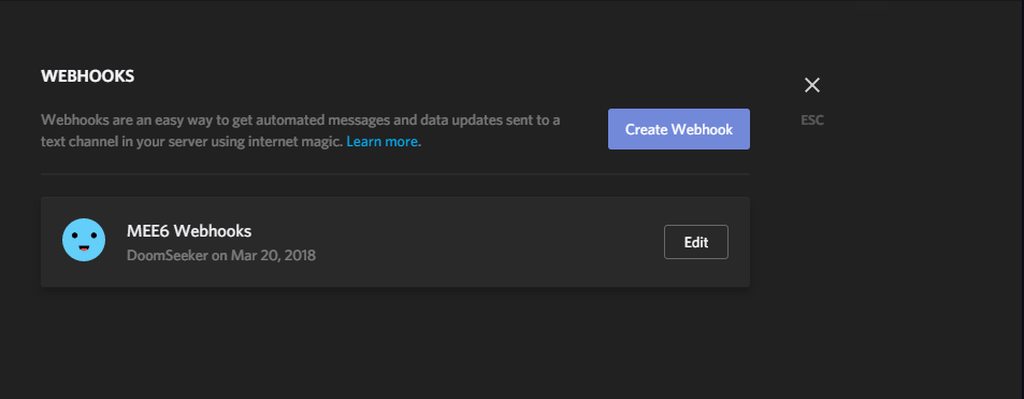
 silent lance
I am currently having an issue where Mee6 level ups, but the roles I assign when they reach said level is never handed. Is there a way to get that working again?
 indigo cloud
silent lance
indigo cloud
silent lance
Okay, I just wasn't aware if it was just me. I'll keep an eye on any news about the fix. Thank you.
 plain agate
Fun bug.
So when i go to set up "auto delete command "
and i click it
Whatever command i looked at last
Becomes that
It only does this with old commands not new
So changing old commands to "auto delete "
bitter owl
@plain agate Could you send us screenshot of that?
plain agate
Okay ill try to show
bitter owl
Thanks a lot! @plain agate
plain agate
Okay. for whatever reason it seems to be working correctly again
bitter owl
We know a bug that selector is being frozen. But this one I don't remember if it's known, so I need to see to remember if already exists or not
Alright then, thanks for the feedback anyway
plain agate
i can't get it to do it again but everyone on my chat saw it lol
but the command is working correct maybe just a glitch
will try to look out for it
if it does it again
bitter owl
Great
 north solar
Qqqqqqqqnuun
 abstract glade
Any news on the bug thats stopping role assignments when they reach their rank reward level?
bitter owl
@buoyant moon What you mean?
buoyant moon
just does
bitter owl
@abstract glade Dev will start to fix today
buoyant moon
Its glitchy with some of the text areas
like some I cant access
I hate edge but mee6 opens there by default
abstract glade
Thanks for the reply, google
abstract glade
Google always knows the answer
bitter owl
@abstract glade Not always lol
@Toastiee#4900 Known problem, going to be start to be fixed any moment ;)
 agile marsh
I try to make a custom command, select new, send and try to change the server but when I select it, it will just click off. This bug happens on all browsers and devices.
buoyant moon
@agile marsh its a known bug #425409486820474881
 bitter owl
Cookie said so, but seems it doesn't lol
 stark sequoia
mee6 cant join my server
 dark python
Working on your room id's  @primal topaz
bitter owl
@stark sequoia Check to be logged to discord as thomas said
Or toast I dont remember
☝
 crude flint
It leaves as a @invalid_user, not a @user#1234 ? I think this needs to be fixed, bug or not. 😕
mortal oxide
You see that because that user isn't in your cache
ionic meteor
Replace {user} for {user.name} or {user.idname} that won’t tag the user but it will fix the issue
crude flint
OK.
dusk shard
is the moderator commands fixed?
 worldly flame
@dire yarrow THe reddit plugin does not open and is on a constant loading screen for me when I try to.
dusk shard
@ionic meteor are the commands still broken
ionic meteor
@dusk shard Should be fixed
dusk shard
alright lemme test
worldly flame
@dire yarrow My timers don't work either. And commands in the form that ask the SWTORBot return nothing when coming from the MeeBot
ionic meteor
@worldly flame timers are broken atm
worldly flame
kk
 sullen venture
When selecting a modlog channel, there is no channel listed. I think we can blame Discord?
any ideas?
ionic meteor
Yes I think you should blame discord 😦
cold bear
@sullen venture just press authorize
 modern garnet
Member leaving message shows @invalid-user or something cryptic (image attached) to anyone that doesn't share a server or are friends with that user unless they're in their cache or something. The old way where the leaving user is just in bold text and not mentioned would be much better.
ionic meteor
@modern garnet Replace {user} for {user.name} or {user.idname}
cold bear
this is discord side issue. bot nor user can't mention user that doesn't share a server (their mentions will show as broken). cached users will still have readable mention on it. use solution above.
modern garnet
@ionic meteor thank you so much. It'd be a lot better if that was the default thing in the box, or if all options were listed.
@cold bear understandable
 hard ocean
@modern garnet I had a problem when {user.idname} => tagged the person and I only wanted username#1234, as the old mee6 did it.. Thomas gave the tip to use {user.name}#{user.discriminator}instead, and it gives you username#1234 instead of the bot tagging a user.
modern garnet
@hard ocean Ooooooooooh I like that, nice . It'd be very beneficial to have some input/output chart to show all the options.
sullen venture
No description for ingridient
 spark kelp
sullen venture
spark kelp
sullen venture
Add a website placeholder is not in the correct position and it's too dark
bitter owl
Or .com / .net @sullen venture extra instruction lol
 lime tendon
Can't even reset this players level
buoyant moon
ok
 austere hollow
bitter owl
austere hollow
bitter owl
@austere hollow Sorry?
 onyx forge
when I try to add me six it just takes me to a grey page
bitter owl
@onyx forge Mobile?
onyx forge
no pc
bitter owl
if you are in a computer, please try in another browser till be fixed this problem
bitter owl
Great
 half urchin
yo ,add a timer work's ?
half urchin
yes thank's
 gray flicker
Is slowmode back on?
 acoustic hull
!clear command is also bugged .
mortal oxide
sullen venture
Use {user.idname} instead of {user} in leave message @dull jay
buoyant moon
I think there's suppose to be a specified time here 🤔 https://i.imgur.com/PJE7NHO.png @lean sphinx

There's an extra space in between.
 dull jay
Thanks @sullen venture
buoyant moon
That bot isn't in this server Rayane.
dull jay
Lol thnx @loud acorn
 idle vigil
Hi. I here to signal some troubles on the bot.
Mee6 stopped attributting levels roles since update.
dull jay
#425409486820474881 @idle vigil
idle vigil
Ty mate
dull jay
Np @idle vigil
dull jay
Known-bugs is for staff to announce bugs that they know
 errant walrus
but I cant get in the website that I should go to
dull jay
Doesnt work for me too unfortunately
 lethal mesa
GoldenGuy What Do Think About When They Gonna Finish The Fix ? 😃 This Week ! :/ ?
ornate flicker
As soon as possible.
lethal mesa
I Hope So. ^-^
dull jay
I think you meant "finish fixing the bot". I do not know, but most of the bugs are rumored to be fixed until next week
dull jay
Sorry, but I do not know @errant walrus
errant walrus
I will try
ornate flicker
Regarding what?
dull jay
@loud acorn Do not spam. Or I will be forced to tag staff
 abstract jacinth
Has anyone reported the Mee6 is removing roles? It's happening only on Mondays. Has happened on a few of our servers.
ionic meteor
@ENIGMAnon#7664 Im pretty sure it was fixed 😃
abstract jacinth
On these servers we need to know for sure if it was fixed. We have thousands of people onboard and 130+ were affected last Monday. any way I can get confirmation?
Thanks for the reply btw.
buoyant moon
The bot doesn't join my server
and it just shows this
Not a bug but spelling error in help menu
ionic meteor

Discord
Step up your game with a modern voice & text chat app. Crystal clear voice, multiple server and channel support, mobile apps, and more. Get your free server now!
@ENIGMAnon#7664 You said it happened monday right? We haven't received any reports about mee6 removing roles in the last few days 😃
buoyant moon
@ionic meteor the levels system is enabled in my server and it doesnt work
and it works in other servers
ionic meteor
I can answer you in #〉volunteer-support 😃
 crystal bluff
I think you can check that in the audit logs of the server, if it has removed roles?
abstract jacinth
Yes it has happened the last two Mondays in a row. We've been scouring the logs and we see that Mee6 is changing the roles (taking roles away).
crystal bluff
In that case, screenshot it and send
ionic meteor
Only on mondays? 🤔
abstract jacinth
Yes..only Mondays.
ionic meteor
thehell
abstract jacinth
I'll see if I can get our other Admins to grab screenshots....brb
They are grabbing 1 or 2 screenshots.... I don't think you want 137 screenshots tho..so I asked for just a couple. I have an excel spread sheet, but I don't want to have to explain it... on this one particular server however, 137 of over 3500 were changed this last Monday.
I have 10 screen shots....sending only 2. @crystal bluff Who wants them? Look at first log entry on each S/S.
 limpid canyon
so the timing post isn't posting on my server
cold bear
 junior goblet
 golden rivet
bot can't delete bad words and role are broken .-.
solid crag
both known
 whole elk
I've put in a variable that's listed here: http://mee6.github.io/Mee6-documentation/Variables/. I am quite sure that the Variable is functional (I have to test it though), however it is not listed here. This also has the side effect of not making it easy to use such a variable.
 outer vault
When I had a username in the Welcome message so specific people are notified, the tag doesn't work
whole elk
@outer vault Either wrong variable or already known bug. Variables are generally quite problematic atm
outer vault
It's not variable, It's literally : @bold notchhere
oups
But it's not in known bugs
buoyant moon
Why did not I get my Big Farmer role?
outer vault
Use id?
faint dome
\@user
buoyant moon
ah rip
faint dome
@outer vault dont work ?
buoyant moon
Can anyone please put me Big Farmer please`?
faint dome
@outer vault fot example \@Z_runner make @faint dome
outer vault
I understand but how do I get the number
I cannot see the command you used
all I see is /@faint dome
argh sorry
 upper bronze
The bot is not posting when twitch people go online
faint dome
outer vault
thank you!
upper bronze
Just saw it thanks
faint dome
You're welcome :)
 sacred heath
 ripe cape
Is this the bot with the !clear command? If so its not working.
ionic meteor
@ripe cape it is. please come to #〉volunteer-support and ill help you out there 😉
 silent canyon
I can’t get the moderator to work. Can someone help me?
 harsh geyser
it doesn't save
ionic meteor
@harsh geyser Copy your settings and refresh, check if it saved
buoyant moon
I do not know if they said it here. but the auto-role module is not working
faint dome
ionic meteor
can you check your dashboard to check if the subreddit is added twice?
buoyant moon
Help! I kicked Mee6 bot, but when I try to reinvite him, the website redirects to dashboard
 bronze berry
bot is repeatedly posting that ppl are live. is this due to a update or something?
wooden mountain
that has always been like that
other bots and services have the same problem
it is a problem on twitch there side
harsh geyser
ok the dashboard works now
 vivid pond
When a member has been muted by the automod, but the mute wore off, then when that same person leaves and rejoins the server, he'll be muted
wooden mountain
😕
did he get unmuted before he left?
@oblique fractaly171#8838
sorry Nutt
@vivid pond
wooden mountain
so the mute persistence does not get removed..... thanks for the bug report
well.... if the unmute was manual .....
the tempmute timer only runs as long as he is in the server, so if he leaves and joins back he will get muted again and the timer will continue where it left of when he left the server
so if teh unmute was manual then it could have been that he was still muted
vivid pond
hmmm
faint dome
(I suggest ban him. Like that he can't be mute again 😆 )
vivid pond
the timer was one minute, so can test that real quick
 oblique fractal
@wooden mountain np
vivid pond
@faint dome he's my alt and the only other user on the server apart from Mee6 😆
faint dome

vivid pond
it's been over a minute, still muted
 dusk spoke
Is role leveling broken?
vivid pond
hmmm
 minor compass
Exactly what I came here for as well
wooden mountain
@oblique fractaly171#8838 thanks for the bug report, i will be sure to look into it
dammit, sorry Nutt
vivid pond
here are the mutes...
I didn't use !unmute to take away the first one, I just removed the role
imma try using that now
okay well there's no bug, it's just me being stupid and not using the unmute command @wooden mountain ¯_(ツ)_/¯
sorry bout that
minor compass
Hello, the role leveling system isn't working, just wanted to know if there was a bug and was being fixed.
dusk spoke
/\
wooden mountain
dusk spoke
just wanted to make sure i wasn't going crazy. thank you!
minor compass
Totally helped
 sharp zinc
Has the dashboard been deleted or is mine just not working just comes up with grey screen
<@&193123929701875712>
 peak bluff
hey there, I would like to report something I didn't noticed on #425409486820474881
wooden mountain
@sharp zinc not optimized for phones, try a diffrent browser and hope it works
sharp zinc
Ok thx 👌
 celest geode
noticing the leave message gives a giant series of numbers, rather then the appropriate "Discord @buoyant moon"
Example: https://gyazo.com/97b51286539f71831577a1eb67c7b38a


 peak bluff
after choosing a log channel I don't see the input change the value after authorization

 wooden mountain
@celest geode this is more a discord issue then a Mee6 issue, change {user} in {user.userid} to get a @ user#1234 format that does not try to mention the user
@peak bluff just press authorize, discord bug
(as it is discordapp.com)
wooden mountain
do not try to set a server/channel, just let the window open and press authorize immediatly
celest geode
weird thing was, @wooden mountain never had an issue until like yesterday