#〉bugs-reports
2 messages · Page 14 of 1
 sullen venture
or even french (#175714280648343552)
 sharp cradle
on your site i try to add it to my server and it says i have no servers
 cold bear
!logout
 dire yarrowBOT
oops, it looks like you are on the wrong account, you need a account with 'manage server' permissions.
You have to log out and back in again.
- log out of discordapp site https://discordapp.com/login and follow the steps in the gif below
- go to http://mee6.xyz/logout and click the 'add to discord' button
http://i.imgur.com/bNwJQX1.gifv
 sullen venture
it's for @dire yarrow bug reports, not standart talking
 leaden patio
ik
 deft perch
When you use the !mute {user} it doesnt actually mute.
cold bear
does bot says something?
deft perch
Yes, when I run the command it says "{user} is now 🙊 here!" but the user is still able to speak?
cold bear
!mute
dire yarrowBOT
!mute @mention - mutes mentioned user in current channel
Requirements:
- Manage Channels
P.S. You can't mute people who have the permission to mute others, this include: owner, other moderator or members with Administrator or Manage Server permissions!!!
Okay. I will take a look with that information
 buoyant moon
reddit plug dosent work again
cold bear
disabled until further notice
buoyant moon
Website is down, any reason why???
 topaz mist

 ashen comet
Mee6 is dublicate posting/double posting all Twitch announcements and hence pinging all members twice!
 unique lake
The !mute and !clear commands are currently not working. <@&173957749716025344>
 primal topaz
@weary pulsarQuest#6472 Notfied Cookie to see if its something on our end.
rippp
@unique lake Make sure to check your permissions and make sure you have a moderator role. Also you cannot mute other moderators or higher staff then you.
unique lake
I have checked my permissions.
I'm muting regular users, I have the admin role and I've got the admin role listed.
 buoyant moon
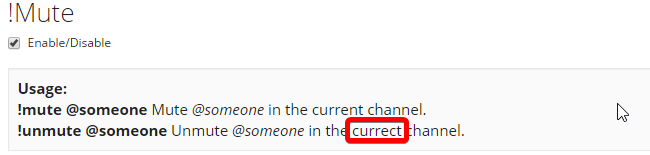
Not really a bug, but non-the-less something: http://i.imgur.com/MKVSkQr.png
 brazen mica
on the Twitch announcements it is linking a broken URL if the username ends with an underscore. all info that displays below for the user is correct, besides of course the link not working.
 mossy flare
@brazen mica Try putting a ` at the front and end of {streamer} in the message
brazen mica
ohhh I see its formatting it to italicized. so that should contain the name yeah?
ty @mossy flare will give it a try, not able to see the announcement until she goes live again next time
cold bear
@willow berry what the problem, lets use #〉volunteer-support for that
 willow berry
I did and someone sent me to tag a supporter
I have no ideea who to tag
sorry if I am doing something worng
cold bear
don't worry
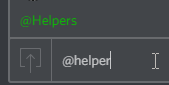
^^^ first, that how you can tag someone's role
@willow berry explain what the problem with bot you have
willow berry
thank you 😃
dire yarrowBOT
GG @willow berry, you just advanced to level 1 !
willow berry
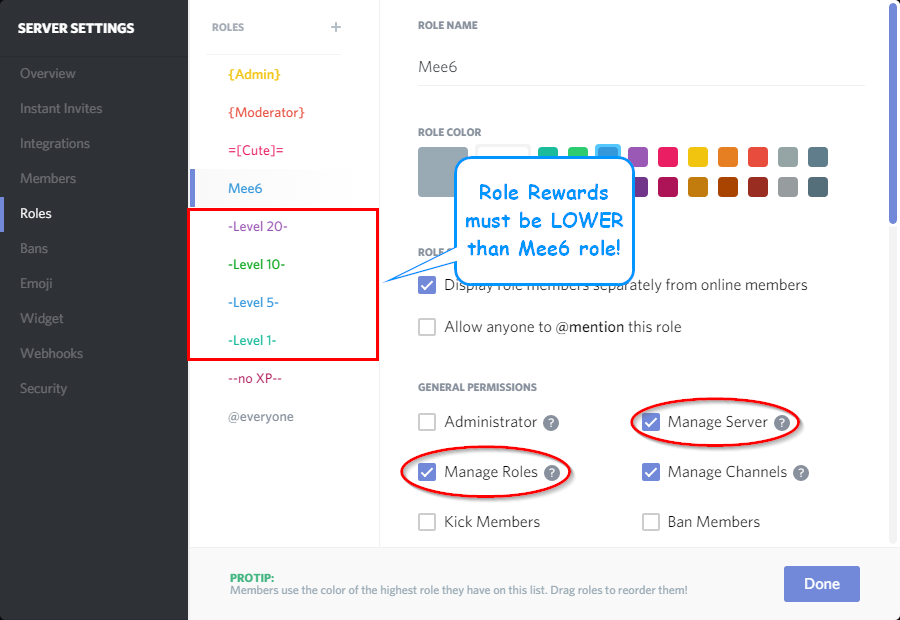
so the problem that I have is this....I am using the bot for the leveling system and so far all went ok
just the bot didn't gave the specific role for the specific level
it's just like dead
it gives the xp and all... it shows the level...just it doesn't give the specific role for the specific level
 strange archBOT
 buoyant moon
idk if this is a bug, but when i set it to give notificatins about me going live on twitch, it doesn't send for like 5-10 mins after i go live
dire yarrowBOT
if you notice that Streamers are not being announced:
 - Delete the streamers and hand type them; Sometimes you will pick up a extra invisible character that breaks the searches.
 - Check the 'https://www.twitch.tv/directory' for the Streamer WHILE STREAMING.
 - Check the Configuration:'http://www.twitch.tv/streamer` means you only need streamer as the name inserted.

 [!] All else fails, Contact Support with a Mention to @Support or @Helpers;
 granite arrow
!rank
dire yarrowBOT
@granite arrow, It seems like you are not ranked. Start talking in the chat to get ranked :wink:.
granite arrow
!help
dire yarrowBOT
Hey, I DM'ed you the list of commands for this server.
If you want me to work in another server then read #255286916872667147 to see how to let me do stuff in other servers. 😉
 wooden mountain
@lime ibexUnknownPuppy#9349 http://mee6.xyz/servers and try again
(sorry The) @buoyant moon ^^
 fast gyro
http://mee6.github.io/Mee6-documentation/levelxp/
The link to the calcuator isn't displaying as a link
 normal bloom
the actual link: http://mee6calc.xyz/
buoyant moon
Mee6 is obeying another bot which do not have permission to use moderation commands
Please DM me as soon as possible
 white notch
Above issue seems to be related to TypicalBot (for reference)
 elfin kite
mee6 doesnt seem to give my server members the roles when they reach a certain level. did i do something wrong?
white notch
!role-rewards
dire yarrowBOT
role rewards will give a role as reward for active users in chat.
you gain xp by talking in chat. when you gain enough ex you get a level.
in order to let me give role rewards i need :
+ manage roles permission
+ manage server permission
+ at least one of my roles needs to be ABOVE the reward roles(bots can't give roles that are higher than their own role)
! I will only check for role rewards to be updated when someone levels up... so if you added role rewards a bit late then wait till someone levels again before complaining that I am not doing my job.
!!tag role-rewards
strange archBOT
elfin kite
ohhh okay thanks so much!
 vernal wolf
So when using !mute, mee6 makes a rule in the channel settings blocking the "send message" permission for the specific user.
Hey guys, I think I have a bug to report.
When you use !unmute, instead of removing the rule it actually changes the permission to allow sending messages. (Not just to neutral)
The issue with this is that if an admin later wants to disable writing messages for some role or for @ everyone, any user who has been !muted and then !unmuted will still be able to write unless you manually remove the rule targeting them.
wooden mountain
intended behaviar, the !unmute command can give someone send permission in a chanel that is read only for general public, also removing the rule can lead to permission lost (or gain) for that user, like for users who have read message history in that channel
(ur have embed links deneid for just them, they would gain that back if we would to deletet there rule)
 silent python
@dire yarrow est hors ligne ?
wooden mountain
@silent python http://mee6.xyz/login
silent python
J'avais en bug entre mes 2 comptes Discord j'ai regler le truc désolé 
 hazy cipher
<@&173957749716025344> is the bot down at this time?
mossy flare
@hazy cipher indeed it is
 proud grotto
no it's up
 latent agate
Inclided to believe a helper over someone without a role lol
mossy flare
lmao
hazy cipher
Its not up for me @proud grotto
proud grotto
yes it is
latent agate
lol what a troll
buoyant moon
incom b& Kappa
hazy cipher
Agreed @latent agate
 north hound
white notch
north hound
white notch
@north hound refer to #238889207827922944
north hound
Ok
 hexed dagger
mee6bot offline. why is that
white notch
read #〉announcements and #238889207827922944
hexed dagger
t6hx
white notch
read #〉announcements and #238889207827922944
white notch
I'm not one to roast. It's offline, so you can't do anything about it until the bot is back online
or anything
white notch
Mee6 offline
We are aware that the bot is offline, please refer to #〉announcements and #238889207827922944 for further information.
🔒 to prevent unnecessary talk this channel has been locked 🔒
 orchid night
mee6 bug fixed?
orchid night
okk
 keen plank
chill dude xD
orchid night
yup hehe
 small blade
to be fair if you were asked the same question over and over youd get a little peeved^^
orchid night
lucoa .u looking alone😄
small blade
what?
normal bloom
👀
normal bloom

orchid night
😂
small blade
right....whatever
orchid night
why u changed from lucoa to lucoa(jo)
small blade
this isnt really the place for that kinda chat.
orchid night
okk right sending u friend req
 neat urchin
Is the website down for anyone else?
buoyant moon
yes
neat urchin
Ok
 tawny bison
Website is offline?
white notch
Recently came up. Give it some time
tawny bison
oh ya oki doki 😛
neat urchin
Says it's a problem with the host.
neat urchin
Cool thanks!
buoyant moon
I'm not sure if this is a problem with my server but !levels doesn't work.
I don't mean the link doesn't work because obviously it wouldn't
But the command itself doesn't load but all of the other commands do (including !rank and the custom commands.)
oh that explains it XD
 broken bluff
@buoyant moon Wait for the website to come back online.
dire yarrowBOT
GG @broken bluff, you just advanced to level 2 !
buoyant moon
ah ok
But rank works because that's saved through the bot and not a link to the website.
broken bluff
@buoyant moon There is a problem with Cloudfare. (Error 502)
buoyant moon
thx
cold bear
because they're stored in database
broken bluff
So was i right?
cold bear
in some way yes
 fallen gale
the mee6.xyz website is down, and its returning error code 520. It also says its the host's fail and it says that cloudflare is ok
now it returned error code 502
fallen gale
thank you @wooden mountain
dire yarrowBOT
GG @broken bluff, you just advanced to level 3 !
wooden mountain
that seems like it belongd in some science or medical server, not here
 errant mesa
normal bloom
errant mesa
normal bloom
Grand is already handling it^
 lilac ibex
hi, for some reason mee6 isn't clearing messages when we use !clear
the messages aren't older then two weeks
buoyant moon
My mee isnt letting me use commands, its not offline its just not working
north hound
dire yarrowBOT
GG @north hound, you just advanced to level 1 !
north hound
I keep on typing like commands and it doesn't work
dire yarrowBOT
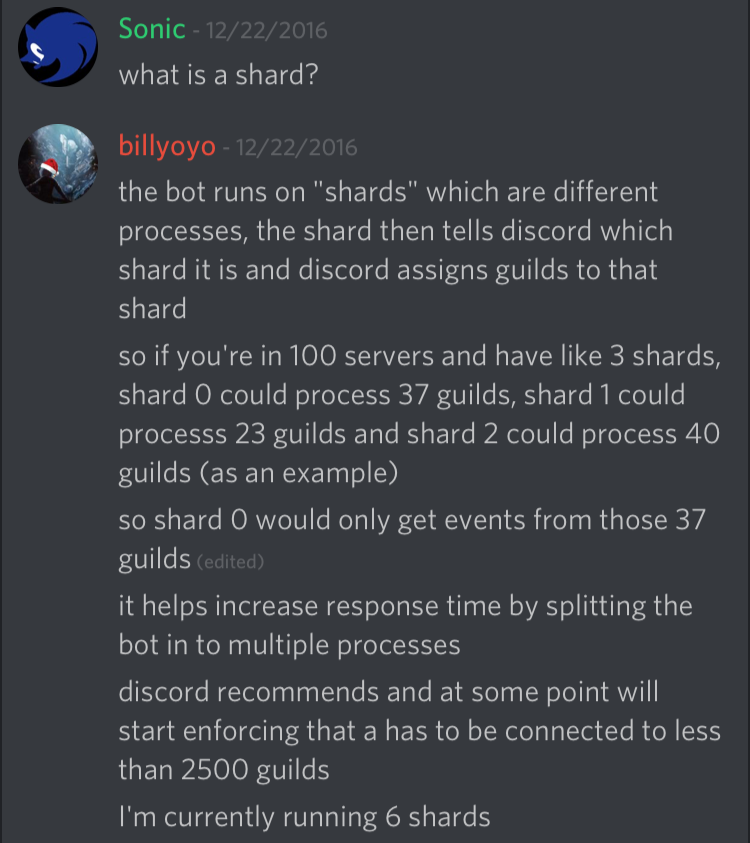
shard 23/200
white notch
!!tag shard
strange archBOT
 white notch
Just try the command, so I know if it's a shard having issues or not
On your server, not here 
north hound
Ok it's 115/200
white notch
Sorry, got sidetracked 😬 I've asked the dev to restart all shards in the hope that solves it
north hound
Who tf is dev
white notch
Cookie
north hound
Who
Wtvr if u asked this dev it doesn't matter to me
Is it good to have high shards
Or low
north hound
So I should have a low one
white notch
I believe more increases response time
It doesn't work that way
Shard numbers are random
north hound
Oh
broken bluff
It is saying that windows is investigating in the website is safe...
@bitter zenith
cold bear
@broken bluff what you talking about?
broken bluff
Ok
 frail atlas
mee6 isnt doing ANYTHING on my server
been working fine until today
wont do anything
cold bear
server id please @frail atlas
wooden mountain
i have requested a restart
frail atlas
still nothing
frail atlas
working ty
 upbeat gust
I also had a warning before going onto the site today, wasn't like this before. I easily just bypassed it though since I knew the site is safe. But it doesn't mean that other people won't think other wise.
It probably is only a microsoft edge thing, and most people use chrome so it probably won't be a big issue, but who knows
cold bear
paranoia is bad
 rough geyser
Having some issues with the Mee6 bot as well. Here's my server ID: 242462394318585876
mossy flare
@rough geyser your shard has been reported by another server, cookie already notified
wooden mountain
we are aware of problems and are working on a fix
 novel inlet
It seems like the youtube music bot functionality is broken. Already knowing?
sullen venture
 ivory coral
My level plugin doesnt work
wooden mountain
did you enable it?
wooden mountain
give the link to that page
ivory coral
 wooden mountain
thanks
ivory coral
Im level 3 and I dont get any roles , I have putten levels at roles
wooden mountain
do you have the boti role?
wooden mountain
ok
ivory coral
have boti role
wooden mountain
!role-rewards
dire yarrowBOT
role rewards will give a role as reward for active users in chat.
you gain xp by talking in chat. when you gain enough ex you get a level.
in order to let me give role rewards i need :
+ manage roles permission
+ manage server permission
+ at least one of my roles needs to be ABOVE the reward roles(bots can't give roles that are higher than their own role)
! I will only check for role rewards to be updated when someone levels up... so if you added role rewards a bit late then wait till someone levels again before complaining that I am not doing my job.
can you check his permissions?
ivory coral
No I cant
sullen venture
ok dm me an invite
sullen venture
then admins
ivory coral
Im the creator
wooden mountain
sory for the mute, to many links
dire yarrowBOT
GG @ivory coral, you just advanced to level 1 !
ivory coral
I dont understand
dire yarrowBOT
 Locomotiva Udrea
Rank
4496/18558
Lvl.
1
Exp.
15/155 (tot. 115)
 Mee6.xyz
ivory coral
Mee6.xyz
ivory coral
sil
normal bloom
i really dont think it was him
@ivory coral
check the audit log, probably someone else
ivory coral
Ineed again some help with the bot
if someone is here
I can invite u
It doesnt give me the role
again
wooden mountain
!role-rewards
dire yarrowBOT
role rewards will give a role as reward for active users in chat.
you gain xp by talking in chat. when you gain enough ex you get a level.
in order to let me give role rewards i need :
+ manage roles permission
+ manage server permission
+ at least one of my roles needs to be ABOVE the reward roles(bots can't give roles that are higher than their own role)
! I will only check for role rewards to be updated when someone levels up... so if you added role rewards a bit late then wait till someone levels again before complaining that I am not doing my job.
 autumn dove
Help me the reddit plugin doesn't seem to work
white notch
There are some issues with it atm, so it's not really working properly
autumn dove
Aw man I wanted it to post dank memes
white notch
You could always use a webhook 
autumn dove
Wtf is that
white notch
Grabs information from one point, and posts it in another point
Harder to set up and understand
autumn dove

white notch
But more reliable and easier to manage 😉
dire yarrowBOT
GG @autumn dove, you just advanced to level 1 !
normal bloom
@autumn dove once im home in about 3 hours i can help you set it up. If interested DM me
autumn dove
OK ty
 tall coral
<@&193123929701875712> how do you do auto rank
white notch
Not a feature for the bot (next time use #〉volunteer-support not this channel)
wooden mountain
is levels enabled?
 real willow
ye
wooden mountain
do you have a banned role?
real willow
it works again still thanks
wooden mountain
👍
 split escarp
!clear does not work
normal bloom
already answered on #〉volunteer-support
 serene dome
Alright, so I enabled the Twitch notifier thingy on mee6's website so mee6 can send me notifications when some of my favorite Twitch streamers are live. However, the problem is that mee6 doesn't send messages for all the Twitch streamers I want, it only sends messages for 2 of 'em, when I have 4 people I want notifs from.
It only sends notifications for the first 2 people.
;-;
serene dome
Nope
I copy-pasted the their Twitch usernames (the thing that comes after "https://twitch.tv/")
normal bloom
you might copied an invisble symbol or a space
serene dome
Okay, I'll re-type 'em.
Done.
I'll see if it sends a message the next time one of 'em goes live.
Thx for the help tho (even tho u didn't really do anything) @normal bloom xd
dire yarrowBOT
GG @serene dome, you just advanced to level 1 !
serene dome
GG
mossy flare
get rekt
serene dome
True dat xd
 marsh sphinx
Sometimes the twitch notifier sends the twitch thing 3 times
 carmine flax
The Mee6 Bot has an error in the level system. I have set a role from level 1 on my server, but this is not given automatically
wooden mountain
!role-rewards
dire yarrowBOT
role rewards will give a role as reward for active users in chat.
you gain xp by talking in chat. when you gain enough ex you get a level.
in order to let me give role rewards i need :
+ manage roles permission
+ manage server permission
+ at least one of my roles needs to be ABOVE the reward roles(bots can't give roles that are higher than their own role)
! I will only check for role rewards to be updated when someone levels up... so if you added role rewards a bit late then wait till someone levels again before complaining that I am not doing my job.
@carmine flax ^^ check permisisons
carmine flax
this my settings
and level 1 is not automatically
mee6 say You are level 1, yay but not give a role
strange archBOT
carmine flax
thank you @wooden mountain
dire yarrowBOT
GG @carmine flax, you just advanced to level 1 !
tall coral
Guys did We cpey from rick and mory IR did they copy us
normal bloom
mee6(six)= meeseeks. get it six=seeks
 rustic hollow
 normal bloom
there are a couple grammatical mistakes that have been noticed but arent top priority to fix
Bot features> silly mistakes
 grand hound
Hi @primal topaz i seem to have encountered a reoccuring bug where mee6 says its playing music but no sound comes through
white notch
is there a green circle around its name indicating it's speaking?
white notch
what permissions does the bot have?
grand hound
no sound is even indicated as comeing through
the same permissions as me the leader of the channel
white notch
also try doing !leave then join
grand hound
ah yea there it is
didnt know there was a "!leave" command
is there a full list of commands that i can find somewhere?
white notch
!!tag commands
strange archBOT
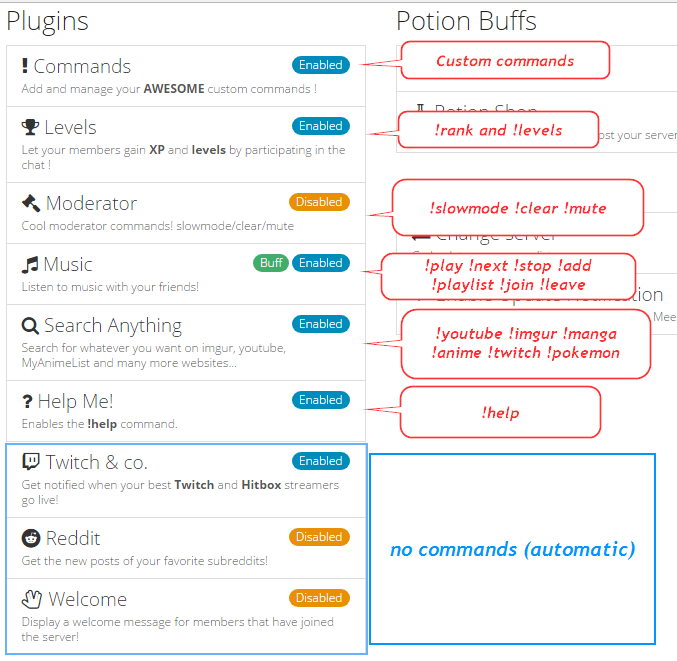 white notch

buoyant moon
Guy just joined my discord, no welcome notification. Despite the bot having correct permissions, it being assigned the correct hannel and it being set on the site
 hearty juniper
Anyone having a problem with the reddit plugin?
white notch
broken atm
hearty juniper
ahh ok thanks 😃
 craggy river
Thanks for update! I was trying to figure out why it wasn't work..just got this mod so wasn't sure if it was me lol
 jovial marsh
<@&193123929701875712> Hello, I'm new, may I know the prefix for Mee6?
cold bear
@jovial marsh !
jovial marsh
ty
 velvet mango
Hey guys, I've had Mee6 for about two weeks now
Its running very well and my Discord members have been using the EXP system
Strangely enough, I randomly stopped getting EXP yesterday? But only me.
There's probably an easy fix for this but could I have some help? Thanks
normal bloom
!dashboard
dire yarrowBOT
Dashboard: https://mee6.xyz/servers and select your server image
normal bloom
Follow that link, select your server, Ranking plugin and at the bottom check banned roles
probably added one of the roles you have to the banned list
normal bloom
👌🏼
wooden mountain
 low briar
For some reason Mee6 is giving every new user the role which is supposed to be given once level 1 is reached. I want new users to be in the 'everyone' role until they reach level 1, then get promoted to a new role. Instead, every new user is automatically promoted at level 0. Any ideas?
wooden mountain
you can see who does it in the audit logs (in server settings) @low briar
low briar
Good shout. I'll let you know the outcome!
 floral flicker
Hey, is the reddit plugin still broken?
wooden mountain
yep
floral flicker
Aww :/
Are anyone working on making it work?
Or well... I would assume someone are
wooden mountain
was working on it
floral flicker
Was? Does that mean not anylonger?
wooden mountain
we only have 1 dev and he is busy with real live and not with Mee6 atm
floral flicker
Oh, ok, thank you for your answers :)
low briar
@wooden mountain Thank you for your help earlier, it was bloddy Dyno bot causing it
wooden mountain
 remote lynx
Hello my !clear is not working on my server
 plush dove
No commands are working on my server at all!
wooden mountain
read #255286916872667147
plush dove
got it now, thanks
 hot aurora
Meee6 hasn't been tracking exp for the levels system and it only responds to !rank/!levels for a few members. Help?
wooden mountain
check the banned roles
on the dashboard, levels plugin, there is a box banned roles, any role in tehre won't gain xp and can't use those commands
mossy flare
i thought that said lonely day kek
 spiral ginkgo
wooden mountain
spiral ginkgo
wooden mountain
restart your discrod
 ivory scarab
There is no section where it shows you how to add your own commands when the Command option is enabled/disabled
white notch
Take a look at the imgur guide in #255286916872667147
ivory scarab
@white notch thanks
 ocean onyx
is the reddit plugin down again?
white notch
dire yarrowBOT
the reddit plugin will post all new posts from your favorite subreddits.
+ Mee6 needs MANAGE WEBHOOK permission, either on the channel you choose or server wide
- you can not nickname the reddit posting webhook, changing the webhook does not effect anything
- the reddit plugin will automaticly disable itself over time if Mee6 does not have the manage webhook permission
@ocean onyx ☝
normal bloom
@white notch new command?
white notch
yep
normal bloom
<@&173957749716025344> The hyperlink to the variables webpage in http://mee6.github.io/Mee6-documentation/Commands/ is broken. its Variables not variables so it redirects to a 404 error
Hyperlink
wooden mountain
@normal bloom so you are telling me that it is with a small leter and not a capital letter? even though internet urls are not case sensetive and all my pages starts with a capital letter
normal bloom
@wooden mountain well that was the only thing i found could be wrong
Broken hyperlink
normal bloom
And i was saying the opposite, it should be Variables not variables like it currently is
wooden mountain
😛
cold bear
just make duplicates with lowercase
wooden mountain
just add a / after it, the / was missing
 grand lynx
Pokemon Database is old
wooden mountain
we know, we don't have taht database, we only use a other site there database
if you ahve a alternative let us know
wooden mountain
@☠💧🔥𝒛𝒆𝒕𝒓𝒆𝒙🔥💧☠#1182 they don't have a API, on there Q&A page i found the question do you have a api with this as result:
@grand lynx i hate names like that
and veekun is the one we are currently using
pokeapi has even less then veekun
grand lynx
dire yarrowBOT
GG @grand lynx, you just advanced to level 2 !
grand lynx
soo now???
wooden mountain
again, no API, Mee6 can't open a website and take the data from a normal web page, je needs a Aplication Programming Interface (API) that respodns something like this:
{
    "id": 1,
    "name": "bulbasaur",
    "base_experience": 64,
    "height": 7,
    "is_default": true,
    "order": 1,
    "weight": 69,
    "abilities": [
        {
            "is_hidden": true,
            "slot": 3,
            "ability": {
                "name": "chlorophyll",
                "url": "http://pokeapi.co/api/v2/ability/34/"
            }
        }
    ],
    "forms": [
.... AND MORE
that he can read and get data from
i have searched arround and veekun is one of the couple sites that offers this and has relative much, all the others that offer a api have eitehr less pokemon or less data for each pokemon
 oak wyvern
Help pls!!! mee6 bot is giving people random roles!!! 😡
oak wyvern
thanks @white notch
buoyant moon
The stream alert response time depends on what? My is about 10 minutes, this is normal?
wooden mountain
current is 8.65 minutes
it depends on how fast twtich is responding and how many streamers are currently live (and how many streamers Mee6 needs to check)
buoyant moon
thks
dire yarrowBOT
GG @buoyant moon, you just advanced to level 1 !
 spring talon
along with the database being old a lot of the pictures disappear in my discord for some reason 😦
 olive pond
How do u reset lvs
mossy flare
 asks question
leaves server before answer
normal bloom
✅
 frosty rapids
Not exactly 'bug-report' but I noticed something, not sure if it's intentional.
should be manga, no?
 royal scroll
We are infamous for typos, thanks for reporting it.
wooden mountain
no, it should be mango
 fast vortex
Mango?
buoyant moon
i have a very serious report.
i have 2 discord accounts. unfortuneately, i cant manage my servers because mee6 logs me on to my second one, not my first. could you add a thing so we put in our email and password for discord?
wooden mountain
!logout
dire yarrowBOT
oops, it looks like you are on the wrong account, you need a account with 'manage server' permissions.
You have to log out and back in again.
- log out of discordapp site https://discordapp.com/login and follow the steps in the gif below
- go to http://mee6.xyz/logout and click the 'add to discord' button
http://i.imgur.com/bNwJQX1.gifv
wooden mountain
@buoyant moon ^
wooden mountain
don't work or gives empty message?
wooden mountain
in user settings (gear next to your name bottem left) then text and images => enable embed preview
@uncut elk
 uncut elk
okey thanks
floral flicker
Is the reddit plugin fixing still on hiatus?
cold bear
dire yarrowBOT
the reddit plugin will post all new posts from your favorite subreddits.
+ Mee6 needs MANAGE WEBHOOK permission, either on the channel you choose or server wide
- you can not nickname the reddit posting webhook, changing the webhook does not effect anything
- the reddit plugin will automaticly disable itself over time if Mee6 does not have the manage webhook permission
Ok, thank you very much :D
dire yarrowBOT
GG @floral flicker, you just advanced to level 1 !
floral flicker
Haha
I'm not sure what it means with the second point, I can not nickname what exactly? The chat Mee6 is posting in?
wooden mountain
in #261311113340256267 you see 2 versions of Mee6, one with a white name (for reddit posts) and one with a blue name (twitch posts) the white one that posts the reddit stuff can not be nicknamed or color changed
floral flicker
Oh... do I need a completely other bot to post reddit stuff? 😅
wooden mountain
no, Mee6 will make that "other bot" (called webhooks)
 dense pelican
 wooden mountain
@dense pelican Mee6 is not going to spam your chat
if the last message in the channel is from Mee6 then he won't post a timer
 neat perch
Hi guys, I love the timers now, but it says that my max is 10 timers but I only have 5
white notch
!!tag timers
strange archBOT
You're limited to 5 timers per guild, with the message interval being in minutes. If nobody posts a message after the timer has been sent, the channel is considered "non active" and so the next timer will not be sent
neat perch
Who is the Dev?
white notch
 faint hemlock
mossy flare
faint hemlock
mossy flare
@faint hemlock in the announcement message put a ` at the beginning and end of {streamer}
buoyant moon
Why does not the Timers option work in the bot? Please reply with @buoyant moon ...
dire yarrowBOT
GG @reef hinge, you just advanced to level 1 !
buoyant moon
Im from Poland
I use an interpreter :C
wooden mountain
@reef hinge if you are going to just ask everyone to be your friend then i am gona ban you
leave members alone
!!tag @reef hinge friend requests to all (and prob also DM ad)
strange archBOT
 No tag @reef hinge found.
wooden mountain
? i did ban
buoyant moon
Heh
strange archBOT
 Connor#9461 was banned!
buoyant moon
here!
here! Why does not the Timers option work in the bot? Please reply with @buoyant moon ...
wooden mountain
@buoyant moon i already answered in #〉volunteer-support
buoyant moon
Sory
 half hull
When using a timer the Bot uses the generic Name Mee6 rather then the one I renamed him to.
wooden mountain
not yet no
half hull
Thank you for responding.
 soft helm
If you type in another text channel the bot can read, it will trigger the timer and send the message in the assigned chat before the time you set has been met.
As soon as someone types in the corresponding text channel that is.
white notch
!!tag timers
strange archBOT
You're limited to 5 timers per guild, with the message interval being in minutes. If nobody posts a message after the timer has been sent, the channel is considered "non active" and so the next timer will not be sent. The bot needs the MANAGE_WEBHOOKS perm otherwise it'll auto disable if the channel isn't found or it can't create webhook
white notch
Once someone types in chat after Mee6 has sent a message, it will send further timers
 sonic plank
Timer new plugin turns Disabled sometimes without reason
 quiet dew
I agree with Maek. Timer new plugin turns Disabled sometimes without reason
white notch
Read above with Dyno
sonic plank
@white notch Hello, i confirm it disabled on an existing channel even before post the first message. The status of the plugin is Disabled alone when i navigate in the bot interface menu. Maybe it don't find my channel randomly or other thing
wooden mountain
@sonic plank go in that channel settings => permissions => add @dire yarrow and set the MANAGE WEBHOOKS on ✅
sonic plank
@wooden mountain I'll try thank you!
soft helm
@white notch So its supposed to not follow the schedule if you type in another channel, wait 15 minutes then type in the corresponding channel which will activate the message straight away?
Of all the test only 1 worked
While 1 half worked
And the other 2 just broke completely
white notch
The timer is only affected with posting if someone sends a message in that channel. This changes it from being a "non active channel" to a "active channel" so it posts. Posting a message in another channel shouldn't affect the timer in the channel it's being sent (unless that's an actual bug
soft helm
It seems to affect it though, works just fine when I don't type in another channel he can read
 bitter zenith
 floral trout
timer keeps disabling on the dashboard
strange archBOT
You're limited to 5 timers per guild, with the message interval being in minutes. If nobody posts a message after the timer has been sent, the channel is considered "non active" and so the next timer will not be sent. The bot needs the MANAGE_WEBHOOKS perm otherwise it'll auto disable if the channel isn't found or it can't create webhook
 mortal oxide
@floral trout
 jovial stag
Not sure if this is just because I'm on mobile or if it's legitimately weird.....
dire yarrowBOT
GG @jovial stag, you just advanced to level 1 !
jovial stag
The timed message appears white name for the bot and doesn't have the nickname we set but the rank command has the nickname and color we set
wooden mountain
diffrent color name is normal
we had to search a way arround discord rate limits
wooden mountain
the nickname can come later on (maybe) but the color will always be white (unless discord updates there webhooks)
jovial stag
ah, ok
buoyant moon
I Don't Get Dm'ed When I Type !help
wooden mountain
does it come in the chat where you type !help?
is helpme plugin enabled?
do you allow servers members to dm you?
 fallen cedar
Hello there, your bot has given a LOT of my members of the server I help run a rank letting them access ALL channels, in our Audit Logs it says your bot changed the ranks. <@&173957749716025344> <@&193123929701875712>
bitter zenith
If someone on your server with Manage server permissions updated the Mee6 dashboard
and set it to give out a role with say... admin permissions
yeah that could happen
what you'd have to do is figure out A) which role is it
B) when did it get the permissions to have Admin
C) why the hell is below a bot with manage roles permissions
D) how is it a level reward?
wooden mountain
C defenetly check that one
bitter zenith
@fallen cedar 👆
fallen cedar
Alright it added a LOT of roles to random people (most with a rank already) it added 8-9 roles some of them being removed and added back again
bitter zenith
That's automatic
wooden mountain
being removed and added back is normal for discord system
fallen cedar
Nobody has touched the bots perms since we added it 2-3 days ago
bitter zenith
If a member levels up and any member has reached a level to have earned a role that they no longer have, Mee6 will automatically assign the role as the level reward
wooden mountain
but someoen change something on the dashboard
can you give me the link to your dashboard? @fallen cedar
bitter zenith
The real question here is, what are your level rewards, who has permission to access the dashboard, and how did a role with high level permissions get put above a role with admin
wooden mountain
the link for inviteing the bot to yoru server is also good
bitter zenith
specifically, "manage roles"
wooden mountain
or just give me a invite @fallen cedar
bitter zenith
here's the thing tho
if at any point all your members had access to admin perms
any one of them could have done it
fallen cedar
Our thing with the highest ranking members is gone
wooden mountain
if you want me to check what happend then give me a invite
fallen cedar
Alright I'll pm you it standby
dire yarrowBOT
GG @fallen cedar, you just advanced to level 1 !
fallen cedar
We lost our dashboard when removing the bot I'll pm you an invite now
wooden mountain
i don't know if i can see my panel if the bot is gone
wooden mountain
i am trying to source it
 cobalt elk
on servers mee6 messages are just blank but i can still see his pms
normal bloom
Sounds like it doesnt have the embed permission
white notch
already answered in #〉volunteer-support
normal bloom
👌🏽
 umbral rock
When i want to activate the timer, after i quit the website its desactive the timer. Is it normal?
wooden mountain
it means that he does not have the needed permissions @umbral rock give him the MANAGE WEBHOOK permission
 static flume
Hi here, i've a problem with timers plugin
i activate him and when i leave mee6 and come back, he is disabled (sorry for my bad english)
static flume
Ok, someone solved my problem. But i've a bug. When i activated Webhook(to enable the plugin) a lot of message we posted on server disappeared
i had to stop the permission to "manage messages" for stop this
 lethal shell
when I do !clear 1000 it wont work 😭
cold bear
!clear
dire yarrowBOT
temporary: no bot can clear messages older then 2 weeks (discord API problem)
the clear command allows you to clear the last xx amount of message.
or to clear that anoying spammer without clearing anyone else
just use !clear 1-1000 to clear the last xx messages(example !clear 10),
or use !clear @name to clear all the message of @name in the last 100 messages
+ i need manage messages permission
+ i need view message history permission (otherwise i will respond with -1 messages cleared)
+ you need to check the checkmark next to clear on the plugin page.
+ you need to set your role as moderator (located at the bottom of the plugin page in the moderator tab)
@lethal shell ^^^
 silver elk
<@&173957749716025344> <@&193123929701875712> I've found an issue where the Twitch Announcement feature provides an incorrect link to the Channel. The notification is for the proper channel, the screenshot is for the proper channel, the meta link from the unfurling is corrrect; However, the link provided in the announcement is incorrect.
Potential edge-case: The twitch username ends with an underscore.
white notch
Easy fix
silver elk
Yea, not worried about it. Just figured I'd report it.
white notch
Do this
It's to do with the Discord Markdown system btw
Because having _ makes text underlined and if not done correctly it screws it all up
dire yarrowBOT
GG @buoyant moon, you just advanced to level 1 !
 median bear
Timer plugin keep setting itself to disable
dire yarrowBOT
GG @median bear, you just advanced to level 1 !
wooden mountain
@median bear give Mee6 the manage webhooks permission and enable it again
 midnight spire
Mee6 is double chatting the steamer announcement
white notch
screenshot please
wooden mountain
that is normal, #BlameTwitch
 kindred flicker
Hello it looks like the Timers plugin is not working correctling for me. I find that old messages that i wrote to be posted every X minutes in my server's chats are still there but the plugin itself gets disabled everytime i enter the Mee6bot web page. Is this a common error or am i doing something wrong?
Thanks in advance
wooden mountain
timers takes time to update config @kindred flicker it will stop eventualy (or delete the webhook)
kindred flicker
i haven't touched the webhook's settings in my server. Do i need to allow the bot to manage webhooks in order to work properly? (All other plugins are working great)
wooden mountain
webhook is needed for timers and reddit
kindred flicker
Oh ok thanks, then I'm really sorry for wasting your time ^^
thanks again for the help
midnight spire
@white notch about double chat
dire yarrowBOT
GG @midnight spire, you just advanced to level 1 !
wooden mountain
yeah.... #BlameTwitch
 noble flume
Hello i'm a French guy, sorry for my bad english. I have to reported a bug has arrived when i wanted to update a times request of a specific channel to another, the updated doesn't work, the message are re sending on the latest channel, not the newest. I have to deleted the requested, and created a newest timer to the newest channel who i wanted to message be sended for it to work.
wooden mountain
timers are slow on updating
dire yarrowBOT
GG @wooden mountain, you just advanced to level 65 !
wooden mountain
AGAIN?
 clear blaze
xD gg
noble flume
Ok thx @wooden mountain sorry for the inconvenience
 prime olive
i don't know what the issue ist, but if you use !pokemon and bring up some entry
dire yarrowBOT
GG @prime olive, you just advanced to level 2 !
prime olive
the post that comes up by meee6 bot doesn't display the picture of the pokemon
white notch
screenshot please
prime olive
k
as you can see, i've reposted the exact same url as mee6
but mee6 didn't manage to display the image
white notch
looks like Discord itself is to blame and it's embedding
prime olive
maybe it's because the post contains 2 different urls
royal scroll
What Delta said or Mee6 can't embed images on your server.
prime olive
what about an option for mee6 posting the image url as an sparate post?
mee6 is able to post images on my server apart from this function
royal scroll
Can he embed links though? I believe that's the problem.
prime olive
ok, discords embedding seems unreliable for these pokemon sprites for some reason
it just didn't work for another url that i've posted myself
anyway, thanks for the help
primal topaz
embeds are trashy sometimes xD
 hexed condor
Using !clear <@player> doesn't delete the command yet !clear <number> does.
wooden mountain
!clear @player will only delete the command if you tag yourself
hexed condor
k
 slow crescent
Is something wrong with the mee6 reddit feature?
cold bear
no need to send that in more than 2 channels
 sturdy bloom
Ok
I found it
So many chats
ANYWAYS
after messing with mee6 for about an hour we decided to spam the pokemon command and after a few minutes it started to lag
wooden mountain
So many chats you barely see them all, i think you see less then half
sturdy bloom
I have bad eye sight ;-;
Anyways I thought little of it lagging than about 7 minutes in the bot froze
wooden mountain
if you spam one of the search commands then lagg will come over time
sturdy bloom
It has been about a day
wooden mountain
seems fine to me
sturdy bloom
It only happened in my server.
wooden mountain
invite
wooden mountain
kick and re-invite does not fix a freeze
wooden mountain
anywhre
 winged iron
Everytime i turn on the "Timers" for my Server. The Feature disables again everytime. I tried different channels and different messages. I disabled and enabled the plugin. On other Servers where I have permission, the plugin works.
Level messages work.
cold bear
enable manage webhook permission
winged iron
It works now c:
Thank you 
cold bear

white notch
!!tag commands
 wind windBOT
 tepid bloom
!!tag commands
wooden mountain
!!tag mod only
wind windBOT
No tag mod found.
 simple knot
lol
buoyant moon
hi
wooden mountain
@normal bloom for f* sake, check the time, 3 and a half hours?
 strange nova
кто русский?
wooden mountain
@cold bear ^^
wooden mountain
translation?
cold bear
who is russian?
wooden mountain
🤦
soft helm
Only me that only gets the pikachu image to work but other pokemon images refuses to be embedded into discord?
wooden mountain
try one here that does not work for you
soft helm
!pokemon mew
dire yarrowBOT
GG @soft helm, you just advanced to level 3 !
name: Mew
types: Psychic
abilities: Synchronize
rates: genderless
egg groups: Undiscovered
hp: 100
atk: 100
def: 100
SpA: 100
SpD: 100
Spd: 100
total: 600
url: http://veekun.com/dex/pokemon/mew
picture: http://veekun.com/dex/media/pokemon/main-sprites/omegaruby-alphasapphire/151.png
 wooden mountain
works fine for me
soft helm
Hmm...
wooden mountain
don't you see it?
 digital abyss
Hi, i see Mee6 don't want to work in my server... It anwser to any command, and i don't why. it worked good before yesterday <@&173957749716025344> <@&193123929701875712>
Someone can help me ?
mossy flare
@digital abyss are any of the plugins disabled?
digital abyss
no plugins that i use
mossy flare
hm?
 thick matrix
Hi, i have a problem with the timers plugin. Mee6 keeps sending the mesage that i deleted and it doesn't send the messages what i want D:
white notch
@thick matrix try disabling and re-enabling the plugin
thick matrix
it didn't work :c
white notch
Seems to be a bug that the dev is fixing right now
wooden mountain
it worked
but discord is slow in deleteing on the user there side
just do Ctrl + R and it should be deleted
 formal bronze
Why doesn't the !rank cool down worl
 left dawn
on the website it has signed me into a wrong account, when I go to log out and sign back in it takes me to a authorise page where it asks me to add the bot to the server of my account which I want to sign out of then I try to sign out again and re sign in and the same thing happens again and I am stuck in this cycle of log out> log in> authorise bot to server>no servers found> repeat
white notch
!logout
dire yarrowBOT
oops, it looks like you are on the wrong account, you need an account with 'manage server' permissions.
You have to log out and back in again.
- log out of discordapp site https://discordapp.com/login and follow the steps in the gif below
- go to http://mee6.xyz/logout and click the 'add to discord' button
http://i.imgur.com/bNwJQX1.gifv
white notch
also remove that @everyone from your message
left dawn
thanks
 formal ice
uh my friends discord, everytime we try to access !levels , it wont show up
white notch
Check to see if the plugin is enabled, they or anyone doesn't have a banned role and that the bot has the perms to send messages in that channel
 cedar tusk
wooden mountain
cedar tusk
wooden mountain

 steel ore
Why Is The Bot Not Giving Rank To The Member When They Reached The Level Of Rewarding?
dire yarrowBOT
role rewards will give a role as reward for active users in chat.
you gain xp by talking in chat. when you gain enough ex you get a level.
in order to let me give role rewards i need :
+ manage roles permission
+ at least one of my roles needs to be ABOVE the reward roles(bots can't give roles that are higher than their own role)
! I will only check for role rewards to be updated when someone levels up... so if you added role rewards a bit late then wait till someone levels again before complaining that I am not doing my job.
DISCLAIMER: roles will stack up, if you remove a low level role from someone then that person will just get it back over time.
http://i.imgur.com/3BxCbUO.png
 stray barn
I have some problems with the levels of the role, people are not assigned a roll according to their level of fact the bot does not assign role
white notch
did you follow what's above?
stray barn
I do not understand you
white notch
sigh
stray barn
Oh yes, if I gave the permissions to the bot, the other roles do not exceed the bot
I have to wait, to the bot assign them?
white notch
if you have done all of it correctly, then yes
I will only check for role rewards to be updated when someone levels up... so if you added role rewards a bit late then wait till someone levels again before complaining that I am not doing my job.
stray barn
Okay, thank you, if the problem continues to come to you again
 brittle stream
Excuse me guys... I'm having the exact same problem. Whenever I call !rank or !levels, nothing happens. Should I kick Mee6 and invite it again?
white notch
It's either:
- Levels plugin isn't enabled
- You have a banned role
- Mee6 can't type in that channel
brittle stream
Just made sure all those were enabled. Maybe this one bug is still up? https://www.reddit.com/r/discordapp/comments/5debmw/my_mee6_bot_is_not_granting_role_rewards_when/

reddit
Currently I have my Mee6 set up to grant 'Trusted' role when a user reaches level 1 for testing purposes. However when the user reaches level 1,...
"ALSO, if he has a bot role called Mee6 and you can't delete it, he won't be able to give out role rewards (discord bug). To fix this just kick Mee6 and when you are inviting him back, don't give him any perms on the authentication screen. After that just give him a role with the permissions above. Also do not worry, server settings in the dashboard and levels are saved when he is kicked so you don't loose anything."
wooden mountain
yep, it is probably that
brittle stream
I'm just afraid that I'll loose the Music plugin if I kick it, cause I just donated for that and I won't be able to donate again. Is it going to stay after I kick it and invite it back?
white notch
Also do not worry, server settings in the dashboard and levels are saved when he is kicked so you don't loose anything
brittle stream
(I was just wondering cause it needs points to activate and I was not sure if it would retain that info)
white notch
the only way to lose it is to delete the server
brittle stream
Oh great!
Good to know 😄 I'll give it a try then and report back
Thank you guys!
buoyant moon
I need help
 wispy sun
be more precise...
normal bloom
 wintry moon
The Twitch & co. doesn't like underscores.. If I use "someexamplename___" the {link} only produces "someexamplename" and ignores the underscores set in the Twitch username.
white notch
Enclose it with a grave accent both sides of {streamer}
It's because of Discord's Markdown system
It's the key next to the number 1 on the top left of your keyboard
@wintry moon
wintry moon
Thanks, now it displays correctly but isn't a link anymore, which really isn't necessary
 lavish tree
When I put on banned words the don't work on my server
white notch
@wintry moon you only need to put the grave accent around {streamer}, not {link}
wintry moon
@white notch Oh, accidentally put it on both instead of just the streamer. Thanks!
white notch
@lavish tree it's an exact match, so any special characters like > ? ( that are in it our around it will not work. Also make sure you pressed enter wetter entering the words, pressed update and Mee6 has the manage messages perm
lavish tree
I did that but it didn't work
white notch
Did the person type in exactly what you entered as a banned word?
lavish tree
Yes
white notch
Is Mee6 able to delete messages?
white notch
Make sure it has either the manage messages perm or the Admin perm
lavish tree
Where I find those stuff?
white notch
Server settings->roles
lavish tree
Okay I am there
dire yarrowBOT
GG @lavish tree, you just advanced to level 1 !
lavish tree
@white notch The manage messages perm is on.
white notch
Go back onto the dashboard->moderator plugin and check that the banned words you typed have a blue border around them
And don't dm me anything unless I say you can
lavish tree
Sorry
buoyant moon
buoyant moon
he said he sometimes cant mute a player or ban a player
royal scroll
Don't know about the mute stuff, but Mee6 doesn't have any ban/kick commands
buoyant moon
ok well i dont use mee6 as much i just decided just tried helping him
hahah
well, the only thing ik is it does have mute
 quick axle
Hey everyone, I added Mee6 to my server but Moderators and Admins cannot use Mee6 's commands?
wooden mountain
what commands?
quick axle
All of them lol
!help works but !rank doesn't
I lied, it's only !rank that doesn't work
The users can use it just fine but Mods and Admins cannot
sullen venture
Banned roles? Plugin enabled?
quick axle
The role is not banned and the plugin is enabled.
wooden mountain
give link to your Mee6 dashbaord
 dawn loom
im getting a bug on the website it logs me in as jkgyf and i cant change it
cold bear
!logout
dire yarrowBOT
oops, it looks like you are on the wrong account, you need an account with 'manage server' permissions.
You have to log out and back in again.
- log out of discordapp site https://discordapp.com/login and follow the steps in the gif below
- go to http://mee6.xyz/logout and click the 'add to discord' button
http://i.imgur.com/bNwJQX1.gifv
cold bear
@dawn loom ^^^
wooden mountain
ask the admins/moderators of that server
 dense saddle
i did
the mod said that filter was broken
and dont get me wrong ive been in this server for a while
wooden mountain
filter is not broken
they just added melons as a banned word
we do NOT have a global list of banned words, it is all per server
wooden mountain
slow internet, image not loading, pls wait
dense saddle
he said melons wasnt supposed to be filtered
dire yarrowBOT
GG @dense saddle, you just advanced to level 1 !
dense saddle
@dire yarrow youre broken
royal scroll
"It wasn't supposed to be filtered in the first place" Mee6 doesn't just add random words into the banned word list.
wooden mountain
@dense saddle this is the banned words list of that server (or at least a part of the banned words list)
as you can see, melons and Melons are both in that list, added by a mod or admin of that server
dense saddle
@wooden mountain youre not in diepcord
wooden mountain
so?
dense saddle
how would you know
wooden mountain
i can see configs of servers i am not in
normal bloom
👀
 broken canopy
timers seems to be disabling itself after i enable it?
mossy flare
@broken canopy are you sure another user isnt doing it
broken canopy
no one else has access to the bot on the server
normal bloom
@broken canopy DM me an invite to the server and give me admin
broken canopy
it shows as enabled after i click timers on the dashboard, then if i go back to dash it disables
normal bloom
solved
 meager heart
Idk if its a bug, a bug with discord, or just me, but finding the emoji ID does not work on mobile
:Mee6:
^ Mobile
!Mee6
^ Pc
Same command
meager heart
Are you shure?
normal bloom
yes
meager heart
K
mortal oxide
@formal mulch what problem have you with music Plugin?
 formal mulch
I can't play music with the !play command
wooden mountain
!music
dire yarrowBOT
So basically how it works:
You join a voice channel then type !join
Then you add a music like !add name_of_the_music, example : !add nyan cat
Then you do !play
Other commands: !next, !playlist, !stop.
Enjoy your Music 😉
Keep in mind it's still beta beta. So some bugs. 😄
 open wigeon
 scarlet cloud
Hey! can you help me? i can't put in the Mee6 bot to my server, it says that i haven't created any server. Any solutions m8? <@&255513346428764161>
mossy flare
!logout
dire yarrowBOT
oops, it looks like you are on the wrong account, you need an account with 'manage server' permissions.
You have to log out and back in again.
- log out of discordapp site https://discordapp.com/login and follow the steps in the gif below
- go to http://mee6.xyz/logout and click the 'add to discord' button
http://i.imgur.com/bNwJQX1.gifv
scarlet cloud
sorry, i really wanted Mee6 on my server
@mossy flare still doesnt work, what should i do?
@mossy flare Hey! thx so much for helping me out, it works though. im just in a rush and forgot to logout, i am very clumsy. thx btw 😄
mossy flare
👌🏻
 unreal quail
Owo
 warm void
I linked over 5 streamers that I watch for myself/ and for my discord server on "Twitch & Co"and when a certain streamer is live it only posts one streamer out of the 5 streamers that I've made. Why is this?
 slim crypt
Yeh that happens in my server aswell.
buoyant moon
when i do !clear 3 it clears 1 msg when i do !clear 4 it clears 2 msgs and so on
when i do !clear {Number} It Deletes -2 msgs than it should clear
sullen venture
@cold bear wtf is happened
cold bear
it works fine
sullen venture
You hacked? Or the keyboard messed up?
buoyant moon
History
Someone: Who Tagged Me?
Me: Your Mom
Me: Lol
Me: Bad Joke NVM
Me: ?purge 3
Me: Umm Wat
then i did !clear 5 and
Someone: Who Tagged Me?
Me: Your Mom
Me: Lol
left
wind windBOT
TomTehGrand#9171 was banned!
 odd spear
One of our users is not seeing the !Rank posts, they appear blank to him no matter whether it's someone else or them typing !Rank
cold bear
!!tag rank
wind windBOT
 cold bear
this thing must be enabled for showing embeds to users
odd spear
Ok, thnx, will see if they have it switched off
other users are seeing things fine so must be on their end
perfect, that seemed to work. Thanks again
cold bear
buoyant moon
hello guys. I changed my Mee6 bots name to GodBot, however when I use "Timer Plugin (send a message at every x interval)", the name reverts to Mee6 when sending the message.
cold bear
because this is webhook, there nothing we can do about
 tight gust
my music bot isn't playing music
i can add it to the list but it won't play when i do !play
add music to the list*
 errant cargo
white notch
errant cargo
white notch
@tight gust
wind windBOT
$5 hooker#1810 was kicked.
 limber crypt




 dire yarrowBOT
 Billakos
Rank
17108/22006
Lvl.
0
Exp.
22/100 (tot. 22)
Mee6.xyz