
#Error with payment key registration
16 messages · Page 1 of 1 (latest)
 empty rain
 sturdy bronze
?tmnfaccount
 azure garnetBOT
If you're seeing this error message while trying to create an account in TM Nations Forever or TM United Forever, then luckily there's a workaround for you.
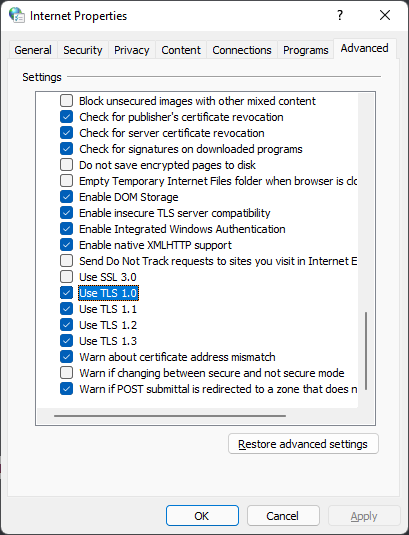
You need to open up your Internet Properties panel, which you can find via the search bar in Windows or by typing it in the start menu (Internet Options in Windows 11).

Navigate to the Advanced tab and scroll down to the Security section.
Here you need to make sure the option Use TLS 1.0 is enabled. If it isn't, enable it - see the image below for reference.
After that, you should be able to create an account successfully.
Make sure to deactivate that option again after having registered your account, as to not compromise your security.
 empty rain
btw. is the Player-key also the payment-registration-key?
 silk merlin
empty rain
btw. is the Player-key also the payment-registration-key?
silk merlin
empty rain
btw. is the Player-key also the payment-registration-key?
yes
that's the same key
empty rain
azure garnet
it doesn't work...
sturdy bronze
empty rain
it doesn't work...
Is it the same error
Enabling TLS 1.0 guarantees solving 12157
empty rain
now it's giving me another error: 12029, no connection to the server
Google say's: "damaged version of the internet explorer"?
sturdy bronze
you have to wait an hour or two to get rid of 12029
empty rain
sturdy bronze
you have to wait an hour or two to get rid of 12029
k, thx °^°
should i keep the Game open, or can i close it?
sturdy bronze
close it
empty rain
ok