

50 messages · Page 1 of 1 (latest)
 restive grail
Do the files end in .Block.Gbx or .Item.Gbx @worthy cypress
restive grail
yea then put them in Documents\Trackmania\Blocks
they will automatically appear next to the regular dirt blocks in the editor
also make sure they're compatible with TM2020
 worthy cypress
they should be I can give the link to the items
worthy cypress
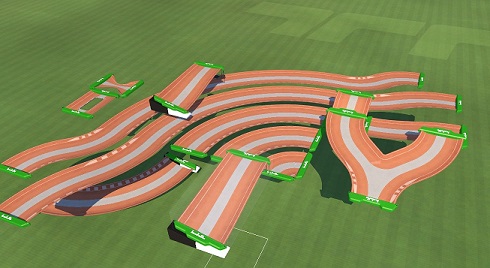
Uploaded by PrinzValium117 · Environment: Stadium · Items: 0 · Game: Trackmania · Size: 5140 KB
restive grail
yea so put them in the Blocks folder
worthy cypress
and stadium?
restive grail
?
worthy cypress
Alright i test it now
Okay so I am preety sure they appeared, though they get placed as normal dirt blocks

hmm nvm
it seems they dont work on ground for some reason
restive grail
yep you have to select the proper one
restive grail
they probably only modified the air variants
you can click the "cloud" icon to use the air block mode
restive grail
yea you're meant to block mix them ontop of the regular dirt blocks
worthy cypress
air block mode on, but as you can see no railing when they are floating, and no street when they are on the ground🤔
worthy cypress
restive grail
yea you're meant to block mix them ontop of the regular dirt blocks
I see
Well they still dont work on ground though
but i guess that can be mapped around
restive grail
it should work just fine
if you airblock mode and click it onto the regular road on the ground
worthy cypress
What you are saying does not really do anything undless I am stupid somehow
I can put them like a tiny bit above and kind of works

hmm
Like i simply cant build on the same block
or is this the intended way?
restive grail
worthy cypress
or is this the intended way?
hmm
idk? if they're done properly they should just sit right above the actual dirt block
by using the ghost block mode and air block mode
worthy cypress
restive grail
by using the ghost block mode and air block mode
ghost block mode simply does not want to "mix" the two blocks
restive grail
i mean
the way you're doing it seems fine
it's sitting on top of the regular dirt block
worthy cypress
yeah
